1P13/1P10 Python
Review Session
Google Developer Student Clubs
McMaster University
QR Code
Please Check in on the event
page!
1. Data Type Conversions
2. If Statements
3. Functions
4. Lists and String Methods
5. Loops (For and While)
Agenda
6. Nested Data
Structures
7. Recursion
8. OOP
9. Exception Handling
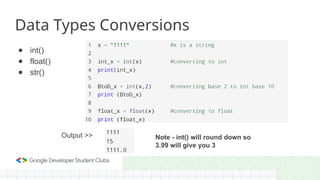
Data Types Conversions
● int()
● float()
● str()
Output >> Note - int() will round down so
3.99 will give you 3
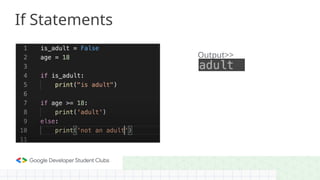
‱ If TRUE, the contained block of code is executed
‱ If FALSE, the block of code is skipped
If-else statements will execute a second block of code if the first if
statement is FALSE
If-elif-else statements is the same as the If-else statement, except the elif-
case will be executed if the first if-case is FALSE and the elif-case is TRUE
If Statements
If statements check if a condition is True or False
Output>>
If Statements
If Statements
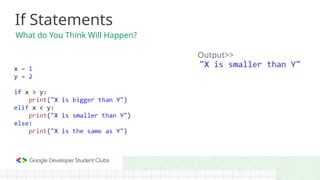
What do You Think Will Happen?
Output>>
Functions
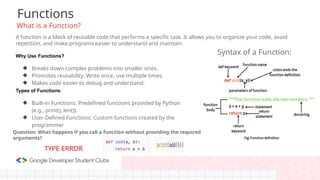
What is a Function?
A function is a block of reusable code that performs a specific task. It allows you to organize your code, avoid
repetition, and make programs easier to understand and maintain.
Why Use Functions?
❖ Breaks down complex problems into smaller ones.
❖ Promotes reusability: Write once, use multiple times.
❖ Makes code easier to debug and understand.
Types of Functions:
❖ Built-in Functions: Predefined functions provided by Python
(e.g., print(), len()).
❖ User-Defined Functions: Custom functions created by the
programmer
Syntax of a Function:
Question: What happens if you call a function without providing the required
arguments?
TYPE ERROR
Built-in Functions
What are Built-in Functions?
Predefined functions in Python that perform common tasks without requiring any additional code.
Why Use Built-in Functions?
● Saves time and effort.
● Highly optimized and
reliable.
● Readily available in Python.
Examples of Built-in Functions
● print(): Displays information to the user.
print("Welcome to Python!") # Outputs: Welcome to Python!
● len(): calculates the number of items in a sequence (string,
list, etc.).
len([10, 20, 30]) # Outputs: 3
● max() and min(): Find the largest or smallest value in a
collection.
max(5, 10, 15) # Outputs: 15
min(-1, 0, 1) # Outputs: -1
● sum(): Adds up elements of a list or iterable.
sum([1, 2, 3, 4]) # Outputs: 10
● type(): checks the type of a variable.
type(3.14) # Outputs: <class 'float'>
Quick Activity
What will this output?
numbers(L) = [3, 8, 1, 6]
print(len(numbers), max(numbers), sum(numbers))
Output: 4 8 18
Explanation:
1. len(numbers) → The list has 4 elements.
2. max(numbers) → The largest number is 8.
3. sum(numbers) → The sum of the elements is 3 + 8 + 1 + 6 = 18.
List Methods
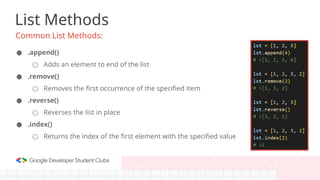
Common List Methods:
● .append()
○ Adds an element to end of the list
● .remove()
○ Removes the first occurrence of the specified item
● .reverse()
○ Reverses the list in place
● .index()
○ Returns the index of the first element with the specified value
String Methods
Common String Methods:
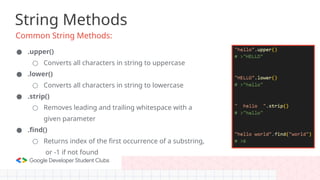
● .upper()
○ Converts all characters in string to uppercase
● .lower()
○ Converts all characters in string to lowercase
● .strip()
○ Removes leading and trailing whitespace with a
given parameter
● .find()
○ Returns index of the first occurrence of a substring,
or -1 if not found
String Methods
Common String Methods:
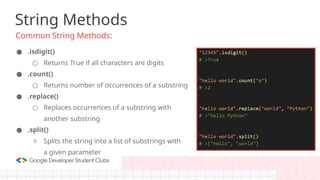
● .isdigit()
○ Returns True if all characters are digits
● .count()
○ Returns number of occurrences of a substring
● .replace()
○ Replaces occurrences of a substring with
another substring
● .split()
○ Splits the string into a list of substrings with
a given parameter
What are Loops and what do they do?
Loops
● Used to complete repetitive tasks
● Saves time and reduces the need to duplicate code
● It keeps running until all of the cycles specified are completed
● Ex. (calculating the sum of numbers from 1-100)
● Ex. (Repeating a game level until the player completes it)
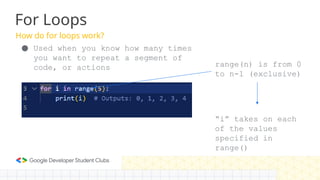
How do for loops work?
For Loops
● Used when you know how many times
you want to repeat a segment of
code, or actions range(n) is from 0
to n-1 (exclusive)
“i” takes on each
of the values
specified in
range()
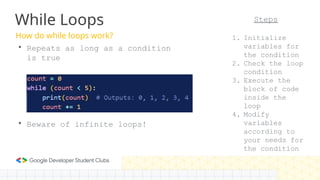
How do while loops work?
While Loops
‱ Repeats as long as a condition
is true
‱ Beware of infinite loops!
Steps
1. Initialize
variables for
the condition
2. Check the loop
condition
3. Execute the
block of code
inside the
loop
4. Modify
variables
according to
your needs for
the condition
Nested DS
● Nested Data structures such as nested lists allow us to create
matrices, where for each index, we have a lot more information than
we would otherwise have.
● Nested lists are essentially just lists within a list. For example,
● To access a specific element within a matrix, you would write
○ list_name[outer_list][inner_list]
● For example you want to access, the value “Hiba” in that above matrix,
the command for that would be math_grades[1][0]. The first index
refers to the outer list, and the second index refers to the inner list.
Nested DS Example
Output: ● You can also modify elements within a nested list
by referencing both the outer and inner list
indices. For example, math_grades[1][1] = 95,
changes Hiba’s grade to 95
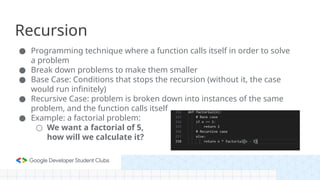
Recursion
● Programming technique where a function calls itself in order to solve
a problem
● Break down problems to make them smaller
● Base Case: Conditions that stops the recursion (without it, the case
would run infinitely)
● Recursive Case: problem is broken down into instances of the same
problem, and the function calls itself
● Example: a factorial problem:
○ We want a factorial of 5,
how will we calculate it?
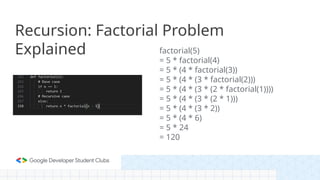
Recursion: Factorial Problem
Explained factorial(5)
= 5 * factorial(4)
= 5 * (4 * factorial(3))
= 5 * (4 * (3 * factorial(2)))
= 5 * (4 * (3 * (2 * factorial(1))))
= 5 * (4 * (3 * (2 * 1)))
= 5 * (4 * (3 * 2))
= 5 * (4 * 6)
= 5 * 24
= 120
OOP
What is Object-Oriented Programming?
OOP is a programming paradigm where problems are modeled as objects
with attributes (data) and behaviors (functions).
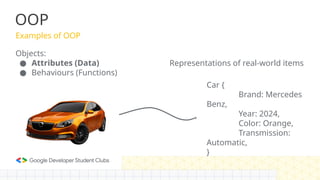
❖ Objects model real-world entities in our code.
❖ These are called classes in Python, Java and more

OOP
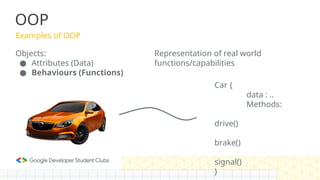
Examples of OOP
Objects:
● Attributes (Data)
● Behaviours (Functions)
Car {
Brand: Mercedes
Benz,
Year: 2024,
Color: Orange,
Transmission:
Automatic,
}
Representations of real-world items
OOP
Examples of OOP
Objects:
● Attributes (Data)
● Behaviours (Functions)
Car {
data : ..
Methods:
drive()
brake()
signal()
}
Representation of real world
functions/capabilities
OOP
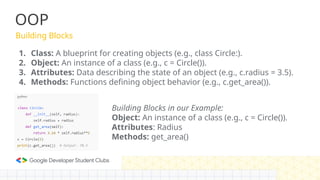
Building Blocks
1. Class: A blueprint for creating objects (e.g., class Circle:).
2. Object: An instance of a class (e.g., c = Circle()).
3. Attributes: Data describing the state of an object (e.g., c.radius = 3.5).
4. Methods: Functions defining object behavior (e.g., c.get_area()).
Building Blocks in our Example:
Object: An instance of a class (e.g., c = Circle()).
Attributes: Radius
Methods: get_area()
OOP
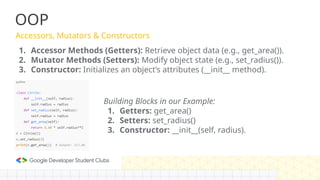
Accessors, Mutators & Constructors
1. Accessor Methods (Getters): Retrieve object data (e.g., get_area()).
2. Mutator Methods (Setters): Modify object state (e.g., set_radius()).
3. Constructor: Initializes an object’s attributes (__init__ method).
Building Blocks in our Example:
1. Getters: get_area()
2. Setters: set_radius()
3. Constructor: __init__(self, radius).
OOP
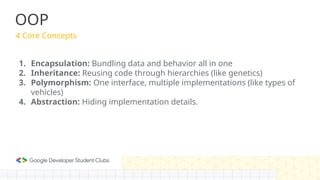
4 Core Concepts
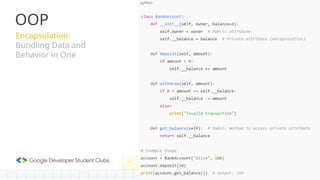
1. Encapsulation: Bundling data and behavior all in one
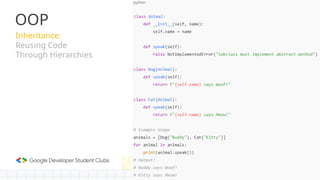
2. Inheritance: Reusing code through hierarchies (like genetics)
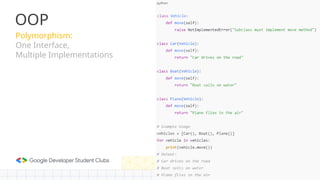
3. Polymorphism: One interface, multiple implementations (like types of
vehicles)
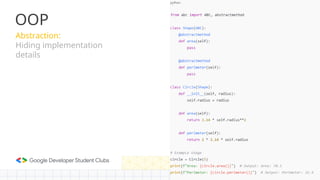
4. Abstraction: Hiding implementation details.
OOP
Encapsulation:
Bundling Data and
Behavior in One
OOP
Inheritance:
Reusing Code
Through Hierarchies
Polymorphism:
One Interface,
Multiple Implementations
OOP
Abstraction:
Hiding implementation
details
OOP
OOP
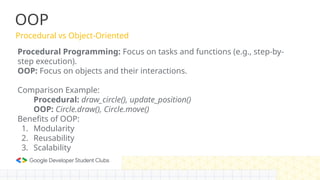
Procedural vs Object-Oriented
Procedural Programming: Focus on tasks and functions (e.g., step-by-
step execution).
OOP: Focus on objects and their interactions.
Comparison Example:
Procedural: draw_circle(), update_position()
OOP: Circle.draw(), Circle.move()
Benefits of OOP:
1. Modularity
2. Reusability
3. Scalability
Exception Handling
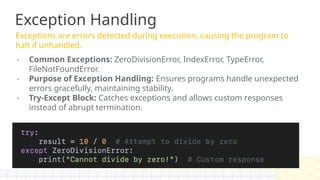
Exceptions are errors detected during execution, causing the program to
halt if unhandled.
- Common Exceptions: ZeroDivisionError, IndexError, TypeError,
FileNotFoundError.
- Purpose of Exception Handling: Ensures programs handle unexpected
errors gracefully, maintaining stability.
- Try-Except Block: Catches exceptions and allows custom responses
instead of abrupt termination.
Exception Handling
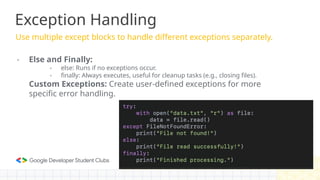
Use multiple except blocks to handle different exceptions separately.
- Else and Finally:
- else: Runs if no exceptions occur.
- finally: Always executes, useful for cleanup tasks (e.g., closing files).
Custom Exceptions: Create user-defined exceptions for more
specific error handling.
Exception Handling
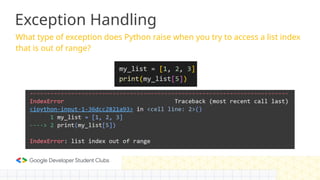
What type of exception does Python raise when you try to access a list index
that is out of range?
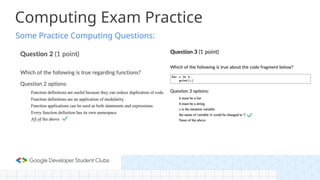
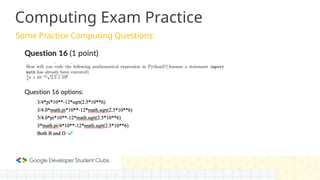
Some Practice Computing Questions:
Computing Exam Practice
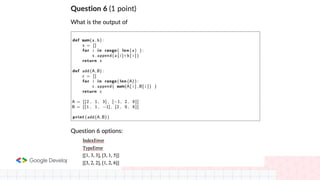
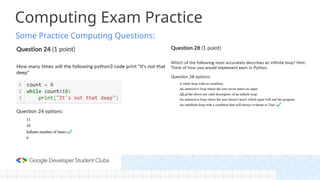
Some Practice Computing Questions:
Computing Exam Practice
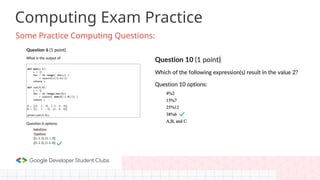
Some Practice Computing Questions:
Computing Exam Practice
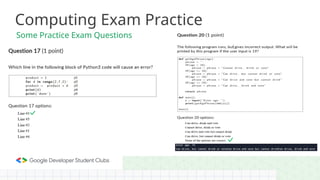
Some Practice Exam Questions
Some Practice Computing Questions:
Computing Exam Practice
A complex question from Review
sheet
1P13 Review Session Student Questions:
https://colab.research.google.com/drive/1fd1EGKtkga9GQrf3c2z0Oq9Sof-eZ_Ga?usp=sharing
(Link also available in the description of the video recording)
Q & A
Any Questions?

1P13 Python Review Session Covering various Topics

  • 1.
    1P13/1P10 Python Review Session GoogleDeveloper Student Clubs McMaster University
  • 2.
    QR Code Please Checkin on the event page!
  • 3.
    1. Data TypeConversions 2. If Statements 3. Functions 4. Lists and String Methods 5. Loops (For and While) Agenda 6. Nested Data Structures 7. Recursion 8. OOP 9. Exception Handling
  • 4.
    Data Types Conversions ●int() ● float() ● str() Output >> Note - int() will round down so 3.99 will give you 3
  • 5.
    ‱ If TRUE,the contained block of code is executed ‱ If FALSE, the block of code is skipped If-else statements will execute a second block of code if the first if statement is FALSE If-elif-else statements is the same as the If-else statement, except the elif- case will be executed if the first if-case is FALSE and the elif-case is TRUE If Statements If statements check if a condition is True or False
  • 6.
  • 7.
    If Statements What doYou Think Will Happen? Output>>
  • 8.
    Functions What is aFunction? A function is a block of reusable code that performs a specific task. It allows you to organize your code, avoid repetition, and make programs easier to understand and maintain. Why Use Functions? ❖ Breaks down complex problems into smaller ones. ❖ Promotes reusability: Write once, use multiple times. ❖ Makes code easier to debug and understand. Types of Functions: ❖ Built-in Functions: Predefined functions provided by Python (e.g., print(), len()). ❖ User-Defined Functions: Custom functions created by the programmer Syntax of a Function: Question: What happens if you call a function without providing the required arguments? TYPE ERROR
  • 9.
    Built-in Functions What areBuilt-in Functions? Predefined functions in Python that perform common tasks without requiring any additional code. Why Use Built-in Functions? ● Saves time and effort. ● Highly optimized and reliable. ● Readily available in Python. Examples of Built-in Functions ● print(): Displays information to the user. print("Welcome to Python!") # Outputs: Welcome to Python! ● len(): calculates the number of items in a sequence (string, list, etc.). len([10, 20, 30]) # Outputs: 3 ● max() and min(): Find the largest or smallest value in a collection. max(5, 10, 15) # Outputs: 15 min(-1, 0, 1) # Outputs: -1 ● sum(): Adds up elements of a list or iterable. sum([1, 2, 3, 4]) # Outputs: 10 ● type(): checks the type of a variable. type(3.14) # Outputs: <class 'float'> Quick Activity What will this output? numbers(L) = [3, 8, 1, 6] print(len(numbers), max(numbers), sum(numbers)) Output: 4 8 18 Explanation: 1. len(numbers) → The list has 4 elements. 2. max(numbers) → The largest number is 8. 3. sum(numbers) → The sum of the elements is 3 + 8 + 1 + 6 = 18.
  • 10.
    List Methods Common ListMethods: ● .append() ○ Adds an element to end of the list ● .remove() ○ Removes the first occurrence of the specified item ● .reverse() ○ Reverses the list in place ● .index() ○ Returns the index of the first element with the specified value
  • 11.
    String Methods Common StringMethods: ● .upper() ○ Converts all characters in string to uppercase ● .lower() ○ Converts all characters in string to lowercase ● .strip() ○ Removes leading and trailing whitespace with a given parameter ● .find() ○ Returns index of the first occurrence of a substring, or -1 if not found
  • 12.
    String Methods Common StringMethods: ● .isdigit() ○ Returns True if all characters are digits ● .count() ○ Returns number of occurrences of a substring ● .replace() ○ Replaces occurrences of a substring with another substring ● .split() ○ Splits the string into a list of substrings with a given parameter
  • 13.
    What are Loopsand what do they do? Loops ● Used to complete repetitive tasks ● Saves time and reduces the need to duplicate code ● It keeps running until all of the cycles specified are completed ● Ex. (calculating the sum of numbers from 1-100) ● Ex. (Repeating a game level until the player completes it)
  • 14.
    How do forloops work? For Loops ● Used when you know how many times you want to repeat a segment of code, or actions range(n) is from 0 to n-1 (exclusive) “i” takes on each of the values specified in range()
  • 15.
    How do whileloops work? While Loops ‱ Repeats as long as a condition is true ‱ Beware of infinite loops! Steps 1. Initialize variables for the condition 2. Check the loop condition 3. Execute the block of code inside the loop 4. Modify variables according to your needs for the condition
  • 16.
    Nested DS ● NestedData structures such as nested lists allow us to create matrices, where for each index, we have a lot more information than we would otherwise have. ● Nested lists are essentially just lists within a list. For example, ● To access a specific element within a matrix, you would write ○ list_name[outer_list][inner_list] ● For example you want to access, the value “Hiba” in that above matrix, the command for that would be math_grades[1][0]. The first index refers to the outer list, and the second index refers to the inner list.
  • 17.
    Nested DS Example Output:● You can also modify elements within a nested list by referencing both the outer and inner list indices. For example, math_grades[1][1] = 95, changes Hiba’s grade to 95
  • 18.
    Recursion ● Programming techniquewhere a function calls itself in order to solve a problem ● Break down problems to make them smaller ● Base Case: Conditions that stops the recursion (without it, the case would run infinitely) ● Recursive Case: problem is broken down into instances of the same problem, and the function calls itself ● Example: a factorial problem: ○ We want a factorial of 5, how will we calculate it?
  • 19.
    Recursion: Factorial Problem Explainedfactorial(5) = 5 * factorial(4) = 5 * (4 * factorial(3)) = 5 * (4 * (3 * factorial(2))) = 5 * (4 * (3 * (2 * factorial(1)))) = 5 * (4 * (3 * (2 * 1))) = 5 * (4 * (3 * 2)) = 5 * (4 * 6) = 5 * 24 = 120
  • 20.
    OOP What is Object-OrientedProgramming? OOP is a programming paradigm where problems are modeled as objects with attributes (data) and behaviors (functions). ❖ Objects model real-world entities in our code. ❖ These are called classes in Python, Java and more

  • 21.
    OOP Examples of OOP Objects: ●Attributes (Data) ● Behaviours (Functions) Car { Brand: Mercedes Benz, Year: 2024, Color: Orange, Transmission: Automatic, } Representations of real-world items
  • 22.
    OOP Examples of OOP Objects: ●Attributes (Data) ● Behaviours (Functions) Car { data : .. Methods: drive() brake() signal() } Representation of real world functions/capabilities
  • 23.
    OOP Building Blocks 1. Class:A blueprint for creating objects (e.g., class Circle:). 2. Object: An instance of a class (e.g., c = Circle()). 3. Attributes: Data describing the state of an object (e.g., c.radius = 3.5). 4. Methods: Functions defining object behavior (e.g., c.get_area()). Building Blocks in our Example: Object: An instance of a class (e.g., c = Circle()). Attributes: Radius Methods: get_area()
  • 24.
    OOP Accessors, Mutators &Constructors 1. Accessor Methods (Getters): Retrieve object data (e.g., get_area()). 2. Mutator Methods (Setters): Modify object state (e.g., set_radius()). 3. Constructor: Initializes an object’s attributes (__init__ method). Building Blocks in our Example: 1. Getters: get_area() 2. Setters: set_radius() 3. Constructor: __init__(self, radius).
  • 25.
    OOP 4 Core Concepts 1.Encapsulation: Bundling data and behavior all in one 2. Inheritance: Reusing code through hierarchies (like genetics) 3. Polymorphism: One interface, multiple implementations (like types of vehicles) 4. Abstraction: Hiding implementation details.
  • 26.
  • 27.
  • 28.
  • 29.
  • 30.
    OOP Procedural vs Object-Oriented ProceduralProgramming: Focus on tasks and functions (e.g., step-by- step execution). OOP: Focus on objects and their interactions. Comparison Example: Procedural: draw_circle(), update_position() OOP: Circle.draw(), Circle.move() Benefits of OOP: 1. Modularity 2. Reusability 3. Scalability
  • 31.
    Exception Handling Exceptions areerrors detected during execution, causing the program to halt if unhandled. - Common Exceptions: ZeroDivisionError, IndexError, TypeError, FileNotFoundError. - Purpose of Exception Handling: Ensures programs handle unexpected errors gracefully, maintaining stability. - Try-Except Block: Catches exceptions and allows custom responses instead of abrupt termination.
  • 32.
    Exception Handling Use multipleexcept blocks to handle different exceptions separately. - Else and Finally: - else: Runs if no exceptions occur. - finally: Always executes, useful for cleanup tasks (e.g., closing files). Custom Exceptions: Create user-defined exceptions for more specific error handling.
  • 33.
    Exception Handling What typeof exception does Python raise when you try to access a list index that is out of range?
  • 34.
    Some Practice ComputingQuestions: Computing Exam Practice
  • 36.
    Some Practice ComputingQuestions: Computing Exam Practice
  • 37.
    Some Practice ComputingQuestions: Computing Exam Practice
  • 38.
    Computing Exam Practice SomePractice Exam Questions
  • 39.
    Some Practice ComputingQuestions: Computing Exam Practice
  • 40.
    A complex questionfrom Review sheet 1P13 Review Session Student Questions: https://colab.research.google.com/drive/1fd1EGKtkga9GQrf3c2z0Oq9Sof-eZ_Ga?usp=sharing (Link also available in the description of the video recording)
  • 41.
    Q & A AnyQuestions?

Editor's Notes

  • #1 Hussain Things to bring/ do All core team members randomly message in discords :)) Bring hdmi cord Buy timbits Ask mb to get other instas to post our info session Qr codes Bring back slides/make sure to review speaker notes
  • #2 Slide and google collab with questions on each topic will be made available on the event page
  • #3 Data Type Conversions (Sehaj) If Statements (Sehaj) Functions (Mustafa) Lists and String Methods (Goshanraj) Loops (For and While) (yash) Nested Data Structures (Harnoor) Recursion (Muskaan) OOP (Jasiri) Exception Handling (Jacob) (Hussain)
  • #4 Sehaj Take the string and convert it into decimal. It is in binary we can make it to decimal. Which is what we use in our daily life.
  • #5 Sehaj By adding an else statement, the else statement will be executed only if the if statement is false. You can also add elif statements between the if and else statements that will execute if the first if statement is false.
  • #6 Sehaj After if we add a boolean expression. If the expression evaluated to True then the following statement will be executed. Since it evaluated to true it will run. Need to indent and add semi colon.
  • #7  Sehaj
  • #18 Muskaan/Samridhi
  • #19 Muskaan/Samridhi
  • #31 Hussain
  • #32 Hussain
  • #33 Hussain
  • #34 Harman
  • #35 Hussain
  • #36 Hussain
  • #37 Harman While loops will repeat the contained block of code until the condition is TRUE. Useful when you don’t have a set amount of iterations in mind Break command exits a loop at any moment, and none of the statements after it will be executed Questions to ask students: What will be the output of the following while loop? (do it for both and then reveal)
  • #38 Hussain Line 3 will give an indentation error. Even line 4 is not indented properly but because line 3 appears before line 4, it will raise the error first
  • #39 Harman
  • #40 Harman