Networking with Java
CSc 335
Object-Oriented Programming and Design
Craig Barber, Ian Vasquez, Rick Snodgrass, Rick Mercer
Networking
Refactoring Y-2
Refactoring Y-2
Refactoring Y-2
Concurrency
Networks
Serialization
Javadoc
JUnit
Eclipse
Debugging
Testing &
Maintaing
Large
Programs
Teams
Reading
others’
code
MVC
Observer
Observable
Design
Patterns
UML
Class
Diagrams
Inheritance
Hierarchy
Coupling/
Cohesion
OO Design
PITL
Sequence
Diagrams
Package
Diagrams
Anonymous
Classes
Abstract
Classes
Packages
JDK/JRE
Java Language
Compile-Time
Run-Time
Type Resolution
Type Checking
Java Swing
Frameworks
Java API
Inversion
of Control
Layout
Manager
Listeners
Events
I/O
Iterator
Collection
Exceptions
Composite
Command
Template
Decorator
N-2
Networking with Java N-3
Outline
• Introduction to Networking Concepts
 Client-Server and Peer-to-Peer
 Sockets
 Streams
Networking with Java N-4
What is “Networking”
• What is “Networking”?
 Getting two or more computers to send data (in Java--
serialized objects) to each other
 Having programs on separate computers interact with one
another
• Types of Networking
 Client - Server
 Many clients connect with one server.
 Clients communicate only with server.
 Peer-to-Peer
 Clients connect to a group of other clients, with no server.
 Clients communicating directly with each-other.
Networking with Java N-5
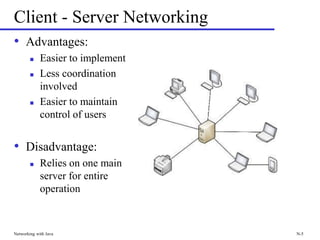
Client - Server Networking
• Advantages:
 Easier to implement
 Less coordination
involved
 Easier to maintain
control of users
• Disadvantage:
 Relies on one main
server for entire
operation
Networking with Java N-6
How Can Networking Work?
• Computers connect to each other through links called
sockets, each associated with a single computer.
• A network stream is created by connecting a socket on
one computer to a socket on another computer
• Applications communicate by sending data through
streams to each other
 Reading and writing objects over the network employs the
same serialization you used for persistence
Networking with Java N-7
Sockets
• A socket is a connection on one computer used to send
data back and forth
• The application consists of multiple processes, one
running on each computer
• Sockets are created by the process on each computer
• The sockets then establish a connection to each other
 One process sets up a server socket to receive a connection.
 The other process sets up a client socket to establish the
connection with the server socket.
Networking with Java N-8
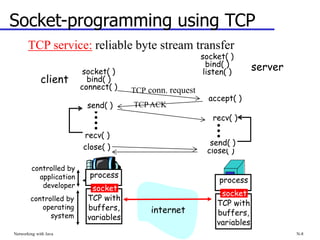
Socket-programming using TCP
TCP service: reliable byte stream transfer
process
TCP with
buffers,
variables
socket
controlled by
application
developer
controlled by
operating
system
process
TCP with
buffers,
variables
socket
internet
client
server
socket( )
bind( )
connect( )
socket( )
bind( )
listen( )
accept( )
send( )
recv( )
close( ) close( )
recv( )
send( )
TCP conn. request
TCP ACK
Networking with Java N-9
Outline
• Introduction to Networking Concepts
• Networking in Java
 Sockets
 Streams
 Decorating Streams
• Summary
Networking with Java N-10
Sockets in Java
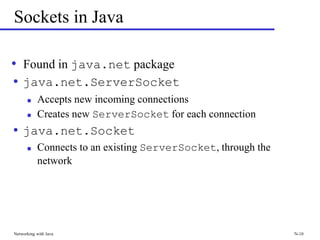
• Found in java.net package
• java.net.ServerSocket
 Accepts new incoming connections
 Creates new ServerSocket for each connection
• java.net.Socket
 Connects to an existing ServerSocket, through the
network
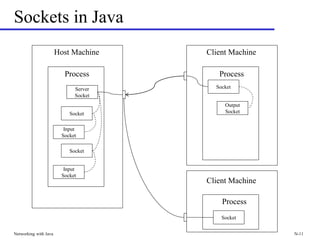
Sockets in Java
Networking with Java N-11
Host Machine
Process
Client Machine
Process
Server
Socket
Input
Socket
Output
Socket
Socket
Socket
Socket
Input
Socket
Process
Socket
Client Machine
Two new types
Networking with Java N-12
• We'll be using two new types
• java.net.ServerSocket
• java.net.Socket
 You can write to and read from a Socket's input and
output streams with readObject and writeObject messages
 which makes networked programs easier to develop
Networking with Java N-13
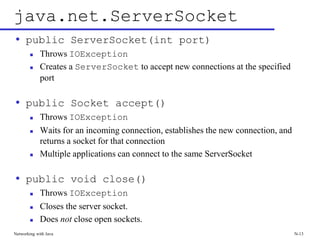
java.net.ServerSocket
• public ServerSocket(int port)
 Throws IOException
 Creates a ServerSocket to accept new connections at the specified
port
• public Socket accept()
 Throws IOException
 Waits for an incoming connection, establishes the new connection, and
returns a socket for that connection
 Multiple applications can connect to the same ServerSocket
• public void close()
 Throws IOException
 Closes the server socket.
 Does not close open sockets.
Networking with Java N-14
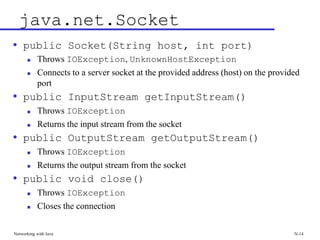
java.net.Socket
• public Socket(String host, int port)
 Throws IOException, UnknownHostException
 Connects to a server socket at the provided address (host) on the provided
port
• public InputStream getInputStream()
 Throws IOException
 Returns the input stream from the socket
• public OutputStream getOutputStream()
 Throws IOException
 Returns the output stream from the socket
• public void close()
 Throws IOException
 Closes the connection
Networking with Java N-15
Building a Network app
• This app will have one server and only one client (no
Threads needed)
• Build the server first
 Need a new ServerSocket (int port)
 The accept message to ServerSocket waits for a connection
that knows where the server is and what port it is listening to
int port = 4000; // A port available on lectura soince 2003
ServerSocket socket = new ServerSocket(port);
Socket connection = socket.accept();
Networking with Java N-16
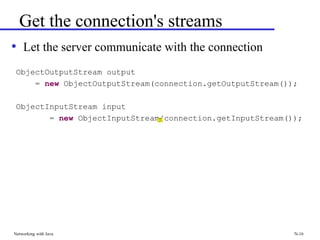
Get the connection's streams
• Let the server communicate with the connection
ObjectOutputStream output
= new ObjectOutputStream(connection.getOutputStream());
ObjectInputStream input
= new ObjectInputStream(connection.getInputStream());
Networking with Java N-17
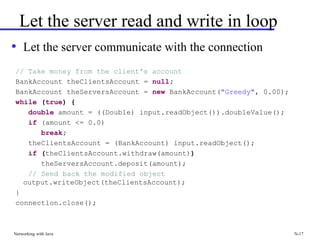
Let the server read and write in loop
• Let the server communicate with the connection
// Take money from the client's account
BankAccount theClientsAccount = null;
BankAccount theServersAccount = new BankAccount("Greedy", 0.00);
while (true) {
double amount = ((Double) input.readObject()).doubleValue();
if (amount <= 0.0)
break;
theClientsAccount = (BankAccount) input.readObject();
if (theClientsAccount.withdraw(amount))
theServersAccount.deposit(amount);
// Send back the modified object
output.writeObject(theClientsAccount);
}
connection.close();
Networking with Java N-18
Write the Client
• Get the input and output stream to and friom the server
we are connecting to
ObjectOutputStream output
= new ObjectOutputStream(server.getOutputStream());
ObjectInputStream input
= new ObjectInputStream(server.getInputStream());
Networking with Java N-19
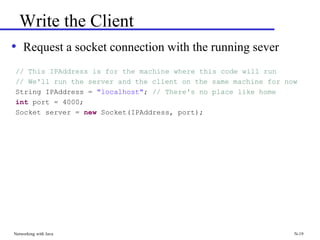
Write the Client
• Request a socket connection with the running sever
// This IPAddress is for the machine where this code will run
// We'll run the server and the client on the same machine for now
String IPAddress = "localhost"; // There's no place like home
int port = 4000;
Socket server = new Socket(IPAddress, port);
Networking with Java N-20
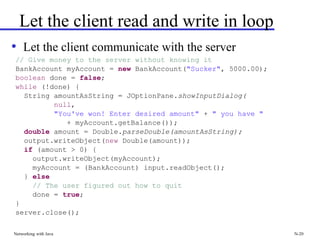
Let the client read and write in loop
• Let the client communicate with the server
// Give money to the server without knowing it
BankAccount myAccount = new BankAccount("Sucker", 5000.00);
boolean done = false;
while (!done) {
String amountAsString = JOptionPane.showInputDialog(
null,
"You've won! Enter desired amount" + " you have "
+ myAccount.getBalance());
double amount = Double.parseDouble(amountAsString);
output.writeObject(new Double(amount));
if (amount > 0) {
output.writeObject(myAccount);
myAccount = (BankAccount) input.readObject();
} else
// The user figured out how to quit
done = true;
}
server.close();

17-Networking.pdf

  • 1.
    Networking with Java CSc335 Object-Oriented Programming and Design Craig Barber, Ian Vasquez, Rick Snodgrass, Rick Mercer
  • 2.
    Networking Refactoring Y-2 Refactoring Y-2 RefactoringY-2 Concurrency Networks Serialization Javadoc JUnit Eclipse Debugging Testing & Maintaing Large Programs Teams Reading others’ code MVC Observer Observable Design Patterns UML Class Diagrams Inheritance Hierarchy Coupling/ Cohesion OO Design PITL Sequence Diagrams Package Diagrams Anonymous Classes Abstract Classes Packages JDK/JRE Java Language Compile-Time Run-Time Type Resolution Type Checking Java Swing Frameworks Java API Inversion of Control Layout Manager Listeners Events I/O Iterator Collection Exceptions Composite Command Template Decorator N-2
  • 3.
    Networking with JavaN-3 Outline • Introduction to Networking Concepts  Client-Server and Peer-to-Peer  Sockets  Streams
  • 4.
    Networking with JavaN-4 What is “Networking” • What is “Networking”?  Getting two or more computers to send data (in Java-- serialized objects) to each other  Having programs on separate computers interact with one another • Types of Networking  Client - Server  Many clients connect with one server.  Clients communicate only with server.  Peer-to-Peer  Clients connect to a group of other clients, with no server.  Clients communicating directly with each-other.
  • 5.
    Networking with JavaN-5 Client - Server Networking • Advantages:  Easier to implement  Less coordination involved  Easier to maintain control of users • Disadvantage:  Relies on one main server for entire operation
  • 6.
    Networking with JavaN-6 How Can Networking Work? • Computers connect to each other through links called sockets, each associated with a single computer. • A network stream is created by connecting a socket on one computer to a socket on another computer • Applications communicate by sending data through streams to each other  Reading and writing objects over the network employs the same serialization you used for persistence
  • 7.
    Networking with JavaN-7 Sockets • A socket is a connection on one computer used to send data back and forth • The application consists of multiple processes, one running on each computer • Sockets are created by the process on each computer • The sockets then establish a connection to each other  One process sets up a server socket to receive a connection.  The other process sets up a client socket to establish the connection with the server socket.
  • 8.
    Networking with JavaN-8 Socket-programming using TCP TCP service: reliable byte stream transfer process TCP with buffers, variables socket controlled by application developer controlled by operating system process TCP with buffers, variables socket internet client server socket( ) bind( ) connect( ) socket( ) bind( ) listen( ) accept( ) send( ) recv( ) close( ) close( ) recv( ) send( ) TCP conn. request TCP ACK
  • 9.
    Networking with JavaN-9 Outline • Introduction to Networking Concepts • Networking in Java  Sockets  Streams  Decorating Streams • Summary
  • 10.
    Networking with JavaN-10 Sockets in Java • Found in java.net package • java.net.ServerSocket  Accepts new incoming connections  Creates new ServerSocket for each connection • java.net.Socket  Connects to an existing ServerSocket, through the network
  • 11.
    Sockets in Java Networkingwith Java N-11 Host Machine Process Client Machine Process Server Socket Input Socket Output Socket Socket Socket Socket Input Socket Process Socket Client Machine
  • 12.
    Two new types Networkingwith Java N-12 • We'll be using two new types • java.net.ServerSocket • java.net.Socket  You can write to and read from a Socket's input and output streams with readObject and writeObject messages  which makes networked programs easier to develop
  • 13.
    Networking with JavaN-13 java.net.ServerSocket • public ServerSocket(int port)  Throws IOException  Creates a ServerSocket to accept new connections at the specified port • public Socket accept()  Throws IOException  Waits for an incoming connection, establishes the new connection, and returns a socket for that connection  Multiple applications can connect to the same ServerSocket • public void close()  Throws IOException  Closes the server socket.  Does not close open sockets.
  • 14.
    Networking with JavaN-14 java.net.Socket • public Socket(String host, int port)  Throws IOException, UnknownHostException  Connects to a server socket at the provided address (host) on the provided port • public InputStream getInputStream()  Throws IOException  Returns the input stream from the socket • public OutputStream getOutputStream()  Throws IOException  Returns the output stream from the socket • public void close()  Throws IOException  Closes the connection
  • 15.
    Networking with JavaN-15 Building a Network app • This app will have one server and only one client (no Threads needed) • Build the server first  Need a new ServerSocket (int port)  The accept message to ServerSocket waits for a connection that knows where the server is and what port it is listening to int port = 4000; // A port available on lectura soince 2003 ServerSocket socket = new ServerSocket(port); Socket connection = socket.accept();
  • 16.
    Networking with JavaN-16 Get the connection's streams • Let the server communicate with the connection ObjectOutputStream output = new ObjectOutputStream(connection.getOutputStream()); ObjectInputStream input = new ObjectInputStream(connection.getInputStream());
  • 17.
    Networking with JavaN-17 Let the server read and write in loop • Let the server communicate with the connection // Take money from the client's account BankAccount theClientsAccount = null; BankAccount theServersAccount = new BankAccount("Greedy", 0.00); while (true) { double amount = ((Double) input.readObject()).doubleValue(); if (amount <= 0.0) break; theClientsAccount = (BankAccount) input.readObject(); if (theClientsAccount.withdraw(amount)) theServersAccount.deposit(amount); // Send back the modified object output.writeObject(theClientsAccount); } connection.close();
  • 18.
    Networking with JavaN-18 Write the Client • Get the input and output stream to and friom the server we are connecting to ObjectOutputStream output = new ObjectOutputStream(server.getOutputStream()); ObjectInputStream input = new ObjectInputStream(server.getInputStream());
  • 19.
    Networking with JavaN-19 Write the Client • Request a socket connection with the running sever // This IPAddress is for the machine where this code will run // We'll run the server and the client on the same machine for now String IPAddress = "localhost"; // There's no place like home int port = 4000; Socket server = new Socket(IPAddress, port);
  • 20.
    Networking with JavaN-20 Let the client read and write in loop • Let the client communicate with the server // Give money to the server without knowing it BankAccount myAccount = new BankAccount("Sucker", 5000.00); boolean done = false; while (!done) { String amountAsString = JOptionPane.showInputDialog( null, "You've won! Enter desired amount" + " you have " + myAccount.getBalance()); double amount = Double.parseDouble(amountAsString); output.writeObject(new Double(amount)); if (amount > 0) { output.writeObject(myAccount); myAccount = (BankAccount) input.readObject(); } else // The user figured out how to quit done = true; } server.close();