Programming with Python
Lecture 7: Functions
Instructor: John Eric Steephen
Today’s lecture
●
Topics
– Defining and calling functions
– Parameter passing
– Variable scope and lifetime
– Function scope
– Namespaces
– Keyword & default arguments
– Variable number of arguments
– Closures
– Lambda functions
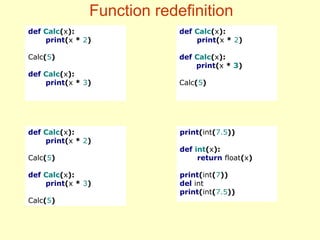
– Function redefinition
●
Pre-requisites
– Session 7
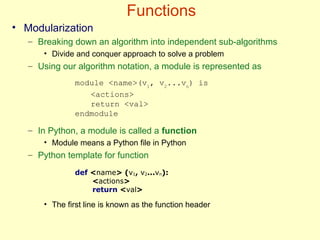
Functions
• Modularization
– Breaking down an algorithm into independent sub-algorithms
• Divide and conquer approach to solve a problem
– Using our algorithm notation, a module is represented as
– In Python, a module is called a function
• Module means a Python file in Python
– Python template for function
• The first line is known as the function header
module <name>(v1
, v2
...vn
) is
<actions>
return <val>
endmodule
def <name> (v1, v2...vn):
<actions>
return <val>
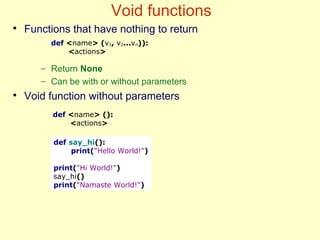
Void functions
●
Functions that have nothing to return
– Return None
– Can be with or without parameters
●
Void function without parameters
def say_hi():
print("Hello World!")
print("Hi World!")
say_hi()
print("Namaste World!")
def <name> (v1, v2...vn)):
<actions>
def <name> ():
<actions>
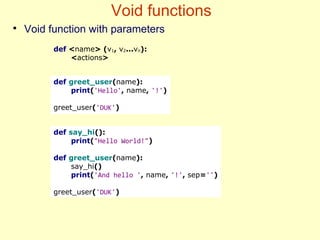
Void functions
●
Void function with parameters
def say_hi():
print("Hello World!")
def greet_user(name):
say_hi()
print('And hello ', name, '!', sep='')
greet_user('DUK')
def greet_user(name):
print('Hello', name, '!')
greet_user('DUK')
def <name> (v1, v2...vn):
<actions>
Functions
●
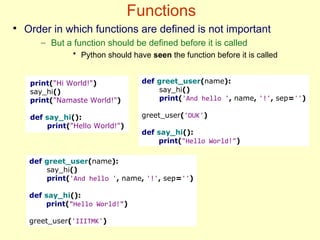
Order in which functions are defined is not important
– But a function should be defined before it is called
• Python should have seen the function before it is called
print("Hi World!")
say_hi()
print("Namaste World!")
def say_hi():
print("Hello World!")
def greet_user(name):
say_hi()
print('And hello ', name, '!', sep='')
greet_user('DUK')
def say_hi():
print("Hello World!")
def greet_user(name):
say_hi()
print('And hello ', name, '!', sep='')
def say_hi():
print("Hello World!")
greet_user('IIITMK')
Non-void functions
●
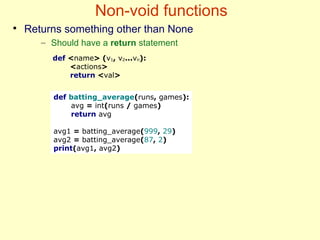
Returns something other than None
– Should have a return statement
def batting_average(runs, games):
avg = int(runs / games)
return avg
avg1 = batting_average(999, 29)
avg2 = batting_average(87, 2)
print(avg1, avg2)
def <name> (v1, v2...vn):
<actions>
return <val>
Variable scope
●
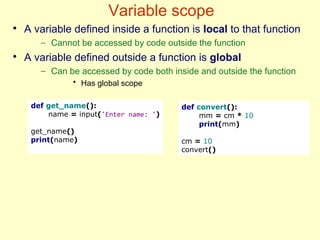
A variable defined inside a function is local to that function
– Cannot be accessed by code outside the function
●
A variable defined outside a function is global
– Can be accessed by code both inside and outside the function
• Has global scope
def get_name():
name = input('Enter name: ')
get_name()
print(name)
def convert():
mm = cm * 10
print(mm)
cm = 10
convert()
Variable scope
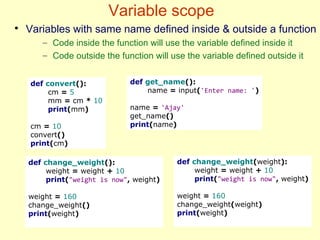
def convert():
cm = 5
mm = cm * 10
print(mm)
cm = 10
convert()
print(cm)
def get_name():
name = input('Enter name: ')
name = 'Ajay'
get_name()
print(name)
●
Variables with same name defined inside & outside a function
– Code inside the function will use the variable defined inside it
– Code outside the function will use the variable defined outside it
def change_weight():
weight = weight + 10
print("weight is now", weight)
weight = 160
change_weight()
print(weight)
def change_weight(weight):
weight = weight + 10
print("weight is now", weight)
weight = 160
change_weight(weight)
print(weight)
Variable scope
●
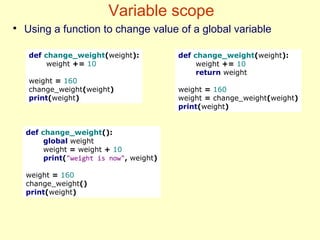
Using a function to change value of a global variable
def change_weight(weight):
weight += 10
weight = 160
change_weight(weight)
print(weight)
def change_weight(weight):
weight += 10
return weight
weight = 160
weight = change_weight(weight)
print(weight)
def change_weight():
global weight
weight = weight + 10
print("weight is now", weight)
weight = 160
change_weight()
print(weight)
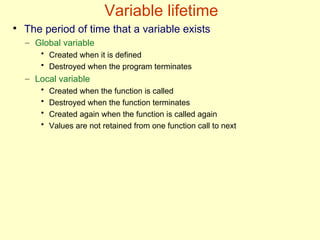
Variable lifetime
●
The period of time that a variable exists
– Global variable
• Created when it is defined
• Destroyed when the program terminates
– Local variable
• Created when the function is called
• Destroyed when the function terminates
• Created again when the function is called again
• Values are not retained from one function call to next
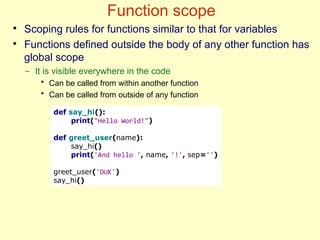
Function scope
●
Scoping rules for functions similar to that for variables
●
Functions defined outside the body of any other function has
global scope
– It is visible everywhere in the code
• Can be called from within another function
• Can be called from outside of any function
def say_hi():
print("Hello World!")
def greet_user(name):
say_hi()
print('And hello ', name, '!', sep='')
greet_user('DUK')
say_hi()
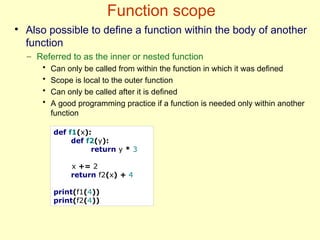
Function scope
def f1(x):
def f2(y):
return y * 3
x += 2
return f2(x) + 4
print(f1(4))
print(f2(4))
●
Also possible to define a function within the body of another
function
– Referred to as the inner or nested function
• Can only be called from within the function in which it was defined
• Scope is local to the outer function
• Can only be called after it is defined
• A good programming practice if a function is needed only within another
function
Namespaces
●
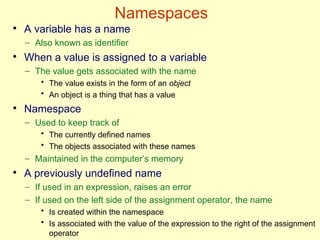
A variable has a name
– Also known as identifier
●
When a value is assigned to a variable
– The value gets associated with the name
• The value exists in the form of an object
• An object is a thing that has a value
●
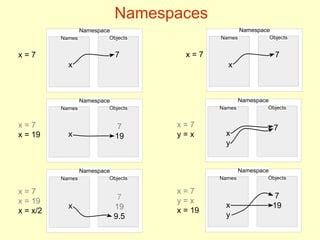
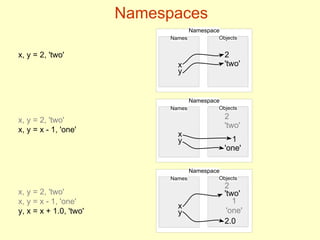
Namespace
– Used to keep track of
• The currently defined names
• The objects associated with these names
– Maintained in the computer’s memory
●
A previously undefined name
– If used in an expression, raises an error
– If used on the left side of the assignment operator, the name
• Is created within the namespace
• Is associated with the value of the expression to the right of the assignment
operator
Namespaces
Namespace
Names Objects
x = 7
x = 7
x = 19
x = 7
x = 19
x = x/2
x = 7
y = x
x = 7
y = x
x = 19
x
7
Namespace
Names Objects
x
7
19
Namespace
Names Objects
x
7
19
9.5
Namespace
Names Objects
x = 7
x
7
Namespace
Names Objects
x
y
7
Namespace
Names Objects
x
y
7
19
Namespace
Names Objects
x
2
'two'
1
'one'
y
Namespace
Names Objects
2
'two'
x
y
Namespaces
Namespace
Names Objects
x, y = 2, 'two'
x, y = 2, 'two'
x, y = x - 1, 'one'
y, x = x + 1.0, 'two'
x
2
'two'
y
1
x, y = 2, 'two'
x, y = x - 1, 'one'
2.0
'one'
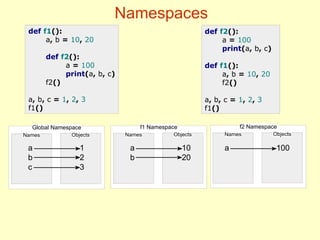
Namespaces
●
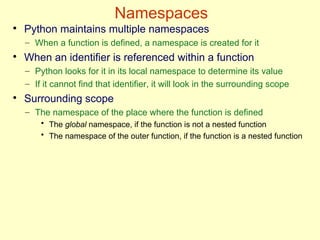
Python maintains multiple namespaces
– When a function is defined, a namespace is created for it
●
When an identifier is referenced within a function
– Python looks for it in its local namespace to determine its value
– If it cannot find that identifier, it will look in the surrounding scope
●
Surrounding scope
– The namespace of the place where the function is defined
• The global namespace, if the function is not a nested function
• The namespace of the outer function, if the function is a nested function
f2 Namespace
Names Objects
f1 Namespace
Names Objects
Namespaces
def f1():
a, b = 10, 20
def f2():
a = 100
print(a, b, c)
f2()
a, b, c = 1, 2, 3
f1()
Global Namespace
Names Objects
1
2
3
a
b
c
a
b
10
20
a 100
def f2():
a = 100
print(a, b, c)
def f1():
a, b = 10, 20
f2()
a, b, c = 1, 2, 3
f1()
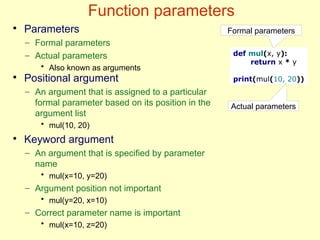
Function parameters
def mul(x, y):
return x * y
print(mul(10, 20))
Formal parameters
Actual parameters
●
Parameters
– Formal parameters
– Actual parameters
• Also known as arguments
●
Positional argument
– An argument that is assigned to a particular
formal parameter based on its position in the
argument list
• mul(10, 20)
●
Keyword argument
– An argument that is specified by parameter
name
• mul(x=10, y=20)
– Argument position not important
• mul(y=20, x=10)
– Correct parameter name is important
• mul(x=10, z=20)
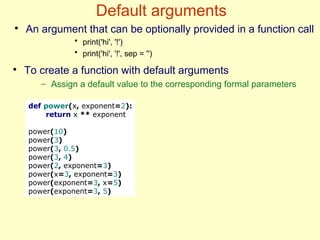
Default arguments
def power(x, exponent=2):
return x ** exponent
power(10)
power(3)
power(3, 0.5)
power(3, 4)
power(2, exponent=3)
power(x=3, exponent=3)
power(exponent=3, x=5)
power(exponent=3, 5)
●
To create a function with default arguments
– Assign a default value to the corresponding formal parameters
●
An argument that can be optionally provided in a function call
• print('hi', '!')
• print('hi', '!', sep = '')
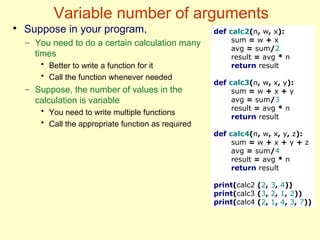
Variable number of arguments
●
Suppose in your program,
– You need to do a certain calculation many
times
• Better to write a function for it
• Call the function whenever needed
– Suppose, the number of values in the
calculation is variable
• You need to write multiple functions
• Call the appropriate function as required
def calc2(n, w, x):
sum = w + x
avg = sum/2
result = avg * n
return result
def calc3(n, w, x, y):
sum = w + x + y
avg = sum/3
result = avg * n
return result
def calc4(n, w, x, y, z):
sum = w + x + y + z
avg = sum/4
result = avg * n
return result
print(calc2 (2, 3, 4))
print(calc3 (3, 2, 1, 2))
print(calc4 (2, 1, 4, 3, 7))
Variable number of arguments
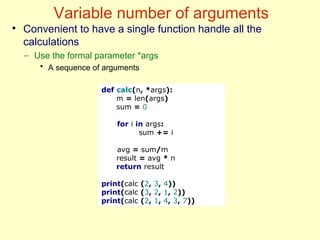
def calc(n, *args):
m = len(args)
sum = 0
for i in args:
sum += i
avg = sum/m
result = avg * n
return result
print(calc (2, 3, 4))
print(calc (3, 2, 1, 2))
print(calc (2, 1, 4, 3, 7))
●
Convenient to have a single function handle all the
calculations
– Use the formal parameter *args
• A sequence of arguments
Closure
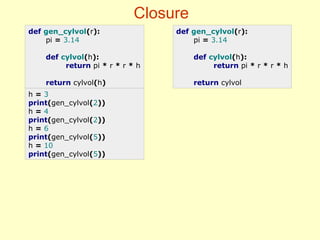
def gen_cylvol(r):
pi = 3.14
def cylvol(h):
return pi * r * r * h
return cylvol(h)
def gen_cylvol(r):
pi = 3.14
def cylvol(h):
return pi * r * r * h
return cylvol
h = 3
print(gen_cylvol(2))
h = 4
print(gen_cylvol(2))
h = 6
print(gen_cylvol(5))
h = 10
print(gen_cylvol(5))
Closure
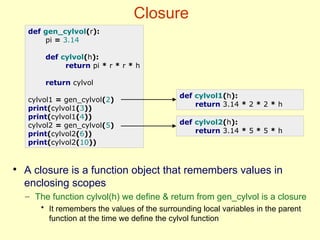
def gen_cylvol(r):
pi = 3.14
def cylvol(h):
return pi * r * r * h
return cylvol
cylvol1 = gen_cylvol(2)
print(cylvol1(3))
print(cylvol1(4))
cylvol2 = gen_cylvol(5)
print(cylvol2(6))
print(cylvol2(10))
def cylvol1(h):
return 3.14 * 2 * 2 * h
def cylvol2(h):
return 3.14 * 5 * 5 * h
●
A closure is a function object that remembers values in
enclosing scopes
– The function cylvol(h) we define & return from gen_cylvol is a closure
• It remembers the values of the surrounding local variables in the parent
function at the time we define the cylvol function
Lambda function
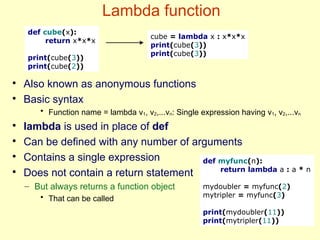
def cube(x):
return x*x*x
print(cube(3))
print(cube(2))
cube = lambda x : x*x*x
print(cube(3))
print(cube(3))
●
Also known as anonymous functions
●
Basic syntax
• Function name = lambda v1, v2,...vn: Single expression having v1, v2,...vn
●
lambda is used in place of def
●
Can be defined with any number of arguments
●
Contains a single expression
●
Does not contain a return statement
– But always returns a function object
• That can be called
def myfunc(n):
return lambda a : a * n
mydoubler = myfunc(2)
mytripler = myfunc(3)
print(mydoubler(11))
print(mytripler(11))
Function redefinition
print(int(7.5))
def int(x):
return float(x)
print(int(7))
del int
print(int(7.5))
def Calc(x):
print(x * 2)
Calc(5)
def Calc(x):
print(x * 3)
def Calc(x):
print(x * 2)
Calc(5)
def Calc(x):
print(x * 3)
Calc(5)
def Calc(x):
print(x * 2)
def Calc(x):
print(x * 3)
Calc(5)

07. Functions.pdfPython is a high-level programming language used to build software, websites, data systems, automation scripts, AI/ML models, and more.

  • 1.
    Programming with Python Lecture7: Functions Instructor: John Eric Steephen
  • 2.
    Today’s lecture ● Topics – Definingand calling functions – Parameter passing – Variable scope and lifetime – Function scope – Namespaces – Keyword & default arguments – Variable number of arguments – Closures – Lambda functions – Function redefinition ● Pre-requisites – Session 7
  • 3.
    Functions • Modularization – Breakingdown an algorithm into independent sub-algorithms • Divide and conquer approach to solve a problem – Using our algorithm notation, a module is represented as – In Python, a module is called a function • Module means a Python file in Python – Python template for function • The first line is known as the function header module <name>(v1 , v2 ...vn ) is <actions> return <val> endmodule def <name> (v1, v2...vn): <actions> return <val>
  • 4.
    Void functions ● Functions thathave nothing to return – Return None – Can be with or without parameters ● Void function without parameters def say_hi(): print("Hello World!") print("Hi World!") say_hi() print("Namaste World!") def <name> (v1, v2...vn)): <actions> def <name> (): <actions>
  • 5.
    Void functions ● Void functionwith parameters def say_hi(): print("Hello World!") def greet_user(name): say_hi() print('And hello ', name, '!', sep='') greet_user('DUK') def greet_user(name): print('Hello', name, '!') greet_user('DUK') def <name> (v1, v2...vn): <actions>
  • 6.
    Functions ● Order in whichfunctions are defined is not important – But a function should be defined before it is called • Python should have seen the function before it is called print("Hi World!") say_hi() print("Namaste World!") def say_hi(): print("Hello World!") def greet_user(name): say_hi() print('And hello ', name, '!', sep='') greet_user('DUK') def say_hi(): print("Hello World!") def greet_user(name): say_hi() print('And hello ', name, '!', sep='') def say_hi(): print("Hello World!") greet_user('IIITMK')
  • 7.
    Non-void functions ● Returns somethingother than None – Should have a return statement def batting_average(runs, games): avg = int(runs / games) return avg avg1 = batting_average(999, 29) avg2 = batting_average(87, 2) print(avg1, avg2) def <name> (v1, v2...vn): <actions> return <val>
  • 8.
    Variable scope ● A variabledefined inside a function is local to that function – Cannot be accessed by code outside the function ● A variable defined outside a function is global – Can be accessed by code both inside and outside the function • Has global scope def get_name(): name = input('Enter name: ') get_name() print(name) def convert(): mm = cm * 10 print(mm) cm = 10 convert()
  • 9.
    Variable scope def convert(): cm= 5 mm = cm * 10 print(mm) cm = 10 convert() print(cm) def get_name(): name = input('Enter name: ') name = 'Ajay' get_name() print(name) ● Variables with same name defined inside & outside a function – Code inside the function will use the variable defined inside it – Code outside the function will use the variable defined outside it def change_weight(): weight = weight + 10 print("weight is now", weight) weight = 160 change_weight() print(weight) def change_weight(weight): weight = weight + 10 print("weight is now", weight) weight = 160 change_weight(weight) print(weight)
  • 10.
    Variable scope ● Using afunction to change value of a global variable def change_weight(weight): weight += 10 weight = 160 change_weight(weight) print(weight) def change_weight(weight): weight += 10 return weight weight = 160 weight = change_weight(weight) print(weight) def change_weight(): global weight weight = weight + 10 print("weight is now", weight) weight = 160 change_weight() print(weight)
  • 11.
    Variable lifetime ● The periodof time that a variable exists – Global variable • Created when it is defined • Destroyed when the program terminates – Local variable • Created when the function is called • Destroyed when the function terminates • Created again when the function is called again • Values are not retained from one function call to next
  • 12.
    Function scope ● Scoping rulesfor functions similar to that for variables ● Functions defined outside the body of any other function has global scope – It is visible everywhere in the code • Can be called from within another function • Can be called from outside of any function def say_hi(): print("Hello World!") def greet_user(name): say_hi() print('And hello ', name, '!', sep='') greet_user('DUK') say_hi()
  • 13.
    Function scope def f1(x): deff2(y): return y * 3 x += 2 return f2(x) + 4 print(f1(4)) print(f2(4)) ● Also possible to define a function within the body of another function – Referred to as the inner or nested function • Can only be called from within the function in which it was defined • Scope is local to the outer function • Can only be called after it is defined • A good programming practice if a function is needed only within another function
  • 14.
    Namespaces ● A variable hasa name – Also known as identifier ● When a value is assigned to a variable – The value gets associated with the name • The value exists in the form of an object • An object is a thing that has a value ● Namespace – Used to keep track of • The currently defined names • The objects associated with these names – Maintained in the computer’s memory ● A previously undefined name – If used in an expression, raises an error – If used on the left side of the assignment operator, the name • Is created within the namespace • Is associated with the value of the expression to the right of the assignment operator
  • 15.
    Namespaces Namespace Names Objects x =7 x = 7 x = 19 x = 7 x = 19 x = x/2 x = 7 y = x x = 7 y = x x = 19 x 7 Namespace Names Objects x 7 19 Namespace Names Objects x 7 19 9.5 Namespace Names Objects x = 7 x 7 Namespace Names Objects x y 7 Namespace Names Objects x y 7 19
  • 16.
    Namespace Names Objects x 2 'two' 1 'one' y Namespace Names Objects 2 'two' x y Namespaces Namespace NamesObjects x, y = 2, 'two' x, y = 2, 'two' x, y = x - 1, 'one' y, x = x + 1.0, 'two' x 2 'two' y 1 x, y = 2, 'two' x, y = x - 1, 'one' 2.0 'one'
  • 17.
    Namespaces ● Python maintains multiplenamespaces – When a function is defined, a namespace is created for it ● When an identifier is referenced within a function – Python looks for it in its local namespace to determine its value – If it cannot find that identifier, it will look in the surrounding scope ● Surrounding scope – The namespace of the place where the function is defined • The global namespace, if the function is not a nested function • The namespace of the outer function, if the function is a nested function
  • 18.
    f2 Namespace Names Objects f1Namespace Names Objects Namespaces def f1(): a, b = 10, 20 def f2(): a = 100 print(a, b, c) f2() a, b, c = 1, 2, 3 f1() Global Namespace Names Objects 1 2 3 a b c a b 10 20 a 100 def f2(): a = 100 print(a, b, c) def f1(): a, b = 10, 20 f2() a, b, c = 1, 2, 3 f1()
  • 19.
    Function parameters def mul(x,y): return x * y print(mul(10, 20)) Formal parameters Actual parameters ● Parameters – Formal parameters – Actual parameters • Also known as arguments ● Positional argument – An argument that is assigned to a particular formal parameter based on its position in the argument list • mul(10, 20) ● Keyword argument – An argument that is specified by parameter name • mul(x=10, y=20) – Argument position not important • mul(y=20, x=10) – Correct parameter name is important • mul(x=10, z=20)
  • 20.
    Default arguments def power(x,exponent=2): return x ** exponent power(10) power(3) power(3, 0.5) power(3, 4) power(2, exponent=3) power(x=3, exponent=3) power(exponent=3, x=5) power(exponent=3, 5) ● To create a function with default arguments – Assign a default value to the corresponding formal parameters ● An argument that can be optionally provided in a function call • print('hi', '!') • print('hi', '!', sep = '')
  • 21.
    Variable number ofarguments ● Suppose in your program, – You need to do a certain calculation many times • Better to write a function for it • Call the function whenever needed – Suppose, the number of values in the calculation is variable • You need to write multiple functions • Call the appropriate function as required def calc2(n, w, x): sum = w + x avg = sum/2 result = avg * n return result def calc3(n, w, x, y): sum = w + x + y avg = sum/3 result = avg * n return result def calc4(n, w, x, y, z): sum = w + x + y + z avg = sum/4 result = avg * n return result print(calc2 (2, 3, 4)) print(calc3 (3, 2, 1, 2)) print(calc4 (2, 1, 4, 3, 7))
  • 22.
    Variable number ofarguments def calc(n, *args): m = len(args) sum = 0 for i in args: sum += i avg = sum/m result = avg * n return result print(calc (2, 3, 4)) print(calc (3, 2, 1, 2)) print(calc (2, 1, 4, 3, 7)) ● Convenient to have a single function handle all the calculations – Use the formal parameter *args • A sequence of arguments
  • 23.
    Closure def gen_cylvol(r): pi =3.14 def cylvol(h): return pi * r * r * h return cylvol(h) def gen_cylvol(r): pi = 3.14 def cylvol(h): return pi * r * r * h return cylvol h = 3 print(gen_cylvol(2)) h = 4 print(gen_cylvol(2)) h = 6 print(gen_cylvol(5)) h = 10 print(gen_cylvol(5))
  • 24.
    Closure def gen_cylvol(r): pi =3.14 def cylvol(h): return pi * r * r * h return cylvol cylvol1 = gen_cylvol(2) print(cylvol1(3)) print(cylvol1(4)) cylvol2 = gen_cylvol(5) print(cylvol2(6)) print(cylvol2(10)) def cylvol1(h): return 3.14 * 2 * 2 * h def cylvol2(h): return 3.14 * 5 * 5 * h ● A closure is a function object that remembers values in enclosing scopes – The function cylvol(h) we define & return from gen_cylvol is a closure • It remembers the values of the surrounding local variables in the parent function at the time we define the cylvol function
  • 25.
    Lambda function def cube(x): returnx*x*x print(cube(3)) print(cube(2)) cube = lambda x : x*x*x print(cube(3)) print(cube(3)) ● Also known as anonymous functions ● Basic syntax • Function name = lambda v1, v2,...vn: Single expression having v1, v2,...vn ● lambda is used in place of def ● Can be defined with any number of arguments ● Contains a single expression ● Does not contain a return statement – But always returns a function object • That can be called def myfunc(n): return lambda a : a * n mydoubler = myfunc(2) mytripler = myfunc(3) print(mydoubler(11)) print(mytripler(11))
  • 26.
    Function redefinition print(int(7.5)) def int(x): returnfloat(x) print(int(7)) del int print(int(7.5)) def Calc(x): print(x * 2) Calc(5) def Calc(x): print(x * 3) def Calc(x): print(x * 2) Calc(5) def Calc(x): print(x * 3) Calc(5) def Calc(x): print(x * 2) def Calc(x): print(x * 3) Calc(5)