IT2032PA
Content Management
   System (CMS)
 Nitec in Social Media & Web Technology
System Requirements for a
        Streaming Server
In this chapter, you will learn:
  o Identify the hardware requirement for a media server
  o Identify the software requirement for a media server
  o Identify the recommended bandwidth for streaming
    media
  o Identify the audio and video codec used for
    streaming media
Requirements
• Hardware Requirement –
 Enough bandwidth to allow access to that media.
 o Depending on the uses and applications
 o A media server may require large amounts
   of RAM, or a powerful, multicore CPU.
 o A RAID may be used to create a large amount of
   storage.
 o TV tuner cards (Digital or Analog)
Requirements
• Software Requirement –
  Enough bandwidth to allow access to that media.
  o Adobe
  o Microsoft
  o Apple
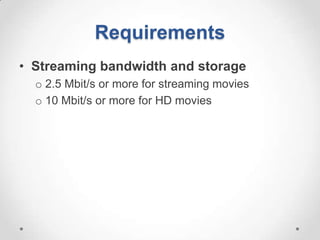
Requirements
• Streaming bandwidth and storage
  o 2.5 Mbit/s or more for streaming movies
  o 10 Mbit/s or more for HD movies
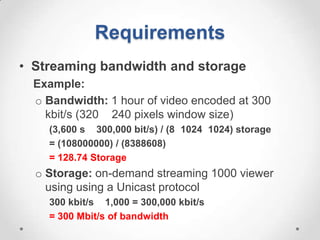
Requirements
• Streaming bandwidth and storage
  Example:
  o Bandwidth: 1 hour of video encoded at 300
    kbit/s (320 240 pixels window size)
    (3,600 s 300,000 bit/s) / (8 1024 1024) storage
    = (108000000) / (8388608)
    = 128.74 Storage
  o Storage: on-demand streaming 1000 viewer
    using using a Unicast protocol
    300 kbit/s 1,000 = 300,000 kbit/s
    = 300 Mbit/s of bandwidth
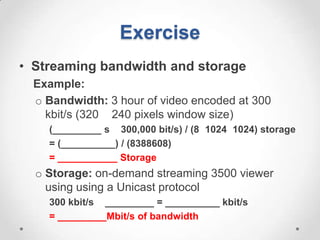
Exercise
• Streaming bandwidth and storage
  Example:
  o Bandwidth: 3 hour of video encoded at 300
    kbit/s (320 240 pixels window size)
    (_________ s 300,000 bit/s) / (8 1024 1024) storage
    = (__________) / (8388608)
    = ___________ Storage
  o Storage: on-demand streaming 3500 viewer
    using using a Unicast protocol
    300 kbit/s _________ = __________ kbit/s
    = _________Mbit/s of bandwidth
Codec, Bitstream, Transport, Control
 • Media: SWMD Video
   1. Audio is compressed: MP3, Vorbis or AAC
      Video stream is compressed: H.264 or VP8
   2. Assembled in a container bitstream such
      as FLV, WebM, ASF or ISMA
   3. The bitstream is delivered (streaming server to
      a streaming client) using a transport protocol,
      such as MMS or RTP.
   4. Client interacts with the streaming server using
      a control protocol such as MMS or RTSP
Network Congestion,
Bandwidth Spikes and Buffering
• Network congestion and other problems
  are fairly common

• To help ameliorate the interruption of the data
  stream, buffering is implemented.
Network Congestion,
Bandwidth Spikes and Buffering
• Buffering works by storing a portion of the
  video locally, and then playing the video by
  retrieving data from the local buffer.

• Buffering can also help encoding videos that
  contain spikes of high bandwidth. This can
  occur if something in the video suddenly
  requires more bandwidth
Audio and Bandwidth
• Audio requires bandwidth just as video does.
• The higher the quality of the audio, the more
  bandwidth it will consume.
  o Media Encoder always use compressed audio.
  o PCM uncompressed audio, 22.050 kHz, 16 bit
    mono for instance requires 43 kbps of bandwidth
  o Lower quality audio such as ACELP.net 8 kHz,
    mono for example requires only 5 kbps of
    bandwidth.
CODECs
• Codecs are compression technologies
  with two components;
  An encoder to compress the file in your studio or
  office and a decoder to decode the file when played
  by the remove viewer.
  o Streaming space - H.264, VP6, Windows Media
    and Sorenson Spark
  o DVD and Blu-ray spaces - MPEG-2
  H.264 and MPEG-2 are huge in the network and
  particularly satellite spaces.
Distribution Environments
• Windows Media
• Flash
• QuickTime

 Make sure that they have the appropriate player
 installed.
Commonly used Video CODECS
• Lossless codecs (FFv1)
• MPEG-4 Part 2 codecs (Div X Pro, Xvid)
• H.264/MPEG-4 AVC codecs
  (x264, NERO Digital, QuickTime H.264)
• Microsoft codecs (WMV, MS MPEG-4v3)
• On2 codecs (VP6, VP6-E, VP6-S, VP7, VP8)
Other Video CODECS
•   Sorenson 3 used by Apple's QuickTime
•   Sorenson Spark used by Macromedia
•   RealVideo used/developed by Real Networks
•   Cinepak early codec used by Apple's QuickTime
Commonly used Audio CODECS
• Non-compression formats
  o Linear Pulse Code Modulation (describe as PCM)
    • Audio Interchange File Format (AIFF, audio container
      format)
    • WAV – Microsoft ”WAVE”
  o Pulse-density modulation (PDM)
    • Direct Stream Digital (DSD) is standard for Super
      Audio CD
Commonly used Audio CODECS
• Lossless data compression
  o Apple Lossless Audio Codec (ALAC)
    • QuickTime
  o Dolby TrueHD
    • FFmpeg (decoding only)
  o Free Lossless Audio Codec (FLAC)
    • FFmpeg
    • libFLAC
  o MPEG-4 Audio Lossless Coding (MPEG-4 ALS)
  o MPEG-4 ALS reference software
  o Windows Media Audio 9 Lossless
Commonly used Audio CODECS
• General
  o Adaptive Differential (or Delta) pulse-code
    modulation (ADPCM)
  o Adaptive Rate-Distortion Optimised sound codeR
    (ARDOR)
  o Adaptive Transform Acoustic Coding (ATRAC,
    used in MiniDisc devices)
  o Dolby Digital (A/52, AC3)
  o MPEG-1 Audio and MPEG-2 Audio
Commonly used Audio CODECS
• General
  o MPEG-4 Audio
  o FFmpeg (decoding only)
  o Windows Media Audio (WMA)
    • Windows Media Encoder
    • FFmpeg

02.m3 cms sys-req4mediastreaming

  • 1.
    IT2032PA Content Management System (CMS) Nitec in Social Media & Web Technology
  • 2.
    System Requirements fora Streaming Server In this chapter, you will learn: o Identify the hardware requirement for a media server o Identify the software requirement for a media server o Identify the recommended bandwidth for streaming media o Identify the audio and video codec used for streaming media
  • 3.
    Requirements • Hardware Requirement– Enough bandwidth to allow access to that media. o Depending on the uses and applications o A media server may require large amounts of RAM, or a powerful, multicore CPU. o A RAID may be used to create a large amount of storage. o TV tuner cards (Digital or Analog)
  • 4.
    Requirements • Software Requirement– Enough bandwidth to allow access to that media. o Adobe o Microsoft o Apple
  • 5.
    Requirements • Streaming bandwidthand storage o 2.5 Mbit/s or more for streaming movies o 10 Mbit/s or more for HD movies
  • 6.
    Requirements • Streaming bandwidthand storage Example: o Bandwidth: 1 hour of video encoded at 300 kbit/s (320 240 pixels window size) (3,600 s 300,000 bit/s) / (8 1024 1024) storage = (108000000) / (8388608) = 128.74 Storage o Storage: on-demand streaming 1000 viewer using using a Unicast protocol 300 kbit/s 1,000 = 300,000 kbit/s = 300 Mbit/s of bandwidth
  • 7.
    Exercise • Streaming bandwidthand storage Example: o Bandwidth: 3 hour of video encoded at 300 kbit/s (320 240 pixels window size) (_________ s 300,000 bit/s) / (8 1024 1024) storage = (__________) / (8388608) = ___________ Storage o Storage: on-demand streaming 3500 viewer using using a Unicast protocol 300 kbit/s _________ = __________ kbit/s = _________Mbit/s of bandwidth
  • 8.
    Codec, Bitstream, Transport,Control • Media: SWMD Video 1. Audio is compressed: MP3, Vorbis or AAC Video stream is compressed: H.264 or VP8 2. Assembled in a container bitstream such as FLV, WebM, ASF or ISMA 3. The bitstream is delivered (streaming server to a streaming client) using a transport protocol, such as MMS or RTP. 4. Client interacts with the streaming server using a control protocol such as MMS or RTSP
  • 9.
    Network Congestion, Bandwidth Spikesand Buffering • Network congestion and other problems are fairly common • To help ameliorate the interruption of the data stream, buffering is implemented.
  • 10.
    Network Congestion, Bandwidth Spikesand Buffering • Buffering works by storing a portion of the video locally, and then playing the video by retrieving data from the local buffer. • Buffering can also help encoding videos that contain spikes of high bandwidth. This can occur if something in the video suddenly requires more bandwidth
  • 11.
    Audio and Bandwidth •Audio requires bandwidth just as video does. • The higher the quality of the audio, the more bandwidth it will consume. o Media Encoder always use compressed audio. o PCM uncompressed audio, 22.050 kHz, 16 bit mono for instance requires 43 kbps of bandwidth o Lower quality audio such as ACELP.net 8 kHz, mono for example requires only 5 kbps of bandwidth.
  • 12.
    CODECs • Codecs arecompression technologies with two components; An encoder to compress the file in your studio or office and a decoder to decode the file when played by the remove viewer. o Streaming space - H.264, VP6, Windows Media and Sorenson Spark o DVD and Blu-ray spaces - MPEG-2 H.264 and MPEG-2 are huge in the network and particularly satellite spaces.
  • 13.
    Distribution Environments • WindowsMedia • Flash • QuickTime Make sure that they have the appropriate player installed.
  • 14.
    Commonly used VideoCODECS • Lossless codecs (FFv1) • MPEG-4 Part 2 codecs (Div X Pro, Xvid) • H.264/MPEG-4 AVC codecs (x264, NERO Digital, QuickTime H.264) • Microsoft codecs (WMV, MS MPEG-4v3) • On2 codecs (VP6, VP6-E, VP6-S, VP7, VP8)
  • 15.
    Other Video CODECS • Sorenson 3 used by Apple's QuickTime • Sorenson Spark used by Macromedia • RealVideo used/developed by Real Networks • Cinepak early codec used by Apple's QuickTime
  • 16.
    Commonly used AudioCODECS • Non-compression formats o Linear Pulse Code Modulation (describe as PCM) • Audio Interchange File Format (AIFF, audio container format) • WAV – Microsoft ”WAVE” o Pulse-density modulation (PDM) • Direct Stream Digital (DSD) is standard for Super Audio CD
  • 17.
    Commonly used AudioCODECS • Lossless data compression o Apple Lossless Audio Codec (ALAC) • QuickTime o Dolby TrueHD • FFmpeg (decoding only) o Free Lossless Audio Codec (FLAC) • FFmpeg • libFLAC o MPEG-4 Audio Lossless Coding (MPEG-4 ALS) o MPEG-4 ALS reference software o Windows Media Audio 9 Lossless
  • 18.
    Commonly used AudioCODECS • General o Adaptive Differential (or Delta) pulse-code modulation (ADPCM) o Adaptive Rate-Distortion Optimised sound codeR (ARDOR) o Adaptive Transform Acoustic Coding (ATRAC, used in MiniDisc devices) o Dolby Digital (A/52, AC3) o MPEG-1 Audio and MPEG-2 Audio
  • 19.
    Commonly used AudioCODECS • General o MPEG-4 Audio o FFmpeg (decoding only) o Windows Media Audio (WMA) • Windows Media Encoder • FFmpeg