Canvas Info Tech Inc.

EXAMPLE OF A TEST CASE (Amazon)
Test
Requirem Case Test
ent
Num Case
Number ber
Name

UC001

UC001

Search for a
TC00 product: Good
1
search

Search for a
TC00 product: Empty
2
Search

Test case
description

Target
URL (if any)

Sequence
of
Steps

If Failed,
Expected Results Actual Results Pass/Fail Defect ID

1. System
showed a
Search product
1. System should page with a text
show you a
box for entering
Search product
the product
page with a text
name and a
box for entering
Submit button
1. Navigate to
the product name 2. No action
"Search for a
and a Submit
from the
product" page
button
system
2. Enter product 2. No action from 3. System
This test case tests
name
the system
responded
"Dove Soap"
3. System should back with 10
the functionality of
3. Hit Enter or
respond back with matching
Search in amazon.
It focuses on positive http://internalQA. Click Submit
10 types of Dove products, along
search.
amazon.com
button
Soaps
with their gifs. Pass

This test case tests
that our application
tells us that we are
being improper in
doing an empty
search

1. System should
show you a
Search product
page with a text
box for entering
the product name
and a Submit
button
2. No action from
the system
3. System should
say "No search
term was entered.
Please enter
product name".

1. Navigate to
"Search for a
"An internal
product" page
error occurred"
2. Enter no
http://internalQA. product name
page was
amazon.com
3. Hit Enter
displayed
Fail
Be bold! Be fearless! Be attentive
Copyright; All Rights Reserved: Canvas InfoTech Inc.; 2006-2012; Do not distribute; Do not copy

Bug
15908
Canvas Info Tech Inc.

EXAMPLE OF A TEST CASE (Amazon)
Test
Requirem Case Test
ent
Num Case
Number ber
Name

Test case
description

This test case
searches for
products that we
know Amazon will
not carry

UC001

Search for a
TC00 product: Wrong
3
search

UC002

Login to
TC00 the System:Positive
4
Test

Target
URL (if any)

Sequence
of
Steps

Expected Results
1. System should
show you a
Search product
page with a text
box for entering
the product name
and a Submit
1. Navigate to
button
"Search for a
2. No action from
product" page
the system
2. Enter "10 tola 3. System should
http://internalQA. gold bar"
say "No matches
amazon.com
3. Hit Enter
found".
1. The login page
is displayed with a
1. Navigate to
textbox for
the "Login Page" Username,
2. Enter
Textbox for
username =
Password and a
marufa
Submit Button
and password = 2. No output
good
3. Welcome page
http://internalQA. 3. Hit Enter
is displayed with
amazon.com
time of last login.

If Failed,
Actual Results Pass/Fail Defect ID

No results
found

Pass

Welcome page
displayed
Pass

Be bold! Be fearless! Be attentive
Copyright; All Rights Reserved: Canvas InfoTech Inc.; 2006-2012; Do not distribute; Do not copy
Canvas Info Tech Inc.

EXAMPLE OF A TEST CASE (Amazon)
Test
Requirem Case Test
ent
Num Case
Number ber
Name

UC002

TC00
5
4
5

Test case
description

Login to
the System: Negative
Test
Cancel an order
Update Password
Remove product
from cart
Checkout items
See past orders

Target
URL (if any)

Sequence
of
Steps

If Failed,
Expected Results Actual Results Pass/Fail Defect ID
1. The login page
is displayed with a
textbox for
Username,
Textbox for
Password and a
Submit Button
1. Navigate to
2. No output
the "Login Page" 3. Sorry page
displayed with text
2. Enter
invalid
username =
marufa
username/passwo
and password = rd and warning us
that we are left
GOOD
http://internalQA. 3. Hit Enter
with 2 more
Welcome page
amazon.com
attempts at login displayed
56780
FAIL

Be bold! Be fearless! Be attentive
Copyright; All Rights Reserved: Canvas InfoTech Inc.; 2006-2012; Do not distribute; Do not copy

Amazon search test case document

  • 1.
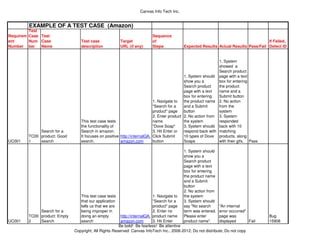
    Canvas Info TechInc. EXAMPLE OF A TEST CASE (Amazon) Test Requirem Case Test ent Num Case Number ber Name UC001 UC001 Search for a TC00 product: Good 1 search Search for a TC00 product: Empty 2 Search Test case description Target URL (if any) Sequence of Steps If Failed, Expected Results Actual Results Pass/Fail Defect ID 1. System showed a Search product 1. System should page with a text show you a box for entering Search product the product page with a text name and a box for entering Submit button 1. Navigate to the product name 2. No action "Search for a and a Submit from the product" page button system 2. Enter product 2. No action from 3. System This test case tests name the system responded "Dove Soap" 3. System should back with 10 the functionality of 3. Hit Enter or respond back with matching Search in amazon. It focuses on positive http://internalQA. Click Submit 10 types of Dove products, along search. amazon.com button Soaps with their gifs. Pass This test case tests that our application tells us that we are being improper in doing an empty search 1. System should show you a Search product page with a text box for entering the product name and a Submit button 2. No action from the system 3. System should say "No search term was entered. Please enter product name". 1. Navigate to "Search for a "An internal product" page error occurred" 2. Enter no http://internalQA. product name page was amazon.com 3. Hit Enter displayed Fail Be bold! Be fearless! Be attentive Copyright; All Rights Reserved: Canvas InfoTech Inc.; 2006-2012; Do not distribute; Do not copy Bug 15908
  • 2.
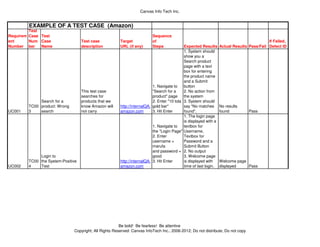
    Canvas Info TechInc. EXAMPLE OF A TEST CASE (Amazon) Test Requirem Case Test ent Num Case Number ber Name Test case description This test case searches for products that we know Amazon will not carry UC001 Search for a TC00 product: Wrong 3 search UC002 Login to TC00 the System:Positive 4 Test Target URL (if any) Sequence of Steps Expected Results 1. System should show you a Search product page with a text box for entering the product name and a Submit 1. Navigate to button "Search for a 2. No action from product" page the system 2. Enter "10 tola 3. System should http://internalQA. gold bar" say "No matches amazon.com 3. Hit Enter found". 1. The login page is displayed with a 1. Navigate to textbox for the "Login Page" Username, 2. Enter Textbox for username = Password and a marufa Submit Button and password = 2. No output good 3. Welcome page http://internalQA. 3. Hit Enter is displayed with amazon.com time of last login. If Failed, Actual Results Pass/Fail Defect ID No results found Pass Welcome page displayed Pass Be bold! Be fearless! Be attentive Copyright; All Rights Reserved: Canvas InfoTech Inc.; 2006-2012; Do not distribute; Do not copy
  • 3.
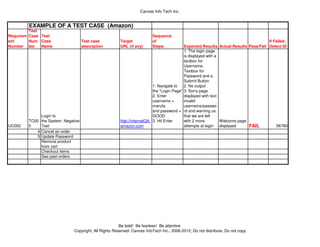
    Canvas Info TechInc. EXAMPLE OF A TEST CASE (Amazon) Test Requirem Case Test ent Num Case Number ber Name UC002 TC00 5 4 5 Test case description Login to the System: Negative Test Cancel an order Update Password Remove product from cart Checkout items See past orders Target URL (if any) Sequence of Steps If Failed, Expected Results Actual Results Pass/Fail Defect ID 1. The login page is displayed with a textbox for Username, Textbox for Password and a Submit Button 1. Navigate to 2. No output the "Login Page" 3. Sorry page displayed with text 2. Enter invalid username = marufa username/passwo and password = rd and warning us that we are left GOOD http://internalQA. 3. Hit Enter with 2 more Welcome page amazon.com attempts at login displayed 56780 FAIL Be bold! Be fearless! Be attentive Copyright; All Rights Reserved: Canvas InfoTech Inc.; 2006-2012; Do not distribute; Do not copy