www.sensaran.wordpress.com
DAY 3—GETTING STARTED
WITH APACHE PIG
www.sensaran.wordpress.com
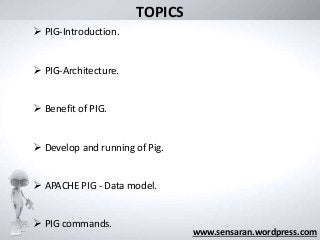
 PIG-Introduction.
 PIG-Architecture.
 Benefit of PIG.
 Develop and running of Pig.
 APACHE PIG - Data model.
 PIG commands.
TOPICS
FIVE STEPS TO INSTALL APACHE PIG
IN UBUNTU 12.0.4
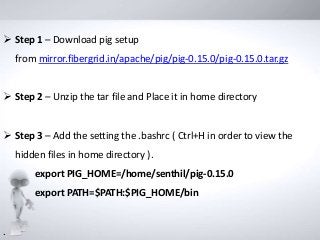
 Step 1 – Download pig setup
from mirror.fibergrid.in/apache/pig/pig-0.15.0/pig-0.15.0.tar.gz
 Step 2 – Unzip the tar file and Place it in home directory
 Step 3 – Add the setting the .bashrc ( Ctrl+H in order to view the
hidden files in home directory ).
export PIG_HOME=/home/senthil/pig-0.15.0
export PATH=$PATH:$PIG_HOME/bin
.
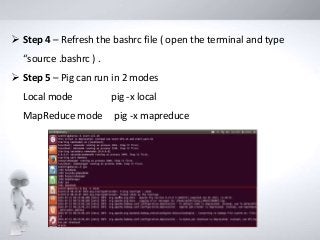
 Step 4 – Refresh the bashrc file ( open the terminal and type
“source .bashrc ) .
 Step 5 – Pig can run in 2 modes
Local mode pig -x local
MapReduce mode pig -x mapreduce
 Developing the new coding structure in Map Reduce using Java will
be a billion dollar question now ?
 How we are going to resolve this ?
INTRODUCING PIG
In Map Reduce Framework
 Programmer need to translate into a series of Map and
Reduce stages
 Code is difficult to maintain, optimize, and extend.
 Developer has to write custom codes in Java which will have an
impact on production time
www.sensaran.wordpress.com
INTRODUCTION TO PIG
www.sensaran.wordpress.com
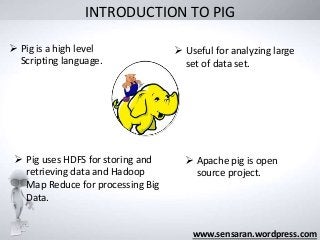
 Pig is a high level
Scripting language.
 Useful for analyzing large
set of data set.
 Pig uses HDFS for storing and
retrieving data and Hadoop
Map Reduce for processing Big
Data.
 Apache pig is open
source project.
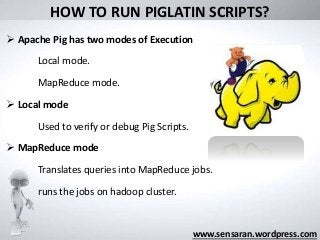
HOW TO RUN PIGLATIN SCRIPTS?
 Apache Pig has two modes of Execution
Local mode.
MapReduce mode.
 Local mode
Used to verify or debug Pig Scripts.
 MapReduce mode
Translates queries into MapReduce jobs.
runs the jobs on hadoop cluster.
www.sensaran.wordpress.com
10
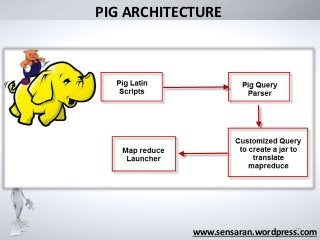
PIG ARCHITECTURE
www.sensaran.wordpress.com
11
WHAT IS THE BIGGEST BENEFIT OF PIG?
www.sensaran.wordpress.com
Dramatically increases productivity
10 lines of PigLatin = 200 lines in Java
15 minutes in PigLatin = 4 hours in Java
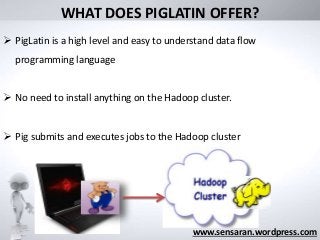
WHAT DOES PIGLATIN OFFER?
www.sensaran.wordpress.com
 PigLatin is a high level and easy to understand data flow
programming language
 No need to install anything on the Hadoop cluster.
 Pig submits and executes jobs to the Hadoop cluster
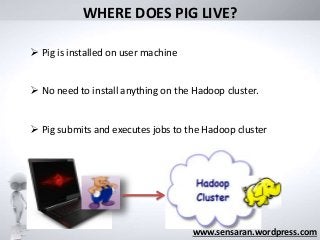
WHERE DOES PIG LIVE?
www.sensaran.wordpress.com
 Pig is installed on user machine
 No need to install anything on the Hadoop cluster.
 Pig submits and executes jobs to the Hadoop cluster
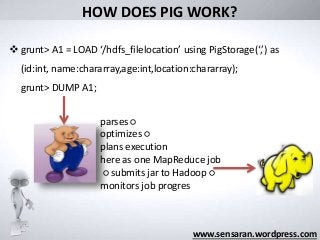
HOW DOES PIG WORK?
www.sensaran.wordpress.com
 grunt> A1 = LOAD ‘/hdfs_filelocation’ using PigStorage(‘,’) as
(id:int, name:chararray,age:int,location:chararray);
grunt> DUMP A1;
parses ○
optimizes ○
plans execution
here as one MapReduce job
○ submits jar to Hadoop ○
monitors job progres
HOW TO DEVELOP PIGLATIN SCRIPTS?
www.sensaran.wordpress.com
 Eclipse plugins
 PigEditor
 Notepad++ , notepad or vim
Hadoop Distributed File Syste
m
HDFS
Google File System
GFS
Cross Platform Linux
Developed in Java
environment
Developed in c,c++
environment
At first its developed by
Yahoo and now its an open
source Framework
Its developed by Google
It has Name node and Data
Node
It has Master-node and Chunk
server
128 MB will be the default
block size
64 MB will be the default
block size
Name node receive heartbeat
from Data node
Master node receive
heartbeat from Chunk server
Commodities hardware
were used
Commodities hardware
werused
WORM – Write Once and
Read Many times
Multiple writer , multiple
reader model
Deleted files are renamed into
particular folder and then it
will removed via garbage
Deleted files are not
reclaimed immediately and
are renamed in hidden name
space and it will deleted after
three days if it's not in use
No Network stack issue Network stack Issue
Journal ,editlog Oprational log
only append is possible random file write possible
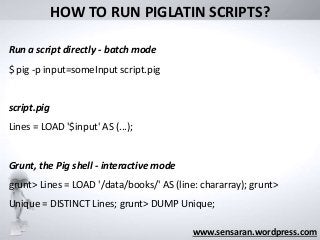
HOW TO RUN PIGLATIN SCRIPTS?
www.sensaran.wordpress.com
Run a script directly - batch mode
$ pig -p input=someInput script.pig
script.pig
Lines = LOAD '$input' AS (...);
Grunt, the Pig shell - interactive mode
grunt> Lines = LOAD '/data/books/' AS (line: chararray); grunt>
Unique = DISTINCT Lines; grunt> DUMP Unique;
www.sensaran.wordpress.com
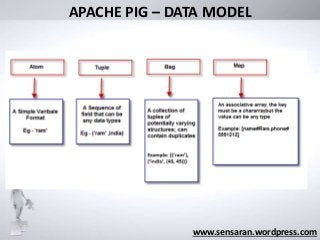
APACHE PIG – DATA MODEL
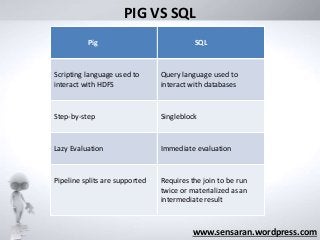
PIG VS SQL
www.sensaran.wordpress.com
Pig SQL
Scripting language used to
interact with HDFS
Query language used to
interact with databases
Step-by-step Singleblock
Lazy Evaluation Immediate evaluation
Pipeline splits are supported Requires the join to be run
twice or materialized as an
intermediate result
What was its
“Big Data” limit?
www.sensaran.wordpress.com
PIG USEFUL COMMANDS
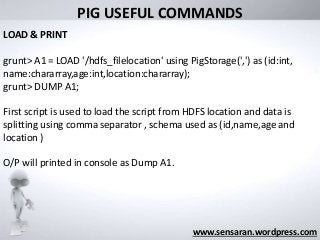
LOAD & PRINT
grunt> A1 = LOAD '/hdfs_filelocation' using PigStorage(',') as (id:int,
name:chararray,age:int,location:chararray);
grunt> DUMP A1;
First script is used to load the script from HDFS location and data is
splitting using comma separator , schema used as (id,name,age and
location )
O/P will printed in console as Dump A1.
What was its
“Big Data” limit?
www.sensaran.wordpress.com
PIG USEFUL COMMANDS
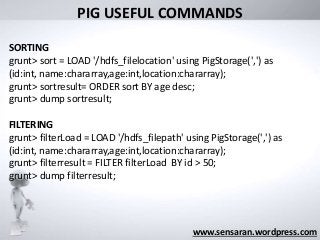
SORTING
grunt> sort = LOAD '/hdfs_filelocation' using PigStorage(',') as
(id:int, name:chararray,age:int,location:chararray);
grunt> sortresult= ORDER sort BY age desc;
grunt> dump sortresult;
FILTERING
grunt> filterLoad = LOAD '/hdfs_filepath' using PigStorage(',') as
(id:int, name:chararray,age:int,location:chararray);
grunt> filterresult = FILTER filterLoad BY id > 50;
grunt> dump filterresult;
What was its
“Big Data” limit?
www.sensaran.wordpress.com
PIG USEFUL COMMANDS
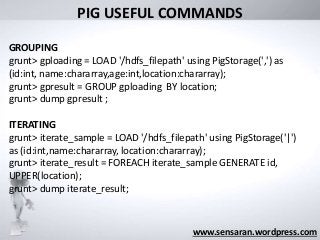
GROUPING
grunt> gploading = LOAD '/hdfs_filepath' using PigStorage(',') as
(id:int, name:chararray,age:int,location:chararray);
grunt> gpresult = GROUP gploading BY location;
grunt> dump gpresult ;
ITERATING
grunt> iterate_sample = LOAD '/hdfs_filepath' using PigStorage('|')
as (id:int,name:chararray, location:chararray);
grunt> iterate_result = FOREACH iterate_sample GENERATE id,
UPPER(location);
grunt> dump iterate_result;
What was its
“Big Data” limit?
www.sensaran.wordpress.com
PIG USEFUL COMMANDS
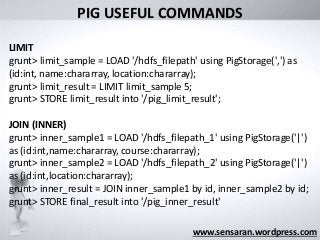
LIMIT
grunt> limit_sample = LOAD '/hdfs_filepath' using PigStorage(',') as
(id:int, name:chararray, location:chararray);
grunt> limit_result = LIMIT limit_sample 5;
grunt> STORE limit_result into '/pig_limit_result';
JOIN (INNER)
grunt> inner_sample1 = LOAD '/hdfs_filepath_1' using PigStorage('|')
as (id:int,name:chararray, course:chararray);
grunt> inner_sample2 = LOAD '/hdfs_filepath_2' using PigStorage('|')
as (id:int,location:chararray);
grunt> inner_result = JOIN inner_sample1 by id, inner_sample2 by id;
grunt> STORE final_result into '/pig_inner_result'
APACHE PIG QUIZ
www.sensaran.wordpress.com
1 . Which of the following commands is used to start Pig in
MapReduce mode ?
a) Pig
b) Both Pig and Pig -x MapReduce
c) Pig -x MapReduce
d) Pig -x local
www.sensaran.wordpress.com
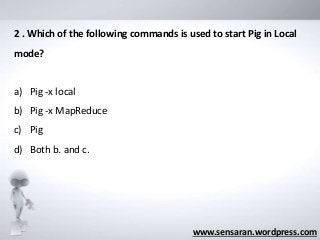
2 . Which of the following commands is used to start Pig in Local
mode?
a) Pig -x local
b) Pig -x MapReduce
c) Pig
d) Both b. and c.
www.sensaran.wordpress.com
3 . Which of the following keywords in Pig scripting is used for
displaying the output on the screen?
a) DUMP
b) STORE
c) LOAD
d) TOKENIZE
www.sensaran.wordpress.com
4 .Which of the following keywords in Pig scripting is used for
accepting input files?
a) LOAD
b) STORE
c) FLATTERN
d) TOKENIZE
www.sensaran.wordpress.com
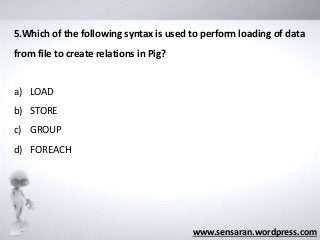
5.Which of the following syntax is used to perform loading of data
from file to create relations in Pig?
a) LOAD
b) STORE
c) GROUP
d) FOREACH

Big data with Apache Pig Introduction and characterstic

  • 1.
  • 2.
    www.sensaran.wordpress.com  PIG-Introduction.  PIG-Architecture. Benefit of PIG.  Develop and running of Pig.  APACHE PIG - Data model.  PIG commands. TOPICS
  • 3.
    FIVE STEPS TOINSTALL APACHE PIG IN UBUNTU 12.0.4
  • 4.
     Step 1– Download pig setup from mirror.fibergrid.in/apache/pig/pig-0.15.0/pig-0.15.0.tar.gz  Step 2 – Unzip the tar file and Place it in home directory  Step 3 – Add the setting the .bashrc ( Ctrl+H in order to view the hidden files in home directory ). export PIG_HOME=/home/senthil/pig-0.15.0 export PATH=$PATH:$PIG_HOME/bin .
  • 5.
     Step 4– Refresh the bashrc file ( open the terminal and type “source .bashrc ) .  Step 5 – Pig can run in 2 modes Local mode pig -x local MapReduce mode pig -x mapreduce
  • 6.
     Developing thenew coding structure in Map Reduce using Java will be a billion dollar question now ?  How we are going to resolve this ?
  • 7.
    INTRODUCING PIG In MapReduce Framework  Programmer need to translate into a series of Map and Reduce stages  Code is difficult to maintain, optimize, and extend.  Developer has to write custom codes in Java which will have an impact on production time www.sensaran.wordpress.com
  • 8.
    INTRODUCTION TO PIG www.sensaran.wordpress.com Pig is a high level Scripting language.  Useful for analyzing large set of data set.  Pig uses HDFS for storing and retrieving data and Hadoop Map Reduce for processing Big Data.  Apache pig is open source project.
  • 9.
    HOW TO RUNPIGLATIN SCRIPTS?  Apache Pig has two modes of Execution Local mode. MapReduce mode.  Local mode Used to verify or debug Pig Scripts.  MapReduce mode Translates queries into MapReduce jobs. runs the jobs on hadoop cluster. www.sensaran.wordpress.com
  • 10.
  • 11.
    11 WHAT IS THEBIGGEST BENEFIT OF PIG? www.sensaran.wordpress.com Dramatically increases productivity 10 lines of PigLatin = 200 lines in Java 15 minutes in PigLatin = 4 hours in Java
  • 12.
    WHAT DOES PIGLATINOFFER? www.sensaran.wordpress.com  PigLatin is a high level and easy to understand data flow programming language  No need to install anything on the Hadoop cluster.  Pig submits and executes jobs to the Hadoop cluster
  • 13.
    WHERE DOES PIGLIVE? www.sensaran.wordpress.com  Pig is installed on user machine  No need to install anything on the Hadoop cluster.  Pig submits and executes jobs to the Hadoop cluster
  • 14.
    HOW DOES PIGWORK? www.sensaran.wordpress.com  grunt> A1 = LOAD ‘/hdfs_filelocation’ using PigStorage(‘,’) as (id:int, name:chararray,age:int,location:chararray); grunt> DUMP A1; parses ○ optimizes ○ plans execution here as one MapReduce job ○ submits jar to Hadoop ○ monitors job progres
  • 15.
    HOW TO DEVELOPPIGLATIN SCRIPTS? www.sensaran.wordpress.com  Eclipse plugins  PigEditor  Notepad++ , notepad or vim
  • 16.
    Hadoop Distributed FileSyste m HDFS Google File System GFS Cross Platform Linux Developed in Java environment Developed in c,c++ environment At first its developed by Yahoo and now its an open source Framework Its developed by Google It has Name node and Data Node It has Master-node and Chunk server 128 MB will be the default block size 64 MB will be the default block size Name node receive heartbeat from Data node Master node receive heartbeat from Chunk server Commodities hardware were used Commodities hardware werused WORM – Write Once and Read Many times Multiple writer , multiple reader model Deleted files are renamed into particular folder and then it will removed via garbage Deleted files are not reclaimed immediately and are renamed in hidden name space and it will deleted after three days if it's not in use No Network stack issue Network stack Issue Journal ,editlog Oprational log only append is possible random file write possible HOW TO RUN PIGLATIN SCRIPTS? www.sensaran.wordpress.com Run a script directly - batch mode $ pig -p input=someInput script.pig script.pig Lines = LOAD '$input' AS (...); Grunt, the Pig shell - interactive mode grunt> Lines = LOAD '/data/books/' AS (line: chararray); grunt> Unique = DISTINCT Lines; grunt> DUMP Unique;
  • 17.
  • 18.
    PIG VS SQL www.sensaran.wordpress.com PigSQL Scripting language used to interact with HDFS Query language used to interact with databases Step-by-step Singleblock Lazy Evaluation Immediate evaluation Pipeline splits are supported Requires the join to be run twice or materialized as an intermediate result
  • 19.
    What was its “BigData” limit? www.sensaran.wordpress.com PIG USEFUL COMMANDS LOAD & PRINT grunt> A1 = LOAD '/hdfs_filelocation' using PigStorage(',') as (id:int, name:chararray,age:int,location:chararray); grunt> DUMP A1; First script is used to load the script from HDFS location and data is splitting using comma separator , schema used as (id,name,age and location ) O/P will printed in console as Dump A1.
  • 20.
    What was its “BigData” limit? www.sensaran.wordpress.com PIG USEFUL COMMANDS SORTING grunt> sort = LOAD '/hdfs_filelocation' using PigStorage(',') as (id:int, name:chararray,age:int,location:chararray); grunt> sortresult= ORDER sort BY age desc; grunt> dump sortresult; FILTERING grunt> filterLoad = LOAD '/hdfs_filepath' using PigStorage(',') as (id:int, name:chararray,age:int,location:chararray); grunt> filterresult = FILTER filterLoad BY id > 50; grunt> dump filterresult;
  • 21.
    What was its “BigData” limit? www.sensaran.wordpress.com PIG USEFUL COMMANDS GROUPING grunt> gploading = LOAD '/hdfs_filepath' using PigStorage(',') as (id:int, name:chararray,age:int,location:chararray); grunt> gpresult = GROUP gploading BY location; grunt> dump gpresult ; ITERATING grunt> iterate_sample = LOAD '/hdfs_filepath' using PigStorage('|') as (id:int,name:chararray, location:chararray); grunt> iterate_result = FOREACH iterate_sample GENERATE id, UPPER(location); grunt> dump iterate_result;
  • 22.
    What was its “BigData” limit? www.sensaran.wordpress.com PIG USEFUL COMMANDS LIMIT grunt> limit_sample = LOAD '/hdfs_filepath' using PigStorage(',') as (id:int, name:chararray, location:chararray); grunt> limit_result = LIMIT limit_sample 5; grunt> STORE limit_result into '/pig_limit_result'; JOIN (INNER) grunt> inner_sample1 = LOAD '/hdfs_filepath_1' using PigStorage('|') as (id:int,name:chararray, course:chararray); grunt> inner_sample2 = LOAD '/hdfs_filepath_2' using PigStorage('|') as (id:int,location:chararray); grunt> inner_result = JOIN inner_sample1 by id, inner_sample2 by id; grunt> STORE final_result into '/pig_inner_result'
  • 23.
  • 24.
    www.sensaran.wordpress.com 1 . Whichof the following commands is used to start Pig in MapReduce mode ? a) Pig b) Both Pig and Pig -x MapReduce c) Pig -x MapReduce d) Pig -x local
  • 25.
    www.sensaran.wordpress.com 2 . Whichof the following commands is used to start Pig in Local mode? a) Pig -x local b) Pig -x MapReduce c) Pig d) Both b. and c.
  • 26.
    www.sensaran.wordpress.com 3 . Whichof the following keywords in Pig scripting is used for displaying the output on the screen? a) DUMP b) STORE c) LOAD d) TOKENIZE
  • 27.
    www.sensaran.wordpress.com 4 .Which ofthe following keywords in Pig scripting is used for accepting input files? a) LOAD b) STORE c) FLATTERN d) TOKENIZE
  • 28.
    www.sensaran.wordpress.com 5.Which of thefollowing syntax is used to perform loading of data from file to create relations in Pig? a) LOAD b) STORE c) GROUP d) FOREACH
Editor's Notes

  • #11 www.scmGalaxy.com, Author - Rajesh Kumar
  • #12 www.scmGalaxy.com, Author - Rajesh Kumar