




images for Amazon
product listings
5 ESSENTIAL
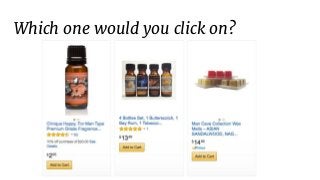
Which one would you click on?
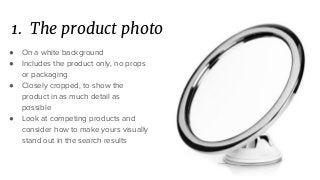
1. The product photo
● On a white background
● Includes the product only, no props
or packaging
● Closely cropped, to show the
product in as much detail as
possible
● Look at competing products and
consider how to make yours visually
stand out in the search results
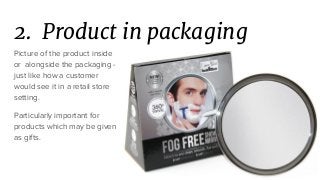
2. Product in packaging
Picture of the product inside
or alongside the packaging -
just like how a customer
would see it in a retail store
setting.
Particularly important for
products which may be given
as gifts.
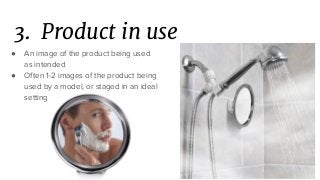
3. Product in use
● An image of the product being used
as intended
● Often 1-2 images of the product being
used by a model, or staged in an ideal
setting
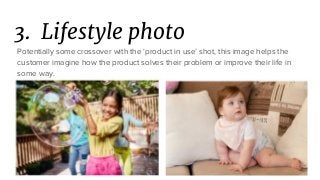
3. Lifestyle photo
Potentially some crossover with the ‘product in use’ shot, this image helps the
customer imagine how the product solves their problem or improve their life in
some way.
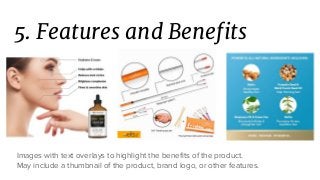
5. Features and Benefits
Images with text overlays to highlight the benefits of the product.
May include a thumbnail of the product, brand logo, or other features.
More tips
● High resolution is a must (>1,000px) to enable the zoom feature
● Crop the image closely to maximize space on the listing
● Try to use all the 7-9 available image slots that Amazon provides
● Consider: how does this image help to describe the features & benefits of the
product?
● Consider: what images are needed to create a sensory experience? E.g. smell,
touch, taste, sound?
MORE
image ideas
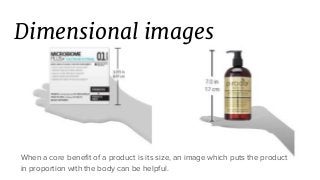
Dimensional images
When a core benefit of a product is its size, an image which puts the product
in proportion with the body can be helpful.
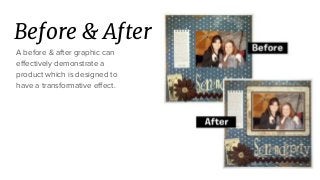
Before & After
A before & after graphic can
effectively demonstrate a
product which is designed to
have a transformative effect.
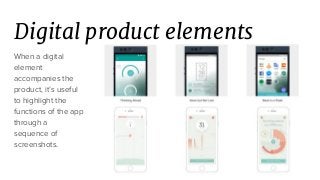
Digital product elements
When a digital
element
accompanies the
product, it’s useful
to highlight the
functions of the app
through a
sequence of
screenshots.
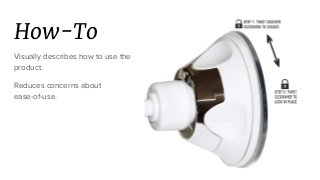
How-To
Visually describes how to use the
product.
Reduces concerns about
ease-of-use.
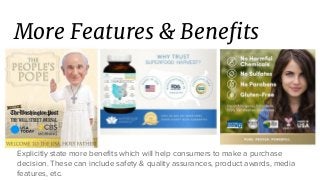
More Features & Benefits
Explicitly state more benefits which will help consumers to make a purchase
decision. These can include safety & quality assurances, product awards, media
features, etc.
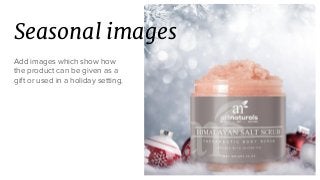
Seasonal images
Add images which show how
the product can be given as a
gift or used in a holiday setting.
Customer testimonials
Create graphics which highlight
reviews and testimonials from
happy customers.
This can be particularly effective
for new products without any
reviews on the Amazon platform.
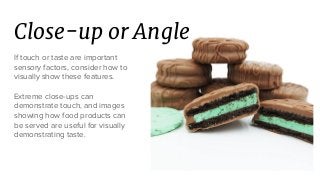
Close-up or Angle
If touch or taste are important
sensory factors, consider how to
visually show these features.
Extreme close-ups can
demonstrate touch, and images
showing how food products can
be served are useful for visually
demonstrating taste.
Origin story
If your brand or products has a unique origin story, use one of your available
image slots to tell the story.
(646) 561-9936 | sales@bobsledmarketing.com

5 Essential Images for Amazon Product Listings

  • 1.
    images for Amazon productlistings 5 ESSENTIAL
  • 2.
    Which one wouldyou click on?
  • 3.
    1. The productphoto ● On a white background ● Includes the product only, no props or packaging ● Closely cropped, to show the product in as much detail as possible ● Look at competing products and consider how to make yours visually stand out in the search results
  • 4.
    2. Product inpackaging Picture of the product inside or alongside the packaging - just like how a customer would see it in a retail store setting. Particularly important for products which may be given as gifts.
  • 5.
    3. Product inuse ● An image of the product being used as intended ● Often 1-2 images of the product being used by a model, or staged in an ideal setting
  • 6.
    3. Lifestyle photo Potentiallysome crossover with the ‘product in use’ shot, this image helps the customer imagine how the product solves their problem or improve their life in some way.
  • 7.
    5. Features andBenefits Images with text overlays to highlight the benefits of the product. May include a thumbnail of the product, brand logo, or other features.
  • 8.
    More tips ● Highresolution is a must (>1,000px) to enable the zoom feature ● Crop the image closely to maximize space on the listing ● Try to use all the 7-9 available image slots that Amazon provides ● Consider: how does this image help to describe the features & benefits of the product? ● Consider: what images are needed to create a sensory experience? E.g. smell, touch, taste, sound?
  • 9.
  • 10.
    Dimensional images When acore benefit of a product is its size, an image which puts the product in proportion with the body can be helpful.
  • 11.
    Before & After Abefore & after graphic can effectively demonstrate a product which is designed to have a transformative effect.
  • 12.
    Digital product elements Whena digital element accompanies the product, it’s useful to highlight the functions of the app through a sequence of screenshots.
  • 13.
    How-To Visually describes howto use the product. Reduces concerns about ease-of-use.
  • 14.
    More Features &Benefits Explicitly state more benefits which will help consumers to make a purchase decision. These can include safety & quality assurances, product awards, media features, etc.
  • 15.
    Seasonal images Add imageswhich show how the product can be given as a gift or used in a holiday setting.
  • 16.
    Customer testimonials Create graphicswhich highlight reviews and testimonials from happy customers. This can be particularly effective for new products without any reviews on the Amazon platform.
  • 17.
    Close-up or Angle Iftouch or taste are important sensory factors, consider how to visually show these features. Extreme close-ups can demonstrate touch, and images showing how food products can be served are useful for visually demonstrating taste.
  • 18.
    Origin story If yourbrand or products has a unique origin story, use one of your available image slots to tell the story.
  • 19.
    (646) 561-9936 |sales@bobsledmarketing.com