Presented by Josh Tynjala
Haxe Summit 2019 — Seattle, Washington, USA
User interfaces for creative projects
• Games
• Interactive data visualizations
• Rich multimedia experiences
Flexible
• Pick only the components that you need
• Don’t need to include the weight of the entire framework
• Components can be included anywhere with addChild()
• Just fancy DisplayObject subclasses
• Or… build a whole app using only Feathers components
• Intended for many types of devices
• Mobile, desktop, smart TVs, consoles
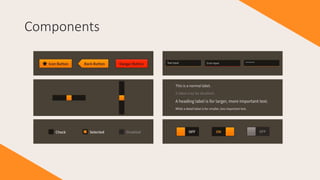
Components
Components
Components
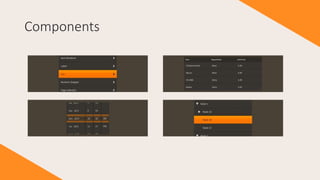
• Slide out drawers
• Stack / history navigator
• Tab navigator
• Callout / popover
• Progress bars
• Scroll bars
• Containers with layout
• Numeric stepper
• Image loader
• Drop-down list
• Radio buttons
• Toast
• Tool tips
• Auto-complete
• Alert / Message box
• Custom list item renderers
Layouts
Layouts
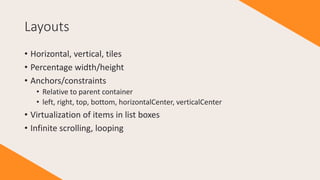
• Horizontal, vertical, tiles
• Percentage width/height
• Anchors/constraints
• Relative to parent container
• left, right, top, bottom, horizontalCenter, verticalCenter
• Virtualization of items in list boxes
• Infinite scrolling, looping
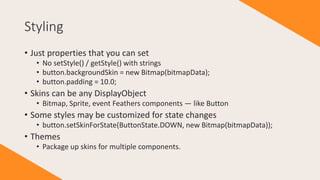
Styling
• Just properties that you can set
• No setStyle() / getStyle() with strings
• button.backgroundSkin = new Bitmap(bitmapData);
• button.padding = 10.0;
• Skins can be any DisplayObject
• Bitmap, Sprite, event Feathers components — like Button
• Some styles may be customized for state changes
• button.setSkinForState(ButtonState.DOWN, new Bitmap(bitmapData));
• Themes
• Package up skins for multiple components.
Haxe and OpenFL
Changes in the new version
Improved naming
• Shorter names
• StackScreenNavigator => StackNavigator
• isEnabled => enabled
• Avoid conflicts with the new eco-system
• Haxe List: (feathers.controls.List => ListBox)
• OpenFL invalidate: (FeathersControl.invalidate() => setInvalid())
Simplified text rendering
• Starling version had ITextRender / ITextEditor interfaces
• TextField, Flash Text Engine, Starling BitmapFont
• Just uses openfl.text.TextField now
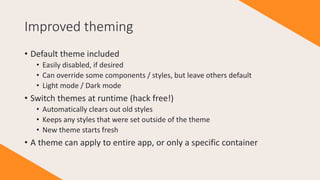
Improved theming
• Default theme included
• Easily disabled, if desired
• Can override some components / styles, but leave others default
• Light mode / Dark mode
• Switch themes at runtime (hack free!)
• Automatically clears out old styles
• Keeps any styles that were set outside of the theme
• New theme starts fresh
• A theme can apply to entire app, or only a specific container
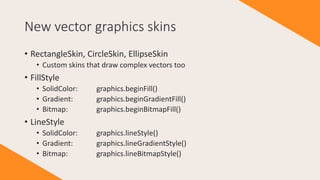
New vector graphics skins
• RectangleSkin, CircleSkin, EllipseSkin
• Custom skins that draw complex vectors too
• FillStyle
• SolidColor: graphics.beginFill()
• Gradient: graphics.beginGradientFill()
• Bitmap: graphics.beginBitmapFill()
• LineStyle
• SolidColor: graphics.lineStyle()
• Gradient: graphics.lineGradientStyle()
• Bitmap: graphics.lineBitmapStyle()
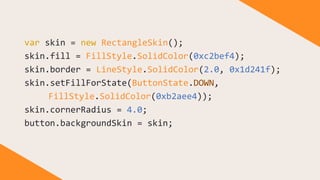
var skin = new RectangleSkin();
skin.fill = FillStyle.SolidColor(0xc2bef4);
skin.border = LineStyle.SolidColor(2.0, 0x1d241f);
skin.setFillForState(ButtonState.DOWN,
FillStyle.SolidColor(0xb2aee4));
skin.cornerRadius = 4.0;
button.backgroundSkin = skin;
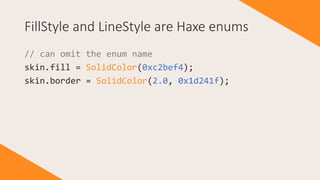
FillStyle and LineStyle are Haxe enums
// can omit the enum name
skin.fill = SolidColor(0xc2bef4);
skin.border = SolidColor(2.0, 0x1d241f);
StackNavigator improvements
• Navigate between views
• History stack
• Animated transitions
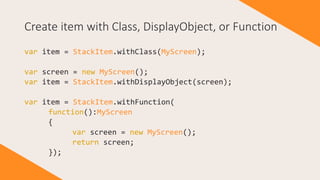
Create item with Class, DisplayObject, or Function
var item = StackItem.withClass(MyScreen);
var screen = new MyScreen();
var item = StackItem.withDisplayObject(screen);
var item = StackItem.withFunction(
function():MyScreen
{
var screen = new MyScreen();
return screen;
});
StackNavigator actions
• What to do when view dispatches an event
• Navigate in any direction
• Forward, back, back to first view, replace current
• Forward to event listener function
• Create a new action dynamically based on the event
• Map<String, StackAction>
Stack actions
StackItem.withClass(MyScreen, [
CheckoutEvent.NEXT => StackAction.Push("step2"),
CheckoutEvent.PREV => StackAction.Pop,
Event.CANCEL => StackAction.PopToRoot,
CheckoutEvent.ORDER_COMPLETE =>
StackAction.Replace("orderComplete"),
DebugEvent.LOG => StackAction.Listener(
function(event:DebugEvent):Void {
trace(event.message);
})
]);
Demo
Crowd-funding Feathers UI
• Community helps fund initial port of open source library
• Later, premium content funds continued development
• Charts / graphs, barcodes and QR codes, screencasts, ebooks
• Backer rewards include premium components
• Sign up to get notified when campaign launches:
https://feathersui.com/openfl/
Social media: @feathersui and @joshtynjala
Website: https://feathersui.com/openfl

Feathers UI for OpenFL and Haxe

  • 1.
    Presented by JoshTynjala Haxe Summit 2019 — Seattle, Washington, USA
  • 2.
    User interfaces forcreative projects • Games • Interactive data visualizations • Rich multimedia experiences
  • 3.
    Flexible • Pick onlythe components that you need • Don’t need to include the weight of the entire framework • Components can be included anywhere with addChild() • Just fancy DisplayObject subclasses • Or… build a whole app using only Feathers components • Intended for many types of devices • Mobile, desktop, smart TVs, consoles
  • 4.
  • 5.
  • 6.
    Components • Slide outdrawers • Stack / history navigator • Tab navigator • Callout / popover • Progress bars • Scroll bars • Containers with layout • Numeric stepper • Image loader • Drop-down list • Radio buttons • Toast • Tool tips • Auto-complete • Alert / Message box • Custom list item renderers
  • 7.
  • 8.
    Layouts • Horizontal, vertical,tiles • Percentage width/height • Anchors/constraints • Relative to parent container • left, right, top, bottom, horizontalCenter, verticalCenter • Virtualization of items in list boxes • Infinite scrolling, looping
  • 9.
    Styling • Just propertiesthat you can set • No setStyle() / getStyle() with strings • button.backgroundSkin = new Bitmap(bitmapData); • button.padding = 10.0; • Skins can be any DisplayObject • Bitmap, Sprite, event Feathers components — like Button • Some styles may be customized for state changes • button.setSkinForState(ButtonState.DOWN, new Bitmap(bitmapData)); • Themes • Package up skins for multiple components.
  • 10.
    Haxe and OpenFL Changesin the new version
  • 11.
    Improved naming • Shorternames • StackScreenNavigator => StackNavigator • isEnabled => enabled • Avoid conflicts with the new eco-system • Haxe List: (feathers.controls.List => ListBox) • OpenFL invalidate: (FeathersControl.invalidate() => setInvalid())
  • 12.
    Simplified text rendering •Starling version had ITextRender / ITextEditor interfaces • TextField, Flash Text Engine, Starling BitmapFont • Just uses openfl.text.TextField now
  • 13.
    Improved theming • Defaulttheme included • Easily disabled, if desired • Can override some components / styles, but leave others default • Light mode / Dark mode • Switch themes at runtime (hack free!) • Automatically clears out old styles • Keeps any styles that were set outside of the theme • New theme starts fresh • A theme can apply to entire app, or only a specific container
  • 14.
    New vector graphicsskins • RectangleSkin, CircleSkin, EllipseSkin • Custom skins that draw complex vectors too • FillStyle • SolidColor: graphics.beginFill() • Gradient: graphics.beginGradientFill() • Bitmap: graphics.beginBitmapFill() • LineStyle • SolidColor: graphics.lineStyle() • Gradient: graphics.lineGradientStyle() • Bitmap: graphics.lineBitmapStyle()
  • 15.
    var skin =new RectangleSkin(); skin.fill = FillStyle.SolidColor(0xc2bef4); skin.border = LineStyle.SolidColor(2.0, 0x1d241f); skin.setFillForState(ButtonState.DOWN, FillStyle.SolidColor(0xb2aee4)); skin.cornerRadius = 4.0; button.backgroundSkin = skin;
  • 16.
    FillStyle and LineStyleare Haxe enums // can omit the enum name skin.fill = SolidColor(0xc2bef4); skin.border = SolidColor(2.0, 0x1d241f);
  • 17.
    StackNavigator improvements • Navigatebetween views • History stack • Animated transitions
  • 18.
    Create item withClass, DisplayObject, or Function var item = StackItem.withClass(MyScreen); var screen = new MyScreen(); var item = StackItem.withDisplayObject(screen); var item = StackItem.withFunction( function():MyScreen { var screen = new MyScreen(); return screen; });
  • 19.
    StackNavigator actions • Whatto do when view dispatches an event • Navigate in any direction • Forward, back, back to first view, replace current • Forward to event listener function • Create a new action dynamically based on the event • Map<String, StackAction>
  • 20.
    Stack actions StackItem.withClass(MyScreen, [ CheckoutEvent.NEXT=> StackAction.Push("step2"), CheckoutEvent.PREV => StackAction.Pop, Event.CANCEL => StackAction.PopToRoot, CheckoutEvent.ORDER_COMPLETE => StackAction.Replace("orderComplete"), DebugEvent.LOG => StackAction.Listener( function(event:DebugEvent):Void { trace(event.message); }) ]);
  • 21.
  • 22.
    Crowd-funding Feathers UI •Community helps fund initial port of open source library • Later, premium content funds continued development • Charts / graphs, barcodes and QR codes, screencasts, ebooks • Backer rewards include premium components • Sign up to get notified when campaign launches: https://feathersui.com/openfl/
  • 23.
    Social media: @feathersuiand @joshtynjala Website: https://feathersui.com/openfl