Transcript Toss Up
1. Get into teams of 4-5
2. As a team, look at the 5 different Valley
Transcripts
3. Pretend that you are a College Admissions
Board. As a team, put them in order of
Most Likely to Least Likely to get accepted!
4. Be prepared to share your reasons!
Transcript Toss Up
• Things to think about when deciding:
– What did the candidates get on their ACT?
– What are the candidates GPA?
– What kinds of grades did the candidates get?
– Did the candidates show improvement from 9th
to 12th grade?
Can you guess who?
• One of the Transcripts belongs to a High
School Drop-out
• One of the Transcripts belongs to a Teen Mom
Your Transcript isn’t a true reflection of who you
are as a person, but it does give an impression
of who you are as a student!
What can you do to make a good
First Impression?
How to read my transcript
What does my transcript tell me?
• What courses you’ve taken
• What courses you’ve passed and failed
• How many credits you have earned
• Your GPA for each Term
• Your Cumulative GPA
• Your Credit Summary
What can my transcript help me figure
out?
• What courses you still need to take (or retake)
• If you are on track to advance to the next
grade level
• How close you are to meeting graduation
requirements
Who gets to see my transcript?
• Colleges and Universities!
– When you apply to college, you have to send them an
official transcript
• Scholarship Programs
– If you apply for scholarships, you might need to send them
an official transcript if the scholarship is grade or GPA
based
• Counselors and Teachers
– To help you stay on track to graduation!
– To help you determine the best college or post-high school
plan for you!
• You and your parents/guardians
– Your transcript is a record of your successes! Make sure
you know what it says!
So, what am I looking at?
You are looking at a version of your
UNOFFICIAL Transcript!
• The Course tells you the Course Number and
the Course Name
• These are the classes you have taken and
received a grade for.
• The Course numbers tell you if it is Part A or Part B of a
class
• Numbers ending in 4 = Part A
• Numbers ending in 5 = Part B
• Numbers ending in 6 = Part C (for Year Long Courses)
• The Mark is the letter grade you received for
each class.
• The Weight is how many credits each course is
worth.
• At Valley, each trimester class is worth ½ credit.
• Credit is how many credits you earned for each
class you took.
• So if you passed, you get 0.5 credits.
• If you failed you get 0.0 credits.
• Term tells you during what grading period you
took those classes and earned those marks.
Term 2 = 1st Tri Term 4 = 2nd Tri Term 6 = 3rd Tri
Term 7 = Summer School and/or ESS
• Credit (at the bottom) tells you how many
credits you earned for just that Term.
• GPA tells you your Grade Point Average for just
that Term
• Your GPA is an average of your Marks:
A=4 B=3 C=2 D=1 U=0
• The section called GPA Summary shows your
Cumulative GPA – which is your total GPA for all
of your classes during high school
• Weighted just means that if you are in AP,
Advanced, or Honors classes, you have been
given GPA “Bonus Points”
• The section called Credit Summary tells you how many
Credits you have earned in the different category of
classes towards Graduation Requirements
• It is a general guide, not an official count!
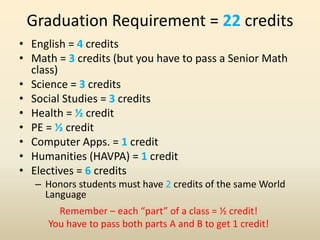
Graduation Requirement = 22 credits
• English = 4 credits
• Math = 3 credits (but you have to pass a Senior Math
class)
• Science = 3 credits
• Social Studies = 3 credits
• Health = ½ credit
• PE = ½ credit
• Computer Apps. = 1 credit
• Humanities (HAVPA) = 1 credit
• Electives = 6 credits
– Honors students must have 2 credits of the same World
Language
Remember – each “part” of a class = ½ credit!
You have to pass both parts A and B to get 1 credit!
What grade am I in?
• Your grade level is based on how many credits you
have earned:
10th = 5 credits
11th = 11 credits
12th = 16 credits
Graduate = 22
It is possible to get more than 22 credits.
It is possible to change grade levels mid-year
– although it will only be done at the
1st Trimester Report Card!
Filling out your Lack Card
What is a Working Lack Card
• A Lack Card is something the counselors use
to keep track of what classes you have already
passed, and which ones you need to take.
• It’s like a Graduation Requirement Check List
• We call it “Working” because you add on to it
all year long
A Note on Class Names:
• As long as the name of the course has the
Required Course name in it, it counts!
• Ex) – AP U.S. History COUNTS as US History
• Ex) – AP English Language and Composition
COUNTS as English 3
Abbreviation Key
• SS/Ex Civ = Survey of Social Studies OR Exploring Civics
• WC = World Civilization
• Gov = Government
• Literacy Lab = Eng Lab / Reading
• Eng Sp. Topics = ACT Prep OR Eng Intern Sr Sem
• US = U.S. History
• Bio-INT = Biology Intervention
• Humanities = History Arts HAVPA
• HNR = Honors
• AP = Advanced Placement
• ADV = Advanced Program
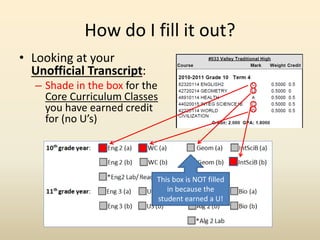
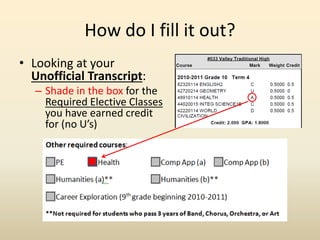
How do I fill it out?
• Looking at your
Unofficial Transcript:
– Shade in the box for the
Core Curriculum Classes
you have earned credit
for (no U’s)
This box is NOT filled
in because the
student earned a U!
How do I fill it out?
• Looking at your
Unofficial Transcript:
– Shade in the box for the
Required Elective Classes
you have earned credit
for (no U’s)
How do I fill it out?
• Looking at your Unofficial Transcript:
– Write in any other Elective classes on the lines
provided
– If it doesn’t have its own box, it’s an Elective!
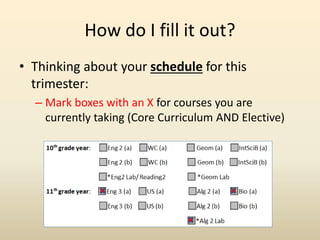
How do I fill it out?
• Thinking about your schedule for this
trimester:
– Mark boxes with an X for courses you are
currently taking (Core Curriculum AND Elective)
How do I fill it out?
• Thinking about your schedule for this trimester:
– Write in any Elective classes you are currently taking
– Circle its number.
What’s the point of this, again?
• The point is to give you a visual representation
of what classes you need to take and pass in
order to graduate – especially if you are a
Senior!
• Unless you are a Senior, you will use this Lack
Card when you do Schedule Requests for next
year!
• Take responsibility for your own education!
Know what you need to do and do it!
You only get one chance to make
a good first impression!
The BIG Questions
• What does your transcript say about you?
• Is it an accurate reflection of how you are as a
student? As a person?
• What does it NOT say about who you are?
• What accomplishments does it NOT reflect?
• What can you do to create a better picture of
who you really are?
Set a SMART Goal!
• S= Specific: focused, not vague or general
• M= Measurable: you will know for sure when
you have reached your goal
• A= Appropriate: related to your grades or
academic achievement
• R= Realistic: the goal is doable, but still
ambitious
• T= Timebound: you have a date picked out for
when you want to have achieved your goal

How to read your transcript 2012 2013

  • 1.
    Transcript Toss Up 1.Get into teams of 4-5 2. As a team, look at the 5 different Valley Transcripts 3. Pretend that you are a College Admissions Board. As a team, put them in order of Most Likely to Least Likely to get accepted! 4. Be prepared to share your reasons!
  • 2.
    Transcript Toss Up •Things to think about when deciding: – What did the candidates get on their ACT? – What are the candidates GPA? – What kinds of grades did the candidates get? – Did the candidates show improvement from 9th to 12th grade?
  • 3.
    Can you guesswho? • One of the Transcripts belongs to a High School Drop-out • One of the Transcripts belongs to a Teen Mom Your Transcript isn’t a true reflection of who you are as a person, but it does give an impression of who you are as a student! What can you do to make a good First Impression?
  • 4.
    How to readmy transcript
  • 5.
    What does mytranscript tell me? • What courses you’ve taken • What courses you’ve passed and failed • How many credits you have earned • Your GPA for each Term • Your Cumulative GPA • Your Credit Summary
  • 6.
    What can mytranscript help me figure out? • What courses you still need to take (or retake) • If you are on track to advance to the next grade level • How close you are to meeting graduation requirements
  • 7.
    Who gets tosee my transcript? • Colleges and Universities! – When you apply to college, you have to send them an official transcript • Scholarship Programs – If you apply for scholarships, you might need to send them an official transcript if the scholarship is grade or GPA based • Counselors and Teachers – To help you stay on track to graduation! – To help you determine the best college or post-high school plan for you! • You and your parents/guardians – Your transcript is a record of your successes! Make sure you know what it says!
  • 8.
    So, what amI looking at? You are looking at a version of your UNOFFICIAL Transcript!
  • 9.
    • The Coursetells you the Course Number and the Course Name • These are the classes you have taken and received a grade for.
  • 10.
    • The Coursenumbers tell you if it is Part A or Part B of a class • Numbers ending in 4 = Part A • Numbers ending in 5 = Part B • Numbers ending in 6 = Part C (for Year Long Courses)
  • 11.
    • The Markis the letter grade you received for each class.
  • 12.
    • The Weightis how many credits each course is worth. • At Valley, each trimester class is worth ½ credit.
  • 13.
    • Credit ishow many credits you earned for each class you took. • So if you passed, you get 0.5 credits. • If you failed you get 0.0 credits.
  • 14.
    • Term tellsyou during what grading period you took those classes and earned those marks. Term 2 = 1st Tri Term 4 = 2nd Tri Term 6 = 3rd Tri Term 7 = Summer School and/or ESS
  • 15.
    • Credit (atthe bottom) tells you how many credits you earned for just that Term.
  • 16.
    • GPA tellsyou your Grade Point Average for just that Term • Your GPA is an average of your Marks: A=4 B=3 C=2 D=1 U=0
  • 17.
    • The sectioncalled GPA Summary shows your Cumulative GPA – which is your total GPA for all of your classes during high school • Weighted just means that if you are in AP, Advanced, or Honors classes, you have been given GPA “Bonus Points”
  • 18.
    • The sectioncalled Credit Summary tells you how many Credits you have earned in the different category of classes towards Graduation Requirements • It is a general guide, not an official count!
  • 19.
    Graduation Requirement =22 credits • English = 4 credits • Math = 3 credits (but you have to pass a Senior Math class) • Science = 3 credits • Social Studies = 3 credits • Health = ½ credit • PE = ½ credit • Computer Apps. = 1 credit • Humanities (HAVPA) = 1 credit • Electives = 6 credits – Honors students must have 2 credits of the same World Language Remember – each “part” of a class = ½ credit! You have to pass both parts A and B to get 1 credit!
  • 20.
    What grade amI in? • Your grade level is based on how many credits you have earned: 10th = 5 credits 11th = 11 credits 12th = 16 credits Graduate = 22 It is possible to get more than 22 credits. It is possible to change grade levels mid-year – although it will only be done at the 1st Trimester Report Card!
  • 21.
  • 22.
    What is aWorking Lack Card • A Lack Card is something the counselors use to keep track of what classes you have already passed, and which ones you need to take. • It’s like a Graduation Requirement Check List • We call it “Working” because you add on to it all year long
  • 23.
    A Note onClass Names: • As long as the name of the course has the Required Course name in it, it counts! • Ex) – AP U.S. History COUNTS as US History • Ex) – AP English Language and Composition COUNTS as English 3
  • 24.
    Abbreviation Key • SS/ExCiv = Survey of Social Studies OR Exploring Civics • WC = World Civilization • Gov = Government • Literacy Lab = Eng Lab / Reading • Eng Sp. Topics = ACT Prep OR Eng Intern Sr Sem • US = U.S. History • Bio-INT = Biology Intervention • Humanities = History Arts HAVPA • HNR = Honors • AP = Advanced Placement • ADV = Advanced Program
  • 25.
    How do Ifill it out? • Looking at your Unofficial Transcript: – Shade in the box for the Core Curriculum Classes you have earned credit for (no U’s) This box is NOT filled in because the student earned a U!
  • 26.
    How do Ifill it out? • Looking at your Unofficial Transcript: – Shade in the box for the Required Elective Classes you have earned credit for (no U’s)
  • 27.
    How do Ifill it out? • Looking at your Unofficial Transcript: – Write in any other Elective classes on the lines provided – If it doesn’t have its own box, it’s an Elective!
  • 28.
    How do Ifill it out? • Thinking about your schedule for this trimester: – Mark boxes with an X for courses you are currently taking (Core Curriculum AND Elective)
  • 29.
    How do Ifill it out? • Thinking about your schedule for this trimester: – Write in any Elective classes you are currently taking – Circle its number.
  • 30.
    What’s the pointof this, again? • The point is to give you a visual representation of what classes you need to take and pass in order to graduate – especially if you are a Senior! • Unless you are a Senior, you will use this Lack Card when you do Schedule Requests for next year! • Take responsibility for your own education! Know what you need to do and do it!
  • 31.
    You only getone chance to make a good first impression!
  • 32.
    The BIG Questions •What does your transcript say about you? • Is it an accurate reflection of how you are as a student? As a person? • What does it NOT say about who you are? • What accomplishments does it NOT reflect? • What can you do to create a better picture of who you really are?
  • 33.
    Set a SMARTGoal! • S= Specific: focused, not vague or general • M= Measurable: you will know for sure when you have reached your goal • A= Appropriate: related to your grades or academic achievement • R= Realistic: the goal is doable, but still ambitious • T= Timebound: you have a date picked out for when you want to have achieved your goal