Outline
IS400: Development of Business Applications on the Internet
Fall 2004
Instructor: Dr. Boris Jukic
JavaScript: Introduction
to Scripting
Topics Covered
 Writing simple JavaScript programs.
 Using input and output statements
 Basic memory concepts.
 Arithmetic operators.
 Decision-making statements.
 Relational and equality operators.
Introduction
 JavaScript scripting language
– Client-side scripting enhances functionality and
appearance
 Makes pages more dynamic and interactive
 Pages can produce immediate response without
contacting a server
 Customization is possible on the basis of users’ explicit
and implicit input
 Browser has to have a built-in (JavaScript) interpreter
– Foundation for complex server-side scripting
JavaScript: Object-Based Language
 There are three object categories in JavaScript:
Native Objects, Host Objects, and User-Defined
Objects.
– Native objects: defined by JavaScript.
 String, Number, Array, Image, Date, Math, etc.
– Host objects : supplied and always available to JavaScript
by the browser environment.
 window, document, forms, etc.
– User-defined objects : defined by the author/programmer
 Initially, we will use host objects created by the
browser and their methods and properties
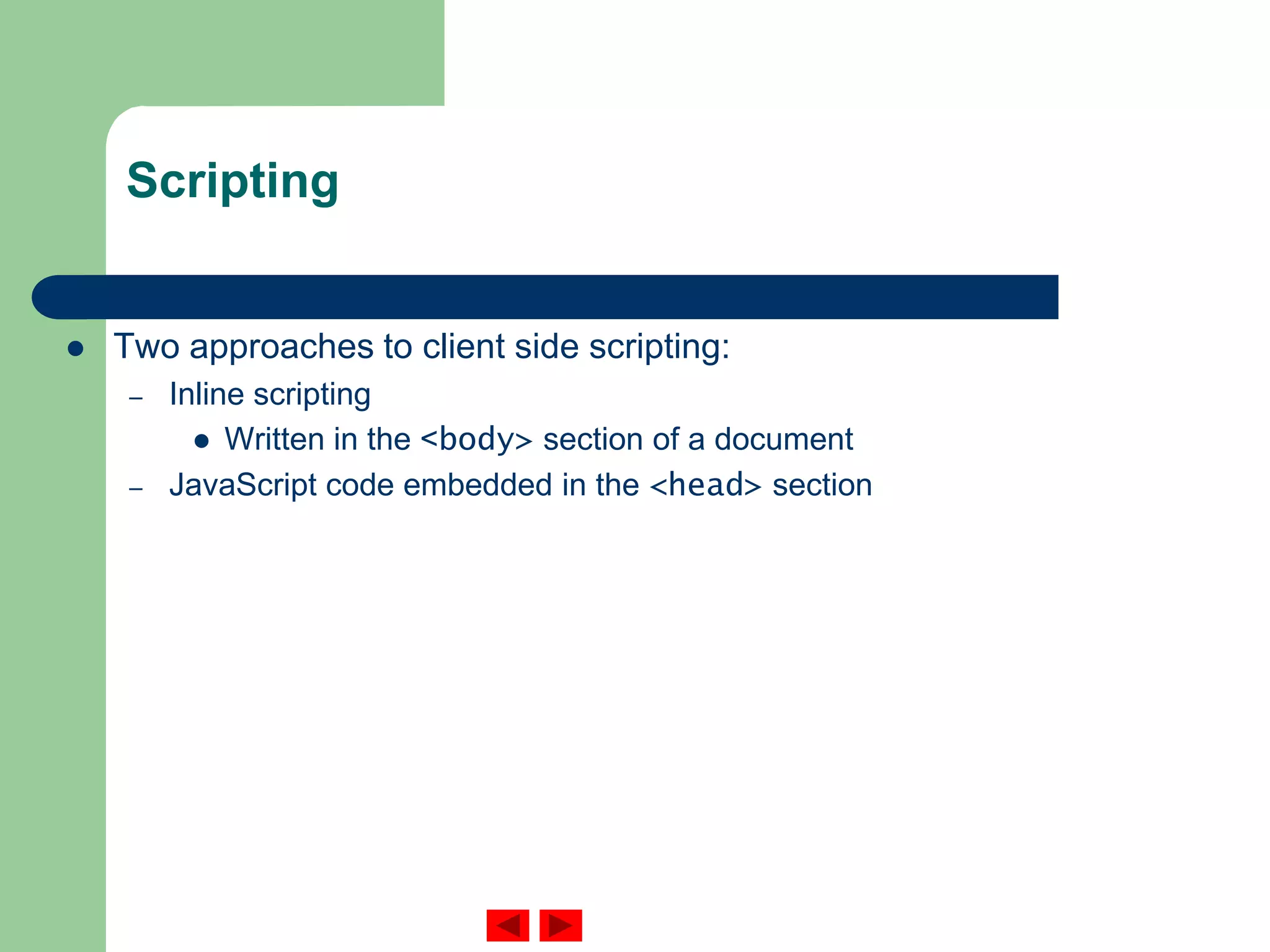
Scripting
 Two approaches to client side scripting:
– Inline scripting
 Written in the <body> section of a document
– JavaScript code embedded in the <head> section
Scripting
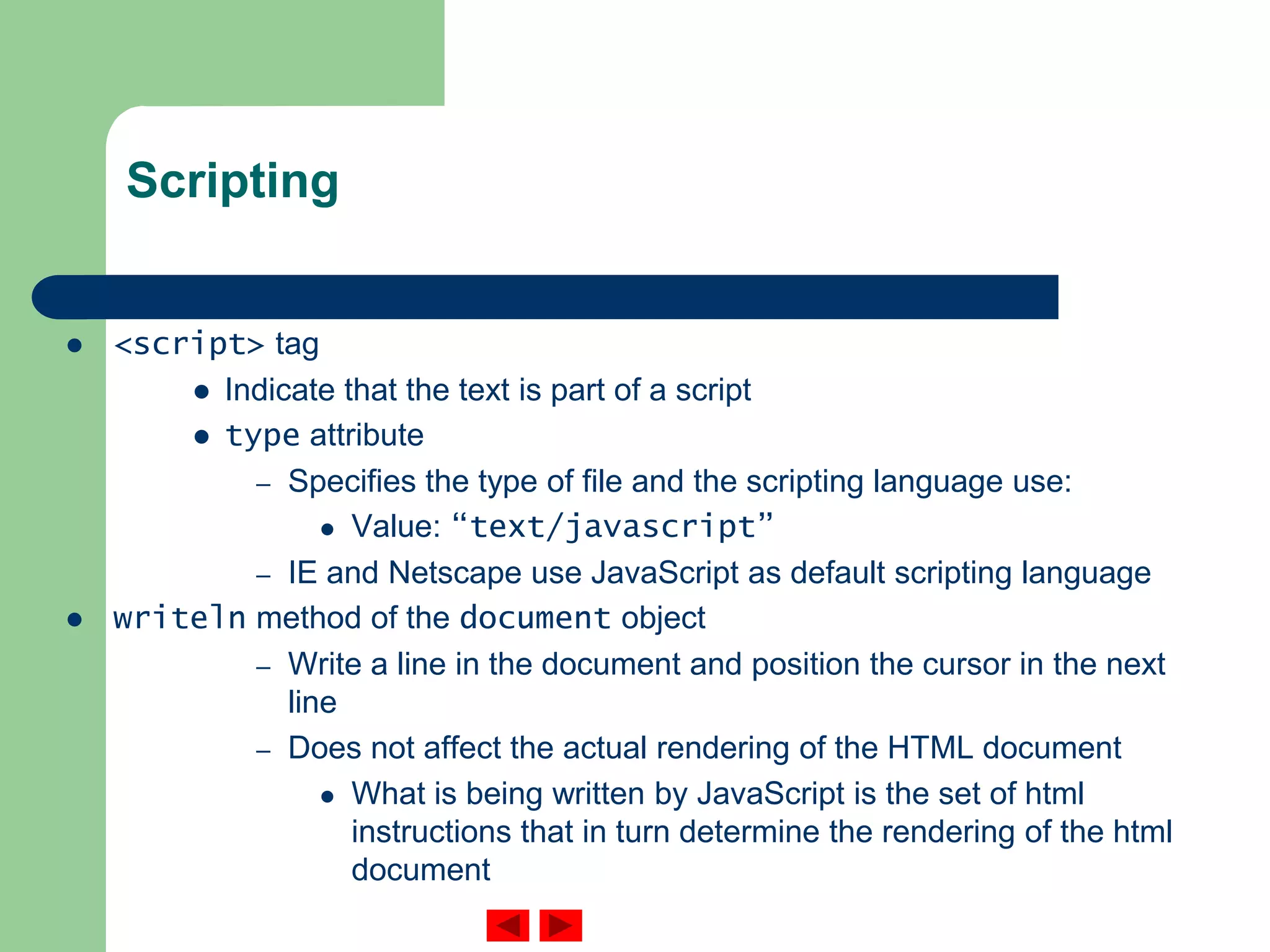
 <script> tag
 Indicate that the text is part of a script
 type attribute
– Specifies the type of file and the scripting language use:
 Value: “text/javascript”
– IE and Netscape use JavaScript as default scripting language
 writeln method of the document object
– Write a line in the document and position the cursor in the next
line
– Does not affect the actual rendering of the HTML document
 What is being written by JavaScript is the set of html
instructions that in turn determine the rendering of the html
document
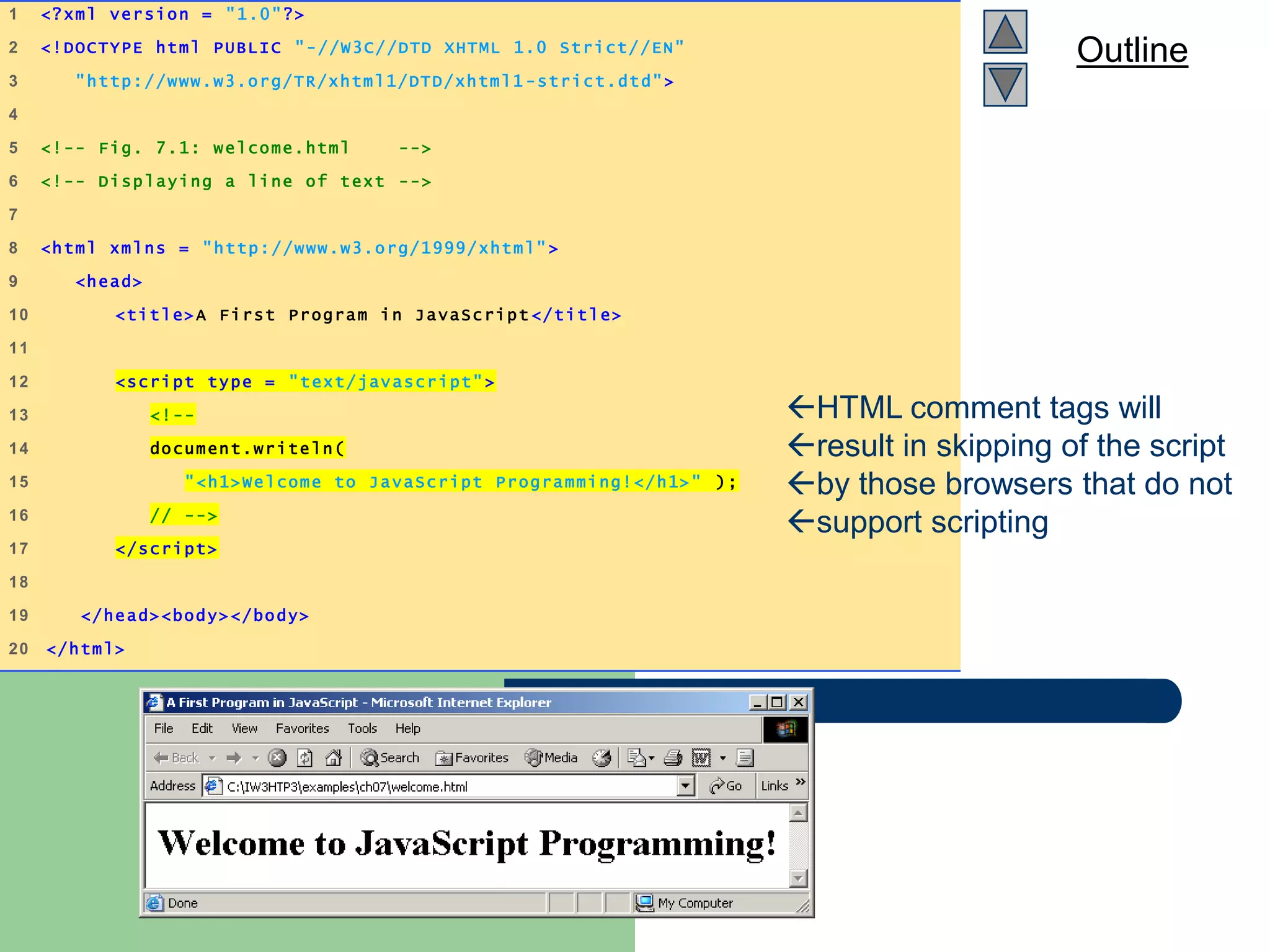
Outline
welcome.html
(1 of 1)
1 <?xml version = "1.0"?>
2 <!DOCTYPE html PUBLIC "-//W3C//DTD XHTML 1.0 Strict//EN"
3 "http://www.w3.org/TR/xhtml1/DTD/xhtml1 -strict.dtd">
4
5 <!-- Fig. 7.1: welcome.html -->
6 <!-- Displaying a line of text -->
7
8 <html xmlns = "http://www.w3.org/1999/xhtml" >
9 <head>
10 <title>A First Program in JavaScript </title>
11
12 <script type = "text/javascript" >
13 <!--
14 document.writeln(
15 "<h1>Welcome to JavaScript Programming!</h1>" );
16 // -->
17 </script>
18
19 </head><body></body>
20 </html>
HTML comment tags will
result in skipping of the script
by those browsers that do not
support scripting
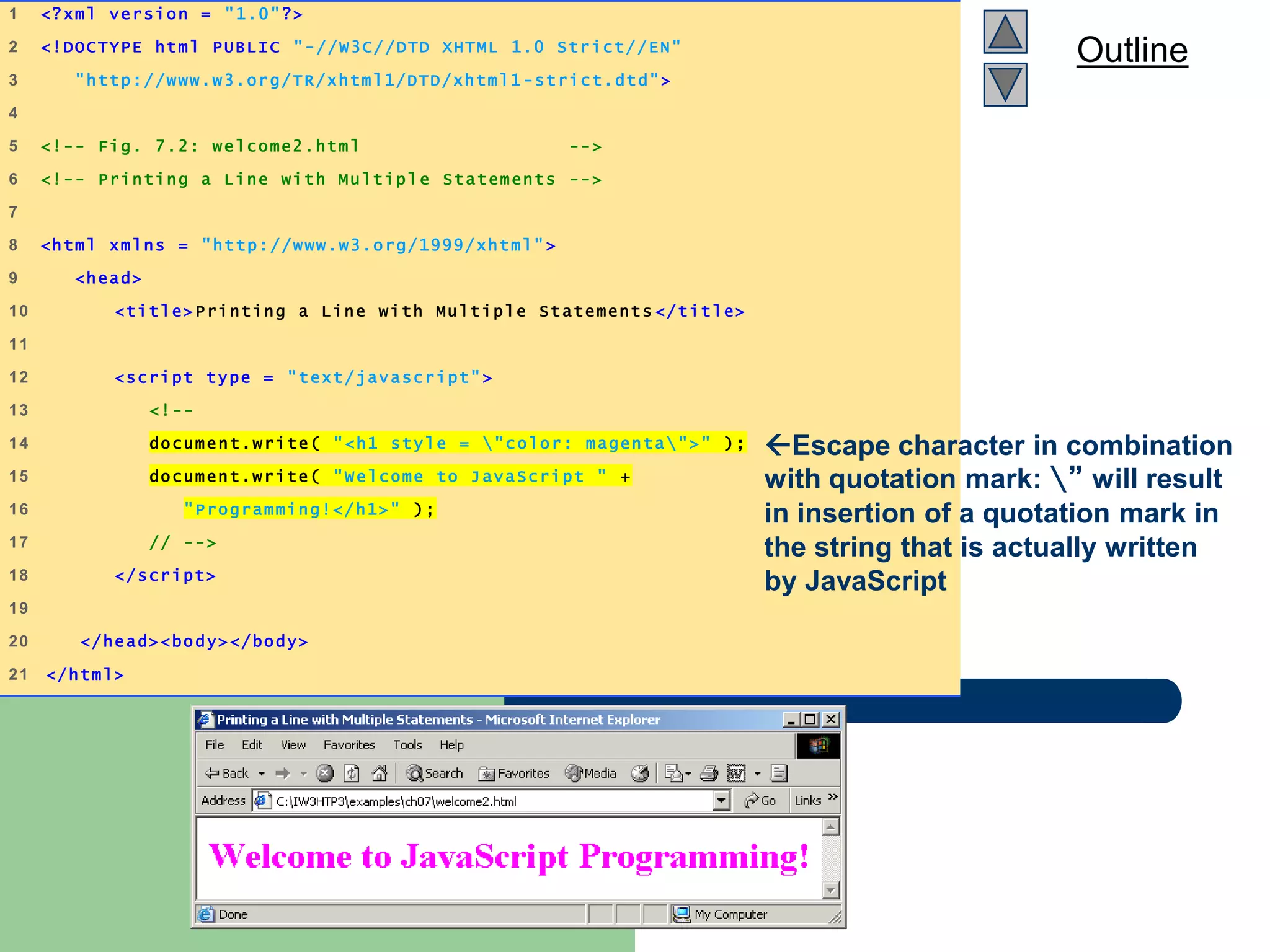
Outline
welcome2.html
(1 of 1)
1 <?xml version = "1.0"?>
2 <!DOCTYPE html PUBLIC "-//W3C//DTD XHTML 1.0 Strict//EN"
3 "http://www.w3.org/TR/xhtml1/DTD/xhtml1 -strict.dtd">
4
5 <!-- Fig. 7.2: welcome2.html -->
6 <!-- Printing a Line with Multipl e Statements -->
7
8 <html xmlns = "http://www.w3.org/1999/xhtml" >
9 <head>
10 <title>Printing a Line with Multiple Statements </title>
11
12 <script type = "text/javascript" >
13 <!--
14 document.write( "<h1 style = "color: magenta">" );
15 document.write( "Welcome to JavaScript " +
16 "Programming!</h1>" );
17 // -->
18 </script>
19
20 </head><body></body>
21 </html>
Escape character in combination
with quotation mark: ” will result
in insertion of a quotation mark in
the string that is actually written
by JavaScript
Outline
welcome3.html
1 of 1
1 <?xml version = "1.0"?>
2 <!DOCTYPE html PUBLIC "-//W3C//DTD XHTML 1.0 Strict//EN"
3 "http://www.w3.org/TR/xhtml1/DTD/xhtml1 -strict.dtd">
4
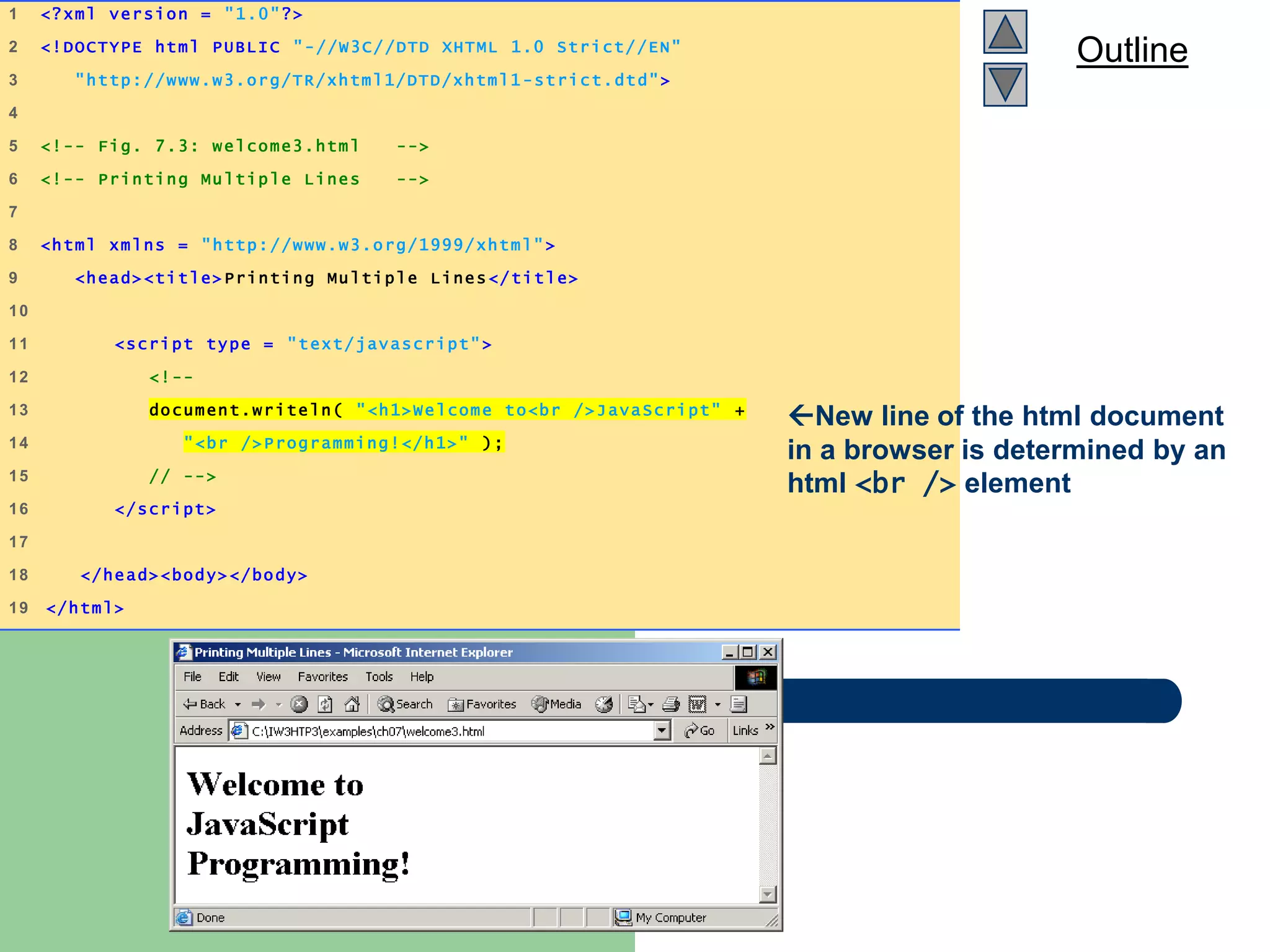
5 <!-- Fig. 7.3: welcome3.html -->
6 <!-- Printing Multiple Lines -->
7
8 <html xmlns = "http://www.w3.org/1999/xhtml" >
9 <head><title>Printing Multiple Lines</title>
10
11 <script type = "text/javascript">
12 <!--
13 document.writeln( "<h1>Welcome to<br />JavaScript" +
14 "<br />Programming!</h1>" );
15 // -->
16 </script>
17
18 </head><body></body>
19 </html>
New line of the html document
in a browser is determined by an
html <br /> element
Outline
welcome4.html
1 of 1
1 <?xml version = "1.0"?>
2 <!DOCTYPE html PUBLIC "-//W3C//DTD XHTML 1.0 Strict//EN"
3 "http://www.w3.org/TR/xhtml1/DTD/xhtml1 -strict.dtd">
4
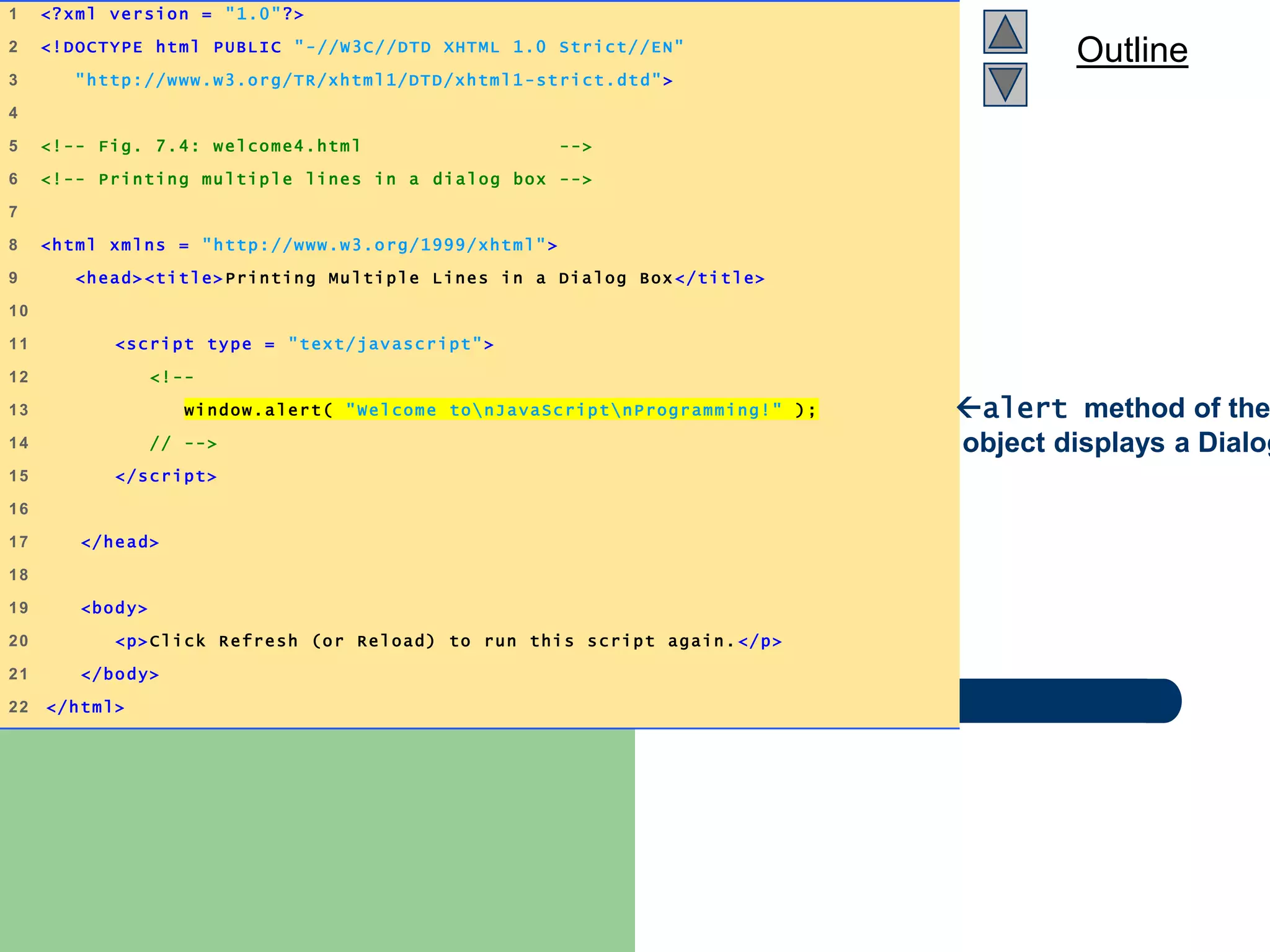
5 <!-- Fig. 7.4: welcome4.html -->
6 <!-- Printing multiple lines in a dialog box -->
7
8 <html xmlns = "http://www.w3.org/1999/xhtml">
9 <head><title>Printing Multiple Lines in a Dialog Box </title>
10
11 <script type = "text/javascript">
12 <!--
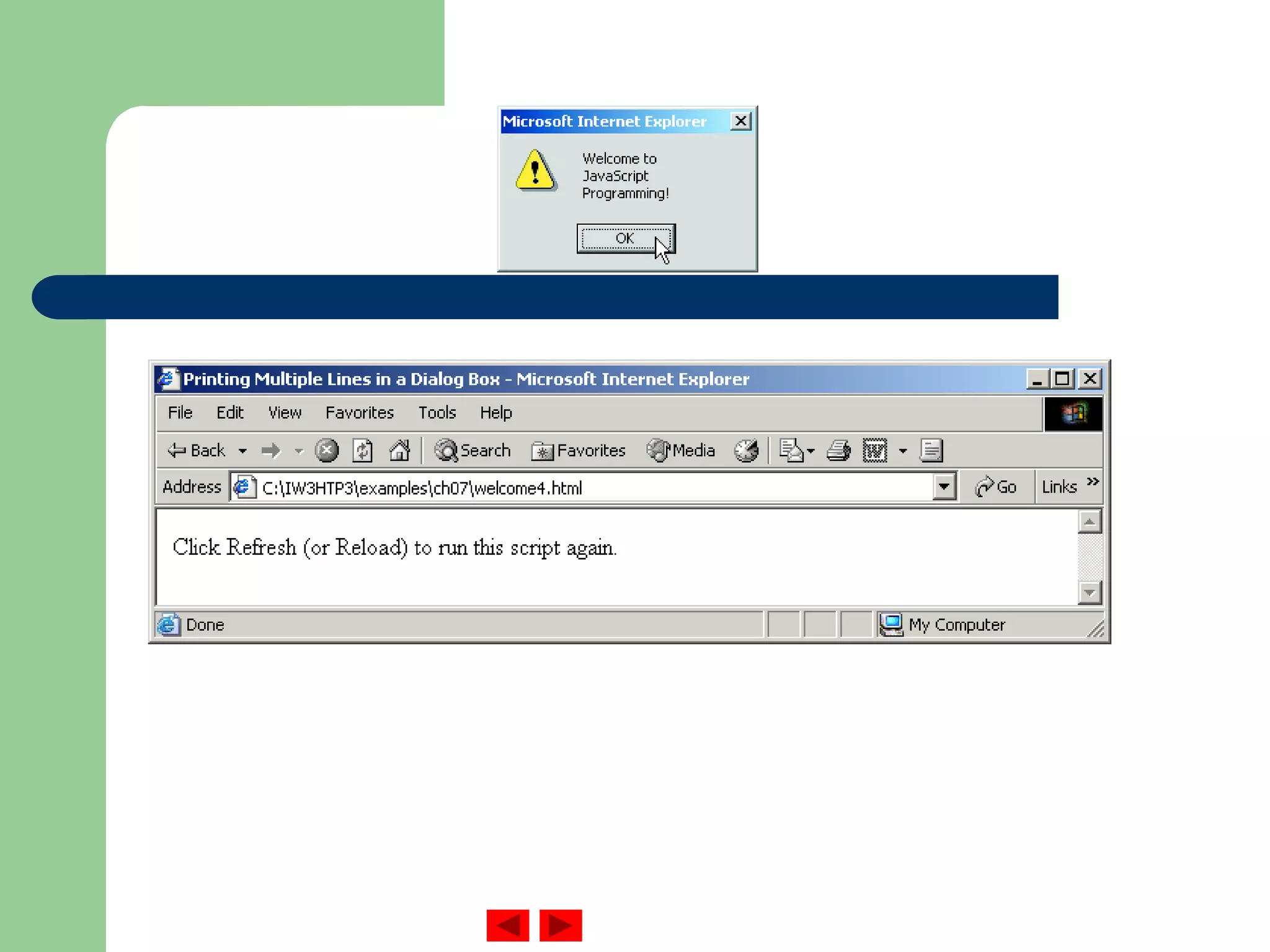
13 window.alert( "Welcome tonJavaScriptnProgramming!" );
14 // -->
15 </script>
16
17 </head>
18
19 <body>
20 <p>Click Refresh (or Reload) to run this script again. </p>
21 </body>
22 </html>
alert method of the
object displays a Dialog
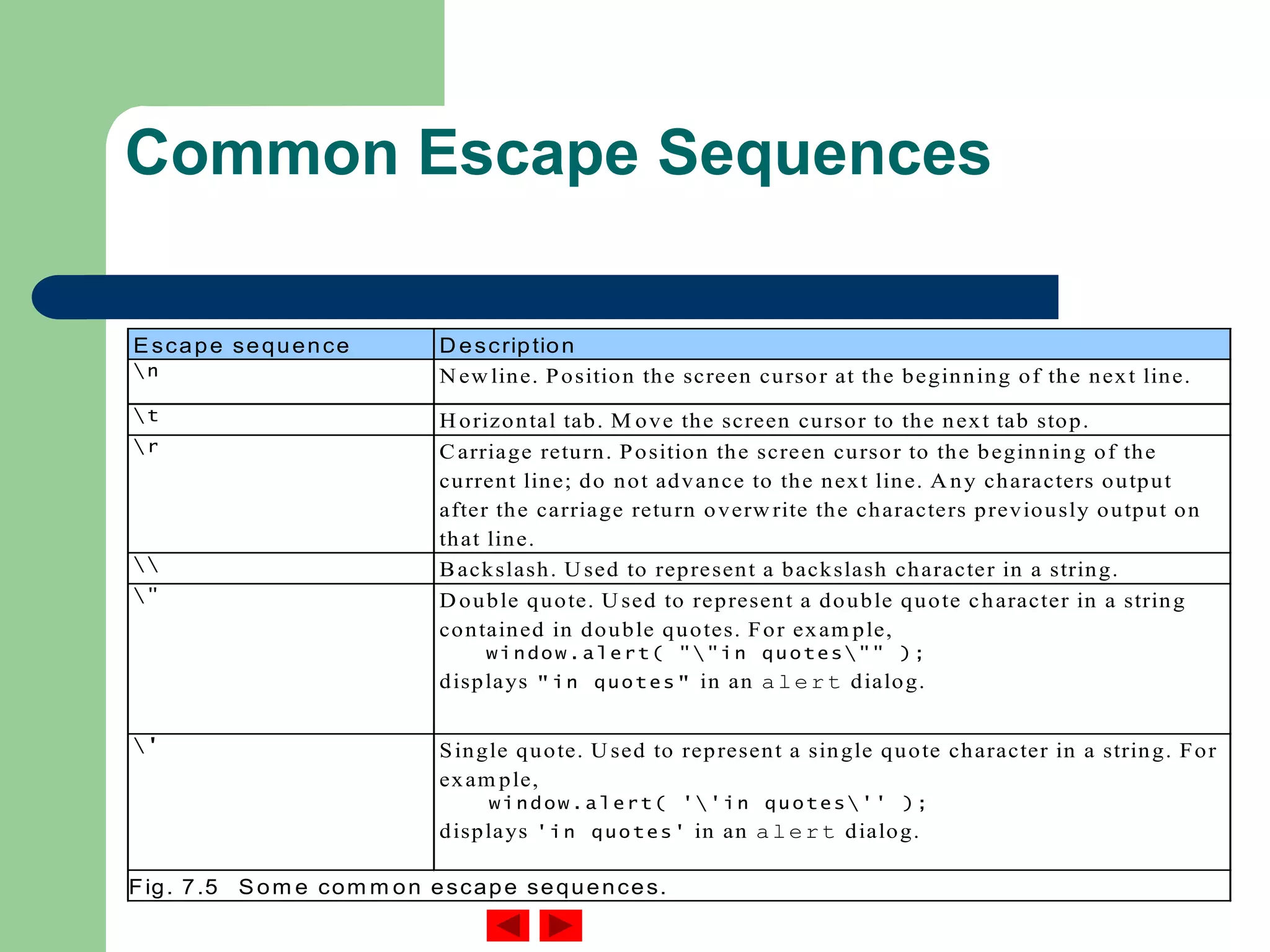
Common Escape Sequences
Escape sequence D escription
n N ew line. Position the screen cursor at the beginning of the next line.
t H orizontal tab. M ove the screen cursor to the next tab stop.
r Carriage return. Position the screen cursor to the beginning of the
current line; do not advance to the next line. A ny characters output
after the carriage return overw rite the characters previously output on
that line.
 Backslash. U sed to represent a backslash character in a string.
" D ouble quote. U sed to represent a double quote character in a string
contained in double quotes. For exam ple,
window.alert( ""in quotes"" );
displays "in quotes" in an alert dialog.
' Single quote. U sed to represent a single quote character in a string. For
exam ple,
window.alert( ''in quotes'' );
displays 'in quotes' in an alert dialog.
Fig. 7.5 Som e com m on escape sequences.
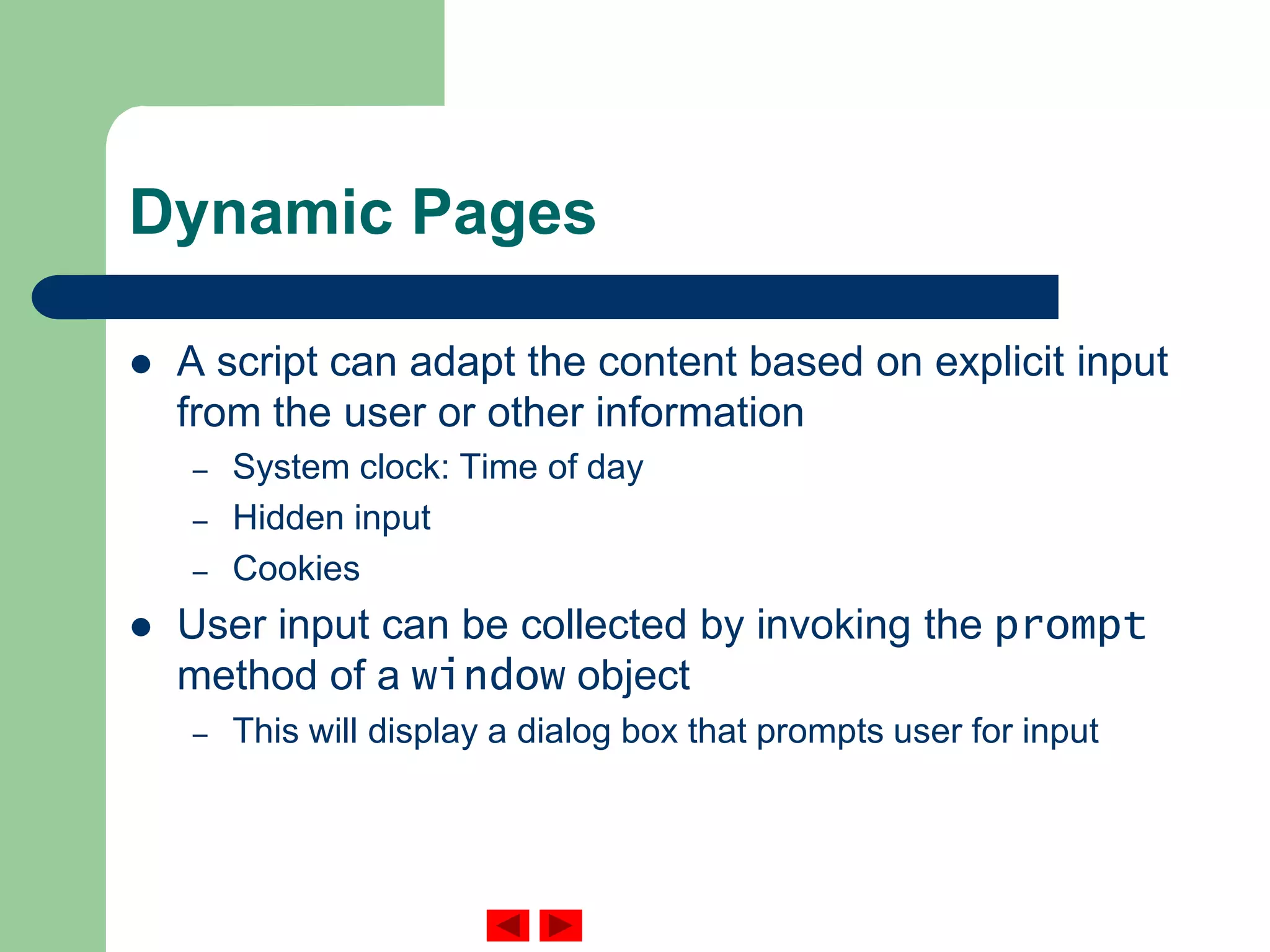
Dynamic Pages
 A script can adapt the content based on explicit input
from the user or other information
– System clock: Time of day
– Hidden input
– Cookies
 User input can be collected by invoking the prompt
method of a window object
– This will display a dialog box that prompts user for input
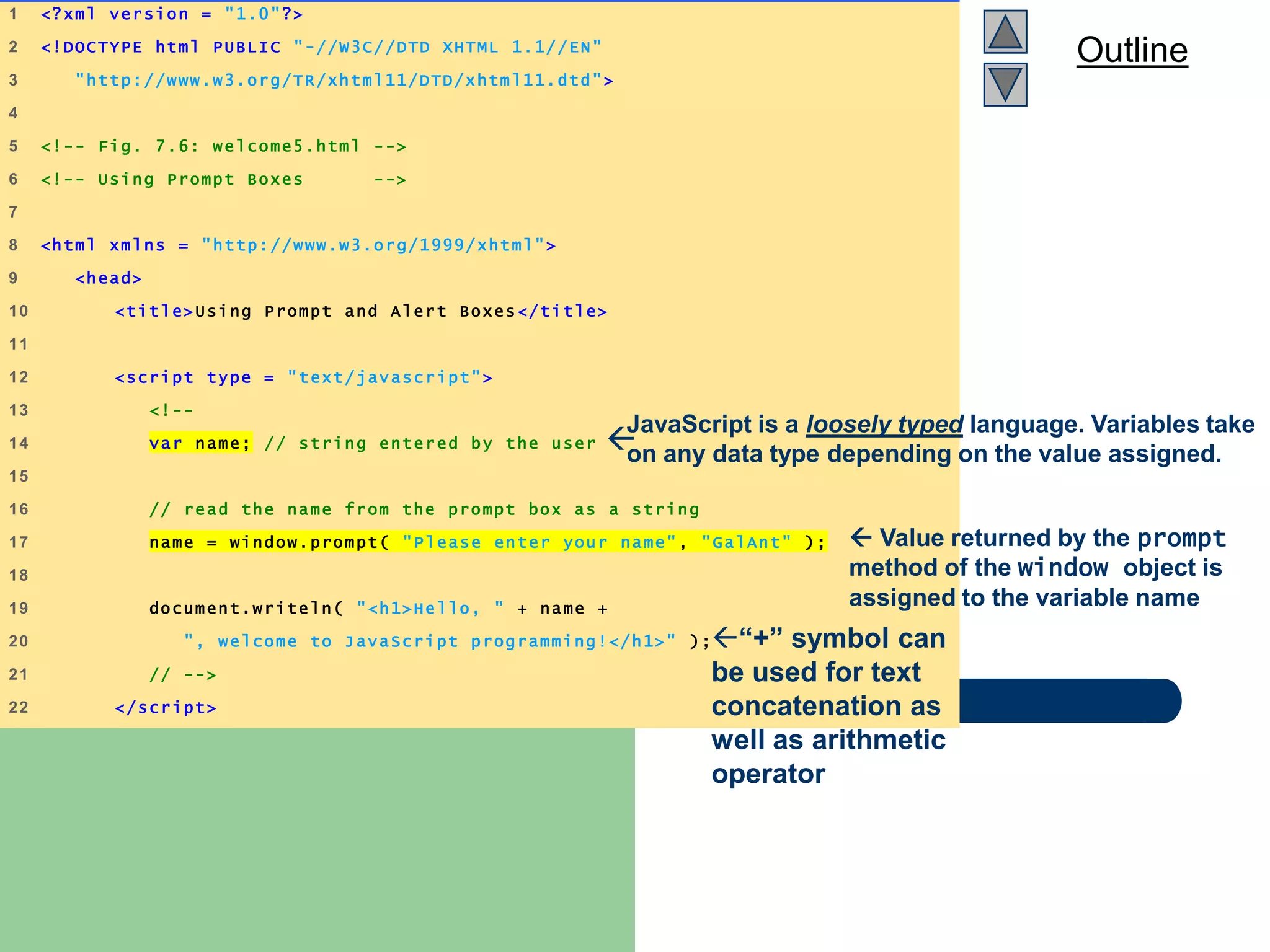
Outline
welcome5.html
(1 of 2)
1 <?xml version = "1.0"?>
2 <!DOCTYPE html PUBLIC "-//W3C//DTD XHTML 1.1//EN"
3 "http://www.w3.org/TR/xhtml11/DTD/xhtml11.dtd">
4
5 <!-- Fig. 7.6: welcome5.html -->
6 <!-- Using Prompt Boxes -->
7
8 <html xmlns = "http://www.w3.org/1999/xhtml">
9 <head>
10 <title>Using Prompt and Alert Boxes</title>
11
12 <script type = "text/javascript">
13 <!--
14 var name; // string entered by the user
15
16 // read the name from the prompt box as a string
17 name = window.prompt( "Please enter your name", "GalAnt" );
18
19 document.writeln( "<h1>Hello, " + name +
20 ", welcome to JavaScript programming!</h1>" );
21 // -->
22 </script>
JavaScript is a loosely typed language. Variables take
on any data type depending on the value assigned.
 Value returned by the prompt
method of the window object is
assigned to the variable name
“+” symbol can
be used for text
concatenation as
well as arithmetic
operator
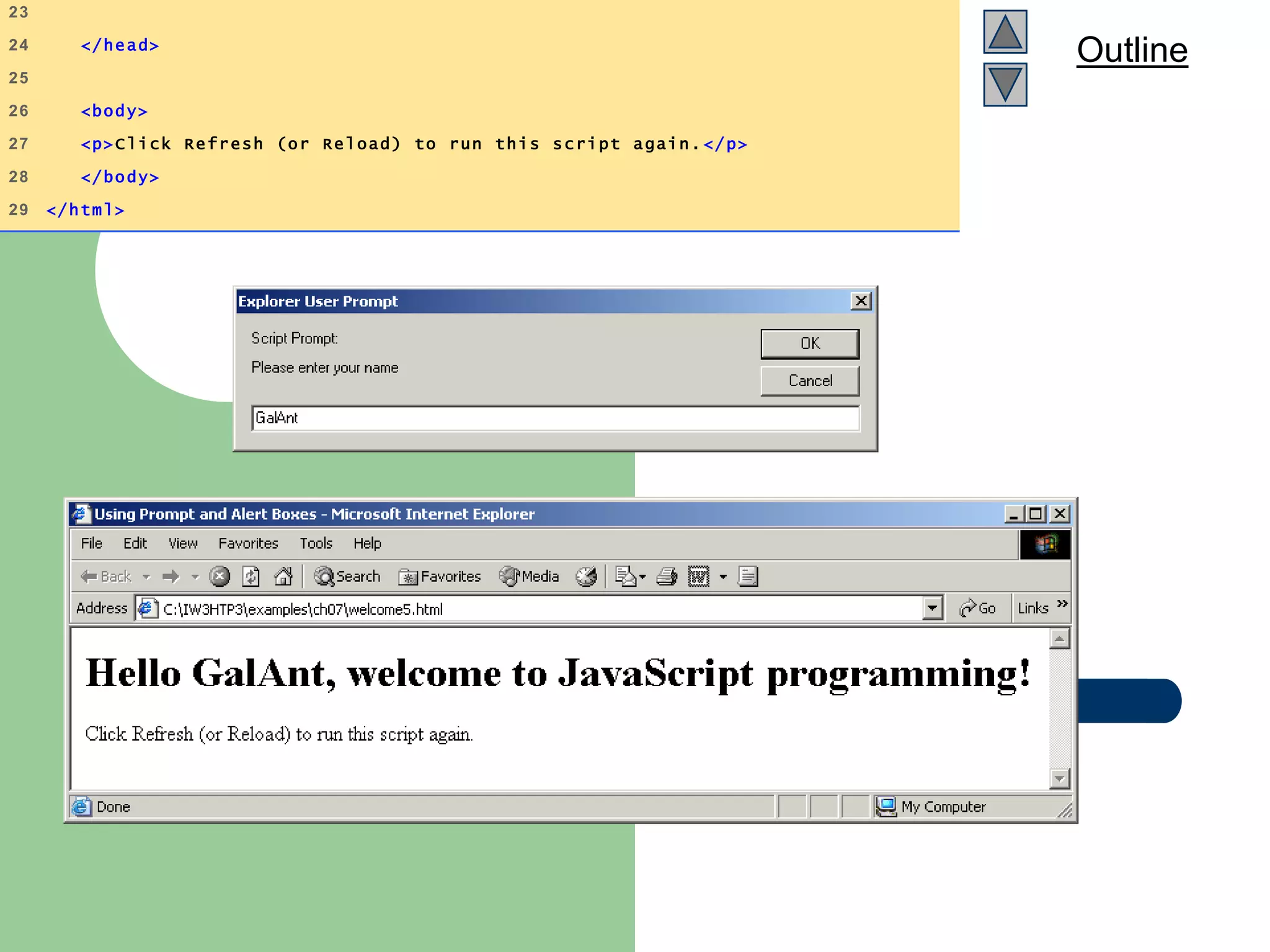
Outline
23
24 </head>
25
26 <body>
27 <p>Click Refresh (or Reload) to run this script again. </p>
28 </body>
29 </html>
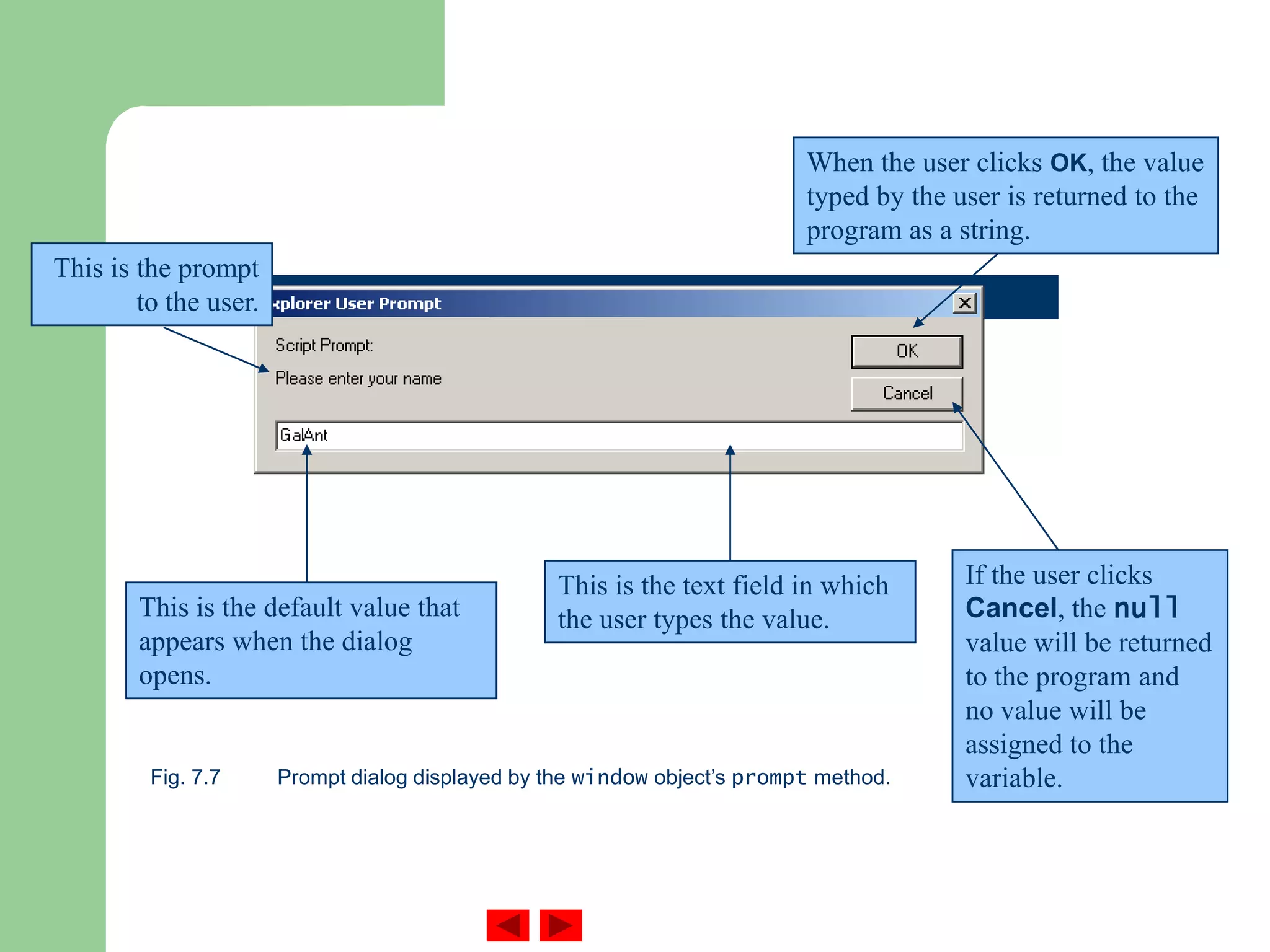
Fig. 7.7 Prompt dialog displayed by the window object’s prompt method.
This is the prompt
to the user.
This is the default value that
appears when the dialog
opens.
This is the text field in which
the user types the value.
When the user clicks OK, the value
typed by the user is returned to the
program as a string.
If the user clicks
Cancel, the null
value will be returned
to the program and
no value will be
assigned to the
variable.
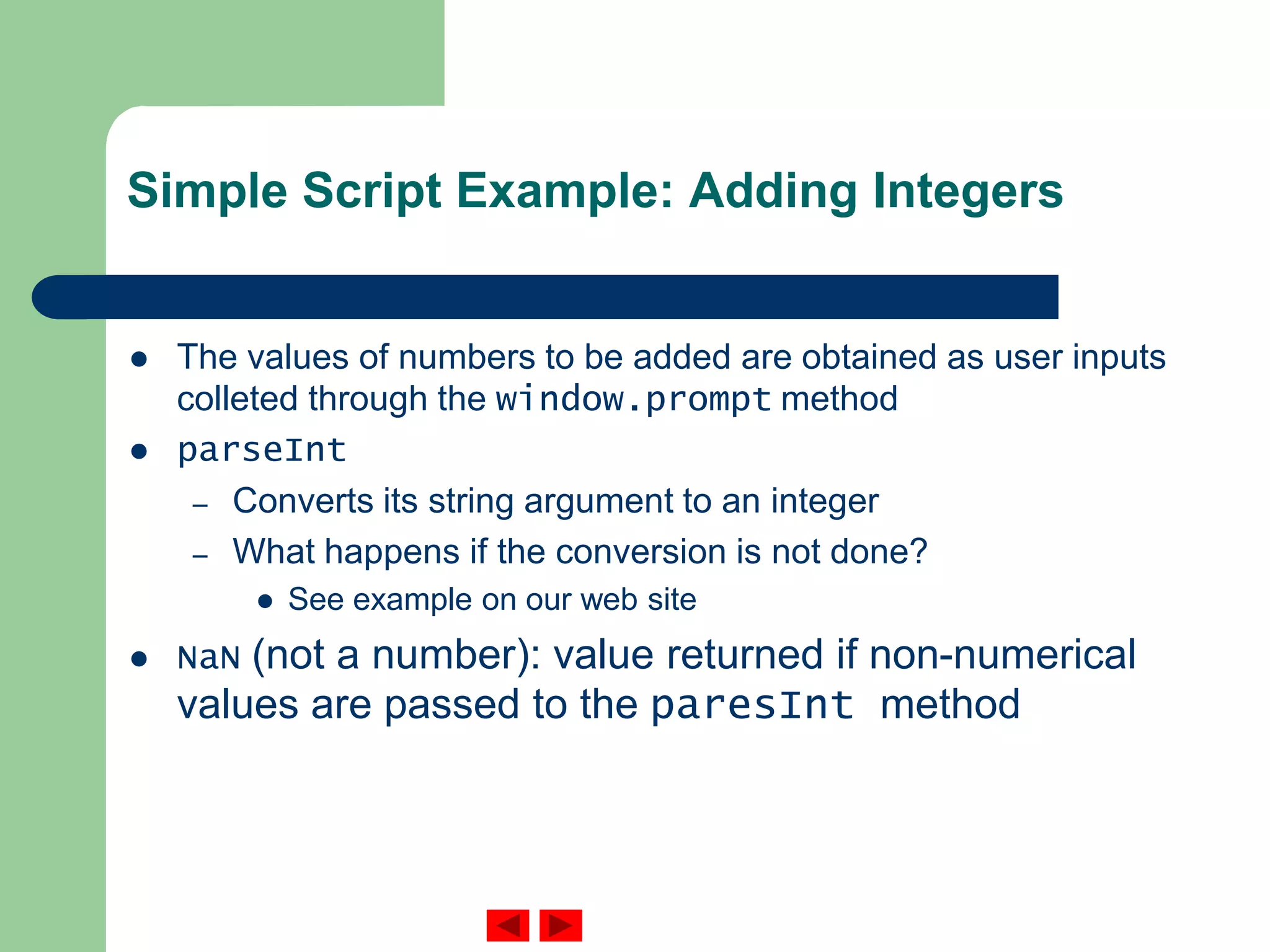
Simple Script Example: Adding Integers
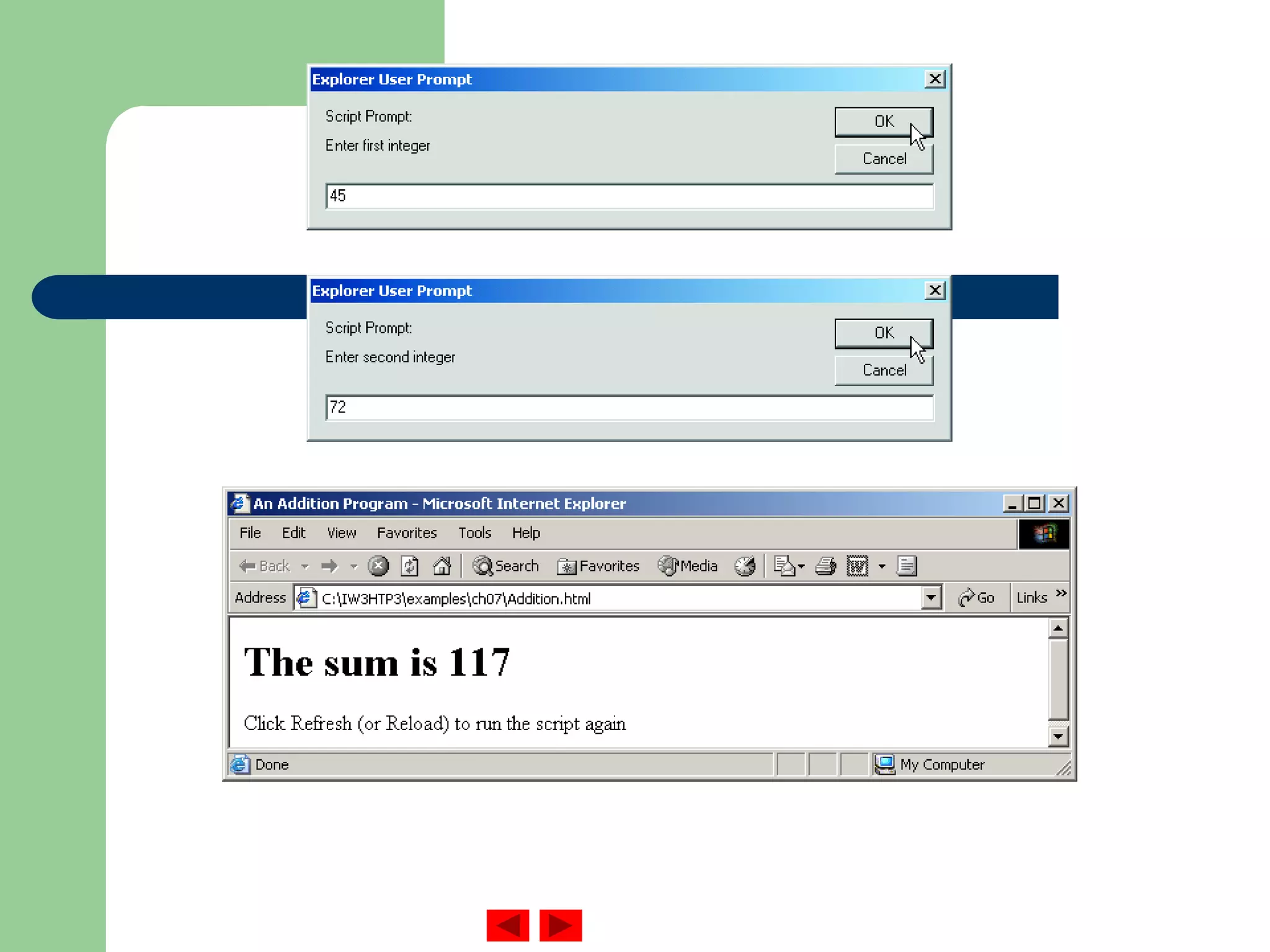
 The values of numbers to be added are obtained as user inputs
colleted through the window.prompt method
 parseInt
– Converts its string argument to an integer
– What happens if the conversion is not done?
 See example on our web site
 NaN (not a number): value returned if non-numerical
values are passed to the paresInt method
Outline
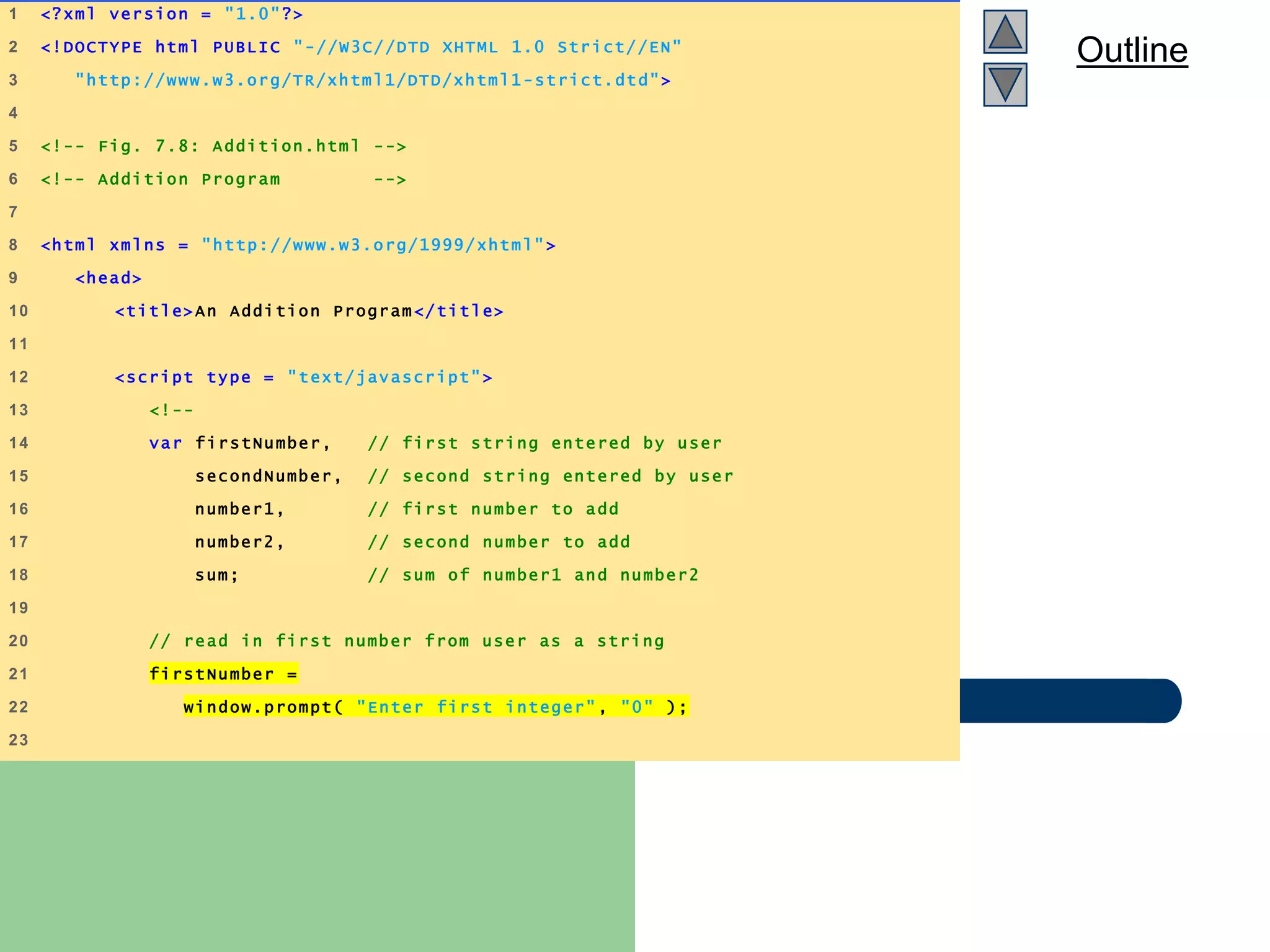
Addition.html
(1 of 2)
1 <?xml version = "1.0"?>
2 <!DOCTYPE html PUBLIC "-//W3C//DTD XHTML 1.0 Strict//EN"
3 "http://www.w3.org/TR/xhtml1/DTD/xhtml1 -strict.dtd">
4
5 <!-- Fig. 7.8: Addition.html -->
6 <!-- Addition Program -->
7
8 <html xmlns = "http://www.w3.org/1999/xhtml" >
9 <head>
10 <title>An Addition Program</title>
11
12 <script type = "text/javascript">
13 <!--
14 var firstNumber, // first string entered by user
15 secondNumber, // second string entered by user
16 number1, // first number to add
17 number2, // second number to add
18 sum; // sum of number1 and number2
19
20 // read in first number from user as a string
21 firstNumber =
22 window.prompt( "Enter first integer" , "0" );
23
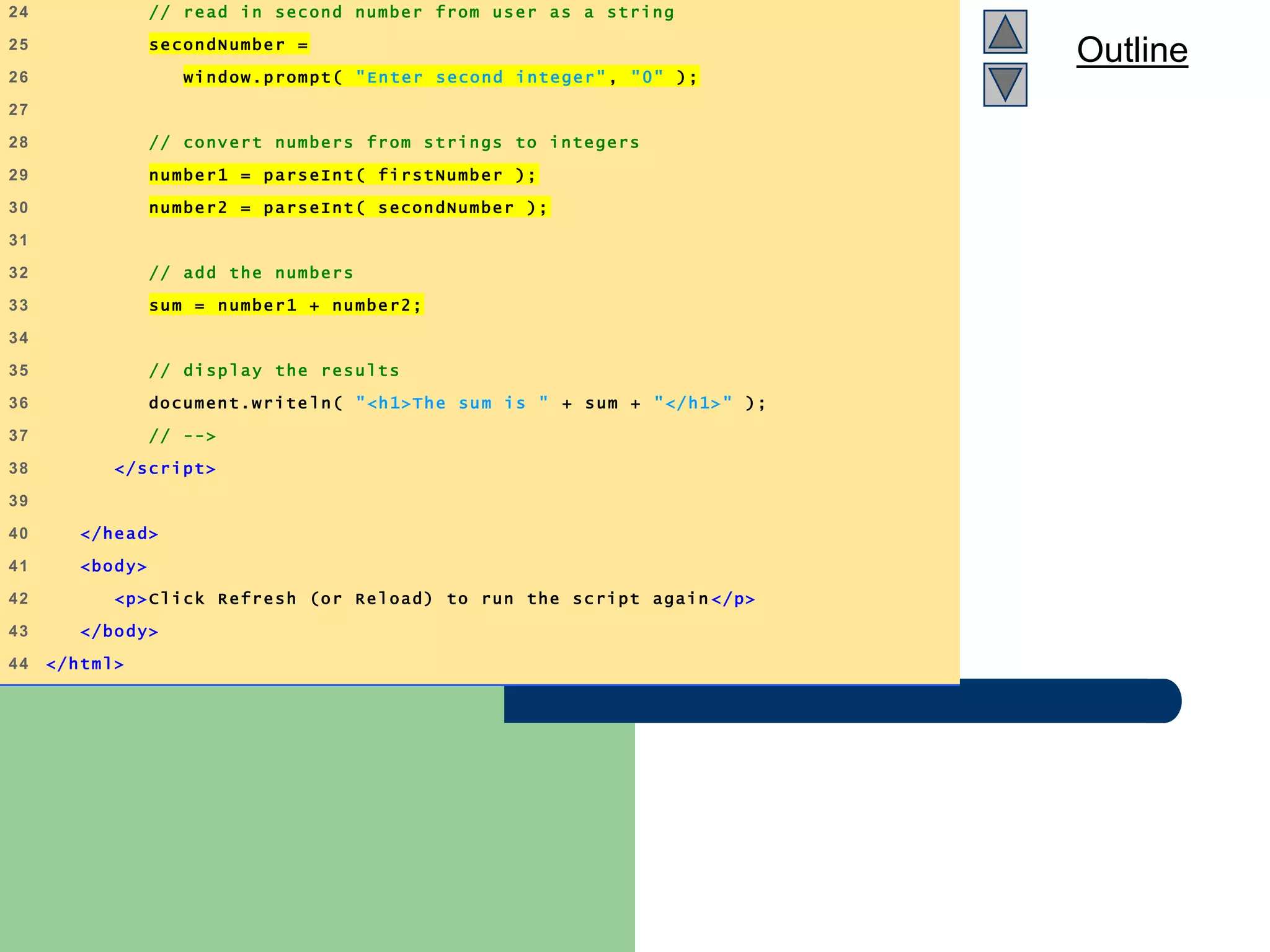
Outline
Addition.html
(2 of 2)
24 // read in second number from user as a string
25 secondNumber =
26 window.prompt( "Enter second integer", "0" );
27
28 // convert numbers from strings to integers
29 number1 = parseInt( firstNumber );
30 number2 = parseInt( secondNumber );
31
32 // add the numbers
33 sum = number1 + number2;
34
35 // display the results
36 document.write ln( "<h1>The sum is " + sum + "</h1>" );
37 // -->
38 </script>
39
40 </head>
41 <body>
42 <p>Click Refresh (or Reload) to run the script again </p>
43 </body>
44 </html>
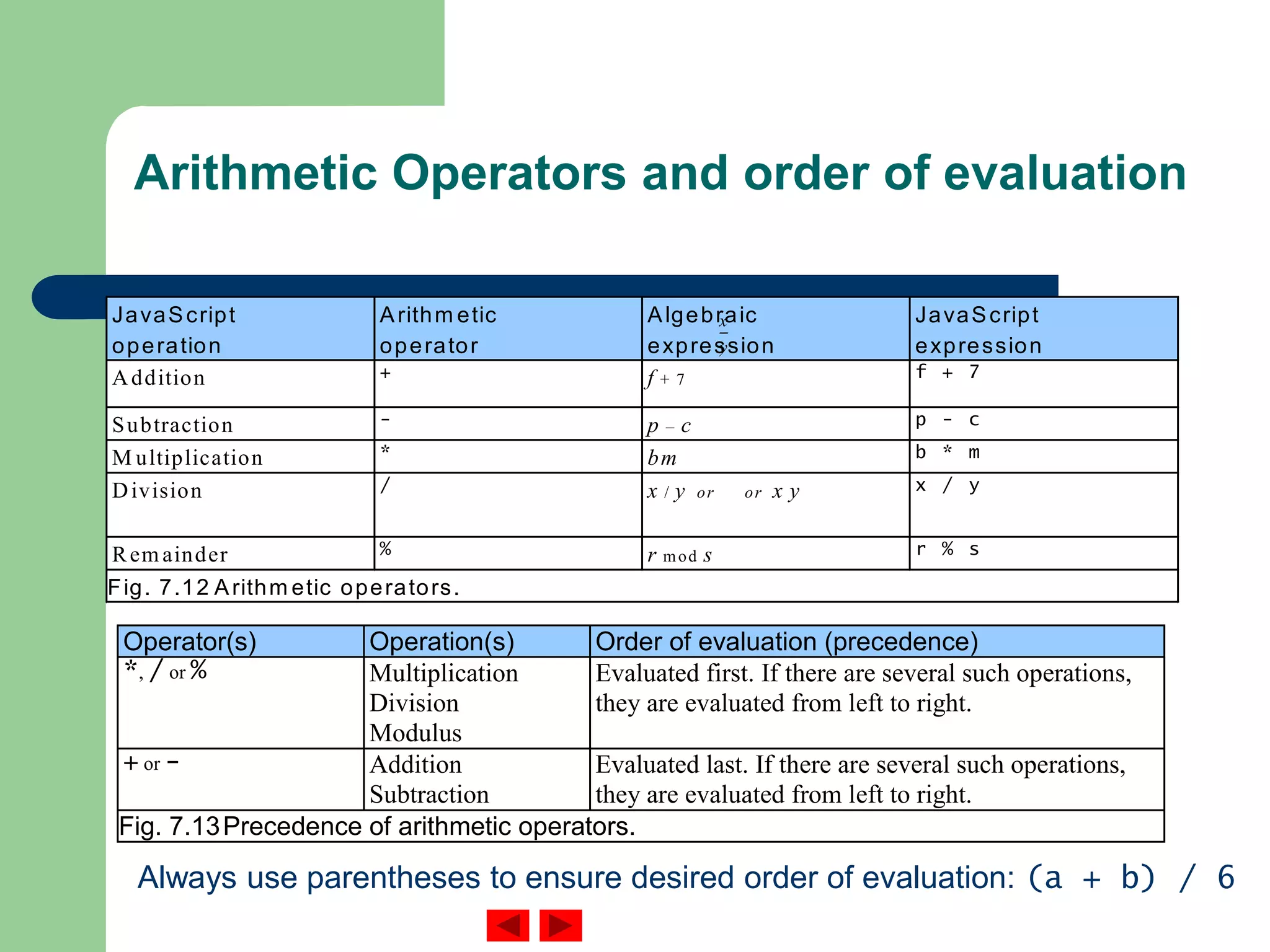
Arithmetic Operators and order of evaluation
JavaScript
operation
Arithm etic
operator
Algebraic
expression
JavaScript
expression
Addition + f + 7 f + 7
Subtraction - p – c p - c
M ultiplication * bm b * m
Division / x / y or or x y x / y
Rem ainder % r mod s r % s
Fig. 7.12 Arithm etic operators.
Operator(s) Operation(s) Order of evaluation (precedence)
*, / or % Multiplication
Division
Modulus
Evaluated first. If there are several such operations,
they are evaluated from left to right.
+ or - Addition
Subtraction
Evaluated last. If there are several such operations,
they are evaluated from left to right.
Fig. 7.13Precedence of arithmetic operators.
x
y
--
Always use parentheses to ensure desired order of evaluation: (a + b) / 6
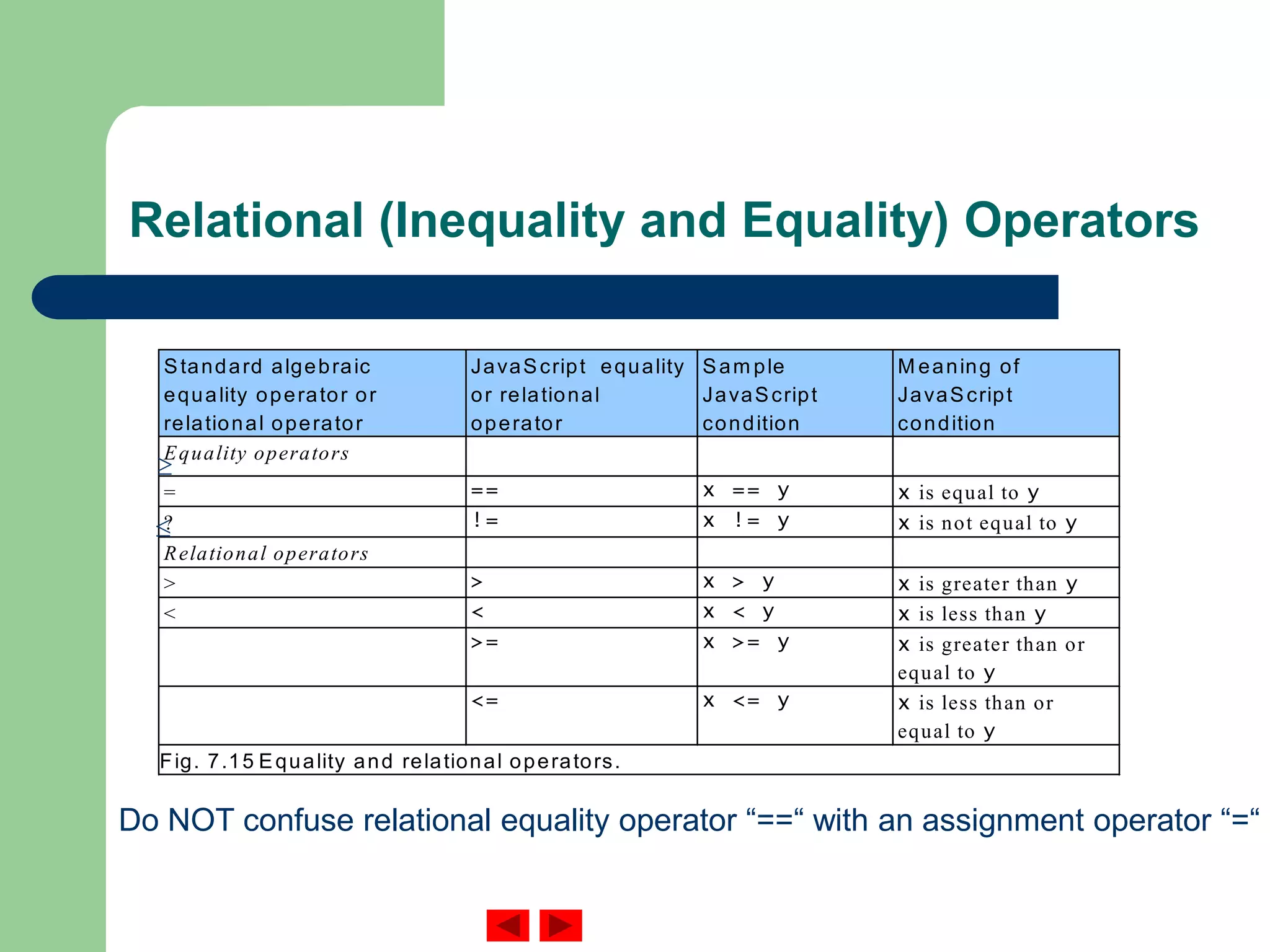
Relational (Inequality and Equality) Operators
Standard algebraic
equality operator or
relational operator
JavaScript equality
or relational
operator
Sam ple
JavaScript
condition
M eaning of
JavaScript
condition
Equality operators
= == x == y x is equal to y
? != x != y x is not equal to y
Relational operators
> > x > y x is greater than y
< < x < y x is less than y
>= x >= y x is greater than or
equal to y
<= x <= y x is less than or
equal to y
Fig. 7.15 Equality and relational operators.
Do NOT confuse relational equality operator “==“ with an assignment operator “=“
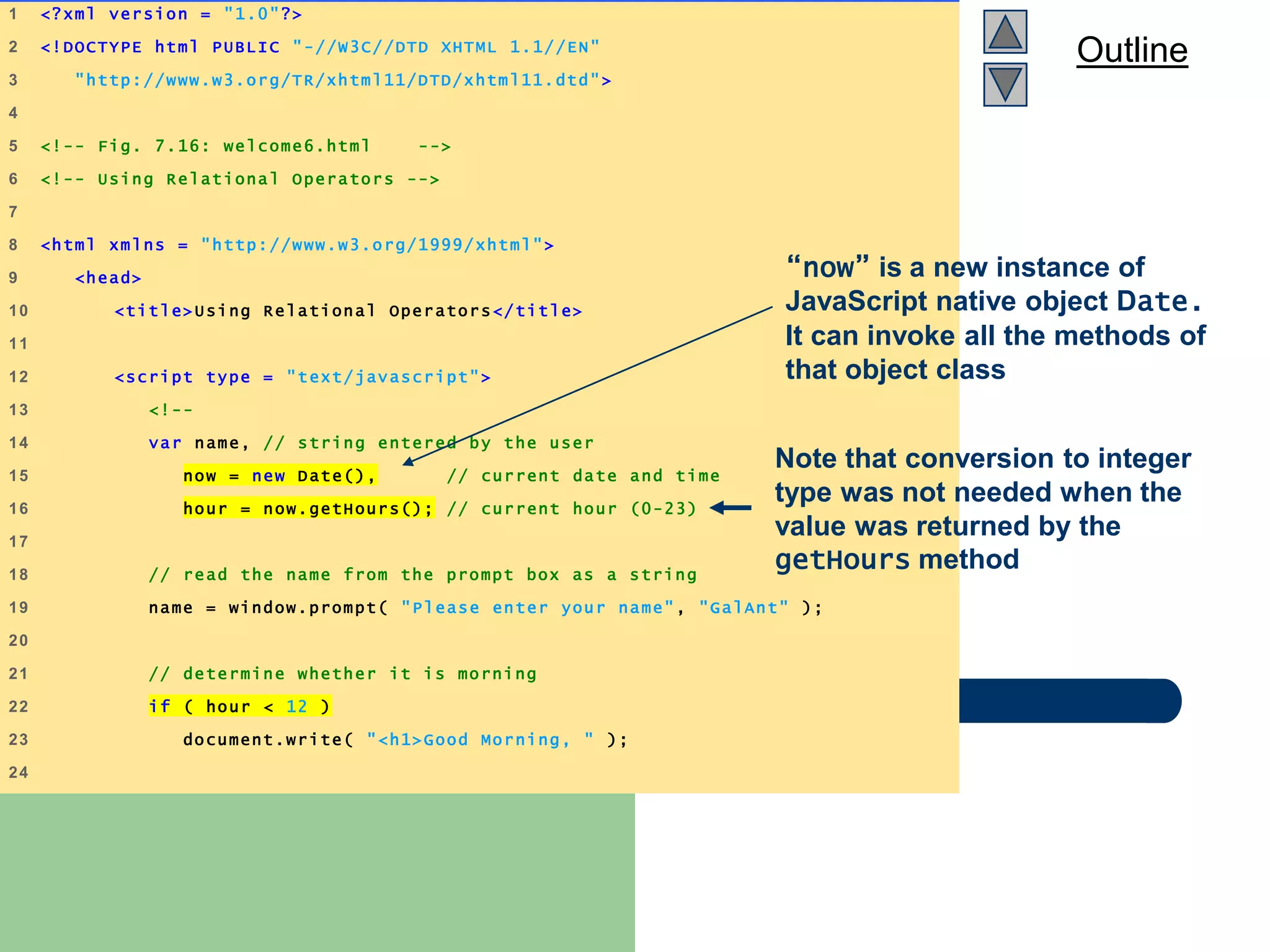
Outline
welcome6.html
(1 of 3)
1 <?xml version = "1.0"?>
2 <!DOCTYPE html PUBLIC "-//W3C//DTD XHTML 1.1//EN"
3 "http://www.w3.org/TR/xhtml11/DTD/xhtml11.dtd">
4
5 <!-- Fig. 7.16: welcome6.html -->
6 <!-- Using Relational Operators -->
7
8 <html xmlns = "http://www.w3.org/1999/xhtml">
9 <head>
10 <title>Using Relational Operators</title>
11
12 <script type = "text/javascript">
13 <!--
14 var name, // string entered by the user
15 now = new Date(), // current date and time
16 hour = now.getHours(); // current hour (0-23)
17
18 // read the name from the prompt box as a string
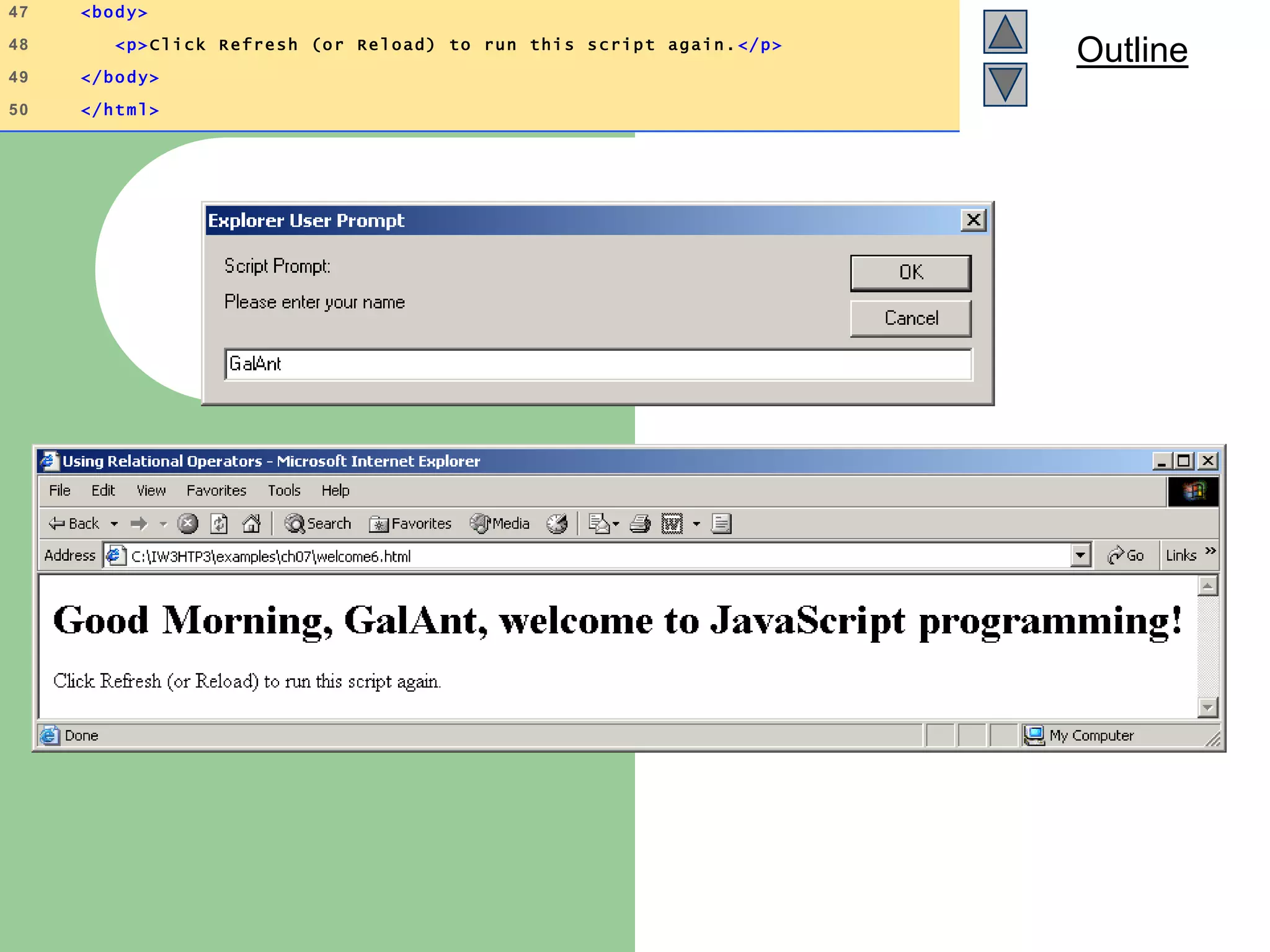
19 name = window.prompt( "Please enter your name", "GalAnt" );
20
21 // determine whether it is morning
22 if ( hour < 12 )
23 document.write( "<h1>Good Morning, " );
24
“now” is a new instance of
JavaScript native object Date.
It can invoke all the methods of
that object class
Note that conversion to integer
type was not needed when the
value was returned by the
getHours method
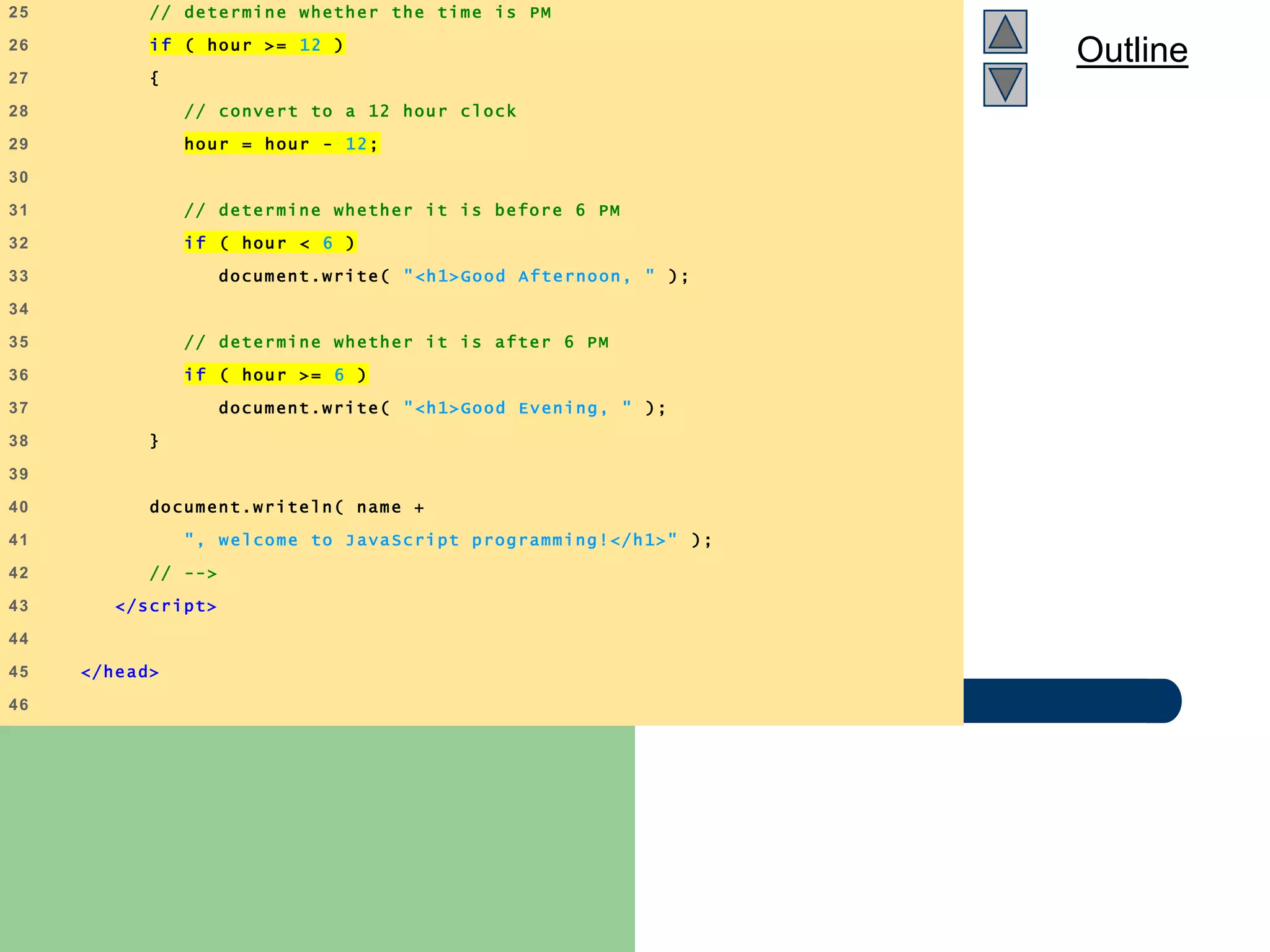
Outline
welcome6.html
(2 of 3)
25 // determine whether the time is PM
26 if ( hour >= 12 )
27 {
28 // convert to a 12 hour clock
29 hour = hour - 12;
30
31 // determine whether it is before 6 PM
32 if ( hour < 6 )
33 document.write( "<h1>Good Afternoon, " );
34
35 // determine whether it is after 6 PM
36 if ( hour >= 6 )
37 document.write( "<h1>Good Evening, " );
38 }
39
40 document.writeln( name +
41 ", welcome to JavaScript programming!</h1>" );
42 // -->
43 </script>
44
45 </head>
46
Outline
welcome6.html
(3 of 3)
47 <body>
48 <p>Click Refresh (or Reload) to run this script again.</p>
49 </body>
50 </html>
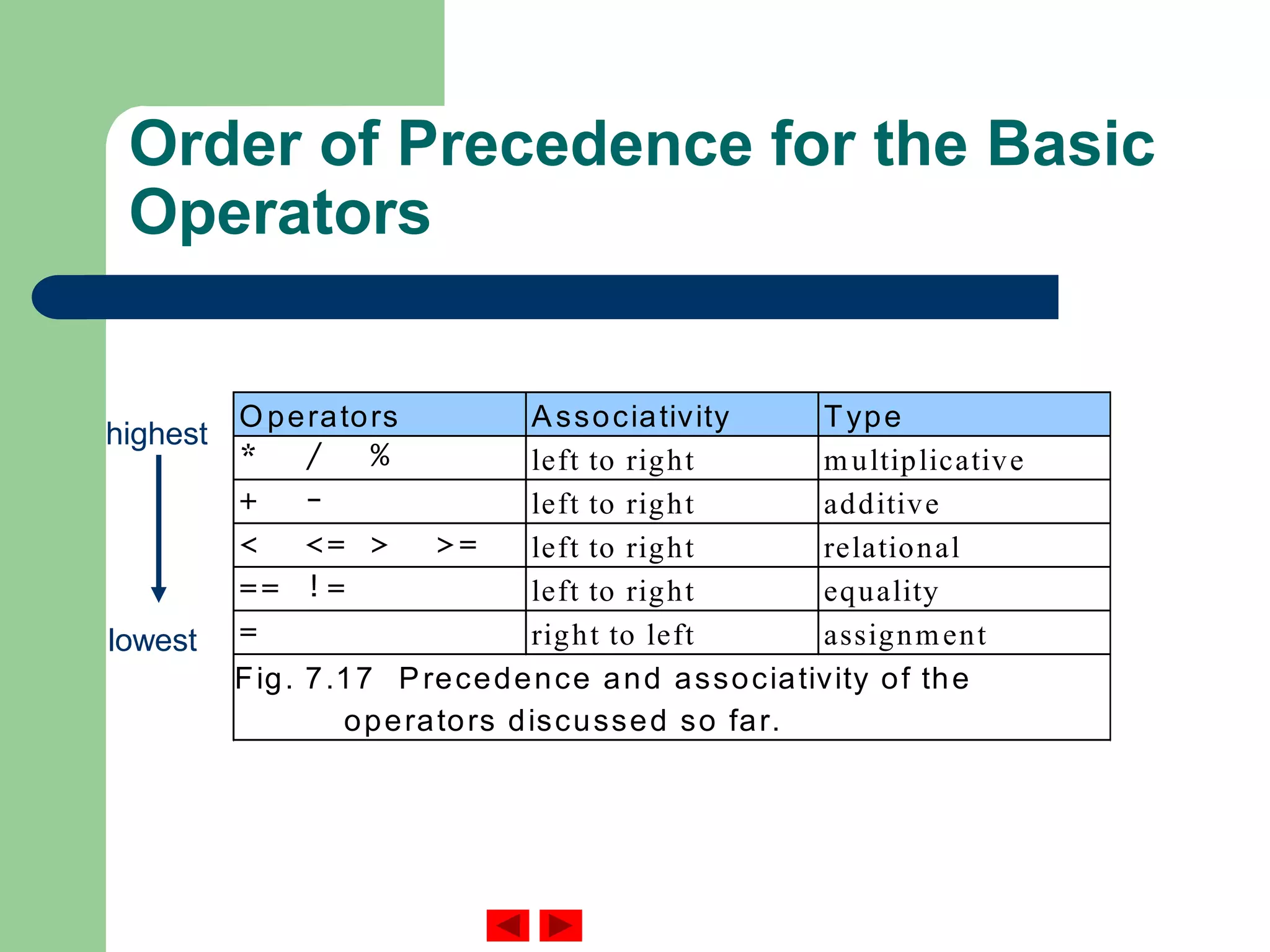
Order of Precedence for the Basic
Operators
Operators Associativity Type
* / % left to right multiplicative
+ - left to right additive
< <= > >= left to right relational
== != left to right equality
= right to left assignment
Fig. 7.17 Precedence and associativity of the
operators discussed so far.
highest
lowest

Java script

  • 1.
    Outline IS400: Development ofBusiness Applications on the Internet Fall 2004 Instructor: Dr. Boris Jukic JavaScript: Introduction to Scripting
  • 2.
    Topics Covered  Writingsimple JavaScript programs.  Using input and output statements  Basic memory concepts.  Arithmetic operators.  Decision-making statements.  Relational and equality operators.
  • 3.
    Introduction  JavaScript scriptinglanguage – Client-side scripting enhances functionality and appearance  Makes pages more dynamic and interactive  Pages can produce immediate response without contacting a server  Customization is possible on the basis of users’ explicit and implicit input  Browser has to have a built-in (JavaScript) interpreter – Foundation for complex server-side scripting
  • 4.
    JavaScript: Object-Based Language There are three object categories in JavaScript: Native Objects, Host Objects, and User-Defined Objects. – Native objects: defined by JavaScript.  String, Number, Array, Image, Date, Math, etc. – Host objects : supplied and always available to JavaScript by the browser environment.  window, document, forms, etc. – User-defined objects : defined by the author/programmer  Initially, we will use host objects created by the browser and their methods and properties
  • 5.
    Scripting  Two approachesto client side scripting: – Inline scripting  Written in the <body> section of a document – JavaScript code embedded in the <head> section
  • 6.
    Scripting  <script> tag Indicate that the text is part of a script  type attribute – Specifies the type of file and the scripting language use:  Value: “text/javascript” – IE and Netscape use JavaScript as default scripting language  writeln method of the document object – Write a line in the document and position the cursor in the next line – Does not affect the actual rendering of the HTML document  What is being written by JavaScript is the set of html instructions that in turn determine the rendering of the html document
  • 7.
    Outline welcome.html (1 of 1) 1<?xml version = "1.0"?> 2 <!DOCTYPE html PUBLIC "-//W3C//DTD XHTML 1.0 Strict//EN" 3 "http://www.w3.org/TR/xhtml1/DTD/xhtml1 -strict.dtd"> 4 5 <!-- Fig. 7.1: welcome.html --> 6 <!-- Displaying a line of text --> 7 8 <html xmlns = "http://www.w3.org/1999/xhtml" > 9 <head> 10 <title>A First Program in JavaScript </title> 11 12 <script type = "text/javascript" > 13 <!-- 14 document.writeln( 15 "<h1>Welcome to JavaScript Programming!</h1>" ); 16 // --> 17 </script> 18 19 </head><body></body> 20 </html> HTML comment tags will result in skipping of the script by those browsers that do not support scripting
  • 8.
    Outline welcome2.html (1 of 1) 1<?xml version = "1.0"?> 2 <!DOCTYPE html PUBLIC "-//W3C//DTD XHTML 1.0 Strict//EN" 3 "http://www.w3.org/TR/xhtml1/DTD/xhtml1 -strict.dtd"> 4 5 <!-- Fig. 7.2: welcome2.html --> 6 <!-- Printing a Line with Multipl e Statements --> 7 8 <html xmlns = "http://www.w3.org/1999/xhtml" > 9 <head> 10 <title>Printing a Line with Multiple Statements </title> 11 12 <script type = "text/javascript" > 13 <!-- 14 document.write( "<h1 style = "color: magenta">" ); 15 document.write( "Welcome to JavaScript " + 16 "Programming!</h1>" ); 17 // --> 18 </script> 19 20 </head><body></body> 21 </html> Escape character in combination with quotation mark: ” will result in insertion of a quotation mark in the string that is actually written by JavaScript
  • 9.
    Outline welcome3.html 1 of 1 1<?xml version = "1.0"?> 2 <!DOCTYPE html PUBLIC "-//W3C//DTD XHTML 1.0 Strict//EN" 3 "http://www.w3.org/TR/xhtml1/DTD/xhtml1 -strict.dtd"> 4 5 <!-- Fig. 7.3: welcome3.html --> 6 <!-- Printing Multiple Lines --> 7 8 <html xmlns = "http://www.w3.org/1999/xhtml" > 9 <head><title>Printing Multiple Lines</title> 10 11 <script type = "text/javascript"> 12 <!-- 13 document.writeln( "<h1>Welcome to<br />JavaScript" + 14 "<br />Programming!</h1>" ); 15 // --> 16 </script> 17 18 </head><body></body> 19 </html> New line of the html document in a browser is determined by an html <br /> element
  • 10.
    Outline welcome4.html 1 of 1 1<?xml version = "1.0"?> 2 <!DOCTYPE html PUBLIC "-//W3C//DTD XHTML 1.0 Strict//EN" 3 "http://www.w3.org/TR/xhtml1/DTD/xhtml1 -strict.dtd"> 4 5 <!-- Fig. 7.4: welcome4.html --> 6 <!-- Printing multiple lines in a dialog box --> 7 8 <html xmlns = "http://www.w3.org/1999/xhtml"> 9 <head><title>Printing Multiple Lines in a Dialog Box </title> 10 11 <script type = "text/javascript"> 12 <!-- 13 window.alert( "Welcome tonJavaScriptnProgramming!" ); 14 // --> 15 </script> 16 17 </head> 18 19 <body> 20 <p>Click Refresh (or Reload) to run this script again. </p> 21 </body> 22 </html> alert method of the object displays a Dialog
  • 12.
    Common Escape Sequences Escapesequence D escription n N ew line. Position the screen cursor at the beginning of the next line. t H orizontal tab. M ove the screen cursor to the next tab stop. r Carriage return. Position the screen cursor to the beginning of the current line; do not advance to the next line. A ny characters output after the carriage return overw rite the characters previously output on that line. Backslash. U sed to represent a backslash character in a string. " D ouble quote. U sed to represent a double quote character in a string contained in double quotes. For exam ple, window.alert( ""in quotes"" ); displays "in quotes" in an alert dialog. ' Single quote. U sed to represent a single quote character in a string. For exam ple, window.alert( ''in quotes'' ); displays 'in quotes' in an alert dialog. Fig. 7.5 Som e com m on escape sequences.
  • 13.
    Dynamic Pages  Ascript can adapt the content based on explicit input from the user or other information – System clock: Time of day – Hidden input – Cookies  User input can be collected by invoking the prompt method of a window object – This will display a dialog box that prompts user for input
  • 14.
    Outline welcome5.html (1 of 2) 1<?xml version = "1.0"?> 2 <!DOCTYPE html PUBLIC "-//W3C//DTD XHTML 1.1//EN" 3 "http://www.w3.org/TR/xhtml11/DTD/xhtml11.dtd"> 4 5 <!-- Fig. 7.6: welcome5.html --> 6 <!-- Using Prompt Boxes --> 7 8 <html xmlns = "http://www.w3.org/1999/xhtml"> 9 <head> 10 <title>Using Prompt and Alert Boxes</title> 11 12 <script type = "text/javascript"> 13 <!-- 14 var name; // string entered by the user 15 16 // read the name from the prompt box as a string 17 name = window.prompt( "Please enter your name", "GalAnt" ); 18 19 document.writeln( "<h1>Hello, " + name + 20 ", welcome to JavaScript programming!</h1>" ); 21 // --> 22 </script> JavaScript is a loosely typed language. Variables take on any data type depending on the value assigned.  Value returned by the prompt method of the window object is assigned to the variable name “+” symbol can be used for text concatenation as well as arithmetic operator
  • 15.
    Outline 23 24 </head> 25 26 <body> 27<p>Click Refresh (or Reload) to run this script again. </p> 28 </body> 29 </html>
  • 16.
    Fig. 7.7 Promptdialog displayed by the window object’s prompt method. This is the prompt to the user. This is the default value that appears when the dialog opens. This is the text field in which the user types the value. When the user clicks OK, the value typed by the user is returned to the program as a string. If the user clicks Cancel, the null value will be returned to the program and no value will be assigned to the variable.
  • 17.
    Simple Script Example:Adding Integers  The values of numbers to be added are obtained as user inputs colleted through the window.prompt method  parseInt – Converts its string argument to an integer – What happens if the conversion is not done?  See example on our web site  NaN (not a number): value returned if non-numerical values are passed to the paresInt method
  • 18.
    Outline Addition.html (1 of 2) 1<?xml version = "1.0"?> 2 <!DOCTYPE html PUBLIC "-//W3C//DTD XHTML 1.0 Strict//EN" 3 "http://www.w3.org/TR/xhtml1/DTD/xhtml1 -strict.dtd"> 4 5 <!-- Fig. 7.8: Addition.html --> 6 <!-- Addition Program --> 7 8 <html xmlns = "http://www.w3.org/1999/xhtml" > 9 <head> 10 <title>An Addition Program</title> 11 12 <script type = "text/javascript"> 13 <!-- 14 var firstNumber, // first string entered by user 15 secondNumber, // second string entered by user 16 number1, // first number to add 17 number2, // second number to add 18 sum; // sum of number1 and number2 19 20 // read in first number from user as a string 21 firstNumber = 22 window.prompt( "Enter first integer" , "0" ); 23
  • 19.
    Outline Addition.html (2 of 2) 24// read in second number from user as a string 25 secondNumber = 26 window.prompt( "Enter second integer", "0" ); 27 28 // convert numbers from strings to integers 29 number1 = parseInt( firstNumber ); 30 number2 = parseInt( secondNumber ); 31 32 // add the numbers 33 sum = number1 + number2; 34 35 // display the results 36 document.write ln( "<h1>The sum is " + sum + "</h1>" ); 37 // --> 38 </script> 39 40 </head> 41 <body> 42 <p>Click Refresh (or Reload) to run the script again </p> 43 </body> 44 </html>
  • 21.
    Arithmetic Operators andorder of evaluation JavaScript operation Arithm etic operator Algebraic expression JavaScript expression Addition + f + 7 f + 7 Subtraction - p – c p - c M ultiplication * bm b * m Division / x / y or or x y x / y Rem ainder % r mod s r % s Fig. 7.12 Arithm etic operators. Operator(s) Operation(s) Order of evaluation (precedence) *, / or % Multiplication Division Modulus Evaluated first. If there are several such operations, they are evaluated from left to right. + or - Addition Subtraction Evaluated last. If there are several such operations, they are evaluated from left to right. Fig. 7.13Precedence of arithmetic operators. x y -- Always use parentheses to ensure desired order of evaluation: (a + b) / 6
  • 22.
    Relational (Inequality andEquality) Operators Standard algebraic equality operator or relational operator JavaScript equality or relational operator Sam ple JavaScript condition M eaning of JavaScript condition Equality operators = == x == y x is equal to y ? != x != y x is not equal to y Relational operators > > x > y x is greater than y < < x < y x is less than y >= x >= y x is greater than or equal to y <= x <= y x is less than or equal to y Fig. 7.15 Equality and relational operators. Do NOT confuse relational equality operator “==“ with an assignment operator “=“
  • 23.
    Outline welcome6.html (1 of 3) 1<?xml version = "1.0"?> 2 <!DOCTYPE html PUBLIC "-//W3C//DTD XHTML 1.1//EN" 3 "http://www.w3.org/TR/xhtml11/DTD/xhtml11.dtd"> 4 5 <!-- Fig. 7.16: welcome6.html --> 6 <!-- Using Relational Operators --> 7 8 <html xmlns = "http://www.w3.org/1999/xhtml"> 9 <head> 10 <title>Using Relational Operators</title> 11 12 <script type = "text/javascript"> 13 <!-- 14 var name, // string entered by the user 15 now = new Date(), // current date and time 16 hour = now.getHours(); // current hour (0-23) 17 18 // read the name from the prompt box as a string 19 name = window.prompt( "Please enter your name", "GalAnt" ); 20 21 // determine whether it is morning 22 if ( hour < 12 ) 23 document.write( "<h1>Good Morning, " ); 24 “now” is a new instance of JavaScript native object Date. It can invoke all the methods of that object class Note that conversion to integer type was not needed when the value was returned by the getHours method
  • 24.
    Outline welcome6.html (2 of 3) 25// determine whether the time is PM 26 if ( hour >= 12 ) 27 { 28 // convert to a 12 hour clock 29 hour = hour - 12; 30 31 // determine whether it is before 6 PM 32 if ( hour < 6 ) 33 document.write( "<h1>Good Afternoon, " ); 34 35 // determine whether it is after 6 PM 36 if ( hour >= 6 ) 37 document.write( "<h1>Good Evening, " ); 38 } 39 40 document.writeln( name + 41 ", welcome to JavaScript programming!</h1>" ); 42 // --> 43 </script> 44 45 </head> 46
  • 25.
    Outline welcome6.html (3 of 3) 47<body> 48 <p>Click Refresh (or Reload) to run this script again.</p> 49 </body> 50 </html>
  • 26.
    Order of Precedencefor the Basic Operators Operators Associativity Type * / % left to right multiplicative + - left to right additive < <= > >= left to right relational == != left to right equality = right to left assignment Fig. 7.17 Precedence and associativity of the operators discussed so far. highest lowest