AWS Machine Learning
Engineering in Computer Science - Data Mining Class
Who are we?
2AWS Machine Learning
Lukas
Hermann
Milad Kiwan
Dario Molinari Lorenzo Vitali
Daniele De Cillis
Matteo Pallotta
Where to find the material
Slideshare repository
http://www.slideshare.net/dariospin93/presentazione-
tutorial-70026708
Github repository:
https://github.com/dariospin93/TutorialDataMining
Here you’ll find the files needed for this tutorial
3AWS Machine Learning
What is Machine Learning?
“Machine learning is the subfield of computer
science that gives computers the ability to learn
without being explicitly programmed" (Wikipedia)
“A computer program is said to learn from experience
E with respect to some class of tasks T and
performance measure P if its performance at tasks
in T, as measured by P, improves with experience
E." (Tom M. Mitchell, Chair of the Machine Learning Department at Carnegie Mellon
University)
4AWS Machine Learning
What is Machine Learning?
Some ML tasks:
• Classification: inputs are divided into 2 or more
classes. The goal is to produce a model that
assigns unseen inputs to one (e.g: Spam Filtering,
input= emails, output = ”spam” or “not spam”).
• Regression: related to the previous category. The
outputs are continuous rather than discrete (e.g:
input = ”size of a house”, output = ”price”)
5AWS Machine Learning
What is Machine Learning?
Some ML tasks:
• Clustering: divide inputs into groups. The main
difference with respect to Classification problems is
that the groups are not known beforehand
• Dimensionality reduction: map inputs into a
lower-dimensional space. (e.g: input = “set of
documents in human language”, output = “which
documents cover similar topics”)
• ...
6AWS Machine Learning
Why Machine Learning?
• Growing flood of data
• Growing availability of computational power
• Progress in algorithms
7AWS Machine Learning
Amazon Machine Learning
“Service that makes it easy for developers of all skill
levels to use machine learning technology. Amazon
Machine Learning provides visualization tools and
wizards that guide you through the process of
creating machine learning (ML) models without
having to learn complex ML algorithms and
technology.”
8AWS Machine Learning
What is Amazon ML?
• Robust cloud-based service that makes it easy for
developers of all skill levels to use ML technology.
• Create ML models by finding patterns in your
existing data.
• provides visualization tools and wizards that guide
you through the process.
9AWS Machine Learning
When to use Amazon ML?
• No need to learn complex ML algorithms and
technology.
• Makes it easy to obtain predictions for your
application using simple APIs.
• ML is not a solution for every type of problem.
– if you can determine a target value by using simple rules, computations,
or predetermined steps that can be programmed without needing ML.
10AWS Machine Learning
When to use Amazon ML?
• Many human tasks cannot be adequately solved
using a simple rule-based solution: recognizing
whether an email is spam or not spam.
• When rules depend on too many factors and many
of these rules overlap or need to be tuned very
finely.
11AWS Machine Learning
When to use Amazon ML?
You can use ML approaches for these specific ML
tasks:
• binary classification (predicting one of two possible
outcomes).
• multiclass classification (predicting one of more
than two outcomes).
• regression (predicting a numeric value).
12AWS Machine Learning
Formulating The Problem
• The first step in machine learning is to decide what
you want to predict, which is known as the label or
target answer.
– Predict the number of purchases your customers will make for each
product. (regression problem)
– Predict which products will get more than 10 purchases. (binary
classification problem)
– Which category of products is most interesting to this customer.
(multiclass classification problem)
13AWS Machine Learning
Collecting Labeled Data
• Labeled Data: are data for which you already know
the target answer.
• The Target: is the answer that you want to predict.
14AWS Machine Learning
Collecting Labeled Data
• Data is not readily available in a labeled form.
Collecting and preparing the variables and the
target are often the most important steps in solving
an ML problem.
• You provide data that is labeled with the target to
the ML algorithm to learn from. Then, you will use
the trained ML model to predict this answer on
data for which you do not know the target answer.
15AWS Machine Learning
What is Amazon S3 (Simple Storage Service)?
• Amazon S3 has a simple web services interface
that you can use to store and retrieve any amount
of data.
• It is designed to make web-scale computing easier
for developers.
16AWS Machine Learning
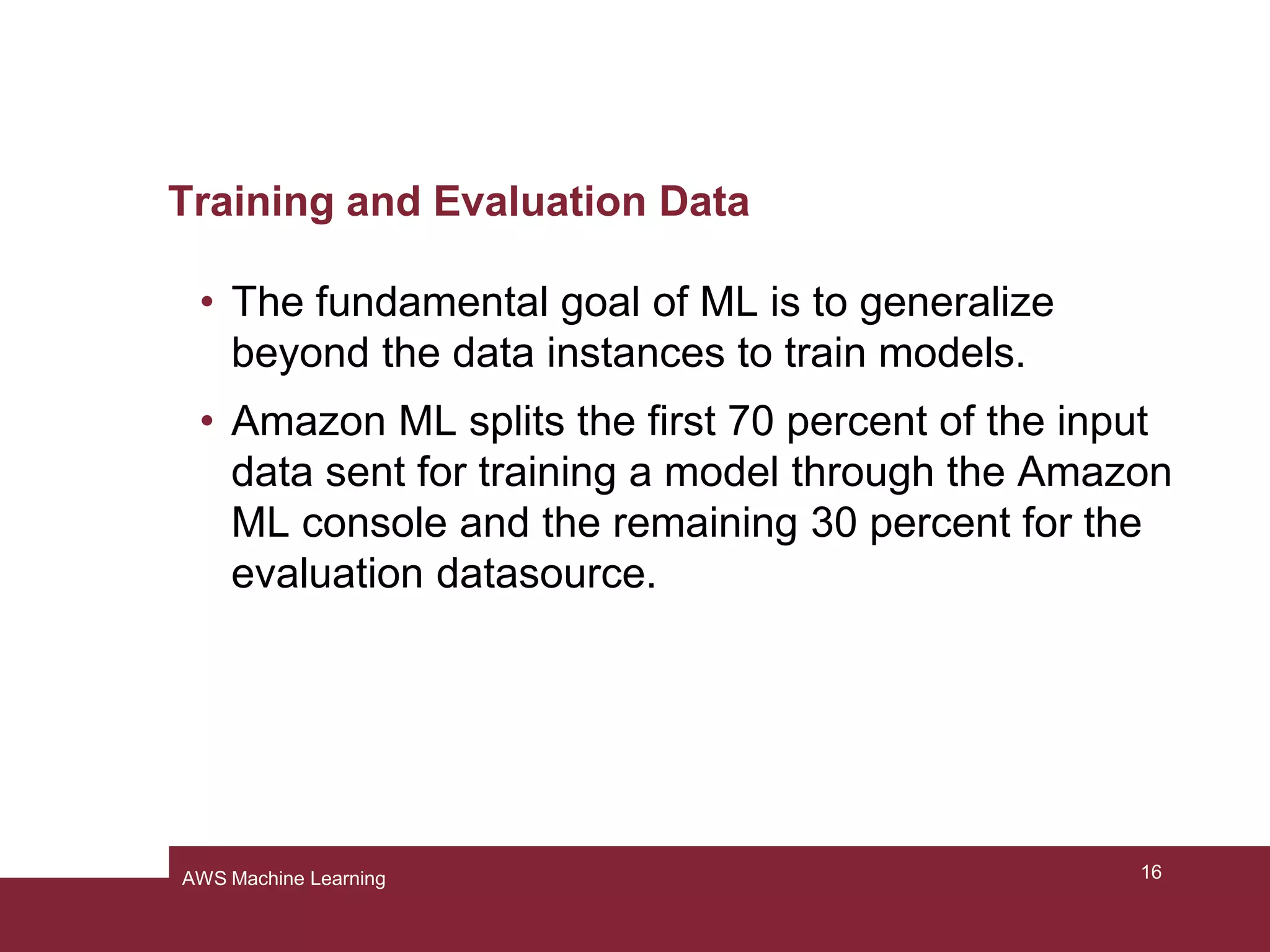
Training and Evaluation Data
• The fundamental goal of ML is to generalize
beyond the data instances to train models.
• Amazon ML splits the first 70 percent of the input
data sent for training a model through the Amazon
ML console and the remaining 30 percent for the
evaluation datasource.
17AWS Machine Learning
Training and Evaluation Data
• The ML system uses the training data to train
models to see patterns, and uses the evaluation
data to evaluate the predictive quality of the trained
model
• The ML system evaluates predictive performance
by comparing predictions on the evaluation data
set with true values.
18AWS Machine Learning
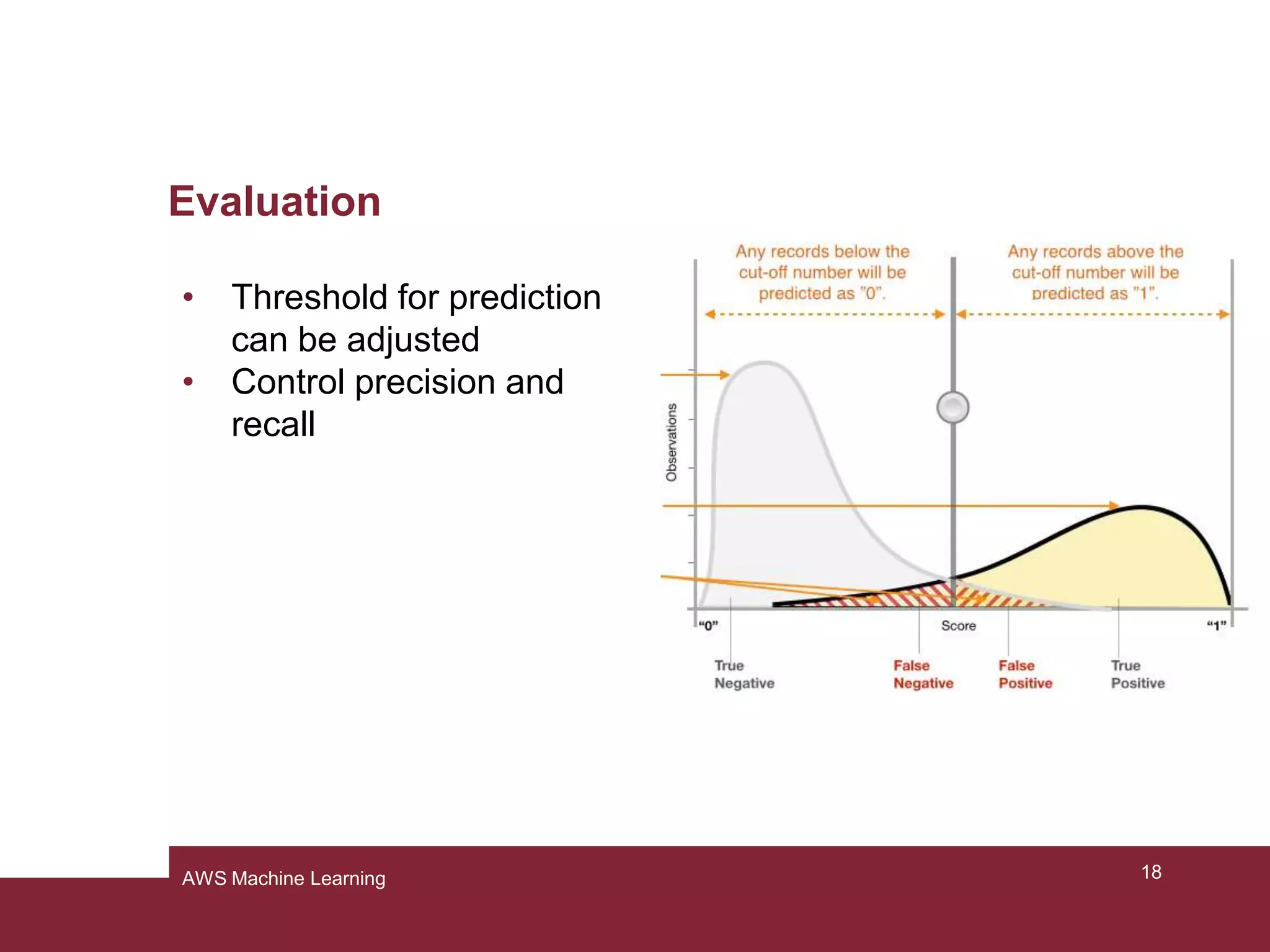
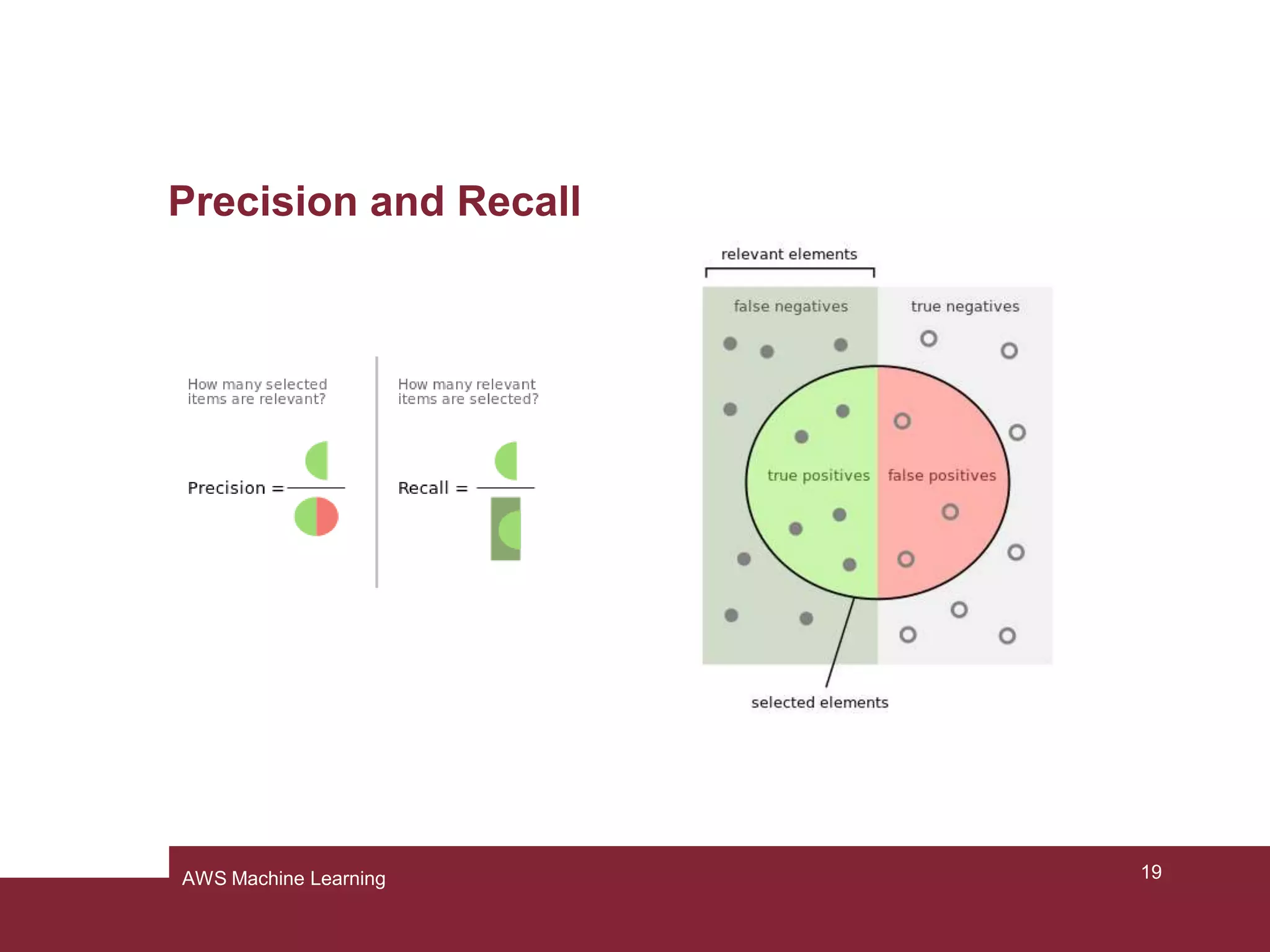
Evaluation
• Threshold for prediction
can be adjusted
• Control precision and
recall
19AWS Machine Learning
Precision and Recall
20AWS Machine Learning
AWS ML Techniques
• for regression, AWS uses linear regression
• for classification, AWS uses logistic regression
– Despite the name classification method
– uses a ML model similar to regression with a logistic sigmoid
function
– binomial or multinomial
21AWS Machine Learning
Logistic Regression: Example
• Labeled data with labels y ∈ {0,1}
• e.g.:
– x: hours of study
– y: pass (1) or fail (0)
• What’s the probability of success given a certain
time spent studying?
22AWS Machine Learning
Logistic Regression: Example
23AWS Machine Learning
Limitations of Amazon ML
•Only supervised learning (no clustering etc.)
•No selection of the ML method possible
•Preprocessing of the data is a black box
24AWS Machine Learning
AWS Machine Learning – hands-on
AWS Machine Learning
A cloud application
With Amazon ML, we can build and train a predictive model in a scalable cloud
solution. In fact, there is no need of any kind of application to run this tool, because
it runs on the cloud (actually, we’ll need a web browser in order to access to the
tool). In our tutorial we’ll show you the basic functionalities of Amazon ML, like
creating a datasource, building a model and using this model to generate
predictions.
In order to do this, we need a dataset, as big as possible. Our dataset, is taken
from the University of California at Irvine (UCI) machine learning repository, where
it is possible to find a lot of them.
Pagina 26
AWS Machine Learning
What we will see in this tutorial
In this tutorial we’ll see how machine learning can be used for marketing purposes.
To do this, we’ll show you how to build and train a model to help you making
decisions based on the data you have.
We’ll focus on selecting people based on their earnings, that may be useful to find
who’s going to be more suitable for certain marketing offers
Pagina 27
AWS Machine Learning
Tutorial Plan
1. Preparing the data
2. Creating a training datasource
3. Creating a model
4. Reviewing the model’s predictive performance and setting a score threshold
5. Using the model to generate predictions
6. Cleaning up (to avoid incurring in unwanted charges)
Pagina 28
AWS Machine Learning
Step 1: Preparing the data
Initially, we must be sure that our tool understands the data we pass to it. In order
to do this, we should ensure that our dataset follows Amazon’s guidelines:
• Data must be saved in .csv format
• Each row must be a single observation
• Each column must contain a single attribute of the observation
• The first should contain the attribute’s names (or you can provide them in a
separated file, but it’s not recommended)
• Every attribute must be separated by comma
• If you use Excel and MacOS, do not save in “comma separated value(.csv)”
format, use the “windows comma separated (.csv)” instead.
Pagina 29
AWS Machine Learning
Step 1: Preparing the data
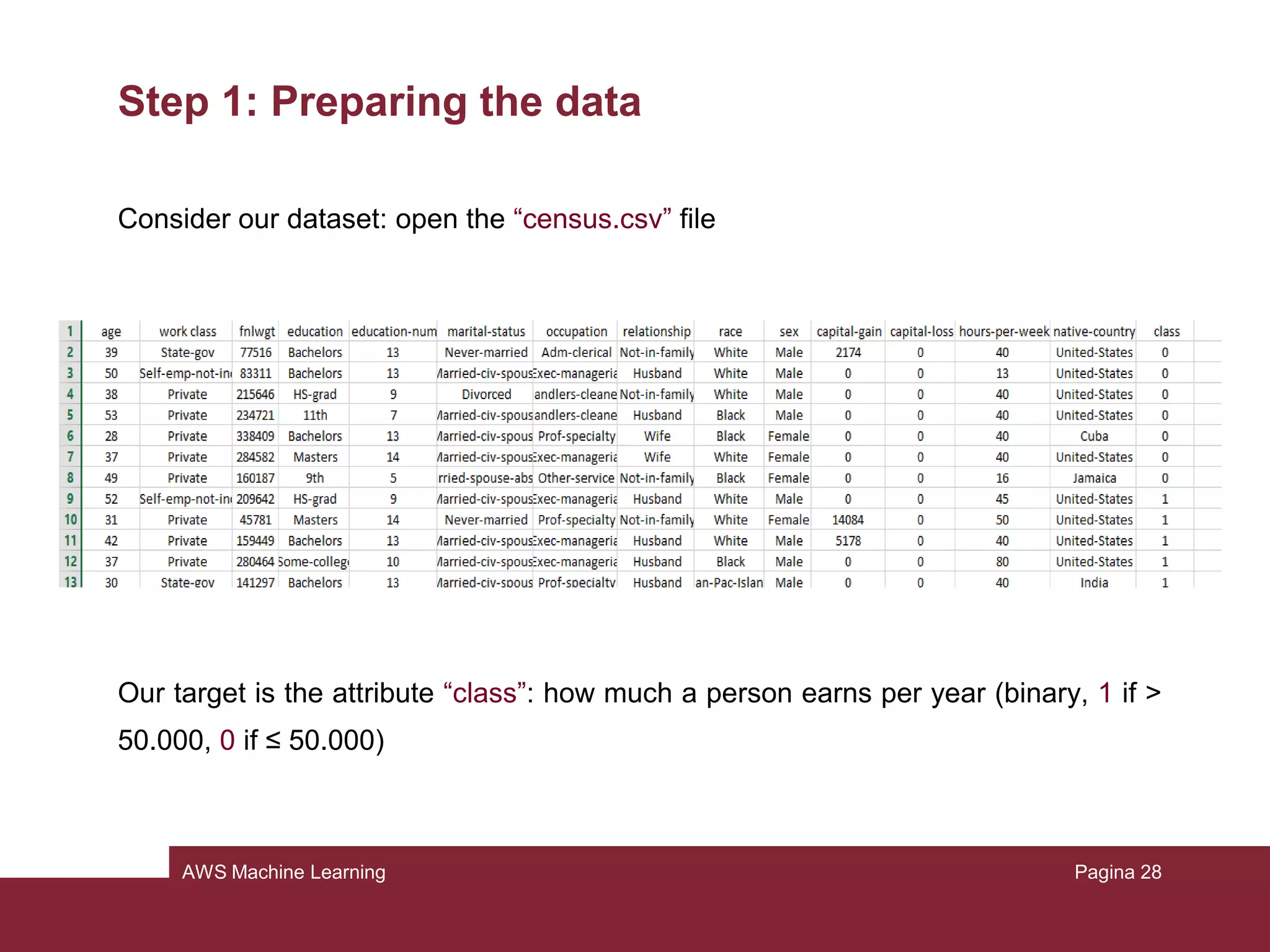
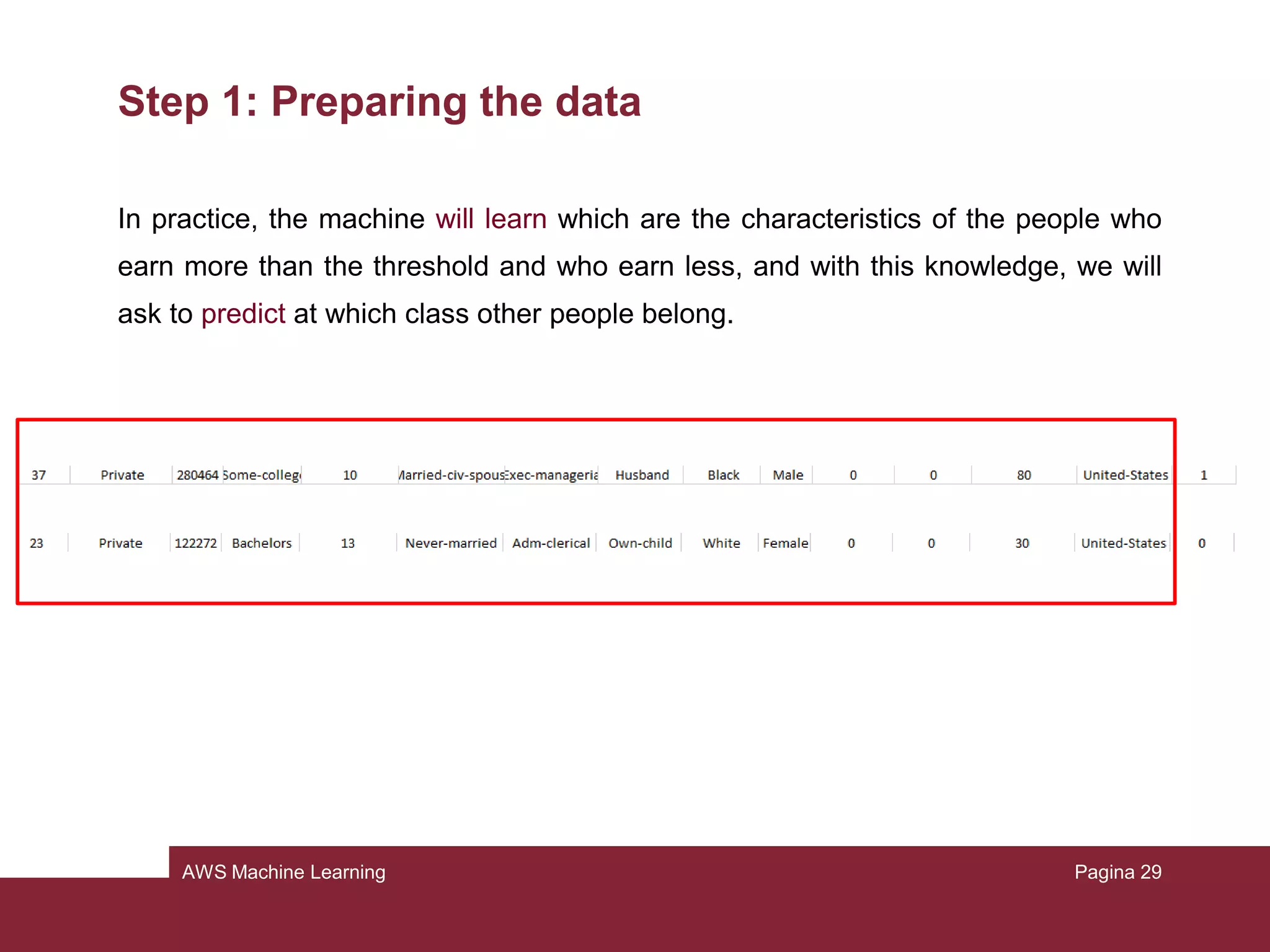
Consider our dataset: open the “census.csv” file
Our target is the attribute “class”: how much a person earns per year (binary, 1 if >
50.000, 0 if ≤ 50.000)
Pagina 30
AWS Machine Learning
Step 1: Preparing the data
In practice, the machine will learn which are the characteristics of the people who
earn more than the threshold and who earn less, and with this knowledge, we will
ask to predict at which class other people belong.
Pagina 31
AWS Machine Learning
Step 1: Preparing the data
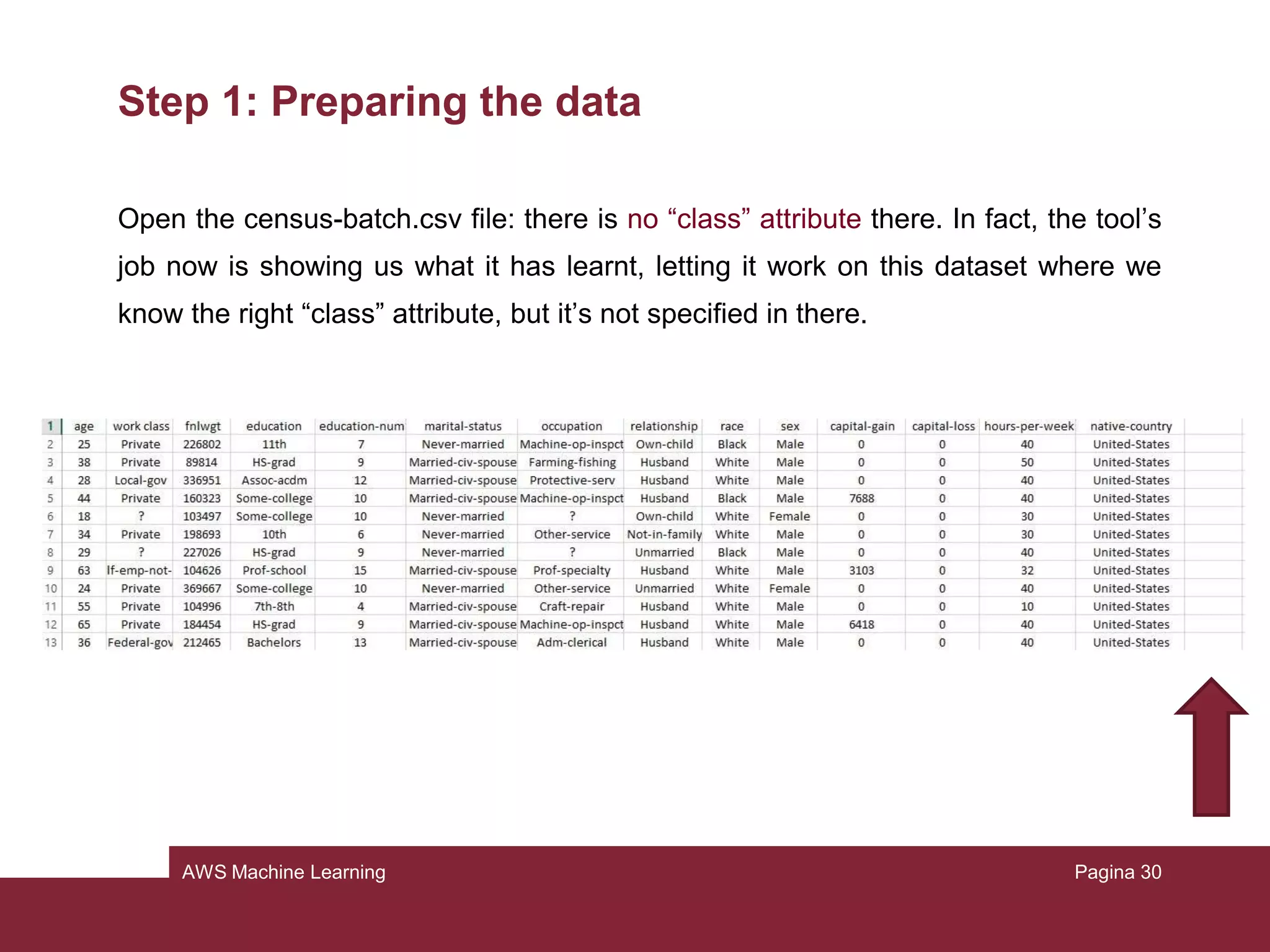
Open the census-batch.csv file: there is no “class” attribute there. In fact, the tool’s
job now is showing us what it has learnt, letting it work on this dataset where we
know the right “class” attribute, but it’s not specified in there.
Pagina 32
AWS Machine Learning
Step 2: Creating the training datasource
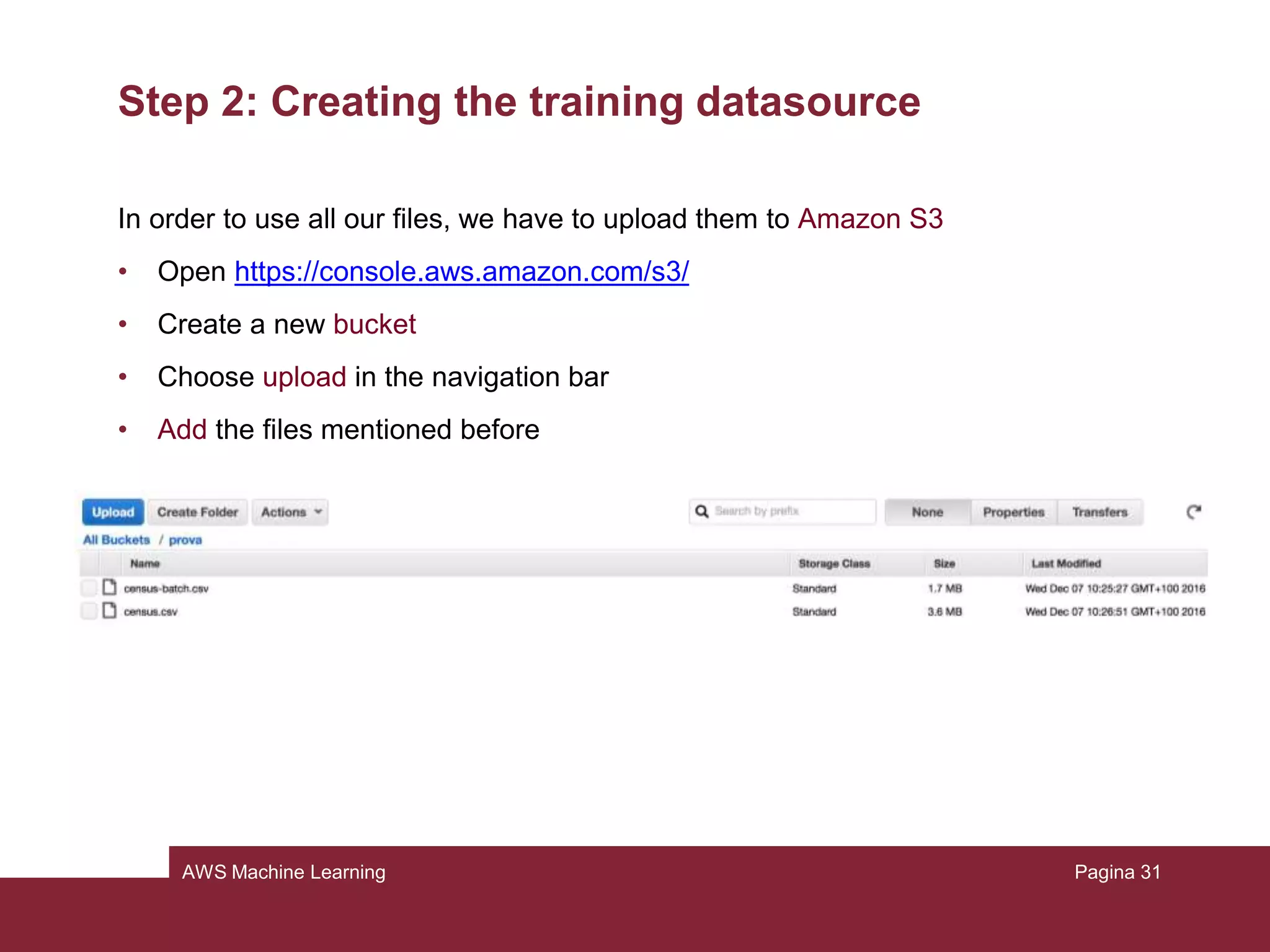
In order to use all our files, we have to upload them to Amazon S3
• Open https://console.aws.amazon.com/s3/
• Create a new bucket
• Choose upload in the navigation bar
• Add the files mentioned before
Pagina 33
AWS Machine Learning
Step 2: Creating the training datasource
Now to create the datasource (it will contain only the location of the data):
• Open https://console.aws.amazon.com/machinelearning/
• Choose Get Started (or Create New) and launch
• Select S3 from “Where your data is located?”
• Type <name of your bucket>/census.csv
• Put the name “Census data”
• Choose verify and grant permission
• Review and choose continue
Pagina 34
AWS Machine Learning
Step 2: Creating the training datasource
A schema contains information needed to interpret the input data for the model.
The simplest and fastest thing to do is to let Amazon infer it. We have to check if it
is correct. Review the schema and be sure that:
• Attributes with only 2 possible states are marked as binary
• Attributes that are numbers or strings that are used to denote a category should
be marked as categorical
• Attributes that are numbers where order matters should be marked as numeric
• Attributes that are plain strings as text
Then choose continue
Pagina 35
AWS Machine Learning
Step 2: Creating the training datasource
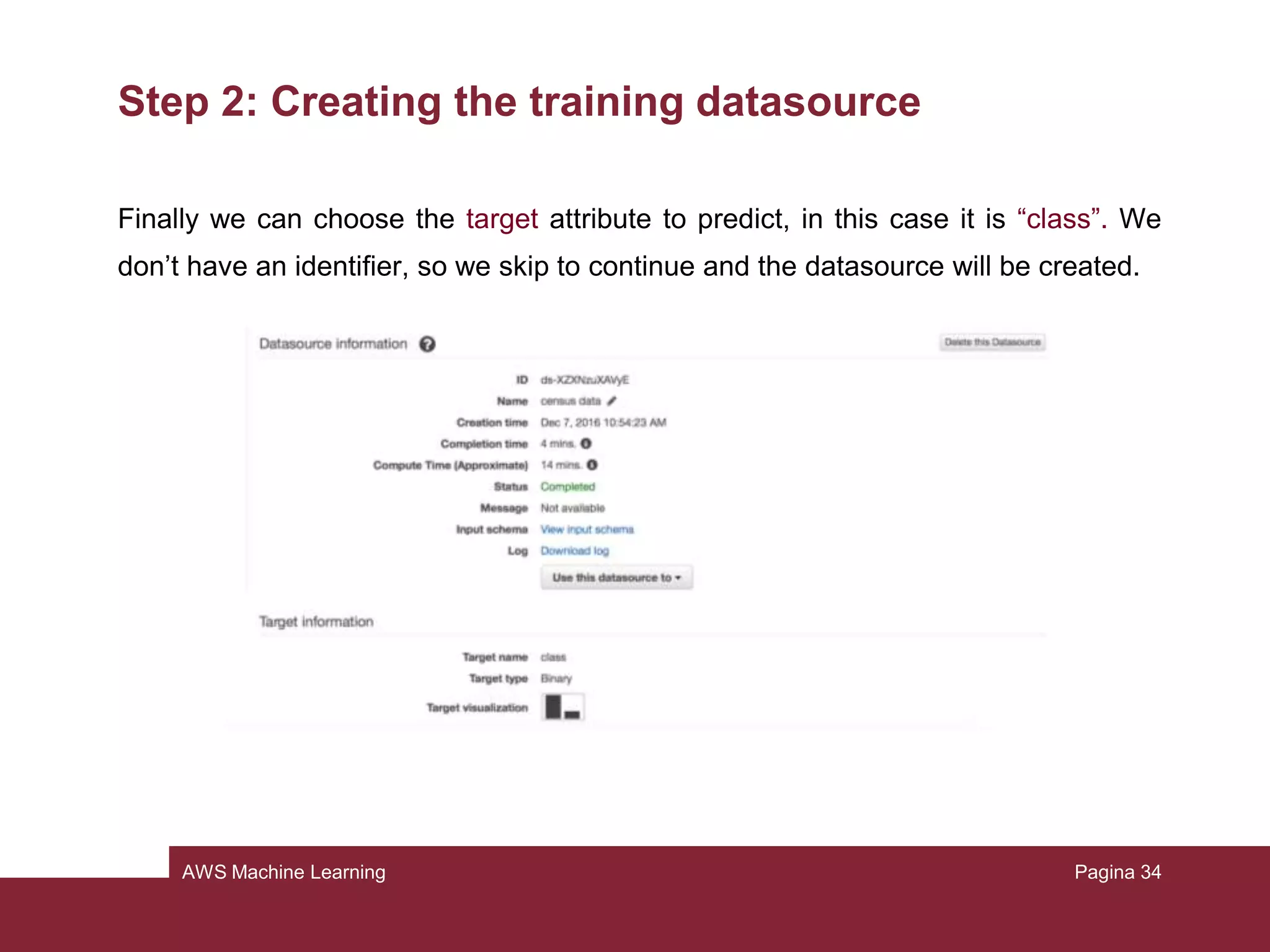
Finally we can choose the target attribute to predict, in this case it is “class”. We
don’t have an identifier, so we skip to continue and the datasource will be created.
Pagina 36
AWS Machine Learning
Step 3: Creating an ML model
Amazon should redirect us to the page of model creation. If not:
• From the console, click on “create a new model”
• Choose “I already created a datasource pointing to my S3 data”
• Pick our datasource previously created and click Continue
• Be sure the model name is “ML model: Census data” and select Default
• The evaluation name must be “Evaluation ML model: Census data”, review and
finish
Pagina 37
AWS Machine Learning
Step 3: Creating an ML model
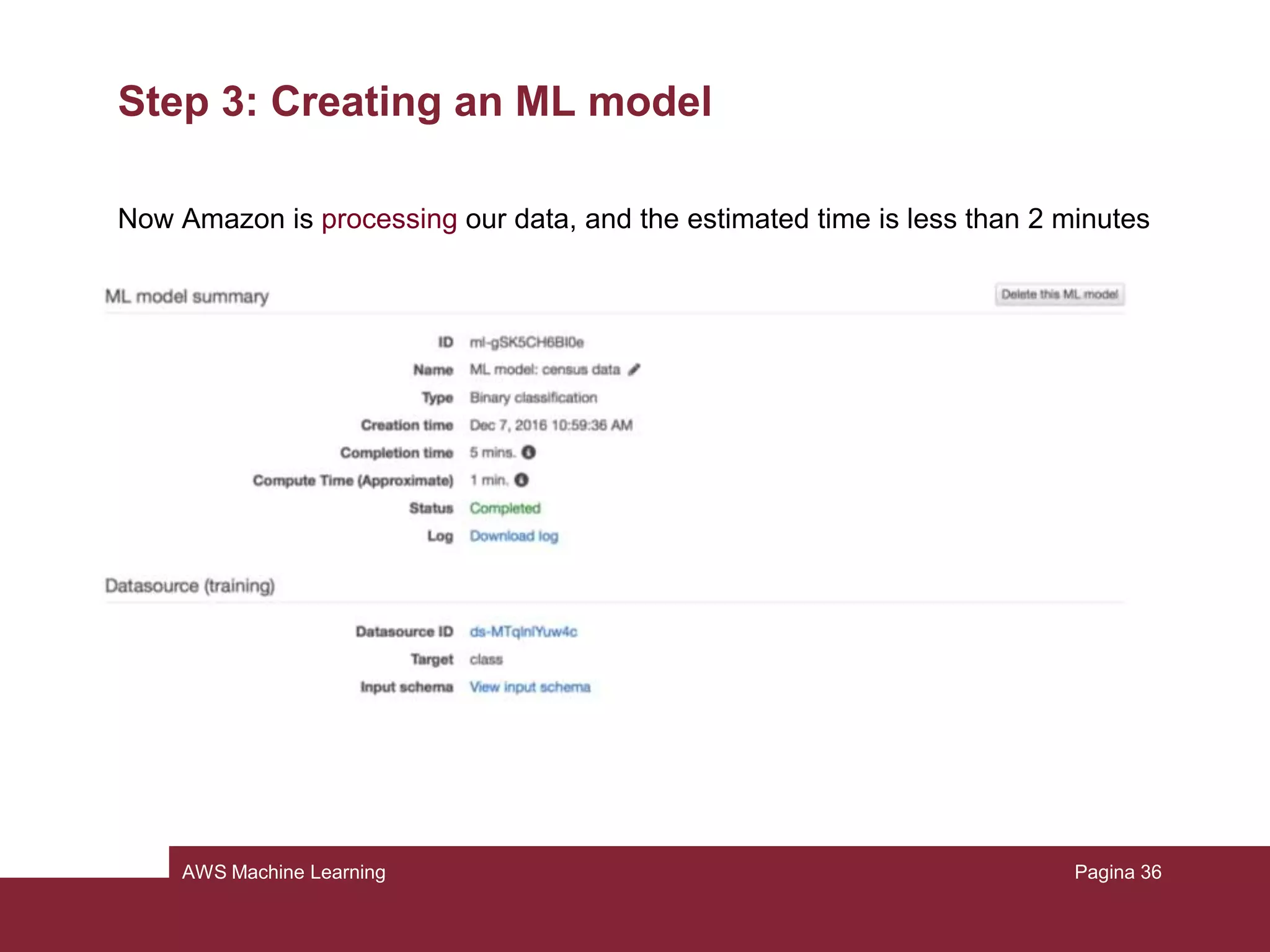
Now Amazon is processing our data, and this may take some minutes
Pagina 38
AWS Machine Learning
Step 3: Creating an ML model
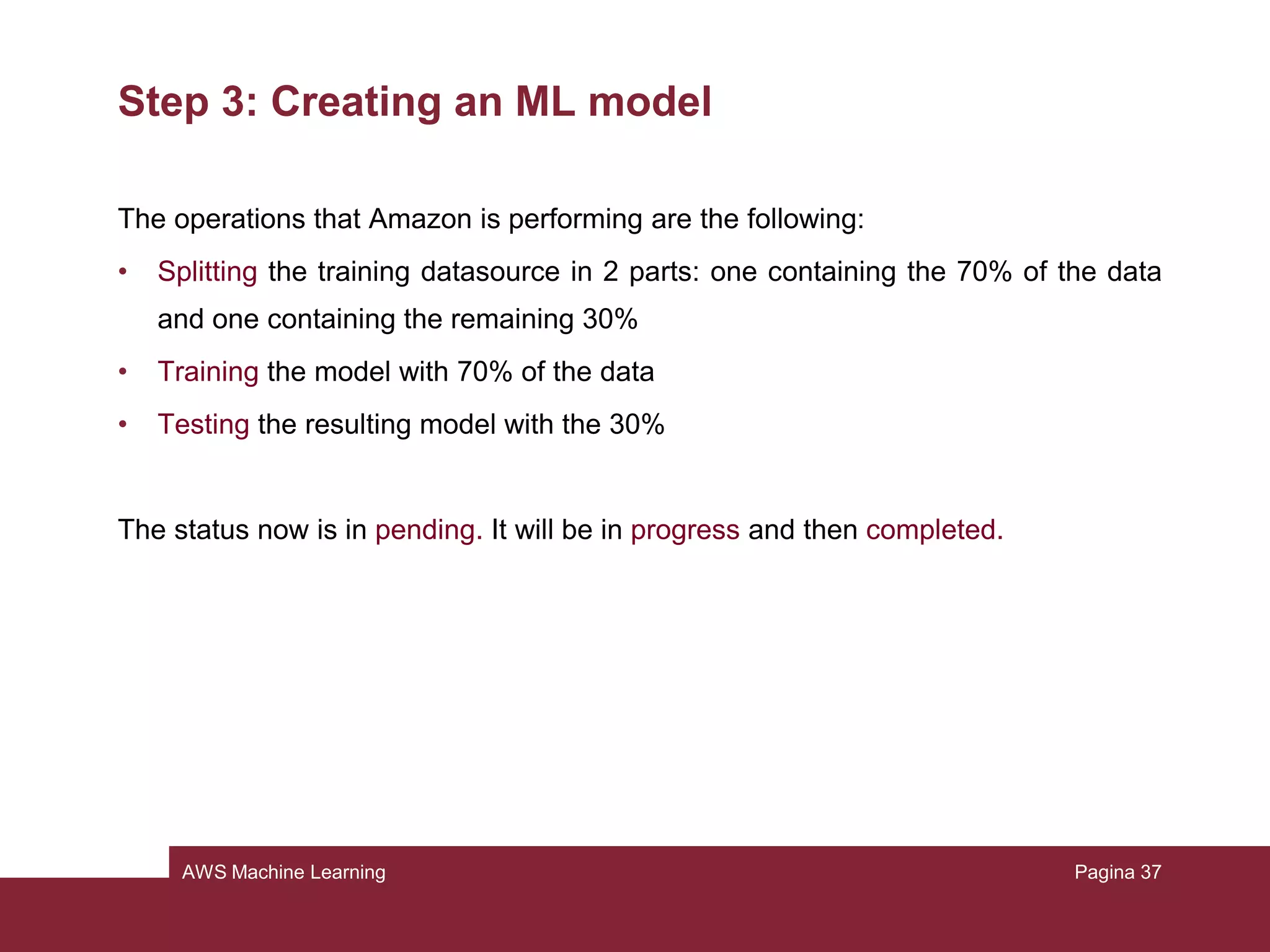
The operations that Amazon is performing are the following:
• Splitting the training datasource in 2 parts: one containing the 70% of the data
and one containing the remaining 30%
• Training the model with 70% of the data
• Testing the resulting model with the 30%
The status now is in pending. It will be in progress and then completed.
Pagina 39
AWS Machine Learning
Step 3: Creating an ML model
Pagina 40
AWS Machine Learning
Step 4: Reviewing the model’s predictive performance
and setting a score threshold
It’s important to check if the model is good enough for future predictions. This can
be done by looking at the model evaluation.
Take a look to the AUC (Area Under Curve) metric: it is an industry-standard quality
metric that expresses the performance quality of the model.
• Choose evaluation in the model summary
• Click on our model
• Click on summary
Pagina 41
AWS Machine Learning
Step 4: Reviewing the model’s predictive performance
and setting a score threshold
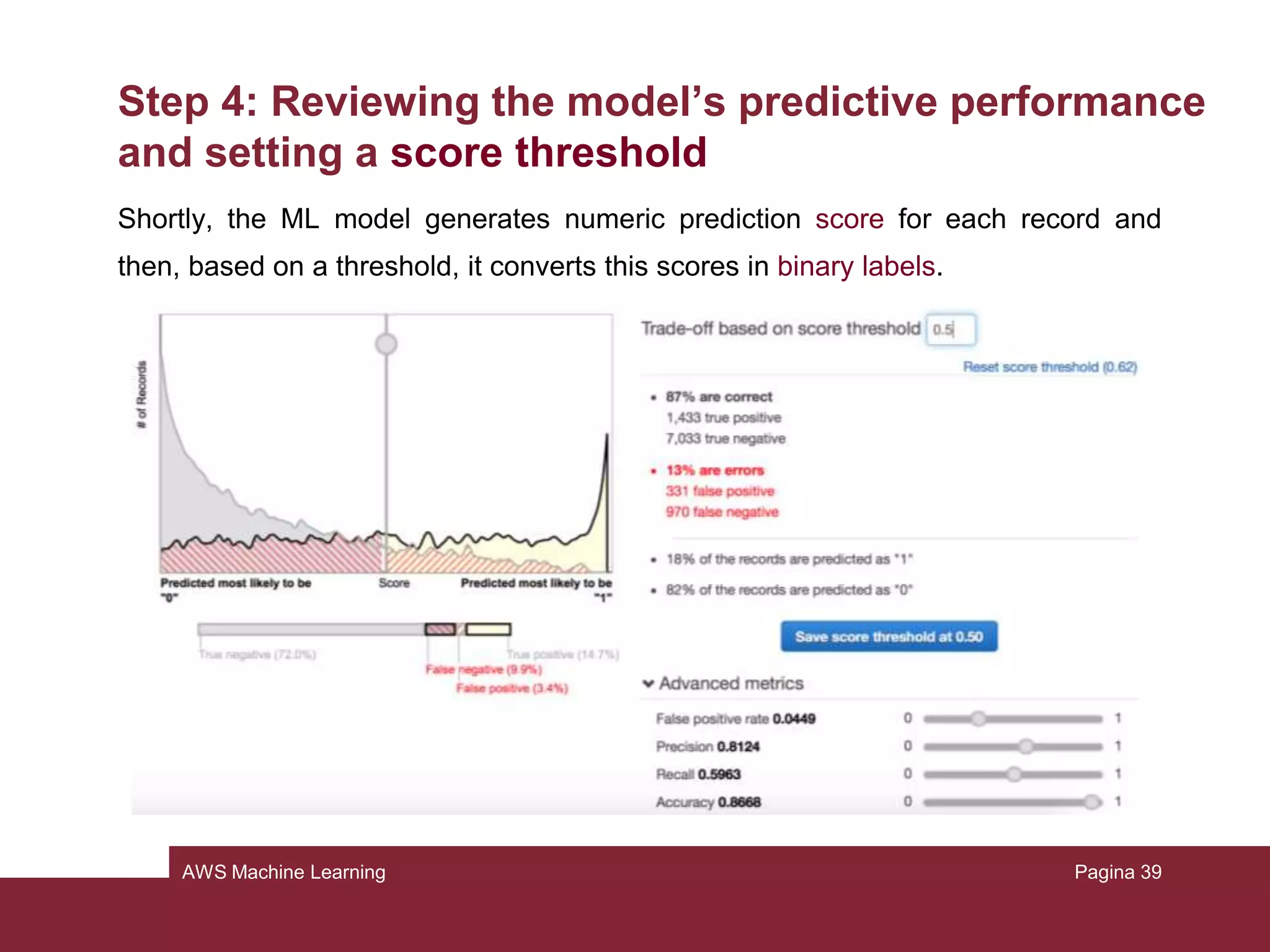
Shortly, the ML model generates numeric prediction score for each record and
then, based on a threshold, it converts this scores in binary labels.
Pagina 42
AWS Machine Learning
Step 4: Reviewing the model’s predictive performance
and setting a score threshold
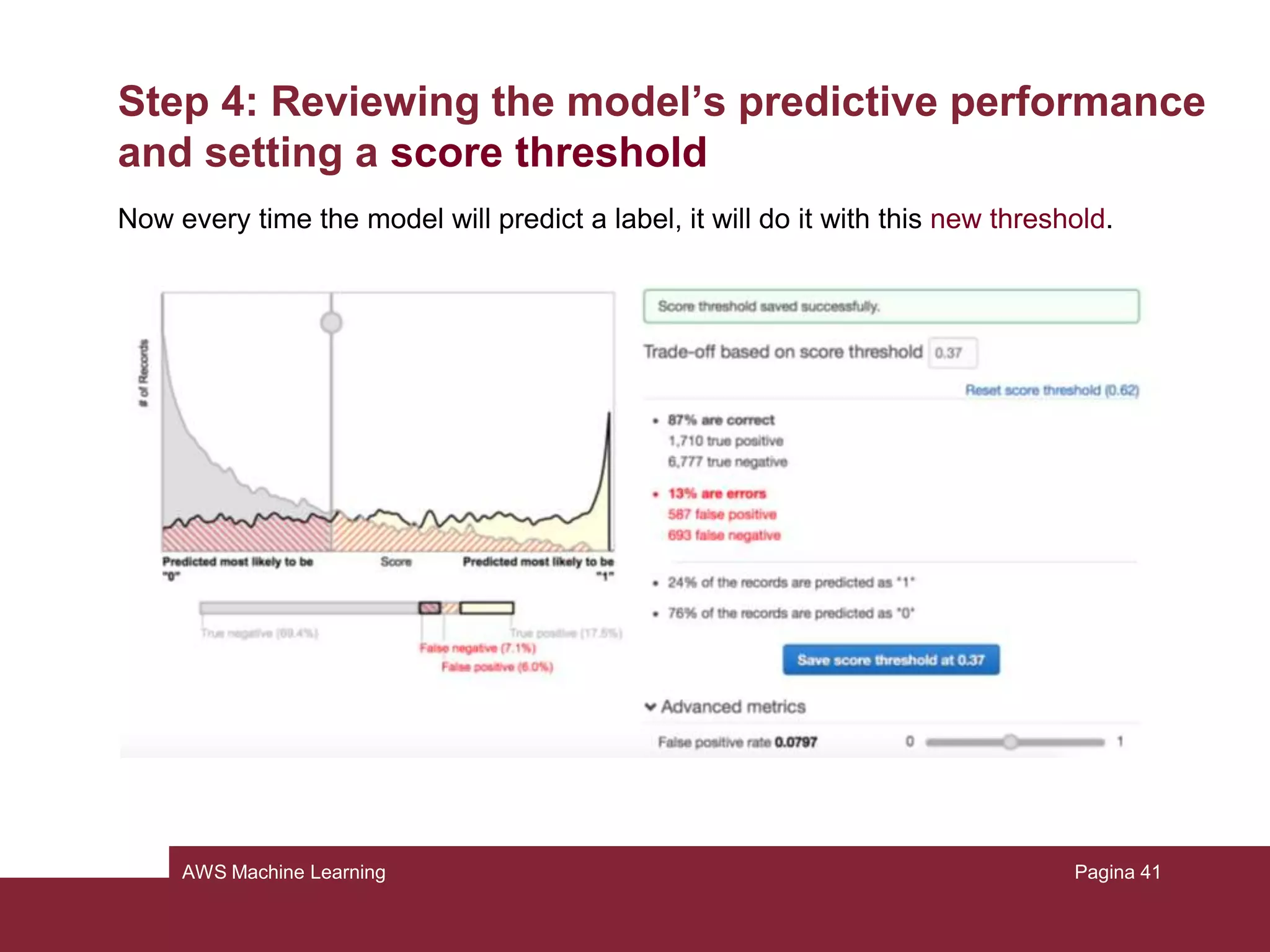
We can interact with this evaluation: if we change this threshold, we can modify
how the model assigns the labels.
• On evaluation summary page, choose “Adjust score threshold”
• Try to move the vertical line on the graphic and the number of correct choices
and errors will change:
– Movements to the right will reduce the number of false positives
– Movements to the left will reduce the number of false negatives
• Move it until the score threshold becomes 0.37 (it decreases the false
negatives)
Pagina 43
AWS Machine Learning
Step 4: Reviewing the model’s predictive performance
and setting a score threshold
Now every time the model will predict a label, it will do it with this new threshold.
Pagina 44
AWS Machine Learning
Step 5: Using the ML model to generate predictions
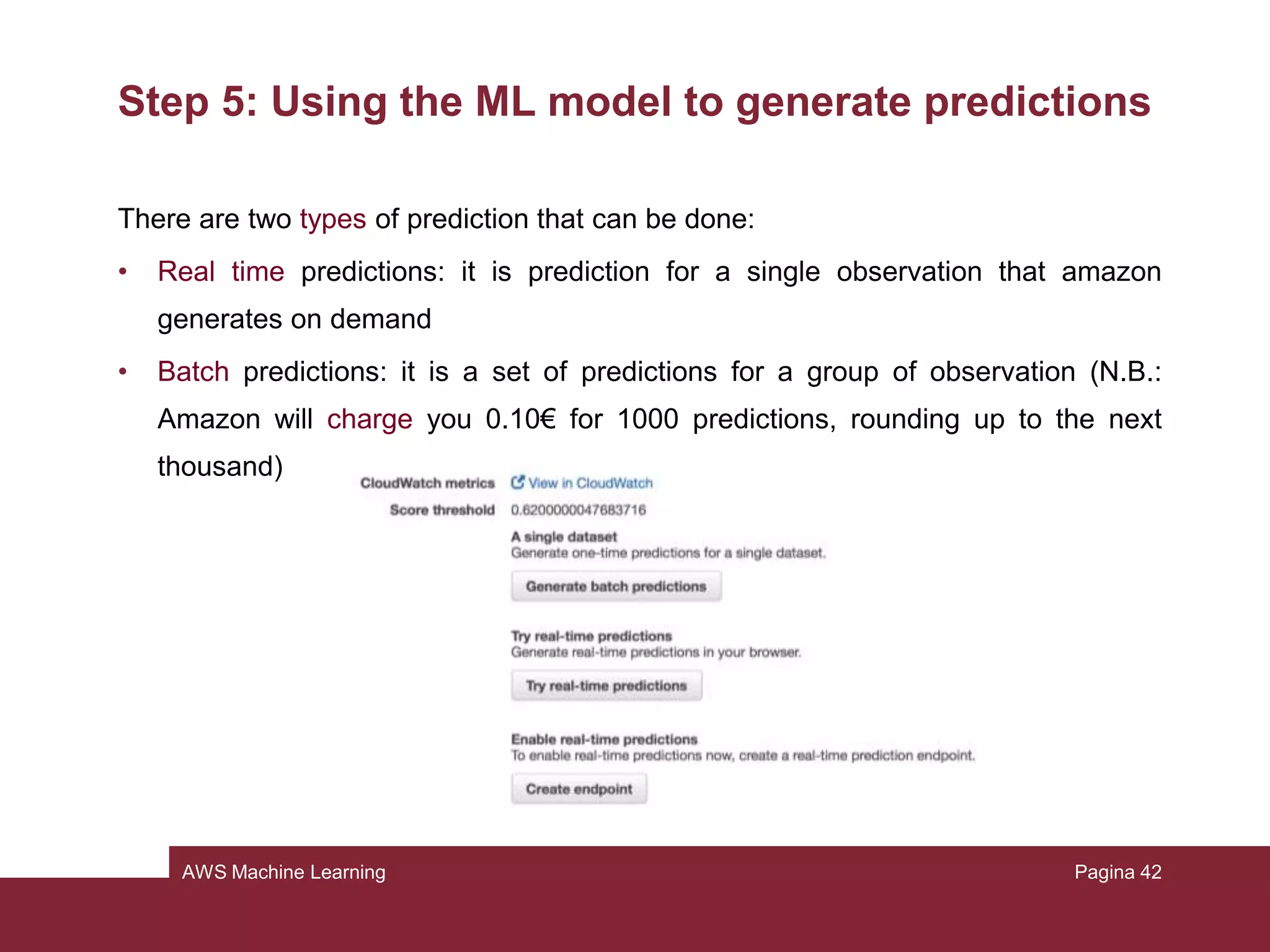
There are two types of prediction that can be done:
• Real time predictions: it is prediction for a single observation that amazon
generates on demand
• Batch predictions: it is a set of predictions for a group of observation (N.B.:
Amazon will charge you 0.10€ for 1000 predictions, rounding up to the next
thousand)
Pagina 45
AWS Machine Learning
Step 5: Using the ML model to generate predictions
We’ll try now batch predictions, and we need the census-batch.csv file that we
uploaded at the beginning.
• Click on Amazon Machine Learning
• Click on Batch prediction
• Choose the model we created and click Continue
• In “Locate the input data”, choose “My data is in s3, and I need to create a
datasource”
• For the name of the datasource, type “Census data 2” and for the location of the
file type “your-bucket/census-batch.csv”
• “Does the first line in your cvs contain the column names?”, choose Yes, then
Verify and Continue
Pagina 46
AWS Machine Learning
Step 5: Using the ML model to generate predictions
• For the destination, type the location where you uploaded the file at the
beginning
• Accept the default name
• Choose Review
• Grant permission to Amazon S3
• On the review page choose Finish
As we saw with the training, now Amazon will process our file and give us the
results.
Pagina 47
AWS Machine Learning
Step 5: Using the ML model to generate predictions
Pagina 48
AWS Machine Learning
Step 5: Using the ML model to generate predictions
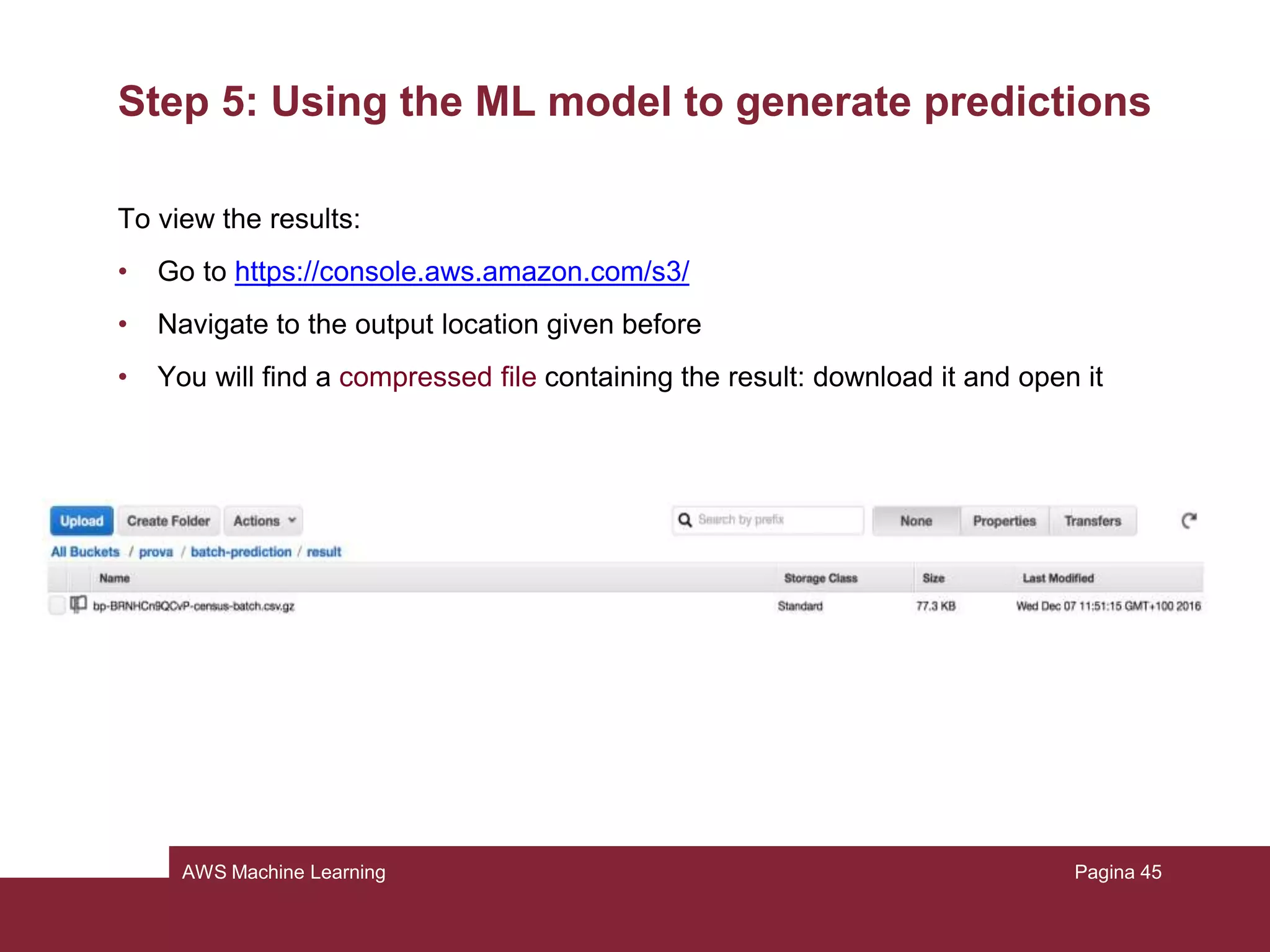
To view the results:
• Go to https://console.aws.amazon.com/s3/
• Navigate to the output location given before
• You will find a compressed file containing the result: download it and open it
Pagina 49
AWS Machine Learning
Step 5: Using the ML model to generate predictions
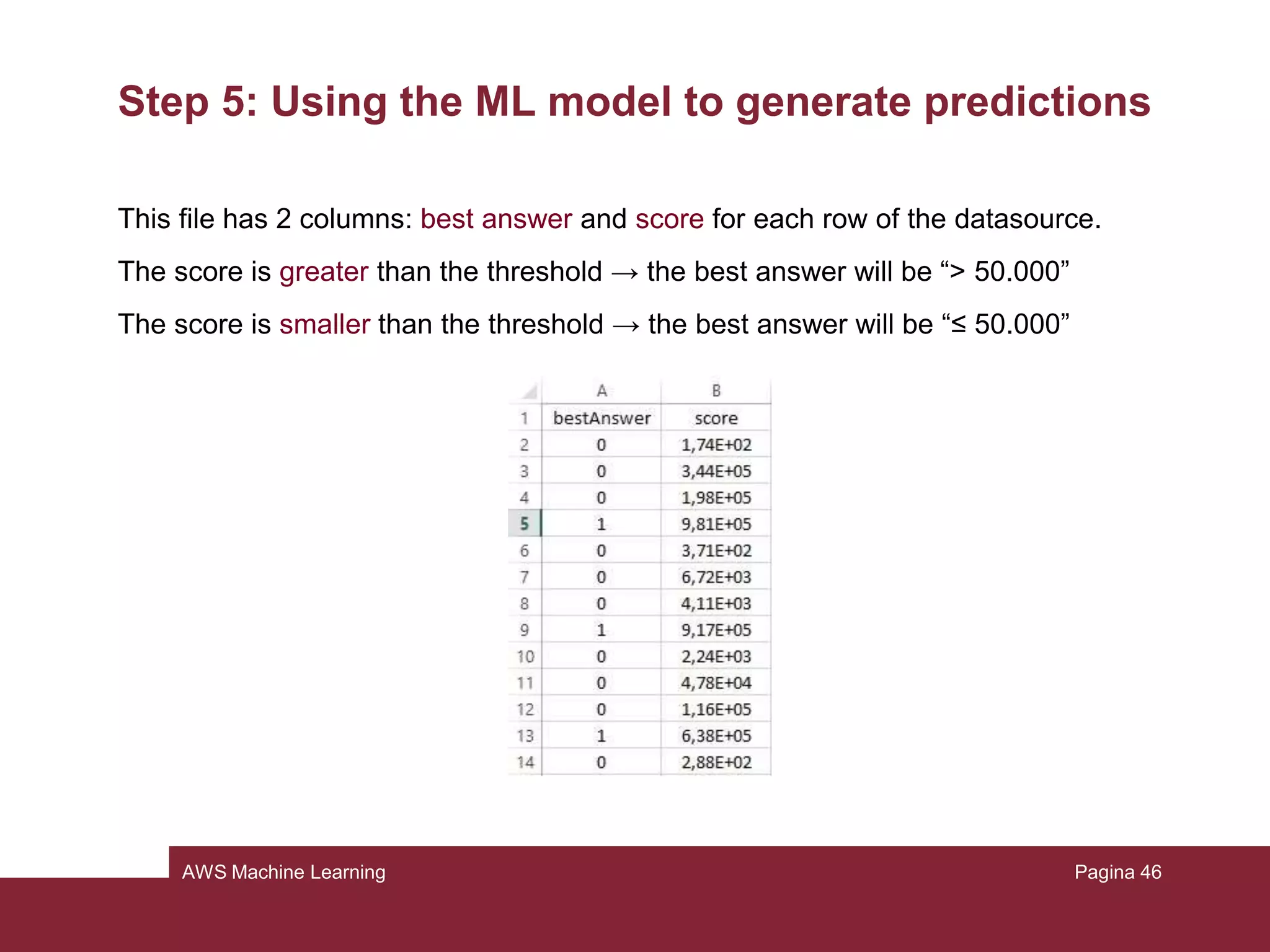
This file has 2 columns: best answer and score for each row of the datasource.
The score is greater than the threshold → the best answer will be “> 50.000”
The score is smaller than the threshold → the best answer will be “≤ 50.000”
Pagina 50
AWS Machine Learning
Step 6: Cleaning up
It’s safe to delete all the model and predictions we created so far, in order to not
incur in additional charges and to keep clean our console.
Pagina 51
AWS Machine Learning - Homework Assignment
Pagina 52
AWS Machine Learning
Homework Assignment
In the tutorial it has been introduced the usage of Amazon ML service through a
graphical interface, however in practice it can be useful to integrate such service
into a particular application.
Amazon ML addresses this problem offering a large, complete and easy to use set
of APIs.
http://docs.aws.amazon.com/machine-learning/latest/APIReference
Pagina 53
AWS Machine Learning
Homework Assignment
Assignment:
You are asked to repeat the steps presented in the tutorial with the exception of the
5
th
step (Using the model to generate predictions). You are asked indeed to
complete such point by writing a Python script that makes use of the APIs.
Write the code needed to:
1) Generate real-time predictions
2) Generate batch predictions:
Pagina 54
AWS Machine Learning
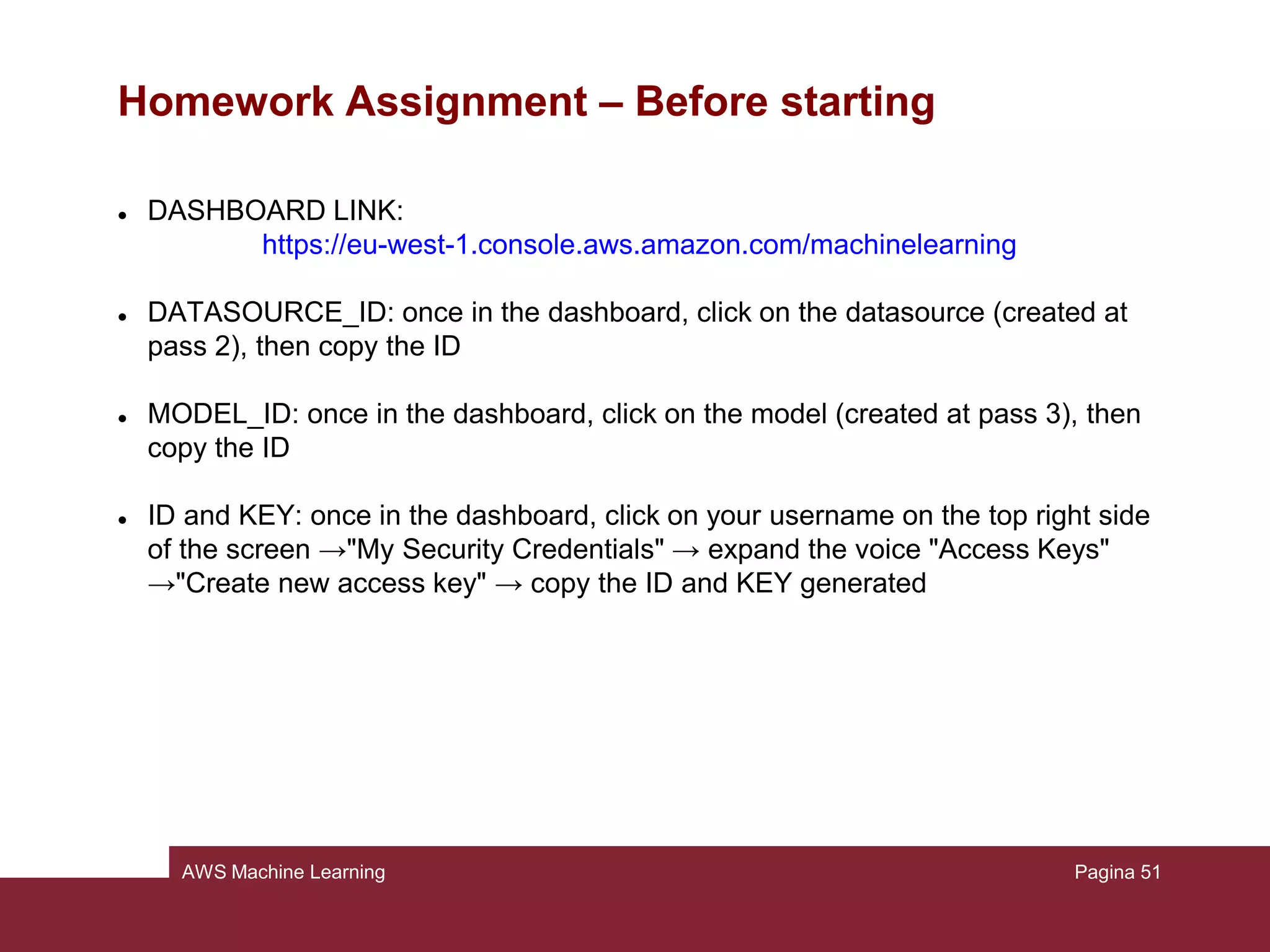
Homework Assignment – Before starting
 DASHBOARD LINK:
https://eu-west-1.console.aws.amazon.com/machinelearning
 DATASOURCE_ID: once in the dashboard, click on the datasource (created at
pass 2), then copy the ID
 MODEL_ID: once in the dashboard, click on the model (created at pass 3), then
copy the ID
 ID and KEY: once in the dashboard, click on your username on the top right side
of the screen →"My Security Credentials" → expand the voice "Access Keys"
→"Create new access key" → copy the ID and KEY generated
Pagina 55
AWS Machine Learning
Homework Assignment – Before starting
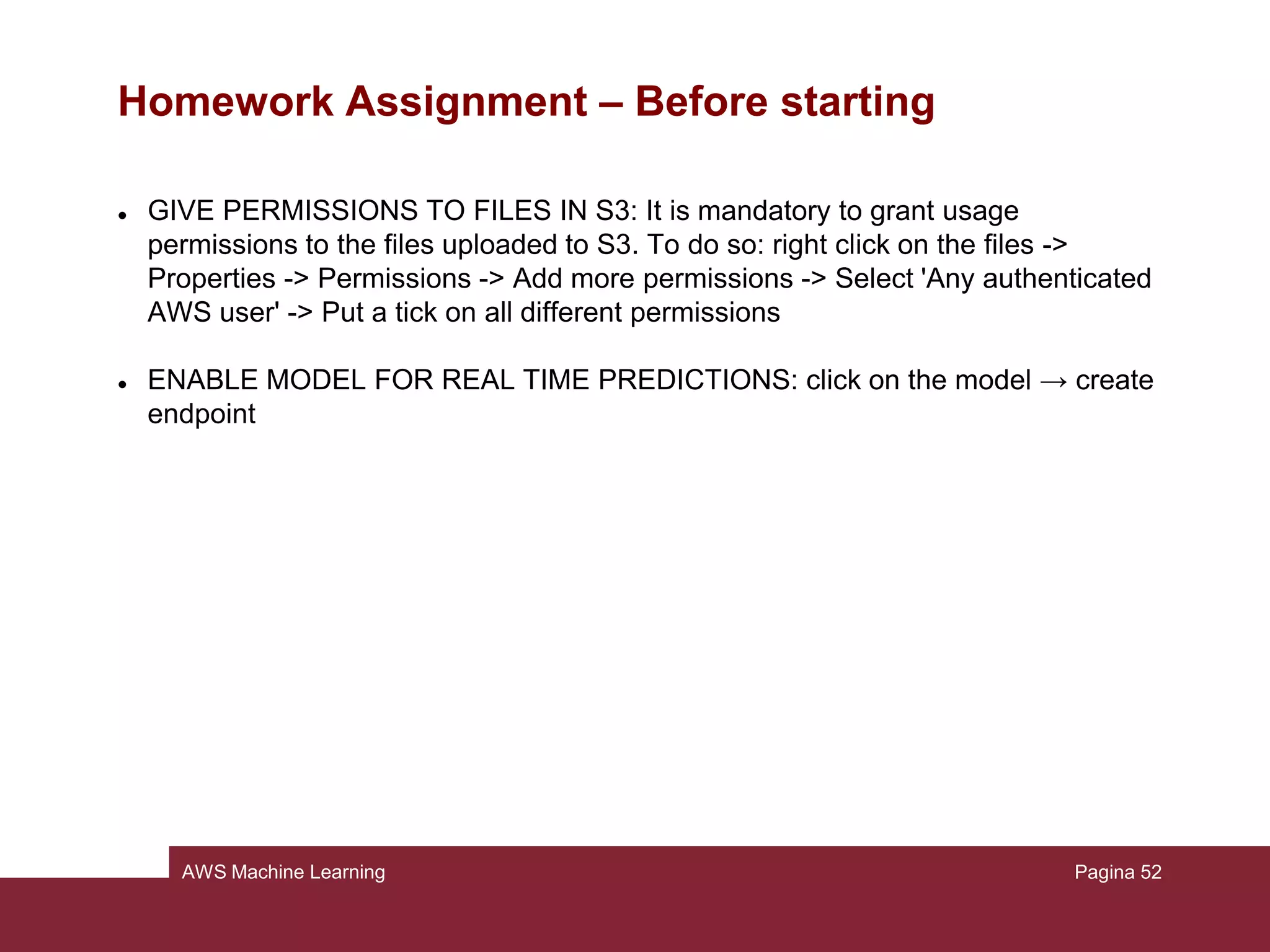
 GIVE PERMISSIONS TO FILES IN S3: It is mandatory to grant usage
permissions to the files uploaded to S3. To do so: right click on the files ->
Properties -> Permissions -> Add more permissions -> Select 'Any authenticated
AWS user' -> Put a tick on all different permissions
 ENABLE MODEL FOR REAL TIME PREDICTIONS: click on the model → create
endpoint
Pagina 56
AWS Machine Learning
Homework Assignment – Exercise 1
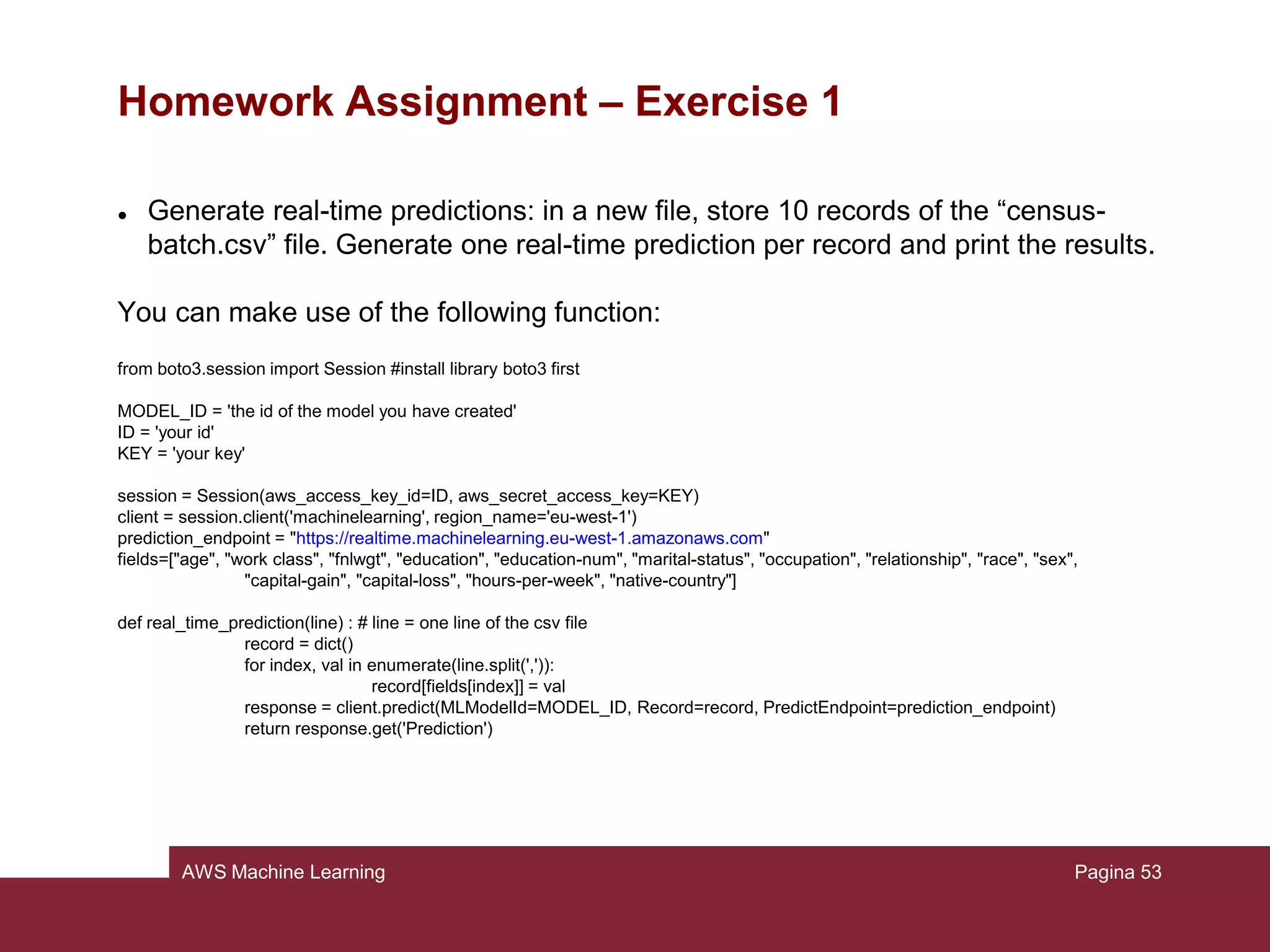
 Generate real-time predictions: in a new file, store 10 records of the “census-
batch.csv” file. Generate one real-time prediction per record and print the results.
You can make use of the following function:
from boto3.session import Session #install library boto3 first
MODEL_ID = 'the id of the model you have created'
ID = 'your id'
KEY = 'your key'
session = Session(aws_access_key_id=ID, aws_secret_access_key=KEY)
client = session.client('machinelearning', region_name='eu-west-1')
prediction_endpoint = "https://realtime.machinelearning.eu-west-1.amazonaws.com"
fields=["age", "work class", "fnlwgt", "education", "education-num", "marital-status", "occupation", "relationship", "race", "sex",
"capital-gain", "capital-loss", "hours-per-week", "native-country"]
def real_time_prediction(line) : # line = one line of the csv file
record = dict()
for index, val in enumerate(line.split(',')):
record[fields[index]] = val
response = client.predict(MLModelId=MODEL_ID, Record=record, PredictEndpoint=prediction_endpoint)
return response.get('Prediction')
Pagina 57
AWS Machine Learning
Homework Assignment – Exercise 2
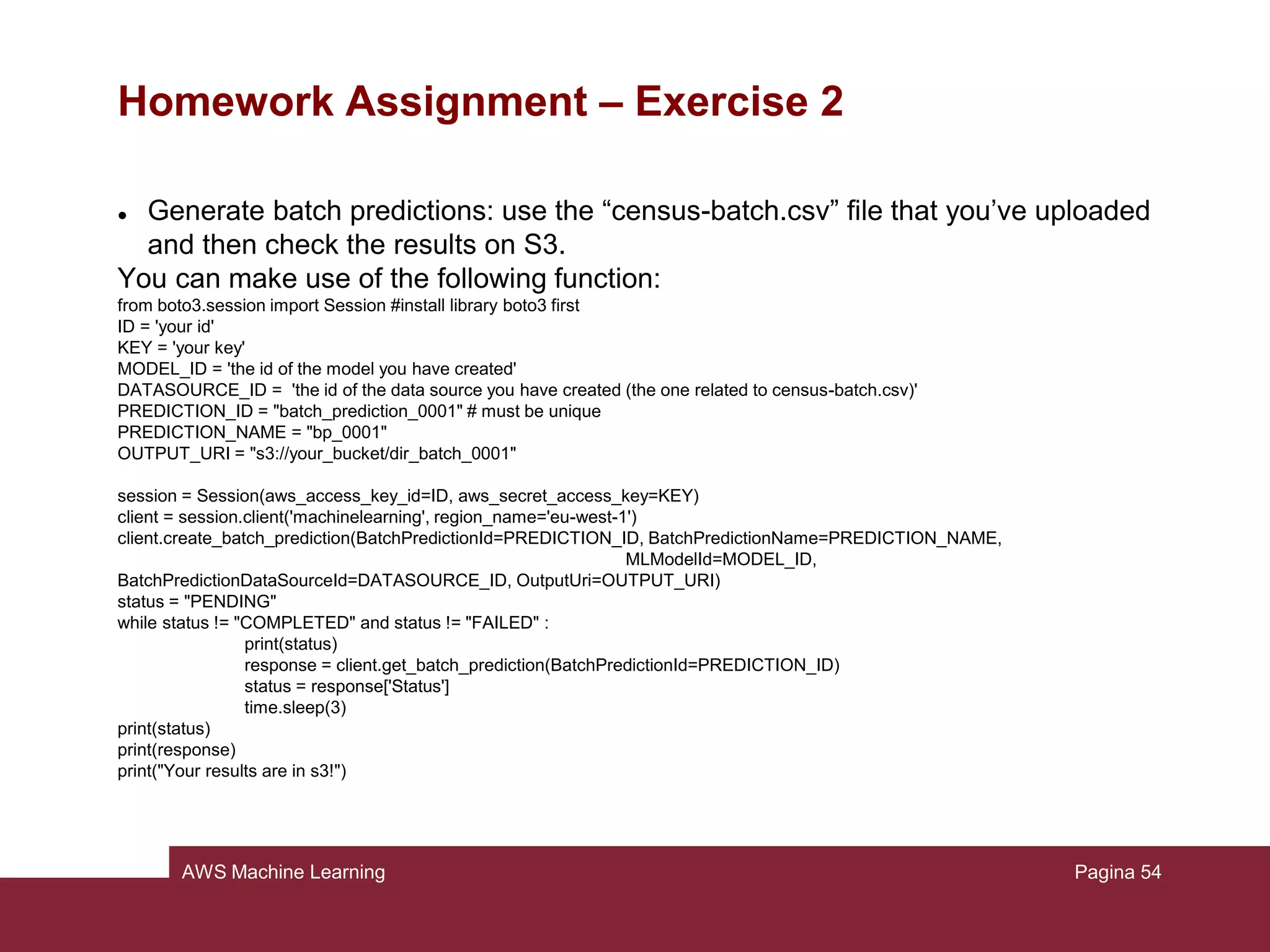
 Generate batch predictions: use the “census-batch.csv” file that you’ve uploaded
and then check the results on S3.
You can make use of the following function:
from boto3.session import Session #install library boto3 first
ID = 'your id'
KEY = 'your key'
MODEL_ID = 'the id of the model you have created'
DATASOURCE_ID = 'the id of the data source you have created (the one related to census-batch.csv)'
PREDICTION_ID = "batch_prediction_0001" # must be unique
PREDICTION_NAME = "bp_0001"
OUTPUT_URI = "s3://your_bucket/dir_batch_0001"
session = Session(aws_access_key_id=ID, aws_secret_access_key=KEY)
client = session.client('machinelearning', region_name='eu-west-1')
client.create_batch_prediction(BatchPredictionId=PREDICTION_ID, BatchPredictionName=PREDICTION_NAME,
MLModelId=MODEL_ID,
BatchPredictionDataSourceId=DATASOURCE_ID, OutputUri=OUTPUT_URI)
status = "PENDING"
while status != "COMPLETED" and status != "FAILED" :
print(status)
response = client.get_batch_prediction(BatchPredictionId=PREDICTION_ID)
status = response['Status']
time.sleep(3)
print(status)
print(response)
print("Your results are in s3!")
Pagina 58
AWS Machine Learning
Homework Assignment
For this homework, you’ll have one week of time to deliver the results.
In particular, the due is 20/12/2016, 23:59
You are asked to deliver back the code and the instructions to run it into a
.zip file to one of our email addresses.
Pagina 59
AWS Machine Learning
Homework Assignment
For any kind of problem or information, please contact us!
Contacts:
• Dario Molinari: molinari.1547862@studenti.uniroma1.it
• Daniele De cillis: decillis.1528489@studenti.uniroma1.it
• Lorenzo Vitali: vitali.1526110@studenti.uniroma1.it
• Lukas Hermann: lukas.hermann@gmx.de
• Milad Kiwan: kiwan.1164659@studenti.uniroma1.it
• Matteo Pallotta: matpallotta@gmail.com
Pagina 60

Presentazione tutorial

  • 1.
    AWS Machine Learning Engineeringin Computer Science - Data Mining Class
  • 2.
    Who are we? 2AWSMachine Learning Lukas Hermann Milad Kiwan Dario Molinari Lorenzo Vitali Daniele De Cillis Matteo Pallotta
  • 3.
    Where to findthe material Slideshare repository http://www.slideshare.net/dariospin93/presentazione- tutorial-70026708 Github repository: https://github.com/dariospin93/TutorialDataMining Here you’ll find the files needed for this tutorial 3AWS Machine Learning
  • 4.
    What is MachineLearning? “Machine learning is the subfield of computer science that gives computers the ability to learn without being explicitly programmed" (Wikipedia) “A computer program is said to learn from experience E with respect to some class of tasks T and performance measure P if its performance at tasks in T, as measured by P, improves with experience E." (Tom M. Mitchell, Chair of the Machine Learning Department at Carnegie Mellon University) 4AWS Machine Learning
  • 5.
    What is MachineLearning? Some ML tasks: • Classification: inputs are divided into 2 or more classes. The goal is to produce a model that assigns unseen inputs to one (e.g: Spam Filtering, input= emails, output = ”spam” or “not spam”). • Regression: related to the previous category. The outputs are continuous rather than discrete (e.g: input = ”size of a house”, output = ”price”) 5AWS Machine Learning
  • 6.
    What is MachineLearning? Some ML tasks: • Clustering: divide inputs into groups. The main difference with respect to Classification problems is that the groups are not known beforehand • Dimensionality reduction: map inputs into a lower-dimensional space. (e.g: input = “set of documents in human language”, output = “which documents cover similar topics”) • ... 6AWS Machine Learning
  • 7.
    Why Machine Learning? •Growing flood of data • Growing availability of computational power • Progress in algorithms 7AWS Machine Learning
  • 8.
    Amazon Machine Learning “Servicethat makes it easy for developers of all skill levels to use machine learning technology. Amazon Machine Learning provides visualization tools and wizards that guide you through the process of creating machine learning (ML) models without having to learn complex ML algorithms and technology.” 8AWS Machine Learning
  • 9.
    What is AmazonML? • Robust cloud-based service that makes it easy for developers of all skill levels to use ML technology. • Create ML models by finding patterns in your existing data. • provides visualization tools and wizards that guide you through the process. 9AWS Machine Learning
  • 10.
    When to useAmazon ML? • No need to learn complex ML algorithms and technology. • Makes it easy to obtain predictions for your application using simple APIs. • ML is not a solution for every type of problem. – if you can determine a target value by using simple rules, computations, or predetermined steps that can be programmed without needing ML. 10AWS Machine Learning
  • 11.
    When to useAmazon ML? • Many human tasks cannot be adequately solved using a simple rule-based solution: recognizing whether an email is spam or not spam. • When rules depend on too many factors and many of these rules overlap or need to be tuned very finely. 11AWS Machine Learning
  • 12.
    When to useAmazon ML? You can use ML approaches for these specific ML tasks: • binary classification (predicting one of two possible outcomes). • multiclass classification (predicting one of more than two outcomes). • regression (predicting a numeric value). 12AWS Machine Learning
  • 13.
    Formulating The Problem •The first step in machine learning is to decide what you want to predict, which is known as the label or target answer. – Predict the number of purchases your customers will make for each product. (regression problem) – Predict which products will get more than 10 purchases. (binary classification problem) – Which category of products is most interesting to this customer. (multiclass classification problem) 13AWS Machine Learning
  • 14.
    Collecting Labeled Data •Labeled Data: are data for which you already know the target answer. • The Target: is the answer that you want to predict. 14AWS Machine Learning
  • 15.
    Collecting Labeled Data •Data is not readily available in a labeled form. Collecting and preparing the variables and the target are often the most important steps in solving an ML problem. • You provide data that is labeled with the target to the ML algorithm to learn from. Then, you will use the trained ML model to predict this answer on data for which you do not know the target answer. 15AWS Machine Learning
  • 16.
    What is AmazonS3 (Simple Storage Service)? • Amazon S3 has a simple web services interface that you can use to store and retrieve any amount of data. • It is designed to make web-scale computing easier for developers. 16AWS Machine Learning
  • 17.
    Training and EvaluationData • The fundamental goal of ML is to generalize beyond the data instances to train models. • Amazon ML splits the first 70 percent of the input data sent for training a model through the Amazon ML console and the remaining 30 percent for the evaluation datasource. 17AWS Machine Learning
  • 18.
    Training and EvaluationData • The ML system uses the training data to train models to see patterns, and uses the evaluation data to evaluate the predictive quality of the trained model • The ML system evaluates predictive performance by comparing predictions on the evaluation data set with true values. 18AWS Machine Learning
  • 19.
    Evaluation • Threshold forprediction can be adjusted • Control precision and recall 19AWS Machine Learning
  • 20.
  • 21.
    AWS ML Techniques •for regression, AWS uses linear regression • for classification, AWS uses logistic regression – Despite the name classification method – uses a ML model similar to regression with a logistic sigmoid function – binomial or multinomial 21AWS Machine Learning
  • 22.
    Logistic Regression: Example •Labeled data with labels y ∈ {0,1} • e.g.: – x: hours of study – y: pass (1) or fail (0) • What’s the probability of success given a certain time spent studying? 22AWS Machine Learning
  • 23.
  • 24.
    Limitations of AmazonML •Only supervised learning (no clustering etc.) •No selection of the ML method possible •Preprocessing of the data is a black box 24AWS Machine Learning
  • 25.
  • 26.
    AWS Machine Learning Acloud application With Amazon ML, we can build and train a predictive model in a scalable cloud solution. In fact, there is no need of any kind of application to run this tool, because it runs on the cloud (actually, we’ll need a web browser in order to access to the tool). In our tutorial we’ll show you the basic functionalities of Amazon ML, like creating a datasource, building a model and using this model to generate predictions. In order to do this, we need a dataset, as big as possible. Our dataset, is taken from the University of California at Irvine (UCI) machine learning repository, where it is possible to find a lot of them. Pagina 26
  • 27.
    AWS Machine Learning Whatwe will see in this tutorial In this tutorial we’ll see how machine learning can be used for marketing purposes. To do this, we’ll show you how to build and train a model to help you making decisions based on the data you have. We’ll focus on selecting people based on their earnings, that may be useful to find who’s going to be more suitable for certain marketing offers Pagina 27
  • 28.
    AWS Machine Learning TutorialPlan 1. Preparing the data 2. Creating a training datasource 3. Creating a model 4. Reviewing the model’s predictive performance and setting a score threshold 5. Using the model to generate predictions 6. Cleaning up (to avoid incurring in unwanted charges) Pagina 28
  • 29.
    AWS Machine Learning Step1: Preparing the data Initially, we must be sure that our tool understands the data we pass to it. In order to do this, we should ensure that our dataset follows Amazon’s guidelines: • Data must be saved in .csv format • Each row must be a single observation • Each column must contain a single attribute of the observation • The first should contain the attribute’s names (or you can provide them in a separated file, but it’s not recommended) • Every attribute must be separated by comma • If you use Excel and MacOS, do not save in “comma separated value(.csv)” format, use the “windows comma separated (.csv)” instead. Pagina 29
  • 30.
    AWS Machine Learning Step1: Preparing the data Consider our dataset: open the “census.csv” file Our target is the attribute “class”: how much a person earns per year (binary, 1 if > 50.000, 0 if ≤ 50.000) Pagina 30
  • 31.
    AWS Machine Learning Step1: Preparing the data In practice, the machine will learn which are the characteristics of the people who earn more than the threshold and who earn less, and with this knowledge, we will ask to predict at which class other people belong. Pagina 31
  • 32.
    AWS Machine Learning Step1: Preparing the data Open the census-batch.csv file: there is no “class” attribute there. In fact, the tool’s job now is showing us what it has learnt, letting it work on this dataset where we know the right “class” attribute, but it’s not specified in there. Pagina 32
  • 33.
    AWS Machine Learning Step2: Creating the training datasource In order to use all our files, we have to upload them to Amazon S3 • Open https://console.aws.amazon.com/s3/ • Create a new bucket • Choose upload in the navigation bar • Add the files mentioned before Pagina 33
  • 34.
    AWS Machine Learning Step2: Creating the training datasource Now to create the datasource (it will contain only the location of the data): • Open https://console.aws.amazon.com/machinelearning/ • Choose Get Started (or Create New) and launch • Select S3 from “Where your data is located?” • Type <name of your bucket>/census.csv • Put the name “Census data” • Choose verify and grant permission • Review and choose continue Pagina 34
  • 35.
    AWS Machine Learning Step2: Creating the training datasource A schema contains information needed to interpret the input data for the model. The simplest and fastest thing to do is to let Amazon infer it. We have to check if it is correct. Review the schema and be sure that: • Attributes with only 2 possible states are marked as binary • Attributes that are numbers or strings that are used to denote a category should be marked as categorical • Attributes that are numbers where order matters should be marked as numeric • Attributes that are plain strings as text Then choose continue Pagina 35
  • 36.
    AWS Machine Learning Step2: Creating the training datasource Finally we can choose the target attribute to predict, in this case it is “class”. We don’t have an identifier, so we skip to continue and the datasource will be created. Pagina 36
  • 37.
    AWS Machine Learning Step3: Creating an ML model Amazon should redirect us to the page of model creation. If not: • From the console, click on “create a new model” • Choose “I already created a datasource pointing to my S3 data” • Pick our datasource previously created and click Continue • Be sure the model name is “ML model: Census data” and select Default • The evaluation name must be “Evaluation ML model: Census data”, review and finish Pagina 37
  • 38.
    AWS Machine Learning Step3: Creating an ML model Now Amazon is processing our data, and this may take some minutes Pagina 38
  • 39.
    AWS Machine Learning Step3: Creating an ML model The operations that Amazon is performing are the following: • Splitting the training datasource in 2 parts: one containing the 70% of the data and one containing the remaining 30% • Training the model with 70% of the data • Testing the resulting model with the 30% The status now is in pending. It will be in progress and then completed. Pagina 39
  • 40.
    AWS Machine Learning Step3: Creating an ML model Pagina 40
  • 41.
    AWS Machine Learning Step4: Reviewing the model’s predictive performance and setting a score threshold It’s important to check if the model is good enough for future predictions. This can be done by looking at the model evaluation. Take a look to the AUC (Area Under Curve) metric: it is an industry-standard quality metric that expresses the performance quality of the model. • Choose evaluation in the model summary • Click on our model • Click on summary Pagina 41
  • 42.
    AWS Machine Learning Step4: Reviewing the model’s predictive performance and setting a score threshold Shortly, the ML model generates numeric prediction score for each record and then, based on a threshold, it converts this scores in binary labels. Pagina 42
  • 43.
    AWS Machine Learning Step4: Reviewing the model’s predictive performance and setting a score threshold We can interact with this evaluation: if we change this threshold, we can modify how the model assigns the labels. • On evaluation summary page, choose “Adjust score threshold” • Try to move the vertical line on the graphic and the number of correct choices and errors will change: – Movements to the right will reduce the number of false positives – Movements to the left will reduce the number of false negatives • Move it until the score threshold becomes 0.37 (it decreases the false negatives) Pagina 43
  • 44.
    AWS Machine Learning Step4: Reviewing the model’s predictive performance and setting a score threshold Now every time the model will predict a label, it will do it with this new threshold. Pagina 44
  • 45.
    AWS Machine Learning Step5: Using the ML model to generate predictions There are two types of prediction that can be done: • Real time predictions: it is prediction for a single observation that amazon generates on demand • Batch predictions: it is a set of predictions for a group of observation (N.B.: Amazon will charge you 0.10€ for 1000 predictions, rounding up to the next thousand) Pagina 45
  • 46.
    AWS Machine Learning Step5: Using the ML model to generate predictions We’ll try now batch predictions, and we need the census-batch.csv file that we uploaded at the beginning. • Click on Amazon Machine Learning • Click on Batch prediction • Choose the model we created and click Continue • In “Locate the input data”, choose “My data is in s3, and I need to create a datasource” • For the name of the datasource, type “Census data 2” and for the location of the file type “your-bucket/census-batch.csv” • “Does the first line in your cvs contain the column names?”, choose Yes, then Verify and Continue Pagina 46
  • 47.
    AWS Machine Learning Step5: Using the ML model to generate predictions • For the destination, type the location where you uploaded the file at the beginning • Accept the default name • Choose Review • Grant permission to Amazon S3 • On the review page choose Finish As we saw with the training, now Amazon will process our file and give us the results. Pagina 47
  • 48.
    AWS Machine Learning Step5: Using the ML model to generate predictions Pagina 48
  • 49.
    AWS Machine Learning Step5: Using the ML model to generate predictions To view the results: • Go to https://console.aws.amazon.com/s3/ • Navigate to the output location given before • You will find a compressed file containing the result: download it and open it Pagina 49
  • 50.
    AWS Machine Learning Step5: Using the ML model to generate predictions This file has 2 columns: best answer and score for each row of the datasource. The score is greater than the threshold → the best answer will be “> 50.000” The score is smaller than the threshold → the best answer will be “≤ 50.000” Pagina 50
  • 51.
    AWS Machine Learning Step6: Cleaning up It’s safe to delete all the model and predictions we created so far, in order to not incur in additional charges and to keep clean our console. Pagina 51
  • 52.
    AWS Machine Learning- Homework Assignment Pagina 52
  • 53.
    AWS Machine Learning HomeworkAssignment In the tutorial it has been introduced the usage of Amazon ML service through a graphical interface, however in practice it can be useful to integrate such service into a particular application. Amazon ML addresses this problem offering a large, complete and easy to use set of APIs. http://docs.aws.amazon.com/machine-learning/latest/APIReference Pagina 53
  • 54.
    AWS Machine Learning HomeworkAssignment Assignment: You are asked to repeat the steps presented in the tutorial with the exception of the 5 th step (Using the model to generate predictions). You are asked indeed to complete such point by writing a Python script that makes use of the APIs. Write the code needed to: 1) Generate real-time predictions 2) Generate batch predictions: Pagina 54
  • 55.
    AWS Machine Learning HomeworkAssignment – Before starting  DASHBOARD LINK: https://eu-west-1.console.aws.amazon.com/machinelearning  DATASOURCE_ID: once in the dashboard, click on the datasource (created at pass 2), then copy the ID  MODEL_ID: once in the dashboard, click on the model (created at pass 3), then copy the ID  ID and KEY: once in the dashboard, click on your username on the top right side of the screen →"My Security Credentials" → expand the voice "Access Keys" →"Create new access key" → copy the ID and KEY generated Pagina 55
  • 56.
    AWS Machine Learning HomeworkAssignment – Before starting  GIVE PERMISSIONS TO FILES IN S3: It is mandatory to grant usage permissions to the files uploaded to S3. To do so: right click on the files -> Properties -> Permissions -> Add more permissions -> Select 'Any authenticated AWS user' -> Put a tick on all different permissions  ENABLE MODEL FOR REAL TIME PREDICTIONS: click on the model → create endpoint Pagina 56
  • 57.
    AWS Machine Learning HomeworkAssignment – Exercise 1  Generate real-time predictions: in a new file, store 10 records of the “census- batch.csv” file. Generate one real-time prediction per record and print the results. You can make use of the following function: from boto3.session import Session #install library boto3 first MODEL_ID = 'the id of the model you have created' ID = 'your id' KEY = 'your key' session = Session(aws_access_key_id=ID, aws_secret_access_key=KEY) client = session.client('machinelearning', region_name='eu-west-1') prediction_endpoint = "https://realtime.machinelearning.eu-west-1.amazonaws.com" fields=["age", "work class", "fnlwgt", "education", "education-num", "marital-status", "occupation", "relationship", "race", "sex", "capital-gain", "capital-loss", "hours-per-week", "native-country"] def real_time_prediction(line) : # line = one line of the csv file record = dict() for index, val in enumerate(line.split(',')): record[fields[index]] = val response = client.predict(MLModelId=MODEL_ID, Record=record, PredictEndpoint=prediction_endpoint) return response.get('Prediction') Pagina 57
  • 58.
    AWS Machine Learning HomeworkAssignment – Exercise 2  Generate batch predictions: use the “census-batch.csv” file that you’ve uploaded and then check the results on S3. You can make use of the following function: from boto3.session import Session #install library boto3 first ID = 'your id' KEY = 'your key' MODEL_ID = 'the id of the model you have created' DATASOURCE_ID = 'the id of the data source you have created (the one related to census-batch.csv)' PREDICTION_ID = "batch_prediction_0001" # must be unique PREDICTION_NAME = "bp_0001" OUTPUT_URI = "s3://your_bucket/dir_batch_0001" session = Session(aws_access_key_id=ID, aws_secret_access_key=KEY) client = session.client('machinelearning', region_name='eu-west-1') client.create_batch_prediction(BatchPredictionId=PREDICTION_ID, BatchPredictionName=PREDICTION_NAME, MLModelId=MODEL_ID, BatchPredictionDataSourceId=DATASOURCE_ID, OutputUri=OUTPUT_URI) status = "PENDING" while status != "COMPLETED" and status != "FAILED" : print(status) response = client.get_batch_prediction(BatchPredictionId=PREDICTION_ID) status = response['Status'] time.sleep(3) print(status) print(response) print("Your results are in s3!") Pagina 58
  • 59.
    AWS Machine Learning HomeworkAssignment For this homework, you’ll have one week of time to deliver the results. In particular, the due is 20/12/2016, 23:59 You are asked to deliver back the code and the instructions to run it into a .zip file to one of our email addresses. Pagina 59
  • 60.
    AWS Machine Learning HomeworkAssignment For any kind of problem or information, please contact us! Contacts: • Dario Molinari: molinari.1547862@studenti.uniroma1.it • Daniele De cillis: decillis.1528489@studenti.uniroma1.it • Lorenzo Vitali: vitali.1526110@studenti.uniroma1.it • Lukas Hermann: lukas.hermann@gmx.de • Milad Kiwan: kiwan.1164659@studenti.uniroma1.it • Matteo Pallotta: matpallotta@gmail.com Pagina 60