An Introduction to Kubernetes and What’s New in v1.6
{code} by Dell EMC - Community Webinar
April 6, 2017
Matthew DeLio <mdelio@google.com>
Product Manager - Kubernetes and Google Container Engine (GKE)
Kubernetes
✕ No isolation
✕ Shared Libraries
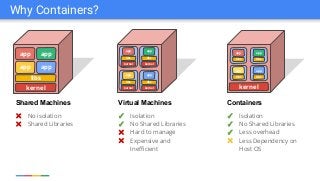
Why Containers?
app
libs
kernel
libs
app app
kernel
app
libs
libs
kernel
kernel
libs
app
kernel
libs
app
libs
app
libs
app
✓ Isolation
✓ No Shared Libraries
✕ Hard to manage
✕ Expensive and
Inefficient
✓ Isolation
✓ No Shared Libraries
✓ Less overhead
✕ Less Dependency on
Host OS
kernel
libs
app
app app
app
Shared Machines Virtual Machines Containers
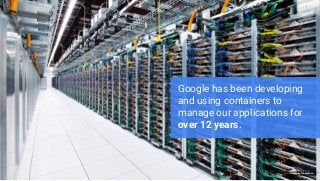
Google has been developing
and using containers to
manage our applications for
over 12 years.
Images by Connie Zhou
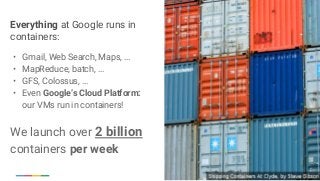
Everything at Google runs in
containers:
• Gmail, Web Search, Maps, ...
• MapReduce, batch, ...
• GFS, Colossus, ...
• Even Google’s Cloud Platform:
our VMs run in containers!
We launch over 2 billion
containers per week
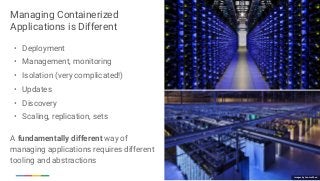
Managing Containerized
Applications is Different
• Deployment
• Management, monitoring
• Isolation (very complicated!)
• Updates
• Discovery
• Scaling, replication, sets
A fundamentally different way of
managing applications requires different
tooling and abstractions
Images by Connie Zhou
Greek for “Helmsman”; also the root of the
words “governor” and “cybernetic”
• Manages container clusters
• Inspired and informed by Google’s experiences
and internal systems
• Supports multiple cloud and bare-metal
environments
• Supports multiple container runtimes
• 100% Open source, written in Go
Manage applications, not machines
Kubernetes
Workload Portability
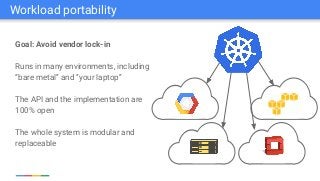
Goal: Avoid vendor lock-in
Runs in many environments, including
“bare metal” and “your laptop”
The API and the implementation are
100% open
The whole system is modular and
replaceable
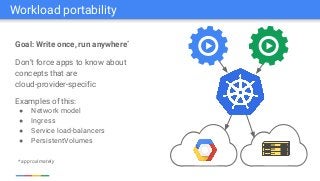
Workload portability
Goal: Write once, run anywhere*
Don’t force apps to know about
concepts that are
cloud-provider-specific
Examples of this:
● Network model
● Ingress
● Service load-balancers
● PersistentVolumes
* approximately
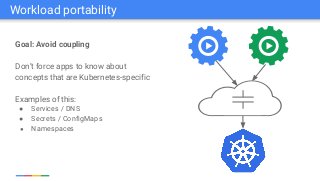
Workload portability
Goal: Avoid coupling
Don’t force apps to know about
concepts that are Kubernetes-specific
Examples of this:
● Services / DNS
● Secrets / ConfigMaps
● Namespaces
Workload portability
Result: Portability
Build your apps on-prem, lift-and-shift
into cloud when you are ready
Don’t get stuck with a platform that
doesn’t work for you
Put your app on wheels and move it
whenever and wherever you need
Workload portability
Creating/Managing the cluster:
• Choose a node OS: CoreOS, Atomic, RHEL, Debian, CentOS, Ubuntu, ...
• Provision machines: Boot VMs, install and run kube components, ...
• Configure networking: IP ranges for Pods, Services, SDN, ...
• Start cluster services: DNS, logging, monitoring, ...
• Manage nodes: kernel upgrades, OS updates, hardware failures...
This is where Google Container Engine (GKE) really helps:
• One click (or command-line) cluster creation
• We manage the nodes and monitor the master control plane
Why Google Container Engine (GKE)?
kubelet
UI
kubeletCLI
API
users master nodes
etcd
kubelet
scheduler
controllers
apiserver
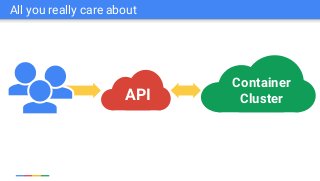
The 10000 foot view
UI
API
Container
Cluster
All you really care about
Pods
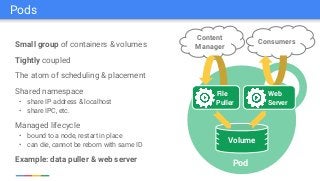
Small group of containers & volumes
Tightly coupled
The atom of scheduling & placement
Shared namespace
• share IP address & localhost
• share IPC, etc.
Managed lifecycle
• bound to a node, restart in place
• can die, cannot be reborn with same ID
Example: data puller & web server
Consumers
Content
Manager
File
Puller
Web
Server
Volume
Pod
Pods
Replication
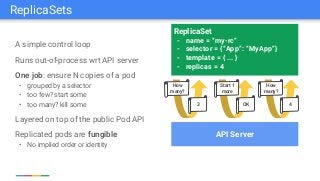
A simple control loop
Runs out-of-process wrt API server
One job: ensure N copies of a pod
• grouped by a selector
• too few? start some
• too many? kill some
Layered on top of the public Pod API
Replicated pods are fungible
• No implied order or identity
ReplicaSet
- name = “my-rc”
- selector = {“App”: “MyApp”}
- template = { ... }
- replicas = 4
API Server
How
many?
3
Start 1
more
OK
How
many?
4
ReplicaSets
Rolling Update
ReplicaSet
- name: my-app-v1
- replicas: 3
- selector:
- app: MyApp
- version: v1
Service
- app: MyApp
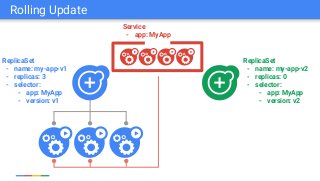
Rolling Update
ReplicaSet
- name: my-app-v1
- replicas: 3
- selector:
- app: MyApp
- version: v1
ReplicaSet
- name: my-app-v2
- replicas: 0
- selector:
- app: MyApp
- version: v2
Service
- app: MyApp
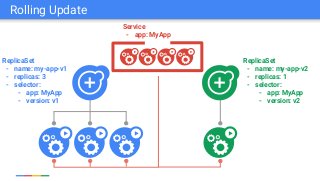
Rolling Update
ReplicaSet
- name: my-app-v1
- replicas: 3
- selector:
- app: MyApp
- version: v1
ReplicaSet
- name: my-app-v2
- replicas: 1
- selector:
- app: MyApp
- version: v2
Service
- app: MyApp
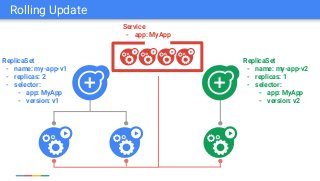
Rolling Update
ReplicaSet
- name: my-app-v1
- replicas: 2
- selector:
- app: MyApp
- version: v1
ReplicaSet
- name: my-app-v2
- replicas: 1
- selector:
- app: MyApp
- version: v2
Service
- app: MyApp
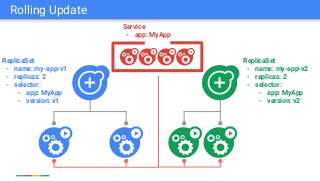
Rolling Update
ReplicaSet
- name: my-app-v1
- replicas: 2
- selector:
- app: MyApp
- version: v1
ReplicaSet
- name: my-app-v2
- replicas: 2
- selector:
- app: MyApp
- version: v2
Service
- app: MyApp
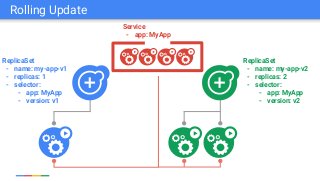
Rolling Update
ReplicaSet
- name: my-app-v1
- replicas: 1
- selector:
- app: MyApp
- version: v1
ReplicaSet
- name: my-app-v2
- replicas: 2
- selector:
- app: MyApp
- version: v2
Service
- app: MyApp
Rolling Update
ReplicaSet
- name: my-app-v1
- replicas: 1
- selector:
- app: MyApp
- version: v1
ReplicaSet
- name: my-app-v2
- replicas: 3
- selector:
- app: MyApp
- version: v2
Service
- app: MyApp
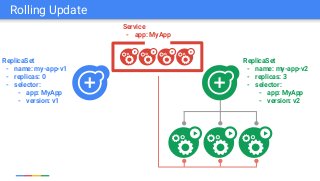
Rolling Update
ReplicaSet
- name: my-app-v1
- replicas: 0
- selector:
- app: MyApp
- version: v1
ReplicaSet
- name: my-app-v2
- replicas: 3
- selector:
- app: MyApp
- version: v2
Service
- app: MyApp
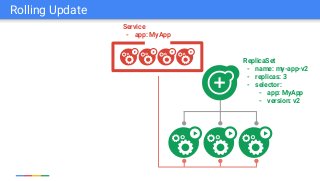
Rolling Update
ReplicaSet
- name: my-app-v2
- replicas: 3
- selector:
- app: MyApp
- version: v2
Service
- app: MyApp
Rolling Update
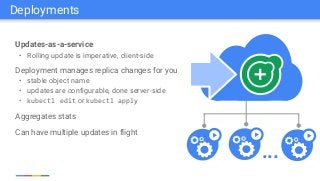
Deployments
Updates-as-a-service
• Rolling update is imperative, client-side
Deployment manages replica changes for you
• stable object name
• updates are configurable, done server-side
• kubectl edit or kubectl apply
Aggregates stats
Can have multiple updates in flight
...
Deployments
Deployment Demo
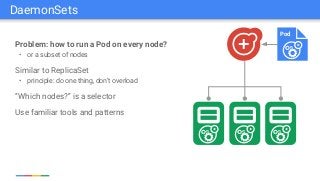
Problem: how to run a Pod on every node?
• or a subset of nodes
Similar to ReplicaSet
• principle: do one thing, don’t overload
“Which nodes?” is a selector
Use familiar tools and patterns
Pod
DaemonSets
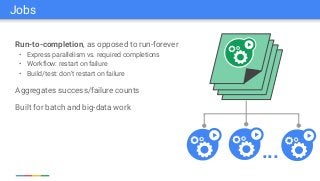
Run-to-completion, as opposed to run-forever
• Express parallelism vs. required completions
• Workflow: restart on failure
• Build/test: don’t restart on failure
Aggregates success/failure counts
Built for batch and big-data work
...
Jobs
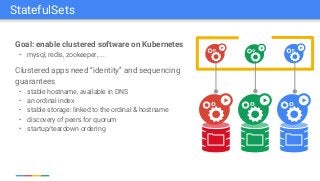
Goal: enable clustered software on Kubernetes
• mysql, redis, zookeeper, ...
Clustered apps need “identity” and sequencing
guarantees
• stable hostname, available in DNS
• an ordinal index
• stable storage: linked to the ordinal & hostname
• discovery of peers for quorum
• startup/teardown ordering
StatefulSets
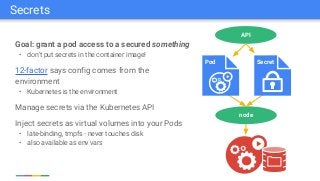
Goal: grant a pod access to a secured something
• don’t put secrets in the container image!
12-factor says config comes from the
environment
• Kubernetes is the environment
Manage secrets via the Kubernetes API
Inject secrets as virtual volumes into your Pods
• late-binding, tmpfs - never touches disk
• also available as env vars
node
API
Pod Secret
Secrets
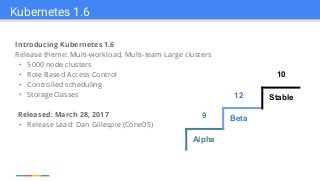
Introducing Kubernetes 1.6
Release theme: Multi-workload, Multi-team Large clusters
• 5000 node clusters
• Role Based Access Control
• Controlled scheduling
• StorageClasses
Released: March 28, 2017
• Release Lead: Dan Gillespie (CoreOS)
Kubernetes 1.6
Alpha
Beta
Stable
9
12
10
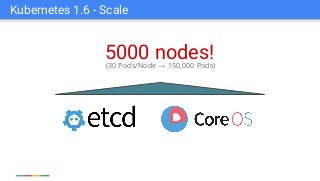
5000 nodes!(30 Pods/Node → 150,000 Pods)
Kubernetes 1.6 - Scale
my-cluster
node-1 node-2 node-3 (5000)
blue-web blue-web
blue-state blue-state
green-svc green-svc
green-job green-job
Kubernetes 1.6 - RBAC
Without fine-grained Access:
• Authorization at cluster level
• All pods have same
authorization
Without controlled scheduling:
• Lack flexibility for
multi-workload
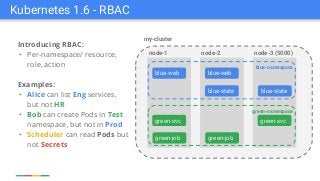
Introducing RBAC:
• Per-namespace/ resource,
role, action
Examples:
• Alice can list Eng services,
but not HR
• Bob can create Pods in Test
namespace, but not in Prod
• Scheduler can read Pods but
not Secrets
Kubernetes 1.6 - RBAC
my-cluster
node-1 node-2 node-3 (5000)
blue-web blue-web
blue-state blue-state
green-svc green-svc
green-job green-job
blue-namespace
green-namespace
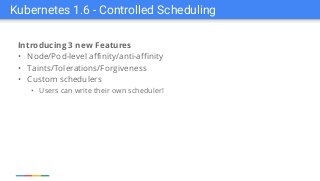
Introducing 3 new Features
• Node/Pod-level affinity/anti-affinity
• Taints/Tolerations/Forgiveness
• Custom schedulers
• Users can write their own scheduler!
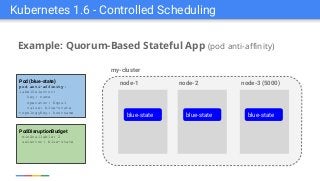
Kubernetes 1.6 - Controlled Scheduling
Example: Quorum-Based Stateful App (pod anti-affinity)
my-cluster
node-1 node-2 node-3 (5000)
blue-state blue-state
Kubernetes 1.6 - Controlled Scheduling
blue-state
Pod (blue-state)
pod anti-affinity:
labelSelector:
key: name
operator: Equal
value: blue-state
topologyKey: hostname
PodDisruptionBudget
minAvailable: 2
selector: blue-state
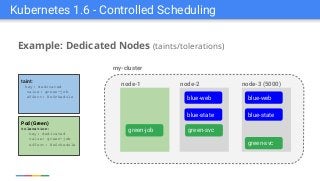
Kubernetes 1.6 - Controlled Scheduling
Example: Dedicated Nodes (taints/tolerations)
my-cluster
node-1 node-2 node-3 (5000)
blue-webblue-web
green-job green-svc
Pod (Green)
toleration:
key: dedicated
value: green-job
effect: NoSchedule
taint:
key: dedicated
value: green-job
effect: NoSchedule
green-svc
blue-stateblue-state
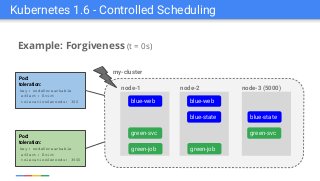
Example: Forgiveness (t = 0s)
Kubernetes 1.6 - Controlled Scheduling
Pod:
toleration:
key: nodeUnreachable
effect: Evict
tolerationSeconds: 300
Pod:
toleration:
key: nodeUnreachable
effect: Evict
tolerationSeconds: 3600
my-cluster
node-1 node-2 node-3 (5000)
blue-web blue-web
blue-state blue-state
green-svc green-svc
green-job green-job
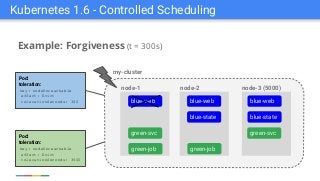
Example: Forgiveness (t = 300s)
Kubernetes 1.6 - Controlled Scheduling
Pod:
toleration:
key: nodeUnreachable
effect: Evict
tolerationSeconds: 300
Pod:
toleration:
key: nodeUnreachable
effect: Evict
tolerationSeconds: 3600
my-cluster
node-1 node-2 node-3 (5000)
blue-web blue-web
blue-state blue-state
green-svc green-svc
green-job green-job
blue-web
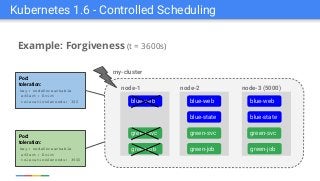
Example: Forgiveness (t = 3600s)
Kubernetes 1.6 - Controlled Scheduling
Pod:
toleration:
key: nodeUnreachable
effect: Evict
tolerationSeconds: 300
Pod:
toleration:
key: nodeUnreachable
effect: Evict
tolerationSeconds: 3600
my-cluster
node-1 node-2 node-3 (5000)
blue-web blue-web
blue-state blue-state
green-svc green-svc
green-job green-job
blue-web
green-svc
green-job
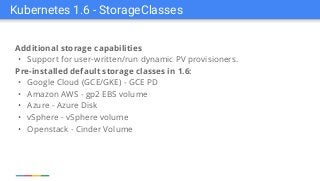
Kubernetes 1.6 - StorageClasses
Additional storage capabilities
• Support for user-written/run dynamic PV provisioners.
Pre-installed default storage classes in 1.6:
• Google Cloud (GCE/GKE) - GCE PD
• Amazon AWS - gp2 EBS volume
• Azure - Azure Disk
• vSphere - vSphere volume
• Openstack - Cinder Volume
Supported Storage
Persistent
• GCE Persistent Disk
• AWS Elastic Block Store
• Azure File Storage
• Azure Data Disk
• iSCSI
• Flocker
• NFS
• vSphere
• GlusterFS
• Ceph File and RBD
• Cinder
• Quobyte Volume
• FibreChannel
• VMware Photon PD
• Portworx
• Dell EMC ScaleIO
Ephemeral
• Empty dir (and tmpfs)
• Expose Kubernetes API
• Secret
• ConfigMap
• DownwardAPI
Other
• Flex (exec a binary)
• Host path
Future
• Local Storage
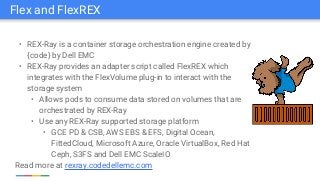
Flex and FlexREX
• REX-Ray is a container storage orchestration engine created by
{code} by Dell EMC
• REX-Ray provides an adapter script called FlexREX which
integrates with the FlexVolume plug-in to interact with the
storage system
• Allows pods to consume data stored on volumes that are
orchestrated by REX-Ray
• Use any REX-Ray supported storage platform
• GCE PD & CSB, AWS EBS & EFS, Digital Ocean,
FittedCloud, Microsoft Azure, Oracle VirtualBox, Red Hat
Ceph, S3FS and Dell EMC ScaleIO
Read more at rexray.codedellemc.com
Container Storage Interface (CSI)
• Goal: provide an industry wide standard for plugging storage systems into all
major container orchestration (CO) systems
• Write your volume driver once, run it anywhere
• Working with Mesos, Cloud Foundry, and Docker
• Goal: Volume drivers no longer need to live in-tree
• Can download the appropriate volume plugin when needed
Out-of-Tree Volume Drivers
Thank You!
Please visit kubernetes.io to learn more and get involved!
Matthew DeLio <mdelio@google.com>
Product Manager - Kubernetes and Google Container Engine (GKE)

{code} Webinar: Kubernetes overview and 1.6 update with Matthew De Lio

  • 1.
    An Introduction toKubernetes and What’s New in v1.6 {code} by Dell EMC - Community Webinar April 6, 2017 Matthew DeLio <mdelio@google.com> Product Manager - Kubernetes and Google Container Engine (GKE) Kubernetes
  • 2.
    ✕ No isolation ✕Shared Libraries Why Containers? app libs kernel libs app app kernel app libs libs kernel kernel libs app kernel libs app libs app libs app ✓ Isolation ✓ No Shared Libraries ✕ Hard to manage ✕ Expensive and Inefficient ✓ Isolation ✓ No Shared Libraries ✓ Less overhead ✕ Less Dependency on Host OS kernel libs app app app app Shared Machines Virtual Machines Containers
  • 3.
    Google has beendeveloping and using containers to manage our applications for over 12 years. Images by Connie Zhou
  • 4.
    Everything at Googleruns in containers: • Gmail, Web Search, Maps, ... • MapReduce, batch, ... • GFS, Colossus, ... • Even Google’s Cloud Platform: our VMs run in containers! We launch over 2 billion containers per week
  • 5.
    Managing Containerized Applications isDifferent • Deployment • Management, monitoring • Isolation (very complicated!) • Updates • Discovery • Scaling, replication, sets A fundamentally different way of managing applications requires different tooling and abstractions Images by Connie Zhou
  • 6.
    Greek for “Helmsman”;also the root of the words “governor” and “cybernetic” • Manages container clusters • Inspired and informed by Google’s experiences and internal systems • Supports multiple cloud and bare-metal environments • Supports multiple container runtimes • 100% Open source, written in Go Manage applications, not machines Kubernetes
  • 7.
  • 8.
    Goal: Avoid vendorlock-in Runs in many environments, including “bare metal” and “your laptop” The API and the implementation are 100% open The whole system is modular and replaceable Workload portability
  • 9.
    Goal: Write once,run anywhere* Don’t force apps to know about concepts that are cloud-provider-specific Examples of this: ● Network model ● Ingress ● Service load-balancers ● PersistentVolumes * approximately Workload portability
  • 10.
    Goal: Avoid coupling Don’tforce apps to know about concepts that are Kubernetes-specific Examples of this: ● Services / DNS ● Secrets / ConfigMaps ● Namespaces Workload portability
  • 11.
    Result: Portability Build yourapps on-prem, lift-and-shift into cloud when you are ready Don’t get stuck with a platform that doesn’t work for you Put your app on wheels and move it whenever and wherever you need Workload portability
  • 12.
    Creating/Managing the cluster: •Choose a node OS: CoreOS, Atomic, RHEL, Debian, CentOS, Ubuntu, ... • Provision machines: Boot VMs, install and run kube components, ... • Configure networking: IP ranges for Pods, Services, SDN, ... • Start cluster services: DNS, logging, monitoring, ... • Manage nodes: kernel upgrades, OS updates, hardware failures... This is where Google Container Engine (GKE) really helps: • One click (or command-line) cluster creation • We manage the nodes and monitor the master control plane Why Google Container Engine (GKE)?
  • 13.
  • 14.
  • 15.
  • 16.
    Small group ofcontainers & volumes Tightly coupled The atom of scheduling & placement Shared namespace • share IP address & localhost • share IPC, etc. Managed lifecycle • bound to a node, restart in place • can die, cannot be reborn with same ID Example: data puller & web server Consumers Content Manager File Puller Web Server Volume Pod Pods
  • 17.
  • 18.
    A simple controlloop Runs out-of-process wrt API server One job: ensure N copies of a pod • grouped by a selector • too few? start some • too many? kill some Layered on top of the public Pod API Replicated pods are fungible • No implied order or identity ReplicaSet - name = “my-rc” - selector = {“App”: “MyApp”} - template = { ... } - replicas = 4 API Server How many? 3 Start 1 more OK How many? 4 ReplicaSets
  • 19.
  • 20.
    ReplicaSet - name: my-app-v1 -replicas: 3 - selector: - app: MyApp - version: v1 Service - app: MyApp Rolling Update
  • 21.
    ReplicaSet - name: my-app-v1 -replicas: 3 - selector: - app: MyApp - version: v1 ReplicaSet - name: my-app-v2 - replicas: 0 - selector: - app: MyApp - version: v2 Service - app: MyApp Rolling Update
  • 22.
    ReplicaSet - name: my-app-v1 -replicas: 3 - selector: - app: MyApp - version: v1 ReplicaSet - name: my-app-v2 - replicas: 1 - selector: - app: MyApp - version: v2 Service - app: MyApp Rolling Update
  • 23.
    ReplicaSet - name: my-app-v1 -replicas: 2 - selector: - app: MyApp - version: v1 ReplicaSet - name: my-app-v2 - replicas: 1 - selector: - app: MyApp - version: v2 Service - app: MyApp Rolling Update
  • 24.
    ReplicaSet - name: my-app-v1 -replicas: 2 - selector: - app: MyApp - version: v1 ReplicaSet - name: my-app-v2 - replicas: 2 - selector: - app: MyApp - version: v2 Service - app: MyApp Rolling Update
  • 25.
    ReplicaSet - name: my-app-v1 -replicas: 1 - selector: - app: MyApp - version: v1 ReplicaSet - name: my-app-v2 - replicas: 2 - selector: - app: MyApp - version: v2 Service - app: MyApp Rolling Update
  • 26.
    ReplicaSet - name: my-app-v1 -replicas: 1 - selector: - app: MyApp - version: v1 ReplicaSet - name: my-app-v2 - replicas: 3 - selector: - app: MyApp - version: v2 Service - app: MyApp Rolling Update
  • 27.
    ReplicaSet - name: my-app-v1 -replicas: 0 - selector: - app: MyApp - version: v1 ReplicaSet - name: my-app-v2 - replicas: 3 - selector: - app: MyApp - version: v2 Service - app: MyApp Rolling Update
  • 28.
    ReplicaSet - name: my-app-v2 -replicas: 3 - selector: - app: MyApp - version: v2 Service - app: MyApp Rolling Update
  • 29.
  • 30.
    Updates-as-a-service • Rolling updateis imperative, client-side Deployment manages replica changes for you • stable object name • updates are configurable, done server-side • kubectl edit or kubectl apply Aggregates stats Can have multiple updates in flight ... Deployments
  • 31.
  • 32.
    Problem: how torun a Pod on every node? • or a subset of nodes Similar to ReplicaSet • principle: do one thing, don’t overload “Which nodes?” is a selector Use familiar tools and patterns Pod DaemonSets
  • 33.
    Run-to-completion, as opposedto run-forever • Express parallelism vs. required completions • Workflow: restart on failure • Build/test: don’t restart on failure Aggregates success/failure counts Built for batch and big-data work ... Jobs
  • 34.
    Goal: enable clusteredsoftware on Kubernetes • mysql, redis, zookeeper, ... Clustered apps need “identity” and sequencing guarantees • stable hostname, available in DNS • an ordinal index • stable storage: linked to the ordinal & hostname • discovery of peers for quorum • startup/teardown ordering StatefulSets
  • 35.
    Goal: grant apod access to a secured something • don’t put secrets in the container image! 12-factor says config comes from the environment • Kubernetes is the environment Manage secrets via the Kubernetes API Inject secrets as virtual volumes into your Pods • late-binding, tmpfs - never touches disk • also available as env vars node API Pod Secret Secrets
  • 36.
  • 37.
    Introducing Kubernetes 1.6 Releasetheme: Multi-workload, Multi-team Large clusters • 5000 node clusters • Role Based Access Control • Controlled scheduling • StorageClasses Released: March 28, 2017 • Release Lead: Dan Gillespie (CoreOS) Kubernetes 1.6 Alpha Beta Stable 9 12 10
  • 38.
    5000 nodes!(30 Pods/Node→ 150,000 Pods) Kubernetes 1.6 - Scale
  • 39.
    my-cluster node-1 node-2 node-3(5000) blue-web blue-web blue-state blue-state green-svc green-svc green-job green-job Kubernetes 1.6 - RBAC Without fine-grained Access: • Authorization at cluster level • All pods have same authorization Without controlled scheduling: • Lack flexibility for multi-workload
  • 40.
    Introducing RBAC: • Per-namespace/resource, role, action Examples: • Alice can list Eng services, but not HR • Bob can create Pods in Test namespace, but not in Prod • Scheduler can read Pods but not Secrets Kubernetes 1.6 - RBAC my-cluster node-1 node-2 node-3 (5000) blue-web blue-web blue-state blue-state green-svc green-svc green-job green-job blue-namespace green-namespace
  • 41.
    Introducing 3 newFeatures • Node/Pod-level affinity/anti-affinity • Taints/Tolerations/Forgiveness • Custom schedulers • Users can write their own scheduler! Kubernetes 1.6 - Controlled Scheduling
  • 42.
    Example: Quorum-Based StatefulApp (pod anti-affinity) my-cluster node-1 node-2 node-3 (5000) blue-state blue-state Kubernetes 1.6 - Controlled Scheduling blue-state Pod (blue-state) pod anti-affinity: labelSelector: key: name operator: Equal value: blue-state topologyKey: hostname PodDisruptionBudget minAvailable: 2 selector: blue-state
  • 43.
    Kubernetes 1.6 -Controlled Scheduling Example: Dedicated Nodes (taints/tolerations) my-cluster node-1 node-2 node-3 (5000) blue-webblue-web green-job green-svc Pod (Green) toleration: key: dedicated value: green-job effect: NoSchedule taint: key: dedicated value: green-job effect: NoSchedule green-svc blue-stateblue-state
  • 44.
    Example: Forgiveness (t= 0s) Kubernetes 1.6 - Controlled Scheduling Pod: toleration: key: nodeUnreachable effect: Evict tolerationSeconds: 300 Pod: toleration: key: nodeUnreachable effect: Evict tolerationSeconds: 3600 my-cluster node-1 node-2 node-3 (5000) blue-web blue-web blue-state blue-state green-svc green-svc green-job green-job
  • 45.
    Example: Forgiveness (t= 300s) Kubernetes 1.6 - Controlled Scheduling Pod: toleration: key: nodeUnreachable effect: Evict tolerationSeconds: 300 Pod: toleration: key: nodeUnreachable effect: Evict tolerationSeconds: 3600 my-cluster node-1 node-2 node-3 (5000) blue-web blue-web blue-state blue-state green-svc green-svc green-job green-job blue-web
  • 46.
    Example: Forgiveness (t= 3600s) Kubernetes 1.6 - Controlled Scheduling Pod: toleration: key: nodeUnreachable effect: Evict tolerationSeconds: 300 Pod: toleration: key: nodeUnreachable effect: Evict tolerationSeconds: 3600 my-cluster node-1 node-2 node-3 (5000) blue-web blue-web blue-state blue-state green-svc green-svc green-job green-job blue-web green-svc green-job
  • 47.
    Kubernetes 1.6 -StorageClasses Additional storage capabilities • Support for user-written/run dynamic PV provisioners. Pre-installed default storage classes in 1.6: • Google Cloud (GCE/GKE) - GCE PD • Amazon AWS - gp2 EBS volume • Azure - Azure Disk • vSphere - vSphere volume • Openstack - Cinder Volume
  • 48.
    Supported Storage Persistent • GCEPersistent Disk • AWS Elastic Block Store • Azure File Storage • Azure Data Disk • iSCSI • Flocker • NFS • vSphere • GlusterFS • Ceph File and RBD • Cinder • Quobyte Volume • FibreChannel • VMware Photon PD • Portworx • Dell EMC ScaleIO Ephemeral • Empty dir (and tmpfs) • Expose Kubernetes API • Secret • ConfigMap • DownwardAPI Other • Flex (exec a binary) • Host path Future • Local Storage
  • 49.
    Flex and FlexREX •REX-Ray is a container storage orchestration engine created by {code} by Dell EMC • REX-Ray provides an adapter script called FlexREX which integrates with the FlexVolume plug-in to interact with the storage system • Allows pods to consume data stored on volumes that are orchestrated by REX-Ray • Use any REX-Ray supported storage platform • GCE PD & CSB, AWS EBS & EFS, Digital Ocean, FittedCloud, Microsoft Azure, Oracle VirtualBox, Red Hat Ceph, S3FS and Dell EMC ScaleIO Read more at rexray.codedellemc.com
  • 50.
    Container Storage Interface(CSI) • Goal: provide an industry wide standard for plugging storage systems into all major container orchestration (CO) systems • Write your volume driver once, run it anywhere • Working with Mesos, Cloud Foundry, and Docker • Goal: Volume drivers no longer need to live in-tree • Can download the appropriate volume plugin when needed Out-of-Tree Volume Drivers
  • 51.
    Thank You! Please visitkubernetes.io to learn more and get involved! Matthew DeLio <mdelio@google.com> Product Manager - Kubernetes and Google Container Engine (GKE)