Yasufumi Sekine(おれたま@aha-oretama)
AQA POP TALK #3
~海外カンファレンスから見えたテスト自動化の未来~
ハッシュタグ:#aqapop
SeleniumConf Chicago 参加報告
Yasufumi Sekine
おれたま@AHA_oretama
● Automation & QA Group (通称:AQA)
○ 今年の8月からジョイン
○ テスト自動化
■ Appium, WebdriverIO, Espresso
■ CI
● リンク
○ https://twitter.com/AHA_oretama
○ https://github.com/aha-oretama
○ https://www.slideshare.net/aha_oretama
アジェンダ
1. SeleniumConf Chicagoの紹介
2. セッションの一部紹介
3. まとめ
アジェンダ
1. SeleniumConf Chicagoの紹介
2. セッションの一部紹介
3. まとめ
Selenium Conferenceとは?
• Seleniumをメインとしたカンファレンス
• Appium、CI/CDなどテスト自動化に関する幅広い内容
• SeleniumConf Chicago
• 10/18,19にChicagoで開催
• 前日10/17にはワークショップが開催
• 来年はTokyoで開催(後述)
Chicago
会場の雰囲気
全体として
セッション
● Beginner、指定なし、Advancedの3つのレベルのセッションがあり、
個人のレベルに合わせたセッションを選べる
● 英語の同時字幕あり
● Beginnerがあるとはいえ、最低限の知識、経験は必要
ブース
● テスト自動化に関する企業のブースが10程度
● その場でデモをしてくれるため、ツールの良さが理解しやすい
アジェンダ
1. SeleniumConf Chicagoの紹介
2. セッションの一部紹介
3. まとめ
セッションの一部紹介
SeleniumConf Chicagoのスライドは順次公開されています。
ここでは、自分が興味をもったセッションを
自分なりに実務にどう活かすか、という視点を交えて紹介します。
(セッションの内容を紹介したあとに、
実務にどう活かすかという私なりの観点を説明します。
AI for element selection
● test.ai Jason Arbonによる発表
● AppiumでAIによる要素指定
● Appiumの3rd Party Plugin
driver.findElement('-custom', 'ai:cart');
詳しくはさきほどの AI Applications in Automation Testing 参照してください。
実際の使い方はMercari Engineering Blogも参考にしてください。
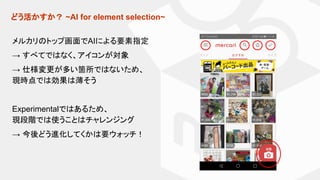
どう活かすか? ~AI for element selection~
メルカリのトップ画面でAIによる要素指定
→ すべてではなく、アイコンが対象
→ 仕様変更が多い箇所ではないため、
現時点では効果は薄そう
Experimentalではあるため、
現段階では使うことはチャレンジング
→ 今後どう進化してくかは要ウォッチ!
Jump starting your testing with Selenium Grid Docker Containers,
Selene, and pytest
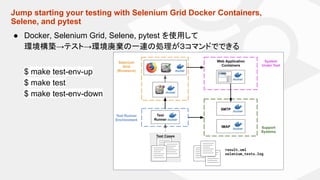
● Docker, Selenium Grid, Selene, pytest を使用して
環境構築→テスト→環境廃棄の一連の処理が3コマンドでできる
$ make test-env-up
$ make test
$ make test-env-down
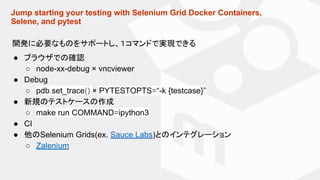
Jump starting your testing with Selenium Grid Docker Containers,
Selene, and pytest
開発に必要なものをサポートし、1コマンドで実現できる
● ブラウザでの確認
○ node-xx-debug × vncviewer
● Debug
○ pdb.set_trace() × PYTESTOPTS=“-k {testcase}”
● 新規のテストケースの作成
○ make run COMMAND=ipython3
● CI
● 他のSelenium Grids(ex. Sauce Labs)とのインテグレーション
○ Zalenium
どう活かすか? ~Jump starting your testing with Selenium Grid Docker
Containers, Selene, and pytest~
メリット
● すぐに環境を構築、実行できる
● どこでも誰でも同じ環境を使うことができる
⇒ ある程度の人数で開発するときは積極的に採用したい。
Selene, pytest 以外には未対応であるが、
ソースがGitHub上に公開されているため、
自分の言語、フレームワークに変更することは可能。
Sub-second acceptance tests
● Aslak Hellesøy による発表
○ Cucumber作者
システムの応答時間 × 人の感じ方の境界 (Source:Usability Engineering)
受入テストに対して、いかにテストを早くするするかが重要になる。
100ms the limit for having the user feel that the system is reacting instantaneously
1sec the limit for the user's flow of thought to stay uninterrupted
10sec the limit for keeping the user's attention focused on the dialogue
Sub-second acceptance tests
Source:https://speakerdeck.com/aslakhellesoy/sub-second-acceptance-tests-seleniumconf-2018
Unit
Service
どう活かすか? ~Sub-second acceptance tests~
● 個人的な印象としては、UIテスト(〜Servie テスト)の中に
このピラミッドがあるイメージ
● 早くかつ安定 × 信頼性は反比例。
使い分けることが重要になるのではないか?
● ただし、もし右にいけばいくほど、
初期アーキテクチャにテスタビリティを盛り込む必要がある
UI
Mobileのパフォーマンスは非常に重要。
Run the load down your mobile app
Source:Dimensional Research , A MOBILE APP USER SURVERY - Feb 2015
モバイルのパフォーマンスの3つの観点に対して
デモをしてわかりやすく説明
● Server/API Performance → JMeter
● Device Performance
● Network Performance
Run the load down your mobile app
Appium
Run the load down your mobile app
Android by Appium (Link)
List<List<Object>> performanceData
= driver.getPerformanceData("my.app.package", "cpuinfo", 5);
iOS by Appium (Link)
$ appium --relaxed-security
Map<String, Object> args = new HashMap<>();
args.put("timeout", 60 * 1000);
args.put("profileName", "Time Profiler");
driver.executeScript("mobile: startPerfRecord", args);
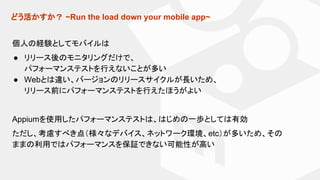
どう活かすか? ~Run the load down your mobile app~
個人の経験としてモバイルは
● リリース後のモニタリングだけで、
パフォーマンステストを行えないことが多い
● Webとは違い、バージョンのリリースサイクルが長いため、
リリース前にパフォーマンステストを行えたほうがよい
Appiumを使用したパフォーマンステストは、はじめの一歩としては有効
ただし、考慮すべき点(様々なデバイス、ネットワーク環境、etc)が多いため、その
ままの利用ではパフォーマンスを保証できない可能性が高い
Automated Accessibility Testing
Web Contents Accessibility Guidelines (WCAG) 2.1 から
「Following these guidelines will make content more accessible to a wider
range of people with disabilities」
Ex.
<input type="image" id="image" alt="Login" src="/login-button.png">

Automated Accessibility Testing
自動でAccessiblityを指摘してくれるツール群が提供されている
● Chrome/Firefox Extension
● axe-cli
● axe-webdriverjs
● axe-selenium-java
● axe-matchers (Ruby, Cucumber)
● react-axe
● Linting support (is coming)
etc
どう活かすか? ~Automated Accessibility Testing~
状況に合わせたやり方を提供されている
● UIテスト実装済み → axe-webdriverjs, axe-selenium-javaなどを使い、
既存のUIテストとaxeのインテグレーション
● Accessibilityのテストのみ自動化したい → axe-cli で自動化
● まずはAccessibilityを調べてみたい → Chrome/Firefox Extensions
⇒ まずは試してみる。
アジェンダ
1. SeleniumConf Chicagoの紹介
2. セッションの一部紹介
3. まとめ
まとめ
● 紹介したセッション以外にも、自動化を進めるためのマインドセット、自動テスト
の体験談、インフラの話など幅広い内容でした。
● 個人的には初の海外カンファレンス、英語が不安な中にも関わらず
自分の中で持ち帰るものがあったのは良かったです。
● もっとコミュニティとのコミュニケーションを
取れればよかったと後悔してます。
○ 次回は英語力を向上して、議論してみたいです。
SeleniumConf Tokyo Coming soon!
https://conf.selenium.jp/
2018/4/18,19開催!
前日にはワークショップ開催
● 運営側として初参加!
● CFP 募集中
● ぜひご参加を!
ご静聴ありがとうございました。

SeleniumConf Chicago 参加報告