
SAP EWM
Outbound Process
https://www.usaonlinetraining.com
Call / WhatsApp : +91 9160401016
Pack Spec
Packaging Specifications
Sales order and outbound delivery in ERP
The sales order process can contain a complete bundle of single activities as
presales, order processing, availability check, picking, packing and shipping, billing
and payment.
Every sales activity made in one of these areas is documented by means of a sales
document. All business transactions are mapped with specially configured
document types.
The assigned status shows, what stage the individual steps, that make up the sales
activity, has reached.
Sales and distribution is integrated with other application components in ERP such
as Production (Material Requirement Planning, Manufacturing), Material
Managements or Financial Accounting and Controlling.
In addition, the SD processing can interface to other solutions of the SAP Business
Suite as Customer Relationship Management (CRM) or Supply Chain Management
(SCM) with the applications Advanced Planner and Optimizer (APO) or Extended
Warehouse Management (EWM).
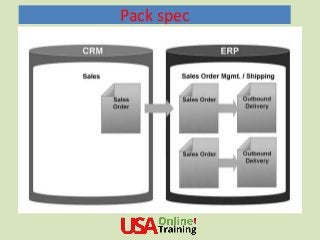
Some functions in EWM need that sales orders are created in solution SAP-CRM. To
document and control the activities, a range of documents are used to map the
individual
Pack spec
Pack Spec
Pack Spec
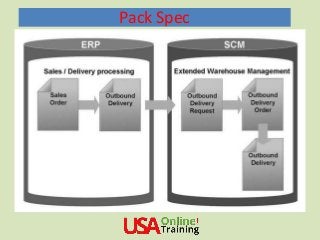
Warehouse request
The outbound delivery order is the warehouse request for goods issue processes. It
defines the work list for EWM.
The warehouse request for an outbound delivery order serves in EWM as basis for
the execution of picking activities.
Based on the warehouse request, warehouse tasks are created and the goods
movements are posted.
The outbound delivery order (e.g. the warehouse request) is a document containing
all the data required for triggering and monitoring the complete outbound delivery
process.
The process starts with the first planning activities for the outbound delivery and
continues until the finished goods have been loaded and sent. You either use the
outbound delivery order to preview the planning of pending warehouse activities or
to execute the actions required to create the delivery.
The outbound delivery order is the warehouse request document for goods issue.
The warehouse request document is the base for all further documents and
processes within this delivery.
Pack Spec
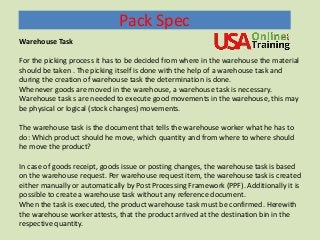
Warehouse Task
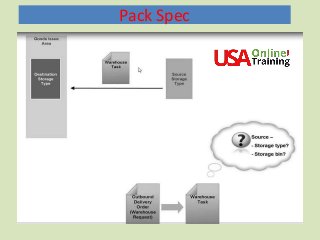
For the picking process it has to be decided from where in the warehouse the material
should be taken . The picking itself is done with the help of a warehouse task and
during the creation of warehouse task the determination is done.
Whenever goods are moved in the warehouse, a warehouse task is necessary.
Warehouse task s are needed to execute good movements in the warehouse, this may
be physical or logical (stock changes) movements.
The warehouse task is the document that tells the warehouse worker what he has to
do: Which product should he move, which quantity and from where to where should
he move the product?
In case of goods receipt, goods issue or posting changes, the warehouse task is based
on the warehouse request. Per warehouse request item, the warehouse task is created
either manually or automatically by Post Processing Framework (PPF). Additionally it is
possible to create a warehouse task without any reference document.
When the task is executed, the product warehouse task must be confirmed. Herewith
the warehouse worker attests, that the product arrived at the destination bin in the
respective quantity.
Pack Spec
Pack Spec
Warehouse Order
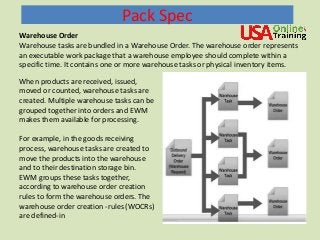
Warehouse tasks are bundled in a Warehouse Order. The warehouse order represents
an executable work package that a warehouse employee should complete within a
specific time. It contains one or more warehouse tasks or physical inventory items.
When products are received, issued,
moved or counted, warehouse tasks are
created. Multiple warehouse tasks can be
grouped together into orders and EWM
makes them available for processing.
For example, in the goods receiving
process, warehouse tasks are created to
move the products into the warehouse
and to their destination storage bin.
EWM groups these tasks together,
according to warehouse order creation
rules to form the warehouse orders. The
warehouse order creation -rules (WOCRs)
are defined-in
Pack Spec
Warehouse Order Creation
To create warehouse orders, in the first step warehouse tasks are grouped together
according the activity area where they are sorted by predefined rules.
Per activity area a warehouse order creation rule is defined and these rules are worked
until each warehouse task is assigned to one warehouse order. In the following steps,
filters and limits can be taken into account. In case no rule can be performed, a single
warehouse task is assigned to a single warehouse order.
During this summarization of the warehouse tasks into warehouse orders, EWM uses the
search sequence for Warehouse Order creation, for example, first rule A, then B, then C.
EWM works through the warehouse order creation rules in sequence, as defined for
each activity area.
Filters and limit values control which warehouse tasks and how many warehouse tasks
EWM groups together into a warehouse order. In addition, individual warehouse order
creation rules can contain sort rules. As soon as EWM applies a Warehouse Order
creation rule, it sorts the warehouse tasks according to the sort rule.
In addition to the sort rules, filter and limit values, warehouse order creation rules can
also contain parameters for packing and consolidation groups. During warehouse order
creation, the consolidation group influences which warehouse tasks are permitted to be.
Pack Spec
Goods Issue Posting
After the materials have been picked and brought to the goods issue zone,
you can post the goods issue. It can also be triggered through processing a
transportation unit or a vehicle.
This is done through a separate document in EWM, the outbound delivery.
The EWM outbound delivery sends back the information about the goods
issue posting to ERR
Through this the inventory management document (and the financial
document) is created. In case of a partial delivery, that means that in the
EWM outbound delivery not the complete quantity from the outbound
delivery order is being delivered, a delivery split is being done.
Looking for SAP EWM Online Training
Visit : https://www.usaonlinetraining.com/sap-ewm-training
Contact / WhatsApp : +91 9160401016
Pack Spec
The following stock removal strategies are supported in the goods issue
process :
• FIFO (First In, First Out)
▪ Stringent FIFO (FIFO across all storage types
• LIFO (Last In, First Out)
• Partial Quantities
• Large/Small
• Shelf Life Expiration Date
FIFO (First-In. First Out)
This removal strategy, like others that are date-based_ is implemented using the Stock
Removal Mule sorting. The quarts are sorted according to the goods receipt date in
the quant.
Stringent FIFO
Requirement: First-in First-out Rule must be applied across all picking areas.
Solution: Can be achieved by using storage type groups. The stock is sorted by the
defined sort fields within one storage type group. Each Storage Type Search Sequence
can group the storage types differently.
Pack Spec
Shelf Life Expiration Date
With this strategy, the system ensures that the products with the oldest shelf life
expiration date are removed from stock first This strategy is implement like the or
date-based removal strategies; in a stock removal rule, the shelf life expiration date
is specified as the sort criteria.
LIFO (Last In, First Out)
For some warehouse organizations, or sectors of industry, some products cannot use
the FIFO principle. For example, in the building materials industry products that are to
be removed from stock, such as lumber, are stacked on products that are already
stored in the warehouse. When using the FIFO strategy, the warehouse worker would
first have to remove the products lying on top to get to the product with the oldest
goods receipt date. The LIFO strategy is provided for such situations_ When the
system searches for a suitable quant to remove from stock, it always suggests the last
guard that was placed into stocks This is another stock removal strategy that uses the
Stock Removal Ride in its implementation
SAP EWM, S4HANA Embedded,
WM, MM,REFX ,PS, Logistics
Oil & Gas,S4 HANA..and more
Other Courses
https://www.usaonlinetraining.com
Call / WhatsApp : +91 9160401016

SAP EWM Outbound Process 2

  • 1.
  • 2.
    Pack Spec Packaging Specifications Salesorder and outbound delivery in ERP The sales order process can contain a complete bundle of single activities as presales, order processing, availability check, picking, packing and shipping, billing and payment. Every sales activity made in one of these areas is documented by means of a sales document. All business transactions are mapped with specially configured document types. The assigned status shows, what stage the individual steps, that make up the sales activity, has reached. Sales and distribution is integrated with other application components in ERP such as Production (Material Requirement Planning, Manufacturing), Material Managements or Financial Accounting and Controlling. In addition, the SD processing can interface to other solutions of the SAP Business Suite as Customer Relationship Management (CRM) or Supply Chain Management (SCM) with the applications Advanced Planner and Optimizer (APO) or Extended Warehouse Management (EWM). Some functions in EWM need that sales orders are created in solution SAP-CRM. To document and control the activities, a range of documents are used to map the individual
  • 3.
  • 4.
  • 5.
    Pack Spec Warehouse request Theoutbound delivery order is the warehouse request for goods issue processes. It defines the work list for EWM. The warehouse request for an outbound delivery order serves in EWM as basis for the execution of picking activities. Based on the warehouse request, warehouse tasks are created and the goods movements are posted. The outbound delivery order (e.g. the warehouse request) is a document containing all the data required for triggering and monitoring the complete outbound delivery process. The process starts with the first planning activities for the outbound delivery and continues until the finished goods have been loaded and sent. You either use the outbound delivery order to preview the planning of pending warehouse activities or to execute the actions required to create the delivery. The outbound delivery order is the warehouse request document for goods issue. The warehouse request document is the base for all further documents and processes within this delivery.
  • 6.
    Pack Spec Warehouse Task Forthe picking process it has to be decided from where in the warehouse the material should be taken . The picking itself is done with the help of a warehouse task and during the creation of warehouse task the determination is done. Whenever goods are moved in the warehouse, a warehouse task is necessary. Warehouse task s are needed to execute good movements in the warehouse, this may be physical or logical (stock changes) movements. The warehouse task is the document that tells the warehouse worker what he has to do: Which product should he move, which quantity and from where to where should he move the product? In case of goods receipt, goods issue or posting changes, the warehouse task is based on the warehouse request. Per warehouse request item, the warehouse task is created either manually or automatically by Post Processing Framework (PPF). Additionally it is possible to create a warehouse task without any reference document. When the task is executed, the product warehouse task must be confirmed. Herewith the warehouse worker attests, that the product arrived at the destination bin in the respective quantity.
  • 7.
  • 8.
    Pack Spec Warehouse Order Warehousetasks are bundled in a Warehouse Order. The warehouse order represents an executable work package that a warehouse employee should complete within a specific time. It contains one or more warehouse tasks or physical inventory items. When products are received, issued, moved or counted, warehouse tasks are created. Multiple warehouse tasks can be grouped together into orders and EWM makes them available for processing. For example, in the goods receiving process, warehouse tasks are created to move the products into the warehouse and to their destination storage bin. EWM groups these tasks together, according to warehouse order creation rules to form the warehouse orders. The warehouse order creation -rules (WOCRs) are defined-in
  • 9.
    Pack Spec Warehouse OrderCreation To create warehouse orders, in the first step warehouse tasks are grouped together according the activity area where they are sorted by predefined rules. Per activity area a warehouse order creation rule is defined and these rules are worked until each warehouse task is assigned to one warehouse order. In the following steps, filters and limits can be taken into account. In case no rule can be performed, a single warehouse task is assigned to a single warehouse order. During this summarization of the warehouse tasks into warehouse orders, EWM uses the search sequence for Warehouse Order creation, for example, first rule A, then B, then C. EWM works through the warehouse order creation rules in sequence, as defined for each activity area. Filters and limit values control which warehouse tasks and how many warehouse tasks EWM groups together into a warehouse order. In addition, individual warehouse order creation rules can contain sort rules. As soon as EWM applies a Warehouse Order creation rule, it sorts the warehouse tasks according to the sort rule. In addition to the sort rules, filter and limit values, warehouse order creation rules can also contain parameters for packing and consolidation groups. During warehouse order creation, the consolidation group influences which warehouse tasks are permitted to be.
  • 10.
    Pack Spec Goods IssuePosting After the materials have been picked and brought to the goods issue zone, you can post the goods issue. It can also be triggered through processing a transportation unit or a vehicle. This is done through a separate document in EWM, the outbound delivery. The EWM outbound delivery sends back the information about the goods issue posting to ERR Through this the inventory management document (and the financial document) is created. In case of a partial delivery, that means that in the EWM outbound delivery not the complete quantity from the outbound delivery order is being delivered, a delivery split is being done. Looking for SAP EWM Online Training Visit : https://www.usaonlinetraining.com/sap-ewm-training Contact / WhatsApp : +91 9160401016
  • 11.
    Pack Spec The followingstock removal strategies are supported in the goods issue process : • FIFO (First In, First Out) ▪ Stringent FIFO (FIFO across all storage types • LIFO (Last In, First Out) • Partial Quantities • Large/Small • Shelf Life Expiration Date FIFO (First-In. First Out) This removal strategy, like others that are date-based_ is implemented using the Stock Removal Mule sorting. The quarts are sorted according to the goods receipt date in the quant. Stringent FIFO Requirement: First-in First-out Rule must be applied across all picking areas. Solution: Can be achieved by using storage type groups. The stock is sorted by the defined sort fields within one storage type group. Each Storage Type Search Sequence can group the storage types differently.
  • 12.
    Pack Spec Shelf LifeExpiration Date With this strategy, the system ensures that the products with the oldest shelf life expiration date are removed from stock first This strategy is implement like the or date-based removal strategies; in a stock removal rule, the shelf life expiration date is specified as the sort criteria. LIFO (Last In, First Out) For some warehouse organizations, or sectors of industry, some products cannot use the FIFO principle. For example, in the building materials industry products that are to be removed from stock, such as lumber, are stacked on products that are already stored in the warehouse. When using the FIFO strategy, the warehouse worker would first have to remove the products lying on top to get to the product with the oldest goods receipt date. The LIFO strategy is provided for such situations_ When the system searches for a suitable quant to remove from stock, it always suggests the last guard that was placed into stocks This is another stock removal strategy that uses the Stock Removal Ride in its implementation
  • 13.
    SAP EWM, S4HANAEmbedded, WM, MM,REFX ,PS, Logistics Oil & Gas,S4 HANA..and more Other Courses https://www.usaonlinetraining.com Call / WhatsApp : +91 9160401016