TGA/ARCS Webinar: eCTD module 1.3 - best practices
This presentation gives an overview of the expectations and best practices for structuring and formatting data in module 1.3 for submissions in the eCTD format using the Australian specifications version 3.1.
TGA/ARCS Webinar: eCTD module 1.3 - best practices
1.
eCTD Module 1.3– Best Practices
Emma Richards
Evaluation Management Section
Prescription Medicines Authorisation Branch, TGA
ARCS Electronic Submission Discussion Forum (ESDF) Meeting
22 June 2018
2.
Presentation Overview
• Module1.3 Lifecycle Management Examples
• Other Module 1.3 Considerations / Best Practice
• Questions
eCTD Module 1.3 – Best Practices 1
3.
Reminder - Module1.3
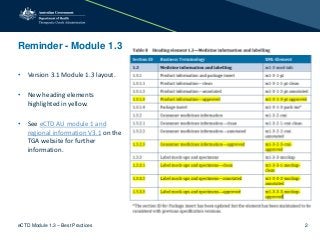
• Version 3.1 Module 1.3 layout.
• New heading elements
highlighted in yellow.
• See eCTD AU module 1 and
regional information V3.1 on the
TGA website for further
information.
eCTD Module 1.3 – Best Practices 2
4.
Module 1.3 Lifecycle– Initial PI, CMI and Labels
• Initial sequence:
– clean copies of the draft PI, CMI and labels within m1-3-1-1-pi-clean, m1-3-2-1-
cmi-clean and m-1-3-3-1-mockup-clean using ‘new’.
• Response to request for information sequence:
– amended clean copies using ‘replace’.
– annotated copies of the draft PI, CMI and labels within m1-3-1-2-pi-annotated,
m1-3-2-2-cmi-annotated and m-1-3-3-2-mockup-annotated using ‘new’.
• Following negotiations:
– amended clean and annotated copies using ‘replace’.
– ensure ALL amendments are included.
• Following Approval:
– ‘approved’ copies of the PI, CMI and labels within m1-3-1-3-pi-approved, m1-3-2-
3-cmi-approved and m-1-3-3-3-mockup-approved using ‘new’.
eCTD Module 1.3 – Best Practices 3
5.
Further information onthe ‘Approved’ folder
• Should contain:
– current Australian ‘approved’ versions of PI, CMI and labels.
• Within eCTD:
– provide the ‘approved’ versions as a post-approval closing sequence.
sequence type Supplementary Information
sequence description Product Information
eCTD Module 1.3 – Best Practices 4
6.
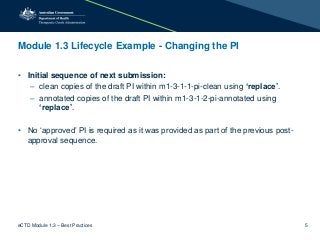
Module 1.3 LifecycleExample - Changing the PI
• Initial sequence of next submission:
– clean copies of the draft PI within m1-3-1-1-pi-clean using ‘replace’.
– annotated copies of the draft PI within m1-3-1-2-pi-annotated using
‘replace’.
• No ‘approved’ PI is required as it was provided as part of the previous post-
approval sequence.
eCTD Module 1.3 – Best Practices 5
7.
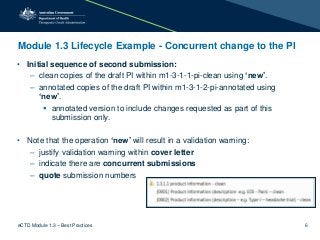
Module 1.3 LifecycleExample - Concurrent change to the PI
• Initial sequence of second submission:
– clean copies of the draft PI within m1-3-1-1-pi-clean using ‘new’.
– annotated copies of the draft PI within m1-3-1-2-pi-annotated using
‘new’.
annotated version to include changes requested as part of this
submission only.
• Note that the operation ‘new’ will result in a validation warning:
– justify validation warning within cover letter
– indicate there are concurrent submissions
– quote submission numbers
eCTD Module 1.3 – Best Practices 6
8.
Module 1.3 LifecycleExample - Concurrent change to the PI
• Following Approval of 1st PI change:
– clean copies of the ‘approved’ PI within m1-3-1-3-pi-approved using
‘replace’.
• Following Approval of 2nd PI change:
– clean copies of the ‘approved’ PI within m1-3-1-3-pi-approved using
‘replace’.
The ‘approved’ folder allows the TGA to track what changes have been finalized
this is important when there are multiple changes within multiple submissions.
eCTD Module 1.3 – Best Practices 7
9.
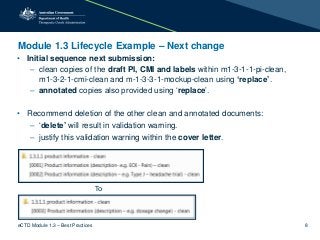
Module 1.3 LifecycleExample – Next change
• Initial sequence next submission:
– clean copies of the draft PI, CMI and labels within m1-3-1-1-pi-clean,
m1-3-2-1-cmi-clean and m-1-3-3-1-mockup-clean using ‘replace’.
– annotated copies also provided using ‘replace’.
• Recommend deletion of the other clean and annotated documents:
– ‘delete’ will result in validation warning.
– justify this validation warning within the cover letter.
To
eCTD Module 1.3 – Best Practices 8
10.
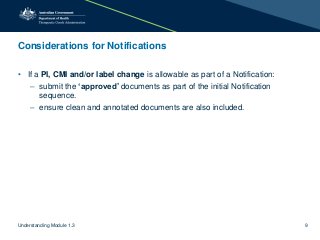
Considerations for Notifications
•If a PI, CMI and/or label change is allowable as part of a Notification:
– submit the ‘approved’ documents as part of the initial Notification
sequence.
– ensure clean and annotated documents are also included.
Understanding Module 1.3 9
11.
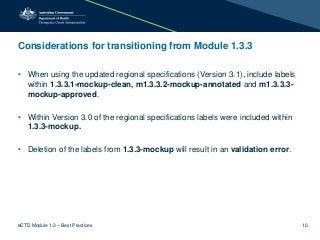
Considerations for transitioningfrom Module 1.3.3
• When using the updated regional specifications (Version 3.1), include labels
within 1.3.3.1-mockup-clean, m1.3.3.2-mockup-annotated and m1.3.3.3-
mockup-approved.
• Within Version 3.0 of the regional specifications labels were included within
1.3.3-mockup.
• Deletion of the labels from 1.3.3-mockup will result in an validation error.
eCTD Module 1.3 – Best Practices 10
12.
Electronic Submissions Update
•New Electronic submission hub at https://www.tga.gov.au/electronic-submissions-
and-data-review.
• Update to the eCTD Document Matrix file download.
• Automation of validation of sequences.
• Transition period for the current regional specifications ends 30 June 2018.
eCTD Module 1.3 – Best Practices 11
#2 Thank you Daria
The aim of todays presentation is to discuss some of the TGA preferences and best practices associated with module 1.3.
#3 To best explain the expectations for Module 1.3 I wanted to go through examples and then touch on a couple of additional considerations and tips before finishing with any questions in relation to the structure and function of Module 1.3 within eCTD. So lets get started!
#4 Firstly just a reminder of the structure of module 1.3 within the new version 3.1 specifications.
Key point is the addition of the new ‘approval’ heading elements for the PI, CMI and labels.
Should you need any further information about the version 3.1 specification updates please initially refer the eCTD AU module 1 and regional information specification and guidance for use document on the TGA – and remember that these updated specifications become mandatory from 1 July 2018 (which is Sunday week)
#5 So, getting into the examples
When you first submit to the TGA it is likely it will be as a new medicine – for example a new chemical entity.
Within this initial sequence you will submit your proposed draft PI labels and potentially a CMI, these will be included within the heading elements listed on your screen – using the lifecycle operation ‘New’ as this is the first time data is included.
Congratulations the submission has been accepted for evaluation and we have received section 31 questions at milestone 3 – these questions include recommended amendments to draft PI, CMI and labels.
To compile the Module 1.3 aspects for this sequence you amend your clean copies and use the operation ‘replace’ to overlay these on the previous clean copies submitted within the initial sequence. As changes have been made to these documents annotated copies of the draft PI, CMI and labels are now required and should include track changes. These can be added to the appriopaite heading elements using the ‘new’ operation.
We then move into PI negotiations for this NCE
PI negotiations are usually conducted via email using a word version of the PI.
However following this negotiation it is expected that updated clean and annotated copies of the PI (and CMI) be included within a sequence to upload to our system.
As there have been previous files within both clean and annotated heading elements the operation you use will be ‘replace’
Please remember that All amendments means a consolidated version of all track changes made for that particular submission.
A positive decision is made on this medicine and an approval letter is received.
It is after the decision letter that we would expect a post approval closing sequence containing the newly ‘approved’ PI, labels and CMI. – the relevant heading elements to include this information is listed on the slide.
#6 Just a little be of extra information regarding the ‘approved’ heading elements.
The intent of these elements is to allow easy and consistent access to the current ‘approved’ copy of these documents within our dossier management system – this means that all the information relevant to the medicine to assist with evaluation is located in the one spot – this is something the evaluators really appreciate.
Further to this eCTD allows us access to the lifecycle (history) of the medicine in one view – this is really helpful when evaluating – particular if there are concurrent submissions for the medicine – having the approved copies is a consistent location adds to this lifecycle history.
I have been using the word ‘approved’ – I am aware that technically the TGA does not ‘approve’ the CMI and this is not changing as a result of the introduction of version 3.1 specifications – the word ‘approved’ has been used to differentiate this heading element from the clean and annotated elements and aligns with process for the PI and labels.
So from a technical perceptive we recommend that the post approval closing sequence be submitted to the TGA as soon as possible following the decision.
While it is not mandatory to have the “approval “ or “Date of revision” date included in the final PI, we encourage you to do so if possible.
Sequence is to be related to the initial sequence and the recommended sequence type and description are listed on the screen.
#7 So your NCE is finalised and now you want to add an additional indication so submit as EOI
Clean and annotated labels are to be included using the operation replace.
No approved PI are required as they were submitted in the previous post approval sequence
On this point you will see on our website that the document matrix file download has been updated so no submitting the approved documents will no longer result in a validation error
For example – this activity is sequence 0013 and the approved PI was in the close out sequence 0012
#8 Whilst the EOI is under evaluation you submit a type J change – so there are two concurrent Pis under evaluation.
Our expectation in these type of instances is that the type J PI will be submitted seperately to the EOI PI – so there will be two Pis with the clean and annoated elements.
You will use the operation new to include these documents – as we do not want to replace the EOI pi which is still under evaluation.
This will result in a validaiton warning
#9 Following evaluations and PI nego the Type J has been approved – at this stage please submit this PI as the new approved PI using the operation replace
1 month later the EOI is approved – again this should be submitted as a post approval sequence
When there are concurrent submissions we really encourge you to submit the approved PI ASAP as this means that all the evaluations can see the updated approved PI.
This allows all evauations sections to know what is approved.
#10 A couple of months later you decide to create a tablet form of this medicine and submit a type F major variation.
What we expect is that at the stage when you are submitting the initial sequence for the type F you will use the replace operation to include the draft clean and annotated PI for change and you would also use the delete operation to remove the other old PI – so that these old Pis do not clutter the element and it is clear to evaluators which documents they need to evaluate.
The delete will result in a validation warning
#11 Now I wanted to discuss a couple of unique situations that you may encounter, the first being how to handle notifications.
What we are proposing for notifications only is that when there are allowable changes to the labels etc the approved documents can be provided within the initial sequence.
Reduces the regulatory burden.
#12 There have been some questions regarding what to di with the older version 3.0 label documents located within m1.3.3
Deletion of these when using verison 3.1 will result in a validation error.
We are currenty considering our options in relation to this
Liaisin with software providing and discussing options
Ideally we would like this infomration removed we are jus working on the best way to achive this.
To ensure the eCTD lifecycle appropriately tracks label changes:
recommended that the Version 3.0 labels located within m1.3.3 be removed using ‘delete’.
the labels are now to be included in m1.3.3.1, m1.3.3.2 and m1.3.3.3.
justify validation warning in the cover letter by stating removal of labels from m1.3.3.
It is recommended that these amendments be made as part of your next sequence where label changes are required.