Hamilton: a micro framework for
creating dataframes
applyconf April 2021
Stefan Krawczyk
#applyconf #MLOps #machinelearning
@stefkrawczyk
linkedin.com/in/skrawczyk
Try out Stitch Fix → goo.gl/Q3tCQ3
What to keep in mind for the next ~8 minutes?
1. Hamilton is a new paradigm to create dataframes*.
2. Hamilton enables Data Scientists to focus on functions
rather than “glue” code.
#applyconf #MLOps #machinelearning 2
Outline: Hamilton
> Backstory: who, what, & why
Hamilton
The Result
Future
Backstory: who
#applyconf #MLOps #machinelearning 4
Forecasting, Estimation, & Demand (FED)Team
● Data Scientists that are responsible for forecasts that help the
business make operational decisions.
○ e.g. staffing levels
● One of the oldest teams at Stitch Fix.
Backstory: what
#applyconf #MLOps #machinelearning 5
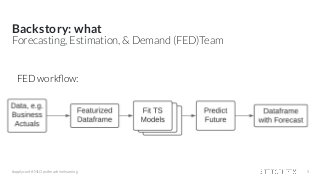
Forecasting, Estimation, & Demand (FED)Team
FED workflow:
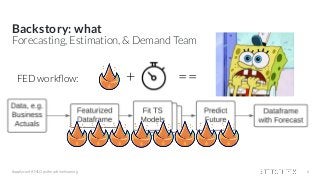
FED workflow: + ==
Backstory: what
#applyconf #MLOps #machinelearning 6
Forecasting, Estimation, & Demand Team
Backstory: what
#applyconf #MLOps #machinelearning
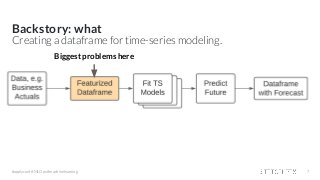
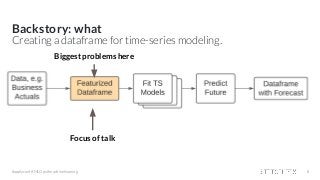
Creating a dataframe for time-series modeling.
7
Biggest problems here
Backstory: what
#applyconf #MLOps #machinelearning 8
Creating a dataframe for time-series modeling.
Focus of talk
Biggest problems here
Backstory: why
#applyconf #MLOps #machinelearning 9
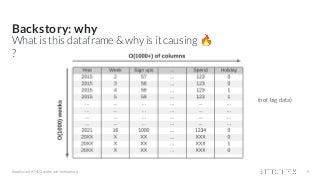
What is this dataframe & why is it causing 🔥
?
(not big data)
Backstory: why
#applyconf #MLOps #machinelearning 10
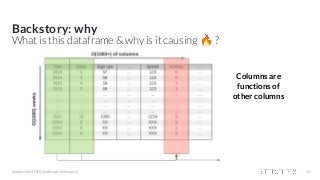
What is this dataframe & why is it causing 🔥 ?
Columns are
functions of
other columns
Backstory: why
#applyconf #MLOps #machinelearning 11
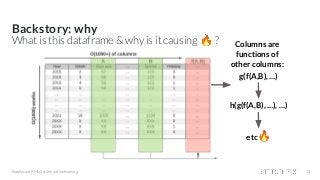
What is this dataframe & why is it causing 🔥 ?
g(f(A,B), …)
h(g(f(A,B), …), …)
etc🔥
Columns are
functions of
other columns:
Backstory: why
#applyconf #MLOps #machinelearning 12
Featurization: some example code
df = load_dates() # load date ranges
df = load_actuals(df) # load actuals, e.g. spend, signups
df['holidays'] = is_holiday(df['year'], df['week']) # holidays
df['avg_3wk_spend'] = df['spend'].rolling(3).mean() # moving average of spend
df['spend_per_signup'] = df['spend'] / df['signups'] # spend per person signed up
df['spend_shift_3weeks'] = df.spend['spend'].shift(3) # shift spend because ...
df['spend_shift_3weeks_per_signup'] = df['spend_shift_3weeks'] / df['signups']
def my_special_feature(df: pd.DataFrame) -> pd.Series:
return (df['A'] - df['B'] + df['C']) * weights
df['special_feature'] = my_special_feature(df)
# ...
Backstory: why
#applyconf #MLOps #machinelearning 13
Featurization: some example code
df = load_dates() # load date ranges
df = load_actuals(df) # load actuals, e.g. spend, signups
df['holidays'] = is_holiday(df['year'], df['week']) # holidays
df['avg_3wk_spend'] = df['spend'].rolling(3).mean() # moving average of spend
df['spend_per_signup'] = df['spend'] / df['signups'] # spend per person signed up
df['spend_shift_3weeks'] = df.spend['spend'].shift(3) # shift spend because ...
df['spend_shift_3weeks_per_signup'] = df['spend_shift_3weeks'] / df['signups']
def my_special_feature(df: pd.DataFrame) -> pd.Series:
return (df['A'] - df['B'] + df['C']) * weights
df['special_feature'] = my_special_feature(df)
# ...
Now scale this code to 1000+ columns & a growing team 😬
Backstory: why
○ Unit testing 👎
○ Documentation 👎
○ Onboarding 📈 👎
○ Debugging 📈 👎
#applyconf #MLOps #machinelearning 14
df = load_dates() # load date ranges
df = load_actuals(df) # load actuals, e.g. spend, signups
df['holidays'] = is_holiday(df['year'], df['week']) # holidays
df['avg_3wk_spend'] = df['spend'].rolling(3).mean() # moving average of spend
df['spend_per_signup'] = df['spend'] / df['signups'] # spend per person signed up
df['spend_shift_3weeks'] = df.spend['spend'].shift(3) # shift spend because ...
df['spend_shift_3weeks_per_signup'] = df['spend_shift_3weeks'] / df['signups']
def my_special_feature(df: pd.DataFrame) -> pd.Series:
return (df['A'] - df['B'] + df['C']) * weights
df['special_feature'] = my_special_feature(df)
# ...
Scaling this type of code results in the following:
- lots of heterogeneity in function definitions & behaviors
- inline dataframe manipulations
- code ordering is super important
Backstory - Summary
#applyconf #MLOps #machinelearning 15
1. Code for featurization == 🤯.
2. Data all fits in memory.
Outline: Hamilton
Backstory: who, what, & why
> Hamilton
The Result
Future
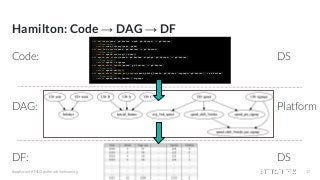
Hamilton: Code → DAG → DF
Code:
DAG:
DF:
#applyconf #MLOps #machinelearning 17
def holidays(year: pd.Series, week: pd.Series) -> pd.Series:
"""Some docs"""
return some_library(year, week)
def avg_3wk_spend(spend: pd.Series) -> pd.Series:
"""Some docs"""
return spend.rolling(3).mean()
def spend_per_signup(spend: pd.Series, signups: pd.Series) -> pd.Series:
"""Some docs"""
return spend / signups
def spend_shift_3weeks(spend: pd.Series) -> pd.Series:
"""Some docs"""
return spend.shift(3)
def spend_shift_3weeks_per_signup(spend_shift_3weeks: pd.Series, signups: pd.Series) -> pd.Series:
"""Some docs"""
return spend_shift_3weeks / signups
DS
Platform
DS
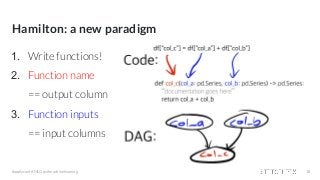
Hamilton: a new paradigm
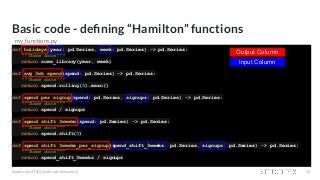
1. Write functions!
2. Function name
== output column
3. Function inputs
== input columns
#applyconf #MLOps #machinelearning 18
Hamilton: a new paradigm
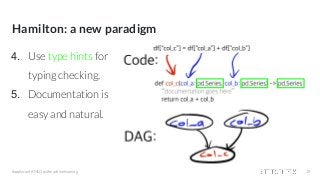
4. Use type hints for
typing checking.
5. Documentation is
easy and natural.
#applyconf #MLOps #machinelearning 19
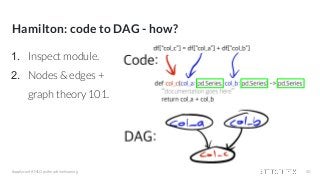
Hamilton: code to DAG - how?
1. Inspect module.
2. Nodes & edges +
graph theory 101.
#applyconf #MLOps #machinelearning 20
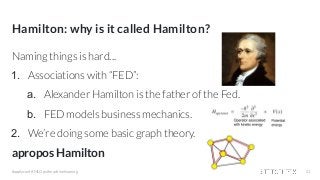
Hamilton: why is it called Hamilton?
#applyconf #MLOps #machinelearning
Naming things is hard...
1. Associations with “FED”:
a. Alexander Hamilton is the father of the Fed.
b. FED models business mechanics.
2. We’re doing some basic graph theory.
apropos Hamilton
21
Example Hamilton Code
So you can get a feel for this paradigm...
#applyconf #MLOps #machinelearning 22
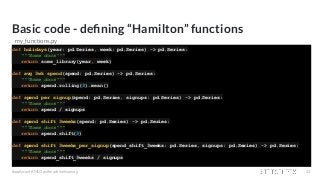
Basic code - defining “Hamilton” functions
def holidays(year: pd.Series, week: pd.Series) -> pd.Series:
"""Some docs"""
return some_library(year, week)
def avg_3wk_spend(spend: pd.Series) -> pd.Series:
"""Some docs"""
return spend.rolling(3).mean()
def spend_per_signup(spend: pd.Series, signups: pd.Series) -> pd.Series:
"""Some docs"""
return spend / signups
def spend_shift_3weeks(spend: pd.Series) -> pd.Series:
"""Some docs"""
return spend.shift(3)
def spend_shift_3weeks_per_signup(spend_shift_3weeks: pd.Series, signups: pd.Series) -> pd.Series:
"""Some docs"""
return spend_shift_3weeks / signups
#applyconf #MLOps #machinelearning 23
my_functions.py
Basic code - defining “Hamilton” functions
def holidays(year: pd.Series, week: pd.Series) -> pd.Series:
"""Some docs"""
return some_library(year, week)
def avg_3wk_spend(spend: pd.Series) -> pd.Series:
"""Some docs"""
return spend.rolling(3).mean()
def spend_per_signup(spend: pd.Series, signups: pd.Series) -> pd.Series:
"""Some docs"""
return spend / signups
def spend_shift_3weeks(spend: pd.Series) -> pd.Series:
"""Some docs"""
return spend.shift(3)
def spend_shift_3weeks_per_signup(spend_shift_3weeks: pd.Series, signups: pd.Series) -> pd.Series:
"""Some docs"""
return spend_shift_3weeks / signups
#applyconf #MLOps #machinelearning 24
Output Column
Input Column
my_functions.py
Driver code - how do you get the Dataframe?
from hamilton import driver
initial_columns = { # load from actuals / initial data
'A': ...,
'B': ...,
'C': 3,
'signups': ...,
'spend': ...,
'week': ...,
'year': ...
}
module_name = 'my_functions' # e.g. my_functions.py
module = importlib.import_module(module_name) # The python file to crawl
dr = driver.Driver(initial_columns, module) # can pass in multiple modules
output_columns = ['year','week',...,'spend_shift_3weeks_per_signup','special_feature']
df = dr.execute(output_columns, display_graph=True) # only walk DAG for what is needed
#applyconf #MLOps #machinelearning 25
Driver code - how do you get the Dataframe?
from hamilton import driver
initial_columns = { # load from actuals / initial data
'A': ...,
'B': ...,
'C': 3,
'signups': ...,
'spend': ...,
'week': ...,
'year': ...
}
module_name = 'my_functions' # e.g. my_functions.py
module = importlib.import_module(module_name) # The python file to crawl
dr = driver.Driver(initial_columns, module) # can pass in multiple modules
output_columns = ['year','week',...,'spend_shift_3weeks_per_signup','special_feature']
df = dr.execute(output_columns, display_graph=True) # only walk DAG for what is needed
#applyconf #MLOps #machinelearning 26
Driver code - how do you get the Dataframe?
from hamilton import driver
initial_columns = { # load from actuals / initial data
'A': ...,
'B': ...,
'C': 3,
'signups': ...,
'spend': ...,
'week': ...,
'year': ...
}
module_name = 'my_functions' # e.g. my_functions.py
module = importlib.import_module(module_name) # The python file to crawl
dr = driver.Driver(initial_columns, module) # can pass in multiple modules
output_columns = ['year','week',...,'spend_shift_3weeks_per_signup','special_feature']
df = dr.execute(output_columns, display_graph=True) # only walk DAG for what is needed
#applyconf #MLOps #machinelearning 27
Driver code - how do you get the Dataframe?
from hamilton import driver
initial_columns = { # load from actuals / initial data
'A': ...,
'B': ...,
'C': 3,
'signups': ...,
'spend': ...,
'week': ...,
'year': ...
}
module_name = 'my_functions' # e.g. my_functions.py
module = importlib.import_module(module_name) # The python file to crawl
dr = driver.Driver(initial_columns, module) # can pass in multiple modules
output_columns = ['year','week',...,'spend_shift_3weeks_per_signup','special_feature']
df = dr.execute(output_columns, display_graph=True) # only walk DAG for what is needed
#applyconf #MLOps #machinelearning 28
Driver code - how do you get the Dataframe?
from hamilton import driver
initial_columns = { # load from actuals / initial data
'A': ...,
'B': ...,
'C': 3,
'signups': ...,
'spend': ...,
'week': ...,
'year': ...
}
module_name = 'my_functions' # e.g. my_functions.py
module = importlib.import_module(module_name) # The python file to crawl
dr = driver.Driver(initial_columns, module) # can pass in multiple modules
output_columns = ['year','week',...,'spend_shift_3weeks_per_signup','special_feature']
df = dr.execute(output_columns, display_graph=True) # only walk DAG for what is needed
#applyconf #MLOps #machinelearning 29
Driver code - how do you get the Dataframe?
from hamilton import driver
initial_columns = { # load from actuals / initial data
'A': ...,
'B': ...,
'C': 3,
'signups': ...,
'spend': ...,
'week': ...,
'year': ...
}
module_name = 'my_functions' # e.g. my_functions.py
module = importlib.import_module(module_name) # The python file to crawl
dr = driver.Driver(initial_columns, module) # can pass in multiple modules
output_columns = ['year','week',...,'spend_shift_3weeks_per_signup','special_feature']
df = dr.execute(output_columns, display_graph=True) # only walk DAG for what is needed
#applyconf #MLOps #machinelearning 30
Driver code - how do you get the Dataframe?
from hamilton import driver
initial_columns = { # load from actuals / initial data
'A': ...,
'B': ...,
'C': 3,
'signups': ...,
'spend': ...,
'week': ...,
'year': ...
}
module_name = 'my_functions' # e.g. my_functions.py
module = importlib.import_module(module_name) # The python file to crawl
dr = driver.Driver(initial_columns, module) # can pass in multiple modules
output_columns = ['year','week',...,'spend_shift_3weeks_per_signup','special_feature']
df = dr.execute(output_columns, display_graph=True) # only walk DAG for what is needed
#applyconf #MLOps #machinelearning 31
Can visualize what we’re executing too!
Outline: Hamilton
Backstory: who, what, & why
Hamilton
> The Result
Future
The Result - after 1.5+ years in production
#applyconf #MLOps #machinelearning 33
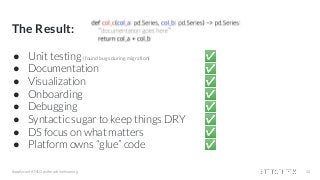
The Result:
● Unit testing (found bugs during migration) ✅
● Documentation ✅
● Visualization ✅
● Onboarding ✅
● Debugging ✅
● Syntactic sugar to keep things DRY ✅
● DS focus on what matters ✅
● Platform owns “glue” code ✅
#applyconf #MLOps #machinelearning 34
The Result - after 1.5+ years in production
DS Quote:
#applyconf #MLOps #machinelearning 35
I've previously onboarded at an organization that dealt with multiple layers of information dependency. The
“data product” was a result of years of multiple authors adding layers without systematic examination for
potholes like circular references. Because of that, the product was a terribly fragile product and knowledge
transfers took place through a series of ad-hoc trial and error by a new member; they run into an issue, ask
their supervisor for clarification, then they are handed an opaque explanation and workaround which then
gets propagated through a game of telephone to the next person (the mechanics of solution is propagated,
but the reason behind the solution is not). In my own experience, the ah-ha moment did not occur until I
doggedly followed the thread of information and built a dag on my own.
Having had that experience, onboarding a data product that already had a graph structure to embody the
complex dependency was a delight; chief among its many benefits is that the product is amenable to other
generic analysis approaches for graphs. Moreover, because of the abstraction that separates dataframe
structure from quantitative specification, it helps a new person to process the information without having to
have a priori domain knowledge, since dependencies are clearly specified and functions are simple and
concise.
The Result - after 1.5+ years in production
DS Quote: TL;DR:
#applyconf #MLOps #machinelearning 36
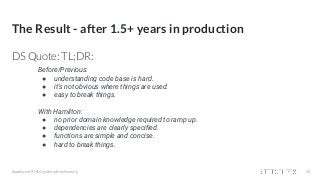
Before/Previous:
● understanding code base is hard.
● it’s not obvious where things are used.
● easy to break things.
With Hamilton:
● no prior domain knowledge required to ramp up.
● dependencies are clearly specified.
● functions are simple and concise.
● hard to break things.
Outline: Hamilton
Backstory: who, what, & why
Hamilton
The Result
> Future
Future
Ideas:
● distributed processing
○ we have a DAG, why not farm it out?
● open source (python 3.6+)
○ would you be interested?
● general featurization
○ can we take this mainstream?
● extend to anything that can be “unioned/merged” together
#applyconf #MLOps #machinelearning 38
Thank you! We’re hiring! Questions?
Try out Stitch Fix → goo.gl/Q3tCQ3
@stefkrawczyk
linkedin.com/in/skrawczyk

Hamilton a micro framework for creating dataframes

  • 1.
    Hamilton: a microframework for creating dataframes applyconf April 2021 Stefan Krawczyk #applyconf #MLOps #machinelearning @stefkrawczyk linkedin.com/in/skrawczyk Try out Stitch Fix → goo.gl/Q3tCQ3
  • 2.
    What to keepin mind for the next ~8 minutes? 1. Hamilton is a new paradigm to create dataframes*. 2. Hamilton enables Data Scientists to focus on functions rather than “glue” code. #applyconf #MLOps #machinelearning 2
  • 3.
    Outline: Hamilton > Backstory:who, what, & why Hamilton The Result Future
  • 4.
    Backstory: who #applyconf #MLOps#machinelearning 4 Forecasting, Estimation, & Demand (FED)Team ● Data Scientists that are responsible for forecasts that help the business make operational decisions. ○ e.g. staffing levels ● One of the oldest teams at Stitch Fix.
  • 5.
    Backstory: what #applyconf #MLOps#machinelearning 5 Forecasting, Estimation, & Demand (FED)Team FED workflow:
  • 6.
    FED workflow: +== Backstory: what #applyconf #MLOps #machinelearning 6 Forecasting, Estimation, & Demand Team
  • 7.
    Backstory: what #applyconf #MLOps#machinelearning Creating a dataframe for time-series modeling. 7 Biggest problems here
  • 8.
    Backstory: what #applyconf #MLOps#machinelearning 8 Creating a dataframe for time-series modeling. Focus of talk Biggest problems here
  • 9.
    Backstory: why #applyconf #MLOps#machinelearning 9 What is this dataframe & why is it causing 🔥 ? (not big data)
  • 10.
    Backstory: why #applyconf #MLOps#machinelearning 10 What is this dataframe & why is it causing 🔥 ? Columns are functions of other columns
  • 11.
    Backstory: why #applyconf #MLOps#machinelearning 11 What is this dataframe & why is it causing 🔥 ? g(f(A,B), …) h(g(f(A,B), …), …) etc🔥 Columns are functions of other columns:
  • 12.
    Backstory: why #applyconf #MLOps#machinelearning 12 Featurization: some example code df = load_dates() # load date ranges df = load_actuals(df) # load actuals, e.g. spend, signups df['holidays'] = is_holiday(df['year'], df['week']) # holidays df['avg_3wk_spend'] = df['spend'].rolling(3).mean() # moving average of spend df['spend_per_signup'] = df['spend'] / df['signups'] # spend per person signed up df['spend_shift_3weeks'] = df.spend['spend'].shift(3) # shift spend because ... df['spend_shift_3weeks_per_signup'] = df['spend_shift_3weeks'] / df['signups'] def my_special_feature(df: pd.DataFrame) -> pd.Series: return (df['A'] - df['B'] + df['C']) * weights df['special_feature'] = my_special_feature(df) # ...
  • 13.
    Backstory: why #applyconf #MLOps#machinelearning 13 Featurization: some example code df = load_dates() # load date ranges df = load_actuals(df) # load actuals, e.g. spend, signups df['holidays'] = is_holiday(df['year'], df['week']) # holidays df['avg_3wk_spend'] = df['spend'].rolling(3).mean() # moving average of spend df['spend_per_signup'] = df['spend'] / df['signups'] # spend per person signed up df['spend_shift_3weeks'] = df.spend['spend'].shift(3) # shift spend because ... df['spend_shift_3weeks_per_signup'] = df['spend_shift_3weeks'] / df['signups'] def my_special_feature(df: pd.DataFrame) -> pd.Series: return (df['A'] - df['B'] + df['C']) * weights df['special_feature'] = my_special_feature(df) # ... Now scale this code to 1000+ columns & a growing team 😬
  • 14.
    Backstory: why ○ Unittesting 👎 ○ Documentation 👎 ○ Onboarding 📈 👎 ○ Debugging 📈 👎 #applyconf #MLOps #machinelearning 14 df = load_dates() # load date ranges df = load_actuals(df) # load actuals, e.g. spend, signups df['holidays'] = is_holiday(df['year'], df['week']) # holidays df['avg_3wk_spend'] = df['spend'].rolling(3).mean() # moving average of spend df['spend_per_signup'] = df['spend'] / df['signups'] # spend per person signed up df['spend_shift_3weeks'] = df.spend['spend'].shift(3) # shift spend because ... df['spend_shift_3weeks_per_signup'] = df['spend_shift_3weeks'] / df['signups'] def my_special_feature(df: pd.DataFrame) -> pd.Series: return (df['A'] - df['B'] + df['C']) * weights df['special_feature'] = my_special_feature(df) # ... Scaling this type of code results in the following: - lots of heterogeneity in function definitions & behaviors - inline dataframe manipulations - code ordering is super important
  • 15.
    Backstory - Summary #applyconf#MLOps #machinelearning 15 1. Code for featurization == 🤯. 2. Data all fits in memory.
  • 16.
    Outline: Hamilton Backstory: who,what, & why > Hamilton The Result Future
  • 17.
    Hamilton: Code →DAG → DF Code: DAG: DF: #applyconf #MLOps #machinelearning 17 def holidays(year: pd.Series, week: pd.Series) -> pd.Series: """Some docs""" return some_library(year, week) def avg_3wk_spend(spend: pd.Series) -> pd.Series: """Some docs""" return spend.rolling(3).mean() def spend_per_signup(spend: pd.Series, signups: pd.Series) -> pd.Series: """Some docs""" return spend / signups def spend_shift_3weeks(spend: pd.Series) -> pd.Series: """Some docs""" return spend.shift(3) def spend_shift_3weeks_per_signup(spend_shift_3weeks: pd.Series, signups: pd.Series) -> pd.Series: """Some docs""" return spend_shift_3weeks / signups DS Platform DS
  • 18.
    Hamilton: a newparadigm 1. Write functions! 2. Function name == output column 3. Function inputs == input columns #applyconf #MLOps #machinelearning 18
  • 19.
    Hamilton: a newparadigm 4. Use type hints for typing checking. 5. Documentation is easy and natural. #applyconf #MLOps #machinelearning 19
  • 20.
    Hamilton: code toDAG - how? 1. Inspect module. 2. Nodes & edges + graph theory 101. #applyconf #MLOps #machinelearning 20
  • 21.
    Hamilton: why isit called Hamilton? #applyconf #MLOps #machinelearning Naming things is hard... 1. Associations with “FED”: a. Alexander Hamilton is the father of the Fed. b. FED models business mechanics. 2. We’re doing some basic graph theory. apropos Hamilton 21
  • 22.
    Example Hamilton Code Soyou can get a feel for this paradigm... #applyconf #MLOps #machinelearning 22
  • 23.
    Basic code -defining “Hamilton” functions def holidays(year: pd.Series, week: pd.Series) -> pd.Series: """Some docs""" return some_library(year, week) def avg_3wk_spend(spend: pd.Series) -> pd.Series: """Some docs""" return spend.rolling(3).mean() def spend_per_signup(spend: pd.Series, signups: pd.Series) -> pd.Series: """Some docs""" return spend / signups def spend_shift_3weeks(spend: pd.Series) -> pd.Series: """Some docs""" return spend.shift(3) def spend_shift_3weeks_per_signup(spend_shift_3weeks: pd.Series, signups: pd.Series) -> pd.Series: """Some docs""" return spend_shift_3weeks / signups #applyconf #MLOps #machinelearning 23 my_functions.py
  • 24.
    Basic code -defining “Hamilton” functions def holidays(year: pd.Series, week: pd.Series) -> pd.Series: """Some docs""" return some_library(year, week) def avg_3wk_spend(spend: pd.Series) -> pd.Series: """Some docs""" return spend.rolling(3).mean() def spend_per_signup(spend: pd.Series, signups: pd.Series) -> pd.Series: """Some docs""" return spend / signups def spend_shift_3weeks(spend: pd.Series) -> pd.Series: """Some docs""" return spend.shift(3) def spend_shift_3weeks_per_signup(spend_shift_3weeks: pd.Series, signups: pd.Series) -> pd.Series: """Some docs""" return spend_shift_3weeks / signups #applyconf #MLOps #machinelearning 24 Output Column Input Column my_functions.py
  • 25.
    Driver code -how do you get the Dataframe? from hamilton import driver initial_columns = { # load from actuals / initial data 'A': ..., 'B': ..., 'C': 3, 'signups': ..., 'spend': ..., 'week': ..., 'year': ... } module_name = 'my_functions' # e.g. my_functions.py module = importlib.import_module(module_name) # The python file to crawl dr = driver.Driver(initial_columns, module) # can pass in multiple modules output_columns = ['year','week',...,'spend_shift_3weeks_per_signup','special_feature'] df = dr.execute(output_columns, display_graph=True) # only walk DAG for what is needed #applyconf #MLOps #machinelearning 25
  • 26.
    Driver code -how do you get the Dataframe? from hamilton import driver initial_columns = { # load from actuals / initial data 'A': ..., 'B': ..., 'C': 3, 'signups': ..., 'spend': ..., 'week': ..., 'year': ... } module_name = 'my_functions' # e.g. my_functions.py module = importlib.import_module(module_name) # The python file to crawl dr = driver.Driver(initial_columns, module) # can pass in multiple modules output_columns = ['year','week',...,'spend_shift_3weeks_per_signup','special_feature'] df = dr.execute(output_columns, display_graph=True) # only walk DAG for what is needed #applyconf #MLOps #machinelearning 26
  • 27.
    Driver code -how do you get the Dataframe? from hamilton import driver initial_columns = { # load from actuals / initial data 'A': ..., 'B': ..., 'C': 3, 'signups': ..., 'spend': ..., 'week': ..., 'year': ... } module_name = 'my_functions' # e.g. my_functions.py module = importlib.import_module(module_name) # The python file to crawl dr = driver.Driver(initial_columns, module) # can pass in multiple modules output_columns = ['year','week',...,'spend_shift_3weeks_per_signup','special_feature'] df = dr.execute(output_columns, display_graph=True) # only walk DAG for what is needed #applyconf #MLOps #machinelearning 27
  • 28.
    Driver code -how do you get the Dataframe? from hamilton import driver initial_columns = { # load from actuals / initial data 'A': ..., 'B': ..., 'C': 3, 'signups': ..., 'spend': ..., 'week': ..., 'year': ... } module_name = 'my_functions' # e.g. my_functions.py module = importlib.import_module(module_name) # The python file to crawl dr = driver.Driver(initial_columns, module) # can pass in multiple modules output_columns = ['year','week',...,'spend_shift_3weeks_per_signup','special_feature'] df = dr.execute(output_columns, display_graph=True) # only walk DAG for what is needed #applyconf #MLOps #machinelearning 28
  • 29.
    Driver code -how do you get the Dataframe? from hamilton import driver initial_columns = { # load from actuals / initial data 'A': ..., 'B': ..., 'C': 3, 'signups': ..., 'spend': ..., 'week': ..., 'year': ... } module_name = 'my_functions' # e.g. my_functions.py module = importlib.import_module(module_name) # The python file to crawl dr = driver.Driver(initial_columns, module) # can pass in multiple modules output_columns = ['year','week',...,'spend_shift_3weeks_per_signup','special_feature'] df = dr.execute(output_columns, display_graph=True) # only walk DAG for what is needed #applyconf #MLOps #machinelearning 29
  • 30.
    Driver code -how do you get the Dataframe? from hamilton import driver initial_columns = { # load from actuals / initial data 'A': ..., 'B': ..., 'C': 3, 'signups': ..., 'spend': ..., 'week': ..., 'year': ... } module_name = 'my_functions' # e.g. my_functions.py module = importlib.import_module(module_name) # The python file to crawl dr = driver.Driver(initial_columns, module) # can pass in multiple modules output_columns = ['year','week',...,'spend_shift_3weeks_per_signup','special_feature'] df = dr.execute(output_columns, display_graph=True) # only walk DAG for what is needed #applyconf #MLOps #machinelearning 30
  • 31.
    Driver code -how do you get the Dataframe? from hamilton import driver initial_columns = { # load from actuals / initial data 'A': ..., 'B': ..., 'C': 3, 'signups': ..., 'spend': ..., 'week': ..., 'year': ... } module_name = 'my_functions' # e.g. my_functions.py module = importlib.import_module(module_name) # The python file to crawl dr = driver.Driver(initial_columns, module) # can pass in multiple modules output_columns = ['year','week',...,'spend_shift_3weeks_per_signup','special_feature'] df = dr.execute(output_columns, display_graph=True) # only walk DAG for what is needed #applyconf #MLOps #machinelearning 31 Can visualize what we’re executing too!
  • 32.
    Outline: Hamilton Backstory: who,what, & why Hamilton > The Result Future
  • 33.
    The Result -after 1.5+ years in production #applyconf #MLOps #machinelearning 33
  • 34.
    The Result: ● Unittesting (found bugs during migration) ✅ ● Documentation ✅ ● Visualization ✅ ● Onboarding ✅ ● Debugging ✅ ● Syntactic sugar to keep things DRY ✅ ● DS focus on what matters ✅ ● Platform owns “glue” code ✅ #applyconf #MLOps #machinelearning 34
  • 35.
    The Result -after 1.5+ years in production DS Quote: #applyconf #MLOps #machinelearning 35 I've previously onboarded at an organization that dealt with multiple layers of information dependency. The “data product” was a result of years of multiple authors adding layers without systematic examination for potholes like circular references. Because of that, the product was a terribly fragile product and knowledge transfers took place through a series of ad-hoc trial and error by a new member; they run into an issue, ask their supervisor for clarification, then they are handed an opaque explanation and workaround which then gets propagated through a game of telephone to the next person (the mechanics of solution is propagated, but the reason behind the solution is not). In my own experience, the ah-ha moment did not occur until I doggedly followed the thread of information and built a dag on my own. Having had that experience, onboarding a data product that already had a graph structure to embody the complex dependency was a delight; chief among its many benefits is that the product is amenable to other generic analysis approaches for graphs. Moreover, because of the abstraction that separates dataframe structure from quantitative specification, it helps a new person to process the information without having to have a priori domain knowledge, since dependencies are clearly specified and functions are simple and concise.
  • 36.
    The Result -after 1.5+ years in production DS Quote: TL;DR: #applyconf #MLOps #machinelearning 36 Before/Previous: ● understanding code base is hard. ● it’s not obvious where things are used. ● easy to break things. With Hamilton: ● no prior domain knowledge required to ramp up. ● dependencies are clearly specified. ● functions are simple and concise. ● hard to break things.
  • 37.
    Outline: Hamilton Backstory: who,what, & why Hamilton The Result > Future
  • 38.
    Future Ideas: ● distributed processing ○we have a DAG, why not farm it out? ● open source (python 3.6+) ○ would you be interested? ● general featurization ○ can we take this mainstream? ● extend to anything that can be “unioned/merged” together #applyconf #MLOps #machinelearning 38
  • 39.
    Thank you! We’rehiring! Questions? Try out Stitch Fix → goo.gl/Q3tCQ3 @stefkrawczyk linkedin.com/in/skrawczyk