Social media powerpoint presentation
Agenda
1 What is social media?
2 Why social media is important
3 Different types of social media
4 Advantages and disadvantages
5 How to use social media safely
6 Thank you
4 Break
Social media
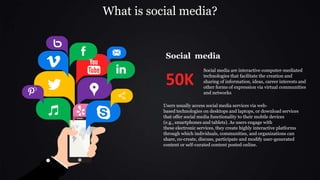
Social media are interactive computer-mediated
technologies that facilitate the creation and
sharing of information, ideas, career interests and
other forms of expression via virtual communities
and networks
50K
Users usually access social media services via web-
based technologies on desktops and laptops, or download services
that offer social media functionality to their mobile devices
(e.g., smartphones and tablets). As users engage with
these electronic services, they create highly interactive platforms
through which individuals, communities, and organizations can
share, co-create, discuss, participate and modify user-generated
content or self-curated content posted online.
What is social media?
Why social media is important
Social media
Social media is an essential piece of your business marketing
strategy. Social platforms help you connect with your customers,
increase awareness about your brand, and boost your leads and
sales. With more than three billion people around the world using
social media every month
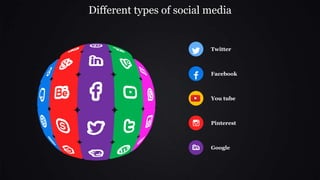
Different types of social media
Twitter
Facebook
You tube
Pinterest
Google
It’s Time For A
Coffee
Break
The coffee break presentation mystery
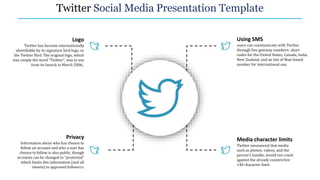
Twitter Social Media Presentation Template
Using SMS
users can communicate with Twitter
through five gateway numbers: short
codes for the United States, Canada, India,
New Zealand, and an Isle of Man-based
number for international use.
Media character limits
Twitter announced that media
such as photos, videos, and the
person's handle, would not count
against the already constrictive
140 character limit.
Logo
Twitter has become internationally
identifiable by its signature bird logo, or
the Twitter Bird. The original logo, which
was simply the word "Twitter", was in use
from its launch in March 2006..
Privacy
Information about who has chosen to
follow an account and who a user has
chosen to follow is also public, though
accounts can be changed to "protected"
which limits this information (and all
tweets) to approved followers.
Facebook
Facebook is a social networking website where users can post
comments, share photographs and post links to news or other
interesting content on the web, chat live, and watch short-form
video
7.8%
2.5%
6.7%
Photos and videos
Numbers of share
Numbers of followers
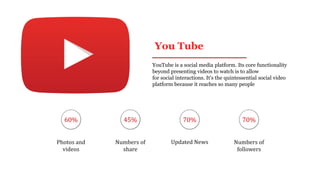
You Tube
YouTube is a social media platform. Its core functionality
beyond presenting videos to watch is to allow
for social interactions. It's the quintessential social video
platform because it reaches so many people
60% 45% 70% 70%
Photos and
videos
Numbers of
share
Updated News Numbers of
followers
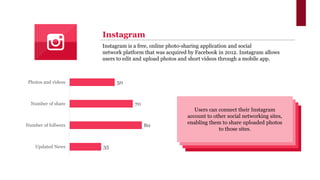
35
80
70
50
Updated News
Number of follwers
Number of share
Photos and videos
Instagram is a free, online photo-sharing application and social
network platform that was acquired by Facebook in 2012. Instagram allows
users to edit and upload photos and short videos through a mobile app.
Instagram
Users can connect their Instagram
account to other social networking sites,
enabling them to share uploaded photos
to those sites.
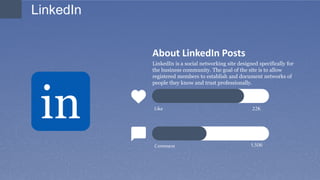
About LinkedIn Posts
LinkedIn is a social networking site designed specifically for
the business community. The goal of the site is to allow
registered members to establish and document networks of
people they know and trust professionally.
Like
Comment
22K
1,506
LinkedIn
in
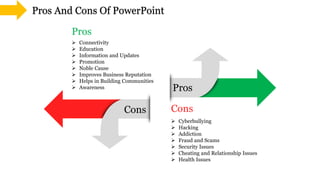
Cons
Pros
Pros
Cons
Pros And Cons Of PowerPoint
 Cyberbullying
 Hacking
 Addiction
 Fraud and Scams
 Security Issues
 Cheating and Relationship Issues
 Health Issues
 Connectivity
 Education
 Information and Updates
 Promotion
 Noble Cause
 Improves Business Reputation
 Helps in Building Communities
 Awareness
How to use social media safely
• Use a strong password. The longer it is, the more secure it will
be.
• Use a different password for each of your social media accounts.
• Set up your security answers. This option is available for most
social media sites.
• If you have social media apps on your phone, be sure to
password protect your device.
• Be selective with friend requests. If you don’t know the person,
don’t accept their request. It could be a fake account.
• Click links with caution. Social media accounts are regularly
hacked. Look out for language or content that does not sound
like something your friend would post.
• Be careful about what you share. Don’t reveal sensitive personal
information i.e.: home address, financial information, phone
number. The more you post the easier it is to have your identity
stolen.
• Become familiar with the privacy policies of the social media
channels you use and customize your privacy settings to control
who sees what.
• Protect your computer by installing antivirus software to
safeguard. Also ensure that your browser, operating system,
and software are kept up to date.
• Remember to log off when you’re done.
Social media powerpoint presentation

Social media powerpoint presentation

  • 1.
  • 2.
    Agenda 1 What issocial media? 2 Why social media is important 3 Different types of social media 4 Advantages and disadvantages 5 How to use social media safely 6 Thank you 4 Break
  • 3.
    Social media Social mediaare interactive computer-mediated technologies that facilitate the creation and sharing of information, ideas, career interests and other forms of expression via virtual communities and networks 50K Users usually access social media services via web- based technologies on desktops and laptops, or download services that offer social media functionality to their mobile devices (e.g., smartphones and tablets). As users engage with these electronic services, they create highly interactive platforms through which individuals, communities, and organizations can share, co-create, discuss, participate and modify user-generated content or self-curated content posted online. What is social media?
  • 4.
    Why social mediais important Social media Social media is an essential piece of your business marketing strategy. Social platforms help you connect with your customers, increase awareness about your brand, and boost your leads and sales. With more than three billion people around the world using social media every month
  • 5.
    Different types ofsocial media Twitter Facebook You tube Pinterest Google
  • 6.
    It’s Time ForA Coffee Break The coffee break presentation mystery
  • 7.
    Twitter Social MediaPresentation Template Using SMS users can communicate with Twitter through five gateway numbers: short codes for the United States, Canada, India, New Zealand, and an Isle of Man-based number for international use. Media character limits Twitter announced that media such as photos, videos, and the person's handle, would not count against the already constrictive 140 character limit. Logo Twitter has become internationally identifiable by its signature bird logo, or the Twitter Bird. The original logo, which was simply the word "Twitter", was in use from its launch in March 2006.. Privacy Information about who has chosen to follow an account and who a user has chosen to follow is also public, though accounts can be changed to "protected" which limits this information (and all tweets) to approved followers.
  • 8.
    Facebook Facebook is asocial networking website where users can post comments, share photographs and post links to news or other interesting content on the web, chat live, and watch short-form video 7.8% 2.5% 6.7% Photos and videos Numbers of share Numbers of followers
  • 9.
    You Tube YouTube isa social media platform. Its core functionality beyond presenting videos to watch is to allow for social interactions. It's the quintessential social video platform because it reaches so many people 60% 45% 70% 70% Photos and videos Numbers of share Updated News Numbers of followers
  • 10.
    35 80 70 50 Updated News Number offollwers Number of share Photos and videos Instagram is a free, online photo-sharing application and social network platform that was acquired by Facebook in 2012. Instagram allows users to edit and upload photos and short videos through a mobile app. Instagram Users can connect their Instagram account to other social networking sites, enabling them to share uploaded photos to those sites.
  • 11.
    About LinkedIn Posts LinkedInis a social networking site designed specifically for the business community. The goal of the site is to allow registered members to establish and document networks of people they know and trust professionally. Like Comment 22K 1,506 LinkedIn in
  • 12.
    Cons Pros Pros Cons Pros And ConsOf PowerPoint  Cyberbullying  Hacking  Addiction  Fraud and Scams  Security Issues  Cheating and Relationship Issues  Health Issues  Connectivity  Education  Information and Updates  Promotion  Noble Cause  Improves Business Reputation  Helps in Building Communities  Awareness
  • 13.
    How to usesocial media safely • Use a strong password. The longer it is, the more secure it will be. • Use a different password for each of your social media accounts. • Set up your security answers. This option is available for most social media sites. • If you have social media apps on your phone, be sure to password protect your device. • Be selective with friend requests. If you don’t know the person, don’t accept their request. It could be a fake account. • Click links with caution. Social media accounts are regularly hacked. Look out for language or content that does not sound like something your friend would post. • Be careful about what you share. Don’t reveal sensitive personal information i.e.: home address, financial information, phone number. The more you post the easier it is to have your identity stolen. • Become familiar with the privacy policies of the social media channels you use and customize your privacy settings to control who sees what. • Protect your computer by installing antivirus software to safeguard. Also ensure that your browser, operating system, and software are kept up to date. • Remember to log off when you’re done.