Plugin and Play
PLUGINS THAT SUPPORT THE FULL SPECTRUM OF KOTLIN FEATURES
17-5-2022
by
Simone
de
Gijt
Introduction
Simone de Gijt
2016
2017
2018
2019
2020
2021
…
- Kotlin 1.0 released
- Started working in IT
Google announces that Kotlin is the preferred language of
Android app developers
- Signs contract @ OpenValue
- Starts working with Kotlin
Twitter: @de_gijt
What to
expect?
 Kover
 Code covarage
 Options
 Advantages / Disadvantages
 Demo of usages / configuration
 Ktlint
 Linter
 Options
 Adventages / Disadvantages
 Demo of usages / configuration
 Detekt
 Code smells
 Options
 Adventages / Disadvantages
 Demo of usages / configuration
Twitter: @de_gijt
Kover
{kof· fer}
Kover - Gradle plugin for Kotlin code coverage agents:
IntelliJ and JaCoCo.
Twitter: @de_gijt
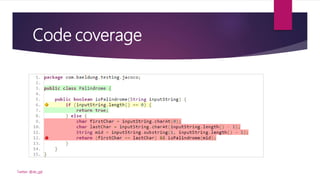
Code coverage
Twitter: @de_gijt
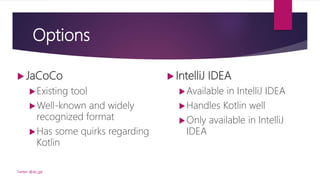
Options
 JaCoCo
Existing tool
Well-known and widely
recognized format
Has some quirks regarding
Kotlin
Twitter: @de_gijt
 IntelliJ IDEA
Available in IntelliJ IDEA
Handles Kotlin well
Only available in IntelliJ
IDEA
Twitter: @de_gijt
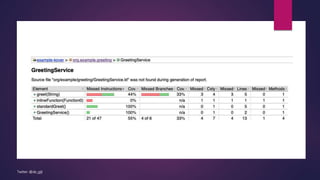
assertThat(service.greet(null))
.isEqualTo("Hello world")
Twitter: @de_gijt
Advantages Kover
 Provided by JetBrains
 Fully integrated with the Gradle toolchain and multiplatform projects.
 Kotlin Android support without the need to divide into build types and flavours
 Customizable filters for instrumented classes
 Handles specific Kotlin features
 Inline functions
 Directory structure
 …
Twitter: @de_gijt
Disadvantages
 Still in an experimental state
 Only available for Gradle (not Maven)
 Engine Jacoco doesn’t support Kotlin Directory Structure
 Verification is only on LINE-level
Twitter: @de_gijt
Demo
Twitter: @de_gijt
https://github.com/SimonedeGijt/example-kover
Ktlint
{kitty· lint}
Ktlint - An anti-bikeshedding Kotlin linter with built-in
formatter
Twitter: @de_gijt
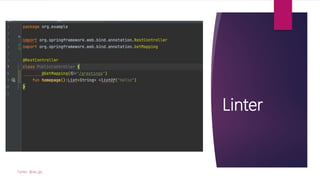
Linter
Twitter: @de_gijt
Advantages
 It saves time!
 It saves energy
 It simplifies your process
Twitter: @de_gijt
Plugin options
 JLLeitschuh:
 Gradle wrapper over
the pinterest project
 Adds special tasks
Twitter: @de_gijt
 Pinterest:
 Static code analysis
tool that is used to
analyse the Kotlin
code for you.
 Follows the official
Kotlin code style
 GantSign:
 Maven wrapper
over the
pinterest
project
Demo
Twitter: @de_gijt
https://github.com/SimonedeGijt/
example-kover-ktlint-subprojects
https://github.com/SimonedeGijt/example-ktlint
Detekt
{de· tect}
Detekt - A static code analysis tool for
the Kotlin programming language.
Twitter: @de_gijt
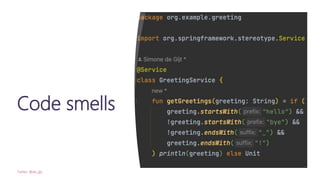
Code smells
Twitter: @de_gijt
Options
 Sonarqube
 Very nice reports that integrate with Gitlab
 You get a lot of extra’s..
 Community and paid versions
 Megalinter
 Free
 Not Kotlin specific
Twitter: @de_gijt
Advantages
 Highly configurable rule sets
 Specification of quality gates which will break your build
 Gradle plugin for code analysis via Gradle builds
 SonarQube & IntelliJ integraitons
 Third party integrations for Maven, Bazel and Github
Actions (Docker based and Javascript based)
Twitter: @de_gijt
Disadvantages
 Ktlint doesn’t work optimal inside Detekt.
Better to use it next to Detekt.
 Doesn’t support other languages.
Twitter: @de_gijt
Demo
Twitter: @de_gijt
https://github.com/SimonedeGijt/example-detekt
Sources
 Kover – The Code Coverage Plugin
 https://kotlinlang.org/docs/multiplatform.html
 https://www.geeksforgeeks.org/code-formatting-in-kotlin-using-ktlint/
 https://blog.mindorks.com/code-formatting-in-kotlin-using-ktlint
 https://github.com/Kotlin/kotlinx-kover
 https://github.com/JLLeitschuh/ktlint-gradle
 https://github.com/pinterest/ktlint
 https://github.com/gantsign/ktlint-maven-plugin
 https://github.com/detekt/detekt
 https://megalinter.github.io/latest/installation/
Twitter: @de_gijt
Questions
Twitter: @de_gijt
Contact
Twitter:
@de_gijt
LinkedIn:
Simone de Gijt
Twitter: @de_gijt
Slideshare:

PluginAndPlay-AmsterdamJUG.pptx

Editor's Notes

  • #3 ~
  • #5 László Kövér is a Hungarian politician and the current speaker of the National Assembly of Hungary. Kover is pronounced the same as the Dutch word for suitcase. https://github.com/Kotlin/kotlinx-kover
  • #7 Source: Kover – The Code Coverage Plugin https://www.youtube.com/watch?v=jNu5LY9HIbw
  • #10 Sources: Kover – The Code Coverage Plugin https://www.youtube.com/watch?v=jNu5LY9HIbw https://github.com/Kotlin/kotlinx-kover https://kotlinlang.org/docs/multiplatform.html
  • #12 Demo: Start with JaCoCo Show you can not see the class in the report (because of directory structure) Show inline function is not ”covered” Show IntelliJ Add Kover to the plugins Run report Open as HTML and show that you now can see the class-file including the coverage of the inline function Show that test classes are also tested by default Unmute integrationtests -> no additional config like with jacoco Standard: test is without Kover -> add config Show that you can exclude classes from Kover (both extension + report) Show kover config koverVerify Maybe subprojects (merged reports)
  • #15 Source: https://www.geeksforgeeks.org/code-formatting-in-kotlin-using-ktlint/
  • #16 Sources https://blog.mindorks.com/code-formatting-in-kotlin-using-ktlint https://github.com/JLLeitschuh/ktlint-gradle https://github.com/pinterest/ktlint https://github.com/gantsign/ktlint-maven-plugin https://megalinter.github.io/latest/installation/ JLLeitschuh: The plugin can be applied to any project, but only activates if that project has the kotlin plugin applied Check tasks support change files to be checked incrementally. On the first run, the task will check all files in the source set, on subsequent runs it will check only added/modified files. IntelliJ IDEA: recommended to work with the ktlint install from brew
  • #17 Demo: Basic project without a lint; show format-error in service -> build -> no issues Add ktlint (normal plugin) to project: show all new tasks Show that if you only want intellij idea tasks you can add -idea in the plugin: build, after ktlintCheck 2 options: Create baseline: ktlintGenerateBaseline Format via: ktlintFormat / option+command+l Git integration: addKtlintCheckGitPreCommitHook addKtlintFormatGitPreCommitHook Add plugin Nick Badal Actions on save Additional config file: Without editorconfig file or ktlint plugin the rules of preferences are applied (KOTLIN) You can overwrite this by the editorconfig file (no extra config needed) Source: https://medium.com/@vanniktech/writing-your-first-ktlint-rule-5a1707f4ca5b
  • #19 ComplexCondition
  • #23 Demo: Basic project without a lint; show format-error in service -> build -> no issues Add ktlint (normal plugin) to project: show all new tasks Show that if you only want intellij idea tasks you can add -idea in the plugin: build, after ktlintCheck 2 options: Create baseline: ktlintGenerateBaseline Format via: ktlintFormat / option+command+l Git integration: addKtlintCheckGitPreCommitHook addKtlintFormatGitPreCommitHook Add plugin Nick Badal Actions on save Additional config file: Without editorconfig file or ktlint plugin the rules of preferences are applied (KOTLIN) You can overwrite this by the editorconfig file (no extra config needed) Source: https://medium.com/@vanniktech/writing-your-first-ktlint-rule-5a1707f4ca5b