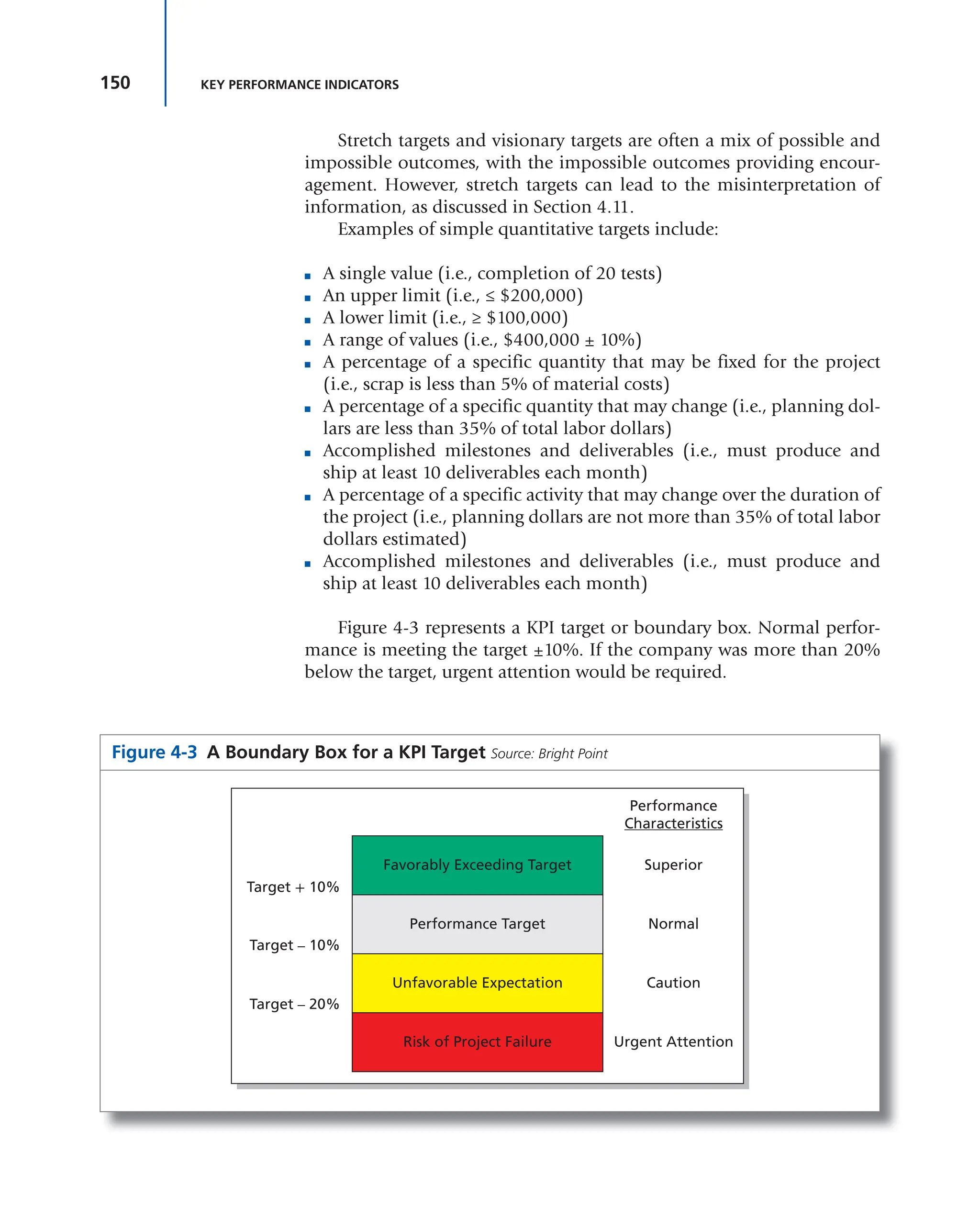
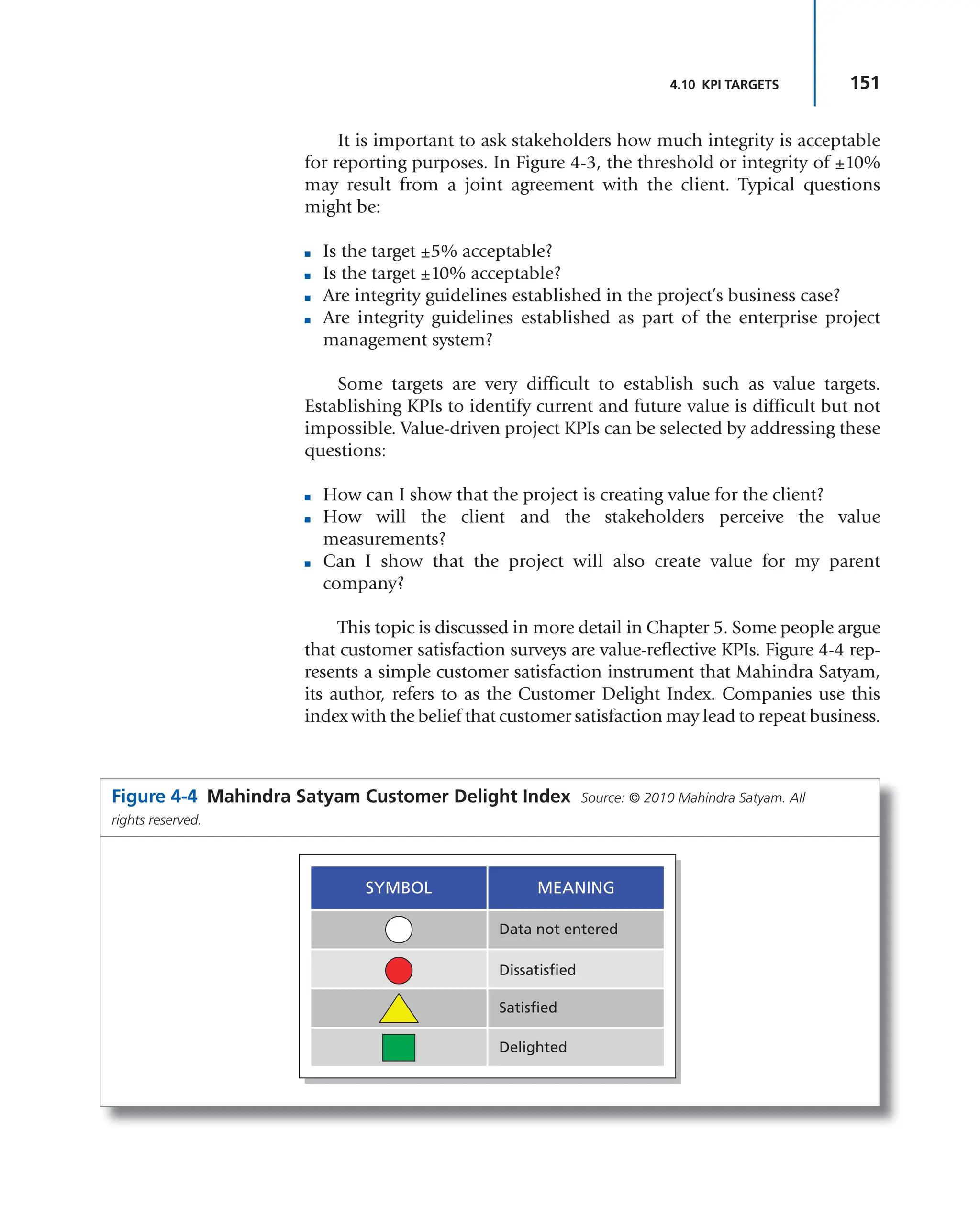
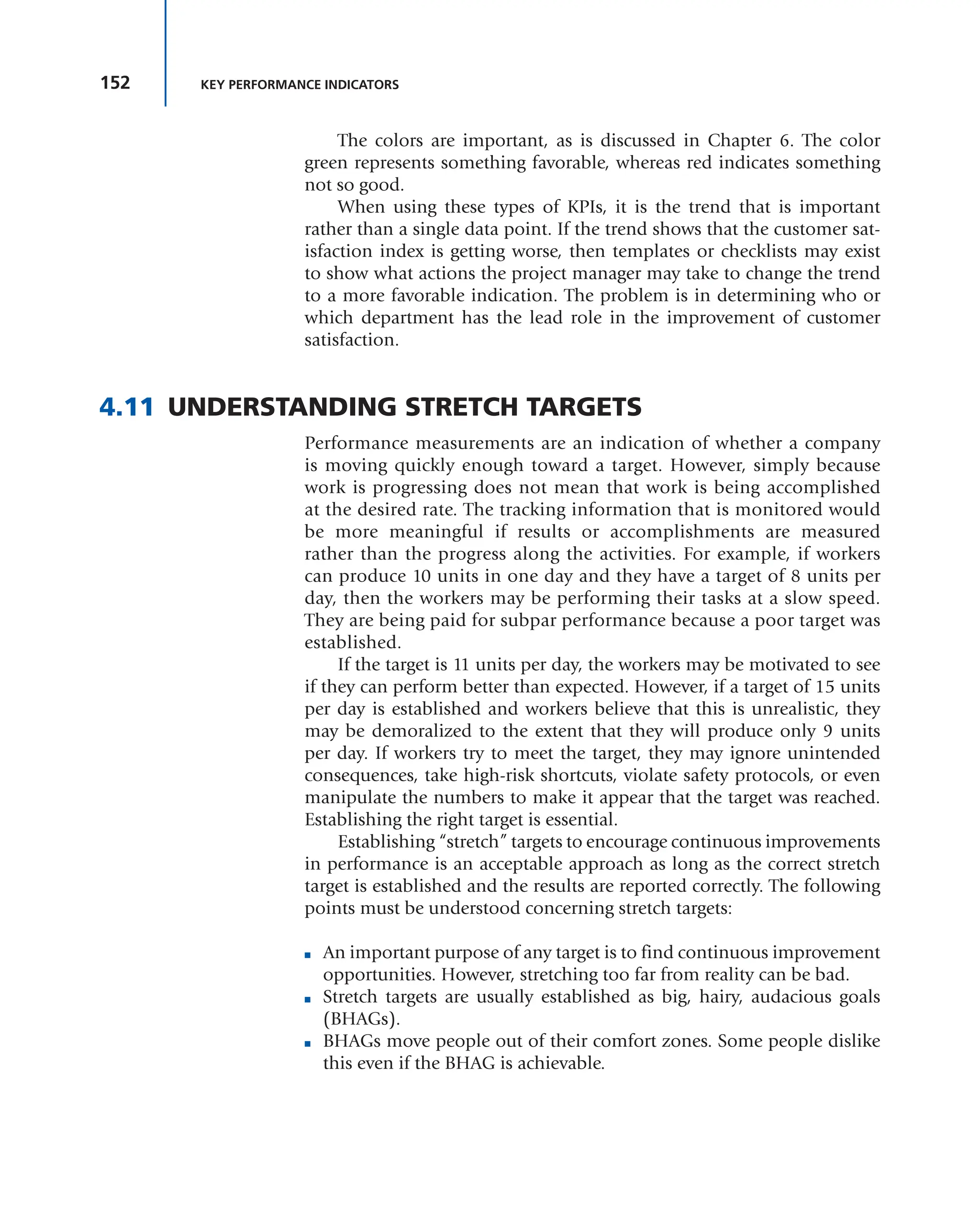
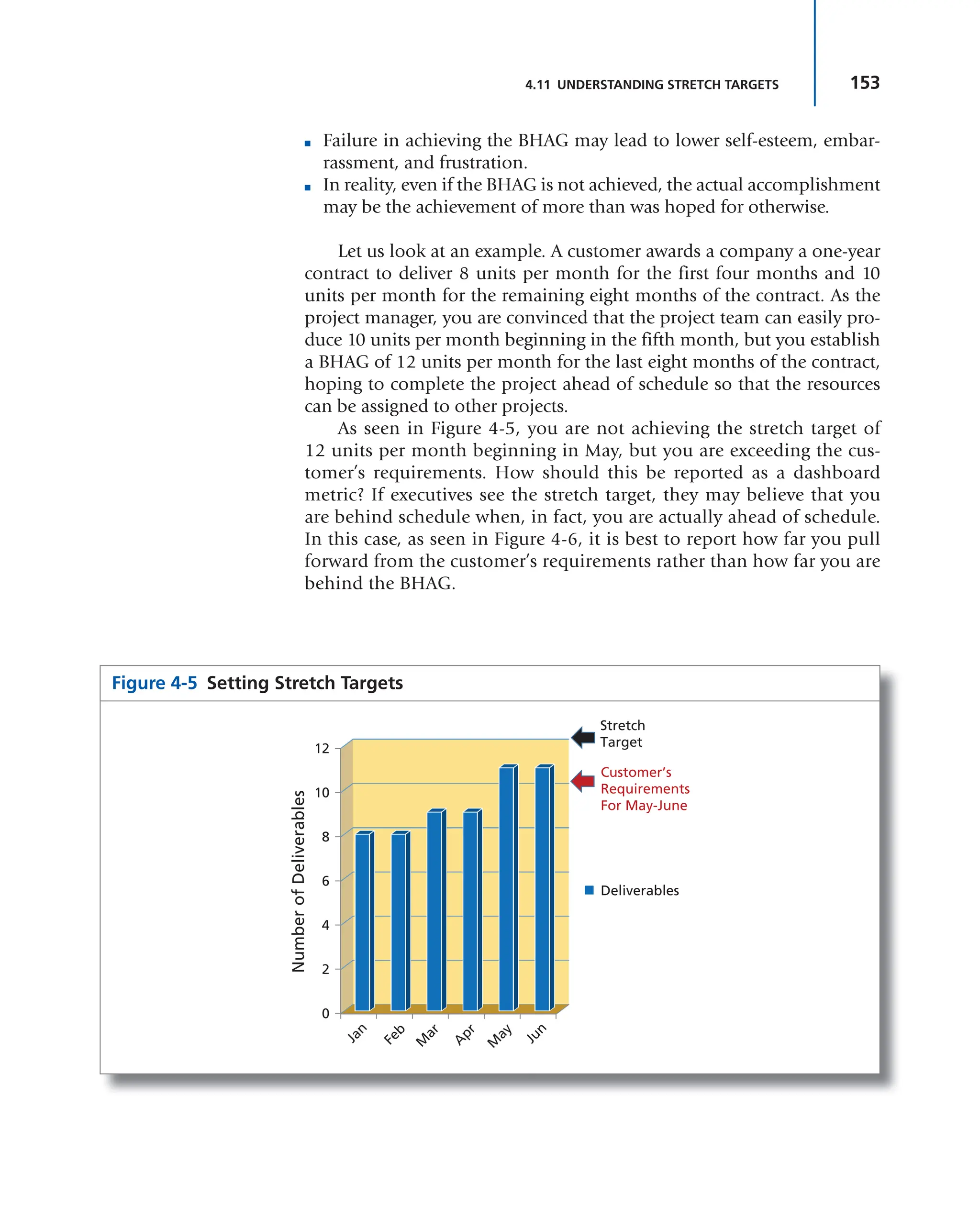
project management
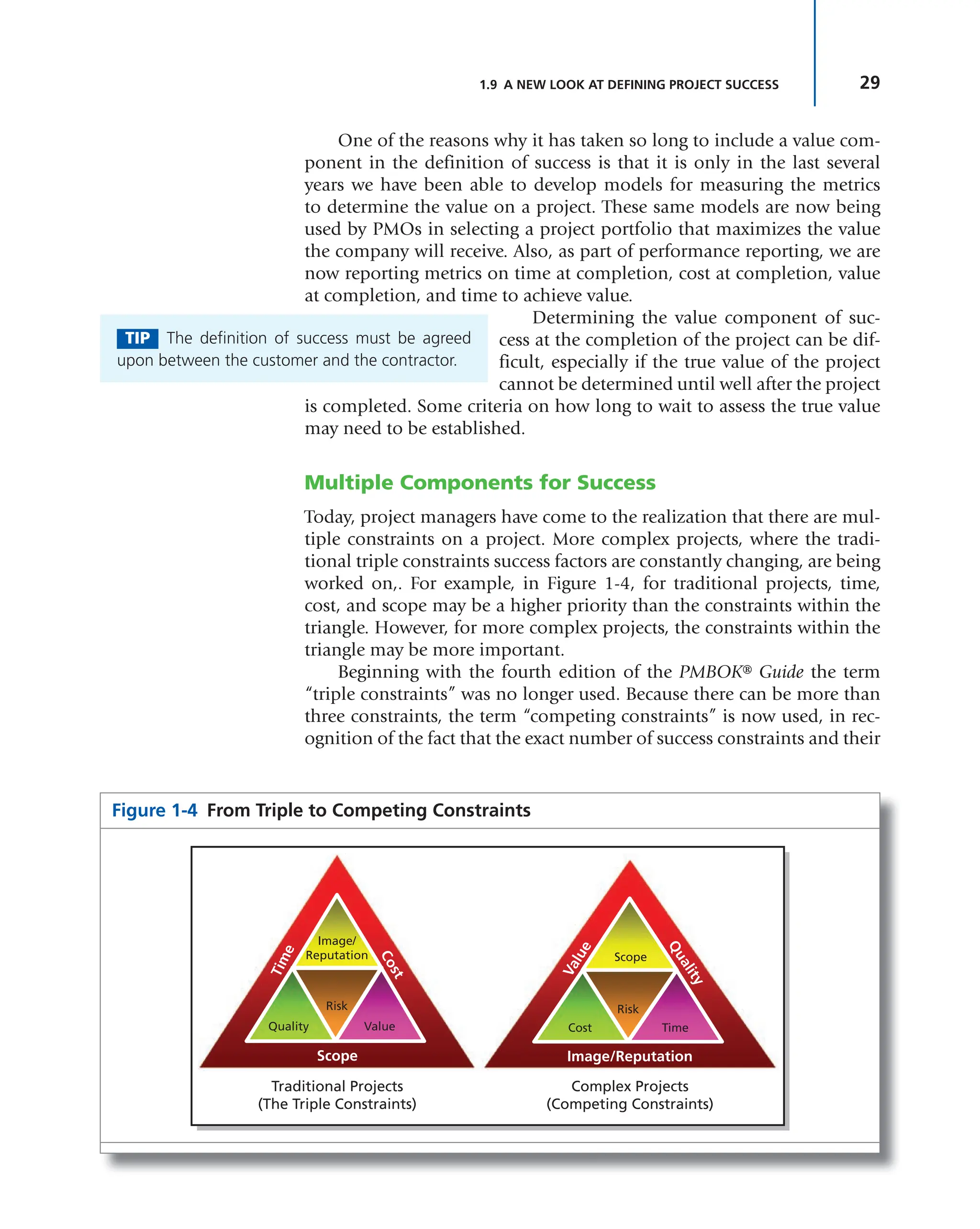
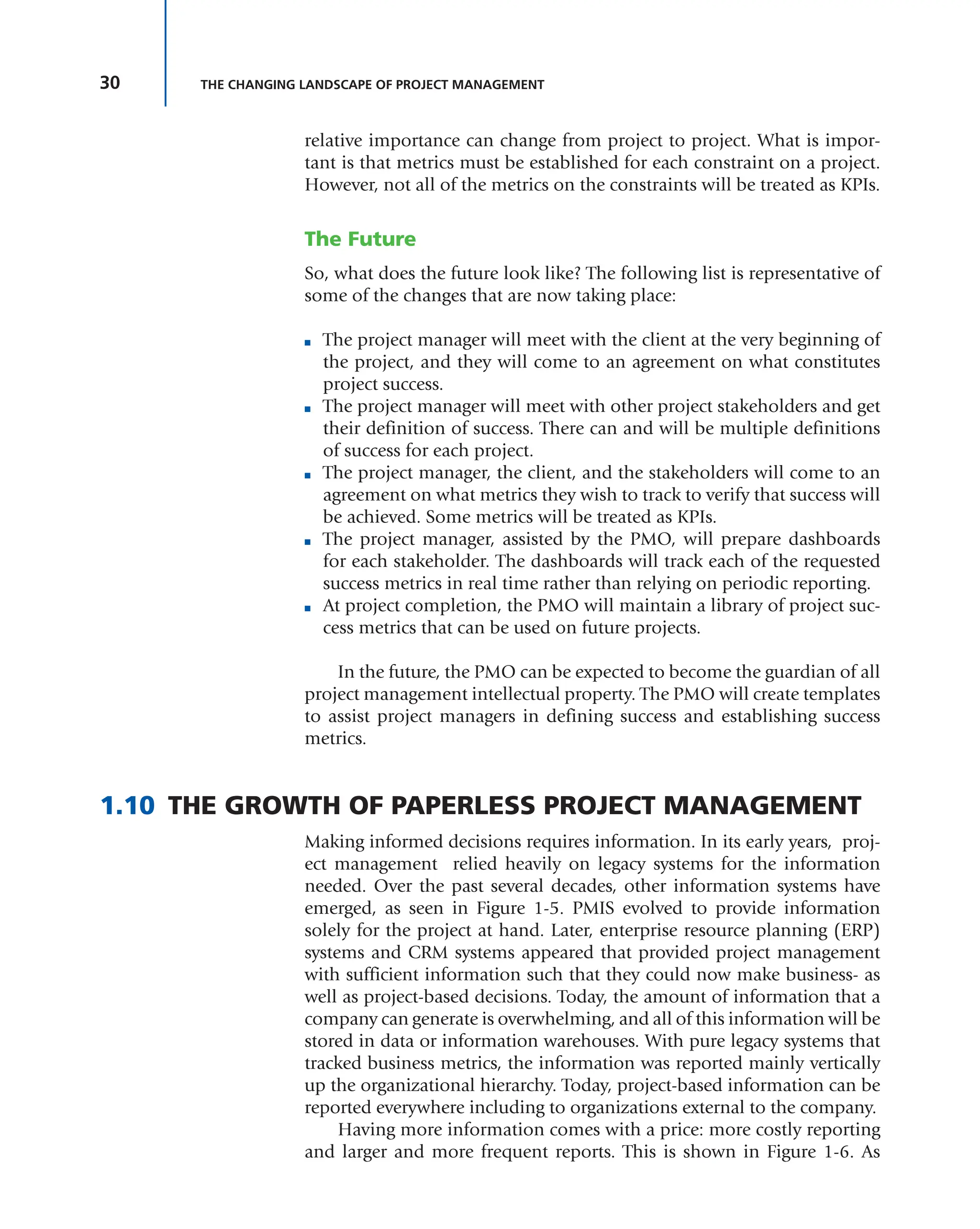
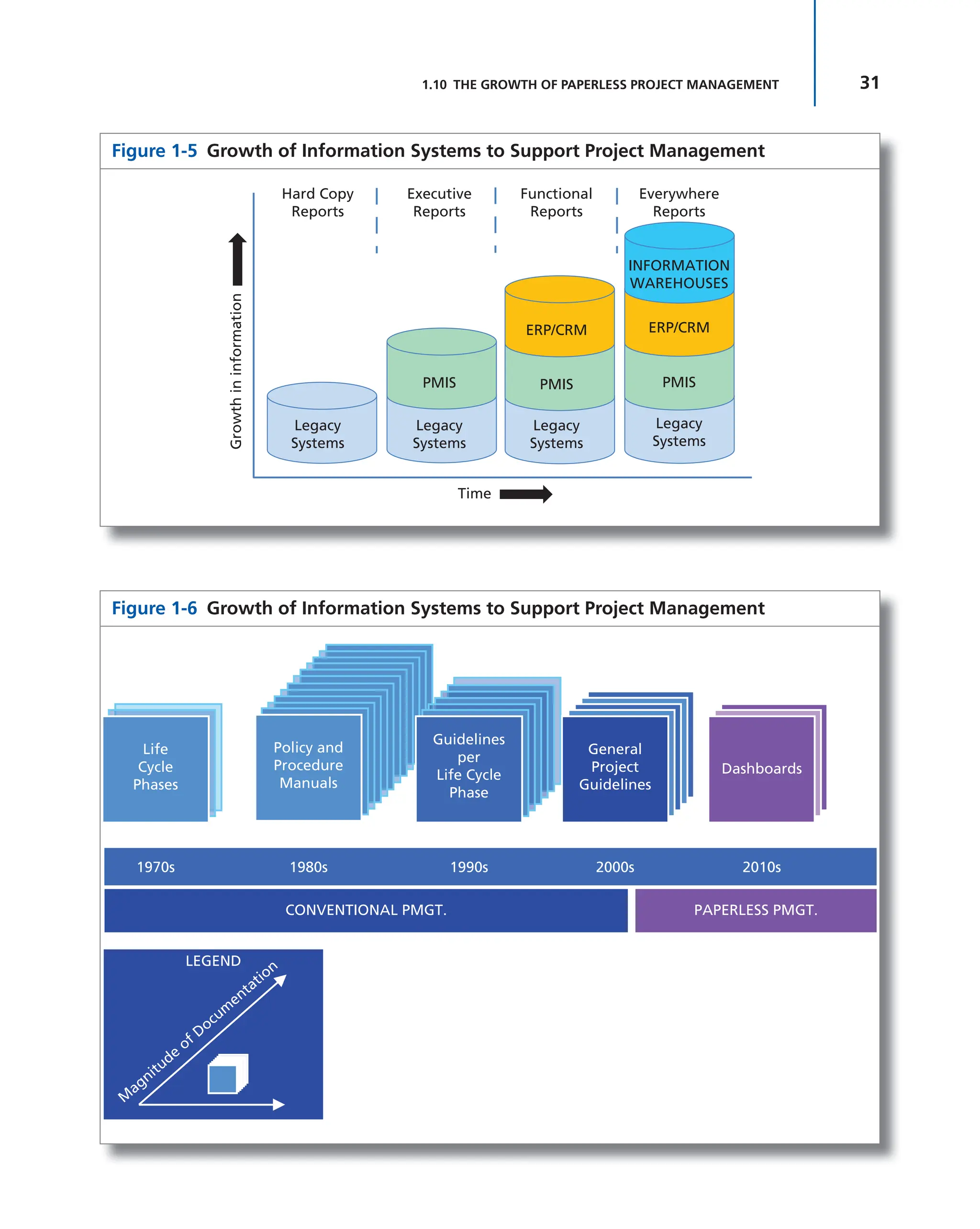
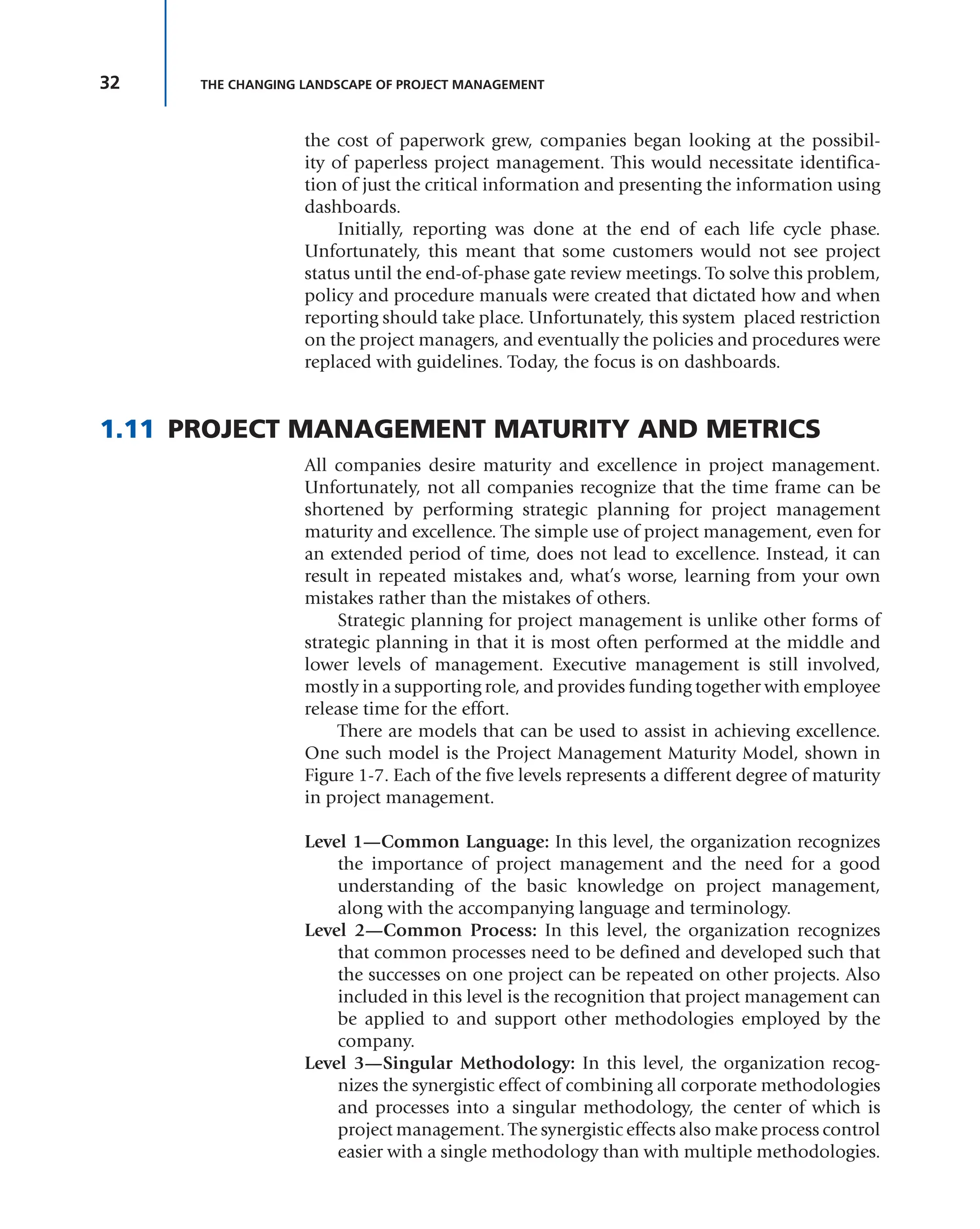
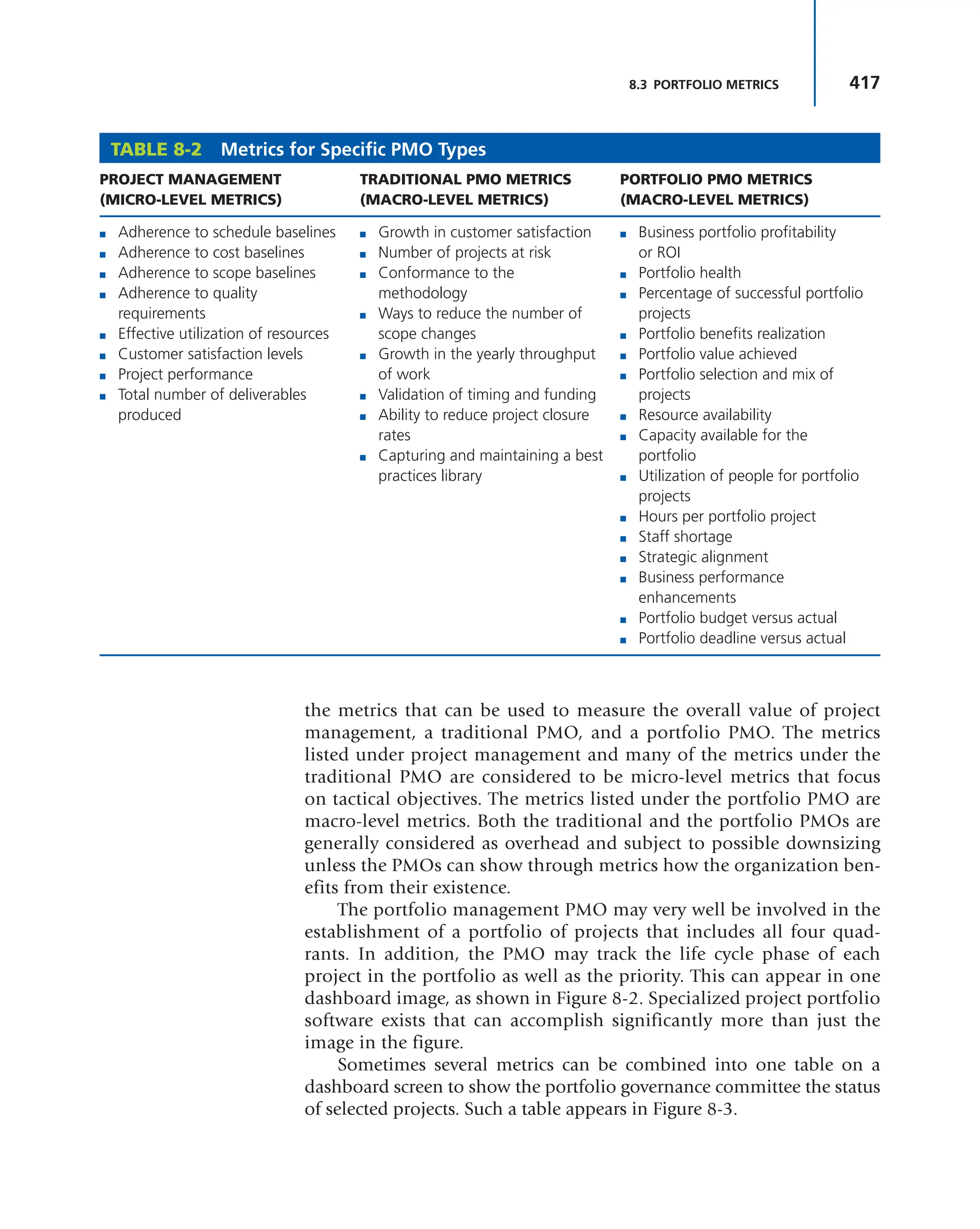
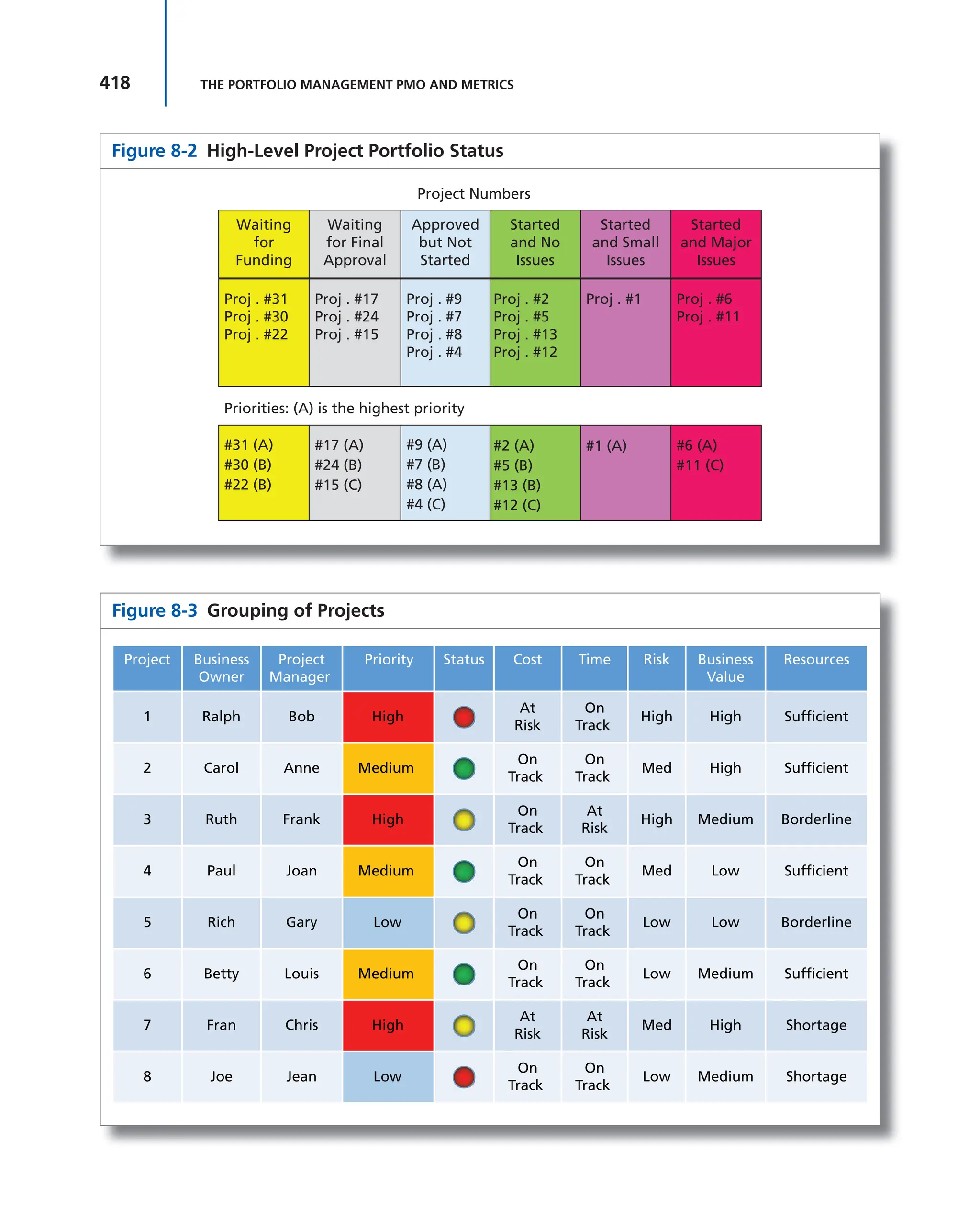
metrics, kpis, and
dashboards
PROJECT MANAGEMENT
METRICS, KPIs, AND
DASHBOARDS
A Guide to Measuring
and Monitoring Project
Performance
Third Edition
Harold Kerzner, Ph.D.
Sr. Executive Director for Project Management
The International Institute for Learning
Cover design: © Wiley
Cover image: © 2017 Dundas Data Visualization, Inc. All rights reserved.
This book is printed on acid-free paper.
Copyright © 2017 by International Institute for Learning, Inc., New York,
New York. All rights reserved.
Published by John Wiley & Sons, Inc., Hoboken, New Jersey
Published simultaneously in Canada
No part of this publication may be reproduced, stored in a retrieval system, or transmitted
in any form or by any means, electronic, mechanical, photocopying, recording, scanning,
or otherwise, except as permitted under Section 107 or 108 of the 1976 United States
Copyright Act, without either the prior written permission of the Publisher, or authorization
through payment of the appropriate per-copy fee to the Copyright Clearance Center, 222
Rosewood Drive, Danvers, MA 01923, (978) 750-8400, fax (978) 646-8600, or on the web
at www.copyright.com. Requests to the Publisher for permission should be addressed to
the Permissions Department, John Wiley & Sons, Inc., 111 River Street, Hoboken, NJ 07030,
(201) 748-6011, fax (201) 748-6008, or online at www.wiley.com/go/permissions.
Limit of Liability/Disclaimer of Warranty: While the publisher and author have used
their best efforts in preparing this book, they make no representations or warranties with
the respect to the accuracy or completeness of the contents of this book and specifically
disclaim any implied warranties of merchantability or fitness for a particular purpose. No
warranty may be created or extended by sales representatives or written sales materials.
The advice and strategies contained herein may not be suitable for your situation. You
should consult with a professional where appropriate. Neither the publisher nor the
author shall be liable for damages arising herefrom.
For general information about our other products and services, please contact our
Customer Care Department within the United States at (800) 762-2974, outside the
United States at (317) 572-3993 or fax (317) 572-4002.
Wiley publishes in a variety of print and electronic formats and by print-on-demand.
Some material included with standard print versions of this book may not be included
in e-books or in print-on-demand. If this book refers to media such as a CD or DVD that
is not included in the version you purchased, you may download this material at http://
booksupport.wiley.com. For more information about Wiley products, visit www.wiley.com.
Library of Congress Cataloging-in-Publication Data
Names: Kerzner, Harold, author.
Title: Project management metrics, KPIs, and dashboards : a guide to
measuring and monitoring project performance / Harold Kerzner, Ph.D., Sr.
Executive Director for Project Management, The International Institute for
Learning.
Description: Third edition. | Hoboken, New Jersey : John Wiley & Sons, Inc.,
[2017] | Includes index. |
Identifiers: LCCN 2017022057 (print) | LCCN 2017030981 (ebook) | ISBN
9781119427506 (pdf) | ISBN 9781119427322 (epub) | ISBN 9781119427285 (pbk.)
Subjects: LCSH: Project management. | Project management–Quality control. |
Performance standards. | Work measurement.
Classification: LCC HD69.P75 (ebook) | LCC HD69.P75 K492 2017 (print) | DDC
658.4/04–dc23
LC record available at https://lccn.loc.gov/2017022057
Printed in the United States of America
10 9 8 7 6 5 4 3 2 1
v
PREFACE ix
1 THE CHANGING LANDSCAPE OF
PROJECT MANAGEMENT 1
CHAPTER OVERVIEW 1
1.0 INTRODUCTION 1
1.1 EXECUTIVE VIEW OF PROJECT MANAGEMENT 2
1.2 COMPLEX PROJECTS 5
Comparing Traditional and Nontraditional Projects 5
Defining Complexity 8
Trade-offs 10
Skill Set 10
Governance 11
Decision Making 11
Fluid Methodologies 12
1.3 GLOBAL PROJECT MANAGEMENT 12
1.4 PROJECT MANAGEMENT METHODOLOGIES
AND FRAMEWORKS 14
Light Methodologies 16
Heavy Methodologies 17
Frameworks 17
1.5 THE NEED FOR EFFECTIVE GOVERNANCE 20
1.6 ENGAGEMENT PROJECT MANAGEMENT 20
1.7 CUSTOMER RELATIONS MANAGEMENT 23
1.8 OTHER DEVELOPMENTS IN PROJECT
MANAGEMENT 23
1.9 A NEW LOOK AT DEFINING PROJECT SUCCESS 25
Success Is Measured by the Triple Constraints 25
Customer Satisfaction Must Be Considered as Well 26
Other (or Secondary) Factors Must Be Considered
as Well 26
Success Must Include a Business Component 26
Prioritization of Success Constraints May Be
Necessary 27
The Definition of Success Must Include a “Value”
Component 28
Multiple Components for Success 29
The Future 30
1.10 THE GROWTH OF PAPERLESS PROJECT
MANAGEMENT 30
1.11 PROJECT MANAGEMENT MATURITY AND
METRICS 32
1.12 PROJECT MANAGEMENT BENCHMARKING AND
METRICS 36
Best Practice versus Proven Practice 37
Benchmarking Methodologies 38
1.13 CONCLUSIONS 42
2 THE DRIVING FORCES FOR BETTER
METRICS 43
CHAPTER OVERVIEW 43
2.0 INTRODUCTION 43
2.1 STAKEHOLDER RELATIONS MANAGEMENT 44
2.2 PROJECT AUDITS AND THE PMO 56
2.3 INTRODUCTION TO SCOPE CREEP 57
Defining Scope Creep 57
Scope Creep Dependencies 60
Causes of Scope Creep 60
Need for Business Knowledge 62
Business Side of Scope Creep 62
Ways to Minimize Scope Creep 63
2.4 PROJECT HEALTH CHECKS 64
Understanding Project Health Checks 65
Who Performs the Health Check? 67
Life Cycle Phases 67
2.5 MANAGING DISTRESSED PROJECTS 69
Root Causes of Failure 70
Definition of Failure 71
Early Warning Signs of Trouble 72
Selecting the Recovery Project Manager 73
Recovery Life Cycle Phases 74
CONTENTS
vi CONTENTS
3 METRICS 83
CHAPTER OVERVIEW 83
3.0 INTRODUCTION 83
3.1 PROJECT MANAGEMENT METRICS: THE EARLY
YEARS 84
3.2 PROJECT MANAGEMENT METRICS: CURRENT
VIEW 87
Metrics and Small Companies 88
3.3 METRICS MANAGEMENT MYTHS 88
3.4 SELLING EXECUTIVES ON A METRICS
MANAGEMENT PROGRAM 89
3.5 UNDERSTANDING METRICS 91
3.6 CAUSES FOR LACK OF SUPPORT FOR METRICS
MANAGEMENT 95
3.7 USING METRICS IN EMPLOYEE PERFORMANCE
REVIEWS 96
3.8 CHARACTERISTICS OF A METRIC 97
3.9 METRIC CATEGORIES AND TYPES 99
3.10 SELECTING THE METRICS 101
3.11 SELECTING A METRIC/KPI OWNER 105
3.12 METRICS AND INFORMATION
SYSTEMS 106
3.13 CRITICAL SUCCESS FACTORS 106
3.14 METRICS AND THE PMO 109
3.15 METRICS AND PROJECT OVERSIGHT/
GOVERNANCE 112
3.16 METRICS TRAPS 113
3.17 PROMOTING THE METRICS 114
3.18 CHURCHILL DOWNS INCORPORATED’S
PROJECT PERFORMANCE MEASUREMENT
APPROACHES 114
Toll Gates (Project Management–Related Progress and
Performance Reporting) 116
4 KEY PERFORMANCE
INDICATORS 121
CHAPTER OVERVIEW 121
4.0 INTRODUCTION 121
4.1 THE NEED FOR KPIs 122
4.2 USING THE KPIs 126
4.3 THE ANATOMY OF A KPI 128
4.4 KPI CHARACTERISTICS 129
Accountability 130
Empowered 131
Timely 131
Trigger Points 131
Easy to Understand 132
Accurate 132
Relevant 133
Seven Strategies for Selecting Relevant Key
Performance Indicators 134
Putting the R in KPI 135
Take First Prize 137
4.5 CATEGORIES OF KPIs 137
4.6 KPI SELECTION 138
4.7 KPI MEASUREMENT 144
4.8 KPI INTERDEPENDENCIES 146
4.9 KPIs AND TRAINING 148
4.10 KPI TARGETS 149
4.11 UNDERSTANDING STRETCH TARGETS 152
4.12 KPI FAILURES 154
4.13 KPIs AND INTELLECTUAL CAPITAL 155
4.14 KPI BAD HABITS 157
KPI Bad Habits Causing Your Performance
Measurement Struggles 158
4.15 BRIGHTPOINT CONSULTING, INC.—DASHBOARD
DESIGN: KEY PERFORMANCE INDICATORS AND
METRICS 163
Introduction 163
Metrics and Key Performance Indicators 164
Scorecards, Dashboards, and Reports 165
Gathering KPI and Metric Requirements for a
Dashboard 166
Interviewing Business Users 166
Putting It All Together—The KPI Wheel 167
Start Anywhere, but Go Everywhere 167
Wheels Generate Other Wheels 170
A Word about Gathering Requirements and Business
Users 170
Wrapping It All Up 171
5 VALUE-BASED PROJECT
MANAGEMENT METRICS 173
CHAPTER OVERVIEW 173
5.0 INTRODUCTION 173
5.1 VALUE OVER THE YEARS 175
5.2 VALUES AND LEADERSHIP 176
5.3 COMBINING SUCCESS AND VALUE 179
5.4 RECOGNIZING THE NEED FOR VALUE
METRICS 183
5.5 THE NEED FOR EFFECTIVE MEASUREMENT
TECHNIQUES 186
5.6 CUSTOMER/STAKEHOLDER IMPACT ON VALUE
METRICS 191
5.7 CUSTOMER VALUE MANAGEMENT 192
5.8 THE RELATIONSHIP BETWEEN PROJECT
MANAGEMENT AND VALUE 197
5.9 BACKGROUND OF METRICS 202
Redefining Success 203
Growth in the Use of Metrics 204
vii
CONTENTS
5.10 SELECTING THE RIGHT METRICS 208
5.11 THE FAILURE OF TRADITIONAL METRICS AND
KPIs 212
5.12 THE NEED FOR VALUE METRICS 212
5.13 CREATING A VALUE METRIC 213
5.14 PRESENTING THE VALUE METRIC IN A
DASHBOARD 221
5.15 INDUSTRY EXAMPLES OF VALUE METRICS 221
5.16 USE OF CRISIS DASHBOARDS FOR OUT-OF-RANGE
VALUE ATTRIBUTES 227
5.17 ESTABLISHING A METRICS MANAGEMENT
PROGRAM 228
5.18 USING VALUE METRICS FOR FORECASTING 230
5.19 METRICS AND JOB DESCRIPTIONS 232
5.20 GRAPHICAL REPRESENTATION OF METRICS 232
5.21 CREATING A PROJECT VALUE BASELINE 245
The Performance Measurement Baseline 246
Project Value Management 246
The Value Management Baseline 247
Selecting the Value Baseline Attributes 250
6 DASHBOARDS 253
CHAPTER OVERVIEW 253
6.0 INTRODUCTION 253
6.1 HOW WE PROCESS DASHBOARD
INFORMATION 258
6.2 DASHBOARD CORE ATTRIBUTES 258
6.3 THE MEANING OF INFORMATION 259
6.4 TRAFFIC LIGHT DASHBOARD REPORTING 261
6.5 DASHBOARDS AND SCORECARDS 263
Dashboards 264
Scorecards 264
Summary 264
6.6 CREATING A DASHBOARD IS A LOT LIKE ONLINE
DATING 266
Finding Out the Needs of the Stakeholders 266
Making a Connection 267
Choosing Your Key Performance Indicators 267
Selecting Your Visuals 268
Building on the Momentum 268
Maintenance 268
6.7 BENEFITS OF DASHBOARDS 269
6.8 IS YOUR BI TOOL FLEXIBLE ENOUGH? 269
A Flexible BI Tool–What Does It Mean and Why Does
It Matter? 269
Why Is Flexibility So Important? 270
Stay Up to Speed with Your Changing Business
Needs 271
Be Independent (with Fewer Tools and Users Involved
to Get Your Job Done) 272
Adapt to Each and Every User 272
Be Ready for the Unknown 272
6.9 RULES FOR DASHBOARDS 273
6.10 THE SEVEN DEADLY SINS OF DASHBOARD DESIGN
AND WHY THEY SHOULD BE AVOIDED 273
Deadly Sin #1: Off the Page, Out of Mind 274
Deadly Sin #2: And This Means . . . What? 274
Deadly Sin #3: Right Data, Wrong Chart 274
Deadly Sin #4: Not Making the Right
Arrangements 274
Deadly Sin #5: A Lack of Emphasis 275
Deadly Sin #6: Debilitating Detail 275
Deadly Sin #7: Not Crunching the Numbers 275
6.11 BRIGHTPOINT CONSULTING, INC.: DESIGNING
EXECUTIVE DASHBOARDS 276
Introduction 276
Dashboard Design Goals 276
Defining Key Performance Indicators 277
Defining Supporting Analytics 277
Choosing the Correct KPI Visualization
Components 278
Supporting Analytics 280
Validating Your Design 283
6.12 ALL THAT GLITTERS IS NOT GOLD 285
6.13 USING EMOTICONS 309
6.14 MISLEADING INDICATORS 311
6.15 AGILE AND SCRUM METRICS 312
6.16 DATA WAREHOUSES 314
6.17 DASHBOARD DESIGN TIPS 315
Colors 315
Fonts and font size 316
Use Screen Real Estate 316
Component Placement 317
6.18 TEAMQUEST CORPORATION 317
White Paper #1: Metric Dashboard Design 318
White Paper #2: Proactive Metrics Management 329
6.19 LOGI ANALYTICS, INC.: DASHBOARD BEST
PRACTICES 338
Executive Summary 338
Introduction—What’s New about Dashboards? 340
How Modern Is the Modern Dashboard? 340
The Dashboard versus the Spreadsheet 342
Designing the Dashboard 342
The Business-Driven Dashboard 343
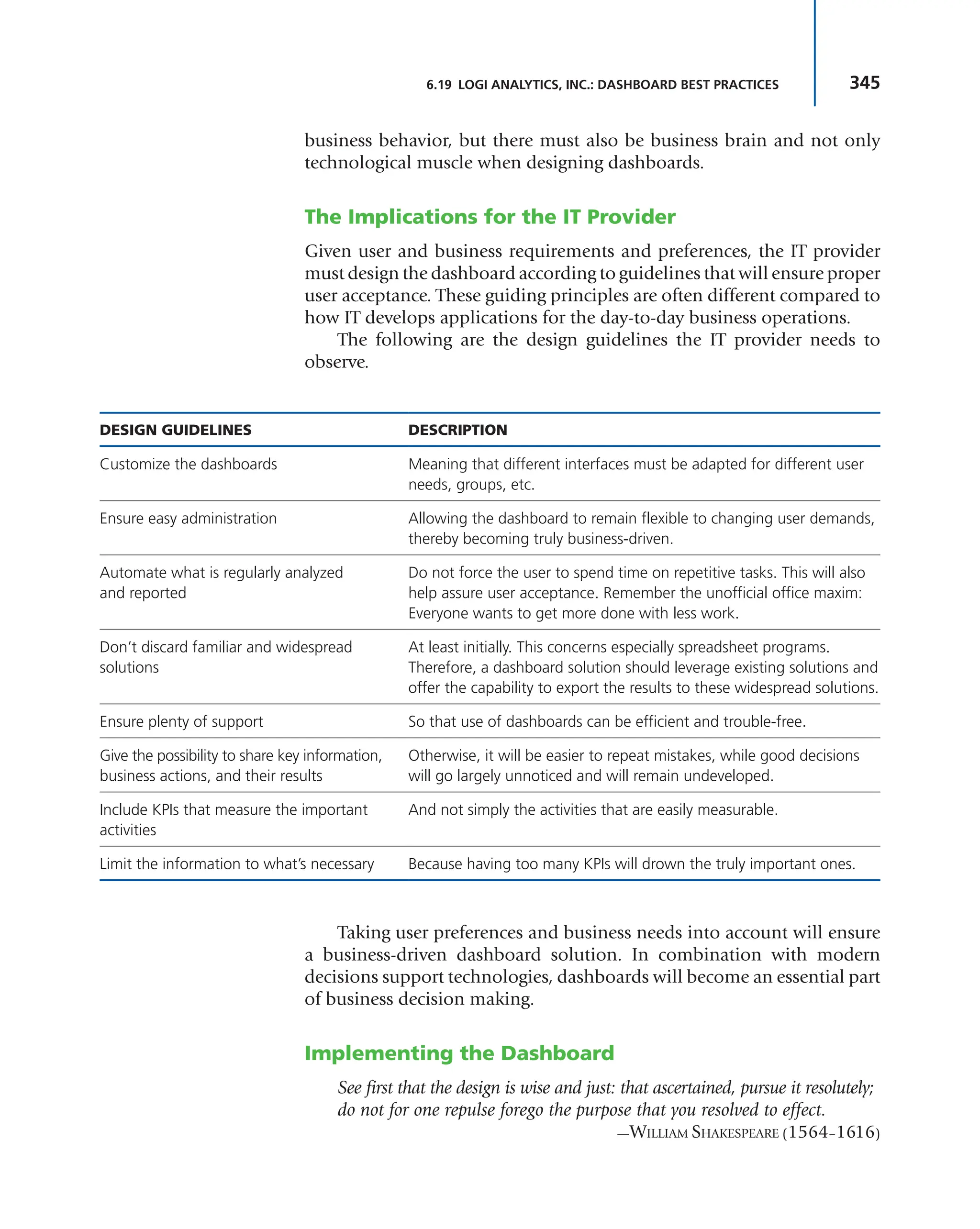
The Implications for the IT Provider 345
Implementing the Dashboard 345
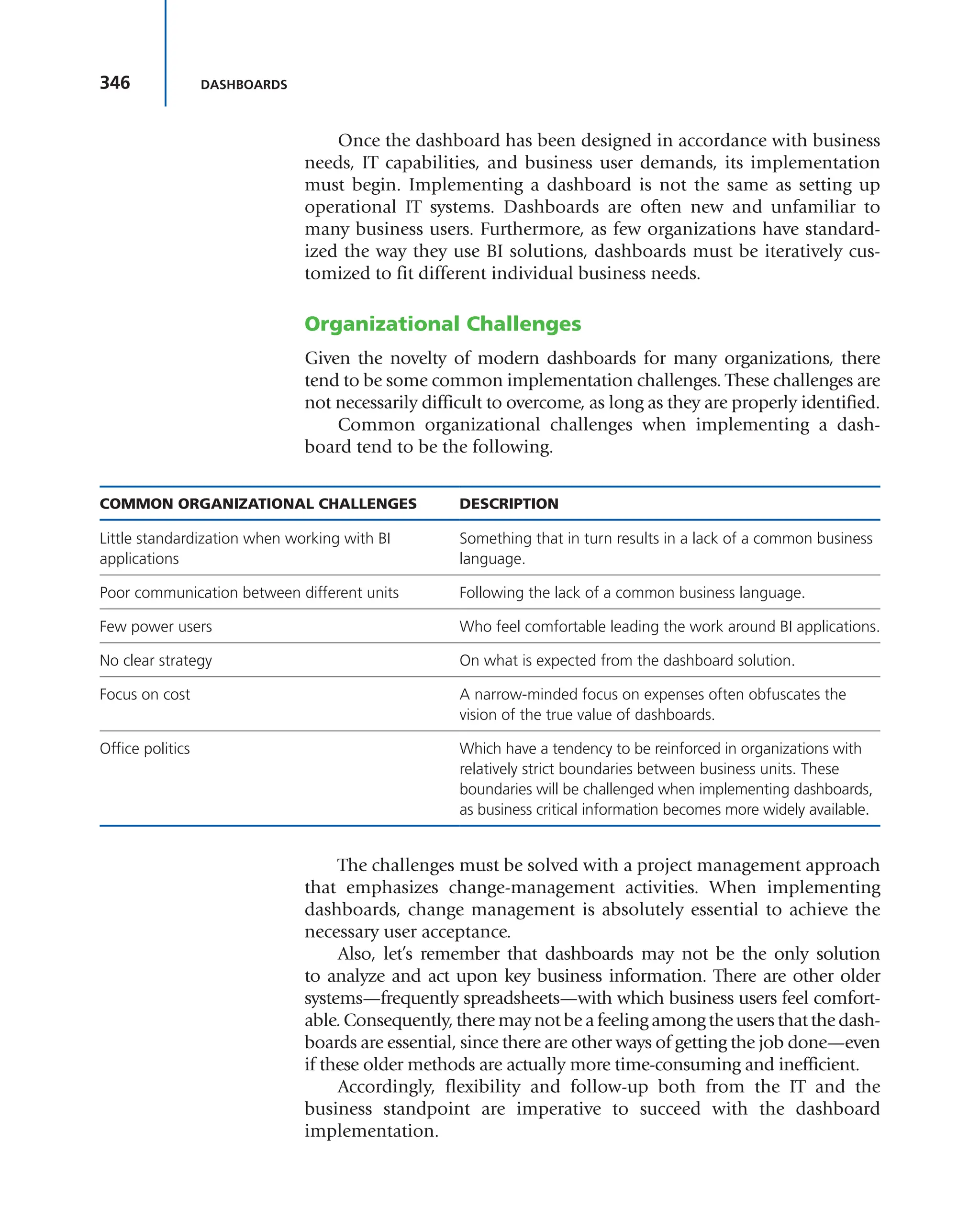
Organizational Challenges 346
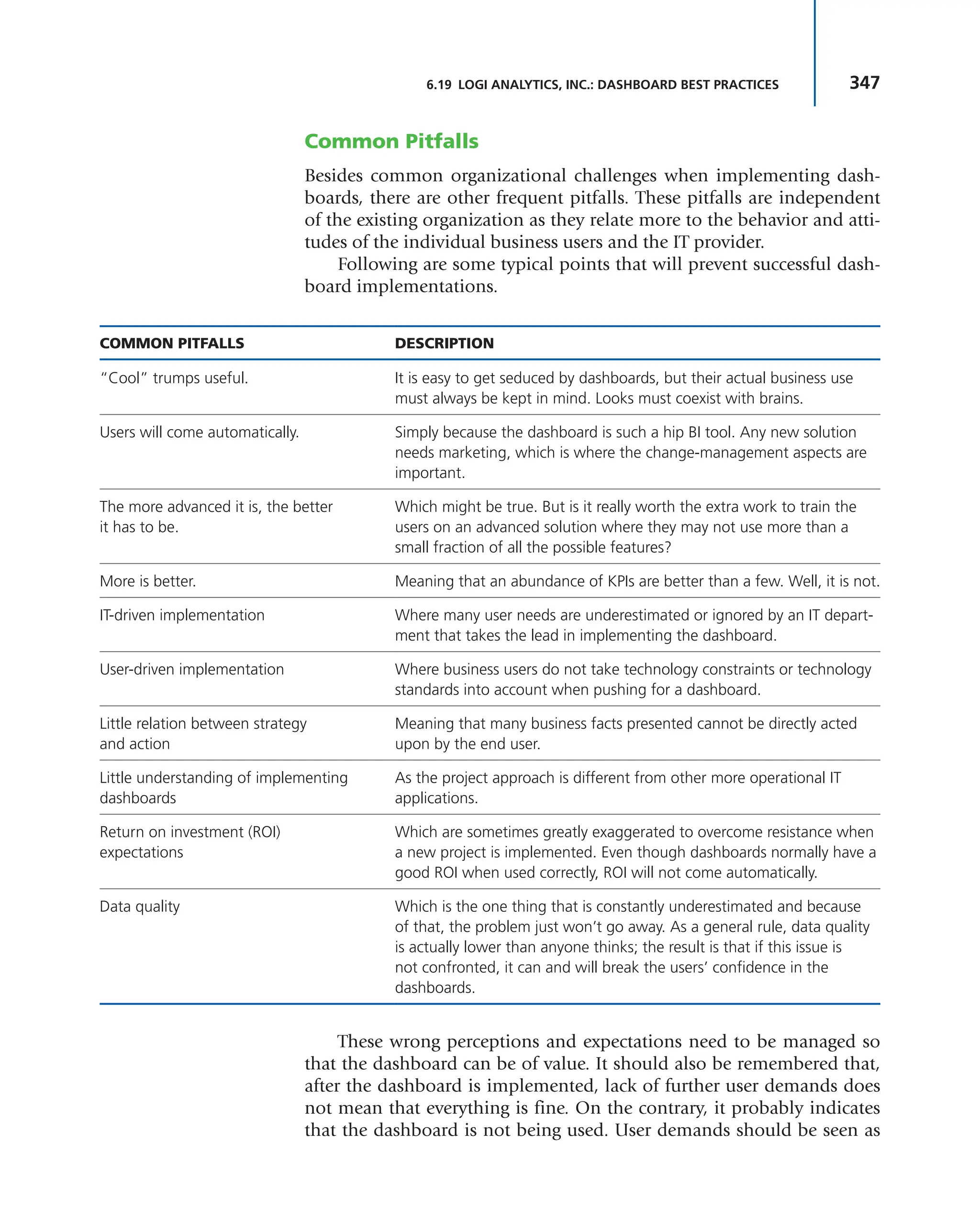
Common Pitfalls 347
Justifying the Dashboard 348
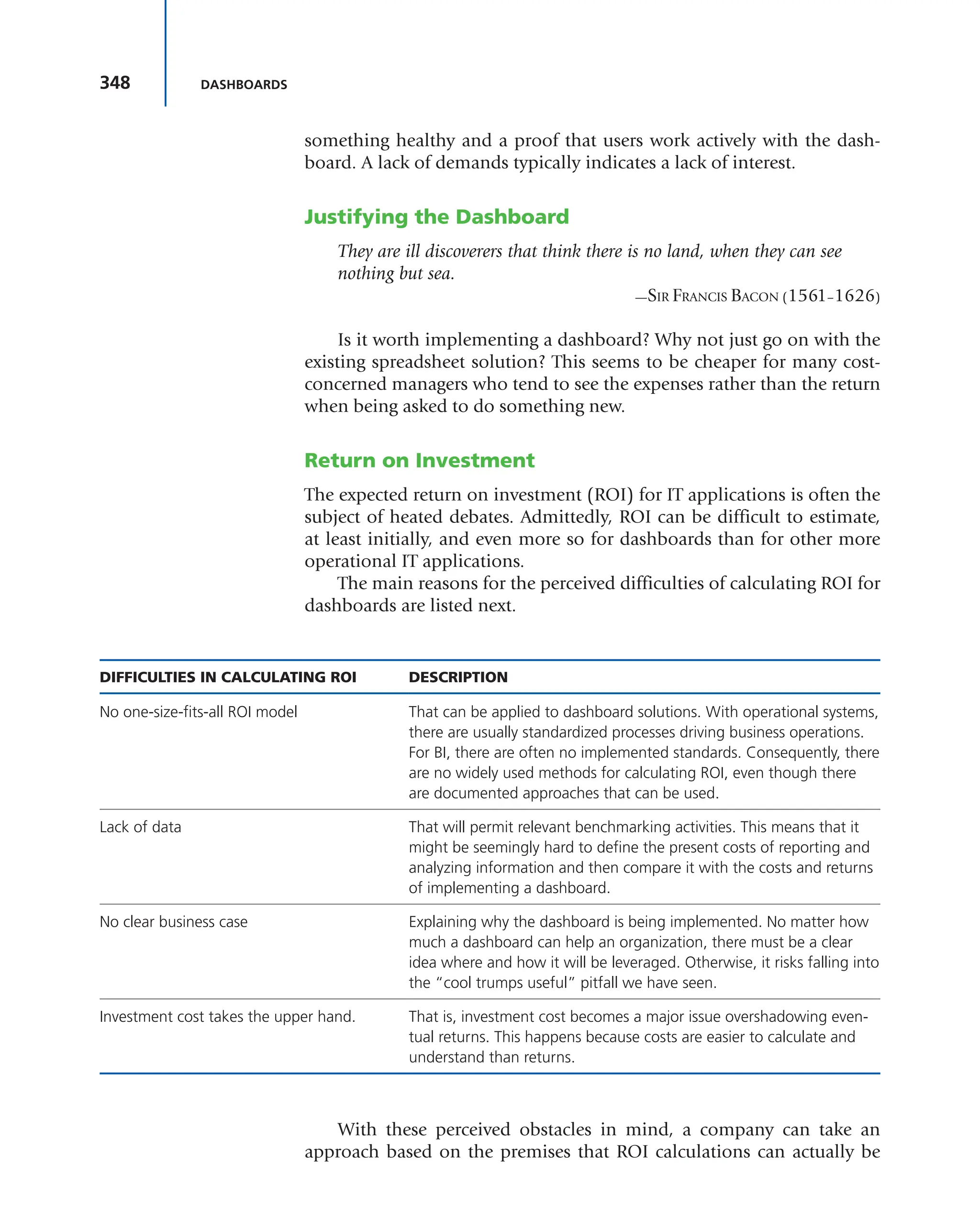
Return on Investment 348
Ensuring Service-Level Agreements 349
Conclusion 349
viii CONTENTS
6.20 A SIMPLE TEMPLATE 350
6.21 SUMMARY OF DASHBOARD DESIGN
REQUIREMENTS 350
The Importance of Design to Information
Dashboards 350
The Rules for Color Usage on Your Dashboard 353
The Rules for Graphic Design of Your Dashboard 355
The Rules for Placing the Dashboard in Front of Your
Users—The Key to User Adoption 356
The Rules for Accuracy of Information
on Your Dashboard 357
6.22 DASHBOARD LIMITATIONS 357
6.23 THE DASHBOARD PILOT RUN 360
6.24 EVALUATING DASHBOARD VENDORS 361
6.25 NEW DASHBOARD APPLICATIONS 363
7 DASHBOARD APPLICATIONS 365
CHAPTER OVERVIEW 365
7.0 INTRODUCTION 365
7.1 DASHBOARDS IN ACTION: DUNDAS DATA
VISUALIZATION 366
7.2 DASHBOARDS IN ACTION: PIEMATRIX, INC. 366
7.3 PIEMATRIX OVERVIEW 378
PieMatrix Executive Dashboard 378
Executive Dashboard and To-Do List—Where Does All
This Data Come From? 389
Project—Governing and Executing Complex Projects
in a Visual and Friendly Way 392
Project—Planning the Project 396
Project—Breaking Down Silos 399
Authoring—Where the Best Practice Content
Comes From 405
From Authoring Back to the Executive
Dashboard 405
7.4 DASHBOARDS IN ACTION: INTERNATIONAL
INSTITUTE FOR LEARNING 408
8 THE PORTFOLIO MANAGEMENT
PMO AND METRICS 413
CHAPTER OVERVIEW 413
8.0 INTRODUCTION 413
8.1 CRITICAL QUESTIONS 414
8.2 VALUE CATEGORIES 414
8.3 PORTFOLIO METRICS 416
8.4 MEASUREMENT TECHNIQUES
AND METRICS 419
8.5 CRISIS DASHBOARDS 419
Defining a Crisis 420
INDEX 425
ix
The ultimate purpose of metrics and dashboards is not to provide more
information but to provide the right information to the right person
at the right time, using the correct media and in a cost-effective man-
ner. This is certainly a challenge. As computer technology has grown, so
has the ease with which information can be generated and presented to
management and stakeholders. Today, everyone seems concerned about
information overload. Unfortunately, the real issue is non-information
overload. In other words, there are too many useless reports that can-
not easily be read and that provide readers with too much information,
much of which may have no relevance. This information simply distracts
us from the real issues and accurate performance reporting. Furthermore,
the growth in metric measurement techniques has encouraged us to mea-
sure everything regardless of its value as part of performance reporting.
The purpose of status reporting is to show us what actions the viewer
must consider. Insufficient or ineffective metrics prevent us from under-
standing what decisions really need to be made. In traditional project
review meetings, emphasis is placed on a detailed schedule analysis and a
lengthy review of the cost baseline versus actual expenditures. The result-
ing discussion and explanation of the variances are most frequently pure
guesswork. Managers who are upset about the questioning by senior man-
agement then make adjustments that do not fix the problems but limit
the time they will be grilled by senior management at the next review
meeting. They then end up taking actions that may be counterproductive
to the timely completion of the project, and real issues are hidden.
You cannot correct or improve something that cannot be effectively
identified and measured. Without effective metrics, managers will not
respond to situations correctly and will end up reinforcing undesirable
actions by the project team. Keeping the project team headed in the right
direction cannot be done easily without effective identification and mea-
surement of metrics.
When all is said and done, we wonder why we have studies like the
Chaos Report, which has shown us over the past 20 years that only about
30 percent of the IT projects are completed successfully. We then identify
PREFACE
x PREFACE
hundreds of causes as to why projects fail but neglect what is now being
recognized as perhaps the single most important cause: a failure in met-
rics management.
Metrics management should be addressed in all of the areas of
knowledge in the PMBOK® Guide,* especially communications manage-
ment. We are now struggling to find better ways of communicating on
projects. This will become increasingly important as companies compete
in a global marketplace. Our focus today is on the unique needs of the
receiver of the information. The need to make faster and better decisions
mandates better information. Human beings can absorb information in
a variety of ways. We must address all of these ways in the selection of the
metrics and the design of the dashboards that convey this information.
The three most important words in a stakeholder’s vocabulary are
“making informed decisions.” This is usually the intent of effective stake-
holder relations management. Unfortunately, this cannot be accom-
plished without an effective information system based on meaningful
and informative metrics and key performance indicators (KPIs).
All too often, we purchase project management software and reluc-
tantly rely on the report generators, charts, and graphs to provide the
necessary information, even when we realize that this information either
is not sufficient or has limited value. Even those companies that create
their own project management methodologies neglect to consider the
metrics and KPIs that are needed for effective stakeholder relations man-
agement. Informed decisions require effective information. We all seem
to understand this, yet it has only been in recent years that we have tried
to do something about it.
For decades we believed that the only information that needed to
be passed on to the client and the stakeholders was information related
to time and cost. Today we realize that the true project status cannot be
determined from time and cost alone. Each project may require its own
unique metrics and KPIs. The future of project management may very
well be metric-driven project management.
Information design has finally come of age. Effective communica-
tions is the essence of information design. Today we have many small
companies that are specialists in business information design. Larger
companies may maintain their own specialist team and call these people
graphic designers, information architects, or interaction designers. These
people maintain expertise in the visual display of both quantitative and
qualitative information necessary for informed decision making.
Traditional communications and information flow has always been
based on tables, charts, and indexes that were, it is hoped, organized
properly by the designer. Today information or data graphics combines
points, lines, charts, symbols, images, words, numbers, shades, and a
*PMBOK is a registered mark of the Project Management Institute, Inc.
xi
PREFACE
symphony of colors necessary to convey the right message easily. What
we know with certainty is that dashboards and metrics are never an end
in themselves. They go through continuous improvement and are con-
stantly updated. In a project management environment, each receiver of
information can have different requirements and may request different
information during the life cycle of the project.
With this in mind, the book is structured as follows:
■ Chapters 1 and 2 identify how project management has changed over
the last few years and how more pressure is being placed on organiza-
tions for effective metrics management.
■ Chapter 3 provides an understanding of what metrics are and how they
can be used.
■ Chapter 4 discusses key performance indications and explains the dif-
ference between metrics and KPIs.
■ Chapter 5 focuses on the value-driven metrics and value-driven KPIs.
Stakeholders are asking for more metrics related to the project’s ulti-
mate value. The identification and measurement of value-driven met-
rics can be difficult.
■ Chapter 6 describes how dashboards can be used to present the met-
rics and KPIs to stakeholders. Examples of dashboards are included
together with some rules for dashboard design.
■ Chapter 7 identifies dashboards that are being used by companies.
■ Chapter 8 provides various business-related metrics that are currently
used by portfolio management project management offices to ensure
that the business portfolio is delivering the business value expected.
HAROLD KERZNER, Ph.D.
Sr. Executive for Project Management
The International Institute for Learning
1
The way project managers managed projects in the past will not suffice
for many of the projects being managed now or for the projects of the
future. The complexity of these projects will place pressure on organiza-
tions to better understand how to identify, select, measure, and report
project metrics, especially metrics showing value creation. The future of
project management may very well be metric-driven project management.
In addition, new approaches to project management, such as those with
agile and Scrum, have brought with them new sets of metrics.
CHAPTER
OVERVIEW
CHAPTER
OBJECTIVES
1 THE CHANGING LANDSCAPE OF
PROJECT MANAGEMENT
■ To understand how project management has changed
■ To understand the need for project management metrics
■ To understand the need for better, more complex project management
metrics
KEY WORDS ■ Certification boards
■ Complex projects
■ Engagement project management
■ Frameworks
■ Governance
■ Project management methodologies
■ Project success
1.0 INTRODUCTION
For more than 50 years, project management has been in use but perhaps
not on a worldwide basis. What differentiated companies in the early
years was whether they used project management or not, not how well
they used it. Today, almost every company uses project management, and
the differentiation is whether they are simply good at project manage-
ment or whether they truly excel at project management. The difference
between using project management and being good at it is relatively
small, and most companies can become good at project management in
a relatively short time, especially if they have executive-level support. A
well-organized project management office (PMO) can also accelerate the
Project Management Metrics, KPIs, and Dashboards: A Guide to
Measuring and Monitoring Project Performance, Third Edition
By Harold Kerzner
Copyright © 2017 by International Institute for Learning, Inc., New York, New York
2 THE CHANGING LANDSCAPE OF PROJECT MANAGEMENT
maturation process. The difference, however, between being good and
excelling at project management is quite large. One of the critical differ-
ences is that excellence in project management on a continuous basis
requires more metrics than just time and cost. The success of a project
cannot be determined just from the time and cost metrics, yet we persist
in the belief that this is possible.
Companies such as IBM, Microsoft, Siemens, Hewlett-Packard (HP),
and Deloitte, to name just a few, have come to the realization that they
must excel at project management. Doing this requires additional tools
and metrics to support project management. IBM has more than 300,000
employees, more than 70 percent of whom are outside of the United
States. This includes some 30,000 project managers. HP has more than
8000 project managers and 3500 PMP® credential holders. HP’s goal
is 8000 project managers and 8000 PMP® credential holders. These
numbers are now much larger with HP’s acquisition of Electronic Data
Systems (EDS).
1.1 EXECUTIVE VIEW OF PROJECT MANAGEMENT
The companies just mentioned perform strategic planning for project
management and are focusing heavily on the future. Several of the things
that these companies are doing will be discussed in this chapter, begin-
ning with senior management’s vision of the future. Years ago, senior
management paid lip service to project management, reluctantly sup-
porting it to placate the customers. Today, senior management appears to
have recognized the value in using project management effectively and
maintains a different view of project management, as shown in Table 1-1.
TABLE 1-1 Executive View of Project Management
OLD VIEW NEW VIEW
Project management is a career path. Project management is a strategic or core competency neces-
sary for the growth and survival of the company.
We need our people to receive Project Management
Professional certifications.
We need our people to undergo multiple certifications and,
at a minimum, to be certified in both project management
and corporate business processes.
Project managers will be used for project
execution only.
Project managers will participate in strategic planning, the
portfolio selection of projects, and capacity-planning activities.
Business strategy and project execution are
separate activities.
Part of the project manager’s job is to bridge strategy and
execution.
Project managers just make project-based decisions. Project managers make both project and business decisions.
3
1.1 EXECUTIVE VIEW OF PROJECT MANAGEMENT
Project management is no longer regarded as a part-time occupation
or even a career path position. It is now viewed as a strategic competency
needed for the survival of the firm. Superior project management capa-
bility can make the difference between winning and losing a contract.
For more than 30 years, becoming a PMP® credential holder was seen
as the light at the end of the tunnel. Today, that has changed. Becoming
a PMP® credential holder is the light at the entryway to the tunnel. The
light at the end of the tunnel may require multiple certifications. As an
example, after becoming a PMP® credential holder, a project manager
may desire to become certified in
■ Business Analyst Skills or Business Management
■ Program Management
■ Business Processes
■ Managing Complex Projects
■ Six Sigma
■ Risk Management
■ Agile Project Management
Some companies have certification boards that meet frequently and
discuss what certification programs would be of value for their project
managers. Certification programs that require specific knowledge of
company processes or company intellectual property may be internally
developed and taught by the company’s own employees.
Executives have come to realize that there is a return on investment
in project management education. Therefore, executives are now invest-
ing heavily in customized project management training, especially in
behavioral courses. As an example, one executive commented that he
felt that presentation skills training was the highest priority for his proj-
ect managers. If a project manager makes a highly polished presentation
before a client, the client believes that the project is being managed the
same way. If the project manager makes a poor presentation, then the
client might believe the project is managed the same way. Other train-
ing programs that executives feel would be beneficial for the future
include:
■ Establishing metrics and key performance indicators (KPIs)
■ Dashboard design
■ Managing complex projects
■ How to perform feasibility studies and cost–benefit analyses
■ Business analysis
■ Business case development
■ How to validate and revalidate project assumptions
4 THE CHANGING LANDSCAPE OF PROJECT MANAGEMENT
■ How to establish effective project governance
■ How to manage multiple stakeholders many of whom may be
multinational
■ How to design and implement “fluid” or adaptive enterprise project
management (EPM) methodologies
■ How to develop coping skills and stress management skills
Project managers are now being brought on board projects at the
beginning of the initiation phase rather than at its end. To understand
the reason for this, consider the following situation:
SITUATION: A project team is assembled at the end of the initiation
phase of a project to develop a new product for the company. The
project manager is given the business case for the project together with
a listing of the assumptions and constraints. Eventually the project is
completed, somewhat late and significantly over budget. When asked
by marketing and sales why the project costs were so large, the proj-
ect manager responds, “According to my team’s interpretation of the
requirements and the business case, we had to add in more features
than we originally thought.”
Marketing then replies, “The added functionality is more than
what our customers actually need. The manufacturing costs for what
you developed will be significantly higher than anticipated, and that will
force us to raise the selling price. We may no longer be competitive in
the market segment we were targeting.”
“That’s not our problem,” responds the project manager. “Our
definition of project success is the eventual commercialization of the
product. Finding customers is your problem, not our problem.”
Needless to say, we could argue about what the real issues were in
this project that created the problems. For the purpose of this book, two
issues stand out. First and foremost, project managers today are paid
to make business decisions as well as project decisions. Making merely
project-type decisions could result in the development of a product that
is either too costly to build or overpriced for the market at hand. Second,
the traditional metrics used by project managers over the past several
decades were designed for project rather than business decision mak-
ing. Project managers must recognize that, with the added responsibili-
ties of making business decisions, a new set of metrics may need to be
included as part of their responsibilities. Likewise, we could argue that
marketing was remiss in not establishing and tracking business-related
metrics throughout the project and simply waited until the project was
completed to see the results.
5
1.2 COMPLEX PROJECTS
For four decades, project management has been
used to support traditional projects. Traditional
projects are heavily based on linear thinking;
there exist well-structured life cycle phases and
templates, forms, guidelines, and checklists for
each phase. As long as the scope is reasonably
well defined, traditional project management works well.
Unfortunately, only a small percentage of all of the projects in a com-
pany fall into this category. Most nontraditional or complex projects use
seat-of-the-pants management because they are largely based on business
scenarios where the outcome or expectations can change from day to day.
Project management techniques were neither required nor used on these
complex projects that were more business oriented and aligned to 5-year
or 10-year strategic plans that were constantly updated.
Project managers have finally realized that project management can
be used on these complex projects, but the traditional processes may be
inappropriate or must be modified. This includes looking at project man-
agement metrics and KPIs in a different light. The leadership style for
complex projects may not be the same as that for traditional projects.
Risk management is significantly more difficult on complex projects, and
the involvement of more participants and stakeholders is necessary.
Now that companies have become good at traditional projects, we
are focusing our attention on the nontraditional or complex projects.
Unfortunately, there is no clear-cut definition of a complex project. Some
of the major differences between traditional and nontraditional or com-
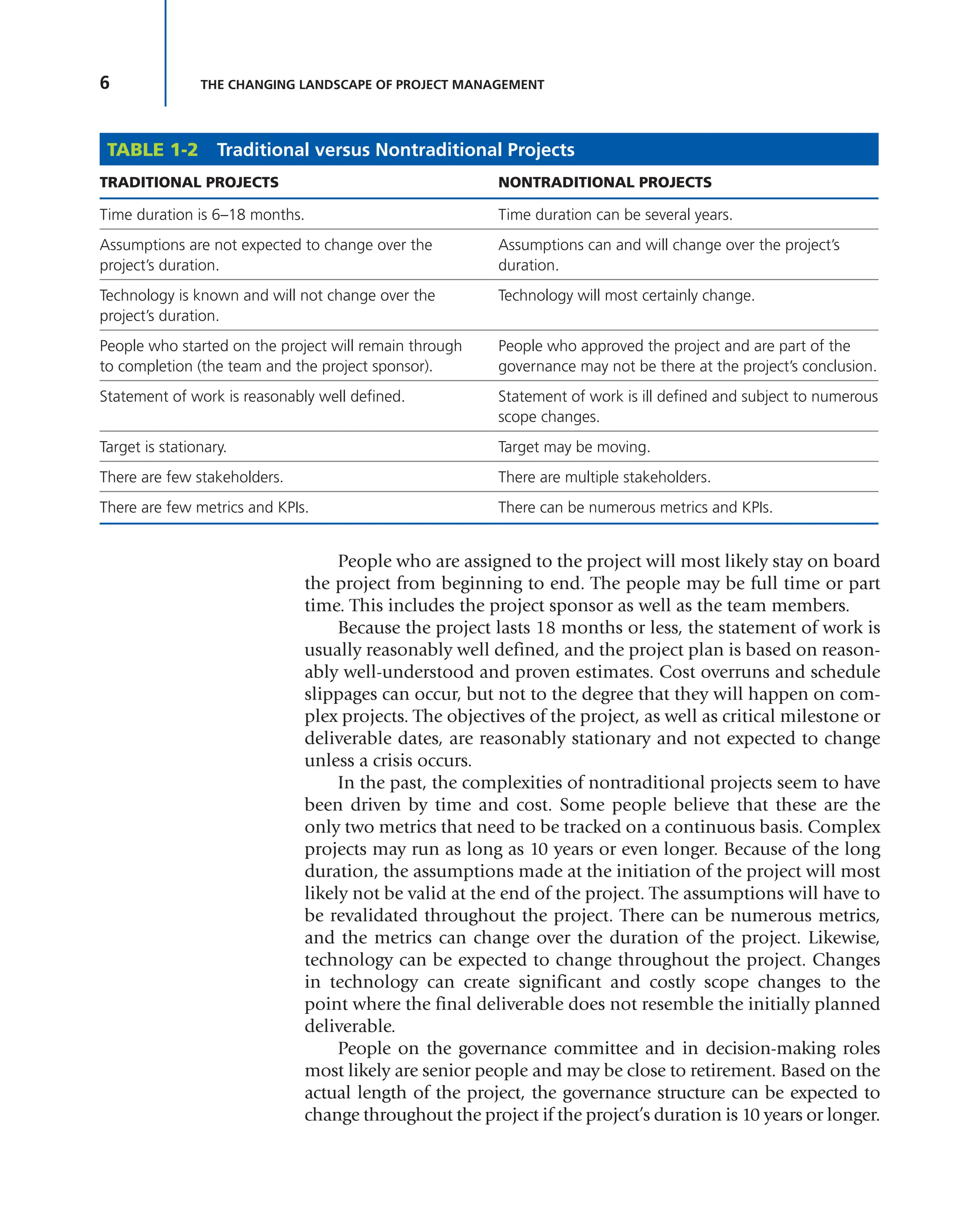
plex projects, in the author’s opinion, are shown in Table 1-2.
Comparing Traditional and Nontraditional Projects
The traditional project that most people manage usually lasts less than
18 months. In some companies, the traditional project might last six
months or less. The length of the project usually depends on the industry.
In the auto industry, for example, a traditional project lasts three years.
With projects that last 18 months or less, it is assumed that tech-
nology is known with some degree of assurance and technology may
undergo little change over the life of the project. The same holds true for
the assumptions. Project managers tend to believe that the assumptions
made at the beginning of the project will remain intact for the duration
of the project unless a crisis occurs.
Section 1.2 is adapted from Harold Kerzner and Carl Belack, Managing Complex Projects
(Hoboken, NJ: John Wiley & Sons, 2010), Chapter 1.
TIP Today’s project managers see themselves
as managing part of a business rather than simply
managing a project. Therefore, they may require
additional metrics for informed decision making.
6 THE CHANGING LANDSCAPE OF PROJECT MANAGEMENT
People who are assigned to the project will most likely stay on board
the project from beginning to end. The people may be full time or part
time. This includes the project sponsor as well as the team members.
Because the project lasts 18 months or less, the statement of work is
usually reasonably well defined, and the project plan is based on reason-
ably well-understood and proven estimates. Cost overruns and schedule
slippages can occur, but not to the degree that they will happen on com-
plex projects. The objectives of the project, as well as critical milestone or
deliverable dates, are reasonably stationary and not expected to change
unless a crisis occurs.
In the past, the complexities of nontraditional projects seem to have
been driven by time and cost. Some people believe that these are the
only two metrics that need to be tracked on a continuous basis. Complex
projects may run as long as 10 years or even longer. Because of the long
duration, the assumptions made at the initiation of the project will most
likely not be valid at the end of the project. The assumptions will have to
be revalidated throughout the project. There can be numerous metrics,
and the metrics can change over the duration of the project. Likewise,
technology can be expected to change throughout the project. Changes
in technology can create significant and costly scope changes to the
point where the final deliverable does not resemble the initially planned
deliverable.
People on the governance committee and in decision-making roles
most likely are senior people and may be close to retirement. Based on the
actual length of the project, the governance structure can be expected to
change throughout the project if the project’s duration is 10 years or longer.
TABLE 1-2 Traditional versus Nontraditional Projects
TRADITIONAL PROJECTS NONTRADITIONAL PROJECTS
Time duration is 6–18 months. Time duration can be several years.
Assumptions are not expected to change over the
project’s duration.
Assumptions can and will change over the project’s
duration.
Technology is known and will not change over the
project’s duration.
Technology will most certainly change.
People who started on the project will remain through
to completion (the team and the project sponsor).
People who approved the project and are part of the
governance may not be there at the project’s conclusion.
Statement of work is reasonably well defined. Statement of work is ill defined and subject to numerous
scope changes.
Target is stationary. Target may be moving.
There are few stakeholders. There are multiple stakeholders.
There are few metrics and KPIs. There can be numerous metrics and KPIs.
7
1.2 COMPLEX PROJECTS
Because of scope changes, the statement of work may undergo several
revisions over the life cycle of the project. New governance groups and
new stakeholders can have their own hidden agendas and demand that
the scope be changed; they might even cancel their financial support for
the project. Finally, whenever there is a long-term complex project where
continuous scope changes are expected, the final target may move. In
other words, the project plan must be constructed to hit a moving target.
SITUATION: A project manager was brought on board a project and pro-
vided with a project charter that included all of the assumptions made
in the selection and authorization of the project. Partway through the
project, some of the business assumptions changed. The project man-
ager assumed that the project sponsor would be monitoring the enter-
prise environmental factors for changes in the business assumptions.
That did not happen. The project was eventually completed, but there
was no real market for the product.
Given the premise that project managers are now more actively
involved in the business side of projects, the business assumptions must
be tracked the same way that budgets and schedules are tracked. If the
assumptions are wrong or no longer valid, then either the statement of
work may need to be changed or the project may need to be canceled.
The expected value at the end of the project also must be tracked because
unacceptable changes in the final value may be another reason for proj-
ect cancellation.
Examples of assumptions that are likely to change over the duration
of a project, especially on a long-term project, include these:
■ The cost of borrowing money and financing the project will remain
fixed.
■ Procurement costs will not increase.
■ Breakthroughs in technology will take place as scheduled.
■ The resources with the necessary skills will be available when needed.
■ The marketplace will readily accept the product.
■ The customer base is loyal to the company.
■ Competitors will not catch up to the company.
■ The risks are low and can be easily mitigated.
■ The political environment in the host country will not change.
The problem with having faulty assumptions is that they can lead
to bad results and unhappy customers. The best defense against poor
assumptions is good preparation at project initiation, including the
development of risk mitigation strategies and tracking metrics for critical
assumptions. However, it may not be possible to establish metrics for the
tracking of all assumptions.
8 THE CHANGING LANDSCAPE OF PROJECT MANAGEMENT
Most companies either have or are in the process of developing an
enterprise project management (EPM) methodology. EPM systems usu-
ally are rigid processes designed around policies and procedures, and
they work efficiently when the statement of work is well defined. With
the new type of projects currently being used when techniques such as
Agile Project Management are applicable, these rigid and inflexible pro-
cesses may be more of a hindrance and costly to use on small projects.
EPM systems must become more flexible in order to satisfy business
needs. The criteria for good systems will lean toward forms, guidelines,
templates, and checklists rather than policies and procedures. Project
managers will be given more flexibility in order to make the decisions
necessary to satisfy the project’s business needs. The situation is further
complicated because all active stakeholders may wish to use their own
methodology, and having multiple methodologies on the same project
is never a good idea. Some host countries may be quite knowledgeable
in project management, whereas other may have just cursory knowledge.
Over the next decade, having a fervent
belief that the original plan is correct may be
a poor assumption. As the project’s business
needs change, the need to change the plan will
be evident. Also, decision making based entirely
on the triple constraints, with little regard for
the project’s final value, may result in a poor
decision. Simply stated, today’s view of project management is quite dif-
ferent from the views in the past, and this is partially because the benefits
of project management have been recognized more over the past two
decades.
Some of the differences between manag-
ing traditional and complex projects are sum-
marized in Table 1-3. Perhaps the primary
difference is whom the project manager must
interface with on a daily basis. With traditional
projects, the project manager interfaces with the sponsor and the client,
both of whom may provide the only governance on the project. With
complex projects, governance is by committee and there can be multiple
stakeholders whose concerns need to be addressed.
Defining Complexity
Complex projects can differ from traditional projects for a multitude of
reasons, including:
■ Size
■ Dollar value
■ Uncertain requirements
TIP Metrics and KPIs must be established
for those critical activities that can have a direct
impact on project success or failure. This includes
the tracking of assumptions and the creation of
business value.
TIP The more flexibility the methodology con-
tains, the greater the need for additional metrics
and KPIs.
9
1.2 COMPLEX PROJECTS
■ Uncertain scope
■ Uncertain deliverables
■ Complex interactions
■ Uncertain credentials of the labor pool
■ Geographical separation across multiple time zones
■ Use of large virtual teams
■ Other differences
There are numerous definitions of a “complex” project, based on
the interactions of two or more of the preceding elements. Even a small,
two-month infrastructure project can be considered complex according
to the definition. Project complexity can create havoc when selecting
and using metrics. The projects that project managers manage within
their own companies can be regarded as complex projects if the scope is
large and the statement of work is only partially complete. Some people
believe that research and development (R&D) projects are always com-
plex because, if a plan for R&D can be laid out, then there probably is not
R&D. R&D is when the project manager is not 100 percent sure where the
company is heading, does not know what it will cost, and does not know
if and when the company will get there.
Complexity can be defined according to the number of interactions
that must take place for the work to be executed. The greater the number
of functional units that must interact, the harder it is to perform the inte-
gration. The situation becomes more difficult if the functional units are
dispersed across the globe and if cultural differences makes integration
difficult. Complexity can also be defined according to size and length.
The larger the project is in scope and cost and the greater the time frame,
the more likely it is that scope changes will occur, significantly affect-
ing the budget and schedule. Large, complex projects tend to have large
cost overruns and schedule slippages. Good examples of this are Denver
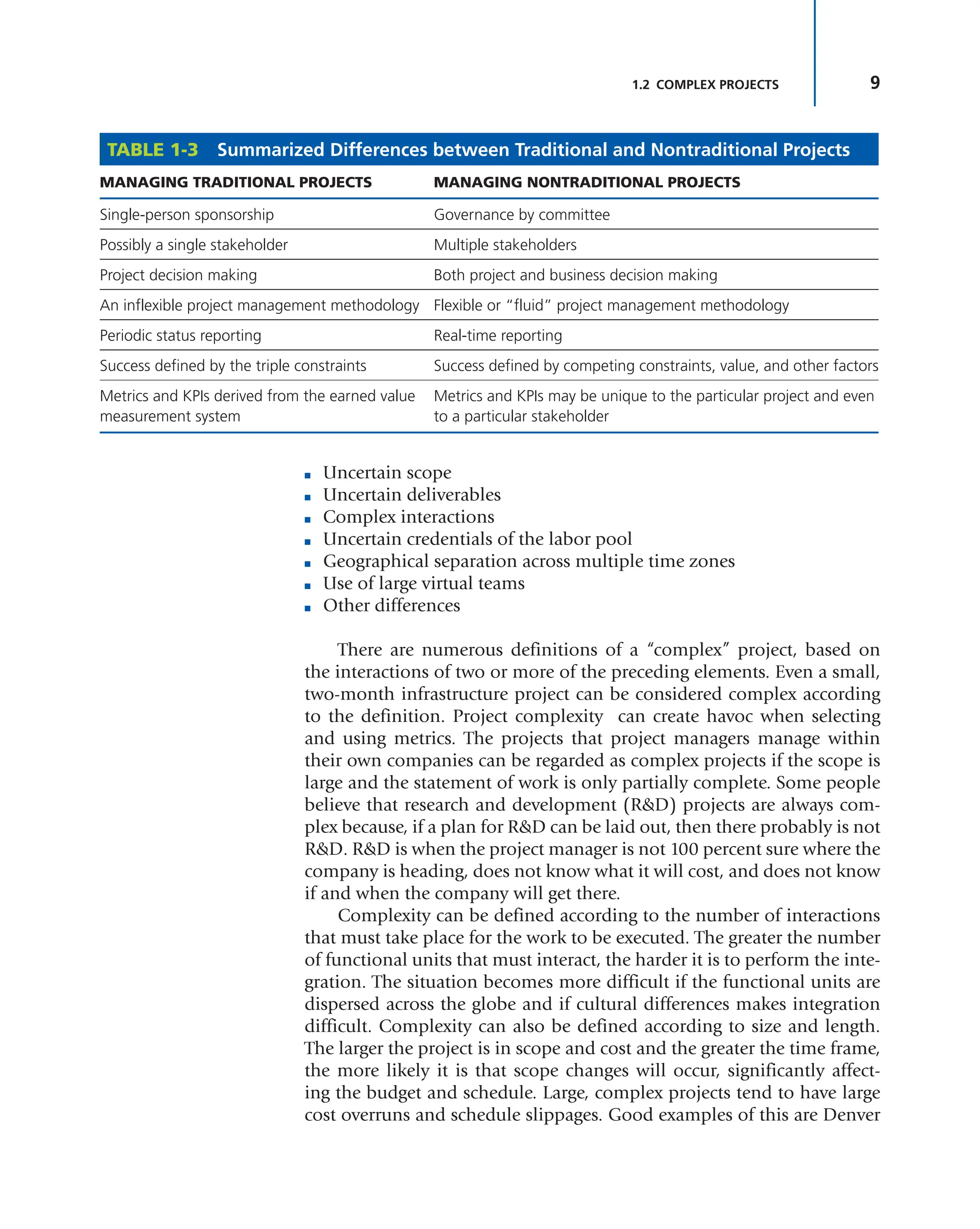
TABLE 1-3 Summarized Differences between Traditional and Nontraditional Projects
MANAGING TRADITIONAL PROJECTS MANAGING NONTRADITIONAL PROJECTS
Single-person sponsorship Governance by committee
Possibly a single stakeholder Multiple stakeholders
Project decision making Both project and business decision making
An inflexible project management methodology Flexible or “fluid” project management methodology
Periodic status reporting Real-time reporting
Success defined by the triple constraints Success defined by competing constraints, value, and other factors
Metrics and KPIs derived from the earned value
measurement system
Metrics and KPIs may be unique to the particular project and even
to a particular stakeholder
10 THE CHANGING LANDSCAPE OF PROJECT MANAGEMENT
International Airport, the Channel Tunnel between England and France,
and the “Big Dig” in Boston.
Trade-Offs
Project management is an attempt to improve efficiency and effectiveness
in the use of resources by getting work to flow multidirectionally through
an organization, whether traditional or complex projects. Initially, this
flow might seem easy to accomplish, but typically a number of con-
straints are imposed on projects. The most common constraints are time,
cost, and performance (also referred to as scope or quality), which are
known as the triple constraints.
Historically, from an executive-level perspective, the goal of project
management was to meet the triple constraints of time, cost, and per-
formance while maintaining good customer relations. Unfortunately,
because most projects have some unique characteristics, highly accurate
time and cost estimates were not be possible, and trade-offs between
the triple constraints may be necessary. As will be discussed later, today
we focus on competing constraints and there may be significantly more
than three constraints on a project, and metrics may have to be estab-
lished to track each constraint. There may be as many as 10 or more
competing constraints. Metrics provide the basis for informed trade-off
decision making. Executive management, functional management, and
key stakeholders must be involved in almost all trade-off discussions to
ensure that the final decision is made in the best interests of the project,
the company, and the stakeholders. If multiple stakeholders are involved,
as occurs on complex projects, then agreement
from all of the stakeholders may be necessary.
Project managers may possess sufficient knowl-
edge for some technical decision making but
may not have sufficient business or technical
knowledge to adequately determine the best
course of action to address the interests of the
parent company as well as the individual project
stakeholders.
Skill Set
All project managers have skills, but not all project managers may have
the right skills for the given job. For projects internal to a company, it
may be possible to develop a company-specific skill set or company-spe-
cific body of knowledge. Specific training courses can be established to
support company-based knowledge requirements.
For complex projects with a multitude of stakeholders, all from differ-
ent countries with different cultures, finding the perfect project manager
TIP Because of the complex interactions of
the elements of work, a few simple metrics may
not provide a clear picture of project status. The
combination of several metrics may be necessary
in order to make informed decisions based on evi-
dence and facts.
11
1.2 COMPLEX PROJECTS
may be an impossible task. Today the understanding of complex projects
and the accompanying metrics is in its infancy, and it is still difficult to
determine the ideal skill set for managing complex projects. Remember
that project management existed for more than three decades before the
first Project Management Body of Knowledge (PMBOK®
Guide*) was cre-
ated, and even now with the sixth edition, it is still referred to as a “guide.”
We can, however, conclude that there are certain skills required to
manage complex projects. Some jof those skills are:
■ Knowing how to manage virtual teams
■ Understanding cultural differences
■ The ability to manage multiple stakeholders, each of whom may have
a different agenda
■ Understanding the impact of politics on project management
■ How to select and measure project metrics
Governance
Cradle-to-grave user involvement in complex projects is essential.
Unfortunately, user involvement can change because of politics and proj-
ect length. It is not always possible to have the same user community
attached to the project from beginning to end. Promotions, changes in
power and authority positions because of elections, and retirements can
cause shifts in user involvement.
Governance is the process of decision making. On large complex
projects, governance will be in the hands of the many rather than the
few. Each stakeholder may either expect or demand to be part of all criti-
cal decisions on the project. Governance must be supported by proper
metrics that provide meaningful information. The channels for gover-
nance must be clearly defined at the beginning of the project, possibly
before the project manager is assigned. Changes in governance, which
are increasingly expected the longer the project takes, can have a serious
impact on the way the project is managed as well as on the metrics used.
Decision Making
Complex projects have complex problems. All problems generally have
solutions, but not all solutions may be good or even practical. Good met-
rics can make decision making easier. Also, some solutions to problems
can be more costly than other solutions. Identifying a problem is usu-
ally easy. Identifying alternative solutions may require the involvement
of many stakeholders, and each stakeholder may have a different view of
the actual problem and the possible alternatives. To complicate matters,
some host countries have very long decision-making cycles for problem
*PMBOK is a registered mark of the Project Management Institute, Inc.
12 THE CHANGING LANDSCAPE OF PROJECT MANAGEMENT
identification and for the selection of the best alternative. Each stake-
holder may select an alternative that is in the best interests of that par-
ticular stakeholder rather than in the best interests of the project.
Obtaining approval also can take a long time, especially if the solu-
tion requires that additional capital be raised and if politics play an active
role. In some emerging countries, every complex project may require the
signature of a majority of the ministers and senior government leaders.
Decisions may be based on politics and religion as well.
Fluid Methodologies
With complex projects, the project manager needs a fluid or flexible
project management methodology capable of interfacing with multiple
stakeholders. The methodology may need to be aligned more with busi-
ness processes than with project management
processes, since the project manager may need
to make business decisions as well as project
decisions. Complex projects seem to be dictated
more by business decisions than by pure project
decisions.
Complex projects are driven more by the
project’s end business value than by the triple or
competing constraints. Complex projects tend
to take longer than anticipated and cost more
than originally budgeted because of the need to
guarantee that the final result will have the busi-
ness value desired by customers and stakehold-
ers. Simply stated, complex projects tend to be
value-driven rather than driven by the triple or
competing constraints.
1.3 GLOBAL PROJECT MANAGEMENT
Every company in the world has complex projects that it would have
liked to undertake but was unable to because of limitations, such as:
■ No project portfolio management function to evaluate projects
■ A poor understanding of capacity planning
■ A poor understanding of project prioritization
■ A lack of tools for determining the project’s business value
■ A lack of project management tools and software
■ A lack of sufficient resources
■ A lack of qualified resources
■ A lack of support for project management education
TIP Completing a project within the triple con-
straints is not necessarily success if perceived stake-
holder value is not there at project completion.
TIP The more complex the project, the more
time is needed to select metrics, perform measure-
ments, and report on the proper mix of metrics.
TIP The longer the project, the greater the flex-
ibility needed to allow for different metrics to be
used over the life of the project.
13
1.3 GLOBAL PROJECT MANAGEMENT
■ A lack of a project management methodology
■ A lack of knowledge in dealing with complexity
■ A fear of failure
■ A lack of understanding of metrics needed to track the project
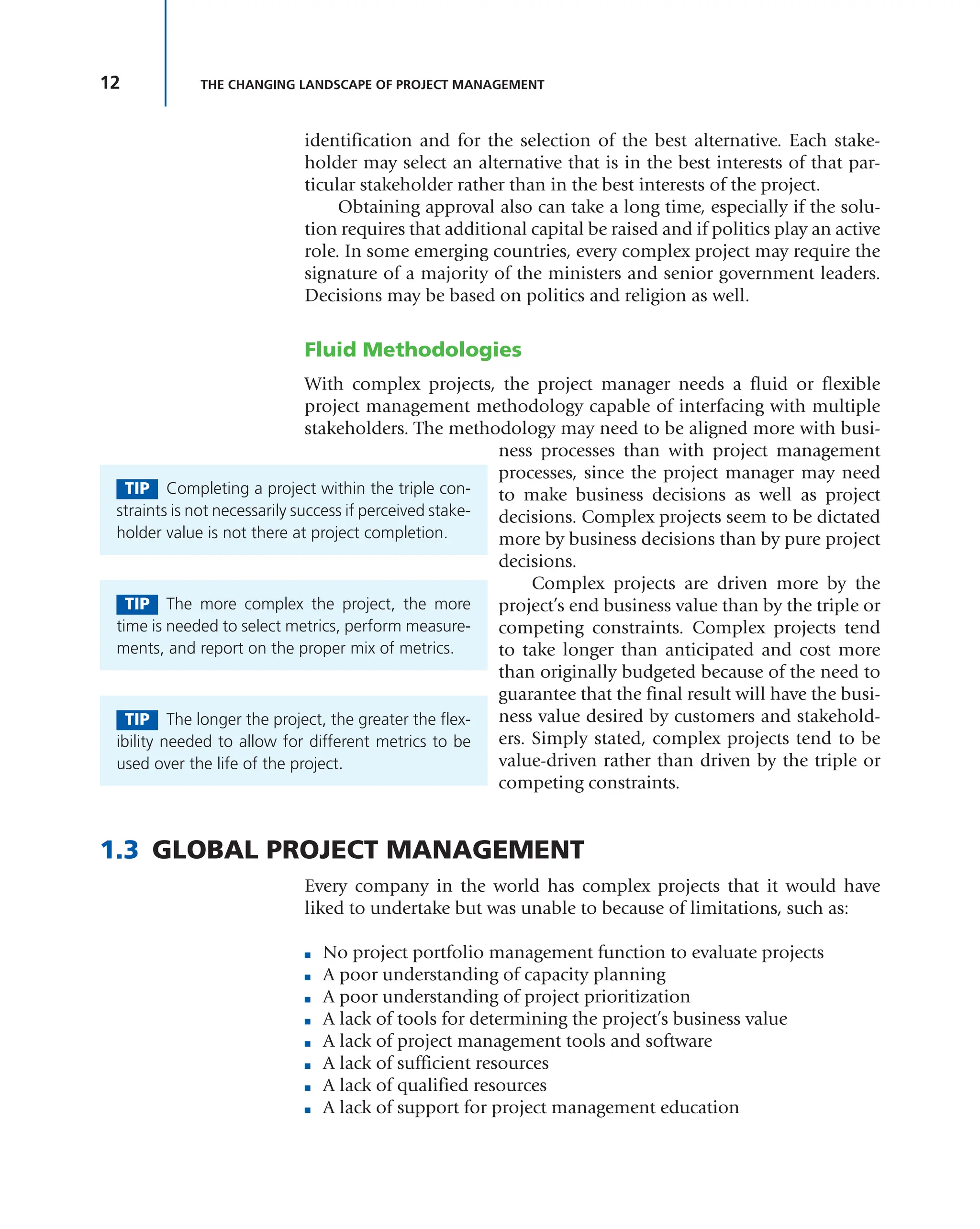
Because not every company has the capability to manage complex
projects, companies must look outside for suppliers of project manage-
ment services. Companies that provide these services on a global basis
consider themselves to be business solution providers and differenti-
ate themselves from localized companies according to the elements in
Table 1-4.
Those companies that have taken the time and effort to develop flex-
ible project management methodologies and become solution providers
are companies that are competing in the global marketplace. Although
these companies may have as part of their core business the providing of
products and services, they may view their future as being a global solu-
tion provider for the management of complex projects.
For these companies, being good at project
management is not enough; they must excel at
project management. They must be innovative
in their processes to the point that all processes
and methodologies are highly fluid and easily
adaptable to a particular client. They have an
extensive library of tools to support the project
management processes. Most of the tools were created internally with
ideas discovered through captured lessons learned and best practices.
TABLE 1-4 Nonglobal versus Global Company Competencies
FACTOR NONGLOBAL GLOBAL
Core business Sell products and services Sell business solutions
Project management satisfaction level Must be good at project
management
Must excel at project management
P management methodology Rigid Flexible and fluid
Metrics/KPIs Minimal Extensive
Supporting tools Minimal Extensive
Continuous improvement Follow the leader Capture best practices and lessons learned
Business knowledge Know your company’s business Understand the client’s business model as
well as your company’s business model
Type of team Colocated Virtual
TIP Competing globally requires a different
mind-set from competing locally. An effective
project management information system based on
possibly project-specific metrics may be essential.
14 THE CHANGING LANDSCAPE OF PROJECT MANAGEMENT
1.4 PROJECT MANAGEMENT METHODOLOGIES
AND FRAMEWORKS
Most companies today seem to recognize the need for one or more proj-
ect management methodologies but either create the wrong methodolo-
gies or misuse the methodologies that have been created. Many times
companies rush into the development or purchasing of a methodology
without any understanding of the need for one other than the fact that
their competitors have a methodology. As Jason Charvat states:
Using project management methodologies is a business strategy allow-
ing companies to maximize the project’s value to the organization. The
methodologies must evolve and be “tweaked” to accommodate a com-
pany’s changing focus or direction. It is almost a mind-set, a way that
reshapes entire organizational processes: sales and marketing, product
design, planning, deployment, recruitment, finance, and operations
support. It presents a radical cultural shift for many organizations. As
industries and companies change, so must their methodologies. If not,
they’re losing the point.1
There are significant advantages to the design and implementation
of a good, flexible methodology:
■ Shorter project schedules
■ Better control of costs
■ Fewer or no unwanted scope changes
■ Can plan for better execution
■ Results can be predicted more accurately
■ Improves customer relations during project execution
■ The project can be adjusted during execution to fit changing customer
requirements
■ Better visibility of status for senior management
■ Execution is standardized
■ Best practices can be captured
Rather than using policies and procedures, some methodologies are
constructed as a set of forms, guidelines, templates, and checklists that
can and must be applied to a specific project or situation. It may not
be possible to create a single enterprise-wide methodology that can be
applied to each and every project. Some companies have been success-
ful doing this, but many companies successfully maintain more than
one methodology. Unless project managers are capable of tailoring the
EPM methodology to their needs, more than one methodology may be
necessary.
1 Jason Charvat, Project Management Methodologies (Hoboken, NJ: John Wiley & Sons,
2003), p. 2.
15
1.4 PROJECT MANAGEMENT METHODOLOGIES AND FRAMEWORKS
There are several reasons why good intentions often go astray. At the
executive levels, methodologies can fail if the executives have a poor under-
standing of what a methodology is and believe that a methodology is:
■ A quick fix
■ A silver bullet
■ A temporary solution
■ A cookbook approach for project success2
At the working levels, methodologies can also fail if they:
■ Are abstract and high level
■ Contain insufficient narratives to support these methodologies
■ Are not functional or do not address crucial areas . . .
■ Ignore the industry standards and best practices
■ Look impressive but lack real integration into the business
■ Use nonstandard project conventions and terminology
■ Compete for similar resources without addressing this problem
■ Don’t have any performance metrics
■ Take too long to complete because of bureaucracy and administration3
Methodologies also can fail because the methodology:
■ Must be followed exactly even if the assumptions and environmental
input factors have changed
■ Focuses on linear thinking
■ Does not allow for out-of-the-box thinking
■ Does not allow for value-added changes that are not part of the origi-
nal requirements
■ Does not fit the type of project
■ Is too abstract (rushing to design it)
■ Development team neglects to consider bottlenecks and the concerns
of the user community
■ Is too detailed
■ Takes too long to use
■ Is too complex for the market, clients, and stakeholders to understand
■ Does not have sufficient or correct metrics
Deciding on what type of methodology is not an easy task. There are
many factors to consider, such as:4
■ The overall company strategy—how competitive are we as a company?
■ The size of the project team and/or scope to be managed
2 Ibid., p. 4.
3 Ibid., p. 5.
4 Ibid., p. 66.
16 THE CHANGING LANDSCAPE OF PROJECT MANAGEMENT
■ The priority of the project
■ How critical the project is to the company
■ How flexible the methodology and its components are
Numerous other factors can influence the design of a methodology.
Some of these factors include:
■ Corporate strategy
■ Complexity and size of the projects in the portfolio
■ Management’s faith in project management
■ Development budget
■ Number of life cycle phases
■ Technology requirements
■ Customer requirements
■ Training requirements and costs
■ Supporting tools and software costs
Project management methodologies are created around the project
management maturity level of the company and the corporate culture.
If the company is reasonably mature in project management and has
a culture that fosters cooperation, effective communication, teamwork,
and trust, then a highly flexible methodology can be created based on
guidelines, forms, checklists, and templates. As stated previously, the
more flexibility that is added into the methodology, the greater the need
for a family of metrics and KPIs. Project managers can pick and choose
the parts of the methodology and metrics that are appropriate for a par-
ticular client. Organizations that do not possess either of these two char-
acteristics rely heavily on methodologies constructed with rigid policies
and procedures, thus creating significant paperwork requirements with
accompanying cost increases and removing the flexibility that the project
manager needs to adapt the methodology to the needs of a specific cli-
ent. These rigid methodologies usually rely on time and cost as the only
metrics and can make it nearly impossible to determine the real status of
the project.
Charvat describes these two types as light methodologies and heavy
methodologies.5
Light Methodologies
Ever-increasing technological complexities, project delays, and changing
clientrequirementsbroughtaboutasmallrevolutionintheworldofdevel-
opment methodologies. A totally new breed of methodology—which is
5 The next two subsections are taken from Charvat, Project Management Methodologies,
pp. 102–104.
17
1.4 PROJECT MANAGEMENT METHODOLOGIES AND FRAMEWORKS
agile, is adaptive, and involves the client every part of the way—is start-
ing to emerge. Many of the heavyweight methodologists were resistant
to the introduction of these “lightweight” or “agile” methodologies.6
These methodologies use an informal communication style. Unlike
heavyweight methodologies, lightweight projects have only a few rules,
practices, and documents. Projects are designed and built on face-to-face
discussions, meetings, and the flow of information to the clients. The
immediate difference of using light methodologies is that they are much
less documentation-oriented, usually emphasizing a smaller amount of
documentation for the project.
Heavy Methodologies
The traditional project management methodologies (i.e., the systems
development life cycle [SDLC] approach) are considered bureaucratic or
“predictive” in nature and have resulted in many unsuccessful projects.
These heavy methodologies are becoming less popular. These method-
ologies are so laborious that the whole pace of design, development, and
deployment slows down—and nothing gets done. Project managers tend
to predict every milestone because they want to foresee every technical
detail (i.e., software code or engineering detail). This leads managers to
start demanding many types of specifications, plans, reports, checkpoints,
and schedules. Heavy methodologies attempt to plan a large part of a
project in great detail over a long span of time. This works well until things
start changing, and the project managers inherently try to resist change.
Frameworks
More and more companies today, especially those that wish to compete
in the global marketplace as business solution providers, are using frame-
works rather than methodologies.
■ Framework: The individual segments, principles, pieces, or compo-
nents of the processes needed to complete a project. This can include
forms, guidelines, checklists, and templates.
■ Methodology: The orderly structuring or grouping of the segments
or framework elements. This can appear as policies, procedures, or
guidelines.
Frameworks focus on a series of processes that must be done on all
projects. Each process is supported by a series of forms, guidelines, tem-
plates, checklists, and metrics that can be applied to a particular client’s
business needs. The metrics will be determined jointly by the project
manager, the client, and the various stakeholders.
6Martin Fowler, The New Methodology, Thought Works, 2001. Available at www.martinfowler
.com/articles.
18 THE CHANGING LANDSCAPE OF PROJECT MANAGEMENT
As stated previously, a methodology is a series of processes, activi-
ties, and tools that are part of a specific discipline, such as project man-
agement, and are designed to accomplish a specific objective. When the
products, services, or customers have similar requirements and do not
require significant customization, companies develop methodologies to
provide some degree of consistency in the way that projects are managed.
With these methodologies, the metrics, once established, usually remain
the same for every project.
As companies become reasonably mature in project management, the
policies and procedures are replaced by forms, guidelines, templates, and
checklists. These tools provide more flexibility for the project manager in
how to apply the methodology to satisfy a specific customer’s requirements.
This flexibility leads to a more informal application of the project manage-
ment methodology, and significantly more metrics are now required.
Today, this informal project management approach has been some-
what modified and is referred to as a framework. A framework is a basic
conceptual structure that is used to address an issue, such as a project. It
includes a set of assumptions, project-specific metrics, concepts, values,
and processes that provide the project manager with a means for view-
ing what is needed to satisfy a customer’s requirements. A framework is
a skeletal support structure for building the project’s deliverables. Agile
and Scrum are heavy users of frameworks.
Frameworks work well as long as the project’s requirements do not
impose severe pressure on the project manager. Unfortunately, in today’s
chaotic environment, this pressure appears to be increasing because:
■ Customers are demanding low-volume, high-quality products with
some degree of customization.
■ Project life cycles and new product development times are being
compressed.
■ Enterprise environmental factors are having a greater impact on project
execution.
■ Customers and stakeholders want to be more actively involved in the
execution of projects.
■ Companies are developing strategic partnerships with suppliers, and
each supplier can be at a different level of project management maturity.
■ Global competition has forced companies to accept projects from cus-
tomers that are all at a different level of project management maturity.
These pressures tend to slow down the decision-making processes
at a time when stakeholders want the processes to be accelerated. This
slowdown is the result of:
■ Project managers being expected to make decisions in areas where they
have limited knowledge.
■ Project managers hesitating to accept full accountability and owner-
ship for the projects.
19
1.4 PROJECT MANAGEMENT METHODOLOGIES AND FRAMEWORKS
■ Excessive layers of management being superimposed on the project
management organization.
■ Risk management being pushed up to higher levels in the organiza-
tional hierarchy.
■ Project managers demonstrating questionable leadership ability.
Both methodologies and frameworks are mechanisms by which we
can obtain best practices and lessons learned in the use of metrics and
KPIs. Figure 1-1 illustrates the generic use of a methodology or frame-
work. Once the clients and stakeholders are identified, then the require-
ments, business case, and accompanying assumptions can be input.
The methodology serves as a guide through the PMBOK® Guide process
groups of initiation (I), planning (P), execution (E), monitoring and
controlling (M), and closure (C). The methodology also provides us with
guidance in the identification of metrics, KPIs, and dashboard reporting
techniques for a particular client.
Some people believe that, once the deliverables are provided to the
client and project closure takes place, the project is completed. This is not
the case. More companies today are adding, at the end of the life cycle
phases of the methodology, another life cycle phase, entitled “Customer
Satisfaction Management.” The purpose of this phase is to meet with the
Figure 1-1 Generic Methodology
Client(s)
Stakeholders
Inputs Processes Outputs
Customer
Satisfaction
Management
Requirements
Business Case
Assumptions
Validation Validation
I P E M C
Methodology
• M ®
Guide
Processes
• ools
• Metrics
•
• as oar s
e i era es
• Best Practices
i rar
• Lessons Learned
i rar
• Metric i rar
• i rar
• Client Value-
A e Acti ities
• ro e ents
for the Next
Project
ee ack
20 THE CHANGING LANDSCAPE OF PROJECT MANAGEMENT
client and the stakeholders and discuss what was learned on the project
regarding best practices, lessons learned, metrics, and KPIs. The intent is
to see what can be done better for that client on future projects. Today,
companies maintain metric and KPI libraries the same way that they
maintain libraries for best practices and lessons learned.
1.5 THE NEED FOR EFFECTIVE GOVERNANCE
The problems just described can be resolved by using effective project
governance. Project governance is actually a framework by which deci-
sions are made. Governance relates to decisions that define expectations,
accountability, responsibility, the granting of power, or the verifying of
performance. Governance also relates to consistent management, cohe-
sive policies, processes, and decision-making rights for a given area of
responsibility, and enables efficient and effective decision making.
Every project can have different governance, even if each project uses
the same EPM methodology. The governance function can operate as a
separate process or as part of project management leadership. Governance
is not designed to replace project decision making but to prevent unde-
sirable decisions from being made. Effective governance must be sup-
ported by a good project management information system (PMIS). The
PMIS must have agreed-upon metrics and KPIs such that informed deci-
sion making is possible rather than seat-of-the-pants decision making.
SITUATION: At the onset of a project, the governance committee agreed
to make certain decisions to assist the project manager. Unfortunately,
metrics were not established to support the governance committee.
The result was a schedule slippage and a cost overrun due to delayed
decision making.
Historically, governance was provided by a single person acting
as the project sponsor. Today, governance is provided by a committee.
Committee membership can change from project to project and industry
to industry. Membership may also vary according to the number of stake-
holders and whether the project is for an internal or an external client.
1.6 ENGAGEMENT PROJECT MANAGEMENT
With project management now viewed as a strategic competency, it is
natural for companies that wish to compete in a global marketplace to be
strong believers in engagement project management or engagement sell-
ing. Years ago, the sales force would sell a product or services to a client
and then move on to find another client. Today, the emphasis is on stay-
ing with clients and looking for additional work from the same clients.
21
1.6 ENGAGEMENT PROJECT MANAGEMENT
In a marital context, an engagement can be viewed as the beginning
of a lifelong partnership. The same holds true with engagement project
management. Companies like IBM and HP no longer view themselves
as selling products or services. Instead, they see themselves as business
solution providers for their clients, and a business solution provider can-
not remain in business without having superior project management
capability.
As part of engagement project management, companies must con-
vince clients that they have the project management capability to pro-
vide solutions to their business needs on a repetitive basis. In exchange
for this, companies want clients to treat them as strategic partners rather
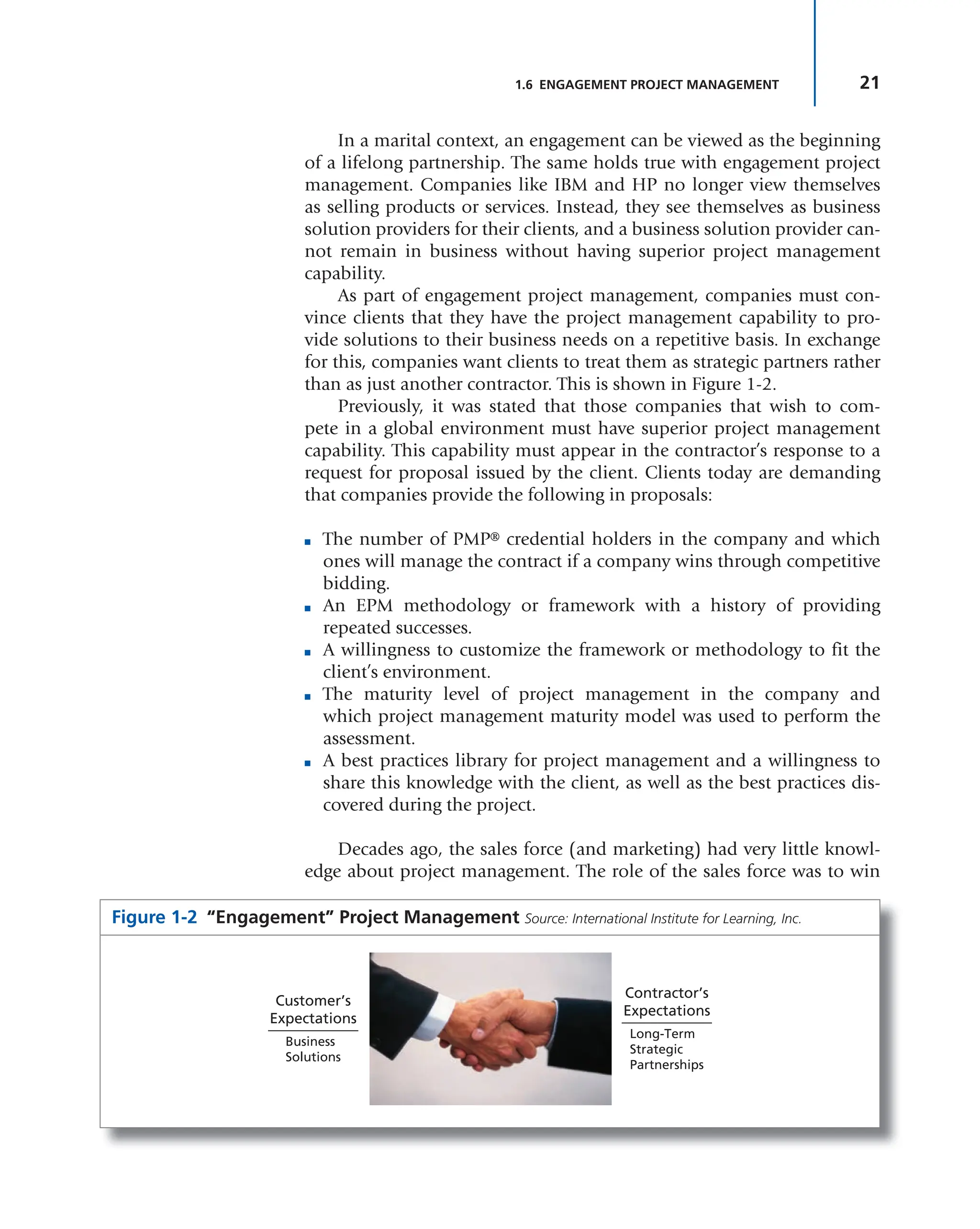
than as just another contractor. This is shown in Figure 1-2.
Previously, it was stated that those companies that wish to com-
pete in a global environment must have superior project management
capability. This capability must appear in the contractor’s response to a
request for proposal issued by the client. Clients today are demanding
that companies provide the following in proposals:
■ The number of PMP® credential holders in the company and which
ones will manage the contract if a company wins through competitive
bidding.
■ An EPM methodology or framework with a history of providing
repeated successes.
■ A willingness to customize the framework or methodology to fit the
client’s environment.
■ The maturity level of project management in the company and
which project management maturity model was used to perform the
assessment.
■ A best practices library for project management and a willingness to
share this knowledge with the client, as well as the best practices dis-
covered during the project.
Decades ago, the sales force (and marketing) had very little knowl-
edge about project management. The role of the sales force was to win
Figure 1-2 “Engagement” Project Management Source: International Institute for Learning, Inc.
Customer’s
Expectations
Business
Solutions
Contractor’s
Expectations
Long-Term
Strategic
Partnerships
22 THE CHANGING LANDSCAPE OF PROJECT MANAGEMENT
contracts, regardless of the concessions that had to be made. The project
manager then “inherited” a project with an underfunded budget and an
impossible schedule. Today, sales and marketing must understand proj-
ect management and be able to sell it to clients as part of engagement
selling. The sales force must sell the company’s project management
methodology or framework and the accompanying best practices. Sales
and marketing are now involved in project management.
Engagement project management benefits both the buyer and the
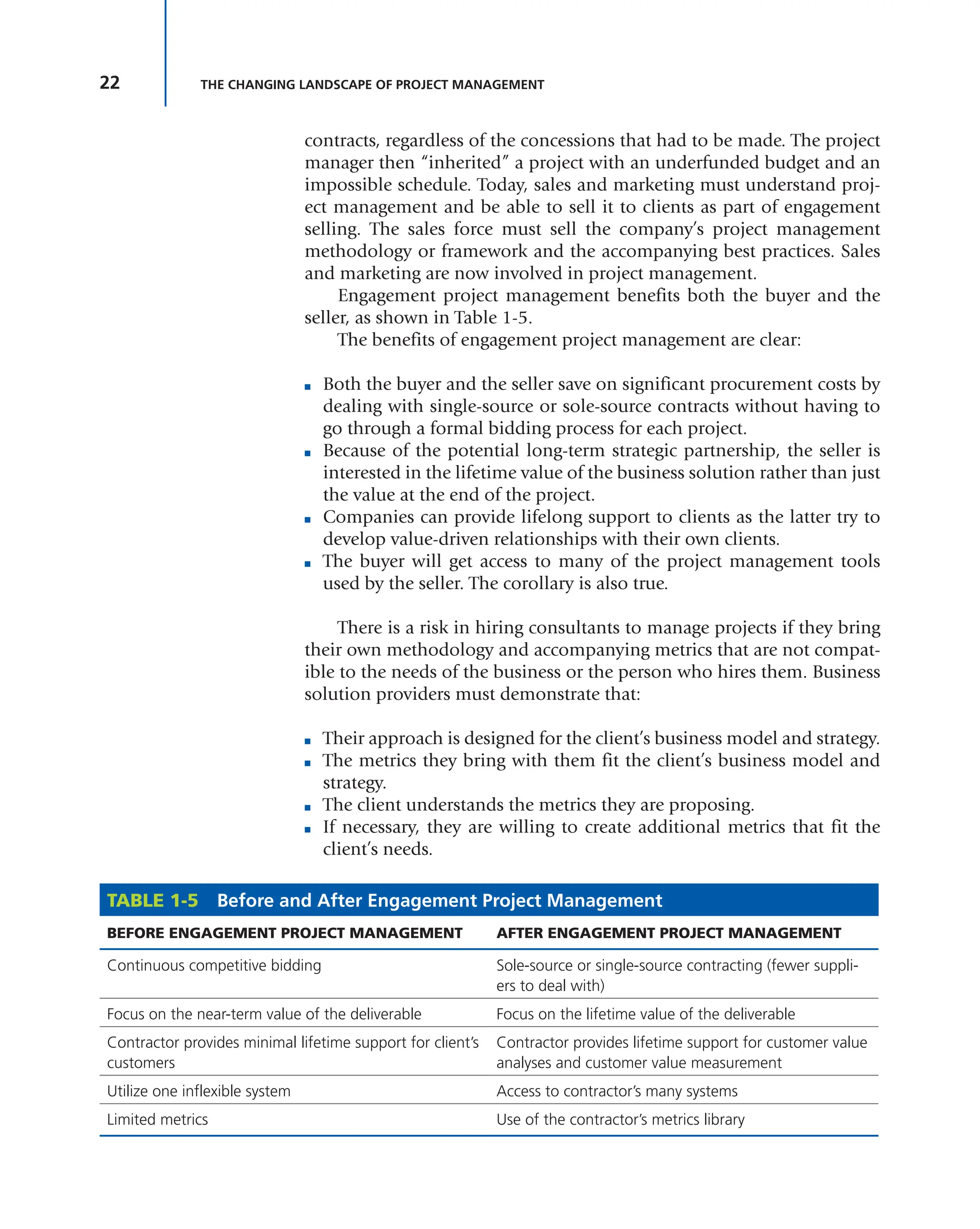
seller, as shown in Table 1-5.
The benefits of engagement project management are clear:
■ Both the buyer and the seller save on significant procurement costs by
dealing with single-source or sole-source contracts without having to
go through a formal bidding process for each project.
■ Because of the potential long-term strategic partnership, the seller is
interested in the lifetime value of the business solution rather than just
the value at the end of the project.
■ Companies can provide lifelong support to clients as the latter try to
develop value-driven relationships with their own clients.
■ The buyer will get access to many of the project management tools
used by the seller. The corollary is also true.
There is a risk in hiring consultants to manage projects if they bring
their own methodology and accompanying metrics that are not compat-
ible to the needs of the business or the person who hires them. Business
solution providers must demonstrate that:
■ Their approach is designed for the client’s business model and strategy.
■ The metrics they bring with them fit the client’s business model and
strategy.
■ The client understands the metrics they are proposing.
■ If necessary, they are willing to create additional metrics that fit the
client’s needs.
TABLE 1-5 Before and After Engagement Project Management
BEFORE ENGAGEMENT PROJECT MANAGEMENT AFTER ENGAGEMENT PROJECT MANAGEMENT
Continuous competitive bidding Sole-source or single-source contracting (fewer suppli-
ers to deal with)
Focus on the near-term value of the deliverable Focus on the lifetime value of the deliverable
Contractor provides minimal lifetime support for client’s
customers
Contractor provides lifetime support for customer value
analyses and customer value measurement
Utilize one inflexible system Access to contractor’s many systems
Limited metrics Use of the contractor’s metrics library
23
1.8 OTHER DEVELOPMENTS IN PROJECT MANAGEMENT
1.7 CUSTOMER RELATIONS MANAGEMENT
Engagement project management is forcing project managers to become
active participants in customer relations management (CRM) activities.
CRM activities focus on:
■ Identifying the right customers
■ Developing the right relationship with the customers
■ Maintaining customer retention
CRM activities cannot be done entirely by the project manager. Some
companies have both engagement managers and project managers. These
two individuals must work together to maintain customer satisfaction.
Table 1-6 shows the partial responsibilities of each.
1.8 OTHER DEVELOPMENTS IN PROJECT MANAGEMENT
For companies to be successful at managing complex projects on a repeti-
tive basis and to function as solution providers, the project management
methodology and accompanying tools must be fluid or adaptive. This
means that companies may need to develop a different project manage-
ment approach when interfacing with each stakeholder, given the fact
that each stakeholder may have different requirements and expectations
and the fact that most complex projects have long time spans. Figure 1-3
illustrates some of the new developments in project management, which
apply to both traditional and nontraditional projects.
TABLE 1-6 Engagement Manager versus Project Manager
CUSTOMER VALUE MANAGEMENT ENGAGEMENT MANAGER PROJECT MANAGER
Phase 1: Identifying the right
customers
• Strategic marketing
• Proposal preparation
• Engagement selling
• Assist in proposal preparation
• May report to engagement
manager
Phase 2: Developing the right
relationship
• Defining acceptance criteria
(metrics/KPIs)
• Risk mitigation planning
• Client briefings
• Client invoicing
• Soliciting satisfaction feedback
and CRM
• Supporting CRM
• Establishing performance metrics
• Measuring customer value and
satisfaction
• Improving customer satisfaction
management
Phase 3: Maintaining retention • Conducting customer satisfaction
management meeting
• Updating client metrics and KPIs
• Attending customer satisfaction
management meetings
• Looking for future areas of
improvement
24 THE CHANGING LANDSCAPE OF PROJECT MANAGEMENT
The five items in the figure fit together when done properly.
1. New success criteria: At the initiation of the project, the project
manager will meet with the client and the stakeholders to come to
stakeholder agreements on what constitutes success on the project.
Initially, many of the stakeholders may have their own definition
of success, but the project manager must forge an agreement, if
possible.
2. Key performance indicators: Once the success criteria are agreed
upon, the project manager and the project team will work with the
stakeholders to define the metrics and KPIs that each stakeholder
wishes to track. It is possible that each stakeholder will have different
KPI requirements.
3. Measurement: Before the metrics and KPIs are agreed to and placed
on the dashboards, the project manager must be sure all team mem-
bers know how to perform the measurements. This is the hardest
part because not all team members or strategic partners may have the
capability or skills to measure all of the KPIs.
4. Dashboard design: Once the KPIs are identified and measure-
ment techniques are identified, the project manager, along with the
appropriate project team members, will design a dashboard for each
stakeholder. Some of the KPIs in the dashboards will be updated
periodically, whereas others may be updated on a real-time basis.
Figure 1-3 New Developments in Project Management
New Success Criteria
Governance
Measurement
Key Performance
Indicators
Dashboard
Design
25
1.9 A NEW LOOK AT DEFINING PROJECT SUCCESS
5. Governance: Once the measurements are made, critical decisions
may have to be supervised by the governance board. The governance
board can include key stakeholders as well as stakeholders who are
functioning just as observers.
1.9 A NEW LOOK AT DEFINING PROJECT SUCCESS
The ultimate purpose of project management is to create a continuous
stream of project successes. This can happen provided that a good defini-
tion of “success” is available on each project.
SITUATION: Many years ago, as a young project manager, I asked a vice
president in my company, “What is the definition of success on my proj-
ect?” He responded, “The only definition in this company is meeting the
target profit margin in the contract.” I then asked him, “Does our cus-
tomer have the same definition of success?” That ended our conversation.
For years, customers and contractors each worked toward different def-
initions for success. The contractor focused on profits as the only success
factor, whereas the customer was more concerned with the quality of the
deliverables. As project management evolved, all of that began to change.
Success Is Measured by the Triple Constraints
The triple constraints can be defined as a triangle with the three sides rep-
resenting time, cost, and performance (which may include quality, scope,
and technical performance). This was the basis for defining success dur-
ing the birth of project management. This definition was provided by the
customer, where cost was intended to mean “within the contracted cost.”
The contractor’s interpretation of cost was profit.
Historically, only the triple constraints were used to define project
success. Unfortunately, even if all of the deliverables are completed on
time and within cost, the project may still be a failure if:
■ There is no market demand for the product or services created.
■ The products and services did not satisfy the customer’s needs.
■ The product and services appeared to satisfy the customer’s needs but
the customer was unhappy with the performance of the deliverables.
■ The benefits defined in the business case were not achieved.
■ The resulting financial value expected from the benefits was signifi-
cantly less than anticipated.
It became apparent that metrics other than those used to track the
triple constraints were needed to define project success.
26 THE CHANGING LANDSCAPE OF PROJECT MANAGEMENT
Customer Satisfaction Must Be Considered as Well
Managing a project within the triple constraints is always a good idea, but
the customer must be satisfied with the end result. A contractor can com-
plete a project within the triple constraints and still find that the customer
is unhappy with the end result. So, we have now placed a circle around
the triple constraints, entitled “customer satisfaction.” The president of an
aerospace company stated, “The only definition of success in our business
is customer satisfaction.” That brought the customer and the contractor a
little closer together. In the early years of using project management tech-
niques, aerospace and defense contractors were incurring large cost over-
runs, and it was almost impossible to define success according to the triple
constraints. Numerous scope changes were initiated by both customers and
contractors. Because of the numerous scope changes , the only two metrics
used on projects were related to time and cost. Success, however, was mea-
sured by follow-on business, which was an output of customer satisfaction.
Other (or Secondary) Factors Must Be Considered
as Well
SITUATION: Several years ago, I met a contractor that had underbid a job
for a client by almost 40 percent. When I asked why the company was
willing to lose money on the contract, the person responded, “Our def-
inition of success on this project is being able to use the client’s name
as a reference in our sales brochures.”
There can be secondary success factors that, based on the project,
are more important than the primary factors. These secondary factors
include using the customer’s name as a reference, corporate reputation
and image, compliance with government regulations, strategic align-
ment, technical superiority, ethical conduct, and other such factors. The
secondary factors may end up being more important than the primary
factors of the triple constraints.
Success Must Include a Business Component
By the turn of the twenty-first century, companies were establishing PMOs.
One of the PMO’s primary activities was to make sure that each project
was aligned to strategic business objectives. The definition of success,
thus, included a business component as well as a technical component.
As an example, consider the following components included in the defi-
nition of success provided by a spokesperson from Orange Switzerland:
■ The delivery of the product within the scope of time, cost, and quality
characteristics
■ The successful management of changes during the project life cycle
27
1.9 A NEW LOOK AT DEFINING PROJECT SUCCESS
■ The management of the project team
■ The success of the product against criteria and target during the project
initiation phase (e.g., adoption rates, ROI, . . . )7
As another example, consider the following provided by Colin
Spence, project manager/partner at Convergent Computing (CCO).
General guidelines for a successful project are as follows:
■ Meeting the technology and business goals of the client on time, on
budget and on scope
■ Setting the resource or team up for success, so that all participants
have the best chance to succeed and have positive experiences in the
process
■ Exceeding the client’s expectations in terms of abilities, teamwork,
and professionalism and generating the highest level of customer
satisfaction.
■ Winning additional business from the client, and being able to use
them as a reference account and/or agree to a case study.
■ Creating or fine-tuning processes, documentation, and deliverables
that can be shared with the organization and leveraged in other
engagements.8
The definition of the role of the project manager also changed.
Project managers were managing part of a business rather than merely a
project, and they were expected to make sound business decisions as well
as project decisions. There must be a business purpose for each project.
Each project is expected to make a contribution of business value to the
company when the project is completed.
Prioritization of Success Constraints May Be Necessary
Not all project constraints are equal. The prioritization of constraints is
performed on a project-by-project basis. Sponsors’ involvement in this
process is essential. Secondary factors are also considered to be con-
straints and may be more important than the primary constraints. For
example, years ago, at Disneyland and Disney World, the project man-
agers designing and building the attractions at the theme parks had six
constraints:
1. Time
2. Cost
3. Scope
7 Quoted in H. Kerzner, Project Management Best Practices: Achieving Global Excellence
(Hoboken, NJ: John Wiley & Sons, 2006), pp. 22–23.
8 Quoted in ibid., p. 23.
28 THE CHANGING LANDSCAPE OF PROJECT MANAGEMENT
4. Safety
5. Aesthetic value
6. Quality
At Disney, the last three constraints, those of safety, aesthetic value,
and quality, were considered locked-in constraints that could not be
altered during trade-offs. All trade-offs were made on time, cost, and scope.
The importance of the components of success can change over the
life of the project. For example, in the initiation phase of a project, scope
may be the critical factor for success, and all trade-offs are made on
the basis of time and cost. During the execution phase of the project,
time and cost may become more important, and then trade-offs will be
made on the basis of scope.
SITUATION: The importance of the components of success at a point
in time can also determine how decisions are made. As an example, a
project sponsor asked a project manager when the project’s baseline
schedules would be prepared. The project manager responded, “As
soon as you tell me what is most important to you, time, cost, or risk,
I'll prepare the schedules. I can create a schedule based on least time,
least cost, or least risk. I can give you only one of those three in the
preparation of the schedule.” The project sponsor was somewhat irate
because he wanted all three. The project manager knew better, how-
ever, and held his ground. He told the sponsor that he would prepare
one and only one schedule, not three schedules. The project sponsor
finally said, rather reluctantly, “Lay out the schedule based on least time.”
As previously stated, the definition of project success has a business
component. That is true for both the customer and contractor’s defini-
tion of success. Also, each project can have a different definition of suc-
cess. There must be up-front agreement between the customer and the
contractor at project initiation or even at the first meeting between them
on what constitutes success at the end of or during the project. In other
words, there must be a common agreement on the definition of success,
especially the business reason for working on the project.
The Definition of Success Must Include a “Value”
Component
Previously it was stated that there must be a business purpose for work-
ing on a project. Now, however, it is understood that, for real success
to occur, there must be value achieved at the completion of the project.
Completing a project within the constraints of time and cost does not
guarantee that business value will be there at the end of the project. In
the words of Warren Buffett, one of the world’s most successful investors
and chairman and chief executive of Berkshire Hathaway, “Price is what
you pay. Value is what you get.”
29
1.9 A NEW LOOK AT DEFINING PROJECT SUCCESS
One of the reasons why it has taken so long to include a value com-
ponent in the definition of success is that it is only in the last several
years we have been able to develop models for measuring the metrics
to determine the value on a project. These same models are now being
used by PMOs in selecting a project portfolio that maximizes the value
the company will receive. Also, as part of performance reporting, we are
now reporting metrics on time at completion, cost at completion, value
at completion, and time to achieve value.
Determining the value component of suc-
cess at the completion of the project can be dif-
ficult, especially if the true value of the project
cannot be determined until well after the project
is completed. Some criteria on how long to wait to assess the true value
may need to be established.
Multiple Components for Success
Today, project managers have come to the realization that there are mul-
tiple constraints on a project. More complex projects, where the tradi-
tional triple constraints success factors are constantly changing, are being
worked on,. For example, in Figure 1-4, for traditional projects, time,
cost, and scope may be a higher priority than the constraints within the
triangle. However, for more complex projects, the constraints within the
triangle may be more important.
Beginning with the fourth edition of the PMBOK® Guide the term
“triple constraints” was no longer used. Because there can be more than
three constraints, the term “competing constraints” is now used, in rec-
ognition of the fact that the exact number of success constraints and their
TIP The definition of success must be agreed
upon between the customer and the contractor.
Figure 1-4 From Triple to Competing Constraints
Scope
Image/
Reputation
Risk
Quality Value
Image/Reputation
Scope
Risk
Cost Time
Traditional Projects
(The Triple Constraints)
Complex Projects
(Competing Constraints)
T
i
m
e
C
o
s
t
V
a
l
u
e
Q
u
a
l
i
t
y
30 THE CHANGING LANDSCAPE OF PROJECT MANAGEMENT
relative importance can change from project to project. What is impor-
tant is that metrics must be established for each constraint on a project.
However, not all of the metrics on the constraints will be treated as KPIs.
The Future
So, what does the future look like? The following list is representative of
some of the changes that are now taking place:
■ The project manager will meet with the client at the very beginning of
the project, and they will come to an agreement on what constitutes
project success.
■ The project manager will meet with other project stakeholders and get
their definition of success. There can and will be multiple definitions
of success for each project.
■ The project manager, the client, and the stakeholders will come to an
agreement on what metrics they wish to track to verify that success will
be achieved. Some metrics will be treated as KPIs.
■ The project manager, assisted by the PMO, will prepare dashboards
for each stakeholder. The dashboards will track each of the requested
success metrics in real time rather than relying on periodic reporting.
■ At project completion, the PMO will maintain a library of project suc-
cess metrics that can be used on future projects.
In the future, the PMO can be expected to become the guardian of all
project management intellectual property. The PMO will create templates
to assist project managers in defining success and establishing success
metrics.
1.10 THE GROWTH OF PAPERLESS PROJECT MANAGEMENT
Making informed decisions requires information. In its early years, proj-
ect management relied heavily on legacy systems for the information
needed. Over the past several decades, other information systems have
emerged, as seen in Figure 1-5. PMIS evolved to provide information
solely for the project at hand. Later, enterprise resource planning (ERP)
systems and CRM systems appeared that provided project management
with sufficient information such that they could now make business- as
well as project-based decisions. Today, the amount of information that a
company can generate is overwhelming, and all of this information will be
stored in data or information warehouses. With pure legacy systems that
tracked business metrics, the information was reported mainly vertically
up the organizational hierarchy. Today, project-based information can be
reported everywhere including to organizations external to the company.
Having more information comes with a price: more costly reporting
and larger and more frequent reports. This is shown in Figure 1-6. As
31
1.10 THE GROWTH OF PAPERLESS PROJECT MANAGEMENT
Figure 1-5 Growth of Information Systems to Support Project Management
Legacy
Systems
Legacy
Systems
Legacy
Systems
Legacy
Systems
PMIS
PMIS PMIS
ERP/CRM
ERP/CRM
INFORMATION
WAREHOUSES
Time
Growth
in
information
Hard Copy
Reports
Executive
Reports
Everywhere
Reports
Functional
Reports
Figure 1-6 Growth of Information Systems to Support Project Management
LEGEND
M
agnitude
of Docum
entation
1970s 1980s 1990s 2000s 2010s
CONVENTIONAL PMGT.
Life
Cycle
Phases
Policy and
Procedure
Manuals
Guidelines
per
Life Cycle
Phase
General
Project
Guidelines
Dashboards
PAPERLESS PMGT.
32 THE CHANGING LANDSCAPE OF PROJECT MANAGEMENT
the cost of paperwork grew, companies began looking at the possibil-
ity of paperless project management. This would necessitate identifica-
tion of just the critical information and presenting the information using
dashboards.
Initially, reporting was done at the end of each life cycle phase.
Unfortunately, this meant that some customers would not see project
status until the end-of-phase gate review meetings. To solve this problem,
policy and procedure manuals were created that dictated how and when
reporting should take place. Unfortunately, this system placed restriction
on the project managers, and eventually the policies and procedures were
replaced with guidelines. Today, the focus is on dashboards.
1.11 PROJECT MANAGEMENT MATURITY AND METRICS
All companies desire maturity and excellence in project management.
Unfortunately, not all companies recognize that the time frame can be
shortened by performing strategic planning for project management
maturity and excellence. The simple use of project management, even for
an extended period of time, does not lead to excellence. Instead, it can
result in repeated mistakes and, what’s worse, learning from your own
mistakes rather than the mistakes of others.
Strategic planning for project management is unlike other forms of
strategic planning in that it is most often performed at the middle and
lower levels of management. Executive management is still involved,
mostly in a supporting role, and provides funding together with employee
release time for the effort.
There are models that can be used to assist in achieving excellence.
One such model is the Project Management Maturity Model, shown in
Figure 1-7. Each of the five levels represents a different degree of maturity
in project management.
Level 1—Common Language: In this level, the organization recognizes
the importance of project management and the need for a good
understanding of the basic knowledge on project management,
along with the accompanying language and terminology.
Level 2—Common Process: In this level, the organization recognizes
that common processes need to be defined and developed such that
the successes on one project can be repeated on other projects. Also
included in this level is the recognition that project management can
be applied to and support other methodologies employed by the
company.
Level 3—Singular Methodology: In this level, the organization recog-
nizes the synergistic effect of combining all corporate methodologies
and processes into a singular methodology, the center of which is
project management. The synergistic effects also make process control
easier with a single methodology than with multiple methodologies.
33
1.11 PROJECT MANAGEMENT MATURITY AND METRICS
Level 4—Benchmarking: This level contains the recognition that pro-
cess improvement is necessary to maintain a competitive advantage.
Benchmarking should be performed on a continuous basis. The
company must decide whom to benchmark against and what to
benchmark.
Level 5—Continuous Improvement: In this level, the organization eval-
uates the information obtained through benchmarking and must
then decide whether this information will enhance the singular
methodology or not.
Although these five levels normally are accomplished with forms,
guidelines, templates, and checklists, the growth in metrics management
has allowed further enhancement of the model by including in each level
the necessity for metrics, as shown in Figure 1-7. Metrics can serve as a
sign of organizational maturity. The need for paperless project manage-
ment will require that more emphasis be placed on metrics management
as part of the project management maturity process.
Maturity in project management allows companies to recognize that
project management is a strategic competency, as shown in Figure 1-8.
Figure 1-7 Project Management Maturity and Metrics
Basic
Knowledge
Level 1
Common
Language
Process
Definition
Level 2
Common
Process
Process
Control
Level 3
Singular
Methodology
Process
Improvement
Level 4
Benchmarking
Level 5
Continuous
Improvement
• Identify
traditional
or core
metrics
• Identify
metrics for
each process
• Identify
measurement
techniques
• Consolidate
the number of
metrics
• Finalize the
core metrics
for possible
commonality
• Finalize the
measurement
techniques
• Compare against
industry
standards
• Seek out
customer specific
metrics
• Look for better
ways to perform
measurements
• Create a
metrics library
• Assign metric
owners
• Look for
metric best
practices
34 THE CHANGING LANDSCAPE OF PROJECT MANAGEMENT
For companies that promote their project management capabilities to
external clients, competency in project management is viewed as a sus-
tained competitive advantage. However, ineffective metrics management
can increase the risks in maintaining a sustained competitive advantage,
as shown in Figure 1-9. These risks are covered in detail in later chapters.
Figure 1-9 Metric Risks to Maintain a Sustained Competitive Advantage
Display
Risks
• Displays Not
Understood
• Wrong Colors
and Images
• Cluttering and
Branding
Identification
Risks
• Too Many
Metrics
• Quality of
Information
• Unclear Use
of Metrics
• Unclear
Techniques
• Changing
Techniques
• Cost of
Measurement
Measurement
Risks
Metric Risks
to Maintaining
a SCA
Figure 1-8 Project Management Competitiveness
Immaturity Maturity Excellence
Is the
Pathway to
Is the
Foundation for
Project
Management
Competencies
Is the
Source of
Project
Management
Skills
Leads to
Project
Management
Training
Strategic
Competency
Sustained
Competitive
Advantage
35
1.11 PROJECT MANAGEMENT MATURITY AND METRICS
Figure 1-10 Nonsustainable Competitive Advantages
Competitive
Advantage
Time
P
r
o
j
e
c
t
M
a
n
a
g
e
m
e
n
t
E
x
c
e
l
l
e
n
c
e
C
o
m
p
e
t
i
t
o
r
s
C
o
u
n
t
e
r
a
t
t
a
c
k
Exploitation
Figure 1-11 Sustainable Competitive Advantages
Sustained
Competitive
Advantage
Time
Continuous
Improvement
Figure 1-8 shows that excellence in project management is achieved
when project management is seen as a strategic competency and the com-
pany recognizes that its project management capability has become a
competitive advantage. Unfortunately, competitive advantages are not
always sustainable, as can be seen in Figure 1-10. As a company exploits
its competitive advantage, competitors counterattack to reduce or elimi-
nate that advantage. Therefore, as illustrated in Figure 1-11, a company
must have continuous improvement for the competitive advantage to
grow into a sustained competitive advantage.
Having a sustained competitive advantage in project management
does not come just from being on time and on budget at the end of
36 THE CHANGING LANDSCAPE OF PROJECT MANAGEMENT
each project. Rather, offering clients something that competitors cannot
do may help. But in project management, a true competitive advantage
occurs when efforts are directly linked to the customers’ perception of
value. Whatever means the company uses to show this, such as through
the use of value-reflective metrics, gives it a sustainable competitive
advantage. Value-reflective metrics, which are discussed in Chapter 5,
show how to create value. If these metrics undergo continuous improve-
ment, then users may be adding value for the customers.
There is no point in wasting resources on value metrics unless the cli-
ent understands the metrics and perceives the value that is being created.
Therefore, client input into the selection of the attributes for the value
metrics is essential. Table 1-7 shows some typical value-reflective metrics
and the accompanying strategic competitive advantage.
1.12 PROJECT MANAGEMENT BENCHMARKING
AND METRICS
One of the fastest ways to reach maturity and excellence in project man-
agement is through the use of benchmarking. A benchmark is a measure-
ment or standard against which comparisons can be made. Benchmarking
is the process of comparing business processes and performance metrics
to industry bests or best practices from other industries. Dimensions typ-
ically measured are quality, time, and cost. In the process of benchmark-
ing, management identifies the best firms in its industry, or in another
industry where similar processes exist, and compares the results and pro-
cesses of those studied (the “targets”) to its own company’s results and
processes. In this way, management learns how well the targets perform
TABLE 1-7 Competitive Advantages from Value-Reflective Metrics
METRICS WITH VALUE ATTRIBUTES POSSIBLE COMPETITIVE ADVANTAGE
Deliverables produced Efficiency
Product functionality Innovation
Product functionality Product differentiation
Support response time Service differentiation
Staffing and employee pay grades People differentiation
Quality Quality differentiation
Action items in the system and how long Speed of problem resolution and decisions
Cycle time Speed to market
Failure rates Quality differentiation and innovation
37
1.12 PROJECT MANAGEMENT BENCHMARKING AND METRICS
and, more important, the business processes that explain why these firms
are successful.
Best Practice versus Proven Practice
In project management, the terms “best practice benchmarking” or
“process benchmarking” are used, referring to how organizations evalu-
ate various aspects of their processes in relation to the practices of best
practice companies, usually within a peer group defined for the purposes
of comparison. This evaluation process allows organizations to develop
plans on how to make improvements or adapt specific best practices,
usually with the aim of increasing some aspect of project management
performance. Benchmarking often is treated as a continuous process in
which organizations continually seek to improve their practices.
For more than a decade, companies have been fascinated with the
term “best practices.” Best practices are generally those practices that have
been proven to produce superior results. But now, after a decade or more
of use, the term is being scrutinized and it is recognized that perhaps bet-
ter expressions exist. When a company says that it has a best practice, it
really means that there is a technique, process, metric, method, or activ-
ity that can be more effective at delivering an outcome than any other
approach and that it provides the company with the desired outcome
with fewer problems and unforeseen complications. As a result, the com-
pany ends up with the most efficient and effective way of accomplishing
a task based on a repeatable process that has been proven over time for a
large number of people and/or projects.
There are several arguments why the words “best practice” should
not be used. First is the argument that the identification of a best prac-
tice may lead some to believe that they were performing some activities
incorrectly in the past, and that may not be the case. What was known as
a best practice may simply be a more efficient and effective way of achiev-
ing a deliverable. Another argument is that some people believe that best
practices imply that there is one and only one way of accomplishing a
task. This also may be a faulty interpretation. Third, and perhaps most
important, is the argument that a best practice is the “best” way of per-
forming an activity and, since it is the best, no further opportunities for
improvement are possible.
Once a best practice has been identified and proven to be effective,
normally it is integrated into project management processes so that it
becomes a standard way of doing business. Therefore, after acceptance
and proven use of the idea, the better expression possibly should be
“proven practice” rather than best practice. This leaves the door open for
further improvements.
These are just some arguments why “best practices” may be just a
buzzword and should be replaced. Perhaps this will happen in the future.
38 THE CHANGING LANDSCAPE OF PROJECT MANAGEMENT
However, for the remainder of this text, the term “best practices” is used,
with the caveat that other terms may be more appropriate.
Benchmarking Methodologies
No single benchmarking process has been universally adopted. The wide
appeal and acceptance of benchmarking has led to the emergence of a
variety of benchmarking methodologies. However, with regard to project
management, benchmarking activities usually are easier to implement
and accept because of the existence of the PMBOK® Guide and a PMO.
The PMBOK® Guide helps to identify areas where benchmarking would
be beneficial, and people understand that the PMO is responsible for
continuous improvements in project management.
The following is an example of a typical benchmarking methodology.
■ Identify problem areas: Because benchmarking can be applied to
any business process or function, a range of research techniques may
be required. They include informal conversations with customers,
employees, or suppliers; exploratory research techniques such as focus
groups; and in-depth marketing research, quantitative research, sur-
veys, questionnaires, reengineering analysis, process mapping, quality
control variance reports, financial ratio analysis, or simply reviewing
cycle times or other performance indicators.
■ Identify others that have similar processes: Because project manage-
ment exists in virtually every industry, benchmarking personnel should
not make the mistake of looking only at their own industry.
■ Identify organizations that are leaders in these areas: Look for
the very best in any industry and in any country. Consult custom-
ers, suppliers, financial analysts, trade associations, and magazines
to determine which companies are worthy of study. Symposiums
and conferences sponsored by the Project Management Institute
provide excellent opportunities to hear presentations from compa-
nies that are doing things exceptionally well. Even companies that
are in financial distress may be outstanding is some areas of project
management.
■ Visit the “best practice” companies to identify leading-edge prac-
tices: Companies typically agree to mutually exchange information
beneficial to all parties in a benchmarking group and share the results
within the group.
■ Implement new and improved business practices: Take the leading-
edge practices and develop implementation plans that include iden-
tification of specific opportunities, funding the project, and selling
the ideas to the organization for the purpose of gaining demonstrated
value from the improvements.
39
1.12 PROJECT MANAGEMENT BENCHMARKING AND METRICS
Benchmarking Costs
The three main types of costs in benchmarking are:
1. Visitation costs: This includes hotel rooms, travel costs, meals, token
gifts, and lost labor time.
2. Time costs: Members of the benchmarking team will be investing
time in researching problems, finding exceptional companies to
study, visits, and implementation. This will take them away from
their regular tasks for part of each day so additional staff might be
required.
3. Benchmarking database costs: Organizations that institutionalize
benchmarking into their daily procedures find it is useful to create
and maintain a database or library of best practices.
The cost of benchmarking can be reduced substantially by utilizing
internet resources. These resources aim to capture benchmarks and best
practices from organizations, business sectors, and countries to make the
benchmarking process much quicker and cheaper.
Types of Benchmarking
There are several types of benchmarking studies:
■ Process benchmarking: The initiating firm focuses its observation and
investigation of project management and business processes with a goal
of identifying and observing the best practices from one or more bench-
mark firms. Activity analysis will be required where the objective is to
benchmark cost and efficiency in executing the processes that are part
of a project management methodology. This is the most common form
of benchmarking in project management. Process benchmarking can-
not be successful if users do not fully understand their own processes.
■ Metric benchmarking: The process of comparing the different metrics
that organizations are using for continuous improvements. Time, cost,
and quality are just three of the metrics that are being used. Additional
metrics are being created to measure what is needed, not what is the
easiest to measure. The intent is to identify the core metrics needed for
project management. One of the biggest challenges for metric bench-
marking is the variety of metric definitions used among companies or
divisions. Definitions may change over time within the same organiza-
tion due to changes in leadership and priorities. The most useful com-
parisons can be made when metrics definitions are common between
compared units and do not change so improvements can be verified.
■ Financial benchmarking: Performing a financial analysis and compar-
ing the results in an effort to assess your overall competitiveness and
productivity.
40 THE CHANGING LANDSCAPE OF PROJECT MANAGEMENT
■ Benchmarking from an investor perspective: Extending the bench-
marking universe to also compare to peer companies that can be con-
sidered alternative investment opportunities from the perspective of
an investor.
■ Performance benchmarking: Allows the initiator firm to assess its
competitive position by comparing products and services with those
of target firms.
■ Product benchmarking: The process of designing new products or
upgrades to current ones. This process sometimes can involve reverse
engineering, which involves taking apart competitors’ products to find
strengths and weaknesses.
■ Strategic benchmarking: This involves observing how others compete.
This type of benchmarking usually is not industry specific, meaning it
is best to look at other industries.
■ Functional benchmarking: A company focuses its benchmarking on
a single function to improve the operation of that particular function.
Complex functions such as human resources, finance and accounting,
and information and communication technology are unlikely to be
directly comparable in cost and efficiency terms and may need to be
disaggregated into processes to make valid comparison.
■ Best-in-class benchmarking: This involves studying the leading com-
petitor or the company that carries out a specific function best.
■ Internal benchmarking: A comparison of a business process to a simi-
lar process inside the organization. This is a quest for internal best
practices.
■ Competitive benchmarking: This is a direct competitor-to-competitor
comparison of a product, service, process, or method.
■ Generic benchmarking: This approach broadly conceptualizes unre-
lated business processes or functions that can be practiced in the same
or similar ways regardless of industry.
Benchmarking Code of Conduct
Numerous problems can occur during benchmarking. Some problems
result from misunderstandings, whereas other problems could involve
legal issues. The Code of Conduct of the International Benchmarking
Clearinghouse is an excellent starting point.
■ Legality: Avoid any discussions that could be interpreted as illegal for
you or your benchmarking partners.
■ Exchange: Be prepared to answer the same questions you are asking.
Letting partners review the questions in advance is helpful.
■ Confidentiality: All information should be treated as proprietary
information. You may wish to consider having everyone sign a non-
disclosure agreement.
■ Use of Information: There must be an agreement, preferably in writ-
ing, on how the information will be used.
41
1.12 PROJECT MANAGEMENT BENCHMARKING AND METRICS
■ Contact: Follow your partners’ protocols and customs on whom you
are allowed to interface with.
■ Preparation: Be fully prepared for partner interfacing and exchanges
of information.
■ Completion: Avoid making promises or commitments that cannot be
kept.
Benchmarking Mistakes
Benchmarking mistakes can lead to benchmarking failures. Some of
these mistakes include:
■ Limiting benchmarking activities to just the company’s own industry
■ Benchmarking only industry leaders; industry followers can provide
just as much information as industry leaders.
■ Failing to recognize that not all results are applicable, especially where
organizational and cultural differences exist.
■ Failing to have a benchmarking plan and not knowing what to
look for
Points to Remember
Some critical points must be remembered when performing
benchmarking:
■ It is necessary to understand the culture and circumstances behind the
numbers to fully understand their meaning and use. The “how” is just
as important as the “how much?”
■ In project management, changes can occur quickly. It is important to
set frequencies for the benchmarking studies, and each process studied
may require different frequencies.
■ The more rigorous the benchmarking process, the better the results.
■ Regardless of how good a company thinks its project management sys-
tems are, there is always room for improvement.
■ Those who do not believe in continuous improvement soon become
industry followers rather than leaders.
■ Executives who are not familiar with or supportive of benchmarking
will always adopt the “not invented here” argument or “this is the way
we have always done it.”
■ Successful benchmarking is “doing,” not “knowing.”
■ Benchmarking allows users to learn from the mistakes of others rather
than from their own mistakes.
■ Because of the rate of change that takes place in project management,
it is highly unlikely that the targets that are benchmarked with will be
leaders in all areas of project management.
■ Benchmarking can prevent surprises.
■ People must recognize the need for change. This must be accomplished
with benchmarking evidence rather than just claims or opinions.
42 THE CHANGING LANDSCAPE OF PROJECT MANAGEMENT
■ Change occurs quickly when the people who are needed to change or
to make the change are involved in the benchmarking studies.
■ Implementing change requires a champion. Having a PMO is almost
always the right idea.
1.13 CONCLUSIONS
The future of project management may very well rest in the hands of
the solution providers. These providers will custom-design project man-
agement frameworks and methodologies for each client and possibly
for each stakeholder. They must be able to develop metrics that go well
beyond the current PMBOK® Guide and demonstrate a willingness to
make business decisions as well as project decisions. The future of project
management looks quite good, but it will be a challenge.
43
Today, more than ever before, a great percentage of projects are becom-
ing distressed and possibly failing. Techniques such as project audits and
health checks encourage the use of a more formalized metrics management
system. Effective project decisions cannot be made without meaningful
metrics. Stakeholder relations management thrives on meaningful metrics.
CHAPTER
OVERVIEW
CHAPTER
OBJECTIVES
2 THE DRIVING FORCES FOR BETTER
METRICS
■ To understand the importance of metrics in dealing with stakeholders
■ To understand the importance of metrics when conducting project
audits
■ To understand the importance of metrics when performing health
checks
■ To understand the metrics can and will change when trying to recover
a distressed project
KEY WORDS
2.0 INTRODUCTION
Companies do not simply add more metrics or key performance indica-
tors (KPIs) by choice. Usually driving forces make it evident that such
changes are needed. Complacency works when things are going well or
as planned. When project managers start accepting more complex proj-
ects, however, as was discussed in Chapter 1, things have a tendency to go
poorly, and the need for additional metrics is recognized.
By performing audits and health checks, project managers can pre-
vent a project from becoming distressed, provided that the cause of the
problem is detected early enough and options exist for corrective action.
Unfortunately, the metrics used might not act as an early warning sys-
tem. By the time new metrics for analysis of a potentially failing project
■ Boundaries
■ Distressed projects
■ Project audits
■ Project health checks
■ Scope creep
■ Stakeholder relations management (SRM)
Project Management Metrics, KPIs, and Dashboards: A Guide to
Measuring and Monitoring Project Performance, Third Edition
By Harold Kerzner
Copyright © 2017 by International Institute for Learning, Inc., New York, New York
44 THE DRIVING FORCES FOR BETTER METRICS
are established, the damage may have been done and recovery may no
longer be possible. The final result can be devastating if stakeholder rela-
tions management (SRM) fails and future business is not forthcoming.
Situations like this may be attributed to improper identification, selec-
tion, implementation, and measurement of the right metrics and KPIs.
2.1 STAKEHOLDER RELATIONS MANAGEMENT
Stakeholders are, in one way or another, individuals, companies, or orga-
nizations that may be affected by the outcome of the project or the way
in which the project is managed. Stakeholders may be either directly or
indirectly involved throughout the project, or may function simply as
observers. A stakeholder can shift from a passive role to being an active
member of the team and participate in making critical decisions.
SITUATION: In order to impress the stakeholders, the project manager
agrees to establish more metrics than needed. Once the project begins
and the stakeholders begin examining the measurements of the met-
rics, the project manager realizes that some stakeholders are actively
involved in the project to the point where they are trying to microman-
age him or her.
SITUATION: As the project progresses, several stakeholders begin
asking for additional metrics that were not part of the original plan.
The project management methodology does not provide data for these
metrics, and the cost of changing the methodology at this point is
prohibitive.
SITUATION: The project manager tries to impress stakeholders by
giving them more information than they actually need. The result is
that they may not be able to identify what information they actually
need and mistrust the data to the point where they do not use it for
decision-making purposes.
On small or traditional projects, both internal and external ones,
project managers generally interface with just the project sponsor as
the primary stakeholder, and the sponsor usually is assigned from the
organization that funds the project. However, the larger the project,
the greater the number of stakeholders that project managers must inter-
face with. Project managers may now have to deal with with governance
by committee. The situation becomes even more potentially problematic
if there is a large number of stakeholders, geographically dispersed, all at
different levels of management in their respective hierarchy, each with a
different level of authority, and language and cultural differences. Trying
This section is adapted from Harold Kerzner and Carl Belack, Managing Complex Projects
(Hoboken, NJ: John Wiley & Sons, 2010), Chapter 10.
45
2.1 STAKEHOLDER RELATIONS MANAGEMENT
to interface with all of these people on a regular
basis and make decisions, especially on a large,
complex project is very time-consuming.
One of the complexities of SRM is figuring
out how to satisfy everyone without sacrificing
the company’s long-term mission or vision. Also,
the company may have long-term objectives in
mind for this project, and those objectives may
not necessarily be aligned to the project’s objec-
tives or each stakeholder’s objectives. Lining up
all of the stakeholders in a row and getting them
to agree to all decisions is more wishful thinking
than reality. Project managers may discover that
it is impossible to get all of the stakeholders to
agree, and can only hope to placate as many as
possible at any given time.
SRM cannot work effectively without com-
mitments from all of the stakeholders. Obtaining
these commitments can be difficult if the stake-
holders cannot see what is in it for them at the
completion of the project, namely the value
that they expect or other personal interest. The
problem is that what one stakeholder perceives as value another stake-
holder may have a completely different perception of or he or she may
desire a different form of value. For example, one stakeholder could view
the success of the project as a symbol of prestige, authority, power, or
an opportunity for promotion. Another stakeholder could perceive the
value as simply keeping people employed. A third stakeholder could see
value in the final deliverables of the project and the inherent quality in
it. A fourth stakeholder could see the project as an opportunity for future
work with particular partners.
Another form of agreement involves developing a consensus on how
stakeholders will interact with each other. It may be necessary for certain
stakeholders to interact with each other and support one another by shar-
ing resources, providing financial support in a timely manner, and shar-
ing intellectual property. This support may necessitate a commonality
among some metrics. Although all stakeholders recognize the necessity
for these agreements, they can be affected by politics, economic condi-
tions, and other enterprise environmental factors that may be beyond the
control of the project manager. Certain countries may not be willing to
work with other countries because of culture, religion, views on human
rights, and other such factors.
For the project manager, obtaining these agreements right at the
beginning of the project is essential. Some project managers are fortunate
to be able to do this while others are not. Leadership changes in certain
governments, or any organizational hierarchy, may make it difficult to
TIP Because of the potentially large number
of stakeholders, project managers should not
attempt to establish metrics that can satisfy all of
the stakeholders all of the time.
TIP Passive stakeholders can become active
stakeholders when the situation merits it.
The project manager must consider metrics for
passive stakeholders as well, but perhaps not the
same number of metrics that would be provided
for the active stakeholders.
TIP Not all of the stakeholders will be in agree-
ment on the interpretation of the metrics and
have the same conclusions on what action, if any,
is necessary.
46 THE DRIVING FORCES FOR BETTER METRICS
enforce these agreements on complex projects.
Changes in leadership can cause changes in the
project’s direction.
It is important that everyone who has a stake
in the project be willing to communicate what
they believe are the factors critical for success.
Success is easier to define and reach when there
is broad agreement. However, there is no guar-
antee that there will be an agreement among the
project manager, client(s), and stakeholders as
to a core set of metrics and KPIs. Project man-
agers must be prepared to construct a different
set of dashboards possibly for each viewer. But
there is a risk. If too many metrics are established, then too much data
may be necessary, and the project team may find it difficult to capture all
of the information that is needed. The metrics selected must be scaled to
fit the needs of the project as well as the needs of individual stakeholders.
Also, the metrics selected must be used to ensure that the time and cost
involved with selecting and measuring the metrics has been worthwhile.
Some simple steps can be followed:
■ The project team must brainstorm what metrics are appropriate for this
project. This is easy to do if a metrics library exists for metric selection
and recommendation purposes. This brainstorming may be accom-
plished prior to stakeholder involvement.
■ The team must then assess the metrics to make sure they are needed
and look for ways of combining metrics if appropriate.
■ Theteammustmakesurethatthemetricsarepresentedintermsthatevery
viewer can understand (i.e., What is the meaning of a partial or incom-
plete deliverable? What is the meaning of an unacceptable deliverable?).
■ The team must then decide what metrics to recommend to the
stakeholders.
Sometimes the number of metrics is selected based on the personal
whims of the stakeholders and the project team, and then it is discovered
how costly measuring and reporting all of the metrics is. The number
of metrics selected should be based on the size of the project, its com-
plexity, the decisions that the governance committee must make, and the
accompanying risks. There must be an informational value for each met-
ric. Otherwise, the result can be information overload and an abundance
of useless information.
On small projects, there is not sufficient time or funding to work with
a large number of metrics. Success on a small project may be as simple
as customer acceptance of the deliverables or no complaints by the cus-
tomer. But for larger and more complex projects, success may not be able
to be determined from a single metric. Core metrics may be necessary.
TIP Metrics systems, no matter how good,
may not generate interaction among stakehold-
ers. Metrics serve as a support tool and should not
be viewed as a replacement for effective project
communications.
TIP Changes in stakeholders may necessitate
the creation of new metrics regardless how far the
project has progressed.
47
2.1 STAKEHOLDER RELATIONS MANAGEMENT
It is important for the project manager to fully understand the issues
and challenges facing each of the stakeholders, especially their informa-
tion needs. Although it may seem unrealistic, some stakeholders can have
different views on the time requirements of the project. In some devel-
oping nations, the construction of a new hospital in a highly populated
area may drive the commitment for the project, even though it could be
late by a year or longer. People just want to know that the hospital will
be built eventually.
In some cultures, workers cannot be fired. Because workers believe
they have job security, it may be impossible to get them to work faster or
better. In some countries, there may be as many as 50 paid holidays for
workers, and this can have an impact on the project manager’s schedule.
Not all workers in each country have the same skill level even though
they have the same title. For example, a senior engineer in an emerging
nation may have the same skills as a lower-grade engineer in another
country. In some locations where labor shortages may exist, workers are
assigned to tasks based on availability rather than ability. Having suffi-
cient headcount is not a guarantee that the work will get done in a timely
manner and that the level of quality will be there.
In some countries, power and authority, as well as belonging to the
right political party, are symbols of prestige. People in these positions
may not view the project manager as their equal and may direct all of
their communications to the project sponsor. In this case, it is possible
that salary is less important than relative power and authority.
It is important to realize that not all of the stakeholders may want
the project to be successful. This will happen if stakeholders believe that,
at the completion of the project, they may lose power, authority, hier-
archical positions in their company, or, in a worst case, even lose their
job. Sometimes these stakeholders will either remain silent or even be
supporters of the project until the end date approaches. If the project
is regarded as unsuccessful, these stakeholders may respond by saying
“I told you so.” If it appears that the project may be a success, these
stakeholders may suddenly be transformed from supporters or the silent
majority to adversaries, and encourage failure.
It is very difficult to identify stakeholders with hidden agendas. These
people may hide their true feelings and be reluctant to share information.
Often there are no telltale or early warnings signs that indicate their true
belief in the project. However, if stakeholders are reluctant to approve
scope changes, provide additional investment, or assign highly qualified
resources, this could be an indication that they may have lost confidence
in the project.
Not all stakeholders understand project
management. Not all stakeholders understand
the role of a project sponsor or their role as
part of project governance. Not all stakeholders
TIP The project manager may find it necessary
to establish country-specific metrics for his or her
personal use.
48 THE DRIVING FORCES FOR BETTER METRICS
understand how to interface with a project or the project manager, even
though they may readily accept and support the project and its mission.
Simply stated, the majority of the stakeholders quite often are never
trained in how to properly function as a stakeholder or a member of
a project governance committee. Unfortunately, this lack of training
cannot be detected early on but may become apparent as the project
progresses.
Some stakeholders may be under the impression that they are merely
observers and do not need to participate in decision making or autho-
rization of scope changes. Their new role could constitute a rude awak-
ening. Some will accept it, whereas others will not. Those who do not
accept the new role usually are fearful that participating in a decision that
turns out to be wrong can be the end of their career.
Some stakeholders may believe they should be micromanagers,
often usurping the authority of the project manager by making decisions
that they may not necessarily be authorized to make, at least not alone.
Stakeholders who attempt to micromanage can do significantly more
harm to the project than stakeholders who remain observers.
It may be a good idea for the project manager to prepare a list of
expectations that he or she has of stakeholders. This is essential even
though the stakeholders visibly support the existence of the project. Role
clarification for stakeholders should be accomplished early, in the same
way that the project manager provides role clarification for team mem-
bers at the initial project kickoff meeting.
The current view of stakeholder management in Table 2-1 results
from the implementation of “engagement project management” prac-
tices. In the past, whenever a sale was made to the client, the salesperson
would then move on to find a new client. Salespeople viewed themselves
as providers of products and/or services.
TABLE 2-1 Changing Views in Stakeholder Relations Management
PAST VIEW PRESENT VIEW
Manage existing relationships Build relationships for the future; that is, engagement
project management
Align the project to short-term business goals Align the project to long-term strategic business goals
Provide ethical leadership when suits Provide ethical leadership throughout the project
Project is aligned to profits Project is aligned stakeholders’ expectation of value
Identify profitable scope changes Identify value-added scope changes
Provide stakeholders with the least number of
metrics and KPIs
Provide stakeholders with sufficient metrics and KPIs such
that they can make informed decisions
49
2.1 STAKEHOLDER RELATIONS MANAGEMENT
Today, salespeople view themselves as pro-
viders of business solutions. In other words,
salespeople now tell clients, “We can provide
you with a solution to all of your business needs
and what we want in exchange is to be treated as
a strategic business partner.” This benefits both
the buyer and the seller, as discussed previously.
Therefore, as a solution provider, the project manager focuses heav-
ily on the future and on establishing a long-term partnership agreement
with the client and the stakeholders. This focus is heavily oriented toward
value rather than near-term profitability.
On the micro-level, SRM can be defined using the six processes
shown in Figure 2-1.
1. Identify the stakeholders: This step may require support from
the project sponsor, sales, and the executive management team.
Even then, there is no guarantee that all of the stakeholders will be
identified.
2. Stakeholder analysis: This analysis requires an understanding of
which stakeholders are key stakeholders—those who have influence,
the ability, and the authority to make decisions, and can make or
break the project. This analysis also includes developing SRM strate-
gies based on the results of the analysis.
3. Perform stakeholder engagements: During this step, the project
manager and the project team get to know the stakeholders.
TIP Providing too many metrics and KPIs may
be an invitation for stakeholders to micromanage
the project. Another possibility is that the stake-
holders may not trust the data and therefore not
use the data for decision making.
Figure 2-1 Stakeholder Relations Management
Identify the
stakeholders
Abide by
agreements
Stakeholder
debriefing
Stakeholder
analysis
Perform
stakeholder
engagement
Stakeholder
information
flow
Stakeholder
Relations
Management
50 THE DRIVING FORCES FOR BETTER METRICS
4. Stakeholder information flow: This step is the identification of
the information flow network and the preparation of the necessary
reports for each stakeholder.
5. Abide by agreements: This step enforces stakeholder agreements
made during the initiation and planning stages of the project.
6. Stakeholder debriefings: This step occurs after contract or life cycle
phase closure and is used to capture lessons learned and best prac-
tices for improvements on the next project involving these stakehold-
ers or the next life cycle phase.
Stakeholder management begins with stakeholder identification.
This is easier said than done, especially if the project is multinational.
Stakeholders can exist at any level of management. Corporate stakehold-
ers are often easier to identify than political or government stakeholders.
Each stakeholder is an essential piece of the project puzzle.
Stakeholders must work together and usually interact with the project
through the governance process. Therefore, it is essential to know which
stakeholders will participate in governance and which will not.
As part of stakeholder identification, the project manager must know
whether he or she has the authority or perceived status to interface with
the stakeholders. Some stakeholders perceive themselves as higher status
than the project manager. In this case, the project sponsor may be the
person to maintain interactions.
Stakeholders can be identified in several ways. More than one way
can be used on projects.
■ Groups: This could include financial institutions, creditors, regulatory
agencies, and the like.
■ Individuals: These could be identified by name or title, such as the
CIO, COO, CEO or just the name of the contact person in the stake-
holder’s organization.
■ Contribution: This could include financial contributor, resource con-
tributor, or technology contributor.
■ Other factors: This could include the authority to make decisions or
other such factors.
It is important to understand that not all stakeholders have the
same expectations of a project. Some stakeholders may want the proj-
ect to succeed at any cost, whereas other stakeholders may prefer to
see the project fail even though they openly seem to support it. Some
stakeholders view success as the completion of the project regardless
of the cost overruns, whereas others may define success in financial
terms only. Some stakeholders are heavily oriented toward the value
they expect to see in the project, and this is the only definition of suc-
cess for them. The true value may not be seen until months after the
project has been completed. Some stakeholders may view the project
51
2.1 STAKEHOLDER RELATIONS MANAGEMENT
as their opportunity for public notice and increased status and, there-
fore, want to be actively involved. Others may prefer a more passive
involvement.
On large, complex projects with a multitude of stakeholders, it may
be impossible for the project manager to cater to all of the stakehold-
ers. Therefore, the project manager must know who the most influential
stakeholders are and who can provide the greatest support on the project.
Typical questions to ask include:
■ Who are powerful and who are not?
■ Who will have or require direct, or indirect, involvement?
■ Who has the power to kill the project?
■ What is the urgency of the deliverables?
■ Who may require more or less information than others?
Not all stakeholders are equal in influence, power, or the author-
ity to make decisions in a timely manner. It is imperative for the proj-
ect manager to know who sits on the top of the list as having these
capabilities.
Finally, it is important for project managers to remember that stake-
holders can change over the life of a project, especially if it is a long-term
project. Also, the importance of certain stakeholders can change over the
life of a project and in each life cycle phase. The stakeholder list is, there-
fore, an organic document subject to change.
Stakeholder mapping is most frequently displayed on a grid, com-
paring stakeholders’ power and their level of interest. This is shown in
Figure 2-2. The four cells can be defined as:
1. Manage closely: These are high-powered, interested people who
can make or break a project. The project manager must put forth the
greatest effort to satisfy them and be aware that there are factors that
can cause them to change quadrants rapidly.
2. Keep satisfied: These are high-powered, less interested people who
can also make or break a project. The project manager must put forth
some effort to satisfy them but not with excessive detail that can lead
to boredom and total disinterest. They may not get involved until the
end of the project approaches.
3. Keep informed: These are people with limited power but keen inter-
est in the project. They can function as an early warning system of
approaching problems and may be technically astute and able to
assist with some technical issues. These are the stakeholders who
often provide hidden opportunities.
4. Monitor only: These are people with limited power and who may
not be interested in the project unless a disaster occurs. The project
manager should provide them with some information but not with
so much detail that they will become disinterested or bored.
52 THE DRIVING FORCES FOR BETTER METRICS
The larger the project, the more important
it becomes to know who is and is not an influ-
ential or key stakeholder. Although the project
manager must win the support of all stakehold-
ers, or at least try to do so, the key stakeholders
come first. Key stakeholders may be able to assist
the project manager in identifying enterprise
environmental factors that can have an impact on the project. These fac-
tors could include forecasts on the host country’s political and economic
conditions, the identification of potential sources for additional funding,
and other such issues. In some cases, the stakeholders may have software
tools that can supplement the project manager’s available organizational
process assets.
Thus far, we have discussed the importance of winning over the key
or influential stakeholders. There is also a valid argument for winning
over the stakeholders who are considered to be unimportant. Although
some stakeholders may appear to be unimportant, this can change rap-
idly. For example, an unimportant stakeholder may suddenly discover
that a scope change is about to be approved and that scope change can
seriously affect him or her, perhaps politically. In such a case, the for-
merly unimportant stakeholder (originally deemed so for apparent lack
of concern about the project) becomes a key stakeholder.
Figure 2-2 Stakeholder Mapping
Keep
Satisfied
Manage
Closely
Monitor
Keep
Informed
Low
Low
High
High
Level of Interest
Power
TIP Where the stakeholders are positioned on
the grid could determine the number of metrics
that they want or will be provided. As stakeholders
change positions in the grid, so might the number
of metrics they receive.
53
2.1 STAKEHOLDER RELATIONS MANAGEMENT
Another example occurs on longer-term projects, where stakeholders
may change over time, perhaps because of politics, promotions, retire-
ments, or reassignments. A new stakeholder may suddenly want to be
an important stakeholder, whereas his or her predecessor was more of
an observer. Finally, stakeholders may be relatively quiet in one life cycle
phase because of limited involvement but become more active in other
life cycle phase, when they must participate. The same may hold true for
people who are key stakeholders in early life cycle phases and just observ-
ers in later phases. The project team must know who the stakeholders are.
The team must also be able to determine which stakeholders are critical
stakeholders at specific points in time. The criticality of the stakeholder
determines what metrics will appear on the his or her dashboard.
Stakeholder engagement is the point when the project manager
physically meets with the stakeholders and determines their needs and
expectations. As part of this, the project manager must:
■ Understand them and their expectations
■ Understand their needs
■ Value their opinions
■ Find ways to win their support on a continuous basis
■ Identify early on any stakeholder problems that can influence the
project
Even though stakeholder engagement follows stakeholder identifica-
tion, it is often through stakeholder engagement that it is determined
which stakeholders are supporters, advocates, neutral, or opponents. This
identification may also be viewed as the first step in building a trusting
relationship between the project manager and the stakeholders.
As part of stakeholder engagement, it is necessary for the project
manager to understand each stakeholder’s interests. One of the ways to
accomplish this is to ask the stakeholders (usually the key stakeholders)
what information they would like to see in performance reports. This
information will help identify the KPIs needed to service that stakeholder.
Each stakeholder may have a different set of KPI interests. It is a costly
endeavor for the project manager to maintain multiple KPI tracking and
reporting flows, but it is a necessity for successful SRM. Getting all of the
stakeholders to agree on a uniform set of KPI reports and dashboards
may be almost impossible.
There must be an agreement on what information is needed for
each stakeholder, when the information is needed, and in what for-
mat the information will be presented. Some stakeholders may want
a daily or weekly information flow, whereas others may be happy with
monthly data. For the most part, the information will be provided via
the internet.
54 THE DRIVING FORCES FOR BETTER METRICS
Project managers should use a communica-
tions matrix to carefully lay out planned stake-
holder communications. Information in this
matrix might include the following: the defini-
tion or title of the communication (e.g., status
report, risk register), the originator, the intended
recipients, the medium to be used, the rules for
the access of information, and the frequency of
publication or updates.
Previously, we discussed the complexities of determining the metrics
for each stakeholder. Some issues that need to be addressed include:
■ The potential difficulty in getting customer and stakeholder agree-
ments on the metrics
■ Determining if the metric data is in the system or needs to be collected
■ Determining the cost, complexity, and timing for obtaining the data
■ Considering the risks of information system changes and/or obsoles-
cence that can affect metric data collection over the life of the project
Metrics have to be measureable, but some metric information may
be difficult to quantify. For example, customer satisfaction, goodwill, and
reputation may be important to some stakeholders, but they may be dif-
ficult to quantify. Some metric data may need to be measured in qualita-
tive terms rather than quantitative terms.
The need for effective stakeholder communications is clear:
■ Communicating with stakeholders on a regular basis is a necessity.
■ Knowledge of the stakeholders may allow the project manager to antic-
ipate their actions.
■ Effective stakeholder communications builds trust.
■ Virtual teams thrive on effective stakeholder communications.
■ Although stakeholders are classified by groups or organizations, com-
munications still occur between people.
■ Ineffective stakeholder communications can cause a supporter to
become a blocker.
Part of the process of stakeholder engagement involves the establish-
ment of agreements between the individual stakeholders and the project
manager, and among other stakeholders as well. These agreements must
be enforced throughout the project. The project manager must identify:
■ Any and all agreements among stakeholders (i.e., funding limitations,
sharing of information, approval cycle for changes, etc.)
■ How politics may change stakeholder agreements
TIP There is a high likelihood that stakeholders
will change during the execution of the project,
especially on long-term projects. This does not
mean that changes in the metrics should also take
place. Communication with these stakeholders is
essential to see if their information needs have
changed.
55
2.1 STAKEHOLDER RELATIONS MANAGEMENT
■ Which stakeholders may be replaced during the project (i.e., retire-
ment, promotion, change of assignment, politics, etc.)
The project manager must be prepared for the fact that not all agree-
ments will be honored.
Three additional critical factors must be considered for successful
SRM:
1. Effective SRM takes time. It may be necessary to share this responsi-
bility with sponsor, executives, and members of the project team.
2. Based on the number of stakeholders, it may not be possible to
address their concerns face to face. The project manager must maxi-
mize his or her ability to communicate via the internet. This is also
important when managing virtual teams.
3. Regardless of the number of stakeholders, documentation on the
working relationships with the stakeholders must be archived. This is
critical for success on future projects.
Effective stakeholder management can be the difference between
an outstanding success and a terrible failure. Successful stakeholder
management can result in binding agreements. The resulting benefits
may be:
■ Better decision making and in a more timely manner
■ Better control of scope changes; prevention of unnecessary changes
■ Follow-on work from stakeholders
■ End user satisfaction and loyalty
■ Minimization of the impact that politics can have on a project
Sometimes, regardless of how hard project managers try, they will
fail at SRM. Typical reasons include:
■ Inviting stakeholders to participate too early, thus encouraging scope
changes and costly delays
■ Inviting stakeholders to participate too late so that their views cannot
be considered without costly delays
■ Inviting the wrong stakeholders to participate in critical decisions, thus
leading to unnecessary changes and criticism by key stakeholders
■ Key stakeholders becoming disinterested in the project
■ Key stakeholders who are impatient with the lack of progress
■ Allowing key stakeholders to believe that their contributions are
meaningless
■ Managing the project with an unethical leadership style or interfacing
with the stakeholders in an unethical manner
56 THE DRIVING FORCES FOR BETTER METRICS
2.2 PROJECT AUDITS AND THE PMO
The necessity for a structured independent review of various parts of a
business, including projects, has taken on a more important role. Part
of this can be attributed to the Sarbanes-Oxley Act compliance require-
ments. These audits are now part of the responsibility of the project man-
agement office (PMO).
These independent reviews are audits that focus on either discovery
or decision making. They also can focus on determining the health of a
project. The audits can be scheduled or random and can be performed by
in-house personnel or external examiners.
SITUATION: The project manager has been notified by the PMO that
part of her new responsibility is to audit projects on a regular basis. In
order to do this, the PMO has requested that all projects track certain
metrics that are of interest to the PMO. The tracking of some of these
will be costly and was not included when determining the original cost
baseline.
There are several types of audits. Some common types include:
■ Performance audits: These audits are used to appraise the progress
and performance of a given project. The project manager, project spon-
sor, or an executive steering committee can conduct this audit.
■ Compliance audits: These audits are usually performed by the PMO to
validate that the project is using the project management methodology
properly. Usually the PMO has the authority to perform the audit but
may not have the authority to enforce compliance.
■ Quality audits: These audits ensure that the planned project quality
is being met and that all laws and regulations are being followed. The
quality assurance group performs this audit.
■ Exit audits: These audits are usually for projects that are in trouble
and may need to be terminated. Personnel external to the project, such
as an exit champion or an executive steering committee, conduct the
audits.
■ Best practices audits: These audits can be conducted at the end of
each life cycle phase or at the end of the project. Some companies have
found that project managers may not be the best individuals to per-
form such audits. In these situations, the company may have profes-
sional facilitators trained in conducting best practices reviews.
■ Metric and KPI audits: These audits are similar to best practices audits
and are used to establish a library for metrics. They are also used to
validate and/or update that the metric is still of value for reporting
purposes, the metric measurement technique is correct, and the metric
display on a dashboard is done with the proper images.
57
2.3 INTRODUCTION TO SCOPE CREEP
There are three things that most project managers know will happen
with almost certainty: death, taxes, and scope creep. Scope creep is the
continuous enhancement of the project’s requirements as the project’s
deliverables are being developed. Scope creep is viewed as the growth in
the project’s scope.
Although scope creep can occur in any project in any industry, it is
most frequently associated with information systems development proj-
ects. Scope changes can occur during any project life cycle phase. Scope
changes occur because it is the nature of humans not to be able to com-
pletely describe the project or the plan to execute the project at the start.
This is particularly true on large, complex projects. As a result, we gain
more knowledge as the project progresses, and this leads to creeping
scope and scope changes.
Scope creep is a natural occurrence for project managers. We must
accept the fact that this will happen. Some people believe that there are
magic charms, potions, and rituals that can prevent scope creep. This is
certainly not true. Perhaps the best we can do is to establish processes,
such as configuration management systems or change control boards,
to get some control over scope creep. However, these processes are not
designed to prevent scope creep but to prevent unwanted scope changes
from taking place.
Therefore, it can be argued that scope creep is not just allowing the
scope to change but an indication of how well we manage changes to
the scope. If all of the parties agree that a scope change is needed, then
perhaps it can be argued that the scope simply changed rather than crept.
Some people view scope creep as scope changes not approved by the
sponsor or the change control board.
Scope creep often is viewed as detrimental to project success because
it increases the cost and lengthens the schedule. Although this is true,
scope creep can also produce favorable results, such as add-ons that give
products a competitive advantage. Scope creep can also please the cus-
tomer if the scope changes are seen as providing additional value for the
final deliverable.
Defining Scope Creep
Perhaps the most critical step in the initiation phase of a project is defin-
ing the project scope. The first attempt at scope definition may occur as
early as the proposal or competitive bidding stage. At this point, suffi-
cient time and effort may not be devoted to an accurate determination or
understanding of the scope and customer requirements. To make matters
worse, all of this may be done well before the project manager is brought
on board.
58 THE DRIVING FORCES FOR BETTER METRICS
Once the project manager is brought on
board, he or she must either become familiar
with and validate the scope requirements if they
have already been prepared or interview the vari-
ous stakeholders and gather the necessary infor-
mation for a clear understanding of the scope.
In doing so, the project manager prepares a list of what is included and
excluded from his or her understanding of the requirements. Yet no mat-
ter how meticulously the project manager attempts to do this, the scope
is never known with 100 percent clarity. This is one of the primary rea-
sons why metrics may need to change over the life of the project.
The project manager’s goal is to establish the boundaries of the
scope. To do this, the project manager’s vision of the project and each
stakeholder’s vision of the project must be aligned. There must also be
an alignment with corporate business objectives because there must be a
valid business reason for undertaking the project. If the alignments do
not occur, then the boundary for the project will become dynamic or
constantly changing rather than remaining stationary. The same can be
said to hold true when selecting metrics.
Figure 2-3 shows the boundaries of the project. The project’s overall
boundary is designed to satisfy both business objectives established by the
project manager’s company and technical/scope objectives established by
the customer, assuming it is an external client. The project manager and the
TIP Metrics can be established for the track-
ing of scope creep. However, the usefulness of
these metrics is questionable because of the many
causes of scope creep.
Figure 2-3 Project Boundaries
Corporate
Business
Objectives
Customer
Requirements
And Targets
Scope Boundary
Business Boundary
59
2.3 INTRODUCTION TO SCOPE CREEP
various stakeholders, including the customer, can have different interpreta-
tions of the scope boundary and the business boundary. Also, the project
manager may focus heavily on the technology that the customer needs
rather than business value that the project manager’s company desires.
Simply stated, the project manager may seek to exceed the specifications,
whereas the stakeholders and the project manager’s company want to meet
the minimum specification levels in the shortest amount of time.
When scope creep occurs and scope changes are necessary, the scope
boundary can move. However, the scope boundary may not be able to
move if it alters the business boundary and corporate expectations. As an
example, a scope change to add value to a product might not be approved
if it extends the launch date of the product.
It is important to understand that the scope of the project is not what
the customer asked for but what we agree to deliver. What we agree to can
include and exclude things that the customer asked for.
There are certain facts that we now know:
■ The scope boundary is what the project manager commits to delivering.
■ The boundary is usually never clearly defined at the start of the project.
■ Sometimes the boundary may not be clearly defined until we are well
into the project.
■ Progressive or rolling-wave planning (i.e. planning that becomes more
detailed as the project progresses) may have to be used to clearly articu-
late the scope.
■ Sometimes the scope is not fully known until the deliverables are com-
pleted and tested.
■ Finally, even after stakeholders’ acceptance of the deliverables, the
interpretation of the scope boundary still can be up for debate.
The scope boundary can drift during the implementation of the proj-
ect because, as we get further into the project and gain more knowledge,
we identify unplanned additions to the scope. This scope creep phenom-
enon is then accompanied by cost increases and schedule extensions. But
is scope creep really evil? Perhaps not; it is something we must live with
as project managers. Some projects may be fortunate enough to avoid
scope creep. In general, the larger the project, the greater the likelihood
that scope creep will occur.
The length of the project also has an impact
on scope creep. If the business environment is
highly dynamic and continuously changing,
products and services must be developed to satisfy
market needs. Therefore, on long-term projects,
scope creep may be seen as a necessity for keeping
up with customer demands, and project add-ons
may be required to obtain customer acceptance.
TIP Metrics must be established to track align-
ment to both the business boundary and the scope
boundary. However, not all of these metrics are KPIs
that are reported to the stakeholders. Most of these
metrics are for the project manager’s use only.
60 THE DRIVING FORCES FOR BETTER METRICS
Some of the typical metrics that are used from measuring scope creep
focus on looking for trends such as:
■ Erratic cycle time such as on projects using an agile approach
■ Lack of progress
■ Chronic scope creep
■ Scope creep occurring faster than the team can absorb the added work
Scope Creep Dependencies
Often, scope changes are approved without evaluating the downstream
impact that the scope change can have on work packages that have not
started yet. As an example, making a scope change early in the project
to change the design of a component may result in a significant cost
overrun if long-lead raw materials that were ordered and paid for are
no longer needed. Also, there could be other contractors who have
begun working on their projects, assuming that the original design was
finalized. Now a small scope change by one contractor could have a
serious impact on other downstream contractors. Dependencies must
be considered when approving a scope change because the cost of
reversing a previous decision can have a severe financial impact on
the project.
Causes of Scope Creep
In order to prevent scope creep from occurring, the project manager must
begin by understanding the causes of scope creep. The causes are numer-
ous, and it is wishful thinking to believe that all of these causes can be
prevented. Many of the causes are well beyond the control of the project
manager, even though for some of these we can establish metrics that
function as early warning signs. Some causes are related to business scope
creep, and others are part of technical scope creep.
■ Poor understanding of requirements: This occurs when a project
is accepted or rushed into without fully understanding what must
be done.
■ Poorly defined requirements: Sometimes the requirements are so
poorly defined that numerous assumptions must be made, and as
project managers get into the later stages of the project, it is discovered
that some of the assumptions are no longer valid.
■ Complexity: The more complex the project, the greater the impact of
scope creep. Being too ambitious and believing that project manag-
ers can deliver more than they can offer on a complex project can be
disastrous.
61
2.3 INTRODUCTION TO SCOPE CREEP
■ Failing to “drill down.” When a project is initiated using only high-
level requirements, scope creep can be expected when project managers
get involved in the detailed activities in the work breakdown structure.
■ Poor communications: Poor communication between the project
manager and the stakeholders can lead to ill-defined requirements and
misinterpretation of the scope.
■ Misunderstanding expectations: Regardless of how the scope is
defined, stakeholders and customers have expectations of the outcome
of the project. Failure to understand these expectations up front can
lead to costly downstream changes.
■ Featuritis: Also called gold-plating a project, this occurs when the proj-
ect team adds in its own, often unnecessary features and functionality
in the form of “bells and whistles.”
■ Perfectionism: This occurs when the project team initiates scope
changes in order to exceed the specifications and requirements rather
than just meet them. Project teams may see this as a chance for glory.
■ Career advancement: Scope creep may require additional resources,
perhaps making the project manager more powerful in the eyes of
senior management. Scope creep also lengthens projects and provides
team members with a much longer tenure in a temporary home if they
are unsure about their next assignment.
■ Time-to-market pressure: Many projects start out with highly optimis-
tic expectations. If the business exerts pressure on the project manager
to commit to an unrealistic product launch date, then he or she may
need to reduce functionality. This could be less costly or even more
costly based on where the descoping takes place.
■ Government regulations: Compliance with legislation and regulatory
changes can cause costly scope creep.
■ Deception: Sometimes project managers know well in advance that
the customer’s statement of work has “holes” in it. Rather than inform
the customer about the additional work that will be required, project
managers underbid the job based on the original scope and, after con-
tract award, push through profitable scope changes.
■ Penalty clauses: Some contracts have penalty clauses for late deliv-
ery. By pushing through (perhaps unnecessary) scope changes that will
lengthen the schedule, the project manager may be able to avoid pen-
alty clauses.
■ Placating the customer: Some customers will request nice-to-have-
but-not-necessary scope changes after the contract begins. Although
it may seem nice to placate the customer, always saying yes does not
guarantee follow-on work.
■ Poor change control: The purpose of a change control process is to
prevent unnecessary changes. If the change control process is merely a
rubber stamp that approves all of the project manager’s requests, then
continuous scope creep will occur.
62 THE DRIVING FORCES FOR BETTER METRICS
Need for Business Knowledge
Scope changes must be properly targeted prior to approval and imple-
mentation, and this is the weakest link because it requires business
knowledge as well as technical knowledge. As an example, scope changes
should not be implemented at the expense of risking exposure to prod-
uct liability lawsuits or safety issues. Likewise, making scope changes
exclusively for the sake of enhancing one’s image or reputation should
be avoided if it could result in an unhappy client. Also, scope changes
should not be implemented if the payback period for the product is dras-
tically extended in order to capture the recovery costs of the scope change.
Scope changes should be based on a solid business foundation. For
example, developing a very high-quality product may seem nice at the
time, but there must be customers willing to pay the higher price. The
result might be a product that nobody wants or can afford.
There must exist a valid business purpose for a scope change. This
purpose includes assessment of the following factors, at a minimum:
■ Customer needs and the added value that the scope change will provide
■ Market needs, including the time required to make the scope change,
the payback period, return on investment, and whether the final prod-
uct’s selling price will be overpriced for the market
■ Impact on the length of the project and product life cycle
■ Competition’s ability to imitate the scope change
■ Product liability associated with the scope change and the impact on
the company’s image
Business Side of Scope Creep
In the eyes of the customer, scope creep is viewed as a detriment to suc-
cess unless it provides add-ons or added value. For contractors, however,
scope creep has long been viewed as a source of added profitability on
projects. Years ago, it was common practice on some Department of
Defense contracts to underbid the original contract during competitive
bidding to ensure the award of the contract and then push through large
quantities of lucrative scope changes. Scope creep was planned for.
Customers were rarely informed of gaps in their statements of work
that could lead to scope creep. Even if the statement of work was clearly
written, often it was intentionally or unintentionally misinterpreted
for the benefit of seeking out profitable scope changes, whether those
changes actually were needed or not. For some companies, scope changes
were the prime source of corporate profitability, more so than the initial
contract. During competitive bidding, executives would ask the bidding
team two critical questions before submitting a bid: (1) What is our cost
of doing the work we are promising? and (2) How much money can we
expect from scope changes once the contract is awarded to us? Often the
63
2.3 INTRODUCTION TO SCOPE CREEP
answer to the second question determined the size of the initial bid. In
other words, contractors may plan for significant scope creep before the
project even begins.
Ways to Minimize Scope Creep
Some people believe that scope creep should be prevented at all costs.
However, not allowing necessary scope creep to occur can be dangerous
and possibly detrimental to business objectives. Furthermore, it may be
impossible to prevent scope creep. Perhaps the best that can be done is
to control scope creep by minimizing its amount and extent. Some of the
activities that may be helpful include these:
■ Realize that scope creep will happen: Scope creep is almost impossi-
ble to prevent. Rather, attempts should be made to control scope creep.
■ Know the requirements: The project manager must fully understand
the requirements of the project and must communicate with the stake-
holders to make sure both partners both have the same understanding.
■ Know the client’s expectations: The client and the stakeholders can
have expectations that may not be in alignment with the project man-
ager’s interpretation of the requirements on scope. The project manager
must understand the expectations, and continuous communication is
essential.
■ Eliminate the notion that the customer is always right: Constantly
saying yes to placate the customer can cause sufficient scope creep that
a good project becomes a distressed project. Some changes probably
could be clustered together and accomplished later as an enhancement
project.
■ Act as the devil’s advocate: The project manager should not take for
granted that all change requests are necessary, even if they are inter-
nally generated by the project team. Question the necessity for the
change. Make sure that there is sufficient justification for the change.
■ Determine the effect of the change: Scope creep will affect the sched-
ule, cost, scope/requirements, and resources. See whether some of the
milestone dates can or cannot be moved. Some dates are hard to move,
whereas others are easy. See if additional resources are needed to per-
form the scope change and if the resources will be available.
■ Get user involvement early: Early user involvement may prevent some
scope creep or at least identify the scope changes early enough such
that the effects of the changes are minimal.
■ Add in flexibility: It may be possible to add some flexibility into the
budget and schedule if a large amount of scope creep is expected. This
could be in the form of a management/contingency monetary reserve
for cost issues and a reserve activity built into the project schedule for
timing issues.
64 THE DRIVING FORCES FOR BETTER METRICS
■ Know who has signature authority: Not all members of the scope
change control board possess signature authority to approve a scope
change. The project manager must know who possesses this authority.
In general, people who request scope changes
do not do so in an attempt to make the project
manager’s life miserable. They do so because of a
desire to please, through a need for perfection, to
add functionality, or to increase the value in the
eyes of the client. Some scope changes are neces-
sary for business reasons, such as add-ons for increased competitiveness.
Scope creep is a necessity and cannot be eliminated, but it can be controlled.
2.4 PROJECT HEALTH CHECKS
Projects seem to progress quickly until they are about 60 to 70 percent
complete. During that time, everyone applauds that work is progressing as
planned. Then, perhaps without warning, the truth comes out, and proj-
ect managers discover that the project is in trouble. This occurs because of:
■ Disbelief in the value of using project’s metrics
■ Selecting the wrong metrics
■ Fear of what project health checks may reveal
Some project managers have an incredible fixation with project met-
rics and numbers, believing that metrics are the holy grail in determining
status. Most projects seem to focus on only two metrics: time and cost.
These are the primary metrics in all earned value measurement systems.
Although these two metrics may give the project manager a reasonable
representation of where the project is today, using these two metrics to
provide forecasts into the future produces gray areas and may not indi-
cate future problem areas that could prevent a successful and timely
completion of the project. At the other end of the spectrum, there are
managers who have no faith in the metrics and who therefore focus on
vision, strategy, leadership, and prayers.
Rather than relying on metrics alone, the simplest solution might
be to perform periodic health checks on the project. In doing this, three
critical questions must be addressed:
1. Who will perform the health check?
2. Will the interviewees be honest in their responses?
3. Will management and stakeholders overreact to the truth?
The surfacing of previously unknown or hidden issues could lead
to loss of employment, demotions, or project cancellation. Yet project
health checks offer the greatest opportunity for early corrective action to
TIP It is very difficult, if not impossible, to
determine the real health of a project with only
the traditional triple constraint metrics that are in
common use today.
65
2.4 PROJECT HEALTH CHECKS
save a potentially failing project. Health checks can also discover future
opportunities. It is essential to use the right metrics.
Understanding Project Health Checks
People tend to use the terms “audits” and “health checks” synonymously.
Both are designed to ensure successful repeatable project outcomes, and
both must be performed on projects that appear to be heading for a suc-
cessful outcome as well as those that seem destined to fail. There are
lessons learned and best practices that can be discovered from both suc-
cesses and failures. Also, detailed analysis of a project that appears to be
successful at the moment might bring to the surface issues that show that
the project is really in trouble.
Table 2-2 shows some of the differences between audits and health
checks. Although some of the differences may be subtle, we focus our
attention on health checks.
SITUATION: During a team meeting, the project manager asks the team,
“How’s the work progressing?” The response is: “We’re doing reason-
ably well. We’re just a little bit over budget and a little behind schedule,
but we think we’ve solved both issues by using lower-salaried resources
for the next month and having them work overtime. According to our
enterprise project management methodology, our unfavorable cost and
schedule variances are still within the threshold limits, and the genera-
tion of an exception report for management is not necessary. The cus-
tomer should be happy with our results thus far.”
TABLE 2-2 Audits versus Health Checks
VARIABLE AUDIT HEALTH CHECKS
Focus On the present On the future
Intent Compliance Execution effectiveness and deliverables
Timing Generally scheduled and infrequent Generally unscheduled and done when
needed
Items to be searched Best practices Hidden, possible destructive issues and
possible cures
Interviewer Usually someone internal External consultant
How interview is led With entire team One-on-one sessions
Time frame Short term Long term
Depth of analysis Summary Forensic review
Metrics Use of existing or standard project metrics Special health check metrics may be
necessary
66 THE DRIVING FORCES FOR BETTER METRICS
These comments are representative of a project team that has failed to
acknowledge the true status of the project because they are too involved
in its daily activities. Project managers, sponsors, and executives who
are caught up in their own daily activities readily accept comments like
these with blind faith, thus failing to see the big picture. If an audit had
been conducted, the conclusion might have been the same—namely that
the project is successfully following the enterprise project management
methodology (EPMM) and that the time and cost metrics are within the
acceptable limits. A forensic project health check, however, might dis-
close the seriousness of the issues.
Just because a project is on time and/or within the allotted budget
does not guarantee success. The end result could be that the deliverable
has poor quality so that it is unacceptable to the customer. In addition to
time and cost, project health checks focus on quality, resources, benefits,
and requirements to name just a few factors. The need for more metrics
than are now used should be apparent. The true measure of the project’s
future success is the value that the customers see at the completion of the
project. Health checks must therefore be value focused. Audits, in con-
trast, usually do not focus on value.
Health checks can function as an ongoing tool, being performed ran-
domly when needed or periodically throughout various life cycle stages.
However, specific circumstances indicate that a health check should be
accomplished quickly. These circumstances include:
■ Significant scope creep
■ Escalating costs accompanied by a deterioration in value and benefits
■ Schedule slippages that cannot be corrected
■ Missed deadlines
■ Poor morale accompanied by changes in key project personnel
■ Metric measurements that fall below the threshold levels
Periodic health checks, if done correctly and using good metrics,
eliminate ambiguity so that the project’s true status can be determined.
The benefits of health checks include these:
■ Determining the current status of the project
■ Identifying problems early enough that sufficient time exists to take
corrective action
■ Identifying the critical success factors that will support a successful out-
come or the critical issues that can prevent successful delivery
■ Identifying lessons learned, best practices, and critical success factors
that can be used on future projects
■ Evaluating compliance with and improvements to the EPMM
■ Validating that the project’s metrics are correct and provide meaningful
data
67
2.4 PROJECT HEALTH CHECKS
■ Identifying which activities may require or benefit from additional
resources
■ Identifying current and future risks as well as possible risk mitigation
strategies
■ Determining if the benefits and value will be there at completion
■ Determining if euthanasia is required to put the project out of its
misery
■ Developing or recommending a fix-it plan
Some misconceptions about project health checks are described next.
■ The person doing the health check does not understand the project or
the corporate culture and is thus wasting time.
■ The health check is too costly for the value received by performing it.
■ The health check ties up critical resources in interviews.
■ By the time we get the results from the health check, either it will be too
late to make changes or the nature of the project may have changed.
Who Performs the Health Check?
One of the challenges facing companies is whether the health check
should be conducted by internal personnel or by external consultants.
The risk with using internal personnel is that they may have loyalties or
relationships with people on the project team and therefore may not be
totally honest in determining the true status of the project or in deciding
who was at fault.
Using external consultants or facilitators is often the better choice.
External facilitators can bring to the table:
■ A multitude of forms, guidelines, templates, and checklists used in
other companies and similar projects
■ A promise of impartiality and confidentiality
■ A focus on only the facts, hopefully free of politics
■ An environment where people can speak freely and vent their personal
feelings
■ An environment that is relatively free from other day-to-day issues
■ New ideas for project metrics
Life Cycle Phases
The three life cycle phases for project health checks include:
1. Review of the business case and the project’s history
2. Research and discovery of the facts
3. Preparation of the health check report
68 THE DRIVING FORCES FOR BETTER METRICS
Reviewing the business case and project’s history may require the
health check leader to have access to proprietary knowledge and finan-
cial information. This person may have to sign nondisclosure agree-
ments and noncompete clauses before being allowed to perform the
health check.
In the research and discovery phase, the health check leader prepares
a list of questions that need to be answered. The list can be prepared from
the PMBOK® Guide’s* domain areas or areas of knowledge. The questions
can also come from the knowledge repository in the consultant’s company
and from business case analysis templates, guidelines, checklists, or forms.
The questions can change from project to project and industry to industry.
Some of the critical areas that must be investigated are listed next.
■ Performance against baselines
■ Ability to meet forecasts
■ Benefits and value analyses
■ Governance
■ Stakeholder involvement
■ Risk mitigation
■ Contingency planning
If the health check requires one-on-one interviews, the health check
leader must be able to extract the truth from interviewees who have dif-
ferent interpretations or conclusions about the status of the project.
Some people will be truthful, whereas others either will say what they
believe the interviewer wants to hear or will distort the truth as a means
of self-protection.
The final phase is the preparation of the report. The report should
include:
■ A listing of the issues
■ Root cause analyses, possibly including identification of the individu-
als who created the problems
■ Gap analysis
■ Opportunities for corrective action
■ A get-well or fix-it plan
Project health checks are not “Big Brother Is Watching You” activities.
Rather, they are part of project oversight. Without these health checks, the
chances for project failure increase significantly. Project health checks also
provide us with insight on how to keep risks under control. Performing
health checks and taking corrective action early is certainly better than
having to manage a distressed project.
*PMBOK is a registered mark of the Project Management Institute, Inc.
69
2.5 MANAGING DISTRESSED PROJECTS
Professional sports teams treat each new season as a project. For some
teams, the only definition of success is winning the championship,
whereas for others, success is viewed as just a winning season. Not all
teams can win the championship, but having a winning season is cer-
tainly within reach.
At the end of the season, perhaps half of the teams will have won
more games than they lost. However, for the other half of the teams, those
that had losing records, the season (i.e., project) was a failure. When a
project failure occurs in professional sports, managers and coaches are
fired, there is a shakeup in executive leadership, some players are traded
or sold to other teams, and new players are brought on board. These
same tactics can be used to recover failing or distressed projects in an
industrial setting.
Some general facts about troubled projects are listed next.
■ Some projects are doomed to fail regardless of recovery attempts.
■ The chances of failure on any given project may be greater than the
chances of success.
■ Failure can occur in any life cycle phase; success occurs at the end of
the project.
■ Troubled projects do not go from “green” to “red” overnight.
■ There are early warning signs, but often they are overlooked or
misunderstood.
■ Most companies have a poor understanding of how to manage trou-
bled projects.
■ Not all project managers possess the skills to manage a troubled
project.
Not all projects will be successful. Companies that have a very high
degree of project success probably are not working on enough projects
and certainly are not taking on very much risk. These types of compa-
nies eventually become followers rather than leaders. For companies that
desire to be leaders, knowledge on how to turn around a failing or trou-
bled project is essential.
Projects do not get into trouble overnight. There are early warning
signs, but most companies seem to overlook or misunderstand them.
Some companies simply ignore the telltale signs and plow ahead, hoping
for a miracle. Failure to recognize these signs early can make the down-
stream corrections a very costly endeavor. Also, the longer a company
waits to make corrections, the more costly the changes become.
Some companies perform periodic project health checks. These
health checks, when applied to healthy-seeming projects, can lead to the
discovery that the project may be in trouble even though on the surface it
looks healthy. Outside consultants often are hired to perform the health
70 THE DRIVING FORCES FOR BETTER METRICS
checks in order to get impartial assessments. The consultant rarely takes
over the project once the health check is completed but may have made
recommendations for recovery.
When a project gets way off track, the cost of recovery is huge, and
vast or even new resources may be required for corrections. The ultimate
goal for recovery is no longer to finish on time but to finish with rea-
sonable benefits and value for the customer and the stakeholders. The
project’s requirements may change during recovery to meet new goals, if
they have changed. Regardless of what is done, however, not all troubled
projects can be recovered.
Root Causes of Failure
There are numerous causes of project failure. Some causes are quite com-
mon in specific industries, such as information technology, whereas oth-
ers can appear across all industries. Here is a generic list of common
causes of failure.
■ End user stakeholders not involved throughout the project
■ Minimal or no stakeholder backing; lack of ownership
■ Weak business case
■ Corporate goals not understood at lower organizational levels
■ Plan asks for too much in too little time
■ Poor estimates and projections, especially financial
■ Unclear stakeholder requirements
■ Passive user stakeholder involvement after handoff
■ Unclear expectations
■ Unrealistic assumptions, if they exist at all
■ Plans based on insufficient data.
■ No systemization of the planning process
■ Planning performed by a planning group
■ Inadequate or incomplete requirements
■ Lack of resources
■ Assigned resources lack experience.
■ Staffing requirements not fully known
■ Constantly changing resources
■ Poor overall project planning
■ Changed enterprise environmental factors, causing outdated scope
■ Missed deadlines and no recovery plan
■ Exceeded and out-of-control budgets
■ Lack of replanning on a regular basis
■ Lack of attention to the human and organizational aspects of the project
■ Best-guess project estimates not based on history or standards
■ Not enough time provided for proper estimating
■ Ignorance of the exact major milestone dates or due dates for reporting
71
2.5 MANAGING DISTRESSED PROJECTS
■ Team members working with conflicting requirements
■ People shuffled in and out of the project with little regard for its schedule
■ Poor or fragmented cost control
■ Stakeholders use different organizational process assets, which may be
incompatible with the assets of project partners
■ Weak project and stakeholder communications
■ Poor assessment of risks if done at all
■ Wrong type of contract
■ Poor project management; team members, especially virtual ones, pos-
sess a poor understanding of project management
■ Technical objectives more important than business objectives
These causes of project failure can be sorted into three broad
categories:
1. Management mistakes: These are the result of a failure in stake-
holder management, perhaps by allowing too many unnecessary
scope changes, failing to provide proper governance, refusing to
make decisions in a timely manner, and ignoring the project manag-
er’s requests for help. These mistakes also can be the result of wanting
to gold-plate the project, which is the result of not performing project
health checks.
2. Planning mistakes: These are the result of poor project management,
perhaps not following the principles stated in the PMBOK®
Guide, not
having a timely kill switch in the plan, not planning for project audits
or health checks, and not selecting the proper tracking metrics.
3. External influences: These are normally failures in assessing the
environmental input factors correctly. Environmental input factors
include the timing for getting approvals and authorization from third
parties and a poor understanding of the host country’s culture and
politics.
Definition of Failure
Historically, the definition of success on a project was viewed as accom-
plishing the work within the triple constraints and obtaining customer
acceptance. Today the triple constraints are still important, but they have
taken a backseat to the business and value components of success. In
today’s definition, success is when the planned business value is achieved
within the imposed constraints and assumptions, and the customer
receives the desired value.
Although most companies seem to have a reasonably good under-
standing of project success, the same companies seem to have a poor
understanding of project failure. The project manager and the stake-
holders can be working with different definitions of project failure.
72 THE DRIVING FORCES FOR BETTER METRICS
The project manager’s definition might be just not meeting the com-
peting constraints criteria. Stakeholders, in contrast, might seem more
interested in business value than the competing constraints once
the project actually begins. Here are some stakeholders’ perceptions
of failure:
■ The project has become too costly for the expected benefits or value.
■ The project will be completed too late.
■ The project will not achieve its targeted benefits or value.
■ The project no longer satisfies the stakeholders’ needs
Early Warning Signs of Trouble
Projects do not become distressed overnight. They normally go from
“green” to “yellow” to “red,” and along the way are early warning signs
or metrics indicating that failure may be imminent or that immediate
changes may be necessary.
Typical early warning signs include these:
■ Business case deterioration
■ Different opinions on project’s purpose and objectives
■ Unhappy/disinterested stakeholders and steering committee members
■ Continuous criticism by stakeholders
■ Changes in stakeholders without any warning
■ No longer a demand for the deliverables or the product
■ Invisible sponsorship
■ Delayed decisions resulting in missed deadlines
■ High-tension meetings with team and stakeholders
■ Finger-pointing and poor acceptance of responsibility
■ Lack of organizational process assets
■ Failing to close life cycle phases properly
■ High turnover of personnel, especially critical workers
■ Unrealistic expectations
■ Failure in progress reporting
■ Technical failure
■ Having to work excessive hours and with heavy workloads
■ Unclear milestones and other requirements
■ Poor morale
■ Everything is a crisis
■ Poor attendance at team meetings
■ Surprises, slow identification of problems, and constant rework
■ Poor change control process
The earlier the warning signs are discovered, the more opportuni-
ties exist for recovery. When warning signs appear, a project health check
73
2.5 MANAGING DISTRESSED PROJECTS
should be conducted. Successful identification and evaluation of the
early warning signs can indicate that the distressed project:
■ Can succeed according to the original requirements, but some minor
changes are needed
■ Can be repaired, but major changes may be necessary
■ Cannot succeed and should be killed
There are three possible outcomes when managing a troubled project:
1. The project must be completed; that is, it is required by law.
2. The project can be completed, but with major costly changes to the
requirements.
3. The project should be canceled when:
■ Costs and benefits are no longer aligned.
■ What was once a good idea no longer has merit.
Some projects cannot be canceled because they are required by law.
These include projects necessary for compliance with government laws
on environmental issues, health, safety, pollution, and the like. For these
projects, failure is not an option. The hardest decision to make is obvi-
ously to hit the kill switch and cancel the project. Companies that have a
good grasp on project management establish processes to make it easy to
kill a project that cannot be saved. There is often a great deal of political
and cultural resistance to killing a project. Stakeholder management and
project governance are important factors in the ease with which a project
can be terminated.
Selecting the Recovery Project Manager
Companies often hire outside consultants to perform project health
checks. If the health check report indicates that an attempt should be
made to recover the troubled project, then perhaps a new project man-
ager should be brought on board with skills in project recovery. Outside
consultants normally do not take over troubled projects because they
may not have a good grasp of the company’s culture, business and proj-
ect management processes, politics, and employee working relationships.
Not all project managers possess the skills to be effective recovery project
managers (RPMs). In addition to possessing project management knowl-
edge, typical skills needed include:
■ Strong political courage and political savvy
■ A willingness to be totally honest when attacking and reporting the
critical issues
■ Tenacity to succeed even if it requires a change in resources
74 THE DRIVING FORCES FOR BETTER METRICS
■ Understanding that effective recovery is based on information, not
emotions
■ Ability to deal with stress, personally and with the team
Recovering a failing project is like winning the World Series of Poker.
In addition to having the right poker skills, some degree of luck is also
required.
Taking over a troubled project is not the same as starting up a new
project. RPMs must have a good understanding of what they are about to
inherit, including high levels of stress. What they inherit includes:
■ A burned-out team
■ An emotionally drained team
■ Poor morale
■ An exodus of the talented team members, who are always in high
demand elsewhere
■ A team that may have a lack of faith in the recovery process
■ Furious customers
■ Nervous management
■ Invisible sponsorship and governance
■ Either invisible or highly active stakeholders
Project managers who do not understand what is involved in the
recovery of a troubled project can make matters worse by hoping for a
miracle and allowing the death spiral to continue to a point where recov-
ery is no longer possible. The death spiral continues if project managers:
■ Force employees to work excessive hours unnecessarily
■ Create unnecessary additional work
■ Replace team members at inappropriate times
■ Increase team stress and pressure without understanding the
ramifications
■ Search for new “miracle” tools to resolve some of the issues
■ Hire consultants who cannot help or make matters worse by taking too
long to understand the issues
Recovery Life Cycle Phases
A company’s existing EPMM may not help it recover a failing project.
After all, the company’s standard EPMM, which may not have been
appropriate for this project, may have been a contributing factor to the
project’s decline. It is a mistake to believe that any methodology is the
miracle cure. Projects are “management by people,” not tools or meth-
odologies. A different approach may be necessary for the recovery project
to succeed.
75
2.5 MANAGING DISTRESSED PROJECTS
Figure 2-4 shows the typical life cycle phases for a recovery project.
These phases can differ significantly from the company’s standard meth-
odology life cycle phases. The first four phases in the figure are used for
problem assessment and to evaluate and, it is hoped, verify that the proj-
ect may be able to be saved. The last two phases are where the actual
recovery takes place.
The Understanding Phase
The purpose of the understanding phase is for the newly assigned RPM
to review the project and its history. To do this, the RPM will need some
form of mandate or a project charter that may be different from that of
the RPM’s predecessor. This mandate must be provided as quickly as pos-
sible because time is a constraint rather than a luxury. Typical questions
that may be addressed in the mandate include:
■ What authority will the RPM have to access proprietary or confiden-
tial information? This includes information that may not have been
available to the RPM’s predecessor, such as contractual agreements and
actual salaries.
■ What support will the RPM be given from the sponsor and the stake-
holders? Are there any indications that they will accept less-than-
optimal performance and a descoping of the original requirements?
■ Will the RPM be allowed to interview the team members in confidence?
■ Will the stakeholders overreact to brutally honest findings, even if the
problems were caused by the stakeholders and governance groups?
Included in this phase are the following:
■ Understanding of the project’s history
■ Reviewing the business case, expected benefits, and targeted value
Figure 2-4 Recovery Life Cycle Phases
UND AUD TRA NEG RES EXE
Understand Audit Tradeoffs Negotiate Restart Execute
Evaluation Phases Recovery Phases
76 THE DRIVING FORCES FOR BETTER METRICS
■ Reviewing the project’s objectives
■ Reviewing the project’s assumptions
■ Familiarizing oneself with the stakeholders and their needs and
sensitivities
■ Seeing if the enterprise environmental factors and organizational pro-
cess assets are still valid
The Audit Phase
Now that there is an understanding of the project’s history, the audit
phase begins, which is a critical assessment of the project’s existing status.
The following is part of the audit phase:
■ Assessing the actual performance to date
■ Identifying the flaws
■ Performing a root cause analysis
■ Looking for surface (or easy-to-identify) failure points
■ Looking for hidden failure points
■ Determining what are the “must have,” “nice to have,” “can wait,”
and “not needed” activities or deliverables
■ Looking at the issues log and seeing if the issues are people issues. If
there are people issues, can people be removed or replaced?
The audit phase also includes validation that:
■ The objectives are still correct.
■ The benefits and value can be met but perhaps to a lesser degree.
■ The assigned resources possess the proper skills.
■ Roles and responsibilities are assigned to the correct team members.
■ The project’s priority is correct and will support the recovery efforts.
■ Executive support is in place.
The recovery of a failing project cannot be done in isolation. It
requires a recovery team and strong support/sponsorship.
The timing and quality of the executive support needed for recovery
most often is based on the perception of the value of the project. Five
important questions that need to be considered as part of value determi-
nation are listed next.
1. Is the project still of value to the client?
2. Is the project still aligned to the company’s corporate objectives and
strategy?
3. Is the company still committed to the project?
4. Are the stakeholders still committed?
5. Is there overall motivation for rescue?
77
2.5 MANAGING DISTRESSED PROJECTS
Since recovery cannot be accomplished in isolation, it is important
to interview the team members as part of the audit phase. This may very
well be accomplished at the beginning of the audit phase to answer the
previous questions. The team members may have strong opinions on
what went wrong as well as good ideas for a quick and successful recov-
ery. The RPMmust obtain support from the team if recovery is to be suc-
cessful. This support includes:
■ Analyzing the culture
■ Data gathering and assessment involving the full team
■ Making it easy for the team to discuss problems without finger-point-
ing or the laying of blame
■ Interviewing team members, perhaps on a one-on-one basis
■ Reestablishing work-life balance
■ Reestablishing incentives, if possible
It can be difficult to interview people and get their opinions on where
we are, what went wrong, and how to correct it. This is especially true if
the people have hidden agendas. Say the RPM has a close friend associ-
ated with the project; how will the RPM react if that friend is found guilty
of being part of the problem? This is referred to as an emotional cost.
Another problem is that people may want to hide critical informa-
tion if something went wrong and they could be identified with it. They
might view the truth as affecting their chances for career advancement.
The RPM may need a comprehensive list of questions to ask to extract the
right information.
When a project gets into trouble, people tend to play the blame
game, trying to make it appear that someone else is at fault. This may be
an attempt to muddy the waters and detract the interviewer from the real
issues. It is done out of a sense of self-preservation. It may be difficult to
decide who is telling the truth and who is fabricating information.
The RPM may conclude that certain people must be removed from the
project if it is to have a chance for recovery. Regardless what the people did,
they should be allowed to leave the project with dignity. The RPM might
say, “Annie is being reassigned to another project that needs her skills. We
thank her for the valuable contribution she has made to this project.”
Perhaps the worst situation is when the RPM discovers that the real
problems were with the project’s governance. Stakeholders and gover-
nance groups may not receive the news that they were part of the prob-
lem well. The author’s preference is always to be honest in defining the
problems, even if it hurts. This response must be handled with tact and
diplomacy.
The RPM also must assess the team’s morale. This includes:
■ Looking at the good things first to build morale
■ Determining if the original plan was overly ambitious
78 THE DRIVING FORCES FOR BETTER METRICS
■ Determining if there were political problems that led to active or pas-
sive resistance by the team
■ Determining if the work hours and workloads were demoralizing
The Trade-Off Phase
It is hoped that, by this point, the RPM has the necessary information for
decision making as well as the team’s support for the recovery. It may be
highly unlikely that the original requirements can be met without some
serious trade-offs. The RPM now must work with the team and determine
the trade-off options that the RPM will present to the stakeholders.
When the project first began, the triple constraints most likely looked
like what was shown previously in Figure 1–3. Time, cost, and scope were the
primary constraints and trade-offs would have been made on the second-
ary constraints of quality, risk, value, and image/reputation. When a project
becomes distressed, stakeholders know that the original budget and sched-
ule may no longer be valid. The project may take longer and may cost signifi-
cantly more money than originally thought. Therefore, the primary concerns
for the stakeholders regarding whether to support the project further may
change to value, quality, and image/reputation, as shown in right side of
Figure 1-3. The trade-offs that the team will present to the customer and
stakeholders will then be trade-offs on time, cost, scope, and possibly risk.
One way of looking at trade-offs is to review the detailed work break-
down structure and identify all activities remaining to be accomplished.
The activities are then placed on the grid in Figure 2-5. The “must have”
and “nice to have” work packages or deliverables are often the most costly
and the hardest to use for trade-offs. If vendors are required to provide
work package support, then we must perform vendor trade-offs as well,
which include:
■ Assessing vendor contractual agreements
■ Determining if the vendor can fix the problems
■ Determining if vendor concessions and trade-offs are possible
■ Establishing new vendor schedules and pricing
Once all of the elements are placed on the grid in Figure 2-5, the team
will assist the RPM with trade-offs by answering the following questions:
■ Where are the trade-offs?
■ What are the expected casualties?
■ What can and cannot be done?
■ What must be fixed first?
■ Can we stop the bleeding?
■ Have the priorities of the competing constraints changed?
■ Have the features changed?
■ What are the risks?
79
2.5 MANAGING DISTRESSED PROJECTS
Once the trade-offs have been discovered, the RPM and the team
must prepare a presentation for the stakeholders. The RPM will need to
discuss two primary questions with the stakeholders:
1. Is the project worth saving? If the project is not worth saving, then the
RPM must have the courage to say so. Unless a valid business reason
exists for continuation, the RPM must recommend cancellation.
2. If the project is worth saving, can the stakeholders expect a full or
partial recovery, and by when?
Other factors, which most likely are concerns of the stakeholders,
must be addressed. These factors include changes in the:
■ Political environment
■ Enterprise environmental factors
■ Organizational process assets
■ Business case
■ Assumptions
■ Expected benefits and final value
Figure 2-5 Changes in Relative Importance
Can
Wait
Must
Have
Not
Needed
Nice To
Have
Strategic
Importance
Added or Rework Cost
Low High
Low
High
Hard
Trade-offs
Easy
Trade-offs
80 THE DRIVING FORCES FOR BETTER METRICS
Existing or potential lawsuits also must be
considered.
The Negotiation Phase
At this point, the RPM is ready for stakeholder
negotiations. Items that must be addressed as
part of stakeholder negotiations include:
■ The items that are important to the stakeholders (i.e., time, cost, value, etc.)
■ Prioritization of the trade-offs
■ Honesty in the RPM’s beliefs for recovery
■ Not giving stakeholders unrealistic expectations
■ Getting stakeholder buy-in
■ Negotiating for the needed sponsorship and stakeholder support
SITUATION: A project manager have been placed in charge of a distressed
project. She have done her homework correctly and is ready for negotia-
tions with the stakeholders and the client. They inform the project man-
ager that they now wish to be more actively involved in the project and
want additional metrics to be included, especially metrics directly related
to project success and/or failure. Inserting these metrics may be costly
and were not priced out as part of the original cost baseline.
Restart Phase
Assuming the stakeholders have agreed to a recovery process, the RPM is
now ready to restart the project. This includes:
■ Briefing the team on stakeholder negotiations
■ Making sure the team learns from past mistakes
■ Introducing the team to the stakeholders’ agreed-upon recovery plan,
including the agreed-upon milestones
■ Identifying any changes to the way the project will be managed
■ Fully engaging the project sponsor as well as the key stakeholders for
their support
■ Identifying any changes to the roles and responsibilities of the team
members
■ Getting the team to support the use of any new metrics that were pro-
posed during the negotiation phase
Three restarting options include:
1. Full anesthetic: Bring all work to a standstill until the recovery plan
is finalized.
2. Partial anesthetic: Bring some work to a standstill until the scope is
stabilized.
3. Scope modification: Continue work but with modifications as
necessary.
TIP When things go bad and the project man-
ager is trying to recover a potentially failing proj-
ect, concessions may have to be made by allowing
additional metrics and KPIs to be introduced into
project. This may be the only way the project can
be saved.
81
2.5 MANAGING DISTRESSED PROJECTS
Albert Einstein once said: “We cannot solve our problems with the
same thinking we used when we created them.” It may be necessary to
bring on board new people with new ideas. However, there are risks.
The RPM may want these people full time on the project, but retaining
highly qualified workers who may be in high demand elsewhere could
be difficult. Since this project most likely will slip, some of the team
members may be committed to other projects about to begin. However,
the RPM may be lucky enough to have strong executive-level sponsorship
and retain these people. This could allow the RPM to use a colocated
team organization.
The Execution Phase
During the execution phase, the recovery project manager must focus on
certain back-to-work implementation factors. These include:
■ Learning from past mistakes
■ Stabilizing scope
■ Rigidly enforcing the scope change control process
■ Performing periodic critical health checks and using earned value mea-
surement reporting
■ Providing effective and essential communications
■ Maintaining positive morale
■ Adopting proactive SRM
■ Not relying on or expecting the company’s EPMM to save the recovery
project manager
■ Not allowing unwanted stakeholder intervention, which increases
pressure
■ Carefully managing stakeholder expectations
■ Insulating the team from politics
Recovery project management is not easy, and there is no guarantee
that a project manager can or will succeed. The recovery project man-
ager will be under close supervision and be scrutinized by superiors and
stakeholders. He or she may even be required to explain all actions, but
saving a potentially troubled project from disaster is certain worth the
added effort.
83
This chapter describes the characteristics of a metric. Not all metrics are
equal. The value of a metric must be well understood in order for it to be
used correctly and for it to provide the necessary information for informed
decision making.
CHAPTER
OVERVIEW
CHAPTER
OBJECTIVES
3 METRICS
■ To understand the complexities in determining project status
■ To understand the meaning and use of a metric
■ To understand the benefits of using metrics
■ To understand the components and types of metrics
■ To understand the resistance to using metrics
KEY WORDS ■ Information systems
■ Measurement
■ Metrics
3.0 INTRODUCTION
Metrics keep stakeholders informed as to the status of the project.
Stakeholders must be confident that the correct metrics are used and that
the measurement portrays a clear and truthful representation of the sta-
tus. Metrics may determine if it is feasible to take on a certain project or
if a certain course of action should be taken. Metrics can be developed to
track organizational maturity in project management as well as innova-
tion progress.
The project manager and the appropriate stakeholders must come to
an agreement on which metrics to be used and how measurements will
be made. There must also be agreement on which metrics will be part of
the dashboard reporting system and how the metric measurement will be
interpreted. Recently metrics management has taken on a much higher
level of importance, so a metrics management expert may be part of the
project management office (PMO).
Project Management Metrics, KPIs, and Dashboards: A Guide to
Measuring and Monitoring Project Performance, Third Edition
By Harold Kerzner
Copyright © 2017 by International Institute for Learning, Inc., New York, New York
84 METRICS
3.1 PROJECT MANAGEMENT METRICS: THE EARLY YEARS
In the early years of project management, the United States government
discovered that project managers in contractors’ firms were functioning
more as project monitors than as project managers. Monitors simply
recorded information and passed it along to higher levels of management
for consideration. Project managers were reluctant to take any action as
a result of negative information because they either lacked sufficient
authority to implement change or did not know what actions to take. The
result was often customer micromanagement of projects. Unfortunately,
as projects became larger and more complex, government micromanage-
ment became exceedingly difficult to deal with.
Determining the true project status became difficult, as shown
humorously in Figure 3-1. On some larger projects, it became difficult to
determine who was controlling costs. This is shown in Figure 3-2.
The solution was to get the contractors to learn and implement proj-
ect management rather than project monitoring. Project managers were
now expected to:
■ Establish boundaries, baselines, and targets for performance.
■ Measure the performance.
■ Determine the variances from the baselines or targets.
Figure 3-1 Determining Project Status
Time? Cost?
Performance?
?????
85
3.1 PROJECT MANAGEMENT METRICS: THE EARLY YEARS
■ Develop contingency plans to reduce or eliminate unfavorable
variances.
■ Obtain approval of the contingency plans.
■ Implement the contingency plans.
■ Measure the new variances.
■ Repeat the process when necessary.
For this to work, metrics would be needed. The government then
created the Cost/Schedule Control Systems and later the Earned Value
Measurement System (EVMS).1
The metrics that were established as part
of these systems allowed project managers to determine project status, at
least what they thought was the status. As an example:
The Project
■ A budget of $1.2 million.
■ Time duration is 12 months.
■ Production requirement is 10 deliverables.
Timeline
■ Elapsed time is six months.
■ Money spent to date is $700,000.
■ Deliverables produced: 4 complete and 2 partial.
Figure 3-2 Who Controls Costs?
Do You Control Costs? OR Do Costs Control You?
1 In 1967, DOD Instruction 7000.2 identified 35 Cost/Schedule Control System Criteria
(C/SCSC). In 1997, DOD Regulation 5000.2-R identified 32 EVMS criteria.
86 METRICS
With the EVMS metrics, project managers were able to reasonably
determine status. The metrics helped them determine both current and
an often questionable prediction of the future. The metrics provided an
early warning system that allowed project managers sufficient time to make
course corrections in small increments. The metrics emphasized prevention
over cures by identifying and resolving problems early. Metrics can function
as risk triggers such that the impact of downstream risks can be minimized.
The benefits of using these metrics now became abundantly clear:
■ Accurate displaying of project status
■ Early and accurate identification of trends
■ Early and accurate identification of problems
■ Reasonable determination of the project’s health
■ A source of critical information for controlling projects
■ Basis for course corrections
The prolonged use of these metrics led project managers to identify
several best practices that had to take place:
■ Thorough planning of the work to be performed to complete the
project
■ Good estimating of time, labor, and costs
■ Clear communication of the scope of the required tasks
■ Disciplined budgeting and authorization of expenditures
■ Timely accounting of physical progress and cost expenditures
■ Frequent, periodic comparison of actual progress and expenditures to
schedules and budgets, both at the time of comparison and at project
completion
■ Periodic reestimation of time and cost to complete the remaining work
For more than 40 years, these metrics have been treated as the gospel.
Among others, here are the limitations to the use of the metrics in EVMS:
■ Time and cost are basically the only two metrics. Most of the other
metrics being reported are derivatives of time and cost.
■ Measurements of time and cost can be inaccurate, thus leading to
faulty status reports.
■ The quality and value of the project cannot be calculated using time
and cost metrics alone.
■ Completing a project within time and cost does not imply that the
project is a success.
■ Time and cost information can be fudged.
■ Unfavorable metrics do not necessarily mean that a project is in trouble.
■ Unfavorable metrics do not provide information for corrective action.
■ Customers and stakeholders do not always understand the meaning of
these metrics, whether favorable or unfavorable.
87
3.2 PROJECT MANAGEMENT METRICS: CURRENT VIEW
The conclusion is clear. In today’s project management environment
where projects are becoming more complex, the metrics of EVMS, by
themselves, may not be sufficient for managing projects. EVMS does not
address some fundamental issues that can lead to project failure, such
as unrealistic planning, poor governance, low quality of resources, and
poor estimates. This is not to say that EVMS does not work but rather
that additional metrics are needed. Project managers need to establish
metrics that cover the big picture, namely business value to be delivered,
benefits achieved, quality of the results, effort, productivity, and team
performance, to name just a few. In another example, in information
technology projects today, there is a push for the establishment of code-
related metrics. A grouping of metrics rather than a single metric may be
needed to determine performance accurately.
3.2 PROJECT MANAGEMENT METRICS: CURRENT VIEW
One of the reasons why the government created the EVMS was for stan-
dardization in status reporting. Companies then followed the govern-
ment’s lead, using time and cost as the primary metrics. If other metrics
were considered, they were for internal use only and not often shared
with customers.
Today, part of the project manager’s role is to understand what
critical metrics need to be identified and managed for the project to be
viewed as a success by all of the stakeholders. Project managers have
come to the realization that defining project-specific metrics and key per-
formance indicators are joint ventures among the project manager, client,
and stakeholders. Getting stakeholders to agree on the metrics is difficult,
but it must be done as early as possible in the project.
Unlike financial metrics used for the Balanced Scorecard, project-
based metrics can change during each life cycle phase as well as from
project to project. This can be seen in Figure 3-3. Therefore, the estab-
lishment and measurement of metrics may be an expensive necessity to
validate the critical success factors (CSFs) and maintain customer satis-
faction. Many people believe that the future will be metric-driven project
management.
There are several reasons for the growth in project management
metrics:
■ There is a need for “paperless” project management. The cost of paper-
work has become quite expensive.
■ New techniques, such as agile project management, are pressuring
project managers to reduce costs and eliminate unnecessary waste.
■ The growth in complex projects requires more frequent health checks,
which, in turn, require a better understanding of metrics.
88 METRICS
■ Project success is now defined as the delivery of both business value
and project value. Therefore, we need metrics that can track and report
business value as well as the traditional project value.
■ Collecting metrics may be the only way that project managers can vali-
date performance and success.
Metrics and Small Companies
The implementation of metrics management and the use of dashboards
is relatively inexpensive. This makes it attractive to small companies.
Many small companies are afraid that implementing metrics manage-
ment will entail a large cost expenditure, but that certainly is not the case.
A successful metrics management program builds customer loyalty, and
this in turn generates new business. The only major expense might be the
hiring of someone familiar with dashboard design.2
3.3 METRICS MANAGEMENT MYTHS
There are several myths concerning the use of metrics for project manage-
ment. Several of the myths are listed next and will be discussed in later
sections.
■ Metrics management is easy.
■ Dashboard viewers always seem to understand the metrics they are
viewing.
■ Dashboards can be designed with minimal effort.
Figure 3-3 Selecting Metrics
PAST VIEW PRESENT VIEW
Metrics are fixed for
the duration of the
project
Metrics can change
over the duration of
the project
(Metric-Driven Project
Management)
2 For an excellent paper on the application of metrics to small businesses, see “5 KPI
Metrics Every Small Business Owner Should Monitor,” posted by DashboardSpy around
November 1, 2011 (www.DashboardSpy.com).
89
3.4 SELLING EXECUTIVES ON A METRICS MANAGEMENT PROGRAM
■ With a little effort, a perfect set of metrics for each project can be
selected.
■ Once metrics are selected, anyone can perform the measurements.
■ There can never be too many metrics.
■ Project management metrics cannot change over the duration of the
project.
■ Not all metrics can be measured.
■ Metrics tell users what steps to take to remedy an unfortunate
situation.
■ Good project metrics should be tied to employee performance reviews.
3.4 SELLING EXECUTIVES ON A METRICS
MANAGEMENT PROGRAM
Selling metrics management to executives, and receiving a timely
response, requires showing both the benefits and the cost savings. There
are several approaches:
■ If the company is already using financial metrics for business strategy,
and having reasonable success, relate the implementation of project
metrics to financial metrics.
■ Demonstrate quantitatively the cost savings from fewer meetings and
less paperwork as a result of using metrics management.
■ Perform benchmarking studies to show how many other companies
are using metrics management and obtaining favorable results.
■ Show the executives how it will work using a pilot project.
A Detroit-based company went to metrics management to reduce
the amount of paperwork appearing on projects. Previously, executive
project review meetings were preceded by the preparation of reports that
included 14 steps for each page in the report:
1. Organizing
2. Writing
3. Typing
4. Proofing
5. Editing
6. Retyping
7. Graphic arts
8. Approvals
9. Reproduction
10. Classification
11. Distribution
12. Security
13. Storage
14. Disposal
90 METRICS
The company eliminated all of these reports and instead conducted
the meetings with dashboards and traffic lights for each major work pack-
age in the work breakdown structure. In the first year alone, the PMO esti-
mated the cost savings to be more than $1 million resulting from fewer
meetings and a reduction in paperwork.
While it is true that there will be a start-up cost for implementing
a metrics management program, the downstream rewards and finan-
cial savings can be orders of magnitude greater than the start-up costs.
Convincing an organization of this is often difficult, however, because
senior managers are often resistant to challenging the status quo.
Executives must understand that successful metrics management
programs require the establishment of a metrics culture. To do so:
■ The organization must understand that effective metrics management
is based on employee buy-in, not on purchasing software and hiring
consultants.
■ Executives must make sure that they do not inadvertently undermine
metrics management implementation.
■ Executives must be willing to see or change bad habits that can be cor-
rected using metrics management.
■ Metrics management implementation must focus on what needs to be
improved the most.
■ Metrics management implementation can fail if the data is not reliable.
■ However, expecting 100 percent reliability may be unrealistic because
of human error.
■ The results of metrics management may require that people move out
of their comfort zones.
Executives will not support a metrics management system that looks
like pay for performance for executives and can affect their bonuses and
chances for promotion. In such cases, executives may then select only
those metrics that make them look good.
Establishing the culture may necessitate employee training that
includes the following:
■ Metrics management training programs must encourage participants
to focus on the discovery of continuous improvement opportunities.
■ Continuous improvements and best practices related to metrics and
KPIs must be captured throughout the project rather than just at the
end. By doing this, the benefits of the best practices can be seen rapidly.
■ The participants must understand that the goal of “data mining” is to
extract information about performance and transform it into an under-
standable display that can be used for informed decision making.
■ Executive support must be visible during the training.
91
3.5 UNDERSTANDING METRICS
Although most companies use some type of
metrics for measurement, they seem to have a
poor understanding of what constitutes a met-
ric, at least for use in project management. There
may also be a poor understanding of why we
need good metrics. A project cannot be managed
effectively without metrics and accompanying
measurements capable of providing complete or
almost complete information. Without effective
metrics, project managers tend to wait until the project is far off track
before considering relevant action. By that time, it may be too late to res-
cue it, and the only solution is cancellation. Therefore, the simplest defi-
nition of a metric is something that is measured. Consider the following:
■ If it cannot be measured, then it cannot be managed.
■ What gets measured gets done.
■ No one ever really understands anything fully unless it can be measured.
Metrics can be measured and recorded as:
■ Observations
■ Ordinal (i.e., four or five stars) and nominal (i.e., male or female)
data tables
■ Ranges/sets of value
■ Simulation
■ Statistics
■ Calibration estimates and confidence limits
■ Decision models (earned value, expected value of perfect informa-
tion, etc.)
■ Sampling techniques
■ Decomposition techniques
■ Human judgment
If the project manager cannot offer a stake-
holder something that can be measured, then
how can he or she promise that the stakeholder’s
expectations will be met? What cannot be mea-
sured cannot be controlled. Good metrics lead
to proactive project management rather than
reactive project management, if the metrics are
timely and informative. Likewise, some desired
metrics simply may not work and should be
abandoned.
TIP Be prepared for new or changing metrics as
the project progresses.
TIP Metrics may not provide any real value
unless they can be measured.
TIP When performance is measured, perfor-
mance generally improves.
TIP You may never know with any reasonable
degree of precision the exact performance of the
project. However, good metrics can provide a close
estimate.
92 METRICS
For years, measurement itself was not well
understood. Project managers avoided metrics
management because it was not understood,
but authors such as Douglas Hubbard have
helped to resolve the problem. According to
Hubbard:
■ Your problem is not as unique as you think.
■ You have more data than you think.
■ You need less data than you think.
■ There is useful measurement that is much simpler than you think.3
Not all metrics have the same time frames for measurements and life
expectancies. This will impact the frequency with which metrics are mea-
sured. Also, performance does not improve immediately and can fluctu-
ate throughout the life of the project. Just because we establish a target
for measurement does not mean that it must be measured frequently.
Some metrics may be measured and reported in real time, whereas others
may be looked at weekly or monthly. For simplicity’s sake, project-based
metrics can be broken down according to the following time frames for
measurement purposes:
Metrics with full project duration measurements: These are metrics,
such as cost and schedule variances, that are used for the entire dura-
tion of the project and measured either weekly or monthly.
Metrics with life cycle phase measurements: These are metrics that exist
only during a particular life cycle phase. As an example, metrics that track
the amount or percentage of direct labor dollars used for project plan-
ning would probably be measured just in the project planning phase.
Metrics with limited life measurements: These are metrics that exist for
the life of an element of work or work package. As an example, we
could track the manpower staffing rate for specific work packages or
the number of deliverables produced in a specific month.
Metrics that use rolling-wave or moving-window measurements: These
are metrics where the starting and finishing measurement dates can
change as the project progresses. As an example, calculations for the
cost performance index and schedule performance index are used
to measure trends for forecasting. On long-term projects, a moving
window of the most recent six data points (monthly measurements)
may be used to obtain a linear curve fit for the trend line.
Alert metrics and measurements: These metrics are used to indicate that
an out-of-tolerance condition exists. The metrics may exist just until
TIP Despite having a variety of measurement
techniques, project managers must be careful
when promising that they can measure efficiency,
effectiveness, and productivity. Some goals are dif-
ficult to measure accurately.
3 Douglas W. Hubbard, How to Measure Anything; Finding the Value of Intangibles in Business
(Hoboken, NJ: John Wiley & Sons, 2007), p. 31.
93
3.5 UNDERSTANDING METRICS
the out-of-tolerance condition is corrected, but they may appear later
on in the project if the situation appears again. Alert metrics could
also be metrics that are used continuously but are highlighted differ-
ently when an out-of-tolerance condition exists.
Over the years, numerous benefits have surfaced from the use of met-
rics management. Some benefits are:
■ Metrics tell project managers if they are hitting the targets/milestones,
getting better or getting worse.
■ Metrics allow project managers to catch mistakes before they lead to
other mistakes; early identification of issues.
■ Good metrics lead to informed decision making, whereas poor or inac-
curate metrics lead to bad management decisions.
■ Good metrics can assess performance accurately.
■ Metrics allow for proactive management in a timely manner.
■ Metrics improve future estimating.
■ Metrics improve performance in the future.
■ Metrics make it easier to validate baselines and maintain the baselines
with minimal disruptions.
■ Metrics can more accurately assess success and failure.
■ Metrics can improve client satisfaction.
■ Metrics are a means of assessing the project’s health.
■ Metrics track the ability to meet the project’s CSFs.
■ Good metrics allow the definition of project success to be made in
terms of factors other than the traditional triple constraints.
■ Metrics help in resolving crises.
■ Metrics allow project managers to identify and mitigate risks.
It is important to remember that metrics are measurements and,
therefore, provide project managers with opportunities for continuous
improvements to the project management processes. Selecting met-
rics without considering a plan for future action is a waste of time and
money. If a measurement indicates that the metric is significantly far
away from the target, then the team must investigate the root cause of
the deviation, determine what can be done to correct the deviation, get
the plan to correct the deviation approved, and then implement the new
plan. Metrics also allow project managers to create a database of his-
torical information from which to analyze trends and improve future
estimating.
However, there is a dark side to using metrics. Metrics management
requires an understanding of human behavior. Care must be taken that
the use of metrics and measurement techniques does not encourage
unintended behavior. Therefore, it is important to understand the need
94 METRICS
for metrics and measurement. Some important considerations for met-
rics and their measurement include:
■ Expecting to find meaningful measurement techniques quickly or eas-
ily is wishful thinking.
■ Measurement is an observation designed to reduce uncertainty.
■ Measurement supports informed decisions and informed decisions
support better measurements.
■ Metrics should not be measured for sake of making some measure-
ments. Measurements should be made to identify problems quickly
and then trying to fix the problem.
■ Metrics can tell project managers if resources are being wasted.
■ Metrics can bring forth factual evidence that a problem exists and must
be solved. Metrics provide justification for tough choices.
Some projects will meet expectations while others will fail to meet
expectations. Performance metrics are used to better understand the
uncertainties that led to differences between planned and actual perfor-
mance. Although metrics are most frequently used to validate the health
of a project, they can also be used to discover best practices in the pro-
cesses. It is necessary to capture best practices and lessons learned for
long-term continuous improvement. Without effective use of metrics,
companies could spend years trying to achieve sustained improvements.
In this regard, metrics are a necessity because:
■ Project approvals are often based on insufficient information and poor
estimating.
■ Project approvals are based on unrealistic return on investment (ROI),
net present value, and payback period calculations.
■ Project approvals are often based on a best-case scenario.
■ The true time and cost requirements may be either hidden or not fully
understood during the project approval process.
Metrics require a:
■ Need or purpose
■ Target, baseline, or reference point (that is meaningful rather than tar-
gets that are easy to achieve)
■ Means of measurement
■ Means of interpretation
■ Reporting structure
Even with good metrics, metrics management can fail. The most
common causes of failure are:
■ Poor governance, especially by stakeholders
■ Slow decision-making processes
95
3.6 CAUSES FOR LACK OF SUPPORT FOR METRICS MANAGEMENT
■ Overly optimistic project plans
■ Trying to accomplish too much in too little time
■ Poor project management practices and/or methodology
■ Poor understanding of how the metrics will be used
Sometimes the failure of metrics management is the result of poor
stakeholder relations management. Typical issues that can lead to failure
include failing to:
■ Resolve disagreements among the stakeholders
■ Resolve mistrust among the stakeholders
■ Define CSFs
■ Get an agreement on the definition of project success
■ Get an agreement on the metrics needed to support the CSFs and the
definition of success
■ See if the CSFs are being met
■ Get an agreement on how to measure the metrics
■ Understand the metrics
■ Use the metrics correctly
Unless there is stakeholder agreement on how the metrics will be
used to define or predict success and failure, all project managers can
hope for are best guesses. Disagreements on the use of the metrics and
their meaning can result in a loss of credibility for the use of metrics.
3.6 CAUSES FOR LACK OF SUPPORT FOR METRICS
MANAGEMENT
During the past decade, one of the drivers for effective metrics man-
agement has been the growth in complex projects. The larger and more
complex the project is, the greater the difficulty in measuring and deter-
mining success. Therefore, the larger and more complex the project is, the
greater the need for metrics.
Determining the metrics requires answering certain critical ques-
tions, however:
■ Measurements
■ What should be measured?
■ When should it be measured?
■ How should it be measured?
■ Who will perform the measurement?
■ Collecting information and reporting
■ Who will collect the information?
■ When will the information be collected?
■ When and how will the information be reported?
96 METRICS
For many companies, answering these questions, especially on com-
plex projects, was a challenge. As a result, metrics were often ignored
because they were hard to define and collect. There was an inherent fear
in the level of detail that might be needed.
Other reasons for the lack of support included:
■ Metrics management was viewed as extra work and a waste of produc-
tive time.
■ There was no guarantee that the correct metrics would be selected.
■ If the wrong metrics are selected, then the company is wasting time
collecting the wrong data.
■ Metrics management is costly, and the benefits do not justify the cost.
■ Metrics are expensive and useless.
■ Metrics require change, and people often dislike changing their work
habits.
■ Metrics encourage unintended and/or unwanted behavior.
Metrics management is often seen as an add-on to the existing work
of the project team, but without these metrics, often reactive rather than
proactive management is focused on. As a result, the focus is on the com-
pletion of individual work packages rather than on completion of the
business solution for the client.
Everyone understands the value in using metrics, but there is still
the inherent fear among team members that metrics will be seen as “Big
Brother is watching you!” Employees will not support a metrics man-
agement effort that looks like a spying machine. Metrics should track
the performance of a project rather than the performance of individuals.
Metrics should never be used as justification for punishment.
Executive often will not support metrics management because of
horror stories they heard about other companies or the fact that their pet
projects will now be exposed.
3.7 USING METRICS IN EMPLOYEE PERFORMANCE REVIEWS
Job descriptions for project managers now include a requirement for
some knowledge about metrics and metrics management. However,
using the value of the project-based metrics, whether favorable or unfa-
vorable, as part of employee performance reviews may be a bad idea.
Some reasons for this include:
■ Metrics are usually the results of more than one person’s contribution.
It may be impossible to isolate individual contributions.
■ Unfavorable metrics may be the result of circumstances beyond the
employee’s control.
97
3.8 CHARACTERISTICS OF A METRIC
■ The employee may fudge the numbers in the metrics to look good
during performance reviews, and stakeholders may not get a true rep-
resentation of the project’s status.
■ Real problems may be buried so that they do not appear in perfor-
mance reviews.
■ The person doing the performance review may not understand that
the true value of the metric may not be known until sometime in the
future.
■ Employees working on the same project may end up competing with
one another rather than collaborating, and the project’s results could
end up being suboptimal.
3.8 CHARACTERISTICS OF A METRIC
A metric should possess certain basic characteristics. For example, a met-
ric should:
■ Have a need or a purpose
■ Provide useful information
■ Focus toward a target
■ Be able to be measured with reasonable accuracy
■ Reflect the true status of the project
■ Support proactive management
■ Assist in assessing the likelihood of success or failure
■ Be accepted by the stakeholders as a tool for informed decision making
There are several types of metrics. For simplicity’s sake, they can be
broadly identified as:
■ Results indicators (RIs): These tell what has been accomplished.
■ Key performance indicators (KPIs): These are the critical performance
indicators that can drastically increase performance or accomplish-
ment of the project’s objectives.
Most companies use an inappropriate mix of these two types of
metrics and call them all KPIs. However, there is a difference between a
metric and a KPI.
■ Metrics generally focus on the accomplishment of performance objec-
tives, focusing on “Where are we today?”
■ KPIs focus on future outcomes and address “Where will we end up?”
For simplicity’s sake, we consider only metrics in this chapter. KPIs
are discussed in more depth in Chapter 4.
98 METRICS
Financial metrics have been used for more than a decade for analyz-
ing business strategies. Financial metrics are business-related metrics and
are based on measurements of how well business goals are being met as
part of a corporate strategy. Even with the long-term use of business and
financial metrics, limitations still exist:
■ Metrics such as profitability tell if things look good or bad, but they
do not necessarily provide meaningful information on what must be
done to improve performance.
■ Business-based or financial metrics are usually the result of many fac-
tors, and it is therefore difficult to isolate what must be done to imple-
ment change.
■ Business-based or financial metrics are linked to long-term strategic
objectives and usually do not change much.
■ Words such as “customer satisfaction” and “reputation” have no real
use as a metric unless they can be measured with some precision.
■ Some business-based metrics cannot be measured until well into the
future because it is the beneficial use of the deliverable that determines
success.
Over the years, most of these limitations have been overcome by
using KPIs, which are specialized metrics. Although business metrics
work well when focusing on a business strategy, there are significant dif-
ferences between business metrics and project management metrics. This
is shown in Table 3-1.
In contrast to business environments, which are long term, proj-
ect environments are much shorter and, therefore, more susceptible
to changing metrics. In a project environment, metrics can change
TABLE 3-1 Business versus Project Management Metrics
VARIABLE BUSINESS/FINANCIAL PROJECT
Focus Financial measurement Project performance
Intent Meeting strategic goals Meeting project objectives, milestones, and
deliverables
Reporting Monthly or quarterly Real-time data
Items to be looked at Profitability, market share, repeat business,
number of new customers, etc.
Adherence to competing constraints, validation
and verification of performance
Length of use Decades or longer Life of the project
Use of the data Information flow and changes to the
strategy
Corrective action to maintain baselines
Target audience Executive management Stakeholders and working levels
99
3.9 METRIC CATEGORIES AND TYPES
from project to project, during each life cycle phase, and at any time
because of:
■ The way the company defines value internally
■ The way the customer and the contractor jointly define success and
value at project’s initiation
■ The way the customer and contractor come to an agreement at project’s
initiation as to what metrics should be used on a given project
■ New or updated versions of tracking software
■ Improvements to the enterprise project management methodology
and accompanying project management information system
■ Changes in the enterprise environmental factors
■ Changes in the project’s business case assumptions
3.9 METRIC CATEGORIES AND TYPES
In the previous sections, metrics were defined as being either business
metrics or project management metrics. This list can be expanded further
to include four broad categories:
1. Business-based or financial metrics
2. Success-based metrics
3. Project-based metrics
4. Project management process metrics
Historically, metrics were most commonly used to evaluate a busi-
ness strategy. Thus, typical business-based metrics included:
■ ROI
■ Net present value
■ Payback period
■ Cost reduction
■ Improved efficiency
■ Paperwork reduction
■ Future opportunities
■ Accuracy and timing of information
■ Profitability
■ Market share
■ Sales growth rate
■ Number of new customers
■ Amount of repeat business
Another category includes those metrics directly related to the suc-
cess of the project. Examples of these are:
■ Benefits achieved
■ Value achieved
100 METRICS
■ Goals/milestones achieved
■ Stakeholder satisfaction
■ User satisfaction
Project-based metrics can be large in number. They are discussed
in more depth in Chapter 4. However, for simplicity’s sake, they might
include:
■ Time
■ Cost
■ Scope and the number of scope changes
■ Rate of change in the requirements (i.e., requirements growth over
time)
■ Quality
■ Customer satisfaction with project performance
■ Safety considerations
■ Risk mitigation
Regardless of how metrics are selected, there must exist a tracking
metric for each constraint on the project. Since the number and criticality
of the constraints can change from project to project, pressure is placed on
the project team to establish more sophisticated metrics for the tracking
and reporting of each constraint. A constraint that cannot be monitored,
measured, and reported cannot be controlled.
Project management process metrics are directly related to lessons
learned and best practices. Included in this category might be metrics
related to:
■ Continuous improvements
■ Benchmarking
■ Accuracy of the estimates
■ Accuracy of the measurements
■ Accuracy of the targets for the metrics and the KPIs
Thus far, the four broad categories of metrics have been identified.
Within each category there are and can be subcategories or types of met-
rics, based on how the metric will be used. As an example, these seven
types of metrics or metric indicators could appear in each major category:
1. Quantitative metrics (planning dollars or hours as a percentage of
total labor)
2. Practical metrics (improved efficiencies)
3. Directional metrics (risk ratings getting better or worse)
4. Actionable metrics (affect change as the number of unstaffed hours)
5. Financial metrics (profit margins, ROI, etc.)
101
3.10 SELECTING THE METRICS
6. Milestone metrics (number of work packages on time)
7. End result or success metrics (customer satisfaction)
As mentioned previously, and as is shown in later chapters, almost
endless metrics can be established for project management applications.
Only a few of these, however, can be classified as KPIs. Typical metrics
that may be established as KPIs, depending on the use, include:
■ Cost variance
■ Schedule variance
■ Cost performance index
■ Schedule performance index
■ Resource utilization
■ Number of unstaffed hours
■ Percentage of milestones missed
■ Management support hours as a percentage of labor
■ Planning cost as a percentage of labor
■ Percentage of assumptions that have changed
■ Customer loyalty
■ Percentage of turnover of key workers
■ Percentage of labor hours spent on overtime
■ Cost per page for customer reporting
Care must be taken when setting up a classification system for met-
rics. Project managers should note these important factors:
■ It does not matter which classification system of metrics is used as long
as some system is used.
■ It is important not to get stuck in a “metrics mania” mode, where sig-
nificantly more metrics than needed must be created just for the sake
of the metrics.
■ The metrics identified must be used. If a metric cannot continue to be
used, then the metric may be flawed.
■ Consideration should be given to combining or removing metrics that
provide little or no value.
3.10 SELECTING THE METRICS
Quite often, the wrong project metrics are selected because the selection
is based on who is doing the asking. Selecting a commonly used metric is
easy, but it may be inappropriate for the project at hand. The result will
be useless data. Another reason why the wrong metrics are selected is the
law of least resistance, whereby metrics are selected based on the ease and
speed with which they can be measured.
102 METRICS
According to Owen Head:
When establishing the processes to be used in gathering metrics, it is
important to prioritize the list in order of importance, and avoid pro-
cessing any that aren’t truly needed. No metric should be included, for
example, unless the team will actually be able to take the time to react
to it. If the team won’t be able to take action in response to an undesir-
able metric, then it would be a waste of time to gather it. It’s always
possible to increase the number of metrics as the project moves for-
ward, but attempting to take on too much at the beginning can steal
time and attention from other critical project activities.4
Sometimes the people doing the selection do not understand the use
of the metric. Metrics do not tell us what action to take or whether the
success or recovery of a failing project is possible.
Figure 3-4 shows the metrics/KPI spectrum. On the left-hand side are
people who want an abundance of metrics regardless of the value of the
information the metrics provide. On the right-hand side are the people
who ignore the use of metrics because they are hard to define and collect.
Finding a compromise is not easy, but project managers must determine
how many metrics are needed.
With too many metrics:
■ Metrics management steals time from other work.
■ So much information is provided to stakeholders that they cannot
determine what information is critical.
■ Information that has limited value is provided.
With too few metrics:
■ Not enough critical information is provided.
■ Informed decision making becomes difficult.
4 www.pmhut.com/a-minimalists-approach-to-project-metrics
Figure 3-4 Metrics Value Spectrum
The Metrics Value Spectrum
Metrics are the Holy
Grail, specifically
time and cost metrics
Metrics do not work;
focus should be on
leadership, vision,
strategy, and prayers
103
3.10 SELECTING THE METRICS
Project teams and stakeholders tend to select too many rather than
too few metrics. According to Douglas Hubbard:
In business, only a few key variables merit deliberate measurement efforts.
The rest of the variables have an “information value” at or near zero.5
Certain ground rules can be established as part of the metric selec-
tion process:
■ Make sure the metrics selected are based on what is needed rather than
what is wanted.
■ If the metric does not make a difference in the actions necessary to
improve the project or business, then it may be the wrong metric.
■ Make sure that the metrics are worth collecting.
■ Make sure that what is collected is used.
■ Make sure that the metrics are informative.
■ Train the team in the use and value of metrics.
■ Metrics may have to be reevaluated as the project progresses to ensure
that they are the correct metrics.
Selecting metrics is a lot easier when there exist competent baselines
from which to make measurements. It is very difficult or even impossible
to use metrics management effectively when the baselines undergo con-
tinuous transformation. For work that has not been planned yet, bench-
marks and standards can be used instead of baselines.
Sometimes metric targets or goals are selected without a full under-
standing of how they will be measured. Fortunately, advances in mea-
surement techniques enable just about anything to be measured, either
qualitatively or quantitatively. Intangible goals may be tough to measure,
but they are not unmeasurable. Tough things to measure include:
■ Collaboration
■ Commitment
■ Creativity
■ Culture
■ Customer satisfaction
■ Emotional maturity
■ Employee morale
■ Image/reputation
■ Leadership effectiveness
■ Motivation
■ Quality of life
■ Stress level
■ Sustainability
■ Teamwork
5 Hubbard, How to Measure Anything, p. 33.
104 METRICS
Metrics by themselves are just numbers or
trends resulting from measurements. Metrics
have no real value unless they can be properly
interpreted by the stakeholders or subject matter
experts and a corrective plan, if necessary, can be developed. It is impor-
tant to know who will benefit from each metric. The level of importance
can vary from stakeholder to stakeholder.
There is always the risk that the metrics information presented on
the dashboard will be misunderstood and the wrong conclusions will be
drawn. Some people argue that metrics should not exist without context.
It is possible to use information drill-down buttons beside certain impor-
tant metrics. There are two purposes for the drill-down buttons:
1. The information is optional and is used to reassure the project man-
ager that the stakeholders understand the information that is being
provided. This may be necessary in the early stages of using dash-
boards. The information can be in just cursory format.
2. The information is mandatory and must be provided to explain the
meaning of the metric. As an example, assume a metric shows that
there are action items that have been in the system for more than
three months. This may not mean that the project team is derelict in
their responsibility to resolve issues in a timely manner. The unre-
solved action items may be the result of special circumstances, such
as waiting for the results of a certain test, the need for additional
funding, and other such issues.
Although information drill-down buttons may be necessary, having
too many or unnecessary drill-down buttons may end up creating rather
than reducing paperwork. The intent of dashboards is to minimize or
eliminate paperwork rather than increase it.
Several questions can be addressed during metrics selection:
■ How knowledgeable are the stakeholders in project management?
■ How knowledgeable are the stakeholders in metrics management?
■ Do the necessary organizational process assets for metrics measure-
ments exist?
■ Will the baselines and standards undergo transformations during the
project?
Two additional factors must be considered when selecting metrics.
First, there is a cost involved in performing the measurements, and based
on the frequency of the measurements, the costs can be quite large.
Second, it must be recognized that metrics need to be updated. Metrics
are like best practices; they age and may no longer provide the value or
TIP Effective selection of metrics cannot take
place in a vacuum.
105
3.11 SELECTING A METRIC/KPI OWNER
information that was expected. There are several reasons, therefore, for
periodically reviewing the metrics:
■ Customers may desire real-time reporting rather than periodic report-
ing, thus making some metrics inappropriate.
■ The cost and complexity of the measurement may make a metric inap-
propriate for use.
■ The metric does not fit well with the organizational process assets
available for an accurate measurement.
■ Project funding limits may restrict the number of metrics that can be
used.
In reviewing the metrics, there are three possible outcomes:
1. Update a metric.
2. Leave a metric as is but possibly put it on hold.
3. Retire a metric from use.
Finally, metrics should be determined after the project is selected and
approval is obtained. Selecting a project based on available or easy-to-use
metrics often results in the selection of either the wrong project or met-
rics that provide useless data.
3.11 SELECTING A METRIC/KPI OWNER
Many of the companies that have recognized the importance of maintain-
ing a best practices library have also created the position of a best practice
owner. The concept of a KPI owner has been used for financial metrics,
but only recently has it been adopted for project management metrics.
Since companies are expected to maintain a metric/KPI library, they also
should maintain the position of a metric/KPI owner. Each project team
must accept ownership for the KPIs they use. Based on the number of
KPIs, it may be advisable for each project team to assign a KPI owner to
each KPI. The other choice, which is more common, is for one person in
the company to be assigned as the KPI owner.
The metric/KPI owner:
■ Must understand the company’s culture
■ Must have the respect of the labor force
■ Must be able to foster support for the use of metrics
■ May serve as a mentor for people using the metric
■ Must perform continuous improvements on the metric, including
improvements in metric measurement techniques
■ Must support the PMO in determining whether the metric/KPI is still
valid or has aged
106 METRICS
3.12 METRICS AND INFORMATION SYSTEMS
It is possible on a given project to have several different project manage-
ment information and reporting systems. As an example, on the same
project, there can be an information system for the:
■ Project manager’s personal use
■ Project manager’s parent company
■ Client and the stakeholders
There can be different metrics and KPIs in each of the information
systems. The greatest number of metrics will appear in the project man-
ager’s information system. These metrics, which would be for the project
manager’s personal use, could include resource utilization, details related
to work packages, risk-related activities, and cost-estimating accuracies.
Executives in the parent company might focus on the project’s profit mar-
gins, project headcount, customer satisfaction, and potential for future
business. The information presented to the stakeholders is usually the
KPIs, which are the critical metrics for informed decision making, and
can include metrics on cost, schedule, value, and other such factors.
3.13 CRITICAL SUCCESS FACTORS
The ultimate purpose for working on projects, whether they are for inter-
nal or external clients, is to support some type of business strategy. This is
shown in Figure 3-5. Once the project is selected as part of the portfolio
selection of projects, a project strategy is developed around the project’s
Figure 3-5 Establishing the Project’s Strategy
Business
Objectives
Project
Performance
Objectives
Project
Strategy
Mission
Vision
Goals
Portfolio Management
Project Objectives
Project CSFs
Project Metrics and KPIs
107
3.13 CRITICAL SUCCESS FACTORS
objectives, criteria for success, and metrics/KPIs. The greater the agree-
ment between the customer and the contractor on the project’s strategy,
the greater the chances for success.
The same holds true for agreements between the project manager
and the stakeholders. Simply stated, it is important that everyone who
has a stake in the project communicate what they believe to be success
on the project.
As mentioned in Chapter 1, one of the first steps in the develop-
ment of a customer–contractor relationship on a project, perhaps begin-
ning even during the initial engagement with the client, is to come to
an agreed-upon definition of success. Some companies first define suc-
cess in terms of CSFs and then establish metrics and KPIs to determine
whether these CSFs are being met. CSFs identify those activities necessary
to meet the desired deliverables of the customer and maintain effective
stakeholder relations management. Typical CSFs include:
■ Adherence to schedules
■ Adherence to budgets
■ Adherence to quality
■ Appropriateness and timing of sign-offs
■ Adherence to the change control process
■ Add-ons to the contract
■ Proper scoping of the existing environment
■ Understanding the customer’s requirements
■ Early involvement by the customer and stakeholders
■ Agreement upon and documenting of project objectives
■ Provisioning all of the required resources
■ Managing expectations
■ Identifying all project risks and planned handling—with the customer
■ Effective exception-handling process
■ Control of requirements; preventing scope creep
■ Explicit and specific communications with customer
■ Defined processes and formalized gate reviews
Every company has its own definition of success because every com-
pany has different clients, different requirements with these clients,
and different stakeholders. Some CSFs may be heavily oriented toward
an internal definition of success rather than a customer’s definition,
although the ideal situation would a compromise. Here are some of the
CSFs at Convergent Computing, :
■ Have experienced and well-rounded technical resources. These
resources need to not only have outstanding technical skills, but also
be good communicators, work well in challenging environments, and
thrive in a team environment.
108 METRICS
■ Make sure we understand the full range of the clients’ needs, including
both technical and business needs, and document a plan of action (the
scope of work) for meeting these needs.
■ Have well-defined policies and processes for delivering technology ser-
vices that leverage “best-practice” project management concepts and
practices.
■ Have carefully crafted teams, with well-defined roles and responsibili-
ties for the team members, designed to suit the specific needs of the
client.
■ Enhance collaborations and communications both internally (within
the team and from the team to chief compliance officer) and externally
with our clients.
■ Leverage our experience and knowledge base as much as possible to
enhance our efficiency and the quality of our deliverables.6
According to Bill Cattey:
Stated simply and generically, it’s important that everyone who has a
stake in a project communicate about what is believed to be critical to
the success of the project. Projects succeed better when there is broad
agreement on what’s needed for the project to be a success, and mea-
surement is made to see if there is a gap between what is needed, and
what’s actually happening, and corrective action is taken to close the
gap.7
CSFs measure the end result, usually as seen through the eyes of both
the customer and the contractor. KPIs and metrics generally measure the
quality of the processes used to achieve the end results and accomplish
the CSFs. KPIs and metrics are internal measures and can be reviewed on
a periodic basis throughout the life cycle of a project. Some people believe
that CSFs are the same as metrics and KPIs and in confusion try to track
them. CSFs are usually broad categories and difficult to track, whereas
metrics and KPIs are more specific and are therefore more appropriate
for measurement and then reporting through means such as dashboards.
CSFs are often interim steps between the definition of success and the
establishment of metrics.
Metrics measurements can be too costly. Even if all of the stake-
holders are in agreement on the CSFs, the cost of measuring the metrics
to support the CSFs can be prohibitive, and the benefits achieved may
not support the cost. The measurements should pay for themselves in
supporting the CSFs; overly expensive or useless measurements should
6 H. Kerzner, Project Management Best Practices: Achieving Global Excellence (Hoboken, NJ:
John Wiley & Sons, 2006), pp. 26–27.
7 Bill Cattey, “Project Management Metrics,” http://web.mit.edu/wdc/www/project-metrics
.html.
109
3.14 METRICS AND THE PMO
not be made. Stakeholders must believe that the correct metrics were cho-
sen and that the measurements accurately portray the true status. It is
important to understand that some metrics for success cannot immedi-
ately determine the success of a project. True measurements may not be
able to be made until well after the project is completed.
Projects often fail because the project manager and the stakeholders
cannot agree on the CSFs and then may end up selecting useless metrics
that cannot provide meaningful data. It is not uncommon for stakehold-
ers to believe that having the fewest scope changes is a CSF, whereas the
project manager believes that following the change control process rig-
idly is the true CSF, regardless of the number of scope changes. Some
causes of failure include these:
■ Improper understanding of the meaning of the CSFs. Failing to believe
in the value of the CSFs.
■ Each stakeholder is working toward his/her own definitions of the
CSFs.
■ Stakeholders refuse to come to an agreement on the correct CSFs for
the project at hand. This can occur during the project as well as at the
onset.
■ Failure to understand the gap between the actual performance and the
CSFs.
■ Belief that the measurement costs for the metrics to support the CSFs
are too great.
■ Belief that measuring the metrics needed to support the CSFs is a waste
of productive time.
3.14 METRICS AND THE PMO
Earlier we stated that a project cannot be managed effectively without
having measurement and metrics capable of providing with complete
information. Project managers do not always possess expertise in select-
ing the correct metrics, KPIs, and CSFs. This is where the PMO can be of
assistance. With regard to metrics, the PMO can:
■ Assist each project team with the development of project-based metrics
■ Recognize that some metrics may be project or client specific
■ Maintain a metrics library
■ Develop a metric/KPI template for the library
■ Recognize that metric and KPI improvements must evolve over time
and that updating is necessary
As part of the PMO’s responsibility as the guardian of all project man-
agement intellectual property, the PMO will coordinate the efforts for
the updating of the metrics. Metric owners usually report dotted to the
110 METRICS
PMO. A periodic review of the effectiveness of each metric/KPI is essen-
tial because metrics have life cycles. As stated, the metrics can remain as
is, be updated, or be retired from service. Metrics can become irrelevant
without supporting data. Overseeing metrics and KPIs can be expensive
and difficult. Creating unnecessary metrics should be avoided.
The PMO may have the responsibility of debriefing the project teams
in order to capture lessons learned and best practices. A typical debriefing
pyramid is shown in Figure 3-6. The PMO will look at metrics related to
the project and use of organizational process assets, such as the enterprise
project management systems, the business units, and perhaps even cor-
porate strategic metrics.
At the same time, the PMO may evaluate all of the metrics used to see
if the metrics should be part of the metrics library and if the cost of using a
specific metric (i.e., measurement) was worth the effort. Figure 3-7 shows
a typical way that the metrics may be evaluated. Below the risk boundary
or the parity line, the value exceeds the cost, and the risks of using the
metric are acceptable. Above the parity line, the measurement cost may
exceed the value of using the metric, and careful risk analysis is necessary.
If the metrics are deemed to be of value, then they can be classified
in the metrics library the same way that best practices often are classified.
A typical example is shown in Figure 3-8. For companies that are new to
project management, the focus is on promoting the use of metrics, but
perhaps only a few. Companies that are reasonably mature in project
management build and maintain metrics and KPI libraries.
Figure 3-6 Postmortem Pyramid
Performance Analysis
Time Cost Quality Scope
Business
Metrics
Customer
Project
Management
Metrics
Success
Metrics
Business
Opportunity
Mission
Business Unit Metrics
Metrics for
Organizational
Process Assets
Project-
Specific
Metrics
Corporate
Objectives
Project
Objectives
Corporate Success Metrics
111
3.14 METRICS AND THE PMO
Figure 3-8 Best-Practices Classification
Effectiveness
and
Efficiency
Satisfaction
Future
Business
CONTINUOUS IMPROVEMENTS
PROJ.
MANAGEMENT
T
E
C
H
N
O
L
O
G
Y
Technology
Advances
Project Management
U
S
I
N
G
S
T
A
T
E
-
O
F
-
T
H
E
-
A
R
T
T
E
C
H
N
O
L
O
G
Y
ENGAGEM
ENTS
I
N
T
E
R
F
A
C
I
N
G
METHODS FOR
SUCCESSFULLY W
INNING
NEW
BUSINESS
COM
PANY-W
IDE BUSINESS
PERFORM
ANCE IM
PORTANT
INITIATIVES
BUSINESS
APPLICATIONS
C
U
S
T
O
M
E
R
I
N
T
E
R
F
A
C
I
N
G
,
R
E
P
O
R
T
P
R
E
P
A
R
A
T
I
O
N
,
A
N
D
S
T
A
N
D
A
R
D
P
R
A
C
T
I
C
E
S
BEST
PRACTICES
LIBRARY
Figure 3-7 Metric Cost versus Value
High
Unacceptable Risk
Cost
of
Measurement
Low
Acceptable Risk
High
Low
Value of Metric Usage
112 METRICS
In determining the best possible metrics for a project, the PMO may
find it necessary to perform metrics benchmarking. Two critical factors
must be considered:
1. The project management maturity level of one’s organization as well
as the company against which one is benchmarking
2. The project management maturity level of the stakeholders
There are also misconceptions that must be avoided, such as:
■ Metrics that work well for one company may not work well for another
company, if the use of the metrics is based on in-house practices.
■ Identifying the metrics is easy. Using them is difficult.
■ Some metrics may be more a rough guide than a precise benchmark.
Since most PMOs are overhead rather than direct labor charges, it
may be necessary for the PMO to establish its own metrics to show its
contribution to the success of the company. Typical ROI metrics that the
PMO use include:
■ Percentage of projects using/following the enterprise project manage-
ment system/framework
■ Ratio of project manager to total project staff
■ Customer satisfaction ratings
■ Year-over-year throughput
■ Percentage of projects at risk or in trouble
■ Number of projects per headcount (staffing tolerance for projects)
■ Ways to improve faster closure
■ Percentage of scope changes per project
■ Percentage of projects completed on time
■ Percentage of projects completed within budget
It is important to understand that metrics management is an essen-
tial component of knowledge management and that involvement by the
PMO is essential. It is very difficult to improve processes and workflow
without gathering metrics and storing the results for traceability. Some
companies maintain information warehouses that contain lots of data.
Although much has been done to develop ways to input and store infor-
mation into the warehouses, very little attention has been paid to how to
extract the data that has value and is related to the metrics and KPIs that
are selected. This is an area that will need attention in the future.
3.15 METRICS AND PROJECT OVERSIGHT/GOVERNANCE
Every project governance group has its own distinguishing characteris-
tics on its role, the types of decisions it is expected to make, and how it
should interface with the project. In general, the governance group must
113
3.16 METRICS TRAPS
be able to balance the risks of the project against the benefits or value
of the final outcome. To do this, metrics are needed. It is important to
understand what type of decision rights should be delegated to an execu-
tive oversight or governance group and what rights should go to the pro-
gram team before selecting the metrics:
■ Program team: Authority to maintain baselines
■ Oversight group: Scope changes above a certain dollar level, addi-
tional funding, alignment to business objectives, health checks and
project/program termination (exit champion)
Although standard high-level metrics can be used for oversight
groups, additional metrics may be necessary when a crisis occurs. The
metrics needed to resolve a crisis are different from the traditional met-
rics that are used to monitor performance.
3.16 METRICS TRAPS
This chapter has discussed ways that project managers can get in trouble
using the wrong metrics. These were examples of metrics traps. Fancy
colors and charts displaying the metrics often lead to metrics traps.
Some other common mistakes that people often make with metrics
include:
■ Believing that several fancy images are needed to display the same
information that can be shown with one image
■ Spending a great deal of time using trial-and-error solutions to deter-
mine which image is best
■ Selecting metrics that cannot be measured effectively
■ Promising stakeholders metrics before knowing how to perform the
measurement
■ Making stakeholders believe that metrics alone can predict the success
or failure of a project
Metrics traps also can be created by others, such as stakeholders or
members of the governance committee. Some of the more critical traps
occur due to:
■ Stakeholder infatuation with metrics and desire to see all of the metrics
in the metrics library displayed on the dashboards
■ Stakeholder requests for specific metrics that the project manager does
not understand and does not have the organizational process assets to
measure
■ Stakeholder disagreement with what the metrics data show, causing
conflicts to occur
114 METRICS
■ Stakeholders stating that they do not want to hear any bad news or see
bad news displayed on the dashboards
■ Stakeholders’ desire to see the data before it appears on the dashboards
and to filter the information such that they end up stretching the truth
3.17 PROMOTING THE METRICS
Most people who work on projects are motivated by seeing the results
of their efforts. Promoting metrics creates awareness and support for the
project, keeps people informed, and motivates workers. Historically, met-
rics were displayed only in the project’s war room or command center.
War rooms usually have one door and no windows. All of the walls are
covered with charts and displays showing the health of the project. On
large projects, it was common to have an assistant project manager whose
job included updating all of the metrics and charts on a regular basis.
Some companies are creating a “wall of metrics” that everyone can
see, including vendors and clients. Publishing these metrics outside of the
traditional war room does not require additional effort, and the rewards
can significantly outweigh the small cost.
3.18 CHURCHILL DOWNS INCORPORATED’S PROJECT
PERFORMANCE MEASUREMENT APPROACHES
Since a PMO is the guardian of the company’s project management intel-
lectual property as well as the organization responsible for the project
management methodology, the PMO can make it relatively painless to
improve project management performance measurements. Centralizing
these continuous improvement efforts in the PMO can accelerate the
implementation and usage of metrics and KPIs. Such centralization
can be accomplished in a simple manner rather than by using massive
sophistication that could scare away possible users.
The remainder of this section has graciously been provided by Chuck
Millhollan, formerly director of program management, Churchill Downs
Incorporated.
The Churchill Downs Incorporated Project Management Office
(PMO) has two basic premises that helped form our approach to proj-
ect-related measurements. The first, and most important, is that the
dashboard and report content is not as important as the discussion
generated from the information. The second, with a genesis in lessons
Reproduced by permission of CDI. For information on the CDI approach, contact Chuck
Millhollan, Ph.D., MPM, PMP, PgMP, IIBA Certified Business Analysis Professional (CBAP),
ASQ Certified Six Sigma Black Belt, ASQ Certified Manager of Quality/Organizational
Excellence, and ASQ Certified Software Quality Engineer. (Email: chuckfmill@insightbb
.com
115
3.18 CHURCHILL DOWNS INCORPORATED’S PROJECT PERFORMANCE MEASUREMENT APPROACHES
learned through our experiences, is that key performance indicators that
are not defined, documented, and tracked have a much higher potential
for being missed. Since most of the factors that influence what, when,
and how we deliver are beyond the project manager’s control, we focus
on proactively managing expectations to ensure that those expectations
match the delivered reality.
Since our stakeholder’s define our success, we do not use project
management “process” indicators to define project success. While sched-
ule and budget targets are part of the criteria, sponsor acceptance, proj-
ect completion, and ultimately project success, are based on meeting
defined business objectives. To enhance the value of project performance
measurement at Churchill Downs Incorporated (CDI), we purposefully
separate project management–related measurements and reporting from
the benefit measurement associated with the delivered product or ser-
vice. The remainder of this paper references to our project management
related metrics.
To understand our approach to defining critical-to-quality param-
eters and reporting processes, it is important to understand how CDI
defines project success. When our PMO was chartered in April 2007, we
developed a definition for project success with input from our executive
leadership team. CDI considers a project as a success when the following
are true:
1. Predefined business objectives and project goals were achieved or
exceeded.
2. A high-quality product is fully implemented and utilized.
3. Project delivery meets or beats schedule and budget targets.
4. There are multiple winners:
a. Project participants have pride of ownership and feel good about
their work.
b. The customer’s (internal and/or external) expectations are met.
c. Management has met its goals.
5. Project results helped build a good reputation for the project team
and the product or service.
6. Methods are in place for continual monitoring and evaluation (ben-
efit realization).
Another key consideration when evaluating CDI’s project perfor-
mance reporting process is that we made a conscious decision not to invest
in complex portfolio reporting tools that required enterprise acceptance
and adoption. Instead, our modus operandi is to ensure that the heavy
project management lifting is done behind the scenes and the informa-
tion distributed leverages common desktop applications available and
understood by a vast majority of our stakeholders. We are not opposed to
using more sophisticated reporting tools that generate graphs, bar charts,
etc.; however, we must first identify both the need and value. Finally, it is
116 METRICS
important to note that we are quick to evaluate and modify our reporting
processes if we discover that senior/executive leadership is not leveraging
the information to support their decision making. Our goal is to ensure
that the PMO is not perceived as a score keeper, but instead that perfor-
mance measurement and report is providing a defined benefit.
Toll Gates (Project Management–Related Progress and
Performance Reporting)
Since PMO inception (April 2007), our project tracking process has
evolved from a basic one-page document that displayed key milestones
(such as Investment Council approval, completion, project health indica-
tors, projected completion dates, etc.) to a toll-gate process and associ-
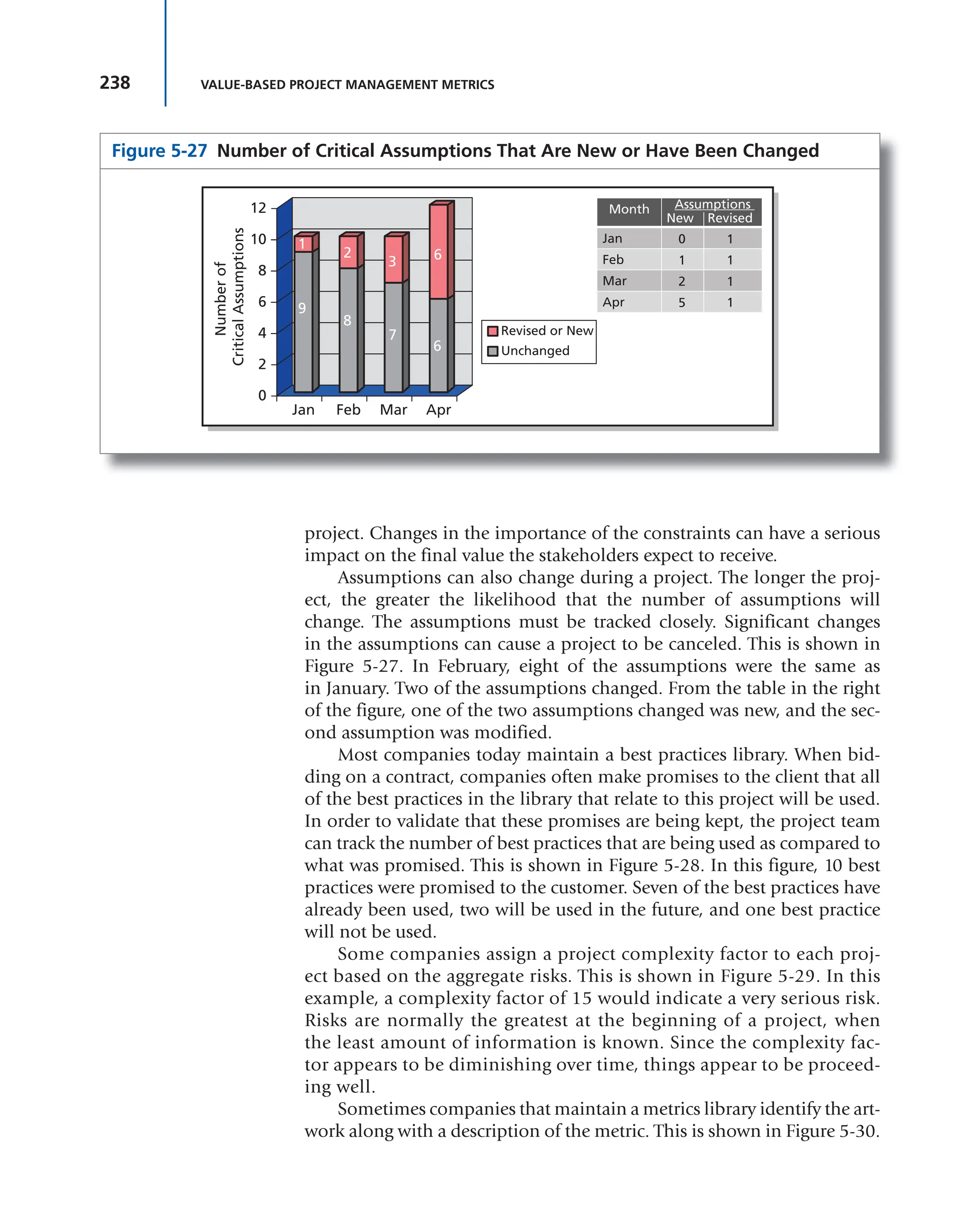
ated graphic we refer to as the project quad. (See Figure 3-9.)
Figure 3-9 Project Quad
1
CDI PMO
Project Title
Sponsor:________________ PM:_________________
Report Out Date:_________
Project Overview:
Business Goal(s):
Start Date:
Approved Budget:
Current Status (R, Y, G):
Issues:
Schedule: Budget:
Scope: Objectives:
Current State:
Project Phase:
% Complete:
Dates:
Toll Gate Plan Estimate Actual
TG-1
TG-2
TG-3
TG-4
Next Steps:
1.
2.
3.
4.
117
3.18 CHURCHILL DOWNS INCORPORATED’S PROJECT PERFORMANCE MEASUREMENT APPROACHES
As our processes matured, so did the desire for and use of project-
specific progress information. Since the initial Green/Yellow/Red project
health indicators were subjective (however, valuable at the time), we had
a need for more quantifiable performance and progress metrics. The proj-
ect quad is divided into four intuitive sections that provide an executive
summary level of information.
Quad Sections
I. Project Overview: This section provides project charter level infor-
mation on the quantifiable business objectives, work authorization
date, approved capital budget, and the standard project health indi-
cator (now less subjective).
II. Current State: This section provides a quick reference for project prog-
ress through the defined Toll Gates and progress according to plan. The
variances are immediately obvious and frequently initiate the discus-
sion necessary to remove barriers to progress. Figure 3-10 is a training
document we use to provide a high-level overview of the Toll Gates.
Figure 3-10 Toll Gate Overview
1
CDI PMO
What Are the Toll Gates?
Define Reqmts Design Build Verify Launch
TG-1 TG-2 TG-3 TG-4
• Definition
• Scope
• Team
• Business
Objectives
• Func. Spec • Tech Design
• Make vs, Buy
• Set Budget
• Set Timeline
(by TG)
• Staff Coding
Team
• Code/Implement
• Unit Testing
• System Testing
• Integration
Testing
• Launch Readiness
• User Acceptance
Testing
• Launch
• Monitor
• Sponsor Acceptance
• Project Closure
118
Figure
3-11
Toll
Gate
2
Checklist
PROJECT
NAME:
PROJECT
NUMBER:
EXECUTIVE
SPONSOR:
BUSINESS
SPONSOR:
IT
SPONSOR:
PM:
ANSWER
ANSWER
DESIGN
BUILD
Can
we
design
&
develop
a
solution
to
meet
the
requirements?
Are
we
ready
for
business
user
acceptance
testing?
What
is
the
IT
solution
and
it’s
ling
term
supportability?
Do
we
have
the
resources
to
get
the
job
done?
How
will
we
address
any
functionality
gaps?
Do
we
have
a
well
defined
testing
strategy/plans
including
Did
we
translate
all
the
business
requirements
into
detailed
technical
specifications?
Code
Reviews
&
unit
testing?
Do
we
have
a
firm
project
plan
with
commit-
Do
we
still
have
business
buy
in?
ment
from
all
parties?
Integration
testing
What
about
scope,
budget,
CTQs,
and
Benefits?
User
acceptance
testing?
Piolet
testing?
Does
the
design
ensure
we
will
meet
out
CTQs?
Did
the
testing
show
that
we
can
meet
our
CTQs?
How
will
we
commercialize?
Approvals
Project
Manager
IT
Sponsor
Business
Sponsor
Date
Date
Date
Performance
and
load
testing?
119
Figure
3-12
Project
Toll
Gate
Dashboard
PROJECT
NAME
STATUS
TOLL
GATE
1
TOLL
GATE
2
TOLL
GATE
3
TOLL
GATE
4
NOTES
/
CRITICAL
ISSUES
Plan
Estimate
Actual
Plan
Estimate
Actual
Plan
Estimate
Actual
Plan
Estimate
Actual
Enterprise
Ticketing
Solution
G
Enterprise
Vault
Hold
Fair
Grounds
OTB
Failover
Testing
G
Network
Refresh
Hold
Epiphany
Service
R
CDI
Video
Teleconferencing
G
Youbet
Merger
Program
G
Enterprise
Printing
Analysis
Y
CDI
Webex
Services
G
Twinspires
Call
Center
Expansion
G
Hullabalou
&
Ticketmaster
Interface
G
Peak-10
Clean-up
G
Hullabalou
Mobile
App
G
Digital
Asset
Management
G
FGRC
Oasis
Upgrade
G
SABO
Derby
Invitation
Process
Enhancements
G
Avamar
System
Training
G
120 METRICS
III. Issues: The project manager uses this section to provide bulletized
statements about barriers to either progress or meeting the approved
business objectives.
IV. Next Steps: This section is used to either identify the next milestones
or for recommendations to bring performance back in line with the
plan.
In order to support the Toll Gate process and facilitate the discus-
sions necessary for accurate reporting and decision making, we use a
standard list of questions that project managers must address as they
move through the gates. Naturally, each question does not apply to each
project and there is an iterative nature to many of the questions; however,
the overall structure has proven effective for ushering projects from initia-
tion to implementation. Figure 3-11 is the Toll Gate 2 checklist.
The nature of CDI’s business makes delivery dates the primary con-
straint for the majority of our projects because of race meet openings
dates for each track, marquee racing events (such as the Kentucky Derby),
concerts, etc. During our biweekly project portfolio reviews, we use a one-
page portfolio dashboard with summary-level data consisting primarily
of Toll Gate delivery dates. This dashboard is used to drill down into the
quads for specific projects that require additional discussion to facilitate
decision making. Figure 3-12 illustrates the project dashboard used to
facilitate the project reviews with the leadership team.
121
People tend to use the words “metrics” and “key performance indicators
(KPIs)” interchangeably. Unfortunately, they mean different things. This
chapter discusses the differences as well the role of KPIs in project man-
agement. At the end of the chapter is a white paper that provides a good
summary of the information discussed in the chapter.
CHAPTER
OVERVIEW
CHAPTER
OBJECTIVES
4 KEY PERFORMANCE INDICATORS
■ To understand the differences between metrics and KPIs
■ To understand that KPIs are controllable factors
■ To understand how to use KPIs correctly
■ To understand the characteristics of a KPI
■ To understand the components of a KPI
■ To understand the categories of KPIs
■ To understand the issues with KPI selection
KEY WORDS
4.0 INTRODUCTION
As stated in previous chapters, part of the project manager’s role is to
understand what the critical metrics are that need to be identified, mea-
sured, reported, and managed so that the project will be viewed as a suc-
cess by all of the stakeholders, if possible. The term “metric” is generic,
whereas a key performance indicator (KPI) is specific. KPIs serve as
early warning signs that, if an unfavorable condition exists and is not
addressed, the results could be poor. KPIs and metrics can be displayed
in dashboards, scorecards, and reports.
■ Actionable characteristics
■ Critical success factors (CSFs)
■ KPI owner
■ Lagging indicators
■ Leading indicators
■ Relevant characteristics
■ SMART rule
■ Stakeholder classification
Project Management Metrics, KPIs, and Dashboards: A Guide to
Measuring and Monitoring Project Performance, Third Edition
By Harold Kerzner
Copyright © 2017 by International Institute for Learning, Inc., New York, New York
122 KEY PERFORMANCE INDICATORS
Defining the correct metrics or KPIs is a joint venture of the project
manager, client, and stakeholders and is a necessity in order to get stake-
holder agreement. KPIs give everyone a clear picture of what is important
on the project. One of the keys to a successful project is the effective and
timely management of information, including the KPIs. KPIs give project
managers information to make informed decisions and reduce uncer-
tainty by managing risks.
Getting stakeholders’ agreement on the KPIs is difficult. If stakehold-
ers have 50 metrics to select from, they will somehow justify the need for
all 50 of them. If they are shown 100 metrics, they will find a reason why
all 100 should be reported. It is difficult to select from the metrics library
those critical metrics that can function as KPIs.
For years, metrics and KPIs were used primarily as part of business
intelligence (BI) systems. When applied to projects, KPIs answer this
question: What is really important for different stakeholders to monitor
on the project? In business, once a KPI is established, it becomes difficult
to change as enterprise environmental factors change for fear that histori-
cal comparison data will be lost. Benchmarking industry KPIs, however,
is still possible because the KPIs are long term. In project management,
given of the uniqueness of projects, benchmarking is more complex
because of the relatively short life span of the KPIs. In both business
applications and projects, however, project managers assume that, if the
KPI targets are being met or exceeded favorably, value is being added to
the business or the project.
4.1 THE NEED FOR KPIs
Most often, items that appear in the dashboards are elements that both
customers and project managers track. These items are referred to as KPIs.
According to Wayne W. Eckerson:
A KPI is a metric measuring how well the organization or an individual
performs an operational, tactical or strategic activity that is critical for
the current and future success of the organization.1
Although Eckerson’s comment is more appropriate for business-
oriented than for project-oriented metrics, the application to a project
environment still exists. KPIs are high-level snapshots of how a project is
progressing toward predefined targets. Some people confuse a KPI with a
leading indicator. A leading indicator is actually a KPI that measures how
the work done now will affect the future. KPIs can be treated as indicators
but not necessarily leading indicators.
1 Wayne W. Eckerson, Performance Dashboards: Measuring, Monitoring and Managing Your
Business (Hoboken, NJ: John Wiley & Sons, 2006), p. 294.
123
4.1 THE NEED FOR KPIs
SITUATION: By the end of the second month of a 12-month project, the
cost variance indicated that the project was over budget by $40,000.
The client then believed that if this continued until the end of the
project, the final result would be a cost overrun of $240,000. The cli-
ent became irate and called for a clear explanation as to why we were
heading for a $240,000 cost overrun.
Although some metrics may appear to be leading indicators, care
must be taken as to how they are interpreted. The misinterpretation of a
metric or the mistaken belief that a metric is a leading indicator can lead
to faulty conclusions.
KPIs are critical components of all earned value measurement sys-
tems. Terms such as “cost variance,” “schedule variance,” “schedule
performance index,” “cost performance index,” and “time/cost at com-
pletion” are actually KPIs if used correctly but not always referred to as
such. The need for these KPIs is simple: What gets measured gets done!
If the goal of a performance measurement system is to improve effi-
ciency and effectiveness, then the KPI must reflect controllable factors.
There is no point in measuring an activity if the users cannot change
the outcome.
For more than four decades, the only KPIs considered were time and
cost or derivatives of time and cost. Today, it is realized that true project
status cannot be measured from just time and cost alone. Therefore, the
need for additional KPIs has grown. Sometimes several metrics and KPIs
can be rolled up into a single KPI. As an example, a customer satisfaction
KPI can be a composite of time, cost, quality, and effective customer com-
munications. KPIs are often derived from formulas on how to combine
these other metrics into a single KPI that may be specific and/or benefi-
cial to a particular company.
With some metrics and KPIs, the lack of data may be good. An
example is safety KPIs. However, if data is needed, then we could use the
following:
■ Number of days between accidents
■ Accident rate (i.e., accidents per unit time period)
What is and is not a KPI must be defined by individual decisions
unique to that project. Project managers must explain to the stake-
holders the differences between metrics and KPIs and why only the
KPIs should be reported on dashboards. As an example, metrics focus
on the completion of work packages, achievement of milestones, and
accomplishment of performance objectives. KPIs focus on future out-
comes, and this is the information stakeholders need for decision mak-
ing. Simply stated, with metrics, users often get bogged down looking
at what happened in the past. With KPIs, users figure out how to use
this data for decision making in the future. Neither metrics nor KPIs can
124 KEY PERFORMANCE INDICATORS
truly predict that the project will be successful, but KPIs provide more
accurate information on what might happen in the future if the existing
trends continue. Both metrics and KPIs provide useful information, but
neither can tell users what action to take or whether a distressed project
can be recovered.
KPIs have been used in a variety of industries and for specialized
purposes, such as:
■ Construction
■ Maintenance
■ Risk management
■ Safety
■ Quality
■ Sales
■ Marketing
■ Information technology (IT)
■ Supply chain management
■ Nonprofit organizations
The fastest-growing area for research in
metrics appears to be IT. The risk of project
failure seems to grow exponentially with the
increase in the size of the IT project. Capers
Jones, in his book Assessment and Control of
Software Risks (Yourdon Press, 1994), stated
that the majority of project failures in IT seem
to be the result of inaccurate metrics and inad-
equate measurement techniques. More people
today, this author included, agree with Jones’s
observations. Sometimes the only difference
between a complete success and a complete fail-
ure is whether or not we correctly recognize the early warning signs in
the metrics.
In IT, commonly used KPIs include:
■ Code: Number of lines of code
■ Language understandability: Language and/or code is easy to under-
stand and read
■ Movability/immovability: The ease by which information can be
moved
■ Complexity: Loops, conditional statements, and so on
■ Math complexity: Time and money needed to execute algorithms
■ Input/output understandability: How difficult it is to understand the
program
■ Antivirus and spyware: Percentage of systems with the latest updates
■ Repairs: Mean time to make system repairs
TIP The project manager must explain to the
dashboard users what is and is not a leading indi-
cator and how the metrics should be interpreted.
TIP Although KPIs reflect controllable factors,
not all unfavorable situations can be completely
corrected. Stakeholders must be made aware of
this fact.
125
Once the stakeholders understand the need for correct KPIs, other
questions must be discussed, including:
■ How many KPIs are needed?
■ How often should they be measured?
■ What should be measured?
■ How complex will the KPI become?
■ Who will be accountable for the KPI (i.e., who owns the KPI)?
■ Will the KPI serve as a benchmark?
Simply because stakeholders are interested in metrics/KPIs and dash-
boards does not mean that they will understand what they are viewing. It
is imperative that stakeholders understand the information on the dash-
boards and draw the correct conclusions. The risk is that stakeholders may
not understand the metric, then draw the wrong conclusion and lose faith
in the metrics concept. Getting back lost faith in a concept may take a great
deal of time and become costly. Therefore, during the first few months of
using metrics and dashboards, it is imperative that the project manager
periodically debriefs each stakeholder to make sure he or she understands
what is being viewed and that each is arriving at right conclusions.
We stated previously that what gets measured gets done and that it
is through measurement that a true understanding of the information is
obtained. If the goal of a metric measurement system is to improve effi-
ciency and effectiveness, then the KPI must reflect controllable factors.
There is no point in measuring an activity or a KPI if the users cannot
change the outcome. Such KPIs would not be acceptable to stakeholders.
Working with stakeholders is challenging. There are complexities
that must be overcome such as:
■ Getting stakeholders to agree on the KPIs maybe difficult, even if the
stakeholders understand KPIs and possess a reasonable level of matu-
rity in project management.
■ Before agreeing to provide KPI data to a stakeholder, determine if the
KPI data is in the system or needs to be collected.
■ The cost, complexity, and timing for obtaining the data must be
determined.
■ The risks of information system changes and/or obsolescence in some
of the organizational process assets that can affect the KPI data collec-
tion over the life of the project.
■ Some KPIs may not appear until well into the project; over time, the
stakeholders may request that additional KPIs be included in the
system.
There are two other critical issues that project managers need to
consider. First, if the project manager maintains multiple informa-
tion systems, a measurement can appear and be treated as a KPI in one
4.1 THE NEED FOR KPIs
126 KEY PERFORMANCE INDICATORS
information system but be recognized as a simple metric in another. As
an example, maintaining the project’s profit margins might be a simple
metric in the project manager’s information system but a KPI in the cor-
porate information system. Stakeholders would not be provided with
this metric.
The second issue involves the contractors
hired. If the project manager hires consultants
and contractors to assist in the management of
the project, they may bring with them their own
project management methodology, metrics, and
KPIs. Project managers must make sure that the
information they report is compatible with the
project managers’ business needs, especially if
this information will be presented to the stake-
holders as well. The contractor’s definition of a
KPI may not be the same as the project man-
ager’s definition.
4.2 USING THE KPIs
The ultimate purpose of a KPI is to identify what needs to be done
to improve performance and keep the strategy on track. If measure-
ments are made over short time blocks, then the team can react quickly
to correct mistakes. KPIs are quantifiable measures that are agreed
to beforehand that reflect critical success factors (CSFs) of an orga-
nization or a project. They measure progress toward organizational
goals and strategic importance. It is a waste of precious time select-
ing and then tracking KPIs that cannot be controlled. As an exam-
ple, a blood pressure monitor tells if blood pressure is too high (or
too low), but it does not tell the doctor what to do to bring it down.
KPIs help users reduce uncertainty in order to make better decisions.
KPIs lead to proactive project management. Metrics are generic and
imply any type of top-down measurement, whereas KPIs are bottom-
up measurements. Qualitative measurements of metrics and KPIs can
also be used and should be treated as "degrees" of quantitative mea-
surements. Eventually, qualitative measurements become quantitative
measurements.
KPIs must be agreed to so that everyone is on the same page. This
requires answering the following:
■ Are there systems in place for creating the KPIs?
■ Are there systems in place for monitoring and reporting the KPIs?
■ Are there systems in place for taking action when necessary?
■ Will corrective action be done using collaborative problem solving?
TIP KPIs in one industry may not be transfer-
able to another industry. Even in the same industry,
KPIs may be used differently in each company.
TIP KPI measurement techniques must be
explained to the stakeholders to get their buy-in
and approval.
127
4.2 USING THE KPIs
Perhaps the most important attribute of a KPI is its relationship to
“actionable.” KPIs indicate that some action may be necessary to correct
a bad situation or to take advantage of an opportunity. Unfortunately,
often the people who see the KPIs understand what action should be
taken but are not empowered to take action. The solution is to make sure
that the KPIs appear on the dashboards of those who have the authority
to take the appropriate steps. However, there are always situations where
the viewers may fear taking action because of their beliefs and attitudes,
and they may then believe that a problem does not exist, at least for now.
The result can be a sacrifice of the future for the present. Even if the proj-
ect manager fails to influence the behavior of current leadership, the KPIs
may influence the behavior of future leadership.
The purpose of a KPI is to track performance measures that track
changes toward a target. The data in the KPIs can bounce around in each
reporting period. Before taking action on an isolated data point, the proj-
ect manager should examine whether a trend can be identified.
Although most companies use metrics and perform measurements,
they seem to have a poor understanding of what constitutes a KPI for
projects and how they should be used. Some general principles regarding
the use of KPIs are listed next.
■ KPIs are agreed to beforehand and reflect the CSFs on the project.
■ KPIs indicate how much progress has been made toward the achieve-
ment of the project’s targets, goals, and objectives.
■ KPIs are not performance targets.
■ The ultimate purposes of a KPI are the measurement of items directly rele-
vant to performance and the provision of information on controllable fac-
tors appropriate for decision making that will lead to positive outcomes.
■ Good KPIs drive change but do not prescribe a course of action. They
indicate how close a project is to a target but do not indicate what must
be done to correct deviations from the target.
■ KPIs assist in the establishing of objectives to be targeted with the ulti-
mate purpose of either adding value to the project or achieving the
prescribed value.
■ KPIs force users to look at the future, whereas metrics alone may allow
users to get bogged down looking at history.
Some people argue that the high-level purposes of a KPI are to
encourage effective measurement. In this regard, the three high-level pur-
poses are to obtain measurements that lead to:
1. Motivation of the team
2. Compliance with use of organizational process assets and alignment
to business objectives
3. Performance improvements and the capturing of lessons learned and
best practices
128 KEY PERFORMANCE INDICATORS
Some companies post KPI information on bulletin boards, in the
company cafeteria, on the walls of conference rooms, or in company
newsletters as a means of motivating the organization by showing prog-
ress toward that target. However, unfavorable KPIs can have an adverse
effect on morale.
4.3 THE ANATOMY OF A KPI
Some metrics, such as project profitability, can tell users if things look
good or bad but do not necessarily provide meaningful information on
what must be done to improve performance. Therefore, a typical KPI
must do more than just function as a metric. If KPIs are dissected, the
following becomes clear:
■ KEY = A major contributor to the success or failure of the project. A KPI
metric is therefore only “key” when it can make or break the project.
■ PERFORMANCE = A metric that can be measured, quantified,
adjusted and controlled. The metric must be controllable to improve
performance.
■ INDICATOR = Reasonable representation of present and future
performance.
A KPI is part of a measurable objective. Defining and selecting the
KPIs are much easier if the CSFs are defined first. KPIs should not be
confused with CSFs. CSFs are things that must be in place to achieve an
objective. A KPI is not a CSF but may provide a leading indication that
the CSF can be met.
Selecting the right KPIs and the right number of KPIs will:
■ Allow for better decision making
■ Improve performance on the project
■ Help identify problem areas faster
■ Improve customer–contractor–stakeholder relations
David Parmenter defines three categories of metrics:
1. Results indicators (RIs): What have we accomplished?
2. Performance indicators (PIs): What must we do to increase or meet
performance?
3. Key performance indicators (KPIs): What are the critical perfor-
mance indicators that can drastically increase performance or accom-
plishment of the objectives? 2
2David Parmenter, Key Performance Indicators (Hoboken, NJ: John Wiley & Sons, 2007), p. 1.
129
4.4 KPI CHARACTERISTICS
Most companies use an inappropriate mix
of the three categories and call them all KPIs.
Having too many KPIs can slow down projects
because of excessive measurements and report-
ing requirements. Too many can also blur users’
vision of actual performance. Too few can likewise cause delays because
of the lack of critical information. Typically, project managers end up
with too many rather than too few KPIs.
The number of KPIs can vary from project to project, and that num-
ber may be affected by the number of stakeholders. Some people select
the number of KPIs based on the Pareto principle, which states that
20 percent of the total indicators will have an impact on 80 percent of the
project. David Parmenter states that the 10/80/10 rule is usually applied
when selecting the number of KPIs:3
■ RIs: 10
■ PIs: 80
■ KPIs: 10
Typically, between 6 and 10 KPIs are standard. Factors influencing
the number of KPIs include:
■ The number of information systems that the project manager uses (i.e.,
one, two, or three)
■ The number of stakeholders and their reporting requirements
■ The ability to measure the information
■ The organizational process assets available to collect the information
■ The cost of measurement and collection
■ Dashboard reporting limitations
4.4 KPI CHARACTERISTICS
The literature abounds with articles defining the characteristics of metrics
and KPIs. All too often, authors use the “SMART” rule as a means of iden-
tifying the characteristics:
S = Specific: The KPI is clear and focused toward performance targets or
a business purpose.
M = Measurable: The KPI can be expressed quantitatively.
A = Attainable: The targets are reasonable and achievable.
R = Realistic or relevant: The KPI is directly pertinent to the work done
on the project.
T = Time-based: The KPI is measurable within a given time period.
TIP KPIs can change over the life of a project,
but CSFs usually remain the same. Changing CSFs
in midstream can be devastating.
3 Ibid., p. 9.
130 KEY PERFORMANCE INDICATORS
The SMART rule was originally developed
to establish meaningful objectives for projects
and later adapted to the identification of metrics
and KPIs. Although the use of the SMART rule
does have some merit, its applicability to KPIs is
questionable.
The most important attribute of a KPI may be that it is actionable. If
the trend of the metric is unfavorable, then the users should know what
action is necessary to correct the unfavorable trend. The user must be able
to control the outcome. This is a weakness when using the SMART rule to
select KPIs.
Wayne Eckerson has developed a more sophisticated set of charac-
teristics for KPIs. The list is more appropriate for business-oriented KPIs
than project-oriented KPIs, but it can be adapted for project management
usage. Table 4-1 shows Eckerson’s Twelve Characteristics.
Accountability
An actionable KPI implies that an individual or group exists who “owns”
the KPI, is held accountable for its results, and knows what to do when
performance declines. Without accountability, measures are meaningless.
TIP Try to educate the stakeholders that there
are limits to the number of KPIs that will be
reported. This should happen prior to the actual
KPI selection process.
TABLE 4-1 12 Characteristics of Effective KPIs
1. Strategic. Performance metrics focuses on the outcome you want to achieve.
2. Simple. KPIs should be straightforward and easy to understand, not based on complex indexes that users do
not know how to influence directly.
3. Owned. Every KPI is “owned” by an individual or group on the business side who is accountable for its
outcome.
4. Actionable. KPIs are populated with timely, actionable data so users can intervene to improve performance
before it is too late.
5. Timely. The KPI can be updated frequently so performance can be improved if intervention is needed.
6. Referenceable: The users can relate back to the origins of the use of the metric.
7. Accurate. The performance metric data can be measured and reported with reasonable accuracy.
8. Correlated. The KPI can be used to drive the desired business outcome.
9. Game-proof. Frequent testing and analysis on the KPI can be conducted so that the data is realistic and not
fudged or circumvented due to laziness.
10. Aligned. KPIs are always aligned with corporate strategy and objectives.
11. Standardized. Everyone agrees on the definition and meaning of the KPI. KPIs are based on standard defini-
tions, rules, and calculations so they can be integrated across dashboards throughout the organization.
12. Relevant. KPIs gradually lose their impact over time, so they must be periodically reviewed and refreshed.
Source: Wayne W. Eckerson, Performance Dashboards: Measuring, Monitoring and Managing Your Business (2nd
ed.) (Hoboken, NJ: John Wiley & Sons, 2011), pp. 209−212.
Pages 130−133 are adapted from Eckerson, Performance Dashboards (Hoboken, NJ: John
Wiley & Sons, 2006), pp. 201–204.
131
4.4 KPI CHARACTERISTICS
Thus, it is critical to assign a single business owner to each KPI and make
it part of his or her job description and performance review. It is also
important to train users to interpret the KPIs and how to respond. Often
this training is best done on the job by having veterans transfer their
knowledge to newcomers. Some companies attach incentives to metrics,
which always underscores the importance of the metric in the minds of
individuals. However, just publishing performance scores among peer
groups is enough to get most people’s competitive juices flowing. It is
best to assign accountability to an individual or small group rather than
to a large group, as the sense of ownership and accountability for the
metric becomes diffused in large groups.
Empowered
Companies also need to empower individuals to act on the information
in a performance dashboard. This seems obvious, but many organizations
that deploy performance dashboards hamstring workers by circumscrib-
ing the actions they can take to meet goals. Companies with hierarchical
cultures often have difficulty here, especially when dealing with front-
line workers whose actions they have historically scripted. Performance
dashboards require companies to replace scripts with guidelines that give
users more leeway to make the right decisions.
Timely
Actionable KPIs require right-time data. The KPI must be updated fre-
quently enough so the responsible individual or group can intervene to
improve performance before it is too late. Operational dashboards usu-
ally do this by default, but many tactical and strategic dashboards do not.
Many of these latter systems contain only lagging indicators of perfor-
mance and are updated only weekly or monthly. These types of perfor-
mance management systems are merely electronic versions of monthly
operational review meetings, not powerful tools of organizational change.
Some people argue that executives do not need actionable informa-
tion because they primarily make strategic decisions for which monthly
updates are good enough. However, the most powerful change agent in
an organization is a top executive armed with an actionable KPI.
Trigger Points
Effective KPIs sit at the nexus of multiple interrelated processes that
drive the organization. When activated, these KPIs create a ripple effect
throughout the organization and produce stunning gains in performance.
For instance, late planes affect many core metrics and processes at
airlines. Costs increase because airlines have to accommodate passen-
gers who miss connecting flights; customer satisfaction declines because
132 KEY PERFORMANCE INDICATORS
customers dislike missing flights; worker morale slips because workers
have to deal with unruly customers; and supplier relationships are strained
because missed flights disrupt service schedules and lower quality.
When an executive focuses on a single, powerful KPI, it creates a rip-
ple effect throughout the organization and substantially changes the way
an organization carries out its core operations. Managers and staff figure
out ways to change business processes and behaviors so that they do not
receive a career-limiting memo from the chief executive.
Easy to Understand
KPIs must be understandable. Employees must know what is being mea-
sured, how it is being calculated, and, more important, what they should
do (and should not do) to affect the KPI positively. Complex KPIs that
consist of indexes, ratios, or multiple calculations are difficult to under-
stand and, more important, are not clearly actionable.
However, even with straightforward KPIs, many users struggle to
understand what the KPIs really mean and how to respond appropriately.
It is critical to train individuals whose performance is being tracked and
follow up with regular reviews to ensure they understand what the KPIs
mean and know the appropriate actions to take. This level of supervision
also helps spot individuals who may be cheating the system by exploiting
unforeseen loopholes.
It is also important to train people on the targets applied to metrics.
For instance, is a high score good or bad? If the metric is customer loyalty,
a high score is good, but if the metric is customer churn, a high score is
bad. Sometimes a metric can have dual polarity, that is, a high score is
good until a certain point and then it turns bad. For instance, a telemar-
keter who makes 20 calls per hour may be doing exceptionally well, but
one who makes 30 calls per hour is cycling through clients too rapidly
and possibly failing to establish good rapport with callers.
Accurate
It is difficult to create KPIs that accurately measure an activity. Sometimes,
unforeseen variables influence measures. For example, a company may see
a jump in worker productivity, but the increase is due more to an uptick
in inflation than internal performance improvements. This is because the
company calculates worker productivity by dividing revenues by the total
number of workers it employs. Thus, a rise in the inflation rate artificially
boosts revenues—the numerator in the metric—and increases the worker
productivity score even though workers did not become more efficient
during this period.
133
4.4 KPI CHARACTERISTICS
Also, it is easy to create metrics that do not accurately measure the
intended objective. For example, many organizations struggle to find a
metric to measure employee satisfaction or dissatisfaction. Some use sur-
veys, but some employees do not answer the questions honestly. Others
use absenteeism as a sign of dissatisfaction, but these numbers are skewed
significantly by employees who miss work to attend a funeral, care for a
sick family member, or stay home when daycare is unavailable. Some
experts suggest that a better metric, although not a perfect one, might be
the number of sick days taken since unhappy employees often take more
sick days than satisfied employees.
Relevant
A KPI has a natural life cycle. When first introduced, the KPI energizes the
workforce and performance improves. Over time, the KPI loses its impact
and must be refreshed, revised, or discarded. Thus, it is imperative that
organizations continually review KPI usage.
Performance dashboard teams should track KPI usage automatically,
using system logs that capture the number of users and queries for each
metric in the system. The team should then present this information to
the performance dashboard steering committee, which needs to decide
what to do about underused metrics.
Business or financial metrics are usually the results of many fac-
tors, and, therefore, it may be difficult to isolate what must be done to
implement change. For project-oriented KPIs, the next six characteris-
tics, which are discussed in more depth in Section 4.6, may very well be
sufficient:
1. Predictive: The KPI is able to predict the future of this trend.
2. Measurable: The KPI can be expressed quantitatively.
3. Actionable: The KPI triggers changes that may be necessary for cor-
rective action.
4. Relevant: The KPI is directly related to the success or failure of the
project.
5. Automated: Reporting minimizes the chance of human error.
6. Few in number: Only what is necessary.
All of these six characteristics are not equal. It may be necessary to
prioritize these characteristics based upon the project’s requirements and
stakeholders’ needs.
Aaron Hursman has written an interesting article entitled “How Do
You Spell KPI?,” which is reproduced in the next section.
134 KEY PERFORMANCE INDICATORS
Seven Strategies for Selecting Relevant Key
Performance Indicators
Conventional wisdom tells us a few things about establishing KPIs. It
goes something like this: Determine your corporate goals. Identify met-
rics to grade progress against those goals. Capture actual data for those
metrics. Jam metrics into scorecards. Jam scorecards down the throats of
employees. Cross fingers. Hope for the best.
In an episode of the television series Undercover Boss, Waste
Management chief operating officer Larry O’Donnell walked in the
shoes of his employees for a few days (under the guise of an alternate
identity). He discovered the effects his KPIs had on employees first-
hand. Specifically, a productivity and efficiency KPI convinced one of
his “coworkers for a day” that she needed to urinate in a coffee cup to
satisfy her production quota. As a truck operator, stopping to find and
use the restroom adversely affected her performance grades. Therefore,
she decided it was more efficient to use a coffee cup she kept with her in
the vehicle. O’Donnell later acknowledged that this was not exactly what
he had in mind when he selected the KPI.
Something strange happened here but not uncommon. Well-
intentioned executives attempted to establish goals and track their prog-
ress. This is perfectly reasonable. In fact, the intent is downright reasonable.
Unfortunately, the events that follow frequently turn into a twisted game
of “Telephone.” Many would argue the cause for this scenario was a fail-
ure in communication. Maybe the communication plan was ineffective
or maybe the organization was just incapable of supporting the specifica-
tions of the plan. Worse yet, maybe there was no plan at all.
Although a well-defined and executed communication plan is essen-
tial, that alone does not solve execution problems related to establishing
KPIs. In reality, communication problems are merely friction. Although
that friction can be strong enough to prevent an intended execution,
reducing or clearing that friction alone does not guarantee success.
Effective KPIs share some core attributes. Many organizations have
adopted a specific approach for establishing KPIs. It is called the SMART
Criteria technique, and, in a nutshell, it requires that a KPI must satisfy
these five criteria: (S)pecific, (M)easurable, (A)ttainable, (R)elevant, and
(T)ime-bound. “S-M-A-R-T” is a fine way to spell KPI as this a solid frame-
work for making decisions about KPIs. Unfortunately, organizations still
find themselves unsatisfied with the results due to a misinterpretation
of the term “relevant.” Usually, this is narrowly defined as “relevant to
company goals,” but what about the individual? If KPIs only become effec-
tive when individuals throughout the organization are aware of them
The section “Seven Strategies for Selecting Relevant Key Performance Indicators “ is repro-
duced with permission of Slalom Consulting and Aaron Hursman. Aaron Hursman, user
experience lead for nGame, http://aaron.hursman.com.
135
4.4 KPI CHARACTERISTICS
and working toward improving them, they will only achieve widespread
adoption when the metrics are made relevant to the individual. Without
relevancy, organizations are left to bet on communication alone to con-
vince, persuade, and cajole others into acceptance.
Putting the R in KPI
By making KPIs individually relevant, you can begin to reach individuals
capable of having a positive impact on those KPIs; keeping them moti-
vated to perform well against specific metrics. Fortunately, the journey to
pervasive adoption is straightforward. Leverage these simple strategies
to put the (R)elevancy back into your KPIs.
1. Identify target audiences: How can we select KPIs that are meaning-
ful to others if we know nothing about these people are or even who
they are? It is especially important to identify teams and individu-
als across the organization that have the ability to directly affect the
health of the business. These are usually not the leaders and strate-
gists, but delivery folks executing on and managing the front lines.
To gain initial momentum, it can be helpful to first identify specific
individuals and then extrapolate this list into cross-functional audi-
ence types.
2. Ethnography: Take a holistic approach to studying your people—
observing them in their actual work environment to better appreci-
ate their needs, motivations, goals, desires, constraints and obstacles.
Use research methods like participant observation and contextual
inquiry to gain these insights. If these methods are not feasible, inter-
views and questionnaires can suffice. Focus your research on answer
questions like: Are they driven by financial, intellectual, and/or emo-
tional goals? Are they motivated by fear? This information can then
be used to establish tangible personas that synthesize these attributes.
Personas can serve as powerful communication tools and grounding
mechanisms that aid critical business decisions like selecting KPIs.
3. Identify business rhythms: People and businesses have their sched-
ules and routines. Once key individuals and teams have been iden-
tified, determine the patterns and frequency of their activities. The
SMART Criteria tell us that good KPIs are also (T)ime-bound, so
select metrics that align with these business rhythms.
4. Perform affinity diagramming: An important part of selecting KPIs
is understanding where individual goals and activities are not aligned
with corporate goals and strategy. The prework necessary for this sort
of gap analysis exercise can be accomplished through affinity dia-
gramming. Affinity diagramming (also known as the KJ method) is
an effective technique for efficiently making sense of large quantities
of qualitative data and unstructured content, and is even more effec-
tive when executed as a team. Just write any extracted insights (focus
136 KEY PERFORMANCE INDICATORS
on individual motivations, goals, and activities) about personas on
sticky notes. Then group similar sticky notes together into a num-
ber of physical groups/piles. Next, create groups of groups if pos-
sible. Finally, label the groups (both the original groups and the new
supergroups) with meaningful one- to three-word phrases. Capture
this information electronically, preferably arranged in a spreadsheet
file. Place the supergroup labels across the top of the spreadsheet in
the first row. Place the group labels in separate columns in the sec-
ond row under the supergroup headings. Transfer the words from the
sticky notes to cells under the coordinating group label. Repeat this
exercise, but instead create sticky notes that describe the corporate
goals, strategy, and initiatives. Also, reuse the same group and super-
group labels that were just created instead of creating new labels.
Affinity diagramming for both scenarios is critical to the next strat-
egy, gap analysis.
5. Conduct gap analysis: To move forward, it is crucial that we under-
stand the current state. Misalignment between company and per-
sonal goals can impact effective KPI selections. Use a gap analysis to
uncover any misalignments. Another organization technique, mental
modeling, builds upon the affinity diagramming strategy and clearly
identifies gaps with to a visual representation of its inputs. To build
the mental model, merge the results of the two affinity diagramming
scenarios (individual versus corporate) by copying the results of cor-
porate-focused scenario and pasting them below the results of the
first scenario. Since the labels were reused for the second scenario,
the data should align. Now, although the data points align, the val-
ues indicate visually where the individual and the company deviate.
Each group for each scenario creates a virtual tower of varying height.
Analyze the results of the illustration simply by identifying where
the tower sizes are relatively and significantly unequal. The Mental
Model clearly illustrates when the individual is focused and/or moti-
vated to affect tasks/metrics that are not consistent with corporate
strategy (and vice versa). Knowing this information is extremely
advantageous, as it gives your organization a blueprint of areas to
(1) address from a business process/organization standpoint or (2)
consider and/or target when selecting KPIs.
6. Consider the domain of control: Select KPIs that fall within the
actionable domain of these very key personnel. For example, a large
retail client once described a series of periodic reports that were
packed with pages of metrics, to which the store managers were held
accountable. They were nicknamed “Worry Reports,” because the
reports contained too many metrics that the managers had no ability
to influence. This is where knowing the intimate work–life details
for these individuals is crucial for selecting the right KPIs. These KPIs
should be easy to calculate, clearly defined, and focused in purpose.
Also, they tell should tell a very “rich” story in that they take into
137
4.5 CATEGORIES OF KPIS
consideration a comparable entity (versus budget, forecast, last year,
variance to average, etc.). Selecting KPIs using this criteria increases
clarity, focus, determination, and motivation in the individual.
7. Compensation alignment: This is the ultimate strategy to make
KPIs relevant for an individual. This one is very simple but effective.
Identify metrics that are tied to the compensation (bonus or base) for
an individual. If those metrics are not aligned with corporate goals
or strategy, assess and adjust the compensation model as necessary.
Ultimately, it can be very difficult to consistently motivate individu-
als to work to improve KPIs when they are not rewarded for doing so,
even if the improvement directly benefits the health of the benefits.
In the eyes of the individual, they perceive any such benefit to be
extremely indirect, if any.
8. Follow up: Executing the previous strategies has the beneficial side
effect of a creating a personal relationship. Seeking out someone’s
perspective does wonders for initiative adoption programs, espe-
cially at the delivery levels of the organization. Take advantage of
that momentum and follow up with these individuals on a recurring
basis to continue to fortify those relationships and strengthen the
purpose behind establishing KPIs in the first place.
Take First Prize
Engage. Understand. Empathize. Show Compassion. Achieve corporate
and individual alignment by selecting KPIs that are personally relevant.
Next time you begin selecting KPIs, remember to spell KPI with a capital
R. You may not win any spelling bees, but you will be better positioned
to effectively monitor and improve business performance.
4.5 CATEGORIES OF KPIs
KPIs can be segmented or clustered per industry. They can also be reported
as a group. This is common for business or financial KPIs. Project-based
metrics are treated differently because of their inherent differences from
financial KPIs, as shown previously in Table 3-1. Unlike financial metrics
used for the Balanced Scorecard, project-based metrics can change during
each life cycle phase as well as from project to project. Project-based met-
rics may be highly specific for each project, even in similar industries, and
reported individually rather than as a group. Not all KPIs can be grouped.
As an example, the KPIs shown next are not easily grouped.
■ Percentage of work packages adhering to the schedule
■ Percentage of work packages adhering to the budget
■ Number of assigned resources versus planned resources
■ Percentage of actual versus planned baselines completed to date
138 KEY PERFORMANCE INDICATORS
■ Percentage of actual versus planned best practices used
■ Project complexity factor
■ Customer satisfaction ratings
■ Number of critical assumptions made
■ Percentage of critical assumptions that have changed
■ Number of cost revisions
■ Number of schedule revisions
■ Number of scope change review meetings
■ Number of critical constraints
■ Percentage of work packages with a critical risk designation
■ Net operating margins
Sometimes KPIs are categorized according to what they are intended
to indicate, similar to the metrics categories discussed in Chapter 3:
■ Quantitative KPIs: Numerical values
■ Practical KPIs: Interfacing with company processes
■ Directional KPIs: Getting better or worse
■ Actionable KPIs: Effect change
■ Financial KPIs: Performance measurements
Another means of classification might be leading, lagging, or diag-
nostic indicators or KPIs:
■ Leading KPIs measure drivers for future performance.
■ Lagging KPIs measure past performance.
■ Diagnostic KPIs measure current performance.
Most dashboards have a combination of leading, lagging, and diag-
nostic metrics.
4.6 KPI SELECTION
Identifying KPIs or even establishing a KPI library is easy, but selecting
the right KPIs can be difficult. Sometimes project managers select a KPI
that at first appears to be the perfect metric, then later find out that it is
actually a terrible measurement and leads to faulty conclusions by the
stakeholders.
KPIs should provide some meaningful information for these four
questions usually asked by executives and stakeholders:
1. Where are we today?
2. Where will we end up?
3. Where were we supposed to end up?
139
4.6 KPI SELECTION
4. If necessary, how can we get there in a cost-effective manner with-
out any degradation in the quality of the deliverables or major scope
changes?
KPIs are used for information dissemination and must be compat-
ible with dashboard requirements. Some critical factors that can influ-
ence the selection process are:
■ Size of the dashboard
■ Number of dashboards
■ Number of KPIs
■ Type of audience
■ Audience requirements
■ Audience project management maturity level
Not all team members may understand the need for KPIs. This is
particularly true when using virtual teams that are unfamiliar with KPI
measurement practices. Understanding the importance of a KPI is an
essential part of the selection process:
■ Many things are measurable but not key to the project’s success. KPIs
are key metrics rather than merely metrics.
■ It is important that the number of KPIs be limited so that everyone is
focused on the same KPIs and understands them.
■ Too many KPIs may distract the project team from what is really
important.
■ Good metrics are essential for tracking performance toward goals.
Poor or inaccurate metrics and indicators lead to bad management
decisions.
Without a good understanding of a KPI, project managers may end
up with an improper selection process that works as follows:
■ Everything that is easy to measure and count is identified.
■ Sophisticated dashboards and reporting techniques for everything that
is easy to measure and count are developed.
■ Then project managers struggle to determine what to do with the
information.
Sometimes the selection process may be hindered by factors beyond
the control of the project manager. Reasons for this might happen if the
project:
■ Was bid on at a loss for political reasons
■ Was bid on at a loss with the hope of win-
ning future contracts
TIP Selecting KPIs is easy. Selecting the right
KPIs is difficult.
140 KEY PERFORMANCE INDICATORS
■ Had its estimated budget slashed by man-
agement to win the contract
■ Had an ill-defined statement of work
■ Had a highly optimistic statement of work
The nature of the project together with the
agreed-upon definition of success and the CSFs
determine which KPIs to use. Given the potential
number of stakeholders, as shown in Figure 4-1,
problems can occur if each stakeholder has differ-
ent needs. Some of these problems are listed next.
■ It may be difficult to get customer and stakeholder agreement on the KPIs.
■ Project managers must determine if the KPI data is in the system or
needs to be collected.
■ Project managers must determine the cost, complexity, and timing for
obtaining the data.
TIP Anything can be measured, but perfect
measurements may be unrealistic. Therefore, it
may be impossible to select a perfect set of KPIs.
TIP Buy-in by the stakeholders and the team is
significantly more important than trying to select
the perfect set of KPIs.
Figure 4-1 Typical Stakeholder Classification System
STAKEHOLDERS
COMPETITORS GOVERNMENT
EXECUTIVE
OFFICERS
LINE
MANAGERS
EMPLOYEES UNIONS
LOCAL
COMMITTEES
CUSTOMERS
PUBLIC
CREDITORS
SHARE-
HOLDERS
BANKS
ORGANIZATIONAL
PRODUCT/MARKET
CAPITAL MARKETS
SUPPLIERS
141
4.6 KPI SELECTION
■ Project managers may have to consider the risks of information system
changes and/or obsolescence that can have an impact on KPI data col-
lection over the life of the project.
In a project context, any single metric can be
selected as a KPI for a given project because of
the relative importance of that KPI to the project
manager, client, or stakeholder. For example, the
following four metrics can be viewed as KPIs according to who is doing
the viewing:
1. Project team morale
2. Customer satisfaction
3. Project profitability
4. Performance trends, such as cost performance index (CPI) and sched-
ule performance index (SPI)
It is possible that a given metric will function as a KPI for one stake-
holder but serve as just a simple metric for another. As an example, look
at Table 4-2.
TIP Not all stakeholders will consider each met-
ric to be a KPI.
TABLE 4-2 Converting a Metric to a KPI
METRIC PREDICTIVE QUANTIFIABLE ACTIONABLE RELEVANT AUTOMATED
Number of unstaffed hours Yes Yes Yes Yes Yes
Number or percentage of mile-
stones missed
Yes Yes Yes
Management support hours as
percentage of total labor
Yes Yes Yes
% of work packages on budget Yes Yes Yes
Number of scope changes Yes Yes Yes
Changes in the risk profile Yes Yes Yes Yes Yes
Number or percentage of
assumptions that have changed
Yes Yes
Customer loyalty Yes Yes Yes Yes Yes
Turnover of key personnel,
number or percentage
Yes Yes
% of overtime labor hours Yes Yes Yes
SV Yes Yes
CV Yes Yes
SPI Yes Yes Yes Yes Yes
CPI Yes Yes Yes Yes Yes
142 KEY PERFORMANCE INDICATORS
The columns in Table 4-2 reflect five of the six criteria for a KPI:
predictive, quantifiable, actionable, relevant, and automated. The “yes”
entries in the table are subjective entries made by the project manager
and possibly the team. As stated previously, the “yes” entries can vary
from project to project and for each stakeholder.
The “yes” entries in the table are metrics that may have some of the
characteristics of a KPI, but perhaps not all of the characteristics. For
example:
■ The number of milestones missed may not be actionable because the
project manager may not be able to control this.
■ Likewise, the same holds true for the number or percentage of work
packages on budget, and it is unlikely that this can be used as a predic-
tive tool for future work packages.
■ Customer loyalty falls into all categories as long as all of the stake-
holders are in agreement and a viable measurement approach is
undertaken.
■ Schedule Variance (SV) and Cost Variance (CV) are reasonably good
indicators of the present but not as good as the Cost Performance
Index (CPI) and the Schedule Performance Index (SPI) for predicting
the future.
■ Changes in the risk profile can vary for each project. For a project with
a reasonably low risk, this metric may not be used at all.
■ Turnover of key personnel is certainly of interest to the project manager
but may or may not be of interest to all of the stakeholders. This metric
may function as a KPI for only a selected number of stakeholders.
Therefore, using the criteria for a KPI stated previously, only 5 of
the 14 metrics would be treated as true KPIs and would appear in the
dashboard. The other metrics still may be reported but not necessarily
through a dashboard reporting system.
Unlike business KPIs, which may remain the same for years, project-
based metrics and KPIs can change for a variety of reasons and can have a
short life expectancy. Metrics may be treated as KPIs at various stages of a
project and replace certain KPIs that may no longer be needed or may be
treated as simple metrics for the remainder of the project. When a crisis
occurs, the shifting of a metric to a KPI and back may happen. This can
also happen when there are changes in the stakeholders.
Previously, it was stated that the project manager may be working
with three different information systems. Some of the 14 metrics in Table
4-2 may be treated as KPIs in only one of the information systems, as
shown in Table 4-3. All of the metrics, whether they are treated as KPIs
or not, are of interest to the project manager. Sponsors and stakeholders
143
4.6 KPI SELECTION
TABLE 4-3 Possible Viewers for Each Metric
METRIC PROJECT MANAGER PROJECT SPONSOR STAKEHOLDERS
Number of unstaffed hours Yes Yes Yes
Number or percentage of milestones
missed
Yes Yes Yes
Management support hours as percent-
age of total labor
Yes Yes Yes
Percentage of work packages on budget Yes Yes Yes
Number of scope changes Yes Yes
Changes in the risk profile Yes Yes Yes
Number or percentage of assumptions
that have changed
Yes Yes
Customer loyalty Yes Yes Yes
Turnover of key personnel, number or
percentage
Yes
% of overtime labor hours Yes
SV Yes
CV Yes
SPI Yes Yes Yes
CPI Yes Yes Yes
may be selective in the metrics that they wish to see in their information
system.
Once the KPIs are selected, certain team members must accept own-
ership for the KPIs they use. Depending on the number of KPIs, it may
be advisable to assign a KPI owner to each KPI. However, certain KPIs,
such as customer satisfaction, may not be able to be assigned to a single
KPI owner.
Many companies today are maintaining KPI libraries. The KPI librar-
ies must take into account the fact that KPIs must evolve over time. If a
KPI library exists, then users must ask:
■ Should there be a single owner in the organization for each KPI?
■ Who, in addition to the KPI’s owner, should attend the KPI review
meetings?
144 KEY PERFORMANCE INDICATORS
4.7 KPI MEASUREMENT
KPIs serve no real value if they cannot be measured with any “reasonable”
degree of accuracy. As Warren Buffett stated, “It is better to be approxi-
mately right than to be precisely wrong.” Anything can be measured, but
perfect measurements may be unrealistic. Therefore, it may be impossible
to select a perfect set of KPIs. KPIs function as rough guides rather than
as precise values.
The relatively slow growth in the acceptance of metrics management
for projects can be directly related to a poor understanding of metric
measurement. Project managers always knew what to measure but not
how to measure. Sometimes teams are even allowed to invent their own
measurement techniques, and the result is usually chaos. In the past,
some of the most importance metrics needed for effective governance
were considered to be intangibles. Project managers then refused to look
for ways to measure intangibles, believing that they were immeasurable.
As a result, the wrong projects were selected, the wrong resources were
assigned, and there was misleading status reporting and poor decision
making. Refusing to measure intangibles can give us a false impression of
the true value of the project.
Metrics are needed in order to better understand and, it is hoped,
reduce the uncertainties involved in the project. The word “uncertainty”
has slightly different meanings according to the field of study. In a proj-
ect management environment, uncertainty is a state of having limited
knowledge such that one may not be able to exactly describe the current
or future health of the project. There can be several possible outcomes
based on how work is progressing. Effective use of metrics can provide a
clearer picture of the project’s health and reduce the number of possible
outcomes. Associated with each outcome is a risk, and each risk can have
a favorable or unfavorable consequence. Metrics cannot reduce the risks,
but they can provide the project team, the stakeholders, and the gover-
nance group with sufficient information such that the right decisions can
be made to reduce or mitigate the risks. Therefore, the better the measure-
ment of the metrics, the more informed the decision makers will be, the
better to reduce the possible outcomes and the associated risks.
Measurement can be defined as the quantification of the uncer-
tainties based on some type of observation. Measurement can never
totally eliminate uncertainly. The person making the observation must
find the proper balance between overconfidence and underconfidence
when using the data, especially when reporting the measurements to the
stakeholders. There can be a different impression made on stakeholders
depending on whether the glass is presented as half full or half empty.
Stating that the glass is half full may lead stakeholders to believe that the
glass may eventually get full and the liquid level is rising. Stating that
the glass is half empty may create the illusion that we have lost half of the
liquid in the glass.
145
4.7 KPI MEASUREMENT
Even with sophisticated measurement techniques, uncertainties will
still exist. It is unrealistic to believe that there will ever be perfect infor-
mation and complete certainty for decision making. Even if techniques
existed by which perfect information could be obtained, the cost of the
measurement would probably be prohibitive. Reality forces us to live
with partial information obtained in a cost-effective manner.
The organizational process assets must be capable of capturing the data
necessary to make the measurement. Sometimes the method needed to
capture the data has to be developed as the project progresses. In this case,
all efforts should be made to get a process in place as quickly as possible.
Douglas Hubbard believes that five questions should be asked before
KPIs are established for measurement:
1. What is the decision this KPI is supposed to support?
2. What really is the thing being measured by the KPI?
3. Why does this thing and the KPI matter to the decision being asked?
4. What is known about it now?
5. What is the value to measuring it further?4
Hubbard also identifies four useful measurement assumptions that
should be considered when selecting KPIs:
■ The problem in selecting a KPI is not as unique as one thinks.
■ One has more data than one thinks.
■ One needs less data than one thinks.
■ There is a useful measurement that is much simpler than one thinks.5
Selecting the right KPIs is essential. On most projects, only a few KPIs
are needed. Sometimes too many KPIs are selected, and users end up with
some KPIs that provide little or no information value, and the KPI ends up
being unnecessary or useless in assisting users in making project decisions.
KPIs are generally defined beforehand but may have to evolve as the
project progresses if there are no methods or processes in place to capture
the required data initially. When this happens, the result is usually the
effect of measurement inversion on the KPI selection process:
■ The KPI with the highest information value, especially for decision
making, will be avoided or never measured because of the difficulty of
data collection.
■ KPIs such as time and cost, which are the easiest to measure, will be
selected, and often too much time is spent on these variables, which may
have the least impact on decision making and the project’s final value.
4 Adapted from Douglas W. Hubbard, How to Measure Anything (Hoboken, NJ: John Wiley
& Sons, 2007), p. 43.
5 Ibid., p. 31.
146 KEY PERFORMANCE INDICATORS
Today, numerous measurement techniques exist. A typical list would
include:
■ Observations
■ Ordinal (i.e., four or five stars) and nominal (i.e., male or female) data
tables
■ Ranges/sets of value
■ Simulation
■ Statistics
■ Calibration estimates and confidence limits
■ Decision models (earned value, expected value of perfect information,
etc.)
■ Sampling techniques
■ Decomposition techniques
■ Human judgment
■ Rules and formulas (i.e., 50/50 rule, 80/20 rule, 0/100 rule, % com-
plete, etc.)
Regardless of which measurement technique is selected, arguments
will always exist over sample size, timing of measurements, duration of
measurements, accuracy and precision, who is best qualified to perform
the measurements, and others.
The results of KPI measurements can create conflict if employees
believe that the information will be:
■ Collected on individuals and used against them (e.g., for disciplinary
purposes)
■ Controlled by management
■ Filtered in both content and distribution (e.g., “They show us informa-
tion only when it suits their purposes.”)
■ Used to allocate blame for performance problems6
4.8 KPI INTERDEPENDENCIES
It is almost impossible to determine the status of a project from a single
metric or KPI. As shown in Figure 4-2, metrics are interlocked or related.
For example, assume that metric #1 is the quality or availability of criti-
cal resources, metric #2 is time, and metric #3 is cost. Small changes in
the number of qualified resources can have a significant effect on the
project’s budget and schedule. The effect can be favorable or unfavorable,
depending on whether qualified resources are added or removed.
6 Parmenter, Key Performance Indicators, p. 64.
147
4.8 KPI INTERDEPENDENCIES
Another important factor is the rate of change of the metrics. This
can be seen from the size of the metrics (i.e., wheels) in Figure 4-2. A
small change in metric #1 will cause metric #2 to move faster just to keep
up. Likewise, metric #3 must move faster than metric #1 and #2 to keep
up. In other words, if we lack some critically skilled resources, then the
schedule may slip quickly and overtime may be needed at once to pro-
duce the deliverables.
KPIs are a set of interrelated performance measures that are necessary
to meet the project’s CSFs. Looking at the 14 metrics in Table 4-2, the
project manager may not be able to determine the actual cause of poor
performance or the necessary action to correct the problem. It may be
necessary to look at several interrelated metrics. As an example, consider
the following two possibilities where a “+” sign is favorable and a “–”
sign is unfavorable:
■ SV = + and CV = –
■ SV = – and CV = +
In the first bulleted item, the project manager may have worked over-
time, used higher-salaried workers, or accelerated the schedule. In the
second bulleted item, there may have been insufficient resources on the
project. In either case, it is hard to tell if performance is good or bad.
Now let’s consider another situation:
■ SV = –$100,000
■ CV = – $250,000
Figure 4-2 Metrics Are Related
Metric #3
Metric #2
Metric #1
148 KEY PERFORMANCE INDICATORS
It appears that the situation is bad, but two additional metrics may
offer a different picture:
■ Number of approved scope changes = 34
■ Turnover of critical skilled workers = 9
Combining all four of these KPIs it could be argued that the project
might not be in that much trouble, at least for now.
As another example, consider what happens if project managers try
to determine the status of the project from just one KPI, namely, CV:
■ June: CV = – $10,000
■ July: CV = – $20,000
It looks like the situation has gotten worse, since the unfavorable
variance has doubled from –$10,000 to –$20,000 in one month. On the
surface, this may look bad. But let us assume that in June, EV = $100,000
and in July, EV = $400,000.
If the CV is converted from dollars to percentage using the formula:
CV(%) = CV($)/EV($)
then CV(%) for June was –10%, but CV(%) for July is –5%. In other
words, the situation has actually improved even though the magnitude
of the variance has increased. Several KPIs may have to be considered and
integrated to get an accurate picture of the project’s real status.
4.9 KPIs AND TRAINING
Project managers and team members may need to attend training sessions
on KPI identification, measurement, control, and reporting. Training ses-
sions must include:
■ A comprehensive understanding of KPIs
■ How to identify KPIs
■ How to select the right display for reporting each KPI
■ How to design a project KPI database
■ How to measure each KPI
■ How to decide upon the necessary action, if appropriate, to correct
performance
■ How to update the corporate KPI library
The training should take place prior to the launch of the project. At
the project’s kick-off meeting, the team will then be briefed on:
■ Why KPIs are being introduced
■ How KPIs will be developed
149
4.10 KPI TARGETS
■ How KPIs will be used
■ What KPIs will not be used for7
Care must be taken when launching a training course that the organi-
zation is ready for such a change. The organization must recognize:
■ The value that the course brings to the organization
■ The need for learning effecting measurement techniques
■ The need for metrics to improve performance
If the company already has some form of metrics management
in place, people may be willing to accept and support the training.
Otherwise, the course may be seen as a threat and do more harm than
good. Simply stated, project managers must know the organization’s
maturity level in project management and metrics management before
beginning a training course.
4.10 KPI TARGETS
Words such as “customer satisfaction” and “reputation” have no real use
as metrics unless they can be measured with some precision. Therefore,
we must establish KPI targets, thresholds, and baselines. Targets have the
following properties:
■ Targets represent a set of values against which measurements will be
made.
■ Targets must be realistic and not unnecessarily challenging. Otherwise,
workers might try to circumvent the targets.
■ Targets may require trial-and-error solutions.
■ Targets must not be established in a vacuum.
It must be understood that KPIs are not targets. KPIs represent how
far an important metric is above or below a predefined target. Typical
targets for a KPI might be:
■ Simple quantitative targets
■ Time-based targets: measurements made monthly or during a certain
time interval
■ At-completion targets: measurements made at the completion of work
packages or project completion
■ Stretch targets: become best in class or a target that is greater than spec-
ification requirements
■ Visionary targets well into the future: more repeat business from this client
7 Ibid., p. 129.
150 KEY PERFORMANCE INDICATORS
Stretch targets and visionary targets are often a mix of possible and
impossible outcomes, with the impossible outcomes providing encour-
agement. However, stretch targets can lead to the misinterpretation of
information, as discussed in Section 4.11.
Examples of simple quantitative targets include:
■ A single value (i.e., completion of 20 tests)
■ An upper limit (i.e., ≤ $200,000)
■ A lower limit (i.e., ≥ $100,000)
■ A range of values (i.e., $400,000 ± 10%)
■ A percentage of a specific quantity that may be fixed for the project
(i.e., scrap is less than 5% of material costs)
■ A percentage of a specific quantity that may change (i.e., planning dol-
lars are less than 35% of total labor dollars)
■ Accomplished milestones and deliverables (i.e., must produce and
ship at least 10 deliverables each month)
■ A percentage of a specific activity that may change over the duration of
the project (i.e., planning dollars are not more than 35% of total labor
dollars estimated)
■ Accomplished milestones and deliverables (i.e., must produce and
ship at least 10 deliverables each month)
Figure 4-3 represents a KPI target or boundary box. Normal perfor-
mance is meeting the target ±10%. If the company was more than 20%
below the target, urgent attention would be required.
Figure 4-3 A Boundary Box for a KPI Target Source: Bright Point
Risk of Project Failure
Unfavorable Expectation
Performance Target
Favorably Exceeding Target
Performance
Characteristics
Superior
Normal
Caution
Urgent Attention
Target + 10%
Target – 10%
Target – 20%
151
4.10 KPI TARGETS
It is important to ask stakeholders how much integrity is acceptable
for reporting purposes. In Figure 4-3, the threshold or integrity of ±10%
may result from a joint agreement with the client. Typical questions
might be:
■ Is the target ±5% acceptable?
■ Is the target ±10% acceptable?
■ Are integrity guidelines established in the project’s business case?
■ Are integrity guidelines established as part of the enterprise project
management system?
Some targets are very difficult to establish such as value targets.
Establishing KPIs to identify current and future value is difficult but not
impossible. Value-driven project KPIs can be selected by addressing these
questions:
■ How can I show that the project is creating value for the client?
■ How will the client and the stakeholders perceive the value
measurements?
■ Can I show that the project will also create value for my parent
company?
This topic is discussed in more detail in Chapter 5. Some people argue
that customer satisfaction surveys are value-reflective KPIs. Figure 4-4 rep-
resents a simple customer satisfaction instrument that Mahindra Satyam,
its author, refers to as the Customer Delight Index. Companies use this
index with the belief that customer satisfaction may lead to repeat business.
Figure 4-4 Mahindra Satyam Customer Delight Index Source: © 2010 Mahindra Satyam. All
rights reserved.
SYMBOL MEANING
Data not entered
Dissatisfied
Satisfied
Delighted
152 KEY PERFORMANCE INDICATORS
The colors are important, as is discussed in Chapter 6. The color
green represents something favorable, whereas red indicates something
not so good.
When using these types of KPIs, it is the trend that is important
rather than a single data point. If the trend shows that the customer sat-
isfaction index is getting worse, then templates or checklists may exist
to show what actions the project manager may take to change the trend
to a more favorable indication. The problem is in determining who or
which department has the lead role in the improvement of customer
satisfaction.
4.11 UNDERSTANDING STRETCH TARGETS
Performance measurements are an indication of whether a company
is moving quickly enough toward a target. However, simply because
work is progressing does not mean that work is being accomplished
at the desired rate. The tracking information that is monitored would
be more meaningful if results or accomplishments are measured
rather than the progress along the activities. For example, if workers
can produce 10 units in one day and they have a target of 8 units per
day, then the workers may be performing their tasks at a slow speed.
They are being paid for subpar performance because a poor target was
established.
If the target is 11 units per day, the workers may be motivated to see
if they can perform better than expected. However, if a target of 15 units
per day is established and workers believe that this is unrealistic, they
may be demoralized to the extent that they will produce only 9 units
per day. If workers try to meet the target, they may ignore unintended
consequences, take high-risk shortcuts, violate safety protocols, or even
manipulate the numbers to make it appear that the target was reached.
Establishing the right target is essential.
Establishing “stretch” targets to encourage continuous improvements
in performance is an acceptable approach as long as the correct stretch
target is established and the results are reported correctly. The following
points must be understood concerning stretch targets:
■ An important purpose of any target is to find continuous improvement
opportunities. However, stretching too far from reality can be bad.
■ Stretch targets are usually established as big, hairy, audacious goals
(BHAGs).
■ BHAGs move people out of their comfort zones. Some people dislike
this even if the BHAG is achievable.
153
4.11 UNDERSTANDING STRETCH TARGETS
■ Failure in achieving the BHAG may lead to lower self-esteem, embar-
rassment, and frustration.
■ In reality, even if the BHAG is not achieved, the actual accomplishment
may be the achievement of more than was hoped for otherwise.
Let us look at an example. A customer awards a company a one-year
contract to deliver 8 units per month for the first four months and 10
units per month for the remaining eight months of the contract. As the
project manager, you are convinced that the project team can easily pro-
duce 10 units per month beginning in the fifth month, but you establish
a BHAG of 12 units per month for the last eight months of the contract,
hoping to complete the project ahead of schedule so that the resources
can be assigned to other projects.
As seen in Figure 4-5, you are not achieving the stretch target of
12 units per month beginning in May, but you are exceeding the cus-
tomer’s requirements. How should this be reported as a dashboard
metric? If executives see the stretch target, they may believe that you
are behind schedule when, in fact, you are actually ahead of schedule.
In this case, as seen in Figure 4-6, it is best to report how far you pull
forward from the customer’s requirements rather than how far you are
behind the BHAG.
Figure 4-5 Setting Stretch Targets
J
a
n
F
e
b
M
a
r
A
p
r
M
a
y
J
u
n
0
2
4
6
8
10
12
Deliverables
Number
of
Deliverables
Stretch
Target
Customer’s
Requirements
For May-June
154 KEY PERFORMANCE INDICATORS
4.12 KPI FAILURES
There are several reasons why the use of KPIs often fails on projects. Some
of the reasons include:
■ People believe that the tracking of a KPI ends at the first line manager
level.
■ The actions needed to regulate unfavorable indications are beyond the
control of the employees doing the monitoring or tracking.
■ The KPIs are not related to the actions or work of the employees doing
the monitoring.
■ The rate of change of the KPIs is too slow, thus making them unsuit-
able for managing the daily work of the employees.
■ Actions needed to correct unfavorable KPIs take too long.
■ Measurement of the KPIs does not provide enough meaning or data to
make them useful.
■ The company identifies too many KPIs, to the point where confusion
reigns among the people doing the measurements.
Years ago, the only metrics that some companies used were those
identified as part of the earned value measurement system. The metrics
generally focused only on time and cost and neglected metrics related to
business success as opposed to project success. Therefore, the measure-
ment metrics were the same on each project and the same for each life
cycle phase. Today, metrics can change from phase to phase and from
project to project. The hard part is obviously deciding on which met-
rics to use. Care must be taken that whatever metrics are established do
Figure 4-6 Reporting BHAG Progress
Don’t measure how far you fall short.
Measure how far you pull forward.
Customer’s
Requirement
Your Level
Units
Produced
BHAG
155
4.13 KPIs AND INTELLECTUAL CAPITAL
not end up comparing apples and oranges. Fortunately, there are sev-
eral good books that can assist project managers in identifying proper or
meaningful metrics.8
Selecting the right KPIs is critical. Since a KPI is a form of measure-
ment, some people believe that KPIs should be assigned only to those
elements that are tangible. Therefore, many intangible elements that
should be tracked by KPIs never get looked at because someone believes
that measurement is impossible. Anything can be measured regardless of
what some people think. According to Douglas Hubbard:
■ Measurement is a set of observations that reduces uncertainty where
the results are expressed as a quantity.
■ A mere reduction, not necessarily elimination, of uncertainty will suf-
fice for a measurement.9
Therefore, KPIs can be established even for intangibles like those that
are discussed in Chapter 5.
4.13 KPIs AND INTELLECTUAL CAPITAL
The growth in IT and the use of a project management office has made
it apparent that metrics and KPIs are now being treated as intellectual
capital. The curved arrows in Figure 4-7 represent the 10 knowledge areas
in the PMBOK® Guide10
. The reason why the knowledge areas are in the
arrows and connected is because the knowledge areas are related, and
each metric and KPI can probably be related to more than one knowl-
edge area. The subjects in the center of the figure represent additional
knowledge that project managers must learn, especially for managing the
more complex global projects. These center subjects also introduce addi-
tion metrics that are related to the nine knowledge areas.
Another source of intellectual capital can come from benchmarking.
As can be seen in Figure 4-8, project management benchmarking activi-
ties can accelerate the rate of improvements to the project management
processes. It is important that metric benchmarking focus on process
effectiveness and process maturity considerations rather than the success
of an individual project. KPIs are associated with performance improve-
ment initiatives.
8 Three books that provide examples of metric identification are Parviz F. Rad and Ginger
Levin, Metrics for Project Management (Vienna, VA: Management Concepts, 2006); Mel
Schnapper and Steven Rollins, Value-Based Metrics for Improving Results (Ft. Lauderdale, FL:
J. Ross, 2006); and Douglas W. Hubbard, How to Measure Anything (3rd ed.) (Hoboken,
NJ: John Wiley & Sons, 2014).
9 Hubbard, How to Measure Anything, p. 21.
10 PMBOK is a registered mark of the Project Management Institute, Inc.
156 KEY PERFORMANCE INDICATORS
Figure 4-7 The PMBOK®
Guide and KPIs
INTEGRATION
MGT.
SCOPE
MGT.
TIME
MGT.
COST
MGT.
PROCUREMENT
MGT.
HUMAN
RESOURCE
MGT.
COMMUNICATIONS
MGT.
RISK
MGT.
QUALITY
MGT.
STAKEHOLDER
MGT.
POLITICS
CULTURE &
RELIGION
BUSINESS &
STRATEGY
PROJECT VALUE
MGT.
Figure 4-8 Project Management Knowledge
Internal Continuous
Improvements
Internal Continuous
Improvements
Benchmarking
Knowledge
Time
Internal Knowledge
Results
of
Studies
Performance
Improvements
Note: Slope indicates rate of improvements
Internal Knowledge External Knowledge
157
4.14 KPI BAD HABITS
TABLE 4-4 Tracking Metrics for Continuous Improvement
KPI BENCHMARK STUDIES CURRENT KPI VALUE TARGET VALUE
Timing 60 days 55 days 50 days
Cost $15,000 $14,000 $13,000
Pay Grade Grade 7 Grade 7 Grade 6
Management Reserve $100,000 $90,000 $80,000
Manpower 16 people 15 people 12 people
Quality 2 defects per 3000 units 2 defects per 4000 units 2 defects per 5000 units
Section 4.14 has been provided by Stacey Barr. © 2012 by Stacey Barr. Reproduced by permis-
sion. Additional information on Stacey Barr can be found in the following websites: www
.staceybarr.com, www.staceybarr.com/measure-up/, performancemeasureblueprintonline
.com, www.staceybarr.com/products/pumpblueprintworkshop.
The website kpilibrary.com has more than 5000 KPIs in its
library. It also performs benchmarking surveys on KPIs using the follow-
ing categories, among others:
■ Operational excellence
■ Cost leadership
■ Product and service differentiation
■ Customer intimacy
Benchmarking studies can support continuous improvement efforts
as shown in Table 4-4. The target values in the table were set up as stretch
targets. In Table 4-4, we are comparing the current value of the KPI
against the benchmark and the stretch targets. If the current value of the
KPI reaches or exceeds the stretch target, then we may be able to assume
that continuous improvement has taken place and then raise the bar by
inserting new stretch targets.
Figure 4-9 shows the components of intellectual capital. As expected,
metrics/KPI libraries are considered corporate intellectual capital. The
project management office is the vehicle by which metrics and KPIs are
converted into intellectual capital and shared appropriately throughout
the company.
4.14 KPI BAD HABITS
Stacey Barr is a globally recognized performance measurement expert
who has made a career of challenging many of the long-held beliefs and
bad habits people have about how performance measures ought to be
158 KEY PERFORMANCE INDICATORS
Figure 4-9 Components of Intellectual Capital
Intellectual
Capital
Specialized
Knowledge
Intellectual
Property
Knowledge
Repositories
Best
Practices
Library
Metrics/KPIs
Library
chosen, created, and used for organizational performance management.
Stacey believes that people share similar struggles with performance
measurement. They can’t find meaningful performance measures, espe-
cially for goals that seem immeasurable. They can’t get staff engaged in
measuring and improving performance. They don’t have measures that
drive lasting performance improvement. Stacey once struggled with these
challenges, and this became her inspiration for sharing her metric/KPI
knowledge with the world. Stacey’s research and knowledge of mistakes
made in business and strategy performance measurement systems are
directly applicable to project management metric management systems.
KPI Bad Habits Causing Your Performance Measurement
Struggles
One of the things that Albert Einstein was famous for defining, over and
above E = MC2
, was insanity: doing the same thing over and over again
and expecting different results.
Clearly, if you want to stop struggling to find meaningful perfor-
mance measures that align to strategy and engage people in improving
performance, then you have to change what you’re doing.
A few very fruitful changes you can make are to unlearn some limit-
ing habits that you may not even realize are at the root of most perfor-
mance measurement struggles.
159
4.14 KPI BAD HABITS
Bad Habit 1: Using Weasel Words to Articulate Your Goals
The problem with strategy in most organizations and companies is that,
in its sanitized and word-smithed published form, it’s not measurable.
Look at any strategic plan and the chances are astronomically high
that you’ll see a glut of words like effective, efficient, productive, respon-
sive, sustainable, engaged, quality, flexible, adaptable, well-being, reli-
able, key, capability, leverage, robust, and accountable.
They are empty words that sound important and fail to say to any-
thing at all, or at least speak of anything that can be verified in the real
world, or measured. It’s no wonder people with goals or objectives like
the following keep asking “How do you measure that?”
■ “Provide efficient, unique, unbiased and responsive, high-quality
support”
■ “Strengthen student engagement and learning outcomes by enhancing
student support and intervention services”
The new habit to replace the weasel-word habit with is to write goals
in clear and simple language that evokes in the minds of people an accu-
rate picture of successful achievement of the goal. If you can’t see it in
your mind, you won’t be able to measure it.
Bad Habit 2: Brainstorming to Find KPIs or Performance Measures
For the most part, people are not that conscious or aware of the approach
they take to find or choose performance measures. Brainstorming is the
most common approach, however. People try to select performance mea-
sures for a particular CSF or key result area or objective or goal, or for
their function or process, by asking a simple question: “So, what mea-
sures could we use?” Everyone sits around and randomly suggests poten-
tial performance measures for that particular CSF or key result area or
objective or goal or for their function or process. They might produce a
list that looks something like this if they were brainstorming measures
for staff engagement:
■ Turnover
■ Sick days
■ Retention rate
■ Introduction of talent management
■ Overtime
■ Staff survey
■ Engagement index
■ Staff satisfaction with their job
■ Leadership development
■ Performance management
160 KEY PERFORMANCE INDICATORS
Brainstorming can generate lots of ideas for measures quite rapidly,
it’s easy to do, no special knowledge or skill is required, it’s familiar so it
won’t be distracting, and it can be very collaborative and engage people
in being part of the measure selection process. But brainstorming rarely
produces good measures.
The truth is you’re not really finished after the brainstorming is over
because you still have to work out how to get a final selection of measures
from that long list. And in all honesty, voting or ranking the ideas and
skimming the few that rise to the top is not the answer. Ideas for poten-
tial measures need to be vetted or tested to weed out the ideas on the list
that are not measures at all (“introduction of talent management”), that
aren’t really relevant to the goal (“overtime”), and that are not feasible
to implement.
Instead of habitually brainstorming to find performance measures,
think about listing potential measures that are the best observable evi-
dence of the successful achievement of your goal, and then choose
the measures that are most relevant balanced with being feasible to
implement.
Bad Habit 3: Getting People to Sign Off on Their Acceptance of
the Measures
Performance measurement has such a terrible stigma. Many people asso-
ciate it with the inane drudgery of data collection, with pointing fingers
and with big sticks that come beating down on them when things go
wrong. They associate it with the embarrassment of being compared with
whoever is performing best this month. The emotions people typically
feel about performance measurement are frustration, cynicism, defen-
siveness, anxiety, stress, and fear.
What we really want is for performance measurement to be seen
as a natural and essential part of work. We want people to associ-
ate it with learning more about what works and what doesn’t, with
valuable feedback that keeps us on the right track, with continuous
improvement of business success. We want people to feel curiosity,
pride, confidence, anticipation, and excitement through using perfor-
mance measures of performance results that matter. This is buy-in, not
sign-off.
Buy-in is a natural product of showing people that measurement is
about feedback, not judgment; of giving them tools that make measure-
ment easy and fun; of allowing them to decide the measures most useful
for their goals.
Of course, you need to stay sensitive to the fact that measurement of
performance is an organization-wide system, and each team is only a part
of that system. But the trade-off should be biased more toward their buy-
in than it is toward sophistication of the measures. You can improve the
161
4.14 KPI BAD HABITS
sophistication of measures on a foundation of buy-in more easily than
you can get buy-in to a suite of sophisticated measures.
Bad Habit 4: Assuming Everyone Knows the Right Way to Implement
Your Measures
In general, a lot of effort is wasted in bringing performance measures
to life. The waste is in the time spent to select measures that are never
brought to life or in the time spent bringing measures to life in the wrong
way. Thus the labor of bringing many measures into the world is far more
excessive and painful than it needs to be. This, as you no doubt have
experienced, breeds cynicism, a feeling of being overwhelmed, and dis-
dain for and disengagement from the process of measuring anything,
let alone measuring what matters.
People argue about data or measure validity instead of making
decisions about how to improve performance. Measures misinform
and mislead decisions because of the wrong calculation or analysis
being used. Too many conflicting versions of the same measure result
from duplication and lack of discipline in performance reporting pro-
cesses, and causes confusion and cynicism about the value of measures.
This was the case for Martin, a manager in a freight company, who
was receiving 12 different versions of a measure of the cycle time of coal
trains from a range of business analysts throughout his department.
Because no two of these 12 different measures matched, he had no idea
which one was the true and accurate measure of cycle time. Martin had
12 measures and no information.
Defining a performance measure means fleshing out the specifics of
its calculation, presentation, interpretation, and ownership. This is the
new habit to learn to avoid making assumptions that result in waste and
misinformation in performance measurement.
Bad Habit 5: Using Performance Reports
If your performance reports are stacking up in a pile, unread and unused,
then they’re obviously not stacking up well as sources of invaluable
insight to guide performance improvement.
It’s an emotional thing, performance reporting. Executives give up
the precious little time they have for their families and nine holes of golf
to instead paw through piles of strategic reports often more than an inch
thick. Or they leave the pile of reports on their desk and make decisions
from their gut instead.
Managers earnestly trawl through operational reports to check if any-
thing needs a bit more positive light thrown on it. Supervisors and teams
cynically scoff about the volumes of time and effort they waste reporting
tables of statistics that track their daily activities to audiences they never
see or hear from.
162 KEY PERFORMANCE INDICATORS
Performance reports need to provide the content that truly matters
most, and provide that content so it is fast and easy for managers to
digest. But most performance reports are just the opposite:
■ They are thrown together in an ad hoc way, making it very hard to navi-
gate to the information most relevant or urgent.
■ They are cluttered and cumbersome with too much detail that drowns
out the important signals with trivial and unactionable distractions.
■ Their information is displayed poorly, using indigestible tables and
silly graphs that are designed with entertainment in mind and unwit-
tingly result in dangerous misinterpretation of the information.
■ The layout is messy and unprofessional, wasting visual real estate,
detracting from the report’s importance, and disengaging users before
they find the insights they can use.
The habit of using performance reports to justify our existence has
to stop. Rather, we ought to get comfortable with making performance
reports answer only three simple questions: What’s performance doing?
Why is it doing that? And what response, if any, should we take?
Bad Habit 6: Comparing This Month’s Performance to Last Month’s, to the
Same Month’s Last Year, and to Target
Managers at one of the major sawmills in a timber company thought
their performance dashboard was the duck’s guts. It tracked a multitude
of various performance measures about how the sawmill operations were
going, and the data update for many of these measures was almost live,
so their dashboard could be updated very regularly.
Traffic lights—red, green, and yellow visual flags that summarize if per-
formance is bad, good, or heading toward unacceptable—were also updated
each time the data feed refreshed. The managers and supervisors would react
to these traffic lights with unnecessarily large interventions, like changing
the settings on timber processing equipment or altering work procedures.
These traffic lights were changing according to data, often from a
small sample, like a day. Long-term trends and natural variability in the
data were ignored. Rather than looking for signals in their data, manag-
ers and supervisors were reacting to the noise, reacting to any variation
in the data at all.
Everyone was so busy reacting to data, the key elements that did need
changingwereleftunattended;therefore,theoverallperformanceworsened.
Performance will always vary up and down over time—you can safely
assume that comparing any two points of performance data will always
reveal a difference of some magnitude. Drawing a conclusion about
whether performance has changed by comparing this month to last
month is tantamount to making things up as you go along.
The insightful conclusions—which will lead you to act when you
should and not act when you shouldn’t—come from the patterns in
your performance data. Insights do not come from comparisons between
163
4.15 BRIGHTPOINT CONSULTING, INC.—DASHBOARD DESIGN: KEY PERFORMANCE INDICATORS AND METRICS
the points of your performance data. Unlearn that bad habit of making
point-to-point comparisons and performance will improve.
Bad Habit 7: Treating Performance Measurement Separately from
Planning, Reporting, and Strategy Execution
Performance measurement is a process that weaves through your existing
management processes. It doesn’t stand alone and apart from them.
The steps of selecting performance measures for goals or objectives
need to be performed as part of the strategic and operational planning
processes, or you end up with goals and objectives that are vague and
immeasurable.
Reporting processes, including the business intelligence systems,
data warehouses, and information dashboards that support them, need
to quickly refocus on the data and information for new performance
measures and their cause analysis.
Strategy execution needs to be informed by the current performance
measures and their targets, and the strategies themselves need to be
changed when the measures show they aren’t working.
Performance measurement isn’t something you do after your stra-
tegic plan is cast in stone and just in time for the annual review. It’s not
something we do for bureaucratic reasons. We do it because it provides
the feedback that about how well we’re achieving the endeavors we chose
to pursue. If those endeavors are important enough to pursue, they are
too important not to measure, and measure well.
4.15 BRIGHTPOINT CONSULTING, INC.—DASHBOARD DESIGN:
KEY PERFORMANCE INDICATORS AND METRICS
Introduction
This article will focus on collecting and defining metrics and key perfor-
mance indicators (KPIs) for executive and operational dashboards. While
the techniques discussed here can be used across many different business
Material in section 4.15 has been taken from BrightPoint Consulting white paper,
“Dashboard Design: Key Performance Indicators and Metrics,” by Tom Gonzalez, managing
director, BrightPoint Consulting, Inc., © 2005 by BrightPoint Consulting, Inc. Reproduced
by permission. All rights reserved. Mr. Gonzalez is the founder and managing director
of BrightPoint Consulting, Inc., serving as a consultant to both Fortune 500 companies
and small to medium businesses alike. With over 20 years experience in developing busi-
ness software applications, Mr. Gonzalez is a recognized expert in the fields of business
intelligence and enterprise application integration within the Microsoft technology stack.
BrightPoint Consulting, Inc. is a leading technology services firm that delivers corporate
dashboard and business intelligence solutions to organizations across the world. BrightPoint
Consulting leverages best-of-breed technologies in data visualization, business intelligence
and application integration to deliver powerful dashboard and business performance solu-
tions that allow executives and managers to monitor and manage their business with preci-
sion and agility. For further company information, visit BrightPoint’s Web site at www
.brightpointinc.com. To contact Mr. Gonzalez, email him at tgonzalez@brightpointinc.com.
164 KEY PERFORMANCE INDICATORS
intelligence requirements gathering efforts, the focus will be collecting
and organizing business data into a format for effective dashboard design.
With the explosion of dashboard tools and technologies in the busi-
ness intelligence (BI) market, many people have different understandings
of what a dashboard, metric, and KPI consist of. In an effort to create a
common vocabulary for the scope of this article, we will define a set of
terms that will form the basis of our discussion. While the definitions
that follow might seem onerous and require a second pass to fully under-
stand, once you have grasped the concepts, you will have a powerful set
of tools for creating dashboards with effective and meaningful metrics
and KPIs.
Metrics and Key Performance Indicators
Metrics and KPIs are the building blocks of many dashboard visualiza-
tions, as they are the most effective means of alerting users as to where
they are in relationship to their objectives. The definitions that follow
form the basic building blocks for dashboard information design, and
they build upon themselves, so it is important that you fully understand
each definition and the concepts discussed before moving on to the next
definition.
Metrics: When we use the term “metric,” we are referring to a direct
numerical measure that represents a piece of business data in the
relationship of one or more dimensions. An example is: “gross sales
by week.” In this case, the measure is dollars (gross sales) and the
dimension is time (week). For a given measure, you may also want to
see the values across different hierarchies within a dimension. For
instance, seeing gross sales by day, week, or month would show you
the measure dollars (gross sales) by different hierarchies (day, week,
and month) within the time dimension. Making the association of a
measure to a specific hierarchal level within a dimension refers to the
overall grain of the metric.
Looking at a measure across more than one dimension, such as
gross sales by territory and time, is called multidimensional analysis.
Most dashboards will only leverage multidimensional analysis in a
limited and static way as opposed to some of the more dynamic slice-
and-dice tools that exist in the BI market. This is important to note,
because if, in your requirements-gathering process, you uncover a sig-
nificant need for this type of analysis, you may consider supplementing
your dashboards with some type of multidimensional analysis tool.
Key Performance Indicator (KPI): A KPI is simply a metric that is tied
to a target. Most often a KPI represents how far a metric is above
or below a predetermined target. KPIs usually are shown as a ratio
of actual to target and are designed to instantly let a business user
know if they are on or off their plan without the end user having to
165
4.15 BRIGHTPOINT CONSULTING, INC.—DASHBOARD DESIGN: KEY PERFORMANCE INDICATORS AND METRICS
consciously focus on the metrics being represented. For instance, we
might decide that in order to hit our quarterly sales target, we need
to be selling $10,000 of widgets per week. The metric would be widget
sales per week; the target would be $10,000. If we used a percentage
gauge visualization to represent this KPI and we had sold $8,000 in
widgets by Wednesday, the user would instantly see that they were
at 80 percent of their goal. When selecting targets for your KPIs, you
need to remember that a target will have to exist for every grain you
want to view within a metric. Having a dashboard that displays a KPI
for gross sales by day, week, and month will require that you have
identified targets for each of these associated grains.
Scorecards, Dashboards, and Reports
The difference between a scorecard, dashboard, and report can be one of
fine distinctions. Each of these tools can combine elements of the other,
but at a high level they all target distinct and separate levels of the busi-
ness decision-making process.
Scorecards: Starting at the highest, most strategic level of the business
decision-making spectrum, we have scorecards. Scorecards are pri-
marily used to help align operational execution with business strat-
egy. The goal of a scorecard is to keep the business focused on a
common strategic plan by monitoring real-world execution and
mapping the results of that execution back to a specific strategy. The
primary measurement used in a scorecard is the key performance
indicator. These KPIs are often a composite of several metrics or
other KPIs that measure the organization’s ability to execute a stra-
tegic objective. An example of a scorecard KPI is an indicator named
“Profitable Sales Growth” that combines several weighted measures
such as: new customer acquisition, sales volume, and gross profit-
ability into one final score.
Dashboards: A dashboard falls one level down in the business decision-
making process from a scorecard, as it is less focused on a strategic
objective and more tied to specific operational goals. An operational
goal may directly contribute to one or more higher-level strategic
objectives. Within a dashboard, execution of the operational goal
itself becomes the focus, not the higher-level strategy. The purpose
of a dashboard is to provide the user with actionable business infor-
mation in a format that is both intuitive and insightful. Dashboards
leverage operational data primarily in the form of metrics and KPIs.
Reports: Probably the most prevalent BI tool seen in business today is
the traditional report. Reports can be very simple and static in nature,
such as a list of sales transactions for a given time period, to more
sophisticated cross-tab reports with nested grouping, rolling sum-
maries, and dynamic drill-through or linking. Reports are best used
166 KEY PERFORMANCE INDICATORS
when the user needs to look at raw data in an easy to read format.
When combined with scorecards and dashboards, reports offer a tre-
mendous way to allow users to analyze the specific data underlying
their metrics and KPIs.
Gathering KPI and Metric Requirements for a Dashboard
Traditional BI projects will often use a bottom-up approach in determin-
ing requirements, where the focus is on the domain of data and the rela-
tionships that exist within that data. When collecting metrics and KPIs
for your dashboard project, you will want to take a top-down approach.
A top-down approach starts with the business decisions that need to be
made first and then works its way down into the data needed to support
those decisions. In order to take a top-down approach, you must involve
the actual business users who will be utilizing these dashboards, as these
are the only people who can determine the relevancy of specific business
data to their decision-making process.
When interviewing business users or stakeholders, the goal is to
uncover the metrics and KPIs that lead the user to a specific decision or
action. Sometimes users will have a very detailed understanding of what
data is important to them, and sometimes they will only have a high-
level set of goals. By following the practices outlined below, you will be
able to distill the information provided to you by the user into a specific
set of KPIs and metrics for your dashboards.
Interviewing Business Users
In our experience working directly with clients and gathering require-
ments for executive and operational dashboard projects in a variety of
industries, we have found that the interview process revolves around two
simple questions: “What business questions do you need answers to, and
once you have those answers what action would you take or what deci-
sion would you make?”
Question 1: What business questions do you need answers to?
The purpose here is to help business users define their requirements in a
way that allows us to get to the data behind their question. For instance,
a VP of sales might have the question: “Which sales people are my top
producers?” or “Are we on target for the month?” In the case of the ques-
tion “Which sales people are my top producers?,” we might then follow up
with a couple of questions for the VP and ask her “Would this measure be
based on gross sales? Would you like to see this daily, weekly, or monthly?”
We want to identify the specific data components that will make up
the KPI or metric. So we need to spend enough time with the user dis-
cussing the question that we clearly understand the measure, dimension,
grain, and target (in the case of a KPI) that will be represented.
167
4.15 BRIGHTPOINT CONSULTING, INC.—DASHBOARD DESIGN: KEY PERFORMANCE INDICATORS AND METRICS
Question 2: Based on the answer to Question 1, what other questions
would this raise or what action would you take?
Once we understand the metric or KPI that is needed to answer the user’s
question, we then need to find out if the user wants to perform further
analysis based on that answer, or if he or she would be able to take an
action or make a decision. The goal is to have users keep breaking down
the question until they have enough information to take action or make
a decision. This process of drilling deeper into the question is analogous
to peeling back the layers of an onion; we want to keep going deeper until
we have gotten to the core, which in this case is the user’s ability to make
a decision or take action.
As a result of this iterative two-part question process, we are going to
quickly filter out the metrics and KPIs that could be considered just inter-
esting from the ones that are truly critical to the user’s decision-making
process.
Putting It All Together—The KPI Wheel
In order to help with this requirements interview process, BrightPoint
Consulting has created a tool called the KPI Wheel (see Figure 4-10). The
interview process is very rarely a structured linear conversation and more
often is an organic free-flowing exchange of ideas and questions. The KPI
Wheel allows us to have a naturally flowing conversation with the end
user, while at the same time keeping us focused on the goal of gathering
specific requirements.
The KPI Wheel is tool that can be used to collect all the specific infor-
mation that will go into defining and visualizing a metric or KPI. We will
use this tool to collect the following information:
1. The business question that we are trying to help the user answer
2. Which business users this question would apply to
3. Why the question is important
4. Where data resides to answer this question
5. What further questions this metric or KPI could raise
6. What actions or decisions could be taken with this information
7. The specific measure, dimension, grain, and target of the metric
or KPI
Start Anywhere, but Go Everywhere
The KPI Wheel is designed as a circle because it embodies the concept
that you can start anywhere but go everywhere, thus covering all relevant
areas. In the course of an interview session, you will want to refer to the
wheel to make sure you are filling in each area as it is discussed. As your
conversation flows, you can simply jot down notes in the appropriate
section, and you can make sure to follow up with more questions if some
168 KEY PERFORMANCE INDICATORS
Figure 4-10 KPI Wheel
Who’s Asking? Why Is It Important?
Data Sources?
What Question?
Questions Raised
Dimension
Measure Target
Actions to Be Taken
Interviewee
Interviewer
Notes
Source: BrightPoint Consulting white paper, “Dashboard Design: Key Performance Indicators and Metrics,” by Tom Gonzalez,
Managing Director, BrightPoint Consulting, Inc., © 2005 by BrightPoint Consulting, Inc. Reproduced by permission. All rights
reserved.
areas remain unfilled. The beauty behind this approach is that a user can
start out very high level—“I want to see how sales are doing”—or at a very
low level—“I need to see product sales broken down by region, time, and
gross margins.” In either scenario, you are able to start at whatever point
the user feels comfortable and then move around the wheel filling in the
needed details.
169
4.15 BRIGHTPOINT CONSULTING, INC.—DASHBOARD DESIGN: KEY PERFORMANCE INDICATORS AND METRICS
Area 1: What Question?
This area of the wheel refers to the basic “What business question do you
need an answer to?” We can often start the interview with this question,
or we can circle back to it when the user starts off with a specific metric in
mind by asking them “What business question would that metric answer
for you?” This segment of the wheel drives the overall context and rel-
evance of the whole metric or KPI.
Area 2: Who’s Asking?
For a given metric, we want to know who will be using this information
to make decisions and take action. It is important to understand the vari-
ous users within the organization who may be viewing this metric. We
can either take note of specific individuals or just refer to a general group
of people who would all have similar business needs.
Area 3: Why Is It Important?
Because a truly effective dashboard can become a tool that is used every
day, we want to validate the importance of each metric and KPI that is
displayed. Oftentimes, in going through this requirements-gathering pro-
cess, we will collect a long list of potential metrics and KPIs, and at some
point the user will have to make a choice about what data is truly the
most important for them to see on a regular basis. We suggest using a
1–10 scale in conjunction with a description of why the metric is impor-
tant, so when you begin your dashboard prototyping, you will have con-
text as to the importance of this metric.
Area 4: Data Sources
For a given metric or KPI, we also want to identify where the supporting
data will come from. Sometimes, in order to calculate a metric along one
or more dimensions, we need to aggregate data from several different
sources. In the case of the metric “Top selling products by gross mar-
gins,” we may need to pull data from both a customer relations manage-
ment system and an enterprise resource planning system. At this stage
it is good enough to simply indicate the business system that holds the
data; it is unnecessary to dive into actual table/field name descriptions
at this point.
Lower Half: Measures, Dimensions, and Targets
We want to make sure that we have captured the three main attri-
butes that create a metric or KPI, and have the user validate the grains
of any given dimensions. If we are unable to pin down the measure
and dimension for a metric and/or the target for a KPI, then we will be
unable to collect and visualize that data when it comes time to design
our dashboard.
170 KEY PERFORMANCE INDICATORS
Lower Half: Questions Raised
In this section of the KPI Wheel, we want to list any other questions that
may be raised when we have answered our primary question. This list can
serve as the basis for the creation of subsequent KPI Wheels that are used
for definition of further metrics and KPIs.
Lower Half: Actions to Be Taken
For any given metric or KPI, we want to understand what types of deci-
sions can be made or what types of actions will be take, depending on the
state of the measurement. By filling out this section, we are also able to
help validate the importance of the metric and separate the “must-have”
KPI from the “nice-to-have” KPI.
Wheels Generate Other Wheels
In filling out a KPI Wheel, the process will often generate the need for
several more KPIs and metrics. This is one of the purposes of doing an
initial analysis in the first place: to bring all of the user’s needs up to the
surface. As you work through this requirements-gathering effort, you will
find that there is no right path to getting your answers, questions will
raise other questions, and you will end up circling back and covering
ground already discussed in a new light. It is important to be patient and
keep an open mind as this is a process of discovery. The goal is to have a
concrete understanding of how you can empower the user through the
use of good metrics and KPIs.
As you start to collect a thick stack of KPI Wheels, you will begin to
see relationships between the KPIs you have collected. When you feel
that you have reached a saturation point and neither you nor the user
can think of any more meaningful measurements, you will then want to
review all the KPI Wheels in context with each other. It is a good practice
to aggregate the KPIs and create logical groupings and hierarchies, so you
clearly understand the relationships that exist between various metrics.
Once these steps have been accomplished, you will have a solid founda-
tion to start you dashboard visualization and design process upon.
A Word about Gathering Requirements and Business
Users
Spending the needed time with a formal requirements-gathering pro-
cess is often something not well understood by business users, espe-
cially senior executives. This process will sometimes be viewed as a lot
of unnecessary busywork that interrupts the user’s already hectic day. It
is important to remember that the decisions you are making now about
what data is and is not relevant will have to be done at some point, and
the only one who can make this determination is the user himself. The
question is whether you spend the time to make those fundamental
171
4.15 BRIGHTPOINT CONSULTING, INC.—DASHBOARD DESIGN: KEY PERFORMANCE INDICATORS AND METRICS
decisions now, while you are simply moving around ideas, or later, after
you have painstakingly designed the dashboards and built complex data
integration services around them.
As with all software development projects, the cost of change grows
exponentially as you move through each stage of the development cycle.
A great analogy is the one used for home construction. What is the cost
to move a wall when it is a line on a drawing versus the cost to move it
after you have hung a picture on it?
Wrapping It All Up
While this article touches upon some of the fundamental building blocks
that can be used in gathering requirements for a dashboard project, it
is by no means a comprehensive methodology. Every BI architect has a
set of best practices and design patterns they use when creating a new
solution. It is hoped that some of the processes mentioned here can be
adapted and used to supplement current best practices for a variety of
solutions that leverage dashboard technologies.
173
For some stakeholders, value is positioned at the top of the priority list.
Establishing value metrics is now a necessity. However, there are short-
comings and pitfalls that must be addressed.
CHAPTER
OVERVIEW
VALUE-BASED PROJECT MANAGEMENT
METRICS
5
CHAPTER
OBJECTIVES
■ To understand what is meant by value
■ To understand the need for measurements of value
■ To understand the shortcomings with value measurement
■ To understand how value has changed the way we manage projects
■ To understand how to create a value-based metric
■ To understand the need for creating a value baseline
KEY WORDS ■ Boundary box
■ Value
■ Value baseline
■ Value conflicts
■ Value measurements
■ Value metrics
■ Value-driven projects
5.0 INTRODUCTION
For years, the traditional view of project management was that, if a
project was completed and it adhered to the triple constraints of time,
cost, and performance (or scope), the project was successful. Perhaps
in the eyes of the project manager, the project appeared to be a success. In
the eyes of the customer or the stakeholders, however, the project might
be regarded as a failure.
As stated in Chapter 1, project managers are now becoming more
business oriented. Projects are being viewed as part of a business for the
purpose of providing value to both the ultimate customer and the par-
ent corporation. Project managers are expected to understand business
Portions of the material in this chapter have been adapted from H. Kerzner and F. Saladis,
Value-Driven Project Management (Hoboken, NJ: John Wiley & Sons , 2009).
Project Management Metrics, KPIs, and Dashboards: A Guide to
Measuring and Monitoring Project Performance, Third Edition
By Harold Kerzner
Copyright © 2017 by International Institute for Learning, Inc., New York, New York
174 VALUE-BASED PROJECT MANAGEMENT METRICS
operations more so today than in the past. As the project managers
become more business oriented, the definition of success on a project
now includes both a business and a value component. The business com-
ponent may be directly related to value.
SITUATION: The information technology (IT) group at a large public
utility always serviced all IT requests without question. All requests
were added to the queue and would eventually get done. The utility
implemented a project management office (PMO) that was assigned
to develop a template for establishing a business case for the request,
clearly indicating the value to the company if the project were com-
pleted. In the first year of using the business case template, one third of
all of the projects in the queue were tossed out.
Projects must provide some degree of value when completed and
must meet the competing constraints. Perhaps the project manager’s
belief is that meeting the competing constraints provides value, but that
is not always the case. Why should a company work on projects that pro-
vide no near-term or long-term value? Too many companies either are
working on the wrong projects or simply have a poor project portfolio
selection process, and no real value appears at the completion of the
projects even though the competing constraints have been met.
Assigning resources that have critical skills that are in demand on
other projects to projects that provide no appreciable value is an exam-
ple of truly inept management and poor decision making. Yet selecting
projects that will guarantee value or an acceptable return on investment
(ROI) is very challenging because some of today’s projects do not pro-
vide the targeted value until years into the future. This is particularly true
for research and development and new product development, where as
many as 50 or more ideas must be explored to generate one commer-
cially successful product. Predicting the value at the start and tracking
the value during execution is difficult. In the pharmaceutical industry,
the cost of developing a new drug could run about $850 million, take
3000 days to go from exploration to commercialization, and provide no
meaningful ROI. In that industry, less than 3 percent of the research and
development projects are ever viewed as a commercial success and gener-
ate more that $400 million per year in revenue.
There are multiple definitions of value. For the most part, value is like
beauty; it is in the eyes of the beholder. In other words, value may be viewed
as a perception at project selection and initiation based on data available at
the time. At project completion, however, the actual value becomes a real-
ity that may not meet the expectations that had initially been perceived.
Another problem is that the achieved value of a project may not sat-
isfy all of the stakeholders, since each stakeholder may have had a differ-
ent perception of value as it relates to his or her business function. Because
of the money invested in some projects, establishing value-based metrics
175
5.1 VALUE OVER THE YEARS
is essential. The definition of value, along with the metrics, can be industry-
specific, company-specific, or even dependent on the size, nature, and
business base of the firm. Some stakeholders may view value as job secu-
rity or profitability. Others might view value as image, reputation, or the
creation of intellectual property. Satisfying all stakeholders is a formidable
task often difficult to achieve. In some cases, it
may simply be impossible. In any event, value-
based metrics must be established along with
traditional metrics. Value metrics show whether
value is being created or destroyed.
5.1 VALUE OVER THE YEARS
Before discussing value-based metrics, it is important to understand how
the necessity for value identification has evolved. Surprisingly enough,
much research on value has taken place over the past 15 years. Some of
the items covered in the research include:
■ Value dynamics
■ Value gap analysis
■ Intellectual capital valuation
■ Human capital valuation
■ Economic value-based analysis
■ Intangible value streams
■ Customer value management/mapping
■ Competitive value matrix
■ Value chain analysis
■ Valuation of IT projects
■ Balanced Scorecard
Following are some of the models that have developed over the past
15 years as a result of the research:
■ Intellectual capital valuation
■ Intellectual property scoring
■ Balanced Scorecard
■ Future Value Management™
■ Intellectual Capital Rating™
■ Intangible value stream modeling
■ Inclusive Value Measurement™
■ Value performance framework
■ Value measurement methodology (VMM)
The reason why these models have become so popular in recent years is
because we have developed techniques for the measurement and determi-
nation of value. This is essential in order to have value metrics on projects.
TIP Do not make promises to stakeholders
about final value unless there are metrics that will
confirm that their expectations can or will be met.
176 VALUE-BASED PROJECT MANAGEMENT METRICS
There is some commonality among many of these models such that
they can be applied to project management. For example, Jack Alexander
created a model called the Value Performance Framework (VPF).1
The
model focuses on building shareholder value and is heavily biased toward
financial key performance indicators (KPIs). However, the key elements
of VPF can be applied to project management, as shown in Table 5-1. The
first column contains the key elements of VPF from Alexander’s book and
the second column illustrates the application to project management.
5.2 VALUES AND LEADERSHIP
The importance of value can have a significant impact on the leadership
style of project managers even though value leadership metrics are not
always created. Historically, project management leadership was per-
ceived as the inevitable conflict between individual values and organiza-
tional values. Today, companies are looking for ways to get employees to
align their personal values with the organization’s values.
TABLE 5-1 Application of VPF to Project Management
VPF ELEMENT PROJECT MANAGEMENT APPLICATION
Understand key principles of valuation Working with the project’s stakeholders to define value
Identification of key value drivers for the company Identification of key value drivers for the project
Assessing performance on critical business processes and
measures through evaluation and external benchmarking
Assessing performance of the enterprise project
management methodology and continuous
improvement using the PMO
Creating a link between shareholder value and critical
business processes and employee activities
Creating a link among project values, stakeholder values,
and team member values
Aligning employee and corporate goals Aligning employee, project, and corporate goals
Identification of key “pressure points” (high-leverage
improvement opportunities) and estimating potential
impact on value
Capturing lessons learned and best practices that can be
used for continuous improvement activities
Implementation of a performance management system
to improve visibility and accountability in critical activities
Establishing and implementing a series of project-based
dashboards for customer and stakeholder visibility of KPIs
Development of performance dashboards with high-level
visual impact
Development of performance dashboards for stake-
holder, team, and senior management visibility
Source: Column 1 is from Jack Alexander, Performance Dashboards and Analysis for Value Creation (Hoboken, NJ: John Wiley &
Sons, 2007), p. 6.
1. Jack Alexander, Performance Dashboards and Analysis for Value Creation (Hoboken, NJ:
John Wiley & Sons, 2007), p. 5.
177
5.2 VALUES AND LEADERSHIP
Several books have been written on this subject, and the best one, in
this author’s opinion, is Balancing Individual and Organizational Values by
Ken Hultman and Bill Gellerman.2
Table 5-2 shows how our concept of
value has changed over the years. Close examination of the table shows
that the changing values affect more than just individual versus organiza-
tional values. Instead, it is more likely to be a conflict among four groups,
as shown in Figure 5-1. The needs of each group might be as listed next.
Project Manager
■ Accomplishment of objectives
■ Demonstration of creativity
■ Demonstration of innovation
TABLE 5-2 Changing Values
MOVING AWAY FROM:
INEFFECTIVE VALUES
MOVING TOWARD:
EFFECTIVE VALUES
Mistrust Trust
Job descriptions Competency models
Power and authority Teamwork
Internal focus Stakeholder focus
Security Taking risks
Conformity Innovation
Predictability Flexibility
Internal competition Internal collaboration
Reactive management Proactive management
Bureaucracy Boundaryless
Traditional education Lifelong education
Hierarchical leadership Multidirectional leadership
Tactical thinking Strategic thinking
Compliance Commitment
Meeting standards Continuous improvements
Source: Ken Hultman and Bill Gellerman, Balancing Individual and Organizational Values
(San Francisco: Jossey-Bass, 2002), pp. 105–106.
2. Ken Hultman and Bill Gellerman, Balancing Individual and Organizational Values (San
Francisco: Jossey-Bass, 2002).
178 VALUE-BASED PROJECT MANAGEMENT METRICS
Team Members
■ Achievement
■ Advancement
■ Ambition
■ Credentials
■ Recognition
Organization
■ Continuous improvement
■ Learning
■ Quality
■ Strategic focus
■ Morality and ethics
■ Profitability
■ Recognition and image
Stakeholders
■ Organizational stakeholders: Job security
■ Product/market stakeholders: Quality performance and product
usefulness
■ Capital markets: Financial growth
There are several reasons why the role of the project manager and
the accompanying leadership style have changed. Some reasons include:
■ Project managers are now managing businesses as if they were a series
of projects.
■ Project management is now viewed as a full-time profession.
■ Project managers are now viewed as both business managers and project
managers and are expected to make decisions in both areas.
Figure 5-1 Project Management Value Conflicts
Individual
Values
Organizational
Values
Conflicts
Team
Values
Stakeholder
Values
179
5.3 COMBINING SUCCESS AND VALUE
■ The value of a project is measured more in business terms than just in
technical terms.
■ Project management is now being applied to parts of the business that
traditionally have not used project management.
5.3 COMBINING SUCCESS AND VALUE
Based on some of the value models discussed previously, such as the
Balanced Scorecard model, a classification system for projects can be
identified. The types of projects, which can be identified and tracked
according to their business alignment and value, can be classified into
four categories:
1. Enhancement or internal projects: These are projects designed to
update processes, improve efficiency and effectiveness, and possibly
improve morale.
2. Financial projects: Companies require some form of cash flow for
survival. These are projects for clients external to the firm and have
an assigned profit margin.
3. Future-related projects: These are long-term projects to produce a
future stream of products or services capable of generating a future
cash flow. These projects may be an enormous cash drain for years
with no guarantee of success.
4. Customer-related projects: Some projects may be performed, even at
a financial loss, to maintain or build a customer relationship. However,
performing too many of these projects can lead to financial disaster.
Today, these types of projects focus more on value than on the com-
peting constraints. Value-driven constraints emphasize stakeholder sat-
isfaction and decisions and the value that is expected on the project. In
others words, success is when the value is obtained, it is hoped within
the triple or competing constraints. As a result, we can define the four
cornerstones of success using Figure 5-2.
Very few projects are completed without some trade-offs. Metrics pro-
vide some of the necessary information needed for decisions on trade-
offs. This holds true for both the traditional projects and those that are
based on value components and metrics. Traditional trade-offs result in a
lengthening of the schedule and an increase in the budget. The same holds
true for the value-driven projects, but the major difference is with perfor-
mance. With traditional trade-offs, performance tends to be reduced to
satisfy other requirements. With value-driven projects, performance tends
to be increased in hopes of providing added value, and this tends to cause
much larger cost overruns and schedule slippages than with traditional
trade-offs. The amount of additional time and funding that the stakeholders
will allow is dependent on the tracking of the metrics.
180 VALUE-BASED PROJECT MANAGEMENT METRICS
Projects managers generally do not have the sole authority for scope
or performance increases or decreases. For traditional trade-offs, the proj-
ect manager and the project sponsor, working together, may have the
authority to make trade-off decisions.
However, for value-driven projects, all or most of the stakeholders
may need to be involved. This can create additional issues such as:
■ It may not be possible to get all of the stakeholders to agree on a value
target during project initiation.
■ It may not be possible to get all of the stakeholders to agree on the
metrics or KPIs.
■ Getting agreement on scope changes, extra costs, and schedule exten-
sions is significantly more difficult the farther along the project is.
■ Stakeholders must be informed of the value expected from the project
at project initiation and continuously briefed as the project progresses;
that is, no surprises!
Conflicts among the stakeholders may occur. As an example:
■ During project initiation, conflicts among stakeholder are usually
resolved in favor of the largest financial contributors.
■ During execution, conflicts over future value become more complex,
especially if major contributors threaten to pull out of the project.
Figure 5-2 Four Cornerstones of Success
Future
Success
Financial
Success
Internal
Success
Customer-
Related
Success
181
5.3 COMBINING SUCCESS AND VALUE
For projects that have a large number of stakeholders, a single spon-
sor may not provide effective project sponsorship. Therefore, commit-
tee sponsorship may be necessary. Committee members may include,
among others:
■ Perhaps a representative from all stakeholder groups
■ Influential executives
■ Critical strategic partners and contractors
Responsibilities for the sponsorship committee may include:
■ Taking a lead role in the definition of the targeted value
■ Taking a lead role in the acceptance of the actual value
■ Ability to provide additional funding
■ Ability to assess changes in the enterprise environment factors
■ Ability to validate and revalidate the assumptions
Sponsorship committees may have significantly more expertise
than the project manager in defining and evaluating the value in a
project.
Each of the quadrants in Figure 5-2 can have its own unique set of
critical success factors (CSFs) and likewise its own unique metrics and
KPIs. Following are typical CSFs for each quadrant.
Internal Success
■ Adherence to schedule, budget, and quality/scope (triple constraint)
■ Mutually agreed-upon scope change control process
■ Does not disturb the main flow of work
■ Clear understanding of the objectives (end user involvement)
■ Maintaining the timing of sign-offs
■ Execution without disturbing the corporate culture
■ Building lasting internal working relationships
■ Consistently respecting each other’s opinions
■ Searching for value-added opportunities
Financial Success
■ Integrating program and project success into one definition
■ Maintaining ethical conduct
■ Adherence to regulatory agency requirements
■ Adherence to health, safety, and environmental laws
■ Maintaining or increasing market share
■ Maintaining or improving ROI, net present value, internal rate of
return, payback period, etc.
■ Maintaining or improving net operating margins
182 VALUE-BASED PROJECT MANAGEMENT METRICS
Future Success
■ Improving the processes needed for commercialization
■ Emphasizing follow-on opportunities
■ Maintaining technical superiority
■ Protecting the company image and reputation
■ Maintaining a knowledge repository
■ Retaining presale and postsale knowledge
■ Aligning projects with long-term strategic objectives
■ Informing the teams about strategic plans
■ Willingness of team members to work with this project manager
again
Customer-Related Success
■ Keeping promises made to the customers over and over again
■ Maintaining customer contact and interfacing continuously
■ Focusing on customer satisfaction from start to finish
■ Improving customer satisfaction ratings on a continuous basis
■ Using every customer’s name as a reference
■ Measuring variances against customer-promised best practices
■ Maintaining or improving on customer delivery requirements
■ Building long-term relationships between organizations
Chapter 3 identified the different type of metrics. The type of
metric that is most suitable for each success quadrant is shown in
Figure 5-3.
Figure 5-3 Categories of Success Metrics
Financial Success Future Success
Internal Success Customer-Related
Success
• antitative
• Practical
• Directional
• ctiona le
• ilestone
• antitative
• Directional
• Financial
• antitative
• Financial
• Directional
• n Res lt
183
5.4 RECOGNIZING THE NEED FOR VALUE METRICS
The importance of the value component in the definition of success can-
not be overstated. Consider the following eight postulates:
Postulate #1: Completing a project on time and within budget does not
guarantee success if you were working on the wrong project.
Postulate #2: Completing a project on time and within budget is not
necessarily success.
Postulate #3: Completing a project within the triple constraints does not
guarantee that the necessary business value will be there at project
completion.
Postulate #4: Having the greatest enterprise project management meth-
odology (EPMM) in the world cannot guarantee that value will be
there at the end of the project.
Postulate #5: “Price is what you pay. Value is what you get” (Warren
Buffett).
Postulate #6: Business value is what customers believe is worth paying
for.
Postulate #7: Success is when business value is achieved.
Postulate #8: Following a project plan to conclusion is not always success
if business-related changes were necessary but never implemented.
These eight postulates suggest that value may become the dominating
factor in the selection of a project portfolio. Project requestors must now
clearly articulate the value component in the project’s business case or run
the risk that the project will not be considered. If the project is approved,
then value metrics must be established and tracked. However, it is impor-
tant to understand that value may be looked at differently during the port-
folio selection of projects because the trade-offs that take place are among
projects rather than the value attributes of a single project.
In Postulate #1 shows what happens when management makes poor
decisions during project selection, establishment of a project portfolio,
and when managing project portfolios. Companies end up working on
the wrong project or projects. What is unfortunate about this scenario is
that the deliverable that was requested can be produced but:
■ There is no market for the product.
■ The product cannot be manufactured as engineered.
■ The assumptions may have changed.
■ The marketplace may have changed.
■ Valuable resources were wasted on the wrong project.
■ Stakeholders may be displeased with management’s performance.
■ The project selection and portfolio management process is flawed and
needs to be improved.
■ Organizational morale has diminished.
184 VALUE-BASED PROJECT MANAGEMENT METRICS
Postulate #2 is the corollary to Postulate #1. Completing a project on
time and on budget does not guarantee:
■ A satisfied client/customer
■ That the customer will accept the product/service
■ That performance expectations will be met
■ That value exists in the deliverable
■ Marketplace acceptance
■ Follow-on work
■ Success
SITUATION: During the initiation of the project, the project manager and
the stakeholders defined project success and established metrics for
each of the competing constraints. When it became obvious that all of
the constraints could not be met, the project manager concluded that
the best alternative was a trade-off on value. The stakeholders became
irate upon hearing the news and decided to prioritize the competing
constraints themselves. This took time and delayed the project.
Postulate #3 focuses on value. Simply because the deliverable is pro-
vided according to a set of constraints is no guarantee that the client will
perceive value in the deliverable. The ultimate objective of all projects
should be to produce a deliverable that meets expectations and achieves
the desired value. Although the importance of the competing constraints
always seems to be emphasized when defining the project, very little time
is spent in defining the value characteristics and resulting metrics that
are expected in the final deliverable. The value component or definition
must be agreed upon jointly by the customer and the contractor (buyer/
seller) during the initiation stage of the project.
Most companies today have some type of project management meth-
odology in place. Unfortunately, all too often there is a mistaken belief
that the methodology will guarantee project success. Methodologies:
■ Cannot guarantee success
■ Cannot guarantee value in the deliverable
■ Cannot guarantee that the time constraint will be adhered to
■ Cannot guarantee that the quality constraint will be met
■ Cannot guarantee any level of performance
■ Are not a substitute for effective planning
■ Are not the ultimate panacea to cure all proj-
ect ills
■ Are not a replacement for effective human
behavior
Methodologies can improve the chances for success but cannot
guarantee success. Methodologies are tools and, as such, do not manage
TIP The definition of value must be aligned
with the strategic objectives of both the customer
and the contractor.
185
5.4 RECOGNIZING THE NEED FOR VALUE METRICS
projects. Projects are managed by people, and, likewise, tools are managed
by people. Methodologies do not replace the people component in project
management. They are designed to enhance the performance of people.
In Postulate #5, the quote from Warren Buffett emphasizes the differ-
ence between price and perceived value. Most people believe that custom-
ers pay for deliverables. This is not necessarily true. Customers pay for the
value they expect to receive from the deliverable. If the deliverable has not
achieved value or has limited value, the result is a dissatisfied customer.
Some people believe that a customer’s greatest interest is quality. In
other words, “Quality comes first.” Although that may seem true on the
surface, the customer generally does not expect to pay an extraordinary
amount of money just for high quality. Quality is just one component in
the value equation. Value is significantly more than just quality.
When a customer agrees to a contract with a contractor/supplier for a
deliverable, the customer is actually looking for the value in the deliver-
able. The customer’s definition of success is “value achieved.”
Unfortunately, unpleasant things can happen when the project man-
ager’s definition of success is the achievement of the deliverable (and
possibly the triple constraint) and the customer’s definition of success is
value. This is particularly true when customers want value and the project
manager, as the contractor, focuses on the profit margins of the projects.
Postulate #7 is a summation of Postulates #1 through #6. Perhaps
the standard definition of success using just the triple constraints should
be modified to include a business component, such as value, or even be
replaced by a more specific definition of value. Other competing con-
straints may need to be included.
Sometimes the value of a project can change over time, and the
project manager may not recognize that these changes have occurred.
Failure to establish value expectations or lack of value in a deliverable
can result from:
■ Market unpredictability
■ Market demand that has changed, thus changing constraints and
assumptions
■ Technology advances or inability to achieve functionality
■ Critical resources were that were not available or resources who lacked
the necessary skills
Establishing value metrics early on can allow a project manager to
identify if a project should be canceled. The earlier the project is can-
celed, the quicker the project’s resources can be assigned to those projects
that have a higher perceived value and probabil-
ity of success. Unfortunately, early warning signs
are not always present to indicate that the value
will not be achieved. The most difficult metrics
to establish are value-driven metrics.
TIP Degradation in value metrics is a clear indi-
cation that the project is in trouble and that it may
be canceled.
186 VALUE-BASED PROJECT MANAGEMENT METRICS
5.5 THE NEED FOR EFFECTIVE MEASUREMENT TECHNIQUES
Selecting metrics and KPIs is not that difficult, provided they can be mea-
sured. This is the major obstacle with the value-driven metrics. On the
surface, they look easy to measure, but there are complexities. However,
even though value appears in the present and in the future, it does not
mean that the value outcome cannot be quantified. Table 5-3 illustrates
some of the metrics that are often treated as value-driven KPIs.
Traditionally, business plans identified the benefits expected from
the project, and the benefits were the criteria for project selection.
Today, portfolio management techniques require identification of the
value as well as the benefits. However, conversion from benefits to
value is not easy.3
Shortcomings in the conversion process can make the conversion
difficult. Figure 5-4 illustrates several common shortcomings.
There are other shortcomings with the measurement of KPIs. KPIs
are metrics for assessing value. With traditional project management,
metrics are established by the EPMM and fixed for the duration of the
project’s life cycle. With value-driven project management, however, met-
rics, can change from project to project, during a life cycle phase and over
time because of:
■ The way the customer and contractor jointly define success and value
at project initiation
TABLE 5-3 Measuring Value
VALUE METRIC MEASUREMENT
Profitability Easy
Customer satisfaction Hard
Goodwill Hard
Penetrate new markets Easy
Develop new technology Moderate
Technology transfer Moderate
Reputation Hard
Stabilize workforce Easy
Utilize unused capacity Easy
3. For additional information on the complexities of conversion, see Jack J. Phillips,
Timothy W. Bothell, and G. Lynne Snead, The Project Management Scorecard (Oxford, UK:
Butterworth Heinemann, 2002), Chapter 13.
187
5.5 THE NEED FOR EFFECTIVE MEASUREMENT TECHNIQUES
■ The way the customer and contractor come to an agreement at project
initiation regarding what metrics should be used on a given project
■ The way the company defines value
■ New or updated versions of tracking software
■ Improvements to the EPMM and the accompanying project manage-
ment information system
■ Changes in the enterprise environmental factors
Even with the best possible metrics, measuring value can be diffi-
cult. Benefits less costs indicate the value and determine if the project
should be done. The challenge is that not all costs are quantifiable. Some
values are easy to measure, while others are more difficult. The value
metrics that are easy to measure are often called soft or are established by
the EPMM and fixed for the project’s life cycle. With value-driven project
management, however, metrics can change from project to project, dur-
ing a life cycle phase and over time, because of tangible value metrics,
whereas the hard values are often considered intangible value metrics.
Table 5-4 illustrates some of the easy and hard value metrics to measure.
Table 5-5 shows some of the problems associated with measuring both
hard and soft value metrics.
Today, some consider the intangible elements to be more important
than the tangible elements. This appears to be happening on IT proj-
ects where executives are giving significantly more attention to intangible
Figure 5-4 Shortcomings
Shortcomings
Measurement
at Too High a Level
Failure to Measure
Changes
No Legitimate Methods
Available
Too Many Assumptions
Must Be Made
Validity of the
Assumptions Questionable
Wrong People Doing the
Measurement
188 VALUE-BASED PROJECT MANAGEMENT METRICS
values. The critical issue with intangible values is not necessarily in the
end result but in the way that the intangibles were calculated.4
Tangible values are usually expressed quantitatively, whereas intan-
gible values may be expressed through a qualitative assessment. There are
three schools of thought regarding value measurement:
School #1: The only thing that is important is ROI.
School #2: ROI can never be calculated effectively; only the intangibles
are important.
School #3: If something cannot be measured, then it does not matter.
The three schools of thought appear to be all-or-nothing approaches
where value is either 100 percent quantitative or 100 percent qualitative.
The best approach is most likely a compromise between a quantitative
and qualitative assessment of value. It may be necessary to establish an
effective range, as shown in Figure 5-5, which is a compromise among
the three schools of thought. The effective range can expand or contract.
TABLE 5-4 Typical Financial Value Metrics
EASY (SOFT/TANGIBLE) VALUE METRICS HARD (INTANGIBLE) VALUE METRICS
ROI calculators
Net present value
Internal rate of return
Cash flow
Payback period
Profitability
Market share
Stockholder satisfaction
Stakeholder satisfaction
Customer satisfaction
Employee retention
Brand loyalty
Time to market
Business relationships
Safety
Reliability
Goodwill
Image
TABLE 5-5 Problems with Measuring Value Metrics
EASY (SOFT/TANGIBLE) VALUE METRICS HARD (INTANGIBLE) VALUE METRICS
Assumptions are often not fully disclosed and can
affect decision making.
Measurement is very generic.
Measurement never captures the correct data in a
meaningful way.
Value is almost always based on subjective attributes of
the person doing the measurement.
The perceived value may be more of an art than a science.
Limited models are available to perform measurement.
4. For additional information on the complexities of measuring intangibles, see ibid.,
Chapter 10. The authors emphasize that the true impact on a business must be measured
in business units.
189
5.5 THE NEED FOR EFFECTIVE MEASUREMENT TECHNIQUES
The timing of value measurement is absolutely critical. During the
life cycle of a project, it may be necessary to switch back and forth from
qualitative to quantitative assessment of the metric and, as stated previ-
ously, the actual metrics or KPIs may then be subject to change. Certain
critical questions must be addressed:
■ When or how far along the project life cycle can concrete metrics be
established, assuming this can be done at all?
■ Can value simply be perceived and, therefore, no value metrics are
required?
■ Even if there are value metrics, are they concrete enough to reasonably
predict actual value?
■ Will project managers be forced to use value-driven project manage-
ment metrics on all projects, or are there some projects where this
approach is not necessary? Examples might include projects that are:
■ Well defined versus ill defined
■ Strategic versus tactical
■ Internal versus external
■ Can a criterion be developed for when to use value-driven project
management, or should it be used on all projects but at lower intensity
levels?
For some projects, using metrics to assess value at project closure
may be difficult. Project managers must establish a time frame for how
long to wait to measure the final or real value or benefits from a proj-
ect. This is particularly important if the actual value cannot be identified
until some time after the project has been completed. Therefore, it may
Figure 5-5 Quantitative versus Qualitative Assessment
Qualitative
Assessment
Quantitative
Assessment
0%
0%
100%
100%
Effective
Range
190 VALUE-BASED PROJECT MANAGEMENT METRICS
not be possible to appraise the success of a project at closure if its true
economic value cannot be realized until some time in the future.
Some practitioners of value measurement question whether value
measurement is better using boundary boxes instead of life cycle phases.
Potential problems with life cycle phase metrics for value-driven projects
are listed next.
■ Metrics can change between phases and even during a phase.
■ One may not be able to account for changes in the enterprise environ-
mental factors.
■ The focus may be on the value at the end of the phase rather than the
value at the end of the project.
■ Team members may get frustrated not being able to calculate value
quantitatively.
Boundary boxes, as shown in Figure 5-6, have some similarity to
statistic process control charts and can assist in metric measurements.
Upper and lower strategic targets for the value of the metrics are estab-
lished. As long as the KPIs indicate that the project is still within the
upper and lower value targets, the project’s objectives and deliverables
may not undergo any scope changes or trade-offs.
Value-driven projects must undergo value health checks to confirm
that the project will make a contribution of value to the company. Value
metrics, such as KPIs, indicate the current value. What is also needed
is an extrapolation from the present into the future. Using traditional
project management combined with the traditional EPMM, the time at
completion and the cost at completion can be calculated. These are com-
mon terms that are part of earned value measurement systems (EVMSs).
However, as stated earlier, being on time and within budget is no guaran-
tee that the perceived value will be there at project completion.
Therefore, instead of using an EPMM, which focuses on earned value
measurement, project managers may need to create a value management
Figure 5-6 Boundary Box
Project’s Objectives and
Deliverables
Upper Value Targets
Lower Value Targets
Value Targets
• Cash Flow
• ROI
• Delivery Dates
• Performance
Metrics
191
5.6 CUSTOMER/STAKEHOLDER IMPACT ON VALUE METRICS
methodology (VMM), which stresses the value variables. With VMM,
time to complete and cost to complete are still used, but a new term,
“value (or benefits) at completion,” is introduced. Determination of
value at completion must be done periodically throughout the project.
However, periodic reevaluation of benefits and value at completion may
be difficult for these reasons:
■ There may be no reexamination process.
■ Management is not committed and believes that the reexamination
process is meaningless.
■ Management is overoptimistic and complacent about existing
performance.
■ Management is blinded by unusually high profits on other projects
(misinterpretation).
■ Management believes that the past is an indication of the future.
5.6 CUSTOMER/STAKEHOLDER IMPACT ON VALUE METRICS
For years, customers and contractors have been working toward different
definitions of project success. The project manager’s definition of suc-
cess was profitability and was tracked through financial metrics. The cus-
tomer’s definition of success was usually the quality of the deliverables.
Unfortunately, quality was measured at the closure of the project because
it was difficult to track throughout the project. Yet quality was often con-
sidered the only measurement of success.
Today, clients and stakeholders appear to be more interested in the
value they will receive at the end of the project. If we were to ask 10 peo-
ple, including project personnel, the meaning of value, we would prob-
ably get 10 different answers. Likewise, if we were to ask which CSF has
the greatest impact on value, we would get different answers. Each answer
would be related to the individual’s work environment and industry.
Today, companies seem to have more of an interest in value than in qual-
ity. This does not mean that companies are giving up on quality. Quality
is part of value. Some people believe that value is simply quality divided
by the cost of obtaining that quality. In other words, the less a company
pays for obtaining the customer’s desired level of quality, the greater the
value to the customer.
The problem with this argument is that it assumes that quality may be
the only attribute of value that is important to the client and, therefore, that
we need to determine better ways of measuring and predicting just quality.5
Unfortunately, there are other attributes of value, and many of these
other attributes are equally as difficult to measure and predict. Customers
5. Throughout this chapter, the “client” can be internal to the company, external to the com-
pany, or the customers of an external client. Stakeholders also can be considered clients.
192 VALUE-BASED PROJECT MANAGEMENT METRICS
can consider many attributes to represent value, but not all of the value
attributes are equal in importance.
Unlike the use of quality as the solitary parameter, value allows a
company to better measure the degree to which the project will satisfy
its objectives. Quality can be regarded as an attribute of value along with
other attributes. Today, every company has quality and produces qual-
ity in some form. This is necessary for survival. What differentiates one
company from another, however, are the other attributes, components,
or factors used to define value. Some of these attributes might include
price, timing, image, reputation, customer service, and sustainability.
In today’s world, customers make decisions to hire a contractor based
on the value they expect to receive and the price they must pay to receive
this value. Actually, the value may be more of a “perceived” value that may
be based on trade-offs on the attributes selected as part of the client’s defi-
nition of value. The client may perceive the value of the project to be used inter-
nally in his or her company or pass it on to customers through the client’s customer
value management (CVM) program. If the project manager’s organization
does not or cannot offer recognized value to clients and stakeholders, then
the project manager will not be able to extract value (i.e., loyalty) from
them in return. Over time, they will defect to other contractors.
The importance of value is clear. According to a study by the American
Productivity and Quality Center:
Although customer satisfaction is still measured and used in decision
making, the majority of partner organizations [used in this study] have
shifted their focus from customer satisfaction to customer value.6
Project managers of the future must consider themselves as the cre-
ators of value. In the courses I teach, I define a “project” as “a set of values
scheduled for sustainable realization.” Project managers therefore must
establish the correct metrics so that the client and stakeholders can track
the value that will be created. Measuring and reporting customer value
throughout the project is now a competitive necessity. If it is done cor-
rectly, it will build emotional bonds with your clients.
5.7 CUSTOMER VALUE MANAGEMENT
For decades, many companies believed that they had an endless supply
of potential customers. Companies called this the “doorknob” approach,
whereby they expected to find a potential customer behind every door.
Under this approach, customer loyalty was nice to have but not a necessity.
6. American Productivity and Quality Center, “Customer Value Measurement: Gaining
Strategic Advantage,” 1999, p. 8.
193
5.7 CUSTOMER VALUE MANAGEMENT
Customers were plentiful and often had little regard for the quality of the
deliverables. Those days may be gone.
As the quality movement began to take hold during the 1980s, so did
the need for effective customer relations management (CRM), as shown
in Figure 5-7. Most CRM programs focused on three things:
1. Finding the right customers
2. Developing the right relationships with these customers
3. Retaining customers
This included stakeholder relations management and seeking out ways to
maintain customer loyalty.
Historically, sales and marketing were responsible for CRM activities.
Today, project managers are doing more than simply managing a proj-
ect; they are managing part of a business. Therefore, they are expected to
make business decisions as well as project decisions, and this includes
managing activities related to CRM. Project managers soon found them-
selves managing projects that required effective stakeholder relations
management as well as customer relations management. Satisfying the
needs of both the client and various stakeholders was difficult.
As CRM began to evolve, companies soon found that there were
different perceptions among their client base regarding the meaning of
quality and value. In order to resolve these issues, companies created cus-
tomer value management (CVM) programs. CVM programs address the
Figure 5-7 Growth in the Importance of Value
Types of
Metrics
TQM
and
Quality
Conformance
Customer
Relations
Management
(CRM)
Customers’
Perception of
Quality and
Value
Customer
Value
Management
Programs
Traditional
Value-Based
Timeline and Initiatives
1980s 1990s 2000s 2010s
194 VALUE-BASED PROJECT MANAGEMENT METRICS
critical question: Why should customers purchase from you rather than from
the competition? The answer was most often the value provided through
products and deliverables. Loyal customers appear to be more value sen-
sitive than price sensitive. Loyal customers are today a scarce resource and
also a source of value for project managers and their organizations. Value
breeds loyalty.
There are other items, such as trust and intangibles, that customers
may see as a form of value. As stated by a technical consultant:
The business between the vendor and the customer is critical. It’s situ-
ational but in technical consulting for instance the customer may really
value only the technical prowess of a vendor’s team; project manage-
ment is expected to be competent in this case. If project management
itself is adding value then isn’t that really a matter of the customer’s
view of the project manager providing services above and beyond the
normal view of functional responsibility? That would come down to the
relationship with the customer. Ask any customer what they truly value
in a vendor and they will tell you it is trust because there is a reliance
on the customer’s business strategy succeeding based on how well the
vendor executes.
For example, in answer to the question, Why do you value vendor
X?, you could imagine the following answers from customers: “So
and so always delivers for me, and I can count on them to deliver a
quality (defined however) product on time and at the agreed price,”
or “Vendor X really helped me be successful with my management by
pulling in the schedule by x weeks,” or “I really appreciated a recent
project done by vendor Y because they handled our unexpected design
changes with professionalism and competence.”
Now most project management is within the sphere of operations
in a vendor’s organization. The customer-facing business relationship
is handled by some company representative in most cases. The project
manager would be brought in once the work is under way, and typically
the direct reporting is to someone underneath the person who autho-
rized the work; so in this case the project manager has the opportunity
to build value with the underling but not the executive.
We discount the personality of the project managers as though
this isn’t an issue. It is a major issue and people need to realize that it
is. Understanding one’s own personality and the personality of the cus-
tomer is vital to getting a label of value added from a customer. If the
project manager isn’t flexible in this area, then creating value with the
customer becomes more difficult.
Anyway, there are as many variations to this theme as there are
projects since personality and other interpersonal relationship nuances
are involved. However, so much of successful project management is all
about these intangibles.
195
5.7 CUSTOMER VALUE MANAGEMENT
CVM today focuses on maximizing customer value, regardless of the
form. In some cases, CVM must measure and increase the lifetime value
of the deliverables of the project for each customer and stakeholder. By
doing this, the project manager is helping customers manage their profit-
ability as well.
Performed correctly, CVM can and will lead to profitability, but being
profitable does not mean that a project manager is performing CVM cor-
rectly. There are benefits to implementing CVM effectively, as shown in
Table 5-6. CVM is the leveraging of customer and stakeholder business
relationships throughout the project. Because each project will have dif-
ferent customers and different stakeholders, CVM must be custom fit to
each organization and possibly each project.
If CVM is to be effective, then presenting the right information to the
client and stakeholders becomes critical. CVM introduces a value mind-
set into decision making. Many CVM programs fail because of poor met-
rics and not measuring the right things. Just focusing on the end result
does not indicate if what the project manager is doing is right or wrong.
Having the correct value-based metrics is essential. Value is in the eyes of
the beholder, which is why there can be different value metrics.
CVM relies heavily on customer value assessment. Traditional CVM
models are light on data and heavy on assumptions. For CVM to work
effectively, it must be heavy on data and light on assumptions. Most
successful CVM programs perform data mining, where the correct attri-
butes of value are found along with data that supports the use of those
attributes. However, valuable resources should not be wasted calculating
value metrics unless the client perceives the value of using the metric.
Project management success in the future will be measured by how well
the project manager provides superior customer value. To do this, the
project manager must know what motivates the customers and the cus-
tomers’ customers.
TABLE 5-6 Before and After CVM Implementation
FACTOR BEFORE CVM AFTER CVM (WITH METRICS)
Stakeholder communications Loosely structured Structured using a network of metrics
Decision making Based on partial information Value-based informed decision making
Priorities Partial agreements Common agreements using metrics
Trade-offs Less structured Structured around value contributions
Resource allocation Less structured Structured around value contributions
Business objectives Projects poorly aligned to business Better alignment to business strategy
Competitiveness Market underperformer Market outperformer
196 VALUE-BASED PROJECT MANAGEMENT METRICS
Executives generally have a better understanding of the customers’
needs than do the workers at the bottom of the organizational chart where
the work takes place. Therefore, the workers may not see, understand, or
appreciate the customer’s need for value. Without the use of value metrics,
project managers focus on the results of the process rather than the pro-
cess itself and miss opportunities to add value. Only when a crisis occurs
do is the process put under a microscope. Value metrics provide workers
with a better understanding of the customer’s definition of value.
Understanding the customer’s perception of value means looking at
the disconnects or activities that are not value-added work. Value is cre-
ated when non-value-added work can be eliminated rather than looking
at ways to streamline project management processes. As an example, con-
sider the following situation.
SITUATION: A company had a project management methodology that
mandated that a risk management plan be developed on each and every
project regardless of the magnitude of the risk. The risk management
plan was clearly defined as a line item in the work breakdown structure
and the clients eventually paid the cost of this. On one project, the proj-
ect manager created a value metric and concluded that the risks on the
project were so low that risk should not be included as one of the attri-
butes of the value metric. The client agreed with this, and the time and
money needed to develop a risk management plan was eliminated from
the project plan. On this project, the risk management plan was seen
as a disconnect and eliminated so that added value could be provided
to the client. The company recognized that the risk management plans
might be a disconnect on some projects and made the risk management
plan optional at the discretion of the project manager and the clients.
This situation is a clear example that value is created when outputs
are produced using fewer inputs or more outputs are created with the
same number of inputs. However, care must be taken to make sure that
the right disconnects are targeted for elimination.
Project managers must work closely with the customers for CVM to
be effective. This includes:
■ Understanding the customer’s definition of satisfaction and effective
performance
■ Knowing how the customer perceives the project manager’s price/
value relationship (some clients still believe that value is simply qual-
ity divided by price)
■ Making sure that the customers understand that value can be expressed
in both nonfinancial and financial terms
■ Ensuring client understands the project manager’s distinctive compe-
tencies and determining if those competencies are appropriate candi-
dates for value attributes
197
5.8 THE RELATIONSHIP BETWEEN PROJECT MANAGEMENT AND VALUE
■ Being prepared to debrief the customer and stakeholders on a regular
basis for potential improvements and best practices
■ Validating that the client is currently using or is willing to use the value
metrics for its own informed decision making
■ Understanding which value attributes are most important to customers
■ Building a customer project management value model or framework
possibly unique for each customer
■ Making sure that the project manager’s model or framework fits the
customer’s internal business model
■ Designing metrics that interface with the customer’s business model
■ Recognizing that CVM can maximize lifetime profitability with each
customer
■ Changing from product-centric or service-centric marketing to project
management-centric marketing
■ Maximizing the economics of customer loyalty
5.8 THE RELATIONSHIP BETWEEN PROJECT MANAGEMENT
AND VALUE
Companies today are trying to link quality, value, and loyalty. These ini-
tiatives, which many call CVM initiatives, first appeared as business ini-
tiatives performed by marketing and sales personnel rather than project
management initiatives. Today, however, project managers are slowly
becoming more involved in business decisions, and value has become
extremely important.
Quality and customer value initiatives are part of CVM activities and
are a necessity if a company wishes to obtain a competitive advantage.
Competitive advantages in project management do not come just from
being on time and within budget at the completion of each project.
Offering something that competitors do not offer may help. However,
true competitive advantage is found when the project manager’s efforts
are directly linked to the customer’s value initiatives, and whatever means
by which this can be shown this will give the project manager a step up
on the competition. Projects managers must develop value-creating strat-
egies and must also know how to create a project value baseline, as is
discussed in Section 5.21.
Customers today have become more demanding and are requiring
the contractor to accept the customer’s definition of value according to
the attributes selected by the customer. Each customer can, therefore,
have a different definition of value. Contractors may wish to establish
their own approach for obtaining this value based on their company’s
organizational process assets rather than having the customer dictate it.
If a project manager establishes his or her own approach to obtaining the
desired value, it should not be assumed that customers will understand
the approach. They may need to be educated. Customers who recognize
198 VALUE-BASED PROJECT MANAGEMENT METRICS
and understand the value that the project manager is providing are more
likely to want a long-term relationship with the project manager’s firm.
To understand the complexities with introducing value to project
management activities, let us assume that companies develop and com-
mercialize products according to the phases in Figure 5-8. Once the proj-
ect management phase is completed, the deliverables are turned over to
someone in marketing and sales responsible for program management and
ultimately commercialization of the product. Program management and
commercialization may be done for products developed internally for one’s
own company or they may be done for the client or even for the client’s own
customers. In any event, it is during or after commercialization when com-
panies survey their customers as to feedback on customer satisfaction and
the value of the product. If customers are unhappy with the final value, it is
an expensive process to go back to the project stage and repeat the project in
order to try to improve the value for the end-of-line customers.
The failures from Figure 5-8 can be attributed to:
■ Project managers are allowed to make only project decisions rather
than both project and business decisions.
■ Project managers are not informed as to the client’s business plans as
they relate to what the project manager is developing.
■ Customers do not clearly articulate to the project manager, either ver-
bally or through documented requirements, the exact value that they
expect.
■ Customers fund projects without fully understanding the value needed
at the completion of the project.
■ Project managers interface with the wrong people on the project.
■ No value-based metrics are established in the project management
phase whereby informed decision making can take place to improve
the final value.
Figure 5-8 Simplified Product Stages of Development
DISCOVERY (R & D) DEVELOPMENT
PROJECT
MANAGEMENT
PROGRAM
MANAGEMENT
PRODUCT
MANAGEMENT
DISCOVERY (R & D) DEVELOPMENT COMMERCIALIZATION
PROJECT
MANAGEMENT
PROGRAM
MANAGEMENT
PRODUCT
MANAGEMENT
199
5.8 THE RELATIONSHIP BETWEEN PROJECT MANAGEMENT AND VALUE
■ Trade-offs are made without considering the impact on the final value.
■ Quality and value are considered as synonymous; quality is considered
the only value attribute.
Returning to Figure 5-7, it can be seen that as CVM activities are
approached, traditional metrics are replaced with value-based metrics.
The value metric should not be used to replace other metrics that people
may be comfortable using for tracking project performance. Instead, it
should be used to support other metrics being used. As stated by a health-
care IT consulting company:
[The need for a value metric] “hits directly on the point” that so many
of us consultants encounter on a regular basis surrounding the fact that
often the metrics that are utilized to ensure success of projects and pro-
grams are too complex, don’t really demonstrate the key factors of what
the sponsors, stakeholders, investors, client, etc., “need” in order to dem-
onstrate value and success in a project and do not always “circle back”
to the mission, vision, and goals of the project at the initial kick-off. What
we have found is that the majority of our clients are constantly in search
of something simple, streamlined, and transparent (truly just as simple
as that). In addition, they generally request a “pretty picture” format;
something that is clear, concise and easy and quick to glance at in order
to determine areas that require immediate attention. They crave for the
red, yellow, green. They yearn for a crisp measure to state what the “cur-
rent state” truly is [and whether the desired value is being achieved]. They
are tired and weary of the “circles,” they are exhausted of the mounds of
paperwork, and they want to take it back to the straight facts.
Most companies are now in the infancy stage of determining how to
define and measure value. For internal projects, we are struggling in deter-
mining the right value metrics to assist us in project portfolio manage-
ment with the selection of one project over another. For external projects,
the picture is more complex. Unlike traditional metrics used in the past,
value-based metrics are different for each client and each stakeholder.
Figure 5-9 shows the three dimensions of values: the parent company’s val-
ues, the client’s values, the client’s customers’ values, and a fourth dimen-
sion could be added, namely stakeholder values. It should be understood
that value that the completion of a project brings to the project manager’s
organization may not be as important as the total value that the project
brings to the client’s organization and the client’s customer base.
For some companies, the use of value metrics will create additional
challenges. As stated by a global IT consulting company:
This will be a cultural change for us and for the customer. Both sides
will need to have staff competent in identifying the right metrics to use
and weightings; and then be able to explain in layman’s language what
the value metric is about.
200 VALUE-BASED PROJECT MANAGEMENT METRICS
The necessity for such value initiatives is clear. As stated by a senior
manager:
I fully agree on the need for such value initiatives and also the need to
make the importance clear to senior management. If we do not work in
that direction, it will be very difficult for the companies to clearly state
if they are working efficiently enough, providing value to the customer
and the stockholders, and in consequence being sufficiently predictive
with regard to its future in the market.
The window into the future now seems to be getting clearer. As a
guess as to what might happen, consider the following:
■ Clients will perform CVM activities with their own clients—their
customers—to discover what value attributes are considered as impor-
tant. Their success is achieved by providing superior value to their
customers.
■ These attributes of quality will be presented to the project manager
at the initiation of the project so that value-based metrics can be
created for the project using these attributes if possible. The proj-
ect manager must interact with clients to understand their value
dimensions.
■ The project manager must then create value metrics and be prepared
to educate the client on the use of the metrics. It is a mistake to believe
that clients will fully understand the value metrics approach. Interact
Figure 5-9 Dimensions of Value
Client’s
Values
Your Company’s Values
Category #1 Customers
Category #2 Customers
Category #3 Customers
Client’s
Customers’
Values
201
5.8 THE RELATIONSHIP BETWEEN PROJECT MANAGEMENT AND VALUE
closely with your client to make sure you are fully aware of any changes
in the value attributes they are finding in their CVM efforts.
■ Since value creation is a series of key and informed decisions, be pre-
pared for value attribute trade-offs and changes to your value metrics.
Value is now being introduced into project management practices.
Value management practices have been around for several decades and
have been hidden under the radar in many companies. Some companies
performed these practices in value engineering (VE) departments. Today
the primary processes of value management, as shown in Figure 5-10, are
becoming readily apparent.7
Although only four processes appear in Figure 5-10, it could be
argued that all of the areas of knowledge in the PMBOK®
Guide are part of
project value management.
7. For an excellent book discussing the evolution of value management, see Michel Thiry,
Value Management Practice (Newtown Square, PA: The Project Management Institute,
1997). Another good reference, which discusses how value can be used in making proj-
ect decisions, is Thomas G. Lechler and John C. Byrne, The Mindset for Creating Project
Value (Newtown Square, PA: The Project Management Institute, 2010). Mel Schnapper
and Steven Rollins created an excellent book, Value-Based Metrics for Improving Results; An
Enterprise Project Management Toolkit (Ft. Lauderdale, FL: J. Ross, 2006). The authors dis-
cuss how this technique was applied at 3M Corporation. Chapters 17 to 25 directly relate
value-based metrics to the areas of knowledge in the PMBOK®
Guide. PMBOK is a registered
mark of the Project Management Institute, Inc.
Figure 5-10 Core Components of Project Management Value
PROJECT VALUE
MANAGEMENT
1
2
3
4
Total Quality
Management
Project
Management
Life Cycle
Costing
Risk
Management
202 VALUE-BASED PROJECT MANAGEMENT METRICS
5.9 BACKGROUND OF METRICS
You have been managing a project for the past several months. During
that time, the client appeared quite happy with your performance, espe-
cially because all of the status reports indicated that your performance
was within time and cost. You patted yourself on the back for doing a
good job, you received accolades from your team and management, and
then reality set in as the end of the project neared; the client was unhappy
with the end result and did not believe that they were receiving the value
that they expected when the project was initiated. The client even com-
mented that they probably should have canceled the project before wast-
ing all of this money. What went wrong?
The problem can be addressed in one word, metrics, or perhaps we
should say using the wrong metrics or the lack of metrics that could have
projected or demonstrated value throughout the project. Having some
metrics is certainly better than having no metrics at all. However, having
the right metrics, especially the inclusion of metrics that can in some way
describe and communicate the value of the project, is best. Metrics must
fully communicate what was needed by the customer.
When projects fail, project managers conduct debriefing sessions
that focus more on blame-laying and finger-pointing than identifying
the root cause of the failure. Sometimes project managers go through
meticulous pain to identify every possible reason for a failure without
identifying the most critical and real causes of the failure. As an example,
in some industries, such as IT, surveys disclose a multitude of causes of
failure. Well-known IT surveys include:
■ The Standish Group Chaos Reports (1995–2010)
■ The OASIG Study (1995)
■ The KPMG Canada Survey (1997)
■ The Bull Survey (1998)
Yet in each of these surveys, very little effort is expended on the fact
that the wrong metrics may have been used. Also, many of the causes for
failure could have been prevented if metrics had been established to track
the potential causes of failure. Then people wonder why these surveys
show that less than 30 percent of the IT projects are completed successfully.
Every year surveys are published that show basically the same reasons
for the failures of IT projects. If the same causes appear year after year, why
do project managers refuse to identify new metrics to track these causes of
failure? Just imagine how many billions of dollars could have been saved
on IT projects if project managers started with the right metrics.
Measuring performance on a project is more than looking at just
time and cost. For more than half a century, project managers were taught
that the “holy grail” of performance metrics was getting the job done
within time and cost. Unfortunately, achieving time and cost does not
203
5.9 BACKGROUND OF METRICS
guarantee that business value will be there at the end of the project nor
does it guarantee that the project manager has been working on the right
project. Instead, it simply means that project managers spent what they
thought they would spend, and it took as long as they thought. It does
not mean that the project was or will be a success.
Redefining Success
For decades, the definition of project success was meeting the proverbial
triple constraints, as shown in Figure 5-11. Time and cost were two of the
three sides to the triangle, and the third side was scope, technology, per-
formance, or quality, depending on who was defining success. Whenever
other constraints appeared, such as risk, business value, image reputa-
tion, safety, and sustainability, they were inserted into the center of the
triangle with the belief that they either lengthened or compressed the
boundary triple constraints.
Today, project management practitioners agree that there are more
than three constraints on most projects, referred to as competing con-
straints. The old adage of working with just the triple constraints has gone
by the wayside. The competing constraints also are prioritized. As an
example of prioritization, the design and development of new attractions
at Disney World and Disneyland were characterized by six constraints;
time, cost, scope, safety, aesthetic value, and quality. During my consult-
ing with Disney, it was apparent the three priority constraints were safety,
aesthetic value, and quality. If and when trade-offs were required, the
only options were trade-offs on time, cost, and scope. Safety, aesthetic
value, and quality constraints were considered untouchable.
Figure 5-11 Traditional Triple Constraints
Scope
T
i
m
e
C
o
s
t
Image/
Reputation
Risk
Quality Value
204 VALUE-BASED PROJECT MANAGEMENT METRICS
One of the first steps on a project is the agreement between the con-
tractor and the client/stakeholders on the requirements of the project
and the various limitations or constraints. For years, contractors, clients,
and stakeholders each had their own definitions of success, which cre-
ated havoc with performance reporting. Every project can have different
constraints and a different definition of success, but the final definition
of project success must be agreed to jointly by the contractor and the cli-
ent/stakeholders. Otherwise, confusion will reign as to what is or is not
important.
Today’s need for more than just three constraints to define success is
quite apparent. Unfortunately, as with most changes to the way business
is done, new headaches appear. For example, new constraints require
new and more sophisticated metrics. For years many companies abided
by the rule of inversion, which stated that time and cost were the only
two metrics that needed to be tracked because they were the easiest to
measure. The more difficult metrics, which could provide an indication
of the project’s true value, were omitted because they could not be mea-
sured. All project management software packages track time and cost,
and many of the packages track only time and cost as the core metrics.
However, as stated previously, time and cost alone cannot accurately
determine performance and the success or value of a project. They tell
only part of the story.
As project managers become more experienced in the use of proj-
ect management and undertake more complex projects, the necessity
of using additional constraints to validate performance and success is
recognized. This is a necessity to create a project value baseline and is
discussed in Section 5.21. For every competing constraint that appears
on projects today, there must be one or more metrics to track that con-
straint. This need for value metrics will require major enhancements
to many of the project management software packages currently in the
marketplace.
Growth in the Use of Metrics
For more than two decades, project managers reluctantly recognized and
understood the cost of paperwork on projects and yet did nothing about
it. Some companies estimated that 8 to 10 hours were needed for each
page of a report or handout given to the customer. This included organiz-
ing the report, typing, proofing, editing, retyping, graphic arts, approvals,
reproduction, distribution, classification, storage, and destruction. Based
on the cost per billable hour, it was not uncommon for a company to
spend $1200 to $2000 per page.
The solution to this problem was quite simple: go to paperless proj-
ect management. But in order to minimize the cost of paperwork, other
methods of conveying information must be used, such as dashboards.
The purpose of a dashboard is to convert raw data into meaningful
205
5.9 BACKGROUND OF METRICS
information that can be easily understood and used for informed deci-
sion making. Thus, the need existed for effective metrics that could
appear in dashboard reporting systems. The value of dashboards was
now quite clear:
■ Reduction or consolidation of reports
■ Less time wasted in preparing and reading reports
■ Reduction in time needed for project monitoring and control
■ Informed decision making based on current or real-time data
■ More time available for important project management work
Unfortunately, today more artwork than needed is added to the
dashboards, part of the trend over recent decades toward what has come
to be called “infographics.” Some of the problems associated with the
growth of infographics include:
■ There is a heavy focus on designs, colors, images, and text rather than
on the quality of the information being presented.
■ A decline in the quality of the information makes it difficult for stake-
holders to use the data properly.
■ There are too many pretty graphics that can be misleading and hard to
understand.
■ Dashboards have been converted from a project management perfor-
mance tool to a marketing/sales tool.
■ Some graphic artists do not understand or utilize information visual-
ization best practices.
■ Political factors sometimes dictate dashboard design.
■ Rushing into often complex technology before understanding the
needs of the user group.
■ Metric scope creep occurs because of a lack of a formalized metric
selection process.
■ Failing to understand which metrics are:
■ Must have—fundamental to the requirements
■ Nice to have—but not a necessity (partial value)
■ Can wait—does not add value
■ Not needed—forget it (no value at all)
Better and clearer representation of the metrics selected is necessary.
Companies have been using metrics for business applications and
developing business strategies for some time. However, the application
of business metrics to project management is difficult to achieve because
of differences shown in Table 5-7. Business and project metrics both have
important use, but in different contexts.
For project management applications, companies used the rule of
inversion (i.e., selecting only metrics that were easy to measure and track)
206 VALUE-BASED PROJECT MANAGEMENT METRICS
and created a list of six core metrics, as shown in Table 5-8. Some compa-
nies use additional or supporting metrics, such as:
■ Deliverables (schedule): Late versus on time
■ Deliverables (quality): Accepted versus rejected
■ Management reserve: Amount available versus amount used
■ Risks: Number of risks in each core metric category
■ Action items: Action items in each core category
■ Action items aging: How many action item not completed are over
one month, two months, three or more months
The core metrics are often represented by a dashboard labeled
“Health Metrics,” as shown in Figure 5-12. Most upper management and
customer organizations look for a single, simple metric that will indicate
TABLE 5-8 The Core Metrics
MEASURE INDICATOR
Time Schedule performance index (SPI)
Cost Cost performance index (CPI)
Resources Quality and number of actual versus planned staff
Scope Number of change requests
Quality Number of defects against user acceptance criteria
Action Items Number of action items behind schedule
TABLE 5-7 Business versus Project Metrics/KPIs
VARIABLE BUSINESS/FINANCIAL PROJECT
Focus Financial measurement Project performance
Intent Meeting strategic goals Meeting project objectives, milestones, and
deliverables
Reporting Monthly or quarterly Real-time data
Items to be looked at Profitability, market share, repeat business,
number of new customers, etc.
Adherence to competing constraints,
validation, and verification of performance
Length of use Decades or even longer Life of the project
Use of data Information flow and changes to strategy Corrective action to maintain baselines
Target audience Executive management Stakeholders and working levels
207
5.9 BACKGROUND OF METRICS
to them if a given project is on the road to success. If a single value-based
metric does not exist, then they usually accept some or all of the core
metrics shown in Figure 5-12. A simple signal light is all they may be
looking for:
■ Green: On the road to success (No action required)
■ Yellow: Problems have surfaced that can derail the progress of the proj-
ect. (Upper management and the customer will want to know what is
being done to solve these problems.)
■ Red: Progress has stopped because the project is derailed. (Upper man-
agement and the customer want to know what resources they should
apply to get the project healthy or whether it is beyond repair so that it
has to be abandoned. Is it no longer of value?)
This is the management/customer value metric in its simplest form.
According to an aerospace firm:
The challenge is identifying what the intrinsic value of the project is.
This can only be defined by a dedicated process to obtain consen-
sus from management and the customer. Once this is defined and
agreed to, then the project manager can select the minimum set of
metrics that will allow him to gauge the success of his efforts. The
set of metrics must be at a minimum so that the tracking of met-
rics does not in itself become a burden to the successful progress of
the project.
Figure 5-12 Core Project Health Metrics
Time Cost Resources Scope Quality Actions
208 VALUE-BASED PROJECT MANAGEMENT METRICS
Unfortunately, there are problems with using just the core metrics to
explain the health of a project:
■ The core metrics are usually interdependent and must be considered
together to get an accurate picture of status,
■ Additional metrics may have to be added specific to the project at hand,
■ Explaining the core metrics by the colors of red, yellow, and green can
be confusing.
■ Core metrics are similar to vital signs taken when visiting a doctor’s office.
Doctors always take the same core metrics: height, weight, temperature,
and blood pressure. From these core metrics alone, the doctor usually
cannot diagnose the problem or prescribe a corrective course of action.
Additional metrics, such as blood work and x-rays, may be required.
The importance of using metrics other than just time and cost, or
even the core metrics, has been known for some time. Knowing it and
doing something about it are two different things, however. In the past,
project managers avoided using more metrics because they did not know
how to measure them. Today, books on the marketplace promote the
concept that “anything can be measured.”
Techniques have been developed by which image, reputation, good-
will, and customer satisfaction, just to name a few, can be measured.
Some of the measurement techniques include:8
■ Observations
■ Ordinal (e.g., four or five stars) and nominal (e.g., male or female)
data tables
■ Ranges, sets of value, number, headcount, percentages
■ Simulation
■ Statistical measurement
■ Calibration estimates and confidence limits
■ Decision models (earned value, expected value of perfect information, etc.)
■ Sampling techniques
■ Decomposition techniques
■ Direct versus indirect measurement
■ Human judgment
5.10 SELECTING THE RIGHT METRICS
Because of these measurement techniques, companies are now tracking
a dozen or more metrics on projects. Although this sounds good, it has
created the additional problem of potential information overload. Having
8. For a description of several of these techniques, see Douglas W. Hubbard, How to
Measure Anything (Hoboken, NJ: John Wiley & Sons, 2007).
209
5.10 SELECTING THE RIGHT METRICS
too many performance metrics may provide viewers with more informa-
tion than they actually need. Therefore, they may not be able to discern
the true status of the project or what information is really important. It
may be hard to ascertain what is important and what is not, especially if
decisions must be made. Providing too few metrics can make it difficult for
viewers to make informed decisions. There is also a cost associated with
metric measurement, and it must be determined if the benefits of using
this many metrics outweigh the costs of measurement. Cost is important
because users tend to select more metrics than actually are needed.
There are three categories of metrics:
1. Traditional metrics: These metrics are used for measuring the per-
formance of the applied project management discipline more than
the results of the project and how well project managers are manag-
ing according to the predetermined baselines. (e.g., cost variance and
schedule variance)
2. Key performance indicators (KPIs): These are the few selected met-
rics that can be used to track and predict whether the project will be
a success. These KPIs are used to validate that the CSFs defined at the
initiation of the project are being met (e.g., time at completion, cost
at completion, and customer satisfaction surveys).
3. Value (or value reflective) metrics: These are special metrics that are
used to indicate whether the stakeholders’ expectations of project value
are or will be met. Value metrics can be a combination of traditional
metrics and KPIs (value at completion and time to achieve full value).
Each type of metric has a primary audience, as shown in Table 5-9.
There can be three information systems on a project:
1. One for the project manager
2. One for the project manager’s superior or parent company
3. One for the stakeholders and the client
There can be a different set of metrics and KPIs for each of these
information systems.
TABLE 5-9 Audiences for Various Metrics
TYPE OF METRIC AUDIENCE
Traditional metrics Primarily the project manager and the team, but may
include the internal sponsor(s) as well
Key performance indicators Some internal usage but mainly used for status
reporting for the client and the stakeholders
Value metrics Can be useful for everyone but primarily for the client
210 VALUE-BASED PROJECT MANAGEMENT METRICS
Traditional metrics, such baselines as the cost, scope, and schedule,
track and can provide information on how well project managers are per-
forming according to the processes in each Knowledge Area or Domain
Area in the PMBOK®
Guide. Project managers must be careful not to
micromanage their projects and establish 40 to 50 metrics.
Typical metrics may include:
■ Number of assigned versus planned resources
■ Quality of assigned versus planned resources
■ Project complexity factor
■ Customer satisfaction rating
■ Number of critical constraints
■ Number of cost revisions
■ Number of critical assumptions
■ Number of unstaffed hours
■ Percentage of total overtime labor hours
■ Cost variance
■ SPI
■ CPI
This is obviously not an all-inclusive list. These metrics may have
some importance for the project manager but not necessarily the same
degree of importance for the client and the stakeholders.
Clients and stakeholders are interested in critical metrics or KPIs.
These chosen few metrics are reported to the client and stakeholders and
provide an indication of whether success is possible; however, they do
not necessarily identify if the desired value will be achieved. The number
of KPIs is usually determined by the amount of real estate on a computer
screen. Most dashboards can display between six and 10 icons or images
where the information can be readily seen with reasonable ease.
Understanding what a KPI means requires a dissection of each of the
terms:
Key: A major contributor to success or failure
Performance: Measurable, quantifiable, adjustable, and controllable
elements
Indicator: Reasonable representation of present and future performance
Obviously, not all metrics are KPIs. There are six attributes of a
KPI, and these attributes are important when identifying and selecting
the KPIs.
1. Predictive: Able to predict the future of this trend
2. Measurable: Can be expressed quantitatively
3. Actionable: Triggers changes that may be necessary
4. Relevant: The KPI is directly related to project success or failure
211
5.10 SELECTING THE RIGHT METRICS
5. Automated: Reporting minimizes the chance of human error
6. Few in number: Only what is necessary
Applying these six attributes to traditional metrics is highly subjec-
tive and will be based on the agreed-upon definition of success, the CSFs
that were selected, and possibly the whims of the stakeholders. There can
be a different set of KPIs for each stakeholder based on each stakehold-
er’s definition of project success and final project value. The use of these
six attributes could significantly increase the costs of measurement and
reporting, especially if each stakeholder requires a different dashboard
with different metrics.
Previously 12 possible metrics that could be used on projects were
identified, but how many of those 12 are actually regarded as a KPI? If
the first five of the six KPI attributes just identified are applied, the result
could be the representation as shown in Table 5-10.
Only six of the twelve metrics (1, 3, 4, 8, 11, and 12) may be
regarded as a KPI and, once again, this is often a highly subjective selec-
tion process. In this example, these would be the critical metrics that
would be shown on the project dashboard and could be necessary for
informed decision making. The other metrics can still be used, but users
might need to drill down on the screens to get access to the traditional
metrics.
TABLE 5-10 Selecting the KPIs
PREDICTIVE MEASURABLE ACTIONABLE RELEVANT AUTOMATED
1. # of assigned vs. planned resources Yes Yes Yes Yes Yes
2. Quality of assigned versus planned
resources
Yes Yes Yes
3. Project complexity factor Yes Yes Yes Yes Yes
4. Customer satisfaction rating Yes Yes Yes Yes Yes
5. Number of critical constraints Yes Yes Yes
6. Number of cost revisions Yes Yes Yes Yes
7. Number of critical assumptions Yes Yes Yes
8. Number of unstaffed hours Yes Yes Yes Yes Yes
9. Percentage of overtime labor hours Yes Yes Yes
10. Cost variance Yes Yes
11. SPI Yes Yes Yes Yes Yes
12. CPI Yes Yes Yes Yes Yes
212 VALUE-BASED PROJECT MANAGEMENT METRICS
5.11 THE FAILURE OF TRADITIONAL METRICS AND KPIs
Although some people swear by metrics and KPIs, there are probably
more failures than success stories. Typical causes of metric failure include:
■ Performance is expressed in traditional or financial terms only.
■ Measurement inversion is used; using the wrong metrics or selecting
only those metrics that are easy to measure and report
■ Performance metrics are not linked to requirements, objectives, and
success criteria.
■ No determination of whether the customer was satisfied
■ Lack of understanding as to which metrics indicate project value
Metrics used for business purposes tend to express all information in
financial terms. Project management metrics cannot always be expressed
in financial terms. Also, in project management, metrics that cannot
effectively predict project success and/or failure and are not linked to the
customer’s requirements often are identified.
Perhaps the biggest issue today is in which part of the value chain
metrics are used. Michael Porter, in his book Competitive Advantage,
used the term “value chain” to illustrate how companies interact with
upstream suppliers, the internal infrastructure, downstream distributors
and end-of-the-line customers.9
Although metrics can be established for
all aspects of the value chain, most companies do not establish metrics
for how the end-of-the-line customer perceives the value of the deliver-
able. Those companies that have developed metrics for this part of the
value chain are more likely doing better than those that have not. These
metrics are identified as customer-related value metrics.
5.12 THE NEED FOR VALUE METRICS
In project management, it is now essential to create metrics that focus
not only on business (internal) performance but also on performance
toward customer satisfaction. If the customer cannot see the value in the
project, then the project may be canceled and repeat business will not
be forthcoming. Good value metrics can also result in less customer and
stakeholder interference and meddling in the project.
The performance metrics process for project management is shown
in Figure 5-13.
The need for an effective metrics management program that focuses
on value-based metrics is clear:
■ There must be a customer/contractor/stakeholders’ agreement on how
a set of metrics will be used to define success or failure; otherwise,
9. Michael Porter, Competitive Advantage (New York: Free Press, 1985).
213
5.13 CREATING A VALUE METRIC
there are just best guesses. Value metrics will allow for a better agree-
ment on the definitions of success and failure.
■ Metrics selection must cover the reality of the entire project; this can be
accomplished with a set of core metrics supported by a value metric.
■ A failure in effective metrics management, especially value metrics, can
lead to stakeholder challenges and a loss of credibility.
Project managers need to develop value-based metrics that can forecast
stakeholder value, possibly shareholder value, and most certainly project
value. Most models for creating this metric are highly subjective and are
based on assumptions that must be agreed upon up front by all parties.
Traditional value-based models that are used as part of a business intelli-
gence application are derivatives of the quality, cost, delivery (QCD) model.
5.13 CREATING A VALUE METRIC
The ideal situation would be the creation of a single value metric that
stakeholders can use to make sure that the project is meeting or exceed-
ing their expectations of value. The value metric can be a combination
of traditional metrics and KPIs. Discussing the meaning of a single value
metric may be more meaningful than discussing the individual compo-
nents; the whole is often greater than the sum of the parts.
There must be support for the concept of creating a value metric.
According to a global IT consulting company:
There has to be buy-in from both sides on the importance and sub-
stance of a value metric; it can’t be the latest fad—it has to be under-
stood as a way of tracking the value of the project.
The next list specifies typical criteria for a value metric.
■ Every project will have at least one value metric or value KPI. In some
industries, it may not be possible to use just one value metric.
■ There may be a limit, such as five, for the number of value attributes
that are part of the value metric. As companies mature in the use of
Figure 5-13 Typical Steps in the Performance Metrics Process
Customer
Reqmts.
Establish
Targets
Develop
Measures
Select
Metrics
Select
KPIs
Define
Value
Metric
214 VALUE-BASED PROJECT MANAGEMENT METRICS
value metrics, the number of attributes can grow or be reduced. Not all
desired attributes will be appropriate or practical.
■ Weighting factors will be assigned to each component.
■ A project value baseline (discussed in Section 5.21) will be tracked
using the value metrics
■ The weighting factors and the component measurement techniques
will be established by the project manager and the stakeholders at the
outset of the project. There may be company policies on assigning the
weighting factors.
■ The target boundary boxes for the metrics will be established by the
project manager and possibly the PMO. If a PMO does not exist, then
a project management committee may take responsibility for accom-
plishing this, or it may be established by the funding organization.
To illustrate how this might work, let us assume that, for the IT proj-
ects the project manager performs for stakeholders, the attributes of the
value metric will be:
■ Quality (of the final software package)
■ Cost (of development)
■ Safety protocols (for security of information)
■ Features (functionality)
■ Schedule or timing (for delivery and implementation)
These attributes are agreed to by the project manager, the client, and
the stakeholders at the outset of the project. The attributes may come
from the metric/KPI library or may be new attributes. Care must be
taken to make sure that the organizational process assets can track, mea-
sure, and report on each attribute. Otherwise, additional costs may be
incurred, and these costs must be addressed up front so that they can be
included in the contract price.
Time and cost are generally attributes of every value metric. However,
there may be special situations where time and cost, or both, are not
value metric attributes:
■ The project must be completed by law, such as environmental projects,
where failure to perform could result in stiff penalties.
■ The project is in trouble, but necessary, and whatever value that can be
salvaged must be.
■ A new product must be introduced to keep up with the competition
regardless of the cost.
■ Safety, aesthetic value, and quality are more important than time, cost,
or scope.
Other attributes are almost always included in the value metric to
support time and cost.
215
5.13 CREATING A VALUE METRIC
The next step is to set up targets with thresholds for each attribute
or component. This is shown in Figure 5-14. If the attribute is cost, then
perhaps performing within ±10 percent of the cost baseline is normal
performance. Performing at greater than 20 percent over budget could be
disastrous, whereas performing at more than 20 percent below budget is
superior performance. However, there are cases where a +20 percent vari-
ance could be good and a –20 percent variance could be bad.
The exact definition or range of the performance characteristics could
be established by the PMO if company standardization is necessary or
through an agreement with the client and the stakeholders. In any event,
targets and thresholds must be established.
The next step is to assign value points for each of the cells in Figure 5-14,
as shown in Figure 5-15. In this case, two value points were assigned
to the cell labeled “Performance Target.” The standard approach is to
then assign points in a linear manner above and below the target cell.
Nonlinear applications are also possible, especially when thresholds are
exceeded.
In Table 5-11, weighting factors are assigned to each of the attributes
of the value metric. As before, the weighting percentages could be estab-
lished by the PMO or through an agreement with the client (i.e., funding
organization) and the stakeholders. The PMO might be used for com-
pany standardization on the weighting factors. However, allowing the
weighting factors are allowed to change indiscriminately sets a dangerous
precedent.
Figure 5-14 Value Metric/KPI Boundary Box
Risk of Project Failure
Unfavorable Expectation
Performance Target
Very Favorably
Exceeding Target
Performance
Characteristics
Thresholds
Superior
Normal
Caution
Urgent Attention
Target + 10%
Target + 20%
Target – 10%
Target – 20%
Good
Exceeding Target
216 VALUE-BASED PROJECT MANAGEMENT METRICS
Now the weighting factors can be multiplied by the value points and
summed to get the total value contribution. If all of the value measure-
ments indicated that performance targets were being met, then 2.0 would
be the worth of the value metric. However, in this case, performance is
being exceeded with regard to quality, safety and schedule, and there-
fore the final worth of the value metric is 2.7. This metric implies that
stakeholders are receiving additional value that is most likely meeting or
exceeding expectations.
Figure 5-15 Value Points for a Boundary Box
Risk of Project Failure
Unfavorable Expectation
Performance Target
Very Favorably
Exceeding Target
Performance
Characteristics
Superior
Normal
Caution
Urgent Attention
Good
Value
Points
4
2
1
0
3
Exceeding Target
TABLE 5-11 Value Metric Measurement
VALUE COMPONENT WEIGHTING FACTOR VALUE MEASUREMENT VALUE CONTRIBUTION
Quality 10% 3 0.3
Cost 20% 2 0.4
Safety 20% 4 0.8
Features 30% 2 0.6
Schedule 20% 3 0.6
TOTAL = 2.7
217
5.13 CREATING A VALUE METRIC
Several issues still must be considered when using this technique:
■ Normal performance must be clearly defined. The users must under-
stand what this means. Is this level actually the target level, or is it the
minimal acceptable level for the client? If it is the target level, then hav-
ing a value below 2.0 might still be acceptable to the client if the target
were greater than what the requirements asked for.
■ Users must understand the real meaning of the value metric. When the
metric goes from 2.0 to 2.1, how significant is that? Statistically, this is
a 5 percent increase. Does it mean that that the value increased 5 per-
cent? How can project managers explain to laypeople the significance
of such an increase and the impact on value?
Value metrics generally focus on the present and/or future value of
the project and may not provide sufficient information regarding other
factors that may affect project health. As an example, let us assume that
the value metric is quantitatively assessed at 2.7. From the customers’
perspective, they are receiving more value than they anticipated. But
other metrics may indicate that the project should be considered for ter-
mination. For example,
■ The value metric is 2.7, but the remaining cost of development is so
high that the product may be overpriced for the market.
■ The value metric is 2.7, but the time to market will be too late.
■ The value metric is 2.7, but a large portion of the remaining work pack-
ages have a very high critical risk designation.
■ The value metric is 2.7, but significantly more critical assumptions are
being introduced.
■ The value metric is 2.7, but the project no longer satisfies the client’s
needs.
■ The value metric is 2.7, but competitors have introduced a product
with a higher value and quality.
In Table 5-12, the number of features in the deliverable was reduced,
which allowed the project manager to improve quality and safety as well
as accelerate the schedule. Since the worth of the value metric is 2.4, addi-
tional value still is being provided to the stakeholders.
In Table 5-13, additional features were added and quality and safety
were improved. However, to do this, schedule slippage and a cost over-
run have been incurred. The worth of the value metric is now 2.7, which
implies that the stakeholders are still receiving added value. The stake-
holders may be willing to incur the added cost and schedule slippage
because of the added value.
Whenever it appears that the project may be over budget or
behind schedule, project managers can change the weighting factors
218 VALUE-BASED PROJECT MANAGEMENT METRICS
and over-weight those components that are in trouble. As an example,
Table 5-14 shows how the weighting factors can be adjusted. Now, if the
overall worth of the value metric exceeds 2.0 with the adjusted weight-
ing factors, the stakeholders still may consider continuing the project.
TABLE 5-13 A Value Metric with Improved Quality, Features, and Safety
VALUE COMPONENT WEIGHTING FACTOR VALUE MEASUREMENT VALUE CONTRIBUTION
Quality 10% 3 0.3
Cost 20% 1 0.2
Safety 20% 4 0.8
Features 30% 4 1.2
Schedule 20% 1 0.2
TOTAL = 2.7
TABLE 5-12 Value Metric with a Reduction in Features
VALUE COMPONENT WEIGHTING FACTOR VALUE MEASUREMENT VALUE CONTRIBUTION
Quality 10% 3 0.3
Cost 20% 2 0.4
Safety 20% 4 0.8
Features 30% 1 0.3
Schedule 20% 3 0.6
TOTAL = 2.4
TABLE 5-14 Changing the Weighting Factors
VALUE COMPONENT
NORMAL
WEIGHTING FACTOR
WEIGHTING FACTORS
WITH SIGNIFICANT
SCHEDULE SLIPPAGE
WEIGHTING FACTORS
WITH SIGNIFICANT
COST OVERRUN
Quality 10% 10% 10%
Cost 20% 20% 40%
Safety 20% 10% 10%
Features 30% 20% 20%
Schedule 20% 40% 20%
219
5.13 CREATING A VALUE METRIC
Sometimes companies identify minimum and maximum weights for
each component, as shown in Table 5-15. However, there is a risk that
management may not be able to adjust to and accept weighting factors
that can change from project to project or even during a project. Also,
standardization and repeatability of the solution may disappear with
changing weighting factors.
Companies generally are reluctant to allow project managers to
change weighting factors once a project is under way, and they may estab-
lish policies to prevent unwanted changes from occurring. The fear is
that the project manager may change the weighting factors just to make
a project look good. However, there are situations where a change may
be necessary:
■ Customers and stakeholders are demanding a change in weighting fac-
tors possibly to justify the continuation of project funding.
■ The risks of the project have changed in the downstream life cycle
phases, and a change in weighting factors is necessary.
■ As the project progresses, new value attributes are added to the value
metric.
■ As the project progresses, some value attributes no longer apply and
must be removed from the value metric.
■ The enterprise environment factors have changed, requiring a change
in the weighting factors.
■ The assumptions have changed over time.
■ The number of critical constraints has changed over time.
It must be remembered that project management metrics and KPIs
can change over the life of a project. Therefore, the weighting factors for
the value metric also may be susceptible to changes.
Sometimes, because of the subjectivity of this approach, when
the information is presented to the client, which measurement tech-
nique was used for each target should be included. This is shown in
TABLE 5-15 Weighting Factor Ranges
VALUE COMPONENT
MINIMAL WEIGHTING
VALUE
MAXIMUM WEIGHTING
VALUE
NOMINAL WEIGHTING
VALUE
Quality 10% 40% 20%
Cost 10% 50% 20%
Safety 10% 40% 20%
Features 20% 40% 30%
Schedule 10% 50% 20%
220 VALUE-BASED PROJECT MANAGEMENT METRICS
Table 5-16. The measurement techniques may be subject to negotia-
tions at the beginning of the project.
The use of metrics and KPIs has been with us for decades, but the use
of a value metric is relatively new. Therefore, failures in the use of this
technique are still common and may include:
■ Not being forward looking; the value metric focuses on the present
rather than the future
■ Not going beyond financial metrics and, thus, failing to consider the
value in knowledge gained, organizational capability, customer satis-
faction, and political impacts
■ Believing that value metrics (and the results) that other companies use
will be the same for another company
■ Not considering how the client and stakeholders define value
■ Allowing the weighting factors to change too often, to make the proj-
ect’s results look better
As with any new technique, additional issues always arise. Some typi-
cal questions that project managers are now trying to answer in regard to
the use of a value metric are listed next.
■ What if only three of the five components can be measured, for exam-
ple, in the early life cycle phases of a project?
■ If only some components can be measured, should the weighting fac-
tors be changed or normalized to 100 percent or left alone?
■ Should the project be a certain percentage complete before the value
metric has any real meaning?
■ Who will make decisions regarding changes in the weighting factors as
the project progresses through its life cycle phases?
■ Can the measurement technique for a given component change over
each life cycle phase, or must it be the same throughout the project?
■ Can the subjectivity of the process be reduced?
TABLE 5-16 Weighting Factors and Measurement Techniques
VALUE COMPONENT WEIGHTING FACTOR
MEASUREMENT
TECHNIQUE
VALUE
MEASUREMENT
VALUE
CONTRIBUTION
Quality 10% Sampling techniques 3 0.3
Cost 20% Direct measurement 2 0.4
Safety 20% Simulation 4 0.8
Features 30% Observation 2 0.6
Schedule 20% Direct measurement 3 0.6
221
5.15 INDUSTRY EXAMPLES OF VALUE METRICS
5.14 PRESENTING THE VALUE METRIC IN A DASHBOARD
Figure 5-16 illustrates how the value metric may appear on a dashboard.
The value attributes and ratings in the table in the upper-right corner
reflect the values in the month of April. In January, the magnitude of the
value metric was about 1.7. In April, the magnitude is 2.7.
Stakeholders can easily see the growth in value over the past four
months. They can also see that four of the five attributes have increased
in value over this time period, whereas the cost attribute appears to have
diminished in value.
Eventually, as project managers become more knowledgeable in the
use of value metrics, they may end up with a single value metric that can
be obtained through an objective and automated process. In the near
term, however, the value metric process will be to be more qualitative
than quantitative and highly subjective based on the value attributes that
were selected.
5.15 INDUSTRY EXAMPLES OF VALUE METRICS
This section provides examples of how various companies use value met-
rics. The number of companies using value metrics is still quite small.
Some of the companies surveyed could not provide accurate weighting
factors because the factors can change for each project. Other companies
differentiated between project success and product success and stated that
Figure 5-16 Project Value Attributes
Size
of
The
Value
Metric
Value
Attribute
Rating
Quality 4
Cost 3
Safety 3
Features 2
Schedule 4
Table Legend
5 = Very High
4 = High
3 = Moderate
2 = Low
1 = Very Low
0
0.5
1
1.5
2
2.5
3
Jan Feb Mar Apr
Schedule
Features
Safety
Cost
Quality
222 VALUE-BASED PROJECT MANAGEMENT METRICS
the value attributes and weighting factors were different for each as well.
(Note: Company names were withheld at the request of the companies.)
In several of the examples, there are descriptions of the attributes. In
most cases, the attributes of the final value metric are a composite of vari-
ous KPIs as discussed previously in this chapter.
Aerospace and Defense: Company 1
■ Schedule: 25% (based on objective data via the project’s EVMS)
■ Cost: 25% (based on objective data via the project’s EVMS)
■ Technical factor: 30% (based on technical performance measures
established at the beginning of the project)
■ Quality factor: 10% (based on an ongoing audit of adherence to estab-
lished quality standards and procedures)
■ Risk factor: 10% (based on how well risk mitigation plans are imple-
mented and followed)
These percentages are for a generic project. Depending on the nature
of the project and the constraints imposed by the client, the percentages
would be adjusted. The actual percentages would be coordinated with
the client so that the client would know and agree to the weighting to
be used. The projects that this method would apply to would result in a
product or system, or both. Most of the clients in aerospace and defense
are extremely sensitive to cost and schedule, which is why the percentages
for those areas are as high as they are.
Aerospace and Defense: Company 2
■ Quality: 35%
■ Delivery: 25%
■ Cost: 20%
■ Technology: 5%
■ Responsiveness: 10%
■ General management: 5%
Capital Projects: Company 2
■ Revenue growth/generation: 30% (Our primary focus has been on
growing revenue through leveraging alternative options.)
■ Cost efficiencies: 30% (This has a direct bottom-line impact and seen
almost equal to generating revenue.)
■ Handle/market share growth: 20% (There is a revenue impact here
as well.)
■ Project schedule: 10% (We have many time-constrained projects
because of our core business operating model. We have the natural
trade-off decisions; however, the first three factors are weighted more
heavily.)
■ Project cost: 10% (Generally tracked to ensure increasing costs do not
overwhelm expected benefits)
223
5.15 INDUSTRY EXAMPLES OF VALUE METRICS
IT Consulting (External Clients): Company 1 (no percentages provided)
■ Risks
■ Scope
■ Resources
■ Quality
■ Schedule
■ Overall status
IT Consulting (External Clients): Company 2
■ Quality: 40% (as determined by feedback from internal engagement
leaders, review of project deliverables before they are submitted to the
client, number of iterations before the deliverables are client-ready,
and, eventually, by the client’s satisfaction with the provided deliver-
ables and the manner in which client interactions and expectations
were managed throughout the engagement; i.e., did we make and keep
our promises, did we offer the client a “no-surprise” experience, and
did we demonstrate professionalism through effective interaction and
communications?)
■ Talent: 20% (as determined by feedback from firm and engagement
leaders as well as satisfaction of project team members in terms of
how the project was planned and delivered; i.e., was a positive working
environment created; were the views and opinions of individual team
members valued and considered; were the roles and contributions of
individual team members well defined, properly communicated, and
understood by all involved; did the project provide an opportunity for
personal and professional growth and development?; etc.)
■ Marketplace: 10% (as determined by the evaluation of the firm and
engagement leadership as to the extent to which the given project dem-
onstrated understanding of the client and the client’s industry as well as
the extent to which the project contributed to establishing or support-
ing the firm’s preeminence within the given service line or industry)
■ Financial: 30% (as determined by on-time and on-budget delivery of
the project, profitability of the engagement, achieved recovery rate or
the level of applied discount to standard rates, and ability to submit
invoices and collect payment within a reasonable amount of time)
IT Consulting (External Clients): Company 3
■ Customer satisfaction: 30% (their perception on how well the project
is going and satisfaction with the team and solution)
■ Budget: 20%
■ Schedule: 10%
■ Solution deployed: 20% (solution is being used by the customer in
production and providing value)
■ Support Issues: 10%
■ Opportunity generation: 10% (a successful project for us would also
generate additional opportunities with the customer—difficult to mea-
sure until well after project completion)
224 VALUE-BASED PROJECT MANAGEMENT METRICS
These factors would apply to all industries and solutions. The only
differences are that the solution deployed is not applicable in certain
project types (such as a health check) and opportunity generation is
applicable only when looking back in time after a project is completed.
IT Consulting (External Clients): Company 4
■ Customer satisfaction/conditions of satisfaction: 30%
■ Manage expectations/communication: 20%
■ Usability/performance: 20%
■ Quality: 20%
■ Cost: 10%
It is less about time and cost now and more about can/will the prod-
uct/service be used and is the client happy with the delivery of the final
product/service?
IT Consulting (External Clients): Company 5
These value metric attributes are primarily for consulting in healthcare.
■ Quality: 25%
■ Cost: 20%
■ Durations/timeliness: 15%
■ Resource utilization: 10%
■ Incorporation of processes (clinical, technical, business focused): 30%
IT Consulting (External Clients): Company 6
Similar to Company 5, this company also provided IT consult-
ing services to healthcare but did not provide a breakdown of the
value metric. The company believes that the value metric (whether
specifically outlined on a project or not) is the true reason why
these projects continue to be funded beyond their schedule and
budget.
IT Consulting (Internal): Company 1
■ Scope: 25%
■ Project client satisfaction: 22.5%
■ Schedule: 17.5%
■ Budget: 17.5%
■ Quality: 17.5%
Software Development: (Internal) (no percentages provided)
■ Code: number of lines of code
■ Language understandability: Language and/or code is easy to under-
stand and read
■ Movability/immovability: The ease with which information can be
moved
225
5.15 INDUSTRY EXAMPLES OF VALUE METRICS
■ Complexity: Loops, conditional statements, etc.
■ Math complexity: Time and money to execute algorithms
■ Input/output understandability: How difficult is it to understand the
program?
Telecommunications: Company 1
■ Financial: 35%
■ Quality/customer satisfaction: 35%
■ Process adherence: 15%
■ Teamwork: 15%
Telecommunications: Company 2 (no percentages provided)
■ Customer Satisfaction
■ Employee Satisfaction
■ Quality
■ Financial
■ Cost
New Product Development:
■ Features/Functions: 35% (This is where the company believes it can
differentiate itself from its competitors.)
■ Time to Market: 25%
■ Quality: 25%
■ Cost: 15%
Automotive Suppliers:
■ Quality: 100%
■ Cost: 100%
■ Safety: 100%
■ Timing: 100%
It is interesting to note that in this company, there were four value
metrics rather than just one, and the company believed that the four
value metrics could not be combined into a single metric. This is why
100 percent is assigned to each. In the auto industry, being less than
100 percent on each value metric could delay the launch of a product
and create financial problems for the client and all of the suppliers.
Global Consulting: Company 1 (not industry specific and no
weights)
This company believes that soft skills and personal attributes are
some key factors affecting the outcome of projects and so far very lit-
tle association has been made between these key factors and project
failure. This is why some of the soft skills are part of the company’s
value metric. The challenge is in quantifying these soft skills factors
226 VALUE-BASED PROJECT MANAGEMENT METRICS
for CVM. This will vary for each project, which is why percentages
are not provided.
■ Management: Consideration given to quick resolution of issues, mini-
mal time wasted, minimal recycling of ideas, timely escalations.
■ Communications/Relationship Building: Verbal and written status
reports, weekly meetings, and the like. Agreed to at the start of the project.
■ Competency: Impact and influence as well as performance and knowl-
edge of project management.
■ Flexibility and Commitment: Balancing clients’ requests and require-
ments with that of suppliers and third-party contractors—ability to
monitor and control to bring optimum results.
■ Quality: The quality definition would vary based on project deliver-
ables. This would be influenced by the industry.
■ Usability: How much of what is implemented can give immediate
added value—this is based on the premise that few organizations
progress beyond what has been implemented within the first two years
by which time the original users have moved on and their successors
would not have had the vision to move the systems to the next level.
On the contrary, the reverse happens, as less functionality is utilized by
the inheritors of the systems.
■ Delivery Strategy: This pertains directly to the strategy or approach
for implementation of the solution offered to the client—the solu-
tion on paper could have seemed to meet the client’s need, but if it
is not executed optimally, it can cause added pain rather than gains.
This speaks directly to governance approaches, production of specified
deliverables, performing tasks on schedule, and the like.
■ Customer Focus: To what extent does the project management team
seek the interest of the customer/client?
■ HSE (health, safety and environmental) Policies: The satisfaction
level with the project team’s compliance with health, safety, and envi-
ronmental policies while performing duties at the customer’s site.
Global Consulting: Company 2 (not industry-specific and no weights)
■ Profitability
■ Schedule
■ Impact/Result
■ Customer Satisfaction
■ Safety
■ Erosion
Erosion is the value of work performed in excess of what was origi-
nally estimated in terms of effort or duration and not recovered through
project change management procedures. In simple terms, erosion is the
difference between billable work (that which has been estimated, pro-
posed, and accepted by the customer) and nonbillable work (that which
has not been estimated, proposed, and accepted by the customer).
227
5.16 USE OF CRISIS DASHBOARDS FOR OUT-OF-RANGE VALUE ATTRIBUTES
5.16 USE OF CRISIS DASHBOARDS FOR OUT-OF-RANGE
VALUE ATTRIBUTES
Today, most companies that use dashboards to communicate with cli-
ents and stakeholders include drill-down capability on the dashboards.
The top dashboard contains the KPIs and the value metric. If additional
information is required, the drill-down capability allows more detailed
information to appear on the screen.
Some companies have taken this concept a step further. Rather
than requiring the viewer to drill down to find the cause of a poten-
tial problem, companies are creating a crisis dashboard that is similar to
an exception report. All KPIs and value metric attributes that exceed the
minimum threshold limits unfavorably will appear in the crisis dash-
board. According to one of the contributing companies:
What we have developed is a kind of algorithm that summarizes the
status of the project. It is based on the following:
There are indicators or semaphores associated to several aspects
of the project that we believe are contributors to value (cost, schedule,
margin variation, risk, issues, pending invoicing, pending payments,
milestones, etc.)
The indicators get a green, yellow, or red colors, depending on
thresholds and variation percentages that are characteristic of each
business unit.
Colors have an allocated value (0,1,4).
Then a new overall indicator or metric is created called “CLOA”
(calculated level of attention) that goes from “very low” to “very
high” or even to “requiring intensive care.” The value of CLOA is
assigned through a formula that takes into account the colors of the
indicators and some of the absolute figures. The intent is not to create
unnecessary alarms if the amounts involved are not significant.
This single indicator is mainly used (until now) by the finance con-
trollers, the local PMOs, the QA departments, portfolio managers, etc.,
to claim their attention on specific projects. The goal is, of course, to
provide an early detection mechanism of failing projects and to estab-
lish the corresponding corrective actions.
The algorithm is not perfect, but it is becoming more and more
useful as we refine it. In any case, the “owners” of this indicator are the
finance controllers of the business unit, not the project managers. Only
the finance controllers are able to modifying its value and to report the
reasons for modification. The report is then stored in the system for
historical backup.
Rather than using a crisis dashboard, some companies simply use
alerts. Alerts or attention-getters are indications that the KPI’s threshold
boundary condition or integrity level has been reached. In general, alerts
228 VALUE-BASED PROJECT MANAGEMENT METRICS
serve as early warning signs that some action must be taken before the sit-
uation gets worse. The situation might actually be worse than it appears
and stakeholders may assume the worst possible scenario. Alerts are simi-
lar to exception reports.
Not all KPIs will trigger alerts. Also, not all alerts indicate unfavor-
able trends. One company established an alert trigger if the company
became too efficient and produced more units than the warehouse could
handle. Shadan Malik describes several types of alerts that may be appro-
priate for enterprise dashboards:
■ Critical alert
■ Important alert
■ Informational alert
■ Public alert
■ Private alert
■ Unread alert10
In a project management environment, there may be three types of
alerts:
1. Project team alert
2. Management alert
3. Stakeholder alert
5.17 ESTABLISHING A METRICS MANAGEMENT PROGRAM
The future of project management must include metrics management.
Certain facts about metrics management can be identified:
■ Project managers cannot effectively promise deliverables to a stake-
holder unless they can also identify measurable metrics.
■ Good metrics allow project managers to catch mistakes before they
lead to other mistakes.
■ Unless project managers identify a metrics program that can be under-
stood and used, the project managers are destined to fail.
■ Metrics programs may require change, and people tend to dislike change.
■ Good metrics are rallying points for the project management team and
the stakeholders.
There are also significant challenges facing organizations in the
establishment of value-based metrics:
■ Project risks and uncertainties may make it difficult for the project
team to identify the right attributes and perform effective measure-
ment of the value attributes.
10. Shadan Malik, Enterprise Dashboards (Hoboken, NJ: John Wiley & Sons, 2005), p. 66.
229
5.17 ESTABLISHING A METRICS MANAGEMENT PROGRAM
■ The more complex the project, the harder it is to establish a single
value metric.
■ Competition and conflicting priorities among projects can lead to
havoc in creating a value metrics program.
■ Added pressure by management and the stakeholders to reduce the
budget and shorten the schedule may have a serious impact on the
value metrics.
Metric management programs must be cultivated. Here are some
facts to consider in establishing such a program:
■ There must be an institutional belief in the value of a metrics manage-
ment program.
■ The belief must be visibly supported by senior management.
■ The metrics must be used for informed decision making.
■ The metrics must be aligned with corporate objectives as well as project
objectives.
■ People must be open and receptive to change.
■ The organization must be open to using metrics to identify areas of
and for performance improvement.
■ The organization must be willing to support the identification, collec-
tion, measurement, and reporting of metrics.
Best practices and benefits can be identified as a result of using met-
rics management correctly and effectively. Some of the best practices
include:
■ Confidence in metrics management can be built using success stories.
■ Displaying a “wall” of metrics for employees to see is a motivational
force.
■ Senior management support is essential.
■ People must not overreact if the wrong metrics are occasionally
chosen.
■ Specialized metrics generally provide more meaningful results than
generic or core metrics.
■ The minimization of the bias in metrics measurement is essential.
■ Companies must be able to differentiate between long-term, short-
term, and lifetime value.
The benefits of metrics include:
■ Companies that support metrics management generally outperform
those that do not.
■ Companies that establish value-based metrics are able to link the value
metrics to employee satisfaction and better business performance.
230 VALUE-BASED PROJECT MANAGEMENT METRICS
5.18 USING VALUE METRICS FOR FORECASTING
Performance reporting is essential for effective decision making to take
place. In general, there are three types of performance reports:
1. Progress reports: These reports describe the work accomplished to
date. This includes:
■ The planned amount work up to the timeline of the report
■ The actual amount of work accomplished up to the timeline
■ The actual cost accumulated up to the timeline
2. Status reports: These reports indicate the status by comparing
the progress to the baselines and determining the variances. This
includes:
■ The schedule variance up to the timeline of the report
■ The cost variance up to the timeline.
3. Forecast reports: Progress reports and status reports are snapshots of
where the project is today. The forecast reports, which are usually of
significant importance to the stakeholders, indicate where the project
will end up. This includes:
■ The expected cost at the completion of the project
■ The expected time duration or date at completion of the project
There are other items that can be included in these reports. However,
the main concern here is with the forecast reports and the metrics used
to make forecasts.
Traditional forecast reports provide information on the time and
cost expected at the completion of the project. This data can be calcu-
lated from extrapolation of trends or formulas or from projections of
the metrics and KPIs. Unfortunately, this data may not be sufficient to
provide management with the necessary information to make effective
business decisions and to decide whether to continue with the project or
consider termination.
Two additional pieces of information may be necessary: the expected
benefits at completion and the expected value at completion. Most
EVMSs in use today do not report these two additional pieces of informa-
tion, probably because there are no standard formulas for them. Also, the
value and benefits at completion may not be known until months after
the project is completed.
The benefits and value at completion must be calculated periodi-
cally. However, depending on which life cycle phase a project is in, there
may be insufficient data to perform the calculation quantitatively. In
such cases, a qualitative assessment of benefits and value at completion
may be necessary, assuming, of course, that information exists to support
the assessment. Expected benefits and value are more appropriate for
231
5.18 USING VALUE METRICS FOR FORECASTING
business decision making and usually provide a strong basis for continu-
ation or cancellation of the project.
Using value metrics, an assessment of value at completion can indi-
cate whether value trade-offs are necessary. Reasons for value trade-offs
include:
■ Changes in the enterprise environmental factors
■ Changes in the assumptions
■ Better approaches have been found, possibly with less risk
■ Availability of highly skilled labor
■ A breakthrough in technology
As stated earlier, most value trade-offs are accompanied by schedule
extensions. Two critical factors that must be considered before schedule
extensions take place are:
1. Extending a project for the desired or added value may incur risks.
2. Extending a project consumes resources that may have already been
committed to other projects in the portfolio.
Traditional tools and techniques may not work well on value-driven
projects. The creation of a VMM may be necessary to achieve the desired
results. A VMM can include the features of EVMSs and enterprise proj-
ect management systems (EPMSs), as shown in Table 5-17. However,
additional variables must be included for the capturing, measuring, and
reporting of value and possibly value metrics.
TABLE 5-17 A Comparison of EVMS, EPMS, and VMM
VARIABLE EVMS EPMS VMM
Time Yes Yes Yes
Cost Yes Yes Yes
Quality Yes Yes
Scope Yes Yes
Risks Yes Yes
Tangibles Yes
Intangibles Yes
Benefits Yes
Value Yes
Trade-offs Yes
232 VALUE-BASED PROJECT MANAGEMENT METRICS
5.19 METRICS AND JOB DESCRIPTIONS
Because project managers are now expected to be knowledgeable regard-
ing metrics, job descriptions for project managers are being revised to
include a level of knowledge in metrics management. Table 5-18 illus-
trates some of the expectations for a company that has five levels of job
descriptions for project managers.
The growth of measurement techniques has accelerated the impor-
tance metrics, and this includes both tangible and intangible forms of
value metrics. Project management is slowly becoming metrics-driven
project management. The traditional metrics used for decades no lon-
ger satisfy the needs of clients and stakeholders. Value-based metrics will
become critical in stakeholder relations management. In addition, met-
rics management will lead project managers to a better understanding of
the necessity of developing more sophisticated knowledge management
techniques.
5.20 GRAPHICAL REPRESENTATION OF METRICS
The old adage “a picture is worth one thousand words” certainly holds
true when graphically displaying metrics. Figure 5-17 shows the resources
that are assigned versus the planned resources. For Work Package #1, five
people were scheduled to be assigned, but only four people are currently
working on this work package. The metric can also be used to show if
excess labor is assigned to a work package.
Figure 5-17 shows a shortage of resources, but that may not be bad if
the workers assigned have higher skills than originally planned for. This
is shown in Figure 5-18. From this figure, the assigned resources are pay
grades 6, 7, and 8. If using only pay grades 5 and 6 was planned, then this
may be good. However, if some pay grade 9 workers were anticipated,
then there may be a problem.
In Figure 5-19 depicts regular time, overtime, and unstaffed hours.
In January, people worked 600 hours on regular shift and 50 hours on
TABLE 5-18 Placing Metrics Knowledge into Job Descriptions
GRADE LEVEL COMPETENCY
1 Understand project metrics and key performance indicators
2 Be able to identify and create project-specific metrics
3 Be able to track and report metrics on a project
4 Be able to measure and evaluate metrics
5 Be able to extract best practices from metrics
233
5.20 GRAPHICAL REPRESENTATION OF METRICS
overtime. The project was still short some 100 hours of work that needed
to be done. This could lead to a schedule slippage.
Stakeholders often want to know what percentage of the work pack-
ages scheduled have been completed and how many are still open or pos-
sibly late. This is shown in Figure 5-20. It is most likely a good sign that
the work packages late are shrinking each month. This representation
Figure 5-17 Planned versus Assigned Labor
9
8
7
6
5
4
3
2
1
0
Work
Package
#1
Work
Package
#2
Work
Package
#3
Work
Package
#4
Labor Shortage
Assigned Labor
4 7 5 6
1
1
2
Number
of
People
Figure 5-18 Pay Grade of the Assigned Resources
9
8
7
6
5
4
3
2
1
0
Jan Feb Mar Apr
Grade 7
Grade 6
4
5 5
3
3
3
2
2
1
3
2
Number
of
People
Grade 8
2
234 VALUE-BASED PROJECT MANAGEMENT METRICS
could also be used to illustrate a percentage of all of the work packages,
regardless of whether they have started or not.
Some companies provide critical risk designations to each work
package. In Figure 5-21, the number of work packages with critical risk
designations is diminishing over time. This is a good sign.
Figure 5-19 Hours Worked on Regular Time, Overtime, and Unstaffed Hours
Hours
600
500
400
300
200
100
0
Jan Feb Mar Apr
Overtime Hours
Unstaffed Hours
Regular Time Hours
Figure 5-20 Work Packages Scheduled for Completion, Including Those Completed and
Those Still Open
Number
of
Work
Packages
14
12
10
8
6
4
2
0
Jan Feb Mar Apr
Late
Completed
235
5.20 GRAPHICAL REPRESENTATION OF METRICS
Figure 5-22 depicts the number of work packages adhering to the
cost baseline. Since the number is increasing over time, costs seem under
control. When costs, scope, and schedules need to be revised, baseline
changes result. The number of baseline changes is usually an indication
of the quality of the up-front planning process and/or the company’s
estimating capability. This is seen in Figure 5-23. This type of metric is
important because it illustrates the rate of change in the requirements
Figure 5-21 Work Packages with a Critical Risk Designation
Number
of
Work
Packages
14
12
10
8
6
4
2
0
Jan Feb Mar Apr
Critical
Noncritical
Figure 5-22 Work Packages Adhering to the Budget
Exceeding Cost Baseline
Within Cost Baseline
Number
of
Work
Packages
14
12
10
8
6
4
2
0
Jan Feb Mar Apr
236 VALUE-BASED PROJECT MANAGEMENT METRICS
over time. The number of baseline revisions can be the result of scope
changes being made throughout the project. This is shown with the met-
ric displayed in Figure 5-24.
Cost and schedule slippages can be the result of poor governance on
a project and the inability to close out action items in a timely manner.
This is shown in Figure 5-25. Action items that remain open for two or
three months can have a serious impact on the final deliverables of the
Figure 5-23 Number of Baseline Revisions
Number
of
Revisions
0
1
2
3
Jan Feb Mar Apr
Time
Cost
Scope
Figure 5-24 Number of Scope Changes Pending, Approved, and Denied
Denied
Pending
Approved
Number
of
Changes
7
8
9
6
5
4
3
2
1
0
Jan Feb Mar Apr
237
5.20 GRAPHICAL REPRESENTATION OF METRICS
project as well as on stakeholder satisfaction. However, there are situa-
tions where action items may need to be open for an extended period of
time. Two such examples include taking advantage of a business oppor-
tunity and looking at risk mitigation techniques.
Not all constraints are equal. Some companies designate their con-
straints as critical and noncritical. Both critical and noncritical con-
straints, as shown in Figure 5-26, must be tracked closely throughout the
Figure 5-26 Number of Critical Constraints Each Month
Noncritical Constraints
Critical Constraints
Number
of
Constraints
Jan
0
2
1
3
4
5
6
7
8
9
Feb Mar Apr
Figure 5-25 Number of Action Items Open Each Month and How Long
They Remained Open
Two Months
One Month
Three Months or
Longer
Jan
0 1 2 3
Feb
Mar
Apr
238 VALUE-BASED PROJECT MANAGEMENT METRICS
project. Changes in the importance of the constraints can have a serious
impact on the final value the stakeholders expect to receive.
Assumptions can also change during a project. The longer the proj-
ect, the greater the likelihood that the number of assumptions will
change. The assumptions must be tracked closely. Significant changes
in the assumptions can cause a project to be canceled. This is shown in
Figure 5-27. In February, eight of the assumptions were the same as
in January. Two of the assumptions changed. From the table in the right
of the figure, one of the two assumptions changed was new, and the sec-
ond assumption was modified.
Most companies today maintain a best practices library. When bid-
ding on a contract, companies often make promises to the client that all
of the best practices in the library that relate to this project will be used.
In order to validate that these promises are being kept, the project team
can track the number of best practices that are being used as compared to
what was promised. This is shown in Figure 5-28. In this figure, 10 best
practices were promised to the customer. Seven of the best practices have
already been used, two will be used in the future, and one best practice
will not be used.
Some companies assign a project complexity factor to each proj-
ect based on the aggregate risks. This is shown in Figure 5-29. In this
example, a complexity factor of 15 would indicate a very serious risk.
Risks are normally the greatest at the beginning of a project, when
the least amount of information is known. Since the complexity fac-
tor appears to be diminishing over time, things appear to be proceed-
ing well.
Sometimes companies that maintain a metrics library identify the art-
work along with a description of the metric. This is shown in Figure 5-30.
Figure 5-27 Number of Critical Assumptions That Are New or Have Been Changed
9
1
8
7
6
6
3
2
Month Assumptions
New
Jan 0
Feb 1
Mar 2
Apr 5
Number
of
Critical
Assumptions 1
1
1
1
0
2
4
6
8
10
12
Jan Feb Mar Apr
Revised or New
Unchanged
Revised
239
5.20 GRAPHICAL REPRESENTATION OF METRICS
Figure 5-30 shows how Figure 5-29, the project complexity factor, would
appear in the metric library. The column on the right in Figure 5-30 shows
some of the information used to describe the metric.
On large projects, stakeholders are often interested in the total man-
power assigned to the project. Figure 5-31 shows this in the form of a metric.
Another important metric is the rate at which the management reserve
Figure 5-28 Actual versus Promised Best Practices Used
0
1
2
3
4
5
6
7
8
9
10
Best Practices Promised
Not to
Be Used
to Be Used
Used
7
1
2
Best Practice
Used
Best Practice
to Be Used
Best Practice
Not to Be
Used
3 8 23
5 17
9
11
14
18
21
Number
of
Best
Practices
Figure 5-29 Project Complexity Factor
Complexity Factor Rating
Technical 5
Business 5
Delivery 4
Table Legend
5 = Very High
4 = High
3 = Moderate
2 = Low
1 = Very Low
Value
of
The
Complexity
Factor
0
2
4
6
8
10
12
14
Jan Feb Mar Apr
Technical
Business
Delivery
240 VALUE-BASED PROJECT MANAGEMENT METRICS
Figure 5-31 Total Project Manpower
Contracted
Hourly
Salaried
30 30
45
35
20 20
20
20
15 15
10
7
Number
of
Employees
Jan
0
10
20
30
40
50
60
70
80
Feb Mar Apr
Figure 5-30 Project Complexity Factor Appearing in the Metric Library
Value
of
the
Complexity
Factor
0
2
4
6
8
10
12
14
Jan Feb Mar Apr
Technical
Business
Delivery
Factor Information
Description Shows Changes in
Project Complexity
over Time
Metric Owner Ellen Stanford
Advantages Directly Related to
Downstream Risks
Disadvantages Highly Subjective
Metric or KPI Metric
Value Attribute Not Applicable
Type of Image Stacked Column
Measurement Human Judgment
PMBOK®
Guide AOK Risk Management
PMBOK®
Guide Domain Execution
241
5.20 GRAPHICAL REPRESENTATION OF METRICS
is being used up. This is shown in Figure 5-32. In January, a management
reserve of $100,000 was established. By the end of March, $60,000 had
been used and $40,000 remained. In April, another $30,000 was added
to the reserve fund and a total of $80,000 had been used.
Figure 5-33 shows the number of deliverables that were delivered on
time or late each month. This metric usually is accompanied by another
Figure 5-32 Management Reserve
Management
Reserve
(x
$1000)
Available
Used
Jan
0
20
40
60
80
100
120
140
Feb Mar Apr
100
30
70
60
40
80
50
Figure 5-33 Deliverables on Time or Late
10
8
2
9
2
4
1
Number
of
Deliverables
Late
On Time
Jan
0
2
4
6
8
10
12
Feb Mar Apr
242 VALUE-BASED PROJECT MANAGEMENT METRICS
metric, as shown in Figure 5-34, which shows how many of the deliver-
ables were accepted and rejected.
Figure 5-35 shows the trend on the CPI and the SPI. Since they rep-
resent trends, it is better to show them on the trend chart on the left
rather than using a gauge that shows the average value. Under normal
Figure 5-34 Deliverables Accepted or Rejected
10
8
2
9
2
4
1
Number
of
Deliverables
Rejected
Accepted
Jan
0
2
4
6
8
10
12
Feb Mar Apr
Figure 5-35 Cumulative Month-End CPI and SPI Data
0 1.5
0.5 1
Average SPI
CPI
SPI
Jan
0
0.5
1
1.5
Feb Mar Apr 0 1.5
0.5 1
Average CPI
243
5.20 GRAPHICAL REPRESENTATION OF METRICS
performance, a value of 1.0 for SPI would indicate meeting the sched-
ule., but the gauge shows an “average” SPI value. The trend chart on the
left shows that the trend for SPI is unfavorable even though the average
value is 1.0. Care must be taken to use the correct image when displaying
the metric. Since this chart is used to show trends, often it is not placed
on the dashboard until there exist a sufficient number of data points to
indicate a trend.
The CPI generally is more meaningful than the cost variance because
it shows trends. However, if the cost variance is to be provided in metric
form, it may be best to show the difference between last month and this
month. This is shown in Figure 5-36. Work package #8 is significantly
worse than last month. Work package #1 is still unfavorable, but there
has been a favorable decrease in the magnitude of the unfavorable vari-
ance. In other words, there can be improvements in the magnitude of
a negative variance. Likewise, in Figure 5-37, there can be unfavorable
decreases in the magnitude of a positive variance.
Trends are normally used to predict the estimated cost at completion
(EAC). This is shown in Figure 5-38. The original budget is $800,000,
and the fluctuations in EAC can be seen. Several formulas can be used
for EAC, and sometimes the fluctuations occur when the formulas being
used are changed.
Figure 5-36 Color-Coded Unfavorable Variances (Monthly)
UNFAVORABLE
INCREASE
UNFAVORABLE
DECREASE
NO CHANGE
FAVORABLE
INCREASE
FAVORABLE
DECREASE
MARGINALLY
UNFAVORABLE
INCREASE
MARGINALLY
FAVORABLE
INCREASE
MARGINALLY
FAVORABLE
DECREASE
MARGINALLY
UNFAVORABLE
DECREASE
FIRST TIME
VARIANCE
Legend (Comparison to Last Month)
Variances, x $1000
0 5
WP #8
Unfavorable Cost
Variances
WP #6
Work
Packages
WP #2
WP #1
244 VALUE-BASED PROJECT MANAGEMENT METRICS
Figure 5-37 Color-Coded Favorable Variances (Monthly)
UNFAVORABLE
INCREASE
UNFAVORABLE
DECREASE
NO CHANGE
FAVORABLE
INCREASE
FAVORABLE
DECREASE
MARGINALLY
UNFAVORABLE
INCREASE
MARGINALLY
FAVORABLE
INCREASE
MARGINALLY
FAVORABLE
DECREASE
MARGINALLY
UNFAVORABLE
DECREASE
FIRST TIME
VARIANCE
Legend (Comparison to Last Month)
Variances, x $1000
0 5
WP #14
Favorable Cost
Variances
WP #11
Work
Packages
WP #7
WP #5
Figure 5-38 Estimate at Completion
700
720
740
760
780
800
820
Jan Feb Mar Apr
BAC
EAC
(in
1000’s)
Legend
BAC
EAC
245
5.21 CREATING A PROJECT VALUE BASELINE
Sometimes the risks on a project are chronic; they simply do not go
away even with mitigation attempts. Figure 5-39 shows how a metric can
be used to track the aging of a risk. One metric alone cannot always show
the status of the project. A combination of metrics may be needed.
5.21 CREATING A PROJECT VALUE BASELINE
All of the information covered in the chapter thus far makes it clear that
a baseline for measuring value is needed. Executives and clients expect
project managers to monitor and control projects effectively. As part of
monitoring and control, project managers must prepare progress, status,
and forecast reports that clearly articulate the performance of the project.
But to measure performance, a reference point or baseline from which
measurements can be made is needed. The necessity for a baseline is
clear:
■ Without a baseline, performance cannot be measured.
■ If performance cannot be measure, it cannot be managed.
■ Performance that can be measured gets watched.
■ What gets watched gets done.
For a project to be able to be controlled, it must be organized as a
closed system. This requires that baselines be established for perhaps all
constraints, including scope, time, and cost at a minimum. Without such
Figure 5-39 Risks Including Aging
Aging
Number
of
Risks
1 Month
2 Months
>3 Months
Jan
0
1
2
3
4
5
6
7
8
Feb Mar Apr
246 VALUE-BASED PROJECT MANAGEMENT METRICS
baselines, a project is considered out of control. It may be impossible to
track what has changed without knowing where the project began. It may
also be impossible to identify value-added opportunities.
The Performance Measurement Baseline
The reference point for measuring performance is the performance mea-
surement baseline (PMB). The PMB serves as the metric benchmark
against which performance can be measured in terms of the triple con-
straints of time, cost, and scope. It can also be used as the basis for busi-
ness value tracking, provided that value metrics and value constraints be
established.
The primary reasons for establishing, approving, controlling, and
documenting the PMB were to:
■ Ensure achievement of project objectives
■ Manage and monitor progress during project execution
■ Ensure accurate information on the accomplishment of the deliver-
ables and requirements
■ Establish performance measurement criteria
The PMB is finalized at the end of the planning phase once the
requirements have been defined, the initial costs have been developed
and approved, and the schedule has been set. Once established, the PMB
serves as the benchmark from which to measure and gauge the project’s
progress. The baseline is then used to measure how actual progress com-
pares to planned performance. Performance measurement may be mean-
ingless without an accurate baseline as a starting point. Unfortunately,
project managers in the past created baselines based on just those ele-
ments of work they felt were important, and this may or may not have
been in full alignment with customer requirements or the customer’s
need for identification of value. The baseline was what the project manager
planned to do, not necessarily what the customer had asked for.
Project Value Management
The problem with the way the PMB was used traditionally is that it did not
account for the value that was expected from the project by people outside
of the company. The importance of value has been known for some time.
For years, many companies established value engineering (VE) depart-
ments that focused on internal value achieved in engineering and manu-
facturing activities. Later VE was expanded and called value analysis (VA). It
included consideration of internal business value. Today there exists com-
bined VE and VA, called value management (VM), where VM = VE + VA.
Today project managers need to understand the importance of project
VM and its relationship to both the customer’s and their consumers’
247
5.21 CREATING A PROJECT VALUE BASELINE
understanding of value. Project VM is a mind-set, and its principles should
be employed at the outset of the project and used throughout the project’s
full life cycle. Project VM is a combination of attributes, people, require-
ments, enterprise environmental factors, and circumstances. The attri-
butes of project value may include time, cost, quality, risk, and other such
factors. Project value is more than just obtaining customer satisfaction
at the lowest price or with a minimum amount of expended resources.
Project value cannot be determined exclusively in terms of the traditional
triple constraints. Focusing on the triple constraints is not a mind-set to
create project value. Establishing good value-reflective metrics allows the
definition of project success to be made in terms of factors other than the
traditional triple constraints. For example, say a project manager works in
a company that manufactures a component for a customer who, in turn,
uses the component in a product it sells to consumers (i.e., its customers).
Each can have a completely different definition of success, such as:
■ Consumer: A deliverable or solution that removes obstacles from or
improves the consumer’s way of life
■ Customer: A deliverable or solution that is aligned to the customer’s
corporate strategic goals and objectives
■ Project manager: Providing sustainable business value within the
competing constraints
Simply stated, VOC is no longer just the voice of your customer, who
may not be the final user of your products and services; it is no longer just
the voice of the customer. VOC can also be the voice of the consumers,
who are the customer’s customers. To listen to these voices properly, the
project manager must understand the customer’s business model and
strategy for reaching out to consumers as well as the customer’s value
management program.
Project VM must begin with a clear understanding of the customer’s
definition of value. Value mismatches generally lead to bad results.
However, it should be understood that on long-term projects, the cus-
tomer’s definition of value may change.
Agreeing with everyone’s definition of value works only if the proj-
ect staffing function provides resources with the capability to equal or
exceed the desired project value. Figure 5-40 shows that the best resources
should be assigned to projects that provide high value to customers and
consumers, provide high strategic value to the project manager’s com-
pany, and require a small investment by the project manager’s company.
The Value Management Baseline
Configuration management is the process of managing changes in the
deliverables, hardware, software, documentation, and even measure-
ments. The value baseline supports configuration management processes.
248 VALUE-BASED PROJECT MANAGEMENT METRICS
Traditionally, configuration management included input from multiple
baselines but not from a value baseline. Therefore, at change control
board meetings, it was somewhat difficult to quantitatively define exactly
what added value would be achieved. Today, the answers to the critical
questions to be addressed at the change control board meetings come
from four baselines:
1. Cost baseline: Cost of the change
2. Schedule baseline: Impact on the schedule
3. Risk baseline: Risk effects
4. Value baseline: Value-added opportunities
All baselines are reference points against which a comparison is
made between planned and actual progress. All baselines are established
at a fixed point in time. However, some value baselines must evolve over
time. Unlike the traditional baselines for time, cost, and scope, value
baselines are highly dependent on when the measurements can be made,
the measurement intervals, and the fact that value baselines are often
displayed as step functions rather than linear functions.
Value baselines have several characteristics:
■ The value baseline can be composed of attributes from other
baselines.
■ The value baseline should be shown to the customer. Other baselines
may or may not be shown to the customers.
■ The value baseline may or may not be a contractual obligation.
Figure 5-40 Value-Based Resource Application Model
Low Medium High
Low
Medium
High
Small
Medium
Large
Value
to
the
Customer
and
the
Stakeholders
Size of
Investm
ent
Strategic Value
249
5.21 CREATING A PROJECT VALUE BASELINE
■ Unlike other baselines, the value baseline can change from life cycle
phase to phase.
■ Stakeholders must understand the differences between actual and
planned value, whether favorable or unfavorable.
■ Baseline changes may require modifying or reworking the project plan
or even result in project cancellation.
■ The value baseline can change without any changes occurring in other
baselines.
■ On some projects, monitoring the value baseline in the early life cycle
phases may provide no meaningful data.
■ It is important to determine how often the value baseline must be
updated.
■ Value baselines may need to be continuously explained to the viewer.
This may not be the case with other baselines.
■ An increase of, say, 5 percent in the value baseline does not necessarily
mean that the actual value has increased by 5 percent.
■ Performance measurements for value may need to be customized
rather than off-the-shelf techniques. This may need to be agreed on up
front on the project.
Getting agreement on project value at the beginning of a project may
be difficult. Even with an agreement, each stakeholder can still have their
own subjective agenda on what value means to them:
■ Project manager: Lowest cost
■ Project design team: Functionality
■ Client: Market share
■ Consumers: Best buy
Stakeholder involvement is essential when establishing the value
baseline. Stakeholders must clearly understand what is meant by:
■ Normal value performance
■ An increase in value
■ A decrease in value
Factors that can cause the value baseline to deteriorate include:
■ Faulty initial expectations of value
■ Unrealistic expectations of value
■ Unattainable expectations of value
■ Poor alignment with business objectives
■ Recessions
■ Changing customer/consumer requirements and habits
■ Unexpected crises
250 VALUE-BASED PROJECT MANAGEMENT METRICS
Selecting the Value Baseline Attributes
The value baseline is composed of a collection of attributes taken from
other baselines. Each project’s value baseline can be different. Figure 5-41
shows the six generic categories for the selection of value attributes. The
attributes in the figure are represented as gears because changes in one
attribute could result in changes to all of the other attributes. Each of the
value attributes can have a different meaning to each of the stakeholders.
This is shown in Table 5-19.
Sometimes metrics such as time and cost are not treated as value
attributes but are still important to the client. As an example, consider a
project where the life cycle cost of the deliverable is more important to
the client than the original contract cost. Life cycle costing is the total
cost to the consumer for the acquisition, ownership, operations, sup-
port, and disposal of the deliverable. What if the project’s cost increases
by $100,000 but life cycle costing indicates a tenfold savings in costs
associated with safety, reliability, operability, maintenance, and envi-
ronmental factors? In this example, the cost metric is still important
during project execution but is not regarded as critical enough to be
used as a value attribute. The same could occur with the time metric,
Figure 5-41 Value Metric Attributes
Quality
Satisfaction
Technology
and Scope
Cost
Risks
Time
Value
Metric
Attributes
251
5.21 CREATING A PROJECT VALUE BASELINE
where getting to market with a quality product is more important than
simply time to market.
Life cycle costing decisions can add significant value to custom-
ers and consumers. Project managers should seek out project value
opportunities, but not necessarily at a significant expense to the proj-
ect. Stakeholders may need to approve project value opportunity initia-
tives. Project value initiatives can lead to overachievement actions by
the project team:
Overachievement Trends
■ Exceeding specifications rather than meeting them
■ Unnecessarily giving clients more than they ask for or need
■ Identifying opportunities for the future at the expense of the project
Risks of Overachievement
■ Increased complexities
■ Greater overall uncertainty and risk
■ Possible conflicting priorities
■ Inability to meet time compression goals
We can now summarize the skills needed for effective project value
management:
■ Innovation skills
■ Brainstorming skills
■ Problem-solving skills
■ Process skills
■ Life cycle costing skills
■ Risk management skills
TABLE 5-19 Interpretation of Attributes
GENERIC VALUE
ATTRIBUTE
PROJECT MANAGER’S
VALUE ATTRIBUTE
CUSTOMER’S VALUE
ATTRIBUTE
CONSUMER’S VALUE
ATTRIBUTE
Time Project duration Time to market Delivery date
Cost Project cost Selling price Purchase price
Quality Performance Functionality Usability
Technology and scope Meeting specifications Strategic alignment Safe buy and reliable
Satisfaction Customer satisfaction Consumer satisfaction Esteem in ownership
Risks No future business from
this customer
Loss of profits and
market share
Need for support and risk
of obsolescence
253
Dashboards are an attempt to go to paperless project management and
yet convey the most critical information to the stakeholders the fastest
way. Dashboards are communication tools for providing data to viewers.
If the goal is to communicate the big picture quickly, perhaps in summary
format, dashboards are the way to go. Other project management tools,
such as written reports, may be necessary to provide supporting informa-
tion and details.
Designing the dashboard is not always easy, however. Multiple
dashboards may be required on the same project. There are rules that
can be followed to make the design effort easier. Included in this chap-
ter are white papers from companies that assist clients in dashboard
design efforts.
CHAPTER
OVERVIEW
DASHBOARDS
6
CHAPTER
OBJECTIVES
■ To understand the characteristics of a dashboard
■ To understand the differences between dashboards and scorecards
■ To understand the different types of dashboards
■ To understand the benefits of using dashboards
■ To understand and be able to apply the dashboard rules
KEY WORDS ■ Business intelligence (BI)
■ Dashboards
■ Rules for dashboard design
■ Scorecards
■ Traffic light reporting
6.0 INTRODUCTION
The idea behind digital dashboards was an outgrowth of decision sup-
port systems in the 1970s. With the surge of the web in the late 1990s,
business-related digital dashboards began to appear. Some dashboards
were laid out to track the flows inherent in business processes while oth-
ers were use to track how well the business strategy was being executed.
Dashboards were constructed to represent financial measures that even
executives could understand. Figure 6-1 shows what a typical dashboard
might look like.
Project Management Metrics, KPIs, and Dashboards: A Guide to
Measuring and Monitoring Project Performance, Third Edition
By Harold Kerzner
Copyright © 2017 by International Institute for Learning, Inc., New York, New York
Figure
6-1
The
Framework
for
a
Typical
Dashboard
Dashboard
1st
Qtr
0
10
20
30
40
50
60
70
80
90
2nd
Qtr
3rd
Qtr
4th
Qtr
Engineering
Manufacturing
Quality
Project
Management
254
255
6.0 INTRODUCTION
Perhaps the single most important event affecting dashboards was
the introduction of the importance of key performance indicators (KPIs)
as part of the Balanced Scorecard approach published by Robert S. Kaplan
and David P. Norton in the mid-1990s.1
Later, in an article by Mark Leon, 135 companies were surveyed and
more than half were using dashboards.2
Even though dashboards are quite common in certain industries, the
uses for the dashboards can vary significantly. As an example, here are
some specific types of dashboards:
■ Hospital workflows and bed management dashboard
■ Museums dashboard
■ Best places to work dashboard
■ Casino management dashboard
■ Dentist dashboard
■ Energy dashboard
■ Federal government dashboards to improve performance and cut waste
■ Flex dashboard at the Federal Reserve Bank
■ Food quality control dashboard
■ Investor risk dashboard
■ Sales compensation dashboard
The website www.dashboardspy.com has archives that describe a
multitude of dashboards for almost every industry.
In today’s business environment, the ability to make dashboard
presentations is almost as indispensable as writing skills. People tend
to take graphics for granted but do not realize what is wrong with vari-
ous types of information graphics because this is not traditionally taught
in schools. There are specialized seminars and webinars on dashboard
design to fill this gap.
Many dashboards fail to provide value because of design issues, not
technology. Effective dashboards are not bells and whistles, glitter, and
bright lights. Dashboard design is effective communication. Most people
fail to understand that information visualization is a science, not an art.
According to Stephen Few,
The fundamental challenge of dashboard design is to display all the
required information on a single screen, clearly and without distraction,
in a manner that can be assimilated quickly.
If this objective is hard to meet in practice, it is because dashboards
often require a dense display of information. You must pack a lot of
2. Mark Leon, “Dashboard Democracy,” Computerworld, June 16, 2003, 41–41. Available at
www.computerworld.com/article/2570516/business-intelligence/dashboard-democracy.html.
1. Robert S. Kaplan and David P. Norton, The Balanced Scorecard: Translating Strategy into
Action (Cambridge, MA: Harvard Business School Press, 1996).
256 DASHBOARDS
information into a very limited space, and the entire display must fit on
a single screen, without clutter. This is a tall order that requires a spe-
cific set of design principles.3
Few’s comments can be modified to provide a definition of a dash-
board as it relates to project management:
A project management dashboard is a visual display of a small number
of critical metrics or key performance indicators such that stakeholders
and all project personnel can see the necessary information at a glance
in order to make an informed decision. Raw data is converted into
meaningful information. All of the information should be clearly visible
on one computer screen.
There are some simple facts related to dashboards:
■ Dashboards are communication tools.
■ Dashboards provide the viewers with situational awareness of what the
information means now and what it might mean in the future.
■ Properly designed dashboards provide business intelligence (BI)
information.
■ Dashboards are not detailed reports.
■ Some dashboards simply may not work.
■ Some dashboards may be inappropriate for a particular application
and should not be forced on the stakeholders.
■ More than one dashboard may be required
to convey the necessary information; they
should provide the right data and without
overwhelming people with information.
■ It is important that the information displayed
focus on the future. Otherwise, viewers will
get bogged down analyzing the past rather
than thinking about what’s ahead.
■ Effective dashboards are a means for reducing potential stakeholder
and executive meddling.
■ During competitive bidding, dashboard displays may be the difference
between winning and losing a contract.
■ Infographics should be based on information design and data visual-
ization best practices.
■ With the growth in the use of KPIs, it is extremely important that stake-
holders and other dashboard viewers have a good understanding of
3. Stephen Few, “Dashboard Design: Beyond Meters, Gauges and Traffic Lights,” Business
Intelligence Journal Winter 2005 (January 1), p. 20. Available at www.bi-bestpractices.com/
view-articles/4666. Few has also written excellent books on dashboards: Show Me the
Numbers (Oakland, CA: Analytics Press 2004); Information Dashboard Design (Sebastopol,
CA: O’Reilly, 2006); and Now You See It (Oakland, CA: Analytics Press, 2009).
TIP The project manager must explain to the
stakeholders how to identify when things are
going well and when things are going poorly using
the dashboard KPIs.
257
6.0 INTRODUCTION
what is being measured. Deciding what to track is critical. Many proj-
ects fail because the dashboard designers insert too many bells and
whistles, which can become distractions. Also, simply because an indi-
cator on a dashboard is not flashing does not mean that things are
going well.
■ Dashboards are usually laid out in landscape rather than portrait view,
especially if the dashboards are to be printed.
■ Do not expect to hit a “home run” with the first dashboard design.
There are also traps that dashboards designers must understand. Two
such traps involve dashboard security and the use of branding. Dashboard
security refers to the process of restricting the information presented in
the dashboard only to those who have the right to that information. The
security system may be quite complex since each of the stakeholders may
receive a different dashboard.
Also, because space on dashboards is limited, care must be taken
to avoid heavy usage of company or project logos and other branding
information. Company branding is always nice to have, but screen real
estate is limited and expensive. Cluttering up a dashboard with too much
information can lead to information overload.
Dashboard designers assigned to a project team must understand:
■ The basics of project management
■ The dashboard audience
■ The purpose of the dashboard
■ The end user’s needs
■ How the dashboard will be used
■ How the measurements will be made
■ How often the measurements will be made
■ How the dashboard will be updated, and how often
■ How to maintain uniformity in design, if possible
■ Security surrounding the display of the data
Unlike business dashboards, which can be updated quarterly, project
management dashboards focus on month-to-date and cumulative-to-date
comparisons or the proximity to the target. Project management dashboards
might also include real-time reporting. When designing a dashboard, the
designer must know how frequently the dashboards must be updated.
Traditional business dashboards are designed for a broad audience.
Project management dashboards are targeted dashboards containing viewer-
specific metrics. There are generally two purposes for the dashboard data:
■ 1. The viewer sees the data and draws his/her own conclusions. These
dashboards contains decision-making data and information necessary
for problem identification.
■ 2. The viewer sees the conclusions that the project manager wants him/
her to see. This dashboard is common for internal reporting and status
updating.
258 DASHBOARDS
The data on project management dashboards are used for both pur-
poses but are heavily biased toward viewers’ needs and the metrics/KPIs
selected. The data must be audience or viewer appropriate.
6.1 HOW WE PROCESS DASHBOARD INFORMATION
Hoping to design the “perfect” dashboard is wishful thinking. Even the
best metrics and dashboards cannot compensate for the ways that peo-
ple process information. Effective dashboard design requires an under-
standing of how people learn. Perhaps the biggest risk is that infographic
designers do not understand the information they are working with and
how people will perceive the information.
We generally accomplish more through our visual sense that other
senses. Dashboards require us to think visually. The results of visualiza-
tion can be:
■ Short-term memory retention
■ Long-term memory retention
■ Visual working memory retention, which lies in between short- and
long-term memory
Retention may be increased if we appeal to more than one sense. For
example, combining a brief narrative with each metric in the dashboard
may be the best approach. However, this may limit the space available
on the dashboard or require scrolling down to other screens. Another
approach might be to provide some of the narrative information in a
dynamic rather than static format. This can be accomplished by inserting
animation or motion graphics to the dashboard.
6.2 DASHBOARD CORE ATTRIBUTES
When designing a project management dashboard, the core attributes, as
shown in Figure 6-2, are:
■ Aesthetic appearance: The viewers want to use it.
■ Easily understood: The material is easily comprehended.
■ Retention: The material will be remembered.
In project management, all three attributes would most likely have
equal importance. Perfection in dashboard design for project manage-
ment applications would occur if all three circles came together. It is not
always possible to design a perfect dashboard because each person has a
different way of learning and retaining information. The more the circles
overlap, the better the dashboard.
259
6.3 THE MEANING OF INFORMATION
Collecting dashboard information just for information sake alone can be
time-consuming and expensive. Not all data provides information that
can be used. Meaningful information must satisfy the following criteria:
■ The information must show a pattern over time (i.e., a trend). This can-
not be accomplished with a discrete data point.
■ The viewer must be able to understand what the data says. Several met-
rics viewed together may be required to get a clear picture of the proj-
ect’s health.
■ The viewer must be able to understand how the measurements were
made and the fact that there may be some “noise” in the data because
of irregularities in measurement. The viewer must filter out the noise
if possible. Vagueness is the enemy of metric measurement and data
interpretation. Misrepresentation of data can lead to serious commu-
nication failure.
■ Dashboard viewers must be able to quickly identify those items that
need immediate attention. Some dashboard designers focus on glitter
that prevents clear communications and focuses on perhaps the wrong
objectives.
■ The data must provide enough information such that the viewer can
make an informed decision.
Figure 6-2 Dashboard Core Attributes
Aesthetic
Appeal
Retention
Easily
Understood
260 DASHBOARDS
■ The viewer must have enough information to fix a problem.
■ If the dashboard viewer must scroll around the dashboard or change
screens, then the overall purpose of having a dashboard may not have
been achieved.
■ When designing a dashboard, focus first on the data needed for
informed decision making rather than the means of display.
■ Dashboard success is achieved when the status of the project is quite
apparent from the dashboard metrics. Dashboards are now part of
decision support systems.
Data does not necessarily tell the viewer what actions to take but
does function as an early warning indicator of potential problems. This
can be seen from Table 6-1.
The last metric in Table 6-1 shows that there could be three or more
causes for this early warning sign to exist. Therefore, more than one met-
ric may be required to fully understand the health of the project.
In an ideal situation, all viewers would see the same dashboards.
This would certainly reduce the time and effort for the creation of
dashboards. However, in reality, this is impractical because the level
of confidentiality of some information may preclude viewing by
certain viewers. Dashboards are customized for individual viewers.
Each viewer may have different needs based on the decisions they
must make.
Some executives will not take ownership for dashboard reporting
systems for fear of looking bad in the eyes of their colleagues if the system
is not accepted by the users or workers or it fails to provide meaningful
results.
TABLE 6-1 Metrics and Early Warning Signs
METRIC MEASUREMENT EARLY WARNING SIGN
Number of scope
changes
Very high May have trouble meeting
baselines and constraints
Amount of overtime Greater than usual Project is understaffed or major
problems exist
Employee turnover Highly skilled people
removed from project to
put out fires elsewhere
Possible schedule slippage
Amount of rework Very high We are using unskilled labor
Number of deliverables We have a shortage of
deliverables
Technical complexity exists,
the project is understaffed, or
workers lack necessary skills
261
6.4 TRAFFIC LIGHT DASHBOARD REPORTING
In the attempt to go to paperless project management, emphasis is being
given to visual displays such as dashboard and scorecards. Executives and
customers desire a visual display of the most critical project performance
information in the least amount of space. Simple dashboard techniques,
such as traffic light reporting, shown in Figure 6-3, can convey critical
performance information.
The following are examples of the meaning of the indicators in
Figure 6-3:
■ Red traffic light: A problem exists that may affect time, cost, quality,
or scope. Sponsorship or stakeholder involvement may be necessary.
■ Yellow or amber light: This is a caution. A potential problem may
exist, perhaps in the future if the situation is not monitored. The
sponsors/stakeholders are informed, but no action is necessary at
Figure 6-3 Traffic Light Dashboard Indicators
262 DASHBOARDS
this time. If some action has been taken, the problem has not been
resolved as yet.
■ Green light: Work is progressing as planned. No involvement by the
sponsors or stakeholders is necessary.
The colors red, yellow, and green may be interpreted differently by
each viewer. Therefore, an explanation of the colors may be necessary.
For example:
■ When discussing project risks:
■ Red: Some risk events exists, and there are no workable mitigation
strategies.
■ Yellow: Some risk events have been identified, and mitigation strate-
gies are being developed.
■ Green: There are no risks.
■ When discussing project staffing:
■ Red: Either sufficient resources are lacking or the assigned resources
have questionable credentials.
■ Yellow: Resource staffing issues exist, but staffing is ramping up.
■ Green: Sufficient and qualified resources are available.
Traffic light reporting using the colors red, green, and yellow or
orange are used often. However, most companies do not establish a crite-
ria for when to change colors. Also to be decided is who has the authority
to change the colors. As an example, a project manager discovers that one
of the work packages performed in a functional area is two weeks behind
schedule. The project manager’s first inclination is to change the color
of this work package from green to red. However, the functional man-
ager asserts that his people will be working overtime and the planned
schedule date should be met. Now the decision as to what color the light
should be is a little more complicated.
Although a traffic light dashboard with just three colors is most com-
mon, some companies use many more colors. The information technol-
ogy (IT) group of a retailer had an eight-color dashboard for IT projects.
An amber color meant that the targeted end date had past and the proj-
ect was still not complete. A purple color meant that this work package
was undergoing a scope change that could have an impact on the triple
constraints.
Although dashboards for project management applications are just
in their infancy, companies have been using traffic light reporting for
some time. It is common for project stakeholders to be briefed by the
project manager without paperwork exchanging hands. The project man-
ager displays the status of a project on a screen, using a computer and an
LCD projector. Beside all of the work packages in the work breakdown
structure is a traffic light. Senior management then takes keen interest in
263
6.5 DASHBOARDS AND SCORECARDS
all of the work packages indicated in red. One Detroit-based company
believes that in the first year of using this technique and going to paper-
less meetings, it saved $1 million, and savings are expected to increase
each year.
6.5 DASHBOARDS AND SCORECARDS
Some people confuse dashboards with scorecards, but there is a differ-
ence between them. According to Wayne W. Eckerson,
Dashboards are visual display mechanisms used in an operationally
oriented performance measurement system that measure performance
against targets and thresholds using right-time data.
Scorecards are visual displays used in a strategically oriented
performance measurement system that chart progress towards achiev-
ing strategic goals and objectives by comparing performance against
targets and thresholds.4
Both dashboards and scorecards are visual display mechanisms
within a performance measurement system that convey critical informa-
tion. The primary difference between dashboards and scorecards is that
dashboards monitor operational processes such as those used in project
management, whereas scorecards chart the progress of tactical goals.
Table 6-2 and the description following it show how Eckerson com-
pares the features of dashboards to scorecards.
Material in Section 6.5 is from Wayne W. Eckerson, Performance Dashboards: Measuring,
Monitoring and Managing Your Business (Hoboken, NJ: John Wiley & Sons, 2006), espe-
cially Chapter 1, “What Are Performance Dashboards,” pp. 3–25. Chapter 12 of Eckerson
also provides an excellent approach to designing dashboard screens.
4. Wayne W. Eckerson, Performance Dashboards: Measuring, Monitoring and Managing Your
Business (Hoboken, NJ: John Wiley & Sons, 2006), pp. 293, 295.
TABLE 6-2 Comparing Features
FEATURE DASHBOARD SCORECARD
Purpose Measures performance Charts progress
Users Supervisors, specialists Executives, managers, and staff
Updates Right-time feeds Periodic snapshots
Data Events Summaries
Display Visual graphs, raw data Visual graphs, comments
Source: Wayne W. Eckerson, Performance Dashboards: Measuring, Monitoring and Managing
Your Business (Hoboken, NJ: John Wiley & Sons, 2006), p. 13.
264 DASHBOARDS
Dashboards
Dashboards are more like automobile dashboards. They let operational
specialists and their supervisors monitor events generated by key busi-
ness processes. Unlike automobiles, however, most business dashboards
do not display events in “real time” as they occur; they display them in
“right time” as users need to view them. This could be every second, min-
ute, hour, day, week, or month, depending on the business process, its
volatility, and how critical it is to the business. However, most elements
on a dashboard are updated on an intraday basis, with latency measured
in either in minutes or hours.
Dashboards often display performance visually, using charts or
simple graphs, such as gauges and meters. However, dashboard graphs
are often updated in place, causing the graph to “flicker” or change
dynamically. Ironically, people who monitor operational processes
often find the visual glitz distracting and prefer to view the data in
its original form, as numbers or text, perhaps accompanied by visual
graphs.
Scorecards
Scorecards, on the other hand, look more like performance charts used to
track progress toward achieving goals. Scorecards usually display monthly
snapshots of summarized data for business executives who track strategic
and long-term objectives or daily and weekly snapshots of data for man-
agers who need to chart the progress of their group of projects toward
achieving goals. In both cases, the data are summarized, so users can view
their performance status at a glance.
Like dashboards, scorecards also make use of charts and visual
graphs to indicate performance state, trends, and variance from goals.
The higher up the users are in the organization, the more they prefer to
see performance encoded visually. However, most scorecards also con-
tain (or should contain) a great deal of textual commentary that inter-
prets performance results, describes action taken, and forecasts future
results.
Summary
In the end, it does not really matter whether you use the term “dash-
board” or “scorecard” as long as the tool helps to focus users and organi-
zations on what really matters. Both dashboards and scorecards need to
display critical performance information on a single screen so that users
can monitor results at a glance.
Dashboards appear to be more appropriate for project management
than scorecards. Table 6-3 shows some of the factors relating to this.
265
6.5 DASHBOARDS AND SCORECARDS
Although the terms are used interchangeably, most project managers
prefer to use dashboards and/or dashboard reporting rather than score-
cards. Eckerson defines three types of dashboards as shown in Table 6-4
and the description that follows:
Operational dashboards monitor core operational processes and
are used primarily by front-line workers and their supervisors who deal
directly with customers or manage the creation or delivery of organiza-
tional products and services. Operational dashboards primarily deliver
detailed information that is only lightly summarized. For example, an
online Web merchant may track transactions at the product level rather
than the customer level. In addition, most metrics in an operational
dashboard are updated on an intraday basis, ranging from minutes to
hours, depending on the application. As a result, operational dashboards
emphasize monitoring more than analysis and management.
Tactical dashboards track departmental processes and projects that
are of interest to a segment of the organization or a limited group of
people.
TABLE 6-3 Comparison of Dashboards and Scorecards
FACTOR DASHBOARDS SCORECARDS
Performance Operational issues Strategic issues
Work breakdown structure level for
measurement
Work package level Summary level
Frequency of update Real-time data Periodic data
Target audience Working levels Executive levels
TABLE 6-4 Three Types of Performance Dashboards
OPERATIONAL TACTICAL STRATEGIC
Purpose Monitor operations Measure progress Execute strategy
Users Supervisors, specialists Managers, analysts Executives, managers, staff
Scope Operational Departmental Enterprise
Information Detailed Detailed/summary Detailed/summary
Updates Intraday Daily/weekly Monthly/quarterly
Emphasis Monitoring Analysis Management
Source: Wayne W. Eckerson, Performance Dashboards: Measuring, Monitoring and Managing Your Business (Hoboken, NJ: John
Wiley & Sons, 2006), p. 18.
266 DASHBOARDS
Managers and business analysts use tactical dashboards to compare
performance of their areas or projects, to budget plans, forecasts, or last
period’s results. For example, a project to reduce the number of errors in
a customer database might use a tactical dashboard to display, monitor,
and analyze progress during the previous 12 months toward achieving
99.9 percent defect-free customer data by 2007.
Strategic dashboards monitor the execution of strategic objectives
and are frequently implemented using a Balanced Scorecard approach,
although Total Quality Management, Six Sigma, and other methodolo-
gies are used as well. The goal of a strategic dashboard is to align the orga-
nization around strategic objectives and get every group marching in the
same direction. To do this, organizations roll out customized scorecards
to every group in the organization and sometimes to every individual as
well. These “cascading” scorecards, which are usually updated weekly or
monthly, give executives a powerful tool to communicate strategy, gain
visibility into operations, and identify the key drivers of performance and
business value. Strategic dashboards emphasize management more than
monitoring and analysis.
Three critical steps must be considered when using dashboards: (1)
the target audience for the dashboard, (2) the type of dashboard to be
used, and (3) the frequency in which the data will be updated. Some
project dashboards focus on the KPIs that are part of earned value mea-
surement. These dashboards may need to be updated daily or weekly.
Dashboards related to the financial health of the company may be
updated monthly or quarterly.
6.6 CREATING A DASHBOARD IS A LOT LIKE ONLINE DATING
Here are some of the similarities between dashboards and online dating.
Finding Out the Needs of the Stakeholders
In the case of online dating, you are the stakeholder. You need to under-
stand what it is that you are looking for. What do you expect out of a
relationship? One rule you can borrow from sales 101 is to ask yourself
Material in Sections 6.6, 6.8, 6.10, and 7.1 has been provided by Dundas Data
Visualization, Inc. © 2017 Dundas Data Visualization. All rights reserved. Dundas
Data Visualization is a leading, global provider of Business Intelligence (BI) and Data
Visualization solutions. Dundas offers easy to use self-service, single BI experience allow-
ing users to connect, interact and visualize powerful dashboards, reports and advanced
data analytics for any data, on any device. Their flexible BI platform is fully supported by
a consultative and best practice solutions approach. For over 20 years, Dundas has been
helping organizations discover deeper insights faster, make better decisions and achieve
greater success. Dundas Data Visualization, Inc., www.dundas.com, Info@dundas.com,
500-250 Ferrand Drive, Toronto, ON, Canada, 1-800-463-1492, 1-416-467-5100.
267
6.6 CREATING A DASHBOARD IS A LOT LIKE ONLINE DATING
“why” until you can no longer provide an answer to it. By examining and
uncovering what it is that you truly need, the process of finding someone
to fulfill that becomes much easier.
This process also holds true when building a dashboard, whether it
is for your personal use or for an entire department. You need to discover
what people are trying to solve or change with dashboards and what they
want to get out of a dashboard solution. You can use the “why” exercise
for this as well. Once you find out the root factors that are driving the
dashboard initiative, the process of building it becomes that much easier.
Making a Connection
Online dating, or dating in general, is all about making those connec-
tions, right? You need to filter through a number of people, try to reach
out to people in creative ways, and at the same time not be creepy (you
know that guy/girl, don’t be that guy/girl). You eventually establish some
communication with a handful of people, or maybe even just one, and
build a connection.
The same is true for dashboards. You need to ensure that you can
connect to your data sources before building out a dashboard. In some
cases the data may not be that “clean,” meaning it has not been stored in
a way that allows you to easily pull the information. A simple example of
this would be an Excel spread sheet that has no data in certain fields, or
where columns/rows change the type of information they contain. Like
online dating, you might have to sort through a bunch of crap before you
are able to build that connection.
Choosing Your Key Performance Indicators
Yes, this is a dashboard term, and it might seem laughable, but it is
needed.
In order to determine whether or not you can have a successful rela-
tionship with someone, you need to have that “checklist,” right? When
going on a date, or even when talking to someone online, you should
have a set of measures based on what you determine your needs are.
If those needs involve marriage, kids, and wilderness excursions, then
perhaps the career-focused, technology-dependent person whose longest
relationship is a couple of weeks isn’t going to the be the best match. If
your needs involve getting attention more than giving it, you might want
to be wary of how many times the person talks about themselves versus
asking about you.
KPIs are a must in dashboards. If you know what your stakehold-
ers need from a dashboard, it is easier to choose the KPIs you wish to
visualize, but it doesn’t make it instantaneous. Based on the needs that
you have access to, you can determine what measures will best help your
stakeholder(s) achieve their goals from the dashboard. For example, if
268 DASHBOARDS
the need is to save money, you might want to use KPIs that would allow
the stakeholder(s) to spot operational efficiencies, redundancies, and
monitor savings.
Selecting Your Visuals
No, this doesn’t have to do with visual appearance. You should have been
able to address that with the first point. This has to do with selecting the
right person, or people, who can help you realize your goal or needs.
Selecting the right person is critical to the success of any relationship.
Selecting the right visuals is also critical to the success of any
dashboard.
You need to be able to display the information in the most effec-
tive way possible to the viewer. The purpose of a dashboard is to pro-
vide information at a glance that enables the users to take action. If
the information is not presented in the most concise and efficient way
possible, you increase the amount of time it takes to glean actionable
insight from the dashboard, and detract from meeting the needs of your
stakeholders.
Building on the Momentum
As you browse through hundreds of profiles and the person on the other
side does the same, it’s crucial that you follow up on a good discussion
and quickly move onto the next stage to see if this can be a good fit. While
most discussions start the same way with your usual spiel that works well,
it is key for your success to be able to keep on impressing and find inter-
est in each other past that first contact. Of course, you want to ensure that
you engage in an authentic way without sharing false information.
For dashboards, you also have to start with a great first impression—
a picture is worth a 1000 words. But if all you have is a good first impres-
sion with no substance behind it, stakeholders will quickly lose interest.
This is where a well-designed dashboard allows users to further inter-
act with the data and uncover more of the value it gives as they further
explore. Being able to improvise and customize to stakeholder desires
can also help ramping up the relationship.
Maintenance
For online dating, this should be self-explanatory. Every relationship
requires work, some more than others, in order to be successful. You
need to communicate and check in to ensure that you’re on the same
page, that you’re still on course, and that you’re meeting each other’s
needs.
Just as every relationship requires maintenance, so too does every
dashboard.
269
6.8 IS YOUR BI TOOL FLEXIBLE ENOUGH?
The needs of the stakeholder(s) can change over time, and you need
to update your dashboard accordingly. This is also true of online dating.
Ideally one’s needs won’t change, but in reality they do, and you need to
adjust accordingly.
6.7 BENEFITS OF DASHBOARDS
Digital dashboards allow viewers to gauge exactly how well the project
is performing overall and to capture specific data. The benefits of using
dashboards include:
■ Visual representation of performance measures
■ Ability to identify and correct negative trends
■ Ability to measure efficiencies/inefficiencies
■ Ability to generate detailed reports showing new trends
■ Ability to make more informed decisions based upon collected
intelligence
■ Align strategies and overall goals
■ Save time over running multiple reports
■ Gain total visibility of all systems instantly5
In order for a project to continuously improve, four steps are required:
1. Measure performance and turn it into data.
2. Turn data into knowledge.
3. Turn knowledge into action.
4. Turn action into improvements.
Dashboards are tools that allow this to happen.
6.8 IS YOUR BI TOOL FLEXIBLE ENOUGH?
A Flexible BI Tool–What Does It Mean and Why Does
It Matter?
So you spent the last few weeks/days/hours (use the appropriate metric
based on how fast your BI tool is) to create a good dashboard or analyze
data you want to present to your team in your next meeting. You are
excited about it. You even added a nice touch with a new visualization
5. Wikipedia, “Dashboard (Business)”; available at https://en.wikipedia.org/wiki/Dashboard_
(business)#cite_note-Briggs-2, retrieved August 2, 2017.
Section 6.8 was written by Ariel Pohoryles; © 2017 by Dundas Data Visualization, Inc. All
rights reserved.
270 DASHBOARDS
to show a business forecast. But when you present it to your colleagues,
you’re asked:
■ “Why is that line green and not purple? Shouldn’t it be purple like our
brand colors?”
■ “What is that line chart showing?”
■ “Can you change the scale? I just can’t read it like that.”
You then have to explain that it’s the BI tool’s defaults and you’re not
sure those can be changed, and if they can, it will take time.
Unfortunately in this case and many others, “small” design and lay-
out concerns can take users’ attention away from the actual content. This
is just one, simple example of how the flexibility (in this case visual) of
your BI tool can determine your BI solution success and the adoption by
the user communities within your organization.
Many BI tools these days seem to be similar on the surface—providing
similar capabilities (connections to common data sources, visualizations
and dashboards, analytical options, mobile consumption options etc.).
The promise of these BI tools is often similar as well—easy to use, scal-
able, good performance. However, once you dive slightly deeper into a
real-life project or task, you often find that your BI tool (even though
once meeting your initial requirements) doesn’t always provide the nec-
essary options, resulting in users having to compromise or underdeliver.
Why is that the case?
Typical BI solutions suffer from a lack of flexibility. While they come
standard with prebuilt solution types, they can’t adapt to changing busi-
ness needs and requirements.
Why Is Flexibility So Important?
The ability to meet a specific design is key to get
the necessary buy-in from a large audience. As
BI tools are more and more visual, the ability to
display the data exactly the way the users want
to consume it (“pixel perfect”) is often an important business require-
ment. Often, the right styling in place enables a professional look and
feel and impacts a potential user’s emotional factor, thus increasing the
chances of improved adoption of the tool across an organization. This is
even more important when the design is for an external group of users
or when the solution is embedded into another application with existing
styling.
For a BI tool to allow you to realize a PowerPoint wireframe or a
Photoshop mockup exactly as designed, a great deal of flexibility is
required around the way you can lay out and layer the information as
well as control the visualizations styling via built-in configurations or
TIP Flexibility allows you to design pixel-perfect
reports for increased adoption.
271
6.8 IS YOUR BI TOOL FLEXIBLE ENOUGH?
your own preference (i.e., via Cascading Style Sheets). For example, look-
ing at the bar chart in Figure 6-4, there are many elements one may wish
to control beyond just changing the bar colors.
In addition, web-based views (such as dashboards) require the sup-
port not only of data-bound visualizations but also other design ele-
ments, such frames, labels, buttons, sliders, and others.
Stay Up to Speed with Your Changing Business Needs
As your business evolves and new challenges come into play, your BI
and analytics needs will change as well. That is why it is good practice
to have an iterative process for your dashboard and always consider it
a “live project.” Being able to quickly modify and change elements on
your existing views without breaking the view, or the way it is accessed by
others, without having to re-create it, is critical to support changing needs
in a timely fashion.
Figure 6-4 Source: Ariel Pohoryles © 2017 by Dundas Data Visualization, Inc. All rights reserved.
data point marker
Sales
$14K
$12K
$10K
$8K
$6K
Sales
vs.
Target
$4K
$2K
$0K
Oct
2014
Nov
2014
Dec
2014
Jan
2015
Feb
2015
Apr
2015
Mar
2015
Target legend for this chart
axis labels
axis title
left axis
bottom axis minor tick mark
data point
data point label
major grid lines
minor grid lines
major tick mark
$12,633
$12,553
$12,840
$13,024
$12,632
$12,500
$12,736
272 DASHBOARDS
Be Independent (with Fewer Tools and Users Involved
to Get Your Job Done)
Many “business-friendly” tools can be intuitive yet limited in scope,
requiring users to rely on multiple products to meet their needs. Some
may be limited around the way they can prepare data and join it across
different sources, others may be limited in the way they can analyze the
data or display it (in dashboards/reports/scorecards/specific visuals).
Whatever the case may be, getting the job done via a combination of
tools, that don’t always play nicely together, or by depending on another
person to change another system is not an optimal approach. Flexible BI
tools can serve as a one-stop shop, allowing users to get all of their com-
mon BI needs in a single place, ensuring great efficiency and improved
effectiveness
Adapt to Each and Every User
A one-size-fits-all-users approach can send self-service business intelli-
gence efforts off track. So can a lack of oversight and up-front develop-
ment. As different users have different skills and needs, it is important
to be able to cater to those users in a dedicated way to support the way
they can and want to work. For example, for some users, too many
options such as the ability to revisualize (change visualizations types)
can be overwhelming and confusing. Being able to control and limit
the options per user, or group, enables users to experience the sys-
tem as they expect and according to their skills. Smart systems take
this idea further and offer users tailored options automatically via
different user roles, as well as offer automatic updates based on user
behavior.
Be Ready for the Unknown
You can do a lot of planning prior to purchasing your BI tool or starting
your project. You may have a long list of functionality requirements or
you may have even conducted a small proof of concept, but once your
project starts, new system requirements often arise. Flexible systems
shine when it comes to scenarios that were unknown at the time the
systems were designed. Make sure your tool gives you the necessary inter-
nal hooks to adapt to new challenges and to further extend the solution
functionality and integration with other systems via its open application
program interfaces.
Flexible systems are those that can be used for more than one pur-
pose or mission, and especially for purposes that are developed after the
systems are deployed.
Is your BI tool flexible enough to meet your future needs?
273
6.10 THE SEVEN DEADLY SINS OF DASHBOARD DESIGN AND WHY THEY SHOULD BE AVOIDED
6.9 RULES FOR DASHBOARDS
This chapter discusses certain rules for dashboards, such as rules for
colors, for metaphor selection, and for positioning the metaphors.
However, there are certain overall rules should be consider as well. Some
of these include:
■ Dashboards are communication tools to provide information at a
glance.
■ Be sure to understand aesthetics, especially in symmetry and
proportions.
■ Be sure to understand computer resolution considerations involving
readability.
■ Begin dashboard design with an understanding of the user’s needs.
■ Be sure to understand content selection and the accuracy of the
information.
■ Dashboard design can be done with simple displays.
■ Dashboard design can be done with simple tools.
■ Use the fewest metrics necessary.
■ Determine the fewest metrics that can be retained in short term
memory.
■ Using too many colors or sophisticated, complex metaphors leads to
distractions.
■ Metrics should be limited to a single screen.
■ Be sure to understand the available space; know the number of win-
dows/frames available within the dashboard.
■ Perfection in design can never be achieved.
■ Asking for assistance with the design effort is not an embarrassment.
■ Monitor the health and user friendliness of the dashboard.
6.10 THE SEVEN DEADLY SINS OF DASHBOARD DESIGN
AND WHY THEY SHOULD BE AVOIDED
The basic purpose of a traditional dashboard is to make it easy for com-
pany management and staff to access crucial and current business data at
little more than a glance. And, make no mistake about it, “easy” is the key
word here—if the user has to work too hard to understand key informa-
tion contained in a dashboard, then it has failed in its mission.
The fact is well-designed dashboards get heavily used—and badly
designed ones don’t. If the dashboard layout doesn’t deliver data clearly
and concisely, then there’s no point in making the effort to create it in
the first place. With that in mind let’s review the “Seven Deadly Sins of
Dashboard Design”—and why they should be avoided.
Section 6.10 © 2017 by Dundas Data Visualization Inc. All rights reserved.
274 DASHBOARDS
Deadly Sin #1: Off the Page, Out of Mind
As noted, the reason for creating a dashboard is to gather together rel-
evant data in one place for instant analysis. When a dashboard design
forces us to either scroll down or navigate to another screen entirely, that
“instant” factor is lost—we lose track of what we’re looking at and our
short-term memory is challenged. Not only that, but the data contained
on a second screen or in an area that requires scrolling is perceived as
being less important—and easy to dismiss. And if it actually is easy to
dismiss, it probably shouldn’t be part of the dashboard in the first place!
Deadly Sin #2: And This Means . . . What?
An effective dashboard puts the data into a relevant context, so we
understand what the numbers mean and what response might be called
for. Just supplying random figures—such as 30,000 orders have been
placed—without comparing it to company targets, or showing whether
the category in question is improving or growing worse, means we might
as well be punching buttons on a calculator at random to see what
happens. The proper context allows for the proper interpretation of the
information—and motivates the correct action.
Deadly Sin #3: Right Data, Wrong Chart
Have you ever been served a pie slice that’s only about a millimeter thick?
Probably not. Yet many dashboards insist on serving up pie charts with so
many razor-thin slices that you can barely make out what they’re supposed
to signify. Conversely, simple bar graph info might be better represented
through a pie chart (for some very specific cases). Using the wrong type of
chart to represent data can prevent proper analysis. The right chart gives you
at-a-glance clarity that visually communicates efficiently and effectively.
Similarly, visualizing quantitative data in the wrong way can cause
severe misinterpretation. For example, a three-dimensional bar chart can
cause bars at the back to appear smaller than they really are. Also, when
you use a bar graph and don’t start from zero, proportions can become
extremely distorted. Don’t judge the visualization by the formula used
to create that visualization; judge it visually just as the user will, to make
sure it makes proportional sense.
Deadly Sin #4: Not Making the Right Arrangements
If the dashboard data isn’t arranged in the right way, it won’t have the
visual impact you’re looking for. This becomes even more important
when the dashboard is interactive and one visual can affect another or
when you have filter controls that can affect all or some of the visualiza-
tions on the dashboard. Always group together related metrics/controls
275
6.10 THE SEVEN DEADLY SINS OF DASHBOARD DESIGN AND WHY THEY SHOULD BE AVOIDED
for easy analysis/comparison instead of placing them willy-nilly on the
page. The design should be done in a logical fashion that facilitates the
user’s comprehension of all the data.
Deadly Sin #5: A Lack of Emphasis
Part of the job of a dashboard is to immediately draw your eyes to the
most important information. If that data is draped in drab colors, you
might check it last—or not at all. It’s also a mistake to use bright promi-
nent colors all across the dashboard—nothing stands out, even when it
should. Again, you want to guide the user to read the dashboard the way
it’s meant to be read; that means properly highlighting the information
that requires the most attention.
Dashboard designers can also get carried away and add a lot of use-
less graphics that just detract from the data. Don’t get us wrong, it’s great
to use graphic elements that enhance the information on display, but stay
away from any kind of Project Runaway experimentation when it comes
to business dashboards. That means junking the unnecessary pictures,
logos, frames, and borders and sticking to a consistent display design or
integrated theme.
Deadly Sin #6: Debilitating Detail
A large part of the dashboard’s value comes from the fact that it pro-
vides “big-picture” measurements of trends and movements, without a
company employee having to dig through pages of reports to come up
with the same results. Why, then, should a dashboard bother to offer too
much detail in its presentation? For instance, money amounts don’t need
to be itemized down to the penny: It’s easier to deal with $43.4 thousand
than $43,392.98. Similarly, overcomplicating such simple items as the
date (April 23 is easier to read than 4/23/12) doesn’t do anyone any
favors. Again, the dashboard’s prime attribute should be its simplicity,
and that should be reflected in every aspect of the design.
Deadly Sin #7: Not Crunching the Numbers
A proper dashboard should clearly communicate the meaning of its data
rather than forcing the user to figure it out. That means utilizing the right
metric to send the right message. For example, if you want company exec-
utives to monitor actual revenue versus the target revenue for the month,
it’s not enough to simply show the two numbers through two separate
lines that are side by side on a chart. It’s much better to graph the actual
revenue as a percentage of the target number—or even graph the variance
(e.g., +7%, –6%) around the 0 axis. Nobody keeps up with their algebra
for a reason, so don’t make the dashboard users do the math, make the
dashboard do it for them.
276 DASHBOARDS
By avoiding these Seven Deadly Sins, you can end up with a heavenly
dashboard design, one that will communicate quickly and efficiently the
data points you want communicated, so that those involved can do their
jobs better. When form and function are both taken into account, the
dashboard will achieve its prime objectives.
6.11 BRIGHTPOINT CONSULTING, INC.: DESIGNING
EXECUTIVE DASHBOARDS
Introduction
Corporate dashboards are becoming the “must-have” business intel-
ligence technology for executives and business users across corporate
America. Dashboard solutions have been around for over a decade but
have recently seen resurgence in popularity because of the advance of
enabling business intelligence and integration technologies.
Designing an effective business dashboard is more challenging than
it might appear because you are compressing large amounts of business
information into a small visual area. Every dashboard component must
effectively balance its share of screen real estate with the importance of
the information it is imparting to the viewer.
This article will discuss how to create an effective operational dash-
board and some of the associated design best practices.
Dashboard Design Goals
Dashboards can take many formats, from glorified reports to highly stra-
tegic business scorecards. This article refers to operational or tactical dash-
boards employed by business users in performing their daily work; these
dashboards may directly support higher-level strategic objectives or be
Material in section 6.11 has been taken from BrightPoint Consulting white paper
“Designing Executive Dashboards,” by Tom Gonzalez, managing director, BrightPoint
Consulting, Inc., © 2005 by BrightPoint Consulting, Inc. Reproduced by permission.
All rights reserved. Mr. Gonzalez is the founder and managing director of BrightPoint
Consulting, Inc., serving as a consultant to both Fortune 500 companies and small-
medium businesses alike. With over 20 years experience in developing business software
applications, Mr. Gonzalez is a recognized expert in the fields of business intelligence
and enterprise application integration within the Microsoft technology stack. BrightPoint
Consulting, Inc. is a leading technology services firm that delivers corporate dashboard
and business intelligence solutions to organizations across the world. BrightPoint
Consulting leverages best of breed technologies in data visualization, business
intelligence and application integration to deliver powerful dashboard and business
performance solutions that allow executives and managers to monitor and manage
their business with precision and agility. For further company information, visit
BrightPoint’s web site at www.brightpointinc.com. To contact Mr. Gonzalez, e-mail
him at tgonzalez@brightpointinc.com.
277
6.11 BRIGHTPOINT CONSULTING, INC.: DESIGNING EXECUTIVE DASHBOARDS
tied to a very specific business function. The goal of an operational dash-
board is to provide business users with relevant and actionable informa-
tion that empowers them to make effective decisions in a more efficient
manner than they could without a dashboard. In this context, “relevant”
means information that is directly tied to the user’s role and level within
the organization. For instance, it would be inappropriate to provide the
CFO with detailed metrics about website traffic but appropriate to present
usage costs as they relate to bandwidth consumption. “Actionable” infor-
mation refers to data that will alert the user as to when and what type of
action needs to be taken in order to meet operational or strategic targets.
Effective dashboards require an extremely efficient design that takes into
account the role a user plays within the organization and the specific tasks
and responsibilities that user performs on a daily/weekly basis.
Defining Key Performance Indicators
The first step in designing a dashboard is to understand what key perfor-
mance indicators (KPI) users are responsible for and which KPIs they wish
to manage through their dashboard solution. A KPI can be defined as a
measure (real or abstract) that indicates relative performance in relation-
ship to a target goal. For instance, we might have a KPI that measures a
specific number, such as daily Internet sales with a target goal of $10,000.
In another instance we might have a more abstract KPI that measures
“financial health” as a composite of several other KPIs, such as outstand-
ing receivables, available credit and earnings before tax and depreciation.
Within this scenario the higher-level “financial” KPI would be a compos-
ite of three disparate measures and their relative performance to specific
targets. Defining the correct KPIs specific to the intended user is one of the
most important design steps, as it sets the foundation and context for the
information that will be subsequently visualized within the dashboard.
Defining Supporting Analytics
In addition to defining your KPIs, it is helpful to identify the information
a user will want to see in order to diagnose the condition of a given KPI.
We refer to this non-KPI information as “supporting analytics” because it
provides context and diagnostic information for end users in helping to
understand why a KPI is in a given state. Often these supporting analyt-
ics take the form of more traditional data visualization representations
such as charts, graphs, tables and, with more advanced data visualization
packages, animated what-if or predictive analysis scenarios.
For each KPI on a given dashboard, you should decide if you want to
provide supporting analytics and, if so, what type of information would
be needed to support analysis of that KPI. For instance, in the case of a
KPI reporting on aging receivables, you might want to provide the user a
list of accounts due with balances past 90 days. In this case when a user
278 DASHBOARDS
sees that the aging KPI is trending in the wrong direction, he/she could
click on a supporting analytics icon to bring up a table of accounts due
sorted by balance outstanding. This information would then support the
user in his/her ability to decide what, if any, action needed to be taken in
relationship to the condition of the KPI.
Choosing the Correct KPI Visualization Components
Dashboard visualization components fall into two main categories: KPIs
and supporting analytics. In either case, it is important to choose the
visualization that best meets the end users’ need in relationship to the
information they are monitoring or analyzing.
For KPIs there are five common visualizations used in most dash-
board solutions. The following list describes each component’s relative
merits and common usage scenario.
1. Alert icons: The simplest visualization is perhaps an alert icon, which
can be a geometric shape that is either color-coded or shaded various
patterns based on its state. Potentially, the most recognizable alert
icon is a green, yellow, or red circle, whereby the color represents a
more or less desirable condition for the KPI.
When to use: These types of visualizations are best used when
they are placed in the context of other supporting information, or
when you need a dense cluster of indicators that are clearly labeled.
Traditional business scorecard dashboards that are laid out in table-
like format can benefit from this visualization in which other adja-
cent columns of information can be analyzed, depending on the
state of the alert icon. These types of icons are also useful in reporting
on system state, such as whether a machine or application is online
or not. Be cautious of using icons that depend exclusively on color
to differentiate state, as 10 percent of the male population and 1 per-
cent of the female population is color-blind; consider using shapes in
conjunction with color to differentiate state.
2. Traffic light icons: The traffic light is a simple extension of the alert
icon, and has little advantage over the alert icon in terms of data visu-
alization. Like the alert icon, this component only offers one dimen-
sion of information, but it requires 100 percent of the screen real
estate. The one advantage of the traffic light icon is that it is a more
widely recognized symbol of communicating a “good state,” “warn-
ing state” or “bad state.”
When to use: In most cases a simple alert icon is a more efficient
visualization, but in situations where your dashboard is being used
by a wide audience on a less frequent basis, a traffic light compo-
nent will allow users to more quickly assimilate the alert information
because of their familiarity with the traffic light symbol from real-
world experience.
279
6.11 BRIGHTPOINT CONSULTING, INC.: DESIGNING EXECUTIVE DASHBOARDS
3. Trend icons: A trend icon represents how a key performance indica-
tor or metric is behaving over a period of time. It can be in one of
three states: moving toward a target, [moving] away from a target, or
static. Various symbols may be used to represent these states, includ-
ing arrows or numbers. Trend icons can be combined with alert icons
to display two dimensions of information within the same visual
space. This can be accomplished by placing the trend icon within a
color- or shape-coded alert icon.
When to use: Trend icons can be used by themselves in the same
situation you would use an alert icon, or to supplement another
more complex KPI visualization when you want to provide a refer-
ence to the KPI’s movement over time.
4. Progress bars: A progress bar represents more than one dimension
of information about a KPI via its scale, color, and limits. At its most
basic level, a progress bar can provide a visual representation of prog-
ress along a one-dimensional axis. With the addition of color and
alert levels, you can also indicate when you have crossed specific tar-
get thresholds as well as how close you are to a specific limit.
When to use: Progress bars are primarily used to represent relative
progress toward a positive quantity of a real number. They do not
work well when the measure you want to represent can have nega-
tive values: The use of shading within a “bar” to represent a negative
value can be confusing to the viewer because any shading is seen to
represent some value above zero, regardless of the label on the axis.
Progress bars also work well when you have KPIs or metrics that share
a common measure along an axis (similar to a bar chart), and you
want to see relative performance across those KPIs/metrics.
5. Gauges: A gauge is an excellent mechanism by which to quickly
assess both positive and negative values along a relative scale. Gauges
lend themselves to dynamic data that can change over time in rela-
tionship to underlying variables. Additionally, the use of embedded
alert levels allows you to quickly see how close or far away you are
from a specific threshold.
When to use: Gauges should be reserved for the highest level and
most critical metrics or KPIs on a dashboard because of their visual
density and tendency to focus user attention. Most of these critical
operational metrics/KPIs will be more dynamic values that change
on a frequent basis throughout the day. One of the most important
considerations in using gauges is their size: too small, and it is diffi-
cult for the viewer to discern relative values because of the density of
the “ink” used to represent the various gauge components; too large,
and you end up wasting valuable screen space.
With more sophisticated data visualization packages, gauges also
serve as excellent context-sensitive navigation elements because of
their visual predominance within the dashboard.
280 DASHBOARDS
Supporting Analytics
Supporting analytics are additional data visualizations that a user can
view to help diagnose the condition of a given KPI or set of KPI’s. In most
business cases, these supporting analytics take the form of traditional
charts and tables or lists. While the scope of this article is not intended to
cover the myriad of best practices in designing traditional charting visu-
alizations, we will discuss some of the basics as they relate to dashboard
design.
When creating supporting analytics, it is paramount that you take
into account the typical end user who will be viewing the dashboard. The
more specialized and specific the dashboard will be, the more complexity
and detail you can have in your supporting analytics. Conversely, if you
have a very high-level dashboard, your supporting analytics will generally
represent higher-level summary information with less complex detail.
In the following list, we will discuss some of the most common visu-
alizations used for designing supporting analytics.
1. Pie charts: Pie charts are generally considered a poor form of data
visualization for any data set with more than half a dozen elements.
The problem with pie charts is that it is very difficult to discern pro-
portional differences with a radially divided circle, except in the case
of a small data set that has large value differences within it. Pie charts
also pose a problem for labeling, because they are either dependent
on a color or pattern to describe the different data elements, or the
labels need to be arranged around the perimeter of the pie, creating a
visual distraction.
When to use: Pie charts should be used to represent very small
data sets that are geared to high-level relationships between data ele-
ments. Usually pie charts can work for summary-level relationships
but should not be used for detailed analysis.
2. Bar charts: Bar charts are an ideal visualization for showing the
relationship of data elements within a series or multiple series. Bar
charts allow for easy comparison of values because of the fact that the
“bars” of data share a common measure and can be easily visually
compared to one another.
When to use: Bar charts are best suited for categorical analysis
but can also be used for small time series analysis (e.g., the months
of a year.) An example of categorical analysis is examining sales of
products broken down by product or product group, with sales in
dollars being the measure and product or product group being the
category. Be careful in using bar charts if you have a data set that can
have one element with a large outlier value; this will render the visu-
alization for the remaining data elements unusable. This is because
of the fact that the chart scale is linear and will not clearly represent
the relationships between the remaining data elements. An example
281
6.11 BRIGHTPOINT CONSULTING, INC.: DESIGNING EXECUTIVE DASHBOARDS
is shown in Figure 6-5. Notice that, because widget 2 has sales of
$1.2MM, you cannot easily discern that widget 3 has twice as many
sales ($46,000) as widget 1 ($23,000).
3. Line charts: Line charts are ideal for time series analysis where you
want to see the progress of one or more measures over time. Line
charts also allow for comparative trend analysis because you can
stack multiple series of data into one chart.
When to use: Use line charts when you would like to see trends
over time in a measure versus a side-by-side detailed comparison of
data points. Time series line charts are most commonly used with the
time dimension along the X-axis and the data being measured along
the Y-axis.
4. Area charts: Area charts can be considered a subset of the line chart,
where the area under or above the line is shaded or colored.
When to use: Area charts are good for simple comparisons with
multiple series of data. By setting contrasting color hues, you can easily
compare the trends over time between two or more series.
Figure 6-5 Typical Bar Chart Source: BrightPoint Consulting white paper, “Designing Executive Dashboards” by Tom
Gonzalez, managing director, BrightPoint Consulting, Inc., © 2005 by BrightPoint Consulting, Inc. Reproduced by permission. All
rights reserved.
$0
Widget
1
Widget
2
Widget
3
Widget
4
Widget
5
$200,000
$400,000
$600,000
$800,000
$1,000,000
$1,200,000
$1,400,000
Sales By Product Q1 2005
282 DASHBOARDS
5. Tables and lists: Tables and lists are best used for information that
either contains large lists of nonnumeric data, or data that has rela-
tionships not easily visualized.
When to use: You will want to use tables or lists when the informa-
tion you need to present does not lend itself to easy numeric analysis.
One example is a financial KPI that measures a company’s current
liquidity ratio. In this case, there can be a complex interrelationship
of line items within the company’s balance sheet, where a simple
table of balance sheet line items would provide a more comprehen-
sive supporting analytic than a series of detailed charts and graphs.
A Word about Labeling Your Charts and Graphs
Chart labels are used to give the users context for the data they are look-
ing at, in terms of both scale and content. The challenge with labeling is
that the more labels you use and the more distinctive you make them,
the more it will distract the user’s attention from the actual data being
represented within the chart.
When using labels, there are some important considerations to take
into account. Foremost among these is how often your user will be view-
ing these charts. For charts being viewed on a more frequent basis, the
user will form a memory of relevant labels and context. In these scenar-
ios, you can be more conservative in your labeling by using smaller fonts
and less color contrast. Conversely, if a user will only be seeing the chart
occasionally, you will want to make sure everything is labeled clearly so
that the user does not have to decipher the meaning of the chart.
Putting It All Together: Using Size, Contrast, and Position
The goal in laying out an effective dashboard is to have the most impor-
tant business information be the first thing to grab your user’s visual
attention. In your earlier design stages, you already determined the
important KPI’s and supporting analytics, so you can use this as your
layout design guide. Size, contrast, and position all play a direct role in
determining which visual elements will grab the user’s eye first.
Size: In most situations, the size of a visual element will play the larg-
est role in how quickly the user will focus their attention upon it.
In laying out your dashboard, figure out which element or group of
elements will be the most important to the user and make their size
proportionally larger than the rest of the elements on the dashboard.
This principle holds true for single element or groups of com-
mon elements that have equal importance.
Contrast: After size, the color or shade contrast of a given element in rela-
tionship to its background will help determine the order in which the
user focuses attention on that element. In some situations, contrast
alone will become the primary factor, even more so than size, for where
the user’s eye will gravitate. Contrast can be achieved by using differ-
ent colors or saturation levels to distinguish a visual element from its
background. A simple example of this can be seen in the Figure 6-6.
283
6.11 BRIGHTPOINT CONSULTING, INC.: DESIGNING EXECUTIVE DASHBOARDS
As you can see, the black circle instantly grabs the user’s attention
because of the sharp contrast against the white background. In this
example, the contrast even overrides the size of the larger circle in its
ability to focus the user’s visual awareness.
Position: Visual position also plays a role in where a user will focus his
or her attention. All other factors being equal, the top-right side
of a rectangular area will be the user’s first focal point, as seen in
Figure 6-7. The next area a user will focus is the top-left side, followed
by the bottom right, and finally the bottom left. Therefore, if you
need to put an element on the dashboard that you don’t want the
user to have to hunt around for, the top-right quadrant is generally
the best place for it.
Position is also important when you want to create an association
between visual elements. By placing elements in visual proximity to each
other, and grouping them by color or lines, you can create an implied
context and relationship between those elements. This is important in
instances when you want to associate a given supporting analytic with a
KPI or group together related supporting analytics.
Validating Your Design
You will want to make sure that your incorporation of the preceding
design techniques achieves the desired effect of focusing the user’s atten-
tion on the most important business information and in the proper
Figure 6-6 Contrasting Colors Source: BrightPoint Consulting white paper “Designing Executive Dashboards” by
Tom Gonzalez, managing director, BrightPoint Consulting, Inc., © 2005 by BrightPoint Consulting, Inc. Reproduced by permis-
sion. All rights reserved.
284 DASHBOARDS
order. One way to see if you have achieved this successfully is to view
your dashboard with an out-of-focus perspective. This can be done by
stepping back from your dashboard and relaxing your focus until the
dashboard becomes blurry and you can no longer read words or distin-
guish finer details. Your visual cortex will still recognize the overall visual
patterns, and you will easily see the most attention-grabbing elements of
your design. You want to validate that the elements attracting the most
visual attention correspond with the KPIs and supporting analytics that
you had previously identified as being most critical to the business pur-
pose of your dashboard.
Please bear in mind, the design guidelines presented in this article
should be used as general rules of thumb, but it is important to note that
these are not hard-and-fast rules that must be followed in every instance.
Every dashboard has its own unique requirements, and in certain cases
you will want to deviate from these guidelines and even contradict them
to accomplish a specific visual effect or purpose.
ADDITIONAL READINGS
Fitts, P. M. “The Information Capacity of the Human Motor System in Controlling
the Amplitude of Movement.” Journal of Experimental Psychology, 47 (1954):
381–391.
Tractinsky, Noam. “Aesthetics and Apparent Usability: Empirically Assessing
Cultural and Methodological Issues.” In CHI ‘97: Proceedings of the ACM
SIGCHI Conference on Human Factors in Computing Systems (Atlanta, GA)
(March 22−27), pp. 115−122.
Tufte, Edward, Envisioning Information. Cheshire, CT: Graphics Press, 1990.
Figure 6-7 Positioning of Icons Source: BrightPoint Consulting white paper “Designing Executive Dashboards” by
Tom Gonzalez, managing director, BrightPoint Consulting, Inc., © 2005 by BrightPoint Consulting, Inc. Reproduced by permis-
sion. All rights reserved.
2. 1.
3.
4.
285
6.12 ALL THAT GLITTERS IS NOT GOLD
In the previous sections, we discussed the use of various metaphors
and icons to display information in dashboards. Designing a perfect
dashboard may be impossible. An image that works well for one dash-
board may be inappropriate for another. Also, there are both advan-
tages and disadvantages to all images and colors. My belief is that, if
the image works and provides the necessary and correct information
for the stakeholder and the stakeholders understands the image, con-
tinue using it.
To understand the complexity in selecting the right image, let us
consider gauges. Gauges are instruments for ascertaining or regulat-
ing the level, state, dimensions or forms of things. Gauges are also
verbs that imply an act of measuring something. Like other images
that are frequently used on dashboards, gauges have advantages and
disadvantages.
Advantages
■ Can be used to display both quantitative and qualitative information
■ Aesthetically pleasing image
■ Can display data using colors, digital indicators, and pointers
Disadvantages
■ Occupies more dashboard space than traditional images
■ May be more difficult to read than other images
■ May be more difficult to update
■ Cannot be used to show trends or whether performance is increasing
or decreasing with regard to a target
■ Can reflect metric information but not KPI information
■ Cannot show the speed at which a change has occurred
■ Cannot identify how much attention is needed to correct an unfavor-
able situation
Several rules can be used for dashboard designs. In-depth explana-
tions of each of these can be found on the Internet. As an example:
■ Rules for selecting the right artwork: Selecting the right image is critical. As
an example, gauges cannot show trends. Options for images include:
■ Gauges
■ Thermometers
■ Traffic lights
■ Area charts
■ Bar charts
■ Stacked charts
■ Bubble charts
■ Clustered charts
■ Performance trends
■ Performance variances
■ Histograms
■ Pie charts
■ Rectangles with quadrants
■ Alert buttons
■ Cylinders
■ Composites
286 DASHBOARDS
■ Rules for positioning the artwork (number of windows and frames):
There must be a speed of perception. Also, the upper left (or upper
right, based on the designer’s preference) is usually considered to be
more important than the lower-right corner.
■ Rules for visualization (readability and symmetry and proportions):
The image and information should be easy to read and aesthetically
pleasing to the eye.
■ Rules for accuracy of the information (context selection): The image
must provide reasonably accurate information for informed decision
making without requiring an interpretation by the viewer. However,
some stakeholders are more interested in trends than absolute
performance.
■ Rules for color selection: Factors that must be considered include:
■ Colors
■ Positioning of the colors
■ Brightness
■ Orientation
■ Saturation
■ Size
■ Texture
■ Shape
As mentioned before, perfection in dashboard design may not be
possible. Even the simplest designs can have possible flaws for the viewer.
As an example, consider the following area charts:
■ Traditional area chart (Figure 6-8): This displays the trend over time
or categories.
■ Stacked area chart (Figure 6-9): This displays the trend of the contri-
bution of each value over time or categories.
■ 100% stacked area chart (Figure 6-10): This displays the trend of the
percentage each value contributes over time or categories.
These charts are good for looking at trends. Some stakeholders may
be interested more in trends than hard numbers. However, to get a pre-
cise value at a specific time period would require detailed measurements
from the charts, and this would introduce the opportunity for error.
Another commonly used image is the bar chart. As an example, con-
sider the following bar charts:
■ Clustered bar chart (Figure 6.11): This compares values across
categories.
■ Stacked bar chart (Figure 6.12): This compares the contribution of
each value to a total across categories.
■ 100% stacked bar chart (Figure 6.13): This compares the percentage
each value contributes to a value across categories.
287
6.12 ALL THAT GLITTERS IS NOT GOLD
Figure 6-8 Area Chart Source: Nils Rasmussen et al., Business Dashboards (Hoboken, NJ: John Wiley & Sons, 2009),
p. 94.
Series A Series B Series C
16000
14000
12000
10000
8000
6000
2000
4000
0
January February March April
Figure 6-9 Area Chart, Stacked Source: Nils Rasmussen et al., Business Dashboards (Hoboken, NJ: John Wiley &
Sons, 2009), p. 94.
30000
25000
20000
15000
10000
5000
0
January February March April
Series C Series B Series A
288 DASHBOARDS
Figure 6-11 Bar Chart, Clustered Source: Nils Rasmussen et al., Business Dashboards (Hoboken, NJ: John Wiley &
Sons, 2009), p. 95.
Series C
Series B
Series A
Gadget
0 2000 4000 6000 8000 10000 12000
Widget
Ziplet
Figure 6-10 Area Chart, 100% Stacked Source: Nils Rasmussen et al., Business Dashboards (Hoboken, NJ: John
Wiley & Sons, 2009), p. 95.
100%
90%
80%
70%
60%
50%
40%
30%
20%
10%
0%
January February March April
Series C
Series B
Series A
289
6.12 ALL THAT GLITTERS IS NOT GOLD
Figure 6-12 Bar Chart, Stacked Source: Nils Rasmussen et al., Business Dashboards (Hoboken, NJ: John Wiley &
Sons, 2009), p. 96.
Series A
Series B
Series C
Gadget
0 5000 10000 20000
15000 25000
Widget
Ziplet
Figure 6-13 Bar Chart, 100% Stacked Source: Nils Rasmussen et al., Business Dashboards (Hoboken, NJ: John
Wiley & Sons, 2009), p. 96.
Series A
Series B
Series C
Gadget
0% 20% 40% 80%
60% 100%
Widget
Ziplet
290 DASHBOARDS
In these figures, viewers can be distracted if part of the bar appears in
the same color as the background of the image. Also, in the stacked bar
charts, getting the exact value of Series B and Series C may require mea-
surement that can lead to error.
Bubble charts, as shown in Figure 6-14, are more appropriate to busi-
ness dashboards than project dashboards. The chart compares three sets
of values, as line charts do, but with a third value displayed as the size of
the bubble marker.
Column charts are similar to bar charts. As an example, consider the
following three column charts:
■ Clustered column chart (Figure 6-15): This compares values across
categories.
■ Stacked column chart (Figure 6-16): This compares the contribution
of each value to a total across categories.
■ 100% stacked column chart (Figure 6-17): This chart compares the
percentage each value contributes to a value across categories.
Some form of column chart appears in almost all dashboards.
However, care must be taken in the selection of the colors. In Figures 6-15
and 6-16, the shades of the colors on the columns may create a visual
problem. The shades in Figure 6-17 are easier to read, provided that the
individual is not color blind.
Figure 6-14 Bubble Chart Source: Nils Rasmussen et al., Business Dashboards (Hoboken, NJ: John Wiley & Sons,
2009), p. 96.
Series A
Series C
0
0 10 20 40
30 50
14000
12000
10000
8000
6000
4000
2000
291
6.12 ALL THAT GLITTERS IS NOT GOLD
Figure 6-16 Column Chart, Stacked Source: Nils Rasmussen et al., Business Dashboards (Hoboken, NJ: John
Wiley & Sons, 2009), p. 97.
30000
25000
20000
15000
10000
5000
0
January February March April
Series C Series B Series A
Figure 6-15 Column Chart, Clustered Source: Nils Rasmussen et al., Business Dashboards (Hoboken, NJ: John
Wiley & Sons, 2009), p. 97.
16000
14000
12000
10000
8000
6000
4000
2000
0
January February March April
Series A Series B Series C
292 DASHBOARDS
Figure 6-17 Column Chart, 100% Stacked Source: Nils Rasmussen et al., Business Dashboards (Hoboken, NJ:
John Wiley & Sons, 2009), p. 98.
100%
90%
80%
70%
60%
50%
40%
30%
20%
10%
0%
January February March April
Series C
Series B
Series A
Gauges are used to show a single value. Typically, gauges, such as
those shown in Figure 6-18, will also use colors to indicate whether the
value that is displayed is “good,” “acceptable,” or “bad.”
Icons can be found in a variety of shapes. Most popular are traf-
fic lights (oval circles) or arrows used in conjunction with dashboards
or scorecards to visualize and highlight variances. This is shown in
Figure 6-19. Colors like green, yellow, and red are used to indicate val-
ues as “good,” “acceptable,” and “bad.” The color green can have more
than one meaning. For example, in some icons, green may indicate that
a change is need rather than no change is necessary.
Line charts are also images that can be used to show trends. However,
no more than three or four lines should appear on a chart. Examples of
line charts are:
■ Traditional line chart (Figure 6-20): This displays trends over time or
categories.
■ Stacked line chart (Figure 6-21): This displays the trend of the contri-
bution of each value over time or categories.
■ 100% stacked line chart (Figure 6-22): This displays the trend of the
percentage each value contributes over time or categories.
293
6.12 ALL THAT GLITTERS IS NOT GOLD
Figure 6-18 Gauges Source: Nils Rasmussen et al., Business Dashboards (Hoboken, NJ: John Wiley & Sons, 2009), p. 98.
0 24,000,000
Sum of Amount in USD
YTD Sales
4,253,310
50
4
0
30
20
1
0
0
Server Load
Percent
–50
50
0
Cost (%) (vs. last month)
50
40
3
0
2
0
1
0
0
9
0
8
0
7
0
60
1
0
0
Download
Usage
Download Usage
Figure 6-19 Icons Source: Nils Rasmussen et al., Business Dashboards (Hoboken, NJ: John Wiley & Sons, 2009), p. 99.
294 DASHBOARDS
Figure 6-20 Line Chart Source: Nils Rasmussen et al., Business Dashboards (Hoboken, NJ: John Wiley & Sons, 2009),
p. 99.
16000
14000
12000
10000
8000
6000
4000
2000
0
January February March April
Series A Series B Series C
Figure 6-21 Line Chart, Stacked Source: Nils Rasmussen et al., Business Dashboards (Hoboken, NJ: John Wiley &
Sons, 2009), p. 100.
30000
25000
20000
15000
10000
5000
0
January February March April
Series C Series B Series A
295
6.12 ALL THAT GLITTERS IS NOT GOLD
Figure 6-22 Line Chart, 100% Stacked Source: Nils Rasmussen et al., Business Dashboards (Hoboken, NJ: John
Wiley & Sons, 2009), p. 100.
100%
90%
80%
70%
60%
50%
40%
30%
20%
10%
0%
January February March April
Series C Series B Series A
Perhaps the most important word in dashboard design is simplicity.
Colorful graphics, intricate designs, and three-dimensional (3-D)
artwork can distract the viewer from the more critical information.
Figure 6-23 shows primary and secondary stakeholders. When you first
look at the figure, you are intrigued by the 3-D effect, which adds noth-
ing to the information you want to convey. Putting the information in
a table or line chart would have achieved the same effect and might
have been easier to understand. Also, there are no numbers in the fig-
ure, so the viewer may not be sure exactly how many stakeholders are
in each category.
Figure 6-24 is similar to Figure 6-23 but more complex. When you
first look at the figure, your eye focuses on the 3-D effect, then you must
read the words over and over again to understand what you are looking
at even though numbers are provided. Finally, the milestones that were
completed within time and cost could have been all of the work packages
that did not have a major impact on the project’s success, whereas other
milestones may have a significant impact. This problem might be over-
come by allowing the viewer to drill down to more depth.
Figure 6-25 illustrates the current breakdown of labor hours on a
project. The figure lacks numerical values for each slice of the pie and
would be easier to read as a column chart.
296 DASHBOARDS
Figure 6-23 Tiered Stakeholder Identification in 3-D
End User
Project Manager
Executive Management
Sponsor
Shareholders
Creditors
Suppliers
Employees
Media
Secondary Stakeholders
Primary Stakeholders
Figure 6-24 Summarized Milestone Reporting
Completed with scope reductions
Within time and cost
3%
Completed late and over budget Within time and over budget
Late and under budget
8%
62%
10%
17%
A typical example of summarized milestone reporting
297
6.12 ALL THAT GLITTERS IS NOT GOLD
Figure 6-26 represents a 3-D pie chart that would be part of a dash-
board for the PMO. The chart illustrates the most common reasons why
projects have failed in the past. Once again, even though the image looks
impressive in 3-D, the information could be presented more clearly in
a line chart and with numbers included. In its current format, all of the
Figure 6-25 Breakdown of Labor Hours
Engineering
Manufaturing
Quality
Project Management
Figure 6-26 Causes of Failure
Unwillingness to
Cancel Projects Refuse to Accept Approach
Focus on Short-
Term Thinking
Too Heavy Focus on
the Triple Constraint
No PMO
Involvement
298 DASHBOARDS
slices of the pie look like they are the same size. This may not be the case.
As a general rule, any embellishments that are not relevant to the data
have no place in the chart.
Square pie charts may very well replace the traditional pie chart.
Figures 6-27 and 6-28 show the square pie chart in two different rota-
tions. With the square pie chart, the colored-in cells can be added up to
get the percentages. Even with the 3-D effect, distortion does not affect
the readability of the chart. Certain elements can be highlighted by ele-
vating them above the other cells. However, there may be some limita-
tions to the use of square pie charts:
■ Each cell generally represents whole number rather than decimals.
■ The image may not impress people if one or more of the percentages
are very large.
■ Cell color selection and placement must be done carefully, and more
time may be necessary to create and interpret this type of chart than
with the traditional pie chart.
■ The image may require more real estate on the dashboard screen than
the traditional pie chart, thus limiting the number of metrics.
Figure 6-27 A Square Pie Chart
299
6.12 ALL THAT GLITTERS IS NOT GOLD
■ The 3-D rotation of the chart must be done without sacrificing the aes-
thetic value of the image and its readability for accuracy.
Figure 6-29 shows the total cost breakdown for four work packages.
Although the chart looks impressive, there is no background grid with
which the viewer can make assessments. Also, the use of red or shades of
red might lead the viewer to believe that the labor dollars are excessive
or a problem area.
Figure 6-30 shows the cost overrun data for four work packages. In
this case, there is a grid, but it difficult to determine the overrun mag-
nitude of labor and procurement. Also, for Work Package 4, should the
front or back side of the 3-D bar be used? If the front side of the bar is
used, the cost overrun is 11 percent, whereas the back side of the bar illus-
trates a 12 percent overrun.
Figure 6-31 shows the cumulative month-end cost performace index
(CPI) and schedule performance index (SPI) data. On the grid, the par-
ity line at 1.0 should probably be highlighted to show the nearness to
Figure 6-28 A Rotated Square Pie Chart
300 DASHBOARDS
Figure 6-29 Total Cost Breakdown per Work Package
0%
Work
Package #1
Work
Package #2
Work
Package #3
Work
Package #4
50% 100%
Labor
Overhead
Materials
Figure 6-30 Cost Overrun Data
Amount over Budget, %
Labor Hours
Labor $$
Procurement
Work Package 4
Work Package 3
Work Package 2
Work Package 1
Work
Package
0 5 10 15
the targeted value. Also there should be more grid lines so that meaning
numbers can be determined.
There are advantages to using 3-D column charts. However, inserting
too much into the charts can make them difficult to use. Figure 6-32 illus-
trates the complexity in making exact value determinations for Series 1
301
6.12 ALL THAT GLITTERS IS NOT GOLD
Figure 6-31 Cumulative Month end CPI and SPI Data
0
April
March
February
January
0.5 1 1.5
SPI
CPI
Figure 6-32 3-D Column Chart
Series 3
Series 3
Series 2
Series 2
Series 1
Series 1
0
C
a
t
e
g
o
r
y
1
C
a
t
e
g
o
r
y
2
C
a
t
e
g
o
r
y
3
C
a
t
e
g
o
r
y
4
1
2
3
4
5
and Series 2. Also, it might be better to use neutral or standard colors
rather than colors designed to emphasize a special situation. Figure 6-33
shows typical neutral colors.
Another common mistake is in the use of textures and gradients, as
shown in Figure 6-34. While there are benefits to this in conducting pre-
sentations, they may not be appropriate for dashboards.
302 DASHBOARDS
Figure 6-34 Column Chart with Gradients
Category 1
0
1
2
3
4
5
6
Category 2 Category 3
Series 1
Series 2
Series 3
Category 4
Figure 6-33 Possible Colors
Standard Colors Emphasis Colors
Figure 6-35 shows a column chart with bright colors. The purpose of
bright colors is to emphasize a good or bad situation. If all of the colors are
bright, as in this figure, the viewer may not know what is or is not important.
When using a column chart, standard colors should be used and
the shading should go from lightest to darkest for easy comparison, as
shown in Figure 6-36. Also, creating shadows or exotic colors behind the
columns can be distracting and should be avoided because the shadows
contain no information or data.
303
6.12 ALL THAT GLITTERS IS NOT GOLD
Figure 6-35 Column Chart Using Bright Colors
Category 1
0
1
2
3
4
5
6
Category 2 Category 3 Category 4
Series 1
Series 2
Series 3
Figure 6-36 Column Chart Using Shading
Category 1
0
1
2
3
4
5
6
Category 2 Category 3 Category 4
Series 1
Series 2
Series 3
304 DASHBOARDS
Figure 6-38 Concentric Circle Charts
Figure 6-37 Background Colors with Shading
Background colors or shading can play tricks on the eye. For example, in
Figure 6-37, the inner squares are all the same size, yet some people perceive
the inner square that is on the right side to be larger than the other squares.
Another example appears in Figure 6-38. The outer circles represent
the total cost of a work package, in dollars, and the inner circle repre-
sents the dollar value of the labor hours that are part of the total cost.
Again, the eye may be deceived because all of the inner circles are the
same size. Because some inner circles consume a larger percentage of the
outer circles, some inner circles appear larger.
305
6.12 ALL THAT GLITTERS IS NOT GOLD
Figure 6-39 Radar Chart
1/15/2010
1/10/2010
1/5/2010
1/25/2010
0
10
20
30
40
1/20/2010
Series 1
Series 2
Radar charts, as seen in Figure 6-39 are usually avoided because they
are often hard to read, even for people that use them frequently. The
information in a radar chart can be displayed in a column or bar chart.
However, there are situations where radar charts can be quite effective.
This chapter has emphasized that the least amount of metrics that
can be used for informed decision making should be placed on the dash-
board. Unfortunately, more information may be necessary. Sometimes
the viewer must have the option to drill down to additional levels for
clarification. For example, in Figure 6-40, the column on the left rep-
resents buttons. When the button is illuminated in red, the metrics on
the screen are for Work Package #1 only. The viewer has the option of
depressing any of the buttons.
Based on the amount of depth in the information needed by the
stakeholders, some dashboards must be designed for in-depth levels of
detail. This becomes a costly effort if each stakeholder requires a different
level of detail.
Figure 6-41 is an attempt to show the cost and schedule variances as
the project progresses. The chart is good if used just to see the trends in
the variances. If actual numbers are required for decision making, how-
ever, then the data should be represented in a table.
Some charts are more appropriate when illustrated as a log-log plot
or semi-log plot. Figure 6-42 shows a typical learning curve that would
be used as part of a manufacturing project. While most project managers
may be familiar with this type of chart, it should not be used in dash-
boards to be presented to stakeholders.
Pointers are indicators that point to a value on a dial, gauge, or scale.
An example of a pointer on a sliding scale is shown in Figure 6-43. Care
306 DASHBOARDS
Figure 6-40 Dashboard with Buttons for Drilling
WP #1
WP #2
WP #3
WP #4
WP #5
WP #6
1st Qtr
0
10
20
30
40
50
60
70
80
90
2nd Qtr 3rd Qtr 4th Qtr
Engineering
Manufacturing
Quality
Project
Management
Figure 6-41 EVMS Status Reporting
SV
CV
PV
EV
AC
TIME LINE
CUMULATIVE
COST,
$
TIME
307
6.12 ALL THAT GLITTERS IS NOT GOLD
Figure 6-42 Learning Curve on a Log-Log Plot
1200
1000
500
200
100
1 2 5 10 20 50 100
Experience (cumulative units of production)
Hours
per
unit
Figure 6-43 Pointers on a Vertical Sliding Scale
0
10
20
30
40
50
60
70
80
90
100
0
10
20
30
40
50
60
70
80
90
100
308 DASHBOARDS
Figure 6-44 Cyclical Data
0
2
4
6
8
10
12
Q1 Q2 Q3 Q4 Q1 Q2 Q3 Q4
Sales
Sales
(or
Revenue)
Per
Quarter
must be taken not to overload an image with pointers because the viewer
of the image must continuously refer to the legend to determine the
meaning of each pointer.
Not all metrics displayed on a dashboard are easily understood. An
example might be a company that has cyclical revenue streams as shown
in Figure 6-44. Some companies prefer to identify all quarters on a dis-
play and use dotted lines to identify which quarters should be compared.
This is shown in this figure. Others may prefer just to show the compari-
son of Q1 and Q2 for each year on one image and Q3 and Q4 compari-
sons on another image. Viewers must understand what they are looking
at when viewing cyclical data.
A heat map is a graphical representation of data where the individual
values are represented using colors. Meteorologists often use heat maps
when discussing the weather. Many different color schemes can be used
to illustrate a heat map, with perceptual advantages and disadvantages
309
6.13 USING EMOTICONS
Figure 6-45 Heat Map
Project Constraints
Phase
#1
Phase
#2
Phase
#3
Phase
#4
Time
Cost
Scope Requirements
Safety
Quality
Image/Reputation
Risks
Government Compliance
Environmental Protection
Ethical Conduct
Life Cycle Phase
for each. Rainbow color maps are often used, as humans can perceive
more shades of color than they can of gray, and this would purportedly
increase the amount of detail perceivable in the image. Figure 6-45 shows
a heat map for the importance of certain constraints. The darker the color,
the more important the constraint.
6.13 USING EMOTICONS
Sometimes symbols are used to make the dashboard look elegant.
Emoticons can be used in dashboards, but their meaning can be misin-
terpreted. For example, in Figure 6-46:
■ Does a happy face mean good or very good?
■ Does a sad face mean bad or very bad?
■ The color red is normally used to reflect something bad. What does a
red smile indicate?
■ The color green normally indicates something favorable. What does a
green frown indicate?
Information flag buttons can be used for drill-down capability to get
clarification on the exact meaning of the emoticon.
310 DASHBOARDS
Figure 6-47 provides additional examples of other emoticons that
can be used. Once again, they can be misinterpreted. For example, does
the police officer emoticon mean the project has stopped or that there
is just a small delay? Does the devil emoticon mean that the project
is in serious trouble or that the project manager is trying to resolve a
problem?
Figure 6-46 Using Emoticons
Work Package #3: Cost Variance
Work Package #4: Cost Variance
Work Package #7: Cost Variance
Work Package #8: Cost Variance
Work Package #9: Cost Variance
Cost Variances Info Flags
Figure 6-47 Other Emoticons That Can Be Misinterpreted
311
6.14 MISLEADING INDICATORS
Misleading indicators are displays that can generate confusion as a result
of the way that the image was represented. Misleading indicators often
contain chart junk, which are unnecessary lines, labels, images, colors,
and data that can detract from the image’s integrity and value. Sometime
chart junk is needed for aesthetic appeal. However, most often the result
can be decision making that is not in the best interest of the project.
Perhaps the most common cause of a misleading indicator is from
a failure to consider the sensitivity of the measurement system that was
used. The result of using a misleading indicator can be:
■ Not being able to validate the data
■ Showing an image that can be manipulated
■ Showing images susceptible to more than one interpretation
■ Showing images that can be misunderstood
■ Showing images that cannot be used to assess performance risks
The laws of dashboard design related to accuracy and aesthetics are
related in the way that the images are visualized by the viewer. Bad visu-
alization can destroy the credibility of the dashboard. Data is often visu-
alized by size and height. Some shapes are easy to size correctly while
others can lead to a faulty interpretation. As an example, look at the col-
umn chart in Figure 6-48.
Figure 6-48 Column Chart Showing Favorable Variances
0
1
2
3
4
5
6
7
8
9
Feb Mar
13
12
11
10
9
8
7
6
5
4
Cost
Variance
(x
$10,000)
Cost
Variance
(x
$10,000)
312 DASHBOARDS
When first visualizing this chart, the eye focuses on the two columns
where it is quite apparent that the column for March is twice the size as
the column for February. Viewers may therefore erroneously conclude
that the favorable variance for March is twice the favorable variance for
February. This would be true using the Y-axis on the left side of the figure.
But if we were to use Y-axis on the right-hand side of Figure 6-48, then
the favorable variance increase in March is only 50 percent of February’s
variance rather than a 100 percent increase.
Another potential problem is when we use the area of a circle to represent
data as shown in Figure 6-49. For simplicity sake, let us assume the radius in
Circle A is one inch and we are trying to show using Circle B that there has
been a significant improvement of 100 percent by showing that Circle B is
twice the area of Circle A. If we simply try to double the radius from one inch
to two inches to create Circle B, then the area of Circle B is four times the area
of Circle A rather than the target of twice the area. This could be misleading
to the viewer. To show that a new circle has twice the area of Circle A, the new
circle should have a radius of 1.414 inches, as shown in Circle C.
6.15 AGILE AND SCRUM METRICS
During the past decade, the introduction of agile and Scrum techniques
have brought with it new metrics. One such metric is the burn-down chart.
A burn down chart is a graphical representation of work left to do
versus time. The outstanding work (or backlog) is often on the verti-
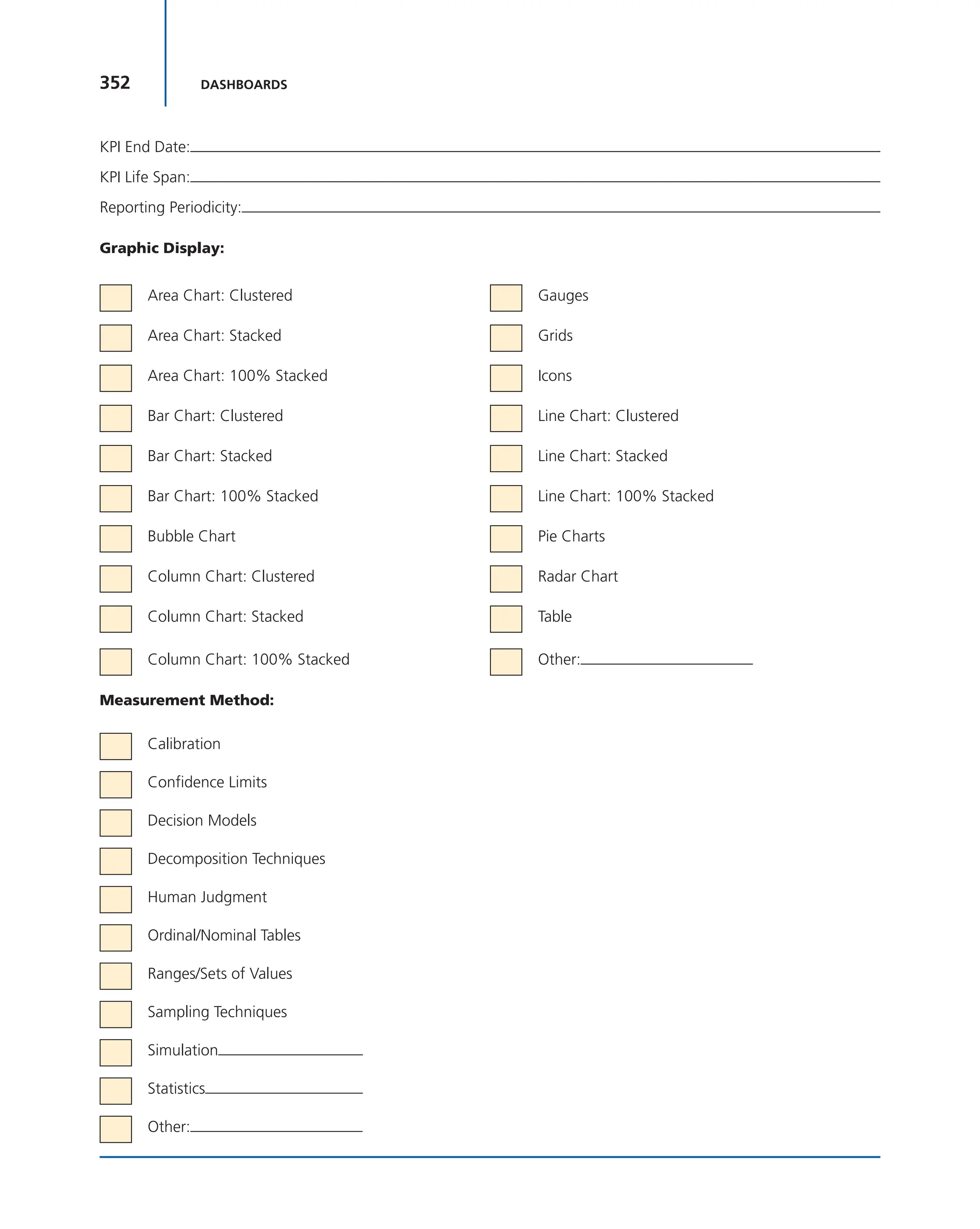
cal axis, with time along the horizontal. That is, it is a run chart of
outstanding work. It is useful for predicting when all of the work
will be completed. It is often used in agile software development
Figure 6-49 Selecting the Right Areas for a Circle
r = radius
Area = r2
A B C
r = 1 inch
Area = 3.14"
r = 2 inch
Area = 12.56"
r = 1.414 inch
Area = 6.28"
313
6.15 AGILE AND SCRUM METRICS
methodologies such as Scrum. However, burn down charts can be
applied to any project containing tasks with time estimates.7
A burn-down chart for a completed iteration, generated from a
Google docs template, is shown in Figure 6-50. It can be read by knowing
the following:
■ X-axis: This is the project/iteration timeline.
■ Y-axis: This is the work that needs to be completed for the project. The
time estimates for the work remaining will be represented by this axis.
■ Project start point: This is the farthest point to the left of the chart and
occurs at day 0 of the project/iteration.
■ Project end point: This is the point that is farthest to the right of the
chart and occurs on the predicted last day of the project/iteration.
■ Ideal work remaining line: This is a straight line that connects the start
point to the end point. At the start point, the ideal line shows the sum
of the estimates for all the tasks (work) that needs to be completed. At
the end point, the ideal line intercepts the X-axis showing that there is
no work left to be completed.
■ Actual work remaining line: This shows the actual work remaining. At
the start point, the actual work remaining is the same as the ideal work
remaining, but as time progresses, the actual work line fluctuates above
and below the ideal line depending on how effective the team is. In
general, a new point is added to this line each day of the project. Each
day, the sum of the time estimates for work that was recently completed
is subtracted from the last point in the line to determine the next point.
Figure 6-50 Burn-Down Chart
0
0
5
10
15
20
25
30
5 10
Iteration Timeline (days)
Sum
of
Task
Estimates
(days)
Project XYZ Iteration 1 Burn Down
15 20
End
Start
Ideal Tasks Remaining
Actual Tasks Remaining
7. Wikipedia contributors, “Burn Down Chart,” Wikipedia, The Free Encyclopedia,
https://en.wikipedia.org/w/index.php?title=Burn_down_chart&oldid=762893946.
314 DASHBOARDS
The accuracy of the time estimates is important when using burn-
down charts. If time requirements are continuously overestimated or
underestimated, these charts allow for the inclusion of an efficiency fac-
tor to remove the variability.
There are always advantages and disadvantages to each metric chosen
and the way that the data is displayed. Some people prefer to use burn-up
charts, arguing that burn-down charts do not necessarily show how much
work was actually completed in a given time period.
There are many more metrics common to agile and Scrum projects,
and they are somewhat different from traditional project management
metrics. Agile metrics generally contain more business-oriented metrics.
Typical agile metrics might include:
■ Total project duration
■ Features delivered and time to market
■ Total project costs
■ Number of defects detected, open or escaped
■ Number of impediments discovered, removed and escalated
■ Financial factors (i.e., return on investment [ROI], net present value,
internal rate of return, payback period, etc.)
■ Customer satisfaction
■ Business value delivered
■ Sprint burn-up or burn-down charts
■ Sprint goal success rates
■ Capacity per sprint
■ Scope increase or decrease
■ Team member utilization rate
■ Team member turnover rate
■ Company turnover rate (as it might affect morale)
■ Capital redeployment (i.e., comparing the cost of further improve-
ments against the future value received)
6.16 DATA WAREHOUSES
During the past 15 years, companies have established project manage-
ment offices (PMOs), which have become the guardians of the company’s
intellectual property on project management. Today, project managers
are expected to make both project decisions and business decisions. It is
therefore unrealistic to expect each PMO to have at its disposal all of the
BI that will be needed. PMOs may be replaced by information or data
warehouses. On large and/or complex projects, each stakeholder may
have an information warehouse, and the project team may have to tap
into each warehouse to get the appropriate information for the dash-
boards. Warehouse creation projects generally are performed by the IT
departments with little input from prospective user groups.
315
6.17 DASHBOARD DESIGN TIPS
Creating real-time dashboards that can change over the life of the
project, and where information will be extracted from a variety of infor-
mation warehouses, brings forth the problem with data quality and cred-
ibility of information:
Data quality is a general challenge when automatically integrating data
from autonomous sources. In an open environment the data aggregator
has little to no influence on the data publisher. Data is often erroneous,
and combining data often aggravates the problem. Especially when per-
forming reasoning (automatically inferring new data from existing data),
erroneous data has potentially devastating impact on the overall quality
of the resulting dataset. Hence, a challenge is how data publishers can
coordinate in order to fix problems in the data or blacklist sites which do
not provide reliable data. Methods and techniques are needed to; check
integrity, accuracy, highlight, identify and sanity check, corroborating
evidence; assess the probability that a given statement is true, equate
weight differences between market sectors or companies; act as clearing
houses for raising and settling disputes between competing (and pos-
sibly conflicting) data providers and interact with messy erroneous web
data of potentially dubious provenance and quality. In summary, errors in
signage, amounts, labeling, and classification can seriously impede the
utility of systems operating over such data.8
Another issue is that not all companies will need or require a data
warehouse. Not all stakeholders will have data warehouses, and even if
they do, the project manager must never assume that all of the informa-
tion needed for the dashboards will be found in the information data
warehouse.
6.17 DASHBOARD DESIGN TIPS
Here are some rules of thumb to follow when you design the layout of a
dashboard.
Colors
You have a large number of colors to choose from, and although it is
tempting to use a variety of different colors to highlight various areas of
importance in a dashboard, most experts agree that too many colors and
the “wrong” colors are worse than too few colors.
8. Wikipedia contributors, “Mashup (web application hybrid),” Wikipedia, The Free
Encyclopedia, https://en.wikipedia.org/wiki/Mashup_(web_application_hybrid)#Data_
quality. Accessed June 15, 2017.
Section 6.17 has been taken from Nils Rasmussen, Claire Y. Chen, and Manish Bansal,
Business Dashboards (Hoboken, NJ: John Wiley & Sons, 2009).
316 DASHBOARDS
Note: Remember that some people are color blind, so if you use
colors, try to use various shades. A good test is to print out a screen-
shot of the dashboard on a black-and-white printer and see whether
you are able to distinguish what will now be shades of gray from each
other.
Fonts and font size
Using the right or wrong fonts and font sizes is like the use of colors; it
can make or break the entire look and feel that a user gets from looking
at a dashboard. Here are some tips:
■ Do not mix a number of different font types; try to stick with one. Use
one of the popular business fonts, such as Arial.
■ Do not mix a number of different font sizes, and do not use too small
or too large fonts. Remember that dashboards likely will be use by
many middle-aged or older employees who cannot easily read very
small fonts. Ideally, you should use a font size of 12 or 14 points and
apply boldface in headers (maybe with the exception of a main header
that could be in some larger font). Text or numbers should be in fonts
of 8 to 12 points, with 10 points being the most often used. When it
comes to font sizes, the challenge for a designer is always the available
areas on the screen (also referred to as screen real estate). With overly
large fonts, titles, legends, descriptions, and so on may get cut off or
bleed into another section, and fonts that are too small make the dis-
play hard to read.
Use Screen Real Estate
Per definition, most dashboards are designed to fit a single viewable area
(e.g., the user’s computer screen) so users can easily get a view of all their
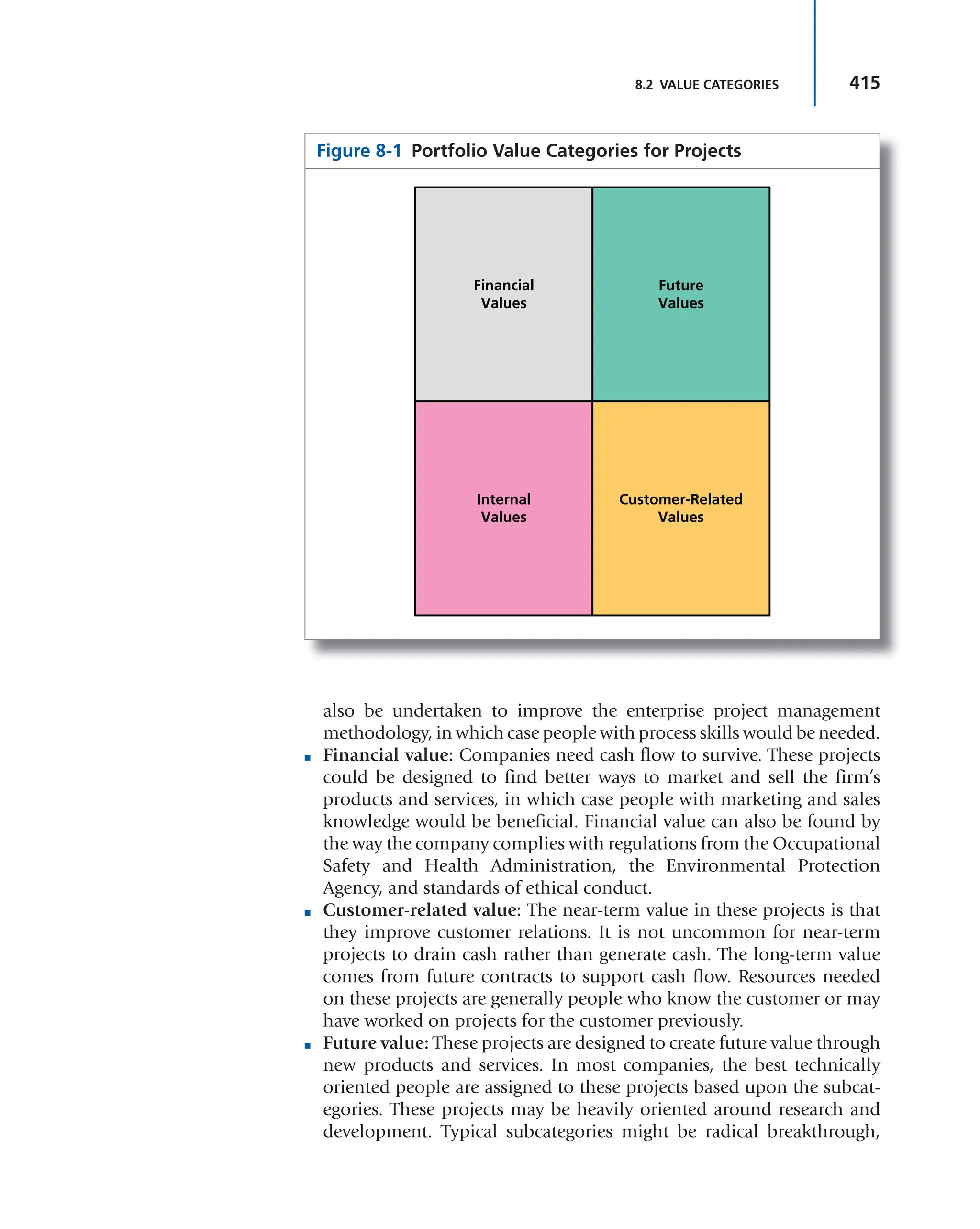
metrics by quickly glancing over the screen. In other words, the moment
a “dashboard” is of a size that requires a lot of scrolling to the sides or up
and down for users to find what they looking for, it is not really a dash-
board anymore but a page with graphics. Almost always, users get excited
about the possibilities with a dashboard, and they want more charts and
tables than what will easily fit on a screen. When this happens, there are
various options:
■ Use components that can be expanded, collapsed, or stacked so
that the default views after login still fit on a single screen, but
users can click a button to expand certain areas where they need
to see more.
■ Use many dashboards. If there is simply too much information to fit
on a single dashboard (e.g., move sales-related information to a “sales
dashboard” and higher-level revenue and expense information to a
317
6.18 TEAMQUEST CORPORATION
“financial dashboard”). Many dashboard technologies have buttons or
hyperlinks that let us link related dashboards together to make naviga-
tion easy and intuitive for the users.
■ Use parameters to filter the data the user wants to see. For example, a
time parameter can display a specific quarter in a dashboard instead of
showing all four quarters in a year.
Component Placement
If you have two tables or grids or scorecards and four charts, how should
they be organized on the screen? Here are a few tips:
■ Talk with the key users to find out which information is most impor-
tant so they can establish a priority. Based on this, place the compo-
nents in order of importance. Most users read from left to right and
start at the top, so that could be the order you place the components.
The idea is that if the users have only a few seconds to glance at a dash-
board, their eyes first catch what is most important to them.
■ A second consideration for component placement is workflow. In
other words, if users typically start by analyzing metrics in a scorecard
component and then want to see a graphical trend for a certain metric
they click on in a scorecard, that chart component should be placed
adjacent to the scorecard to make it easy for users to transfer their view
to the chart as they click on the scorecard.
6.18 TEAMQUEST CORPORATION
Several companies provide metric management and dashboard software
solutions to their clients. In this and Sections 6.19 are three white papers
from such companies, which serve as excellent summaries of the infor-
mation for dashboard design efforts.
The white papers in this section have been taken from two TeamQuest Corporation white
papers, “Metrics Dashboard Design” and “Proactive Metrics Management.” Both white
papers are reproduced by permission. TeamQuest Corporation is a metrics management
software vendor that develops proactive, web-based corporate performance monitoring
and enterprise reporting applications. TeamQuest’s proactive metrics management appli-
cations empower business users to see KPIs in real time and allow business managers
to accurately gauge performance. With TeamQuest, organizations can harness corporate
data into powerful visual metrics that: Automate the reporting and monitoring of KPIs, as
well as data transformations; Enable discovery of new insights into the business, and to
react quickly to those—rather than making after-the-fact corrections; and Trigger positive
change by focusing on factors that directly impact corporate performance. TeamQuest’s
customers include Global 1000, Fortune 500, and mid-size organizations in ITSM, sup-
port, financial, insurance, retail, and other industry sectors. TeamQuest Headquarters:
80 Aberdeen St., Suite 400, Ottawa ON K1S 5R5. Phone: 1–613–236–1644, Toll Free:
1–866–636–6065. Email: info@teamquest.com; www.teamquest.com.
318 DASHBOARDS
White Paper #1: Metric Dashboard Design
Designers of metrics management dashboards need to incorporate three
areas of knowledge and expertise when building dashboards. They must
understand the dashboard users’ needs and expectations both for metrics
and for the presentation of those metrics; they must understand where
and how to get the data for these metrics; and they must apply uniform
standards to the design of dashboards and dashboard suites in order to
make them “intuitive” for the end users.
This paper outlines dashboard design best practices and design tips,
and will help dashboard designers ensure that their projects meet with
end user approval. It concludes with a checklist of design considerations
for dashboard usability.
Increasing User Adoption of Metrics Dashboards
Users turn to metrics management solutions to find out what is going on
with the business in order to make informed, reasoned decisions.
Good metrics management dashboards show key performance indi-
cators (KPIs) in context so that they are meaningful and present them in a
way that allows users to instantly understand the significance of the infor-
mation. This presentation lets users quickly evaluate choices and make
decisions with full confidence that these decisions are supported by facts.
Dashboards are neither detailed reports nor exhaustive views of all
data. Good metrics management solutions can offer users the option to
“drill down” to as much detail as they require, or even link into reporting
systems, but these are only ancillary functions. The primary function of
metrics management dashboards is to support—even induce—proactive
decision making.
Know the End Users
Users want dashboards that respond to their business requirements.
There is no substitute for understanding end users’ needs and getting
involved in dashboard development. Even more important than under-
standing product capabilities is understanding the people who will be using
the dashboards, what they need to know to improve the business, and what
sort of dashboard organization and displays will work best for them.
Use Context to Make Metrics Meaningful
Users need to understand what the metrics mean before they can make
decisions. Data is meaningful only in context.
In order to easily understand metrics, users must see them in
context—their context. In fact, context and presentation are integral to
any metric; without them the metric is simply meaningless numbers.
Dashboard designers should take time to learn what contextual
information users require in order for metrics to be meaningful for them
and to facilitate decisions and actions.
319
6.18 TEAMQUEST CORPORATION
Contextual information will differ depending on the specific area
being managed. For example, dashboard users in finance may need to
track actual expenditures against budget targets, while a support desk
may need to track the number of trouble tickets exceeding mean resolu-
tion times by more than 15 percent. In an environment where a metrics
management solution is being used to help improve processes, users may
need to monitor trends, compared to performance during another given
period. (See Figure 6-51.)
On the left side of Figure 6-51, the much-used pie chart effectively
shows proportions but does not tell anything about performance or
progress toward targets. In the right side of Figure 6-51, a simple bar chart
effectively shows proportions of allocated budgets and monies spent, tar-
gets, and performance: progress toward targets (dotted lines).
Whatever the case, the dashboard designer should spend time under-
standing not only the data behind the indicator but also the data that
creates the context for the indicator (such as revenue targets, time period
coverage, maximum capacities, etc.). This rule should guide the dash-
board designer through every step of design, from data gathering to
detailed composition of displays.
Data Retrieval
Users need to have confidence in the integrity of the metrics they use to
manage the business. They need to know that they are acting on facts,
not guesses.
There is no easy formula that will guarantee the value of data brought
to dashboards. Nonetheless, it is essential to determine the sources, own-
ership, and quality of the data to be used before starting dashboard design.
Figure 6-51 User Displays to Show Context and Progress toward Targets Source: TeamQuest
Corporation white paper, “Metrics Dashboard Design.”
Budget for November
Marketing
Budget for November
R&D
Marketing
38%
R&D
42%
Finance
20%
Finance
320 DASHBOARDS
The following guidelines will help dashboard designers deliver the
metrics dashboard users need and will use.
Identify KRAs and KPIs
Users need to know their metrics so they can make informed decisions
for their areas of responsibility.
A common—and effective—approach to understanding what users
need to know is to work with end users to identify the key results areas
(KRAs) for which they are responsible, then the key performance indica-
tors (KPIs) they need to monitor and manage to improve performance in
their areas of responsibility.
Get the Data Whatever Its Format or Location
Users want metrics derived from complete data, no matter where that data
is stored, so they do not have to guess. Once the metrics users require have
been identified, the data should be retrieved, no matter where it is located.
A well-designed metrics management dashboard provides both a
current synthesis and details of key metrics. Often the data required to
provide this synthesis and these details is spread across a variety of data-
bases technologies and even spreadsheets at different physical locations.
It is, nonetheless, essential that all required data be retrieved. A dash-
board that provides metrics based on partial information is of little value
when a global view is needed.
Refresh the Data According to Users’ Needs
Users need metrics that are up to date so they can act on current and
probable future situations.
The timeliness of a metric is as important as the metric data itself.
Find out how current data must be for it to be valuable to users, and set
the polling frequencies for the queries that retrieve the data accordingly.
Metrics used to monitor hourly call levels to a help desk are worse
than useless if data is gathered every Sunday at 6 A.M. Similarly, if sales
personnel report sales once a week on Thursdays, there is little point in
polling the database every hour for updates to this data.
Usability Design Best Practices
Users do not want to be surprised by the dashboard design. They need to
be able focus on metrics and decisions.
A metrics management dashboard should function for the user in
the same way that an automobile dashboard or traffic signs function for
an automobile driver.
Just as a driver knows to stop at a red light, a metrics dashboard
user should understand without deliberation that, for example, a red
thermometer means that corrective action is required. This requirement
means that dashboard design must be consistent with common usage
and practices as well as across all dashboards.
321
6.18 TEAMQUEST CORPORATION
Offer Users a Choice of Views
Users need to be able to view metrics differently, so they can see the
relationships between the metrics that affect their specific concerns. For
example, financial metrics dashboards showing actuals versus budgets
could offer views by department and by line item or profit center.
Whatever the view offered, dashboards should be consistent, and the
current view should be clearly identified by titles and labels.
Use Commonly Accepted Symbols, Colors, and Organization
Users need to understand dashboards instantly and without specialized
training so they can focus on their jobs, not on deciphering data.
Use symbols, colors and organization in ways that are commonly
accepted and therefore easily understood. (See Figure 6-52.)
As an example, on the left side of Figure 6-52, the users might be con-
fused by the use of color combined with the expressions on the faces. Red
usually means that something is amiss, but the red face has a smile. Users
might not know if action is required. On the right side of Figure 6-52,
green means that everything is going well. The message is reinforced by
the smiley face. Red usually means that action is required. This message
is reinforced by the frown.
Red is the color most commonly used to identify something that
requires attention. Therefore, unless there is a compelling reason to use
another color to identify, for example, sales that are below targets,
use red to communicate this information. Similarly, where appropri-
ate, use commonly accepted symbols, such as stop signs or caution
signs, rather than new symbols that users will have to learn.
Organize information using commonly accepted norms. Generally,
this means that the most important information is placed at the top of a
dashboard and secondary information and details are placed below.
Figure 6-52 Using Color to Improve Communication of Key Information Source: TeamQuest
Corporation white paper, “Metrics Dashboard Design.”
Flagstaff
By Region By Region
Flagstaff
Phoenix
Tuscon
Phoenix
Tuscon
322 DASHBOARDS
Figure 6-53 Maintain Consistent Design for All Dashboards Source: TeamQuest Corporation white
paper, “Metrics Dashboard Design.”
100%
Overview
Monthly
Overview
Monthly
75%
of last year
total
50%
0
100%
50%
0
2005 2005
Jan Feb Mar Jan Feb Mar
$12,400
75%
of last year
total
$12,400
Note, however, that symbols may differ between countries and cul-
tures. Take these differences into account if the dashboards will be used
in different parts of the world.
Establish Clear Dashboard Navigation and Hierarchies
Users need to be able to find information—more detail, less detail, or a
different view—instantly.
Few dashboards are deployed individually. Typically users require a
suite of dashboards. Clearly establish an organization for the dashboard
suite. Use an easily recognizable hierarchy of dashboards and consistent
links for navigating between dashboards.
A good rule is to use the dashboard with top-level information for a
user’s area of responsibility as that user’s entry point, then provide links
from individual metrics to dashboards with more details about that area
of the business. This is known as drill-down capability.
Maintain Consistency of Design
Users do not want to have to learn how to read each dashboard.
Establish and implement a limited set of templates with consistent
use of color, symbols, and navigation, and use them throughout the
dashboard suite.
Presentation of information on dashboards should be consistent. For
example, if dashboards show trends, percentages, and absolute numbers,
placeeachtypeofinformationinthesameplaceoneverydashboardanduse
the same display for these types of information across similar dashboards.
If thermometers are used to show progress of revenue against targets
in the company financials roll-up dashboard, do not use gas gauges to
show revenue against targets in the regional detail dashboards; use ther-
mometers. In the left side of Figure 6-53, the different displays used to
323
6.18 TEAMQUEST CORPORATION
the overview (thermometer) and the monthly values (gas gauges) may
confuse users who drill down to get more detail. On the right side of
Figure 6-53, consistent use of thermometers (large for the overview and
small for the details) ensures that the users will immediately and intui-
tively associate the two displays.
Similarly, if display threshold of red-yellow-green are set to 40, 60,
and 80 percent for the company roll-up dashboard, use the same thresh-
olds for the details unless there is a compelling reason to do otherwise.
Use Color Judiciously
Users expect color to provide important information they need, not dis-
tract them.
Generally, color can be used to create four effects on a dashboard.
It can:
■ Identify the status of key metrics and areas that require attention. For
example, use red to identify expenditures that have increased more
than 15 percent over the same period the previous year.
■ Identify types of information. Color can be used to help users instantly
identify the type of information they are looking at. For example, dark green
can be used for monetary values, and dark blue for quantities of items.
■ Deemphasize areas or items. Border areas, backgrounds, and other
supporting dashboard components (the dashboard skins) should use
plain, unobtrusive colors that help define dashboard areas without
distracting from the information displayed.
■ Identify the dashboard type or its level. Different background colors or
the color of dashboard titles can help users identify what they are look-
ing at. For example, financial dashboards could use a green skin, while
help desk dashboards could use beige as a reassuring color.
Use Dashboard Groups to Improve Organization
Users need to see metric groups and hierarchies so they can understand
relationships between different areas of the business.
Group displays together by the type of metric displayed or by func-
tional area. In Figure 6-54, TeamQuest’s Profit Accelerator dashboards
group related information together to improve dashboard “legibility.”
For example, on a dashboard showing financial roll-ups, put top-
level information into one group that shows progress against targets in
three ways: absolute numbers against targets; performance compared to
the same period in the previous year, or against average performance for
the same period during the last five years; and the trend, based on perfor-
mance over the last 60 days. Alternately, show absolute numbers against
targets for each region or department.
Whatever the rationale used to group information on dashboards, be
consistent. Use the same rationale when establishing groups on different
dashboards.
324 DASHBOARDS
Set dashboard groups to “open” or “closed” based on the hierarchy
of information. Closed groups can be used to provide more detailed met-
rics or complementary metrics on the same dashboard without distract-
ing the user’s eye from the primary information.
Display Selection and Design
Users must be able to understand what they are being shown without
stopping to analyze how it is being shown.
Select the display symbols that are most appropriate for displaying
the information the dashboard users need.
Identify a limited set of symbols and use these on all dashboards. Be
consistent with location, size, and color of supplementary information
associated with the symbols. Consider using different sizes of the same
display symbol for different levels of information.
Figure 6-54 Sample Dashboard with Grouped Metrics Source: TeamQuest Corporation white paper,
“Metrics Dashboard Design.”
325
6.18 TEAMQUEST CORPORATION
Avoid displays that are overly complex, colorful, or animated. Such
qualities are very effective when correctly used. However, the more com-
plex the display, the more difficult it is to process. Overly complex dash-
board displays distract users from the information they need and want.
Consider offering views that separate the information into grouped dis-
plays or even different dashboards.
Do not hesitate to work with the dashboard vendor to design new
display symbols that will improve presentation of information.
Actual Values, Percentages, and Trends
Different users need different information in order to make informed
decisions and take appropriate action.
Decide with the dashboard users what metrics they need to monitor
and manage. Different users may require different information from the
same data.
For example, a CEO may want to know trends in budget expen-
ditures, while a CFO and department managers may be more inter-
ested in actual numbers (actuals versus budgets). Use data to present
the information users need, and make sure that the type of infor-
mation is clearly identified. A thermometer showing revenue trends
that is interpreted as showing actual numbers can lead to costly
misinterpretations.
Timestamps
Users need to know when the metric was updated so they know the age
of the data on which they base their actions.
Time is an essential part of a metric’s context. Ensure that users can
know when the data for the metrics was retrieved. In many cases this
information is the key to understanding what the metric means. Ensure
that this information is available but that it does not crowd the display.
Consider putting the date and time in a mouse-over.
Titles and Labels
Users need to know instantly what they are looking at so they can focus
on what it means for the business.
Give all dashboards meaningful, descriptive titles. Descriptive titles
are generally more intuitive than cryptic or symbolic ones. Assign labels
to dashboard groups and display symbols so that users can clearly iden-
tify information. Keep labels in the same location and use the same color
standards throughout the dashboard suite.
Do not abuse labels. Overuse of labels can crowd out essential
information.
Mouse-Overs
Users often want more information to help them understand the signifi-
cance of a metric.
326 DASHBOARDS
Mouse-overs are an effective way to include detailed metric informa-
tion without crowding the dashboard.
Information such as last and next run time metrics for another cor-
responding period, etc., can be included in mouse-overs to help users
understand the significance of the primary information on the dashboard.
Parameter-Based Views
Users want to see only the metrics that help them do their jobs. Different
users give different weight to different information, as seen in Figure 6-55.
In Figure 6-55, parameters can be used to filter data so that users
see only the information they need. In this example, data is filtered by
region. All users see the same dashboard, but users in Region East see
information for their region while users in Region West see information
for their region.
Parameters are user-set variables that can be used to filter metric data
delivered to the dashboards shown to different users. Consider designing
dashboards with parameters, so that users get views of the dashboards
based on their needs and permissions.
Figure 6-55 How Parameters Can Be Used to Simplify Dashboard Design and
Implementation and Improve Usability Source: TeamQuest Corporation “Metrics Dashboard Design.”
327
6.18 TEAMQUEST CORPORATION
For example, the same dashboard suite might be used by a help-desk
manager and individual employees in the department. The manager may
need a consolidated view of all calls, by type, while each employee might
need to see the calls for which he or she is responsible, a view created by
filtering the information based on the user ID.
If the dashboards use parameters, display these prominently so that
users will know what the metrics they are being shown represent.
Use Thresholds and Threshold-Triggered Actions
Users benefit most from dashboards that help them take corrective
actions before problems occur.
Thresholds and threshold-triggered actions can be used to transform
metrics monitoring into proactive management. Use thresholds to trig-
ger actions that alert users to potential trouble areas, or even initiate cor-
rective action by running scripts. In Figure 6-56, thresholds can be used
with alerts to transform dashboards from passive monitoring devices
into active vehicles inducing corrective action and, especially, prevent
decisions and actions.
For example, set a threshold to send emails to the person respon-
sible for managing a budget if spending reaches more than 70 percent of
budget before the middle of the month. Or, in a help-desk environment,
launch a script to change phone messages and reschedule nonessential
activities if wait times increase beyond SLA requirements.
Figure 6-56 Simple Alert Triggered by a Threshold Source: TeamQuest Corporation white paper, “Metrics
Dashboard Design.”
November
ActiveMetrics
Alert!
R&D
Expenditures for
your department
have exceeded
budget by 12
percent.
328 DASHBOARDS
Roll-Ups and Drill-Downs
Users need to get both the big picture and the details.
A dashboard is most useful when used as part of a suite of comple-
mentary dashboards.
Group together on a dashboard the metrics users need to see
together, and then use drill-downs and roll-ups to provide details and
overviews.
This technique provides users the metrics they need without crowd-
ing too much information on any single dashboard.
Animation
Users appreciate a bit of fun but are annoyed by too many gimmicks.
Animation, such as blinking lights, moving figures, and other such
displays, can add interest to dashboards. Use these sorts of features very
judiciously, however, and consider providing nonanimated versions of
dashboards or an “animation off” button.
Animation can be fun the first few times, but if not properly used
it can become an annoyance. Consider using animation only for spe-
cial projects, such as a month-end race to motivate the sales team,
or to draw attention to new dashboard features for a limited period
of time.
Visual Noise
Users turn to dashboards to be informed, not dazzled.
Avoid cluttering dashboards and dashboard displays with unneces-
sary paraphernalia, such as ornate frames, patterned backgrounds, or 3-D
effects that add no value to the information displayed.
A minimalist approach is almost always the best approach.
Usability Checklist
Attention given to dashboard design can pay enormous dividends, both
in user satisfaction with the dashboards and, especially, in improved
business performance founded in proactive metrics management and
reasoned, informed decision-making processes.
Dashboard users want their questions about the metrics they are
viewing on a dashboard answered even before they can formulate the
questions. In fact, by the time a question about business performance is
asked, it is often too late to take corrective action. Typical questions are
shown in Table 6-5.
Valuable dashboards provide up-to-date information right at the
user’s fingertips so that problem areas can be addressed as they arise and
opportunities can be taken advantage of immediately.
Ensuring that a dashboard and its components answer the ques-
tions in Table 6-6 should help dashboard designers create more effective
dashboards.
329
6.18 TEAMQUEST CORPORATION
White Paper #2: Proactive Metrics Management
Choosing a Metrics Management Solution
A business decision is only as good as the metrics that inform it. The
quality of these metrics depends on three factors: accuracy, timeli-
ness, and presentation. Understanding the importance of metrics,
businesses are investing in defining and monitoring key performance
indicators (KPIs). These indicators must not only accurately reflect
the state of the business and current trends, but they must also be
presented to users in a manner that induces effective, proactive deci-
sion making.
This paper reviews the capabilities of metrics management software
and outlines the most important features and capabilities to look for in
a solution.
TABLE 6-6 Common User Questions and Design Solutions
USER QUESTIONS DESIGN SOLUTIONS
How can I get more details? Provide drill-down links to groups with detailed information.
How can I get a broader view? Provide links to roll-up and overview dashboards.
What do I do with this information: what action
should I take?
Always place data in context and, where possible, suggest
advisable actions based on the metric.
When should I check for an update? Provide the date and time when the metric will be updated.
When business needs warrant, allow ad hoc updates.
How do I get metrics that are not on these
dashboards?
Be ready to develop new dashboards. Users will want them!
TABLE 6-5 User Questions and Design Solutions
USER QUESTIONS DESIGN SOLUTIONS
What am I looking at? Use clear, descriptive titles and labels.
Does this mean “good” or “bad”? Use standard, culturally accepted colors and symbols.
Are things getting better or worse? Employ thresholds, and show meaningful comparisons and trends.
What is being measured, and what are the
units of measure?
Clearly identify the units of measure, and provide actual values.
What is the target or norm? Clearly show targets and norms, and design displays that show
progress toward these.
How recent is the data? Provide a date and timestamp for each metric.
330 DASHBOARDS
Metrics Collection and Delivery
One of the key goals of businesses today is the collection and delivery of
the metrics decision makers need to make timely, informed, and well-
reasoned choices. Even in businesses where the key performance indica-
tors (KPIs) have been defined and the data that drives them is available,
the collection and delivery of the metrics can fail. Metrics that are timely,
accurate, in context, and easy to understand are not immediately avail-
able to those who need them most: boards, executives, managers, and
others at all levels of the organization.
No one is to blame. Until recently the tools needed for effective
delivery of these metrics were simply not available. Reporting provides
detailed profiles of the state of affairs as they were at a specific moment
in the past. Business intelligence (BI) systems provide comprehensive
data and deliver metrics, but these systems are prohibitively expen-
sive and the metrics they provide are limited to those derived from
the data inside the BI system. In today’s business reality, metrics must
be gathered from multiple, disparate systems and sources across the
organization.
The Metrics Management Investment
Since the last generation of dashboards appeared on the market at the
end of the 1990s, “dashboard solutions” have often been promoted as
the answer to decision makers’ need to know. Unfortunately, however,
dashboards alone are not a solution. They are an essential part of the
solution; they are effective for delivering metrics and for presenting them
and making them accessible. But dashboards are only as good as the met-
rics they present; their value as decision-making tools is a function of
both how well they present metrics and of the quality of the data behind
these metrics.
What is needed, then, to transform decision making from educated
guesswork based on partial information and hunches to a truly rational
and informed process based on timely, accurate metrics is not simply
dashboards. This transformation requires a proactive metrics manage-
ment tool—one that can gather data from across multiple systems and
deliver metrics to dashboards in context and with as much or as little
detail as decision makers require.
Selecting a Solution
Due to the emergence of metrics management software and to the diver-
sity of dashboard-type products on the market, the search for a solu-
tion can be confusing. Metrics management dashboards, as shown in
Figure 6-57, should provide users with the information they need to
make informed, reasoned decisions. The following is a set of high-level
criteria for evaluating metrics management solutions.
Figure
6-57
Sample
TeamQuest
Metrics
Management
Dashboard
Source:
TeamQuest
Corporation
white
paper,
“Pro-Active
Metrics
Management.”
331
332 DASHBOARDS
Proactive Metrics Management
Look for the ability to trigger effective preventive and corrective action.
The crucial differentiator for metrics management solutions is the level
of proactive metrics management they support. Proactive metrics man-
agement is a function of a solution’s ability both to trigger appropri-
ate actions in systems with which it interfaces and to facilitate timely
decisions by the persons responsible for key results areas (KRAs) in the
organization.
It is important to understand here that more than one capability
defines a product’s level of support for proactive metrics management.
Two important capabilities are:
1. Thresholds, alerts, and notifications: A proactive solution uses thresh-
olds and alerts set from absolute values or trends (or a combination
of these) to keep users informed.
2. Triggers and corrective/preventative action: A proactive solution is
able to initiate actions when thresholds are compromised. For exam-
ple, it can send an email alert or launch a script.
Technology Agnostic
Look for no restrictions on metrics data sources. TeamQuest ActiveMetrics
can retrieve data from virtually any source, as shown in Figure 6-58. Very
few organizations use a single technology to meet all their data and per-
formance needs.
Typically, different technologies have been implemented because
each is the best available for a specific area of the business: financial
reporting, trouble-ticket management, etc. A proactive metrics man-
agement solution must be able to query seamlessly a wide array of
different databases (and even spreadsheets) for key indicators and,
if required, use indicators derived from different sources in the same
dashboard.
Easy Availability
Look for web-based, easily customizable user interface (UI) design with
multi-language support. Organizations today are rarely limited to a single
geographic location and often work around the clock. A metrics manage-
ment solution’s dashboards must be available at all times and anywhere
in the world, and because key metrics must be made available to many
people, the solution should not require specialized viewing tools. Users
should need nothing more than a web browser to view metrics dash-
boards over the internet or an intranet.
Security
Look for configurable, secure user and data source access. Since metrics
tell critical information about the business, they usually convey sensitive
333
6.18 TEAMQUEST CORPORATION
information. Dashboards and the information they contain should there-
fore be easily protected without sacrificing their availability. Further, the
metrics management solution should be able to access data that is pro-
tected behind various security barriers and firewalls without jeopardizing
the integrity of these security measures.
Usability
Look for ease of use for both end users and dashboard developers.
As with anything else, a metrics management solution is of little
value if it is not widely adopted by users. Users can be classed into two
areas: end users and dashboard designers. Any solution must be easily
usable by both.
Assuming that the metrics dashboards are easily accessible to those
who need them anywhere and at any time, the design of the dashboards
themselves and the metrics they present should be evaluated:
■ Are the dashboards clear and easy to understand so that users grasp
instantly what they are being shown and what it means for their areas
of responsibility?
■ Can thresholds, trends, and warnings be easily and clearly identified
by the end user?
Figure 6-58 Data-Agnostic Metric Dashboard Solution Source: TeamQuest Corporation white paper,
“Pro-Active Metrics Management.”
334 DASHBOARDS
■ Can legends to explain data be easily integrated into the dashboards?
■ Are relationships between metrics easily established by the end users?
■ Do the dashboards allow drill-down views for more detailed informa-
tion, and other view changes requested by users?
■ Does the solution offer clean and consistent display of metrics without
visual noise?
Usability for dashboard designers may be less noticeable day to day,
but it is critical, for it is the designers who will be responsible for the
rapid development and deployment of dashboards to monitor KPIs, and
hence for critical business information.
When evaluating solutions, consider
■ What skill sets do the dashboard designers require?
■ Is training necessary, and if so, how much is required? A rule of thumb
is that that no more than a few days’ training should be needed for staff
to become effective dashboard designers.
■ Do the solution’s dashboard design interfaces permit development
of simple dashboards to start, with increasing complexity added as
designers increase their expertise and decision makers develop their
use of metrics to run the business?
■ Does the solution allow users and designers to select dashboard look
and feel, including branding the dashboards with your organization’s
logo and colors?
Deployment
Look for templates that facilitate rapid deployment without restricting
future development.
Deployment brings together a host of other criteria that should be
examined, and is often the litmus test of these: technology requirements,
availability, security, and usability. (See Figure 6-59.)
TeamQuest Accelerators offer rapid deployment of dashboards for
specific purposes.
Generally, the more effective the dashboards that can be designed,
and the more rapidly that the metrics management solution can be
deployed, the better the solution because its effect is immediate.
Often, a proactive metrics management solution is brought into a
new area of the business to facilitate improved decision making right
from the start, or into an area that is struggling in order to effect pro-
found changes. In either case, getting the solution up and running
and the metrics dashboards to decision makers quickly is of primary
importance. However, rapid deployment in itself is not sufficient rea-
son to select a solution. Beware of instant solutions that limit the
ability to grow and improve how metrics are monitored and managed
in the future.
335
6.18 TEAMQUEST CORPORATION
Power and Flexibility
Look for the ability to deliver the metrics management capabilities that
meet the needs of your business environment. The power and flexibility
of a metrics management solution encompasses a wide range of capabili-
ties. Questions to ask when evaluating solutions include:
■ Can the dashboard pull data from diverse databases and technologies?
If the proposed solution cannot do this, if it is limited to one or two
proprietary database technologies, go no further.
■ Can dashboard designers define the polling periods for queries, and
can these be dynamically updated if required?
■ Can metrics be based on aggregate queries; that is, can the metrics
management solution pull together different types of data from differ-
ent sources and make sense of it? For example, can it use one type of
data for targets, another for progress, and yet another to show trends?
Figure 6-59 Sample Dashboard with Grouped Metrics Source: TeamQuest Corporation white paper,
“Pro-Active Metrics Management.”
336 DASHBOARDS
■ Can the dashboards maintain histories based on user defined
parameters?
■ Does the solution offer different dashboard views for different users?
■ Can metrics shown on dashboards be filtered, and can this filtering be
configured by the dashboard designer?
■ Do the dashboards manage thresholds, and what sort of actions can
these thresholds trigger: emails, scripts, queries, etc.?
■ Are metrics presented in context? Does the solution present numbers,
or does it present meaningful information: quantities or percentages
measured against targets, comparison of quantities for different peri-
ods, trends, etc.?
Context includes the date and time the metric was updated. In
many cases, a metric has value only if the user knows when the data was
retrieved.
Parameters can be used to filter data so that users see only the informa-
tion they need to see. In Figure 6-60, data is filtered by region. All users see
the same dashboard, but users in Region East see data for their region while
users in Region West see information for their region. Whatever the case,
Figure 6-60 How Parameters Can Be Used to Simplify Dashboard Design and
Implementation, and Improve Usability Source: TeamQuest Corporation white paper, “Pro-Active
Metrics Management.”
337
6.18 TEAMQUEST CORPORATION
the dashboard designer should spend time understanding not only the
data behind the indicator but also the data that creates the context for the
indicator (such as revenue targets, time period coverage, maximum capaci-
ties, etc.). This rule should guide the dashboard designer through every
step of design, from data gathering to detailed composition of displays.
The Future
Look for the capability to initiate and sustain positive transformations of
the business.
It is wise to find out if the capabilities offered by a solution will
restrict what can be done in the future. Does the solution lend itself eas-
ily to additions and improvements, both in the way data is collected for
metrics and to the dashboards that users see?
Deployment of a truly proactive metrics management solution will
almost immediately provide insights into how business decisions are
made and will reveal opportunities for improving the decision-making
process, for managing the metrics used in this process—and ultimately
for transforming the business.
As shown in Figure 6-61, thresholds can be used with alerts to trans-
form dashboards from passive monitoring devices into active vehicles,
inducing corrective and, especially, preventive decisions and actions.
Conclusion
Managers and technical experts looking for a metrics management solu-
tion face a growing number of options.
Figure 6-61 Simple Alert Triggered by a Threshold Source: TeamQuest Corporation white paper, “Pro-
Active Metrics Management.”
November
ActiveMetrics
Alert!
R&D
Expenditures for
your department
have exceeded
budget by 12
percent.
338 DASHBOARDS
When evaluating solutions for metrics management, prospective buy-
ers should arm themselves with knowledge about what these types of solu-
tions can and cannot do, and with a list of evaluation criteria. And, finally,
before buying they should ask two questions that encompass the others:
1. Will this solution simply record what happened in the past, or does
it reveal what is going on now and, based on current trends, what is
likely to happen in the future?
2. Is the solution truly proactive? Does it include displays, thresholds,
and triggers not just to monitor what is going on, but also and criti-
cally to automatically initiate appropriate actions, and to facilitate
reasoned, informed decisions?
6.19 LOGI ANALYTICS, INC.: DASHBOARD BEST PRACTICES
Executive Summary
A wise man can see more from the bottom of a well than a fool can from
a mountaintop.
—UNKNOWN
Dashboards are becoming the new face of business intelligence (BI),
as shown in Figure 6-62. While on the surface, executive information sys-
tems (EIS) from the 1980s had a similar look and served a similar purpose,
modern dashboards are interactive, easier to set up and update to changing
business needs, and much more flexible to use. This, plus their ability to
present data and information at both a summary and detailed level, makes
them one of the most powerful tools in the business user’s kit.
To be useful, however, a dashboard must be implemented around
the needs of the business. Its functions should not be dictated by tech-
nology or by the whims of the end users. Also, a dashboard should
The material in this section was taken from a Logi Analytics white paper entitled
“Dashboard Best Practices,” written by Gabriel Fuchs, a renowned expert within strategic IT
solutions, including business intelligence, performance management, and business analyt-
ics. © 2010 by Logi Analytics. Reproduced by permission of Logi Analytics. Logi Analytics,
a leader in interactive, web-based Business Intelligence, which empowers enterprises to
turn data into business-critical information with pure Web-based reporting and analysis
products. The company offers a comprehensive platform that addresses all key areas of
BI—managed reporting, ad hoc reporting, analysis, and data services. Used by thousands of
organizations worldwide, Logi Analytics products are built on standards-based technologies
for easy integration, implementation, and upgrade. Logi Analytics’s per server pricing model
makes its powerful technology the most affordable BI solution on the market. Founded in
2000, Logi Analytics is privately held and based in McLean, Virginia. Logi Analytics, Inc.,
7900 Westpark Dr., Suite T107, McLean VA 22102. Tel. 1.888.LOGIXML | 703.752.9700.
FAX 703.995.4811. Web: http://www.logixml.com. Email: sales@logixml.com.
Figure
6-62
A
Modern
Dashboard’s
Ability
to
Present
Data
and
Information
at
Both
a
Summary
and
Detailed
Level
Makes
It
One
of
the
Most
Powerful
Tools
in
a
Business
User’s
Kit
Source:
©
2010
by
Logi
Analytics.
Reproduced
by
permission
of
Logi
Analytics.
339
340 DASHBOARDS
be implemented so that it gets used—and so that the decision makers
employing it can act on the information the dashboard presents.
To implement a dashboard that is truly business-driven, IT must take
other important factors into consideration. Information included in a
dashboard must be carefully selected, useful, and actionable. Too little
information will make the feature all but useless; too much will make
for a good managers’ meeting conversation piece, but will actually render
the dashboard cumbersome to use. Also, IT should not overlook adding
interfaces that are familiar to end users—such as spreadsheets—and to
set up the possibility to print the analysis results. In other words, dash-
boards must have as much business brain as technological muscle.
The question of how to calculate the return on a dashboard invest-
ment can be tricky. There is no one-size-fits-all calculation that can pre-
dict this with mathematical certainty. With this and other caveats in
mind, a company can take an approach based on the premises that ROI
calculations can be done, but that they will be more a guideline rather
than exact science. ROI is something that needs to be recalculated on a
regular basis before, during, and after the dashboard implementation.
And when done regularly, the ROI calculation can actually help ensure
that dashboards provide lasting value.
Last, today’s dashboards can deliver what users and the organization
as a whole need to know so as to understand their current business and
even conduct informed forecasts.
Introduction—What’s New about Dashboards?
If the only tool you have is a hammer, you tend to see every problem
as a nail.
—ABRAHAM MASLOW (1908–1970)
Knowing what is going on in your business is not merely good; it is
a prerequisite to success. Being able to advance this knowledge to make
reasonable forecasts about the business is even better: It is what distin-
guishes the best from the merely good.
Reaching this business “maturity” requires a number of factors.
Experience and business acumen are indispensable. A bit of luck will also
help—even though it usually seems that the well prepared tend to have
more luck than the ill-prepared. Yet another essential factor is access to
hard facts (i.e., timely and accurate business information presented in an
intuitive manner).
How Modern Is the Modern Dashboard?
Decision support systems were around as early as the 1960s. With the
advent of the client-server architecture in the 1980s, so-called executive
information systems (EISs) were presented as the state-of-the-art decision
support applications. These EISs from 20 years ago had a look similar to
341
6.19 LOGI ANALYTICS, INC.: DASHBOARD BEST PRACTICES
today’s dashboards; so why are today’s dashboards considered so new
and uniquely valuable? As good as EIS systems were as an idea, they
still suffered from technological constraints. First of all, they were not
very interactive, and they were cumbersome to update to new business
demands. Furthermore, they were designed around the approach where
the business user’s questions had to be predicted in advance—not an easy
task. If or when the user had additional questions, the EIS system had to
undergo some time-consuming redevelopment.
On the other hand, many of the charts used in older EIS systems were very
much like what we see in today’s dashboards as shown in Figure 6-63. User
needs and wants have not changed much over time. What has changed
Figure 6-63 A Typical Dashboard. Source: © 2010 by Logi Analytics. Reproduced by permission of Logi Analytics.
342 DASHBOARDS
is the underlying technology on one side and users’ expectations on the
other. Modern dashboards meet business needs in a practical and action-
able way when they can give quick snapshots of the big picture on one
hand while being capable of offering detail on the other.
The Dashboard versus the Spreadsheet
Along with modern dashboards that evolved from the old EIS tools,
another business intelligence (BI) tool has been with us for a while: the
spreadsheet. Most often in the form of Microsoft Excel, the spreadsheet
has an intuitive interface and is easy to learn, at least as far as its most
basic functions. It provides detailed numbers, which users can analyze
adding their own calculations.
However, while the spreadsheet is easy to use and understand, it is
often too detailed to give a quick and comprehensive overview of busi-
ness data. For instance, monthly sales statistics for 50 products sold in 50
different states will in one year generate 30,000 cells of data (50 prod-
ucts × 50 states × 12 months). And this is a relatively simple spread-
sheet. Furthermore, users are likely to reformat this business data in other
spreadsheets, adding calculations and aggregations. This will create yet
more cells of important business data. Although it is possible to create
complementary charts in most spreadsheets, this is a time-consuming,
manual activity that lends itself to easily made mistakes.
Nonetheless, many business users stick with spreadsheets because
they feel comfortable with them and are reluctant to change to another
model. The reality is that not everything can be done efficiently in the
spreadsheet, and one should not get stuck with them simply because
that’s what they have or have been using. This can lead to a situation
where it’s the limitations of the program—rather than business needs—
that determine the scope of reporting and analysis.
With the right underlying technology, today’s dashboards stand out
from the spreadsheet, which nevertheless remains the most used BI inter-
face today. Dashboards allow for a quick and easy-to-personalize over-
view of critical business data in a timely fashion. This added value turns
today’s dashboards into the new face of BI.
Designing the Dashboard
If you want to seek truth, you must at least at one point in your life doubt
all things, as far as possible.
—RENE DESCARTES (1596–1650)
How does one design dashboards that live up to their purpose as
efficient and actionable BI tools instead of merely being fancy play-
things? The main answer is that anything presented in a dashboard
must have a direct relevance to critical business activities. This means
343
6.19 LOGI ANALYTICS, INC.: DASHBOARD BEST PRACTICES
that the business user must be able to act on what is presented as seen
in Figure 6-64. If no action is required or expected from the user, the
business information presented, ultimately, serves little or no purpose.
The Business-Driven Dashboard
From the business users’ perspective, the efficient use of a dashboard
comes with a number of prerequisites. Delivering these requirements
allows the dashboard to become an efficient support tool for driving the
business.
Figure 6-64 For Direct Relevance to Business Activities, Business Users Must Be Able to
Act on What Is Presented in a Dashboard. Source: © 2010 by Logi Analytics. Reproduced by permission of
Logi Analytics.
344 DASHBOARDS
The following are the main user requirements that need to be taken
into account when designing a dashboard.
USER REQUIREMENT DESCRIPTION
Easy access to information So that there is little need for the business user to spend time
preparing the information.
Standardized format of the information Which facilitates the understanding of the reports and analyses
presented.
Correct and comprehensible information Meaning, for example, that all business definitions are clear,
consistent and unambiguous.
Overview and detailed information So that any exceptions or outliers can be quickly detected
and further investigated. This information can be presented in
managed reports that have been set up in advance to answer
recurring business questions. Ad hoc reports and Online ana-
lytical processing (OLAP) engines can also be used to access
and further analyze, sort, group, and calculate this detailed
information.
Spreadsheets Because of their familiarity to most business users, they
can certainly be useful for presenting detailed subsets of
information.
Paper That is, the possibility to properly print reports and analyses.
This point is overlooked in some dashboard solutions.
Color, charts, and key performance indicators These greatly help getting the necessary overview of the state
of the business, and drive attention to where performance
falls short of expectations. While pie charts and bar charts are
common and useful because they are relatively intuitive, heat
maps are becoming more and more popular since they provide
a better overview for more concurrent data dimensions. The
geographic information system (GIS) maps are also popular as
they are intuitive and reduce the risk of misinterpreting geo-
graphical business information.
Ability to share information with colleagues Which entails exporting information to file formats such as
Adobe Acrobat (PDF), Word, PowerPoint, and Excel.
Ability to act Meaning that the information presented needs to be action-
able. If not, what is the user supposed to do with the
information?
Overall, the dashboard needs to be easily adaptable to the user’s
needs. Furthermore, it must present information that allows the user to
act where it matters to the business, which means that the dashboard
must be business-driven rather than technology-driven. It is true that it
is only with today’s technology that dashboards can truly help change
345
6.19 LOGI ANALYTICS, INC.: DASHBOARD BEST PRACTICES
business behavior, but there must also be business brain and not only
technological muscle when designing dashboards.
The Implications for the IT Provider
Given user and business requirements and preferences, the IT provider
must design the dashboard according to guidelines that will ensure proper
user acceptance. These guiding principles are often different compared to
how IT develops applications for the day-to-day business operations.
The following are the design guidelines the IT provider needs to
observe.
DESIGN GUIDELINES DESCRIPTION
Customize the dashboards Meaning that different interfaces must be adapted for different user
needs, groups, etc.
Ensure easy administration Allowing the dashboard to remain flexible to changing user demands,
thereby becoming truly business-driven.
Automate what is regularly analyzed
and reported
Do not force the user to spend time on repetitive tasks. This will also
help assure user acceptance. Remember the unofficial office maxim:
Everyone wants to get more done with less work.
Don’t discard familiar and widespread
solutions
At least initially. This concerns especially spreadsheet programs.
Therefore, a dashboard solution should leverage existing solutions and
offer the capability to export the results to these widespread solutions.
Ensure plenty of support So that use of dashboards can be efficient and trouble-free.
Give the possibility to share key information,
business actions, and their results
Otherwise, it will be easier to repeat mistakes, while good decisions
will go largely unnoticed and will remain undeveloped.
Include KPIs that measure the important
activities
And not simply the activities that are easily measurable.
Limit the information to what’s necessary Because having too many KPIs will drown the truly important ones.
Taking user preferences and business needs into account will ensure
a business-driven dashboard solution. In combination with modern
decisions support technologies, dashboards will become an essential part
of business decision making.
Implementing the Dashboard
See first that the design is wise and just: that ascertained, pursue it resolutely;
do not for one repulse forego the purpose that you resolved to effect.
—WILLIAM SHAKESPEARE (1564–1616)
346 DASHBOARDS
Once the dashboard has been designed in accordance with business
needs, IT capabilities, and business user demands, its implementation
must begin. Implementing a dashboard is not the same as setting up
operational IT systems. Dashboards are often new and unfamiliar to
many business users. Furthermore, as few organizations have standard-
ized the way they use BI solutions, dashboards must be iteratively cus-
tomized to fit different individual business needs.
Organizational Challenges
Given the novelty of modern dashboards for many organizations, there
tend to be some common implementation challenges. These challenges are
not necessarily difficult to overcome, as long as they are properly identified.
Common organizational challenges when implementing a dash-
board tend to be the following.
COMMON ORGANIZATIONAL CHALLENGES DESCRIPTION
Little standardization when working with BI
applications
Something that in turn results in a lack of a common business
language.
Poor communication between different units Following the lack of a common business language.
Few power users Who feel comfortable leading the work around BI applications.
No clear strategy On what is expected from the dashboard solution.
Focus on cost A narrow-minded focus on expenses often obfuscates the
vision of the true value of dashboards.
Office politics Which have a tendency to be reinforced in organizations with
relatively strict boundaries between business units. These
boundaries will be challenged when implementing dashboards,
as business critical information becomes more widely available.
The challenges must be solved with a project management approach
that emphasizes change-management activities. When implementing
dashboards, change management is absolutely essential to achieve the
necessary user acceptance.
Also, let’s remember that dashboards may not be the only solution
to analyze and act upon key business information. There are other older
systems—frequently spreadsheets—with which business users feel comfort-
able. Consequently, there may not be a feeling among the users that the dash-
boards are essential, since there are other ways of getting the job done—even
if these older methods are actually more time-consuming and inefficient.
Accordingly, flexibility and follow-up both from the IT and the
business standpoint are imperative to succeed with the dashboard
implementation.
347
6.19 LOGI ANALYTICS, INC.: DASHBOARD BEST PRACTICES
Common Pitfalls
Besides common organizational challenges when implementing dash-
boards, there are other frequent pitfalls. These pitfalls are independent
of the existing organization as they relate more to the behavior and atti-
tudes of the individual business users and the IT provider.
Following are some typical points that will prevent successful dash-
board implementations.
COMMON PITFALLS DESCRIPTION
“Cool” trumps useful. It is easy to get seduced by dashboards, but their actual business use
must always be kept in mind. Looks must coexist with brains.
Users will come automatically. Simply because the dashboard is such a hip BI tool. Any new solution
needs marketing, which is where the change-management aspects are
important.
The more advanced it is, the better
it has to be.
Which might be true. But is it really worth the extra work to train the
users on an advanced solution where they may not use more than a
small fraction of all the possible features?
More is better. Meaning that an abundance of KPIs are better than a few. Well, it is not.
IT-driven implementation Where many user needs are underestimated or ignored by an IT depart-
ment that takes the lead in implementing the dashboard.
User-driven implementation Where business users do not take technology constraints or technology
standards into account when pushing for a dashboard.
Little relation between strategy
and action
Meaning that many business facts presented cannot be directly acted
upon by the end user.
Little understanding of implementing
dashboards
As the project approach is different from other more operational IT
applications.
Return on investment (ROI)
expectations
Which are sometimes greatly exaggerated to overcome resistance when
a new project is implemented. Even though dashboards normally have a
good ROI when used correctly, ROI will not come automatically.
Data quality Which is the one thing that is constantly underestimated and because
of that, the problem just won’t go away. As a general rule, data quality
is actually lower than anyone thinks; the result is that if this issue is
not confronted, it can and will break the users’ confidence in the
dashboards.
These wrong perceptions and expectations need to be managed so
that the dashboard can be of value. It should also be remembered that,
after the dashboard is implemented, lack of further user demands does
not mean that everything is fine. On the contrary, it probably indicates
that the dashboard is not being used. User demands should be seen as
348 DASHBOARDS
something healthy and a proof that users work actively with the dash-
board. A lack of demands typically indicates a lack of interest.
Justifying the Dashboard
They are ill discoverers that think there is no land, when they can see
nothing but sea.
—SIR FRANCIS BACON (1561–1626)
Is it worth implementing a dashboard? Why not just go on with the
existing spreadsheet solution? This seems to be cheaper for many cost-
concerned managers who tend to see the expenses rather than the return
when being asked to do something new.
Return on Investment
The expected return on investment (ROI) for IT applications is often the
subject of heated debates. Admittedly, ROI can be difficult to estimate,
at least initially, and even more so for dashboards than for other more
operational IT applications.
The main reasons for the perceived difficulties of calculating ROI for
dashboards are listed next.
DIFFICULTIES IN CALCULATING ROI DESCRIPTION
No one-size-fits-all ROI model That can be applied to dashboard solutions. With operational systems,
there are usually standardized processes driving business operations.
For BI, there are often no implemented standards. Consequently, there
are no widely used methods for calculating ROI, even though there
are documented approaches that can be used.
Lack of data That will permit relevant benchmarking activities. This means that it
might be seemingly hard to define the present costs of reporting and
analyzing information and then compare it with the costs and returns
of implementing a dashboard.
No clear business case Explaining why the dashboard is being implemented. No matter how
much a dashboard can help an organization, there must be a clear
idea where and how it will be leveraged. Otherwise, it risks falling into
the “cool trumps useful” pitfall we have seen.
Investment cost takes the upper hand. That is, investment cost becomes a major issue overshadowing even-
tual returns. This happens because costs are easier to calculate and
understand than returns.
With these perceived obstacles in mind, a company can take an
approach based on the premises that ROI calculations can actually be
349
6.19 LOGI ANALYTICS, INC.: DASHBOARD BEST PRACTICES
done but that they will be more a guideline rather than exact science. ROI
will never be correct the first time. It is something that must be recalcu-
lated on a regular basis before, during, and after the dashboard imple-
mentation. And when done regularly, the ROI calculation becomes an
important tool toward ensuring that dashboards provide lasting value.
Ensuring Service-Level Agreements
There is, however, one area where cost and returns actually become sec-
ond priority, and this is when ensuring service-level agreements (SLAs).
SLAs make sure that IT services are provided according to agreed stan-
dards. For SLAs to become efficient, modern dashboards are pivotal to
measure adherence to the SLAs. This situation is relevant to any organiza-
tion having outsourced all or parts of its IT.
What is noteworthy is that a dashboard presenting SLA adherence
tends to be operational in character, as opposed to the more common
tactical or strategic dashboards. Important as operational dashboards
may be, one must not lose focus on the goals of the business as a whole.
Dashboards linked to the management of SLAs will further increase their
value; that is, if the SLAs themselves are defined to truly support the exe-
cution of the company’s strategy.
Conclusion
You see, but you do not observe.
—SIR ARTHUR CONAN DOYLE (1859–1930)
(SHERLOCK HOLMES), A SCANDAL IN BOHEMIA, 1892
Dashboards must be used. As obvious as this may seem, far too many
organizations have spent great resources and much time on implement-
ing something that ends up serving as little more than show-and-tell at
monthly management meetings. No one present is really expected to do
much once the meeting is over, apart from turning up for the next meeting.
Having a dashboard without using it shows a lack of management
direction. It is also a waste of resources, given that today’s dashboards can
and should be powerful management tools where each and every user
becomes empowered. Modern dashboards go further than the common
BI solutions that are still to a large extent focused on standardized reports.
Dashboards today can deliver what users and the organization as a
whole need to know so as to understand their current business and even
conduct informed forecasts. In summary, good dashboards offer insight,
explanations, and shared understanding of business critical information,
and then allow the business user to act upon the information when and
where necessary.
And this will put the organization among the best instead of the
merely good.
350 DASHBOARDS
6.20 A SIMPLE TEMPLATE
Table 6-7 shows a very simple template that can be used in the cre-
ation of a metric/KPI library. Rather than call it a KPI library, it may be
referred to as a metric/KPI library because not all metrics are KPIs and
KPIs on one project may serve as a simple metric on another project.
Also, in the template there may be a reference to various parts of the
PMBOK®
Guide.9
The real purpose of the template is to record which metrics have been
used successfully. We know that humans absorb information in a variety
of ways and the metrics must always undergo continuous improvement
efforts. Metrics that work well for one company may not work equally
well for another company. The images, colors, and shading techniques
may also have to be changed.
Organizations must be cautious not to go overboard in the number
of metrics that will appear in the library. Too many metrics may be over-
whelming to the users. Rad and Levin provide excellent checklists for
assessing what may or may not be important as a metric on a given proj-
ect or a stream of projects.10
Items considered as critical for a given project
or project stream may mandate that measureable metrics be defined.
6.21 SUMMARY OF DASHBOARD DESIGN REQUIREMENTS
We can now summarize the design requirements for dashboards using
the rules for design. The information in Section 6.21 has been graciously
provided by Hubert Lee.11
The Importance of Design to Information Dashboards
The success of a project management dashboard (or any information
dashboard for that matter) lies in the adoption and use of the dashboard
by the end user as a truly helpful tool. Successful dashboards are those
used every day to inform, manage, and optimize business and project
processes. Failed dashboards are those that lie unused and forgotten, or
provide no meaningful information.
So the big question is this: On your dashboard, what makes the
difference between success and failure? How will you ensure successful
adoption of your dashboard by your users?
9. PMBOK is a registered mark of the Project Management Institute, Inc.
10. Parviz Rad and Ginger Levin, Metrics for Project Management (Vienna, VA: Management
Concepts, 2006).
11. Hubert Lee is the founder of Dashboardspy.com. Known in BI circles as “The
Dashboard Spy,” Hubert Lee is an expert at business dashboard design and user experi-
ence. His collection of dashboard examples is among the largest in the world and can be
viewed at http://dashboardspy.com.
351
6.21 SUMMARY OF DASHBOARD DESIGN REQUIREMENTS
TABLE 6-7 KPI Template
Description:
KPI Advantages:
KPI Limitations:
KPI Sponsor:
KPI Owner:
PMBOK®
Guide Domain Area: PMBOK®
Guide Area of Knowledge:
Initiating Integration Mgt.
Planning Scope Mgt.
Executing Time Mgt.
Monitoring and Controlling Cost Mgt.
Closing Quality Mgt.
Professional Responsibility Human Resource Mgt.
Communication Mgt.
Risk Mgt.
Quality Mgt.
Stakeholder Mgt.
Relationship to CSF:
Objective/Target Limits:
KPI Start Date:
352 DASHBOARDS
KPI End Date:
KPI Life Span:
Reporting Periodicity:
Graphic Display:
Area Chart: Clustered Gauges
Area Chart: Stacked Grids
Area Chart: 100% Stacked Icons
Bar Chart: Clustered Line Chart: Clustered
Bar Chart: Stacked Line Chart: Stacked
Bar Chart: 100% Stacked Line Chart: 100% Stacked
Bubble Chart Pie Charts
Column Chart: Clustered Radar Chart
Column Chart: Stacked Table
Column Chart: 100% Stacked Other:
Measurement Method:
Calibration
Confidence Limits
Decision Models
Decomposition Techniques
Human Judgment
Ordinal/Nominal Tables
Ranges/Sets of Values
Sampling Techniques
Simulation
Statistics
Other:
353
6.21 SUMMARY OF DASHBOARD DESIGN REQUIREMENTS
We all know of spreadsheets that have been derided and cast aside.
They may contain all the data elements you need to monitor (and then
some!), yet these spreadsheets are just not used as much as they should.
Why is that? And why is it that if you pull the key metrics out of the same
spreadsheets, lay them out on a properly designed dashboard, you sud-
denly have the attention of the entire user community? We’ll examine
several factors critical to the design of your dashboard.
The Rules for Color Usage on Your Dashboard
A truly effective dashboard makes good use of color to display infor-
mation in an easily understood manner. Color theory and the cognitive
effects of color are subjects close to the hearts of visual artists but seldom
appreciated by creators of dashboards and other user interfaces. We must
always be careful as the poor or careless use of color can mangle the real
message of the data.
No discussion of color would be complete without a quick word on
some fundamental warnings about the use of color in your dashboard
projects. It is estimated that up to 8 to 12 percent of the male population
suffers from some form of color blindness. Take a look at this series of
graphics in Figure 6-65 that show how the colors of the rainbow appear
to people with various forms of color blindness.
Note how similar yellow and green can be to some color-blind peo-
ple and also how similar red and green can be to other color-blind
people. Now, isn’t that eye-opening?
The other warning about colors has to do with black-and-white ver-
sus color printers. As digital formats replace hard copy print quality is less
of a concern than it once was, but some users may still print a paper copy
to be studied later. Given the general decline in the importance of print
in the workplace (not to mention the expense of color printing where
print is still used), any printed copy is likely to be in grayscale. So for the
time being at least, the effect of grayscale conversion must still be taken
into consideration.
So, what do we do about these basic color challenges? Do these
limitations mean we should not use color on our dashboards? Of course
not. It does mean, however, that we must always use color in conjunc-
tion with text labels. By that I mean explicitly including the relevant
label right on or next to the graphic. For example, if you are showing a
red/green/yellow status indicator graphic, put the text value right next
to the graphic.
With that basic warning out of the way, let’s look at some critical
rules to follow concerning the use of color in your dashboards:
■ Be aware of the background color of tables and graphs. Use a back-
ground color that contrasts sufficiently with the foreground objects.
Also, use background color to group and unify different objects.
354 DASHBOARDS
■ Components of graphs and tables that are “nondata,” that is, struc-
tural elements, should not call attention to themselves. Conversely, the
data-centric elements of charts should be highlighted with color.
■ When displaying a sequential or related group of metrics, use a small
set of related hues and vary the intensity to correlate with the increas-
ing data values if possible.
■ Try to make the color usage meaningful. Use different colors to show
different meanings.
■ Use color consciously—check with yourself that each color (or the par-
ticular usage of colors) is meaningful.
Note that the above guidelines refer to the sections of your dash-
boards that contain data. The rest of the dashboard (page background,
navigation elements, branding areas, headers and footers) may be
designed to accommodate your usual graphic look and feel.
Figure 6-65 Rainbow Colors and Their Perception Source: Wikipedia contributors, “Color
Blindness,” Wikipedia, The Free Encyclopedia, https://en.wikipedia.org/w/index.php?title=Color_blindness&oldid=782397090.
The colors of the rainbow as viewed by
a person with no color vision deficiencies
The colors of the rainbow as viewed by
a person with deuteranopia.
The colors of the rainbow as viewed by
a person with protanopia.
The colors of the rainbow as viewed by
a person with tritanopia.
355
6.21 SUMMARY OF DASHBOARD DESIGN REQUIREMENTS
The Rules for Graphic Design of Your Dashboard
The level of design appropriate to a dashboard (or any information visu-
alization) is an age-old debate. Good information visualization practice
and BI user interface design calls for effective use of screen real estate
with clear and easily understood charts and visually simple charts such
as sparklines and bullet graphs. Easy to read and interpret, these charts,
combined with a monotone color scheme (so as to focus attention when
needed with red/green/yellow alert indicators) have become a “best prac-
tice” design for data-heavy BI dashboards.
With its sparseness of color and avoidance of heavy design elements,
this approach allows the user to concentrate on the information aspects.
However, as dashboard project members often find when embarking on
the design phase of the project, such a “sparse” interface often runs into the
objections of the “eye-candy people”—often (but not always!) including the
project sponsor, who is looking to impress users and peers with visual splash.
Many people want the “sizzle” of gaily colored gauges, complete
with 3-D effects, gradients, and big splashy presentation. Maybe it “feels”
like more of a user experience when you get the “wow” factor in there!
From a development standpoint, libraries of visual components
make it very simple to throw all sorts of charts, gauges, dials, and widgets
onto a dashboard. It makes it too easy to get carried away by the visual
excitement. It becomes the responsibility of the dashboard designer to
strike the proper balance between visual excitement and information
visualization best practice.
One proven formula is to limit the efforts of the eager graphic
designer to clearly defined areas. The following list is usually within the
purview of the graphic designer.
Overall Layout of the Website or Software Application
■ Header banner
■ Logo
■ Portlets (widgets)
■ Title bars
■ Tables
■ Sidebars
■ Navigation elements
■ Footer
Reserve the design of the charts and other data visualization elements
for the information visualization expert.
Other tips for the graphic design of your dashboard:
■ Avoid the cliché of using a steering wheel—don’t take the dashboard
metaphor literally! An automobile’s steering wheel has no place on
your information dashboard.
356 DASHBOARDS
■ Bring a design professional into your team. It is uncommon to find
design professionals already on your staff. Hire a proven consultant
with a track record of designing dashboards. Find a visual designer
with expertise in the layout and design of software applications and
pair him/her with an expert information visualization professional.
The look and feel of your dashboard will reflect the investment.
■ Become aware of current trends in the visual design of software
applications. Understand why some looks are considered “modern”
and “cutting-edge” and adopt those practices to give your design a
longer life.
The Rules for Placing the Dashboard in Front of Your
Users—The Key to User Adoption
The most successful dashboards become invaluable tools that users rely
on to facilitate their workflows, remind them of what they have to con-
centrate on, and guide them through metrics and KPI relevant to their
changing situations.
To get your dashboard successfully adopted to such a level requires
you to carefully think about how the users engage with your system in the
first place. From where and exactly how do the users launch your dash-
board? Typically, a dashboard is launched by typing the URL of the appli-
cation into the address bar of a browser. While a common approach,
more proactive steps can be taken that can lead to increased adoption by
the user community. Here are some ideas:
■ Identify launch points within existing company portals. Place brand-
ing elements (banner/logo) and provide a “sign in” button right in the
sidebar of other applications or web sites.
■ Speak with other application owners and insert launch points for your
dashboard right into the other application. The idea is to place it at the
appropriate portion of the user workflow.
■ Consider using the “desktop widget” approach. Have you seen those
mini-applications that your operating system displays on your desktop?
Some dock on the side of the screen and pop out when you mouse over
them. Others reside in full view and allow you to flip them over for
more information. Create a widget for your dashboard and have it live
on the desktop of your PC. Now all your users have to do is to log onto
their PC and they have instant access to their dashboard. No logging in
to a separate application or website. This approach is particularly good
for delivering messages and alerts to the users.
■ Give your dashboard email capability. Send users alerts and updates by
email with links that they can click on to go right into their dashboards.
The goal is to make your dashboard, and the information that it
delivers, absolutely unavoidable by the user. Don’t be afraid to put your
357
6.22 DASHBOARD LIMITATIONS
dashboard right in the face of your users. After all, that’s what is being
done by the automobile dashboard and the airplane cockpit. The infor-
mation and the controls are literally in front of the users’ faces.
The Rules for Accuracy of Information
on Your Dashboard
This rule is easy to understand and absolutely inviolate: Your dashboard
must never be seen as the cause of any problems with the data. The accu-
racy of the data on your dashboard can be questioned (unfortunately,
that’s sometimes the nature of data)—but the dashboard itself must be
seen as a trusted reporting mechanism. If there is a problem with the
data, the user should blame the team responsible for producing the data,
but not the dashboard itself.
If there is a known issue (perhaps a technical problem or a stale
data problem), the dashboard should display a warning message. If the
dashboard does not show live, real-time data but snapshots captured
from certain points in time, the tables and charts should be labeled to
indicate that.
You must work hard at instilling faith and trust in your dashboard
users. Transparency in process, and clear labeling and directions must be
used in the dashboard design process for this to happen.
6.22 DASHBOARD LIMITATIONS
Dashboards are designed first and foremost with the viewer in mind.
The intent of the project management dashboard is to convert data into
a meaningful representation of the project’s performance. But how does
the viewer intend to use the information presented?
Viewers and stakeholders who are expected to make decisions in sup-
port of the project want sufficient data such that they can make “informed”
decisions in a timely manner rather than just guesses. Having the correct
information is critical. In this case, the dashboard may have to contain
detailed information and the viewer may need to examine the informa-
tion carefully. The amount of information that can be displayed accurately
on a dashboard is limited due to space and readability requirements.
However, some stakeholders and viewers who are passively involved
in the project and are not expected to make decisions are usually happy
with a one-minute or at-a-glace dashboard. This type of dashboard has
limitations on both the information presented and its intended use. The
one-minute dashboard can be displayed using the three directional icons
shown in Figure 6-66. In the figure, a green arrow always points upward
and indicates a favorable condition. For example, if the one-minute dash-
board is used to display how well we are managing the project according
to the project’s constraints, then the green arrow would indicate that we
358 DASHBOARDS
are well within the constraint’s limits. A red arrow, which always points
downward, indicates that we have an unfavorable condition and have
exceeded the limits of the constraint. A yellow arrow might indicated
that we are within but close to the threshold limits or tolerances for the
constraint. Some people prefer to use the “traffic light” or circular icons
rather than the arrows.
In Figure 6-67, we have a project that we assume has only five con-
straints. For each of the five constraints, we have identified an icon that
Figure 6-66 Simple Dashboard Icons
Figure 6-67 At-a-Glance Dashboard for Constraints
Time
Risks Scope Costs
Quality
359
6.22 DASHBOARD LIMITATIONS
shows how well we are performing according to the predetermined con-
straints. This type of one-minute dashboard provides only a cursory
picture of the project’s health and has limited value for decision mak-
ing. If the viewers want additional information, they may need to use
drill-down buttons for more detail. Dashboards cannot display all of the
information needed in most circumstances.
Sometimes good intentions go astray. One company created both
one-minute dashboards and detailed dashboards for its viewers. In the
one-minute dashboard, developers decided to go to nine colors, as shown
in Figure 6-68, rather than just the three standard colors that had been
used previously. This made the dashboard significantly more complex
because there could be more than one color associated with each activity.
For example, an activity could be both red and purple, indicating that the
activity has some unresolved critical issues and is still active. It then took
longer to read the dashboard because viewers had to continuously review
the meaning of the colors.
Some of the viewers wanted to see the direction of the variances, spe-
cifically time and cost, and the company then added into the dashboard
the color scheme shown in Figure 6-69. Although there is some merit
in using the style shown in this figure, it is inappropriate for the one-
minute dashboard. Eventually, the one-minute dashboard was removed
and replaced with detailed dashboards that displayed a rainbow of colors
and gradients.
Figure 6-68 Multicolor Status Reporting
Status not addressed or recorded
Meeting expectations; on course
Some improvements needed now
Some improvements needed in the future
Not meeting expectations; critical issues
Problem exists and no action taken
Exceeding expectations
Completed
Still active and completion date has passed
360 DASHBOARDS
6.23 THE DASHBOARD PILOT RUN
Although the project manager, the project team, and the dashboard
designer have a reasonably good understanding of the information that
appears in the dashboard, the same cannot be said for the viewers of the
dashboard. If possible, given the project’s schedule and the size of the
project, setting up a dashboard pilot run may be beneficial. It verifies that
the client and the stakeholders:
■ Understand what they are viewing
■ Arrive at the correct conclusions
■ Have faith in the dashboard concept
■ Are willing to use the information for decision making
During the first few weeks of the project, it may be necessary for the
project manager and the dashboard’s viewers to work together closely to
make sure that all of the dashboard information is clearly understood. A
great deal of time and money can be wasted if the viewers lose faith in the
dashboard concept. Regaining lost faith may be impossible.
Figure 6-69 Color-Coded Variance Reporting
UNFAVORABLE
INCREASE
UNFAVORABLE
DECREASE
NO CHANGE
FAVORABLE
INCREASE
FAVORABLE
DECREASE
MARGINALLY
UNFAVORABLE
INCREASE
MARGINALLY
FAVORABLE
INCREASE
MARGINALLY
FAVORABLE
DECREASE
MARGINALLY
UNFAVORABLE
DECREASE
NEW VARIANCE
361
6.24 EVALUATING DASHBOARD VENDORS
With numerous companies in the marketplace selling dashboard services,
it is important to what how to evaluate both the dashboard features and
the accompanying software. Shadan Malik has identified 10 categories
that must be considered when evaluating dashboard vendors:
■ End user experience
■ User management
■ Drill-down
■ Reporting
■ Data connectivity
■ Alerts
■ Visualization
■ Collaboration
■ System requirements
■ Image capturing and printout12
Malik has also identified rules for good dashboard software.13
It is
worth noting that dashboards software must also meet the standards of
any good software, which includes the following:
■ Fast response: Users should not experience an inordinate delay in
retrieving their dashboards and associated reports.
■ Intuitive: End users need not be required to go through a big learning
curve or mandatory training.
■ Web based: Users should be able to access the dashboards through the
web, if they have proper access rights.
■ Secure: System administrators may administer software security easily
to reduce and track wrongful access. The software must also provide
(when necessary) data encryption to secure sensitive data transmission
across the web.
■ Scalable: A large number of users may access the software without
crashing the system or causing it to slow down below an acceptable
performance benchmark. The quality assumes a reasonable hardware
and network bandwidth.
■ Industry compliant: The software should integrate with the standard
databases of different vendors and work with different server stan-
dards (e.g., .Net, J2EE) and various operating systems (e.g., Unix,
Windows, Linux).
12. Shadan Malik, Enterprise Dashboards (Hoboken, NJ: John Wiley & Sons, 2005), p. 147.
13. Ibid., pp. 9-10.
362 DASHBOARDS
■ Open technology: The software should not have proprietary standards
that would make it difficult or impossible to extend its reach within a
complex IT environment.
■ Supportable: It should be easy to manage a large deployment within the
existing IT staff with limited training on dashboard software. In other
words, the software should not be so complex that it requires long-term
contracting or the hiring of another expert to support its deployment,
assuming that the organization has a reasonably qualified IT staff.
■ Cost effective: The total cost of ownership should be well below
the monetary benefit it provides to justify a strong ROI. Therefore,
the licensing cost, implementation cost, and support cost should be
within a range that provides strong ROI and organizational benefits
after deployment.
The main cost factors that should be considered for a successful
dashboard solution are:
■ Software cost
■ Annual support cost
■ Additional hardware cost
■ Initial deployment cost
■ User training cost
■ Ongoing support personnel cost14
Software purchases require and understanding of the cost savings
and business opportunities. This is shown in Table 6-8.
14
Ibid., p. 168.
TABLE 6-8 Potential Cost Savings and Business Opportunities
COST SAVINGS ADDITIONAL BUSINESS OPPORTUNITY
• Reduction or elimination of efforts for consolidating
disparate reports
• Reduction of time wasted in reviewing overwhelming
amount of data and reports
• Reduction of time spent coordinating and monitoring
complex processes
• Reduction of effort enforcing regulatory compliances
• Elimination of redundancies within the organization
for processing of similar data
• Better decision making with more current or live
information
• Better business insight because of improved data
visibility through enhanced visualization
• Proactive and timely decision making with exception
management and alerts
• Greater democratization of information, empowering
the front line in the organization
• Better customer service and enhanced value delivered
to customers and/or vendors
Source: Shadan Malik, Enterprise Dashboards (Hoboken, NJ: John Wiley & Sons, 2005), p. 172.
363
6.25 NEW DASHBOARD APPLICATIONS
Because dashboards can be updated in real time, new dashboard applica-
tions have emerged. Companies are using dashboards as part of capacity
planning optimization analyses. This is similar to what-if scenarios used
in project scheduling.
With optimization dashboards, a company can look at various ways
of assigning resources to either a single project or a multitude of proj-
ects. For each change in the way that the resources are allocated, the
dashboard will display the impact on the schedules of each project and
possibly profitability. These applications are now being used as part of
capacity-planning analyses during the portfolio project selection and
project prioritization processes. Unfortunately, optimization dashboards
focus on the higher levels of the work breakdown structures. As tech-
nology advances, these techniques may become commonplace for func-
tional managers as well to perform functional resources optimization.
365
Not all dashboards have the same intended use. Some dashboards are
for internal use only, whereas others serve as a means to communicate
with customers. A dashboard’s use cannot be discerned by looking at it.
This chapter contains dashboards from several companies that have rec-
ognized the benefits of their usage.
CHAPTER
OVERVIEW
CHAPTER
OBJECTIVES
7 DASHBOARD APPLICATIONS
■ To understand the various uses of dashboards
■ To identify the type of material in each dashboard
■ To understand the application of the dashboards
KEY WORDS ■ Dashboard design
■ Dashboard use
■ Dashboard contents
7.0 INTRODUCTION
In recent years, there has been a rapid growth in the number of compa-
nies developing expertise in dashboard design techniques and graphical
displays of business intelligence. These companies often have the knowl-
edge and capability to construct effective dashboards for clients through
a much less costly approach than if the company had to do it by itself and
develop its own expertise. While these companies understand the neces-
sity to custom-design the dashboards to fit the needs of the client, they
also try to prevent a “reinvention of the wheel” by first looking at what
dashboards worked well for other clients and seeing if any or all of the
information in or design of the dashboard can be applied to new clients.
The same holds true for the metrics used in the dashboards.
Sometimes the same metric can be represented differently on two
different dashboards, especially if the information is for different clients
or a different audience within the same company.
The remaining sections of the chapter include examples of dash-
boards that have been graciously provided by various companies.
Project Management Metrics, KPIs, and Dashboards: A Guide to
Measuring and Monitoring Project Performance, Third Edition
By Harold Kerzner
Copyright © 2017 by International Institute for Learning, Inc., New York, New York
366 DASHBOARD APPLICATIONS
7.1 DASHBOARDS IN ACTION: DUNDAS DATA VISUALIZATION
Dundas Data Visualization is a leading, global provider of Business
Intelligence (BI) and Data Visualization solutions. Dundas offers easy to
use self-service, single BI experience allowing users to connect, interact
and visualize powerful dashboards, reports and advanced data analytics
for any data, on any device. Their flexible BI platform is fully supported
by a consultative and best practice solutions approach. For over 20 years,
Dundas has been helping organizations discover deeper insights faster,
make better decisions and achieve greater success. Examples of Dundas
dashboards are shown in Figures 7-1 through 7-11.
7.2 DASHBOARDS IN ACTION: PIEMATRIX, INC.
Consider the following scenario, which appears to be happening in
a multitude of companies. Senior management is actively involved
in the selection of projects that will go into the portfolio. Once the
projects are selected, however, senior management gets one summary
dashboard to look at and cannot easily find any appropriate detailed
information that could influence their decisions at the moment.
Although there is some merit to providing executives with just sum-
mary information, there must be a drill-down process in place for easy
access to more critical information that may appear on working level
dashboards.
At the time of writing this book, there are many project and portfo-
lio management systems but not very many that elegantly tie the execu-
tive dashboard down to the front-line team member execution the way
PieMatrix’s does. Not only does PieMatrix’s software provide this drill-
down capability, but it is done with user-friendly software that can be
learned in minutes. Customers can turn complex projects into more
manageable views that make it easy for executives and front-line people
to make informed decisions in a timely manner.
Unlike many dashboard systems that focus only on strategic issues
and financial numbers, the PieMatrix system takes a process focus on
project management. This means that the data being displayed in the
executive dashboard is not just data about how things are done but
data about how things are done consistently right. Predictability of
success becomes more controlled, and project managers may have
more confidence knowing that the execution is being done with truly
best practices.
Material in Section 7.1 has been provided by Dundas Data Visualization, Inc. © 2017
Dundas Data Visualization. All rights reserved.
367
Figure
7-1
Financial
and
Nonfinancial
Dashboard
Metrics
368
Figure
7-2
Overview
Dashboard
369
Figure
7-3
Executive
Dashboard
370
Figure
7-4
Project
Support
Dashboard
371
Figure
7-5
Business
Intelligence
Dashboard
372
Figure
7-6
IT
Monitoring
Dashboard
373
Figure
7-7
Wireless
Dashboard
374
Figure
7-8
Hospital
Performance
Dashboard
375
Figure
7-9
Business
Intelligence
Dashboard
376
Figure
7-10
Insurance
Call
Centre
Dashboard
377
Figure
7-11
Business
Intelligence
Dashboard
378 DASHBOARD APPLICATIONS
7.3 PIEMATRIX OVERVIEW
PieMatrix Inc. produces a business execution platform called PieMatrix.
It’s a software-as-a-service solution. The platform has two key differentia-
tion points. One is its focus on enabling a process framework with best
practices to help reduce risk and drive continuous improvement. Second
is its visual design made for fast user adoption.
PieMatrix is made for any business initiative and for any industry.
PieMatrix customers range from federal and state government public
sector to private industries like pharmaceuticals, healthcare, and energy.
The customer base includes Fortune 500 firms, midsized organizations,
and small “gazelles” (fast-growing companies). The functional use of
PieMatrix covers different departments across the enterprise, such as
information technology, finance, human resources, operations, and mar-
keting. PieMatrix is a platform, which means it provides all the tools an
organization needs to easily set up projects and repeatable best-practice
standards for execution and governance.
PieMatrix is made for project managers, front-line team members,
stakeholders, and executives. Although it has many different functions for
designing and executing projects, the following pages will focus mainly
on the dashboard. The executive dashboard displays quick and impor-
tant information that shows the progress and compliance with company
best practices, standards, or just the right way to get things done. The
administrator can set up visibility rights to certain people within the
enterprise and even with external partners as needed for transparency
and governance.
PieMatrix Executive Dashboard
The PieMatrix Portfolio Progress view displays how the company came
up with the company name (Figure 7-12). The project phases are the
slices of the pie. The layering of the stacked projects displays the matrix
side. The pie images are circular to represent how projects can be iter-
ative in nature. The labels of the phases (or what are called “slices”) can
be anything the organization chooses. Using the same phase nomenclature
across like projects is helpful for everyone to be on the same page. Imagine
two teams building software. One team submits a project report with
the phases “Initiate, Plan, Build, Close.” The second team submits a report
with the phases “Plan, Discover, Design, Construct, Test, Deploy.” How will
the executive know the difference with words like “Plan”? They could cover
Section 7.3 has been graciously provided by Paul Dandurand, chief executive officer,
PieMatrix Inc.; Office 802–318–4891; Mobile 802–578–5653; paul.dandurand@piema-
trix.com; www.piematrix.com; © 2010 PieMatrix Inc.; Patent pending #12/258,637.
Reproduced by permission of PieMatrix, Inc. All rights reserved.
379
Figure
7-12
PieMatrix
Portfolio
Progress—Main
Page
Source:
Reproduced
by
permission
of
PieMatrix,
Inc.
All
rights
reserved.
380 DASHBOARD APPLICATIONS
the same types of processes or maybe not. The PieMatrix structure helps with
better consistency to help reduce communication issues.
Show me the progress of my preferred project set. Give it to me in real time.
We’ll first take a look at the main PieMatrix dashboard view. Figure 7-12 dis-
plays a portfolio of five projects. These are filtered from a larger portfolio set
with the Business Units and Public Tags drop-down filter lists. PieMatrix pro-
vides a hierarchical view of the enterprise where business unit options could
show either the entire enterprise or just a business department, such as IT,
HR, or Finance. It could also be used for geographical regions, such as Asia;
North America; Europe, the Middle East, and Africa; and so on. The Public
Tags can further group within a business unit. For example, a business unit IT
could have tags for filtering like “Project Proposals,” “Innovation Projects,”
“System Upgrades,” and so on.
The simple color codes on the projects show the progress of different
states. The dark green bars represent what is completed. The light green is
showing in progress. The rest in gray represent the not started state.
The data displayed is automatically updated from the field every 10
seconds. PieMatrix is made not only for executives to govern their port-
folio but also for the teams and stakeholders to execute these projects on
a daily basis. This link means the front-line work is automatically sent to
the executive dashboard results in real time.
Show me milestones and key status indicators. PieMatrix uses a con-
textual approach to displaying screen information. The approach is to
keep the views simple and clean and then allow the user to expand
upon the view with a click. The visuals are very simple and accurate.
With a click, the executive can choose to look at more information.
Figure 7-13 shows the same dashboard with phase milestones turned
on. Red dates represent milestones that are behind schedule. Black
dates are on schedule.
Show me only what’s important. An executive can select only the states
that are important for him or her to review. Figure 7-14 displays a portfo-
lio view with the status set to show only projects in risk and issue states.
This is helpful for executives who don’t want the noise of all activity and
would rather see what requires their action.
A good feature in PieMatrix is that the application remembers the
user’s last view, so when he or she logs back into PieMatrix, it will take
that person automatically to the last page including the last filtered states.
This is important for setting our quick viewing states when we just want
to keep our important view at our disposal.
Show me all projects grouped by priority. What if we want to look only
at projects in the high-priority state? PieMatrix has a feature where the
executive or director can set relative priority states based on certain cri-
teria. Figure 7-15 displays a complete portfolio of projects within a busi-
ness unit that are grouped by priority. The high-priority projects are in the
top grouping. The executive can change a project’s priority by clicking the
381
Figure
7-13
PieMatrix
Portfolio
Progress—One
Click
to
Display
Milestone
Dates
and
Project
Status
Indicators
Source:
Reproduced
by
permission
of
PieMatrix,
Inc.
All
rights
reserved.
382
Figure
7-14
PieMatrix
Portfolio
Progress—Filtered
to
Only
Show
Risk
and
Issue
State
Projects
Source:
Reproduced
by
per-
mission
of
PieMatrix,
Inc.
All
rights
reserved.
383
Figure
7-15
PieMatrix
Portfolio
Progress—Full
Portfolio
Grouped
by
Priority
Source:
Reproduced
by
permission
of
PieMatrix,
Inc.
All
rights
reserved.
384 DASHBOARD APPLICATIONS
priority icon to the left of a project’s name. In doing so, the system records
the person’s name, date, and action for accountability and governance.
Show me project data metrics. The PieMatrix platform allows the user
to create project-specific data fields for capturing and displaying project-
level data, such as budget information. Figure 7-16 displays a set of col-
umns that list each data element. These are easily defined within minutes
with the add data field tool. The user can click on a data cell to pop up
the data entry window. The data capture fields can also be set up within
any action step inside the project. As team members answer the step
question with the data, the dashboard displays the answers to all users
within 10 seconds.
Show me project details.Clickingonaprojectpieinthemainportfolioprog-
ress view brings up the project’s detail view as shown in Figure 7-17. What is
interesting with PieMatrix is how the layering of the processes being exe-
cuted is displayed. In this sample project called Axis, the project has three
process flows: Project Management, Development, and Governance.
These are similar to work streams or swim lanes. They represent a set
of process steps across phases that are managed and executed by differ-
ent groups of people getting things done. The Project Management layer
could contain process steps for the project manager to execute, such as
defining the plan, getting the budget approved, and managing the scope.
The Development layer could be for getting the project’s deliverables
built and delivered. This could contain steps for engineering leads, archi-
tects, business analysts, business users, and so on. The Governance layer
could be for risk planning and control along with sponsor management.
This could be managed and executed by a risk team.
PieMatrix makes it easy for the organization to define and execute
steps for any process needs (details shown later). For example, other pro-
cess layers could be for quality alignment, budget management, or ongo-
ing project value analysis. This approach is a great way to break down
silos between groups on complex projects. And coming back to the exec-
utive, this dashboard view at the project level provides a great view for
governing the execution of the process flows.
Show me the issues and let me solve them in real-time. In Figure 7-17,
we notice the Governance layer has a red indicator in the Plan phase. The
executive can click on the red line to view the issue at hand. Figure 7-18
displays an issue pop-up window. This is a collaboration view of com-
ments made to date. PieMatrix makes it easy not only to view the issue
details but also to respond with comments on the fly. The executive can
enter his or her comments as needed to help resolve the issue. Entering a
reply will automatically send an email and a message post to the project’s
manager and those responsible for the issue. PieMatrix also has a sepa-
rate issue list page for overall issues management.
Show me detailed metrics. Sometimes the executive wants to view met-
rics in more detail or different formats. Figure 7-19 displays the PieMatrix
Portfolio Metrics page. As an extension of the visual Dashboard tab, this
385
Figure
7-16
Project
Data
Metrics—Custom
Project
Data
Fields
for
Tracking
Budgets
and
Other
Portfolio
Information
Source:
Reproduced
by
permission
of
PieMatrix,
Inc.
All
rights
reserved.
386
Figure
7-17
PieMatrix
Portfolio
Progress—Project
Drill-down
View
Showing
Process
Layers
Source:
Reproduced
by
permission
of
PieMatrix,
Inc.
All
rights
reserved.
387
Figure
7-18
PieMatrix
Portfolio
Progress—Collaboration
Window
Displays
Conversations
Regarding
a
Project
Issue
Source:
Reproduced
by
permission
of
PieMatrix,
Inc.
All
rights
reserved.
388
Figure
7-19
PieMatrix
Portfolio
Metrics—View
Multiple
Drill-down
Options
with
One
Click
Source:
Reproduced
by
permis-
sion
of
PieMatrix,
Inc.
All
rights
reserved.
389
7.3 PIEMATRIX OVERVIEW
page presents the portfolio data in a table format. The top section of this
page shows the summary for the business unit and the filtered set of
projects. The executive can easily click on any of the blue metric numbers
to obtain more detail about that area. In this example, we clicked on the
number “6” under the Total Projects column. This expanded the view
to show the Project List section. Hovering over the small pie icons on
the right will give a quick, semitransparent snapshot of the progress bars
going across the project phases as we saw in the earlier main dashboard
progress page.
Executive Dashboard and To-Do List—Where Does All
This Data Come From?
For a dashboard to be at all useful, its data needs to come from someplace.
The PieMatrix dashboard data is automatically derived from people get-
ting their work done, in real time, day to day. The organization executives,
managers, team members, stakeholders, partners, and anyone else who
has a role in getting the work done use PieMatrix. They follow their pro-
cess, collaborate, and update their statuses in the platform. This activity is
then automatically updated in the executive dashboard and metrics pages.
Show me what I need to do this week. We’ll first look at the team
member’s To-do List page. Figure 7-20 shows how simple it is for the team
members to view their own work. Keep in mind that the team member can
be anyone assigned to a project. This can be a business analyst, a part-time
consultant, or an executive in a steering committee who is responsible for
reviewing and signing off on certain deliverable documents. (PieMatrix
also has a built-in repository and workflow process of document files).
In the To-do List page, the user can group to-dos either by date group-
ing (as in Figure 7-20) or by project grouping. Once the user changes the
step’s check mark button to any state, such as In Progress, Completed,
or Issue, the system updates any remote executive’s dashboard within 10
seconds.
Show me how to best get my work done to minimize issues and risks.
Imagine all team members knowing not only what tasks to get done
but how to get the work done right with the help of guidance, tips, or
required instructions. This is one of PieMatrix’s key strengths in the mar-
ketplace. Figure 7-21 shows what happens as we hover over an assigned
step. A pop-up with text displays exactly what to do to ensure we get the
step done the best way possible. The instructions can be set up as guid-
ance or a concrete explanation to ensure compliance with regulations. In
either case, the pop-up explains what to do and how to do it so nothing
slips through the cracks. It is up to the organization’s process experts to
create the process content. The PieMatrix platform comes with simple
tools to help the organization establish repeatable processes. PieMatrix
also provides an easy way for the team members to send feedback to the
process content author to help with continuous improvement. Another
390
Figure
7-20
PieMatrix
To-Do
List—Real-Time
Dashboard
Data
Is
Automatically
Derived
When
Team
Members
Execute
Steps
Source:
Reproduced
by
permission
of
PieMatrix,
Inc.
All
rights
reserved.
391
Figure
7-21
PieMatrix
to
Do—Hover
Over
a
Step
to
Show
the
Step’s
Instructions
for
Correct
Execution
Source:
Reproduced
by
permission
of
PieMatrix,
Inc.
All
rights
reserved.
392 DASHBOARD APPLICATIONS
nice and important feature is the ability for team members to create their
own custom process steps and tasks on the fly.
The dashboard should not only reflect how things are being done on
time and on budget but also that things are indeed being done according
to best standards and procedures. This is critical for any initiative or proj-
ect type that is repeated. PieMatrix’s unique structure allows organiza-
tions to set up preestablished process templates that contain all the right
steps, people roles, and document file templates. These preestablished
templates can be from best practices, process standards, or critical pro-
cedures. Many organizations already have this kind of process content
sitting on their servers as documents. However, PieMatrix makes these
standards come alive, ensuring they get integrated into daily executable
steps. Organizations that do not already have process standards can use
PieMatrix storyboarding features to build them from scratch. A project
manager can select the best process template from a list in PieMatrix.
Kicking off a new project with repeatable standards is powerful, espe-
cially for novice managers.
The bottom line is the executive can have more confidence that the
information on the dashboard is based on executing the projects the best
way possible.
Project—Governing and Executing Complex Projects in
a Visual and Friendly Way
The PieMatrix user interface makes it easier for us humans to follow
complex project processes. This is done with PieMatrix’s unique visual
approach. This section shows how the team member or executive reviews
and executes their part of the project process.
Launch my project. A user can launch a project from multiple pages,
such as from the Dashboard, To Do, or the Project List page. Figure 7-22
shows a project being loaded from the project list page. In this example,
the project has three process layers. We will select the Project Mgmt layer
to load. This will load all the project’s objects such as process steps, peo-
ple assignments, dates, files, and so on.
Show me the dates and progress for the project phase. Once the layer
loads, the user decides which phase (“pie slice”) to view. In Figure 7-23,
we selected the Plan phase to show its process boxes. Process boxes are
the high-level steps of the phase. An executive can get to this view directly
with one click when drilling down from the dashboard project page. The
dates and the progress bars are turned on to show the progress bars and
the schedule.
Show me the details of a project process. Figure 7-24 shows what hap-
pens when we click on the process box Develop Project Charter. The box
turns green and displays its action step list. To the right of each step are
icons that can display information, such as dates and progress. The dark
green checkmarks are set to Complete and the light green ones are set to
393
Figure
7-22
PieMatrix
Project—Launch
a
Project
and
Select
from
Multiple
Processes
for
Either
Viewing
or
Execution
Source:
Reproduced
by
permission
of
PieMatrix,
Inc.
All
rights
reserved.
394
Figure
7-23
PieMatrix
Project—Selected
Plan
Phase
and
Turned
on
Progress
Bars
and
Dates
for
Reporting
Source:
Reproduced
by
permission
of
PieMatrix,
Inc.
All
rights
reserved.
395
Figure
7-24
PieMatrix
Project—Selected
Develop
Project
Charter
Process
Box
to
Show
Its
Steps
Source:
Reproduced
by
permission
of
PieMatrix,
Inc.
All
rights
reserved.
396 DASHBOARD APPLICATIONS
In Progress. A project manager or executive can easily navigate between
project pie slices and process boxes to view activity.
At this point, it is important to note that all the data (process boxes
and steps) are derived from a predefined best-practice process template.
As we can see, the content is generic for a number of projects of this type.
The project team can easily customize the content with added custom
process boxes, steps, and files. The project manager can even choose to
make a predefined process step as “Not Needed.” In doing so, PieMatrix
tracks the changes for accountability management.
Show me how to get my steps done right. Previously we displayed the
personal To-do page with a list of steps. This project view also shows
the steps, but it shows them in a big-picture view. We see all the steps
for the team. This is helpful so we can see how our work fits into the
larger scheme. As in the To-do page, a user can hover over a step to see its
detailed instructions or tips on getting it done right. Figure 7-25 displays
an example step description as we hover over the step “Define business
needs and justification.”
The project section of PieMatrix has four other side tabs along with
the Process tab. The information for a box changes as the user clicks
between the side tabs. The People tab shows a people-centric view. The
Files tab displays attached files and links for project assets. PieMatrix has a
built-in file repository system, which is important for allowing executives
to access, review, and sign off on shared deliverable files. The Planning
tab is described in the following section. The Social tab shows the news
feed. The news feed includes messages and activity notices in a similar
style to Facebook or LinkedIn.
Project—Planning the Project
PieMatrix has a built-in planning tab for managing process steps, dates,
and people assignments. This is done either in a Gantt view or a people
list view. This is where the project manager sets up the schedule with
dates. The executive comes to this view to review the actual schedule and
also to compare it with the previously planned baseline. Getting here
from the Dashboard view is just a couple of clicks away.
I want to view the detailed schedule for my process steps. In our exam-
ple, Figure 7-26 shows what happens when we click on the Planning tab
while reviewing Develop Project Charter. Notice that the process box
Develop Project Charter is still selected and the list of steps turn into a
Gantt chart view. The steps now have progress bars that span their dura-
tion timeline (start to end date). Again, the dark green shows what is
completed and the brighter greed shows what is in progress.
Show me the initial targeted baseline. Projects do not always go on
schedule. Some get behind while others get ahead. PieMatrix allows the
executive to view the initial baseline snapshot, which is a schedule set
in a point in time. In the previous image, Figure 7-26, we display the
397
Figure
7-25
PieMatrix
Project—Hover
Over
a
Step
to
Show
Its
How-to
Instructions
(Process
Standard
for
Execution)
Source:
Reproduced
by
permission
of
PieMatrix,
Inc.
All
rights
reserved.
398
Figure
7-26
PieMatrix
Project
Planning—Shows
the
Project’s
Current
Schedule
as
a
Gantt
Chart
Reproduced
by
permission
of
PieMatrix,
Inc.
All
rights
reserved.
399
7.3 PIEMATRIX OVERVIEW
current timeline for each step. The next image, Figure 7-27, shows the
same steps, but this time with their initial baseline targets. The project
manager had previously established this target to indicate the project’s
planned schedule.
Are we on target? Compare the current against the baseline snapshot.
Figure 7-28 displays a comparison between the current schedule (green
and light blue colors) and the snapshot baseline schedule (dark blue
color). In our project Axis, we can see the current schedule is already
behind as compared with our initial plan.
Show me a higher roll-up view of the current and baseline. We can
view a higher level by unselecting the process box. In Figure 7-29 we
deselected the process box Develop Project Charter. It now shows a Gantt
view of the entire Plan phase. Notice the chart’s bars represent the process
boxes rather than the steps. Expanding a process box will then display its
steps. PieMatrix is consistent with showing the user only what is neces-
sary to avoid noise overload. This contextual approach is very helpful for
keeping the displays clean and focused.
As an executive or manager, we can increase the overall view of the
project by deselecting the Plan slice button to see the progress bars across
all major phases. Likewise, unloading the layer will show the entire proj-
ect across all high-level process layers.
In summary, the executive can start at the dashboard level and work
down from a high-level view to the detailed levels very quickly. And then
he or she can work way back up to high level as needed.
Project—Breaking Down Silos
The PieMatrix structure is perfect for process streams on large projects
where different groups focus on different processes, yet they are still
dependent on each other. We now introduce how a team and also an
executive can see how different processes on a complex project can inter-
connect with each other.
Show me all project processes working in tandem on this project. In
Figure 7-30, we loaded three layers in the project view. As a project man-
ager or executive we could load up any combination of process layers
(work streams) and click on any cell (phase/layer intersection) to view
details of that area.
Show me the progress of all the processes executing at the same time.
The Figure 7-31 shows the Plan slice cells selected down each process
layer. We clicked the Progress button to display progress bars as shown
in the Dashboard Portfolio Progress project detail view in Figure 7-17.
Figure 7-31 is a dashboard-like view at the project level. From here we can
quickly navigate to different phases and process streams with one click.
We can also click once on the Planning tab to see the selection’s Gantt
view. This is all very simple and very fast.
400
Figure
7-27
PieMatrix
Project
Planning—Shows
the
Project’s
Initial
Plan
Schedule
(Baseline
Snapshot)
as
a
Gantt
Chart
Source:
Reproduced
by
permission
of
PieMatrix,
Inc.
All
rights
reserved.
401
Figure
7-28
PieMatrix
Project
Planning—Displays
a
Comparison
between
Current
and
Baseline
(Dark
Blue)
Schedules
Source:
Reproduced
by
permission
of
PieMatrix,
Inc.
All
rights
reserved.
402
Figure
7-29
PieMatrix
Project
Planning—Roll-up
Showing
Gantt
Chart
for
the
Plan
Phase
403
Figure
7-30
PieMatrix
Project—Displays
Three
Process
Layers
(or
Work
Streams)
Ready
for
Viewing
or
Execution
Reproduced
by
permission
of
PieMatrix
,
Inc.
All
rights
reserved.
404
Figure
7-31
PieMatrix
Project—Displays
Three
Processes
in
Tandem
under
the
Plan
Phase
405
7.3 PIEMATRIX OVERVIEW
Authoring—Where the Best Practice Content Comes From
Since PieMatrix is process focused, the online application has an entire
section built for creating and managing repeatable best practices, pro-
cesses, or procedure content. An enterprise cannot only make these stan-
dards available for project teams; it can also keep these standards fresh
with new updates in real time. This PieMatrix model is much better than
the traditional documents on a server model where many struggle to
keeping content up to date as well as getting everyone connected with
the changes as they do their daily work.
Figure 7-32 displays a sampling of possible layers, or best practice
content for different business areas. Each of these layer components con-
tains phases, process steps, people roles, expected durations, dependency
links, document templates, and more. The sky is the limit in terms of
what processes an organization can build and deploy. The following is a
sampling of process layer ideas:
■ Business proposal: This can be a process for managing the intake of
project proposals or ideas. The process could include how to submit
a business case, review for approval, and then prioritize for execution.
■ Customer acquisition: This could be a process for a complex sales
life cycle that involves multiple stakeholders and would complement a
customer relations management system.
■ On-/off-boarding: This process layer could execute and manage the
steps for hiring people. Another HR layer could be set up to execute
yearly employee reviews.
■ Project management: This layer can contain a set of practical steps that
are based on the Project Management Institute’s PMBOK®
Guide.*
Other process examples could target sustainability, greening for
energy reduction, pandemic response planning and execution, risk and
safety controls, and so on.
In the process layers list page, clicking a layer launches it in edit mode.
Figure 7-33 displays a sample layer ready for editing. Notice how this edit
mode looks almost exactly as it does in project execution mode. PieMatrix
has an outline button that turns all of the visuals into a standard outline
view for those who prefer building process content in an outline format.
From Authoring Back to the Executive Dashboard
Working our way backward, our authored process layer becomes a ready-
to-use process. This can be published for use across the enterprise or
within a department. In any case, the repeatable best practice project con-
tent is ready for team execution and executive governance.
The teams execute and collaborate as they do their daily work. In
parallel, executives govern their critical views as the activities are executed
*PMBOK is a registered mark of the Project Management Institute, Inc.
406
Figure
7-32
PieMatrix
Process
Authoring—Sampling
of
Possible
Process
Areas
Used
as
Pie
Template
Source:
Reproduced
by
permission
of
PieMatrix,
Inc.
All
rights
reserved.
407
Figure
7-33
PieMatrix
Process
Authoring—Sampling
of
Possible
Process
Areas
Used
as
Pie
Template
Source:
Reproduced
by
permission
of
PieMatrix,
Inc.
All
rights
reserved.
408 DASHBOARD APPLICATIONS
in real time. More important, everyone sleeps better at night knowing
the projects are being done with the right process steps that reduce cost,
enhance efficiency, and keep all out of trouble.
The next time an executive looks at a project portfolio dashboard, he
or she should ask if the data is in real time, if it is process focused, and if
the data is based on getting the job done right for the organization.
For information on PieMatrix, go to www.piematrix.com.
7.4 DASHBOARDS IN ACTION: INTERNATIONAL INSTITUTE
FOR LEARNING
The International Institute for Learning (IIL) is one of the world’s larg-
est project management educational and consulting services providers.
With a multitude of clients scattered across the globe and each at a pos-
sible different level of maturity in project management, IIL is often called
upon to create different sets of dashboards for their clients.
Dashboards do not need to be highly complex. Even the simplest
form of dashboard can provide effective information for decision mak-
ers. Figures 7-34 through 7-39 illustrate that simple dashboards can often
be as effective or even more effective than complex dashboards. Loading
up a dashboard with unnecessary bells and whistles does not increase the
quality of the information.
Figure 7-34 Impact upon Strategic Objectives Source: International Institute for Learning, Inc.
Become a great
place to work
Optimize the
supply chain
Improvement to
the process...
Optimize delivery
terms
Maximize market
share
Loyalty marketing
Increase
profitability
Continuous
growth
Maximize
shareholder assets
11
4
3
6
4
7
21
16
14
Impact upon Strategic Objectives
409
7.4 DASHBOARDS IN ACTION: INTERNATIONAL INSTITUTE FOR LEARNING
Figure 7-35 Projects within the Business Area Source: International Institute for Learning, Inc.
Projects within the Business Area
General Mgmt
Mgmt and Finances
Human Resources
Operations
Marketing
Sales
IT
Others
16
3 4
9
13
15
8
18
Figure 7-36 Project Origin Source: International Institute for Learning, Inc.
Project Origin
Strategy
Commitments
FODA Analysis
Others
6
15
19
46
410 DASHBOARD APPLICATIONS
Figure 7-37 Project Status within the Business Area Source: International Institute for Learning, Inc.
Projects within the Planning Phase
Project Status within the Business Area
Projects within the Execution Phase
Projects within the Closing Phase
1 1 2 3
7
2
5
3
11
3
7
6
4
2
3
3
8
4
4
3
2
1
2
G
e
n
e
r
a
l
M
g
m
t
M
g
m
t
t
&
F
i
n
a
n
c
e
s
H
u
m
a
n
R
e
s
o
u
r
s
e
s
O
p
e
r
a
t
i
o
n
s
M
a
r
k
e
t
i
n
g
S
a
l
e
s
I
T
O
t
h
e
r
s
Figure 7-38 Projects by Year of Approval Source: International Institute for Learning, Inc.
0
2007
2008
2009
2010
10
11
22
34
19
Projects by Year of Approval
20 30 40
411
7.4 DASHBOARDS IN ACTION: INTERNATIONAL INSTITUTE FOR LEARNING
Figure 7-39 Budget for the Projects Source: International Institute for Learning, Inc.
Budget for the Projects
Up to $100,000
25
10
22
29
Between $100,001 and
$499,999
Between $500,000 and
$999,999
More than $1’000,000
In the last line of Figure 7-39, $1’000,000 looks strange, but it is cor-
rect. In the international format, which is used by many countries, the
apostrophe is used to separate millions and comma is used for thousands.
413
THE PORTFOLIO MANAGEMENT PMO
AND METRICS
8
To avoid metrics mania and save time and headaches, companies have
given the responsibility of metrics management to various traditional or
corporate project management offices (PMOs). However, as companies
recognize the need for specialized PMOs, such as the portfolio man-
agement PMO, specialized metrics may be needed. The PMO generally
establishes the metrics needed to validate the performance of the overall
portfolio of projects.
CHAPTER
OVERVIEW
CHAPTER
OBJECTIVES
■ To understand the responsibilities of a portfolio management PMO
■ To understand the differences between traditional metrics and value-
based metrics
■ To understand the types of metrics needed by a portfolio management
PMO
■ To understand the need for crisis dashboards
KEY WORDS ■ Crisis dashboards
■ Portfolio management PMO
■ Value-based metrics
8.0 INTRODUCTION
Advances in project metrics have been rapid, but advances in portfolio
metrics have been slow because not all companies maintain a project
management office (PMO) dedicated to portfolio management activities.
Some companies maintain just a single PMO. Although PMOs are often
created to provide an independent view of project performance, metrics
must also be established to measure PMO success as well as portfolio
success.
Today, it is becoming more common to have a PMO dedicated to
the management of the portfolio of projects. This can lead to changes
in the role of the project manager, the metrics used, and the dashboard
displays.
Project Management Metrics, KPIs, and Dashboards: A Guide to
Measuring and Monitoring Project Performance, Third Edition
By Harold Kerzner
Copyright © 2017 by International Institute for Learning, Inc., New York, New York
414 THE PORTFOLIO MANAGEMENT PMO AND METRICS
8.1 CRITICAL QUESTIONS
Three important questions that must be addressed by the portfolio man-
agement PMO:
1. Is the company working on the right projects? (i.e., Do the projects support
strategic initiatives, and are they aligned with strategic objectives?)
2. Is the company working on enough of the right projects? (i.e., Is there
the right mix of projects to maximize investment value? Shareholder
value?)
3. Is the company doing the right projects right? (i.e., When will the project
be finished, and at what cost?)
All three questions mention the word “right.” Today, this word has a
value meaning or at least implies value. Simply stated, why select a proj-
ect as part of the portfolio if the intent is not to create business value? And
if the project is completed within time and cost, is it a success if business
value was not created? In the future, “value” will become increasingly
important, and the definition of project success might be “achieving the
desired business value within the competing constraints.”
The importance of value should now be clear. Success must be
defined in terms of the value that was expected to be delivered. Business
cases today define the benefits to be achieved and how they will be mea-
sured. Value is what the benefits are actually worth to the business at the
completion of the project. Metrics must be designed to reflect this value.
8.2 VALUE CATEGORIES
As shown in Figure 8-1, projects can be selected as part of the portfolio
based on the type of value they are expected to deliver. The quadrants in
the figure are generic, and each company can have its own categories of
value based on how the company performs strategic planning.
Defining success on a project has never been an easy task. The focus
has always been the triple constraints. Today it is acknowledged that
there are four cornerstones for success, where success is defined in terms
of value that is expected. Projects must be selected that can maximize the
value based on the constraints placed on the available resources. To do
this, project managers must be able to quantify value. Possible categories
of value include:
■ Internal value: These projects are designed to improve the efficiency
and effectiveness of the firm. A side benefit might be the building of
relationships throughout the firm. The value obtained from these proj-
ects could be lowering costs, controlling scope changes, reducing waste,
and shortening the time to market for new products. These projects can
415
8.2 VALUE CATEGORIES
also be undertaken to improve the enterprise project management
methodology, in which case people with process skills would be needed.
■ Financial value: Companies need cash flow to survive. These projects
could be designed to find better ways to market and sell the firm’s
products and services, in which case people with marketing and sales
knowledge would be beneficial. Financial value can also be found by
the way the company complies with regulations from the Occupational
Safety and Health Administration, the Environmental Protection
Agency, and standards of ethical conduct.
■ Customer-related value: The near-term value in these projects is that
they improve customer relations. It is not uncommon for near-term
projects to drain cash rather than generate cash. The long-term value
comes from future contracts to support cash flow. Resources needed
on these projects are generally people who know the customer or may
have worked on projects for the customer previously.
■ Future value: These projects are designed to create future value through
new products and services. In most companies, the best technically
oriented people are assigned to these projects based upon the subcat-
egories. These projects may be heavily oriented around research and
development. Typical subcategories might be radical breakthrough,
Figure 8-1 Portfolio Value Categories for Projects
Financial
Values
Future
Values
Internal
Values
Customer-Related
Values
416 THE PORTFOLIO MANAGEMENT PMO AND METRICS
next generation, addition to the family, or add-ons and enhancements.
Future value projects may require project managers with technical
skills as well as business skills and a good understanding of business
risk management.
Table 8-1 identifies the four broad categories from Figure 8-1 and the
accompanying tracking metrics. Numerous benefits and metrics can be
used for each category. Only a few appear here as examples.
8.3 PORTFOLIO METRICS
The value tracking metrics identified in Table 8-1 are design to track
individual projects in each of the categories. These metrics are referred
to as micro-level metrics. Specific metrics can be used to measure the
overall effectiveness of a portfolio management PMO. Table 8-2 shows
TABLE 8-1 Typical Categories of Value and Tracking Metrics
CATEGORY BENEFITS/VALUE VALUE TRACKING METRICS
Internal value ■ Adherence to constraints
■ Repetitive delivery
■ Control of scope changes
■ Control of action items
■ Reduction in waste
■ Efficiency
■ Time
■ Cost
■ Scope
■ Quality
■ Number of scope changes
■ Duration of open action items
■ Number of resources
■ Amount of waste
■ Efficiency
Financial value ■ Improvements in ROI, NPV, IRR, and
payback period
■ Cash flow
■ Improvements in operating margins
■ Financial metrics
■ ROI calculators
■ Operating margins
Customer-related
value
■ Customer loyalty
■ Number of customers allowing you to
use their name as a reference
■ Improvements in customer delivery
■ Customer satisfaction ratings
■ Loyalty/customer satisfaction surveys
■ Time to market
■ Quality
Future value ■ Reducing time to market
■ Image/reputation
■ Technical superiority
■ Creation of new technology or
products
■ Time
■ Surveys on image and reputation
■ Number of new products
■ Number of patents
■ Number of retained customers
■ Number of new customers
417
8.3 PORTFOLIO METRICS
the metrics that can be used to measure the overall value of project
management, a traditional PMO, and a portfolio PMO. The metrics
listed under project management and many of the metrics under the
traditional PMO are considered to be micro-level metrics that focus
on tactical objectives. The metrics listed under the portfolio PMO are
macro-level metrics. Both the traditional and the portfolio PMOs are
generally considered as overhead and subject to possible downsizing
unless the PMOs can show through metrics how the organization ben-
efits from their existence.
The portfolio management PMO may very well be involved in the
establishment of a portfolio of projects that includes all four quad-
rants. In addition, the PMO may track the life cycle phase of each
project in the portfolio as well as the priority. This can appear in one
dashboard image, as shown in Figure 8-2. Specialized project portfolio
software exists that can accomplish significantly more than just the
image in the figure.
Sometimes several metrics can be combined into one table on a
dashboard screen to show the portfolio governance committee the status
of selected projects. Such a table appears in Figure 8-3.
TABLE 8-2 Metrics for Specific PMO Types
PROJECT MANAGEMENT
(MICRO-LEVEL METRICS)
TRADITIONAL PMO METRICS
(MACRO-LEVEL METRICS)
PORTFOLIO PMO METRICS
(MACRO-LEVEL METRICS)
■ Adherence to schedule baselines
■ Adherence to cost baselines
■ Adherence to scope baselines
■ Adherence to quality
requirements
■ Effective utilization of resources
■ Customer satisfaction levels
■ Project performance
■ Total number of deliverables
produced
■ Growth in customer satisfaction
■ Number of projects at risk
■ Conformance to the
methodology
■ Ways to reduce the number of
scope changes
■ Growth in the yearly throughput
of work
■ Validation of timing and funding
■ Ability to reduce project closure
rates
■ Capturing and maintaining a best
practices library
■ Business portfolio profitability
or ROI
■ Portfolio health
■ Percentage of successful portfolio
projects
■ Portfolio benefits realization
■ Portfolio value achieved
■ Portfolio selection and mix of
projects
■ Resource availability
■ Capacity available for the
portfolio
■ Utilization of people for portfolio
projects
■ Hours per portfolio project
■ Staff shortage
■ Strategic alignment
■ Business performance
enhancements
■ Portfolio budget versus actual
■ Portfolio deadline versus actual
418 THE PORTFOLIO MANAGEMENT PMO AND METRICS
Figure 8-2 High-Level Project Portfolio Status
Priorities: (A) is the highest priority
Waiting
for
Funding
Proj . #31
Proj . #30
Proj . #22
Proj . #17
Proj . #24
Proj . #15
Proj . #9
Proj . #7
Proj . #8
Proj . #4
Proj . #2
Proj . #5
Proj . #13
Proj . #12
Proj . #1 Proj . #6
Proj . #11
Waiting
for Final
Approval
Approved
but Not
Started
Started
and Major
Issues
Started
and Small
Issues
Started
and No
Issues
#31 (A)
#30 (B)
#22 (B)
#17 (A)
#24 (B)
#15 (C)
#9 (A)
#7 (B)
#8 (A)
#4 (C)
#2 (A)
#5 (B)
#13 (B)
#12 (C)
#1 (A) #6 (A)
#11 (C)
Project Numbers
Figure 8-3 Grouping of Projects
Project Business
Owner
Project
Manager
Priority Status Cost Time Risk Business
Value
Resources
1 Ralph Bob High
On
Track
On
Track
At
Risk
At
Risk
At
Risk
At
Risk
On
Track
On
Track
On
Track
On
Track
On
Track
On
Track
On
Track
On
Track
On
Track
On
Track
High High Sufficient
2 Carol Anne Medium Med High Sufficient
3 Ruth Frank High High Medium Borderline
4 Paul Joan Medium Med Low Sufficient
5 Rich Gary Low Low Low Borderline
6 Betty Louis Medium Low Medium Sufficient
7 Fran Chris High Med High Shortage
8 Joe Jean Low Low Medium Shortage
419
8.5 CRISIS DASHBOARDS
8.4 MEASUREMENT TECHNIQUES AND METRICS
With the growth in measurement techniques, companies now have a
multitude of metrics to support the decisions they must make and to
measure portfolio benefits and value. Although some of these measure-
ment techniques are still in the infancy stages, the growth rate is expected
to be rapid. The purpose of the portfolio metrics is to address concerns
about the percentage of projects:
■ On time and within budget
■ With missed milestones
■ On hold, canceled (before and/or after approval), or that have failed
■ Aligned to strategic objectives
■ That have undergone scope reduction
■ That required rework
■ That are used to run the business, grow the business, and to innovate
Portfolio metrics also address:
■ How resources are being utilized across the portfolio
■ How much time is spent approving a project
■ How much time is spent approving the features/deliverables of a
project
■ How much time is spent developing the benefits realization plan and
the business case
The actions over the concerns may require re-baselining the portfolio.
This might include:
■ Terminating or removing weak investments
■ Recommending scope changes to some of the existing projects
■ Cutting costs
■ Accelerating some schedules
■ Consolidating some projects
■ Changing project personnel
Re-baselining often is necessary if there are (1) too many projects
in the queue and not enough resources, and (2) critical resources being
consumed on non-value-added projects.
8.5 CRISIS DASHBOARDS
Projects in today’s environments are significantly more complex than
projects managed in the past. Governance is performed by a gover-
nance committee rather than just a project sponsor. Each stakeholder
420 THE PORTFOLIO MANAGEMENT PMO AND METRICS
or member of the governance committee may very well require differ-
ent metrics and key performance indicators (KPIs). If each stakeholder
wishes to view 20 to 30 metrics, the costs of metric measurement and
reporting can be significant and can defeat the purpose of going to paper-
less project management.
The solution to effective communications with stakeholders and
governance groups is to show them that they can most likely get all of the
critical data they need for informed decision making with 6 to 10 metrics
or KPIs that can be displayed on one computer screen. This is not always
the case, and drill-down to other screens may be necessary. But, in gen-
eral, one computer screen shot should be sufficient.
If an out-of-tolerance condition or crisis situation exists with any of
the metrics or KPIs on the dashboard screen, then the situation should
be readily apparent to the viewer. But what if the crisis occurs due to
metrics that do not appear on the screen? In this case, the viewer will
be immediately directed to a crisis dashboard, which shows all of the
metrics that are out of tolerance. The metrics will remain on the crisis
dashboard until such time that the crisis or out-of-tolerance conditions
are corrected. Each stakeholder will now see the regular screen shot and
then be instructed to look at the crisis screen shot.
Defining a Crisis
A crisis can be defined as any event, whether expected or not, that can
lead to an unstable or dangerous situation affecting the outcome of the
project. Crises imply negative consequences that can harm the organiza-
tion, its stakeholders, and the general public and can cause changes to
the firm’s business strategy, how it interfaces with the enterprise envi-
ronmental factors, its social consciousness, and the way it maintains cus-
tomer satisfaction. A crisis does not necessarily mean that the project will
fail nor does it mean that the project should be terminated. The crisis
simply could be that the project’s outcome will not occur as expected.
Some crises may appear gradually and can be preceded by early
warning signs. These can be referred to as smoldering crises. The intent
of metrics and dashboards is to identify trends that could indicate that a
crisis is coming and provide the project manager with sufficient time to
develop contingency plans. The earlier the project manager knows about
the impending crisis, the more options available as a remedy.
Another type of crisis is that which occurs abruptly with little or
no warning. These are referred to as sudden crises. Examples that could
impact projects might be elections or political uncertainty in the host
country, natural disasters, or the resignation of an employee with critical
skills. Metrics and dashboards cannot be created for every possible crisis
that could exist on a project. Sudden crises cannot be prevented.
Not all out-of-tolerance conditions are crises. For example, being
significantly behind schedule on a software project may be seen as a
421
8.5 CRISIS DASHBOARDS
problem but not necessarily a crisis. But if the construction of a manu-
facturing plant is behind schedule and plant workers have already been
hired to begin work on a certain date or the delay in the plant will acti-
vate penalty clauses for late delivery of manufactured items for a client,
then the situation could be a crisis. Sometimes exceeding a target favor-
ably also triggers a crisis. As an example, a manufacturing company had
a requirement to deliver 10 and only 10 units to a client each month. The
company manufactured 15 units each month but could only ship 10 per
month to the client. Unfortunately, the company did not have storage
facilities for the extra units produced, and a crisis occurred.
How do project managers determine whether the out-of-tolerance
condition is just a problem or a crisis that needs to appear on the crisis
dashboard? The answer is in the potential damage that can occur. If any
of the items on the next list could occur, then the situation would most
likely be treated as a crisis and necessitate a dashboard display:
■ There is a significant threat to:
■ The outcome of the project.
■ The organization as a whole, its stakeholders, and possibly the
general public.
■ The firm’s business model and strategy.
■ Worker health and safety
■ There is a possibility for loss of life.
■ Redesigning existing systems is now necessary.
■ Organizational change will be necessary.
■ The firm’s image or reputation will be damaged.
■ Degradation in customer satisfaction could result in a present and
future loss of significant revenue.
It is important to understand the difference between risk manage-
ment and crisis management.
In contrast to risk management, which involves assessing potential
threats and finding the best ways to avoid those threats, crisis manage-
ment involves dealing with threats before, during, and after they have
occurred. [That is, crisis management is proactive, not merely reactive.]
It is a discipline within the broader context of management consisting
of skills and techniques required to identify, assess, understand, and
cope with a serious situation, especially from the moment it first occurs
to the point that recovery procedures start.1
Crises often require that immediate decisions be made. Effective deci-
sion making requires information. If one metric appears to be in crisis
1. Wikipedia contributors, “Crisis Management,” Wikipedia, The Free Encyclopedia, https://
en.wikipedia.org/w/index.php?title=Crisis_management&oldid=774782017.
422 THE PORTFOLIO MANAGEMENT PMO AND METRICS
mode and shows up on the crisis dashboard, viewers may find it necessary
to look at several other metrics that may not be in a crisis mode and may
not appear on the crisis dashboard but are possible causes of the crisis.
Looking at metrics on dashboards is a lot easier than reading reports.
The difference between a problem and a crisis is like beauty; it is
in the eyes of the beholder. What one stakeholder sees as a problem,
another stakeholder may see it as a crisis. Table 8-3 shows how difficult it
is to make the differentiation.
TABLE 8-3 Differentiating between a Problem and a Crisis
METRIC/KPI PROBLEM CRISIS
Time The project will be late but still accept-
able to the client.
The project will be late and the client is considering
cancellation.
Cost Costs are being overrun, but the client
can provide additional funding.
Costs are being overrun and no additional funding is
available. Cancellation is highly probable.
Quality The customer is unhappy with the
quality but can live with it.
Quality of the deliverables is unacceptable, personal
injury is possible, the client may cancel the contract,
and no further work may come from this client.
Resources The project is either understaffed or
the resources assigned have marginal
skills to do the job. A schedule delay is
probable.
The quality or lack of resources will cause a serious
delay in the schedule, and the quality of workman-
ship may be unacceptable such that the project may
be canceled.
Scope Numerous scope changes cause
changes to the baselines. Delays and
cost overruns are happening but are
acceptable to the client for now.
The number of scope changes has led the client to
believe that the planning is not correct and more
scope changes will occur. The benefits of the project
no longer outweigh the cost, and project termina-
tion is likely.
Action Items The client is unhappy with the amount
of time taken to close out action items,
but the impact on the project is small.
The client is unhappy with the amount of time taken
to close out action items, and the impact on the
project is significant. Governance decisions are being
delayed because of the open action items, and the
impact on the project may be severe.
Risks Significant risk levels exist, but the
team may be able to mitigate some of
the risks.
The potential damage that can occur because of the
severity of the risks is unacceptable to the client.
Assumptions
and constraints
New assumptions and constraints have
appeared and may adversely affect the
project.
New assumptions and constraints have appeared
such that significant project replanning will be nec-
essary. The value of the project may no longer be
there.
Enterprise
environmental
factors
The enterprise environmental factors
have changes and may adversely affect
the project.
The new enterprise environmental factors will greatly
reduce the value and expected benefits of the
project.
423
8.5 CRISIS DASHBOARDS
These conclusions about crisis dashboards can be drawn:
■ The definition of what is or is not a crisis is not always clear to the
viewers.
■ Not all problems are crises.
■ Sometimes unfavorable trends are treated as a crisis and appear on
crisis dashboards.
■ The crisis dashboard may contain a mixture of crisis metrics and met-
rics that are treated just as problems.
■ The metrics that appear on a traditional dashboard reporting system
may have to be redrawn when placed on a crisis dashboard to ensure
that the metrics are easily understood.
Crisis metrics generally imply that either this situation must be mon-
itored closely or that some decisions must be made. But project managers
must be careful not to overreact.
425
INDEX
Accountability, KPI owner,
130–131
Accuracy, 132–133, 286, 357
Actionable (term), 127, 138,
277
Aerospace and defense indus-
try, 222
Affinity Diagramming,
135–136
Agile techniques, 312–314
Agreements, with stakehold-
ers, 45, 50, 54–55
Alert icons, 278
Alerts, 227–228
Alexander, Jack, 176
American Productivity and
Quality Center, 192
Animation, on dashboards,
328
Area charts, 281, 286, 287
Artwork, for dashboards,
285–286, 292, 295–309
Assessment and Control of
Software Risks (Jones),
124
Assumptions, metrics for,
238
Attributes:
value baseline, 250–251
value metric, 213–220,
227–228
Audits, 56, 65–66
Audit phase (recovery life
cycle), 76–78
Auto industry, 225
Availability, of metrics man-
agement systems, 332
Bacon, Sir Francis, 348
Balanced Scorecard, 87, 137,
255, 266
Balancing Individual and
Organizational Values
(Ken Hultman and Bill
Gellerman), 177
Bansal, Manish, 315n
Bar charts, 280–281, 286,
288–289
Barr, Stacey, 157–163
Baseline, project value,
245–251
Benchmarking, 36–42
best practice vs. proven
practice, 37–38
Code of Conduct, 40–41
common mistakes, 41
costs, 39
critical factors, 41–42
and intellectual capital,
155–157
methodologies, 38
types of studies, 39–40
Benefits at completion (metric),
230–231
Best practices:
classification of, 110–112
dashboard design, 320
graphing, 238, 239
limitations of term, 37
in PIEmatrix application,
405–407
proven practice vs., 37–38
BHAGs (big, hairy, audacious
goals), 152–154
BI systems, see Business intel-
ligence (BI) systems
Boundary, scope, 58–59
Boundary boxes, 150, 190,
214–216
Bower, Paul, 366n
Brainstorming, 159–160
BrightPoint Consulting, Inc.,
163–171
Bubble charts, 290
Budget, success and, 184
Buffett, Warren, 28, 144, 183,
185
Burn-down charts, 312–314
Business-based metrics,
98–100, 205–206
Business Dashboards
(Rasmussen, Chen, and
Bansal), 315
Project Management Metrics, KPIs, and Dashboards: A Guide to
Measuring and Monitoring Project Performance, Third Edition
By Harold Kerzner
Copyright © 2017 by International Institute for Learning, Inc., New York, New York
426 INDEX
Business intelligence (BI)
systems:
dashboard as alternative to,
330
dashboard flexibility in,
269–272
Dundas Data Visualization
dashboard, 371, 375, 377
KPIs and, 122, 164
Business objectives, 62–64
Business requirements, dash-
board, 343–345
Business rhythms, 135
Business strategy, 26–27
Calculated level of attention
(CLOA), 227
Cattey, Bill, 108
Certification boards, 3
Chaos Report, ix
Charvat, Jason, 14, 16–17
Chen, Claire Y., 315
Churchill Downs
Incorporated, 114–120
CLOA (calculated level of
attention), 227
Code of Conduct of
the International
Benchmarking
Clearinghouse, 40–41
Collaboration view, in
PIEmatrix, 384, 387
Colors, for dashboards:
alert icons, 278, 292
backgrounds, 304
column charts, 290–292,
301–303
contrasting, 282–283
design tips, 315–316
effects created by, 323
excessively bright or drab,
275
excessive number of,
359–360
heat maps, 308–309
selection rules, 286
square pie charts, 298
symbolic values of, 321
traffic lights, 261–263
usage rules, 353–354
Column charts, 290–292
Communication, 46, 50,
53–55, 134, 380
Communications Matrix, 54
Compensation alignment, 137
Competing constraints,
29–30, 203, 204
Competitive Advantage (Michael
Porter), 212
Completion, project, 233–234
Complexity, defining, 8–10
Complexity factor, project,
238, 239
Complex projects, 5–12,
95–96
Concentric circle charts, 304
Configuration management,
247, 248
Consistency, in dashboard
design, 322–323
Constraints:
competing, 29–30, 203, 204
depicting in dashboard
design, 358–359
graphing metric for, 237,
238
prioritization of, 27–28
triple, 10, 25, 29, 78,
203–204
Consultants, 22
Consulting companies,
225–226
Context, for dashboard met-
rics, 318–319
Contrast, in dashboard design,
282–283
Convergent Computing,
107–108
Core project health metrics,
206–208
Costs:
of benchmarking, 39
graphing metrics for,
235–237
Cost Performance Index (CPI),
242–244
Cost/Schedule Control
Systems, 85
Crisis, defined, 420–421
Crisis dashboards, 227–228,
419–423
Crisis management, risk man-
agement vs., 421
Critical success factors (CSFs),
106–109, 126, 128,
181–182
CRM, see Customer relations
management
Culture, of stakeholders, 47
Customer Delight Index, 151
Customer-related success, 179,
180, 182
Customer-related value met-
rics, 212, 415, 416
Customer relations manage-
ment (CRM), 23, 30,
193–194
Customer satisfaction, 19–20,
26, 151–152
Customer Satisfaction
Management, 19–20
Customer value management
(CVM):
goals and creation of,
192–197
quality and customer value
initiatives, 197–201
Cyclical data, 308
Dashboards, 253–363. See also
Dashboard design(s)
agile and Scrum metrics,
312–314
benefits of, 269
best practices for, 338–349
427
INDEX
core attributes, 258–259
crisis, 227–228, 419–423
and data warehouses,
314–315
defined, 165, 256
effective, 255–258
and empowerment of
employees, 131
factors influencing design/
usage of, 365
information criteria for,
259–260
limitations of, 357–360
metrics management with,
329–338
new applications, 363
at PIEmatrix, 366, 378–408
pilot run for, 360
processing of information
on, 258
purposes for data on,
257–258
rules for, 273
scorecards vs., 263–266
templates for, 350–352
toll gate, 119, 120
traffic light dashboard
reporting, 261–263
value metric in, 221
Dashboard applications,
365–411
at Dundas Data
Visualization, 366–377
at International Institute for
Learning, 408–411
at PIEmatrix, Inc., 366,
378–408
“Dashboard Best Practices”
(Gabriel Fuchs),
338–349
“Dashboard Democracy”
(Mark Leon), 255n.2
Dashboard design(s):
and BI system flexibility,
269–272
at BrightPoint Consulting,
Inc., 163–171
color, see Colors, for
dashboards
creating connections with
users, 266–269
drill-down buttons, 104
at Dundas Data
Visualization, 366–377
emoticons on, 309–310
executive, 276–284
Gabriel Fuchs on, 342–345
at International Institute for
Learning, 408–411
layout tips, 315–317
misleading indicators on,
311–312
requirements, 350–357
rules for, 285–309
“seven deadly sins” of,
273–276
TeamQuest, Inc. on,
317–338
vendor evaluation, 361–362
“Dashboard Design” (Tom
Gonzalez), 163n
Data:
for dashboards, 259–260,
274–275, 319–320, 325
for PIEmatrix application,
384, 385, 389–392
Data mining, 194
Data warehouses, 314–315
Debriefing pyramid, 110
Decision making, in complex
projects, 11–12
Deliverables, graphing metric
for, 241–242
Department of Defense, 62
Dependencies, scope creep
and, 60
Deployment, of metrics man-
agement system,
334–335
Descartes, Rene, 342
Detail, on dashboards:
design elements, 305–309
excessive, 275
in PIEmatrix application,
384, 388, 389
Dimensions, of metrics, 164
Directional KPIs, 138
Disneyland, 27–28, 203
Disney World, 27–28, 203
Displays, dashboard,
324–325
Distressed projects, 69–81
causes of failure, 70–72
definition of failure, 71–72
early warning signs of trou-
ble, 72–73
recovery life cycle phases,
74–81
selecting Recovery Project
Managers, 73–74
Domain of control, KPI,
136–137
Doyle, Sir Arthur Conan, 349
Drill-downs, 104, 328, 384,
386–388
Dundas Data Visualization,
366–377
EAC (estimated cost at com-
pletion), 243, 244
Early warning signs, for dis-
tressed projects, 72–73
Earned Value Measurement
System (EVMS), 64,
85–87, 231
Eckerson, Wayne, 122, 130,
263–265
Eckerson’s Twelve
Characteristics of KPIs,
130–133
Einstein, Albert, 81, 158
Electronic Data Systems (EDS), 2
Emoticons, 309–310
Emphasis, in dashboard
design, 275
428 INDEX
Employee performance
reviews, 96–97
Empowerment, of employees,
131
Engagement project manage-
ment, 20–23, 48–49
Enterprise project manage-
ment (EPM), 8, 231
Enterprise project manage-
ment methodology
(EPMM), 74
Enterprise resource planning
(ERP), 30
Erosion, 226
ESI (Executive Information
Systems), 338, 340–341
Estimated cost at completion
(EAC), 243, 244
Ethnography, 135
EVMS, see Earned Value
Measurement System
Execution phase (recovery life
cycle), 81
Executives:
showing benefits of metrics
management program to,
89–90
view of project manage-
ment, 2–4
Executive dashboards:
at BrightPoint Consulting,
Inc., 276–284
at Dundas Data
Visualization, 369
at PIEmatrix, 366, 378–389,
392, 405, 408
Executive Information Systems
(EIS), 338, 340–341
External personnel, project
health checks by, 67
Failure:
of KPIs, 154–155, 212
and limits of triple
constraints, 25
in metrics management,
94–95
project, 70–72, 109
of project management
methodologies, 15
in SRM, 55
of traditional metrics, 212
Few, Stephen, 255–256
Financial KPIs, 138
Financial success, 179–182
Financial value metrics, 187,
188, 415, 416
First impressions, on dash-
boards, 268
Flexibility:
of dashboard, 269–272
of metrics management sys-
tem, 335–337
Fluidity, of project manage-
ment methodologies, 12
Follow up, on KPIs, 137
Fonts, 316
Forecasting, with value-based
metrics, 230–231
Frameworks, 17–20
Fuchs, Gabriel, 338–349
Future success, 179, 180, 182
Future value metrics, 415,
416
Gantt timelines, 396, 398–
400, 402
Gap analysis, 136
Gauges, on dashboards, 279,
285, 292, 293
Gellerman, Bill, 177
Global project management,
12–13
Gonzalez, Tom, 163n
Governance, 11, 20, 112–113,
236–237
Grain, of metrics, 164
Graphical representations,
of value-based metrics,
232–245
Graphic design, of dash-
boards, 355–356
Group displays, dashboard,
323–324
Hard value metrics, 187, 188
Head, Owen, 102
Health, project, 64–68, 190,
206–208, 217
Heat maps, 308, 309
Heavy methodologies, 17
Hewlett-Packard (HP), 2
“How Do You Spell KPI?”
(Aaron Hursman),
133–137
Hubbard, Douglas, 92, 103,
145, 155
Hultman, Ken, 177
Hursman, Aaron, 133–137
IBM, 2
Icons, dashboard, 278–279,
292, 293
Identification, of stakeholders,
49–51
IIL (International Institute for
Learning), 408–411
Implementation:
dashboard, 345–348
and KPI bad habits, 161
Indicators, misleading,
311–312
Infographics, 205
Information flow, 50, 53–54
Information systems, 30–32,
106
Information technology, see IT
entries
Intangibles, 103, 144, 155,
187–188
Integrity guidelines, 151
Intellectual capital, 155–157
Interconnections, in PIEmatrix
application, 399, 403,
404
429
INDEX
Interdependencies, of KPIs,
146–148
Internal personnel, project
health checks by, 67
Internal success, 179–182
Internal value metrics,
414–416
International Benchmarking
Clearinghouse Code of
Conduct, 40–41
International Institute for
Learning (IIL), 408–411
Interviews:
about dashboard require-
ments, 166–167, 170
in audit phase of recovery
life cycle, 77–78
Issue states, in PIEmatrix, 380,
382
IT, KPIs for, 124
IT consulting industry,
223–225
IT monitoring dashboard, 372
IT project surveys, 202
IT providers, dashboard design
by, 345
Job descriptions, 232
Jones, Capers, 124
Kaplan, Robert S., 255
Key performance indicators
(KPIs), 121–171
bad habits with, 157–163
at BrightPoint Consulting,
Inc., 163–171
categories of, 137–138
characteristics of, 129–137
CSFs vs., 108
on dashboards, 166, 267–
268, 277, 320
defined, 122–126, 164–165
failure of, 154–155, 212
and intellectual capital,
155–157
interdependencies of,
146–148
KPI owner selection, 105
measurement of, 144–146,
186–191
and metrics, 97, 101, 123
number of, 129
purposes and use of,
125–126
selecting, 138–143,
209–211
stretch targets, 152–154
targets, 149–152
and training, 148–149
KPIs, see Key performance
indicators
KPI owners, 105, 143
KPI Wheel, 167–170
Labels, in dashboard design,
282, 325
Labor metrics, graphing,
232–234
Lagging indicators, 138
Launching projects, in
PIEmatrix, 392, 393
Leadership, 176–179
Leading indicators, 122–123,
138
Lee, Hubert, 350–357
Leon, Mark, 255
Life cycle costing, 250–251
Life cycle phases (project
health checks), 67–68
Light methodologies, 16–17
Line charts, 281, 292,
294–295
Lists, 282
Logi Analytics, Inc., 338–349
Loyalty, customer, 194,
197–201
Macro-level metrics, 417
Mahindra Satyam (company),
151
Maintenance, dashboard,
268–269
Malik, Shadan, 228, 361–362
Management reserve, 239, 241
Manpower graphing metric,
239, 240
Maslow, Abraham, 340
Measures, 164
Measurement:
defined, 144
of KPIs, 144–146
with value-based metrics,
186–191
Methodologies:
for complex projects, 12
and definition of success,
184–185
project management, 14–20
value measurement, 191,
231
Metrics, 83–120. See also
Value-based metrics
avoiding unintended behav-
ior from, 93–94
benchmarking, 36–42
at BrightPoint Consulting,
Inc., 163–171
categories and types of,
99–101
characteristics of, 97–99
at Churchill Downs
Incorporated, 114–120
classification system setup,
101
critical success factors,
106–109
current view, 87–88
for dashboards, 166, 275
defined, 91, 164
and early warning signs on
dashboards, 260
and employee performance
reviews, 96–97
failure of, 212
historical views, 84–87
430 INDEX
and information systems, 106
and intangibles, 103
and KPIs, 97, 101, 123
metric/KPI owner selection,
105
metrics management,
92–97. See also Metrics
management
and PMO responsibilities,
109–112
and Project Management
Maturity Model, 32–36
and project oversight/
governance, 112–113
promoting, 114
reasons for growth in,
87–88
for scope creep, 60
selecting, 46, 101–105,
140–143
and small companies, 88
time frames for, 92–93
traps, 113–114
value-reflective, 36
“Metric Dashboard Design”
(TeamQuest, Inc.),
318–328
Metric-driven project
management, 87, 88
Metric/KPI library, 350
Metric/KPI owner, 105
Metrics management, 43–81
benefits of, 93
with dashboards,
329–338
for distressed projects,
69–81
myths about, 88–89
project audits, 56
project health checks,
64–68
and Project Management
Maturity Model, 33–34
and scope creep, 57–64
selling executives on ben-
efits of, 89–90
and SRM, 44–55
support for, 95–96
value-based metrics in,
228–229
Micro-level metrics, 417
Millhollan, Chuck, 114
Misleading indicators, 311–312
Mouse-overs, 325–326
Navigation, dashboard, 322
Negotiation phase (recovery
life cycle), 80
Noise, on dashboards, 328
Nontraditional projects, 5–8.
See also Complex projects
Norton, David P., 255
O’Donnell, Larry, 134
Operational dashboards, 265
Organization, dashboard,
321–322, 346
Out-of-range value attributes,
227–228
Out-of-tolerance conditions,
420–421
Overachievement, 251
Oversight:
health checks and, 68
metrics and, 112–113
Paperless project manage-
ment, 30–32
Parameter-based views,
326–327
Pareto Principle, 129
Parmenter, David, 128, 129
Performance dashboards, 131
Performance indicators (PIs),
128, 129
Performance measurement
baseline (PMB), 246
Performance measurements,
project, 114–120
Performance reports, 161–162
Performance reviews,
employee, 96–97
Phase milestones, in
PIEmatrix, 380, 381
PIs (performance indicators),
128, 129
Pie charts, 274, 280, 298–299
PIEmatrix (application):
To Do list page, 389–392
executive dashboards, 366,
378–389, 392, 405, 408
overview, 378
Portfolio Metrics page, 384,
388, 389
portfolio views, 378–389
process authoring, 405–407
process interconnections,
399, 403, 404
project planning, 396,
398–402
project view, 392–397, 399,
403, 404
PIEmatrix, Inc., 366, 378–408
Pilot run, 360
Planning, with PIEmatrix,
396, 398–402
PMB (Performance measure-
ment baseline), 246
PMBOK® Guide (Project
Management Body of
Knowledge):
and benchmarking, 38
and best practices, 405
health check questions
from, 68
knowledge areas in, 155,
156
and methodologies, 19
metrics management, x
and planning mistakes, 71
and project management
history, 11
and project value
management, 201
Metrics (Continued)
431
INDEX
references in templates, 350,
351
and traditional metrics, 210
and triple constraints, 29
PMIS (project management
information systems), 20
PMO, see Project management
office
PMPs (Project Management
Professionals), 2, 3
Pointers (dashboard indica-
tors), 305, 307, 308
Porter, Michael, 212
Portfolio management PMO,
413–423
crisis dashboards,
419–423
critical questions addressed
by, 414
measurement techniques,
419
portfolio metrics, 416–419
value categories for projects,
414–416
Portfolio PMO metrics, 417
Position, in dashboard design,
283, 284
Power, of metrics management
system, 335–337
Practical KPIs, 138
Price, value and, 185
Prioritization of constraints,
27–28
Priority states, in PIEmatrix,
380, 383
“Pro-Active Metrics
Management”
(TeamQuest, Inc.), 317n,
329–338
Problems, crisis vs., 421–422
Process authoring, 405–407
Process boxes, PIEmatrix, 395,
396
Process interconnections, 399,
403, 404
Product development,
198–199
Progress, viewing in
PIEmatrix, 392–396
Progress bars, 279
Project audits, 56
Project-based metrics, 100,
205–206
Project completion, graphing,
233–234
Project complexity factor,
graphing, 238, 239
Project failure, 70–72, 109
Project health, 64–68, 190,
206–208
Project management, 1–42
benchmarking and metrics,
36–42
for complex projects, 5–12
and CRM, 23
and defining project success,
25–30
engagement, 20–22
executive view, 2–4
global, 12–13
governance in, 20
maturity and metrics,
32–36
methodologies and frame-
works, 14–20
paperless, 30–32
stakeholder-specific
approach, 23–25
traditional view vs. value-
based, 173–175
value and, 197–201.
See also Project value
management
Project Management Body of
Knowledge, see PMBOK®
Guide
Project management informa-
tion systems (PMIS), 20
Project Management Maturity
Model, 32–36
Project management method-
ologies, 14–20
Project management office
(PMO). See also specific
companies, e.g.: Churchill
Downs Incorporated
audits by, 56
benchmarking by, 38
future for, 30
for portfolio management,
see Portfolio management
PMO
responsibilities of, 26,
109–112
value metric selection by,
215
Project management process
metrics, 100
Project Management
Professionals (PMPs), 2, 3
Project managers:
executive view of, 2–4
future for, 30
responsibilities of, 23, 84, 87
role of, 177–178
skill set of, 10–11
Project performance measure-
ments, 114–120
Project planning, with
PIEmatrix, 396, 398–402
Project quad, 116–117, 120
Project success, see Success
Project support dashboard,
370
Project value baseline,
245–251
Project value management,
201, 246–251
Project view (PIEmatrix),
392–397, 399, 403, 404
Qualitative assessment,
188–189
Quality, value and, 191–192,
197–201
432 INDEX
Quantitative assessment,
188–189
Quantitative KPIs, 138
Radar charts, 305
Rasmussen, Nils, 315n
Recovery life cycle, 74–81
audit phase, 76–78
execution phase, 81
negotiation phase, 80
restart phase, 80–81
tradeoff phase, 78–79
understanding phase,
75–76
Recovery Project Manager
(RPM):
mandate for, 75
responsibilities of, 77–79
selecting, 73–74
Relevant characteristics:
of dashboards, 277
of KPIs, 134–137
Reports, 165–166
Restart phase (recovery life
cycle), 80–81
Results indicators (RIs), 97,
128, 129
Return on investment, see ROI
Reviews, of metrics, 104–105
RIs, see Results indicators
Risk management:
crisis management vs., 421
value metrics and, 196
Risk metrics, graphing, 234–
235, 245
Risk states, in PIEmatrix, 380,
382
ROI (return on investment):
for dashboards, 340,
348–349
for PMOs, 112
in value measurement, 188
Roll-ups, 328
RPM, see Recovery Project
Manager
Sarbanes-Oxley Law, 56
Schedule Performance Index
(SPI):
graphing metric for,
242–243
and KPIs, 142
Schedules, viewing in
PIEmatrix, 396, 398–401
Scope boundary, 58–59
Scope creep, 57–64
and business knowledge, 62
and business objectives,
62–64
causes, 60–61
defined, 57–60
dependencies, 60
Scorecards, 165, 263–266
Scrolling, on dashboards, 274,
316
Scrum techniques, 312–314
Secondary success factors, 26
Security, of metrics manage-
ment system, 332, 333
Service Level Agreements
(SLAs), 349
“Seven Deadly Sins of
Dashboard Design,”
273–276
Shakespeare, William, 345
Simplicity, in dashboard
design, 295–305
Size, in dashboard design, 282
Skill set, project manager’s,
10–11
SLAs (Service Level
Agreements), 349
Small companies, metrics in,
88
SMART Rule, 129–130,
134–135
Smoldering crises, 420
Soft value metrics, 187–188.
See also Intangibles
Software development
industry, 223–225
Spence, Colin, 27
SPI, see Schedule Performance
Index
Sponsorship, 181
Spreadsheets, 342, 353
Square pie charts, 298–299
SRM, see Stakeholder relations
management
Stakeholders:
classification of, 140
customizing project man-
agement for, 23–25
dashboard design for needs
of, 266–267
defined, 44
educating, about KPIs,
124–125
KPI metrics and, 125
KPI selection by, 140
role of, 48, 49
and value-based metrics,
191–192
in value-driven projects,
179, 180
Stakeholder analysis, 49
Stakeholder debriefings, 50
Stakeholder engagement, 49,
53–55
Stakeholder identification,
49–51
Stakeholder information flow,
50, 53–54
Stakeholder mapping, 51–52
Stakeholder relations manage-
ment (SRM), 44–55
agreement of stakeholders,
45
benefits of, 55
cultural issues in, 47
failure in, 55
processes of, 49–55
and roles of stakeholders,
48, 49
Step descriptions, PIEmatrix,
395–397
433
INDEX
Strategic dashboards, 266
Stretch targets, 152–154
Success. See also Critical suc-
cess factors (CSFs)
defining, 25–30, 115
metrics for defining, 46
redefining, 203–204
and value, 28–29, 179–185
Success-based metrics, 99–100
Sudden crises, 420
Supporting analytics, dash-
board, 277–278,
280–284
Symbols, for dashboards, 322
Tables, 282
Tactical dashboards, 265–266
Targets:
for KPIs, 149–152
for value metrics, 214–217
Target audiences, 135
TeamQuest, Inc.:
“Metrics Dashboard
Design,” 317n, 318–328
“Pro-Active Metrics
Management,” 317n,
329–338
TeamQuest Accelerators, 334
TeamQuest ActiveMetrics, 332,
333
Technology, 332, 333
Telecommunications industry,
225
Templates, dashboard,
350–352
10/80/10 rule, 129
3-D charts, 295–302
Thresholds, in dashboard
design, 327
Time, in definition of success,
184
Timelines, in PIEmatrix, 396,
398–402
Timeliness, of KPIs, 131
Timestamps, dashboard, 325
Timing, of value measure-
ment, 188–190
Titles, in dashboard design,
325
To Do list page, PIEmatrix,
389–392
Toll gate process, 116–120
Tradeoff phase (recovery life
cycle), 78–79
Tradeoffs, 10, 231
Traditional metrics, 209–210,
212
Traditional projects, 5–8
Traffic lights, on dashboards,
261–263, 278, 292, 293
Training, KPIs and,
148–149
Trend icons, 279
Trigger points, KPI, 131–132
Triple constraints, 10, 25, 29,
78, 203–204
Uncertainty (term), 144
Understandability, KPI, 132
Understanding phase (recov-
ery life cycle), 75–76
Usability, of dashboards, 328,
329, 333–334
Users:
adoption of dashboards by,
356–357
in dashboard development/
design, 318
and dashboard flexibility,
272
dashboard requirements of,
166–167, 170
of metrics management sys-
tem, 333–334
processing of dashboard
information, 258
Validation, of dashboard
design, 283–284
Values, 176–179
Value:
categories for projects,
414–416
defining, 175–176
identification of, 175–176
and leadership, 176–179
measurements of, 186–191
of metrics, 110, 111
and quality/loyalty,
197–201
and success, 28–29,
179–185
Value at completion (metric),
230–231
Value attributes, 213–220,
227–228
Value-based metrics, 173–251
creating, 213–220
and crisis dashboards,
227–228
customer value manage-
ment, 192–197
and failure of KPIs/other
metrics, 212
forecasting with, 230–231
graphical representation of,
232–245
industry examples, 221–226
and job descriptions, 232
leadership and value,
176–179
measurement techniques
for, 186–191
in metrics management pro-
grams, 228–229
need for, 212–213
presenting in a dashboard,
221
and project health, 190,
206–208
project management value,
197–201
selecting, 208–211
and stakeholders, 191–192
success and value, 179–185
434 INDEX
traditional view of proj-
ect management vs.,
173–175
and value identification,
175–176
Value baseline, 247–251
Value conflicts, 176–179
Value-driven projects, 179–
182, 190–191, 231
Value management (VM),
201, 246–249. See also
Customer value man-
agement; Project value
management
baseline, 247–251
equation for, 246
Value measurement method-
ology (VMM), 191, 231
Value Performance Framework
(VPF), 176
Value-reflective metrics, 36
Value targets, 151
Vendors, for dashboard
design, 361–362
Views, on dashboards, 321,
326–327
Visualization components,
dashboard, 268, 274,
278
Visualization rules, dash-
board, 286
VM, see Customer value man-
agement; Project value
management; Value
management
VMM (value measurement
methodology), 191,
231
VPF (Value Performance
Framework), 176
Weasel words, 159
Weighting factors, for value
metrics, 216–218
Wireless dashboard, 373
Work breakdown structure,
78
Value-based (Continued)

Project management metrics- KPIs- and dashboards _ a guide to measuring and monitoring project performance.pdf

  • 1.
  • 2.
    PROJECT MANAGEMENT METRICS, KPIs,AND DASHBOARDS A Guide to Measuring and Monitoring Project Performance Third Edition Harold Kerzner, Ph.D. Sr. Executive Director for Project Management The International Institute for Learning
  • 3.
    Cover design: ©Wiley Cover image: © 2017 Dundas Data Visualization, Inc. All rights reserved. This book is printed on acid-free paper. Copyright © 2017 by International Institute for Learning, Inc., New York, New York. All rights reserved. Published by John Wiley & Sons, Inc., Hoboken, New Jersey Published simultaneously in Canada No part of this publication may be reproduced, stored in a retrieval system, or transmitted in any form or by any means, electronic, mechanical, photocopying, recording, scanning, or otherwise, except as permitted under Section 107 or 108 of the 1976 United States Copyright Act, without either the prior written permission of the Publisher, or authorization through payment of the appropriate per-copy fee to the Copyright Clearance Center, 222 Rosewood Drive, Danvers, MA 01923, (978) 750-8400, fax (978) 646-8600, or on the web at www.copyright.com. Requests to the Publisher for permission should be addressed to the Permissions Department, John Wiley & Sons, Inc., 111 River Street, Hoboken, NJ 07030, (201) 748-6011, fax (201) 748-6008, or online at www.wiley.com/go/permissions. Limit of Liability/Disclaimer of Warranty: While the publisher and author have used their best efforts in preparing this book, they make no representations or warranties with the respect to the accuracy or completeness of the contents of this book and specifically disclaim any implied warranties of merchantability or fitness for a particular purpose. No warranty may be created or extended by sales representatives or written sales materials. The advice and strategies contained herein may not be suitable for your situation. You should consult with a professional where appropriate. Neither the publisher nor the author shall be liable for damages arising herefrom. For general information about our other products and services, please contact our Customer Care Department within the United States at (800) 762-2974, outside the United States at (317) 572-3993 or fax (317) 572-4002. Wiley publishes in a variety of print and electronic formats and by print-on-demand. Some material included with standard print versions of this book may not be included in e-books or in print-on-demand. If this book refers to media such as a CD or DVD that is not included in the version you purchased, you may download this material at http:// booksupport.wiley.com. For more information about Wiley products, visit www.wiley.com. Library of Congress Cataloging-in-Publication Data Names: Kerzner, Harold, author. Title: Project management metrics, KPIs, and dashboards : a guide to measuring and monitoring project performance / Harold Kerzner, Ph.D., Sr. Executive Director for Project Management, The International Institute for Learning. Description: Third edition. | Hoboken, New Jersey : John Wiley & Sons, Inc., [2017] | Includes index. | Identifiers: LCCN 2017022057 (print) | LCCN 2017030981 (ebook) | ISBN 9781119427506 (pdf) | ISBN 9781119427322 (epub) | ISBN 9781119427285 (pbk.) Subjects: LCSH: Project management. | Project management–Quality control. | Performance standards. | Work measurement. Classification: LCC HD69.P75 (ebook) | LCC HD69.P75 K492 2017 (print) | DDC 658.4/04–dc23 LC record available at https://lccn.loc.gov/2017022057 Printed in the United States of America 10 9 8 7 6 5 4 3 2 1
  • 4.
    v PREFACE ix 1 THECHANGING LANDSCAPE OF PROJECT MANAGEMENT 1 CHAPTER OVERVIEW 1 1.0 INTRODUCTION 1 1.1 EXECUTIVE VIEW OF PROJECT MANAGEMENT 2 1.2 COMPLEX PROJECTS 5 Comparing Traditional and Nontraditional Projects 5 Defining Complexity 8 Trade-offs 10 Skill Set 10 Governance 11 Decision Making 11 Fluid Methodologies 12 1.3 GLOBAL PROJECT MANAGEMENT 12 1.4 PROJECT MANAGEMENT METHODOLOGIES AND FRAMEWORKS 14 Light Methodologies 16 Heavy Methodologies 17 Frameworks 17 1.5 THE NEED FOR EFFECTIVE GOVERNANCE 20 1.6 ENGAGEMENT PROJECT MANAGEMENT 20 1.7 CUSTOMER RELATIONS MANAGEMENT 23 1.8 OTHER DEVELOPMENTS IN PROJECT MANAGEMENT 23 1.9 A NEW LOOK AT DEFINING PROJECT SUCCESS 25 Success Is Measured by the Triple Constraints 25 Customer Satisfaction Must Be Considered as Well 26 Other (or Secondary) Factors Must Be Considered as Well 26 Success Must Include a Business Component 26 Prioritization of Success Constraints May Be Necessary 27 The Definition of Success Must Include a “Value” Component 28 Multiple Components for Success 29 The Future 30 1.10 THE GROWTH OF PAPERLESS PROJECT MANAGEMENT 30 1.11 PROJECT MANAGEMENT MATURITY AND METRICS 32 1.12 PROJECT MANAGEMENT BENCHMARKING AND METRICS 36 Best Practice versus Proven Practice 37 Benchmarking Methodologies 38 1.13 CONCLUSIONS 42 2 THE DRIVING FORCES FOR BETTER METRICS 43 CHAPTER OVERVIEW 43 2.0 INTRODUCTION 43 2.1 STAKEHOLDER RELATIONS MANAGEMENT 44 2.2 PROJECT AUDITS AND THE PMO 56 2.3 INTRODUCTION TO SCOPE CREEP 57 Defining Scope Creep 57 Scope Creep Dependencies 60 Causes of Scope Creep 60 Need for Business Knowledge 62 Business Side of Scope Creep 62 Ways to Minimize Scope Creep 63 2.4 PROJECT HEALTH CHECKS 64 Understanding Project Health Checks 65 Who Performs the Health Check? 67 Life Cycle Phases 67 2.5 MANAGING DISTRESSED PROJECTS 69 Root Causes of Failure 70 Definition of Failure 71 Early Warning Signs of Trouble 72 Selecting the Recovery Project Manager 73 Recovery Life Cycle Phases 74 CONTENTS
  • 5.
    vi CONTENTS 3 METRICS83 CHAPTER OVERVIEW 83 3.0 INTRODUCTION 83 3.1 PROJECT MANAGEMENT METRICS: THE EARLY YEARS 84 3.2 PROJECT MANAGEMENT METRICS: CURRENT VIEW 87 Metrics and Small Companies 88 3.3 METRICS MANAGEMENT MYTHS 88 3.4 SELLING EXECUTIVES ON A METRICS MANAGEMENT PROGRAM 89 3.5 UNDERSTANDING METRICS 91 3.6 CAUSES FOR LACK OF SUPPORT FOR METRICS MANAGEMENT 95 3.7 USING METRICS IN EMPLOYEE PERFORMANCE REVIEWS 96 3.8 CHARACTERISTICS OF A METRIC 97 3.9 METRIC CATEGORIES AND TYPES 99 3.10 SELECTING THE METRICS 101 3.11 SELECTING A METRIC/KPI OWNER 105 3.12 METRICS AND INFORMATION SYSTEMS 106 3.13 CRITICAL SUCCESS FACTORS 106 3.14 METRICS AND THE PMO 109 3.15 METRICS AND PROJECT OVERSIGHT/ GOVERNANCE 112 3.16 METRICS TRAPS 113 3.17 PROMOTING THE METRICS 114 3.18 CHURCHILL DOWNS INCORPORATED’S PROJECT PERFORMANCE MEASUREMENT APPROACHES 114 Toll Gates (Project Management–Related Progress and Performance Reporting) 116 4 KEY PERFORMANCE INDICATORS 121 CHAPTER OVERVIEW 121 4.0 INTRODUCTION 121 4.1 THE NEED FOR KPIs 122 4.2 USING THE KPIs 126 4.3 THE ANATOMY OF A KPI 128 4.4 KPI CHARACTERISTICS 129 Accountability 130 Empowered 131 Timely 131 Trigger Points 131 Easy to Understand 132 Accurate 132 Relevant 133 Seven Strategies for Selecting Relevant Key Performance Indicators 134 Putting the R in KPI 135 Take First Prize 137 4.5 CATEGORIES OF KPIs 137 4.6 KPI SELECTION 138 4.7 KPI MEASUREMENT 144 4.8 KPI INTERDEPENDENCIES 146 4.9 KPIs AND TRAINING 148 4.10 KPI TARGETS 149 4.11 UNDERSTANDING STRETCH TARGETS 152 4.12 KPI FAILURES 154 4.13 KPIs AND INTELLECTUAL CAPITAL 155 4.14 KPI BAD HABITS 157 KPI Bad Habits Causing Your Performance Measurement Struggles 158 4.15 BRIGHTPOINT CONSULTING, INC.—DASHBOARD DESIGN: KEY PERFORMANCE INDICATORS AND METRICS 163 Introduction 163 Metrics and Key Performance Indicators 164 Scorecards, Dashboards, and Reports 165 Gathering KPI and Metric Requirements for a Dashboard 166 Interviewing Business Users 166 Putting It All Together—The KPI Wheel 167 Start Anywhere, but Go Everywhere 167 Wheels Generate Other Wheels 170 A Word about Gathering Requirements and Business Users 170 Wrapping It All Up 171 5 VALUE-BASED PROJECT MANAGEMENT METRICS 173 CHAPTER OVERVIEW 173 5.0 INTRODUCTION 173 5.1 VALUE OVER THE YEARS 175 5.2 VALUES AND LEADERSHIP 176 5.3 COMBINING SUCCESS AND VALUE 179 5.4 RECOGNIZING THE NEED FOR VALUE METRICS 183 5.5 THE NEED FOR EFFECTIVE MEASUREMENT TECHNIQUES 186 5.6 CUSTOMER/STAKEHOLDER IMPACT ON VALUE METRICS 191 5.7 CUSTOMER VALUE MANAGEMENT 192 5.8 THE RELATIONSHIP BETWEEN PROJECT MANAGEMENT AND VALUE 197 5.9 BACKGROUND OF METRICS 202 Redefining Success 203 Growth in the Use of Metrics 204
  • 6.
    vii CONTENTS 5.10 SELECTING THERIGHT METRICS 208 5.11 THE FAILURE OF TRADITIONAL METRICS AND KPIs 212 5.12 THE NEED FOR VALUE METRICS 212 5.13 CREATING A VALUE METRIC 213 5.14 PRESENTING THE VALUE METRIC IN A DASHBOARD 221 5.15 INDUSTRY EXAMPLES OF VALUE METRICS 221 5.16 USE OF CRISIS DASHBOARDS FOR OUT-OF-RANGE VALUE ATTRIBUTES 227 5.17 ESTABLISHING A METRICS MANAGEMENT PROGRAM 228 5.18 USING VALUE METRICS FOR FORECASTING 230 5.19 METRICS AND JOB DESCRIPTIONS 232 5.20 GRAPHICAL REPRESENTATION OF METRICS 232 5.21 CREATING A PROJECT VALUE BASELINE 245 The Performance Measurement Baseline 246 Project Value Management 246 The Value Management Baseline 247 Selecting the Value Baseline Attributes 250 6 DASHBOARDS 253 CHAPTER OVERVIEW 253 6.0 INTRODUCTION 253 6.1 HOW WE PROCESS DASHBOARD INFORMATION 258 6.2 DASHBOARD CORE ATTRIBUTES 258 6.3 THE MEANING OF INFORMATION 259 6.4 TRAFFIC LIGHT DASHBOARD REPORTING 261 6.5 DASHBOARDS AND SCORECARDS 263 Dashboards 264 Scorecards 264 Summary 264 6.6 CREATING A DASHBOARD IS A LOT LIKE ONLINE DATING 266 Finding Out the Needs of the Stakeholders 266 Making a Connection 267 Choosing Your Key Performance Indicators 267 Selecting Your Visuals 268 Building on the Momentum 268 Maintenance 268 6.7 BENEFITS OF DASHBOARDS 269 6.8 IS YOUR BI TOOL FLEXIBLE ENOUGH? 269 A Flexible BI Tool–What Does It Mean and Why Does It Matter? 269 Why Is Flexibility So Important? 270 Stay Up to Speed with Your Changing Business Needs 271 Be Independent (with Fewer Tools and Users Involved to Get Your Job Done) 272 Adapt to Each and Every User 272 Be Ready for the Unknown 272 6.9 RULES FOR DASHBOARDS 273 6.10 THE SEVEN DEADLY SINS OF DASHBOARD DESIGN AND WHY THEY SHOULD BE AVOIDED 273 Deadly Sin #1: Off the Page, Out of Mind 274 Deadly Sin #2: And This Means . . . What? 274 Deadly Sin #3: Right Data, Wrong Chart 274 Deadly Sin #4: Not Making the Right Arrangements 274 Deadly Sin #5: A Lack of Emphasis 275 Deadly Sin #6: Debilitating Detail 275 Deadly Sin #7: Not Crunching the Numbers 275 6.11 BRIGHTPOINT CONSULTING, INC.: DESIGNING EXECUTIVE DASHBOARDS 276 Introduction 276 Dashboard Design Goals 276 Defining Key Performance Indicators 277 Defining Supporting Analytics 277 Choosing the Correct KPI Visualization Components 278 Supporting Analytics 280 Validating Your Design 283 6.12 ALL THAT GLITTERS IS NOT GOLD 285 6.13 USING EMOTICONS 309 6.14 MISLEADING INDICATORS 311 6.15 AGILE AND SCRUM METRICS 312 6.16 DATA WAREHOUSES 314 6.17 DASHBOARD DESIGN TIPS 315 Colors 315 Fonts and font size 316 Use Screen Real Estate 316 Component Placement 317 6.18 TEAMQUEST CORPORATION 317 White Paper #1: Metric Dashboard Design 318 White Paper #2: Proactive Metrics Management 329 6.19 LOGI ANALYTICS, INC.: DASHBOARD BEST PRACTICES 338 Executive Summary 338 Introduction—What’s New about Dashboards? 340 How Modern Is the Modern Dashboard? 340 The Dashboard versus the Spreadsheet 342 Designing the Dashboard 342 The Business-Driven Dashboard 343 The Implications for the IT Provider 345 Implementing the Dashboard 345 Organizational Challenges 346 Common Pitfalls 347 Justifying the Dashboard 348 Return on Investment 348 Ensuring Service-Level Agreements 349 Conclusion 349
  • 7.
    viii CONTENTS 6.20 ASIMPLE TEMPLATE 350 6.21 SUMMARY OF DASHBOARD DESIGN REQUIREMENTS 350 The Importance of Design to Information Dashboards 350 The Rules for Color Usage on Your Dashboard 353 The Rules for Graphic Design of Your Dashboard 355 The Rules for Placing the Dashboard in Front of Your Users—The Key to User Adoption 356 The Rules for Accuracy of Information on Your Dashboard 357 6.22 DASHBOARD LIMITATIONS 357 6.23 THE DASHBOARD PILOT RUN 360 6.24 EVALUATING DASHBOARD VENDORS 361 6.25 NEW DASHBOARD APPLICATIONS 363 7 DASHBOARD APPLICATIONS 365 CHAPTER OVERVIEW 365 7.0 INTRODUCTION 365 7.1 DASHBOARDS IN ACTION: DUNDAS DATA VISUALIZATION 366 7.2 DASHBOARDS IN ACTION: PIEMATRIX, INC. 366 7.3 PIEMATRIX OVERVIEW 378 PieMatrix Executive Dashboard 378 Executive Dashboard and To-Do List—Where Does All This Data Come From? 389 Project—Governing and Executing Complex Projects in a Visual and Friendly Way 392 Project—Planning the Project 396 Project—Breaking Down Silos 399 Authoring—Where the Best Practice Content Comes From 405 From Authoring Back to the Executive Dashboard 405 7.4 DASHBOARDS IN ACTION: INTERNATIONAL INSTITUTE FOR LEARNING 408 8 THE PORTFOLIO MANAGEMENT PMO AND METRICS 413 CHAPTER OVERVIEW 413 8.0 INTRODUCTION 413 8.1 CRITICAL QUESTIONS 414 8.2 VALUE CATEGORIES 414 8.3 PORTFOLIO METRICS 416 8.4 MEASUREMENT TECHNIQUES AND METRICS 419 8.5 CRISIS DASHBOARDS 419 Defining a Crisis 420 INDEX 425
  • 8.
    ix The ultimate purposeof metrics and dashboards is not to provide more information but to provide the right information to the right person at the right time, using the correct media and in a cost-effective man- ner. This is certainly a challenge. As computer technology has grown, so has the ease with which information can be generated and presented to management and stakeholders. Today, everyone seems concerned about information overload. Unfortunately, the real issue is non-information overload. In other words, there are too many useless reports that can- not easily be read and that provide readers with too much information, much of which may have no relevance. This information simply distracts us from the real issues and accurate performance reporting. Furthermore, the growth in metric measurement techniques has encouraged us to mea- sure everything regardless of its value as part of performance reporting. The purpose of status reporting is to show us what actions the viewer must consider. Insufficient or ineffective metrics prevent us from under- standing what decisions really need to be made. In traditional project review meetings, emphasis is placed on a detailed schedule analysis and a lengthy review of the cost baseline versus actual expenditures. The result- ing discussion and explanation of the variances are most frequently pure guesswork. Managers who are upset about the questioning by senior man- agement then make adjustments that do not fix the problems but limit the time they will be grilled by senior management at the next review meeting. They then end up taking actions that may be counterproductive to the timely completion of the project, and real issues are hidden. You cannot correct or improve something that cannot be effectively identified and measured. Without effective metrics, managers will not respond to situations correctly and will end up reinforcing undesirable actions by the project team. Keeping the project team headed in the right direction cannot be done easily without effective identification and mea- surement of metrics. When all is said and done, we wonder why we have studies like the Chaos Report, which has shown us over the past 20 years that only about 30 percent of the IT projects are completed successfully. We then identify PREFACE
  • 9.
    x PREFACE hundreds ofcauses as to why projects fail but neglect what is now being recognized as perhaps the single most important cause: a failure in met- rics management. Metrics management should be addressed in all of the areas of knowledge in the PMBOK® Guide,* especially communications manage- ment. We are now struggling to find better ways of communicating on projects. This will become increasingly important as companies compete in a global marketplace. Our focus today is on the unique needs of the receiver of the information. The need to make faster and better decisions mandates better information. Human beings can absorb information in a variety of ways. We must address all of these ways in the selection of the metrics and the design of the dashboards that convey this information. The three most important words in a stakeholder’s vocabulary are “making informed decisions.” This is usually the intent of effective stake- holder relations management. Unfortunately, this cannot be accom- plished without an effective information system based on meaningful and informative metrics and key performance indicators (KPIs). All too often, we purchase project management software and reluc- tantly rely on the report generators, charts, and graphs to provide the necessary information, even when we realize that this information either is not sufficient or has limited value. Even those companies that create their own project management methodologies neglect to consider the metrics and KPIs that are needed for effective stakeholder relations man- agement. Informed decisions require effective information. We all seem to understand this, yet it has only been in recent years that we have tried to do something about it. For decades we believed that the only information that needed to be passed on to the client and the stakeholders was information related to time and cost. Today we realize that the true project status cannot be determined from time and cost alone. Each project may require its own unique metrics and KPIs. The future of project management may very well be metric-driven project management. Information design has finally come of age. Effective communica- tions is the essence of information design. Today we have many small companies that are specialists in business information design. Larger companies may maintain their own specialist team and call these people graphic designers, information architects, or interaction designers. These people maintain expertise in the visual display of both quantitative and qualitative information necessary for informed decision making. Traditional communications and information flow has always been based on tables, charts, and indexes that were, it is hoped, organized properly by the designer. Today information or data graphics combines points, lines, charts, symbols, images, words, numbers, shades, and a *PMBOK is a registered mark of the Project Management Institute, Inc.
  • 10.
    xi PREFACE symphony of colorsnecessary to convey the right message easily. What we know with certainty is that dashboards and metrics are never an end in themselves. They go through continuous improvement and are con- stantly updated. In a project management environment, each receiver of information can have different requirements and may request different information during the life cycle of the project. With this in mind, the book is structured as follows: ■ Chapters 1 and 2 identify how project management has changed over the last few years and how more pressure is being placed on organiza- tions for effective metrics management. ■ Chapter 3 provides an understanding of what metrics are and how they can be used. ■ Chapter 4 discusses key performance indications and explains the dif- ference between metrics and KPIs. ■ Chapter 5 focuses on the value-driven metrics and value-driven KPIs. Stakeholders are asking for more metrics related to the project’s ulti- mate value. The identification and measurement of value-driven met- rics can be difficult. ■ Chapter 6 describes how dashboards can be used to present the met- rics and KPIs to stakeholders. Examples of dashboards are included together with some rules for dashboard design. ■ Chapter 7 identifies dashboards that are being used by companies. ■ Chapter 8 provides various business-related metrics that are currently used by portfolio management project management offices to ensure that the business portfolio is delivering the business value expected. HAROLD KERZNER, Ph.D. Sr. Executive for Project Management The International Institute for Learning
  • 11.
    1 The way projectmanagers managed projects in the past will not suffice for many of the projects being managed now or for the projects of the future. The complexity of these projects will place pressure on organiza- tions to better understand how to identify, select, measure, and report project metrics, especially metrics showing value creation. The future of project management may very well be metric-driven project management. In addition, new approaches to project management, such as those with agile and Scrum, have brought with them new sets of metrics. CHAPTER OVERVIEW CHAPTER OBJECTIVES 1 THE CHANGING LANDSCAPE OF PROJECT MANAGEMENT ■ To understand how project management has changed ■ To understand the need for project management metrics ■ To understand the need for better, more complex project management metrics KEY WORDS ■ Certification boards ■ Complex projects ■ Engagement project management ■ Frameworks ■ Governance ■ Project management methodologies ■ Project success 1.0 INTRODUCTION For more than 50 years, project management has been in use but perhaps not on a worldwide basis. What differentiated companies in the early years was whether they used project management or not, not how well they used it. Today, almost every company uses project management, and the differentiation is whether they are simply good at project manage- ment or whether they truly excel at project management. The difference between using project management and being good at it is relatively small, and most companies can become good at project management in a relatively short time, especially if they have executive-level support. A well-organized project management office (PMO) can also accelerate the Project Management Metrics, KPIs, and Dashboards: A Guide to Measuring and Monitoring Project Performance, Third Edition By Harold Kerzner Copyright © 2017 by International Institute for Learning, Inc., New York, New York
  • 12.
    2 THE CHANGINGLANDSCAPE OF PROJECT MANAGEMENT maturation process. The difference, however, between being good and excelling at project management is quite large. One of the critical differ- ences is that excellence in project management on a continuous basis requires more metrics than just time and cost. The success of a project cannot be determined just from the time and cost metrics, yet we persist in the belief that this is possible. Companies such as IBM, Microsoft, Siemens, Hewlett-Packard (HP), and Deloitte, to name just a few, have come to the realization that they must excel at project management. Doing this requires additional tools and metrics to support project management. IBM has more than 300,000 employees, more than 70 percent of whom are outside of the United States. This includes some 30,000 project managers. HP has more than 8000 project managers and 3500 PMP® credential holders. HP’s goal is 8000 project managers and 8000 PMP® credential holders. These numbers are now much larger with HP’s acquisition of Electronic Data Systems (EDS). 1.1 EXECUTIVE VIEW OF PROJECT MANAGEMENT The companies just mentioned perform strategic planning for project management and are focusing heavily on the future. Several of the things that these companies are doing will be discussed in this chapter, begin- ning with senior management’s vision of the future. Years ago, senior management paid lip service to project management, reluctantly sup- porting it to placate the customers. Today, senior management appears to have recognized the value in using project management effectively and maintains a different view of project management, as shown in Table 1-1. TABLE 1-1 Executive View of Project Management OLD VIEW NEW VIEW Project management is a career path. Project management is a strategic or core competency neces- sary for the growth and survival of the company. We need our people to receive Project Management Professional certifications. We need our people to undergo multiple certifications and, at a minimum, to be certified in both project management and corporate business processes. Project managers will be used for project execution only. Project managers will participate in strategic planning, the portfolio selection of projects, and capacity-planning activities. Business strategy and project execution are separate activities. Part of the project manager’s job is to bridge strategy and execution. Project managers just make project-based decisions. Project managers make both project and business decisions.
  • 13.
    3 1.1 EXECUTIVE VIEWOF PROJECT MANAGEMENT Project management is no longer regarded as a part-time occupation or even a career path position. It is now viewed as a strategic competency needed for the survival of the firm. Superior project management capa- bility can make the difference between winning and losing a contract. For more than 30 years, becoming a PMP® credential holder was seen as the light at the end of the tunnel. Today, that has changed. Becoming a PMP® credential holder is the light at the entryway to the tunnel. The light at the end of the tunnel may require multiple certifications. As an example, after becoming a PMP® credential holder, a project manager may desire to become certified in ■ Business Analyst Skills or Business Management ■ Program Management ■ Business Processes ■ Managing Complex Projects ■ Six Sigma ■ Risk Management ■ Agile Project Management Some companies have certification boards that meet frequently and discuss what certification programs would be of value for their project managers. Certification programs that require specific knowledge of company processes or company intellectual property may be internally developed and taught by the company’s own employees. Executives have come to realize that there is a return on investment in project management education. Therefore, executives are now invest- ing heavily in customized project management training, especially in behavioral courses. As an example, one executive commented that he felt that presentation skills training was the highest priority for his proj- ect managers. If a project manager makes a highly polished presentation before a client, the client believes that the project is being managed the same way. If the project manager makes a poor presentation, then the client might believe the project is managed the same way. Other train- ing programs that executives feel would be beneficial for the future include: ■ Establishing metrics and key performance indicators (KPIs) ■ Dashboard design ■ Managing complex projects ■ How to perform feasibility studies and cost–benefit analyses ■ Business analysis ■ Business case development ■ How to validate and revalidate project assumptions
  • 14.
    4 THE CHANGINGLANDSCAPE OF PROJECT MANAGEMENT ■ How to establish effective project governance ■ How to manage multiple stakeholders many of whom may be multinational ■ How to design and implement “fluid” or adaptive enterprise project management (EPM) methodologies ■ How to develop coping skills and stress management skills Project managers are now being brought on board projects at the beginning of the initiation phase rather than at its end. To understand the reason for this, consider the following situation: SITUATION: A project team is assembled at the end of the initiation phase of a project to develop a new product for the company. The project manager is given the business case for the project together with a listing of the assumptions and constraints. Eventually the project is completed, somewhat late and significantly over budget. When asked by marketing and sales why the project costs were so large, the proj- ect manager responds, “According to my team’s interpretation of the requirements and the business case, we had to add in more features than we originally thought.” Marketing then replies, “The added functionality is more than what our customers actually need. The manufacturing costs for what you developed will be significantly higher than anticipated, and that will force us to raise the selling price. We may no longer be competitive in the market segment we were targeting.” “That’s not our problem,” responds the project manager. “Our definition of project success is the eventual commercialization of the product. Finding customers is your problem, not our problem.” Needless to say, we could argue about what the real issues were in this project that created the problems. For the purpose of this book, two issues stand out. First and foremost, project managers today are paid to make business decisions as well as project decisions. Making merely project-type decisions could result in the development of a product that is either too costly to build or overpriced for the market at hand. Second, the traditional metrics used by project managers over the past several decades were designed for project rather than business decision mak- ing. Project managers must recognize that, with the added responsibili- ties of making business decisions, a new set of metrics may need to be included as part of their responsibilities. Likewise, we could argue that marketing was remiss in not establishing and tracking business-related metrics throughout the project and simply waited until the project was completed to see the results.
  • 15.
    5 1.2 COMPLEX PROJECTS 1.2COMPLEX PROJECTS For four decades, project management has been used to support traditional projects. Traditional projects are heavily based on linear thinking; there exist well-structured life cycle phases and templates, forms, guidelines, and checklists for each phase. As long as the scope is reasonably well defined, traditional project management works well. Unfortunately, only a small percentage of all of the projects in a com- pany fall into this category. Most nontraditional or complex projects use seat-of-the-pants management because they are largely based on business scenarios where the outcome or expectations can change from day to day. Project management techniques were neither required nor used on these complex projects that were more business oriented and aligned to 5-year or 10-year strategic plans that were constantly updated. Project managers have finally realized that project management can be used on these complex projects, but the traditional processes may be inappropriate or must be modified. This includes looking at project man- agement metrics and KPIs in a different light. The leadership style for complex projects may not be the same as that for traditional projects. Risk management is significantly more difficult on complex projects, and the involvement of more participants and stakeholders is necessary. Now that companies have become good at traditional projects, we are focusing our attention on the nontraditional or complex projects. Unfortunately, there is no clear-cut definition of a complex project. Some of the major differences between traditional and nontraditional or com- plex projects, in the author’s opinion, are shown in Table 1-2. Comparing Traditional and Nontraditional Projects The traditional project that most people manage usually lasts less than 18 months. In some companies, the traditional project might last six months or less. The length of the project usually depends on the industry. In the auto industry, for example, a traditional project lasts three years. With projects that last 18 months or less, it is assumed that tech- nology is known with some degree of assurance and technology may undergo little change over the life of the project. The same holds true for the assumptions. Project managers tend to believe that the assumptions made at the beginning of the project will remain intact for the duration of the project unless a crisis occurs. Section 1.2 is adapted from Harold Kerzner and Carl Belack, Managing Complex Projects (Hoboken, NJ: John Wiley & Sons, 2010), Chapter 1. TIP Today’s project managers see themselves as managing part of a business rather than simply managing a project. Therefore, they may require additional metrics for informed decision making.
  • 16.
    6 THE CHANGINGLANDSCAPE OF PROJECT MANAGEMENT People who are assigned to the project will most likely stay on board the project from beginning to end. The people may be full time or part time. This includes the project sponsor as well as the team members. Because the project lasts 18 months or less, the statement of work is usually reasonably well defined, and the project plan is based on reason- ably well-understood and proven estimates. Cost overruns and schedule slippages can occur, but not to the degree that they will happen on com- plex projects. The objectives of the project, as well as critical milestone or deliverable dates, are reasonably stationary and not expected to change unless a crisis occurs. In the past, the complexities of nontraditional projects seem to have been driven by time and cost. Some people believe that these are the only two metrics that need to be tracked on a continuous basis. Complex projects may run as long as 10 years or even longer. Because of the long duration, the assumptions made at the initiation of the project will most likely not be valid at the end of the project. The assumptions will have to be revalidated throughout the project. There can be numerous metrics, and the metrics can change over the duration of the project. Likewise, technology can be expected to change throughout the project. Changes in technology can create significant and costly scope changes to the point where the final deliverable does not resemble the initially planned deliverable. People on the governance committee and in decision-making roles most likely are senior people and may be close to retirement. Based on the actual length of the project, the governance structure can be expected to change throughout the project if the project’s duration is 10 years or longer. TABLE 1-2 Traditional versus Nontraditional Projects TRADITIONAL PROJECTS NONTRADITIONAL PROJECTS Time duration is 6–18 months. Time duration can be several years. Assumptions are not expected to change over the project’s duration. Assumptions can and will change over the project’s duration. Technology is known and will not change over the project’s duration. Technology will most certainly change. People who started on the project will remain through to completion (the team and the project sponsor). People who approved the project and are part of the governance may not be there at the project’s conclusion. Statement of work is reasonably well defined. Statement of work is ill defined and subject to numerous scope changes. Target is stationary. Target may be moving. There are few stakeholders. There are multiple stakeholders. There are few metrics and KPIs. There can be numerous metrics and KPIs.
  • 17.
    7 1.2 COMPLEX PROJECTS Becauseof scope changes, the statement of work may undergo several revisions over the life cycle of the project. New governance groups and new stakeholders can have their own hidden agendas and demand that the scope be changed; they might even cancel their financial support for the project. Finally, whenever there is a long-term complex project where continuous scope changes are expected, the final target may move. In other words, the project plan must be constructed to hit a moving target. SITUATION: A project manager was brought on board a project and pro- vided with a project charter that included all of the assumptions made in the selection and authorization of the project. Partway through the project, some of the business assumptions changed. The project man- ager assumed that the project sponsor would be monitoring the enter- prise environmental factors for changes in the business assumptions. That did not happen. The project was eventually completed, but there was no real market for the product. Given the premise that project managers are now more actively involved in the business side of projects, the business assumptions must be tracked the same way that budgets and schedules are tracked. If the assumptions are wrong or no longer valid, then either the statement of work may need to be changed or the project may need to be canceled. The expected value at the end of the project also must be tracked because unacceptable changes in the final value may be another reason for proj- ect cancellation. Examples of assumptions that are likely to change over the duration of a project, especially on a long-term project, include these: ■ The cost of borrowing money and financing the project will remain fixed. ■ Procurement costs will not increase. ■ Breakthroughs in technology will take place as scheduled. ■ The resources with the necessary skills will be available when needed. ■ The marketplace will readily accept the product. ■ The customer base is loyal to the company. ■ Competitors will not catch up to the company. ■ The risks are low and can be easily mitigated. ■ The political environment in the host country will not change. The problem with having faulty assumptions is that they can lead to bad results and unhappy customers. The best defense against poor assumptions is good preparation at project initiation, including the development of risk mitigation strategies and tracking metrics for critical assumptions. However, it may not be possible to establish metrics for the tracking of all assumptions.
  • 18.
    8 THE CHANGINGLANDSCAPE OF PROJECT MANAGEMENT Most companies either have or are in the process of developing an enterprise project management (EPM) methodology. EPM systems usu- ally are rigid processes designed around policies and procedures, and they work efficiently when the statement of work is well defined. With the new type of projects currently being used when techniques such as Agile Project Management are applicable, these rigid and inflexible pro- cesses may be more of a hindrance and costly to use on small projects. EPM systems must become more flexible in order to satisfy business needs. The criteria for good systems will lean toward forms, guidelines, templates, and checklists rather than policies and procedures. Project managers will be given more flexibility in order to make the decisions necessary to satisfy the project’s business needs. The situation is further complicated because all active stakeholders may wish to use their own methodology, and having multiple methodologies on the same project is never a good idea. Some host countries may be quite knowledgeable in project management, whereas other may have just cursory knowledge. Over the next decade, having a fervent belief that the original plan is correct may be a poor assumption. As the project’s business needs change, the need to change the plan will be evident. Also, decision making based entirely on the triple constraints, with little regard for the project’s final value, may result in a poor decision. Simply stated, today’s view of project management is quite dif- ferent from the views in the past, and this is partially because the benefits of project management have been recognized more over the past two decades. Some of the differences between manag- ing traditional and complex projects are sum- marized in Table 1-3. Perhaps the primary difference is whom the project manager must interface with on a daily basis. With traditional projects, the project manager interfaces with the sponsor and the client, both of whom may provide the only governance on the project. With complex projects, governance is by committee and there can be multiple stakeholders whose concerns need to be addressed. Defining Complexity Complex projects can differ from traditional projects for a multitude of reasons, including: ■ Size ■ Dollar value ■ Uncertain requirements TIP Metrics and KPIs must be established for those critical activities that can have a direct impact on project success or failure. This includes the tracking of assumptions and the creation of business value. TIP The more flexibility the methodology con- tains, the greater the need for additional metrics and KPIs.
  • 19.
    9 1.2 COMPLEX PROJECTS ■Uncertain scope ■ Uncertain deliverables ■ Complex interactions ■ Uncertain credentials of the labor pool ■ Geographical separation across multiple time zones ■ Use of large virtual teams ■ Other differences There are numerous definitions of a “complex” project, based on the interactions of two or more of the preceding elements. Even a small, two-month infrastructure project can be considered complex according to the definition. Project complexity can create havoc when selecting and using metrics. The projects that project managers manage within their own companies can be regarded as complex projects if the scope is large and the statement of work is only partially complete. Some people believe that research and development (R&D) projects are always com- plex because, if a plan for R&D can be laid out, then there probably is not R&D. R&D is when the project manager is not 100 percent sure where the company is heading, does not know what it will cost, and does not know if and when the company will get there. Complexity can be defined according to the number of interactions that must take place for the work to be executed. The greater the number of functional units that must interact, the harder it is to perform the inte- gration. The situation becomes more difficult if the functional units are dispersed across the globe and if cultural differences makes integration difficult. Complexity can also be defined according to size and length. The larger the project is in scope and cost and the greater the time frame, the more likely it is that scope changes will occur, significantly affect- ing the budget and schedule. Large, complex projects tend to have large cost overruns and schedule slippages. Good examples of this are Denver TABLE 1-3 Summarized Differences between Traditional and Nontraditional Projects MANAGING TRADITIONAL PROJECTS MANAGING NONTRADITIONAL PROJECTS Single-person sponsorship Governance by committee Possibly a single stakeholder Multiple stakeholders Project decision making Both project and business decision making An inflexible project management methodology Flexible or “fluid” project management methodology Periodic status reporting Real-time reporting Success defined by the triple constraints Success defined by competing constraints, value, and other factors Metrics and KPIs derived from the earned value measurement system Metrics and KPIs may be unique to the particular project and even to a particular stakeholder
  • 20.
    10 THE CHANGINGLANDSCAPE OF PROJECT MANAGEMENT International Airport, the Channel Tunnel between England and France, and the “Big Dig” in Boston. Trade-Offs Project management is an attempt to improve efficiency and effectiveness in the use of resources by getting work to flow multidirectionally through an organization, whether traditional or complex projects. Initially, this flow might seem easy to accomplish, but typically a number of con- straints are imposed on projects. The most common constraints are time, cost, and performance (also referred to as scope or quality), which are known as the triple constraints. Historically, from an executive-level perspective, the goal of project management was to meet the triple constraints of time, cost, and per- formance while maintaining good customer relations. Unfortunately, because most projects have some unique characteristics, highly accurate time and cost estimates were not be possible, and trade-offs between the triple constraints may be necessary. As will be discussed later, today we focus on competing constraints and there may be significantly more than three constraints on a project, and metrics may have to be estab- lished to track each constraint. There may be as many as 10 or more competing constraints. Metrics provide the basis for informed trade-off decision making. Executive management, functional management, and key stakeholders must be involved in almost all trade-off discussions to ensure that the final decision is made in the best interests of the project, the company, and the stakeholders. If multiple stakeholders are involved, as occurs on complex projects, then agreement from all of the stakeholders may be necessary. Project managers may possess sufficient knowl- edge for some technical decision making but may not have sufficient business or technical knowledge to adequately determine the best course of action to address the interests of the parent company as well as the individual project stakeholders. Skill Set All project managers have skills, but not all project managers may have the right skills for the given job. For projects internal to a company, it may be possible to develop a company-specific skill set or company-spe- cific body of knowledge. Specific training courses can be established to support company-based knowledge requirements. For complex projects with a multitude of stakeholders, all from differ- ent countries with different cultures, finding the perfect project manager TIP Because of the complex interactions of the elements of work, a few simple metrics may not provide a clear picture of project status. The combination of several metrics may be necessary in order to make informed decisions based on evi- dence and facts.
  • 21.
    11 1.2 COMPLEX PROJECTS maybe an impossible task. Today the understanding of complex projects and the accompanying metrics is in its infancy, and it is still difficult to determine the ideal skill set for managing complex projects. Remember that project management existed for more than three decades before the first Project Management Body of Knowledge (PMBOK® Guide*) was cre- ated, and even now with the sixth edition, it is still referred to as a “guide.” We can, however, conclude that there are certain skills required to manage complex projects. Some jof those skills are: ■ Knowing how to manage virtual teams ■ Understanding cultural differences ■ The ability to manage multiple stakeholders, each of whom may have a different agenda ■ Understanding the impact of politics on project management ■ How to select and measure project metrics Governance Cradle-to-grave user involvement in complex projects is essential. Unfortunately, user involvement can change because of politics and proj- ect length. It is not always possible to have the same user community attached to the project from beginning to end. Promotions, changes in power and authority positions because of elections, and retirements can cause shifts in user involvement. Governance is the process of decision making. On large complex projects, governance will be in the hands of the many rather than the few. Each stakeholder may either expect or demand to be part of all criti- cal decisions on the project. Governance must be supported by proper metrics that provide meaningful information. The channels for gover- nance must be clearly defined at the beginning of the project, possibly before the project manager is assigned. Changes in governance, which are increasingly expected the longer the project takes, can have a serious impact on the way the project is managed as well as on the metrics used. Decision Making Complex projects have complex problems. All problems generally have solutions, but not all solutions may be good or even practical. Good met- rics can make decision making easier. Also, some solutions to problems can be more costly than other solutions. Identifying a problem is usu- ally easy. Identifying alternative solutions may require the involvement of many stakeholders, and each stakeholder may have a different view of the actual problem and the possible alternatives. To complicate matters, some host countries have very long decision-making cycles for problem *PMBOK is a registered mark of the Project Management Institute, Inc.
  • 22.
    12 THE CHANGINGLANDSCAPE OF PROJECT MANAGEMENT identification and for the selection of the best alternative. Each stake- holder may select an alternative that is in the best interests of that par- ticular stakeholder rather than in the best interests of the project. Obtaining approval also can take a long time, especially if the solu- tion requires that additional capital be raised and if politics play an active role. In some emerging countries, every complex project may require the signature of a majority of the ministers and senior government leaders. Decisions may be based on politics and religion as well. Fluid Methodologies With complex projects, the project manager needs a fluid or flexible project management methodology capable of interfacing with multiple stakeholders. The methodology may need to be aligned more with busi- ness processes than with project management processes, since the project manager may need to make business decisions as well as project decisions. Complex projects seem to be dictated more by business decisions than by pure project decisions. Complex projects are driven more by the project’s end business value than by the triple or competing constraints. Complex projects tend to take longer than anticipated and cost more than originally budgeted because of the need to guarantee that the final result will have the busi- ness value desired by customers and stakehold- ers. Simply stated, complex projects tend to be value-driven rather than driven by the triple or competing constraints. 1.3 GLOBAL PROJECT MANAGEMENT Every company in the world has complex projects that it would have liked to undertake but was unable to because of limitations, such as: ■ No project portfolio management function to evaluate projects ■ A poor understanding of capacity planning ■ A poor understanding of project prioritization ■ A lack of tools for determining the project’s business value ■ A lack of project management tools and software ■ A lack of sufficient resources ■ A lack of qualified resources ■ A lack of support for project management education TIP Completing a project within the triple con- straints is not necessarily success if perceived stake- holder value is not there at project completion. TIP The more complex the project, the more time is needed to select metrics, perform measure- ments, and report on the proper mix of metrics. TIP The longer the project, the greater the flex- ibility needed to allow for different metrics to be used over the life of the project.
  • 23.
    13 1.3 GLOBAL PROJECTMANAGEMENT ■ A lack of a project management methodology ■ A lack of knowledge in dealing with complexity ■ A fear of failure ■ A lack of understanding of metrics needed to track the project Because not every company has the capability to manage complex projects, companies must look outside for suppliers of project manage- ment services. Companies that provide these services on a global basis consider themselves to be business solution providers and differenti- ate themselves from localized companies according to the elements in Table 1-4. Those companies that have taken the time and effort to develop flex- ible project management methodologies and become solution providers are companies that are competing in the global marketplace. Although these companies may have as part of their core business the providing of products and services, they may view their future as being a global solu- tion provider for the management of complex projects. For these companies, being good at project management is not enough; they must excel at project management. They must be innovative in their processes to the point that all processes and methodologies are highly fluid and easily adaptable to a particular client. They have an extensive library of tools to support the project management processes. Most of the tools were created internally with ideas discovered through captured lessons learned and best practices. TABLE 1-4 Nonglobal versus Global Company Competencies FACTOR NONGLOBAL GLOBAL Core business Sell products and services Sell business solutions Project management satisfaction level Must be good at project management Must excel at project management P management methodology Rigid Flexible and fluid Metrics/KPIs Minimal Extensive Supporting tools Minimal Extensive Continuous improvement Follow the leader Capture best practices and lessons learned Business knowledge Know your company’s business Understand the client’s business model as well as your company’s business model Type of team Colocated Virtual TIP Competing globally requires a different mind-set from competing locally. An effective project management information system based on possibly project-specific metrics may be essential.
  • 24.
    14 THE CHANGINGLANDSCAPE OF PROJECT MANAGEMENT 1.4 PROJECT MANAGEMENT METHODOLOGIES AND FRAMEWORKS Most companies today seem to recognize the need for one or more proj- ect management methodologies but either create the wrong methodolo- gies or misuse the methodologies that have been created. Many times companies rush into the development or purchasing of a methodology without any understanding of the need for one other than the fact that their competitors have a methodology. As Jason Charvat states: Using project management methodologies is a business strategy allow- ing companies to maximize the project’s value to the organization. The methodologies must evolve and be “tweaked” to accommodate a com- pany’s changing focus or direction. It is almost a mind-set, a way that reshapes entire organizational processes: sales and marketing, product design, planning, deployment, recruitment, finance, and operations support. It presents a radical cultural shift for many organizations. As industries and companies change, so must their methodologies. If not, they’re losing the point.1 There are significant advantages to the design and implementation of a good, flexible methodology: ■ Shorter project schedules ■ Better control of costs ■ Fewer or no unwanted scope changes ■ Can plan for better execution ■ Results can be predicted more accurately ■ Improves customer relations during project execution ■ The project can be adjusted during execution to fit changing customer requirements ■ Better visibility of status for senior management ■ Execution is standardized ■ Best practices can be captured Rather than using policies and procedures, some methodologies are constructed as a set of forms, guidelines, templates, and checklists that can and must be applied to a specific project or situation. It may not be possible to create a single enterprise-wide methodology that can be applied to each and every project. Some companies have been success- ful doing this, but many companies successfully maintain more than one methodology. Unless project managers are capable of tailoring the EPM methodology to their needs, more than one methodology may be necessary. 1 Jason Charvat, Project Management Methodologies (Hoboken, NJ: John Wiley & Sons, 2003), p. 2.
  • 25.
    15 1.4 PROJECT MANAGEMENTMETHODOLOGIES AND FRAMEWORKS There are several reasons why good intentions often go astray. At the executive levels, methodologies can fail if the executives have a poor under- standing of what a methodology is and believe that a methodology is: ■ A quick fix ■ A silver bullet ■ A temporary solution ■ A cookbook approach for project success2 At the working levels, methodologies can also fail if they: ■ Are abstract and high level ■ Contain insufficient narratives to support these methodologies ■ Are not functional or do not address crucial areas . . . ■ Ignore the industry standards and best practices ■ Look impressive but lack real integration into the business ■ Use nonstandard project conventions and terminology ■ Compete for similar resources without addressing this problem ■ Don’t have any performance metrics ■ Take too long to complete because of bureaucracy and administration3 Methodologies also can fail because the methodology: ■ Must be followed exactly even if the assumptions and environmental input factors have changed ■ Focuses on linear thinking ■ Does not allow for out-of-the-box thinking ■ Does not allow for value-added changes that are not part of the origi- nal requirements ■ Does not fit the type of project ■ Is too abstract (rushing to design it) ■ Development team neglects to consider bottlenecks and the concerns of the user community ■ Is too detailed ■ Takes too long to use ■ Is too complex for the market, clients, and stakeholders to understand ■ Does not have sufficient or correct metrics Deciding on what type of methodology is not an easy task. There are many factors to consider, such as:4 ■ The overall company strategy—how competitive are we as a company? ■ The size of the project team and/or scope to be managed 2 Ibid., p. 4. 3 Ibid., p. 5. 4 Ibid., p. 66.
  • 26.
    16 THE CHANGINGLANDSCAPE OF PROJECT MANAGEMENT ■ The priority of the project ■ How critical the project is to the company ■ How flexible the methodology and its components are Numerous other factors can influence the design of a methodology. Some of these factors include: ■ Corporate strategy ■ Complexity and size of the projects in the portfolio ■ Management’s faith in project management ■ Development budget ■ Number of life cycle phases ■ Technology requirements ■ Customer requirements ■ Training requirements and costs ■ Supporting tools and software costs Project management methodologies are created around the project management maturity level of the company and the corporate culture. If the company is reasonably mature in project management and has a culture that fosters cooperation, effective communication, teamwork, and trust, then a highly flexible methodology can be created based on guidelines, forms, checklists, and templates. As stated previously, the more flexibility that is added into the methodology, the greater the need for a family of metrics and KPIs. Project managers can pick and choose the parts of the methodology and metrics that are appropriate for a par- ticular client. Organizations that do not possess either of these two char- acteristics rely heavily on methodologies constructed with rigid policies and procedures, thus creating significant paperwork requirements with accompanying cost increases and removing the flexibility that the project manager needs to adapt the methodology to the needs of a specific cli- ent. These rigid methodologies usually rely on time and cost as the only metrics and can make it nearly impossible to determine the real status of the project. Charvat describes these two types as light methodologies and heavy methodologies.5 Light Methodologies Ever-increasing technological complexities, project delays, and changing clientrequirementsbroughtaboutasmallrevolutionintheworldofdevel- opment methodologies. A totally new breed of methodology—which is 5 The next two subsections are taken from Charvat, Project Management Methodologies, pp. 102–104.
  • 27.
    17 1.4 PROJECT MANAGEMENTMETHODOLOGIES AND FRAMEWORKS agile, is adaptive, and involves the client every part of the way—is start- ing to emerge. Many of the heavyweight methodologists were resistant to the introduction of these “lightweight” or “agile” methodologies.6 These methodologies use an informal communication style. Unlike heavyweight methodologies, lightweight projects have only a few rules, practices, and documents. Projects are designed and built on face-to-face discussions, meetings, and the flow of information to the clients. The immediate difference of using light methodologies is that they are much less documentation-oriented, usually emphasizing a smaller amount of documentation for the project. Heavy Methodologies The traditional project management methodologies (i.e., the systems development life cycle [SDLC] approach) are considered bureaucratic or “predictive” in nature and have resulted in many unsuccessful projects. These heavy methodologies are becoming less popular. These method- ologies are so laborious that the whole pace of design, development, and deployment slows down—and nothing gets done. Project managers tend to predict every milestone because they want to foresee every technical detail (i.e., software code or engineering detail). This leads managers to start demanding many types of specifications, plans, reports, checkpoints, and schedules. Heavy methodologies attempt to plan a large part of a project in great detail over a long span of time. This works well until things start changing, and the project managers inherently try to resist change. Frameworks More and more companies today, especially those that wish to compete in the global marketplace as business solution providers, are using frame- works rather than methodologies. ■ Framework: The individual segments, principles, pieces, or compo- nents of the processes needed to complete a project. This can include forms, guidelines, checklists, and templates. ■ Methodology: The orderly structuring or grouping of the segments or framework elements. This can appear as policies, procedures, or guidelines. Frameworks focus on a series of processes that must be done on all projects. Each process is supported by a series of forms, guidelines, tem- plates, checklists, and metrics that can be applied to a particular client’s business needs. The metrics will be determined jointly by the project manager, the client, and the various stakeholders. 6Martin Fowler, The New Methodology, Thought Works, 2001. Available at www.martinfowler .com/articles.
  • 28.
    18 THE CHANGINGLANDSCAPE OF PROJECT MANAGEMENT As stated previously, a methodology is a series of processes, activi- ties, and tools that are part of a specific discipline, such as project man- agement, and are designed to accomplish a specific objective. When the products, services, or customers have similar requirements and do not require significant customization, companies develop methodologies to provide some degree of consistency in the way that projects are managed. With these methodologies, the metrics, once established, usually remain the same for every project. As companies become reasonably mature in project management, the policies and procedures are replaced by forms, guidelines, templates, and checklists. These tools provide more flexibility for the project manager in how to apply the methodology to satisfy a specific customer’s requirements. This flexibility leads to a more informal application of the project manage- ment methodology, and significantly more metrics are now required. Today, this informal project management approach has been some- what modified and is referred to as a framework. A framework is a basic conceptual structure that is used to address an issue, such as a project. It includes a set of assumptions, project-specific metrics, concepts, values, and processes that provide the project manager with a means for view- ing what is needed to satisfy a customer’s requirements. A framework is a skeletal support structure for building the project’s deliverables. Agile and Scrum are heavy users of frameworks. Frameworks work well as long as the project’s requirements do not impose severe pressure on the project manager. Unfortunately, in today’s chaotic environment, this pressure appears to be increasing because: ■ Customers are demanding low-volume, high-quality products with some degree of customization. ■ Project life cycles and new product development times are being compressed. ■ Enterprise environmental factors are having a greater impact on project execution. ■ Customers and stakeholders want to be more actively involved in the execution of projects. ■ Companies are developing strategic partnerships with suppliers, and each supplier can be at a different level of project management maturity. ■ Global competition has forced companies to accept projects from cus- tomers that are all at a different level of project management maturity. These pressures tend to slow down the decision-making processes at a time when stakeholders want the processes to be accelerated. This slowdown is the result of: ■ Project managers being expected to make decisions in areas where they have limited knowledge. ■ Project managers hesitating to accept full accountability and owner- ship for the projects.
  • 29.
    19 1.4 PROJECT MANAGEMENTMETHODOLOGIES AND FRAMEWORKS ■ Excessive layers of management being superimposed on the project management organization. ■ Risk management being pushed up to higher levels in the organiza- tional hierarchy. ■ Project managers demonstrating questionable leadership ability. Both methodologies and frameworks are mechanisms by which we can obtain best practices and lessons learned in the use of metrics and KPIs. Figure 1-1 illustrates the generic use of a methodology or frame- work. Once the clients and stakeholders are identified, then the require- ments, business case, and accompanying assumptions can be input. The methodology serves as a guide through the PMBOK® Guide process groups of initiation (I), planning (P), execution (E), monitoring and controlling (M), and closure (C). The methodology also provides us with guidance in the identification of metrics, KPIs, and dashboard reporting techniques for a particular client. Some people believe that, once the deliverables are provided to the client and project closure takes place, the project is completed. This is not the case. More companies today are adding, at the end of the life cycle phases of the methodology, another life cycle phase, entitled “Customer Satisfaction Management.” The purpose of this phase is to meet with the Figure 1-1 Generic Methodology Client(s) Stakeholders Inputs Processes Outputs Customer Satisfaction Management Requirements Business Case Assumptions Validation Validation I P E M C Methodology • M ® Guide Processes • ools • Metrics • • as oar s e i era es • Best Practices i rar • Lessons Learned i rar • Metric i rar • i rar • Client Value- A e Acti ities • ro e ents for the Next Project ee ack
  • 30.
    20 THE CHANGINGLANDSCAPE OF PROJECT MANAGEMENT client and the stakeholders and discuss what was learned on the project regarding best practices, lessons learned, metrics, and KPIs. The intent is to see what can be done better for that client on future projects. Today, companies maintain metric and KPI libraries the same way that they maintain libraries for best practices and lessons learned. 1.5 THE NEED FOR EFFECTIVE GOVERNANCE The problems just described can be resolved by using effective project governance. Project governance is actually a framework by which deci- sions are made. Governance relates to decisions that define expectations, accountability, responsibility, the granting of power, or the verifying of performance. Governance also relates to consistent management, cohe- sive policies, processes, and decision-making rights for a given area of responsibility, and enables efficient and effective decision making. Every project can have different governance, even if each project uses the same EPM methodology. The governance function can operate as a separate process or as part of project management leadership. Governance is not designed to replace project decision making but to prevent unde- sirable decisions from being made. Effective governance must be sup- ported by a good project management information system (PMIS). The PMIS must have agreed-upon metrics and KPIs such that informed deci- sion making is possible rather than seat-of-the-pants decision making. SITUATION: At the onset of a project, the governance committee agreed to make certain decisions to assist the project manager. Unfortunately, metrics were not established to support the governance committee. The result was a schedule slippage and a cost overrun due to delayed decision making. Historically, governance was provided by a single person acting as the project sponsor. Today, governance is provided by a committee. Committee membership can change from project to project and industry to industry. Membership may also vary according to the number of stake- holders and whether the project is for an internal or an external client. 1.6 ENGAGEMENT PROJECT MANAGEMENT With project management now viewed as a strategic competency, it is natural for companies that wish to compete in a global marketplace to be strong believers in engagement project management or engagement sell- ing. Years ago, the sales force would sell a product or services to a client and then move on to find another client. Today, the emphasis is on stay- ing with clients and looking for additional work from the same clients.
  • 31.
    21 1.6 ENGAGEMENT PROJECTMANAGEMENT In a marital context, an engagement can be viewed as the beginning of a lifelong partnership. The same holds true with engagement project management. Companies like IBM and HP no longer view themselves as selling products or services. Instead, they see themselves as business solution providers for their clients, and a business solution provider can- not remain in business without having superior project management capability. As part of engagement project management, companies must con- vince clients that they have the project management capability to pro- vide solutions to their business needs on a repetitive basis. In exchange for this, companies want clients to treat them as strategic partners rather than as just another contractor. This is shown in Figure 1-2. Previously, it was stated that those companies that wish to com- pete in a global environment must have superior project management capability. This capability must appear in the contractor’s response to a request for proposal issued by the client. Clients today are demanding that companies provide the following in proposals: ■ The number of PMP® credential holders in the company and which ones will manage the contract if a company wins through competitive bidding. ■ An EPM methodology or framework with a history of providing repeated successes. ■ A willingness to customize the framework or methodology to fit the client’s environment. ■ The maturity level of project management in the company and which project management maturity model was used to perform the assessment. ■ A best practices library for project management and a willingness to share this knowledge with the client, as well as the best practices dis- covered during the project. Decades ago, the sales force (and marketing) had very little knowl- edge about project management. The role of the sales force was to win Figure 1-2 “Engagement” Project Management Source: International Institute for Learning, Inc. Customer’s Expectations Business Solutions Contractor’s Expectations Long-Term Strategic Partnerships
  • 32.
    22 THE CHANGINGLANDSCAPE OF PROJECT MANAGEMENT contracts, regardless of the concessions that had to be made. The project manager then “inherited” a project with an underfunded budget and an impossible schedule. Today, sales and marketing must understand proj- ect management and be able to sell it to clients as part of engagement selling. The sales force must sell the company’s project management methodology or framework and the accompanying best practices. Sales and marketing are now involved in project management. Engagement project management benefits both the buyer and the seller, as shown in Table 1-5. The benefits of engagement project management are clear: ■ Both the buyer and the seller save on significant procurement costs by dealing with single-source or sole-source contracts without having to go through a formal bidding process for each project. ■ Because of the potential long-term strategic partnership, the seller is interested in the lifetime value of the business solution rather than just the value at the end of the project. ■ Companies can provide lifelong support to clients as the latter try to develop value-driven relationships with their own clients. ■ The buyer will get access to many of the project management tools used by the seller. The corollary is also true. There is a risk in hiring consultants to manage projects if they bring their own methodology and accompanying metrics that are not compat- ible to the needs of the business or the person who hires them. Business solution providers must demonstrate that: ■ Their approach is designed for the client’s business model and strategy. ■ The metrics they bring with them fit the client’s business model and strategy. ■ The client understands the metrics they are proposing. ■ If necessary, they are willing to create additional metrics that fit the client’s needs. TABLE 1-5 Before and After Engagement Project Management BEFORE ENGAGEMENT PROJECT MANAGEMENT AFTER ENGAGEMENT PROJECT MANAGEMENT Continuous competitive bidding Sole-source or single-source contracting (fewer suppli- ers to deal with) Focus on the near-term value of the deliverable Focus on the lifetime value of the deliverable Contractor provides minimal lifetime support for client’s customers Contractor provides lifetime support for customer value analyses and customer value measurement Utilize one inflexible system Access to contractor’s many systems Limited metrics Use of the contractor’s metrics library
  • 33.
    23 1.8 OTHER DEVELOPMENTSIN PROJECT MANAGEMENT 1.7 CUSTOMER RELATIONS MANAGEMENT Engagement project management is forcing project managers to become active participants in customer relations management (CRM) activities. CRM activities focus on: ■ Identifying the right customers ■ Developing the right relationship with the customers ■ Maintaining customer retention CRM activities cannot be done entirely by the project manager. Some companies have both engagement managers and project managers. These two individuals must work together to maintain customer satisfaction. Table 1-6 shows the partial responsibilities of each. 1.8 OTHER DEVELOPMENTS IN PROJECT MANAGEMENT For companies to be successful at managing complex projects on a repeti- tive basis and to function as solution providers, the project management methodology and accompanying tools must be fluid or adaptive. This means that companies may need to develop a different project manage- ment approach when interfacing with each stakeholder, given the fact that each stakeholder may have different requirements and expectations and the fact that most complex projects have long time spans. Figure 1-3 illustrates some of the new developments in project management, which apply to both traditional and nontraditional projects. TABLE 1-6 Engagement Manager versus Project Manager CUSTOMER VALUE MANAGEMENT ENGAGEMENT MANAGER PROJECT MANAGER Phase 1: Identifying the right customers • Strategic marketing • Proposal preparation • Engagement selling • Assist in proposal preparation • May report to engagement manager Phase 2: Developing the right relationship • Defining acceptance criteria (metrics/KPIs) • Risk mitigation planning • Client briefings • Client invoicing • Soliciting satisfaction feedback and CRM • Supporting CRM • Establishing performance metrics • Measuring customer value and satisfaction • Improving customer satisfaction management Phase 3: Maintaining retention • Conducting customer satisfaction management meeting • Updating client metrics and KPIs • Attending customer satisfaction management meetings • Looking for future areas of improvement
  • 34.
    24 THE CHANGINGLANDSCAPE OF PROJECT MANAGEMENT The five items in the figure fit together when done properly. 1. New success criteria: At the initiation of the project, the project manager will meet with the client and the stakeholders to come to stakeholder agreements on what constitutes success on the project. Initially, many of the stakeholders may have their own definition of success, but the project manager must forge an agreement, if possible. 2. Key performance indicators: Once the success criteria are agreed upon, the project manager and the project team will work with the stakeholders to define the metrics and KPIs that each stakeholder wishes to track. It is possible that each stakeholder will have different KPI requirements. 3. Measurement: Before the metrics and KPIs are agreed to and placed on the dashboards, the project manager must be sure all team mem- bers know how to perform the measurements. This is the hardest part because not all team members or strategic partners may have the capability or skills to measure all of the KPIs. 4. Dashboard design: Once the KPIs are identified and measure- ment techniques are identified, the project manager, along with the appropriate project team members, will design a dashboard for each stakeholder. Some of the KPIs in the dashboards will be updated periodically, whereas others may be updated on a real-time basis. Figure 1-3 New Developments in Project Management New Success Criteria Governance Measurement Key Performance Indicators Dashboard Design
  • 35.
    25 1.9 A NEWLOOK AT DEFINING PROJECT SUCCESS 5. Governance: Once the measurements are made, critical decisions may have to be supervised by the governance board. The governance board can include key stakeholders as well as stakeholders who are functioning just as observers. 1.9 A NEW LOOK AT DEFINING PROJECT SUCCESS The ultimate purpose of project management is to create a continuous stream of project successes. This can happen provided that a good defini- tion of “success” is available on each project. SITUATION: Many years ago, as a young project manager, I asked a vice president in my company, “What is the definition of success on my proj- ect?” He responded, “The only definition in this company is meeting the target profit margin in the contract.” I then asked him, “Does our cus- tomer have the same definition of success?” That ended our conversation. For years, customers and contractors each worked toward different def- initions for success. The contractor focused on profits as the only success factor, whereas the customer was more concerned with the quality of the deliverables. As project management evolved, all of that began to change. Success Is Measured by the Triple Constraints The triple constraints can be defined as a triangle with the three sides rep- resenting time, cost, and performance (which may include quality, scope, and technical performance). This was the basis for defining success dur- ing the birth of project management. This definition was provided by the customer, where cost was intended to mean “within the contracted cost.” The contractor’s interpretation of cost was profit. Historically, only the triple constraints were used to define project success. Unfortunately, even if all of the deliverables are completed on time and within cost, the project may still be a failure if: ■ There is no market demand for the product or services created. ■ The products and services did not satisfy the customer’s needs. ■ The product and services appeared to satisfy the customer’s needs but the customer was unhappy with the performance of the deliverables. ■ The benefits defined in the business case were not achieved. ■ The resulting financial value expected from the benefits was signifi- cantly less than anticipated. It became apparent that metrics other than those used to track the triple constraints were needed to define project success.
  • 36.
    26 THE CHANGINGLANDSCAPE OF PROJECT MANAGEMENT Customer Satisfaction Must Be Considered as Well Managing a project within the triple constraints is always a good idea, but the customer must be satisfied with the end result. A contractor can com- plete a project within the triple constraints and still find that the customer is unhappy with the end result. So, we have now placed a circle around the triple constraints, entitled “customer satisfaction.” The president of an aerospace company stated, “The only definition of success in our business is customer satisfaction.” That brought the customer and the contractor a little closer together. In the early years of using project management tech- niques, aerospace and defense contractors were incurring large cost over- runs, and it was almost impossible to define success according to the triple constraints. Numerous scope changes were initiated by both customers and contractors. Because of the numerous scope changes , the only two metrics used on projects were related to time and cost. Success, however, was mea- sured by follow-on business, which was an output of customer satisfaction. Other (or Secondary) Factors Must Be Considered as Well SITUATION: Several years ago, I met a contractor that had underbid a job for a client by almost 40 percent. When I asked why the company was willing to lose money on the contract, the person responded, “Our def- inition of success on this project is being able to use the client’s name as a reference in our sales brochures.” There can be secondary success factors that, based on the project, are more important than the primary factors. These secondary factors include using the customer’s name as a reference, corporate reputation and image, compliance with government regulations, strategic align- ment, technical superiority, ethical conduct, and other such factors. The secondary factors may end up being more important than the primary factors of the triple constraints. Success Must Include a Business Component By the turn of the twenty-first century, companies were establishing PMOs. One of the PMO’s primary activities was to make sure that each project was aligned to strategic business objectives. The definition of success, thus, included a business component as well as a technical component. As an example, consider the following components included in the defi- nition of success provided by a spokesperson from Orange Switzerland: ■ The delivery of the product within the scope of time, cost, and quality characteristics ■ The successful management of changes during the project life cycle
  • 37.
    27 1.9 A NEWLOOK AT DEFINING PROJECT SUCCESS ■ The management of the project team ■ The success of the product against criteria and target during the project initiation phase (e.g., adoption rates, ROI, . . . )7 As another example, consider the following provided by Colin Spence, project manager/partner at Convergent Computing (CCO). General guidelines for a successful project are as follows: ■ Meeting the technology and business goals of the client on time, on budget and on scope ■ Setting the resource or team up for success, so that all participants have the best chance to succeed and have positive experiences in the process ■ Exceeding the client’s expectations in terms of abilities, teamwork, and professionalism and generating the highest level of customer satisfaction. ■ Winning additional business from the client, and being able to use them as a reference account and/or agree to a case study. ■ Creating or fine-tuning processes, documentation, and deliverables that can be shared with the organization and leveraged in other engagements.8 The definition of the role of the project manager also changed. Project managers were managing part of a business rather than merely a project, and they were expected to make sound business decisions as well as project decisions. There must be a business purpose for each project. Each project is expected to make a contribution of business value to the company when the project is completed. Prioritization of Success Constraints May Be Necessary Not all project constraints are equal. The prioritization of constraints is performed on a project-by-project basis. Sponsors’ involvement in this process is essential. Secondary factors are also considered to be con- straints and may be more important than the primary constraints. For example, years ago, at Disneyland and Disney World, the project man- agers designing and building the attractions at the theme parks had six constraints: 1. Time 2. Cost 3. Scope 7 Quoted in H. Kerzner, Project Management Best Practices: Achieving Global Excellence (Hoboken, NJ: John Wiley & Sons, 2006), pp. 22–23. 8 Quoted in ibid., p. 23.
  • 38.
    28 THE CHANGINGLANDSCAPE OF PROJECT MANAGEMENT 4. Safety 5. Aesthetic value 6. Quality At Disney, the last three constraints, those of safety, aesthetic value, and quality, were considered locked-in constraints that could not be altered during trade-offs. All trade-offs were made on time, cost, and scope. The importance of the components of success can change over the life of the project. For example, in the initiation phase of a project, scope may be the critical factor for success, and all trade-offs are made on the basis of time and cost. During the execution phase of the project, time and cost may become more important, and then trade-offs will be made on the basis of scope. SITUATION: The importance of the components of success at a point in time can also determine how decisions are made. As an example, a project sponsor asked a project manager when the project’s baseline schedules would be prepared. The project manager responded, “As soon as you tell me what is most important to you, time, cost, or risk, I'll prepare the schedules. I can create a schedule based on least time, least cost, or least risk. I can give you only one of those three in the preparation of the schedule.” The project sponsor was somewhat irate because he wanted all three. The project manager knew better, how- ever, and held his ground. He told the sponsor that he would prepare one and only one schedule, not three schedules. The project sponsor finally said, rather reluctantly, “Lay out the schedule based on least time.” As previously stated, the definition of project success has a business component. That is true for both the customer and contractor’s defini- tion of success. Also, each project can have a different definition of suc- cess. There must be up-front agreement between the customer and the contractor at project initiation or even at the first meeting between them on what constitutes success at the end of or during the project. In other words, there must be a common agreement on the definition of success, especially the business reason for working on the project. The Definition of Success Must Include a “Value” Component Previously it was stated that there must be a business purpose for work- ing on a project. Now, however, it is understood that, for real success to occur, there must be value achieved at the completion of the project. Completing a project within the constraints of time and cost does not guarantee that business value will be there at the end of the project. In the words of Warren Buffett, one of the world’s most successful investors and chairman and chief executive of Berkshire Hathaway, “Price is what you pay. Value is what you get.”
  • 39.
    29 1.9 A NEWLOOK AT DEFINING PROJECT SUCCESS One of the reasons why it has taken so long to include a value com- ponent in the definition of success is that it is only in the last several years we have been able to develop models for measuring the metrics to determine the value on a project. These same models are now being used by PMOs in selecting a project portfolio that maximizes the value the company will receive. Also, as part of performance reporting, we are now reporting metrics on time at completion, cost at completion, value at completion, and time to achieve value. Determining the value component of suc- cess at the completion of the project can be dif- ficult, especially if the true value of the project cannot be determined until well after the project is completed. Some criteria on how long to wait to assess the true value may need to be established. Multiple Components for Success Today, project managers have come to the realization that there are mul- tiple constraints on a project. More complex projects, where the tradi- tional triple constraints success factors are constantly changing, are being worked on,. For example, in Figure 1-4, for traditional projects, time, cost, and scope may be a higher priority than the constraints within the triangle. However, for more complex projects, the constraints within the triangle may be more important. Beginning with the fourth edition of the PMBOK® Guide the term “triple constraints” was no longer used. Because there can be more than three constraints, the term “competing constraints” is now used, in rec- ognition of the fact that the exact number of success constraints and their TIP The definition of success must be agreed upon between the customer and the contractor. Figure 1-4 From Triple to Competing Constraints Scope Image/ Reputation Risk Quality Value Image/Reputation Scope Risk Cost Time Traditional Projects (The Triple Constraints) Complex Projects (Competing Constraints) T i m e C o s t V a l u e Q u a l i t y
  • 40.
    30 THE CHANGINGLANDSCAPE OF PROJECT MANAGEMENT relative importance can change from project to project. What is impor- tant is that metrics must be established for each constraint on a project. However, not all of the metrics on the constraints will be treated as KPIs. The Future So, what does the future look like? The following list is representative of some of the changes that are now taking place: ■ The project manager will meet with the client at the very beginning of the project, and they will come to an agreement on what constitutes project success. ■ The project manager will meet with other project stakeholders and get their definition of success. There can and will be multiple definitions of success for each project. ■ The project manager, the client, and the stakeholders will come to an agreement on what metrics they wish to track to verify that success will be achieved. Some metrics will be treated as KPIs. ■ The project manager, assisted by the PMO, will prepare dashboards for each stakeholder. The dashboards will track each of the requested success metrics in real time rather than relying on periodic reporting. ■ At project completion, the PMO will maintain a library of project suc- cess metrics that can be used on future projects. In the future, the PMO can be expected to become the guardian of all project management intellectual property. The PMO will create templates to assist project managers in defining success and establishing success metrics. 1.10 THE GROWTH OF PAPERLESS PROJECT MANAGEMENT Making informed decisions requires information. In its early years, proj- ect management relied heavily on legacy systems for the information needed. Over the past several decades, other information systems have emerged, as seen in Figure 1-5. PMIS evolved to provide information solely for the project at hand. Later, enterprise resource planning (ERP) systems and CRM systems appeared that provided project management with sufficient information such that they could now make business- as well as project-based decisions. Today, the amount of information that a company can generate is overwhelming, and all of this information will be stored in data or information warehouses. With pure legacy systems that tracked business metrics, the information was reported mainly vertically up the organizational hierarchy. Today, project-based information can be reported everywhere including to organizations external to the company. Having more information comes with a price: more costly reporting and larger and more frequent reports. This is shown in Figure 1-6. As
  • 41.
    31 1.10 THE GROWTHOF PAPERLESS PROJECT MANAGEMENT Figure 1-5 Growth of Information Systems to Support Project Management Legacy Systems Legacy Systems Legacy Systems Legacy Systems PMIS PMIS PMIS ERP/CRM ERP/CRM INFORMATION WAREHOUSES Time Growth in information Hard Copy Reports Executive Reports Everywhere Reports Functional Reports Figure 1-6 Growth of Information Systems to Support Project Management LEGEND M agnitude of Docum entation 1970s 1980s 1990s 2000s 2010s CONVENTIONAL PMGT. Life Cycle Phases Policy and Procedure Manuals Guidelines per Life Cycle Phase General Project Guidelines Dashboards PAPERLESS PMGT.
  • 42.
    32 THE CHANGINGLANDSCAPE OF PROJECT MANAGEMENT the cost of paperwork grew, companies began looking at the possibil- ity of paperless project management. This would necessitate identifica- tion of just the critical information and presenting the information using dashboards. Initially, reporting was done at the end of each life cycle phase. Unfortunately, this meant that some customers would not see project status until the end-of-phase gate review meetings. To solve this problem, policy and procedure manuals were created that dictated how and when reporting should take place. Unfortunately, this system placed restriction on the project managers, and eventually the policies and procedures were replaced with guidelines. Today, the focus is on dashboards. 1.11 PROJECT MANAGEMENT MATURITY AND METRICS All companies desire maturity and excellence in project management. Unfortunately, not all companies recognize that the time frame can be shortened by performing strategic planning for project management maturity and excellence. The simple use of project management, even for an extended period of time, does not lead to excellence. Instead, it can result in repeated mistakes and, what’s worse, learning from your own mistakes rather than the mistakes of others. Strategic planning for project management is unlike other forms of strategic planning in that it is most often performed at the middle and lower levels of management. Executive management is still involved, mostly in a supporting role, and provides funding together with employee release time for the effort. There are models that can be used to assist in achieving excellence. One such model is the Project Management Maturity Model, shown in Figure 1-7. Each of the five levels represents a different degree of maturity in project management. Level 1—Common Language: In this level, the organization recognizes the importance of project management and the need for a good understanding of the basic knowledge on project management, along with the accompanying language and terminology. Level 2—Common Process: In this level, the organization recognizes that common processes need to be defined and developed such that the successes on one project can be repeated on other projects. Also included in this level is the recognition that project management can be applied to and support other methodologies employed by the company. Level 3—Singular Methodology: In this level, the organization recog- nizes the synergistic effect of combining all corporate methodologies and processes into a singular methodology, the center of which is project management. The synergistic effects also make process control easier with a single methodology than with multiple methodologies.
  • 43.
    33 1.11 PROJECT MANAGEMENTMATURITY AND METRICS Level 4—Benchmarking: This level contains the recognition that pro- cess improvement is necessary to maintain a competitive advantage. Benchmarking should be performed on a continuous basis. The company must decide whom to benchmark against and what to benchmark. Level 5—Continuous Improvement: In this level, the organization eval- uates the information obtained through benchmarking and must then decide whether this information will enhance the singular methodology or not. Although these five levels normally are accomplished with forms, guidelines, templates, and checklists, the growth in metrics management has allowed further enhancement of the model by including in each level the necessity for metrics, as shown in Figure 1-7. Metrics can serve as a sign of organizational maturity. The need for paperless project manage- ment will require that more emphasis be placed on metrics management as part of the project management maturity process. Maturity in project management allows companies to recognize that project management is a strategic competency, as shown in Figure 1-8. Figure 1-7 Project Management Maturity and Metrics Basic Knowledge Level 1 Common Language Process Definition Level 2 Common Process Process Control Level 3 Singular Methodology Process Improvement Level 4 Benchmarking Level 5 Continuous Improvement • Identify traditional or core metrics • Identify metrics for each process • Identify measurement techniques • Consolidate the number of metrics • Finalize the core metrics for possible commonality • Finalize the measurement techniques • Compare against industry standards • Seek out customer specific metrics • Look for better ways to perform measurements • Create a metrics library • Assign metric owners • Look for metric best practices
  • 44.
    34 THE CHANGINGLANDSCAPE OF PROJECT MANAGEMENT For companies that promote their project management capabilities to external clients, competency in project management is viewed as a sus- tained competitive advantage. However, ineffective metrics management can increase the risks in maintaining a sustained competitive advantage, as shown in Figure 1-9. These risks are covered in detail in later chapters. Figure 1-9 Metric Risks to Maintain a Sustained Competitive Advantage Display Risks • Displays Not Understood • Wrong Colors and Images • Cluttering and Branding Identification Risks • Too Many Metrics • Quality of Information • Unclear Use of Metrics • Unclear Techniques • Changing Techniques • Cost of Measurement Measurement Risks Metric Risks to Maintaining a SCA Figure 1-8 Project Management Competitiveness Immaturity Maturity Excellence Is the Pathway to Is the Foundation for Project Management Competencies Is the Source of Project Management Skills Leads to Project Management Training Strategic Competency Sustained Competitive Advantage
  • 45.
    35 1.11 PROJECT MANAGEMENTMATURITY AND METRICS Figure 1-10 Nonsustainable Competitive Advantages Competitive Advantage Time P r o j e c t M a n a g e m e n t E x c e l l e n c e C o m p e t i t o r s C o u n t e r a t t a c k Exploitation Figure 1-11 Sustainable Competitive Advantages Sustained Competitive Advantage Time Continuous Improvement Figure 1-8 shows that excellence in project management is achieved when project management is seen as a strategic competency and the com- pany recognizes that its project management capability has become a competitive advantage. Unfortunately, competitive advantages are not always sustainable, as can be seen in Figure 1-10. As a company exploits its competitive advantage, competitors counterattack to reduce or elimi- nate that advantage. Therefore, as illustrated in Figure 1-11, a company must have continuous improvement for the competitive advantage to grow into a sustained competitive advantage. Having a sustained competitive advantage in project management does not come just from being on time and on budget at the end of
  • 46.
    36 THE CHANGINGLANDSCAPE OF PROJECT MANAGEMENT each project. Rather, offering clients something that competitors cannot do may help. But in project management, a true competitive advantage occurs when efforts are directly linked to the customers’ perception of value. Whatever means the company uses to show this, such as through the use of value-reflective metrics, gives it a sustainable competitive advantage. Value-reflective metrics, which are discussed in Chapter 5, show how to create value. If these metrics undergo continuous improve- ment, then users may be adding value for the customers. There is no point in wasting resources on value metrics unless the cli- ent understands the metrics and perceives the value that is being created. Therefore, client input into the selection of the attributes for the value metrics is essential. Table 1-7 shows some typical value-reflective metrics and the accompanying strategic competitive advantage. 1.12 PROJECT MANAGEMENT BENCHMARKING AND METRICS One of the fastest ways to reach maturity and excellence in project man- agement is through the use of benchmarking. A benchmark is a measure- ment or standard against which comparisons can be made. Benchmarking is the process of comparing business processes and performance metrics to industry bests or best practices from other industries. Dimensions typ- ically measured are quality, time, and cost. In the process of benchmark- ing, management identifies the best firms in its industry, or in another industry where similar processes exist, and compares the results and pro- cesses of those studied (the “targets”) to its own company’s results and processes. In this way, management learns how well the targets perform TABLE 1-7 Competitive Advantages from Value-Reflective Metrics METRICS WITH VALUE ATTRIBUTES POSSIBLE COMPETITIVE ADVANTAGE Deliverables produced Efficiency Product functionality Innovation Product functionality Product differentiation Support response time Service differentiation Staffing and employee pay grades People differentiation Quality Quality differentiation Action items in the system and how long Speed of problem resolution and decisions Cycle time Speed to market Failure rates Quality differentiation and innovation
  • 47.
    37 1.12 PROJECT MANAGEMENTBENCHMARKING AND METRICS and, more important, the business processes that explain why these firms are successful. Best Practice versus Proven Practice In project management, the terms “best practice benchmarking” or “process benchmarking” are used, referring to how organizations evalu- ate various aspects of their processes in relation to the practices of best practice companies, usually within a peer group defined for the purposes of comparison. This evaluation process allows organizations to develop plans on how to make improvements or adapt specific best practices, usually with the aim of increasing some aspect of project management performance. Benchmarking often is treated as a continuous process in which organizations continually seek to improve their practices. For more than a decade, companies have been fascinated with the term “best practices.” Best practices are generally those practices that have been proven to produce superior results. But now, after a decade or more of use, the term is being scrutinized and it is recognized that perhaps bet- ter expressions exist. When a company says that it has a best practice, it really means that there is a technique, process, metric, method, or activ- ity that can be more effective at delivering an outcome than any other approach and that it provides the company with the desired outcome with fewer problems and unforeseen complications. As a result, the com- pany ends up with the most efficient and effective way of accomplishing a task based on a repeatable process that has been proven over time for a large number of people and/or projects. There are several arguments why the words “best practice” should not be used. First is the argument that the identification of a best prac- tice may lead some to believe that they were performing some activities incorrectly in the past, and that may not be the case. What was known as a best practice may simply be a more efficient and effective way of achiev- ing a deliverable. Another argument is that some people believe that best practices imply that there is one and only one way of accomplishing a task. This also may be a faulty interpretation. Third, and perhaps most important, is the argument that a best practice is the “best” way of per- forming an activity and, since it is the best, no further opportunities for improvement are possible. Once a best practice has been identified and proven to be effective, normally it is integrated into project management processes so that it becomes a standard way of doing business. Therefore, after acceptance and proven use of the idea, the better expression possibly should be “proven practice” rather than best practice. This leaves the door open for further improvements. These are just some arguments why “best practices” may be just a buzzword and should be replaced. Perhaps this will happen in the future.
  • 48.
    38 THE CHANGINGLANDSCAPE OF PROJECT MANAGEMENT However, for the remainder of this text, the term “best practices” is used, with the caveat that other terms may be more appropriate. Benchmarking Methodologies No single benchmarking process has been universally adopted. The wide appeal and acceptance of benchmarking has led to the emergence of a variety of benchmarking methodologies. However, with regard to project management, benchmarking activities usually are easier to implement and accept because of the existence of the PMBOK® Guide and a PMO. The PMBOK® Guide helps to identify areas where benchmarking would be beneficial, and people understand that the PMO is responsible for continuous improvements in project management. The following is an example of a typical benchmarking methodology. ■ Identify problem areas: Because benchmarking can be applied to any business process or function, a range of research techniques may be required. They include informal conversations with customers, employees, or suppliers; exploratory research techniques such as focus groups; and in-depth marketing research, quantitative research, sur- veys, questionnaires, reengineering analysis, process mapping, quality control variance reports, financial ratio analysis, or simply reviewing cycle times or other performance indicators. ■ Identify others that have similar processes: Because project manage- ment exists in virtually every industry, benchmarking personnel should not make the mistake of looking only at their own industry. ■ Identify organizations that are leaders in these areas: Look for the very best in any industry and in any country. Consult custom- ers, suppliers, financial analysts, trade associations, and magazines to determine which companies are worthy of study. Symposiums and conferences sponsored by the Project Management Institute provide excellent opportunities to hear presentations from compa- nies that are doing things exceptionally well. Even companies that are in financial distress may be outstanding is some areas of project management. ■ Visit the “best practice” companies to identify leading-edge prac- tices: Companies typically agree to mutually exchange information beneficial to all parties in a benchmarking group and share the results within the group. ■ Implement new and improved business practices: Take the leading- edge practices and develop implementation plans that include iden- tification of specific opportunities, funding the project, and selling the ideas to the organization for the purpose of gaining demonstrated value from the improvements.
  • 49.
    39 1.12 PROJECT MANAGEMENTBENCHMARKING AND METRICS Benchmarking Costs The three main types of costs in benchmarking are: 1. Visitation costs: This includes hotel rooms, travel costs, meals, token gifts, and lost labor time. 2. Time costs: Members of the benchmarking team will be investing time in researching problems, finding exceptional companies to study, visits, and implementation. This will take them away from their regular tasks for part of each day so additional staff might be required. 3. Benchmarking database costs: Organizations that institutionalize benchmarking into their daily procedures find it is useful to create and maintain a database or library of best practices. The cost of benchmarking can be reduced substantially by utilizing internet resources. These resources aim to capture benchmarks and best practices from organizations, business sectors, and countries to make the benchmarking process much quicker and cheaper. Types of Benchmarking There are several types of benchmarking studies: ■ Process benchmarking: The initiating firm focuses its observation and investigation of project management and business processes with a goal of identifying and observing the best practices from one or more bench- mark firms. Activity analysis will be required where the objective is to benchmark cost and efficiency in executing the processes that are part of a project management methodology. This is the most common form of benchmarking in project management. Process benchmarking can- not be successful if users do not fully understand their own processes. ■ Metric benchmarking: The process of comparing the different metrics that organizations are using for continuous improvements. Time, cost, and quality are just three of the metrics that are being used. Additional metrics are being created to measure what is needed, not what is the easiest to measure. The intent is to identify the core metrics needed for project management. One of the biggest challenges for metric bench- marking is the variety of metric definitions used among companies or divisions. Definitions may change over time within the same organiza- tion due to changes in leadership and priorities. The most useful com- parisons can be made when metrics definitions are common between compared units and do not change so improvements can be verified. ■ Financial benchmarking: Performing a financial analysis and compar- ing the results in an effort to assess your overall competitiveness and productivity.
  • 50.
    40 THE CHANGINGLANDSCAPE OF PROJECT MANAGEMENT ■ Benchmarking from an investor perspective: Extending the bench- marking universe to also compare to peer companies that can be con- sidered alternative investment opportunities from the perspective of an investor. ■ Performance benchmarking: Allows the initiator firm to assess its competitive position by comparing products and services with those of target firms. ■ Product benchmarking: The process of designing new products or upgrades to current ones. This process sometimes can involve reverse engineering, which involves taking apart competitors’ products to find strengths and weaknesses. ■ Strategic benchmarking: This involves observing how others compete. This type of benchmarking usually is not industry specific, meaning it is best to look at other industries. ■ Functional benchmarking: A company focuses its benchmarking on a single function to improve the operation of that particular function. Complex functions such as human resources, finance and accounting, and information and communication technology are unlikely to be directly comparable in cost and efficiency terms and may need to be disaggregated into processes to make valid comparison. ■ Best-in-class benchmarking: This involves studying the leading com- petitor or the company that carries out a specific function best. ■ Internal benchmarking: A comparison of a business process to a simi- lar process inside the organization. This is a quest for internal best practices. ■ Competitive benchmarking: This is a direct competitor-to-competitor comparison of a product, service, process, or method. ■ Generic benchmarking: This approach broadly conceptualizes unre- lated business processes or functions that can be practiced in the same or similar ways regardless of industry. Benchmarking Code of Conduct Numerous problems can occur during benchmarking. Some problems result from misunderstandings, whereas other problems could involve legal issues. The Code of Conduct of the International Benchmarking Clearinghouse is an excellent starting point. ■ Legality: Avoid any discussions that could be interpreted as illegal for you or your benchmarking partners. ■ Exchange: Be prepared to answer the same questions you are asking. Letting partners review the questions in advance is helpful. ■ Confidentiality: All information should be treated as proprietary information. You may wish to consider having everyone sign a non- disclosure agreement. ■ Use of Information: There must be an agreement, preferably in writ- ing, on how the information will be used.
  • 51.
    41 1.12 PROJECT MANAGEMENTBENCHMARKING AND METRICS ■ Contact: Follow your partners’ protocols and customs on whom you are allowed to interface with. ■ Preparation: Be fully prepared for partner interfacing and exchanges of information. ■ Completion: Avoid making promises or commitments that cannot be kept. Benchmarking Mistakes Benchmarking mistakes can lead to benchmarking failures. Some of these mistakes include: ■ Limiting benchmarking activities to just the company’s own industry ■ Benchmarking only industry leaders; industry followers can provide just as much information as industry leaders. ■ Failing to recognize that not all results are applicable, especially where organizational and cultural differences exist. ■ Failing to have a benchmarking plan and not knowing what to look for Points to Remember Some critical points must be remembered when performing benchmarking: ■ It is necessary to understand the culture and circumstances behind the numbers to fully understand their meaning and use. The “how” is just as important as the “how much?” ■ In project management, changes can occur quickly. It is important to set frequencies for the benchmarking studies, and each process studied may require different frequencies. ■ The more rigorous the benchmarking process, the better the results. ■ Regardless of how good a company thinks its project management sys- tems are, there is always room for improvement. ■ Those who do not believe in continuous improvement soon become industry followers rather than leaders. ■ Executives who are not familiar with or supportive of benchmarking will always adopt the “not invented here” argument or “this is the way we have always done it.” ■ Successful benchmarking is “doing,” not “knowing.” ■ Benchmarking allows users to learn from the mistakes of others rather than from their own mistakes. ■ Because of the rate of change that takes place in project management, it is highly unlikely that the targets that are benchmarked with will be leaders in all areas of project management. ■ Benchmarking can prevent surprises. ■ People must recognize the need for change. This must be accomplished with benchmarking evidence rather than just claims or opinions.
  • 52.
    42 THE CHANGINGLANDSCAPE OF PROJECT MANAGEMENT ■ Change occurs quickly when the people who are needed to change or to make the change are involved in the benchmarking studies. ■ Implementing change requires a champion. Having a PMO is almost always the right idea. 1.13 CONCLUSIONS The future of project management may very well rest in the hands of the solution providers. These providers will custom-design project man- agement frameworks and methodologies for each client and possibly for each stakeholder. They must be able to develop metrics that go well beyond the current PMBOK® Guide and demonstrate a willingness to make business decisions as well as project decisions. The future of project management looks quite good, but it will be a challenge.
  • 53.
    43 Today, more thanever before, a great percentage of projects are becom- ing distressed and possibly failing. Techniques such as project audits and health checks encourage the use of a more formalized metrics management system. Effective project decisions cannot be made without meaningful metrics. Stakeholder relations management thrives on meaningful metrics. CHAPTER OVERVIEW CHAPTER OBJECTIVES 2 THE DRIVING FORCES FOR BETTER METRICS ■ To understand the importance of metrics in dealing with stakeholders ■ To understand the importance of metrics when conducting project audits ■ To understand the importance of metrics when performing health checks ■ To understand the metrics can and will change when trying to recover a distressed project KEY WORDS 2.0 INTRODUCTION Companies do not simply add more metrics or key performance indica- tors (KPIs) by choice. Usually driving forces make it evident that such changes are needed. Complacency works when things are going well or as planned. When project managers start accepting more complex proj- ects, however, as was discussed in Chapter 1, things have a tendency to go poorly, and the need for additional metrics is recognized. By performing audits and health checks, project managers can pre- vent a project from becoming distressed, provided that the cause of the problem is detected early enough and options exist for corrective action. Unfortunately, the metrics used might not act as an early warning sys- tem. By the time new metrics for analysis of a potentially failing project ■ Boundaries ■ Distressed projects ■ Project audits ■ Project health checks ■ Scope creep ■ Stakeholder relations management (SRM) Project Management Metrics, KPIs, and Dashboards: A Guide to Measuring and Monitoring Project Performance, Third Edition By Harold Kerzner Copyright © 2017 by International Institute for Learning, Inc., New York, New York
  • 54.
    44 THE DRIVINGFORCES FOR BETTER METRICS are established, the damage may have been done and recovery may no longer be possible. The final result can be devastating if stakeholder rela- tions management (SRM) fails and future business is not forthcoming. Situations like this may be attributed to improper identification, selec- tion, implementation, and measurement of the right metrics and KPIs. 2.1 STAKEHOLDER RELATIONS MANAGEMENT Stakeholders are, in one way or another, individuals, companies, or orga- nizations that may be affected by the outcome of the project or the way in which the project is managed. Stakeholders may be either directly or indirectly involved throughout the project, or may function simply as observers. A stakeholder can shift from a passive role to being an active member of the team and participate in making critical decisions. SITUATION: In order to impress the stakeholders, the project manager agrees to establish more metrics than needed. Once the project begins and the stakeholders begin examining the measurements of the met- rics, the project manager realizes that some stakeholders are actively involved in the project to the point where they are trying to microman- age him or her. SITUATION: As the project progresses, several stakeholders begin asking for additional metrics that were not part of the original plan. The project management methodology does not provide data for these metrics, and the cost of changing the methodology at this point is prohibitive. SITUATION: The project manager tries to impress stakeholders by giving them more information than they actually need. The result is that they may not be able to identify what information they actually need and mistrust the data to the point where they do not use it for decision-making purposes. On small or traditional projects, both internal and external ones, project managers generally interface with just the project sponsor as the primary stakeholder, and the sponsor usually is assigned from the organization that funds the project. However, the larger the project, the greater the number of stakeholders that project managers must inter- face with. Project managers may now have to deal with with governance by committee. The situation becomes even more potentially problematic if there is a large number of stakeholders, geographically dispersed, all at different levels of management in their respective hierarchy, each with a different level of authority, and language and cultural differences. Trying This section is adapted from Harold Kerzner and Carl Belack, Managing Complex Projects (Hoboken, NJ: John Wiley & Sons, 2010), Chapter 10.
  • 55.
    45 2.1 STAKEHOLDER RELATIONSMANAGEMENT to interface with all of these people on a regular basis and make decisions, especially on a large, complex project is very time-consuming. One of the complexities of SRM is figuring out how to satisfy everyone without sacrificing the company’s long-term mission or vision. Also, the company may have long-term objectives in mind for this project, and those objectives may not necessarily be aligned to the project’s objec- tives or each stakeholder’s objectives. Lining up all of the stakeholders in a row and getting them to agree to all decisions is more wishful thinking than reality. Project managers may discover that it is impossible to get all of the stakeholders to agree, and can only hope to placate as many as possible at any given time. SRM cannot work effectively without com- mitments from all of the stakeholders. Obtaining these commitments can be difficult if the stake- holders cannot see what is in it for them at the completion of the project, namely the value that they expect or other personal interest. The problem is that what one stakeholder perceives as value another stake- holder may have a completely different perception of or he or she may desire a different form of value. For example, one stakeholder could view the success of the project as a symbol of prestige, authority, power, or an opportunity for promotion. Another stakeholder could perceive the value as simply keeping people employed. A third stakeholder could see value in the final deliverables of the project and the inherent quality in it. A fourth stakeholder could see the project as an opportunity for future work with particular partners. Another form of agreement involves developing a consensus on how stakeholders will interact with each other. It may be necessary for certain stakeholders to interact with each other and support one another by shar- ing resources, providing financial support in a timely manner, and shar- ing intellectual property. This support may necessitate a commonality among some metrics. Although all stakeholders recognize the necessity for these agreements, they can be affected by politics, economic condi- tions, and other enterprise environmental factors that may be beyond the control of the project manager. Certain countries may not be willing to work with other countries because of culture, religion, views on human rights, and other such factors. For the project manager, obtaining these agreements right at the beginning of the project is essential. Some project managers are fortunate to be able to do this while others are not. Leadership changes in certain governments, or any organizational hierarchy, may make it difficult to TIP Because of the potentially large number of stakeholders, project managers should not attempt to establish metrics that can satisfy all of the stakeholders all of the time. TIP Passive stakeholders can become active stakeholders when the situation merits it. The project manager must consider metrics for passive stakeholders as well, but perhaps not the same number of metrics that would be provided for the active stakeholders. TIP Not all of the stakeholders will be in agree- ment on the interpretation of the metrics and have the same conclusions on what action, if any, is necessary.
  • 56.
    46 THE DRIVINGFORCES FOR BETTER METRICS enforce these agreements on complex projects. Changes in leadership can cause changes in the project’s direction. It is important that everyone who has a stake in the project be willing to communicate what they believe are the factors critical for success. Success is easier to define and reach when there is broad agreement. However, there is no guar- antee that there will be an agreement among the project manager, client(s), and stakeholders as to a core set of metrics and KPIs. Project man- agers must be prepared to construct a different set of dashboards possibly for each viewer. But there is a risk. If too many metrics are established, then too much data may be necessary, and the project team may find it difficult to capture all of the information that is needed. The metrics selected must be scaled to fit the needs of the project as well as the needs of individual stakeholders. Also, the metrics selected must be used to ensure that the time and cost involved with selecting and measuring the metrics has been worthwhile. Some simple steps can be followed: ■ The project team must brainstorm what metrics are appropriate for this project. This is easy to do if a metrics library exists for metric selection and recommendation purposes. This brainstorming may be accom- plished prior to stakeholder involvement. ■ The team must then assess the metrics to make sure they are needed and look for ways of combining metrics if appropriate. ■ Theteammustmakesurethatthemetricsarepresentedintermsthatevery viewer can understand (i.e., What is the meaning of a partial or incom- plete deliverable? What is the meaning of an unacceptable deliverable?). ■ The team must then decide what metrics to recommend to the stakeholders. Sometimes the number of metrics is selected based on the personal whims of the stakeholders and the project team, and then it is discovered how costly measuring and reporting all of the metrics is. The number of metrics selected should be based on the size of the project, its com- plexity, the decisions that the governance committee must make, and the accompanying risks. There must be an informational value for each met- ric. Otherwise, the result can be information overload and an abundance of useless information. On small projects, there is not sufficient time or funding to work with a large number of metrics. Success on a small project may be as simple as customer acceptance of the deliverables or no complaints by the cus- tomer. But for larger and more complex projects, success may not be able to be determined from a single metric. Core metrics may be necessary. TIP Metrics systems, no matter how good, may not generate interaction among stakehold- ers. Metrics serve as a support tool and should not be viewed as a replacement for effective project communications. TIP Changes in stakeholders may necessitate the creation of new metrics regardless how far the project has progressed.
  • 57.
    47 2.1 STAKEHOLDER RELATIONSMANAGEMENT It is important for the project manager to fully understand the issues and challenges facing each of the stakeholders, especially their informa- tion needs. Although it may seem unrealistic, some stakeholders can have different views on the time requirements of the project. In some devel- oping nations, the construction of a new hospital in a highly populated area may drive the commitment for the project, even though it could be late by a year or longer. People just want to know that the hospital will be built eventually. In some cultures, workers cannot be fired. Because workers believe they have job security, it may be impossible to get them to work faster or better. In some countries, there may be as many as 50 paid holidays for workers, and this can have an impact on the project manager’s schedule. Not all workers in each country have the same skill level even though they have the same title. For example, a senior engineer in an emerging nation may have the same skills as a lower-grade engineer in another country. In some locations where labor shortages may exist, workers are assigned to tasks based on availability rather than ability. Having suffi- cient headcount is not a guarantee that the work will get done in a timely manner and that the level of quality will be there. In some countries, power and authority, as well as belonging to the right political party, are symbols of prestige. People in these positions may not view the project manager as their equal and may direct all of their communications to the project sponsor. In this case, it is possible that salary is less important than relative power and authority. It is important to realize that not all of the stakeholders may want the project to be successful. This will happen if stakeholders believe that, at the completion of the project, they may lose power, authority, hier- archical positions in their company, or, in a worst case, even lose their job. Sometimes these stakeholders will either remain silent or even be supporters of the project until the end date approaches. If the project is regarded as unsuccessful, these stakeholders may respond by saying “I told you so.” If it appears that the project may be a success, these stakeholders may suddenly be transformed from supporters or the silent majority to adversaries, and encourage failure. It is very difficult to identify stakeholders with hidden agendas. These people may hide their true feelings and be reluctant to share information. Often there are no telltale or early warnings signs that indicate their true belief in the project. However, if stakeholders are reluctant to approve scope changes, provide additional investment, or assign highly qualified resources, this could be an indication that they may have lost confidence in the project. Not all stakeholders understand project management. Not all stakeholders understand the role of a project sponsor or their role as part of project governance. Not all stakeholders TIP The project manager may find it necessary to establish country-specific metrics for his or her personal use.
  • 58.
    48 THE DRIVINGFORCES FOR BETTER METRICS understand how to interface with a project or the project manager, even though they may readily accept and support the project and its mission. Simply stated, the majority of the stakeholders quite often are never trained in how to properly function as a stakeholder or a member of a project governance committee. Unfortunately, this lack of training cannot be detected early on but may become apparent as the project progresses. Some stakeholders may be under the impression that they are merely observers and do not need to participate in decision making or autho- rization of scope changes. Their new role could constitute a rude awak- ening. Some will accept it, whereas others will not. Those who do not accept the new role usually are fearful that participating in a decision that turns out to be wrong can be the end of their career. Some stakeholders may believe they should be micromanagers, often usurping the authority of the project manager by making decisions that they may not necessarily be authorized to make, at least not alone. Stakeholders who attempt to micromanage can do significantly more harm to the project than stakeholders who remain observers. It may be a good idea for the project manager to prepare a list of expectations that he or she has of stakeholders. This is essential even though the stakeholders visibly support the existence of the project. Role clarification for stakeholders should be accomplished early, in the same way that the project manager provides role clarification for team mem- bers at the initial project kickoff meeting. The current view of stakeholder management in Table 2-1 results from the implementation of “engagement project management” prac- tices. In the past, whenever a sale was made to the client, the salesperson would then move on to find a new client. Salespeople viewed themselves as providers of products and/or services. TABLE 2-1 Changing Views in Stakeholder Relations Management PAST VIEW PRESENT VIEW Manage existing relationships Build relationships for the future; that is, engagement project management Align the project to short-term business goals Align the project to long-term strategic business goals Provide ethical leadership when suits Provide ethical leadership throughout the project Project is aligned to profits Project is aligned stakeholders’ expectation of value Identify profitable scope changes Identify value-added scope changes Provide stakeholders with the least number of metrics and KPIs Provide stakeholders with sufficient metrics and KPIs such that they can make informed decisions
  • 59.
    49 2.1 STAKEHOLDER RELATIONSMANAGEMENT Today, salespeople view themselves as pro- viders of business solutions. In other words, salespeople now tell clients, “We can provide you with a solution to all of your business needs and what we want in exchange is to be treated as a strategic business partner.” This benefits both the buyer and the seller, as discussed previously. Therefore, as a solution provider, the project manager focuses heav- ily on the future and on establishing a long-term partnership agreement with the client and the stakeholders. This focus is heavily oriented toward value rather than near-term profitability. On the micro-level, SRM can be defined using the six processes shown in Figure 2-1. 1. Identify the stakeholders: This step may require support from the project sponsor, sales, and the executive management team. Even then, there is no guarantee that all of the stakeholders will be identified. 2. Stakeholder analysis: This analysis requires an understanding of which stakeholders are key stakeholders—those who have influence, the ability, and the authority to make decisions, and can make or break the project. This analysis also includes developing SRM strate- gies based on the results of the analysis. 3. Perform stakeholder engagements: During this step, the project manager and the project team get to know the stakeholders. TIP Providing too many metrics and KPIs may be an invitation for stakeholders to micromanage the project. Another possibility is that the stake- holders may not trust the data and therefore not use the data for decision making. Figure 2-1 Stakeholder Relations Management Identify the stakeholders Abide by agreements Stakeholder debriefing Stakeholder analysis Perform stakeholder engagement Stakeholder information flow Stakeholder Relations Management
  • 60.
    50 THE DRIVINGFORCES FOR BETTER METRICS 4. Stakeholder information flow: This step is the identification of the information flow network and the preparation of the necessary reports for each stakeholder. 5. Abide by agreements: This step enforces stakeholder agreements made during the initiation and planning stages of the project. 6. Stakeholder debriefings: This step occurs after contract or life cycle phase closure and is used to capture lessons learned and best prac- tices for improvements on the next project involving these stakehold- ers or the next life cycle phase. Stakeholder management begins with stakeholder identification. This is easier said than done, especially if the project is multinational. Stakeholders can exist at any level of management. Corporate stakehold- ers are often easier to identify than political or government stakeholders. Each stakeholder is an essential piece of the project puzzle. Stakeholders must work together and usually interact with the project through the governance process. Therefore, it is essential to know which stakeholders will participate in governance and which will not. As part of stakeholder identification, the project manager must know whether he or she has the authority or perceived status to interface with the stakeholders. Some stakeholders perceive themselves as higher status than the project manager. In this case, the project sponsor may be the person to maintain interactions. Stakeholders can be identified in several ways. More than one way can be used on projects. ■ Groups: This could include financial institutions, creditors, regulatory agencies, and the like. ■ Individuals: These could be identified by name or title, such as the CIO, COO, CEO or just the name of the contact person in the stake- holder’s organization. ■ Contribution: This could include financial contributor, resource con- tributor, or technology contributor. ■ Other factors: This could include the authority to make decisions or other such factors. It is important to understand that not all stakeholders have the same expectations of a project. Some stakeholders may want the proj- ect to succeed at any cost, whereas other stakeholders may prefer to see the project fail even though they openly seem to support it. Some stakeholders view success as the completion of the project regardless of the cost overruns, whereas others may define success in financial terms only. Some stakeholders are heavily oriented toward the value they expect to see in the project, and this is the only definition of suc- cess for them. The true value may not be seen until months after the project has been completed. Some stakeholders may view the project
  • 61.
    51 2.1 STAKEHOLDER RELATIONSMANAGEMENT as their opportunity for public notice and increased status and, there- fore, want to be actively involved. Others may prefer a more passive involvement. On large, complex projects with a multitude of stakeholders, it may be impossible for the project manager to cater to all of the stakehold- ers. Therefore, the project manager must know who the most influential stakeholders are and who can provide the greatest support on the project. Typical questions to ask include: ■ Who are powerful and who are not? ■ Who will have or require direct, or indirect, involvement? ■ Who has the power to kill the project? ■ What is the urgency of the deliverables? ■ Who may require more or less information than others? Not all stakeholders are equal in influence, power, or the author- ity to make decisions in a timely manner. It is imperative for the proj- ect manager to know who sits on the top of the list as having these capabilities. Finally, it is important for project managers to remember that stake- holders can change over the life of a project, especially if it is a long-term project. Also, the importance of certain stakeholders can change over the life of a project and in each life cycle phase. The stakeholder list is, there- fore, an organic document subject to change. Stakeholder mapping is most frequently displayed on a grid, com- paring stakeholders’ power and their level of interest. This is shown in Figure 2-2. The four cells can be defined as: 1. Manage closely: These are high-powered, interested people who can make or break a project. The project manager must put forth the greatest effort to satisfy them and be aware that there are factors that can cause them to change quadrants rapidly. 2. Keep satisfied: These are high-powered, less interested people who can also make or break a project. The project manager must put forth some effort to satisfy them but not with excessive detail that can lead to boredom and total disinterest. They may not get involved until the end of the project approaches. 3. Keep informed: These are people with limited power but keen inter- est in the project. They can function as an early warning system of approaching problems and may be technically astute and able to assist with some technical issues. These are the stakeholders who often provide hidden opportunities. 4. Monitor only: These are people with limited power and who may not be interested in the project unless a disaster occurs. The project manager should provide them with some information but not with so much detail that they will become disinterested or bored.
  • 62.
    52 THE DRIVINGFORCES FOR BETTER METRICS The larger the project, the more important it becomes to know who is and is not an influ- ential or key stakeholder. Although the project manager must win the support of all stakehold- ers, or at least try to do so, the key stakeholders come first. Key stakeholders may be able to assist the project manager in identifying enterprise environmental factors that can have an impact on the project. These fac- tors could include forecasts on the host country’s political and economic conditions, the identification of potential sources for additional funding, and other such issues. In some cases, the stakeholders may have software tools that can supplement the project manager’s available organizational process assets. Thus far, we have discussed the importance of winning over the key or influential stakeholders. There is also a valid argument for winning over the stakeholders who are considered to be unimportant. Although some stakeholders may appear to be unimportant, this can change rap- idly. For example, an unimportant stakeholder may suddenly discover that a scope change is about to be approved and that scope change can seriously affect him or her, perhaps politically. In such a case, the for- merly unimportant stakeholder (originally deemed so for apparent lack of concern about the project) becomes a key stakeholder. Figure 2-2 Stakeholder Mapping Keep Satisfied Manage Closely Monitor Keep Informed Low Low High High Level of Interest Power TIP Where the stakeholders are positioned on the grid could determine the number of metrics that they want or will be provided. As stakeholders change positions in the grid, so might the number of metrics they receive.
  • 63.
    53 2.1 STAKEHOLDER RELATIONSMANAGEMENT Another example occurs on longer-term projects, where stakeholders may change over time, perhaps because of politics, promotions, retire- ments, or reassignments. A new stakeholder may suddenly want to be an important stakeholder, whereas his or her predecessor was more of an observer. Finally, stakeholders may be relatively quiet in one life cycle phase because of limited involvement but become more active in other life cycle phase, when they must participate. The same may hold true for people who are key stakeholders in early life cycle phases and just observ- ers in later phases. The project team must know who the stakeholders are. The team must also be able to determine which stakeholders are critical stakeholders at specific points in time. The criticality of the stakeholder determines what metrics will appear on the his or her dashboard. Stakeholder engagement is the point when the project manager physically meets with the stakeholders and determines their needs and expectations. As part of this, the project manager must: ■ Understand them and their expectations ■ Understand their needs ■ Value their opinions ■ Find ways to win their support on a continuous basis ■ Identify early on any stakeholder problems that can influence the project Even though stakeholder engagement follows stakeholder identifica- tion, it is often through stakeholder engagement that it is determined which stakeholders are supporters, advocates, neutral, or opponents. This identification may also be viewed as the first step in building a trusting relationship between the project manager and the stakeholders. As part of stakeholder engagement, it is necessary for the project manager to understand each stakeholder’s interests. One of the ways to accomplish this is to ask the stakeholders (usually the key stakeholders) what information they would like to see in performance reports. This information will help identify the KPIs needed to service that stakeholder. Each stakeholder may have a different set of KPI interests. It is a costly endeavor for the project manager to maintain multiple KPI tracking and reporting flows, but it is a necessity for successful SRM. Getting all of the stakeholders to agree on a uniform set of KPI reports and dashboards may be almost impossible. There must be an agreement on what information is needed for each stakeholder, when the information is needed, and in what for- mat the information will be presented. Some stakeholders may want a daily or weekly information flow, whereas others may be happy with monthly data. For the most part, the information will be provided via the internet.
  • 64.
    54 THE DRIVINGFORCES FOR BETTER METRICS Project managers should use a communica- tions matrix to carefully lay out planned stake- holder communications. Information in this matrix might include the following: the defini- tion or title of the communication (e.g., status report, risk register), the originator, the intended recipients, the medium to be used, the rules for the access of information, and the frequency of publication or updates. Previously, we discussed the complexities of determining the metrics for each stakeholder. Some issues that need to be addressed include: ■ The potential difficulty in getting customer and stakeholder agree- ments on the metrics ■ Determining if the metric data is in the system or needs to be collected ■ Determining the cost, complexity, and timing for obtaining the data ■ Considering the risks of information system changes and/or obsoles- cence that can affect metric data collection over the life of the project Metrics have to be measureable, but some metric information may be difficult to quantify. For example, customer satisfaction, goodwill, and reputation may be important to some stakeholders, but they may be dif- ficult to quantify. Some metric data may need to be measured in qualita- tive terms rather than quantitative terms. The need for effective stakeholder communications is clear: ■ Communicating with stakeholders on a regular basis is a necessity. ■ Knowledge of the stakeholders may allow the project manager to antic- ipate their actions. ■ Effective stakeholder communications builds trust. ■ Virtual teams thrive on effective stakeholder communications. ■ Although stakeholders are classified by groups or organizations, com- munications still occur between people. ■ Ineffective stakeholder communications can cause a supporter to become a blocker. Part of the process of stakeholder engagement involves the establish- ment of agreements between the individual stakeholders and the project manager, and among other stakeholders as well. These agreements must be enforced throughout the project. The project manager must identify: ■ Any and all agreements among stakeholders (i.e., funding limitations, sharing of information, approval cycle for changes, etc.) ■ How politics may change stakeholder agreements TIP There is a high likelihood that stakeholders will change during the execution of the project, especially on long-term projects. This does not mean that changes in the metrics should also take place. Communication with these stakeholders is essential to see if their information needs have changed.
  • 65.
    55 2.1 STAKEHOLDER RELATIONSMANAGEMENT ■ Which stakeholders may be replaced during the project (i.e., retire- ment, promotion, change of assignment, politics, etc.) The project manager must be prepared for the fact that not all agree- ments will be honored. Three additional critical factors must be considered for successful SRM: 1. Effective SRM takes time. It may be necessary to share this responsi- bility with sponsor, executives, and members of the project team. 2. Based on the number of stakeholders, it may not be possible to address their concerns face to face. The project manager must maxi- mize his or her ability to communicate via the internet. This is also important when managing virtual teams. 3. Regardless of the number of stakeholders, documentation on the working relationships with the stakeholders must be archived. This is critical for success on future projects. Effective stakeholder management can be the difference between an outstanding success and a terrible failure. Successful stakeholder management can result in binding agreements. The resulting benefits may be: ■ Better decision making and in a more timely manner ■ Better control of scope changes; prevention of unnecessary changes ■ Follow-on work from stakeholders ■ End user satisfaction and loyalty ■ Minimization of the impact that politics can have on a project Sometimes, regardless of how hard project managers try, they will fail at SRM. Typical reasons include: ■ Inviting stakeholders to participate too early, thus encouraging scope changes and costly delays ■ Inviting stakeholders to participate too late so that their views cannot be considered without costly delays ■ Inviting the wrong stakeholders to participate in critical decisions, thus leading to unnecessary changes and criticism by key stakeholders ■ Key stakeholders becoming disinterested in the project ■ Key stakeholders who are impatient with the lack of progress ■ Allowing key stakeholders to believe that their contributions are meaningless ■ Managing the project with an unethical leadership style or interfacing with the stakeholders in an unethical manner
  • 66.
    56 THE DRIVINGFORCES FOR BETTER METRICS 2.2 PROJECT AUDITS AND THE PMO The necessity for a structured independent review of various parts of a business, including projects, has taken on a more important role. Part of this can be attributed to the Sarbanes-Oxley Act compliance require- ments. These audits are now part of the responsibility of the project man- agement office (PMO). These independent reviews are audits that focus on either discovery or decision making. They also can focus on determining the health of a project. The audits can be scheduled or random and can be performed by in-house personnel or external examiners. SITUATION: The project manager has been notified by the PMO that part of her new responsibility is to audit projects on a regular basis. In order to do this, the PMO has requested that all projects track certain metrics that are of interest to the PMO. The tracking of some of these will be costly and was not included when determining the original cost baseline. There are several types of audits. Some common types include: ■ Performance audits: These audits are used to appraise the progress and performance of a given project. The project manager, project spon- sor, or an executive steering committee can conduct this audit. ■ Compliance audits: These audits are usually performed by the PMO to validate that the project is using the project management methodology properly. Usually the PMO has the authority to perform the audit but may not have the authority to enforce compliance. ■ Quality audits: These audits ensure that the planned project quality is being met and that all laws and regulations are being followed. The quality assurance group performs this audit. ■ Exit audits: These audits are usually for projects that are in trouble and may need to be terminated. Personnel external to the project, such as an exit champion or an executive steering committee, conduct the audits. ■ Best practices audits: These audits can be conducted at the end of each life cycle phase or at the end of the project. Some companies have found that project managers may not be the best individuals to per- form such audits. In these situations, the company may have profes- sional facilitators trained in conducting best practices reviews. ■ Metric and KPI audits: These audits are similar to best practices audits and are used to establish a library for metrics. They are also used to validate and/or update that the metric is still of value for reporting purposes, the metric measurement technique is correct, and the metric display on a dashboard is done with the proper images.
  • 67.
    57 2.3 INTRODUCTION TOSCOPE CREEP 2.3 INTRODUCTION TO SCOPE CREEP There are three things that most project managers know will happen with almost certainty: death, taxes, and scope creep. Scope creep is the continuous enhancement of the project’s requirements as the project’s deliverables are being developed. Scope creep is viewed as the growth in the project’s scope. Although scope creep can occur in any project in any industry, it is most frequently associated with information systems development proj- ects. Scope changes can occur during any project life cycle phase. Scope changes occur because it is the nature of humans not to be able to com- pletely describe the project or the plan to execute the project at the start. This is particularly true on large, complex projects. As a result, we gain more knowledge as the project progresses, and this leads to creeping scope and scope changes. Scope creep is a natural occurrence for project managers. We must accept the fact that this will happen. Some people believe that there are magic charms, potions, and rituals that can prevent scope creep. This is certainly not true. Perhaps the best we can do is to establish processes, such as configuration management systems or change control boards, to get some control over scope creep. However, these processes are not designed to prevent scope creep but to prevent unwanted scope changes from taking place. Therefore, it can be argued that scope creep is not just allowing the scope to change but an indication of how well we manage changes to the scope. If all of the parties agree that a scope change is needed, then perhaps it can be argued that the scope simply changed rather than crept. Some people view scope creep as scope changes not approved by the sponsor or the change control board. Scope creep often is viewed as detrimental to project success because it increases the cost and lengthens the schedule. Although this is true, scope creep can also produce favorable results, such as add-ons that give products a competitive advantage. Scope creep can also please the cus- tomer if the scope changes are seen as providing additional value for the final deliverable. Defining Scope Creep Perhaps the most critical step in the initiation phase of a project is defin- ing the project scope. The first attempt at scope definition may occur as early as the proposal or competitive bidding stage. At this point, suffi- cient time and effort may not be devoted to an accurate determination or understanding of the scope and customer requirements. To make matters worse, all of this may be done well before the project manager is brought on board.
  • 68.
    58 THE DRIVINGFORCES FOR BETTER METRICS Once the project manager is brought on board, he or she must either become familiar with and validate the scope requirements if they have already been prepared or interview the vari- ous stakeholders and gather the necessary infor- mation for a clear understanding of the scope. In doing so, the project manager prepares a list of what is included and excluded from his or her understanding of the requirements. Yet no mat- ter how meticulously the project manager attempts to do this, the scope is never known with 100 percent clarity. This is one of the primary rea- sons why metrics may need to change over the life of the project. The project manager’s goal is to establish the boundaries of the scope. To do this, the project manager’s vision of the project and each stakeholder’s vision of the project must be aligned. There must also be an alignment with corporate business objectives because there must be a valid business reason for undertaking the project. If the alignments do not occur, then the boundary for the project will become dynamic or constantly changing rather than remaining stationary. The same can be said to hold true when selecting metrics. Figure 2-3 shows the boundaries of the project. The project’s overall boundary is designed to satisfy both business objectives established by the project manager’s company and technical/scope objectives established by the customer, assuming it is an external client. The project manager and the TIP Metrics can be established for the track- ing of scope creep. However, the usefulness of these metrics is questionable because of the many causes of scope creep. Figure 2-3 Project Boundaries Corporate Business Objectives Customer Requirements And Targets Scope Boundary Business Boundary
  • 69.
    59 2.3 INTRODUCTION TOSCOPE CREEP various stakeholders, including the customer, can have different interpreta- tions of the scope boundary and the business boundary. Also, the project manager may focus heavily on the technology that the customer needs rather than business value that the project manager’s company desires. Simply stated, the project manager may seek to exceed the specifications, whereas the stakeholders and the project manager’s company want to meet the minimum specification levels in the shortest amount of time. When scope creep occurs and scope changes are necessary, the scope boundary can move. However, the scope boundary may not be able to move if it alters the business boundary and corporate expectations. As an example, a scope change to add value to a product might not be approved if it extends the launch date of the product. It is important to understand that the scope of the project is not what the customer asked for but what we agree to deliver. What we agree to can include and exclude things that the customer asked for. There are certain facts that we now know: ■ The scope boundary is what the project manager commits to delivering. ■ The boundary is usually never clearly defined at the start of the project. ■ Sometimes the boundary may not be clearly defined until we are well into the project. ■ Progressive or rolling-wave planning (i.e. planning that becomes more detailed as the project progresses) may have to be used to clearly articu- late the scope. ■ Sometimes the scope is not fully known until the deliverables are com- pleted and tested. ■ Finally, even after stakeholders’ acceptance of the deliverables, the interpretation of the scope boundary still can be up for debate. The scope boundary can drift during the implementation of the proj- ect because, as we get further into the project and gain more knowledge, we identify unplanned additions to the scope. This scope creep phenom- enon is then accompanied by cost increases and schedule extensions. But is scope creep really evil? Perhaps not; it is something we must live with as project managers. Some projects may be fortunate enough to avoid scope creep. In general, the larger the project, the greater the likelihood that scope creep will occur. The length of the project also has an impact on scope creep. If the business environment is highly dynamic and continuously changing, products and services must be developed to satisfy market needs. Therefore, on long-term projects, scope creep may be seen as a necessity for keeping up with customer demands, and project add-ons may be required to obtain customer acceptance. TIP Metrics must be established to track align- ment to both the business boundary and the scope boundary. However, not all of these metrics are KPIs that are reported to the stakeholders. Most of these metrics are for the project manager’s use only.
  • 70.
    60 THE DRIVINGFORCES FOR BETTER METRICS Some of the typical metrics that are used from measuring scope creep focus on looking for trends such as: ■ Erratic cycle time such as on projects using an agile approach ■ Lack of progress ■ Chronic scope creep ■ Scope creep occurring faster than the team can absorb the added work Scope Creep Dependencies Often, scope changes are approved without evaluating the downstream impact that the scope change can have on work packages that have not started yet. As an example, making a scope change early in the project to change the design of a component may result in a significant cost overrun if long-lead raw materials that were ordered and paid for are no longer needed. Also, there could be other contractors who have begun working on their projects, assuming that the original design was finalized. Now a small scope change by one contractor could have a serious impact on other downstream contractors. Dependencies must be considered when approving a scope change because the cost of reversing a previous decision can have a severe financial impact on the project. Causes of Scope Creep In order to prevent scope creep from occurring, the project manager must begin by understanding the causes of scope creep. The causes are numer- ous, and it is wishful thinking to believe that all of these causes can be prevented. Many of the causes are well beyond the control of the project manager, even though for some of these we can establish metrics that function as early warning signs. Some causes are related to business scope creep, and others are part of technical scope creep. ■ Poor understanding of requirements: This occurs when a project is accepted or rushed into without fully understanding what must be done. ■ Poorly defined requirements: Sometimes the requirements are so poorly defined that numerous assumptions must be made, and as project managers get into the later stages of the project, it is discovered that some of the assumptions are no longer valid. ■ Complexity: The more complex the project, the greater the impact of scope creep. Being too ambitious and believing that project manag- ers can deliver more than they can offer on a complex project can be disastrous.
  • 71.
    61 2.3 INTRODUCTION TOSCOPE CREEP ■ Failing to “drill down.” When a project is initiated using only high- level requirements, scope creep can be expected when project managers get involved in the detailed activities in the work breakdown structure. ■ Poor communications: Poor communication between the project manager and the stakeholders can lead to ill-defined requirements and misinterpretation of the scope. ■ Misunderstanding expectations: Regardless of how the scope is defined, stakeholders and customers have expectations of the outcome of the project. Failure to understand these expectations up front can lead to costly downstream changes. ■ Featuritis: Also called gold-plating a project, this occurs when the proj- ect team adds in its own, often unnecessary features and functionality in the form of “bells and whistles.” ■ Perfectionism: This occurs when the project team initiates scope changes in order to exceed the specifications and requirements rather than just meet them. Project teams may see this as a chance for glory. ■ Career advancement: Scope creep may require additional resources, perhaps making the project manager more powerful in the eyes of senior management. Scope creep also lengthens projects and provides team members with a much longer tenure in a temporary home if they are unsure about their next assignment. ■ Time-to-market pressure: Many projects start out with highly optimis- tic expectations. If the business exerts pressure on the project manager to commit to an unrealistic product launch date, then he or she may need to reduce functionality. This could be less costly or even more costly based on where the descoping takes place. ■ Government regulations: Compliance with legislation and regulatory changes can cause costly scope creep. ■ Deception: Sometimes project managers know well in advance that the customer’s statement of work has “holes” in it. Rather than inform the customer about the additional work that will be required, project managers underbid the job based on the original scope and, after con- tract award, push through profitable scope changes. ■ Penalty clauses: Some contracts have penalty clauses for late deliv- ery. By pushing through (perhaps unnecessary) scope changes that will lengthen the schedule, the project manager may be able to avoid pen- alty clauses. ■ Placating the customer: Some customers will request nice-to-have- but-not-necessary scope changes after the contract begins. Although it may seem nice to placate the customer, always saying yes does not guarantee follow-on work. ■ Poor change control: The purpose of a change control process is to prevent unnecessary changes. If the change control process is merely a rubber stamp that approves all of the project manager’s requests, then continuous scope creep will occur.
  • 72.
    62 THE DRIVINGFORCES FOR BETTER METRICS Need for Business Knowledge Scope changes must be properly targeted prior to approval and imple- mentation, and this is the weakest link because it requires business knowledge as well as technical knowledge. As an example, scope changes should not be implemented at the expense of risking exposure to prod- uct liability lawsuits or safety issues. Likewise, making scope changes exclusively for the sake of enhancing one’s image or reputation should be avoided if it could result in an unhappy client. Also, scope changes should not be implemented if the payback period for the product is dras- tically extended in order to capture the recovery costs of the scope change. Scope changes should be based on a solid business foundation. For example, developing a very high-quality product may seem nice at the time, but there must be customers willing to pay the higher price. The result might be a product that nobody wants or can afford. There must exist a valid business purpose for a scope change. This purpose includes assessment of the following factors, at a minimum: ■ Customer needs and the added value that the scope change will provide ■ Market needs, including the time required to make the scope change, the payback period, return on investment, and whether the final prod- uct’s selling price will be overpriced for the market ■ Impact on the length of the project and product life cycle ■ Competition’s ability to imitate the scope change ■ Product liability associated with the scope change and the impact on the company’s image Business Side of Scope Creep In the eyes of the customer, scope creep is viewed as a detriment to suc- cess unless it provides add-ons or added value. For contractors, however, scope creep has long been viewed as a source of added profitability on projects. Years ago, it was common practice on some Department of Defense contracts to underbid the original contract during competitive bidding to ensure the award of the contract and then push through large quantities of lucrative scope changes. Scope creep was planned for. Customers were rarely informed of gaps in their statements of work that could lead to scope creep. Even if the statement of work was clearly written, often it was intentionally or unintentionally misinterpreted for the benefit of seeking out profitable scope changes, whether those changes actually were needed or not. For some companies, scope changes were the prime source of corporate profitability, more so than the initial contract. During competitive bidding, executives would ask the bidding team two critical questions before submitting a bid: (1) What is our cost of doing the work we are promising? and (2) How much money can we expect from scope changes once the contract is awarded to us? Often the
  • 73.
    63 2.3 INTRODUCTION TOSCOPE CREEP answer to the second question determined the size of the initial bid. In other words, contractors may plan for significant scope creep before the project even begins. Ways to Minimize Scope Creep Some people believe that scope creep should be prevented at all costs. However, not allowing necessary scope creep to occur can be dangerous and possibly detrimental to business objectives. Furthermore, it may be impossible to prevent scope creep. Perhaps the best that can be done is to control scope creep by minimizing its amount and extent. Some of the activities that may be helpful include these: ■ Realize that scope creep will happen: Scope creep is almost impossi- ble to prevent. Rather, attempts should be made to control scope creep. ■ Know the requirements: The project manager must fully understand the requirements of the project and must communicate with the stake- holders to make sure both partners both have the same understanding. ■ Know the client’s expectations: The client and the stakeholders can have expectations that may not be in alignment with the project man- ager’s interpretation of the requirements on scope. The project manager must understand the expectations, and continuous communication is essential. ■ Eliminate the notion that the customer is always right: Constantly saying yes to placate the customer can cause sufficient scope creep that a good project becomes a distressed project. Some changes probably could be clustered together and accomplished later as an enhancement project. ■ Act as the devil’s advocate: The project manager should not take for granted that all change requests are necessary, even if they are inter- nally generated by the project team. Question the necessity for the change. Make sure that there is sufficient justification for the change. ■ Determine the effect of the change: Scope creep will affect the sched- ule, cost, scope/requirements, and resources. See whether some of the milestone dates can or cannot be moved. Some dates are hard to move, whereas others are easy. See if additional resources are needed to per- form the scope change and if the resources will be available. ■ Get user involvement early: Early user involvement may prevent some scope creep or at least identify the scope changes early enough such that the effects of the changes are minimal. ■ Add in flexibility: It may be possible to add some flexibility into the budget and schedule if a large amount of scope creep is expected. This could be in the form of a management/contingency monetary reserve for cost issues and a reserve activity built into the project schedule for timing issues.
  • 74.
    64 THE DRIVINGFORCES FOR BETTER METRICS ■ Know who has signature authority: Not all members of the scope change control board possess signature authority to approve a scope change. The project manager must know who possesses this authority. In general, people who request scope changes do not do so in an attempt to make the project manager’s life miserable. They do so because of a desire to please, through a need for perfection, to add functionality, or to increase the value in the eyes of the client. Some scope changes are neces- sary for business reasons, such as add-ons for increased competitiveness. Scope creep is a necessity and cannot be eliminated, but it can be controlled. 2.4 PROJECT HEALTH CHECKS Projects seem to progress quickly until they are about 60 to 70 percent complete. During that time, everyone applauds that work is progressing as planned. Then, perhaps without warning, the truth comes out, and proj- ect managers discover that the project is in trouble. This occurs because of: ■ Disbelief in the value of using project’s metrics ■ Selecting the wrong metrics ■ Fear of what project health checks may reveal Some project managers have an incredible fixation with project met- rics and numbers, believing that metrics are the holy grail in determining status. Most projects seem to focus on only two metrics: time and cost. These are the primary metrics in all earned value measurement systems. Although these two metrics may give the project manager a reasonable representation of where the project is today, using these two metrics to provide forecasts into the future produces gray areas and may not indi- cate future problem areas that could prevent a successful and timely completion of the project. At the other end of the spectrum, there are managers who have no faith in the metrics and who therefore focus on vision, strategy, leadership, and prayers. Rather than relying on metrics alone, the simplest solution might be to perform periodic health checks on the project. In doing this, three critical questions must be addressed: 1. Who will perform the health check? 2. Will the interviewees be honest in their responses? 3. Will management and stakeholders overreact to the truth? The surfacing of previously unknown or hidden issues could lead to loss of employment, demotions, or project cancellation. Yet project health checks offer the greatest opportunity for early corrective action to TIP It is very difficult, if not impossible, to determine the real health of a project with only the traditional triple constraint metrics that are in common use today.
  • 75.
    65 2.4 PROJECT HEALTHCHECKS save a potentially failing project. Health checks can also discover future opportunities. It is essential to use the right metrics. Understanding Project Health Checks People tend to use the terms “audits” and “health checks” synonymously. Both are designed to ensure successful repeatable project outcomes, and both must be performed on projects that appear to be heading for a suc- cessful outcome as well as those that seem destined to fail. There are lessons learned and best practices that can be discovered from both suc- cesses and failures. Also, detailed analysis of a project that appears to be successful at the moment might bring to the surface issues that show that the project is really in trouble. Table 2-2 shows some of the differences between audits and health checks. Although some of the differences may be subtle, we focus our attention on health checks. SITUATION: During a team meeting, the project manager asks the team, “How’s the work progressing?” The response is: “We’re doing reason- ably well. We’re just a little bit over budget and a little behind schedule, but we think we’ve solved both issues by using lower-salaried resources for the next month and having them work overtime. According to our enterprise project management methodology, our unfavorable cost and schedule variances are still within the threshold limits, and the genera- tion of an exception report for management is not necessary. The cus- tomer should be happy with our results thus far.” TABLE 2-2 Audits versus Health Checks VARIABLE AUDIT HEALTH CHECKS Focus On the present On the future Intent Compliance Execution effectiveness and deliverables Timing Generally scheduled and infrequent Generally unscheduled and done when needed Items to be searched Best practices Hidden, possible destructive issues and possible cures Interviewer Usually someone internal External consultant How interview is led With entire team One-on-one sessions Time frame Short term Long term Depth of analysis Summary Forensic review Metrics Use of existing or standard project metrics Special health check metrics may be necessary
  • 76.
    66 THE DRIVINGFORCES FOR BETTER METRICS These comments are representative of a project team that has failed to acknowledge the true status of the project because they are too involved in its daily activities. Project managers, sponsors, and executives who are caught up in their own daily activities readily accept comments like these with blind faith, thus failing to see the big picture. If an audit had been conducted, the conclusion might have been the same—namely that the project is successfully following the enterprise project management methodology (EPMM) and that the time and cost metrics are within the acceptable limits. A forensic project health check, however, might dis- close the seriousness of the issues. Just because a project is on time and/or within the allotted budget does not guarantee success. The end result could be that the deliverable has poor quality so that it is unacceptable to the customer. In addition to time and cost, project health checks focus on quality, resources, benefits, and requirements to name just a few factors. The need for more metrics than are now used should be apparent. The true measure of the project’s future success is the value that the customers see at the completion of the project. Health checks must therefore be value focused. Audits, in con- trast, usually do not focus on value. Health checks can function as an ongoing tool, being performed ran- domly when needed or periodically throughout various life cycle stages. However, specific circumstances indicate that a health check should be accomplished quickly. These circumstances include: ■ Significant scope creep ■ Escalating costs accompanied by a deterioration in value and benefits ■ Schedule slippages that cannot be corrected ■ Missed deadlines ■ Poor morale accompanied by changes in key project personnel ■ Metric measurements that fall below the threshold levels Periodic health checks, if done correctly and using good metrics, eliminate ambiguity so that the project’s true status can be determined. The benefits of health checks include these: ■ Determining the current status of the project ■ Identifying problems early enough that sufficient time exists to take corrective action ■ Identifying the critical success factors that will support a successful out- come or the critical issues that can prevent successful delivery ■ Identifying lessons learned, best practices, and critical success factors that can be used on future projects ■ Evaluating compliance with and improvements to the EPMM ■ Validating that the project’s metrics are correct and provide meaningful data
  • 77.
    67 2.4 PROJECT HEALTHCHECKS ■ Identifying which activities may require or benefit from additional resources ■ Identifying current and future risks as well as possible risk mitigation strategies ■ Determining if the benefits and value will be there at completion ■ Determining if euthanasia is required to put the project out of its misery ■ Developing or recommending a fix-it plan Some misconceptions about project health checks are described next. ■ The person doing the health check does not understand the project or the corporate culture and is thus wasting time. ■ The health check is too costly for the value received by performing it. ■ The health check ties up critical resources in interviews. ■ By the time we get the results from the health check, either it will be too late to make changes or the nature of the project may have changed. Who Performs the Health Check? One of the challenges facing companies is whether the health check should be conducted by internal personnel or by external consultants. The risk with using internal personnel is that they may have loyalties or relationships with people on the project team and therefore may not be totally honest in determining the true status of the project or in deciding who was at fault. Using external consultants or facilitators is often the better choice. External facilitators can bring to the table: ■ A multitude of forms, guidelines, templates, and checklists used in other companies and similar projects ■ A promise of impartiality and confidentiality ■ A focus on only the facts, hopefully free of politics ■ An environment where people can speak freely and vent their personal feelings ■ An environment that is relatively free from other day-to-day issues ■ New ideas for project metrics Life Cycle Phases The three life cycle phases for project health checks include: 1. Review of the business case and the project’s history 2. Research and discovery of the facts 3. Preparation of the health check report
  • 78.
    68 THE DRIVINGFORCES FOR BETTER METRICS Reviewing the business case and project’s history may require the health check leader to have access to proprietary knowledge and finan- cial information. This person may have to sign nondisclosure agree- ments and noncompete clauses before being allowed to perform the health check. In the research and discovery phase, the health check leader prepares a list of questions that need to be answered. The list can be prepared from the PMBOK® Guide’s* domain areas or areas of knowledge. The questions can also come from the knowledge repository in the consultant’s company and from business case analysis templates, guidelines, checklists, or forms. The questions can change from project to project and industry to industry. Some of the critical areas that must be investigated are listed next. ■ Performance against baselines ■ Ability to meet forecasts ■ Benefits and value analyses ■ Governance ■ Stakeholder involvement ■ Risk mitigation ■ Contingency planning If the health check requires one-on-one interviews, the health check leader must be able to extract the truth from interviewees who have dif- ferent interpretations or conclusions about the status of the project. Some people will be truthful, whereas others either will say what they believe the interviewer wants to hear or will distort the truth as a means of self-protection. The final phase is the preparation of the report. The report should include: ■ A listing of the issues ■ Root cause analyses, possibly including identification of the individu- als who created the problems ■ Gap analysis ■ Opportunities for corrective action ■ A get-well or fix-it plan Project health checks are not “Big Brother Is Watching You” activities. Rather, they are part of project oversight. Without these health checks, the chances for project failure increase significantly. Project health checks also provide us with insight on how to keep risks under control. Performing health checks and taking corrective action early is certainly better than having to manage a distressed project. *PMBOK is a registered mark of the Project Management Institute, Inc.
  • 79.
    69 2.5 MANAGING DISTRESSEDPROJECTS 2.5 MANAGING DISTRESSED PROJECTS Professional sports teams treat each new season as a project. For some teams, the only definition of success is winning the championship, whereas for others, success is viewed as just a winning season. Not all teams can win the championship, but having a winning season is cer- tainly within reach. At the end of the season, perhaps half of the teams will have won more games than they lost. However, for the other half of the teams, those that had losing records, the season (i.e., project) was a failure. When a project failure occurs in professional sports, managers and coaches are fired, there is a shakeup in executive leadership, some players are traded or sold to other teams, and new players are brought on board. These same tactics can be used to recover failing or distressed projects in an industrial setting. Some general facts about troubled projects are listed next. ■ Some projects are doomed to fail regardless of recovery attempts. ■ The chances of failure on any given project may be greater than the chances of success. ■ Failure can occur in any life cycle phase; success occurs at the end of the project. ■ Troubled projects do not go from “green” to “red” overnight. ■ There are early warning signs, but often they are overlooked or misunderstood. ■ Most companies have a poor understanding of how to manage trou- bled projects. ■ Not all project managers possess the skills to manage a troubled project. Not all projects will be successful. Companies that have a very high degree of project success probably are not working on enough projects and certainly are not taking on very much risk. These types of compa- nies eventually become followers rather than leaders. For companies that desire to be leaders, knowledge on how to turn around a failing or trou- bled project is essential. Projects do not get into trouble overnight. There are early warning signs, but most companies seem to overlook or misunderstand them. Some companies simply ignore the telltale signs and plow ahead, hoping for a miracle. Failure to recognize these signs early can make the down- stream corrections a very costly endeavor. Also, the longer a company waits to make corrections, the more costly the changes become. Some companies perform periodic project health checks. These health checks, when applied to healthy-seeming projects, can lead to the discovery that the project may be in trouble even though on the surface it looks healthy. Outside consultants often are hired to perform the health
  • 80.
    70 THE DRIVINGFORCES FOR BETTER METRICS checks in order to get impartial assessments. The consultant rarely takes over the project once the health check is completed but may have made recommendations for recovery. When a project gets way off track, the cost of recovery is huge, and vast or even new resources may be required for corrections. The ultimate goal for recovery is no longer to finish on time but to finish with rea- sonable benefits and value for the customer and the stakeholders. The project’s requirements may change during recovery to meet new goals, if they have changed. Regardless of what is done, however, not all troubled projects can be recovered. Root Causes of Failure There are numerous causes of project failure. Some causes are quite com- mon in specific industries, such as information technology, whereas oth- ers can appear across all industries. Here is a generic list of common causes of failure. ■ End user stakeholders not involved throughout the project ■ Minimal or no stakeholder backing; lack of ownership ■ Weak business case ■ Corporate goals not understood at lower organizational levels ■ Plan asks for too much in too little time ■ Poor estimates and projections, especially financial ■ Unclear stakeholder requirements ■ Passive user stakeholder involvement after handoff ■ Unclear expectations ■ Unrealistic assumptions, if they exist at all ■ Plans based on insufficient data. ■ No systemization of the planning process ■ Planning performed by a planning group ■ Inadequate or incomplete requirements ■ Lack of resources ■ Assigned resources lack experience. ■ Staffing requirements not fully known ■ Constantly changing resources ■ Poor overall project planning ■ Changed enterprise environmental factors, causing outdated scope ■ Missed deadlines and no recovery plan ■ Exceeded and out-of-control budgets ■ Lack of replanning on a regular basis ■ Lack of attention to the human and organizational aspects of the project ■ Best-guess project estimates not based on history or standards ■ Not enough time provided for proper estimating ■ Ignorance of the exact major milestone dates or due dates for reporting
  • 81.
    71 2.5 MANAGING DISTRESSEDPROJECTS ■ Team members working with conflicting requirements ■ People shuffled in and out of the project with little regard for its schedule ■ Poor or fragmented cost control ■ Stakeholders use different organizational process assets, which may be incompatible with the assets of project partners ■ Weak project and stakeholder communications ■ Poor assessment of risks if done at all ■ Wrong type of contract ■ Poor project management; team members, especially virtual ones, pos- sess a poor understanding of project management ■ Technical objectives more important than business objectives These causes of project failure can be sorted into three broad categories: 1. Management mistakes: These are the result of a failure in stake- holder management, perhaps by allowing too many unnecessary scope changes, failing to provide proper governance, refusing to make decisions in a timely manner, and ignoring the project manag- er’s requests for help. These mistakes also can be the result of wanting to gold-plate the project, which is the result of not performing project health checks. 2. Planning mistakes: These are the result of poor project management, perhaps not following the principles stated in the PMBOK® Guide, not having a timely kill switch in the plan, not planning for project audits or health checks, and not selecting the proper tracking metrics. 3. External influences: These are normally failures in assessing the environmental input factors correctly. Environmental input factors include the timing for getting approvals and authorization from third parties and a poor understanding of the host country’s culture and politics. Definition of Failure Historically, the definition of success on a project was viewed as accom- plishing the work within the triple constraints and obtaining customer acceptance. Today the triple constraints are still important, but they have taken a backseat to the business and value components of success. In today’s definition, success is when the planned business value is achieved within the imposed constraints and assumptions, and the customer receives the desired value. Although most companies seem to have a reasonably good under- standing of project success, the same companies seem to have a poor understanding of project failure. The project manager and the stake- holders can be working with different definitions of project failure.
  • 82.
    72 THE DRIVINGFORCES FOR BETTER METRICS The project manager’s definition might be just not meeting the com- peting constraints criteria. Stakeholders, in contrast, might seem more interested in business value than the competing constraints once the project actually begins. Here are some stakeholders’ perceptions of failure: ■ The project has become too costly for the expected benefits or value. ■ The project will be completed too late. ■ The project will not achieve its targeted benefits or value. ■ The project no longer satisfies the stakeholders’ needs Early Warning Signs of Trouble Projects do not become distressed overnight. They normally go from “green” to “yellow” to “red,” and along the way are early warning signs or metrics indicating that failure may be imminent or that immediate changes may be necessary. Typical early warning signs include these: ■ Business case deterioration ■ Different opinions on project’s purpose and objectives ■ Unhappy/disinterested stakeholders and steering committee members ■ Continuous criticism by stakeholders ■ Changes in stakeholders without any warning ■ No longer a demand for the deliverables or the product ■ Invisible sponsorship ■ Delayed decisions resulting in missed deadlines ■ High-tension meetings with team and stakeholders ■ Finger-pointing and poor acceptance of responsibility ■ Lack of organizational process assets ■ Failing to close life cycle phases properly ■ High turnover of personnel, especially critical workers ■ Unrealistic expectations ■ Failure in progress reporting ■ Technical failure ■ Having to work excessive hours and with heavy workloads ■ Unclear milestones and other requirements ■ Poor morale ■ Everything is a crisis ■ Poor attendance at team meetings ■ Surprises, slow identification of problems, and constant rework ■ Poor change control process The earlier the warning signs are discovered, the more opportuni- ties exist for recovery. When warning signs appear, a project health check
  • 83.
    73 2.5 MANAGING DISTRESSEDPROJECTS should be conducted. Successful identification and evaluation of the early warning signs can indicate that the distressed project: ■ Can succeed according to the original requirements, but some minor changes are needed ■ Can be repaired, but major changes may be necessary ■ Cannot succeed and should be killed There are three possible outcomes when managing a troubled project: 1. The project must be completed; that is, it is required by law. 2. The project can be completed, but with major costly changes to the requirements. 3. The project should be canceled when: ■ Costs and benefits are no longer aligned. ■ What was once a good idea no longer has merit. Some projects cannot be canceled because they are required by law. These include projects necessary for compliance with government laws on environmental issues, health, safety, pollution, and the like. For these projects, failure is not an option. The hardest decision to make is obvi- ously to hit the kill switch and cancel the project. Companies that have a good grasp on project management establish processes to make it easy to kill a project that cannot be saved. There is often a great deal of political and cultural resistance to killing a project. Stakeholder management and project governance are important factors in the ease with which a project can be terminated. Selecting the Recovery Project Manager Companies often hire outside consultants to perform project health checks. If the health check report indicates that an attempt should be made to recover the troubled project, then perhaps a new project man- ager should be brought on board with skills in project recovery. Outside consultants normally do not take over troubled projects because they may not have a good grasp of the company’s culture, business and proj- ect management processes, politics, and employee working relationships. Not all project managers possess the skills to be effective recovery project managers (RPMs). In addition to possessing project management knowl- edge, typical skills needed include: ■ Strong political courage and political savvy ■ A willingness to be totally honest when attacking and reporting the critical issues ■ Tenacity to succeed even if it requires a change in resources
  • 84.
    74 THE DRIVINGFORCES FOR BETTER METRICS ■ Understanding that effective recovery is based on information, not emotions ■ Ability to deal with stress, personally and with the team Recovering a failing project is like winning the World Series of Poker. In addition to having the right poker skills, some degree of luck is also required. Taking over a troubled project is not the same as starting up a new project. RPMs must have a good understanding of what they are about to inherit, including high levels of stress. What they inherit includes: ■ A burned-out team ■ An emotionally drained team ■ Poor morale ■ An exodus of the talented team members, who are always in high demand elsewhere ■ A team that may have a lack of faith in the recovery process ■ Furious customers ■ Nervous management ■ Invisible sponsorship and governance ■ Either invisible or highly active stakeholders Project managers who do not understand what is involved in the recovery of a troubled project can make matters worse by hoping for a miracle and allowing the death spiral to continue to a point where recov- ery is no longer possible. The death spiral continues if project managers: ■ Force employees to work excessive hours unnecessarily ■ Create unnecessary additional work ■ Replace team members at inappropriate times ■ Increase team stress and pressure without understanding the ramifications ■ Search for new “miracle” tools to resolve some of the issues ■ Hire consultants who cannot help or make matters worse by taking too long to understand the issues Recovery Life Cycle Phases A company’s existing EPMM may not help it recover a failing project. After all, the company’s standard EPMM, which may not have been appropriate for this project, may have been a contributing factor to the project’s decline. It is a mistake to believe that any methodology is the miracle cure. Projects are “management by people,” not tools or meth- odologies. A different approach may be necessary for the recovery project to succeed.
  • 85.
    75 2.5 MANAGING DISTRESSEDPROJECTS Figure 2-4 shows the typical life cycle phases for a recovery project. These phases can differ significantly from the company’s standard meth- odology life cycle phases. The first four phases in the figure are used for problem assessment and to evaluate and, it is hoped, verify that the proj- ect may be able to be saved. The last two phases are where the actual recovery takes place. The Understanding Phase The purpose of the understanding phase is for the newly assigned RPM to review the project and its history. To do this, the RPM will need some form of mandate or a project charter that may be different from that of the RPM’s predecessor. This mandate must be provided as quickly as pos- sible because time is a constraint rather than a luxury. Typical questions that may be addressed in the mandate include: ■ What authority will the RPM have to access proprietary or confiden- tial information? This includes information that may not have been available to the RPM’s predecessor, such as contractual agreements and actual salaries. ■ What support will the RPM be given from the sponsor and the stake- holders? Are there any indications that they will accept less-than- optimal performance and a descoping of the original requirements? ■ Will the RPM be allowed to interview the team members in confidence? ■ Will the stakeholders overreact to brutally honest findings, even if the problems were caused by the stakeholders and governance groups? Included in this phase are the following: ■ Understanding of the project’s history ■ Reviewing the business case, expected benefits, and targeted value Figure 2-4 Recovery Life Cycle Phases UND AUD TRA NEG RES EXE Understand Audit Tradeoffs Negotiate Restart Execute Evaluation Phases Recovery Phases
  • 86.
    76 THE DRIVINGFORCES FOR BETTER METRICS ■ Reviewing the project’s objectives ■ Reviewing the project’s assumptions ■ Familiarizing oneself with the stakeholders and their needs and sensitivities ■ Seeing if the enterprise environmental factors and organizational pro- cess assets are still valid The Audit Phase Now that there is an understanding of the project’s history, the audit phase begins, which is a critical assessment of the project’s existing status. The following is part of the audit phase: ■ Assessing the actual performance to date ■ Identifying the flaws ■ Performing a root cause analysis ■ Looking for surface (or easy-to-identify) failure points ■ Looking for hidden failure points ■ Determining what are the “must have,” “nice to have,” “can wait,” and “not needed” activities or deliverables ■ Looking at the issues log and seeing if the issues are people issues. If there are people issues, can people be removed or replaced? The audit phase also includes validation that: ■ The objectives are still correct. ■ The benefits and value can be met but perhaps to a lesser degree. ■ The assigned resources possess the proper skills. ■ Roles and responsibilities are assigned to the correct team members. ■ The project’s priority is correct and will support the recovery efforts. ■ Executive support is in place. The recovery of a failing project cannot be done in isolation. It requires a recovery team and strong support/sponsorship. The timing and quality of the executive support needed for recovery most often is based on the perception of the value of the project. Five important questions that need to be considered as part of value determi- nation are listed next. 1. Is the project still of value to the client? 2. Is the project still aligned to the company’s corporate objectives and strategy? 3. Is the company still committed to the project? 4. Are the stakeholders still committed? 5. Is there overall motivation for rescue?
  • 87.
    77 2.5 MANAGING DISTRESSEDPROJECTS Since recovery cannot be accomplished in isolation, it is important to interview the team members as part of the audit phase. This may very well be accomplished at the beginning of the audit phase to answer the previous questions. The team members may have strong opinions on what went wrong as well as good ideas for a quick and successful recov- ery. The RPMmust obtain support from the team if recovery is to be suc- cessful. This support includes: ■ Analyzing the culture ■ Data gathering and assessment involving the full team ■ Making it easy for the team to discuss problems without finger-point- ing or the laying of blame ■ Interviewing team members, perhaps on a one-on-one basis ■ Reestablishing work-life balance ■ Reestablishing incentives, if possible It can be difficult to interview people and get their opinions on where we are, what went wrong, and how to correct it. This is especially true if the people have hidden agendas. Say the RPM has a close friend associ- ated with the project; how will the RPM react if that friend is found guilty of being part of the problem? This is referred to as an emotional cost. Another problem is that people may want to hide critical informa- tion if something went wrong and they could be identified with it. They might view the truth as affecting their chances for career advancement. The RPM may need a comprehensive list of questions to ask to extract the right information. When a project gets into trouble, people tend to play the blame game, trying to make it appear that someone else is at fault. This may be an attempt to muddy the waters and detract the interviewer from the real issues. It is done out of a sense of self-preservation. It may be difficult to decide who is telling the truth and who is fabricating information. The RPM may conclude that certain people must be removed from the project if it is to have a chance for recovery. Regardless what the people did, they should be allowed to leave the project with dignity. The RPM might say, “Annie is being reassigned to another project that needs her skills. We thank her for the valuable contribution she has made to this project.” Perhaps the worst situation is when the RPM discovers that the real problems were with the project’s governance. Stakeholders and gover- nance groups may not receive the news that they were part of the prob- lem well. The author’s preference is always to be honest in defining the problems, even if it hurts. This response must be handled with tact and diplomacy. The RPM also must assess the team’s morale. This includes: ■ Looking at the good things first to build morale ■ Determining if the original plan was overly ambitious
  • 88.
    78 THE DRIVINGFORCES FOR BETTER METRICS ■ Determining if there were political problems that led to active or pas- sive resistance by the team ■ Determining if the work hours and workloads were demoralizing The Trade-Off Phase It is hoped that, by this point, the RPM has the necessary information for decision making as well as the team’s support for the recovery. It may be highly unlikely that the original requirements can be met without some serious trade-offs. The RPM now must work with the team and determine the trade-off options that the RPM will present to the stakeholders. When the project first began, the triple constraints most likely looked like what was shown previously in Figure 1–3. Time, cost, and scope were the primary constraints and trade-offs would have been made on the second- ary constraints of quality, risk, value, and image/reputation. When a project becomes distressed, stakeholders know that the original budget and sched- ule may no longer be valid. The project may take longer and may cost signifi- cantly more money than originally thought. Therefore, the primary concerns for the stakeholders regarding whether to support the project further may change to value, quality, and image/reputation, as shown in right side of Figure 1-3. The trade-offs that the team will present to the customer and stakeholders will then be trade-offs on time, cost, scope, and possibly risk. One way of looking at trade-offs is to review the detailed work break- down structure and identify all activities remaining to be accomplished. The activities are then placed on the grid in Figure 2-5. The “must have” and “nice to have” work packages or deliverables are often the most costly and the hardest to use for trade-offs. If vendors are required to provide work package support, then we must perform vendor trade-offs as well, which include: ■ Assessing vendor contractual agreements ■ Determining if the vendor can fix the problems ■ Determining if vendor concessions and trade-offs are possible ■ Establishing new vendor schedules and pricing Once all of the elements are placed on the grid in Figure 2-5, the team will assist the RPM with trade-offs by answering the following questions: ■ Where are the trade-offs? ■ What are the expected casualties? ■ What can and cannot be done? ■ What must be fixed first? ■ Can we stop the bleeding? ■ Have the priorities of the competing constraints changed? ■ Have the features changed? ■ What are the risks?
  • 89.
    79 2.5 MANAGING DISTRESSEDPROJECTS Once the trade-offs have been discovered, the RPM and the team must prepare a presentation for the stakeholders. The RPM will need to discuss two primary questions with the stakeholders: 1. Is the project worth saving? If the project is not worth saving, then the RPM must have the courage to say so. Unless a valid business reason exists for continuation, the RPM must recommend cancellation. 2. If the project is worth saving, can the stakeholders expect a full or partial recovery, and by when? Other factors, which most likely are concerns of the stakeholders, must be addressed. These factors include changes in the: ■ Political environment ■ Enterprise environmental factors ■ Organizational process assets ■ Business case ■ Assumptions ■ Expected benefits and final value Figure 2-5 Changes in Relative Importance Can Wait Must Have Not Needed Nice To Have Strategic Importance Added or Rework Cost Low High Low High Hard Trade-offs Easy Trade-offs
  • 90.
    80 THE DRIVINGFORCES FOR BETTER METRICS Existing or potential lawsuits also must be considered. The Negotiation Phase At this point, the RPM is ready for stakeholder negotiations. Items that must be addressed as part of stakeholder negotiations include: ■ The items that are important to the stakeholders (i.e., time, cost, value, etc.) ■ Prioritization of the trade-offs ■ Honesty in the RPM’s beliefs for recovery ■ Not giving stakeholders unrealistic expectations ■ Getting stakeholder buy-in ■ Negotiating for the needed sponsorship and stakeholder support SITUATION: A project manager have been placed in charge of a distressed project. She have done her homework correctly and is ready for negotia- tions with the stakeholders and the client. They inform the project man- ager that they now wish to be more actively involved in the project and want additional metrics to be included, especially metrics directly related to project success and/or failure. Inserting these metrics may be costly and were not priced out as part of the original cost baseline. Restart Phase Assuming the stakeholders have agreed to a recovery process, the RPM is now ready to restart the project. This includes: ■ Briefing the team on stakeholder negotiations ■ Making sure the team learns from past mistakes ■ Introducing the team to the stakeholders’ agreed-upon recovery plan, including the agreed-upon milestones ■ Identifying any changes to the way the project will be managed ■ Fully engaging the project sponsor as well as the key stakeholders for their support ■ Identifying any changes to the roles and responsibilities of the team members ■ Getting the team to support the use of any new metrics that were pro- posed during the negotiation phase Three restarting options include: 1. Full anesthetic: Bring all work to a standstill until the recovery plan is finalized. 2. Partial anesthetic: Bring some work to a standstill until the scope is stabilized. 3. Scope modification: Continue work but with modifications as necessary. TIP When things go bad and the project man- ager is trying to recover a potentially failing proj- ect, concessions may have to be made by allowing additional metrics and KPIs to be introduced into project. This may be the only way the project can be saved.
  • 91.
    81 2.5 MANAGING DISTRESSEDPROJECTS Albert Einstein once said: “We cannot solve our problems with the same thinking we used when we created them.” It may be necessary to bring on board new people with new ideas. However, there are risks. The RPM may want these people full time on the project, but retaining highly qualified workers who may be in high demand elsewhere could be difficult. Since this project most likely will slip, some of the team members may be committed to other projects about to begin. However, the RPM may be lucky enough to have strong executive-level sponsorship and retain these people. This could allow the RPM to use a colocated team organization. The Execution Phase During the execution phase, the recovery project manager must focus on certain back-to-work implementation factors. These include: ■ Learning from past mistakes ■ Stabilizing scope ■ Rigidly enforcing the scope change control process ■ Performing periodic critical health checks and using earned value mea- surement reporting ■ Providing effective and essential communications ■ Maintaining positive morale ■ Adopting proactive SRM ■ Not relying on or expecting the company’s EPMM to save the recovery project manager ■ Not allowing unwanted stakeholder intervention, which increases pressure ■ Carefully managing stakeholder expectations ■ Insulating the team from politics Recovery project management is not easy, and there is no guarantee that a project manager can or will succeed. The recovery project man- ager will be under close supervision and be scrutinized by superiors and stakeholders. He or she may even be required to explain all actions, but saving a potentially troubled project from disaster is certain worth the added effort.
  • 92.
    83 This chapter describesthe characteristics of a metric. Not all metrics are equal. The value of a metric must be well understood in order for it to be used correctly and for it to provide the necessary information for informed decision making. CHAPTER OVERVIEW CHAPTER OBJECTIVES 3 METRICS ■ To understand the complexities in determining project status ■ To understand the meaning and use of a metric ■ To understand the benefits of using metrics ■ To understand the components and types of metrics ■ To understand the resistance to using metrics KEY WORDS ■ Information systems ■ Measurement ■ Metrics 3.0 INTRODUCTION Metrics keep stakeholders informed as to the status of the project. Stakeholders must be confident that the correct metrics are used and that the measurement portrays a clear and truthful representation of the sta- tus. Metrics may determine if it is feasible to take on a certain project or if a certain course of action should be taken. Metrics can be developed to track organizational maturity in project management as well as innova- tion progress. The project manager and the appropriate stakeholders must come to an agreement on which metrics to be used and how measurements will be made. There must also be agreement on which metrics will be part of the dashboard reporting system and how the metric measurement will be interpreted. Recently metrics management has taken on a much higher level of importance, so a metrics management expert may be part of the project management office (PMO). Project Management Metrics, KPIs, and Dashboards: A Guide to Measuring and Monitoring Project Performance, Third Edition By Harold Kerzner Copyright © 2017 by International Institute for Learning, Inc., New York, New York
  • 93.
    84 METRICS 3.1 PROJECTMANAGEMENT METRICS: THE EARLY YEARS In the early years of project management, the United States government discovered that project managers in contractors’ firms were functioning more as project monitors than as project managers. Monitors simply recorded information and passed it along to higher levels of management for consideration. Project managers were reluctant to take any action as a result of negative information because they either lacked sufficient authority to implement change or did not know what actions to take. The result was often customer micromanagement of projects. Unfortunately, as projects became larger and more complex, government micromanage- ment became exceedingly difficult to deal with. Determining the true project status became difficult, as shown humorously in Figure 3-1. On some larger projects, it became difficult to determine who was controlling costs. This is shown in Figure 3-2. The solution was to get the contractors to learn and implement proj- ect management rather than project monitoring. Project managers were now expected to: ■ Establish boundaries, baselines, and targets for performance. ■ Measure the performance. ■ Determine the variances from the baselines or targets. Figure 3-1 Determining Project Status Time? Cost? Performance? ?????
  • 94.
    85 3.1 PROJECT MANAGEMENTMETRICS: THE EARLY YEARS ■ Develop contingency plans to reduce or eliminate unfavorable variances. ■ Obtain approval of the contingency plans. ■ Implement the contingency plans. ■ Measure the new variances. ■ Repeat the process when necessary. For this to work, metrics would be needed. The government then created the Cost/Schedule Control Systems and later the Earned Value Measurement System (EVMS).1 The metrics that were established as part of these systems allowed project managers to determine project status, at least what they thought was the status. As an example: The Project ■ A budget of $1.2 million. ■ Time duration is 12 months. ■ Production requirement is 10 deliverables. Timeline ■ Elapsed time is six months. ■ Money spent to date is $700,000. ■ Deliverables produced: 4 complete and 2 partial. Figure 3-2 Who Controls Costs? Do You Control Costs? OR Do Costs Control You? 1 In 1967, DOD Instruction 7000.2 identified 35 Cost/Schedule Control System Criteria (C/SCSC). In 1997, DOD Regulation 5000.2-R identified 32 EVMS criteria.
  • 95.
    86 METRICS With theEVMS metrics, project managers were able to reasonably determine status. The metrics helped them determine both current and an often questionable prediction of the future. The metrics provided an early warning system that allowed project managers sufficient time to make course corrections in small increments. The metrics emphasized prevention over cures by identifying and resolving problems early. Metrics can function as risk triggers such that the impact of downstream risks can be minimized. The benefits of using these metrics now became abundantly clear: ■ Accurate displaying of project status ■ Early and accurate identification of trends ■ Early and accurate identification of problems ■ Reasonable determination of the project’s health ■ A source of critical information for controlling projects ■ Basis for course corrections The prolonged use of these metrics led project managers to identify several best practices that had to take place: ■ Thorough planning of the work to be performed to complete the project ■ Good estimating of time, labor, and costs ■ Clear communication of the scope of the required tasks ■ Disciplined budgeting and authorization of expenditures ■ Timely accounting of physical progress and cost expenditures ■ Frequent, periodic comparison of actual progress and expenditures to schedules and budgets, both at the time of comparison and at project completion ■ Periodic reestimation of time and cost to complete the remaining work For more than 40 years, these metrics have been treated as the gospel. Among others, here are the limitations to the use of the metrics in EVMS: ■ Time and cost are basically the only two metrics. Most of the other metrics being reported are derivatives of time and cost. ■ Measurements of time and cost can be inaccurate, thus leading to faulty status reports. ■ The quality and value of the project cannot be calculated using time and cost metrics alone. ■ Completing a project within time and cost does not imply that the project is a success. ■ Time and cost information can be fudged. ■ Unfavorable metrics do not necessarily mean that a project is in trouble. ■ Unfavorable metrics do not provide information for corrective action. ■ Customers and stakeholders do not always understand the meaning of these metrics, whether favorable or unfavorable.
  • 96.
    87 3.2 PROJECT MANAGEMENTMETRICS: CURRENT VIEW The conclusion is clear. In today’s project management environment where projects are becoming more complex, the metrics of EVMS, by themselves, may not be sufficient for managing projects. EVMS does not address some fundamental issues that can lead to project failure, such as unrealistic planning, poor governance, low quality of resources, and poor estimates. This is not to say that EVMS does not work but rather that additional metrics are needed. Project managers need to establish metrics that cover the big picture, namely business value to be delivered, benefits achieved, quality of the results, effort, productivity, and team performance, to name just a few. In another example, in information technology projects today, there is a push for the establishment of code- related metrics. A grouping of metrics rather than a single metric may be needed to determine performance accurately. 3.2 PROJECT MANAGEMENT METRICS: CURRENT VIEW One of the reasons why the government created the EVMS was for stan- dardization in status reporting. Companies then followed the govern- ment’s lead, using time and cost as the primary metrics. If other metrics were considered, they were for internal use only and not often shared with customers. Today, part of the project manager’s role is to understand what critical metrics need to be identified and managed for the project to be viewed as a success by all of the stakeholders. Project managers have come to the realization that defining project-specific metrics and key per- formance indicators are joint ventures among the project manager, client, and stakeholders. Getting stakeholders to agree on the metrics is difficult, but it must be done as early as possible in the project. Unlike financial metrics used for the Balanced Scorecard, project- based metrics can change during each life cycle phase as well as from project to project. This can be seen in Figure 3-3. Therefore, the estab- lishment and measurement of metrics may be an expensive necessity to validate the critical success factors (CSFs) and maintain customer satis- faction. Many people believe that the future will be metric-driven project management. There are several reasons for the growth in project management metrics: ■ There is a need for “paperless” project management. The cost of paper- work has become quite expensive. ■ New techniques, such as agile project management, are pressuring project managers to reduce costs and eliminate unnecessary waste. ■ The growth in complex projects requires more frequent health checks, which, in turn, require a better understanding of metrics.
  • 97.
    88 METRICS ■ Projectsuccess is now defined as the delivery of both business value and project value. Therefore, we need metrics that can track and report business value as well as the traditional project value. ■ Collecting metrics may be the only way that project managers can vali- date performance and success. Metrics and Small Companies The implementation of metrics management and the use of dashboards is relatively inexpensive. This makes it attractive to small companies. Many small companies are afraid that implementing metrics manage- ment will entail a large cost expenditure, but that certainly is not the case. A successful metrics management program builds customer loyalty, and this in turn generates new business. The only major expense might be the hiring of someone familiar with dashboard design.2 3.3 METRICS MANAGEMENT MYTHS There are several myths concerning the use of metrics for project manage- ment. Several of the myths are listed next and will be discussed in later sections. ■ Metrics management is easy. ■ Dashboard viewers always seem to understand the metrics they are viewing. ■ Dashboards can be designed with minimal effort. Figure 3-3 Selecting Metrics PAST VIEW PRESENT VIEW Metrics are fixed for the duration of the project Metrics can change over the duration of the project (Metric-Driven Project Management) 2 For an excellent paper on the application of metrics to small businesses, see “5 KPI Metrics Every Small Business Owner Should Monitor,” posted by DashboardSpy around November 1, 2011 (www.DashboardSpy.com).
  • 98.
    89 3.4 SELLING EXECUTIVESON A METRICS MANAGEMENT PROGRAM ■ With a little effort, a perfect set of metrics for each project can be selected. ■ Once metrics are selected, anyone can perform the measurements. ■ There can never be too many metrics. ■ Project management metrics cannot change over the duration of the project. ■ Not all metrics can be measured. ■ Metrics tell users what steps to take to remedy an unfortunate situation. ■ Good project metrics should be tied to employee performance reviews. 3.4 SELLING EXECUTIVES ON A METRICS MANAGEMENT PROGRAM Selling metrics management to executives, and receiving a timely response, requires showing both the benefits and the cost savings. There are several approaches: ■ If the company is already using financial metrics for business strategy, and having reasonable success, relate the implementation of project metrics to financial metrics. ■ Demonstrate quantitatively the cost savings from fewer meetings and less paperwork as a result of using metrics management. ■ Perform benchmarking studies to show how many other companies are using metrics management and obtaining favorable results. ■ Show the executives how it will work using a pilot project. A Detroit-based company went to metrics management to reduce the amount of paperwork appearing on projects. Previously, executive project review meetings were preceded by the preparation of reports that included 14 steps for each page in the report: 1. Organizing 2. Writing 3. Typing 4. Proofing 5. Editing 6. Retyping 7. Graphic arts 8. Approvals 9. Reproduction 10. Classification 11. Distribution 12. Security 13. Storage 14. Disposal
  • 99.
    90 METRICS The companyeliminated all of these reports and instead conducted the meetings with dashboards and traffic lights for each major work pack- age in the work breakdown structure. In the first year alone, the PMO esti- mated the cost savings to be more than $1 million resulting from fewer meetings and a reduction in paperwork. While it is true that there will be a start-up cost for implementing a metrics management program, the downstream rewards and finan- cial savings can be orders of magnitude greater than the start-up costs. Convincing an organization of this is often difficult, however, because senior managers are often resistant to challenging the status quo. Executives must understand that successful metrics management programs require the establishment of a metrics culture. To do so: ■ The organization must understand that effective metrics management is based on employee buy-in, not on purchasing software and hiring consultants. ■ Executives must make sure that they do not inadvertently undermine metrics management implementation. ■ Executives must be willing to see or change bad habits that can be cor- rected using metrics management. ■ Metrics management implementation must focus on what needs to be improved the most. ■ Metrics management implementation can fail if the data is not reliable. ■ However, expecting 100 percent reliability may be unrealistic because of human error. ■ The results of metrics management may require that people move out of their comfort zones. Executives will not support a metrics management system that looks like pay for performance for executives and can affect their bonuses and chances for promotion. In such cases, executives may then select only those metrics that make them look good. Establishing the culture may necessitate employee training that includes the following: ■ Metrics management training programs must encourage participants to focus on the discovery of continuous improvement opportunities. ■ Continuous improvements and best practices related to metrics and KPIs must be captured throughout the project rather than just at the end. By doing this, the benefits of the best practices can be seen rapidly. ■ The participants must understand that the goal of “data mining” is to extract information about performance and transform it into an under- standable display that can be used for informed decision making. ■ Executive support must be visible during the training.
  • 100.
    91 3.5 UNDERSTANDING METRICS 3.5UNDERSTANDING METRICS Although most companies use some type of metrics for measurement, they seem to have a poor understanding of what constitutes a met- ric, at least for use in project management. There may also be a poor understanding of why we need good metrics. A project cannot be managed effectively without metrics and accompanying measurements capable of providing complete or almost complete information. Without effective metrics, project managers tend to wait until the project is far off track before considering relevant action. By that time, it may be too late to res- cue it, and the only solution is cancellation. Therefore, the simplest defi- nition of a metric is something that is measured. Consider the following: ■ If it cannot be measured, then it cannot be managed. ■ What gets measured gets done. ■ No one ever really understands anything fully unless it can be measured. Metrics can be measured and recorded as: ■ Observations ■ Ordinal (i.e., four or five stars) and nominal (i.e., male or female) data tables ■ Ranges/sets of value ■ Simulation ■ Statistics ■ Calibration estimates and confidence limits ■ Decision models (earned value, expected value of perfect informa- tion, etc.) ■ Sampling techniques ■ Decomposition techniques ■ Human judgment If the project manager cannot offer a stake- holder something that can be measured, then how can he or she promise that the stakeholder’s expectations will be met? What cannot be mea- sured cannot be controlled. Good metrics lead to proactive project management rather than reactive project management, if the metrics are timely and informative. Likewise, some desired metrics simply may not work and should be abandoned. TIP Be prepared for new or changing metrics as the project progresses. TIP Metrics may not provide any real value unless they can be measured. TIP When performance is measured, perfor- mance generally improves. TIP You may never know with any reasonable degree of precision the exact performance of the project. However, good metrics can provide a close estimate.
  • 101.
    92 METRICS For years,measurement itself was not well understood. Project managers avoided metrics management because it was not understood, but authors such as Douglas Hubbard have helped to resolve the problem. According to Hubbard: ■ Your problem is not as unique as you think. ■ You have more data than you think. ■ You need less data than you think. ■ There is useful measurement that is much simpler than you think.3 Not all metrics have the same time frames for measurements and life expectancies. This will impact the frequency with which metrics are mea- sured. Also, performance does not improve immediately and can fluctu- ate throughout the life of the project. Just because we establish a target for measurement does not mean that it must be measured frequently. Some metrics may be measured and reported in real time, whereas others may be looked at weekly or monthly. For simplicity’s sake, project-based metrics can be broken down according to the following time frames for measurement purposes: Metrics with full project duration measurements: These are metrics, such as cost and schedule variances, that are used for the entire dura- tion of the project and measured either weekly or monthly. Metrics with life cycle phase measurements: These are metrics that exist only during a particular life cycle phase. As an example, metrics that track the amount or percentage of direct labor dollars used for project plan- ning would probably be measured just in the project planning phase. Metrics with limited life measurements: These are metrics that exist for the life of an element of work or work package. As an example, we could track the manpower staffing rate for specific work packages or the number of deliverables produced in a specific month. Metrics that use rolling-wave or moving-window measurements: These are metrics where the starting and finishing measurement dates can change as the project progresses. As an example, calculations for the cost performance index and schedule performance index are used to measure trends for forecasting. On long-term projects, a moving window of the most recent six data points (monthly measurements) may be used to obtain a linear curve fit for the trend line. Alert metrics and measurements: These metrics are used to indicate that an out-of-tolerance condition exists. The metrics may exist just until TIP Despite having a variety of measurement techniques, project managers must be careful when promising that they can measure efficiency, effectiveness, and productivity. Some goals are dif- ficult to measure accurately. 3 Douglas W. Hubbard, How to Measure Anything; Finding the Value of Intangibles in Business (Hoboken, NJ: John Wiley & Sons, 2007), p. 31.
  • 102.
    93 3.5 UNDERSTANDING METRICS theout-of-tolerance condition is corrected, but they may appear later on in the project if the situation appears again. Alert metrics could also be metrics that are used continuously but are highlighted differ- ently when an out-of-tolerance condition exists. Over the years, numerous benefits have surfaced from the use of met- rics management. Some benefits are: ■ Metrics tell project managers if they are hitting the targets/milestones, getting better or getting worse. ■ Metrics allow project managers to catch mistakes before they lead to other mistakes; early identification of issues. ■ Good metrics lead to informed decision making, whereas poor or inac- curate metrics lead to bad management decisions. ■ Good metrics can assess performance accurately. ■ Metrics allow for proactive management in a timely manner. ■ Metrics improve future estimating. ■ Metrics improve performance in the future. ■ Metrics make it easier to validate baselines and maintain the baselines with minimal disruptions. ■ Metrics can more accurately assess success and failure. ■ Metrics can improve client satisfaction. ■ Metrics are a means of assessing the project’s health. ■ Metrics track the ability to meet the project’s CSFs. ■ Good metrics allow the definition of project success to be made in terms of factors other than the traditional triple constraints. ■ Metrics help in resolving crises. ■ Metrics allow project managers to identify and mitigate risks. It is important to remember that metrics are measurements and, therefore, provide project managers with opportunities for continuous improvements to the project management processes. Selecting met- rics without considering a plan for future action is a waste of time and money. If a measurement indicates that the metric is significantly far away from the target, then the team must investigate the root cause of the deviation, determine what can be done to correct the deviation, get the plan to correct the deviation approved, and then implement the new plan. Metrics also allow project managers to create a database of his- torical information from which to analyze trends and improve future estimating. However, there is a dark side to using metrics. Metrics management requires an understanding of human behavior. Care must be taken that the use of metrics and measurement techniques does not encourage unintended behavior. Therefore, it is important to understand the need
  • 103.
    94 METRICS for metricsand measurement. Some important considerations for met- rics and their measurement include: ■ Expecting to find meaningful measurement techniques quickly or eas- ily is wishful thinking. ■ Measurement is an observation designed to reduce uncertainty. ■ Measurement supports informed decisions and informed decisions support better measurements. ■ Metrics should not be measured for sake of making some measure- ments. Measurements should be made to identify problems quickly and then trying to fix the problem. ■ Metrics can tell project managers if resources are being wasted. ■ Metrics can bring forth factual evidence that a problem exists and must be solved. Metrics provide justification for tough choices. Some projects will meet expectations while others will fail to meet expectations. Performance metrics are used to better understand the uncertainties that led to differences between planned and actual perfor- mance. Although metrics are most frequently used to validate the health of a project, they can also be used to discover best practices in the pro- cesses. It is necessary to capture best practices and lessons learned for long-term continuous improvement. Without effective use of metrics, companies could spend years trying to achieve sustained improvements. In this regard, metrics are a necessity because: ■ Project approvals are often based on insufficient information and poor estimating. ■ Project approvals are based on unrealistic return on investment (ROI), net present value, and payback period calculations. ■ Project approvals are often based on a best-case scenario. ■ The true time and cost requirements may be either hidden or not fully understood during the project approval process. Metrics require a: ■ Need or purpose ■ Target, baseline, or reference point (that is meaningful rather than tar- gets that are easy to achieve) ■ Means of measurement ■ Means of interpretation ■ Reporting structure Even with good metrics, metrics management can fail. The most common causes of failure are: ■ Poor governance, especially by stakeholders ■ Slow decision-making processes
  • 104.
    95 3.6 CAUSES FORLACK OF SUPPORT FOR METRICS MANAGEMENT ■ Overly optimistic project plans ■ Trying to accomplish too much in too little time ■ Poor project management practices and/or methodology ■ Poor understanding of how the metrics will be used Sometimes the failure of metrics management is the result of poor stakeholder relations management. Typical issues that can lead to failure include failing to: ■ Resolve disagreements among the stakeholders ■ Resolve mistrust among the stakeholders ■ Define CSFs ■ Get an agreement on the definition of project success ■ Get an agreement on the metrics needed to support the CSFs and the definition of success ■ See if the CSFs are being met ■ Get an agreement on how to measure the metrics ■ Understand the metrics ■ Use the metrics correctly Unless there is stakeholder agreement on how the metrics will be used to define or predict success and failure, all project managers can hope for are best guesses. Disagreements on the use of the metrics and their meaning can result in a loss of credibility for the use of metrics. 3.6 CAUSES FOR LACK OF SUPPORT FOR METRICS MANAGEMENT During the past decade, one of the drivers for effective metrics man- agement has been the growth in complex projects. The larger and more complex the project is, the greater the difficulty in measuring and deter- mining success. Therefore, the larger and more complex the project is, the greater the need for metrics. Determining the metrics requires answering certain critical ques- tions, however: ■ Measurements ■ What should be measured? ■ When should it be measured? ■ How should it be measured? ■ Who will perform the measurement? ■ Collecting information and reporting ■ Who will collect the information? ■ When will the information be collected? ■ When and how will the information be reported?
  • 105.
    96 METRICS For manycompanies, answering these questions, especially on com- plex projects, was a challenge. As a result, metrics were often ignored because they were hard to define and collect. There was an inherent fear in the level of detail that might be needed. Other reasons for the lack of support included: ■ Metrics management was viewed as extra work and a waste of produc- tive time. ■ There was no guarantee that the correct metrics would be selected. ■ If the wrong metrics are selected, then the company is wasting time collecting the wrong data. ■ Metrics management is costly, and the benefits do not justify the cost. ■ Metrics are expensive and useless. ■ Metrics require change, and people often dislike changing their work habits. ■ Metrics encourage unintended and/or unwanted behavior. Metrics management is often seen as an add-on to the existing work of the project team, but without these metrics, often reactive rather than proactive management is focused on. As a result, the focus is on the com- pletion of individual work packages rather than on completion of the business solution for the client. Everyone understands the value in using metrics, but there is still the inherent fear among team members that metrics will be seen as “Big Brother is watching you!” Employees will not support a metrics man- agement effort that looks like a spying machine. Metrics should track the performance of a project rather than the performance of individuals. Metrics should never be used as justification for punishment. Executive often will not support metrics management because of horror stories they heard about other companies or the fact that their pet projects will now be exposed. 3.7 USING METRICS IN EMPLOYEE PERFORMANCE REVIEWS Job descriptions for project managers now include a requirement for some knowledge about metrics and metrics management. However, using the value of the project-based metrics, whether favorable or unfa- vorable, as part of employee performance reviews may be a bad idea. Some reasons for this include: ■ Metrics are usually the results of more than one person’s contribution. It may be impossible to isolate individual contributions. ■ Unfavorable metrics may be the result of circumstances beyond the employee’s control.
  • 106.
    97 3.8 CHARACTERISTICS OFA METRIC ■ The employee may fudge the numbers in the metrics to look good during performance reviews, and stakeholders may not get a true rep- resentation of the project’s status. ■ Real problems may be buried so that they do not appear in perfor- mance reviews. ■ The person doing the performance review may not understand that the true value of the metric may not be known until sometime in the future. ■ Employees working on the same project may end up competing with one another rather than collaborating, and the project’s results could end up being suboptimal. 3.8 CHARACTERISTICS OF A METRIC A metric should possess certain basic characteristics. For example, a met- ric should: ■ Have a need or a purpose ■ Provide useful information ■ Focus toward a target ■ Be able to be measured with reasonable accuracy ■ Reflect the true status of the project ■ Support proactive management ■ Assist in assessing the likelihood of success or failure ■ Be accepted by the stakeholders as a tool for informed decision making There are several types of metrics. For simplicity’s sake, they can be broadly identified as: ■ Results indicators (RIs): These tell what has been accomplished. ■ Key performance indicators (KPIs): These are the critical performance indicators that can drastically increase performance or accomplish- ment of the project’s objectives. Most companies use an inappropriate mix of these two types of metrics and call them all KPIs. However, there is a difference between a metric and a KPI. ■ Metrics generally focus on the accomplishment of performance objec- tives, focusing on “Where are we today?” ■ KPIs focus on future outcomes and address “Where will we end up?” For simplicity’s sake, we consider only metrics in this chapter. KPIs are discussed in more depth in Chapter 4.
  • 107.
    98 METRICS Financial metricshave been used for more than a decade for analyz- ing business strategies. Financial metrics are business-related metrics and are based on measurements of how well business goals are being met as part of a corporate strategy. Even with the long-term use of business and financial metrics, limitations still exist: ■ Metrics such as profitability tell if things look good or bad, but they do not necessarily provide meaningful information on what must be done to improve performance. ■ Business-based or financial metrics are usually the result of many fac- tors, and it is therefore difficult to isolate what must be done to imple- ment change. ■ Business-based or financial metrics are linked to long-term strategic objectives and usually do not change much. ■ Words such as “customer satisfaction” and “reputation” have no real use as a metric unless they can be measured with some precision. ■ Some business-based metrics cannot be measured until well into the future because it is the beneficial use of the deliverable that determines success. Over the years, most of these limitations have been overcome by using KPIs, which are specialized metrics. Although business metrics work well when focusing on a business strategy, there are significant dif- ferences between business metrics and project management metrics. This is shown in Table 3-1. In contrast to business environments, which are long term, proj- ect environments are much shorter and, therefore, more susceptible to changing metrics. In a project environment, metrics can change TABLE 3-1 Business versus Project Management Metrics VARIABLE BUSINESS/FINANCIAL PROJECT Focus Financial measurement Project performance Intent Meeting strategic goals Meeting project objectives, milestones, and deliverables Reporting Monthly or quarterly Real-time data Items to be looked at Profitability, market share, repeat business, number of new customers, etc. Adherence to competing constraints, validation and verification of performance Length of use Decades or longer Life of the project Use of the data Information flow and changes to the strategy Corrective action to maintain baselines Target audience Executive management Stakeholders and working levels
  • 108.
    99 3.9 METRIC CATEGORIESAND TYPES from project to project, during each life cycle phase, and at any time because of: ■ The way the company defines value internally ■ The way the customer and the contractor jointly define success and value at project’s initiation ■ The way the customer and contractor come to an agreement at project’s initiation as to what metrics should be used on a given project ■ New or updated versions of tracking software ■ Improvements to the enterprise project management methodology and accompanying project management information system ■ Changes in the enterprise environmental factors ■ Changes in the project’s business case assumptions 3.9 METRIC CATEGORIES AND TYPES In the previous sections, metrics were defined as being either business metrics or project management metrics. This list can be expanded further to include four broad categories: 1. Business-based or financial metrics 2. Success-based metrics 3. Project-based metrics 4. Project management process metrics Historically, metrics were most commonly used to evaluate a busi- ness strategy. Thus, typical business-based metrics included: ■ ROI ■ Net present value ■ Payback period ■ Cost reduction ■ Improved efficiency ■ Paperwork reduction ■ Future opportunities ■ Accuracy and timing of information ■ Profitability ■ Market share ■ Sales growth rate ■ Number of new customers ■ Amount of repeat business Another category includes those metrics directly related to the suc- cess of the project. Examples of these are: ■ Benefits achieved ■ Value achieved
  • 109.
    100 METRICS ■ Goals/milestonesachieved ■ Stakeholder satisfaction ■ User satisfaction Project-based metrics can be large in number. They are discussed in more depth in Chapter 4. However, for simplicity’s sake, they might include: ■ Time ■ Cost ■ Scope and the number of scope changes ■ Rate of change in the requirements (i.e., requirements growth over time) ■ Quality ■ Customer satisfaction with project performance ■ Safety considerations ■ Risk mitigation Regardless of how metrics are selected, there must exist a tracking metric for each constraint on the project. Since the number and criticality of the constraints can change from project to project, pressure is placed on the project team to establish more sophisticated metrics for the tracking and reporting of each constraint. A constraint that cannot be monitored, measured, and reported cannot be controlled. Project management process metrics are directly related to lessons learned and best practices. Included in this category might be metrics related to: ■ Continuous improvements ■ Benchmarking ■ Accuracy of the estimates ■ Accuracy of the measurements ■ Accuracy of the targets for the metrics and the KPIs Thus far, the four broad categories of metrics have been identified. Within each category there are and can be subcategories or types of met- rics, based on how the metric will be used. As an example, these seven types of metrics or metric indicators could appear in each major category: 1. Quantitative metrics (planning dollars or hours as a percentage of total labor) 2. Practical metrics (improved efficiencies) 3. Directional metrics (risk ratings getting better or worse) 4. Actionable metrics (affect change as the number of unstaffed hours) 5. Financial metrics (profit margins, ROI, etc.)
  • 110.
    101 3.10 SELECTING THEMETRICS 6. Milestone metrics (number of work packages on time) 7. End result or success metrics (customer satisfaction) As mentioned previously, and as is shown in later chapters, almost endless metrics can be established for project management applications. Only a few of these, however, can be classified as KPIs. Typical metrics that may be established as KPIs, depending on the use, include: ■ Cost variance ■ Schedule variance ■ Cost performance index ■ Schedule performance index ■ Resource utilization ■ Number of unstaffed hours ■ Percentage of milestones missed ■ Management support hours as a percentage of labor ■ Planning cost as a percentage of labor ■ Percentage of assumptions that have changed ■ Customer loyalty ■ Percentage of turnover of key workers ■ Percentage of labor hours spent on overtime ■ Cost per page for customer reporting Care must be taken when setting up a classification system for met- rics. Project managers should note these important factors: ■ It does not matter which classification system of metrics is used as long as some system is used. ■ It is important not to get stuck in a “metrics mania” mode, where sig- nificantly more metrics than needed must be created just for the sake of the metrics. ■ The metrics identified must be used. If a metric cannot continue to be used, then the metric may be flawed. ■ Consideration should be given to combining or removing metrics that provide little or no value. 3.10 SELECTING THE METRICS Quite often, the wrong project metrics are selected because the selection is based on who is doing the asking. Selecting a commonly used metric is easy, but it may be inappropriate for the project at hand. The result will be useless data. Another reason why the wrong metrics are selected is the law of least resistance, whereby metrics are selected based on the ease and speed with which they can be measured.
  • 111.
    102 METRICS According toOwen Head: When establishing the processes to be used in gathering metrics, it is important to prioritize the list in order of importance, and avoid pro- cessing any that aren’t truly needed. No metric should be included, for example, unless the team will actually be able to take the time to react to it. If the team won’t be able to take action in response to an undesir- able metric, then it would be a waste of time to gather it. It’s always possible to increase the number of metrics as the project moves for- ward, but attempting to take on too much at the beginning can steal time and attention from other critical project activities.4 Sometimes the people doing the selection do not understand the use of the metric. Metrics do not tell us what action to take or whether the success or recovery of a failing project is possible. Figure 3-4 shows the metrics/KPI spectrum. On the left-hand side are people who want an abundance of metrics regardless of the value of the information the metrics provide. On the right-hand side are the people who ignore the use of metrics because they are hard to define and collect. Finding a compromise is not easy, but project managers must determine how many metrics are needed. With too many metrics: ■ Metrics management steals time from other work. ■ So much information is provided to stakeholders that they cannot determine what information is critical. ■ Information that has limited value is provided. With too few metrics: ■ Not enough critical information is provided. ■ Informed decision making becomes difficult. 4 www.pmhut.com/a-minimalists-approach-to-project-metrics Figure 3-4 Metrics Value Spectrum The Metrics Value Spectrum Metrics are the Holy Grail, specifically time and cost metrics Metrics do not work; focus should be on leadership, vision, strategy, and prayers
  • 112.
    103 3.10 SELECTING THEMETRICS Project teams and stakeholders tend to select too many rather than too few metrics. According to Douglas Hubbard: In business, only a few key variables merit deliberate measurement efforts. The rest of the variables have an “information value” at or near zero.5 Certain ground rules can be established as part of the metric selec- tion process: ■ Make sure the metrics selected are based on what is needed rather than what is wanted. ■ If the metric does not make a difference in the actions necessary to improve the project or business, then it may be the wrong metric. ■ Make sure that the metrics are worth collecting. ■ Make sure that what is collected is used. ■ Make sure that the metrics are informative. ■ Train the team in the use and value of metrics. ■ Metrics may have to be reevaluated as the project progresses to ensure that they are the correct metrics. Selecting metrics is a lot easier when there exist competent baselines from which to make measurements. It is very difficult or even impossible to use metrics management effectively when the baselines undergo con- tinuous transformation. For work that has not been planned yet, bench- marks and standards can be used instead of baselines. Sometimes metric targets or goals are selected without a full under- standing of how they will be measured. Fortunately, advances in mea- surement techniques enable just about anything to be measured, either qualitatively or quantitatively. Intangible goals may be tough to measure, but they are not unmeasurable. Tough things to measure include: ■ Collaboration ■ Commitment ■ Creativity ■ Culture ■ Customer satisfaction ■ Emotional maturity ■ Employee morale ■ Image/reputation ■ Leadership effectiveness ■ Motivation ■ Quality of life ■ Stress level ■ Sustainability ■ Teamwork 5 Hubbard, How to Measure Anything, p. 33.
  • 113.
    104 METRICS Metrics bythemselves are just numbers or trends resulting from measurements. Metrics have no real value unless they can be properly interpreted by the stakeholders or subject matter experts and a corrective plan, if necessary, can be developed. It is impor- tant to know who will benefit from each metric. The level of importance can vary from stakeholder to stakeholder. There is always the risk that the metrics information presented on the dashboard will be misunderstood and the wrong conclusions will be drawn. Some people argue that metrics should not exist without context. It is possible to use information drill-down buttons beside certain impor- tant metrics. There are two purposes for the drill-down buttons: 1. The information is optional and is used to reassure the project man- ager that the stakeholders understand the information that is being provided. This may be necessary in the early stages of using dash- boards. The information can be in just cursory format. 2. The information is mandatory and must be provided to explain the meaning of the metric. As an example, assume a metric shows that there are action items that have been in the system for more than three months. This may not mean that the project team is derelict in their responsibility to resolve issues in a timely manner. The unre- solved action items may be the result of special circumstances, such as waiting for the results of a certain test, the need for additional funding, and other such issues. Although information drill-down buttons may be necessary, having too many or unnecessary drill-down buttons may end up creating rather than reducing paperwork. The intent of dashboards is to minimize or eliminate paperwork rather than increase it. Several questions can be addressed during metrics selection: ■ How knowledgeable are the stakeholders in project management? ■ How knowledgeable are the stakeholders in metrics management? ■ Do the necessary organizational process assets for metrics measure- ments exist? ■ Will the baselines and standards undergo transformations during the project? Two additional factors must be considered when selecting metrics. First, there is a cost involved in performing the measurements, and based on the frequency of the measurements, the costs can be quite large. Second, it must be recognized that metrics need to be updated. Metrics are like best practices; they age and may no longer provide the value or TIP Effective selection of metrics cannot take place in a vacuum.
  • 114.
    105 3.11 SELECTING AMETRIC/KPI OWNER information that was expected. There are several reasons, therefore, for periodically reviewing the metrics: ■ Customers may desire real-time reporting rather than periodic report- ing, thus making some metrics inappropriate. ■ The cost and complexity of the measurement may make a metric inap- propriate for use. ■ The metric does not fit well with the organizational process assets available for an accurate measurement. ■ Project funding limits may restrict the number of metrics that can be used. In reviewing the metrics, there are three possible outcomes: 1. Update a metric. 2. Leave a metric as is but possibly put it on hold. 3. Retire a metric from use. Finally, metrics should be determined after the project is selected and approval is obtained. Selecting a project based on available or easy-to-use metrics often results in the selection of either the wrong project or met- rics that provide useless data. 3.11 SELECTING A METRIC/KPI OWNER Many of the companies that have recognized the importance of maintain- ing a best practices library have also created the position of a best practice owner. The concept of a KPI owner has been used for financial metrics, but only recently has it been adopted for project management metrics. Since companies are expected to maintain a metric/KPI library, they also should maintain the position of a metric/KPI owner. Each project team must accept ownership for the KPIs they use. Based on the number of KPIs, it may be advisable for each project team to assign a KPI owner to each KPI. The other choice, which is more common, is for one person in the company to be assigned as the KPI owner. The metric/KPI owner: ■ Must understand the company’s culture ■ Must have the respect of the labor force ■ Must be able to foster support for the use of metrics ■ May serve as a mentor for people using the metric ■ Must perform continuous improvements on the metric, including improvements in metric measurement techniques ■ Must support the PMO in determining whether the metric/KPI is still valid or has aged
  • 115.
    106 METRICS 3.12 METRICSAND INFORMATION SYSTEMS It is possible on a given project to have several different project manage- ment information and reporting systems. As an example, on the same project, there can be an information system for the: ■ Project manager’s personal use ■ Project manager’s parent company ■ Client and the stakeholders There can be different metrics and KPIs in each of the information systems. The greatest number of metrics will appear in the project man- ager’s information system. These metrics, which would be for the project manager’s personal use, could include resource utilization, details related to work packages, risk-related activities, and cost-estimating accuracies. Executives in the parent company might focus on the project’s profit mar- gins, project headcount, customer satisfaction, and potential for future business. The information presented to the stakeholders is usually the KPIs, which are the critical metrics for informed decision making, and can include metrics on cost, schedule, value, and other such factors. 3.13 CRITICAL SUCCESS FACTORS The ultimate purpose for working on projects, whether they are for inter- nal or external clients, is to support some type of business strategy. This is shown in Figure 3-5. Once the project is selected as part of the portfolio selection of projects, a project strategy is developed around the project’s Figure 3-5 Establishing the Project’s Strategy Business Objectives Project Performance Objectives Project Strategy Mission Vision Goals Portfolio Management Project Objectives Project CSFs Project Metrics and KPIs
  • 116.
    107 3.13 CRITICAL SUCCESSFACTORS objectives, criteria for success, and metrics/KPIs. The greater the agree- ment between the customer and the contractor on the project’s strategy, the greater the chances for success. The same holds true for agreements between the project manager and the stakeholders. Simply stated, it is important that everyone who has a stake in the project communicate what they believe to be success on the project. As mentioned in Chapter 1, one of the first steps in the develop- ment of a customer–contractor relationship on a project, perhaps begin- ning even during the initial engagement with the client, is to come to an agreed-upon definition of success. Some companies first define suc- cess in terms of CSFs and then establish metrics and KPIs to determine whether these CSFs are being met. CSFs identify those activities necessary to meet the desired deliverables of the customer and maintain effective stakeholder relations management. Typical CSFs include: ■ Adherence to schedules ■ Adherence to budgets ■ Adherence to quality ■ Appropriateness and timing of sign-offs ■ Adherence to the change control process ■ Add-ons to the contract ■ Proper scoping of the existing environment ■ Understanding the customer’s requirements ■ Early involvement by the customer and stakeholders ■ Agreement upon and documenting of project objectives ■ Provisioning all of the required resources ■ Managing expectations ■ Identifying all project risks and planned handling—with the customer ■ Effective exception-handling process ■ Control of requirements; preventing scope creep ■ Explicit and specific communications with customer ■ Defined processes and formalized gate reviews Every company has its own definition of success because every com- pany has different clients, different requirements with these clients, and different stakeholders. Some CSFs may be heavily oriented toward an internal definition of success rather than a customer’s definition, although the ideal situation would a compromise. Here are some of the CSFs at Convergent Computing, : ■ Have experienced and well-rounded technical resources. These resources need to not only have outstanding technical skills, but also be good communicators, work well in challenging environments, and thrive in a team environment.
  • 117.
    108 METRICS ■ Makesure we understand the full range of the clients’ needs, including both technical and business needs, and document a plan of action (the scope of work) for meeting these needs. ■ Have well-defined policies and processes for delivering technology ser- vices that leverage “best-practice” project management concepts and practices. ■ Have carefully crafted teams, with well-defined roles and responsibili- ties for the team members, designed to suit the specific needs of the client. ■ Enhance collaborations and communications both internally (within the team and from the team to chief compliance officer) and externally with our clients. ■ Leverage our experience and knowledge base as much as possible to enhance our efficiency and the quality of our deliverables.6 According to Bill Cattey: Stated simply and generically, it’s important that everyone who has a stake in a project communicate about what is believed to be critical to the success of the project. Projects succeed better when there is broad agreement on what’s needed for the project to be a success, and mea- surement is made to see if there is a gap between what is needed, and what’s actually happening, and corrective action is taken to close the gap.7 CSFs measure the end result, usually as seen through the eyes of both the customer and the contractor. KPIs and metrics generally measure the quality of the processes used to achieve the end results and accomplish the CSFs. KPIs and metrics are internal measures and can be reviewed on a periodic basis throughout the life cycle of a project. Some people believe that CSFs are the same as metrics and KPIs and in confusion try to track them. CSFs are usually broad categories and difficult to track, whereas metrics and KPIs are more specific and are therefore more appropriate for measurement and then reporting through means such as dashboards. CSFs are often interim steps between the definition of success and the establishment of metrics. Metrics measurements can be too costly. Even if all of the stake- holders are in agreement on the CSFs, the cost of measuring the metrics to support the CSFs can be prohibitive, and the benefits achieved may not support the cost. The measurements should pay for themselves in supporting the CSFs; overly expensive or useless measurements should 6 H. Kerzner, Project Management Best Practices: Achieving Global Excellence (Hoboken, NJ: John Wiley & Sons, 2006), pp. 26–27. 7 Bill Cattey, “Project Management Metrics,” http://web.mit.edu/wdc/www/project-metrics .html.
  • 118.
    109 3.14 METRICS ANDTHE PMO not be made. Stakeholders must believe that the correct metrics were cho- sen and that the measurements accurately portray the true status. It is important to understand that some metrics for success cannot immedi- ately determine the success of a project. True measurements may not be able to be made until well after the project is completed. Projects often fail because the project manager and the stakeholders cannot agree on the CSFs and then may end up selecting useless metrics that cannot provide meaningful data. It is not uncommon for stakehold- ers to believe that having the fewest scope changes is a CSF, whereas the project manager believes that following the change control process rig- idly is the true CSF, regardless of the number of scope changes. Some causes of failure include these: ■ Improper understanding of the meaning of the CSFs. Failing to believe in the value of the CSFs. ■ Each stakeholder is working toward his/her own definitions of the CSFs. ■ Stakeholders refuse to come to an agreement on the correct CSFs for the project at hand. This can occur during the project as well as at the onset. ■ Failure to understand the gap between the actual performance and the CSFs. ■ Belief that the measurement costs for the metrics to support the CSFs are too great. ■ Belief that measuring the metrics needed to support the CSFs is a waste of productive time. 3.14 METRICS AND THE PMO Earlier we stated that a project cannot be managed effectively without having measurement and metrics capable of providing with complete information. Project managers do not always possess expertise in select- ing the correct metrics, KPIs, and CSFs. This is where the PMO can be of assistance. With regard to metrics, the PMO can: ■ Assist each project team with the development of project-based metrics ■ Recognize that some metrics may be project or client specific ■ Maintain a metrics library ■ Develop a metric/KPI template for the library ■ Recognize that metric and KPI improvements must evolve over time and that updating is necessary As part of the PMO’s responsibility as the guardian of all project man- agement intellectual property, the PMO will coordinate the efforts for the updating of the metrics. Metric owners usually report dotted to the
  • 119.
    110 METRICS PMO. Aperiodic review of the effectiveness of each metric/KPI is essen- tial because metrics have life cycles. As stated, the metrics can remain as is, be updated, or be retired from service. Metrics can become irrelevant without supporting data. Overseeing metrics and KPIs can be expensive and difficult. Creating unnecessary metrics should be avoided. The PMO may have the responsibility of debriefing the project teams in order to capture lessons learned and best practices. A typical debriefing pyramid is shown in Figure 3-6. The PMO will look at metrics related to the project and use of organizational process assets, such as the enterprise project management systems, the business units, and perhaps even cor- porate strategic metrics. At the same time, the PMO may evaluate all of the metrics used to see if the metrics should be part of the metrics library and if the cost of using a specific metric (i.e., measurement) was worth the effort. Figure 3-7 shows a typical way that the metrics may be evaluated. Below the risk boundary or the parity line, the value exceeds the cost, and the risks of using the metric are acceptable. Above the parity line, the measurement cost may exceed the value of using the metric, and careful risk analysis is necessary. If the metrics are deemed to be of value, then they can be classified in the metrics library the same way that best practices often are classified. A typical example is shown in Figure 3-8. For companies that are new to project management, the focus is on promoting the use of metrics, but perhaps only a few. Companies that are reasonably mature in project management build and maintain metrics and KPI libraries. Figure 3-6 Postmortem Pyramid Performance Analysis Time Cost Quality Scope Business Metrics Customer Project Management Metrics Success Metrics Business Opportunity Mission Business Unit Metrics Metrics for Organizational Process Assets Project- Specific Metrics Corporate Objectives Project Objectives Corporate Success Metrics
  • 120.
    111 3.14 METRICS ANDTHE PMO Figure 3-8 Best-Practices Classification Effectiveness and Efficiency Satisfaction Future Business CONTINUOUS IMPROVEMENTS PROJ. MANAGEMENT T E C H N O L O G Y Technology Advances Project Management U S I N G S T A T E - O F - T H E - A R T T E C H N O L O G Y ENGAGEM ENTS I N T E R F A C I N G METHODS FOR SUCCESSFULLY W INNING NEW BUSINESS COM PANY-W IDE BUSINESS PERFORM ANCE IM PORTANT INITIATIVES BUSINESS APPLICATIONS C U S T O M E R I N T E R F A C I N G , R E P O R T P R E P A R A T I O N , A N D S T A N D A R D P R A C T I C E S BEST PRACTICES LIBRARY Figure 3-7 Metric Cost versus Value High Unacceptable Risk Cost of Measurement Low Acceptable Risk High Low Value of Metric Usage
  • 121.
    112 METRICS In determiningthe best possible metrics for a project, the PMO may find it necessary to perform metrics benchmarking. Two critical factors must be considered: 1. The project management maturity level of one’s organization as well as the company against which one is benchmarking 2. The project management maturity level of the stakeholders There are also misconceptions that must be avoided, such as: ■ Metrics that work well for one company may not work well for another company, if the use of the metrics is based on in-house practices. ■ Identifying the metrics is easy. Using them is difficult. ■ Some metrics may be more a rough guide than a precise benchmark. Since most PMOs are overhead rather than direct labor charges, it may be necessary for the PMO to establish its own metrics to show its contribution to the success of the company. Typical ROI metrics that the PMO use include: ■ Percentage of projects using/following the enterprise project manage- ment system/framework ■ Ratio of project manager to total project staff ■ Customer satisfaction ratings ■ Year-over-year throughput ■ Percentage of projects at risk or in trouble ■ Number of projects per headcount (staffing tolerance for projects) ■ Ways to improve faster closure ■ Percentage of scope changes per project ■ Percentage of projects completed on time ■ Percentage of projects completed within budget It is important to understand that metrics management is an essen- tial component of knowledge management and that involvement by the PMO is essential. It is very difficult to improve processes and workflow without gathering metrics and storing the results for traceability. Some companies maintain information warehouses that contain lots of data. Although much has been done to develop ways to input and store infor- mation into the warehouses, very little attention has been paid to how to extract the data that has value and is related to the metrics and KPIs that are selected. This is an area that will need attention in the future. 3.15 METRICS AND PROJECT OVERSIGHT/GOVERNANCE Every project governance group has its own distinguishing characteris- tics on its role, the types of decisions it is expected to make, and how it should interface with the project. In general, the governance group must
  • 122.
    113 3.16 METRICS TRAPS beable to balance the risks of the project against the benefits or value of the final outcome. To do this, metrics are needed. It is important to understand what type of decision rights should be delegated to an execu- tive oversight or governance group and what rights should go to the pro- gram team before selecting the metrics: ■ Program team: Authority to maintain baselines ■ Oversight group: Scope changes above a certain dollar level, addi- tional funding, alignment to business objectives, health checks and project/program termination (exit champion) Although standard high-level metrics can be used for oversight groups, additional metrics may be necessary when a crisis occurs. The metrics needed to resolve a crisis are different from the traditional met- rics that are used to monitor performance. 3.16 METRICS TRAPS This chapter has discussed ways that project managers can get in trouble using the wrong metrics. These were examples of metrics traps. Fancy colors and charts displaying the metrics often lead to metrics traps. Some other common mistakes that people often make with metrics include: ■ Believing that several fancy images are needed to display the same information that can be shown with one image ■ Spending a great deal of time using trial-and-error solutions to deter- mine which image is best ■ Selecting metrics that cannot be measured effectively ■ Promising stakeholders metrics before knowing how to perform the measurement ■ Making stakeholders believe that metrics alone can predict the success or failure of a project Metrics traps also can be created by others, such as stakeholders or members of the governance committee. Some of the more critical traps occur due to: ■ Stakeholder infatuation with metrics and desire to see all of the metrics in the metrics library displayed on the dashboards ■ Stakeholder requests for specific metrics that the project manager does not understand and does not have the organizational process assets to measure ■ Stakeholder disagreement with what the metrics data show, causing conflicts to occur
  • 123.
    114 METRICS ■ Stakeholdersstating that they do not want to hear any bad news or see bad news displayed on the dashboards ■ Stakeholders’ desire to see the data before it appears on the dashboards and to filter the information such that they end up stretching the truth 3.17 PROMOTING THE METRICS Most people who work on projects are motivated by seeing the results of their efforts. Promoting metrics creates awareness and support for the project, keeps people informed, and motivates workers. Historically, met- rics were displayed only in the project’s war room or command center. War rooms usually have one door and no windows. All of the walls are covered with charts and displays showing the health of the project. On large projects, it was common to have an assistant project manager whose job included updating all of the metrics and charts on a regular basis. Some companies are creating a “wall of metrics” that everyone can see, including vendors and clients. Publishing these metrics outside of the traditional war room does not require additional effort, and the rewards can significantly outweigh the small cost. 3.18 CHURCHILL DOWNS INCORPORATED’S PROJECT PERFORMANCE MEASUREMENT APPROACHES Since a PMO is the guardian of the company’s project management intel- lectual property as well as the organization responsible for the project management methodology, the PMO can make it relatively painless to improve project management performance measurements. Centralizing these continuous improvement efforts in the PMO can accelerate the implementation and usage of metrics and KPIs. Such centralization can be accomplished in a simple manner rather than by using massive sophistication that could scare away possible users. The remainder of this section has graciously been provided by Chuck Millhollan, formerly director of program management, Churchill Downs Incorporated. The Churchill Downs Incorporated Project Management Office (PMO) has two basic premises that helped form our approach to proj- ect-related measurements. The first, and most important, is that the dashboard and report content is not as important as the discussion generated from the information. The second, with a genesis in lessons Reproduced by permission of CDI. For information on the CDI approach, contact Chuck Millhollan, Ph.D., MPM, PMP, PgMP, IIBA Certified Business Analysis Professional (CBAP), ASQ Certified Six Sigma Black Belt, ASQ Certified Manager of Quality/Organizational Excellence, and ASQ Certified Software Quality Engineer. (Email: chuckfmill@insightbb .com
  • 124.
    115 3.18 CHURCHILL DOWNSINCORPORATED’S PROJECT PERFORMANCE MEASUREMENT APPROACHES learned through our experiences, is that key performance indicators that are not defined, documented, and tracked have a much higher potential for being missed. Since most of the factors that influence what, when, and how we deliver are beyond the project manager’s control, we focus on proactively managing expectations to ensure that those expectations match the delivered reality. Since our stakeholder’s define our success, we do not use project management “process” indicators to define project success. While sched- ule and budget targets are part of the criteria, sponsor acceptance, proj- ect completion, and ultimately project success, are based on meeting defined business objectives. To enhance the value of project performance measurement at Churchill Downs Incorporated (CDI), we purposefully separate project management–related measurements and reporting from the benefit measurement associated with the delivered product or ser- vice. The remainder of this paper references to our project management related metrics. To understand our approach to defining critical-to-quality param- eters and reporting processes, it is important to understand how CDI defines project success. When our PMO was chartered in April 2007, we developed a definition for project success with input from our executive leadership team. CDI considers a project as a success when the following are true: 1. Predefined business objectives and project goals were achieved or exceeded. 2. A high-quality product is fully implemented and utilized. 3. Project delivery meets or beats schedule and budget targets. 4. There are multiple winners: a. Project participants have pride of ownership and feel good about their work. b. The customer’s (internal and/or external) expectations are met. c. Management has met its goals. 5. Project results helped build a good reputation for the project team and the product or service. 6. Methods are in place for continual monitoring and evaluation (ben- efit realization). Another key consideration when evaluating CDI’s project perfor- mance reporting process is that we made a conscious decision not to invest in complex portfolio reporting tools that required enterprise acceptance and adoption. Instead, our modus operandi is to ensure that the heavy project management lifting is done behind the scenes and the informa- tion distributed leverages common desktop applications available and understood by a vast majority of our stakeholders. We are not opposed to using more sophisticated reporting tools that generate graphs, bar charts, etc.; however, we must first identify both the need and value. Finally, it is
  • 125.
    116 METRICS important tonote that we are quick to evaluate and modify our reporting processes if we discover that senior/executive leadership is not leveraging the information to support their decision making. Our goal is to ensure that the PMO is not perceived as a score keeper, but instead that perfor- mance measurement and report is providing a defined benefit. Toll Gates (Project Management–Related Progress and Performance Reporting) Since PMO inception (April 2007), our project tracking process has evolved from a basic one-page document that displayed key milestones (such as Investment Council approval, completion, project health indica- tors, projected completion dates, etc.) to a toll-gate process and associ- ated graphic we refer to as the project quad. (See Figure 3-9.) Figure 3-9 Project Quad 1 CDI PMO Project Title Sponsor:________________ PM:_________________ Report Out Date:_________ Project Overview: Business Goal(s): Start Date: Approved Budget: Current Status (R, Y, G): Issues: Schedule: Budget: Scope: Objectives: Current State: Project Phase: % Complete: Dates: Toll Gate Plan Estimate Actual TG-1 TG-2 TG-3 TG-4 Next Steps: 1. 2. 3. 4.
  • 126.
    117 3.18 CHURCHILL DOWNSINCORPORATED’S PROJECT PERFORMANCE MEASUREMENT APPROACHES As our processes matured, so did the desire for and use of project- specific progress information. Since the initial Green/Yellow/Red project health indicators were subjective (however, valuable at the time), we had a need for more quantifiable performance and progress metrics. The proj- ect quad is divided into four intuitive sections that provide an executive summary level of information. Quad Sections I. Project Overview: This section provides project charter level infor- mation on the quantifiable business objectives, work authorization date, approved capital budget, and the standard project health indi- cator (now less subjective). II. Current State: This section provides a quick reference for project prog- ress through the defined Toll Gates and progress according to plan. The variances are immediately obvious and frequently initiate the discus- sion necessary to remove barriers to progress. Figure 3-10 is a training document we use to provide a high-level overview of the Toll Gates. Figure 3-10 Toll Gate Overview 1 CDI PMO What Are the Toll Gates? Define Reqmts Design Build Verify Launch TG-1 TG-2 TG-3 TG-4 • Definition • Scope • Team • Business Objectives • Func. Spec • Tech Design • Make vs, Buy • Set Budget • Set Timeline (by TG) • Staff Coding Team • Code/Implement • Unit Testing • System Testing • Integration Testing • Launch Readiness • User Acceptance Testing • Launch • Monitor • Sponsor Acceptance • Project Closure
  • 127.
    118 Figure 3-11 Toll Gate 2 Checklist PROJECT NAME: PROJECT NUMBER: EXECUTIVE SPONSOR: BUSINESS SPONSOR: IT SPONSOR: PM: ANSWER ANSWER DESIGN BUILD Can we design & develop a solution to meet the requirements? Are we ready for business user acceptance testing? What is the IT solution and it’s ling term supportability? Do we have the resources to get the job done? How will we address any functionality gaps? Do we have a well defined testing strategy/plans including Did we translate all the business requirements into detailed technical specifications? Code Reviews & unit testing? Do we have a firm project plan with commit- Do we still have business buy in? ment from all parties? Integration testing What about scope, budget, CTQs, and Benefits? User acceptance testing? Piolet testing? Does the design ensure we will meet out CTQs? Did the testing show that we can meet our CTQs? How will we commercialize? Approvals Project Manager IT Sponsor Business Sponsor Date Date Date Performance and load testing?
  • 128.
  • 129.
    120 METRICS III. Issues:The project manager uses this section to provide bulletized statements about barriers to either progress or meeting the approved business objectives. IV. Next Steps: This section is used to either identify the next milestones or for recommendations to bring performance back in line with the plan. In order to support the Toll Gate process and facilitate the discus- sions necessary for accurate reporting and decision making, we use a standard list of questions that project managers must address as they move through the gates. Naturally, each question does not apply to each project and there is an iterative nature to many of the questions; however, the overall structure has proven effective for ushering projects from initia- tion to implementation. Figure 3-11 is the Toll Gate 2 checklist. The nature of CDI’s business makes delivery dates the primary con- straint for the majority of our projects because of race meet openings dates for each track, marquee racing events (such as the Kentucky Derby), concerts, etc. During our biweekly project portfolio reviews, we use a one- page portfolio dashboard with summary-level data consisting primarily of Toll Gate delivery dates. This dashboard is used to drill down into the quads for specific projects that require additional discussion to facilitate decision making. Figure 3-12 illustrates the project dashboard used to facilitate the project reviews with the leadership team.
  • 130.
    121 People tend touse the words “metrics” and “key performance indicators (KPIs)” interchangeably. Unfortunately, they mean different things. This chapter discusses the differences as well the role of KPIs in project man- agement. At the end of the chapter is a white paper that provides a good summary of the information discussed in the chapter. CHAPTER OVERVIEW CHAPTER OBJECTIVES 4 KEY PERFORMANCE INDICATORS ■ To understand the differences between metrics and KPIs ■ To understand that KPIs are controllable factors ■ To understand how to use KPIs correctly ■ To understand the characteristics of a KPI ■ To understand the components of a KPI ■ To understand the categories of KPIs ■ To understand the issues with KPI selection KEY WORDS 4.0 INTRODUCTION As stated in previous chapters, part of the project manager’s role is to understand what the critical metrics are that need to be identified, mea- sured, reported, and managed so that the project will be viewed as a suc- cess by all of the stakeholders, if possible. The term “metric” is generic, whereas a key performance indicator (KPI) is specific. KPIs serve as early warning signs that, if an unfavorable condition exists and is not addressed, the results could be poor. KPIs and metrics can be displayed in dashboards, scorecards, and reports. ■ Actionable characteristics ■ Critical success factors (CSFs) ■ KPI owner ■ Lagging indicators ■ Leading indicators ■ Relevant characteristics ■ SMART rule ■ Stakeholder classification Project Management Metrics, KPIs, and Dashboards: A Guide to Measuring and Monitoring Project Performance, Third Edition By Harold Kerzner Copyright © 2017 by International Institute for Learning, Inc., New York, New York
  • 131.
    122 KEY PERFORMANCEINDICATORS Defining the correct metrics or KPIs is a joint venture of the project manager, client, and stakeholders and is a necessity in order to get stake- holder agreement. KPIs give everyone a clear picture of what is important on the project. One of the keys to a successful project is the effective and timely management of information, including the KPIs. KPIs give project managers information to make informed decisions and reduce uncer- tainty by managing risks. Getting stakeholders’ agreement on the KPIs is difficult. If stakehold- ers have 50 metrics to select from, they will somehow justify the need for all 50 of them. If they are shown 100 metrics, they will find a reason why all 100 should be reported. It is difficult to select from the metrics library those critical metrics that can function as KPIs. For years, metrics and KPIs were used primarily as part of business intelligence (BI) systems. When applied to projects, KPIs answer this question: What is really important for different stakeholders to monitor on the project? In business, once a KPI is established, it becomes difficult to change as enterprise environmental factors change for fear that histori- cal comparison data will be lost. Benchmarking industry KPIs, however, is still possible because the KPIs are long term. In project management, given of the uniqueness of projects, benchmarking is more complex because of the relatively short life span of the KPIs. In both business applications and projects, however, project managers assume that, if the KPI targets are being met or exceeded favorably, value is being added to the business or the project. 4.1 THE NEED FOR KPIs Most often, items that appear in the dashboards are elements that both customers and project managers track. These items are referred to as KPIs. According to Wayne W. Eckerson: A KPI is a metric measuring how well the organization or an individual performs an operational, tactical or strategic activity that is critical for the current and future success of the organization.1 Although Eckerson’s comment is more appropriate for business- oriented than for project-oriented metrics, the application to a project environment still exists. KPIs are high-level snapshots of how a project is progressing toward predefined targets. Some people confuse a KPI with a leading indicator. A leading indicator is actually a KPI that measures how the work done now will affect the future. KPIs can be treated as indicators but not necessarily leading indicators. 1 Wayne W. Eckerson, Performance Dashboards: Measuring, Monitoring and Managing Your Business (Hoboken, NJ: John Wiley & Sons, 2006), p. 294.
  • 132.
    123 4.1 THE NEEDFOR KPIs SITUATION: By the end of the second month of a 12-month project, the cost variance indicated that the project was over budget by $40,000. The client then believed that if this continued until the end of the project, the final result would be a cost overrun of $240,000. The cli- ent became irate and called for a clear explanation as to why we were heading for a $240,000 cost overrun. Although some metrics may appear to be leading indicators, care must be taken as to how they are interpreted. The misinterpretation of a metric or the mistaken belief that a metric is a leading indicator can lead to faulty conclusions. KPIs are critical components of all earned value measurement sys- tems. Terms such as “cost variance,” “schedule variance,” “schedule performance index,” “cost performance index,” and “time/cost at com- pletion” are actually KPIs if used correctly but not always referred to as such. The need for these KPIs is simple: What gets measured gets done! If the goal of a performance measurement system is to improve effi- ciency and effectiveness, then the KPI must reflect controllable factors. There is no point in measuring an activity if the users cannot change the outcome. For more than four decades, the only KPIs considered were time and cost or derivatives of time and cost. Today, it is realized that true project status cannot be measured from just time and cost alone. Therefore, the need for additional KPIs has grown. Sometimes several metrics and KPIs can be rolled up into a single KPI. As an example, a customer satisfaction KPI can be a composite of time, cost, quality, and effective customer com- munications. KPIs are often derived from formulas on how to combine these other metrics into a single KPI that may be specific and/or benefi- cial to a particular company. With some metrics and KPIs, the lack of data may be good. An example is safety KPIs. However, if data is needed, then we could use the following: ■ Number of days between accidents ■ Accident rate (i.e., accidents per unit time period) What is and is not a KPI must be defined by individual decisions unique to that project. Project managers must explain to the stake- holders the differences between metrics and KPIs and why only the KPIs should be reported on dashboards. As an example, metrics focus on the completion of work packages, achievement of milestones, and accomplishment of performance objectives. KPIs focus on future out- comes, and this is the information stakeholders need for decision mak- ing. Simply stated, with metrics, users often get bogged down looking at what happened in the past. With KPIs, users figure out how to use this data for decision making in the future. Neither metrics nor KPIs can
  • 133.
    124 KEY PERFORMANCEINDICATORS truly predict that the project will be successful, but KPIs provide more accurate information on what might happen in the future if the existing trends continue. Both metrics and KPIs provide useful information, but neither can tell users what action to take or whether a distressed project can be recovered. KPIs have been used in a variety of industries and for specialized purposes, such as: ■ Construction ■ Maintenance ■ Risk management ■ Safety ■ Quality ■ Sales ■ Marketing ■ Information technology (IT) ■ Supply chain management ■ Nonprofit organizations The fastest-growing area for research in metrics appears to be IT. The risk of project failure seems to grow exponentially with the increase in the size of the IT project. Capers Jones, in his book Assessment and Control of Software Risks (Yourdon Press, 1994), stated that the majority of project failures in IT seem to be the result of inaccurate metrics and inad- equate measurement techniques. More people today, this author included, agree with Jones’s observations. Sometimes the only difference between a complete success and a complete fail- ure is whether or not we correctly recognize the early warning signs in the metrics. In IT, commonly used KPIs include: ■ Code: Number of lines of code ■ Language understandability: Language and/or code is easy to under- stand and read ■ Movability/immovability: The ease by which information can be moved ■ Complexity: Loops, conditional statements, and so on ■ Math complexity: Time and money needed to execute algorithms ■ Input/output understandability: How difficult it is to understand the program ■ Antivirus and spyware: Percentage of systems with the latest updates ■ Repairs: Mean time to make system repairs TIP The project manager must explain to the dashboard users what is and is not a leading indi- cator and how the metrics should be interpreted. TIP Although KPIs reflect controllable factors, not all unfavorable situations can be completely corrected. Stakeholders must be made aware of this fact.
  • 134.
    125 Once the stakeholdersunderstand the need for correct KPIs, other questions must be discussed, including: ■ How many KPIs are needed? ■ How often should they be measured? ■ What should be measured? ■ How complex will the KPI become? ■ Who will be accountable for the KPI (i.e., who owns the KPI)? ■ Will the KPI serve as a benchmark? Simply because stakeholders are interested in metrics/KPIs and dash- boards does not mean that they will understand what they are viewing. It is imperative that stakeholders understand the information on the dash- boards and draw the correct conclusions. The risk is that stakeholders may not understand the metric, then draw the wrong conclusion and lose faith in the metrics concept. Getting back lost faith in a concept may take a great deal of time and become costly. Therefore, during the first few months of using metrics and dashboards, it is imperative that the project manager periodically debriefs each stakeholder to make sure he or she understands what is being viewed and that each is arriving at right conclusions. We stated previously that what gets measured gets done and that it is through measurement that a true understanding of the information is obtained. If the goal of a metric measurement system is to improve effi- ciency and effectiveness, then the KPI must reflect controllable factors. There is no point in measuring an activity or a KPI if the users cannot change the outcome. Such KPIs would not be acceptable to stakeholders. Working with stakeholders is challenging. There are complexities that must be overcome such as: ■ Getting stakeholders to agree on the KPIs maybe difficult, even if the stakeholders understand KPIs and possess a reasonable level of matu- rity in project management. ■ Before agreeing to provide KPI data to a stakeholder, determine if the KPI data is in the system or needs to be collected. ■ The cost, complexity, and timing for obtaining the data must be determined. ■ The risks of information system changes and/or obsolescence in some of the organizational process assets that can affect the KPI data collec- tion over the life of the project. ■ Some KPIs may not appear until well into the project; over time, the stakeholders may request that additional KPIs be included in the system. There are two other critical issues that project managers need to consider. First, if the project manager maintains multiple informa- tion systems, a measurement can appear and be treated as a KPI in one 4.1 THE NEED FOR KPIs
  • 135.
    126 KEY PERFORMANCEINDICATORS information system but be recognized as a simple metric in another. As an example, maintaining the project’s profit margins might be a simple metric in the project manager’s information system but a KPI in the cor- porate information system. Stakeholders would not be provided with this metric. The second issue involves the contractors hired. If the project manager hires consultants and contractors to assist in the management of the project, they may bring with them their own project management methodology, metrics, and KPIs. Project managers must make sure that the information they report is compatible with the project managers’ business needs, especially if this information will be presented to the stake- holders as well. The contractor’s definition of a KPI may not be the same as the project man- ager’s definition. 4.2 USING THE KPIs The ultimate purpose of a KPI is to identify what needs to be done to improve performance and keep the strategy on track. If measure- ments are made over short time blocks, then the team can react quickly to correct mistakes. KPIs are quantifiable measures that are agreed to beforehand that reflect critical success factors (CSFs) of an orga- nization or a project. They measure progress toward organizational goals and strategic importance. It is a waste of precious time select- ing and then tracking KPIs that cannot be controlled. As an exam- ple, a blood pressure monitor tells if blood pressure is too high (or too low), but it does not tell the doctor what to do to bring it down. KPIs help users reduce uncertainty in order to make better decisions. KPIs lead to proactive project management. Metrics are generic and imply any type of top-down measurement, whereas KPIs are bottom- up measurements. Qualitative measurements of metrics and KPIs can also be used and should be treated as "degrees" of quantitative mea- surements. Eventually, qualitative measurements become quantitative measurements. KPIs must be agreed to so that everyone is on the same page. This requires answering the following: ■ Are there systems in place for creating the KPIs? ■ Are there systems in place for monitoring and reporting the KPIs? ■ Are there systems in place for taking action when necessary? ■ Will corrective action be done using collaborative problem solving? TIP KPIs in one industry may not be transfer- able to another industry. Even in the same industry, KPIs may be used differently in each company. TIP KPI measurement techniques must be explained to the stakeholders to get their buy-in and approval.
  • 136.
    127 4.2 USING THEKPIs Perhaps the most important attribute of a KPI is its relationship to “actionable.” KPIs indicate that some action may be necessary to correct a bad situation or to take advantage of an opportunity. Unfortunately, often the people who see the KPIs understand what action should be taken but are not empowered to take action. The solution is to make sure that the KPIs appear on the dashboards of those who have the authority to take the appropriate steps. However, there are always situations where the viewers may fear taking action because of their beliefs and attitudes, and they may then believe that a problem does not exist, at least for now. The result can be a sacrifice of the future for the present. Even if the proj- ect manager fails to influence the behavior of current leadership, the KPIs may influence the behavior of future leadership. The purpose of a KPI is to track performance measures that track changes toward a target. The data in the KPIs can bounce around in each reporting period. Before taking action on an isolated data point, the proj- ect manager should examine whether a trend can be identified. Although most companies use metrics and perform measurements, they seem to have a poor understanding of what constitutes a KPI for projects and how they should be used. Some general principles regarding the use of KPIs are listed next. ■ KPIs are agreed to beforehand and reflect the CSFs on the project. ■ KPIs indicate how much progress has been made toward the achieve- ment of the project’s targets, goals, and objectives. ■ KPIs are not performance targets. ■ The ultimate purposes of a KPI are the measurement of items directly rele- vant to performance and the provision of information on controllable fac- tors appropriate for decision making that will lead to positive outcomes. ■ Good KPIs drive change but do not prescribe a course of action. They indicate how close a project is to a target but do not indicate what must be done to correct deviations from the target. ■ KPIs assist in the establishing of objectives to be targeted with the ulti- mate purpose of either adding value to the project or achieving the prescribed value. ■ KPIs force users to look at the future, whereas metrics alone may allow users to get bogged down looking at history. Some people argue that the high-level purposes of a KPI are to encourage effective measurement. In this regard, the three high-level pur- poses are to obtain measurements that lead to: 1. Motivation of the team 2. Compliance with use of organizational process assets and alignment to business objectives 3. Performance improvements and the capturing of lessons learned and best practices
  • 137.
    128 KEY PERFORMANCEINDICATORS Some companies post KPI information on bulletin boards, in the company cafeteria, on the walls of conference rooms, or in company newsletters as a means of motivating the organization by showing prog- ress toward that target. However, unfavorable KPIs can have an adverse effect on morale. 4.3 THE ANATOMY OF A KPI Some metrics, such as project profitability, can tell users if things look good or bad but do not necessarily provide meaningful information on what must be done to improve performance. Therefore, a typical KPI must do more than just function as a metric. If KPIs are dissected, the following becomes clear: ■ KEY = A major contributor to the success or failure of the project. A KPI metric is therefore only “key” when it can make or break the project. ■ PERFORMANCE = A metric that can be measured, quantified, adjusted and controlled. The metric must be controllable to improve performance. ■ INDICATOR = Reasonable representation of present and future performance. A KPI is part of a measurable objective. Defining and selecting the KPIs are much easier if the CSFs are defined first. KPIs should not be confused with CSFs. CSFs are things that must be in place to achieve an objective. A KPI is not a CSF but may provide a leading indication that the CSF can be met. Selecting the right KPIs and the right number of KPIs will: ■ Allow for better decision making ■ Improve performance on the project ■ Help identify problem areas faster ■ Improve customer–contractor–stakeholder relations David Parmenter defines three categories of metrics: 1. Results indicators (RIs): What have we accomplished? 2. Performance indicators (PIs): What must we do to increase or meet performance? 3. Key performance indicators (KPIs): What are the critical perfor- mance indicators that can drastically increase performance or accom- plishment of the objectives? 2 2David Parmenter, Key Performance Indicators (Hoboken, NJ: John Wiley & Sons, 2007), p. 1.
  • 138.
    129 4.4 KPI CHARACTERISTICS Mostcompanies use an inappropriate mix of the three categories and call them all KPIs. Having too many KPIs can slow down projects because of excessive measurements and report- ing requirements. Too many can also blur users’ vision of actual performance. Too few can likewise cause delays because of the lack of critical information. Typically, project managers end up with too many rather than too few KPIs. The number of KPIs can vary from project to project, and that num- ber may be affected by the number of stakeholders. Some people select the number of KPIs based on the Pareto principle, which states that 20 percent of the total indicators will have an impact on 80 percent of the project. David Parmenter states that the 10/80/10 rule is usually applied when selecting the number of KPIs:3 ■ RIs: 10 ■ PIs: 80 ■ KPIs: 10 Typically, between 6 and 10 KPIs are standard. Factors influencing the number of KPIs include: ■ The number of information systems that the project manager uses (i.e., one, two, or three) ■ The number of stakeholders and their reporting requirements ■ The ability to measure the information ■ The organizational process assets available to collect the information ■ The cost of measurement and collection ■ Dashboard reporting limitations 4.4 KPI CHARACTERISTICS The literature abounds with articles defining the characteristics of metrics and KPIs. All too often, authors use the “SMART” rule as a means of iden- tifying the characteristics: S = Specific: The KPI is clear and focused toward performance targets or a business purpose. M = Measurable: The KPI can be expressed quantitatively. A = Attainable: The targets are reasonable and achievable. R = Realistic or relevant: The KPI is directly pertinent to the work done on the project. T = Time-based: The KPI is measurable within a given time period. TIP KPIs can change over the life of a project, but CSFs usually remain the same. Changing CSFs in midstream can be devastating. 3 Ibid., p. 9.
  • 139.
    130 KEY PERFORMANCEINDICATORS The SMART rule was originally developed to establish meaningful objectives for projects and later adapted to the identification of metrics and KPIs. Although the use of the SMART rule does have some merit, its applicability to KPIs is questionable. The most important attribute of a KPI may be that it is actionable. If the trend of the metric is unfavorable, then the users should know what action is necessary to correct the unfavorable trend. The user must be able to control the outcome. This is a weakness when using the SMART rule to select KPIs. Wayne Eckerson has developed a more sophisticated set of charac- teristics for KPIs. The list is more appropriate for business-oriented KPIs than project-oriented KPIs, but it can be adapted for project management usage. Table 4-1 shows Eckerson’s Twelve Characteristics. Accountability An actionable KPI implies that an individual or group exists who “owns” the KPI, is held accountable for its results, and knows what to do when performance declines. Without accountability, measures are meaningless. TIP Try to educate the stakeholders that there are limits to the number of KPIs that will be reported. This should happen prior to the actual KPI selection process. TABLE 4-1 12 Characteristics of Effective KPIs 1. Strategic. Performance metrics focuses on the outcome you want to achieve. 2. Simple. KPIs should be straightforward and easy to understand, not based on complex indexes that users do not know how to influence directly. 3. Owned. Every KPI is “owned” by an individual or group on the business side who is accountable for its outcome. 4. Actionable. KPIs are populated with timely, actionable data so users can intervene to improve performance before it is too late. 5. Timely. The KPI can be updated frequently so performance can be improved if intervention is needed. 6. Referenceable: The users can relate back to the origins of the use of the metric. 7. Accurate. The performance metric data can be measured and reported with reasonable accuracy. 8. Correlated. The KPI can be used to drive the desired business outcome. 9. Game-proof. Frequent testing and analysis on the KPI can be conducted so that the data is realistic and not fudged or circumvented due to laziness. 10. Aligned. KPIs are always aligned with corporate strategy and objectives. 11. Standardized. Everyone agrees on the definition and meaning of the KPI. KPIs are based on standard defini- tions, rules, and calculations so they can be integrated across dashboards throughout the organization. 12. Relevant. KPIs gradually lose their impact over time, so they must be periodically reviewed and refreshed. Source: Wayne W. Eckerson, Performance Dashboards: Measuring, Monitoring and Managing Your Business (2nd ed.) (Hoboken, NJ: John Wiley & Sons, 2011), pp. 209−212. Pages 130−133 are adapted from Eckerson, Performance Dashboards (Hoboken, NJ: John Wiley & Sons, 2006), pp. 201–204.
  • 140.
    131 4.4 KPI CHARACTERISTICS Thus,it is critical to assign a single business owner to each KPI and make it part of his or her job description and performance review. It is also important to train users to interpret the KPIs and how to respond. Often this training is best done on the job by having veterans transfer their knowledge to newcomers. Some companies attach incentives to metrics, which always underscores the importance of the metric in the minds of individuals. However, just publishing performance scores among peer groups is enough to get most people’s competitive juices flowing. It is best to assign accountability to an individual or small group rather than to a large group, as the sense of ownership and accountability for the metric becomes diffused in large groups. Empowered Companies also need to empower individuals to act on the information in a performance dashboard. This seems obvious, but many organizations that deploy performance dashboards hamstring workers by circumscrib- ing the actions they can take to meet goals. Companies with hierarchical cultures often have difficulty here, especially when dealing with front- line workers whose actions they have historically scripted. Performance dashboards require companies to replace scripts with guidelines that give users more leeway to make the right decisions. Timely Actionable KPIs require right-time data. The KPI must be updated fre- quently enough so the responsible individual or group can intervene to improve performance before it is too late. Operational dashboards usu- ally do this by default, but many tactical and strategic dashboards do not. Many of these latter systems contain only lagging indicators of perfor- mance and are updated only weekly or monthly. These types of perfor- mance management systems are merely electronic versions of monthly operational review meetings, not powerful tools of organizational change. Some people argue that executives do not need actionable informa- tion because they primarily make strategic decisions for which monthly updates are good enough. However, the most powerful change agent in an organization is a top executive armed with an actionable KPI. Trigger Points Effective KPIs sit at the nexus of multiple interrelated processes that drive the organization. When activated, these KPIs create a ripple effect throughout the organization and produce stunning gains in performance. For instance, late planes affect many core metrics and processes at airlines. Costs increase because airlines have to accommodate passen- gers who miss connecting flights; customer satisfaction declines because
  • 141.
    132 KEY PERFORMANCEINDICATORS customers dislike missing flights; worker morale slips because workers have to deal with unruly customers; and supplier relationships are strained because missed flights disrupt service schedules and lower quality. When an executive focuses on a single, powerful KPI, it creates a rip- ple effect throughout the organization and substantially changes the way an organization carries out its core operations. Managers and staff figure out ways to change business processes and behaviors so that they do not receive a career-limiting memo from the chief executive. Easy to Understand KPIs must be understandable. Employees must know what is being mea- sured, how it is being calculated, and, more important, what they should do (and should not do) to affect the KPI positively. Complex KPIs that consist of indexes, ratios, or multiple calculations are difficult to under- stand and, more important, are not clearly actionable. However, even with straightforward KPIs, many users struggle to understand what the KPIs really mean and how to respond appropriately. It is critical to train individuals whose performance is being tracked and follow up with regular reviews to ensure they understand what the KPIs mean and know the appropriate actions to take. This level of supervision also helps spot individuals who may be cheating the system by exploiting unforeseen loopholes. It is also important to train people on the targets applied to metrics. For instance, is a high score good or bad? If the metric is customer loyalty, a high score is good, but if the metric is customer churn, a high score is bad. Sometimes a metric can have dual polarity, that is, a high score is good until a certain point and then it turns bad. For instance, a telemar- keter who makes 20 calls per hour may be doing exceptionally well, but one who makes 30 calls per hour is cycling through clients too rapidly and possibly failing to establish good rapport with callers. Accurate It is difficult to create KPIs that accurately measure an activity. Sometimes, unforeseen variables influence measures. For example, a company may see a jump in worker productivity, but the increase is due more to an uptick in inflation than internal performance improvements. This is because the company calculates worker productivity by dividing revenues by the total number of workers it employs. Thus, a rise in the inflation rate artificially boosts revenues—the numerator in the metric—and increases the worker productivity score even though workers did not become more efficient during this period.
  • 142.
    133 4.4 KPI CHARACTERISTICS Also,it is easy to create metrics that do not accurately measure the intended objective. For example, many organizations struggle to find a metric to measure employee satisfaction or dissatisfaction. Some use sur- veys, but some employees do not answer the questions honestly. Others use absenteeism as a sign of dissatisfaction, but these numbers are skewed significantly by employees who miss work to attend a funeral, care for a sick family member, or stay home when daycare is unavailable. Some experts suggest that a better metric, although not a perfect one, might be the number of sick days taken since unhappy employees often take more sick days than satisfied employees. Relevant A KPI has a natural life cycle. When first introduced, the KPI energizes the workforce and performance improves. Over time, the KPI loses its impact and must be refreshed, revised, or discarded. Thus, it is imperative that organizations continually review KPI usage. Performance dashboard teams should track KPI usage automatically, using system logs that capture the number of users and queries for each metric in the system. The team should then present this information to the performance dashboard steering committee, which needs to decide what to do about underused metrics. Business or financial metrics are usually the results of many fac- tors, and, therefore, it may be difficult to isolate what must be done to implement change. For project-oriented KPIs, the next six characteris- tics, which are discussed in more depth in Section 4.6, may very well be sufficient: 1. Predictive: The KPI is able to predict the future of this trend. 2. Measurable: The KPI can be expressed quantitatively. 3. Actionable: The KPI triggers changes that may be necessary for cor- rective action. 4. Relevant: The KPI is directly related to the success or failure of the project. 5. Automated: Reporting minimizes the chance of human error. 6. Few in number: Only what is necessary. All of these six characteristics are not equal. It may be necessary to prioritize these characteristics based upon the project’s requirements and stakeholders’ needs. Aaron Hursman has written an interesting article entitled “How Do You Spell KPI?,” which is reproduced in the next section.
  • 143.
    134 KEY PERFORMANCEINDICATORS Seven Strategies for Selecting Relevant Key Performance Indicators Conventional wisdom tells us a few things about establishing KPIs. It goes something like this: Determine your corporate goals. Identify met- rics to grade progress against those goals. Capture actual data for those metrics. Jam metrics into scorecards. Jam scorecards down the throats of employees. Cross fingers. Hope for the best. In an episode of the television series Undercover Boss, Waste Management chief operating officer Larry O’Donnell walked in the shoes of his employees for a few days (under the guise of an alternate identity). He discovered the effects his KPIs had on employees first- hand. Specifically, a productivity and efficiency KPI convinced one of his “coworkers for a day” that she needed to urinate in a coffee cup to satisfy her production quota. As a truck operator, stopping to find and use the restroom adversely affected her performance grades. Therefore, she decided it was more efficient to use a coffee cup she kept with her in the vehicle. O’Donnell later acknowledged that this was not exactly what he had in mind when he selected the KPI. Something strange happened here but not uncommon. Well- intentioned executives attempted to establish goals and track their prog- ress. This is perfectly reasonable. In fact, the intent is downright reasonable. Unfortunately, the events that follow frequently turn into a twisted game of “Telephone.” Many would argue the cause for this scenario was a fail- ure in communication. Maybe the communication plan was ineffective or maybe the organization was just incapable of supporting the specifica- tions of the plan. Worse yet, maybe there was no plan at all. Although a well-defined and executed communication plan is essen- tial, that alone does not solve execution problems related to establishing KPIs. In reality, communication problems are merely friction. Although that friction can be strong enough to prevent an intended execution, reducing or clearing that friction alone does not guarantee success. Effective KPIs share some core attributes. Many organizations have adopted a specific approach for establishing KPIs. It is called the SMART Criteria technique, and, in a nutshell, it requires that a KPI must satisfy these five criteria: (S)pecific, (M)easurable, (A)ttainable, (R)elevant, and (T)ime-bound. “S-M-A-R-T” is a fine way to spell KPI as this a solid frame- work for making decisions about KPIs. Unfortunately, organizations still find themselves unsatisfied with the results due to a misinterpretation of the term “relevant.” Usually, this is narrowly defined as “relevant to company goals,” but what about the individual? If KPIs only become effec- tive when individuals throughout the organization are aware of them The section “Seven Strategies for Selecting Relevant Key Performance Indicators “ is repro- duced with permission of Slalom Consulting and Aaron Hursman. Aaron Hursman, user experience lead for nGame, http://aaron.hursman.com.
  • 144.
    135 4.4 KPI CHARACTERISTICS andworking toward improving them, they will only achieve widespread adoption when the metrics are made relevant to the individual. Without relevancy, organizations are left to bet on communication alone to con- vince, persuade, and cajole others into acceptance. Putting the R in KPI By making KPIs individually relevant, you can begin to reach individuals capable of having a positive impact on those KPIs; keeping them moti- vated to perform well against specific metrics. Fortunately, the journey to pervasive adoption is straightforward. Leverage these simple strategies to put the (R)elevancy back into your KPIs. 1. Identify target audiences: How can we select KPIs that are meaning- ful to others if we know nothing about these people are or even who they are? It is especially important to identify teams and individu- als across the organization that have the ability to directly affect the health of the business. These are usually not the leaders and strate- gists, but delivery folks executing on and managing the front lines. To gain initial momentum, it can be helpful to first identify specific individuals and then extrapolate this list into cross-functional audi- ence types. 2. Ethnography: Take a holistic approach to studying your people— observing them in their actual work environment to better appreci- ate their needs, motivations, goals, desires, constraints and obstacles. Use research methods like participant observation and contextual inquiry to gain these insights. If these methods are not feasible, inter- views and questionnaires can suffice. Focus your research on answer questions like: Are they driven by financial, intellectual, and/or emo- tional goals? Are they motivated by fear? This information can then be used to establish tangible personas that synthesize these attributes. Personas can serve as powerful communication tools and grounding mechanisms that aid critical business decisions like selecting KPIs. 3. Identify business rhythms: People and businesses have their sched- ules and routines. Once key individuals and teams have been iden- tified, determine the patterns and frequency of their activities. The SMART Criteria tell us that good KPIs are also (T)ime-bound, so select metrics that align with these business rhythms. 4. Perform affinity diagramming: An important part of selecting KPIs is understanding where individual goals and activities are not aligned with corporate goals and strategy. The prework necessary for this sort of gap analysis exercise can be accomplished through affinity dia- gramming. Affinity diagramming (also known as the KJ method) is an effective technique for efficiently making sense of large quantities of qualitative data and unstructured content, and is even more effec- tive when executed as a team. Just write any extracted insights (focus
  • 145.
    136 KEY PERFORMANCEINDICATORS on individual motivations, goals, and activities) about personas on sticky notes. Then group similar sticky notes together into a num- ber of physical groups/piles. Next, create groups of groups if pos- sible. Finally, label the groups (both the original groups and the new supergroups) with meaningful one- to three-word phrases. Capture this information electronically, preferably arranged in a spreadsheet file. Place the supergroup labels across the top of the spreadsheet in the first row. Place the group labels in separate columns in the sec- ond row under the supergroup headings. Transfer the words from the sticky notes to cells under the coordinating group label. Repeat this exercise, but instead create sticky notes that describe the corporate goals, strategy, and initiatives. Also, reuse the same group and super- group labels that were just created instead of creating new labels. Affinity diagramming for both scenarios is critical to the next strat- egy, gap analysis. 5. Conduct gap analysis: To move forward, it is crucial that we under- stand the current state. Misalignment between company and per- sonal goals can impact effective KPI selections. Use a gap analysis to uncover any misalignments. Another organization technique, mental modeling, builds upon the affinity diagramming strategy and clearly identifies gaps with to a visual representation of its inputs. To build the mental model, merge the results of the two affinity diagramming scenarios (individual versus corporate) by copying the results of cor- porate-focused scenario and pasting them below the results of the first scenario. Since the labels were reused for the second scenario, the data should align. Now, although the data points align, the val- ues indicate visually where the individual and the company deviate. Each group for each scenario creates a virtual tower of varying height. Analyze the results of the illustration simply by identifying where the tower sizes are relatively and significantly unequal. The Mental Model clearly illustrates when the individual is focused and/or moti- vated to affect tasks/metrics that are not consistent with corporate strategy (and vice versa). Knowing this information is extremely advantageous, as it gives your organization a blueprint of areas to (1) address from a business process/organization standpoint or (2) consider and/or target when selecting KPIs. 6. Consider the domain of control: Select KPIs that fall within the actionable domain of these very key personnel. For example, a large retail client once described a series of periodic reports that were packed with pages of metrics, to which the store managers were held accountable. They were nicknamed “Worry Reports,” because the reports contained too many metrics that the managers had no ability to influence. This is where knowing the intimate work–life details for these individuals is crucial for selecting the right KPIs. These KPIs should be easy to calculate, clearly defined, and focused in purpose. Also, they tell should tell a very “rich” story in that they take into
  • 146.
    137 4.5 CATEGORIES OFKPIS consideration a comparable entity (versus budget, forecast, last year, variance to average, etc.). Selecting KPIs using this criteria increases clarity, focus, determination, and motivation in the individual. 7. Compensation alignment: This is the ultimate strategy to make KPIs relevant for an individual. This one is very simple but effective. Identify metrics that are tied to the compensation (bonus or base) for an individual. If those metrics are not aligned with corporate goals or strategy, assess and adjust the compensation model as necessary. Ultimately, it can be very difficult to consistently motivate individu- als to work to improve KPIs when they are not rewarded for doing so, even if the improvement directly benefits the health of the benefits. In the eyes of the individual, they perceive any such benefit to be extremely indirect, if any. 8. Follow up: Executing the previous strategies has the beneficial side effect of a creating a personal relationship. Seeking out someone’s perspective does wonders for initiative adoption programs, espe- cially at the delivery levels of the organization. Take advantage of that momentum and follow up with these individuals on a recurring basis to continue to fortify those relationships and strengthen the purpose behind establishing KPIs in the first place. Take First Prize Engage. Understand. Empathize. Show Compassion. Achieve corporate and individual alignment by selecting KPIs that are personally relevant. Next time you begin selecting KPIs, remember to spell KPI with a capital R. You may not win any spelling bees, but you will be better positioned to effectively monitor and improve business performance. 4.5 CATEGORIES OF KPIs KPIs can be segmented or clustered per industry. They can also be reported as a group. This is common for business or financial KPIs. Project-based metrics are treated differently because of their inherent differences from financial KPIs, as shown previously in Table 3-1. Unlike financial metrics used for the Balanced Scorecard, project-based metrics can change during each life cycle phase as well as from project to project. Project-based met- rics may be highly specific for each project, even in similar industries, and reported individually rather than as a group. Not all KPIs can be grouped. As an example, the KPIs shown next are not easily grouped. ■ Percentage of work packages adhering to the schedule ■ Percentage of work packages adhering to the budget ■ Number of assigned resources versus planned resources ■ Percentage of actual versus planned baselines completed to date
  • 147.
    138 KEY PERFORMANCEINDICATORS ■ Percentage of actual versus planned best practices used ■ Project complexity factor ■ Customer satisfaction ratings ■ Number of critical assumptions made ■ Percentage of critical assumptions that have changed ■ Number of cost revisions ■ Number of schedule revisions ■ Number of scope change review meetings ■ Number of critical constraints ■ Percentage of work packages with a critical risk designation ■ Net operating margins Sometimes KPIs are categorized according to what they are intended to indicate, similar to the metrics categories discussed in Chapter 3: ■ Quantitative KPIs: Numerical values ■ Practical KPIs: Interfacing with company processes ■ Directional KPIs: Getting better or worse ■ Actionable KPIs: Effect change ■ Financial KPIs: Performance measurements Another means of classification might be leading, lagging, or diag- nostic indicators or KPIs: ■ Leading KPIs measure drivers for future performance. ■ Lagging KPIs measure past performance. ■ Diagnostic KPIs measure current performance. Most dashboards have a combination of leading, lagging, and diag- nostic metrics. 4.6 KPI SELECTION Identifying KPIs or even establishing a KPI library is easy, but selecting the right KPIs can be difficult. Sometimes project managers select a KPI that at first appears to be the perfect metric, then later find out that it is actually a terrible measurement and leads to faulty conclusions by the stakeholders. KPIs should provide some meaningful information for these four questions usually asked by executives and stakeholders: 1. Where are we today? 2. Where will we end up? 3. Where were we supposed to end up?
  • 148.
    139 4.6 KPI SELECTION 4.If necessary, how can we get there in a cost-effective manner with- out any degradation in the quality of the deliverables or major scope changes? KPIs are used for information dissemination and must be compat- ible with dashboard requirements. Some critical factors that can influ- ence the selection process are: ■ Size of the dashboard ■ Number of dashboards ■ Number of KPIs ■ Type of audience ■ Audience requirements ■ Audience project management maturity level Not all team members may understand the need for KPIs. This is particularly true when using virtual teams that are unfamiliar with KPI measurement practices. Understanding the importance of a KPI is an essential part of the selection process: ■ Many things are measurable but not key to the project’s success. KPIs are key metrics rather than merely metrics. ■ It is important that the number of KPIs be limited so that everyone is focused on the same KPIs and understands them. ■ Too many KPIs may distract the project team from what is really important. ■ Good metrics are essential for tracking performance toward goals. Poor or inaccurate metrics and indicators lead to bad management decisions. Without a good understanding of a KPI, project managers may end up with an improper selection process that works as follows: ■ Everything that is easy to measure and count is identified. ■ Sophisticated dashboards and reporting techniques for everything that is easy to measure and count are developed. ■ Then project managers struggle to determine what to do with the information. Sometimes the selection process may be hindered by factors beyond the control of the project manager. Reasons for this might happen if the project: ■ Was bid on at a loss for political reasons ■ Was bid on at a loss with the hope of win- ning future contracts TIP Selecting KPIs is easy. Selecting the right KPIs is difficult.
  • 149.
    140 KEY PERFORMANCEINDICATORS ■ Had its estimated budget slashed by man- agement to win the contract ■ Had an ill-defined statement of work ■ Had a highly optimistic statement of work The nature of the project together with the agreed-upon definition of success and the CSFs determine which KPIs to use. Given the potential number of stakeholders, as shown in Figure 4-1, problems can occur if each stakeholder has differ- ent needs. Some of these problems are listed next. ■ It may be difficult to get customer and stakeholder agreement on the KPIs. ■ Project managers must determine if the KPI data is in the system or needs to be collected. ■ Project managers must determine the cost, complexity, and timing for obtaining the data. TIP Anything can be measured, but perfect measurements may be unrealistic. Therefore, it may be impossible to select a perfect set of KPIs. TIP Buy-in by the stakeholders and the team is significantly more important than trying to select the perfect set of KPIs. Figure 4-1 Typical Stakeholder Classification System STAKEHOLDERS COMPETITORS GOVERNMENT EXECUTIVE OFFICERS LINE MANAGERS EMPLOYEES UNIONS LOCAL COMMITTEES CUSTOMERS PUBLIC CREDITORS SHARE- HOLDERS BANKS ORGANIZATIONAL PRODUCT/MARKET CAPITAL MARKETS SUPPLIERS
  • 150.
    141 4.6 KPI SELECTION ■Project managers may have to consider the risks of information system changes and/or obsolescence that can have an impact on KPI data col- lection over the life of the project. In a project context, any single metric can be selected as a KPI for a given project because of the relative importance of that KPI to the project manager, client, or stakeholder. For example, the following four metrics can be viewed as KPIs according to who is doing the viewing: 1. Project team morale 2. Customer satisfaction 3. Project profitability 4. Performance trends, such as cost performance index (CPI) and sched- ule performance index (SPI) It is possible that a given metric will function as a KPI for one stake- holder but serve as just a simple metric for another. As an example, look at Table 4-2. TIP Not all stakeholders will consider each met- ric to be a KPI. TABLE 4-2 Converting a Metric to a KPI METRIC PREDICTIVE QUANTIFIABLE ACTIONABLE RELEVANT AUTOMATED Number of unstaffed hours Yes Yes Yes Yes Yes Number or percentage of mile- stones missed Yes Yes Yes Management support hours as percentage of total labor Yes Yes Yes % of work packages on budget Yes Yes Yes Number of scope changes Yes Yes Yes Changes in the risk profile Yes Yes Yes Yes Yes Number or percentage of assumptions that have changed Yes Yes Customer loyalty Yes Yes Yes Yes Yes Turnover of key personnel, number or percentage Yes Yes % of overtime labor hours Yes Yes Yes SV Yes Yes CV Yes Yes SPI Yes Yes Yes Yes Yes CPI Yes Yes Yes Yes Yes
  • 151.
    142 KEY PERFORMANCEINDICATORS The columns in Table 4-2 reflect five of the six criteria for a KPI: predictive, quantifiable, actionable, relevant, and automated. The “yes” entries in the table are subjective entries made by the project manager and possibly the team. As stated previously, the “yes” entries can vary from project to project and for each stakeholder. The “yes” entries in the table are metrics that may have some of the characteristics of a KPI, but perhaps not all of the characteristics. For example: ■ The number of milestones missed may not be actionable because the project manager may not be able to control this. ■ Likewise, the same holds true for the number or percentage of work packages on budget, and it is unlikely that this can be used as a predic- tive tool for future work packages. ■ Customer loyalty falls into all categories as long as all of the stake- holders are in agreement and a viable measurement approach is undertaken. ■ Schedule Variance (SV) and Cost Variance (CV) are reasonably good indicators of the present but not as good as the Cost Performance Index (CPI) and the Schedule Performance Index (SPI) for predicting the future. ■ Changes in the risk profile can vary for each project. For a project with a reasonably low risk, this metric may not be used at all. ■ Turnover of key personnel is certainly of interest to the project manager but may or may not be of interest to all of the stakeholders. This metric may function as a KPI for only a selected number of stakeholders. Therefore, using the criteria for a KPI stated previously, only 5 of the 14 metrics would be treated as true KPIs and would appear in the dashboard. The other metrics still may be reported but not necessarily through a dashboard reporting system. Unlike business KPIs, which may remain the same for years, project- based metrics and KPIs can change for a variety of reasons and can have a short life expectancy. Metrics may be treated as KPIs at various stages of a project and replace certain KPIs that may no longer be needed or may be treated as simple metrics for the remainder of the project. When a crisis occurs, the shifting of a metric to a KPI and back may happen. This can also happen when there are changes in the stakeholders. Previously, it was stated that the project manager may be working with three different information systems. Some of the 14 metrics in Table 4-2 may be treated as KPIs in only one of the information systems, as shown in Table 4-3. All of the metrics, whether they are treated as KPIs or not, are of interest to the project manager. Sponsors and stakeholders
  • 152.
    143 4.6 KPI SELECTION TABLE4-3 Possible Viewers for Each Metric METRIC PROJECT MANAGER PROJECT SPONSOR STAKEHOLDERS Number of unstaffed hours Yes Yes Yes Number or percentage of milestones missed Yes Yes Yes Management support hours as percent- age of total labor Yes Yes Yes Percentage of work packages on budget Yes Yes Yes Number of scope changes Yes Yes Changes in the risk profile Yes Yes Yes Number or percentage of assumptions that have changed Yes Yes Customer loyalty Yes Yes Yes Turnover of key personnel, number or percentage Yes % of overtime labor hours Yes SV Yes CV Yes SPI Yes Yes Yes CPI Yes Yes Yes may be selective in the metrics that they wish to see in their information system. Once the KPIs are selected, certain team members must accept own- ership for the KPIs they use. Depending on the number of KPIs, it may be advisable to assign a KPI owner to each KPI. However, certain KPIs, such as customer satisfaction, may not be able to be assigned to a single KPI owner. Many companies today are maintaining KPI libraries. The KPI librar- ies must take into account the fact that KPIs must evolve over time. If a KPI library exists, then users must ask: ■ Should there be a single owner in the organization for each KPI? ■ Who, in addition to the KPI’s owner, should attend the KPI review meetings?
  • 153.
    144 KEY PERFORMANCEINDICATORS 4.7 KPI MEASUREMENT KPIs serve no real value if they cannot be measured with any “reasonable” degree of accuracy. As Warren Buffett stated, “It is better to be approxi- mately right than to be precisely wrong.” Anything can be measured, but perfect measurements may be unrealistic. Therefore, it may be impossible to select a perfect set of KPIs. KPIs function as rough guides rather than as precise values. The relatively slow growth in the acceptance of metrics management for projects can be directly related to a poor understanding of metric measurement. Project managers always knew what to measure but not how to measure. Sometimes teams are even allowed to invent their own measurement techniques, and the result is usually chaos. In the past, some of the most importance metrics needed for effective governance were considered to be intangibles. Project managers then refused to look for ways to measure intangibles, believing that they were immeasurable. As a result, the wrong projects were selected, the wrong resources were assigned, and there was misleading status reporting and poor decision making. Refusing to measure intangibles can give us a false impression of the true value of the project. Metrics are needed in order to better understand and, it is hoped, reduce the uncertainties involved in the project. The word “uncertainty” has slightly different meanings according to the field of study. In a proj- ect management environment, uncertainty is a state of having limited knowledge such that one may not be able to exactly describe the current or future health of the project. There can be several possible outcomes based on how work is progressing. Effective use of metrics can provide a clearer picture of the project’s health and reduce the number of possible outcomes. Associated with each outcome is a risk, and each risk can have a favorable or unfavorable consequence. Metrics cannot reduce the risks, but they can provide the project team, the stakeholders, and the gover- nance group with sufficient information such that the right decisions can be made to reduce or mitigate the risks. Therefore, the better the measure- ment of the metrics, the more informed the decision makers will be, the better to reduce the possible outcomes and the associated risks. Measurement can be defined as the quantification of the uncer- tainties based on some type of observation. Measurement can never totally eliminate uncertainly. The person making the observation must find the proper balance between overconfidence and underconfidence when using the data, especially when reporting the measurements to the stakeholders. There can be a different impression made on stakeholders depending on whether the glass is presented as half full or half empty. Stating that the glass is half full may lead stakeholders to believe that the glass may eventually get full and the liquid level is rising. Stating that the glass is half empty may create the illusion that we have lost half of the liquid in the glass.
  • 154.
    145 4.7 KPI MEASUREMENT Evenwith sophisticated measurement techniques, uncertainties will still exist. It is unrealistic to believe that there will ever be perfect infor- mation and complete certainty for decision making. Even if techniques existed by which perfect information could be obtained, the cost of the measurement would probably be prohibitive. Reality forces us to live with partial information obtained in a cost-effective manner. The organizational process assets must be capable of capturing the data necessary to make the measurement. Sometimes the method needed to capture the data has to be developed as the project progresses. In this case, all efforts should be made to get a process in place as quickly as possible. Douglas Hubbard believes that five questions should be asked before KPIs are established for measurement: 1. What is the decision this KPI is supposed to support? 2. What really is the thing being measured by the KPI? 3. Why does this thing and the KPI matter to the decision being asked? 4. What is known about it now? 5. What is the value to measuring it further?4 Hubbard also identifies four useful measurement assumptions that should be considered when selecting KPIs: ■ The problem in selecting a KPI is not as unique as one thinks. ■ One has more data than one thinks. ■ One needs less data than one thinks. ■ There is a useful measurement that is much simpler than one thinks.5 Selecting the right KPIs is essential. On most projects, only a few KPIs are needed. Sometimes too many KPIs are selected, and users end up with some KPIs that provide little or no information value, and the KPI ends up being unnecessary or useless in assisting users in making project decisions. KPIs are generally defined beforehand but may have to evolve as the project progresses if there are no methods or processes in place to capture the required data initially. When this happens, the result is usually the effect of measurement inversion on the KPI selection process: ■ The KPI with the highest information value, especially for decision making, will be avoided or never measured because of the difficulty of data collection. ■ KPIs such as time and cost, which are the easiest to measure, will be selected, and often too much time is spent on these variables, which may have the least impact on decision making and the project’s final value. 4 Adapted from Douglas W. Hubbard, How to Measure Anything (Hoboken, NJ: John Wiley & Sons, 2007), p. 43. 5 Ibid., p. 31.
  • 155.
    146 KEY PERFORMANCEINDICATORS Today, numerous measurement techniques exist. A typical list would include: ■ Observations ■ Ordinal (i.e., four or five stars) and nominal (i.e., male or female) data tables ■ Ranges/sets of value ■ Simulation ■ Statistics ■ Calibration estimates and confidence limits ■ Decision models (earned value, expected value of perfect information, etc.) ■ Sampling techniques ■ Decomposition techniques ■ Human judgment ■ Rules and formulas (i.e., 50/50 rule, 80/20 rule, 0/100 rule, % com- plete, etc.) Regardless of which measurement technique is selected, arguments will always exist over sample size, timing of measurements, duration of measurements, accuracy and precision, who is best qualified to perform the measurements, and others. The results of KPI measurements can create conflict if employees believe that the information will be: ■ Collected on individuals and used against them (e.g., for disciplinary purposes) ■ Controlled by management ■ Filtered in both content and distribution (e.g., “They show us informa- tion only when it suits their purposes.”) ■ Used to allocate blame for performance problems6 4.8 KPI INTERDEPENDENCIES It is almost impossible to determine the status of a project from a single metric or KPI. As shown in Figure 4-2, metrics are interlocked or related. For example, assume that metric #1 is the quality or availability of criti- cal resources, metric #2 is time, and metric #3 is cost. Small changes in the number of qualified resources can have a significant effect on the project’s budget and schedule. The effect can be favorable or unfavorable, depending on whether qualified resources are added or removed. 6 Parmenter, Key Performance Indicators, p. 64.
  • 156.
    147 4.8 KPI INTERDEPENDENCIES Anotherimportant factor is the rate of change of the metrics. This can be seen from the size of the metrics (i.e., wheels) in Figure 4-2. A small change in metric #1 will cause metric #2 to move faster just to keep up. Likewise, metric #3 must move faster than metric #1 and #2 to keep up. In other words, if we lack some critically skilled resources, then the schedule may slip quickly and overtime may be needed at once to pro- duce the deliverables. KPIs are a set of interrelated performance measures that are necessary to meet the project’s CSFs. Looking at the 14 metrics in Table 4-2, the project manager may not be able to determine the actual cause of poor performance or the necessary action to correct the problem. It may be necessary to look at several interrelated metrics. As an example, consider the following two possibilities where a “+” sign is favorable and a “–” sign is unfavorable: ■ SV = + and CV = – ■ SV = – and CV = + In the first bulleted item, the project manager may have worked over- time, used higher-salaried workers, or accelerated the schedule. In the second bulleted item, there may have been insufficient resources on the project. In either case, it is hard to tell if performance is good or bad. Now let’s consider another situation: ■ SV = –$100,000 ■ CV = – $250,000 Figure 4-2 Metrics Are Related Metric #3 Metric #2 Metric #1
  • 157.
    148 KEY PERFORMANCEINDICATORS It appears that the situation is bad, but two additional metrics may offer a different picture: ■ Number of approved scope changes = 34 ■ Turnover of critical skilled workers = 9 Combining all four of these KPIs it could be argued that the project might not be in that much trouble, at least for now. As another example, consider what happens if project managers try to determine the status of the project from just one KPI, namely, CV: ■ June: CV = – $10,000 ■ July: CV = – $20,000 It looks like the situation has gotten worse, since the unfavorable variance has doubled from –$10,000 to –$20,000 in one month. On the surface, this may look bad. But let us assume that in June, EV = $100,000 and in July, EV = $400,000. If the CV is converted from dollars to percentage using the formula: CV(%) = CV($)/EV($) then CV(%) for June was –10%, but CV(%) for July is –5%. In other words, the situation has actually improved even though the magnitude of the variance has increased. Several KPIs may have to be considered and integrated to get an accurate picture of the project’s real status. 4.9 KPIs AND TRAINING Project managers and team members may need to attend training sessions on KPI identification, measurement, control, and reporting. Training ses- sions must include: ■ A comprehensive understanding of KPIs ■ How to identify KPIs ■ How to select the right display for reporting each KPI ■ How to design a project KPI database ■ How to measure each KPI ■ How to decide upon the necessary action, if appropriate, to correct performance ■ How to update the corporate KPI library The training should take place prior to the launch of the project. At the project’s kick-off meeting, the team will then be briefed on: ■ Why KPIs are being introduced ■ How KPIs will be developed
  • 158.
    149 4.10 KPI TARGETS ■How KPIs will be used ■ What KPIs will not be used for7 Care must be taken when launching a training course that the organi- zation is ready for such a change. The organization must recognize: ■ The value that the course brings to the organization ■ The need for learning effecting measurement techniques ■ The need for metrics to improve performance If the company already has some form of metrics management in place, people may be willing to accept and support the training. Otherwise, the course may be seen as a threat and do more harm than good. Simply stated, project managers must know the organization’s maturity level in project management and metrics management before beginning a training course. 4.10 KPI TARGETS Words such as “customer satisfaction” and “reputation” have no real use as metrics unless they can be measured with some precision. Therefore, we must establish KPI targets, thresholds, and baselines. Targets have the following properties: ■ Targets represent a set of values against which measurements will be made. ■ Targets must be realistic and not unnecessarily challenging. Otherwise, workers might try to circumvent the targets. ■ Targets may require trial-and-error solutions. ■ Targets must not be established in a vacuum. It must be understood that KPIs are not targets. KPIs represent how far an important metric is above or below a predefined target. Typical targets for a KPI might be: ■ Simple quantitative targets ■ Time-based targets: measurements made monthly or during a certain time interval ■ At-completion targets: measurements made at the completion of work packages or project completion ■ Stretch targets: become best in class or a target that is greater than spec- ification requirements ■ Visionary targets well into the future: more repeat business from this client 7 Ibid., p. 129.
  • 159.
    150 KEY PERFORMANCEINDICATORS Stretch targets and visionary targets are often a mix of possible and impossible outcomes, with the impossible outcomes providing encour- agement. However, stretch targets can lead to the misinterpretation of information, as discussed in Section 4.11. Examples of simple quantitative targets include: ■ A single value (i.e., completion of 20 tests) ■ An upper limit (i.e., ≤ $200,000) ■ A lower limit (i.e., ≥ $100,000) ■ A range of values (i.e., $400,000 ± 10%) ■ A percentage of a specific quantity that may be fixed for the project (i.e., scrap is less than 5% of material costs) ■ A percentage of a specific quantity that may change (i.e., planning dol- lars are less than 35% of total labor dollars) ■ Accomplished milestones and deliverables (i.e., must produce and ship at least 10 deliverables each month) ■ A percentage of a specific activity that may change over the duration of the project (i.e., planning dollars are not more than 35% of total labor dollars estimated) ■ Accomplished milestones and deliverables (i.e., must produce and ship at least 10 deliverables each month) Figure 4-3 represents a KPI target or boundary box. Normal perfor- mance is meeting the target ±10%. If the company was more than 20% below the target, urgent attention would be required. Figure 4-3 A Boundary Box for a KPI Target Source: Bright Point Risk of Project Failure Unfavorable Expectation Performance Target Favorably Exceeding Target Performance Characteristics Superior Normal Caution Urgent Attention Target + 10% Target – 10% Target – 20%
  • 160.
    151 4.10 KPI TARGETS Itis important to ask stakeholders how much integrity is acceptable for reporting purposes. In Figure 4-3, the threshold or integrity of ±10% may result from a joint agreement with the client. Typical questions might be: ■ Is the target ±5% acceptable? ■ Is the target ±10% acceptable? ■ Are integrity guidelines established in the project’s business case? ■ Are integrity guidelines established as part of the enterprise project management system? Some targets are very difficult to establish such as value targets. Establishing KPIs to identify current and future value is difficult but not impossible. Value-driven project KPIs can be selected by addressing these questions: ■ How can I show that the project is creating value for the client? ■ How will the client and the stakeholders perceive the value measurements? ■ Can I show that the project will also create value for my parent company? This topic is discussed in more detail in Chapter 5. Some people argue that customer satisfaction surveys are value-reflective KPIs. Figure 4-4 rep- resents a simple customer satisfaction instrument that Mahindra Satyam, its author, refers to as the Customer Delight Index. Companies use this index with the belief that customer satisfaction may lead to repeat business. Figure 4-4 Mahindra Satyam Customer Delight Index Source: © 2010 Mahindra Satyam. All rights reserved. SYMBOL MEANING Data not entered Dissatisfied Satisfied Delighted
  • 161.
    152 KEY PERFORMANCEINDICATORS The colors are important, as is discussed in Chapter 6. The color green represents something favorable, whereas red indicates something not so good. When using these types of KPIs, it is the trend that is important rather than a single data point. If the trend shows that the customer sat- isfaction index is getting worse, then templates or checklists may exist to show what actions the project manager may take to change the trend to a more favorable indication. The problem is in determining who or which department has the lead role in the improvement of customer satisfaction. 4.11 UNDERSTANDING STRETCH TARGETS Performance measurements are an indication of whether a company is moving quickly enough toward a target. However, simply because work is progressing does not mean that work is being accomplished at the desired rate. The tracking information that is monitored would be more meaningful if results or accomplishments are measured rather than the progress along the activities. For example, if workers can produce 10 units in one day and they have a target of 8 units per day, then the workers may be performing their tasks at a slow speed. They are being paid for subpar performance because a poor target was established. If the target is 11 units per day, the workers may be motivated to see if they can perform better than expected. However, if a target of 15 units per day is established and workers believe that this is unrealistic, they may be demoralized to the extent that they will produce only 9 units per day. If workers try to meet the target, they may ignore unintended consequences, take high-risk shortcuts, violate safety protocols, or even manipulate the numbers to make it appear that the target was reached. Establishing the right target is essential. Establishing “stretch” targets to encourage continuous improvements in performance is an acceptable approach as long as the correct stretch target is established and the results are reported correctly. The following points must be understood concerning stretch targets: ■ An important purpose of any target is to find continuous improvement opportunities. However, stretching too far from reality can be bad. ■ Stretch targets are usually established as big, hairy, audacious goals (BHAGs). ■ BHAGs move people out of their comfort zones. Some people dislike this even if the BHAG is achievable.
  • 162.
    153 4.11 UNDERSTANDING STRETCHTARGETS ■ Failure in achieving the BHAG may lead to lower self-esteem, embar- rassment, and frustration. ■ In reality, even if the BHAG is not achieved, the actual accomplishment may be the achievement of more than was hoped for otherwise. Let us look at an example. A customer awards a company a one-year contract to deliver 8 units per month for the first four months and 10 units per month for the remaining eight months of the contract. As the project manager, you are convinced that the project team can easily pro- duce 10 units per month beginning in the fifth month, but you establish a BHAG of 12 units per month for the last eight months of the contract, hoping to complete the project ahead of schedule so that the resources can be assigned to other projects. As seen in Figure 4-5, you are not achieving the stretch target of 12 units per month beginning in May, but you are exceeding the cus- tomer’s requirements. How should this be reported as a dashboard metric? If executives see the stretch target, they may believe that you are behind schedule when, in fact, you are actually ahead of schedule. In this case, as seen in Figure 4-6, it is best to report how far you pull forward from the customer’s requirements rather than how far you are behind the BHAG. Figure 4-5 Setting Stretch Targets J a n F e b M a r A p r M a y J u n 0 2 4 6 8 10 12 Deliverables Number of Deliverables Stretch Target Customer’s Requirements For May-June
  • 163.
    154 KEY PERFORMANCEINDICATORS 4.12 KPI FAILURES There are several reasons why the use of KPIs often fails on projects. Some of the reasons include: ■ People believe that the tracking of a KPI ends at the first line manager level. ■ The actions needed to regulate unfavorable indications are beyond the control of the employees doing the monitoring or tracking. ■ The KPIs are not related to the actions or work of the employees doing the monitoring. ■ The rate of change of the KPIs is too slow, thus making them unsuit- able for managing the daily work of the employees. ■ Actions needed to correct unfavorable KPIs take too long. ■ Measurement of the KPIs does not provide enough meaning or data to make them useful. ■ The company identifies too many KPIs, to the point where confusion reigns among the people doing the measurements. Years ago, the only metrics that some companies used were those identified as part of the earned value measurement system. The metrics generally focused only on time and cost and neglected metrics related to business success as opposed to project success. Therefore, the measure- ment metrics were the same on each project and the same for each life cycle phase. Today, metrics can change from phase to phase and from project to project. The hard part is obviously deciding on which met- rics to use. Care must be taken that whatever metrics are established do Figure 4-6 Reporting BHAG Progress Don’t measure how far you fall short. Measure how far you pull forward. Customer’s Requirement Your Level Units Produced BHAG
  • 164.
    155 4.13 KPIs ANDINTELLECTUAL CAPITAL not end up comparing apples and oranges. Fortunately, there are sev- eral good books that can assist project managers in identifying proper or meaningful metrics.8 Selecting the right KPIs is critical. Since a KPI is a form of measure- ment, some people believe that KPIs should be assigned only to those elements that are tangible. Therefore, many intangible elements that should be tracked by KPIs never get looked at because someone believes that measurement is impossible. Anything can be measured regardless of what some people think. According to Douglas Hubbard: ■ Measurement is a set of observations that reduces uncertainty where the results are expressed as a quantity. ■ A mere reduction, not necessarily elimination, of uncertainty will suf- fice for a measurement.9 Therefore, KPIs can be established even for intangibles like those that are discussed in Chapter 5. 4.13 KPIs AND INTELLECTUAL CAPITAL The growth in IT and the use of a project management office has made it apparent that metrics and KPIs are now being treated as intellectual capital. The curved arrows in Figure 4-7 represent the 10 knowledge areas in the PMBOK® Guide10 . The reason why the knowledge areas are in the arrows and connected is because the knowledge areas are related, and each metric and KPI can probably be related to more than one knowl- edge area. The subjects in the center of the figure represent additional knowledge that project managers must learn, especially for managing the more complex global projects. These center subjects also introduce addi- tion metrics that are related to the nine knowledge areas. Another source of intellectual capital can come from benchmarking. As can be seen in Figure 4-8, project management benchmarking activi- ties can accelerate the rate of improvements to the project management processes. It is important that metric benchmarking focus on process effectiveness and process maturity considerations rather than the success of an individual project. KPIs are associated with performance improve- ment initiatives. 8 Three books that provide examples of metric identification are Parviz F. Rad and Ginger Levin, Metrics for Project Management (Vienna, VA: Management Concepts, 2006); Mel Schnapper and Steven Rollins, Value-Based Metrics for Improving Results (Ft. Lauderdale, FL: J. Ross, 2006); and Douglas W. Hubbard, How to Measure Anything (3rd ed.) (Hoboken, NJ: John Wiley & Sons, 2014). 9 Hubbard, How to Measure Anything, p. 21. 10 PMBOK is a registered mark of the Project Management Institute, Inc.
  • 165.
    156 KEY PERFORMANCEINDICATORS Figure 4-7 The PMBOK® Guide and KPIs INTEGRATION MGT. SCOPE MGT. TIME MGT. COST MGT. PROCUREMENT MGT. HUMAN RESOURCE MGT. COMMUNICATIONS MGT. RISK MGT. QUALITY MGT. STAKEHOLDER MGT. POLITICS CULTURE & RELIGION BUSINESS & STRATEGY PROJECT VALUE MGT. Figure 4-8 Project Management Knowledge Internal Continuous Improvements Internal Continuous Improvements Benchmarking Knowledge Time Internal Knowledge Results of Studies Performance Improvements Note: Slope indicates rate of improvements Internal Knowledge External Knowledge
  • 166.
    157 4.14 KPI BADHABITS TABLE 4-4 Tracking Metrics for Continuous Improvement KPI BENCHMARK STUDIES CURRENT KPI VALUE TARGET VALUE Timing 60 days 55 days 50 days Cost $15,000 $14,000 $13,000 Pay Grade Grade 7 Grade 7 Grade 6 Management Reserve $100,000 $90,000 $80,000 Manpower 16 people 15 people 12 people Quality 2 defects per 3000 units 2 defects per 4000 units 2 defects per 5000 units Section 4.14 has been provided by Stacey Barr. © 2012 by Stacey Barr. Reproduced by permis- sion. Additional information on Stacey Barr can be found in the following websites: www .staceybarr.com, www.staceybarr.com/measure-up/, performancemeasureblueprintonline .com, www.staceybarr.com/products/pumpblueprintworkshop. The website kpilibrary.com has more than 5000 KPIs in its library. It also performs benchmarking surveys on KPIs using the follow- ing categories, among others: ■ Operational excellence ■ Cost leadership ■ Product and service differentiation ■ Customer intimacy Benchmarking studies can support continuous improvement efforts as shown in Table 4-4. The target values in the table were set up as stretch targets. In Table 4-4, we are comparing the current value of the KPI against the benchmark and the stretch targets. If the current value of the KPI reaches or exceeds the stretch target, then we may be able to assume that continuous improvement has taken place and then raise the bar by inserting new stretch targets. Figure 4-9 shows the components of intellectual capital. As expected, metrics/KPI libraries are considered corporate intellectual capital. The project management office is the vehicle by which metrics and KPIs are converted into intellectual capital and shared appropriately throughout the company. 4.14 KPI BAD HABITS Stacey Barr is a globally recognized performance measurement expert who has made a career of challenging many of the long-held beliefs and bad habits people have about how performance measures ought to be
  • 167.
    158 KEY PERFORMANCEINDICATORS Figure 4-9 Components of Intellectual Capital Intellectual Capital Specialized Knowledge Intellectual Property Knowledge Repositories Best Practices Library Metrics/KPIs Library chosen, created, and used for organizational performance management. Stacey believes that people share similar struggles with performance measurement. They can’t find meaningful performance measures, espe- cially for goals that seem immeasurable. They can’t get staff engaged in measuring and improving performance. They don’t have measures that drive lasting performance improvement. Stacey once struggled with these challenges, and this became her inspiration for sharing her metric/KPI knowledge with the world. Stacey’s research and knowledge of mistakes made in business and strategy performance measurement systems are directly applicable to project management metric management systems. KPI Bad Habits Causing Your Performance Measurement Struggles One of the things that Albert Einstein was famous for defining, over and above E = MC2 , was insanity: doing the same thing over and over again and expecting different results. Clearly, if you want to stop struggling to find meaningful perfor- mance measures that align to strategy and engage people in improving performance, then you have to change what you’re doing. A few very fruitful changes you can make are to unlearn some limit- ing habits that you may not even realize are at the root of most perfor- mance measurement struggles.
  • 168.
    159 4.14 KPI BADHABITS Bad Habit 1: Using Weasel Words to Articulate Your Goals The problem with strategy in most organizations and companies is that, in its sanitized and word-smithed published form, it’s not measurable. Look at any strategic plan and the chances are astronomically high that you’ll see a glut of words like effective, efficient, productive, respon- sive, sustainable, engaged, quality, flexible, adaptable, well-being, reli- able, key, capability, leverage, robust, and accountable. They are empty words that sound important and fail to say to any- thing at all, or at least speak of anything that can be verified in the real world, or measured. It’s no wonder people with goals or objectives like the following keep asking “How do you measure that?” ■ “Provide efficient, unique, unbiased and responsive, high-quality support” ■ “Strengthen student engagement and learning outcomes by enhancing student support and intervention services” The new habit to replace the weasel-word habit with is to write goals in clear and simple language that evokes in the minds of people an accu- rate picture of successful achievement of the goal. If you can’t see it in your mind, you won’t be able to measure it. Bad Habit 2: Brainstorming to Find KPIs or Performance Measures For the most part, people are not that conscious or aware of the approach they take to find or choose performance measures. Brainstorming is the most common approach, however. People try to select performance mea- sures for a particular CSF or key result area or objective or goal, or for their function or process, by asking a simple question: “So, what mea- sures could we use?” Everyone sits around and randomly suggests poten- tial performance measures for that particular CSF or key result area or objective or goal or for their function or process. They might produce a list that looks something like this if they were brainstorming measures for staff engagement: ■ Turnover ■ Sick days ■ Retention rate ■ Introduction of talent management ■ Overtime ■ Staff survey ■ Engagement index ■ Staff satisfaction with their job ■ Leadership development ■ Performance management
  • 169.
    160 KEY PERFORMANCEINDICATORS Brainstorming can generate lots of ideas for measures quite rapidly, it’s easy to do, no special knowledge or skill is required, it’s familiar so it won’t be distracting, and it can be very collaborative and engage people in being part of the measure selection process. But brainstorming rarely produces good measures. The truth is you’re not really finished after the brainstorming is over because you still have to work out how to get a final selection of measures from that long list. And in all honesty, voting or ranking the ideas and skimming the few that rise to the top is not the answer. Ideas for poten- tial measures need to be vetted or tested to weed out the ideas on the list that are not measures at all (“introduction of talent management”), that aren’t really relevant to the goal (“overtime”), and that are not feasible to implement. Instead of habitually brainstorming to find performance measures, think about listing potential measures that are the best observable evi- dence of the successful achievement of your goal, and then choose the measures that are most relevant balanced with being feasible to implement. Bad Habit 3: Getting People to Sign Off on Their Acceptance of the Measures Performance measurement has such a terrible stigma. Many people asso- ciate it with the inane drudgery of data collection, with pointing fingers and with big sticks that come beating down on them when things go wrong. They associate it with the embarrassment of being compared with whoever is performing best this month. The emotions people typically feel about performance measurement are frustration, cynicism, defen- siveness, anxiety, stress, and fear. What we really want is for performance measurement to be seen as a natural and essential part of work. We want people to associ- ate it with learning more about what works and what doesn’t, with valuable feedback that keeps us on the right track, with continuous improvement of business success. We want people to feel curiosity, pride, confidence, anticipation, and excitement through using perfor- mance measures of performance results that matter. This is buy-in, not sign-off. Buy-in is a natural product of showing people that measurement is about feedback, not judgment; of giving them tools that make measure- ment easy and fun; of allowing them to decide the measures most useful for their goals. Of course, you need to stay sensitive to the fact that measurement of performance is an organization-wide system, and each team is only a part of that system. But the trade-off should be biased more toward their buy- in than it is toward sophistication of the measures. You can improve the
  • 170.
    161 4.14 KPI BADHABITS sophistication of measures on a foundation of buy-in more easily than you can get buy-in to a suite of sophisticated measures. Bad Habit 4: Assuming Everyone Knows the Right Way to Implement Your Measures In general, a lot of effort is wasted in bringing performance measures to life. The waste is in the time spent to select measures that are never brought to life or in the time spent bringing measures to life in the wrong way. Thus the labor of bringing many measures into the world is far more excessive and painful than it needs to be. This, as you no doubt have experienced, breeds cynicism, a feeling of being overwhelmed, and dis- dain for and disengagement from the process of measuring anything, let alone measuring what matters. People argue about data or measure validity instead of making decisions about how to improve performance. Measures misinform and mislead decisions because of the wrong calculation or analysis being used. Too many conflicting versions of the same measure result from duplication and lack of discipline in performance reporting pro- cesses, and causes confusion and cynicism about the value of measures. This was the case for Martin, a manager in a freight company, who was receiving 12 different versions of a measure of the cycle time of coal trains from a range of business analysts throughout his department. Because no two of these 12 different measures matched, he had no idea which one was the true and accurate measure of cycle time. Martin had 12 measures and no information. Defining a performance measure means fleshing out the specifics of its calculation, presentation, interpretation, and ownership. This is the new habit to learn to avoid making assumptions that result in waste and misinformation in performance measurement. Bad Habit 5: Using Performance Reports If your performance reports are stacking up in a pile, unread and unused, then they’re obviously not stacking up well as sources of invaluable insight to guide performance improvement. It’s an emotional thing, performance reporting. Executives give up the precious little time they have for their families and nine holes of golf to instead paw through piles of strategic reports often more than an inch thick. Or they leave the pile of reports on their desk and make decisions from their gut instead. Managers earnestly trawl through operational reports to check if any- thing needs a bit more positive light thrown on it. Supervisors and teams cynically scoff about the volumes of time and effort they waste reporting tables of statistics that track their daily activities to audiences they never see or hear from.
  • 171.
    162 KEY PERFORMANCEINDICATORS Performance reports need to provide the content that truly matters most, and provide that content so it is fast and easy for managers to digest. But most performance reports are just the opposite: ■ They are thrown together in an ad hoc way, making it very hard to navi- gate to the information most relevant or urgent. ■ They are cluttered and cumbersome with too much detail that drowns out the important signals with trivial and unactionable distractions. ■ Their information is displayed poorly, using indigestible tables and silly graphs that are designed with entertainment in mind and unwit- tingly result in dangerous misinterpretation of the information. ■ The layout is messy and unprofessional, wasting visual real estate, detracting from the report’s importance, and disengaging users before they find the insights they can use. The habit of using performance reports to justify our existence has to stop. Rather, we ought to get comfortable with making performance reports answer only three simple questions: What’s performance doing? Why is it doing that? And what response, if any, should we take? Bad Habit 6: Comparing This Month’s Performance to Last Month’s, to the Same Month’s Last Year, and to Target Managers at one of the major sawmills in a timber company thought their performance dashboard was the duck’s guts. It tracked a multitude of various performance measures about how the sawmill operations were going, and the data update for many of these measures was almost live, so their dashboard could be updated very regularly. Traffic lights—red, green, and yellow visual flags that summarize if per- formance is bad, good, or heading toward unacceptable—were also updated each time the data feed refreshed. The managers and supervisors would react to these traffic lights with unnecessarily large interventions, like changing the settings on timber processing equipment or altering work procedures. These traffic lights were changing according to data, often from a small sample, like a day. Long-term trends and natural variability in the data were ignored. Rather than looking for signals in their data, manag- ers and supervisors were reacting to the noise, reacting to any variation in the data at all. Everyone was so busy reacting to data, the key elements that did need changingwereleftunattended;therefore,theoverallperformanceworsened. Performance will always vary up and down over time—you can safely assume that comparing any two points of performance data will always reveal a difference of some magnitude. Drawing a conclusion about whether performance has changed by comparing this month to last month is tantamount to making things up as you go along. The insightful conclusions—which will lead you to act when you should and not act when you shouldn’t—come from the patterns in your performance data. Insights do not come from comparisons between
  • 172.
    163 4.15 BRIGHTPOINT CONSULTING,INC.—DASHBOARD DESIGN: KEY PERFORMANCE INDICATORS AND METRICS the points of your performance data. Unlearn that bad habit of making point-to-point comparisons and performance will improve. Bad Habit 7: Treating Performance Measurement Separately from Planning, Reporting, and Strategy Execution Performance measurement is a process that weaves through your existing management processes. It doesn’t stand alone and apart from them. The steps of selecting performance measures for goals or objectives need to be performed as part of the strategic and operational planning processes, or you end up with goals and objectives that are vague and immeasurable. Reporting processes, including the business intelligence systems, data warehouses, and information dashboards that support them, need to quickly refocus on the data and information for new performance measures and their cause analysis. Strategy execution needs to be informed by the current performance measures and their targets, and the strategies themselves need to be changed when the measures show they aren’t working. Performance measurement isn’t something you do after your stra- tegic plan is cast in stone and just in time for the annual review. It’s not something we do for bureaucratic reasons. We do it because it provides the feedback that about how well we’re achieving the endeavors we chose to pursue. If those endeavors are important enough to pursue, they are too important not to measure, and measure well. 4.15 BRIGHTPOINT CONSULTING, INC.—DASHBOARD DESIGN: KEY PERFORMANCE INDICATORS AND METRICS Introduction This article will focus on collecting and defining metrics and key perfor- mance indicators (KPIs) for executive and operational dashboards. While the techniques discussed here can be used across many different business Material in section 4.15 has been taken from BrightPoint Consulting white paper, “Dashboard Design: Key Performance Indicators and Metrics,” by Tom Gonzalez, managing director, BrightPoint Consulting, Inc., © 2005 by BrightPoint Consulting, Inc. Reproduced by permission. All rights reserved. Mr. Gonzalez is the founder and managing director of BrightPoint Consulting, Inc., serving as a consultant to both Fortune 500 companies and small to medium businesses alike. With over 20 years experience in developing busi- ness software applications, Mr. Gonzalez is a recognized expert in the fields of business intelligence and enterprise application integration within the Microsoft technology stack. BrightPoint Consulting, Inc. is a leading technology services firm that delivers corporate dashboard and business intelligence solutions to organizations across the world. BrightPoint Consulting leverages best-of-breed technologies in data visualization, business intelligence and application integration to deliver powerful dashboard and business performance solu- tions that allow executives and managers to monitor and manage their business with preci- sion and agility. For further company information, visit BrightPoint’s Web site at www .brightpointinc.com. To contact Mr. Gonzalez, email him at tgonzalez@brightpointinc.com.
  • 173.
    164 KEY PERFORMANCEINDICATORS intelligence requirements gathering efforts, the focus will be collecting and organizing business data into a format for effective dashboard design. With the explosion of dashboard tools and technologies in the busi- ness intelligence (BI) market, many people have different understandings of what a dashboard, metric, and KPI consist of. In an effort to create a common vocabulary for the scope of this article, we will define a set of terms that will form the basis of our discussion. While the definitions that follow might seem onerous and require a second pass to fully under- stand, once you have grasped the concepts, you will have a powerful set of tools for creating dashboards with effective and meaningful metrics and KPIs. Metrics and Key Performance Indicators Metrics and KPIs are the building blocks of many dashboard visualiza- tions, as they are the most effective means of alerting users as to where they are in relationship to their objectives. The definitions that follow form the basic building blocks for dashboard information design, and they build upon themselves, so it is important that you fully understand each definition and the concepts discussed before moving on to the next definition. Metrics: When we use the term “metric,” we are referring to a direct numerical measure that represents a piece of business data in the relationship of one or more dimensions. An example is: “gross sales by week.” In this case, the measure is dollars (gross sales) and the dimension is time (week). For a given measure, you may also want to see the values across different hierarchies within a dimension. For instance, seeing gross sales by day, week, or month would show you the measure dollars (gross sales) by different hierarchies (day, week, and month) within the time dimension. Making the association of a measure to a specific hierarchal level within a dimension refers to the overall grain of the metric. Looking at a measure across more than one dimension, such as gross sales by territory and time, is called multidimensional analysis. Most dashboards will only leverage multidimensional analysis in a limited and static way as opposed to some of the more dynamic slice- and-dice tools that exist in the BI market. This is important to note, because if, in your requirements-gathering process, you uncover a sig- nificant need for this type of analysis, you may consider supplementing your dashboards with some type of multidimensional analysis tool. Key Performance Indicator (KPI): A KPI is simply a metric that is tied to a target. Most often a KPI represents how far a metric is above or below a predetermined target. KPIs usually are shown as a ratio of actual to target and are designed to instantly let a business user know if they are on or off their plan without the end user having to
  • 174.
    165 4.15 BRIGHTPOINT CONSULTING,INC.—DASHBOARD DESIGN: KEY PERFORMANCE INDICATORS AND METRICS consciously focus on the metrics being represented. For instance, we might decide that in order to hit our quarterly sales target, we need to be selling $10,000 of widgets per week. The metric would be widget sales per week; the target would be $10,000. If we used a percentage gauge visualization to represent this KPI and we had sold $8,000 in widgets by Wednesday, the user would instantly see that they were at 80 percent of their goal. When selecting targets for your KPIs, you need to remember that a target will have to exist for every grain you want to view within a metric. Having a dashboard that displays a KPI for gross sales by day, week, and month will require that you have identified targets for each of these associated grains. Scorecards, Dashboards, and Reports The difference between a scorecard, dashboard, and report can be one of fine distinctions. Each of these tools can combine elements of the other, but at a high level they all target distinct and separate levels of the busi- ness decision-making process. Scorecards: Starting at the highest, most strategic level of the business decision-making spectrum, we have scorecards. Scorecards are pri- marily used to help align operational execution with business strat- egy. The goal of a scorecard is to keep the business focused on a common strategic plan by monitoring real-world execution and mapping the results of that execution back to a specific strategy. The primary measurement used in a scorecard is the key performance indicator. These KPIs are often a composite of several metrics or other KPIs that measure the organization’s ability to execute a stra- tegic objective. An example of a scorecard KPI is an indicator named “Profitable Sales Growth” that combines several weighted measures such as: new customer acquisition, sales volume, and gross profit- ability into one final score. Dashboards: A dashboard falls one level down in the business decision- making process from a scorecard, as it is less focused on a strategic objective and more tied to specific operational goals. An operational goal may directly contribute to one or more higher-level strategic objectives. Within a dashboard, execution of the operational goal itself becomes the focus, not the higher-level strategy. The purpose of a dashboard is to provide the user with actionable business infor- mation in a format that is both intuitive and insightful. Dashboards leverage operational data primarily in the form of metrics and KPIs. Reports: Probably the most prevalent BI tool seen in business today is the traditional report. Reports can be very simple and static in nature, such as a list of sales transactions for a given time period, to more sophisticated cross-tab reports with nested grouping, rolling sum- maries, and dynamic drill-through or linking. Reports are best used
  • 175.
    166 KEY PERFORMANCEINDICATORS when the user needs to look at raw data in an easy to read format. When combined with scorecards and dashboards, reports offer a tre- mendous way to allow users to analyze the specific data underlying their metrics and KPIs. Gathering KPI and Metric Requirements for a Dashboard Traditional BI projects will often use a bottom-up approach in determin- ing requirements, where the focus is on the domain of data and the rela- tionships that exist within that data. When collecting metrics and KPIs for your dashboard project, you will want to take a top-down approach. A top-down approach starts with the business decisions that need to be made first and then works its way down into the data needed to support those decisions. In order to take a top-down approach, you must involve the actual business users who will be utilizing these dashboards, as these are the only people who can determine the relevancy of specific business data to their decision-making process. When interviewing business users or stakeholders, the goal is to uncover the metrics and KPIs that lead the user to a specific decision or action. Sometimes users will have a very detailed understanding of what data is important to them, and sometimes they will only have a high- level set of goals. By following the practices outlined below, you will be able to distill the information provided to you by the user into a specific set of KPIs and metrics for your dashboards. Interviewing Business Users In our experience working directly with clients and gathering require- ments for executive and operational dashboard projects in a variety of industries, we have found that the interview process revolves around two simple questions: “What business questions do you need answers to, and once you have those answers what action would you take or what deci- sion would you make?” Question 1: What business questions do you need answers to? The purpose here is to help business users define their requirements in a way that allows us to get to the data behind their question. For instance, a VP of sales might have the question: “Which sales people are my top producers?” or “Are we on target for the month?” In the case of the ques- tion “Which sales people are my top producers?,” we might then follow up with a couple of questions for the VP and ask her “Would this measure be based on gross sales? Would you like to see this daily, weekly, or monthly?” We want to identify the specific data components that will make up the KPI or metric. So we need to spend enough time with the user dis- cussing the question that we clearly understand the measure, dimension, grain, and target (in the case of a KPI) that will be represented.
  • 176.
    167 4.15 BRIGHTPOINT CONSULTING,INC.—DASHBOARD DESIGN: KEY PERFORMANCE INDICATORS AND METRICS Question 2: Based on the answer to Question 1, what other questions would this raise or what action would you take? Once we understand the metric or KPI that is needed to answer the user’s question, we then need to find out if the user wants to perform further analysis based on that answer, or if he or she would be able to take an action or make a decision. The goal is to have users keep breaking down the question until they have enough information to take action or make a decision. This process of drilling deeper into the question is analogous to peeling back the layers of an onion; we want to keep going deeper until we have gotten to the core, which in this case is the user’s ability to make a decision or take action. As a result of this iterative two-part question process, we are going to quickly filter out the metrics and KPIs that could be considered just inter- esting from the ones that are truly critical to the user’s decision-making process. Putting It All Together—The KPI Wheel In order to help with this requirements interview process, BrightPoint Consulting has created a tool called the KPI Wheel (see Figure 4-10). The interview process is very rarely a structured linear conversation and more often is an organic free-flowing exchange of ideas and questions. The KPI Wheel allows us to have a naturally flowing conversation with the end user, while at the same time keeping us focused on the goal of gathering specific requirements. The KPI Wheel is tool that can be used to collect all the specific infor- mation that will go into defining and visualizing a metric or KPI. We will use this tool to collect the following information: 1. The business question that we are trying to help the user answer 2. Which business users this question would apply to 3. Why the question is important 4. Where data resides to answer this question 5. What further questions this metric or KPI could raise 6. What actions or decisions could be taken with this information 7. The specific measure, dimension, grain, and target of the metric or KPI Start Anywhere, but Go Everywhere The KPI Wheel is designed as a circle because it embodies the concept that you can start anywhere but go everywhere, thus covering all relevant areas. In the course of an interview session, you will want to refer to the wheel to make sure you are filling in each area as it is discussed. As your conversation flows, you can simply jot down notes in the appropriate section, and you can make sure to follow up with more questions if some
  • 177.
    168 KEY PERFORMANCEINDICATORS Figure 4-10 KPI Wheel Who’s Asking? Why Is It Important? Data Sources? What Question? Questions Raised Dimension Measure Target Actions to Be Taken Interviewee Interviewer Notes Source: BrightPoint Consulting white paper, “Dashboard Design: Key Performance Indicators and Metrics,” by Tom Gonzalez, Managing Director, BrightPoint Consulting, Inc., © 2005 by BrightPoint Consulting, Inc. Reproduced by permission. All rights reserved. areas remain unfilled. The beauty behind this approach is that a user can start out very high level—“I want to see how sales are doing”—or at a very low level—“I need to see product sales broken down by region, time, and gross margins.” In either scenario, you are able to start at whatever point the user feels comfortable and then move around the wheel filling in the needed details.
  • 178.
    169 4.15 BRIGHTPOINT CONSULTING,INC.—DASHBOARD DESIGN: KEY PERFORMANCE INDICATORS AND METRICS Area 1: What Question? This area of the wheel refers to the basic “What business question do you need an answer to?” We can often start the interview with this question, or we can circle back to it when the user starts off with a specific metric in mind by asking them “What business question would that metric answer for you?” This segment of the wheel drives the overall context and rel- evance of the whole metric or KPI. Area 2: Who’s Asking? For a given metric, we want to know who will be using this information to make decisions and take action. It is important to understand the vari- ous users within the organization who may be viewing this metric. We can either take note of specific individuals or just refer to a general group of people who would all have similar business needs. Area 3: Why Is It Important? Because a truly effective dashboard can become a tool that is used every day, we want to validate the importance of each metric and KPI that is displayed. Oftentimes, in going through this requirements-gathering pro- cess, we will collect a long list of potential metrics and KPIs, and at some point the user will have to make a choice about what data is truly the most important for them to see on a regular basis. We suggest using a 1–10 scale in conjunction with a description of why the metric is impor- tant, so when you begin your dashboard prototyping, you will have con- text as to the importance of this metric. Area 4: Data Sources For a given metric or KPI, we also want to identify where the supporting data will come from. Sometimes, in order to calculate a metric along one or more dimensions, we need to aggregate data from several different sources. In the case of the metric “Top selling products by gross mar- gins,” we may need to pull data from both a customer relations manage- ment system and an enterprise resource planning system. At this stage it is good enough to simply indicate the business system that holds the data; it is unnecessary to dive into actual table/field name descriptions at this point. Lower Half: Measures, Dimensions, and Targets We want to make sure that we have captured the three main attri- butes that create a metric or KPI, and have the user validate the grains of any given dimensions. If we are unable to pin down the measure and dimension for a metric and/or the target for a KPI, then we will be unable to collect and visualize that data when it comes time to design our dashboard.
  • 179.
    170 KEY PERFORMANCEINDICATORS Lower Half: Questions Raised In this section of the KPI Wheel, we want to list any other questions that may be raised when we have answered our primary question. This list can serve as the basis for the creation of subsequent KPI Wheels that are used for definition of further metrics and KPIs. Lower Half: Actions to Be Taken For any given metric or KPI, we want to understand what types of deci- sions can be made or what types of actions will be take, depending on the state of the measurement. By filling out this section, we are also able to help validate the importance of the metric and separate the “must-have” KPI from the “nice-to-have” KPI. Wheels Generate Other Wheels In filling out a KPI Wheel, the process will often generate the need for several more KPIs and metrics. This is one of the purposes of doing an initial analysis in the first place: to bring all of the user’s needs up to the surface. As you work through this requirements-gathering effort, you will find that there is no right path to getting your answers, questions will raise other questions, and you will end up circling back and covering ground already discussed in a new light. It is important to be patient and keep an open mind as this is a process of discovery. The goal is to have a concrete understanding of how you can empower the user through the use of good metrics and KPIs. As you start to collect a thick stack of KPI Wheels, you will begin to see relationships between the KPIs you have collected. When you feel that you have reached a saturation point and neither you nor the user can think of any more meaningful measurements, you will then want to review all the KPI Wheels in context with each other. It is a good practice to aggregate the KPIs and create logical groupings and hierarchies, so you clearly understand the relationships that exist between various metrics. Once these steps have been accomplished, you will have a solid founda- tion to start you dashboard visualization and design process upon. A Word about Gathering Requirements and Business Users Spending the needed time with a formal requirements-gathering pro- cess is often something not well understood by business users, espe- cially senior executives. This process will sometimes be viewed as a lot of unnecessary busywork that interrupts the user’s already hectic day. It is important to remember that the decisions you are making now about what data is and is not relevant will have to be done at some point, and the only one who can make this determination is the user himself. The question is whether you spend the time to make those fundamental
  • 180.
    171 4.15 BRIGHTPOINT CONSULTING,INC.—DASHBOARD DESIGN: KEY PERFORMANCE INDICATORS AND METRICS decisions now, while you are simply moving around ideas, or later, after you have painstakingly designed the dashboards and built complex data integration services around them. As with all software development projects, the cost of change grows exponentially as you move through each stage of the development cycle. A great analogy is the one used for home construction. What is the cost to move a wall when it is a line on a drawing versus the cost to move it after you have hung a picture on it? Wrapping It All Up While this article touches upon some of the fundamental building blocks that can be used in gathering requirements for a dashboard project, it is by no means a comprehensive methodology. Every BI architect has a set of best practices and design patterns they use when creating a new solution. It is hoped that some of the processes mentioned here can be adapted and used to supplement current best practices for a variety of solutions that leverage dashboard technologies.
  • 181.
    173 For some stakeholders,value is positioned at the top of the priority list. Establishing value metrics is now a necessity. However, there are short- comings and pitfalls that must be addressed. CHAPTER OVERVIEW VALUE-BASED PROJECT MANAGEMENT METRICS 5 CHAPTER OBJECTIVES ■ To understand what is meant by value ■ To understand the need for measurements of value ■ To understand the shortcomings with value measurement ■ To understand how value has changed the way we manage projects ■ To understand how to create a value-based metric ■ To understand the need for creating a value baseline KEY WORDS ■ Boundary box ■ Value ■ Value baseline ■ Value conflicts ■ Value measurements ■ Value metrics ■ Value-driven projects 5.0 INTRODUCTION For years, the traditional view of project management was that, if a project was completed and it adhered to the triple constraints of time, cost, and performance (or scope), the project was successful. Perhaps in the eyes of the project manager, the project appeared to be a success. In the eyes of the customer or the stakeholders, however, the project might be regarded as a failure. As stated in Chapter 1, project managers are now becoming more business oriented. Projects are being viewed as part of a business for the purpose of providing value to both the ultimate customer and the par- ent corporation. Project managers are expected to understand business Portions of the material in this chapter have been adapted from H. Kerzner and F. Saladis, Value-Driven Project Management (Hoboken, NJ: John Wiley & Sons , 2009). Project Management Metrics, KPIs, and Dashboards: A Guide to Measuring and Monitoring Project Performance, Third Edition By Harold Kerzner Copyright © 2017 by International Institute for Learning, Inc., New York, New York
  • 182.
    174 VALUE-BASED PROJECTMANAGEMENT METRICS operations more so today than in the past. As the project managers become more business oriented, the definition of success on a project now includes both a business and a value component. The business com- ponent may be directly related to value. SITUATION: The information technology (IT) group at a large public utility always serviced all IT requests without question. All requests were added to the queue and would eventually get done. The utility implemented a project management office (PMO) that was assigned to develop a template for establishing a business case for the request, clearly indicating the value to the company if the project were com- pleted. In the first year of using the business case template, one third of all of the projects in the queue were tossed out. Projects must provide some degree of value when completed and must meet the competing constraints. Perhaps the project manager’s belief is that meeting the competing constraints provides value, but that is not always the case. Why should a company work on projects that pro- vide no near-term or long-term value? Too many companies either are working on the wrong projects or simply have a poor project portfolio selection process, and no real value appears at the completion of the projects even though the competing constraints have been met. Assigning resources that have critical skills that are in demand on other projects to projects that provide no appreciable value is an exam- ple of truly inept management and poor decision making. Yet selecting projects that will guarantee value or an acceptable return on investment (ROI) is very challenging because some of today’s projects do not pro- vide the targeted value until years into the future. This is particularly true for research and development and new product development, where as many as 50 or more ideas must be explored to generate one commer- cially successful product. Predicting the value at the start and tracking the value during execution is difficult. In the pharmaceutical industry, the cost of developing a new drug could run about $850 million, take 3000 days to go from exploration to commercialization, and provide no meaningful ROI. In that industry, less than 3 percent of the research and development projects are ever viewed as a commercial success and gener- ate more that $400 million per year in revenue. There are multiple definitions of value. For the most part, value is like beauty; it is in the eyes of the beholder. In other words, value may be viewed as a perception at project selection and initiation based on data available at the time. At project completion, however, the actual value becomes a real- ity that may not meet the expectations that had initially been perceived. Another problem is that the achieved value of a project may not sat- isfy all of the stakeholders, since each stakeholder may have had a differ- ent perception of value as it relates to his or her business function. Because of the money invested in some projects, establishing value-based metrics
  • 183.
    175 5.1 VALUE OVERTHE YEARS is essential. The definition of value, along with the metrics, can be industry- specific, company-specific, or even dependent on the size, nature, and business base of the firm. Some stakeholders may view value as job secu- rity or profitability. Others might view value as image, reputation, or the creation of intellectual property. Satisfying all stakeholders is a formidable task often difficult to achieve. In some cases, it may simply be impossible. In any event, value- based metrics must be established along with traditional metrics. Value metrics show whether value is being created or destroyed. 5.1 VALUE OVER THE YEARS Before discussing value-based metrics, it is important to understand how the necessity for value identification has evolved. Surprisingly enough, much research on value has taken place over the past 15 years. Some of the items covered in the research include: ■ Value dynamics ■ Value gap analysis ■ Intellectual capital valuation ■ Human capital valuation ■ Economic value-based analysis ■ Intangible value streams ■ Customer value management/mapping ■ Competitive value matrix ■ Value chain analysis ■ Valuation of IT projects ■ Balanced Scorecard Following are some of the models that have developed over the past 15 years as a result of the research: ■ Intellectual capital valuation ■ Intellectual property scoring ■ Balanced Scorecard ■ Future Value Management™ ■ Intellectual Capital Rating™ ■ Intangible value stream modeling ■ Inclusive Value Measurement™ ■ Value performance framework ■ Value measurement methodology (VMM) The reason why these models have become so popular in recent years is because we have developed techniques for the measurement and determi- nation of value. This is essential in order to have value metrics on projects. TIP Do not make promises to stakeholders about final value unless there are metrics that will confirm that their expectations can or will be met.
  • 184.
    176 VALUE-BASED PROJECTMANAGEMENT METRICS There is some commonality among many of these models such that they can be applied to project management. For example, Jack Alexander created a model called the Value Performance Framework (VPF).1 The model focuses on building shareholder value and is heavily biased toward financial key performance indicators (KPIs). However, the key elements of VPF can be applied to project management, as shown in Table 5-1. The first column contains the key elements of VPF from Alexander’s book and the second column illustrates the application to project management. 5.2 VALUES AND LEADERSHIP The importance of value can have a significant impact on the leadership style of project managers even though value leadership metrics are not always created. Historically, project management leadership was per- ceived as the inevitable conflict between individual values and organiza- tional values. Today, companies are looking for ways to get employees to align their personal values with the organization’s values. TABLE 5-1 Application of VPF to Project Management VPF ELEMENT PROJECT MANAGEMENT APPLICATION Understand key principles of valuation Working with the project’s stakeholders to define value Identification of key value drivers for the company Identification of key value drivers for the project Assessing performance on critical business processes and measures through evaluation and external benchmarking Assessing performance of the enterprise project management methodology and continuous improvement using the PMO Creating a link between shareholder value and critical business processes and employee activities Creating a link among project values, stakeholder values, and team member values Aligning employee and corporate goals Aligning employee, project, and corporate goals Identification of key “pressure points” (high-leverage improvement opportunities) and estimating potential impact on value Capturing lessons learned and best practices that can be used for continuous improvement activities Implementation of a performance management system to improve visibility and accountability in critical activities Establishing and implementing a series of project-based dashboards for customer and stakeholder visibility of KPIs Development of performance dashboards with high-level visual impact Development of performance dashboards for stake- holder, team, and senior management visibility Source: Column 1 is from Jack Alexander, Performance Dashboards and Analysis for Value Creation (Hoboken, NJ: John Wiley & Sons, 2007), p. 6. 1. Jack Alexander, Performance Dashboards and Analysis for Value Creation (Hoboken, NJ: John Wiley & Sons, 2007), p. 5.
  • 185.
    177 5.2 VALUES ANDLEADERSHIP Several books have been written on this subject, and the best one, in this author’s opinion, is Balancing Individual and Organizational Values by Ken Hultman and Bill Gellerman.2 Table 5-2 shows how our concept of value has changed over the years. Close examination of the table shows that the changing values affect more than just individual versus organiza- tional values. Instead, it is more likely to be a conflict among four groups, as shown in Figure 5-1. The needs of each group might be as listed next. Project Manager ■ Accomplishment of objectives ■ Demonstration of creativity ■ Demonstration of innovation TABLE 5-2 Changing Values MOVING AWAY FROM: INEFFECTIVE VALUES MOVING TOWARD: EFFECTIVE VALUES Mistrust Trust Job descriptions Competency models Power and authority Teamwork Internal focus Stakeholder focus Security Taking risks Conformity Innovation Predictability Flexibility Internal competition Internal collaboration Reactive management Proactive management Bureaucracy Boundaryless Traditional education Lifelong education Hierarchical leadership Multidirectional leadership Tactical thinking Strategic thinking Compliance Commitment Meeting standards Continuous improvements Source: Ken Hultman and Bill Gellerman, Balancing Individual and Organizational Values (San Francisco: Jossey-Bass, 2002), pp. 105–106. 2. Ken Hultman and Bill Gellerman, Balancing Individual and Organizational Values (San Francisco: Jossey-Bass, 2002).
  • 186.
    178 VALUE-BASED PROJECTMANAGEMENT METRICS Team Members ■ Achievement ■ Advancement ■ Ambition ■ Credentials ■ Recognition Organization ■ Continuous improvement ■ Learning ■ Quality ■ Strategic focus ■ Morality and ethics ■ Profitability ■ Recognition and image Stakeholders ■ Organizational stakeholders: Job security ■ Product/market stakeholders: Quality performance and product usefulness ■ Capital markets: Financial growth There are several reasons why the role of the project manager and the accompanying leadership style have changed. Some reasons include: ■ Project managers are now managing businesses as if they were a series of projects. ■ Project management is now viewed as a full-time profession. ■ Project managers are now viewed as both business managers and project managers and are expected to make decisions in both areas. Figure 5-1 Project Management Value Conflicts Individual Values Organizational Values Conflicts Team Values Stakeholder Values
  • 187.
    179 5.3 COMBINING SUCCESSAND VALUE ■ The value of a project is measured more in business terms than just in technical terms. ■ Project management is now being applied to parts of the business that traditionally have not used project management. 5.3 COMBINING SUCCESS AND VALUE Based on some of the value models discussed previously, such as the Balanced Scorecard model, a classification system for projects can be identified. The types of projects, which can be identified and tracked according to their business alignment and value, can be classified into four categories: 1. Enhancement or internal projects: These are projects designed to update processes, improve efficiency and effectiveness, and possibly improve morale. 2. Financial projects: Companies require some form of cash flow for survival. These are projects for clients external to the firm and have an assigned profit margin. 3. Future-related projects: These are long-term projects to produce a future stream of products or services capable of generating a future cash flow. These projects may be an enormous cash drain for years with no guarantee of success. 4. Customer-related projects: Some projects may be performed, even at a financial loss, to maintain or build a customer relationship. However, performing too many of these projects can lead to financial disaster. Today, these types of projects focus more on value than on the com- peting constraints. Value-driven constraints emphasize stakeholder sat- isfaction and decisions and the value that is expected on the project. In others words, success is when the value is obtained, it is hoped within the triple or competing constraints. As a result, we can define the four cornerstones of success using Figure 5-2. Very few projects are completed without some trade-offs. Metrics pro- vide some of the necessary information needed for decisions on trade- offs. This holds true for both the traditional projects and those that are based on value components and metrics. Traditional trade-offs result in a lengthening of the schedule and an increase in the budget. The same holds true for the value-driven projects, but the major difference is with perfor- mance. With traditional trade-offs, performance tends to be reduced to satisfy other requirements. With value-driven projects, performance tends to be increased in hopes of providing added value, and this tends to cause much larger cost overruns and schedule slippages than with traditional trade-offs. The amount of additional time and funding that the stakeholders will allow is dependent on the tracking of the metrics.
  • 188.
    180 VALUE-BASED PROJECTMANAGEMENT METRICS Projects managers generally do not have the sole authority for scope or performance increases or decreases. For traditional trade-offs, the proj- ect manager and the project sponsor, working together, may have the authority to make trade-off decisions. However, for value-driven projects, all or most of the stakeholders may need to be involved. This can create additional issues such as: ■ It may not be possible to get all of the stakeholders to agree on a value target during project initiation. ■ It may not be possible to get all of the stakeholders to agree on the metrics or KPIs. ■ Getting agreement on scope changes, extra costs, and schedule exten- sions is significantly more difficult the farther along the project is. ■ Stakeholders must be informed of the value expected from the project at project initiation and continuously briefed as the project progresses; that is, no surprises! Conflicts among the stakeholders may occur. As an example: ■ During project initiation, conflicts among stakeholder are usually resolved in favor of the largest financial contributors. ■ During execution, conflicts over future value become more complex, especially if major contributors threaten to pull out of the project. Figure 5-2 Four Cornerstones of Success Future Success Financial Success Internal Success Customer- Related Success
  • 189.
    181 5.3 COMBINING SUCCESSAND VALUE For projects that have a large number of stakeholders, a single spon- sor may not provide effective project sponsorship. Therefore, commit- tee sponsorship may be necessary. Committee members may include, among others: ■ Perhaps a representative from all stakeholder groups ■ Influential executives ■ Critical strategic partners and contractors Responsibilities for the sponsorship committee may include: ■ Taking a lead role in the definition of the targeted value ■ Taking a lead role in the acceptance of the actual value ■ Ability to provide additional funding ■ Ability to assess changes in the enterprise environment factors ■ Ability to validate and revalidate the assumptions Sponsorship committees may have significantly more expertise than the project manager in defining and evaluating the value in a project. Each of the quadrants in Figure 5-2 can have its own unique set of critical success factors (CSFs) and likewise its own unique metrics and KPIs. Following are typical CSFs for each quadrant. Internal Success ■ Adherence to schedule, budget, and quality/scope (triple constraint) ■ Mutually agreed-upon scope change control process ■ Does not disturb the main flow of work ■ Clear understanding of the objectives (end user involvement) ■ Maintaining the timing of sign-offs ■ Execution without disturbing the corporate culture ■ Building lasting internal working relationships ■ Consistently respecting each other’s opinions ■ Searching for value-added opportunities Financial Success ■ Integrating program and project success into one definition ■ Maintaining ethical conduct ■ Adherence to regulatory agency requirements ■ Adherence to health, safety, and environmental laws ■ Maintaining or increasing market share ■ Maintaining or improving ROI, net present value, internal rate of return, payback period, etc. ■ Maintaining or improving net operating margins
  • 190.
    182 VALUE-BASED PROJECTMANAGEMENT METRICS Future Success ■ Improving the processes needed for commercialization ■ Emphasizing follow-on opportunities ■ Maintaining technical superiority ■ Protecting the company image and reputation ■ Maintaining a knowledge repository ■ Retaining presale and postsale knowledge ■ Aligning projects with long-term strategic objectives ■ Informing the teams about strategic plans ■ Willingness of team members to work with this project manager again Customer-Related Success ■ Keeping promises made to the customers over and over again ■ Maintaining customer contact and interfacing continuously ■ Focusing on customer satisfaction from start to finish ■ Improving customer satisfaction ratings on a continuous basis ■ Using every customer’s name as a reference ■ Measuring variances against customer-promised best practices ■ Maintaining or improving on customer delivery requirements ■ Building long-term relationships between organizations Chapter 3 identified the different type of metrics. The type of metric that is most suitable for each success quadrant is shown in Figure 5-3. Figure 5-3 Categories of Success Metrics Financial Success Future Success Internal Success Customer-Related Success • antitative • Practical • Directional • ctiona le • ilestone • antitative • Directional • Financial • antitative • Financial • Directional • n Res lt
  • 191.
    183 5.4 RECOGNIZING THENEED FOR VALUE METRICS 5.4 RECOGNIZING THE NEED FOR VALUE METRICS The importance of the value component in the definition of success can- not be overstated. Consider the following eight postulates: Postulate #1: Completing a project on time and within budget does not guarantee success if you were working on the wrong project. Postulate #2: Completing a project on time and within budget is not necessarily success. Postulate #3: Completing a project within the triple constraints does not guarantee that the necessary business value will be there at project completion. Postulate #4: Having the greatest enterprise project management meth- odology (EPMM) in the world cannot guarantee that value will be there at the end of the project. Postulate #5: “Price is what you pay. Value is what you get” (Warren Buffett). Postulate #6: Business value is what customers believe is worth paying for. Postulate #7: Success is when business value is achieved. Postulate #8: Following a project plan to conclusion is not always success if business-related changes were necessary but never implemented. These eight postulates suggest that value may become the dominating factor in the selection of a project portfolio. Project requestors must now clearly articulate the value component in the project’s business case or run the risk that the project will not be considered. If the project is approved, then value metrics must be established and tracked. However, it is impor- tant to understand that value may be looked at differently during the port- folio selection of projects because the trade-offs that take place are among projects rather than the value attributes of a single project. In Postulate #1 shows what happens when management makes poor decisions during project selection, establishment of a project portfolio, and when managing project portfolios. Companies end up working on the wrong project or projects. What is unfortunate about this scenario is that the deliverable that was requested can be produced but: ■ There is no market for the product. ■ The product cannot be manufactured as engineered. ■ The assumptions may have changed. ■ The marketplace may have changed. ■ Valuable resources were wasted on the wrong project. ■ Stakeholders may be displeased with management’s performance. ■ The project selection and portfolio management process is flawed and needs to be improved. ■ Organizational morale has diminished.
  • 192.
    184 VALUE-BASED PROJECTMANAGEMENT METRICS Postulate #2 is the corollary to Postulate #1. Completing a project on time and on budget does not guarantee: ■ A satisfied client/customer ■ That the customer will accept the product/service ■ That performance expectations will be met ■ That value exists in the deliverable ■ Marketplace acceptance ■ Follow-on work ■ Success SITUATION: During the initiation of the project, the project manager and the stakeholders defined project success and established metrics for each of the competing constraints. When it became obvious that all of the constraints could not be met, the project manager concluded that the best alternative was a trade-off on value. The stakeholders became irate upon hearing the news and decided to prioritize the competing constraints themselves. This took time and delayed the project. Postulate #3 focuses on value. Simply because the deliverable is pro- vided according to a set of constraints is no guarantee that the client will perceive value in the deliverable. The ultimate objective of all projects should be to produce a deliverable that meets expectations and achieves the desired value. Although the importance of the competing constraints always seems to be emphasized when defining the project, very little time is spent in defining the value characteristics and resulting metrics that are expected in the final deliverable. The value component or definition must be agreed upon jointly by the customer and the contractor (buyer/ seller) during the initiation stage of the project. Most companies today have some type of project management meth- odology in place. Unfortunately, all too often there is a mistaken belief that the methodology will guarantee project success. Methodologies: ■ Cannot guarantee success ■ Cannot guarantee value in the deliverable ■ Cannot guarantee that the time constraint will be adhered to ■ Cannot guarantee that the quality constraint will be met ■ Cannot guarantee any level of performance ■ Are not a substitute for effective planning ■ Are not the ultimate panacea to cure all proj- ect ills ■ Are not a replacement for effective human behavior Methodologies can improve the chances for success but cannot guarantee success. Methodologies are tools and, as such, do not manage TIP The definition of value must be aligned with the strategic objectives of both the customer and the contractor.
  • 193.
    185 5.4 RECOGNIZING THENEED FOR VALUE METRICS projects. Projects are managed by people, and, likewise, tools are managed by people. Methodologies do not replace the people component in project management. They are designed to enhance the performance of people. In Postulate #5, the quote from Warren Buffett emphasizes the differ- ence between price and perceived value. Most people believe that custom- ers pay for deliverables. This is not necessarily true. Customers pay for the value they expect to receive from the deliverable. If the deliverable has not achieved value or has limited value, the result is a dissatisfied customer. Some people believe that a customer’s greatest interest is quality. In other words, “Quality comes first.” Although that may seem true on the surface, the customer generally does not expect to pay an extraordinary amount of money just for high quality. Quality is just one component in the value equation. Value is significantly more than just quality. When a customer agrees to a contract with a contractor/supplier for a deliverable, the customer is actually looking for the value in the deliver- able. The customer’s definition of success is “value achieved.” Unfortunately, unpleasant things can happen when the project man- ager’s definition of success is the achievement of the deliverable (and possibly the triple constraint) and the customer’s definition of success is value. This is particularly true when customers want value and the project manager, as the contractor, focuses on the profit margins of the projects. Postulate #7 is a summation of Postulates #1 through #6. Perhaps the standard definition of success using just the triple constraints should be modified to include a business component, such as value, or even be replaced by a more specific definition of value. Other competing con- straints may need to be included. Sometimes the value of a project can change over time, and the project manager may not recognize that these changes have occurred. Failure to establish value expectations or lack of value in a deliverable can result from: ■ Market unpredictability ■ Market demand that has changed, thus changing constraints and assumptions ■ Technology advances or inability to achieve functionality ■ Critical resources were that were not available or resources who lacked the necessary skills Establishing value metrics early on can allow a project manager to identify if a project should be canceled. The earlier the project is can- celed, the quicker the project’s resources can be assigned to those projects that have a higher perceived value and probabil- ity of success. Unfortunately, early warning signs are not always present to indicate that the value will not be achieved. The most difficult metrics to establish are value-driven metrics. TIP Degradation in value metrics is a clear indi- cation that the project is in trouble and that it may be canceled.
  • 194.
    186 VALUE-BASED PROJECTMANAGEMENT METRICS 5.5 THE NEED FOR EFFECTIVE MEASUREMENT TECHNIQUES Selecting metrics and KPIs is not that difficult, provided they can be mea- sured. This is the major obstacle with the value-driven metrics. On the surface, they look easy to measure, but there are complexities. However, even though value appears in the present and in the future, it does not mean that the value outcome cannot be quantified. Table 5-3 illustrates some of the metrics that are often treated as value-driven KPIs. Traditionally, business plans identified the benefits expected from the project, and the benefits were the criteria for project selection. Today, portfolio management techniques require identification of the value as well as the benefits. However, conversion from benefits to value is not easy.3 Shortcomings in the conversion process can make the conversion difficult. Figure 5-4 illustrates several common shortcomings. There are other shortcomings with the measurement of KPIs. KPIs are metrics for assessing value. With traditional project management, metrics are established by the EPMM and fixed for the duration of the project’s life cycle. With value-driven project management, however, met- rics, can change from project to project, during a life cycle phase and over time because of: ■ The way the customer and contractor jointly define success and value at project initiation TABLE 5-3 Measuring Value VALUE METRIC MEASUREMENT Profitability Easy Customer satisfaction Hard Goodwill Hard Penetrate new markets Easy Develop new technology Moderate Technology transfer Moderate Reputation Hard Stabilize workforce Easy Utilize unused capacity Easy 3. For additional information on the complexities of conversion, see Jack J. Phillips, Timothy W. Bothell, and G. Lynne Snead, The Project Management Scorecard (Oxford, UK: Butterworth Heinemann, 2002), Chapter 13.
  • 195.
    187 5.5 THE NEEDFOR EFFECTIVE MEASUREMENT TECHNIQUES ■ The way the customer and contractor come to an agreement at project initiation regarding what metrics should be used on a given project ■ The way the company defines value ■ New or updated versions of tracking software ■ Improvements to the EPMM and the accompanying project manage- ment information system ■ Changes in the enterprise environmental factors Even with the best possible metrics, measuring value can be diffi- cult. Benefits less costs indicate the value and determine if the project should be done. The challenge is that not all costs are quantifiable. Some values are easy to measure, while others are more difficult. The value metrics that are easy to measure are often called soft or are established by the EPMM and fixed for the project’s life cycle. With value-driven project management, however, metrics can change from project to project, dur- ing a life cycle phase and over time, because of tangible value metrics, whereas the hard values are often considered intangible value metrics. Table 5-4 illustrates some of the easy and hard value metrics to measure. Table 5-5 shows some of the problems associated with measuring both hard and soft value metrics. Today, some consider the intangible elements to be more important than the tangible elements. This appears to be happening on IT proj- ects where executives are giving significantly more attention to intangible Figure 5-4 Shortcomings Shortcomings Measurement at Too High a Level Failure to Measure Changes No Legitimate Methods Available Too Many Assumptions Must Be Made Validity of the Assumptions Questionable Wrong People Doing the Measurement
  • 196.
    188 VALUE-BASED PROJECTMANAGEMENT METRICS values. The critical issue with intangible values is not necessarily in the end result but in the way that the intangibles were calculated.4 Tangible values are usually expressed quantitatively, whereas intan- gible values may be expressed through a qualitative assessment. There are three schools of thought regarding value measurement: School #1: The only thing that is important is ROI. School #2: ROI can never be calculated effectively; only the intangibles are important. School #3: If something cannot be measured, then it does not matter. The three schools of thought appear to be all-or-nothing approaches where value is either 100 percent quantitative or 100 percent qualitative. The best approach is most likely a compromise between a quantitative and qualitative assessment of value. It may be necessary to establish an effective range, as shown in Figure 5-5, which is a compromise among the three schools of thought. The effective range can expand or contract. TABLE 5-4 Typical Financial Value Metrics EASY (SOFT/TANGIBLE) VALUE METRICS HARD (INTANGIBLE) VALUE METRICS ROI calculators Net present value Internal rate of return Cash flow Payback period Profitability Market share Stockholder satisfaction Stakeholder satisfaction Customer satisfaction Employee retention Brand loyalty Time to market Business relationships Safety Reliability Goodwill Image TABLE 5-5 Problems with Measuring Value Metrics EASY (SOFT/TANGIBLE) VALUE METRICS HARD (INTANGIBLE) VALUE METRICS Assumptions are often not fully disclosed and can affect decision making. Measurement is very generic. Measurement never captures the correct data in a meaningful way. Value is almost always based on subjective attributes of the person doing the measurement. The perceived value may be more of an art than a science. Limited models are available to perform measurement. 4. For additional information on the complexities of measuring intangibles, see ibid., Chapter 10. The authors emphasize that the true impact on a business must be measured in business units.
  • 197.
    189 5.5 THE NEEDFOR EFFECTIVE MEASUREMENT TECHNIQUES The timing of value measurement is absolutely critical. During the life cycle of a project, it may be necessary to switch back and forth from qualitative to quantitative assessment of the metric and, as stated previ- ously, the actual metrics or KPIs may then be subject to change. Certain critical questions must be addressed: ■ When or how far along the project life cycle can concrete metrics be established, assuming this can be done at all? ■ Can value simply be perceived and, therefore, no value metrics are required? ■ Even if there are value metrics, are they concrete enough to reasonably predict actual value? ■ Will project managers be forced to use value-driven project manage- ment metrics on all projects, or are there some projects where this approach is not necessary? Examples might include projects that are: ■ Well defined versus ill defined ■ Strategic versus tactical ■ Internal versus external ■ Can a criterion be developed for when to use value-driven project management, or should it be used on all projects but at lower intensity levels? For some projects, using metrics to assess value at project closure may be difficult. Project managers must establish a time frame for how long to wait to measure the final or real value or benefits from a proj- ect. This is particularly important if the actual value cannot be identified until some time after the project has been completed. Therefore, it may Figure 5-5 Quantitative versus Qualitative Assessment Qualitative Assessment Quantitative Assessment 0% 0% 100% 100% Effective Range
  • 198.
    190 VALUE-BASED PROJECTMANAGEMENT METRICS not be possible to appraise the success of a project at closure if its true economic value cannot be realized until some time in the future. Some practitioners of value measurement question whether value measurement is better using boundary boxes instead of life cycle phases. Potential problems with life cycle phase metrics for value-driven projects are listed next. ■ Metrics can change between phases and even during a phase. ■ One may not be able to account for changes in the enterprise environ- mental factors. ■ The focus may be on the value at the end of the phase rather than the value at the end of the project. ■ Team members may get frustrated not being able to calculate value quantitatively. Boundary boxes, as shown in Figure 5-6, have some similarity to statistic process control charts and can assist in metric measurements. Upper and lower strategic targets for the value of the metrics are estab- lished. As long as the KPIs indicate that the project is still within the upper and lower value targets, the project’s objectives and deliverables may not undergo any scope changes or trade-offs. Value-driven projects must undergo value health checks to confirm that the project will make a contribution of value to the company. Value metrics, such as KPIs, indicate the current value. What is also needed is an extrapolation from the present into the future. Using traditional project management combined with the traditional EPMM, the time at completion and the cost at completion can be calculated. These are com- mon terms that are part of earned value measurement systems (EVMSs). However, as stated earlier, being on time and within budget is no guaran- tee that the perceived value will be there at project completion. Therefore, instead of using an EPMM, which focuses on earned value measurement, project managers may need to create a value management Figure 5-6 Boundary Box Project’s Objectives and Deliverables Upper Value Targets Lower Value Targets Value Targets • Cash Flow • ROI • Delivery Dates • Performance Metrics
  • 199.
    191 5.6 CUSTOMER/STAKEHOLDER IMPACTON VALUE METRICS methodology (VMM), which stresses the value variables. With VMM, time to complete and cost to complete are still used, but a new term, “value (or benefits) at completion,” is introduced. Determination of value at completion must be done periodically throughout the project. However, periodic reevaluation of benefits and value at completion may be difficult for these reasons: ■ There may be no reexamination process. ■ Management is not committed and believes that the reexamination process is meaningless. ■ Management is overoptimistic and complacent about existing performance. ■ Management is blinded by unusually high profits on other projects (misinterpretation). ■ Management believes that the past is an indication of the future. 5.6 CUSTOMER/STAKEHOLDER IMPACT ON VALUE METRICS For years, customers and contractors have been working toward different definitions of project success. The project manager’s definition of suc- cess was profitability and was tracked through financial metrics. The cus- tomer’s definition of success was usually the quality of the deliverables. Unfortunately, quality was measured at the closure of the project because it was difficult to track throughout the project. Yet quality was often con- sidered the only measurement of success. Today, clients and stakeholders appear to be more interested in the value they will receive at the end of the project. If we were to ask 10 peo- ple, including project personnel, the meaning of value, we would prob- ably get 10 different answers. Likewise, if we were to ask which CSF has the greatest impact on value, we would get different answers. Each answer would be related to the individual’s work environment and industry. Today, companies seem to have more of an interest in value than in qual- ity. This does not mean that companies are giving up on quality. Quality is part of value. Some people believe that value is simply quality divided by the cost of obtaining that quality. In other words, the less a company pays for obtaining the customer’s desired level of quality, the greater the value to the customer. The problem with this argument is that it assumes that quality may be the only attribute of value that is important to the client and, therefore, that we need to determine better ways of measuring and predicting just quality.5 Unfortunately, there are other attributes of value, and many of these other attributes are equally as difficult to measure and predict. Customers 5. Throughout this chapter, the “client” can be internal to the company, external to the com- pany, or the customers of an external client. Stakeholders also can be considered clients.
  • 200.
    192 VALUE-BASED PROJECTMANAGEMENT METRICS can consider many attributes to represent value, but not all of the value attributes are equal in importance. Unlike the use of quality as the solitary parameter, value allows a company to better measure the degree to which the project will satisfy its objectives. Quality can be regarded as an attribute of value along with other attributes. Today, every company has quality and produces qual- ity in some form. This is necessary for survival. What differentiates one company from another, however, are the other attributes, components, or factors used to define value. Some of these attributes might include price, timing, image, reputation, customer service, and sustainability. In today’s world, customers make decisions to hire a contractor based on the value they expect to receive and the price they must pay to receive this value. Actually, the value may be more of a “perceived” value that may be based on trade-offs on the attributes selected as part of the client’s defi- nition of value. The client may perceive the value of the project to be used inter- nally in his or her company or pass it on to customers through the client’s customer value management (CVM) program. If the project manager’s organization does not or cannot offer recognized value to clients and stakeholders, then the project manager will not be able to extract value (i.e., loyalty) from them in return. Over time, they will defect to other contractors. The importance of value is clear. According to a study by the American Productivity and Quality Center: Although customer satisfaction is still measured and used in decision making, the majority of partner organizations [used in this study] have shifted their focus from customer satisfaction to customer value.6 Project managers of the future must consider themselves as the cre- ators of value. In the courses I teach, I define a “project” as “a set of values scheduled for sustainable realization.” Project managers therefore must establish the correct metrics so that the client and stakeholders can track the value that will be created. Measuring and reporting customer value throughout the project is now a competitive necessity. If it is done cor- rectly, it will build emotional bonds with your clients. 5.7 CUSTOMER VALUE MANAGEMENT For decades, many companies believed that they had an endless supply of potential customers. Companies called this the “doorknob” approach, whereby they expected to find a potential customer behind every door. Under this approach, customer loyalty was nice to have but not a necessity. 6. American Productivity and Quality Center, “Customer Value Measurement: Gaining Strategic Advantage,” 1999, p. 8.
  • 201.
    193 5.7 CUSTOMER VALUEMANAGEMENT Customers were plentiful and often had little regard for the quality of the deliverables. Those days may be gone. As the quality movement began to take hold during the 1980s, so did the need for effective customer relations management (CRM), as shown in Figure 5-7. Most CRM programs focused on three things: 1. Finding the right customers 2. Developing the right relationships with these customers 3. Retaining customers This included stakeholder relations management and seeking out ways to maintain customer loyalty. Historically, sales and marketing were responsible for CRM activities. Today, project managers are doing more than simply managing a proj- ect; they are managing part of a business. Therefore, they are expected to make business decisions as well as project decisions, and this includes managing activities related to CRM. Project managers soon found them- selves managing projects that required effective stakeholder relations management as well as customer relations management. Satisfying the needs of both the client and various stakeholders was difficult. As CRM began to evolve, companies soon found that there were different perceptions among their client base regarding the meaning of quality and value. In order to resolve these issues, companies created cus- tomer value management (CVM) programs. CVM programs address the Figure 5-7 Growth in the Importance of Value Types of Metrics TQM and Quality Conformance Customer Relations Management (CRM) Customers’ Perception of Quality and Value Customer Value Management Programs Traditional Value-Based Timeline and Initiatives 1980s 1990s 2000s 2010s
  • 202.
    194 VALUE-BASED PROJECTMANAGEMENT METRICS critical question: Why should customers purchase from you rather than from the competition? The answer was most often the value provided through products and deliverables. Loyal customers appear to be more value sen- sitive than price sensitive. Loyal customers are today a scarce resource and also a source of value for project managers and their organizations. Value breeds loyalty. There are other items, such as trust and intangibles, that customers may see as a form of value. As stated by a technical consultant: The business between the vendor and the customer is critical. It’s situ- ational but in technical consulting for instance the customer may really value only the technical prowess of a vendor’s team; project manage- ment is expected to be competent in this case. If project management itself is adding value then isn’t that really a matter of the customer’s view of the project manager providing services above and beyond the normal view of functional responsibility? That would come down to the relationship with the customer. Ask any customer what they truly value in a vendor and they will tell you it is trust because there is a reliance on the customer’s business strategy succeeding based on how well the vendor executes. For example, in answer to the question, Why do you value vendor X?, you could imagine the following answers from customers: “So and so always delivers for me, and I can count on them to deliver a quality (defined however) product on time and at the agreed price,” or “Vendor X really helped me be successful with my management by pulling in the schedule by x weeks,” or “I really appreciated a recent project done by vendor Y because they handled our unexpected design changes with professionalism and competence.” Now most project management is within the sphere of operations in a vendor’s organization. The customer-facing business relationship is handled by some company representative in most cases. The project manager would be brought in once the work is under way, and typically the direct reporting is to someone underneath the person who autho- rized the work; so in this case the project manager has the opportunity to build value with the underling but not the executive. We discount the personality of the project managers as though this isn’t an issue. It is a major issue and people need to realize that it is. Understanding one’s own personality and the personality of the cus- tomer is vital to getting a label of value added from a customer. If the project manager isn’t flexible in this area, then creating value with the customer becomes more difficult. Anyway, there are as many variations to this theme as there are projects since personality and other interpersonal relationship nuances are involved. However, so much of successful project management is all about these intangibles.
  • 203.
    195 5.7 CUSTOMER VALUEMANAGEMENT CVM today focuses on maximizing customer value, regardless of the form. In some cases, CVM must measure and increase the lifetime value of the deliverables of the project for each customer and stakeholder. By doing this, the project manager is helping customers manage their profit- ability as well. Performed correctly, CVM can and will lead to profitability, but being profitable does not mean that a project manager is performing CVM cor- rectly. There are benefits to implementing CVM effectively, as shown in Table 5-6. CVM is the leveraging of customer and stakeholder business relationships throughout the project. Because each project will have dif- ferent customers and different stakeholders, CVM must be custom fit to each organization and possibly each project. If CVM is to be effective, then presenting the right information to the client and stakeholders becomes critical. CVM introduces a value mind- set into decision making. Many CVM programs fail because of poor met- rics and not measuring the right things. Just focusing on the end result does not indicate if what the project manager is doing is right or wrong. Having the correct value-based metrics is essential. Value is in the eyes of the beholder, which is why there can be different value metrics. CVM relies heavily on customer value assessment. Traditional CVM models are light on data and heavy on assumptions. For CVM to work effectively, it must be heavy on data and light on assumptions. Most successful CVM programs perform data mining, where the correct attri- butes of value are found along with data that supports the use of those attributes. However, valuable resources should not be wasted calculating value metrics unless the client perceives the value of using the metric. Project management success in the future will be measured by how well the project manager provides superior customer value. To do this, the project manager must know what motivates the customers and the cus- tomers’ customers. TABLE 5-6 Before and After CVM Implementation FACTOR BEFORE CVM AFTER CVM (WITH METRICS) Stakeholder communications Loosely structured Structured using a network of metrics Decision making Based on partial information Value-based informed decision making Priorities Partial agreements Common agreements using metrics Trade-offs Less structured Structured around value contributions Resource allocation Less structured Structured around value contributions Business objectives Projects poorly aligned to business Better alignment to business strategy Competitiveness Market underperformer Market outperformer
  • 204.
    196 VALUE-BASED PROJECTMANAGEMENT METRICS Executives generally have a better understanding of the customers’ needs than do the workers at the bottom of the organizational chart where the work takes place. Therefore, the workers may not see, understand, or appreciate the customer’s need for value. Without the use of value metrics, project managers focus on the results of the process rather than the pro- cess itself and miss opportunities to add value. Only when a crisis occurs do is the process put under a microscope. Value metrics provide workers with a better understanding of the customer’s definition of value. Understanding the customer’s perception of value means looking at the disconnects or activities that are not value-added work. Value is cre- ated when non-value-added work can be eliminated rather than looking at ways to streamline project management processes. As an example, con- sider the following situation. SITUATION: A company had a project management methodology that mandated that a risk management plan be developed on each and every project regardless of the magnitude of the risk. The risk management plan was clearly defined as a line item in the work breakdown structure and the clients eventually paid the cost of this. On one project, the proj- ect manager created a value metric and concluded that the risks on the project were so low that risk should not be included as one of the attri- butes of the value metric. The client agreed with this, and the time and money needed to develop a risk management plan was eliminated from the project plan. On this project, the risk management plan was seen as a disconnect and eliminated so that added value could be provided to the client. The company recognized that the risk management plans might be a disconnect on some projects and made the risk management plan optional at the discretion of the project manager and the clients. This situation is a clear example that value is created when outputs are produced using fewer inputs or more outputs are created with the same number of inputs. However, care must be taken to make sure that the right disconnects are targeted for elimination. Project managers must work closely with the customers for CVM to be effective. This includes: ■ Understanding the customer’s definition of satisfaction and effective performance ■ Knowing how the customer perceives the project manager’s price/ value relationship (some clients still believe that value is simply qual- ity divided by price) ■ Making sure that the customers understand that value can be expressed in both nonfinancial and financial terms ■ Ensuring client understands the project manager’s distinctive compe- tencies and determining if those competencies are appropriate candi- dates for value attributes
  • 205.
    197 5.8 THE RELATIONSHIPBETWEEN PROJECT MANAGEMENT AND VALUE ■ Being prepared to debrief the customer and stakeholders on a regular basis for potential improvements and best practices ■ Validating that the client is currently using or is willing to use the value metrics for its own informed decision making ■ Understanding which value attributes are most important to customers ■ Building a customer project management value model or framework possibly unique for each customer ■ Making sure that the project manager’s model or framework fits the customer’s internal business model ■ Designing metrics that interface with the customer’s business model ■ Recognizing that CVM can maximize lifetime profitability with each customer ■ Changing from product-centric or service-centric marketing to project management-centric marketing ■ Maximizing the economics of customer loyalty 5.8 THE RELATIONSHIP BETWEEN PROJECT MANAGEMENT AND VALUE Companies today are trying to link quality, value, and loyalty. These ini- tiatives, which many call CVM initiatives, first appeared as business ini- tiatives performed by marketing and sales personnel rather than project management initiatives. Today, however, project managers are slowly becoming more involved in business decisions, and value has become extremely important. Quality and customer value initiatives are part of CVM activities and are a necessity if a company wishes to obtain a competitive advantage. Competitive advantages in project management do not come just from being on time and within budget at the completion of each project. Offering something that competitors do not offer may help. However, true competitive advantage is found when the project manager’s efforts are directly linked to the customer’s value initiatives, and whatever means by which this can be shown this will give the project manager a step up on the competition. Projects managers must develop value-creating strat- egies and must also know how to create a project value baseline, as is discussed in Section 5.21. Customers today have become more demanding and are requiring the contractor to accept the customer’s definition of value according to the attributes selected by the customer. Each customer can, therefore, have a different definition of value. Contractors may wish to establish their own approach for obtaining this value based on their company’s organizational process assets rather than having the customer dictate it. If a project manager establishes his or her own approach to obtaining the desired value, it should not be assumed that customers will understand the approach. They may need to be educated. Customers who recognize
  • 206.
    198 VALUE-BASED PROJECTMANAGEMENT METRICS and understand the value that the project manager is providing are more likely to want a long-term relationship with the project manager’s firm. To understand the complexities with introducing value to project management activities, let us assume that companies develop and com- mercialize products according to the phases in Figure 5-8. Once the proj- ect management phase is completed, the deliverables are turned over to someone in marketing and sales responsible for program management and ultimately commercialization of the product. Program management and commercialization may be done for products developed internally for one’s own company or they may be done for the client or even for the client’s own customers. In any event, it is during or after commercialization when com- panies survey their customers as to feedback on customer satisfaction and the value of the product. If customers are unhappy with the final value, it is an expensive process to go back to the project stage and repeat the project in order to try to improve the value for the end-of-line customers. The failures from Figure 5-8 can be attributed to: ■ Project managers are allowed to make only project decisions rather than both project and business decisions. ■ Project managers are not informed as to the client’s business plans as they relate to what the project manager is developing. ■ Customers do not clearly articulate to the project manager, either ver- bally or through documented requirements, the exact value that they expect. ■ Customers fund projects without fully understanding the value needed at the completion of the project. ■ Project managers interface with the wrong people on the project. ■ No value-based metrics are established in the project management phase whereby informed decision making can take place to improve the final value. Figure 5-8 Simplified Product Stages of Development DISCOVERY (R & D) DEVELOPMENT PROJECT MANAGEMENT PROGRAM MANAGEMENT PRODUCT MANAGEMENT DISCOVERY (R & D) DEVELOPMENT COMMERCIALIZATION PROJECT MANAGEMENT PROGRAM MANAGEMENT PRODUCT MANAGEMENT
  • 207.
    199 5.8 THE RELATIONSHIPBETWEEN PROJECT MANAGEMENT AND VALUE ■ Trade-offs are made without considering the impact on the final value. ■ Quality and value are considered as synonymous; quality is considered the only value attribute. Returning to Figure 5-7, it can be seen that as CVM activities are approached, traditional metrics are replaced with value-based metrics. The value metric should not be used to replace other metrics that people may be comfortable using for tracking project performance. Instead, it should be used to support other metrics being used. As stated by a health- care IT consulting company: [The need for a value metric] “hits directly on the point” that so many of us consultants encounter on a regular basis surrounding the fact that often the metrics that are utilized to ensure success of projects and pro- grams are too complex, don’t really demonstrate the key factors of what the sponsors, stakeholders, investors, client, etc., “need” in order to dem- onstrate value and success in a project and do not always “circle back” to the mission, vision, and goals of the project at the initial kick-off. What we have found is that the majority of our clients are constantly in search of something simple, streamlined, and transparent (truly just as simple as that). In addition, they generally request a “pretty picture” format; something that is clear, concise and easy and quick to glance at in order to determine areas that require immediate attention. They crave for the red, yellow, green. They yearn for a crisp measure to state what the “cur- rent state” truly is [and whether the desired value is being achieved]. They are tired and weary of the “circles,” they are exhausted of the mounds of paperwork, and they want to take it back to the straight facts. Most companies are now in the infancy stage of determining how to define and measure value. For internal projects, we are struggling in deter- mining the right value metrics to assist us in project portfolio manage- ment with the selection of one project over another. For external projects, the picture is more complex. Unlike traditional metrics used in the past, value-based metrics are different for each client and each stakeholder. Figure 5-9 shows the three dimensions of values: the parent company’s val- ues, the client’s values, the client’s customers’ values, and a fourth dimen- sion could be added, namely stakeholder values. It should be understood that value that the completion of a project brings to the project manager’s organization may not be as important as the total value that the project brings to the client’s organization and the client’s customer base. For some companies, the use of value metrics will create additional challenges. As stated by a global IT consulting company: This will be a cultural change for us and for the customer. Both sides will need to have staff competent in identifying the right metrics to use and weightings; and then be able to explain in layman’s language what the value metric is about.
  • 208.
    200 VALUE-BASED PROJECTMANAGEMENT METRICS The necessity for such value initiatives is clear. As stated by a senior manager: I fully agree on the need for such value initiatives and also the need to make the importance clear to senior management. If we do not work in that direction, it will be very difficult for the companies to clearly state if they are working efficiently enough, providing value to the customer and the stockholders, and in consequence being sufficiently predictive with regard to its future in the market. The window into the future now seems to be getting clearer. As a guess as to what might happen, consider the following: ■ Clients will perform CVM activities with their own clients—their customers—to discover what value attributes are considered as impor- tant. Their success is achieved by providing superior value to their customers. ■ These attributes of quality will be presented to the project manager at the initiation of the project so that value-based metrics can be created for the project using these attributes if possible. The proj- ect manager must interact with clients to understand their value dimensions. ■ The project manager must then create value metrics and be prepared to educate the client on the use of the metrics. It is a mistake to believe that clients will fully understand the value metrics approach. Interact Figure 5-9 Dimensions of Value Client’s Values Your Company’s Values Category #1 Customers Category #2 Customers Category #3 Customers Client’s Customers’ Values
  • 209.
    201 5.8 THE RELATIONSHIPBETWEEN PROJECT MANAGEMENT AND VALUE closely with your client to make sure you are fully aware of any changes in the value attributes they are finding in their CVM efforts. ■ Since value creation is a series of key and informed decisions, be pre- pared for value attribute trade-offs and changes to your value metrics. Value is now being introduced into project management practices. Value management practices have been around for several decades and have been hidden under the radar in many companies. Some companies performed these practices in value engineering (VE) departments. Today the primary processes of value management, as shown in Figure 5-10, are becoming readily apparent.7 Although only four processes appear in Figure 5-10, it could be argued that all of the areas of knowledge in the PMBOK® Guide are part of project value management. 7. For an excellent book discussing the evolution of value management, see Michel Thiry, Value Management Practice (Newtown Square, PA: The Project Management Institute, 1997). Another good reference, which discusses how value can be used in making proj- ect decisions, is Thomas G. Lechler and John C. Byrne, The Mindset for Creating Project Value (Newtown Square, PA: The Project Management Institute, 2010). Mel Schnapper and Steven Rollins created an excellent book, Value-Based Metrics for Improving Results; An Enterprise Project Management Toolkit (Ft. Lauderdale, FL: J. Ross, 2006). The authors dis- cuss how this technique was applied at 3M Corporation. Chapters 17 to 25 directly relate value-based metrics to the areas of knowledge in the PMBOK® Guide. PMBOK is a registered mark of the Project Management Institute, Inc. Figure 5-10 Core Components of Project Management Value PROJECT VALUE MANAGEMENT 1 2 3 4 Total Quality Management Project Management Life Cycle Costing Risk Management
  • 210.
    202 VALUE-BASED PROJECTMANAGEMENT METRICS 5.9 BACKGROUND OF METRICS You have been managing a project for the past several months. During that time, the client appeared quite happy with your performance, espe- cially because all of the status reports indicated that your performance was within time and cost. You patted yourself on the back for doing a good job, you received accolades from your team and management, and then reality set in as the end of the project neared; the client was unhappy with the end result and did not believe that they were receiving the value that they expected when the project was initiated. The client even com- mented that they probably should have canceled the project before wast- ing all of this money. What went wrong? The problem can be addressed in one word, metrics, or perhaps we should say using the wrong metrics or the lack of metrics that could have projected or demonstrated value throughout the project. Having some metrics is certainly better than having no metrics at all. However, having the right metrics, especially the inclusion of metrics that can in some way describe and communicate the value of the project, is best. Metrics must fully communicate what was needed by the customer. When projects fail, project managers conduct debriefing sessions that focus more on blame-laying and finger-pointing than identifying the root cause of the failure. Sometimes project managers go through meticulous pain to identify every possible reason for a failure without identifying the most critical and real causes of the failure. As an example, in some industries, such as IT, surveys disclose a multitude of causes of failure. Well-known IT surveys include: ■ The Standish Group Chaos Reports (1995–2010) ■ The OASIG Study (1995) ■ The KPMG Canada Survey (1997) ■ The Bull Survey (1998) Yet in each of these surveys, very little effort is expended on the fact that the wrong metrics may have been used. Also, many of the causes for failure could have been prevented if metrics had been established to track the potential causes of failure. Then people wonder why these surveys show that less than 30 percent of the IT projects are completed successfully. Every year surveys are published that show basically the same reasons for the failures of IT projects. If the same causes appear year after year, why do project managers refuse to identify new metrics to track these causes of failure? Just imagine how many billions of dollars could have been saved on IT projects if project managers started with the right metrics. Measuring performance on a project is more than looking at just time and cost. For more than half a century, project managers were taught that the “holy grail” of performance metrics was getting the job done within time and cost. Unfortunately, achieving time and cost does not
  • 211.
    203 5.9 BACKGROUND OFMETRICS guarantee that business value will be there at the end of the project nor does it guarantee that the project manager has been working on the right project. Instead, it simply means that project managers spent what they thought they would spend, and it took as long as they thought. It does not mean that the project was or will be a success. Redefining Success For decades, the definition of project success was meeting the proverbial triple constraints, as shown in Figure 5-11. Time and cost were two of the three sides to the triangle, and the third side was scope, technology, per- formance, or quality, depending on who was defining success. Whenever other constraints appeared, such as risk, business value, image reputa- tion, safety, and sustainability, they were inserted into the center of the triangle with the belief that they either lengthened or compressed the boundary triple constraints. Today, project management practitioners agree that there are more than three constraints on most projects, referred to as competing con- straints. The old adage of working with just the triple constraints has gone by the wayside. The competing constraints also are prioritized. As an example of prioritization, the design and development of new attractions at Disney World and Disneyland were characterized by six constraints; time, cost, scope, safety, aesthetic value, and quality. During my consult- ing with Disney, it was apparent the three priority constraints were safety, aesthetic value, and quality. If and when trade-offs were required, the only options were trade-offs on time, cost, and scope. Safety, aesthetic value, and quality constraints were considered untouchable. Figure 5-11 Traditional Triple Constraints Scope T i m e C o s t Image/ Reputation Risk Quality Value
  • 212.
    204 VALUE-BASED PROJECTMANAGEMENT METRICS One of the first steps on a project is the agreement between the con- tractor and the client/stakeholders on the requirements of the project and the various limitations or constraints. For years, contractors, clients, and stakeholders each had their own definitions of success, which cre- ated havoc with performance reporting. Every project can have different constraints and a different definition of success, but the final definition of project success must be agreed to jointly by the contractor and the cli- ent/stakeholders. Otherwise, confusion will reign as to what is or is not important. Today’s need for more than just three constraints to define success is quite apparent. Unfortunately, as with most changes to the way business is done, new headaches appear. For example, new constraints require new and more sophisticated metrics. For years many companies abided by the rule of inversion, which stated that time and cost were the only two metrics that needed to be tracked because they were the easiest to measure. The more difficult metrics, which could provide an indication of the project’s true value, were omitted because they could not be mea- sured. All project management software packages track time and cost, and many of the packages track only time and cost as the core metrics. However, as stated previously, time and cost alone cannot accurately determine performance and the success or value of a project. They tell only part of the story. As project managers become more experienced in the use of proj- ect management and undertake more complex projects, the necessity of using additional constraints to validate performance and success is recognized. This is a necessity to create a project value baseline and is discussed in Section 5.21. For every competing constraint that appears on projects today, there must be one or more metrics to track that con- straint. This need for value metrics will require major enhancements to many of the project management software packages currently in the marketplace. Growth in the Use of Metrics For more than two decades, project managers reluctantly recognized and understood the cost of paperwork on projects and yet did nothing about it. Some companies estimated that 8 to 10 hours were needed for each page of a report or handout given to the customer. This included organiz- ing the report, typing, proofing, editing, retyping, graphic arts, approvals, reproduction, distribution, classification, storage, and destruction. Based on the cost per billable hour, it was not uncommon for a company to spend $1200 to $2000 per page. The solution to this problem was quite simple: go to paperless proj- ect management. But in order to minimize the cost of paperwork, other methods of conveying information must be used, such as dashboards. The purpose of a dashboard is to convert raw data into meaningful
  • 213.
    205 5.9 BACKGROUND OFMETRICS information that can be easily understood and used for informed deci- sion making. Thus, the need existed for effective metrics that could appear in dashboard reporting systems. The value of dashboards was now quite clear: ■ Reduction or consolidation of reports ■ Less time wasted in preparing and reading reports ■ Reduction in time needed for project monitoring and control ■ Informed decision making based on current or real-time data ■ More time available for important project management work Unfortunately, today more artwork than needed is added to the dashboards, part of the trend over recent decades toward what has come to be called “infographics.” Some of the problems associated with the growth of infographics include: ■ There is a heavy focus on designs, colors, images, and text rather than on the quality of the information being presented. ■ A decline in the quality of the information makes it difficult for stake- holders to use the data properly. ■ There are too many pretty graphics that can be misleading and hard to understand. ■ Dashboards have been converted from a project management perfor- mance tool to a marketing/sales tool. ■ Some graphic artists do not understand or utilize information visual- ization best practices. ■ Political factors sometimes dictate dashboard design. ■ Rushing into often complex technology before understanding the needs of the user group. ■ Metric scope creep occurs because of a lack of a formalized metric selection process. ■ Failing to understand which metrics are: ■ Must have—fundamental to the requirements ■ Nice to have—but not a necessity (partial value) ■ Can wait—does not add value ■ Not needed—forget it (no value at all) Better and clearer representation of the metrics selected is necessary. Companies have been using metrics for business applications and developing business strategies for some time. However, the application of business metrics to project management is difficult to achieve because of differences shown in Table 5-7. Business and project metrics both have important use, but in different contexts. For project management applications, companies used the rule of inversion (i.e., selecting only metrics that were easy to measure and track)
  • 214.
    206 VALUE-BASED PROJECTMANAGEMENT METRICS and created a list of six core metrics, as shown in Table 5-8. Some compa- nies use additional or supporting metrics, such as: ■ Deliverables (schedule): Late versus on time ■ Deliverables (quality): Accepted versus rejected ■ Management reserve: Amount available versus amount used ■ Risks: Number of risks in each core metric category ■ Action items: Action items in each core category ■ Action items aging: How many action item not completed are over one month, two months, three or more months The core metrics are often represented by a dashboard labeled “Health Metrics,” as shown in Figure 5-12. Most upper management and customer organizations look for a single, simple metric that will indicate TABLE 5-8 The Core Metrics MEASURE INDICATOR Time Schedule performance index (SPI) Cost Cost performance index (CPI) Resources Quality and number of actual versus planned staff Scope Number of change requests Quality Number of defects against user acceptance criteria Action Items Number of action items behind schedule TABLE 5-7 Business versus Project Metrics/KPIs VARIABLE BUSINESS/FINANCIAL PROJECT Focus Financial measurement Project performance Intent Meeting strategic goals Meeting project objectives, milestones, and deliverables Reporting Monthly or quarterly Real-time data Items to be looked at Profitability, market share, repeat business, number of new customers, etc. Adherence to competing constraints, validation, and verification of performance Length of use Decades or even longer Life of the project Use of data Information flow and changes to strategy Corrective action to maintain baselines Target audience Executive management Stakeholders and working levels
  • 215.
    207 5.9 BACKGROUND OFMETRICS to them if a given project is on the road to success. If a single value-based metric does not exist, then they usually accept some or all of the core metrics shown in Figure 5-12. A simple signal light is all they may be looking for: ■ Green: On the road to success (No action required) ■ Yellow: Problems have surfaced that can derail the progress of the proj- ect. (Upper management and the customer will want to know what is being done to solve these problems.) ■ Red: Progress has stopped because the project is derailed. (Upper man- agement and the customer want to know what resources they should apply to get the project healthy or whether it is beyond repair so that it has to be abandoned. Is it no longer of value?) This is the management/customer value metric in its simplest form. According to an aerospace firm: The challenge is identifying what the intrinsic value of the project is. This can only be defined by a dedicated process to obtain consen- sus from management and the customer. Once this is defined and agreed to, then the project manager can select the minimum set of metrics that will allow him to gauge the success of his efforts. The set of metrics must be at a minimum so that the tracking of met- rics does not in itself become a burden to the successful progress of the project. Figure 5-12 Core Project Health Metrics Time Cost Resources Scope Quality Actions
  • 216.
    208 VALUE-BASED PROJECTMANAGEMENT METRICS Unfortunately, there are problems with using just the core metrics to explain the health of a project: ■ The core metrics are usually interdependent and must be considered together to get an accurate picture of status, ■ Additional metrics may have to be added specific to the project at hand, ■ Explaining the core metrics by the colors of red, yellow, and green can be confusing. ■ Core metrics are similar to vital signs taken when visiting a doctor’s office. Doctors always take the same core metrics: height, weight, temperature, and blood pressure. From these core metrics alone, the doctor usually cannot diagnose the problem or prescribe a corrective course of action. Additional metrics, such as blood work and x-rays, may be required. The importance of using metrics other than just time and cost, or even the core metrics, has been known for some time. Knowing it and doing something about it are two different things, however. In the past, project managers avoided using more metrics because they did not know how to measure them. Today, books on the marketplace promote the concept that “anything can be measured.” Techniques have been developed by which image, reputation, good- will, and customer satisfaction, just to name a few, can be measured. Some of the measurement techniques include:8 ■ Observations ■ Ordinal (e.g., four or five stars) and nominal (e.g., male or female) data tables ■ Ranges, sets of value, number, headcount, percentages ■ Simulation ■ Statistical measurement ■ Calibration estimates and confidence limits ■ Decision models (earned value, expected value of perfect information, etc.) ■ Sampling techniques ■ Decomposition techniques ■ Direct versus indirect measurement ■ Human judgment 5.10 SELECTING THE RIGHT METRICS Because of these measurement techniques, companies are now tracking a dozen or more metrics on projects. Although this sounds good, it has created the additional problem of potential information overload. Having 8. For a description of several of these techniques, see Douglas W. Hubbard, How to Measure Anything (Hoboken, NJ: John Wiley & Sons, 2007).
  • 217.
    209 5.10 SELECTING THERIGHT METRICS too many performance metrics may provide viewers with more informa- tion than they actually need. Therefore, they may not be able to discern the true status of the project or what information is really important. It may be hard to ascertain what is important and what is not, especially if decisions must be made. Providing too few metrics can make it difficult for viewers to make informed decisions. There is also a cost associated with metric measurement, and it must be determined if the benefits of using this many metrics outweigh the costs of measurement. Cost is important because users tend to select more metrics than actually are needed. There are three categories of metrics: 1. Traditional metrics: These metrics are used for measuring the per- formance of the applied project management discipline more than the results of the project and how well project managers are manag- ing according to the predetermined baselines. (e.g., cost variance and schedule variance) 2. Key performance indicators (KPIs): These are the few selected met- rics that can be used to track and predict whether the project will be a success. These KPIs are used to validate that the CSFs defined at the initiation of the project are being met (e.g., time at completion, cost at completion, and customer satisfaction surveys). 3. Value (or value reflective) metrics: These are special metrics that are used to indicate whether the stakeholders’ expectations of project value are or will be met. Value metrics can be a combination of traditional metrics and KPIs (value at completion and time to achieve full value). Each type of metric has a primary audience, as shown in Table 5-9. There can be three information systems on a project: 1. One for the project manager 2. One for the project manager’s superior or parent company 3. One for the stakeholders and the client There can be a different set of metrics and KPIs for each of these information systems. TABLE 5-9 Audiences for Various Metrics TYPE OF METRIC AUDIENCE Traditional metrics Primarily the project manager and the team, but may include the internal sponsor(s) as well Key performance indicators Some internal usage but mainly used for status reporting for the client and the stakeholders Value metrics Can be useful for everyone but primarily for the client
  • 218.
    210 VALUE-BASED PROJECTMANAGEMENT METRICS Traditional metrics, such baselines as the cost, scope, and schedule, track and can provide information on how well project managers are per- forming according to the processes in each Knowledge Area or Domain Area in the PMBOK® Guide. Project managers must be careful not to micromanage their projects and establish 40 to 50 metrics. Typical metrics may include: ■ Number of assigned versus planned resources ■ Quality of assigned versus planned resources ■ Project complexity factor ■ Customer satisfaction rating ■ Number of critical constraints ■ Number of cost revisions ■ Number of critical assumptions ■ Number of unstaffed hours ■ Percentage of total overtime labor hours ■ Cost variance ■ SPI ■ CPI This is obviously not an all-inclusive list. These metrics may have some importance for the project manager but not necessarily the same degree of importance for the client and the stakeholders. Clients and stakeholders are interested in critical metrics or KPIs. These chosen few metrics are reported to the client and stakeholders and provide an indication of whether success is possible; however, they do not necessarily identify if the desired value will be achieved. The number of KPIs is usually determined by the amount of real estate on a computer screen. Most dashboards can display between six and 10 icons or images where the information can be readily seen with reasonable ease. Understanding what a KPI means requires a dissection of each of the terms: Key: A major contributor to success or failure Performance: Measurable, quantifiable, adjustable, and controllable elements Indicator: Reasonable representation of present and future performance Obviously, not all metrics are KPIs. There are six attributes of a KPI, and these attributes are important when identifying and selecting the KPIs. 1. Predictive: Able to predict the future of this trend 2. Measurable: Can be expressed quantitatively 3. Actionable: Triggers changes that may be necessary 4. Relevant: The KPI is directly related to project success or failure
  • 219.
    211 5.10 SELECTING THERIGHT METRICS 5. Automated: Reporting minimizes the chance of human error 6. Few in number: Only what is necessary Applying these six attributes to traditional metrics is highly subjec- tive and will be based on the agreed-upon definition of success, the CSFs that were selected, and possibly the whims of the stakeholders. There can be a different set of KPIs for each stakeholder based on each stakehold- er’s definition of project success and final project value. The use of these six attributes could significantly increase the costs of measurement and reporting, especially if each stakeholder requires a different dashboard with different metrics. Previously 12 possible metrics that could be used on projects were identified, but how many of those 12 are actually regarded as a KPI? If the first five of the six KPI attributes just identified are applied, the result could be the representation as shown in Table 5-10. Only six of the twelve metrics (1, 3, 4, 8, 11, and 12) may be regarded as a KPI and, once again, this is often a highly subjective selec- tion process. In this example, these would be the critical metrics that would be shown on the project dashboard and could be necessary for informed decision making. The other metrics can still be used, but users might need to drill down on the screens to get access to the traditional metrics. TABLE 5-10 Selecting the KPIs PREDICTIVE MEASURABLE ACTIONABLE RELEVANT AUTOMATED 1. # of assigned vs. planned resources Yes Yes Yes Yes Yes 2. Quality of assigned versus planned resources Yes Yes Yes 3. Project complexity factor Yes Yes Yes Yes Yes 4. Customer satisfaction rating Yes Yes Yes Yes Yes 5. Number of critical constraints Yes Yes Yes 6. Number of cost revisions Yes Yes Yes Yes 7. Number of critical assumptions Yes Yes Yes 8. Number of unstaffed hours Yes Yes Yes Yes Yes 9. Percentage of overtime labor hours Yes Yes Yes 10. Cost variance Yes Yes 11. SPI Yes Yes Yes Yes Yes 12. CPI Yes Yes Yes Yes Yes
  • 220.
    212 VALUE-BASED PROJECTMANAGEMENT METRICS 5.11 THE FAILURE OF TRADITIONAL METRICS AND KPIs Although some people swear by metrics and KPIs, there are probably more failures than success stories. Typical causes of metric failure include: ■ Performance is expressed in traditional or financial terms only. ■ Measurement inversion is used; using the wrong metrics or selecting only those metrics that are easy to measure and report ■ Performance metrics are not linked to requirements, objectives, and success criteria. ■ No determination of whether the customer was satisfied ■ Lack of understanding as to which metrics indicate project value Metrics used for business purposes tend to express all information in financial terms. Project management metrics cannot always be expressed in financial terms. Also, in project management, metrics that cannot effectively predict project success and/or failure and are not linked to the customer’s requirements often are identified. Perhaps the biggest issue today is in which part of the value chain metrics are used. Michael Porter, in his book Competitive Advantage, used the term “value chain” to illustrate how companies interact with upstream suppliers, the internal infrastructure, downstream distributors and end-of-the-line customers.9 Although metrics can be established for all aspects of the value chain, most companies do not establish metrics for how the end-of-the-line customer perceives the value of the deliver- able. Those companies that have developed metrics for this part of the value chain are more likely doing better than those that have not. These metrics are identified as customer-related value metrics. 5.12 THE NEED FOR VALUE METRICS In project management, it is now essential to create metrics that focus not only on business (internal) performance but also on performance toward customer satisfaction. If the customer cannot see the value in the project, then the project may be canceled and repeat business will not be forthcoming. Good value metrics can also result in less customer and stakeholder interference and meddling in the project. The performance metrics process for project management is shown in Figure 5-13. The need for an effective metrics management program that focuses on value-based metrics is clear: ■ There must be a customer/contractor/stakeholders’ agreement on how a set of metrics will be used to define success or failure; otherwise, 9. Michael Porter, Competitive Advantage (New York: Free Press, 1985).
  • 221.
    213 5.13 CREATING AVALUE METRIC there are just best guesses. Value metrics will allow for a better agree- ment on the definitions of success and failure. ■ Metrics selection must cover the reality of the entire project; this can be accomplished with a set of core metrics supported by a value metric. ■ A failure in effective metrics management, especially value metrics, can lead to stakeholder challenges and a loss of credibility. Project managers need to develop value-based metrics that can forecast stakeholder value, possibly shareholder value, and most certainly project value. Most models for creating this metric are highly subjective and are based on assumptions that must be agreed upon up front by all parties. Traditional value-based models that are used as part of a business intelli- gence application are derivatives of the quality, cost, delivery (QCD) model. 5.13 CREATING A VALUE METRIC The ideal situation would be the creation of a single value metric that stakeholders can use to make sure that the project is meeting or exceed- ing their expectations of value. The value metric can be a combination of traditional metrics and KPIs. Discussing the meaning of a single value metric may be more meaningful than discussing the individual compo- nents; the whole is often greater than the sum of the parts. There must be support for the concept of creating a value metric. According to a global IT consulting company: There has to be buy-in from both sides on the importance and sub- stance of a value metric; it can’t be the latest fad—it has to be under- stood as a way of tracking the value of the project. The next list specifies typical criteria for a value metric. ■ Every project will have at least one value metric or value KPI. In some industries, it may not be possible to use just one value metric. ■ There may be a limit, such as five, for the number of value attributes that are part of the value metric. As companies mature in the use of Figure 5-13 Typical Steps in the Performance Metrics Process Customer Reqmts. Establish Targets Develop Measures Select Metrics Select KPIs Define Value Metric
  • 222.
    214 VALUE-BASED PROJECTMANAGEMENT METRICS value metrics, the number of attributes can grow or be reduced. Not all desired attributes will be appropriate or practical. ■ Weighting factors will be assigned to each component. ■ A project value baseline (discussed in Section 5.21) will be tracked using the value metrics ■ The weighting factors and the component measurement techniques will be established by the project manager and the stakeholders at the outset of the project. There may be company policies on assigning the weighting factors. ■ The target boundary boxes for the metrics will be established by the project manager and possibly the PMO. If a PMO does not exist, then a project management committee may take responsibility for accom- plishing this, or it may be established by the funding organization. To illustrate how this might work, let us assume that, for the IT proj- ects the project manager performs for stakeholders, the attributes of the value metric will be: ■ Quality (of the final software package) ■ Cost (of development) ■ Safety protocols (for security of information) ■ Features (functionality) ■ Schedule or timing (for delivery and implementation) These attributes are agreed to by the project manager, the client, and the stakeholders at the outset of the project. The attributes may come from the metric/KPI library or may be new attributes. Care must be taken to make sure that the organizational process assets can track, mea- sure, and report on each attribute. Otherwise, additional costs may be incurred, and these costs must be addressed up front so that they can be included in the contract price. Time and cost are generally attributes of every value metric. However, there may be special situations where time and cost, or both, are not value metric attributes: ■ The project must be completed by law, such as environmental projects, where failure to perform could result in stiff penalties. ■ The project is in trouble, but necessary, and whatever value that can be salvaged must be. ■ A new product must be introduced to keep up with the competition regardless of the cost. ■ Safety, aesthetic value, and quality are more important than time, cost, or scope. Other attributes are almost always included in the value metric to support time and cost.
  • 223.
    215 5.13 CREATING AVALUE METRIC The next step is to set up targets with thresholds for each attribute or component. This is shown in Figure 5-14. If the attribute is cost, then perhaps performing within ±10 percent of the cost baseline is normal performance. Performing at greater than 20 percent over budget could be disastrous, whereas performing at more than 20 percent below budget is superior performance. However, there are cases where a +20 percent vari- ance could be good and a –20 percent variance could be bad. The exact definition or range of the performance characteristics could be established by the PMO if company standardization is necessary or through an agreement with the client and the stakeholders. In any event, targets and thresholds must be established. The next step is to assign value points for each of the cells in Figure 5-14, as shown in Figure 5-15. In this case, two value points were assigned to the cell labeled “Performance Target.” The standard approach is to then assign points in a linear manner above and below the target cell. Nonlinear applications are also possible, especially when thresholds are exceeded. In Table 5-11, weighting factors are assigned to each of the attributes of the value metric. As before, the weighting percentages could be estab- lished by the PMO or through an agreement with the client (i.e., funding organization) and the stakeholders. The PMO might be used for com- pany standardization on the weighting factors. However, allowing the weighting factors are allowed to change indiscriminately sets a dangerous precedent. Figure 5-14 Value Metric/KPI Boundary Box Risk of Project Failure Unfavorable Expectation Performance Target Very Favorably Exceeding Target Performance Characteristics Thresholds Superior Normal Caution Urgent Attention Target + 10% Target + 20% Target – 10% Target – 20% Good Exceeding Target
  • 224.
    216 VALUE-BASED PROJECTMANAGEMENT METRICS Now the weighting factors can be multiplied by the value points and summed to get the total value contribution. If all of the value measure- ments indicated that performance targets were being met, then 2.0 would be the worth of the value metric. However, in this case, performance is being exceeded with regard to quality, safety and schedule, and there- fore the final worth of the value metric is 2.7. This metric implies that stakeholders are receiving additional value that is most likely meeting or exceeding expectations. Figure 5-15 Value Points for a Boundary Box Risk of Project Failure Unfavorable Expectation Performance Target Very Favorably Exceeding Target Performance Characteristics Superior Normal Caution Urgent Attention Good Value Points 4 2 1 0 3 Exceeding Target TABLE 5-11 Value Metric Measurement VALUE COMPONENT WEIGHTING FACTOR VALUE MEASUREMENT VALUE CONTRIBUTION Quality 10% 3 0.3 Cost 20% 2 0.4 Safety 20% 4 0.8 Features 30% 2 0.6 Schedule 20% 3 0.6 TOTAL = 2.7
  • 225.
    217 5.13 CREATING AVALUE METRIC Several issues still must be considered when using this technique: ■ Normal performance must be clearly defined. The users must under- stand what this means. Is this level actually the target level, or is it the minimal acceptable level for the client? If it is the target level, then hav- ing a value below 2.0 might still be acceptable to the client if the target were greater than what the requirements asked for. ■ Users must understand the real meaning of the value metric. When the metric goes from 2.0 to 2.1, how significant is that? Statistically, this is a 5 percent increase. Does it mean that that the value increased 5 per- cent? How can project managers explain to laypeople the significance of such an increase and the impact on value? Value metrics generally focus on the present and/or future value of the project and may not provide sufficient information regarding other factors that may affect project health. As an example, let us assume that the value metric is quantitatively assessed at 2.7. From the customers’ perspective, they are receiving more value than they anticipated. But other metrics may indicate that the project should be considered for ter- mination. For example, ■ The value metric is 2.7, but the remaining cost of development is so high that the product may be overpriced for the market. ■ The value metric is 2.7, but the time to market will be too late. ■ The value metric is 2.7, but a large portion of the remaining work pack- ages have a very high critical risk designation. ■ The value metric is 2.7, but significantly more critical assumptions are being introduced. ■ The value metric is 2.7, but the project no longer satisfies the client’s needs. ■ The value metric is 2.7, but competitors have introduced a product with a higher value and quality. In Table 5-12, the number of features in the deliverable was reduced, which allowed the project manager to improve quality and safety as well as accelerate the schedule. Since the worth of the value metric is 2.4, addi- tional value still is being provided to the stakeholders. In Table 5-13, additional features were added and quality and safety were improved. However, to do this, schedule slippage and a cost over- run have been incurred. The worth of the value metric is now 2.7, which implies that the stakeholders are still receiving added value. The stake- holders may be willing to incur the added cost and schedule slippage because of the added value. Whenever it appears that the project may be over budget or behind schedule, project managers can change the weighting factors
  • 226.
    218 VALUE-BASED PROJECTMANAGEMENT METRICS and over-weight those components that are in trouble. As an example, Table 5-14 shows how the weighting factors can be adjusted. Now, if the overall worth of the value metric exceeds 2.0 with the adjusted weight- ing factors, the stakeholders still may consider continuing the project. TABLE 5-13 A Value Metric with Improved Quality, Features, and Safety VALUE COMPONENT WEIGHTING FACTOR VALUE MEASUREMENT VALUE CONTRIBUTION Quality 10% 3 0.3 Cost 20% 1 0.2 Safety 20% 4 0.8 Features 30% 4 1.2 Schedule 20% 1 0.2 TOTAL = 2.7 TABLE 5-12 Value Metric with a Reduction in Features VALUE COMPONENT WEIGHTING FACTOR VALUE MEASUREMENT VALUE CONTRIBUTION Quality 10% 3 0.3 Cost 20% 2 0.4 Safety 20% 4 0.8 Features 30% 1 0.3 Schedule 20% 3 0.6 TOTAL = 2.4 TABLE 5-14 Changing the Weighting Factors VALUE COMPONENT NORMAL WEIGHTING FACTOR WEIGHTING FACTORS WITH SIGNIFICANT SCHEDULE SLIPPAGE WEIGHTING FACTORS WITH SIGNIFICANT COST OVERRUN Quality 10% 10% 10% Cost 20% 20% 40% Safety 20% 10% 10% Features 30% 20% 20% Schedule 20% 40% 20%
  • 227.
    219 5.13 CREATING AVALUE METRIC Sometimes companies identify minimum and maximum weights for each component, as shown in Table 5-15. However, there is a risk that management may not be able to adjust to and accept weighting factors that can change from project to project or even during a project. Also, standardization and repeatability of the solution may disappear with changing weighting factors. Companies generally are reluctant to allow project managers to change weighting factors once a project is under way, and they may estab- lish policies to prevent unwanted changes from occurring. The fear is that the project manager may change the weighting factors just to make a project look good. However, there are situations where a change may be necessary: ■ Customers and stakeholders are demanding a change in weighting fac- tors possibly to justify the continuation of project funding. ■ The risks of the project have changed in the downstream life cycle phases, and a change in weighting factors is necessary. ■ As the project progresses, new value attributes are added to the value metric. ■ As the project progresses, some value attributes no longer apply and must be removed from the value metric. ■ The enterprise environment factors have changed, requiring a change in the weighting factors. ■ The assumptions have changed over time. ■ The number of critical constraints has changed over time. It must be remembered that project management metrics and KPIs can change over the life of a project. Therefore, the weighting factors for the value metric also may be susceptible to changes. Sometimes, because of the subjectivity of this approach, when the information is presented to the client, which measurement tech- nique was used for each target should be included. This is shown in TABLE 5-15 Weighting Factor Ranges VALUE COMPONENT MINIMAL WEIGHTING VALUE MAXIMUM WEIGHTING VALUE NOMINAL WEIGHTING VALUE Quality 10% 40% 20% Cost 10% 50% 20% Safety 10% 40% 20% Features 20% 40% 30% Schedule 10% 50% 20%
  • 228.
    220 VALUE-BASED PROJECTMANAGEMENT METRICS Table 5-16. The measurement techniques may be subject to negotia- tions at the beginning of the project. The use of metrics and KPIs has been with us for decades, but the use of a value metric is relatively new. Therefore, failures in the use of this technique are still common and may include: ■ Not being forward looking; the value metric focuses on the present rather than the future ■ Not going beyond financial metrics and, thus, failing to consider the value in knowledge gained, organizational capability, customer satis- faction, and political impacts ■ Believing that value metrics (and the results) that other companies use will be the same for another company ■ Not considering how the client and stakeholders define value ■ Allowing the weighting factors to change too often, to make the proj- ect’s results look better As with any new technique, additional issues always arise. Some typi- cal questions that project managers are now trying to answer in regard to the use of a value metric are listed next. ■ What if only three of the five components can be measured, for exam- ple, in the early life cycle phases of a project? ■ If only some components can be measured, should the weighting fac- tors be changed or normalized to 100 percent or left alone? ■ Should the project be a certain percentage complete before the value metric has any real meaning? ■ Who will make decisions regarding changes in the weighting factors as the project progresses through its life cycle phases? ■ Can the measurement technique for a given component change over each life cycle phase, or must it be the same throughout the project? ■ Can the subjectivity of the process be reduced? TABLE 5-16 Weighting Factors and Measurement Techniques VALUE COMPONENT WEIGHTING FACTOR MEASUREMENT TECHNIQUE VALUE MEASUREMENT VALUE CONTRIBUTION Quality 10% Sampling techniques 3 0.3 Cost 20% Direct measurement 2 0.4 Safety 20% Simulation 4 0.8 Features 30% Observation 2 0.6 Schedule 20% Direct measurement 3 0.6
  • 229.
    221 5.15 INDUSTRY EXAMPLESOF VALUE METRICS 5.14 PRESENTING THE VALUE METRIC IN A DASHBOARD Figure 5-16 illustrates how the value metric may appear on a dashboard. The value attributes and ratings in the table in the upper-right corner reflect the values in the month of April. In January, the magnitude of the value metric was about 1.7. In April, the magnitude is 2.7. Stakeholders can easily see the growth in value over the past four months. They can also see that four of the five attributes have increased in value over this time period, whereas the cost attribute appears to have diminished in value. Eventually, as project managers become more knowledgeable in the use of value metrics, they may end up with a single value metric that can be obtained through an objective and automated process. In the near term, however, the value metric process will be to be more qualitative than quantitative and highly subjective based on the value attributes that were selected. 5.15 INDUSTRY EXAMPLES OF VALUE METRICS This section provides examples of how various companies use value met- rics. The number of companies using value metrics is still quite small. Some of the companies surveyed could not provide accurate weighting factors because the factors can change for each project. Other companies differentiated between project success and product success and stated that Figure 5-16 Project Value Attributes Size of The Value Metric Value Attribute Rating Quality 4 Cost 3 Safety 3 Features 2 Schedule 4 Table Legend 5 = Very High 4 = High 3 = Moderate 2 = Low 1 = Very Low 0 0.5 1 1.5 2 2.5 3 Jan Feb Mar Apr Schedule Features Safety Cost Quality
  • 230.
    222 VALUE-BASED PROJECTMANAGEMENT METRICS the value attributes and weighting factors were different for each as well. (Note: Company names were withheld at the request of the companies.) In several of the examples, there are descriptions of the attributes. In most cases, the attributes of the final value metric are a composite of vari- ous KPIs as discussed previously in this chapter. Aerospace and Defense: Company 1 ■ Schedule: 25% (based on objective data via the project’s EVMS) ■ Cost: 25% (based on objective data via the project’s EVMS) ■ Technical factor: 30% (based on technical performance measures established at the beginning of the project) ■ Quality factor: 10% (based on an ongoing audit of adherence to estab- lished quality standards and procedures) ■ Risk factor: 10% (based on how well risk mitigation plans are imple- mented and followed) These percentages are for a generic project. Depending on the nature of the project and the constraints imposed by the client, the percentages would be adjusted. The actual percentages would be coordinated with the client so that the client would know and agree to the weighting to be used. The projects that this method would apply to would result in a product or system, or both. Most of the clients in aerospace and defense are extremely sensitive to cost and schedule, which is why the percentages for those areas are as high as they are. Aerospace and Defense: Company 2 ■ Quality: 35% ■ Delivery: 25% ■ Cost: 20% ■ Technology: 5% ■ Responsiveness: 10% ■ General management: 5% Capital Projects: Company 2 ■ Revenue growth/generation: 30% (Our primary focus has been on growing revenue through leveraging alternative options.) ■ Cost efficiencies: 30% (This has a direct bottom-line impact and seen almost equal to generating revenue.) ■ Handle/market share growth: 20% (There is a revenue impact here as well.) ■ Project schedule: 10% (We have many time-constrained projects because of our core business operating model. We have the natural trade-off decisions; however, the first three factors are weighted more heavily.) ■ Project cost: 10% (Generally tracked to ensure increasing costs do not overwhelm expected benefits)
  • 231.
    223 5.15 INDUSTRY EXAMPLESOF VALUE METRICS IT Consulting (External Clients): Company 1 (no percentages provided) ■ Risks ■ Scope ■ Resources ■ Quality ■ Schedule ■ Overall status IT Consulting (External Clients): Company 2 ■ Quality: 40% (as determined by feedback from internal engagement leaders, review of project deliverables before they are submitted to the client, number of iterations before the deliverables are client-ready, and, eventually, by the client’s satisfaction with the provided deliver- ables and the manner in which client interactions and expectations were managed throughout the engagement; i.e., did we make and keep our promises, did we offer the client a “no-surprise” experience, and did we demonstrate professionalism through effective interaction and communications?) ■ Talent: 20% (as determined by feedback from firm and engagement leaders as well as satisfaction of project team members in terms of how the project was planned and delivered; i.e., was a positive working environment created; were the views and opinions of individual team members valued and considered; were the roles and contributions of individual team members well defined, properly communicated, and understood by all involved; did the project provide an opportunity for personal and professional growth and development?; etc.) ■ Marketplace: 10% (as determined by the evaluation of the firm and engagement leadership as to the extent to which the given project dem- onstrated understanding of the client and the client’s industry as well as the extent to which the project contributed to establishing or support- ing the firm’s preeminence within the given service line or industry) ■ Financial: 30% (as determined by on-time and on-budget delivery of the project, profitability of the engagement, achieved recovery rate or the level of applied discount to standard rates, and ability to submit invoices and collect payment within a reasonable amount of time) IT Consulting (External Clients): Company 3 ■ Customer satisfaction: 30% (their perception on how well the project is going and satisfaction with the team and solution) ■ Budget: 20% ■ Schedule: 10% ■ Solution deployed: 20% (solution is being used by the customer in production and providing value) ■ Support Issues: 10% ■ Opportunity generation: 10% (a successful project for us would also generate additional opportunities with the customer—difficult to mea- sure until well after project completion)
  • 232.
    224 VALUE-BASED PROJECTMANAGEMENT METRICS These factors would apply to all industries and solutions. The only differences are that the solution deployed is not applicable in certain project types (such as a health check) and opportunity generation is applicable only when looking back in time after a project is completed. IT Consulting (External Clients): Company 4 ■ Customer satisfaction/conditions of satisfaction: 30% ■ Manage expectations/communication: 20% ■ Usability/performance: 20% ■ Quality: 20% ■ Cost: 10% It is less about time and cost now and more about can/will the prod- uct/service be used and is the client happy with the delivery of the final product/service? IT Consulting (External Clients): Company 5 These value metric attributes are primarily for consulting in healthcare. ■ Quality: 25% ■ Cost: 20% ■ Durations/timeliness: 15% ■ Resource utilization: 10% ■ Incorporation of processes (clinical, technical, business focused): 30% IT Consulting (External Clients): Company 6 Similar to Company 5, this company also provided IT consult- ing services to healthcare but did not provide a breakdown of the value metric. The company believes that the value metric (whether specifically outlined on a project or not) is the true reason why these projects continue to be funded beyond their schedule and budget. IT Consulting (Internal): Company 1 ■ Scope: 25% ■ Project client satisfaction: 22.5% ■ Schedule: 17.5% ■ Budget: 17.5% ■ Quality: 17.5% Software Development: (Internal) (no percentages provided) ■ Code: number of lines of code ■ Language understandability: Language and/or code is easy to under- stand and read ■ Movability/immovability: The ease with which information can be moved
  • 233.
    225 5.15 INDUSTRY EXAMPLESOF VALUE METRICS ■ Complexity: Loops, conditional statements, etc. ■ Math complexity: Time and money to execute algorithms ■ Input/output understandability: How difficult is it to understand the program? Telecommunications: Company 1 ■ Financial: 35% ■ Quality/customer satisfaction: 35% ■ Process adherence: 15% ■ Teamwork: 15% Telecommunications: Company 2 (no percentages provided) ■ Customer Satisfaction ■ Employee Satisfaction ■ Quality ■ Financial ■ Cost New Product Development: ■ Features/Functions: 35% (This is where the company believes it can differentiate itself from its competitors.) ■ Time to Market: 25% ■ Quality: 25% ■ Cost: 15% Automotive Suppliers: ■ Quality: 100% ■ Cost: 100% ■ Safety: 100% ■ Timing: 100% It is interesting to note that in this company, there were four value metrics rather than just one, and the company believed that the four value metrics could not be combined into a single metric. This is why 100 percent is assigned to each. In the auto industry, being less than 100 percent on each value metric could delay the launch of a product and create financial problems for the client and all of the suppliers. Global Consulting: Company 1 (not industry specific and no weights) This company believes that soft skills and personal attributes are some key factors affecting the outcome of projects and so far very lit- tle association has been made between these key factors and project failure. This is why some of the soft skills are part of the company’s value metric. The challenge is in quantifying these soft skills factors
  • 234.
    226 VALUE-BASED PROJECTMANAGEMENT METRICS for CVM. This will vary for each project, which is why percentages are not provided. ■ Management: Consideration given to quick resolution of issues, mini- mal time wasted, minimal recycling of ideas, timely escalations. ■ Communications/Relationship Building: Verbal and written status reports, weekly meetings, and the like. Agreed to at the start of the project. ■ Competency: Impact and influence as well as performance and knowl- edge of project management. ■ Flexibility and Commitment: Balancing clients’ requests and require- ments with that of suppliers and third-party contractors—ability to monitor and control to bring optimum results. ■ Quality: The quality definition would vary based on project deliver- ables. This would be influenced by the industry. ■ Usability: How much of what is implemented can give immediate added value—this is based on the premise that few organizations progress beyond what has been implemented within the first two years by which time the original users have moved on and their successors would not have had the vision to move the systems to the next level. On the contrary, the reverse happens, as less functionality is utilized by the inheritors of the systems. ■ Delivery Strategy: This pertains directly to the strategy or approach for implementation of the solution offered to the client—the solu- tion on paper could have seemed to meet the client’s need, but if it is not executed optimally, it can cause added pain rather than gains. This speaks directly to governance approaches, production of specified deliverables, performing tasks on schedule, and the like. ■ Customer Focus: To what extent does the project management team seek the interest of the customer/client? ■ HSE (health, safety and environmental) Policies: The satisfaction level with the project team’s compliance with health, safety, and envi- ronmental policies while performing duties at the customer’s site. Global Consulting: Company 2 (not industry-specific and no weights) ■ Profitability ■ Schedule ■ Impact/Result ■ Customer Satisfaction ■ Safety ■ Erosion Erosion is the value of work performed in excess of what was origi- nally estimated in terms of effort or duration and not recovered through project change management procedures. In simple terms, erosion is the difference between billable work (that which has been estimated, pro- posed, and accepted by the customer) and nonbillable work (that which has not been estimated, proposed, and accepted by the customer).
  • 235.
    227 5.16 USE OFCRISIS DASHBOARDS FOR OUT-OF-RANGE VALUE ATTRIBUTES 5.16 USE OF CRISIS DASHBOARDS FOR OUT-OF-RANGE VALUE ATTRIBUTES Today, most companies that use dashboards to communicate with cli- ents and stakeholders include drill-down capability on the dashboards. The top dashboard contains the KPIs and the value metric. If additional information is required, the drill-down capability allows more detailed information to appear on the screen. Some companies have taken this concept a step further. Rather than requiring the viewer to drill down to find the cause of a poten- tial problem, companies are creating a crisis dashboard that is similar to an exception report. All KPIs and value metric attributes that exceed the minimum threshold limits unfavorably will appear in the crisis dash- board. According to one of the contributing companies: What we have developed is a kind of algorithm that summarizes the status of the project. It is based on the following: There are indicators or semaphores associated to several aspects of the project that we believe are contributors to value (cost, schedule, margin variation, risk, issues, pending invoicing, pending payments, milestones, etc.) The indicators get a green, yellow, or red colors, depending on thresholds and variation percentages that are characteristic of each business unit. Colors have an allocated value (0,1,4). Then a new overall indicator or metric is created called “CLOA” (calculated level of attention) that goes from “very low” to “very high” or even to “requiring intensive care.” The value of CLOA is assigned through a formula that takes into account the colors of the indicators and some of the absolute figures. The intent is not to create unnecessary alarms if the amounts involved are not significant. This single indicator is mainly used (until now) by the finance con- trollers, the local PMOs, the QA departments, portfolio managers, etc., to claim their attention on specific projects. The goal is, of course, to provide an early detection mechanism of failing projects and to estab- lish the corresponding corrective actions. The algorithm is not perfect, but it is becoming more and more useful as we refine it. In any case, the “owners” of this indicator are the finance controllers of the business unit, not the project managers. Only the finance controllers are able to modifying its value and to report the reasons for modification. The report is then stored in the system for historical backup. Rather than using a crisis dashboard, some companies simply use alerts. Alerts or attention-getters are indications that the KPI’s threshold boundary condition or integrity level has been reached. In general, alerts
  • 236.
    228 VALUE-BASED PROJECTMANAGEMENT METRICS serve as early warning signs that some action must be taken before the sit- uation gets worse. The situation might actually be worse than it appears and stakeholders may assume the worst possible scenario. Alerts are simi- lar to exception reports. Not all KPIs will trigger alerts. Also, not all alerts indicate unfavor- able trends. One company established an alert trigger if the company became too efficient and produced more units than the warehouse could handle. Shadan Malik describes several types of alerts that may be appro- priate for enterprise dashboards: ■ Critical alert ■ Important alert ■ Informational alert ■ Public alert ■ Private alert ■ Unread alert10 In a project management environment, there may be three types of alerts: 1. Project team alert 2. Management alert 3. Stakeholder alert 5.17 ESTABLISHING A METRICS MANAGEMENT PROGRAM The future of project management must include metrics management. Certain facts about metrics management can be identified: ■ Project managers cannot effectively promise deliverables to a stake- holder unless they can also identify measurable metrics. ■ Good metrics allow project managers to catch mistakes before they lead to other mistakes. ■ Unless project managers identify a metrics program that can be under- stood and used, the project managers are destined to fail. ■ Metrics programs may require change, and people tend to dislike change. ■ Good metrics are rallying points for the project management team and the stakeholders. There are also significant challenges facing organizations in the establishment of value-based metrics: ■ Project risks and uncertainties may make it difficult for the project team to identify the right attributes and perform effective measure- ment of the value attributes. 10. Shadan Malik, Enterprise Dashboards (Hoboken, NJ: John Wiley & Sons, 2005), p. 66.
  • 237.
    229 5.17 ESTABLISHING AMETRICS MANAGEMENT PROGRAM ■ The more complex the project, the harder it is to establish a single value metric. ■ Competition and conflicting priorities among projects can lead to havoc in creating a value metrics program. ■ Added pressure by management and the stakeholders to reduce the budget and shorten the schedule may have a serious impact on the value metrics. Metric management programs must be cultivated. Here are some facts to consider in establishing such a program: ■ There must be an institutional belief in the value of a metrics manage- ment program. ■ The belief must be visibly supported by senior management. ■ The metrics must be used for informed decision making. ■ The metrics must be aligned with corporate objectives as well as project objectives. ■ People must be open and receptive to change. ■ The organization must be open to using metrics to identify areas of and for performance improvement. ■ The organization must be willing to support the identification, collec- tion, measurement, and reporting of metrics. Best practices and benefits can be identified as a result of using met- rics management correctly and effectively. Some of the best practices include: ■ Confidence in metrics management can be built using success stories. ■ Displaying a “wall” of metrics for employees to see is a motivational force. ■ Senior management support is essential. ■ People must not overreact if the wrong metrics are occasionally chosen. ■ Specialized metrics generally provide more meaningful results than generic or core metrics. ■ The minimization of the bias in metrics measurement is essential. ■ Companies must be able to differentiate between long-term, short- term, and lifetime value. The benefits of metrics include: ■ Companies that support metrics management generally outperform those that do not. ■ Companies that establish value-based metrics are able to link the value metrics to employee satisfaction and better business performance.
  • 238.
    230 VALUE-BASED PROJECTMANAGEMENT METRICS 5.18 USING VALUE METRICS FOR FORECASTING Performance reporting is essential for effective decision making to take place. In general, there are three types of performance reports: 1. Progress reports: These reports describe the work accomplished to date. This includes: ■ The planned amount work up to the timeline of the report ■ The actual amount of work accomplished up to the timeline ■ The actual cost accumulated up to the timeline 2. Status reports: These reports indicate the status by comparing the progress to the baselines and determining the variances. This includes: ■ The schedule variance up to the timeline of the report ■ The cost variance up to the timeline. 3. Forecast reports: Progress reports and status reports are snapshots of where the project is today. The forecast reports, which are usually of significant importance to the stakeholders, indicate where the project will end up. This includes: ■ The expected cost at the completion of the project ■ The expected time duration or date at completion of the project There are other items that can be included in these reports. However, the main concern here is with the forecast reports and the metrics used to make forecasts. Traditional forecast reports provide information on the time and cost expected at the completion of the project. This data can be calcu- lated from extrapolation of trends or formulas or from projections of the metrics and KPIs. Unfortunately, this data may not be sufficient to provide management with the necessary information to make effective business decisions and to decide whether to continue with the project or consider termination. Two additional pieces of information may be necessary: the expected benefits at completion and the expected value at completion. Most EVMSs in use today do not report these two additional pieces of informa- tion, probably because there are no standard formulas for them. Also, the value and benefits at completion may not be known until months after the project is completed. The benefits and value at completion must be calculated periodi- cally. However, depending on which life cycle phase a project is in, there may be insufficient data to perform the calculation quantitatively. In such cases, a qualitative assessment of benefits and value at completion may be necessary, assuming, of course, that information exists to support the assessment. Expected benefits and value are more appropriate for
  • 239.
    231 5.18 USING VALUEMETRICS FOR FORECASTING business decision making and usually provide a strong basis for continu- ation or cancellation of the project. Using value metrics, an assessment of value at completion can indi- cate whether value trade-offs are necessary. Reasons for value trade-offs include: ■ Changes in the enterprise environmental factors ■ Changes in the assumptions ■ Better approaches have been found, possibly with less risk ■ Availability of highly skilled labor ■ A breakthrough in technology As stated earlier, most value trade-offs are accompanied by schedule extensions. Two critical factors that must be considered before schedule extensions take place are: 1. Extending a project for the desired or added value may incur risks. 2. Extending a project consumes resources that may have already been committed to other projects in the portfolio. Traditional tools and techniques may not work well on value-driven projects. The creation of a VMM may be necessary to achieve the desired results. A VMM can include the features of EVMSs and enterprise proj- ect management systems (EPMSs), as shown in Table 5-17. However, additional variables must be included for the capturing, measuring, and reporting of value and possibly value metrics. TABLE 5-17 A Comparison of EVMS, EPMS, and VMM VARIABLE EVMS EPMS VMM Time Yes Yes Yes Cost Yes Yes Yes Quality Yes Yes Scope Yes Yes Risks Yes Yes Tangibles Yes Intangibles Yes Benefits Yes Value Yes Trade-offs Yes
  • 240.
    232 VALUE-BASED PROJECTMANAGEMENT METRICS 5.19 METRICS AND JOB DESCRIPTIONS Because project managers are now expected to be knowledgeable regard- ing metrics, job descriptions for project managers are being revised to include a level of knowledge in metrics management. Table 5-18 illus- trates some of the expectations for a company that has five levels of job descriptions for project managers. The growth of measurement techniques has accelerated the impor- tance metrics, and this includes both tangible and intangible forms of value metrics. Project management is slowly becoming metrics-driven project management. The traditional metrics used for decades no lon- ger satisfy the needs of clients and stakeholders. Value-based metrics will become critical in stakeholder relations management. In addition, met- rics management will lead project managers to a better understanding of the necessity of developing more sophisticated knowledge management techniques. 5.20 GRAPHICAL REPRESENTATION OF METRICS The old adage “a picture is worth one thousand words” certainly holds true when graphically displaying metrics. Figure 5-17 shows the resources that are assigned versus the planned resources. For Work Package #1, five people were scheduled to be assigned, but only four people are currently working on this work package. The metric can also be used to show if excess labor is assigned to a work package. Figure 5-17 shows a shortage of resources, but that may not be bad if the workers assigned have higher skills than originally planned for. This is shown in Figure 5-18. From this figure, the assigned resources are pay grades 6, 7, and 8. If using only pay grades 5 and 6 was planned, then this may be good. However, if some pay grade 9 workers were anticipated, then there may be a problem. In Figure 5-19 depicts regular time, overtime, and unstaffed hours. In January, people worked 600 hours on regular shift and 50 hours on TABLE 5-18 Placing Metrics Knowledge into Job Descriptions GRADE LEVEL COMPETENCY 1 Understand project metrics and key performance indicators 2 Be able to identify and create project-specific metrics 3 Be able to track and report metrics on a project 4 Be able to measure and evaluate metrics 5 Be able to extract best practices from metrics
  • 241.
    233 5.20 GRAPHICAL REPRESENTATIONOF METRICS overtime. The project was still short some 100 hours of work that needed to be done. This could lead to a schedule slippage. Stakeholders often want to know what percentage of the work pack- ages scheduled have been completed and how many are still open or pos- sibly late. This is shown in Figure 5-20. It is most likely a good sign that the work packages late are shrinking each month. This representation Figure 5-17 Planned versus Assigned Labor 9 8 7 6 5 4 3 2 1 0 Work Package #1 Work Package #2 Work Package #3 Work Package #4 Labor Shortage Assigned Labor 4 7 5 6 1 1 2 Number of People Figure 5-18 Pay Grade of the Assigned Resources 9 8 7 6 5 4 3 2 1 0 Jan Feb Mar Apr Grade 7 Grade 6 4 5 5 3 3 3 2 2 1 3 2 Number of People Grade 8 2
  • 242.
    234 VALUE-BASED PROJECTMANAGEMENT METRICS could also be used to illustrate a percentage of all of the work packages, regardless of whether they have started or not. Some companies provide critical risk designations to each work package. In Figure 5-21, the number of work packages with critical risk designations is diminishing over time. This is a good sign. Figure 5-19 Hours Worked on Regular Time, Overtime, and Unstaffed Hours Hours 600 500 400 300 200 100 0 Jan Feb Mar Apr Overtime Hours Unstaffed Hours Regular Time Hours Figure 5-20 Work Packages Scheduled for Completion, Including Those Completed and Those Still Open Number of Work Packages 14 12 10 8 6 4 2 0 Jan Feb Mar Apr Late Completed
  • 243.
    235 5.20 GRAPHICAL REPRESENTATIONOF METRICS Figure 5-22 depicts the number of work packages adhering to the cost baseline. Since the number is increasing over time, costs seem under control. When costs, scope, and schedules need to be revised, baseline changes result. The number of baseline changes is usually an indication of the quality of the up-front planning process and/or the company’s estimating capability. This is seen in Figure 5-23. This type of metric is important because it illustrates the rate of change in the requirements Figure 5-21 Work Packages with a Critical Risk Designation Number of Work Packages 14 12 10 8 6 4 2 0 Jan Feb Mar Apr Critical Noncritical Figure 5-22 Work Packages Adhering to the Budget Exceeding Cost Baseline Within Cost Baseline Number of Work Packages 14 12 10 8 6 4 2 0 Jan Feb Mar Apr
  • 244.
    236 VALUE-BASED PROJECTMANAGEMENT METRICS over time. The number of baseline revisions can be the result of scope changes being made throughout the project. This is shown with the met- ric displayed in Figure 5-24. Cost and schedule slippages can be the result of poor governance on a project and the inability to close out action items in a timely manner. This is shown in Figure 5-25. Action items that remain open for two or three months can have a serious impact on the final deliverables of the Figure 5-23 Number of Baseline Revisions Number of Revisions 0 1 2 3 Jan Feb Mar Apr Time Cost Scope Figure 5-24 Number of Scope Changes Pending, Approved, and Denied Denied Pending Approved Number of Changes 7 8 9 6 5 4 3 2 1 0 Jan Feb Mar Apr
  • 245.
    237 5.20 GRAPHICAL REPRESENTATIONOF METRICS project as well as on stakeholder satisfaction. However, there are situa- tions where action items may need to be open for an extended period of time. Two such examples include taking advantage of a business oppor- tunity and looking at risk mitigation techniques. Not all constraints are equal. Some companies designate their con- straints as critical and noncritical. Both critical and noncritical con- straints, as shown in Figure 5-26, must be tracked closely throughout the Figure 5-26 Number of Critical Constraints Each Month Noncritical Constraints Critical Constraints Number of Constraints Jan 0 2 1 3 4 5 6 7 8 9 Feb Mar Apr Figure 5-25 Number of Action Items Open Each Month and How Long They Remained Open Two Months One Month Three Months or Longer Jan 0 1 2 3 Feb Mar Apr
  • 246.
    238 VALUE-BASED PROJECTMANAGEMENT METRICS project. Changes in the importance of the constraints can have a serious impact on the final value the stakeholders expect to receive. Assumptions can also change during a project. The longer the proj- ect, the greater the likelihood that the number of assumptions will change. The assumptions must be tracked closely. Significant changes in the assumptions can cause a project to be canceled. This is shown in Figure 5-27. In February, eight of the assumptions were the same as in January. Two of the assumptions changed. From the table in the right of the figure, one of the two assumptions changed was new, and the sec- ond assumption was modified. Most companies today maintain a best practices library. When bid- ding on a contract, companies often make promises to the client that all of the best practices in the library that relate to this project will be used. In order to validate that these promises are being kept, the project team can track the number of best practices that are being used as compared to what was promised. This is shown in Figure 5-28. In this figure, 10 best practices were promised to the customer. Seven of the best practices have already been used, two will be used in the future, and one best practice will not be used. Some companies assign a project complexity factor to each proj- ect based on the aggregate risks. This is shown in Figure 5-29. In this example, a complexity factor of 15 would indicate a very serious risk. Risks are normally the greatest at the beginning of a project, when the least amount of information is known. Since the complexity fac- tor appears to be diminishing over time, things appear to be proceed- ing well. Sometimes companies that maintain a metrics library identify the art- work along with a description of the metric. This is shown in Figure 5-30. Figure 5-27 Number of Critical Assumptions That Are New or Have Been Changed 9 1 8 7 6 6 3 2 Month Assumptions New Jan 0 Feb 1 Mar 2 Apr 5 Number of Critical Assumptions 1 1 1 1 0 2 4 6 8 10 12 Jan Feb Mar Apr Revised or New Unchanged Revised
  • 247.
    239 5.20 GRAPHICAL REPRESENTATIONOF METRICS Figure 5-30 shows how Figure 5-29, the project complexity factor, would appear in the metric library. The column on the right in Figure 5-30 shows some of the information used to describe the metric. On large projects, stakeholders are often interested in the total man- power assigned to the project. Figure 5-31 shows this in the form of a metric. Another important metric is the rate at which the management reserve Figure 5-28 Actual versus Promised Best Practices Used 0 1 2 3 4 5 6 7 8 9 10 Best Practices Promised Not to Be Used to Be Used Used 7 1 2 Best Practice Used Best Practice to Be Used Best Practice Not to Be Used 3 8 23 5 17 9 11 14 18 21 Number of Best Practices Figure 5-29 Project Complexity Factor Complexity Factor Rating Technical 5 Business 5 Delivery 4 Table Legend 5 = Very High 4 = High 3 = Moderate 2 = Low 1 = Very Low Value of The Complexity Factor 0 2 4 6 8 10 12 14 Jan Feb Mar Apr Technical Business Delivery
  • 248.
    240 VALUE-BASED PROJECTMANAGEMENT METRICS Figure 5-31 Total Project Manpower Contracted Hourly Salaried 30 30 45 35 20 20 20 20 15 15 10 7 Number of Employees Jan 0 10 20 30 40 50 60 70 80 Feb Mar Apr Figure 5-30 Project Complexity Factor Appearing in the Metric Library Value of the Complexity Factor 0 2 4 6 8 10 12 14 Jan Feb Mar Apr Technical Business Delivery Factor Information Description Shows Changes in Project Complexity over Time Metric Owner Ellen Stanford Advantages Directly Related to Downstream Risks Disadvantages Highly Subjective Metric or KPI Metric Value Attribute Not Applicable Type of Image Stacked Column Measurement Human Judgment PMBOK® Guide AOK Risk Management PMBOK® Guide Domain Execution
  • 249.
    241 5.20 GRAPHICAL REPRESENTATIONOF METRICS is being used up. This is shown in Figure 5-32. In January, a management reserve of $100,000 was established. By the end of March, $60,000 had been used and $40,000 remained. In April, another $30,000 was added to the reserve fund and a total of $80,000 had been used. Figure 5-33 shows the number of deliverables that were delivered on time or late each month. This metric usually is accompanied by another Figure 5-32 Management Reserve Management Reserve (x $1000) Available Used Jan 0 20 40 60 80 100 120 140 Feb Mar Apr 100 30 70 60 40 80 50 Figure 5-33 Deliverables on Time or Late 10 8 2 9 2 4 1 Number of Deliverables Late On Time Jan 0 2 4 6 8 10 12 Feb Mar Apr
  • 250.
    242 VALUE-BASED PROJECTMANAGEMENT METRICS metric, as shown in Figure 5-34, which shows how many of the deliver- ables were accepted and rejected. Figure 5-35 shows the trend on the CPI and the SPI. Since they rep- resent trends, it is better to show them on the trend chart on the left rather than using a gauge that shows the average value. Under normal Figure 5-34 Deliverables Accepted or Rejected 10 8 2 9 2 4 1 Number of Deliverables Rejected Accepted Jan 0 2 4 6 8 10 12 Feb Mar Apr Figure 5-35 Cumulative Month-End CPI and SPI Data 0 1.5 0.5 1 Average SPI CPI SPI Jan 0 0.5 1 1.5 Feb Mar Apr 0 1.5 0.5 1 Average CPI
  • 251.
    243 5.20 GRAPHICAL REPRESENTATIONOF METRICS performance, a value of 1.0 for SPI would indicate meeting the sched- ule., but the gauge shows an “average” SPI value. The trend chart on the left shows that the trend for SPI is unfavorable even though the average value is 1.0. Care must be taken to use the correct image when displaying the metric. Since this chart is used to show trends, often it is not placed on the dashboard until there exist a sufficient number of data points to indicate a trend. The CPI generally is more meaningful than the cost variance because it shows trends. However, if the cost variance is to be provided in metric form, it may be best to show the difference between last month and this month. This is shown in Figure 5-36. Work package #8 is significantly worse than last month. Work package #1 is still unfavorable, but there has been a favorable decrease in the magnitude of the unfavorable vari- ance. In other words, there can be improvements in the magnitude of a negative variance. Likewise, in Figure 5-37, there can be unfavorable decreases in the magnitude of a positive variance. Trends are normally used to predict the estimated cost at completion (EAC). This is shown in Figure 5-38. The original budget is $800,000, and the fluctuations in EAC can be seen. Several formulas can be used for EAC, and sometimes the fluctuations occur when the formulas being used are changed. Figure 5-36 Color-Coded Unfavorable Variances (Monthly) UNFAVORABLE INCREASE UNFAVORABLE DECREASE NO CHANGE FAVORABLE INCREASE FAVORABLE DECREASE MARGINALLY UNFAVORABLE INCREASE MARGINALLY FAVORABLE INCREASE MARGINALLY FAVORABLE DECREASE MARGINALLY UNFAVORABLE DECREASE FIRST TIME VARIANCE Legend (Comparison to Last Month) Variances, x $1000 0 5 WP #8 Unfavorable Cost Variances WP #6 Work Packages WP #2 WP #1
  • 252.
    244 VALUE-BASED PROJECTMANAGEMENT METRICS Figure 5-37 Color-Coded Favorable Variances (Monthly) UNFAVORABLE INCREASE UNFAVORABLE DECREASE NO CHANGE FAVORABLE INCREASE FAVORABLE DECREASE MARGINALLY UNFAVORABLE INCREASE MARGINALLY FAVORABLE INCREASE MARGINALLY FAVORABLE DECREASE MARGINALLY UNFAVORABLE DECREASE FIRST TIME VARIANCE Legend (Comparison to Last Month) Variances, x $1000 0 5 WP #14 Favorable Cost Variances WP #11 Work Packages WP #7 WP #5 Figure 5-38 Estimate at Completion 700 720 740 760 780 800 820 Jan Feb Mar Apr BAC EAC (in 1000’s) Legend BAC EAC
  • 253.
    245 5.21 CREATING APROJECT VALUE BASELINE Sometimes the risks on a project are chronic; they simply do not go away even with mitigation attempts. Figure 5-39 shows how a metric can be used to track the aging of a risk. One metric alone cannot always show the status of the project. A combination of metrics may be needed. 5.21 CREATING A PROJECT VALUE BASELINE All of the information covered in the chapter thus far makes it clear that a baseline for measuring value is needed. Executives and clients expect project managers to monitor and control projects effectively. As part of monitoring and control, project managers must prepare progress, status, and forecast reports that clearly articulate the performance of the project. But to measure performance, a reference point or baseline from which measurements can be made is needed. The necessity for a baseline is clear: ■ Without a baseline, performance cannot be measured. ■ If performance cannot be measure, it cannot be managed. ■ Performance that can be measured gets watched. ■ What gets watched gets done. For a project to be able to be controlled, it must be organized as a closed system. This requires that baselines be established for perhaps all constraints, including scope, time, and cost at a minimum. Without such Figure 5-39 Risks Including Aging Aging Number of Risks 1 Month 2 Months >3 Months Jan 0 1 2 3 4 5 6 7 8 Feb Mar Apr
  • 254.
    246 VALUE-BASED PROJECTMANAGEMENT METRICS baselines, a project is considered out of control. It may be impossible to track what has changed without knowing where the project began. It may also be impossible to identify value-added opportunities. The Performance Measurement Baseline The reference point for measuring performance is the performance mea- surement baseline (PMB). The PMB serves as the metric benchmark against which performance can be measured in terms of the triple con- straints of time, cost, and scope. It can also be used as the basis for busi- ness value tracking, provided that value metrics and value constraints be established. The primary reasons for establishing, approving, controlling, and documenting the PMB were to: ■ Ensure achievement of project objectives ■ Manage and monitor progress during project execution ■ Ensure accurate information on the accomplishment of the deliver- ables and requirements ■ Establish performance measurement criteria The PMB is finalized at the end of the planning phase once the requirements have been defined, the initial costs have been developed and approved, and the schedule has been set. Once established, the PMB serves as the benchmark from which to measure and gauge the project’s progress. The baseline is then used to measure how actual progress com- pares to planned performance. Performance measurement may be mean- ingless without an accurate baseline as a starting point. Unfortunately, project managers in the past created baselines based on just those ele- ments of work they felt were important, and this may or may not have been in full alignment with customer requirements or the customer’s need for identification of value. The baseline was what the project manager planned to do, not necessarily what the customer had asked for. Project Value Management The problem with the way the PMB was used traditionally is that it did not account for the value that was expected from the project by people outside of the company. The importance of value has been known for some time. For years, many companies established value engineering (VE) depart- ments that focused on internal value achieved in engineering and manu- facturing activities. Later VE was expanded and called value analysis (VA). It included consideration of internal business value. Today there exists com- bined VE and VA, called value management (VM), where VM = VE + VA. Today project managers need to understand the importance of project VM and its relationship to both the customer’s and their consumers’
  • 255.
    247 5.21 CREATING APROJECT VALUE BASELINE understanding of value. Project VM is a mind-set, and its principles should be employed at the outset of the project and used throughout the project’s full life cycle. Project VM is a combination of attributes, people, require- ments, enterprise environmental factors, and circumstances. The attri- butes of project value may include time, cost, quality, risk, and other such factors. Project value is more than just obtaining customer satisfaction at the lowest price or with a minimum amount of expended resources. Project value cannot be determined exclusively in terms of the traditional triple constraints. Focusing on the triple constraints is not a mind-set to create project value. Establishing good value-reflective metrics allows the definition of project success to be made in terms of factors other than the traditional triple constraints. For example, say a project manager works in a company that manufactures a component for a customer who, in turn, uses the component in a product it sells to consumers (i.e., its customers). Each can have a completely different definition of success, such as: ■ Consumer: A deliverable or solution that removes obstacles from or improves the consumer’s way of life ■ Customer: A deliverable or solution that is aligned to the customer’s corporate strategic goals and objectives ■ Project manager: Providing sustainable business value within the competing constraints Simply stated, VOC is no longer just the voice of your customer, who may not be the final user of your products and services; it is no longer just the voice of the customer. VOC can also be the voice of the consumers, who are the customer’s customers. To listen to these voices properly, the project manager must understand the customer’s business model and strategy for reaching out to consumers as well as the customer’s value management program. Project VM must begin with a clear understanding of the customer’s definition of value. Value mismatches generally lead to bad results. However, it should be understood that on long-term projects, the cus- tomer’s definition of value may change. Agreeing with everyone’s definition of value works only if the proj- ect staffing function provides resources with the capability to equal or exceed the desired project value. Figure 5-40 shows that the best resources should be assigned to projects that provide high value to customers and consumers, provide high strategic value to the project manager’s com- pany, and require a small investment by the project manager’s company. The Value Management Baseline Configuration management is the process of managing changes in the deliverables, hardware, software, documentation, and even measure- ments. The value baseline supports configuration management processes.
  • 256.
    248 VALUE-BASED PROJECTMANAGEMENT METRICS Traditionally, configuration management included input from multiple baselines but not from a value baseline. Therefore, at change control board meetings, it was somewhat difficult to quantitatively define exactly what added value would be achieved. Today, the answers to the critical questions to be addressed at the change control board meetings come from four baselines: 1. Cost baseline: Cost of the change 2. Schedule baseline: Impact on the schedule 3. Risk baseline: Risk effects 4. Value baseline: Value-added opportunities All baselines are reference points against which a comparison is made between planned and actual progress. All baselines are established at a fixed point in time. However, some value baselines must evolve over time. Unlike the traditional baselines for time, cost, and scope, value baselines are highly dependent on when the measurements can be made, the measurement intervals, and the fact that value baselines are often displayed as step functions rather than linear functions. Value baselines have several characteristics: ■ The value baseline can be composed of attributes from other baselines. ■ The value baseline should be shown to the customer. Other baselines may or may not be shown to the customers. ■ The value baseline may or may not be a contractual obligation. Figure 5-40 Value-Based Resource Application Model Low Medium High Low Medium High Small Medium Large Value to the Customer and the Stakeholders Size of Investm ent Strategic Value
  • 257.
    249 5.21 CREATING APROJECT VALUE BASELINE ■ Unlike other baselines, the value baseline can change from life cycle phase to phase. ■ Stakeholders must understand the differences between actual and planned value, whether favorable or unfavorable. ■ Baseline changes may require modifying or reworking the project plan or even result in project cancellation. ■ The value baseline can change without any changes occurring in other baselines. ■ On some projects, monitoring the value baseline in the early life cycle phases may provide no meaningful data. ■ It is important to determine how often the value baseline must be updated. ■ Value baselines may need to be continuously explained to the viewer. This may not be the case with other baselines. ■ An increase of, say, 5 percent in the value baseline does not necessarily mean that the actual value has increased by 5 percent. ■ Performance measurements for value may need to be customized rather than off-the-shelf techniques. This may need to be agreed on up front on the project. Getting agreement on project value at the beginning of a project may be difficult. Even with an agreement, each stakeholder can still have their own subjective agenda on what value means to them: ■ Project manager: Lowest cost ■ Project design team: Functionality ■ Client: Market share ■ Consumers: Best buy Stakeholder involvement is essential when establishing the value baseline. Stakeholders must clearly understand what is meant by: ■ Normal value performance ■ An increase in value ■ A decrease in value Factors that can cause the value baseline to deteriorate include: ■ Faulty initial expectations of value ■ Unrealistic expectations of value ■ Unattainable expectations of value ■ Poor alignment with business objectives ■ Recessions ■ Changing customer/consumer requirements and habits ■ Unexpected crises
  • 258.
    250 VALUE-BASED PROJECTMANAGEMENT METRICS Selecting the Value Baseline Attributes The value baseline is composed of a collection of attributes taken from other baselines. Each project’s value baseline can be different. Figure 5-41 shows the six generic categories for the selection of value attributes. The attributes in the figure are represented as gears because changes in one attribute could result in changes to all of the other attributes. Each of the value attributes can have a different meaning to each of the stakeholders. This is shown in Table 5-19. Sometimes metrics such as time and cost are not treated as value attributes but are still important to the client. As an example, consider a project where the life cycle cost of the deliverable is more important to the client than the original contract cost. Life cycle costing is the total cost to the consumer for the acquisition, ownership, operations, sup- port, and disposal of the deliverable. What if the project’s cost increases by $100,000 but life cycle costing indicates a tenfold savings in costs associated with safety, reliability, operability, maintenance, and envi- ronmental factors? In this example, the cost metric is still important during project execution but is not regarded as critical enough to be used as a value attribute. The same could occur with the time metric, Figure 5-41 Value Metric Attributes Quality Satisfaction Technology and Scope Cost Risks Time Value Metric Attributes
  • 259.
    251 5.21 CREATING APROJECT VALUE BASELINE where getting to market with a quality product is more important than simply time to market. Life cycle costing decisions can add significant value to custom- ers and consumers. Project managers should seek out project value opportunities, but not necessarily at a significant expense to the proj- ect. Stakeholders may need to approve project value opportunity initia- tives. Project value initiatives can lead to overachievement actions by the project team: Overachievement Trends ■ Exceeding specifications rather than meeting them ■ Unnecessarily giving clients more than they ask for or need ■ Identifying opportunities for the future at the expense of the project Risks of Overachievement ■ Increased complexities ■ Greater overall uncertainty and risk ■ Possible conflicting priorities ■ Inability to meet time compression goals We can now summarize the skills needed for effective project value management: ■ Innovation skills ■ Brainstorming skills ■ Problem-solving skills ■ Process skills ■ Life cycle costing skills ■ Risk management skills TABLE 5-19 Interpretation of Attributes GENERIC VALUE ATTRIBUTE PROJECT MANAGER’S VALUE ATTRIBUTE CUSTOMER’S VALUE ATTRIBUTE CONSUMER’S VALUE ATTRIBUTE Time Project duration Time to market Delivery date Cost Project cost Selling price Purchase price Quality Performance Functionality Usability Technology and scope Meeting specifications Strategic alignment Safe buy and reliable Satisfaction Customer satisfaction Consumer satisfaction Esteem in ownership Risks No future business from this customer Loss of profits and market share Need for support and risk of obsolescence
  • 260.
    253 Dashboards are anattempt to go to paperless project management and yet convey the most critical information to the stakeholders the fastest way. Dashboards are communication tools for providing data to viewers. If the goal is to communicate the big picture quickly, perhaps in summary format, dashboards are the way to go. Other project management tools, such as written reports, may be necessary to provide supporting informa- tion and details. Designing the dashboard is not always easy, however. Multiple dashboards may be required on the same project. There are rules that can be followed to make the design effort easier. Included in this chap- ter are white papers from companies that assist clients in dashboard design efforts. CHAPTER OVERVIEW DASHBOARDS 6 CHAPTER OBJECTIVES ■ To understand the characteristics of a dashboard ■ To understand the differences between dashboards and scorecards ■ To understand the different types of dashboards ■ To understand the benefits of using dashboards ■ To understand and be able to apply the dashboard rules KEY WORDS ■ Business intelligence (BI) ■ Dashboards ■ Rules for dashboard design ■ Scorecards ■ Traffic light reporting 6.0 INTRODUCTION The idea behind digital dashboards was an outgrowth of decision sup- port systems in the 1970s. With the surge of the web in the late 1990s, business-related digital dashboards began to appear. Some dashboards were laid out to track the flows inherent in business processes while oth- ers were use to track how well the business strategy was being executed. Dashboards were constructed to represent financial measures that even executives could understand. Figure 6-1 shows what a typical dashboard might look like. Project Management Metrics, KPIs, and Dashboards: A Guide to Measuring and Monitoring Project Performance, Third Edition By Harold Kerzner Copyright © 2017 by International Institute for Learning, Inc., New York, New York
  • 261.
  • 262.
    255 6.0 INTRODUCTION Perhaps thesingle most important event affecting dashboards was the introduction of the importance of key performance indicators (KPIs) as part of the Balanced Scorecard approach published by Robert S. Kaplan and David P. Norton in the mid-1990s.1 Later, in an article by Mark Leon, 135 companies were surveyed and more than half were using dashboards.2 Even though dashboards are quite common in certain industries, the uses for the dashboards can vary significantly. As an example, here are some specific types of dashboards: ■ Hospital workflows and bed management dashboard ■ Museums dashboard ■ Best places to work dashboard ■ Casino management dashboard ■ Dentist dashboard ■ Energy dashboard ■ Federal government dashboards to improve performance and cut waste ■ Flex dashboard at the Federal Reserve Bank ■ Food quality control dashboard ■ Investor risk dashboard ■ Sales compensation dashboard The website www.dashboardspy.com has archives that describe a multitude of dashboards for almost every industry. In today’s business environment, the ability to make dashboard presentations is almost as indispensable as writing skills. People tend to take graphics for granted but do not realize what is wrong with vari- ous types of information graphics because this is not traditionally taught in schools. There are specialized seminars and webinars on dashboard design to fill this gap. Many dashboards fail to provide value because of design issues, not technology. Effective dashboards are not bells and whistles, glitter, and bright lights. Dashboard design is effective communication. Most people fail to understand that information visualization is a science, not an art. According to Stephen Few, The fundamental challenge of dashboard design is to display all the required information on a single screen, clearly and without distraction, in a manner that can be assimilated quickly. If this objective is hard to meet in practice, it is because dashboards often require a dense display of information. You must pack a lot of 2. Mark Leon, “Dashboard Democracy,” Computerworld, June 16, 2003, 41–41. Available at www.computerworld.com/article/2570516/business-intelligence/dashboard-democracy.html. 1. Robert S. Kaplan and David P. Norton, The Balanced Scorecard: Translating Strategy into Action (Cambridge, MA: Harvard Business School Press, 1996).
  • 263.
    256 DASHBOARDS information intoa very limited space, and the entire display must fit on a single screen, without clutter. This is a tall order that requires a spe- cific set of design principles.3 Few’s comments can be modified to provide a definition of a dash- board as it relates to project management: A project management dashboard is a visual display of a small number of critical metrics or key performance indicators such that stakeholders and all project personnel can see the necessary information at a glance in order to make an informed decision. Raw data is converted into meaningful information. All of the information should be clearly visible on one computer screen. There are some simple facts related to dashboards: ■ Dashboards are communication tools. ■ Dashboards provide the viewers with situational awareness of what the information means now and what it might mean in the future. ■ Properly designed dashboards provide business intelligence (BI) information. ■ Dashboards are not detailed reports. ■ Some dashboards simply may not work. ■ Some dashboards may be inappropriate for a particular application and should not be forced on the stakeholders. ■ More than one dashboard may be required to convey the necessary information; they should provide the right data and without overwhelming people with information. ■ It is important that the information displayed focus on the future. Otherwise, viewers will get bogged down analyzing the past rather than thinking about what’s ahead. ■ Effective dashboards are a means for reducing potential stakeholder and executive meddling. ■ During competitive bidding, dashboard displays may be the difference between winning and losing a contract. ■ Infographics should be based on information design and data visual- ization best practices. ■ With the growth in the use of KPIs, it is extremely important that stake- holders and other dashboard viewers have a good understanding of 3. Stephen Few, “Dashboard Design: Beyond Meters, Gauges and Traffic Lights,” Business Intelligence Journal Winter 2005 (January 1), p. 20. Available at www.bi-bestpractices.com/ view-articles/4666. Few has also written excellent books on dashboards: Show Me the Numbers (Oakland, CA: Analytics Press 2004); Information Dashboard Design (Sebastopol, CA: O’Reilly, 2006); and Now You See It (Oakland, CA: Analytics Press, 2009). TIP The project manager must explain to the stakeholders how to identify when things are going well and when things are going poorly using the dashboard KPIs.
  • 264.
    257 6.0 INTRODUCTION what isbeing measured. Deciding what to track is critical. Many proj- ects fail because the dashboard designers insert too many bells and whistles, which can become distractions. Also, simply because an indi- cator on a dashboard is not flashing does not mean that things are going well. ■ Dashboards are usually laid out in landscape rather than portrait view, especially if the dashboards are to be printed. ■ Do not expect to hit a “home run” with the first dashboard design. There are also traps that dashboards designers must understand. Two such traps involve dashboard security and the use of branding. Dashboard security refers to the process of restricting the information presented in the dashboard only to those who have the right to that information. The security system may be quite complex since each of the stakeholders may receive a different dashboard. Also, because space on dashboards is limited, care must be taken to avoid heavy usage of company or project logos and other branding information. Company branding is always nice to have, but screen real estate is limited and expensive. Cluttering up a dashboard with too much information can lead to information overload. Dashboard designers assigned to a project team must understand: ■ The basics of project management ■ The dashboard audience ■ The purpose of the dashboard ■ The end user’s needs ■ How the dashboard will be used ■ How the measurements will be made ■ How often the measurements will be made ■ How the dashboard will be updated, and how often ■ How to maintain uniformity in design, if possible ■ Security surrounding the display of the data Unlike business dashboards, which can be updated quarterly, project management dashboards focus on month-to-date and cumulative-to-date comparisons or the proximity to the target. Project management dashboards might also include real-time reporting. When designing a dashboard, the designer must know how frequently the dashboards must be updated. Traditional business dashboards are designed for a broad audience. Project management dashboards are targeted dashboards containing viewer- specific metrics. There are generally two purposes for the dashboard data: ■ 1. The viewer sees the data and draws his/her own conclusions. These dashboards contains decision-making data and information necessary for problem identification. ■ 2. The viewer sees the conclusions that the project manager wants him/ her to see. This dashboard is common for internal reporting and status updating.
  • 265.
    258 DASHBOARDS The dataon project management dashboards are used for both pur- poses but are heavily biased toward viewers’ needs and the metrics/KPIs selected. The data must be audience or viewer appropriate. 6.1 HOW WE PROCESS DASHBOARD INFORMATION Hoping to design the “perfect” dashboard is wishful thinking. Even the best metrics and dashboards cannot compensate for the ways that peo- ple process information. Effective dashboard design requires an under- standing of how people learn. Perhaps the biggest risk is that infographic designers do not understand the information they are working with and how people will perceive the information. We generally accomplish more through our visual sense that other senses. Dashboards require us to think visually. The results of visualiza- tion can be: ■ Short-term memory retention ■ Long-term memory retention ■ Visual working memory retention, which lies in between short- and long-term memory Retention may be increased if we appeal to more than one sense. For example, combining a brief narrative with each metric in the dashboard may be the best approach. However, this may limit the space available on the dashboard or require scrolling down to other screens. Another approach might be to provide some of the narrative information in a dynamic rather than static format. This can be accomplished by inserting animation or motion graphics to the dashboard. 6.2 DASHBOARD CORE ATTRIBUTES When designing a project management dashboard, the core attributes, as shown in Figure 6-2, are: ■ Aesthetic appearance: The viewers want to use it. ■ Easily understood: The material is easily comprehended. ■ Retention: The material will be remembered. In project management, all three attributes would most likely have equal importance. Perfection in dashboard design for project manage- ment applications would occur if all three circles came together. It is not always possible to design a perfect dashboard because each person has a different way of learning and retaining information. The more the circles overlap, the better the dashboard.
  • 266.
    259 6.3 THE MEANINGOF INFORMATION 6.3 THE MEANING OF INFORMATION Collecting dashboard information just for information sake alone can be time-consuming and expensive. Not all data provides information that can be used. Meaningful information must satisfy the following criteria: ■ The information must show a pattern over time (i.e., a trend). This can- not be accomplished with a discrete data point. ■ The viewer must be able to understand what the data says. Several met- rics viewed together may be required to get a clear picture of the proj- ect’s health. ■ The viewer must be able to understand how the measurements were made and the fact that there may be some “noise” in the data because of irregularities in measurement. The viewer must filter out the noise if possible. Vagueness is the enemy of metric measurement and data interpretation. Misrepresentation of data can lead to serious commu- nication failure. ■ Dashboard viewers must be able to quickly identify those items that need immediate attention. Some dashboard designers focus on glitter that prevents clear communications and focuses on perhaps the wrong objectives. ■ The data must provide enough information such that the viewer can make an informed decision. Figure 6-2 Dashboard Core Attributes Aesthetic Appeal Retention Easily Understood
  • 267.
    260 DASHBOARDS ■ Theviewer must have enough information to fix a problem. ■ If the dashboard viewer must scroll around the dashboard or change screens, then the overall purpose of having a dashboard may not have been achieved. ■ When designing a dashboard, focus first on the data needed for informed decision making rather than the means of display. ■ Dashboard success is achieved when the status of the project is quite apparent from the dashboard metrics. Dashboards are now part of decision support systems. Data does not necessarily tell the viewer what actions to take but does function as an early warning indicator of potential problems. This can be seen from Table 6-1. The last metric in Table 6-1 shows that there could be three or more causes for this early warning sign to exist. Therefore, more than one met- ric may be required to fully understand the health of the project. In an ideal situation, all viewers would see the same dashboards. This would certainly reduce the time and effort for the creation of dashboards. However, in reality, this is impractical because the level of confidentiality of some information may preclude viewing by certain viewers. Dashboards are customized for individual viewers. Each viewer may have different needs based on the decisions they must make. Some executives will not take ownership for dashboard reporting systems for fear of looking bad in the eyes of their colleagues if the system is not accepted by the users or workers or it fails to provide meaningful results. TABLE 6-1 Metrics and Early Warning Signs METRIC MEASUREMENT EARLY WARNING SIGN Number of scope changes Very high May have trouble meeting baselines and constraints Amount of overtime Greater than usual Project is understaffed or major problems exist Employee turnover Highly skilled people removed from project to put out fires elsewhere Possible schedule slippage Amount of rework Very high We are using unskilled labor Number of deliverables We have a shortage of deliverables Technical complexity exists, the project is understaffed, or workers lack necessary skills
  • 268.
    261 6.4 TRAFFIC LIGHTDASHBOARD REPORTING 6.4 TRAFFIC LIGHT DASHBOARD REPORTING In the attempt to go to paperless project management, emphasis is being given to visual displays such as dashboard and scorecards. Executives and customers desire a visual display of the most critical project performance information in the least amount of space. Simple dashboard techniques, such as traffic light reporting, shown in Figure 6-3, can convey critical performance information. The following are examples of the meaning of the indicators in Figure 6-3: ■ Red traffic light: A problem exists that may affect time, cost, quality, or scope. Sponsorship or stakeholder involvement may be necessary. ■ Yellow or amber light: This is a caution. A potential problem may exist, perhaps in the future if the situation is not monitored. The sponsors/stakeholders are informed, but no action is necessary at Figure 6-3 Traffic Light Dashboard Indicators
  • 269.
    262 DASHBOARDS this time.If some action has been taken, the problem has not been resolved as yet. ■ Green light: Work is progressing as planned. No involvement by the sponsors or stakeholders is necessary. The colors red, yellow, and green may be interpreted differently by each viewer. Therefore, an explanation of the colors may be necessary. For example: ■ When discussing project risks: ■ Red: Some risk events exists, and there are no workable mitigation strategies. ■ Yellow: Some risk events have been identified, and mitigation strate- gies are being developed. ■ Green: There are no risks. ■ When discussing project staffing: ■ Red: Either sufficient resources are lacking or the assigned resources have questionable credentials. ■ Yellow: Resource staffing issues exist, but staffing is ramping up. ■ Green: Sufficient and qualified resources are available. Traffic light reporting using the colors red, green, and yellow or orange are used often. However, most companies do not establish a crite- ria for when to change colors. Also to be decided is who has the authority to change the colors. As an example, a project manager discovers that one of the work packages performed in a functional area is two weeks behind schedule. The project manager’s first inclination is to change the color of this work package from green to red. However, the functional man- ager asserts that his people will be working overtime and the planned schedule date should be met. Now the decision as to what color the light should be is a little more complicated. Although a traffic light dashboard with just three colors is most com- mon, some companies use many more colors. The information technol- ogy (IT) group of a retailer had an eight-color dashboard for IT projects. An amber color meant that the targeted end date had past and the proj- ect was still not complete. A purple color meant that this work package was undergoing a scope change that could have an impact on the triple constraints. Although dashboards for project management applications are just in their infancy, companies have been using traffic light reporting for some time. It is common for project stakeholders to be briefed by the project manager without paperwork exchanging hands. The project man- ager displays the status of a project on a screen, using a computer and an LCD projector. Beside all of the work packages in the work breakdown structure is a traffic light. Senior management then takes keen interest in
  • 270.
    263 6.5 DASHBOARDS ANDSCORECARDS all of the work packages indicated in red. One Detroit-based company believes that in the first year of using this technique and going to paper- less meetings, it saved $1 million, and savings are expected to increase each year. 6.5 DASHBOARDS AND SCORECARDS Some people confuse dashboards with scorecards, but there is a differ- ence between them. According to Wayne W. Eckerson, Dashboards are visual display mechanisms used in an operationally oriented performance measurement system that measure performance against targets and thresholds using right-time data. Scorecards are visual displays used in a strategically oriented performance measurement system that chart progress towards achiev- ing strategic goals and objectives by comparing performance against targets and thresholds.4 Both dashboards and scorecards are visual display mechanisms within a performance measurement system that convey critical informa- tion. The primary difference between dashboards and scorecards is that dashboards monitor operational processes such as those used in project management, whereas scorecards chart the progress of tactical goals. Table 6-2 and the description following it show how Eckerson com- pares the features of dashboards to scorecards. Material in Section 6.5 is from Wayne W. Eckerson, Performance Dashboards: Measuring, Monitoring and Managing Your Business (Hoboken, NJ: John Wiley & Sons, 2006), espe- cially Chapter 1, “What Are Performance Dashboards,” pp. 3–25. Chapter 12 of Eckerson also provides an excellent approach to designing dashboard screens. 4. Wayne W. Eckerson, Performance Dashboards: Measuring, Monitoring and Managing Your Business (Hoboken, NJ: John Wiley & Sons, 2006), pp. 293, 295. TABLE 6-2 Comparing Features FEATURE DASHBOARD SCORECARD Purpose Measures performance Charts progress Users Supervisors, specialists Executives, managers, and staff Updates Right-time feeds Periodic snapshots Data Events Summaries Display Visual graphs, raw data Visual graphs, comments Source: Wayne W. Eckerson, Performance Dashboards: Measuring, Monitoring and Managing Your Business (Hoboken, NJ: John Wiley & Sons, 2006), p. 13.
  • 271.
    264 DASHBOARDS Dashboards Dashboards aremore like automobile dashboards. They let operational specialists and their supervisors monitor events generated by key busi- ness processes. Unlike automobiles, however, most business dashboards do not display events in “real time” as they occur; they display them in “right time” as users need to view them. This could be every second, min- ute, hour, day, week, or month, depending on the business process, its volatility, and how critical it is to the business. However, most elements on a dashboard are updated on an intraday basis, with latency measured in either in minutes or hours. Dashboards often display performance visually, using charts or simple graphs, such as gauges and meters. However, dashboard graphs are often updated in place, causing the graph to “flicker” or change dynamically. Ironically, people who monitor operational processes often find the visual glitz distracting and prefer to view the data in its original form, as numbers or text, perhaps accompanied by visual graphs. Scorecards Scorecards, on the other hand, look more like performance charts used to track progress toward achieving goals. Scorecards usually display monthly snapshots of summarized data for business executives who track strategic and long-term objectives or daily and weekly snapshots of data for man- agers who need to chart the progress of their group of projects toward achieving goals. In both cases, the data are summarized, so users can view their performance status at a glance. Like dashboards, scorecards also make use of charts and visual graphs to indicate performance state, trends, and variance from goals. The higher up the users are in the organization, the more they prefer to see performance encoded visually. However, most scorecards also con- tain (or should contain) a great deal of textual commentary that inter- prets performance results, describes action taken, and forecasts future results. Summary In the end, it does not really matter whether you use the term “dash- board” or “scorecard” as long as the tool helps to focus users and organi- zations on what really matters. Both dashboards and scorecards need to display critical performance information on a single screen so that users can monitor results at a glance. Dashboards appear to be more appropriate for project management than scorecards. Table 6-3 shows some of the factors relating to this.
  • 272.
    265 6.5 DASHBOARDS ANDSCORECARDS Although the terms are used interchangeably, most project managers prefer to use dashboards and/or dashboard reporting rather than score- cards. Eckerson defines three types of dashboards as shown in Table 6-4 and the description that follows: Operational dashboards monitor core operational processes and are used primarily by front-line workers and their supervisors who deal directly with customers or manage the creation or delivery of organiza- tional products and services. Operational dashboards primarily deliver detailed information that is only lightly summarized. For example, an online Web merchant may track transactions at the product level rather than the customer level. In addition, most metrics in an operational dashboard are updated on an intraday basis, ranging from minutes to hours, depending on the application. As a result, operational dashboards emphasize monitoring more than analysis and management. Tactical dashboards track departmental processes and projects that are of interest to a segment of the organization or a limited group of people. TABLE 6-3 Comparison of Dashboards and Scorecards FACTOR DASHBOARDS SCORECARDS Performance Operational issues Strategic issues Work breakdown structure level for measurement Work package level Summary level Frequency of update Real-time data Periodic data Target audience Working levels Executive levels TABLE 6-4 Three Types of Performance Dashboards OPERATIONAL TACTICAL STRATEGIC Purpose Monitor operations Measure progress Execute strategy Users Supervisors, specialists Managers, analysts Executives, managers, staff Scope Operational Departmental Enterprise Information Detailed Detailed/summary Detailed/summary Updates Intraday Daily/weekly Monthly/quarterly Emphasis Monitoring Analysis Management Source: Wayne W. Eckerson, Performance Dashboards: Measuring, Monitoring and Managing Your Business (Hoboken, NJ: John Wiley & Sons, 2006), p. 18.
  • 273.
    266 DASHBOARDS Managers andbusiness analysts use tactical dashboards to compare performance of their areas or projects, to budget plans, forecasts, or last period’s results. For example, a project to reduce the number of errors in a customer database might use a tactical dashboard to display, monitor, and analyze progress during the previous 12 months toward achieving 99.9 percent defect-free customer data by 2007. Strategic dashboards monitor the execution of strategic objectives and are frequently implemented using a Balanced Scorecard approach, although Total Quality Management, Six Sigma, and other methodolo- gies are used as well. The goal of a strategic dashboard is to align the orga- nization around strategic objectives and get every group marching in the same direction. To do this, organizations roll out customized scorecards to every group in the organization and sometimes to every individual as well. These “cascading” scorecards, which are usually updated weekly or monthly, give executives a powerful tool to communicate strategy, gain visibility into operations, and identify the key drivers of performance and business value. Strategic dashboards emphasize management more than monitoring and analysis. Three critical steps must be considered when using dashboards: (1) the target audience for the dashboard, (2) the type of dashboard to be used, and (3) the frequency in which the data will be updated. Some project dashboards focus on the KPIs that are part of earned value mea- surement. These dashboards may need to be updated daily or weekly. Dashboards related to the financial health of the company may be updated monthly or quarterly. 6.6 CREATING A DASHBOARD IS A LOT LIKE ONLINE DATING Here are some of the similarities between dashboards and online dating. Finding Out the Needs of the Stakeholders In the case of online dating, you are the stakeholder. You need to under- stand what it is that you are looking for. What do you expect out of a relationship? One rule you can borrow from sales 101 is to ask yourself Material in Sections 6.6, 6.8, 6.10, and 7.1 has been provided by Dundas Data Visualization, Inc. © 2017 Dundas Data Visualization. All rights reserved. Dundas Data Visualization is a leading, global provider of Business Intelligence (BI) and Data Visualization solutions. Dundas offers easy to use self-service, single BI experience allow- ing users to connect, interact and visualize powerful dashboards, reports and advanced data analytics for any data, on any device. Their flexible BI platform is fully supported by a consultative and best practice solutions approach. For over 20 years, Dundas has been helping organizations discover deeper insights faster, make better decisions and achieve greater success. Dundas Data Visualization, Inc., www.dundas.com, Info@dundas.com, 500-250 Ferrand Drive, Toronto, ON, Canada, 1-800-463-1492, 1-416-467-5100.
  • 274.
    267 6.6 CREATING ADASHBOARD IS A LOT LIKE ONLINE DATING “why” until you can no longer provide an answer to it. By examining and uncovering what it is that you truly need, the process of finding someone to fulfill that becomes much easier. This process also holds true when building a dashboard, whether it is for your personal use or for an entire department. You need to discover what people are trying to solve or change with dashboards and what they want to get out of a dashboard solution. You can use the “why” exercise for this as well. Once you find out the root factors that are driving the dashboard initiative, the process of building it becomes that much easier. Making a Connection Online dating, or dating in general, is all about making those connec- tions, right? You need to filter through a number of people, try to reach out to people in creative ways, and at the same time not be creepy (you know that guy/girl, don’t be that guy/girl). You eventually establish some communication with a handful of people, or maybe even just one, and build a connection. The same is true for dashboards. You need to ensure that you can connect to your data sources before building out a dashboard. In some cases the data may not be that “clean,” meaning it has not been stored in a way that allows you to easily pull the information. A simple example of this would be an Excel spread sheet that has no data in certain fields, or where columns/rows change the type of information they contain. Like online dating, you might have to sort through a bunch of crap before you are able to build that connection. Choosing Your Key Performance Indicators Yes, this is a dashboard term, and it might seem laughable, but it is needed. In order to determine whether or not you can have a successful rela- tionship with someone, you need to have that “checklist,” right? When going on a date, or even when talking to someone online, you should have a set of measures based on what you determine your needs are. If those needs involve marriage, kids, and wilderness excursions, then perhaps the career-focused, technology-dependent person whose longest relationship is a couple of weeks isn’t going to the be the best match. If your needs involve getting attention more than giving it, you might want to be wary of how many times the person talks about themselves versus asking about you. KPIs are a must in dashboards. If you know what your stakehold- ers need from a dashboard, it is easier to choose the KPIs you wish to visualize, but it doesn’t make it instantaneous. Based on the needs that you have access to, you can determine what measures will best help your stakeholder(s) achieve their goals from the dashboard. For example, if
  • 275.
    268 DASHBOARDS the needis to save money, you might want to use KPIs that would allow the stakeholder(s) to spot operational efficiencies, redundancies, and monitor savings. Selecting Your Visuals No, this doesn’t have to do with visual appearance. You should have been able to address that with the first point. This has to do with selecting the right person, or people, who can help you realize your goal or needs. Selecting the right person is critical to the success of any relationship. Selecting the right visuals is also critical to the success of any dashboard. You need to be able to display the information in the most effec- tive way possible to the viewer. The purpose of a dashboard is to pro- vide information at a glance that enables the users to take action. If the information is not presented in the most concise and efficient way possible, you increase the amount of time it takes to glean actionable insight from the dashboard, and detract from meeting the needs of your stakeholders. Building on the Momentum As you browse through hundreds of profiles and the person on the other side does the same, it’s crucial that you follow up on a good discussion and quickly move onto the next stage to see if this can be a good fit. While most discussions start the same way with your usual spiel that works well, it is key for your success to be able to keep on impressing and find inter- est in each other past that first contact. Of course, you want to ensure that you engage in an authentic way without sharing false information. For dashboards, you also have to start with a great first impression— a picture is worth a 1000 words. But if all you have is a good first impres- sion with no substance behind it, stakeholders will quickly lose interest. This is where a well-designed dashboard allows users to further inter- act with the data and uncover more of the value it gives as they further explore. Being able to improvise and customize to stakeholder desires can also help ramping up the relationship. Maintenance For online dating, this should be self-explanatory. Every relationship requires work, some more than others, in order to be successful. You need to communicate and check in to ensure that you’re on the same page, that you’re still on course, and that you’re meeting each other’s needs. Just as every relationship requires maintenance, so too does every dashboard.
  • 276.
    269 6.8 IS YOURBI TOOL FLEXIBLE ENOUGH? The needs of the stakeholder(s) can change over time, and you need to update your dashboard accordingly. This is also true of online dating. Ideally one’s needs won’t change, but in reality they do, and you need to adjust accordingly. 6.7 BENEFITS OF DASHBOARDS Digital dashboards allow viewers to gauge exactly how well the project is performing overall and to capture specific data. The benefits of using dashboards include: ■ Visual representation of performance measures ■ Ability to identify and correct negative trends ■ Ability to measure efficiencies/inefficiencies ■ Ability to generate detailed reports showing new trends ■ Ability to make more informed decisions based upon collected intelligence ■ Align strategies and overall goals ■ Save time over running multiple reports ■ Gain total visibility of all systems instantly5 In order for a project to continuously improve, four steps are required: 1. Measure performance and turn it into data. 2. Turn data into knowledge. 3. Turn knowledge into action. 4. Turn action into improvements. Dashboards are tools that allow this to happen. 6.8 IS YOUR BI TOOL FLEXIBLE ENOUGH? A Flexible BI Tool–What Does It Mean and Why Does It Matter? So you spent the last few weeks/days/hours (use the appropriate metric based on how fast your BI tool is) to create a good dashboard or analyze data you want to present to your team in your next meeting. You are excited about it. You even added a nice touch with a new visualization 5. Wikipedia, “Dashboard (Business)”; available at https://en.wikipedia.org/wiki/Dashboard_ (business)#cite_note-Briggs-2, retrieved August 2, 2017. Section 6.8 was written by Ariel Pohoryles; © 2017 by Dundas Data Visualization, Inc. All rights reserved.
  • 277.
    270 DASHBOARDS to showa business forecast. But when you present it to your colleagues, you’re asked: ■ “Why is that line green and not purple? Shouldn’t it be purple like our brand colors?” ■ “What is that line chart showing?” ■ “Can you change the scale? I just can’t read it like that.” You then have to explain that it’s the BI tool’s defaults and you’re not sure those can be changed, and if they can, it will take time. Unfortunately in this case and many others, “small” design and lay- out concerns can take users’ attention away from the actual content. This is just one, simple example of how the flexibility (in this case visual) of your BI tool can determine your BI solution success and the adoption by the user communities within your organization. Many BI tools these days seem to be similar on the surface—providing similar capabilities (connections to common data sources, visualizations and dashboards, analytical options, mobile consumption options etc.). The promise of these BI tools is often similar as well—easy to use, scal- able, good performance. However, once you dive slightly deeper into a real-life project or task, you often find that your BI tool (even though once meeting your initial requirements) doesn’t always provide the nec- essary options, resulting in users having to compromise or underdeliver. Why is that the case? Typical BI solutions suffer from a lack of flexibility. While they come standard with prebuilt solution types, they can’t adapt to changing busi- ness needs and requirements. Why Is Flexibility So Important? The ability to meet a specific design is key to get the necessary buy-in from a large audience. As BI tools are more and more visual, the ability to display the data exactly the way the users want to consume it (“pixel perfect”) is often an important business require- ment. Often, the right styling in place enables a professional look and feel and impacts a potential user’s emotional factor, thus increasing the chances of improved adoption of the tool across an organization. This is even more important when the design is for an external group of users or when the solution is embedded into another application with existing styling. For a BI tool to allow you to realize a PowerPoint wireframe or a Photoshop mockup exactly as designed, a great deal of flexibility is required around the way you can lay out and layer the information as well as control the visualizations styling via built-in configurations or TIP Flexibility allows you to design pixel-perfect reports for increased adoption.
  • 278.
    271 6.8 IS YOURBI TOOL FLEXIBLE ENOUGH? your own preference (i.e., via Cascading Style Sheets). For example, look- ing at the bar chart in Figure 6-4, there are many elements one may wish to control beyond just changing the bar colors. In addition, web-based views (such as dashboards) require the sup- port not only of data-bound visualizations but also other design ele- ments, such frames, labels, buttons, sliders, and others. Stay Up to Speed with Your Changing Business Needs As your business evolves and new challenges come into play, your BI and analytics needs will change as well. That is why it is good practice to have an iterative process for your dashboard and always consider it a “live project.” Being able to quickly modify and change elements on your existing views without breaking the view, or the way it is accessed by others, without having to re-create it, is critical to support changing needs in a timely fashion. Figure 6-4 Source: Ariel Pohoryles © 2017 by Dundas Data Visualization, Inc. All rights reserved. data point marker Sales $14K $12K $10K $8K $6K Sales vs. Target $4K $2K $0K Oct 2014 Nov 2014 Dec 2014 Jan 2015 Feb 2015 Apr 2015 Mar 2015 Target legend for this chart axis labels axis title left axis bottom axis minor tick mark data point data point label major grid lines minor grid lines major tick mark $12,633 $12,553 $12,840 $13,024 $12,632 $12,500 $12,736
  • 279.
    272 DASHBOARDS Be Independent(with Fewer Tools and Users Involved to Get Your Job Done) Many “business-friendly” tools can be intuitive yet limited in scope, requiring users to rely on multiple products to meet their needs. Some may be limited around the way they can prepare data and join it across different sources, others may be limited in the way they can analyze the data or display it (in dashboards/reports/scorecards/specific visuals). Whatever the case may be, getting the job done via a combination of tools, that don’t always play nicely together, or by depending on another person to change another system is not an optimal approach. Flexible BI tools can serve as a one-stop shop, allowing users to get all of their com- mon BI needs in a single place, ensuring great efficiency and improved effectiveness Adapt to Each and Every User A one-size-fits-all-users approach can send self-service business intelli- gence efforts off track. So can a lack of oversight and up-front develop- ment. As different users have different skills and needs, it is important to be able to cater to those users in a dedicated way to support the way they can and want to work. For example, for some users, too many options such as the ability to revisualize (change visualizations types) can be overwhelming and confusing. Being able to control and limit the options per user, or group, enables users to experience the sys- tem as they expect and according to their skills. Smart systems take this idea further and offer users tailored options automatically via different user roles, as well as offer automatic updates based on user behavior. Be Ready for the Unknown You can do a lot of planning prior to purchasing your BI tool or starting your project. You may have a long list of functionality requirements or you may have even conducted a small proof of concept, but once your project starts, new system requirements often arise. Flexible systems shine when it comes to scenarios that were unknown at the time the systems were designed. Make sure your tool gives you the necessary inter- nal hooks to adapt to new challenges and to further extend the solution functionality and integration with other systems via its open application program interfaces. Flexible systems are those that can be used for more than one pur- pose or mission, and especially for purposes that are developed after the systems are deployed. Is your BI tool flexible enough to meet your future needs?
  • 280.
    273 6.10 THE SEVENDEADLY SINS OF DASHBOARD DESIGN AND WHY THEY SHOULD BE AVOIDED 6.9 RULES FOR DASHBOARDS This chapter discusses certain rules for dashboards, such as rules for colors, for metaphor selection, and for positioning the metaphors. However, there are certain overall rules should be consider as well. Some of these include: ■ Dashboards are communication tools to provide information at a glance. ■ Be sure to understand aesthetics, especially in symmetry and proportions. ■ Be sure to understand computer resolution considerations involving readability. ■ Begin dashboard design with an understanding of the user’s needs. ■ Be sure to understand content selection and the accuracy of the information. ■ Dashboard design can be done with simple displays. ■ Dashboard design can be done with simple tools. ■ Use the fewest metrics necessary. ■ Determine the fewest metrics that can be retained in short term memory. ■ Using too many colors or sophisticated, complex metaphors leads to distractions. ■ Metrics should be limited to a single screen. ■ Be sure to understand the available space; know the number of win- dows/frames available within the dashboard. ■ Perfection in design can never be achieved. ■ Asking for assistance with the design effort is not an embarrassment. ■ Monitor the health and user friendliness of the dashboard. 6.10 THE SEVEN DEADLY SINS OF DASHBOARD DESIGN AND WHY THEY SHOULD BE AVOIDED The basic purpose of a traditional dashboard is to make it easy for com- pany management and staff to access crucial and current business data at little more than a glance. And, make no mistake about it, “easy” is the key word here—if the user has to work too hard to understand key informa- tion contained in a dashboard, then it has failed in its mission. The fact is well-designed dashboards get heavily used—and badly designed ones don’t. If the dashboard layout doesn’t deliver data clearly and concisely, then there’s no point in making the effort to create it in the first place. With that in mind let’s review the “Seven Deadly Sins of Dashboard Design”—and why they should be avoided. Section 6.10 © 2017 by Dundas Data Visualization Inc. All rights reserved.
  • 281.
    274 DASHBOARDS Deadly Sin#1: Off the Page, Out of Mind As noted, the reason for creating a dashboard is to gather together rel- evant data in one place for instant analysis. When a dashboard design forces us to either scroll down or navigate to another screen entirely, that “instant” factor is lost—we lose track of what we’re looking at and our short-term memory is challenged. Not only that, but the data contained on a second screen or in an area that requires scrolling is perceived as being less important—and easy to dismiss. And if it actually is easy to dismiss, it probably shouldn’t be part of the dashboard in the first place! Deadly Sin #2: And This Means . . . What? An effective dashboard puts the data into a relevant context, so we understand what the numbers mean and what response might be called for. Just supplying random figures—such as 30,000 orders have been placed—without comparing it to company targets, or showing whether the category in question is improving or growing worse, means we might as well be punching buttons on a calculator at random to see what happens. The proper context allows for the proper interpretation of the information—and motivates the correct action. Deadly Sin #3: Right Data, Wrong Chart Have you ever been served a pie slice that’s only about a millimeter thick? Probably not. Yet many dashboards insist on serving up pie charts with so many razor-thin slices that you can barely make out what they’re supposed to signify. Conversely, simple bar graph info might be better represented through a pie chart (for some very specific cases). Using the wrong type of chart to represent data can prevent proper analysis. The right chart gives you at-a-glance clarity that visually communicates efficiently and effectively. Similarly, visualizing quantitative data in the wrong way can cause severe misinterpretation. For example, a three-dimensional bar chart can cause bars at the back to appear smaller than they really are. Also, when you use a bar graph and don’t start from zero, proportions can become extremely distorted. Don’t judge the visualization by the formula used to create that visualization; judge it visually just as the user will, to make sure it makes proportional sense. Deadly Sin #4: Not Making the Right Arrangements If the dashboard data isn’t arranged in the right way, it won’t have the visual impact you’re looking for. This becomes even more important when the dashboard is interactive and one visual can affect another or when you have filter controls that can affect all or some of the visualiza- tions on the dashboard. Always group together related metrics/controls
  • 282.
    275 6.10 THE SEVENDEADLY SINS OF DASHBOARD DESIGN AND WHY THEY SHOULD BE AVOIDED for easy analysis/comparison instead of placing them willy-nilly on the page. The design should be done in a logical fashion that facilitates the user’s comprehension of all the data. Deadly Sin #5: A Lack of Emphasis Part of the job of a dashboard is to immediately draw your eyes to the most important information. If that data is draped in drab colors, you might check it last—or not at all. It’s also a mistake to use bright promi- nent colors all across the dashboard—nothing stands out, even when it should. Again, you want to guide the user to read the dashboard the way it’s meant to be read; that means properly highlighting the information that requires the most attention. Dashboard designers can also get carried away and add a lot of use- less graphics that just detract from the data. Don’t get us wrong, it’s great to use graphic elements that enhance the information on display, but stay away from any kind of Project Runaway experimentation when it comes to business dashboards. That means junking the unnecessary pictures, logos, frames, and borders and sticking to a consistent display design or integrated theme. Deadly Sin #6: Debilitating Detail A large part of the dashboard’s value comes from the fact that it pro- vides “big-picture” measurements of trends and movements, without a company employee having to dig through pages of reports to come up with the same results. Why, then, should a dashboard bother to offer too much detail in its presentation? For instance, money amounts don’t need to be itemized down to the penny: It’s easier to deal with $43.4 thousand than $43,392.98. Similarly, overcomplicating such simple items as the date (April 23 is easier to read than 4/23/12) doesn’t do anyone any favors. Again, the dashboard’s prime attribute should be its simplicity, and that should be reflected in every aspect of the design. Deadly Sin #7: Not Crunching the Numbers A proper dashboard should clearly communicate the meaning of its data rather than forcing the user to figure it out. That means utilizing the right metric to send the right message. For example, if you want company exec- utives to monitor actual revenue versus the target revenue for the month, it’s not enough to simply show the two numbers through two separate lines that are side by side on a chart. It’s much better to graph the actual revenue as a percentage of the target number—or even graph the variance (e.g., +7%, –6%) around the 0 axis. Nobody keeps up with their algebra for a reason, so don’t make the dashboard users do the math, make the dashboard do it for them.
  • 283.
    276 DASHBOARDS By avoidingthese Seven Deadly Sins, you can end up with a heavenly dashboard design, one that will communicate quickly and efficiently the data points you want communicated, so that those involved can do their jobs better. When form and function are both taken into account, the dashboard will achieve its prime objectives. 6.11 BRIGHTPOINT CONSULTING, INC.: DESIGNING EXECUTIVE DASHBOARDS Introduction Corporate dashboards are becoming the “must-have” business intel- ligence technology for executives and business users across corporate America. Dashboard solutions have been around for over a decade but have recently seen resurgence in popularity because of the advance of enabling business intelligence and integration technologies. Designing an effective business dashboard is more challenging than it might appear because you are compressing large amounts of business information into a small visual area. Every dashboard component must effectively balance its share of screen real estate with the importance of the information it is imparting to the viewer. This article will discuss how to create an effective operational dash- board and some of the associated design best practices. Dashboard Design Goals Dashboards can take many formats, from glorified reports to highly stra- tegic business scorecards. This article refers to operational or tactical dash- boards employed by business users in performing their daily work; these dashboards may directly support higher-level strategic objectives or be Material in section 6.11 has been taken from BrightPoint Consulting white paper “Designing Executive Dashboards,” by Tom Gonzalez, managing director, BrightPoint Consulting, Inc., © 2005 by BrightPoint Consulting, Inc. Reproduced by permission. All rights reserved. Mr. Gonzalez is the founder and managing director of BrightPoint Consulting, Inc., serving as a consultant to both Fortune 500 companies and small- medium businesses alike. With over 20 years experience in developing business software applications, Mr. Gonzalez is a recognized expert in the fields of business intelligence and enterprise application integration within the Microsoft technology stack. BrightPoint Consulting, Inc. is a leading technology services firm that delivers corporate dashboard and business intelligence solutions to organizations across the world. BrightPoint Consulting leverages best of breed technologies in data visualization, business intelligence and application integration to deliver powerful dashboard and business performance solutions that allow executives and managers to monitor and manage their business with precision and agility. For further company information, visit BrightPoint’s web site at www.brightpointinc.com. To contact Mr. Gonzalez, e-mail him at tgonzalez@brightpointinc.com.
  • 284.
    277 6.11 BRIGHTPOINT CONSULTING,INC.: DESIGNING EXECUTIVE DASHBOARDS tied to a very specific business function. The goal of an operational dash- board is to provide business users with relevant and actionable informa- tion that empowers them to make effective decisions in a more efficient manner than they could without a dashboard. In this context, “relevant” means information that is directly tied to the user’s role and level within the organization. For instance, it would be inappropriate to provide the CFO with detailed metrics about website traffic but appropriate to present usage costs as they relate to bandwidth consumption. “Actionable” infor- mation refers to data that will alert the user as to when and what type of action needs to be taken in order to meet operational or strategic targets. Effective dashboards require an extremely efficient design that takes into account the role a user plays within the organization and the specific tasks and responsibilities that user performs on a daily/weekly basis. Defining Key Performance Indicators The first step in designing a dashboard is to understand what key perfor- mance indicators (KPI) users are responsible for and which KPIs they wish to manage through their dashboard solution. A KPI can be defined as a measure (real or abstract) that indicates relative performance in relation- ship to a target goal. For instance, we might have a KPI that measures a specific number, such as daily Internet sales with a target goal of $10,000. In another instance we might have a more abstract KPI that measures “financial health” as a composite of several other KPIs, such as outstand- ing receivables, available credit and earnings before tax and depreciation. Within this scenario the higher-level “financial” KPI would be a compos- ite of three disparate measures and their relative performance to specific targets. Defining the correct KPIs specific to the intended user is one of the most important design steps, as it sets the foundation and context for the information that will be subsequently visualized within the dashboard. Defining Supporting Analytics In addition to defining your KPIs, it is helpful to identify the information a user will want to see in order to diagnose the condition of a given KPI. We refer to this non-KPI information as “supporting analytics” because it provides context and diagnostic information for end users in helping to understand why a KPI is in a given state. Often these supporting analyt- ics take the form of more traditional data visualization representations such as charts, graphs, tables and, with more advanced data visualization packages, animated what-if or predictive analysis scenarios. For each KPI on a given dashboard, you should decide if you want to provide supporting analytics and, if so, what type of information would be needed to support analysis of that KPI. For instance, in the case of a KPI reporting on aging receivables, you might want to provide the user a list of accounts due with balances past 90 days. In this case when a user
  • 285.
    278 DASHBOARDS sees thatthe aging KPI is trending in the wrong direction, he/she could click on a supporting analytics icon to bring up a table of accounts due sorted by balance outstanding. This information would then support the user in his/her ability to decide what, if any, action needed to be taken in relationship to the condition of the KPI. Choosing the Correct KPI Visualization Components Dashboard visualization components fall into two main categories: KPIs and supporting analytics. In either case, it is important to choose the visualization that best meets the end users’ need in relationship to the information they are monitoring or analyzing. For KPIs there are five common visualizations used in most dash- board solutions. The following list describes each component’s relative merits and common usage scenario. 1. Alert icons: The simplest visualization is perhaps an alert icon, which can be a geometric shape that is either color-coded or shaded various patterns based on its state. Potentially, the most recognizable alert icon is a green, yellow, or red circle, whereby the color represents a more or less desirable condition for the KPI. When to use: These types of visualizations are best used when they are placed in the context of other supporting information, or when you need a dense cluster of indicators that are clearly labeled. Traditional business scorecard dashboards that are laid out in table- like format can benefit from this visualization in which other adja- cent columns of information can be analyzed, depending on the state of the alert icon. These types of icons are also useful in reporting on system state, such as whether a machine or application is online or not. Be cautious of using icons that depend exclusively on color to differentiate state, as 10 percent of the male population and 1 per- cent of the female population is color-blind; consider using shapes in conjunction with color to differentiate state. 2. Traffic light icons: The traffic light is a simple extension of the alert icon, and has little advantage over the alert icon in terms of data visu- alization. Like the alert icon, this component only offers one dimen- sion of information, but it requires 100 percent of the screen real estate. The one advantage of the traffic light icon is that it is a more widely recognized symbol of communicating a “good state,” “warn- ing state” or “bad state.” When to use: In most cases a simple alert icon is a more efficient visualization, but in situations where your dashboard is being used by a wide audience on a less frequent basis, a traffic light compo- nent will allow users to more quickly assimilate the alert information because of their familiarity with the traffic light symbol from real- world experience.
  • 286.
    279 6.11 BRIGHTPOINT CONSULTING,INC.: DESIGNING EXECUTIVE DASHBOARDS 3. Trend icons: A trend icon represents how a key performance indica- tor or metric is behaving over a period of time. It can be in one of three states: moving toward a target, [moving] away from a target, or static. Various symbols may be used to represent these states, includ- ing arrows or numbers. Trend icons can be combined with alert icons to display two dimensions of information within the same visual space. This can be accomplished by placing the trend icon within a color- or shape-coded alert icon. When to use: Trend icons can be used by themselves in the same situation you would use an alert icon, or to supplement another more complex KPI visualization when you want to provide a refer- ence to the KPI’s movement over time. 4. Progress bars: A progress bar represents more than one dimension of information about a KPI via its scale, color, and limits. At its most basic level, a progress bar can provide a visual representation of prog- ress along a one-dimensional axis. With the addition of color and alert levels, you can also indicate when you have crossed specific tar- get thresholds as well as how close you are to a specific limit. When to use: Progress bars are primarily used to represent relative progress toward a positive quantity of a real number. They do not work well when the measure you want to represent can have nega- tive values: The use of shading within a “bar” to represent a negative value can be confusing to the viewer because any shading is seen to represent some value above zero, regardless of the label on the axis. Progress bars also work well when you have KPIs or metrics that share a common measure along an axis (similar to a bar chart), and you want to see relative performance across those KPIs/metrics. 5. Gauges: A gauge is an excellent mechanism by which to quickly assess both positive and negative values along a relative scale. Gauges lend themselves to dynamic data that can change over time in rela- tionship to underlying variables. Additionally, the use of embedded alert levels allows you to quickly see how close or far away you are from a specific threshold. When to use: Gauges should be reserved for the highest level and most critical metrics or KPIs on a dashboard because of their visual density and tendency to focus user attention. Most of these critical operational metrics/KPIs will be more dynamic values that change on a frequent basis throughout the day. One of the most important considerations in using gauges is their size: too small, and it is diffi- cult for the viewer to discern relative values because of the density of the “ink” used to represent the various gauge components; too large, and you end up wasting valuable screen space. With more sophisticated data visualization packages, gauges also serve as excellent context-sensitive navigation elements because of their visual predominance within the dashboard.
  • 287.
    280 DASHBOARDS Supporting Analytics Supportinganalytics are additional data visualizations that a user can view to help diagnose the condition of a given KPI or set of KPI’s. In most business cases, these supporting analytics take the form of traditional charts and tables or lists. While the scope of this article is not intended to cover the myriad of best practices in designing traditional charting visu- alizations, we will discuss some of the basics as they relate to dashboard design. When creating supporting analytics, it is paramount that you take into account the typical end user who will be viewing the dashboard. The more specialized and specific the dashboard will be, the more complexity and detail you can have in your supporting analytics. Conversely, if you have a very high-level dashboard, your supporting analytics will generally represent higher-level summary information with less complex detail. In the following list, we will discuss some of the most common visu- alizations used for designing supporting analytics. 1. Pie charts: Pie charts are generally considered a poor form of data visualization for any data set with more than half a dozen elements. The problem with pie charts is that it is very difficult to discern pro- portional differences with a radially divided circle, except in the case of a small data set that has large value differences within it. Pie charts also pose a problem for labeling, because they are either dependent on a color or pattern to describe the different data elements, or the labels need to be arranged around the perimeter of the pie, creating a visual distraction. When to use: Pie charts should be used to represent very small data sets that are geared to high-level relationships between data ele- ments. Usually pie charts can work for summary-level relationships but should not be used for detailed analysis. 2. Bar charts: Bar charts are an ideal visualization for showing the relationship of data elements within a series or multiple series. Bar charts allow for easy comparison of values because of the fact that the “bars” of data share a common measure and can be easily visually compared to one another. When to use: Bar charts are best suited for categorical analysis but can also be used for small time series analysis (e.g., the months of a year.) An example of categorical analysis is examining sales of products broken down by product or product group, with sales in dollars being the measure and product or product group being the category. Be careful in using bar charts if you have a data set that can have one element with a large outlier value; this will render the visu- alization for the remaining data elements unusable. This is because of the fact that the chart scale is linear and will not clearly represent the relationships between the remaining data elements. An example
  • 288.
    281 6.11 BRIGHTPOINT CONSULTING,INC.: DESIGNING EXECUTIVE DASHBOARDS is shown in Figure 6-5. Notice that, because widget 2 has sales of $1.2MM, you cannot easily discern that widget 3 has twice as many sales ($46,000) as widget 1 ($23,000). 3. Line charts: Line charts are ideal for time series analysis where you want to see the progress of one or more measures over time. Line charts also allow for comparative trend analysis because you can stack multiple series of data into one chart. When to use: Use line charts when you would like to see trends over time in a measure versus a side-by-side detailed comparison of data points. Time series line charts are most commonly used with the time dimension along the X-axis and the data being measured along the Y-axis. 4. Area charts: Area charts can be considered a subset of the line chart, where the area under or above the line is shaded or colored. When to use: Area charts are good for simple comparisons with multiple series of data. By setting contrasting color hues, you can easily compare the trends over time between two or more series. Figure 6-5 Typical Bar Chart Source: BrightPoint Consulting white paper, “Designing Executive Dashboards” by Tom Gonzalez, managing director, BrightPoint Consulting, Inc., © 2005 by BrightPoint Consulting, Inc. Reproduced by permission. All rights reserved. $0 Widget 1 Widget 2 Widget 3 Widget 4 Widget 5 $200,000 $400,000 $600,000 $800,000 $1,000,000 $1,200,000 $1,400,000 Sales By Product Q1 2005
  • 289.
    282 DASHBOARDS 5. Tablesand lists: Tables and lists are best used for information that either contains large lists of nonnumeric data, or data that has rela- tionships not easily visualized. When to use: You will want to use tables or lists when the informa- tion you need to present does not lend itself to easy numeric analysis. One example is a financial KPI that measures a company’s current liquidity ratio. In this case, there can be a complex interrelationship of line items within the company’s balance sheet, where a simple table of balance sheet line items would provide a more comprehen- sive supporting analytic than a series of detailed charts and graphs. A Word about Labeling Your Charts and Graphs Chart labels are used to give the users context for the data they are look- ing at, in terms of both scale and content. The challenge with labeling is that the more labels you use and the more distinctive you make them, the more it will distract the user’s attention from the actual data being represented within the chart. When using labels, there are some important considerations to take into account. Foremost among these is how often your user will be view- ing these charts. For charts being viewed on a more frequent basis, the user will form a memory of relevant labels and context. In these scenar- ios, you can be more conservative in your labeling by using smaller fonts and less color contrast. Conversely, if a user will only be seeing the chart occasionally, you will want to make sure everything is labeled clearly so that the user does not have to decipher the meaning of the chart. Putting It All Together: Using Size, Contrast, and Position The goal in laying out an effective dashboard is to have the most impor- tant business information be the first thing to grab your user’s visual attention. In your earlier design stages, you already determined the important KPI’s and supporting analytics, so you can use this as your layout design guide. Size, contrast, and position all play a direct role in determining which visual elements will grab the user’s eye first. Size: In most situations, the size of a visual element will play the larg- est role in how quickly the user will focus their attention upon it. In laying out your dashboard, figure out which element or group of elements will be the most important to the user and make their size proportionally larger than the rest of the elements on the dashboard. This principle holds true for single element or groups of com- mon elements that have equal importance. Contrast: After size, the color or shade contrast of a given element in rela- tionship to its background will help determine the order in which the user focuses attention on that element. In some situations, contrast alone will become the primary factor, even more so than size, for where the user’s eye will gravitate. Contrast can be achieved by using differ- ent colors or saturation levels to distinguish a visual element from its background. A simple example of this can be seen in the Figure 6-6.
  • 290.
    283 6.11 BRIGHTPOINT CONSULTING,INC.: DESIGNING EXECUTIVE DASHBOARDS As you can see, the black circle instantly grabs the user’s attention because of the sharp contrast against the white background. In this example, the contrast even overrides the size of the larger circle in its ability to focus the user’s visual awareness. Position: Visual position also plays a role in where a user will focus his or her attention. All other factors being equal, the top-right side of a rectangular area will be the user’s first focal point, as seen in Figure 6-7. The next area a user will focus is the top-left side, followed by the bottom right, and finally the bottom left. Therefore, if you need to put an element on the dashboard that you don’t want the user to have to hunt around for, the top-right quadrant is generally the best place for it. Position is also important when you want to create an association between visual elements. By placing elements in visual proximity to each other, and grouping them by color or lines, you can create an implied context and relationship between those elements. This is important in instances when you want to associate a given supporting analytic with a KPI or group together related supporting analytics. Validating Your Design You will want to make sure that your incorporation of the preceding design techniques achieves the desired effect of focusing the user’s atten- tion on the most important business information and in the proper Figure 6-6 Contrasting Colors Source: BrightPoint Consulting white paper “Designing Executive Dashboards” by Tom Gonzalez, managing director, BrightPoint Consulting, Inc., © 2005 by BrightPoint Consulting, Inc. Reproduced by permis- sion. All rights reserved.
  • 291.
    284 DASHBOARDS order. Oneway to see if you have achieved this successfully is to view your dashboard with an out-of-focus perspective. This can be done by stepping back from your dashboard and relaxing your focus until the dashboard becomes blurry and you can no longer read words or distin- guish finer details. Your visual cortex will still recognize the overall visual patterns, and you will easily see the most attention-grabbing elements of your design. You want to validate that the elements attracting the most visual attention correspond with the KPIs and supporting analytics that you had previously identified as being most critical to the business pur- pose of your dashboard. Please bear in mind, the design guidelines presented in this article should be used as general rules of thumb, but it is important to note that these are not hard-and-fast rules that must be followed in every instance. Every dashboard has its own unique requirements, and in certain cases you will want to deviate from these guidelines and even contradict them to accomplish a specific visual effect or purpose. ADDITIONAL READINGS Fitts, P. M. “The Information Capacity of the Human Motor System in Controlling the Amplitude of Movement.” Journal of Experimental Psychology, 47 (1954): 381–391. Tractinsky, Noam. “Aesthetics and Apparent Usability: Empirically Assessing Cultural and Methodological Issues.” In CHI ‘97: Proceedings of the ACM SIGCHI Conference on Human Factors in Computing Systems (Atlanta, GA) (March 22−27), pp. 115−122. Tufte, Edward, Envisioning Information. Cheshire, CT: Graphics Press, 1990. Figure 6-7 Positioning of Icons Source: BrightPoint Consulting white paper “Designing Executive Dashboards” by Tom Gonzalez, managing director, BrightPoint Consulting, Inc., © 2005 by BrightPoint Consulting, Inc. Reproduced by permis- sion. All rights reserved. 2. 1. 3. 4.
  • 292.
    285 6.12 ALL THATGLITTERS IS NOT GOLD 6.12 ALL THAT GLITTERS IS NOT GOLD In the previous sections, we discussed the use of various metaphors and icons to display information in dashboards. Designing a perfect dashboard may be impossible. An image that works well for one dash- board may be inappropriate for another. Also, there are both advan- tages and disadvantages to all images and colors. My belief is that, if the image works and provides the necessary and correct information for the stakeholder and the stakeholders understands the image, con- tinue using it. To understand the complexity in selecting the right image, let us consider gauges. Gauges are instruments for ascertaining or regulat- ing the level, state, dimensions or forms of things. Gauges are also verbs that imply an act of measuring something. Like other images that are frequently used on dashboards, gauges have advantages and disadvantages. Advantages ■ Can be used to display both quantitative and qualitative information ■ Aesthetically pleasing image ■ Can display data using colors, digital indicators, and pointers Disadvantages ■ Occupies more dashboard space than traditional images ■ May be more difficult to read than other images ■ May be more difficult to update ■ Cannot be used to show trends or whether performance is increasing or decreasing with regard to a target ■ Can reflect metric information but not KPI information ■ Cannot show the speed at which a change has occurred ■ Cannot identify how much attention is needed to correct an unfavor- able situation Several rules can be used for dashboard designs. In-depth explana- tions of each of these can be found on the Internet. As an example: ■ Rules for selecting the right artwork: Selecting the right image is critical. As an example, gauges cannot show trends. Options for images include: ■ Gauges ■ Thermometers ■ Traffic lights ■ Area charts ■ Bar charts ■ Stacked charts ■ Bubble charts ■ Clustered charts ■ Performance trends ■ Performance variances ■ Histograms ■ Pie charts ■ Rectangles with quadrants ■ Alert buttons ■ Cylinders ■ Composites
  • 293.
    286 DASHBOARDS ■ Rulesfor positioning the artwork (number of windows and frames): There must be a speed of perception. Also, the upper left (or upper right, based on the designer’s preference) is usually considered to be more important than the lower-right corner. ■ Rules for visualization (readability and symmetry and proportions): The image and information should be easy to read and aesthetically pleasing to the eye. ■ Rules for accuracy of the information (context selection): The image must provide reasonably accurate information for informed decision making without requiring an interpretation by the viewer. However, some stakeholders are more interested in trends than absolute performance. ■ Rules for color selection: Factors that must be considered include: ■ Colors ■ Positioning of the colors ■ Brightness ■ Orientation ■ Saturation ■ Size ■ Texture ■ Shape As mentioned before, perfection in dashboard design may not be possible. Even the simplest designs can have possible flaws for the viewer. As an example, consider the following area charts: ■ Traditional area chart (Figure 6-8): This displays the trend over time or categories. ■ Stacked area chart (Figure 6-9): This displays the trend of the contri- bution of each value over time or categories. ■ 100% stacked area chart (Figure 6-10): This displays the trend of the percentage each value contributes over time or categories. These charts are good for looking at trends. Some stakeholders may be interested more in trends than hard numbers. However, to get a pre- cise value at a specific time period would require detailed measurements from the charts, and this would introduce the opportunity for error. Another commonly used image is the bar chart. As an example, con- sider the following bar charts: ■ Clustered bar chart (Figure 6.11): This compares values across categories. ■ Stacked bar chart (Figure 6.12): This compares the contribution of each value to a total across categories. ■ 100% stacked bar chart (Figure 6.13): This compares the percentage each value contributes to a value across categories.
  • 294.
    287 6.12 ALL THATGLITTERS IS NOT GOLD Figure 6-8 Area Chart Source: Nils Rasmussen et al., Business Dashboards (Hoboken, NJ: John Wiley & Sons, 2009), p. 94. Series A Series B Series C 16000 14000 12000 10000 8000 6000 2000 4000 0 January February March April Figure 6-9 Area Chart, Stacked Source: Nils Rasmussen et al., Business Dashboards (Hoboken, NJ: John Wiley & Sons, 2009), p. 94. 30000 25000 20000 15000 10000 5000 0 January February March April Series C Series B Series A
  • 295.
    288 DASHBOARDS Figure 6-11Bar Chart, Clustered Source: Nils Rasmussen et al., Business Dashboards (Hoboken, NJ: John Wiley & Sons, 2009), p. 95. Series C Series B Series A Gadget 0 2000 4000 6000 8000 10000 12000 Widget Ziplet Figure 6-10 Area Chart, 100% Stacked Source: Nils Rasmussen et al., Business Dashboards (Hoboken, NJ: John Wiley & Sons, 2009), p. 95. 100% 90% 80% 70% 60% 50% 40% 30% 20% 10% 0% January February March April Series C Series B Series A
  • 296.
    289 6.12 ALL THATGLITTERS IS NOT GOLD Figure 6-12 Bar Chart, Stacked Source: Nils Rasmussen et al., Business Dashboards (Hoboken, NJ: John Wiley & Sons, 2009), p. 96. Series A Series B Series C Gadget 0 5000 10000 20000 15000 25000 Widget Ziplet Figure 6-13 Bar Chart, 100% Stacked Source: Nils Rasmussen et al., Business Dashboards (Hoboken, NJ: John Wiley & Sons, 2009), p. 96. Series A Series B Series C Gadget 0% 20% 40% 80% 60% 100% Widget Ziplet
  • 297.
    290 DASHBOARDS In thesefigures, viewers can be distracted if part of the bar appears in the same color as the background of the image. Also, in the stacked bar charts, getting the exact value of Series B and Series C may require mea- surement that can lead to error. Bubble charts, as shown in Figure 6-14, are more appropriate to busi- ness dashboards than project dashboards. The chart compares three sets of values, as line charts do, but with a third value displayed as the size of the bubble marker. Column charts are similar to bar charts. As an example, consider the following three column charts: ■ Clustered column chart (Figure 6-15): This compares values across categories. ■ Stacked column chart (Figure 6-16): This compares the contribution of each value to a total across categories. ■ 100% stacked column chart (Figure 6-17): This chart compares the percentage each value contributes to a value across categories. Some form of column chart appears in almost all dashboards. However, care must be taken in the selection of the colors. In Figures 6-15 and 6-16, the shades of the colors on the columns may create a visual problem. The shades in Figure 6-17 are easier to read, provided that the individual is not color blind. Figure 6-14 Bubble Chart Source: Nils Rasmussen et al., Business Dashboards (Hoboken, NJ: John Wiley & Sons, 2009), p. 96. Series A Series C 0 0 10 20 40 30 50 14000 12000 10000 8000 6000 4000 2000
  • 298.
    291 6.12 ALL THATGLITTERS IS NOT GOLD Figure 6-16 Column Chart, Stacked Source: Nils Rasmussen et al., Business Dashboards (Hoboken, NJ: John Wiley & Sons, 2009), p. 97. 30000 25000 20000 15000 10000 5000 0 January February March April Series C Series B Series A Figure 6-15 Column Chart, Clustered Source: Nils Rasmussen et al., Business Dashboards (Hoboken, NJ: John Wiley & Sons, 2009), p. 97. 16000 14000 12000 10000 8000 6000 4000 2000 0 January February March April Series A Series B Series C
  • 299.
    292 DASHBOARDS Figure 6-17Column Chart, 100% Stacked Source: Nils Rasmussen et al., Business Dashboards (Hoboken, NJ: John Wiley & Sons, 2009), p. 98. 100% 90% 80% 70% 60% 50% 40% 30% 20% 10% 0% January February March April Series C Series B Series A Gauges are used to show a single value. Typically, gauges, such as those shown in Figure 6-18, will also use colors to indicate whether the value that is displayed is “good,” “acceptable,” or “bad.” Icons can be found in a variety of shapes. Most popular are traf- fic lights (oval circles) or arrows used in conjunction with dashboards or scorecards to visualize and highlight variances. This is shown in Figure 6-19. Colors like green, yellow, and red are used to indicate val- ues as “good,” “acceptable,” and “bad.” The color green can have more than one meaning. For example, in some icons, green may indicate that a change is need rather than no change is necessary. Line charts are also images that can be used to show trends. However, no more than three or four lines should appear on a chart. Examples of line charts are: ■ Traditional line chart (Figure 6-20): This displays trends over time or categories. ■ Stacked line chart (Figure 6-21): This displays the trend of the contri- bution of each value over time or categories. ■ 100% stacked line chart (Figure 6-22): This displays the trend of the percentage each value contributes over time or categories.
  • 300.
    293 6.12 ALL THATGLITTERS IS NOT GOLD Figure 6-18 Gauges Source: Nils Rasmussen et al., Business Dashboards (Hoboken, NJ: John Wiley & Sons, 2009), p. 98. 0 24,000,000 Sum of Amount in USD YTD Sales 4,253,310 50 4 0 30 20 1 0 0 Server Load Percent –50 50 0 Cost (%) (vs. last month) 50 40 3 0 2 0 1 0 0 9 0 8 0 7 0 60 1 0 0 Download Usage Download Usage Figure 6-19 Icons Source: Nils Rasmussen et al., Business Dashboards (Hoboken, NJ: John Wiley & Sons, 2009), p. 99.
  • 301.
    294 DASHBOARDS Figure 6-20Line Chart Source: Nils Rasmussen et al., Business Dashboards (Hoboken, NJ: John Wiley & Sons, 2009), p. 99. 16000 14000 12000 10000 8000 6000 4000 2000 0 January February March April Series A Series B Series C Figure 6-21 Line Chart, Stacked Source: Nils Rasmussen et al., Business Dashboards (Hoboken, NJ: John Wiley & Sons, 2009), p. 100. 30000 25000 20000 15000 10000 5000 0 January February March April Series C Series B Series A
  • 302.
    295 6.12 ALL THATGLITTERS IS NOT GOLD Figure 6-22 Line Chart, 100% Stacked Source: Nils Rasmussen et al., Business Dashboards (Hoboken, NJ: John Wiley & Sons, 2009), p. 100. 100% 90% 80% 70% 60% 50% 40% 30% 20% 10% 0% January February March April Series C Series B Series A Perhaps the most important word in dashboard design is simplicity. Colorful graphics, intricate designs, and three-dimensional (3-D) artwork can distract the viewer from the more critical information. Figure 6-23 shows primary and secondary stakeholders. When you first look at the figure, you are intrigued by the 3-D effect, which adds noth- ing to the information you want to convey. Putting the information in a table or line chart would have achieved the same effect and might have been easier to understand. Also, there are no numbers in the fig- ure, so the viewer may not be sure exactly how many stakeholders are in each category. Figure 6-24 is similar to Figure 6-23 but more complex. When you first look at the figure, your eye focuses on the 3-D effect, then you must read the words over and over again to understand what you are looking at even though numbers are provided. Finally, the milestones that were completed within time and cost could have been all of the work packages that did not have a major impact on the project’s success, whereas other milestones may have a significant impact. This problem might be over- come by allowing the viewer to drill down to more depth. Figure 6-25 illustrates the current breakdown of labor hours on a project. The figure lacks numerical values for each slice of the pie and would be easier to read as a column chart.
  • 303.
    296 DASHBOARDS Figure 6-23Tiered Stakeholder Identification in 3-D End User Project Manager Executive Management Sponsor Shareholders Creditors Suppliers Employees Media Secondary Stakeholders Primary Stakeholders Figure 6-24 Summarized Milestone Reporting Completed with scope reductions Within time and cost 3% Completed late and over budget Within time and over budget Late and under budget 8% 62% 10% 17% A typical example of summarized milestone reporting
  • 304.
    297 6.12 ALL THATGLITTERS IS NOT GOLD Figure 6-26 represents a 3-D pie chart that would be part of a dash- board for the PMO. The chart illustrates the most common reasons why projects have failed in the past. Once again, even though the image looks impressive in 3-D, the information could be presented more clearly in a line chart and with numbers included. In its current format, all of the Figure 6-25 Breakdown of Labor Hours Engineering Manufaturing Quality Project Management Figure 6-26 Causes of Failure Unwillingness to Cancel Projects Refuse to Accept Approach Focus on Short- Term Thinking Too Heavy Focus on the Triple Constraint No PMO Involvement
  • 305.
    298 DASHBOARDS slices ofthe pie look like they are the same size. This may not be the case. As a general rule, any embellishments that are not relevant to the data have no place in the chart. Square pie charts may very well replace the traditional pie chart. Figures 6-27 and 6-28 show the square pie chart in two different rota- tions. With the square pie chart, the colored-in cells can be added up to get the percentages. Even with the 3-D effect, distortion does not affect the readability of the chart. Certain elements can be highlighted by ele- vating them above the other cells. However, there may be some limita- tions to the use of square pie charts: ■ Each cell generally represents whole number rather than decimals. ■ The image may not impress people if one or more of the percentages are very large. ■ Cell color selection and placement must be done carefully, and more time may be necessary to create and interpret this type of chart than with the traditional pie chart. ■ The image may require more real estate on the dashboard screen than the traditional pie chart, thus limiting the number of metrics. Figure 6-27 A Square Pie Chart
  • 306.
    299 6.12 ALL THATGLITTERS IS NOT GOLD ■ The 3-D rotation of the chart must be done without sacrificing the aes- thetic value of the image and its readability for accuracy. Figure 6-29 shows the total cost breakdown for four work packages. Although the chart looks impressive, there is no background grid with which the viewer can make assessments. Also, the use of red or shades of red might lead the viewer to believe that the labor dollars are excessive or a problem area. Figure 6-30 shows the cost overrun data for four work packages. In this case, there is a grid, but it difficult to determine the overrun mag- nitude of labor and procurement. Also, for Work Package 4, should the front or back side of the 3-D bar be used? If the front side of the bar is used, the cost overrun is 11 percent, whereas the back side of the bar illus- trates a 12 percent overrun. Figure 6-31 shows the cumulative month-end cost performace index (CPI) and schedule performance index (SPI) data. On the grid, the par- ity line at 1.0 should probably be highlighted to show the nearness to Figure 6-28 A Rotated Square Pie Chart
  • 307.
    300 DASHBOARDS Figure 6-29Total Cost Breakdown per Work Package 0% Work Package #1 Work Package #2 Work Package #3 Work Package #4 50% 100% Labor Overhead Materials Figure 6-30 Cost Overrun Data Amount over Budget, % Labor Hours Labor $$ Procurement Work Package 4 Work Package 3 Work Package 2 Work Package 1 Work Package 0 5 10 15 the targeted value. Also there should be more grid lines so that meaning numbers can be determined. There are advantages to using 3-D column charts. However, inserting too much into the charts can make them difficult to use. Figure 6-32 illus- trates the complexity in making exact value determinations for Series 1
  • 308.
    301 6.12 ALL THATGLITTERS IS NOT GOLD Figure 6-31 Cumulative Month end CPI and SPI Data 0 April March February January 0.5 1 1.5 SPI CPI Figure 6-32 3-D Column Chart Series 3 Series 3 Series 2 Series 2 Series 1 Series 1 0 C a t e g o r y 1 C a t e g o r y 2 C a t e g o r y 3 C a t e g o r y 4 1 2 3 4 5 and Series 2. Also, it might be better to use neutral or standard colors rather than colors designed to emphasize a special situation. Figure 6-33 shows typical neutral colors. Another common mistake is in the use of textures and gradients, as shown in Figure 6-34. While there are benefits to this in conducting pre- sentations, they may not be appropriate for dashboards.
  • 309.
    302 DASHBOARDS Figure 6-34Column Chart with Gradients Category 1 0 1 2 3 4 5 6 Category 2 Category 3 Series 1 Series 2 Series 3 Category 4 Figure 6-33 Possible Colors Standard Colors Emphasis Colors Figure 6-35 shows a column chart with bright colors. The purpose of bright colors is to emphasize a good or bad situation. If all of the colors are bright, as in this figure, the viewer may not know what is or is not important. When using a column chart, standard colors should be used and the shading should go from lightest to darkest for easy comparison, as shown in Figure 6-36. Also, creating shadows or exotic colors behind the columns can be distracting and should be avoided because the shadows contain no information or data.
  • 310.
    303 6.12 ALL THATGLITTERS IS NOT GOLD Figure 6-35 Column Chart Using Bright Colors Category 1 0 1 2 3 4 5 6 Category 2 Category 3 Category 4 Series 1 Series 2 Series 3 Figure 6-36 Column Chart Using Shading Category 1 0 1 2 3 4 5 6 Category 2 Category 3 Category 4 Series 1 Series 2 Series 3
  • 311.
    304 DASHBOARDS Figure 6-38Concentric Circle Charts Figure 6-37 Background Colors with Shading Background colors or shading can play tricks on the eye. For example, in Figure 6-37, the inner squares are all the same size, yet some people perceive the inner square that is on the right side to be larger than the other squares. Another example appears in Figure 6-38. The outer circles represent the total cost of a work package, in dollars, and the inner circle repre- sents the dollar value of the labor hours that are part of the total cost. Again, the eye may be deceived because all of the inner circles are the same size. Because some inner circles consume a larger percentage of the outer circles, some inner circles appear larger.
  • 312.
    305 6.12 ALL THATGLITTERS IS NOT GOLD Figure 6-39 Radar Chart 1/15/2010 1/10/2010 1/5/2010 1/25/2010 0 10 20 30 40 1/20/2010 Series 1 Series 2 Radar charts, as seen in Figure 6-39 are usually avoided because they are often hard to read, even for people that use them frequently. The information in a radar chart can be displayed in a column or bar chart. However, there are situations where radar charts can be quite effective. This chapter has emphasized that the least amount of metrics that can be used for informed decision making should be placed on the dash- board. Unfortunately, more information may be necessary. Sometimes the viewer must have the option to drill down to additional levels for clarification. For example, in Figure 6-40, the column on the left rep- resents buttons. When the button is illuminated in red, the metrics on the screen are for Work Package #1 only. The viewer has the option of depressing any of the buttons. Based on the amount of depth in the information needed by the stakeholders, some dashboards must be designed for in-depth levels of detail. This becomes a costly effort if each stakeholder requires a different level of detail. Figure 6-41 is an attempt to show the cost and schedule variances as the project progresses. The chart is good if used just to see the trends in the variances. If actual numbers are required for decision making, how- ever, then the data should be represented in a table. Some charts are more appropriate when illustrated as a log-log plot or semi-log plot. Figure 6-42 shows a typical learning curve that would be used as part of a manufacturing project. While most project managers may be familiar with this type of chart, it should not be used in dash- boards to be presented to stakeholders. Pointers are indicators that point to a value on a dial, gauge, or scale. An example of a pointer on a sliding scale is shown in Figure 6-43. Care
  • 313.
    306 DASHBOARDS Figure 6-40Dashboard with Buttons for Drilling WP #1 WP #2 WP #3 WP #4 WP #5 WP #6 1st Qtr 0 10 20 30 40 50 60 70 80 90 2nd Qtr 3rd Qtr 4th Qtr Engineering Manufacturing Quality Project Management Figure 6-41 EVMS Status Reporting SV CV PV EV AC TIME LINE CUMULATIVE COST, $ TIME
  • 314.
    307 6.12 ALL THATGLITTERS IS NOT GOLD Figure 6-42 Learning Curve on a Log-Log Plot 1200 1000 500 200 100 1 2 5 10 20 50 100 Experience (cumulative units of production) Hours per unit Figure 6-43 Pointers on a Vertical Sliding Scale 0 10 20 30 40 50 60 70 80 90 100 0 10 20 30 40 50 60 70 80 90 100
  • 315.
    308 DASHBOARDS Figure 6-44Cyclical Data 0 2 4 6 8 10 12 Q1 Q2 Q3 Q4 Q1 Q2 Q3 Q4 Sales Sales (or Revenue) Per Quarter must be taken not to overload an image with pointers because the viewer of the image must continuously refer to the legend to determine the meaning of each pointer. Not all metrics displayed on a dashboard are easily understood. An example might be a company that has cyclical revenue streams as shown in Figure 6-44. Some companies prefer to identify all quarters on a dis- play and use dotted lines to identify which quarters should be compared. This is shown in this figure. Others may prefer just to show the compari- son of Q1 and Q2 for each year on one image and Q3 and Q4 compari- sons on another image. Viewers must understand what they are looking at when viewing cyclical data. A heat map is a graphical representation of data where the individual values are represented using colors. Meteorologists often use heat maps when discussing the weather. Many different color schemes can be used to illustrate a heat map, with perceptual advantages and disadvantages
  • 316.
    309 6.13 USING EMOTICONS Figure6-45 Heat Map Project Constraints Phase #1 Phase #2 Phase #3 Phase #4 Time Cost Scope Requirements Safety Quality Image/Reputation Risks Government Compliance Environmental Protection Ethical Conduct Life Cycle Phase for each. Rainbow color maps are often used, as humans can perceive more shades of color than they can of gray, and this would purportedly increase the amount of detail perceivable in the image. Figure 6-45 shows a heat map for the importance of certain constraints. The darker the color, the more important the constraint. 6.13 USING EMOTICONS Sometimes symbols are used to make the dashboard look elegant. Emoticons can be used in dashboards, but their meaning can be misin- terpreted. For example, in Figure 6-46: ■ Does a happy face mean good or very good? ■ Does a sad face mean bad or very bad? ■ The color red is normally used to reflect something bad. What does a red smile indicate? ■ The color green normally indicates something favorable. What does a green frown indicate? Information flag buttons can be used for drill-down capability to get clarification on the exact meaning of the emoticon.
  • 317.
    310 DASHBOARDS Figure 6-47provides additional examples of other emoticons that can be used. Once again, they can be misinterpreted. For example, does the police officer emoticon mean the project has stopped or that there is just a small delay? Does the devil emoticon mean that the project is in serious trouble or that the project manager is trying to resolve a problem? Figure 6-46 Using Emoticons Work Package #3: Cost Variance Work Package #4: Cost Variance Work Package #7: Cost Variance Work Package #8: Cost Variance Work Package #9: Cost Variance Cost Variances Info Flags Figure 6-47 Other Emoticons That Can Be Misinterpreted
  • 318.
    311 6.14 MISLEADING INDICATORS 6.14MISLEADING INDICATORS Misleading indicators are displays that can generate confusion as a result of the way that the image was represented. Misleading indicators often contain chart junk, which are unnecessary lines, labels, images, colors, and data that can detract from the image’s integrity and value. Sometime chart junk is needed for aesthetic appeal. However, most often the result can be decision making that is not in the best interest of the project. Perhaps the most common cause of a misleading indicator is from a failure to consider the sensitivity of the measurement system that was used. The result of using a misleading indicator can be: ■ Not being able to validate the data ■ Showing an image that can be manipulated ■ Showing images susceptible to more than one interpretation ■ Showing images that can be misunderstood ■ Showing images that cannot be used to assess performance risks The laws of dashboard design related to accuracy and aesthetics are related in the way that the images are visualized by the viewer. Bad visu- alization can destroy the credibility of the dashboard. Data is often visu- alized by size and height. Some shapes are easy to size correctly while others can lead to a faulty interpretation. As an example, look at the col- umn chart in Figure 6-48. Figure 6-48 Column Chart Showing Favorable Variances 0 1 2 3 4 5 6 7 8 9 Feb Mar 13 12 11 10 9 8 7 6 5 4 Cost Variance (x $10,000) Cost Variance (x $10,000)
  • 319.
    312 DASHBOARDS When firstvisualizing this chart, the eye focuses on the two columns where it is quite apparent that the column for March is twice the size as the column for February. Viewers may therefore erroneously conclude that the favorable variance for March is twice the favorable variance for February. This would be true using the Y-axis on the left side of the figure. But if we were to use Y-axis on the right-hand side of Figure 6-48, then the favorable variance increase in March is only 50 percent of February’s variance rather than a 100 percent increase. Another potential problem is when we use the area of a circle to represent data as shown in Figure 6-49. For simplicity sake, let us assume the radius in Circle A is one inch and we are trying to show using Circle B that there has been a significant improvement of 100 percent by showing that Circle B is twice the area of Circle A. If we simply try to double the radius from one inch to two inches to create Circle B, then the area of Circle B is four times the area of Circle A rather than the target of twice the area. This could be misleading to the viewer. To show that a new circle has twice the area of Circle A, the new circle should have a radius of 1.414 inches, as shown in Circle C. 6.15 AGILE AND SCRUM METRICS During the past decade, the introduction of agile and Scrum techniques have brought with it new metrics. One such metric is the burn-down chart. A burn down chart is a graphical representation of work left to do versus time. The outstanding work (or backlog) is often on the verti- cal axis, with time along the horizontal. That is, it is a run chart of outstanding work. It is useful for predicting when all of the work will be completed. It is often used in agile software development Figure 6-49 Selecting the Right Areas for a Circle r = radius Area = r2 A B C r = 1 inch Area = 3.14" r = 2 inch Area = 12.56" r = 1.414 inch Area = 6.28"
  • 320.
    313 6.15 AGILE ANDSCRUM METRICS methodologies such as Scrum. However, burn down charts can be applied to any project containing tasks with time estimates.7 A burn-down chart for a completed iteration, generated from a Google docs template, is shown in Figure 6-50. It can be read by knowing the following: ■ X-axis: This is the project/iteration timeline. ■ Y-axis: This is the work that needs to be completed for the project. The time estimates for the work remaining will be represented by this axis. ■ Project start point: This is the farthest point to the left of the chart and occurs at day 0 of the project/iteration. ■ Project end point: This is the point that is farthest to the right of the chart and occurs on the predicted last day of the project/iteration. ■ Ideal work remaining line: This is a straight line that connects the start point to the end point. At the start point, the ideal line shows the sum of the estimates for all the tasks (work) that needs to be completed. At the end point, the ideal line intercepts the X-axis showing that there is no work left to be completed. ■ Actual work remaining line: This shows the actual work remaining. At the start point, the actual work remaining is the same as the ideal work remaining, but as time progresses, the actual work line fluctuates above and below the ideal line depending on how effective the team is. In general, a new point is added to this line each day of the project. Each day, the sum of the time estimates for work that was recently completed is subtracted from the last point in the line to determine the next point. Figure 6-50 Burn-Down Chart 0 0 5 10 15 20 25 30 5 10 Iteration Timeline (days) Sum of Task Estimates (days) Project XYZ Iteration 1 Burn Down 15 20 End Start Ideal Tasks Remaining Actual Tasks Remaining 7. Wikipedia contributors, “Burn Down Chart,” Wikipedia, The Free Encyclopedia, https://en.wikipedia.org/w/index.php?title=Burn_down_chart&oldid=762893946.
  • 321.
    314 DASHBOARDS The accuracyof the time estimates is important when using burn- down charts. If time requirements are continuously overestimated or underestimated, these charts allow for the inclusion of an efficiency fac- tor to remove the variability. There are always advantages and disadvantages to each metric chosen and the way that the data is displayed. Some people prefer to use burn-up charts, arguing that burn-down charts do not necessarily show how much work was actually completed in a given time period. There are many more metrics common to agile and Scrum projects, and they are somewhat different from traditional project management metrics. Agile metrics generally contain more business-oriented metrics. Typical agile metrics might include: ■ Total project duration ■ Features delivered and time to market ■ Total project costs ■ Number of defects detected, open or escaped ■ Number of impediments discovered, removed and escalated ■ Financial factors (i.e., return on investment [ROI], net present value, internal rate of return, payback period, etc.) ■ Customer satisfaction ■ Business value delivered ■ Sprint burn-up or burn-down charts ■ Sprint goal success rates ■ Capacity per sprint ■ Scope increase or decrease ■ Team member utilization rate ■ Team member turnover rate ■ Company turnover rate (as it might affect morale) ■ Capital redeployment (i.e., comparing the cost of further improve- ments against the future value received) 6.16 DATA WAREHOUSES During the past 15 years, companies have established project manage- ment offices (PMOs), which have become the guardians of the company’s intellectual property on project management. Today, project managers are expected to make both project decisions and business decisions. It is therefore unrealistic to expect each PMO to have at its disposal all of the BI that will be needed. PMOs may be replaced by information or data warehouses. On large and/or complex projects, each stakeholder may have an information warehouse, and the project team may have to tap into each warehouse to get the appropriate information for the dash- boards. Warehouse creation projects generally are performed by the IT departments with little input from prospective user groups.
  • 322.
    315 6.17 DASHBOARD DESIGNTIPS Creating real-time dashboards that can change over the life of the project, and where information will be extracted from a variety of infor- mation warehouses, brings forth the problem with data quality and cred- ibility of information: Data quality is a general challenge when automatically integrating data from autonomous sources. In an open environment the data aggregator has little to no influence on the data publisher. Data is often erroneous, and combining data often aggravates the problem. Especially when per- forming reasoning (automatically inferring new data from existing data), erroneous data has potentially devastating impact on the overall quality of the resulting dataset. Hence, a challenge is how data publishers can coordinate in order to fix problems in the data or blacklist sites which do not provide reliable data. Methods and techniques are needed to; check integrity, accuracy, highlight, identify and sanity check, corroborating evidence; assess the probability that a given statement is true, equate weight differences between market sectors or companies; act as clearing houses for raising and settling disputes between competing (and pos- sibly conflicting) data providers and interact with messy erroneous web data of potentially dubious provenance and quality. In summary, errors in signage, amounts, labeling, and classification can seriously impede the utility of systems operating over such data.8 Another issue is that not all companies will need or require a data warehouse. Not all stakeholders will have data warehouses, and even if they do, the project manager must never assume that all of the informa- tion needed for the dashboards will be found in the information data warehouse. 6.17 DASHBOARD DESIGN TIPS Here are some rules of thumb to follow when you design the layout of a dashboard. Colors You have a large number of colors to choose from, and although it is tempting to use a variety of different colors to highlight various areas of importance in a dashboard, most experts agree that too many colors and the “wrong” colors are worse than too few colors. 8. Wikipedia contributors, “Mashup (web application hybrid),” Wikipedia, The Free Encyclopedia, https://en.wikipedia.org/wiki/Mashup_(web_application_hybrid)#Data_ quality. Accessed June 15, 2017. Section 6.17 has been taken from Nils Rasmussen, Claire Y. Chen, and Manish Bansal, Business Dashboards (Hoboken, NJ: John Wiley & Sons, 2009).
  • 323.
    316 DASHBOARDS Note: Rememberthat some people are color blind, so if you use colors, try to use various shades. A good test is to print out a screen- shot of the dashboard on a black-and-white printer and see whether you are able to distinguish what will now be shades of gray from each other. Fonts and font size Using the right or wrong fonts and font sizes is like the use of colors; it can make or break the entire look and feel that a user gets from looking at a dashboard. Here are some tips: ■ Do not mix a number of different font types; try to stick with one. Use one of the popular business fonts, such as Arial. ■ Do not mix a number of different font sizes, and do not use too small or too large fonts. Remember that dashboards likely will be use by many middle-aged or older employees who cannot easily read very small fonts. Ideally, you should use a font size of 12 or 14 points and apply boldface in headers (maybe with the exception of a main header that could be in some larger font). Text or numbers should be in fonts of 8 to 12 points, with 10 points being the most often used. When it comes to font sizes, the challenge for a designer is always the available areas on the screen (also referred to as screen real estate). With overly large fonts, titles, legends, descriptions, and so on may get cut off or bleed into another section, and fonts that are too small make the dis- play hard to read. Use Screen Real Estate Per definition, most dashboards are designed to fit a single viewable area (e.g., the user’s computer screen) so users can easily get a view of all their metrics by quickly glancing over the screen. In other words, the moment a “dashboard” is of a size that requires a lot of scrolling to the sides or up and down for users to find what they looking for, it is not really a dash- board anymore but a page with graphics. Almost always, users get excited about the possibilities with a dashboard, and they want more charts and tables than what will easily fit on a screen. When this happens, there are various options: ■ Use components that can be expanded, collapsed, or stacked so that the default views after login still fit on a single screen, but users can click a button to expand certain areas where they need to see more. ■ Use many dashboards. If there is simply too much information to fit on a single dashboard (e.g., move sales-related information to a “sales dashboard” and higher-level revenue and expense information to a
  • 324.
    317 6.18 TEAMQUEST CORPORATION “financialdashboard”). Many dashboard technologies have buttons or hyperlinks that let us link related dashboards together to make naviga- tion easy and intuitive for the users. ■ Use parameters to filter the data the user wants to see. For example, a time parameter can display a specific quarter in a dashboard instead of showing all four quarters in a year. Component Placement If you have two tables or grids or scorecards and four charts, how should they be organized on the screen? Here are a few tips: ■ Talk with the key users to find out which information is most impor- tant so they can establish a priority. Based on this, place the compo- nents in order of importance. Most users read from left to right and start at the top, so that could be the order you place the components. The idea is that if the users have only a few seconds to glance at a dash- board, their eyes first catch what is most important to them. ■ A second consideration for component placement is workflow. In other words, if users typically start by analyzing metrics in a scorecard component and then want to see a graphical trend for a certain metric they click on in a scorecard, that chart component should be placed adjacent to the scorecard to make it easy for users to transfer their view to the chart as they click on the scorecard. 6.18 TEAMQUEST CORPORATION Several companies provide metric management and dashboard software solutions to their clients. In this and Sections 6.19 are three white papers from such companies, which serve as excellent summaries of the infor- mation for dashboard design efforts. The white papers in this section have been taken from two TeamQuest Corporation white papers, “Metrics Dashboard Design” and “Proactive Metrics Management.” Both white papers are reproduced by permission. TeamQuest Corporation is a metrics management software vendor that develops proactive, web-based corporate performance monitoring and enterprise reporting applications. TeamQuest’s proactive metrics management appli- cations empower business users to see KPIs in real time and allow business managers to accurately gauge performance. With TeamQuest, organizations can harness corporate data into powerful visual metrics that: Automate the reporting and monitoring of KPIs, as well as data transformations; Enable discovery of new insights into the business, and to react quickly to those—rather than making after-the-fact corrections; and Trigger positive change by focusing on factors that directly impact corporate performance. TeamQuest’s customers include Global 1000, Fortune 500, and mid-size organizations in ITSM, sup- port, financial, insurance, retail, and other industry sectors. TeamQuest Headquarters: 80 Aberdeen St., Suite 400, Ottawa ON K1S 5R5. Phone: 1–613–236–1644, Toll Free: 1–866–636–6065. Email: info@teamquest.com; www.teamquest.com.
  • 325.
    318 DASHBOARDS White Paper#1: Metric Dashboard Design Designers of metrics management dashboards need to incorporate three areas of knowledge and expertise when building dashboards. They must understand the dashboard users’ needs and expectations both for metrics and for the presentation of those metrics; they must understand where and how to get the data for these metrics; and they must apply uniform standards to the design of dashboards and dashboard suites in order to make them “intuitive” for the end users. This paper outlines dashboard design best practices and design tips, and will help dashboard designers ensure that their projects meet with end user approval. It concludes with a checklist of design considerations for dashboard usability. Increasing User Adoption of Metrics Dashboards Users turn to metrics management solutions to find out what is going on with the business in order to make informed, reasoned decisions. Good metrics management dashboards show key performance indi- cators (KPIs) in context so that they are meaningful and present them in a way that allows users to instantly understand the significance of the infor- mation. This presentation lets users quickly evaluate choices and make decisions with full confidence that these decisions are supported by facts. Dashboards are neither detailed reports nor exhaustive views of all data. Good metrics management solutions can offer users the option to “drill down” to as much detail as they require, or even link into reporting systems, but these are only ancillary functions. The primary function of metrics management dashboards is to support—even induce—proactive decision making. Know the End Users Users want dashboards that respond to their business requirements. There is no substitute for understanding end users’ needs and getting involved in dashboard development. Even more important than under- standing product capabilities is understanding the people who will be using the dashboards, what they need to know to improve the business, and what sort of dashboard organization and displays will work best for them. Use Context to Make Metrics Meaningful Users need to understand what the metrics mean before they can make decisions. Data is meaningful only in context. In order to easily understand metrics, users must see them in context—their context. In fact, context and presentation are integral to any metric; without them the metric is simply meaningless numbers. Dashboard designers should take time to learn what contextual information users require in order for metrics to be meaningful for them and to facilitate decisions and actions.
  • 326.
    319 6.18 TEAMQUEST CORPORATION Contextualinformation will differ depending on the specific area being managed. For example, dashboard users in finance may need to track actual expenditures against budget targets, while a support desk may need to track the number of trouble tickets exceeding mean resolu- tion times by more than 15 percent. In an environment where a metrics management solution is being used to help improve processes, users may need to monitor trends, compared to performance during another given period. (See Figure 6-51.) On the left side of Figure 6-51, the much-used pie chart effectively shows proportions but does not tell anything about performance or progress toward targets. In the right side of Figure 6-51, a simple bar chart effectively shows proportions of allocated budgets and monies spent, tar- gets, and performance: progress toward targets (dotted lines). Whatever the case, the dashboard designer should spend time under- standing not only the data behind the indicator but also the data that creates the context for the indicator (such as revenue targets, time period coverage, maximum capacities, etc.). This rule should guide the dash- board designer through every step of design, from data gathering to detailed composition of displays. Data Retrieval Users need to have confidence in the integrity of the metrics they use to manage the business. They need to know that they are acting on facts, not guesses. There is no easy formula that will guarantee the value of data brought to dashboards. Nonetheless, it is essential to determine the sources, own- ership, and quality of the data to be used before starting dashboard design. Figure 6-51 User Displays to Show Context and Progress toward Targets Source: TeamQuest Corporation white paper, “Metrics Dashboard Design.” Budget for November Marketing Budget for November R&D Marketing 38% R&D 42% Finance 20% Finance
  • 327.
    320 DASHBOARDS The followingguidelines will help dashboard designers deliver the metrics dashboard users need and will use. Identify KRAs and KPIs Users need to know their metrics so they can make informed decisions for their areas of responsibility. A common—and effective—approach to understanding what users need to know is to work with end users to identify the key results areas (KRAs) for which they are responsible, then the key performance indica- tors (KPIs) they need to monitor and manage to improve performance in their areas of responsibility. Get the Data Whatever Its Format or Location Users want metrics derived from complete data, no matter where that data is stored, so they do not have to guess. Once the metrics users require have been identified, the data should be retrieved, no matter where it is located. A well-designed metrics management dashboard provides both a current synthesis and details of key metrics. Often the data required to provide this synthesis and these details is spread across a variety of data- bases technologies and even spreadsheets at different physical locations. It is, nonetheless, essential that all required data be retrieved. A dash- board that provides metrics based on partial information is of little value when a global view is needed. Refresh the Data According to Users’ Needs Users need metrics that are up to date so they can act on current and probable future situations. The timeliness of a metric is as important as the metric data itself. Find out how current data must be for it to be valuable to users, and set the polling frequencies for the queries that retrieve the data accordingly. Metrics used to monitor hourly call levels to a help desk are worse than useless if data is gathered every Sunday at 6 A.M. Similarly, if sales personnel report sales once a week on Thursdays, there is little point in polling the database every hour for updates to this data. Usability Design Best Practices Users do not want to be surprised by the dashboard design. They need to be able focus on metrics and decisions. A metrics management dashboard should function for the user in the same way that an automobile dashboard or traffic signs function for an automobile driver. Just as a driver knows to stop at a red light, a metrics dashboard user should understand without deliberation that, for example, a red thermometer means that corrective action is required. This requirement means that dashboard design must be consistent with common usage and practices as well as across all dashboards.
  • 328.
    321 6.18 TEAMQUEST CORPORATION OfferUsers a Choice of Views Users need to be able to view metrics differently, so they can see the relationships between the metrics that affect their specific concerns. For example, financial metrics dashboards showing actuals versus budgets could offer views by department and by line item or profit center. Whatever the view offered, dashboards should be consistent, and the current view should be clearly identified by titles and labels. Use Commonly Accepted Symbols, Colors, and Organization Users need to understand dashboards instantly and without specialized training so they can focus on their jobs, not on deciphering data. Use symbols, colors and organization in ways that are commonly accepted and therefore easily understood. (See Figure 6-52.) As an example, on the left side of Figure 6-52, the users might be con- fused by the use of color combined with the expressions on the faces. Red usually means that something is amiss, but the red face has a smile. Users might not know if action is required. On the right side of Figure 6-52, green means that everything is going well. The message is reinforced by the smiley face. Red usually means that action is required. This message is reinforced by the frown. Red is the color most commonly used to identify something that requires attention. Therefore, unless there is a compelling reason to use another color to identify, for example, sales that are below targets, use red to communicate this information. Similarly, where appropri- ate, use commonly accepted symbols, such as stop signs or caution signs, rather than new symbols that users will have to learn. Organize information using commonly accepted norms. Generally, this means that the most important information is placed at the top of a dashboard and secondary information and details are placed below. Figure 6-52 Using Color to Improve Communication of Key Information Source: TeamQuest Corporation white paper, “Metrics Dashboard Design.” Flagstaff By Region By Region Flagstaff Phoenix Tuscon Phoenix Tuscon
  • 329.
    322 DASHBOARDS Figure 6-53Maintain Consistent Design for All Dashboards Source: TeamQuest Corporation white paper, “Metrics Dashboard Design.” 100% Overview Monthly Overview Monthly 75% of last year total 50% 0 100% 50% 0 2005 2005 Jan Feb Mar Jan Feb Mar $12,400 75% of last year total $12,400 Note, however, that symbols may differ between countries and cul- tures. Take these differences into account if the dashboards will be used in different parts of the world. Establish Clear Dashboard Navigation and Hierarchies Users need to be able to find information—more detail, less detail, or a different view—instantly. Few dashboards are deployed individually. Typically users require a suite of dashboards. Clearly establish an organization for the dashboard suite. Use an easily recognizable hierarchy of dashboards and consistent links for navigating between dashboards. A good rule is to use the dashboard with top-level information for a user’s area of responsibility as that user’s entry point, then provide links from individual metrics to dashboards with more details about that area of the business. This is known as drill-down capability. Maintain Consistency of Design Users do not want to have to learn how to read each dashboard. Establish and implement a limited set of templates with consistent use of color, symbols, and navigation, and use them throughout the dashboard suite. Presentation of information on dashboards should be consistent. For example, if dashboards show trends, percentages, and absolute numbers, placeeachtypeofinformationinthesameplaceoneverydashboardanduse the same display for these types of information across similar dashboards. If thermometers are used to show progress of revenue against targets in the company financials roll-up dashboard, do not use gas gauges to show revenue against targets in the regional detail dashboards; use ther- mometers. In the left side of Figure 6-53, the different displays used to
  • 330.
    323 6.18 TEAMQUEST CORPORATION theoverview (thermometer) and the monthly values (gas gauges) may confuse users who drill down to get more detail. On the right side of Figure 6-53, consistent use of thermometers (large for the overview and small for the details) ensures that the users will immediately and intui- tively associate the two displays. Similarly, if display threshold of red-yellow-green are set to 40, 60, and 80 percent for the company roll-up dashboard, use the same thresh- olds for the details unless there is a compelling reason to do otherwise. Use Color Judiciously Users expect color to provide important information they need, not dis- tract them. Generally, color can be used to create four effects on a dashboard. It can: ■ Identify the status of key metrics and areas that require attention. For example, use red to identify expenditures that have increased more than 15 percent over the same period the previous year. ■ Identify types of information. Color can be used to help users instantly identify the type of information they are looking at. For example, dark green can be used for monetary values, and dark blue for quantities of items. ■ Deemphasize areas or items. Border areas, backgrounds, and other supporting dashboard components (the dashboard skins) should use plain, unobtrusive colors that help define dashboard areas without distracting from the information displayed. ■ Identify the dashboard type or its level. Different background colors or the color of dashboard titles can help users identify what they are look- ing at. For example, financial dashboards could use a green skin, while help desk dashboards could use beige as a reassuring color. Use Dashboard Groups to Improve Organization Users need to see metric groups and hierarchies so they can understand relationships between different areas of the business. Group displays together by the type of metric displayed or by func- tional area. In Figure 6-54, TeamQuest’s Profit Accelerator dashboards group related information together to improve dashboard “legibility.” For example, on a dashboard showing financial roll-ups, put top- level information into one group that shows progress against targets in three ways: absolute numbers against targets; performance compared to the same period in the previous year, or against average performance for the same period during the last five years; and the trend, based on perfor- mance over the last 60 days. Alternately, show absolute numbers against targets for each region or department. Whatever the rationale used to group information on dashboards, be consistent. Use the same rationale when establishing groups on different dashboards.
  • 331.
    324 DASHBOARDS Set dashboardgroups to “open” or “closed” based on the hierarchy of information. Closed groups can be used to provide more detailed met- rics or complementary metrics on the same dashboard without distract- ing the user’s eye from the primary information. Display Selection and Design Users must be able to understand what they are being shown without stopping to analyze how it is being shown. Select the display symbols that are most appropriate for displaying the information the dashboard users need. Identify a limited set of symbols and use these on all dashboards. Be consistent with location, size, and color of supplementary information associated with the symbols. Consider using different sizes of the same display symbol for different levels of information. Figure 6-54 Sample Dashboard with Grouped Metrics Source: TeamQuest Corporation white paper, “Metrics Dashboard Design.”
  • 332.
    325 6.18 TEAMQUEST CORPORATION Avoiddisplays that are overly complex, colorful, or animated. Such qualities are very effective when correctly used. However, the more com- plex the display, the more difficult it is to process. Overly complex dash- board displays distract users from the information they need and want. Consider offering views that separate the information into grouped dis- plays or even different dashboards. Do not hesitate to work with the dashboard vendor to design new display symbols that will improve presentation of information. Actual Values, Percentages, and Trends Different users need different information in order to make informed decisions and take appropriate action. Decide with the dashboard users what metrics they need to monitor and manage. Different users may require different information from the same data. For example, a CEO may want to know trends in budget expen- ditures, while a CFO and department managers may be more inter- ested in actual numbers (actuals versus budgets). Use data to present the information users need, and make sure that the type of infor- mation is clearly identified. A thermometer showing revenue trends that is interpreted as showing actual numbers can lead to costly misinterpretations. Timestamps Users need to know when the metric was updated so they know the age of the data on which they base their actions. Time is an essential part of a metric’s context. Ensure that users can know when the data for the metrics was retrieved. In many cases this information is the key to understanding what the metric means. Ensure that this information is available but that it does not crowd the display. Consider putting the date and time in a mouse-over. Titles and Labels Users need to know instantly what they are looking at so they can focus on what it means for the business. Give all dashboards meaningful, descriptive titles. Descriptive titles are generally more intuitive than cryptic or symbolic ones. Assign labels to dashboard groups and display symbols so that users can clearly iden- tify information. Keep labels in the same location and use the same color standards throughout the dashboard suite. Do not abuse labels. Overuse of labels can crowd out essential information. Mouse-Overs Users often want more information to help them understand the signifi- cance of a metric.
  • 333.
    326 DASHBOARDS Mouse-overs arean effective way to include detailed metric informa- tion without crowding the dashboard. Information such as last and next run time metrics for another cor- responding period, etc., can be included in mouse-overs to help users understand the significance of the primary information on the dashboard. Parameter-Based Views Users want to see only the metrics that help them do their jobs. Different users give different weight to different information, as seen in Figure 6-55. In Figure 6-55, parameters can be used to filter data so that users see only the information they need. In this example, data is filtered by region. All users see the same dashboard, but users in Region East see information for their region while users in Region West see information for their region. Parameters are user-set variables that can be used to filter metric data delivered to the dashboards shown to different users. Consider designing dashboards with parameters, so that users get views of the dashboards based on their needs and permissions. Figure 6-55 How Parameters Can Be Used to Simplify Dashboard Design and Implementation and Improve Usability Source: TeamQuest Corporation “Metrics Dashboard Design.”
  • 334.
    327 6.18 TEAMQUEST CORPORATION Forexample, the same dashboard suite might be used by a help-desk manager and individual employees in the department. The manager may need a consolidated view of all calls, by type, while each employee might need to see the calls for which he or she is responsible, a view created by filtering the information based on the user ID. If the dashboards use parameters, display these prominently so that users will know what the metrics they are being shown represent. Use Thresholds and Threshold-Triggered Actions Users benefit most from dashboards that help them take corrective actions before problems occur. Thresholds and threshold-triggered actions can be used to transform metrics monitoring into proactive management. Use thresholds to trig- ger actions that alert users to potential trouble areas, or even initiate cor- rective action by running scripts. In Figure 6-56, thresholds can be used with alerts to transform dashboards from passive monitoring devices into active vehicles inducing corrective action and, especially, prevent decisions and actions. For example, set a threshold to send emails to the person respon- sible for managing a budget if spending reaches more than 70 percent of budget before the middle of the month. Or, in a help-desk environment, launch a script to change phone messages and reschedule nonessential activities if wait times increase beyond SLA requirements. Figure 6-56 Simple Alert Triggered by a Threshold Source: TeamQuest Corporation white paper, “Metrics Dashboard Design.” November ActiveMetrics Alert! R&D Expenditures for your department have exceeded budget by 12 percent.
  • 335.
    328 DASHBOARDS Roll-Ups andDrill-Downs Users need to get both the big picture and the details. A dashboard is most useful when used as part of a suite of comple- mentary dashboards. Group together on a dashboard the metrics users need to see together, and then use drill-downs and roll-ups to provide details and overviews. This technique provides users the metrics they need without crowd- ing too much information on any single dashboard. Animation Users appreciate a bit of fun but are annoyed by too many gimmicks. Animation, such as blinking lights, moving figures, and other such displays, can add interest to dashboards. Use these sorts of features very judiciously, however, and consider providing nonanimated versions of dashboards or an “animation off” button. Animation can be fun the first few times, but if not properly used it can become an annoyance. Consider using animation only for spe- cial projects, such as a month-end race to motivate the sales team, or to draw attention to new dashboard features for a limited period of time. Visual Noise Users turn to dashboards to be informed, not dazzled. Avoid cluttering dashboards and dashboard displays with unneces- sary paraphernalia, such as ornate frames, patterned backgrounds, or 3-D effects that add no value to the information displayed. A minimalist approach is almost always the best approach. Usability Checklist Attention given to dashboard design can pay enormous dividends, both in user satisfaction with the dashboards and, especially, in improved business performance founded in proactive metrics management and reasoned, informed decision-making processes. Dashboard users want their questions about the metrics they are viewing on a dashboard answered even before they can formulate the questions. In fact, by the time a question about business performance is asked, it is often too late to take corrective action. Typical questions are shown in Table 6-5. Valuable dashboards provide up-to-date information right at the user’s fingertips so that problem areas can be addressed as they arise and opportunities can be taken advantage of immediately. Ensuring that a dashboard and its components answer the ques- tions in Table 6-6 should help dashboard designers create more effective dashboards.
  • 336.
    329 6.18 TEAMQUEST CORPORATION WhitePaper #2: Proactive Metrics Management Choosing a Metrics Management Solution A business decision is only as good as the metrics that inform it. The quality of these metrics depends on three factors: accuracy, timeli- ness, and presentation. Understanding the importance of metrics, businesses are investing in defining and monitoring key performance indicators (KPIs). These indicators must not only accurately reflect the state of the business and current trends, but they must also be presented to users in a manner that induces effective, proactive deci- sion making. This paper reviews the capabilities of metrics management software and outlines the most important features and capabilities to look for in a solution. TABLE 6-6 Common User Questions and Design Solutions USER QUESTIONS DESIGN SOLUTIONS How can I get more details? Provide drill-down links to groups with detailed information. How can I get a broader view? Provide links to roll-up and overview dashboards. What do I do with this information: what action should I take? Always place data in context and, where possible, suggest advisable actions based on the metric. When should I check for an update? Provide the date and time when the metric will be updated. When business needs warrant, allow ad hoc updates. How do I get metrics that are not on these dashboards? Be ready to develop new dashboards. Users will want them! TABLE 6-5 User Questions and Design Solutions USER QUESTIONS DESIGN SOLUTIONS What am I looking at? Use clear, descriptive titles and labels. Does this mean “good” or “bad”? Use standard, culturally accepted colors and symbols. Are things getting better or worse? Employ thresholds, and show meaningful comparisons and trends. What is being measured, and what are the units of measure? Clearly identify the units of measure, and provide actual values. What is the target or norm? Clearly show targets and norms, and design displays that show progress toward these. How recent is the data? Provide a date and timestamp for each metric.
  • 337.
    330 DASHBOARDS Metrics Collectionand Delivery One of the key goals of businesses today is the collection and delivery of the metrics decision makers need to make timely, informed, and well- reasoned choices. Even in businesses where the key performance indica- tors (KPIs) have been defined and the data that drives them is available, the collection and delivery of the metrics can fail. Metrics that are timely, accurate, in context, and easy to understand are not immediately avail- able to those who need them most: boards, executives, managers, and others at all levels of the organization. No one is to blame. Until recently the tools needed for effective delivery of these metrics were simply not available. Reporting provides detailed profiles of the state of affairs as they were at a specific moment in the past. Business intelligence (BI) systems provide comprehensive data and deliver metrics, but these systems are prohibitively expen- sive and the metrics they provide are limited to those derived from the data inside the BI system. In today’s business reality, metrics must be gathered from multiple, disparate systems and sources across the organization. The Metrics Management Investment Since the last generation of dashboards appeared on the market at the end of the 1990s, “dashboard solutions” have often been promoted as the answer to decision makers’ need to know. Unfortunately, however, dashboards alone are not a solution. They are an essential part of the solution; they are effective for delivering metrics and for presenting them and making them accessible. But dashboards are only as good as the met- rics they present; their value as decision-making tools is a function of both how well they present metrics and of the quality of the data behind these metrics. What is needed, then, to transform decision making from educated guesswork based on partial information and hunches to a truly rational and informed process based on timely, accurate metrics is not simply dashboards. This transformation requires a proactive metrics manage- ment tool—one that can gather data from across multiple systems and deliver metrics to dashboards in context and with as much or as little detail as decision makers require. Selecting a Solution Due to the emergence of metrics management software and to the diver- sity of dashboard-type products on the market, the search for a solu- tion can be confusing. Metrics management dashboards, as shown in Figure 6-57, should provide users with the information they need to make informed, reasoned decisions. The following is a set of high-level criteria for evaluating metrics management solutions.
  • 338.
  • 339.
    332 DASHBOARDS Proactive MetricsManagement Look for the ability to trigger effective preventive and corrective action. The crucial differentiator for metrics management solutions is the level of proactive metrics management they support. Proactive metrics man- agement is a function of a solution’s ability both to trigger appropri- ate actions in systems with which it interfaces and to facilitate timely decisions by the persons responsible for key results areas (KRAs) in the organization. It is important to understand here that more than one capability defines a product’s level of support for proactive metrics management. Two important capabilities are: 1. Thresholds, alerts, and notifications: A proactive solution uses thresh- olds and alerts set from absolute values or trends (or a combination of these) to keep users informed. 2. Triggers and corrective/preventative action: A proactive solution is able to initiate actions when thresholds are compromised. For exam- ple, it can send an email alert or launch a script. Technology Agnostic Look for no restrictions on metrics data sources. TeamQuest ActiveMetrics can retrieve data from virtually any source, as shown in Figure 6-58. Very few organizations use a single technology to meet all their data and per- formance needs. Typically, different technologies have been implemented because each is the best available for a specific area of the business: financial reporting, trouble-ticket management, etc. A proactive metrics man- agement solution must be able to query seamlessly a wide array of different databases (and even spreadsheets) for key indicators and, if required, use indicators derived from different sources in the same dashboard. Easy Availability Look for web-based, easily customizable user interface (UI) design with multi-language support. Organizations today are rarely limited to a single geographic location and often work around the clock. A metrics manage- ment solution’s dashboards must be available at all times and anywhere in the world, and because key metrics must be made available to many people, the solution should not require specialized viewing tools. Users should need nothing more than a web browser to view metrics dash- boards over the internet or an intranet. Security Look for configurable, secure user and data source access. Since metrics tell critical information about the business, they usually convey sensitive
  • 340.
    333 6.18 TEAMQUEST CORPORATION information.Dashboards and the information they contain should there- fore be easily protected without sacrificing their availability. Further, the metrics management solution should be able to access data that is pro- tected behind various security barriers and firewalls without jeopardizing the integrity of these security measures. Usability Look for ease of use for both end users and dashboard developers. As with anything else, a metrics management solution is of little value if it is not widely adopted by users. Users can be classed into two areas: end users and dashboard designers. Any solution must be easily usable by both. Assuming that the metrics dashboards are easily accessible to those who need them anywhere and at any time, the design of the dashboards themselves and the metrics they present should be evaluated: ■ Are the dashboards clear and easy to understand so that users grasp instantly what they are being shown and what it means for their areas of responsibility? ■ Can thresholds, trends, and warnings be easily and clearly identified by the end user? Figure 6-58 Data-Agnostic Metric Dashboard Solution Source: TeamQuest Corporation white paper, “Pro-Active Metrics Management.”
  • 341.
    334 DASHBOARDS ■ Canlegends to explain data be easily integrated into the dashboards? ■ Are relationships between metrics easily established by the end users? ■ Do the dashboards allow drill-down views for more detailed informa- tion, and other view changes requested by users? ■ Does the solution offer clean and consistent display of metrics without visual noise? Usability for dashboard designers may be less noticeable day to day, but it is critical, for it is the designers who will be responsible for the rapid development and deployment of dashboards to monitor KPIs, and hence for critical business information. When evaluating solutions, consider ■ What skill sets do the dashboard designers require? ■ Is training necessary, and if so, how much is required? A rule of thumb is that that no more than a few days’ training should be needed for staff to become effective dashboard designers. ■ Do the solution’s dashboard design interfaces permit development of simple dashboards to start, with increasing complexity added as designers increase their expertise and decision makers develop their use of metrics to run the business? ■ Does the solution allow users and designers to select dashboard look and feel, including branding the dashboards with your organization’s logo and colors? Deployment Look for templates that facilitate rapid deployment without restricting future development. Deployment brings together a host of other criteria that should be examined, and is often the litmus test of these: technology requirements, availability, security, and usability. (See Figure 6-59.) TeamQuest Accelerators offer rapid deployment of dashboards for specific purposes. Generally, the more effective the dashboards that can be designed, and the more rapidly that the metrics management solution can be deployed, the better the solution because its effect is immediate. Often, a proactive metrics management solution is brought into a new area of the business to facilitate improved decision making right from the start, or into an area that is struggling in order to effect pro- found changes. In either case, getting the solution up and running and the metrics dashboards to decision makers quickly is of primary importance. However, rapid deployment in itself is not sufficient rea- son to select a solution. Beware of instant solutions that limit the ability to grow and improve how metrics are monitored and managed in the future.
  • 342.
    335 6.18 TEAMQUEST CORPORATION Powerand Flexibility Look for the ability to deliver the metrics management capabilities that meet the needs of your business environment. The power and flexibility of a metrics management solution encompasses a wide range of capabili- ties. Questions to ask when evaluating solutions include: ■ Can the dashboard pull data from diverse databases and technologies? If the proposed solution cannot do this, if it is limited to one or two proprietary database technologies, go no further. ■ Can dashboard designers define the polling periods for queries, and can these be dynamically updated if required? ■ Can metrics be based on aggregate queries; that is, can the metrics management solution pull together different types of data from differ- ent sources and make sense of it? For example, can it use one type of data for targets, another for progress, and yet another to show trends? Figure 6-59 Sample Dashboard with Grouped Metrics Source: TeamQuest Corporation white paper, “Pro-Active Metrics Management.”
  • 343.
    336 DASHBOARDS ■ Canthe dashboards maintain histories based on user defined parameters? ■ Does the solution offer different dashboard views for different users? ■ Can metrics shown on dashboards be filtered, and can this filtering be configured by the dashboard designer? ■ Do the dashboards manage thresholds, and what sort of actions can these thresholds trigger: emails, scripts, queries, etc.? ■ Are metrics presented in context? Does the solution present numbers, or does it present meaningful information: quantities or percentages measured against targets, comparison of quantities for different peri- ods, trends, etc.? Context includes the date and time the metric was updated. In many cases, a metric has value only if the user knows when the data was retrieved. Parameters can be used to filter data so that users see only the informa- tion they need to see. In Figure 6-60, data is filtered by region. All users see the same dashboard, but users in Region East see data for their region while users in Region West see information for their region. Whatever the case, Figure 6-60 How Parameters Can Be Used to Simplify Dashboard Design and Implementation, and Improve Usability Source: TeamQuest Corporation white paper, “Pro-Active Metrics Management.”
  • 344.
    337 6.18 TEAMQUEST CORPORATION thedashboard designer should spend time understanding not only the data behind the indicator but also the data that creates the context for the indicator (such as revenue targets, time period coverage, maximum capaci- ties, etc.). This rule should guide the dashboard designer through every step of design, from data gathering to detailed composition of displays. The Future Look for the capability to initiate and sustain positive transformations of the business. It is wise to find out if the capabilities offered by a solution will restrict what can be done in the future. Does the solution lend itself eas- ily to additions and improvements, both in the way data is collected for metrics and to the dashboards that users see? Deployment of a truly proactive metrics management solution will almost immediately provide insights into how business decisions are made and will reveal opportunities for improving the decision-making process, for managing the metrics used in this process—and ultimately for transforming the business. As shown in Figure 6-61, thresholds can be used with alerts to trans- form dashboards from passive monitoring devices into active vehicles, inducing corrective and, especially, preventive decisions and actions. Conclusion Managers and technical experts looking for a metrics management solu- tion face a growing number of options. Figure 6-61 Simple Alert Triggered by a Threshold Source: TeamQuest Corporation white paper, “Pro- Active Metrics Management.” November ActiveMetrics Alert! R&D Expenditures for your department have exceeded budget by 12 percent.
  • 345.
    338 DASHBOARDS When evaluatingsolutions for metrics management, prospective buy- ers should arm themselves with knowledge about what these types of solu- tions can and cannot do, and with a list of evaluation criteria. And, finally, before buying they should ask two questions that encompass the others: 1. Will this solution simply record what happened in the past, or does it reveal what is going on now and, based on current trends, what is likely to happen in the future? 2. Is the solution truly proactive? Does it include displays, thresholds, and triggers not just to monitor what is going on, but also and criti- cally to automatically initiate appropriate actions, and to facilitate reasoned, informed decisions? 6.19 LOGI ANALYTICS, INC.: DASHBOARD BEST PRACTICES Executive Summary A wise man can see more from the bottom of a well than a fool can from a mountaintop. —UNKNOWN Dashboards are becoming the new face of business intelligence (BI), as shown in Figure 6-62. While on the surface, executive information sys- tems (EIS) from the 1980s had a similar look and served a similar purpose, modern dashboards are interactive, easier to set up and update to changing business needs, and much more flexible to use. This, plus their ability to present data and information at both a summary and detailed level, makes them one of the most powerful tools in the business user’s kit. To be useful, however, a dashboard must be implemented around the needs of the business. Its functions should not be dictated by tech- nology or by the whims of the end users. Also, a dashboard should The material in this section was taken from a Logi Analytics white paper entitled “Dashboard Best Practices,” written by Gabriel Fuchs, a renowned expert within strategic IT solutions, including business intelligence, performance management, and business analyt- ics. © 2010 by Logi Analytics. Reproduced by permission of Logi Analytics. Logi Analytics, a leader in interactive, web-based Business Intelligence, which empowers enterprises to turn data into business-critical information with pure Web-based reporting and analysis products. The company offers a comprehensive platform that addresses all key areas of BI—managed reporting, ad hoc reporting, analysis, and data services. Used by thousands of organizations worldwide, Logi Analytics products are built on standards-based technologies for easy integration, implementation, and upgrade. Logi Analytics’s per server pricing model makes its powerful technology the most affordable BI solution on the market. Founded in 2000, Logi Analytics is privately held and based in McLean, Virginia. Logi Analytics, Inc., 7900 Westpark Dr., Suite T107, McLean VA 22102. Tel. 1.888.LOGIXML | 703.752.9700. FAX 703.995.4811. Web: http://www.logixml.com. Email: sales@logixml.com.
  • 346.
  • 347.
    340 DASHBOARDS be implementedso that it gets used—and so that the decision makers employing it can act on the information the dashboard presents. To implement a dashboard that is truly business-driven, IT must take other important factors into consideration. Information included in a dashboard must be carefully selected, useful, and actionable. Too little information will make the feature all but useless; too much will make for a good managers’ meeting conversation piece, but will actually render the dashboard cumbersome to use. Also, IT should not overlook adding interfaces that are familiar to end users—such as spreadsheets—and to set up the possibility to print the analysis results. In other words, dash- boards must have as much business brain as technological muscle. The question of how to calculate the return on a dashboard invest- ment can be tricky. There is no one-size-fits-all calculation that can pre- dict this with mathematical certainty. With this and other caveats in mind, a company can take an approach based on the premises that ROI calculations can be done, but that they will be more a guideline rather than exact science. ROI is something that needs to be recalculated on a regular basis before, during, and after the dashboard implementation. And when done regularly, the ROI calculation can actually help ensure that dashboards provide lasting value. Last, today’s dashboards can deliver what users and the organization as a whole need to know so as to understand their current business and even conduct informed forecasts. Introduction—What’s New about Dashboards? If the only tool you have is a hammer, you tend to see every problem as a nail. —ABRAHAM MASLOW (1908–1970) Knowing what is going on in your business is not merely good; it is a prerequisite to success. Being able to advance this knowledge to make reasonable forecasts about the business is even better: It is what distin- guishes the best from the merely good. Reaching this business “maturity” requires a number of factors. Experience and business acumen are indispensable. A bit of luck will also help—even though it usually seems that the well prepared tend to have more luck than the ill-prepared. Yet another essential factor is access to hard facts (i.e., timely and accurate business information presented in an intuitive manner). How Modern Is the Modern Dashboard? Decision support systems were around as early as the 1960s. With the advent of the client-server architecture in the 1980s, so-called executive information systems (EISs) were presented as the state-of-the-art decision support applications. These EISs from 20 years ago had a look similar to
  • 348.
    341 6.19 LOGI ANALYTICS,INC.: DASHBOARD BEST PRACTICES today’s dashboards; so why are today’s dashboards considered so new and uniquely valuable? As good as EIS systems were as an idea, they still suffered from technological constraints. First of all, they were not very interactive, and they were cumbersome to update to new business demands. Furthermore, they were designed around the approach where the business user’s questions had to be predicted in advance—not an easy task. If or when the user had additional questions, the EIS system had to undergo some time-consuming redevelopment. On the other hand, many of the charts used in older EIS systems were very much like what we see in today’s dashboards as shown in Figure 6-63. User needs and wants have not changed much over time. What has changed Figure 6-63 A Typical Dashboard. Source: © 2010 by Logi Analytics. Reproduced by permission of Logi Analytics.
  • 349.
    342 DASHBOARDS is theunderlying technology on one side and users’ expectations on the other. Modern dashboards meet business needs in a practical and action- able way when they can give quick snapshots of the big picture on one hand while being capable of offering detail on the other. The Dashboard versus the Spreadsheet Along with modern dashboards that evolved from the old EIS tools, another business intelligence (BI) tool has been with us for a while: the spreadsheet. Most often in the form of Microsoft Excel, the spreadsheet has an intuitive interface and is easy to learn, at least as far as its most basic functions. It provides detailed numbers, which users can analyze adding their own calculations. However, while the spreadsheet is easy to use and understand, it is often too detailed to give a quick and comprehensive overview of busi- ness data. For instance, monthly sales statistics for 50 products sold in 50 different states will in one year generate 30,000 cells of data (50 prod- ucts × 50 states × 12 months). And this is a relatively simple spread- sheet. Furthermore, users are likely to reformat this business data in other spreadsheets, adding calculations and aggregations. This will create yet more cells of important business data. Although it is possible to create complementary charts in most spreadsheets, this is a time-consuming, manual activity that lends itself to easily made mistakes. Nonetheless, many business users stick with spreadsheets because they feel comfortable with them and are reluctant to change to another model. The reality is that not everything can be done efficiently in the spreadsheet, and one should not get stuck with them simply because that’s what they have or have been using. This can lead to a situation where it’s the limitations of the program—rather than business needs— that determine the scope of reporting and analysis. With the right underlying technology, today’s dashboards stand out from the spreadsheet, which nevertheless remains the most used BI inter- face today. Dashboards allow for a quick and easy-to-personalize over- view of critical business data in a timely fashion. This added value turns today’s dashboards into the new face of BI. Designing the Dashboard If you want to seek truth, you must at least at one point in your life doubt all things, as far as possible. —RENE DESCARTES (1596–1650) How does one design dashboards that live up to their purpose as efficient and actionable BI tools instead of merely being fancy play- things? The main answer is that anything presented in a dashboard must have a direct relevance to critical business activities. This means
  • 350.
    343 6.19 LOGI ANALYTICS,INC.: DASHBOARD BEST PRACTICES that the business user must be able to act on what is presented as seen in Figure 6-64. If no action is required or expected from the user, the business information presented, ultimately, serves little or no purpose. The Business-Driven Dashboard From the business users’ perspective, the efficient use of a dashboard comes with a number of prerequisites. Delivering these requirements allows the dashboard to become an efficient support tool for driving the business. Figure 6-64 For Direct Relevance to Business Activities, Business Users Must Be Able to Act on What Is Presented in a Dashboard. Source: © 2010 by Logi Analytics. Reproduced by permission of Logi Analytics.
  • 351.
    344 DASHBOARDS The followingare the main user requirements that need to be taken into account when designing a dashboard. USER REQUIREMENT DESCRIPTION Easy access to information So that there is little need for the business user to spend time preparing the information. Standardized format of the information Which facilitates the understanding of the reports and analyses presented. Correct and comprehensible information Meaning, for example, that all business definitions are clear, consistent and unambiguous. Overview and detailed information So that any exceptions or outliers can be quickly detected and further investigated. This information can be presented in managed reports that have been set up in advance to answer recurring business questions. Ad hoc reports and Online ana- lytical processing (OLAP) engines can also be used to access and further analyze, sort, group, and calculate this detailed information. Spreadsheets Because of their familiarity to most business users, they can certainly be useful for presenting detailed subsets of information. Paper That is, the possibility to properly print reports and analyses. This point is overlooked in some dashboard solutions. Color, charts, and key performance indicators These greatly help getting the necessary overview of the state of the business, and drive attention to where performance falls short of expectations. While pie charts and bar charts are common and useful because they are relatively intuitive, heat maps are becoming more and more popular since they provide a better overview for more concurrent data dimensions. The geographic information system (GIS) maps are also popular as they are intuitive and reduce the risk of misinterpreting geo- graphical business information. Ability to share information with colleagues Which entails exporting information to file formats such as Adobe Acrobat (PDF), Word, PowerPoint, and Excel. Ability to act Meaning that the information presented needs to be action- able. If not, what is the user supposed to do with the information? Overall, the dashboard needs to be easily adaptable to the user’s needs. Furthermore, it must present information that allows the user to act where it matters to the business, which means that the dashboard must be business-driven rather than technology-driven. It is true that it is only with today’s technology that dashboards can truly help change
  • 352.
    345 6.19 LOGI ANALYTICS,INC.: DASHBOARD BEST PRACTICES business behavior, but there must also be business brain and not only technological muscle when designing dashboards. The Implications for the IT Provider Given user and business requirements and preferences, the IT provider must design the dashboard according to guidelines that will ensure proper user acceptance. These guiding principles are often different compared to how IT develops applications for the day-to-day business operations. The following are the design guidelines the IT provider needs to observe. DESIGN GUIDELINES DESCRIPTION Customize the dashboards Meaning that different interfaces must be adapted for different user needs, groups, etc. Ensure easy administration Allowing the dashboard to remain flexible to changing user demands, thereby becoming truly business-driven. Automate what is regularly analyzed and reported Do not force the user to spend time on repetitive tasks. This will also help assure user acceptance. Remember the unofficial office maxim: Everyone wants to get more done with less work. Don’t discard familiar and widespread solutions At least initially. This concerns especially spreadsheet programs. Therefore, a dashboard solution should leverage existing solutions and offer the capability to export the results to these widespread solutions. Ensure plenty of support So that use of dashboards can be efficient and trouble-free. Give the possibility to share key information, business actions, and their results Otherwise, it will be easier to repeat mistakes, while good decisions will go largely unnoticed and will remain undeveloped. Include KPIs that measure the important activities And not simply the activities that are easily measurable. Limit the information to what’s necessary Because having too many KPIs will drown the truly important ones. Taking user preferences and business needs into account will ensure a business-driven dashboard solution. In combination with modern decisions support technologies, dashboards will become an essential part of business decision making. Implementing the Dashboard See first that the design is wise and just: that ascertained, pursue it resolutely; do not for one repulse forego the purpose that you resolved to effect. —WILLIAM SHAKESPEARE (1564–1616)
  • 353.
    346 DASHBOARDS Once thedashboard has been designed in accordance with business needs, IT capabilities, and business user demands, its implementation must begin. Implementing a dashboard is not the same as setting up operational IT systems. Dashboards are often new and unfamiliar to many business users. Furthermore, as few organizations have standard- ized the way they use BI solutions, dashboards must be iteratively cus- tomized to fit different individual business needs. Organizational Challenges Given the novelty of modern dashboards for many organizations, there tend to be some common implementation challenges. These challenges are not necessarily difficult to overcome, as long as they are properly identified. Common organizational challenges when implementing a dash- board tend to be the following. COMMON ORGANIZATIONAL CHALLENGES DESCRIPTION Little standardization when working with BI applications Something that in turn results in a lack of a common business language. Poor communication between different units Following the lack of a common business language. Few power users Who feel comfortable leading the work around BI applications. No clear strategy On what is expected from the dashboard solution. Focus on cost A narrow-minded focus on expenses often obfuscates the vision of the true value of dashboards. Office politics Which have a tendency to be reinforced in organizations with relatively strict boundaries between business units. These boundaries will be challenged when implementing dashboards, as business critical information becomes more widely available. The challenges must be solved with a project management approach that emphasizes change-management activities. When implementing dashboards, change management is absolutely essential to achieve the necessary user acceptance. Also, let’s remember that dashboards may not be the only solution to analyze and act upon key business information. There are other older systems—frequently spreadsheets—with which business users feel comfort- able. Consequently, there may not be a feeling among the users that the dash- boards are essential, since there are other ways of getting the job done—even if these older methods are actually more time-consuming and inefficient. Accordingly, flexibility and follow-up both from the IT and the business standpoint are imperative to succeed with the dashboard implementation.
  • 354.
    347 6.19 LOGI ANALYTICS,INC.: DASHBOARD BEST PRACTICES Common Pitfalls Besides common organizational challenges when implementing dash- boards, there are other frequent pitfalls. These pitfalls are independent of the existing organization as they relate more to the behavior and atti- tudes of the individual business users and the IT provider. Following are some typical points that will prevent successful dash- board implementations. COMMON PITFALLS DESCRIPTION “Cool” trumps useful. It is easy to get seduced by dashboards, but their actual business use must always be kept in mind. Looks must coexist with brains. Users will come automatically. Simply because the dashboard is such a hip BI tool. Any new solution needs marketing, which is where the change-management aspects are important. The more advanced it is, the better it has to be. Which might be true. But is it really worth the extra work to train the users on an advanced solution where they may not use more than a small fraction of all the possible features? More is better. Meaning that an abundance of KPIs are better than a few. Well, it is not. IT-driven implementation Where many user needs are underestimated or ignored by an IT depart- ment that takes the lead in implementing the dashboard. User-driven implementation Where business users do not take technology constraints or technology standards into account when pushing for a dashboard. Little relation between strategy and action Meaning that many business facts presented cannot be directly acted upon by the end user. Little understanding of implementing dashboards As the project approach is different from other more operational IT applications. Return on investment (ROI) expectations Which are sometimes greatly exaggerated to overcome resistance when a new project is implemented. Even though dashboards normally have a good ROI when used correctly, ROI will not come automatically. Data quality Which is the one thing that is constantly underestimated and because of that, the problem just won’t go away. As a general rule, data quality is actually lower than anyone thinks; the result is that if this issue is not confronted, it can and will break the users’ confidence in the dashboards. These wrong perceptions and expectations need to be managed so that the dashboard can be of value. It should also be remembered that, after the dashboard is implemented, lack of further user demands does not mean that everything is fine. On the contrary, it probably indicates that the dashboard is not being used. User demands should be seen as
  • 355.
    348 DASHBOARDS something healthyand a proof that users work actively with the dash- board. A lack of demands typically indicates a lack of interest. Justifying the Dashboard They are ill discoverers that think there is no land, when they can see nothing but sea. —SIR FRANCIS BACON (1561–1626) Is it worth implementing a dashboard? Why not just go on with the existing spreadsheet solution? This seems to be cheaper for many cost- concerned managers who tend to see the expenses rather than the return when being asked to do something new. Return on Investment The expected return on investment (ROI) for IT applications is often the subject of heated debates. Admittedly, ROI can be difficult to estimate, at least initially, and even more so for dashboards than for other more operational IT applications. The main reasons for the perceived difficulties of calculating ROI for dashboards are listed next. DIFFICULTIES IN CALCULATING ROI DESCRIPTION No one-size-fits-all ROI model That can be applied to dashboard solutions. With operational systems, there are usually standardized processes driving business operations. For BI, there are often no implemented standards. Consequently, there are no widely used methods for calculating ROI, even though there are documented approaches that can be used. Lack of data That will permit relevant benchmarking activities. This means that it might be seemingly hard to define the present costs of reporting and analyzing information and then compare it with the costs and returns of implementing a dashboard. No clear business case Explaining why the dashboard is being implemented. No matter how much a dashboard can help an organization, there must be a clear idea where and how it will be leveraged. Otherwise, it risks falling into the “cool trumps useful” pitfall we have seen. Investment cost takes the upper hand. That is, investment cost becomes a major issue overshadowing even- tual returns. This happens because costs are easier to calculate and understand than returns. With these perceived obstacles in mind, a company can take an approach based on the premises that ROI calculations can actually be
  • 356.
    349 6.19 LOGI ANALYTICS,INC.: DASHBOARD BEST PRACTICES done but that they will be more a guideline rather than exact science. ROI will never be correct the first time. It is something that must be recalcu- lated on a regular basis before, during, and after the dashboard imple- mentation. And when done regularly, the ROI calculation becomes an important tool toward ensuring that dashboards provide lasting value. Ensuring Service-Level Agreements There is, however, one area where cost and returns actually become sec- ond priority, and this is when ensuring service-level agreements (SLAs). SLAs make sure that IT services are provided according to agreed stan- dards. For SLAs to become efficient, modern dashboards are pivotal to measure adherence to the SLAs. This situation is relevant to any organiza- tion having outsourced all or parts of its IT. What is noteworthy is that a dashboard presenting SLA adherence tends to be operational in character, as opposed to the more common tactical or strategic dashboards. Important as operational dashboards may be, one must not lose focus on the goals of the business as a whole. Dashboards linked to the management of SLAs will further increase their value; that is, if the SLAs themselves are defined to truly support the exe- cution of the company’s strategy. Conclusion You see, but you do not observe. —SIR ARTHUR CONAN DOYLE (1859–1930) (SHERLOCK HOLMES), A SCANDAL IN BOHEMIA, 1892 Dashboards must be used. As obvious as this may seem, far too many organizations have spent great resources and much time on implement- ing something that ends up serving as little more than show-and-tell at monthly management meetings. No one present is really expected to do much once the meeting is over, apart from turning up for the next meeting. Having a dashboard without using it shows a lack of management direction. It is also a waste of resources, given that today’s dashboards can and should be powerful management tools where each and every user becomes empowered. Modern dashboards go further than the common BI solutions that are still to a large extent focused on standardized reports. Dashboards today can deliver what users and the organization as a whole need to know so as to understand their current business and even conduct informed forecasts. In summary, good dashboards offer insight, explanations, and shared understanding of business critical information, and then allow the business user to act upon the information when and where necessary. And this will put the organization among the best instead of the merely good.
  • 357.
    350 DASHBOARDS 6.20 ASIMPLE TEMPLATE Table 6-7 shows a very simple template that can be used in the cre- ation of a metric/KPI library. Rather than call it a KPI library, it may be referred to as a metric/KPI library because not all metrics are KPIs and KPIs on one project may serve as a simple metric on another project. Also, in the template there may be a reference to various parts of the PMBOK® Guide.9 The real purpose of the template is to record which metrics have been used successfully. We know that humans absorb information in a variety of ways and the metrics must always undergo continuous improvement efforts. Metrics that work well for one company may not work equally well for another company. The images, colors, and shading techniques may also have to be changed. Organizations must be cautious not to go overboard in the number of metrics that will appear in the library. Too many metrics may be over- whelming to the users. Rad and Levin provide excellent checklists for assessing what may or may not be important as a metric on a given proj- ect or a stream of projects.10 Items considered as critical for a given project or project stream may mandate that measureable metrics be defined. 6.21 SUMMARY OF DASHBOARD DESIGN REQUIREMENTS We can now summarize the design requirements for dashboards using the rules for design. The information in Section 6.21 has been graciously provided by Hubert Lee.11 The Importance of Design to Information Dashboards The success of a project management dashboard (or any information dashboard for that matter) lies in the adoption and use of the dashboard by the end user as a truly helpful tool. Successful dashboards are those used every day to inform, manage, and optimize business and project processes. Failed dashboards are those that lie unused and forgotten, or provide no meaningful information. So the big question is this: On your dashboard, what makes the difference between success and failure? How will you ensure successful adoption of your dashboard by your users? 9. PMBOK is a registered mark of the Project Management Institute, Inc. 10. Parviz Rad and Ginger Levin, Metrics for Project Management (Vienna, VA: Management Concepts, 2006). 11. Hubert Lee is the founder of Dashboardspy.com. Known in BI circles as “The Dashboard Spy,” Hubert Lee is an expert at business dashboard design and user experi- ence. His collection of dashboard examples is among the largest in the world and can be viewed at http://dashboardspy.com.
  • 358.
    351 6.21 SUMMARY OFDASHBOARD DESIGN REQUIREMENTS TABLE 6-7 KPI Template Description: KPI Advantages: KPI Limitations: KPI Sponsor: KPI Owner: PMBOK® Guide Domain Area: PMBOK® Guide Area of Knowledge: Initiating Integration Mgt. Planning Scope Mgt. Executing Time Mgt. Monitoring and Controlling Cost Mgt. Closing Quality Mgt. Professional Responsibility Human Resource Mgt. Communication Mgt. Risk Mgt. Quality Mgt. Stakeholder Mgt. Relationship to CSF: Objective/Target Limits: KPI Start Date:
  • 359.
    352 DASHBOARDS KPI EndDate: KPI Life Span: Reporting Periodicity: Graphic Display: Area Chart: Clustered Gauges Area Chart: Stacked Grids Area Chart: 100% Stacked Icons Bar Chart: Clustered Line Chart: Clustered Bar Chart: Stacked Line Chart: Stacked Bar Chart: 100% Stacked Line Chart: 100% Stacked Bubble Chart Pie Charts Column Chart: Clustered Radar Chart Column Chart: Stacked Table Column Chart: 100% Stacked Other: Measurement Method: Calibration Confidence Limits Decision Models Decomposition Techniques Human Judgment Ordinal/Nominal Tables Ranges/Sets of Values Sampling Techniques Simulation Statistics Other:
  • 360.
    353 6.21 SUMMARY OFDASHBOARD DESIGN REQUIREMENTS We all know of spreadsheets that have been derided and cast aside. They may contain all the data elements you need to monitor (and then some!), yet these spreadsheets are just not used as much as they should. Why is that? And why is it that if you pull the key metrics out of the same spreadsheets, lay them out on a properly designed dashboard, you sud- denly have the attention of the entire user community? We’ll examine several factors critical to the design of your dashboard. The Rules for Color Usage on Your Dashboard A truly effective dashboard makes good use of color to display infor- mation in an easily understood manner. Color theory and the cognitive effects of color are subjects close to the hearts of visual artists but seldom appreciated by creators of dashboards and other user interfaces. We must always be careful as the poor or careless use of color can mangle the real message of the data. No discussion of color would be complete without a quick word on some fundamental warnings about the use of color in your dashboard projects. It is estimated that up to 8 to 12 percent of the male population suffers from some form of color blindness. Take a look at this series of graphics in Figure 6-65 that show how the colors of the rainbow appear to people with various forms of color blindness. Note how similar yellow and green can be to some color-blind peo- ple and also how similar red and green can be to other color-blind people. Now, isn’t that eye-opening? The other warning about colors has to do with black-and-white ver- sus color printers. As digital formats replace hard copy print quality is less of a concern than it once was, but some users may still print a paper copy to be studied later. Given the general decline in the importance of print in the workplace (not to mention the expense of color printing where print is still used), any printed copy is likely to be in grayscale. So for the time being at least, the effect of grayscale conversion must still be taken into consideration. So, what do we do about these basic color challenges? Do these limitations mean we should not use color on our dashboards? Of course not. It does mean, however, that we must always use color in conjunc- tion with text labels. By that I mean explicitly including the relevant label right on or next to the graphic. For example, if you are showing a red/green/yellow status indicator graphic, put the text value right next to the graphic. With that basic warning out of the way, let’s look at some critical rules to follow concerning the use of color in your dashboards: ■ Be aware of the background color of tables and graphs. Use a back- ground color that contrasts sufficiently with the foreground objects. Also, use background color to group and unify different objects.
  • 361.
    354 DASHBOARDS ■ Componentsof graphs and tables that are “nondata,” that is, struc- tural elements, should not call attention to themselves. Conversely, the data-centric elements of charts should be highlighted with color. ■ When displaying a sequential or related group of metrics, use a small set of related hues and vary the intensity to correlate with the increas- ing data values if possible. ■ Try to make the color usage meaningful. Use different colors to show different meanings. ■ Use color consciously—check with yourself that each color (or the par- ticular usage of colors) is meaningful. Note that the above guidelines refer to the sections of your dash- boards that contain data. The rest of the dashboard (page background, navigation elements, branding areas, headers and footers) may be designed to accommodate your usual graphic look and feel. Figure 6-65 Rainbow Colors and Their Perception Source: Wikipedia contributors, “Color Blindness,” Wikipedia, The Free Encyclopedia, https://en.wikipedia.org/w/index.php?title=Color_blindness&oldid=782397090. The colors of the rainbow as viewed by a person with no color vision deficiencies The colors of the rainbow as viewed by a person with deuteranopia. The colors of the rainbow as viewed by a person with protanopia. The colors of the rainbow as viewed by a person with tritanopia.
  • 362.
    355 6.21 SUMMARY OFDASHBOARD DESIGN REQUIREMENTS The Rules for Graphic Design of Your Dashboard The level of design appropriate to a dashboard (or any information visu- alization) is an age-old debate. Good information visualization practice and BI user interface design calls for effective use of screen real estate with clear and easily understood charts and visually simple charts such as sparklines and bullet graphs. Easy to read and interpret, these charts, combined with a monotone color scheme (so as to focus attention when needed with red/green/yellow alert indicators) have become a “best prac- tice” design for data-heavy BI dashboards. With its sparseness of color and avoidance of heavy design elements, this approach allows the user to concentrate on the information aspects. However, as dashboard project members often find when embarking on the design phase of the project, such a “sparse” interface often runs into the objections of the “eye-candy people”—often (but not always!) including the project sponsor, who is looking to impress users and peers with visual splash. Many people want the “sizzle” of gaily colored gauges, complete with 3-D effects, gradients, and big splashy presentation. Maybe it “feels” like more of a user experience when you get the “wow” factor in there! From a development standpoint, libraries of visual components make it very simple to throw all sorts of charts, gauges, dials, and widgets onto a dashboard. It makes it too easy to get carried away by the visual excitement. It becomes the responsibility of the dashboard designer to strike the proper balance between visual excitement and information visualization best practice. One proven formula is to limit the efforts of the eager graphic designer to clearly defined areas. The following list is usually within the purview of the graphic designer. Overall Layout of the Website or Software Application ■ Header banner ■ Logo ■ Portlets (widgets) ■ Title bars ■ Tables ■ Sidebars ■ Navigation elements ■ Footer Reserve the design of the charts and other data visualization elements for the information visualization expert. Other tips for the graphic design of your dashboard: ■ Avoid the cliché of using a steering wheel—don’t take the dashboard metaphor literally! An automobile’s steering wheel has no place on your information dashboard.
  • 363.
    356 DASHBOARDS ■ Bringa design professional into your team. It is uncommon to find design professionals already on your staff. Hire a proven consultant with a track record of designing dashboards. Find a visual designer with expertise in the layout and design of software applications and pair him/her with an expert information visualization professional. The look and feel of your dashboard will reflect the investment. ■ Become aware of current trends in the visual design of software applications. Understand why some looks are considered “modern” and “cutting-edge” and adopt those practices to give your design a longer life. The Rules for Placing the Dashboard in Front of Your Users—The Key to User Adoption The most successful dashboards become invaluable tools that users rely on to facilitate their workflows, remind them of what they have to con- centrate on, and guide them through metrics and KPI relevant to their changing situations. To get your dashboard successfully adopted to such a level requires you to carefully think about how the users engage with your system in the first place. From where and exactly how do the users launch your dash- board? Typically, a dashboard is launched by typing the URL of the appli- cation into the address bar of a browser. While a common approach, more proactive steps can be taken that can lead to increased adoption by the user community. Here are some ideas: ■ Identify launch points within existing company portals. Place brand- ing elements (banner/logo) and provide a “sign in” button right in the sidebar of other applications or web sites. ■ Speak with other application owners and insert launch points for your dashboard right into the other application. The idea is to place it at the appropriate portion of the user workflow. ■ Consider using the “desktop widget” approach. Have you seen those mini-applications that your operating system displays on your desktop? Some dock on the side of the screen and pop out when you mouse over them. Others reside in full view and allow you to flip them over for more information. Create a widget for your dashboard and have it live on the desktop of your PC. Now all your users have to do is to log onto their PC and they have instant access to their dashboard. No logging in to a separate application or website. This approach is particularly good for delivering messages and alerts to the users. ■ Give your dashboard email capability. Send users alerts and updates by email with links that they can click on to go right into their dashboards. The goal is to make your dashboard, and the information that it delivers, absolutely unavoidable by the user. Don’t be afraid to put your
  • 364.
    357 6.22 DASHBOARD LIMITATIONS dashboardright in the face of your users. After all, that’s what is being done by the automobile dashboard and the airplane cockpit. The infor- mation and the controls are literally in front of the users’ faces. The Rules for Accuracy of Information on Your Dashboard This rule is easy to understand and absolutely inviolate: Your dashboard must never be seen as the cause of any problems with the data. The accu- racy of the data on your dashboard can be questioned (unfortunately, that’s sometimes the nature of data)—but the dashboard itself must be seen as a trusted reporting mechanism. If there is a problem with the data, the user should blame the team responsible for producing the data, but not the dashboard itself. If there is a known issue (perhaps a technical problem or a stale data problem), the dashboard should display a warning message. If the dashboard does not show live, real-time data but snapshots captured from certain points in time, the tables and charts should be labeled to indicate that. You must work hard at instilling faith and trust in your dashboard users. Transparency in process, and clear labeling and directions must be used in the dashboard design process for this to happen. 6.22 DASHBOARD LIMITATIONS Dashboards are designed first and foremost with the viewer in mind. The intent of the project management dashboard is to convert data into a meaningful representation of the project’s performance. But how does the viewer intend to use the information presented? Viewers and stakeholders who are expected to make decisions in sup- port of the project want sufficient data such that they can make “informed” decisions in a timely manner rather than just guesses. Having the correct information is critical. In this case, the dashboard may have to contain detailed information and the viewer may need to examine the informa- tion carefully. The amount of information that can be displayed accurately on a dashboard is limited due to space and readability requirements. However, some stakeholders and viewers who are passively involved in the project and are not expected to make decisions are usually happy with a one-minute or at-a-glace dashboard. This type of dashboard has limitations on both the information presented and its intended use. The one-minute dashboard can be displayed using the three directional icons shown in Figure 6-66. In the figure, a green arrow always points upward and indicates a favorable condition. For example, if the one-minute dash- board is used to display how well we are managing the project according to the project’s constraints, then the green arrow would indicate that we
  • 365.
    358 DASHBOARDS are wellwithin the constraint’s limits. A red arrow, which always points downward, indicates that we have an unfavorable condition and have exceeded the limits of the constraint. A yellow arrow might indicated that we are within but close to the threshold limits or tolerances for the constraint. Some people prefer to use the “traffic light” or circular icons rather than the arrows. In Figure 6-67, we have a project that we assume has only five con- straints. For each of the five constraints, we have identified an icon that Figure 6-66 Simple Dashboard Icons Figure 6-67 At-a-Glance Dashboard for Constraints Time Risks Scope Costs Quality
  • 366.
    359 6.22 DASHBOARD LIMITATIONS showshow well we are performing according to the predetermined con- straints. This type of one-minute dashboard provides only a cursory picture of the project’s health and has limited value for decision mak- ing. If the viewers want additional information, they may need to use drill-down buttons for more detail. Dashboards cannot display all of the information needed in most circumstances. Sometimes good intentions go astray. One company created both one-minute dashboards and detailed dashboards for its viewers. In the one-minute dashboard, developers decided to go to nine colors, as shown in Figure 6-68, rather than just the three standard colors that had been used previously. This made the dashboard significantly more complex because there could be more than one color associated with each activity. For example, an activity could be both red and purple, indicating that the activity has some unresolved critical issues and is still active. It then took longer to read the dashboard because viewers had to continuously review the meaning of the colors. Some of the viewers wanted to see the direction of the variances, spe- cifically time and cost, and the company then added into the dashboard the color scheme shown in Figure 6-69. Although there is some merit in using the style shown in this figure, it is inappropriate for the one- minute dashboard. Eventually, the one-minute dashboard was removed and replaced with detailed dashboards that displayed a rainbow of colors and gradients. Figure 6-68 Multicolor Status Reporting Status not addressed or recorded Meeting expectations; on course Some improvements needed now Some improvements needed in the future Not meeting expectations; critical issues Problem exists and no action taken Exceeding expectations Completed Still active and completion date has passed
  • 367.
    360 DASHBOARDS 6.23 THEDASHBOARD PILOT RUN Although the project manager, the project team, and the dashboard designer have a reasonably good understanding of the information that appears in the dashboard, the same cannot be said for the viewers of the dashboard. If possible, given the project’s schedule and the size of the project, setting up a dashboard pilot run may be beneficial. It verifies that the client and the stakeholders: ■ Understand what they are viewing ■ Arrive at the correct conclusions ■ Have faith in the dashboard concept ■ Are willing to use the information for decision making During the first few weeks of the project, it may be necessary for the project manager and the dashboard’s viewers to work together closely to make sure that all of the dashboard information is clearly understood. A great deal of time and money can be wasted if the viewers lose faith in the dashboard concept. Regaining lost faith may be impossible. Figure 6-69 Color-Coded Variance Reporting UNFAVORABLE INCREASE UNFAVORABLE DECREASE NO CHANGE FAVORABLE INCREASE FAVORABLE DECREASE MARGINALLY UNFAVORABLE INCREASE MARGINALLY FAVORABLE INCREASE MARGINALLY FAVORABLE DECREASE MARGINALLY UNFAVORABLE DECREASE NEW VARIANCE
  • 368.
    361 6.24 EVALUATING DASHBOARDVENDORS 6.24 EVALUATING DASHBOARD VENDORS With numerous companies in the marketplace selling dashboard services, it is important to what how to evaluate both the dashboard features and the accompanying software. Shadan Malik has identified 10 categories that must be considered when evaluating dashboard vendors: ■ End user experience ■ User management ■ Drill-down ■ Reporting ■ Data connectivity ■ Alerts ■ Visualization ■ Collaboration ■ System requirements ■ Image capturing and printout12 Malik has also identified rules for good dashboard software.13 It is worth noting that dashboards software must also meet the standards of any good software, which includes the following: ■ Fast response: Users should not experience an inordinate delay in retrieving their dashboards and associated reports. ■ Intuitive: End users need not be required to go through a big learning curve or mandatory training. ■ Web based: Users should be able to access the dashboards through the web, if they have proper access rights. ■ Secure: System administrators may administer software security easily to reduce and track wrongful access. The software must also provide (when necessary) data encryption to secure sensitive data transmission across the web. ■ Scalable: A large number of users may access the software without crashing the system or causing it to slow down below an acceptable performance benchmark. The quality assumes a reasonable hardware and network bandwidth. ■ Industry compliant: The software should integrate with the standard databases of different vendors and work with different server stan- dards (e.g., .Net, J2EE) and various operating systems (e.g., Unix, Windows, Linux). 12. Shadan Malik, Enterprise Dashboards (Hoboken, NJ: John Wiley & Sons, 2005), p. 147. 13. Ibid., pp. 9-10.
  • 369.
    362 DASHBOARDS ■ Opentechnology: The software should not have proprietary standards that would make it difficult or impossible to extend its reach within a complex IT environment. ■ Supportable: It should be easy to manage a large deployment within the existing IT staff with limited training on dashboard software. In other words, the software should not be so complex that it requires long-term contracting or the hiring of another expert to support its deployment, assuming that the organization has a reasonably qualified IT staff. ■ Cost effective: The total cost of ownership should be well below the monetary benefit it provides to justify a strong ROI. Therefore, the licensing cost, implementation cost, and support cost should be within a range that provides strong ROI and organizational benefits after deployment. The main cost factors that should be considered for a successful dashboard solution are: ■ Software cost ■ Annual support cost ■ Additional hardware cost ■ Initial deployment cost ■ User training cost ■ Ongoing support personnel cost14 Software purchases require and understanding of the cost savings and business opportunities. This is shown in Table 6-8. 14 Ibid., p. 168. TABLE 6-8 Potential Cost Savings and Business Opportunities COST SAVINGS ADDITIONAL BUSINESS OPPORTUNITY • Reduction or elimination of efforts for consolidating disparate reports • Reduction of time wasted in reviewing overwhelming amount of data and reports • Reduction of time spent coordinating and monitoring complex processes • Reduction of effort enforcing regulatory compliances • Elimination of redundancies within the organization for processing of similar data • Better decision making with more current or live information • Better business insight because of improved data visibility through enhanced visualization • Proactive and timely decision making with exception management and alerts • Greater democratization of information, empowering the front line in the organization • Better customer service and enhanced value delivered to customers and/or vendors Source: Shadan Malik, Enterprise Dashboards (Hoboken, NJ: John Wiley & Sons, 2005), p. 172.
  • 370.
    363 6.25 NEW DASHBOARDAPPLICATIONS 6.25 NEW DASHBOARD APPLICATIONS Because dashboards can be updated in real time, new dashboard applica- tions have emerged. Companies are using dashboards as part of capacity planning optimization analyses. This is similar to what-if scenarios used in project scheduling. With optimization dashboards, a company can look at various ways of assigning resources to either a single project or a multitude of proj- ects. For each change in the way that the resources are allocated, the dashboard will display the impact on the schedules of each project and possibly profitability. These applications are now being used as part of capacity-planning analyses during the portfolio project selection and project prioritization processes. Unfortunately, optimization dashboards focus on the higher levels of the work breakdown structures. As tech- nology advances, these techniques may become commonplace for func- tional managers as well to perform functional resources optimization.
  • 371.
    365 Not all dashboardshave the same intended use. Some dashboards are for internal use only, whereas others serve as a means to communicate with customers. A dashboard’s use cannot be discerned by looking at it. This chapter contains dashboards from several companies that have rec- ognized the benefits of their usage. CHAPTER OVERVIEW CHAPTER OBJECTIVES 7 DASHBOARD APPLICATIONS ■ To understand the various uses of dashboards ■ To identify the type of material in each dashboard ■ To understand the application of the dashboards KEY WORDS ■ Dashboard design ■ Dashboard use ■ Dashboard contents 7.0 INTRODUCTION In recent years, there has been a rapid growth in the number of compa- nies developing expertise in dashboard design techniques and graphical displays of business intelligence. These companies often have the knowl- edge and capability to construct effective dashboards for clients through a much less costly approach than if the company had to do it by itself and develop its own expertise. While these companies understand the neces- sity to custom-design the dashboards to fit the needs of the client, they also try to prevent a “reinvention of the wheel” by first looking at what dashboards worked well for other clients and seeing if any or all of the information in or design of the dashboard can be applied to new clients. The same holds true for the metrics used in the dashboards. Sometimes the same metric can be represented differently on two different dashboards, especially if the information is for different clients or a different audience within the same company. The remaining sections of the chapter include examples of dash- boards that have been graciously provided by various companies. Project Management Metrics, KPIs, and Dashboards: A Guide to Measuring and Monitoring Project Performance, Third Edition By Harold Kerzner Copyright © 2017 by International Institute for Learning, Inc., New York, New York
  • 372.
    366 DASHBOARD APPLICATIONS 7.1DASHBOARDS IN ACTION: DUNDAS DATA VISUALIZATION Dundas Data Visualization is a leading, global provider of Business Intelligence (BI) and Data Visualization solutions. Dundas offers easy to use self-service, single BI experience allowing users to connect, interact and visualize powerful dashboards, reports and advanced data analytics for any data, on any device. Their flexible BI platform is fully supported by a consultative and best practice solutions approach. For over 20 years, Dundas has been helping organizations discover deeper insights faster, make better decisions and achieve greater success. Examples of Dundas dashboards are shown in Figures 7-1 through 7-11. 7.2 DASHBOARDS IN ACTION: PIEMATRIX, INC. Consider the following scenario, which appears to be happening in a multitude of companies. Senior management is actively involved in the selection of projects that will go into the portfolio. Once the projects are selected, however, senior management gets one summary dashboard to look at and cannot easily find any appropriate detailed information that could influence their decisions at the moment. Although there is some merit to providing executives with just sum- mary information, there must be a drill-down process in place for easy access to more critical information that may appear on working level dashboards. At the time of writing this book, there are many project and portfo- lio management systems but not very many that elegantly tie the execu- tive dashboard down to the front-line team member execution the way PieMatrix’s does. Not only does PieMatrix’s software provide this drill- down capability, but it is done with user-friendly software that can be learned in minutes. Customers can turn complex projects into more manageable views that make it easy for executives and front-line people to make informed decisions in a timely manner. Unlike many dashboard systems that focus only on strategic issues and financial numbers, the PieMatrix system takes a process focus on project management. This means that the data being displayed in the executive dashboard is not just data about how things are done but data about how things are done consistently right. Predictability of success becomes more controlled, and project managers may have more confidence knowing that the execution is being done with truly best practices. Material in Section 7.1 has been provided by Dundas Data Visualization, Inc. © 2017 Dundas Data Visualization. All rights reserved.
  • 373.
  • 374.
  • 375.
  • 376.
  • 377.
  • 378.
  • 379.
  • 380.
  • 381.
  • 382.
  • 383.
  • 384.
    378 DASHBOARD APPLICATIONS 7.3PIEMATRIX OVERVIEW PieMatrix Inc. produces a business execution platform called PieMatrix. It’s a software-as-a-service solution. The platform has two key differentia- tion points. One is its focus on enabling a process framework with best practices to help reduce risk and drive continuous improvement. Second is its visual design made for fast user adoption. PieMatrix is made for any business initiative and for any industry. PieMatrix customers range from federal and state government public sector to private industries like pharmaceuticals, healthcare, and energy. The customer base includes Fortune 500 firms, midsized organizations, and small “gazelles” (fast-growing companies). The functional use of PieMatrix covers different departments across the enterprise, such as information technology, finance, human resources, operations, and mar- keting. PieMatrix is a platform, which means it provides all the tools an organization needs to easily set up projects and repeatable best-practice standards for execution and governance. PieMatrix is made for project managers, front-line team members, stakeholders, and executives. Although it has many different functions for designing and executing projects, the following pages will focus mainly on the dashboard. The executive dashboard displays quick and impor- tant information that shows the progress and compliance with company best practices, standards, or just the right way to get things done. The administrator can set up visibility rights to certain people within the enterprise and even with external partners as needed for transparency and governance. PieMatrix Executive Dashboard The PieMatrix Portfolio Progress view displays how the company came up with the company name (Figure 7-12). The project phases are the slices of the pie. The layering of the stacked projects displays the matrix side. The pie images are circular to represent how projects can be iter- ative in nature. The labels of the phases (or what are called “slices”) can be anything the organization chooses. Using the same phase nomenclature across like projects is helpful for everyone to be on the same page. Imagine two teams building software. One team submits a project report with the phases “Initiate, Plan, Build, Close.” The second team submits a report with the phases “Plan, Discover, Design, Construct, Test, Deploy.” How will the executive know the difference with words like “Plan”? They could cover Section 7.3 has been graciously provided by Paul Dandurand, chief executive officer, PieMatrix Inc.; Office 802–318–4891; Mobile 802–578–5653; paul.dandurand@piema- trix.com; www.piematrix.com; © 2010 PieMatrix Inc.; Patent pending #12/258,637. Reproduced by permission of PieMatrix, Inc. All rights reserved.
  • 385.
  • 386.
    380 DASHBOARD APPLICATIONS thesame types of processes or maybe not. The PieMatrix structure helps with better consistency to help reduce communication issues. Show me the progress of my preferred project set. Give it to me in real time. We’ll first take a look at the main PieMatrix dashboard view. Figure 7-12 dis- plays a portfolio of five projects. These are filtered from a larger portfolio set with the Business Units and Public Tags drop-down filter lists. PieMatrix pro- vides a hierarchical view of the enterprise where business unit options could show either the entire enterprise or just a business department, such as IT, HR, or Finance. It could also be used for geographical regions, such as Asia; North America; Europe, the Middle East, and Africa; and so on. The Public Tags can further group within a business unit. For example, a business unit IT could have tags for filtering like “Project Proposals,” “Innovation Projects,” “System Upgrades,” and so on. The simple color codes on the projects show the progress of different states. The dark green bars represent what is completed. The light green is showing in progress. The rest in gray represent the not started state. The data displayed is automatically updated from the field every 10 seconds. PieMatrix is made not only for executives to govern their port- folio but also for the teams and stakeholders to execute these projects on a daily basis. This link means the front-line work is automatically sent to the executive dashboard results in real time. Show me milestones and key status indicators. PieMatrix uses a con- textual approach to displaying screen information. The approach is to keep the views simple and clean and then allow the user to expand upon the view with a click. The visuals are very simple and accurate. With a click, the executive can choose to look at more information. Figure 7-13 shows the same dashboard with phase milestones turned on. Red dates represent milestones that are behind schedule. Black dates are on schedule. Show me only what’s important. An executive can select only the states that are important for him or her to review. Figure 7-14 displays a portfo- lio view with the status set to show only projects in risk and issue states. This is helpful for executives who don’t want the noise of all activity and would rather see what requires their action. A good feature in PieMatrix is that the application remembers the user’s last view, so when he or she logs back into PieMatrix, it will take that person automatically to the last page including the last filtered states. This is important for setting our quick viewing states when we just want to keep our important view at our disposal. Show me all projects grouped by priority. What if we want to look only at projects in the high-priority state? PieMatrix has a feature where the executive or director can set relative priority states based on certain cri- teria. Figure 7-15 displays a complete portfolio of projects within a busi- ness unit that are grouped by priority. The high-priority projects are in the top grouping. The executive can change a project’s priority by clicking the
  • 387.
  • 388.
  • 389.
  • 390.
    384 DASHBOARD APPLICATIONS priorityicon to the left of a project’s name. In doing so, the system records the person’s name, date, and action for accountability and governance. Show me project data metrics. The PieMatrix platform allows the user to create project-specific data fields for capturing and displaying project- level data, such as budget information. Figure 7-16 displays a set of col- umns that list each data element. These are easily defined within minutes with the add data field tool. The user can click on a data cell to pop up the data entry window. The data capture fields can also be set up within any action step inside the project. As team members answer the step question with the data, the dashboard displays the answers to all users within 10 seconds. Show me project details.Clickingonaprojectpieinthemainportfolioprog- ress view brings up the project’s detail view as shown in Figure 7-17. What is interesting with PieMatrix is how the layering of the processes being exe- cuted is displayed. In this sample project called Axis, the project has three process flows: Project Management, Development, and Governance. These are similar to work streams or swim lanes. They represent a set of process steps across phases that are managed and executed by differ- ent groups of people getting things done. The Project Management layer could contain process steps for the project manager to execute, such as defining the plan, getting the budget approved, and managing the scope. The Development layer could be for getting the project’s deliverables built and delivered. This could contain steps for engineering leads, archi- tects, business analysts, business users, and so on. The Governance layer could be for risk planning and control along with sponsor management. This could be managed and executed by a risk team. PieMatrix makes it easy for the organization to define and execute steps for any process needs (details shown later). For example, other pro- cess layers could be for quality alignment, budget management, or ongo- ing project value analysis. This approach is a great way to break down silos between groups on complex projects. And coming back to the exec- utive, this dashboard view at the project level provides a great view for governing the execution of the process flows. Show me the issues and let me solve them in real-time. In Figure 7-17, we notice the Governance layer has a red indicator in the Plan phase. The executive can click on the red line to view the issue at hand. Figure 7-18 displays an issue pop-up window. This is a collaboration view of com- ments made to date. PieMatrix makes it easy not only to view the issue details but also to respond with comments on the fly. The executive can enter his or her comments as needed to help resolve the issue. Entering a reply will automatically send an email and a message post to the project’s manager and those responsible for the issue. PieMatrix also has a sepa- rate issue list page for overall issues management. Show me detailed metrics. Sometimes the executive wants to view met- rics in more detail or different formats. Figure 7-19 displays the PieMatrix Portfolio Metrics page. As an extension of the visual Dashboard tab, this
  • 391.
  • 392.
  • 393.
  • 394.
  • 395.
    389 7.3 PIEMATRIX OVERVIEW pagepresents the portfolio data in a table format. The top section of this page shows the summary for the business unit and the filtered set of projects. The executive can easily click on any of the blue metric numbers to obtain more detail about that area. In this example, we clicked on the number “6” under the Total Projects column. This expanded the view to show the Project List section. Hovering over the small pie icons on the right will give a quick, semitransparent snapshot of the progress bars going across the project phases as we saw in the earlier main dashboard progress page. Executive Dashboard and To-Do List—Where Does All This Data Come From? For a dashboard to be at all useful, its data needs to come from someplace. The PieMatrix dashboard data is automatically derived from people get- ting their work done, in real time, day to day. The organization executives, managers, team members, stakeholders, partners, and anyone else who has a role in getting the work done use PieMatrix. They follow their pro- cess, collaborate, and update their statuses in the platform. This activity is then automatically updated in the executive dashboard and metrics pages. Show me what I need to do this week. We’ll first look at the team member’s To-do List page. Figure 7-20 shows how simple it is for the team members to view their own work. Keep in mind that the team member can be anyone assigned to a project. This can be a business analyst, a part-time consultant, or an executive in a steering committee who is responsible for reviewing and signing off on certain deliverable documents. (PieMatrix also has a built-in repository and workflow process of document files). In the To-do List page, the user can group to-dos either by date group- ing (as in Figure 7-20) or by project grouping. Once the user changes the step’s check mark button to any state, such as In Progress, Completed, or Issue, the system updates any remote executive’s dashboard within 10 seconds. Show me how to best get my work done to minimize issues and risks. Imagine all team members knowing not only what tasks to get done but how to get the work done right with the help of guidance, tips, or required instructions. This is one of PieMatrix’s key strengths in the mar- ketplace. Figure 7-21 shows what happens as we hover over an assigned step. A pop-up with text displays exactly what to do to ensure we get the step done the best way possible. The instructions can be set up as guid- ance or a concrete explanation to ensure compliance with regulations. In either case, the pop-up explains what to do and how to do it so nothing slips through the cracks. It is up to the organization’s process experts to create the process content. The PieMatrix platform comes with simple tools to help the organization establish repeatable processes. PieMatrix also provides an easy way for the team members to send feedback to the process content author to help with continuous improvement. Another
  • 396.
  • 397.
  • 398.
    392 DASHBOARD APPLICATIONS niceand important feature is the ability for team members to create their own custom process steps and tasks on the fly. The dashboard should not only reflect how things are being done on time and on budget but also that things are indeed being done according to best standards and procedures. This is critical for any initiative or proj- ect type that is repeated. PieMatrix’s unique structure allows organiza- tions to set up preestablished process templates that contain all the right steps, people roles, and document file templates. These preestablished templates can be from best practices, process standards, or critical pro- cedures. Many organizations already have this kind of process content sitting on their servers as documents. However, PieMatrix makes these standards come alive, ensuring they get integrated into daily executable steps. Organizations that do not already have process standards can use PieMatrix storyboarding features to build them from scratch. A project manager can select the best process template from a list in PieMatrix. Kicking off a new project with repeatable standards is powerful, espe- cially for novice managers. The bottom line is the executive can have more confidence that the information on the dashboard is based on executing the projects the best way possible. Project—Governing and Executing Complex Projects in a Visual and Friendly Way The PieMatrix user interface makes it easier for us humans to follow complex project processes. This is done with PieMatrix’s unique visual approach. This section shows how the team member or executive reviews and executes their part of the project process. Launch my project. A user can launch a project from multiple pages, such as from the Dashboard, To Do, or the Project List page. Figure 7-22 shows a project being loaded from the project list page. In this example, the project has three process layers. We will select the Project Mgmt layer to load. This will load all the project’s objects such as process steps, peo- ple assignments, dates, files, and so on. Show me the dates and progress for the project phase. Once the layer loads, the user decides which phase (“pie slice”) to view. In Figure 7-23, we selected the Plan phase to show its process boxes. Process boxes are the high-level steps of the phase. An executive can get to this view directly with one click when drilling down from the dashboard project page. The dates and the progress bars are turned on to show the progress bars and the schedule. Show me the details of a project process. Figure 7-24 shows what hap- pens when we click on the process box Develop Project Charter. The box turns green and displays its action step list. To the right of each step are icons that can display information, such as dates and progress. The dark green checkmarks are set to Complete and the light green ones are set to
  • 399.
  • 400.
  • 401.
  • 402.
    396 DASHBOARD APPLICATIONS InProgress. A project manager or executive can easily navigate between project pie slices and process boxes to view activity. At this point, it is important to note that all the data (process boxes and steps) are derived from a predefined best-practice process template. As we can see, the content is generic for a number of projects of this type. The project team can easily customize the content with added custom process boxes, steps, and files. The project manager can even choose to make a predefined process step as “Not Needed.” In doing so, PieMatrix tracks the changes for accountability management. Show me how to get my steps done right. Previously we displayed the personal To-do page with a list of steps. This project view also shows the steps, but it shows them in a big-picture view. We see all the steps for the team. This is helpful so we can see how our work fits into the larger scheme. As in the To-do page, a user can hover over a step to see its detailed instructions or tips on getting it done right. Figure 7-25 displays an example step description as we hover over the step “Define business needs and justification.” The project section of PieMatrix has four other side tabs along with the Process tab. The information for a box changes as the user clicks between the side tabs. The People tab shows a people-centric view. The Files tab displays attached files and links for project assets. PieMatrix has a built-in file repository system, which is important for allowing executives to access, review, and sign off on shared deliverable files. The Planning tab is described in the following section. The Social tab shows the news feed. The news feed includes messages and activity notices in a similar style to Facebook or LinkedIn. Project—Planning the Project PieMatrix has a built-in planning tab for managing process steps, dates, and people assignments. This is done either in a Gantt view or a people list view. This is where the project manager sets up the schedule with dates. The executive comes to this view to review the actual schedule and also to compare it with the previously planned baseline. Getting here from the Dashboard view is just a couple of clicks away. I want to view the detailed schedule for my process steps. In our exam- ple, Figure 7-26 shows what happens when we click on the Planning tab while reviewing Develop Project Charter. Notice that the process box Develop Project Charter is still selected and the list of steps turn into a Gantt chart view. The steps now have progress bars that span their dura- tion timeline (start to end date). Again, the dark green shows what is completed and the brighter greed shows what is in progress. Show me the initial targeted baseline. Projects do not always go on schedule. Some get behind while others get ahead. PieMatrix allows the executive to view the initial baseline snapshot, which is a schedule set in a point in time. In the previous image, Figure 7-26, we display the
  • 403.
  • 404.
  • 405.
    399 7.3 PIEMATRIX OVERVIEW currenttimeline for each step. The next image, Figure 7-27, shows the same steps, but this time with their initial baseline targets. The project manager had previously established this target to indicate the project’s planned schedule. Are we on target? Compare the current against the baseline snapshot. Figure 7-28 displays a comparison between the current schedule (green and light blue colors) and the snapshot baseline schedule (dark blue color). In our project Axis, we can see the current schedule is already behind as compared with our initial plan. Show me a higher roll-up view of the current and baseline. We can view a higher level by unselecting the process box. In Figure 7-29 we deselected the process box Develop Project Charter. It now shows a Gantt view of the entire Plan phase. Notice the chart’s bars represent the process boxes rather than the steps. Expanding a process box will then display its steps. PieMatrix is consistent with showing the user only what is neces- sary to avoid noise overload. This contextual approach is very helpful for keeping the displays clean and focused. As an executive or manager, we can increase the overall view of the project by deselecting the Plan slice button to see the progress bars across all major phases. Likewise, unloading the layer will show the entire proj- ect across all high-level process layers. In summary, the executive can start at the dashboard level and work down from a high-level view to the detailed levels very quickly. And then he or she can work way back up to high level as needed. Project—Breaking Down Silos The PieMatrix structure is perfect for process streams on large projects where different groups focus on different processes, yet they are still dependent on each other. We now introduce how a team and also an executive can see how different processes on a complex project can inter- connect with each other. Show me all project processes working in tandem on this project. In Figure 7-30, we loaded three layers in the project view. As a project man- ager or executive we could load up any combination of process layers (work streams) and click on any cell (phase/layer intersection) to view details of that area. Show me the progress of all the processes executing at the same time. The Figure 7-31 shows the Plan slice cells selected down each process layer. We clicked the Progress button to display progress bars as shown in the Dashboard Portfolio Progress project detail view in Figure 7-17. Figure 7-31 is a dashboard-like view at the project level. From here we can quickly navigate to different phases and process streams with one click. We can also click once on the Planning tab to see the selection’s Gantt view. This is all very simple and very fast.
  • 406.
  • 407.
  • 408.
  • 409.
  • 410.
  • 411.
    405 7.3 PIEMATRIX OVERVIEW Authoring—Wherethe Best Practice Content Comes From Since PieMatrix is process focused, the online application has an entire section built for creating and managing repeatable best practices, pro- cesses, or procedure content. An enterprise cannot only make these stan- dards available for project teams; it can also keep these standards fresh with new updates in real time. This PieMatrix model is much better than the traditional documents on a server model where many struggle to keeping content up to date as well as getting everyone connected with the changes as they do their daily work. Figure 7-32 displays a sampling of possible layers, or best practice content for different business areas. Each of these layer components con- tains phases, process steps, people roles, expected durations, dependency links, document templates, and more. The sky is the limit in terms of what processes an organization can build and deploy. The following is a sampling of process layer ideas: ■ Business proposal: This can be a process for managing the intake of project proposals or ideas. The process could include how to submit a business case, review for approval, and then prioritize for execution. ■ Customer acquisition: This could be a process for a complex sales life cycle that involves multiple stakeholders and would complement a customer relations management system. ■ On-/off-boarding: This process layer could execute and manage the steps for hiring people. Another HR layer could be set up to execute yearly employee reviews. ■ Project management: This layer can contain a set of practical steps that are based on the Project Management Institute’s PMBOK® Guide.* Other process examples could target sustainability, greening for energy reduction, pandemic response planning and execution, risk and safety controls, and so on. In the process layers list page, clicking a layer launches it in edit mode. Figure 7-33 displays a sample layer ready for editing. Notice how this edit mode looks almost exactly as it does in project execution mode. PieMatrix has an outline button that turns all of the visuals into a standard outline view for those who prefer building process content in an outline format. From Authoring Back to the Executive Dashboard Working our way backward, our authored process layer becomes a ready- to-use process. This can be published for use across the enterprise or within a department. In any case, the repeatable best practice project con- tent is ready for team execution and executive governance. The teams execute and collaborate as they do their daily work. In parallel, executives govern their critical views as the activities are executed *PMBOK is a registered mark of the Project Management Institute, Inc.
  • 412.
  • 413.
  • 414.
    408 DASHBOARD APPLICATIONS inreal time. More important, everyone sleeps better at night knowing the projects are being done with the right process steps that reduce cost, enhance efficiency, and keep all out of trouble. The next time an executive looks at a project portfolio dashboard, he or she should ask if the data is in real time, if it is process focused, and if the data is based on getting the job done right for the organization. For information on PieMatrix, go to www.piematrix.com. 7.4 DASHBOARDS IN ACTION: INTERNATIONAL INSTITUTE FOR LEARNING The International Institute for Learning (IIL) is one of the world’s larg- est project management educational and consulting services providers. With a multitude of clients scattered across the globe and each at a pos- sible different level of maturity in project management, IIL is often called upon to create different sets of dashboards for their clients. Dashboards do not need to be highly complex. Even the simplest form of dashboard can provide effective information for decision mak- ers. Figures 7-34 through 7-39 illustrate that simple dashboards can often be as effective or even more effective than complex dashboards. Loading up a dashboard with unnecessary bells and whistles does not increase the quality of the information. Figure 7-34 Impact upon Strategic Objectives Source: International Institute for Learning, Inc. Become a great place to work Optimize the supply chain Improvement to the process... Optimize delivery terms Maximize market share Loyalty marketing Increase profitability Continuous growth Maximize shareholder assets 11 4 3 6 4 7 21 16 14 Impact upon Strategic Objectives
  • 415.
    409 7.4 DASHBOARDS INACTION: INTERNATIONAL INSTITUTE FOR LEARNING Figure 7-35 Projects within the Business Area Source: International Institute for Learning, Inc. Projects within the Business Area General Mgmt Mgmt and Finances Human Resources Operations Marketing Sales IT Others 16 3 4 9 13 15 8 18 Figure 7-36 Project Origin Source: International Institute for Learning, Inc. Project Origin Strategy Commitments FODA Analysis Others 6 15 19 46
  • 416.
    410 DASHBOARD APPLICATIONS Figure7-37 Project Status within the Business Area Source: International Institute for Learning, Inc. Projects within the Planning Phase Project Status within the Business Area Projects within the Execution Phase Projects within the Closing Phase 1 1 2 3 7 2 5 3 11 3 7 6 4 2 3 3 8 4 4 3 2 1 2 G e n e r a l M g m t M g m t t & F i n a n c e s H u m a n R e s o u r s e s O p e r a t i o n s M a r k e t i n g S a l e s I T O t h e r s Figure 7-38 Projects by Year of Approval Source: International Institute for Learning, Inc. 0 2007 2008 2009 2010 10 11 22 34 19 Projects by Year of Approval 20 30 40
  • 417.
    411 7.4 DASHBOARDS INACTION: INTERNATIONAL INSTITUTE FOR LEARNING Figure 7-39 Budget for the Projects Source: International Institute for Learning, Inc. Budget for the Projects Up to $100,000 25 10 22 29 Between $100,001 and $499,999 Between $500,000 and $999,999 More than $1’000,000 In the last line of Figure 7-39, $1’000,000 looks strange, but it is cor- rect. In the international format, which is used by many countries, the apostrophe is used to separate millions and comma is used for thousands.
  • 418.
    413 THE PORTFOLIO MANAGEMENTPMO AND METRICS 8 To avoid metrics mania and save time and headaches, companies have given the responsibility of metrics management to various traditional or corporate project management offices (PMOs). However, as companies recognize the need for specialized PMOs, such as the portfolio man- agement PMO, specialized metrics may be needed. The PMO generally establishes the metrics needed to validate the performance of the overall portfolio of projects. CHAPTER OVERVIEW CHAPTER OBJECTIVES ■ To understand the responsibilities of a portfolio management PMO ■ To understand the differences between traditional metrics and value- based metrics ■ To understand the types of metrics needed by a portfolio management PMO ■ To understand the need for crisis dashboards KEY WORDS ■ Crisis dashboards ■ Portfolio management PMO ■ Value-based metrics 8.0 INTRODUCTION Advances in project metrics have been rapid, but advances in portfolio metrics have been slow because not all companies maintain a project management office (PMO) dedicated to portfolio management activities. Some companies maintain just a single PMO. Although PMOs are often created to provide an independent view of project performance, metrics must also be established to measure PMO success as well as portfolio success. Today, it is becoming more common to have a PMO dedicated to the management of the portfolio of projects. This can lead to changes in the role of the project manager, the metrics used, and the dashboard displays. Project Management Metrics, KPIs, and Dashboards: A Guide to Measuring and Monitoring Project Performance, Third Edition By Harold Kerzner Copyright © 2017 by International Institute for Learning, Inc., New York, New York
  • 419.
    414 THE PORTFOLIOMANAGEMENT PMO AND METRICS 8.1 CRITICAL QUESTIONS Three important questions that must be addressed by the portfolio man- agement PMO: 1. Is the company working on the right projects? (i.e., Do the projects support strategic initiatives, and are they aligned with strategic objectives?) 2. Is the company working on enough of the right projects? (i.e., Is there the right mix of projects to maximize investment value? Shareholder value?) 3. Is the company doing the right projects right? (i.e., When will the project be finished, and at what cost?) All three questions mention the word “right.” Today, this word has a value meaning or at least implies value. Simply stated, why select a proj- ect as part of the portfolio if the intent is not to create business value? And if the project is completed within time and cost, is it a success if business value was not created? In the future, “value” will become increasingly important, and the definition of project success might be “achieving the desired business value within the competing constraints.” The importance of value should now be clear. Success must be defined in terms of the value that was expected to be delivered. Business cases today define the benefits to be achieved and how they will be mea- sured. Value is what the benefits are actually worth to the business at the completion of the project. Metrics must be designed to reflect this value. 8.2 VALUE CATEGORIES As shown in Figure 8-1, projects can be selected as part of the portfolio based on the type of value they are expected to deliver. The quadrants in the figure are generic, and each company can have its own categories of value based on how the company performs strategic planning. Defining success on a project has never been an easy task. The focus has always been the triple constraints. Today it is acknowledged that there are four cornerstones for success, where success is defined in terms of value that is expected. Projects must be selected that can maximize the value based on the constraints placed on the available resources. To do this, project managers must be able to quantify value. Possible categories of value include: ■ Internal value: These projects are designed to improve the efficiency and effectiveness of the firm. A side benefit might be the building of relationships throughout the firm. The value obtained from these proj- ects could be lowering costs, controlling scope changes, reducing waste, and shortening the time to market for new products. These projects can
  • 420.
    415 8.2 VALUE CATEGORIES alsobe undertaken to improve the enterprise project management methodology, in which case people with process skills would be needed. ■ Financial value: Companies need cash flow to survive. These projects could be designed to find better ways to market and sell the firm’s products and services, in which case people with marketing and sales knowledge would be beneficial. Financial value can also be found by the way the company complies with regulations from the Occupational Safety and Health Administration, the Environmental Protection Agency, and standards of ethical conduct. ■ Customer-related value: The near-term value in these projects is that they improve customer relations. It is not uncommon for near-term projects to drain cash rather than generate cash. The long-term value comes from future contracts to support cash flow. Resources needed on these projects are generally people who know the customer or may have worked on projects for the customer previously. ■ Future value: These projects are designed to create future value through new products and services. In most companies, the best technically oriented people are assigned to these projects based upon the subcat- egories. These projects may be heavily oriented around research and development. Typical subcategories might be radical breakthrough, Figure 8-1 Portfolio Value Categories for Projects Financial Values Future Values Internal Values Customer-Related Values
  • 421.
    416 THE PORTFOLIOMANAGEMENT PMO AND METRICS next generation, addition to the family, or add-ons and enhancements. Future value projects may require project managers with technical skills as well as business skills and a good understanding of business risk management. Table 8-1 identifies the four broad categories from Figure 8-1 and the accompanying tracking metrics. Numerous benefits and metrics can be used for each category. Only a few appear here as examples. 8.3 PORTFOLIO METRICS The value tracking metrics identified in Table 8-1 are design to track individual projects in each of the categories. These metrics are referred to as micro-level metrics. Specific metrics can be used to measure the overall effectiveness of a portfolio management PMO. Table 8-2 shows TABLE 8-1 Typical Categories of Value and Tracking Metrics CATEGORY BENEFITS/VALUE VALUE TRACKING METRICS Internal value ■ Adherence to constraints ■ Repetitive delivery ■ Control of scope changes ■ Control of action items ■ Reduction in waste ■ Efficiency ■ Time ■ Cost ■ Scope ■ Quality ■ Number of scope changes ■ Duration of open action items ■ Number of resources ■ Amount of waste ■ Efficiency Financial value ■ Improvements in ROI, NPV, IRR, and payback period ■ Cash flow ■ Improvements in operating margins ■ Financial metrics ■ ROI calculators ■ Operating margins Customer-related value ■ Customer loyalty ■ Number of customers allowing you to use their name as a reference ■ Improvements in customer delivery ■ Customer satisfaction ratings ■ Loyalty/customer satisfaction surveys ■ Time to market ■ Quality Future value ■ Reducing time to market ■ Image/reputation ■ Technical superiority ■ Creation of new technology or products ■ Time ■ Surveys on image and reputation ■ Number of new products ■ Number of patents ■ Number of retained customers ■ Number of new customers
  • 422.
    417 8.3 PORTFOLIO METRICS themetrics that can be used to measure the overall value of project management, a traditional PMO, and a portfolio PMO. The metrics listed under project management and many of the metrics under the traditional PMO are considered to be micro-level metrics that focus on tactical objectives. The metrics listed under the portfolio PMO are macro-level metrics. Both the traditional and the portfolio PMOs are generally considered as overhead and subject to possible downsizing unless the PMOs can show through metrics how the organization ben- efits from their existence. The portfolio management PMO may very well be involved in the establishment of a portfolio of projects that includes all four quad- rants. In addition, the PMO may track the life cycle phase of each project in the portfolio as well as the priority. This can appear in one dashboard image, as shown in Figure 8-2. Specialized project portfolio software exists that can accomplish significantly more than just the image in the figure. Sometimes several metrics can be combined into one table on a dashboard screen to show the portfolio governance committee the status of selected projects. Such a table appears in Figure 8-3. TABLE 8-2 Metrics for Specific PMO Types PROJECT MANAGEMENT (MICRO-LEVEL METRICS) TRADITIONAL PMO METRICS (MACRO-LEVEL METRICS) PORTFOLIO PMO METRICS (MACRO-LEVEL METRICS) ■ Adherence to schedule baselines ■ Adherence to cost baselines ■ Adherence to scope baselines ■ Adherence to quality requirements ■ Effective utilization of resources ■ Customer satisfaction levels ■ Project performance ■ Total number of deliverables produced ■ Growth in customer satisfaction ■ Number of projects at risk ■ Conformance to the methodology ■ Ways to reduce the number of scope changes ■ Growth in the yearly throughput of work ■ Validation of timing and funding ■ Ability to reduce project closure rates ■ Capturing and maintaining a best practices library ■ Business portfolio profitability or ROI ■ Portfolio health ■ Percentage of successful portfolio projects ■ Portfolio benefits realization ■ Portfolio value achieved ■ Portfolio selection and mix of projects ■ Resource availability ■ Capacity available for the portfolio ■ Utilization of people for portfolio projects ■ Hours per portfolio project ■ Staff shortage ■ Strategic alignment ■ Business performance enhancements ■ Portfolio budget versus actual ■ Portfolio deadline versus actual
  • 423.
    418 THE PORTFOLIOMANAGEMENT PMO AND METRICS Figure 8-2 High-Level Project Portfolio Status Priorities: (A) is the highest priority Waiting for Funding Proj . #31 Proj . #30 Proj . #22 Proj . #17 Proj . #24 Proj . #15 Proj . #9 Proj . #7 Proj . #8 Proj . #4 Proj . #2 Proj . #5 Proj . #13 Proj . #12 Proj . #1 Proj . #6 Proj . #11 Waiting for Final Approval Approved but Not Started Started and Major Issues Started and Small Issues Started and No Issues #31 (A) #30 (B) #22 (B) #17 (A) #24 (B) #15 (C) #9 (A) #7 (B) #8 (A) #4 (C) #2 (A) #5 (B) #13 (B) #12 (C) #1 (A) #6 (A) #11 (C) Project Numbers Figure 8-3 Grouping of Projects Project Business Owner Project Manager Priority Status Cost Time Risk Business Value Resources 1 Ralph Bob High On Track On Track At Risk At Risk At Risk At Risk On Track On Track On Track On Track On Track On Track On Track On Track On Track On Track High High Sufficient 2 Carol Anne Medium Med High Sufficient 3 Ruth Frank High High Medium Borderline 4 Paul Joan Medium Med Low Sufficient 5 Rich Gary Low Low Low Borderline 6 Betty Louis Medium Low Medium Sufficient 7 Fran Chris High Med High Shortage 8 Joe Jean Low Low Medium Shortage
  • 424.
    419 8.5 CRISIS DASHBOARDS 8.4MEASUREMENT TECHNIQUES AND METRICS With the growth in measurement techniques, companies now have a multitude of metrics to support the decisions they must make and to measure portfolio benefits and value. Although some of these measure- ment techniques are still in the infancy stages, the growth rate is expected to be rapid. The purpose of the portfolio metrics is to address concerns about the percentage of projects: ■ On time and within budget ■ With missed milestones ■ On hold, canceled (before and/or after approval), or that have failed ■ Aligned to strategic objectives ■ That have undergone scope reduction ■ That required rework ■ That are used to run the business, grow the business, and to innovate Portfolio metrics also address: ■ How resources are being utilized across the portfolio ■ How much time is spent approving a project ■ How much time is spent approving the features/deliverables of a project ■ How much time is spent developing the benefits realization plan and the business case The actions over the concerns may require re-baselining the portfolio. This might include: ■ Terminating or removing weak investments ■ Recommending scope changes to some of the existing projects ■ Cutting costs ■ Accelerating some schedules ■ Consolidating some projects ■ Changing project personnel Re-baselining often is necessary if there are (1) too many projects in the queue and not enough resources, and (2) critical resources being consumed on non-value-added projects. 8.5 CRISIS DASHBOARDS Projects in today’s environments are significantly more complex than projects managed in the past. Governance is performed by a gover- nance committee rather than just a project sponsor. Each stakeholder
  • 425.
    420 THE PORTFOLIOMANAGEMENT PMO AND METRICS or member of the governance committee may very well require differ- ent metrics and key performance indicators (KPIs). If each stakeholder wishes to view 20 to 30 metrics, the costs of metric measurement and reporting can be significant and can defeat the purpose of going to paper- less project management. The solution to effective communications with stakeholders and governance groups is to show them that they can most likely get all of the critical data they need for informed decision making with 6 to 10 metrics or KPIs that can be displayed on one computer screen. This is not always the case, and drill-down to other screens may be necessary. But, in gen- eral, one computer screen shot should be sufficient. If an out-of-tolerance condition or crisis situation exists with any of the metrics or KPIs on the dashboard screen, then the situation should be readily apparent to the viewer. But what if the crisis occurs due to metrics that do not appear on the screen? In this case, the viewer will be immediately directed to a crisis dashboard, which shows all of the metrics that are out of tolerance. The metrics will remain on the crisis dashboard until such time that the crisis or out-of-tolerance conditions are corrected. Each stakeholder will now see the regular screen shot and then be instructed to look at the crisis screen shot. Defining a Crisis A crisis can be defined as any event, whether expected or not, that can lead to an unstable or dangerous situation affecting the outcome of the project. Crises imply negative consequences that can harm the organiza- tion, its stakeholders, and the general public and can cause changes to the firm’s business strategy, how it interfaces with the enterprise envi- ronmental factors, its social consciousness, and the way it maintains cus- tomer satisfaction. A crisis does not necessarily mean that the project will fail nor does it mean that the project should be terminated. The crisis simply could be that the project’s outcome will not occur as expected. Some crises may appear gradually and can be preceded by early warning signs. These can be referred to as smoldering crises. The intent of metrics and dashboards is to identify trends that could indicate that a crisis is coming and provide the project manager with sufficient time to develop contingency plans. The earlier the project manager knows about the impending crisis, the more options available as a remedy. Another type of crisis is that which occurs abruptly with little or no warning. These are referred to as sudden crises. Examples that could impact projects might be elections or political uncertainty in the host country, natural disasters, or the resignation of an employee with critical skills. Metrics and dashboards cannot be created for every possible crisis that could exist on a project. Sudden crises cannot be prevented. Not all out-of-tolerance conditions are crises. For example, being significantly behind schedule on a software project may be seen as a
  • 426.
    421 8.5 CRISIS DASHBOARDS problembut not necessarily a crisis. But if the construction of a manu- facturing plant is behind schedule and plant workers have already been hired to begin work on a certain date or the delay in the plant will acti- vate penalty clauses for late delivery of manufactured items for a client, then the situation could be a crisis. Sometimes exceeding a target favor- ably also triggers a crisis. As an example, a manufacturing company had a requirement to deliver 10 and only 10 units to a client each month. The company manufactured 15 units each month but could only ship 10 per month to the client. Unfortunately, the company did not have storage facilities for the extra units produced, and a crisis occurred. How do project managers determine whether the out-of-tolerance condition is just a problem or a crisis that needs to appear on the crisis dashboard? The answer is in the potential damage that can occur. If any of the items on the next list could occur, then the situation would most likely be treated as a crisis and necessitate a dashboard display: ■ There is a significant threat to: ■ The outcome of the project. ■ The organization as a whole, its stakeholders, and possibly the general public. ■ The firm’s business model and strategy. ■ Worker health and safety ■ There is a possibility for loss of life. ■ Redesigning existing systems is now necessary. ■ Organizational change will be necessary. ■ The firm’s image or reputation will be damaged. ■ Degradation in customer satisfaction could result in a present and future loss of significant revenue. It is important to understand the difference between risk manage- ment and crisis management. In contrast to risk management, which involves assessing potential threats and finding the best ways to avoid those threats, crisis manage- ment involves dealing with threats before, during, and after they have occurred. [That is, crisis management is proactive, not merely reactive.] It is a discipline within the broader context of management consisting of skills and techniques required to identify, assess, understand, and cope with a serious situation, especially from the moment it first occurs to the point that recovery procedures start.1 Crises often require that immediate decisions be made. Effective deci- sion making requires information. If one metric appears to be in crisis 1. Wikipedia contributors, “Crisis Management,” Wikipedia, The Free Encyclopedia, https:// en.wikipedia.org/w/index.php?title=Crisis_management&oldid=774782017.
  • 427.
    422 THE PORTFOLIOMANAGEMENT PMO AND METRICS mode and shows up on the crisis dashboard, viewers may find it necessary to look at several other metrics that may not be in a crisis mode and may not appear on the crisis dashboard but are possible causes of the crisis. Looking at metrics on dashboards is a lot easier than reading reports. The difference between a problem and a crisis is like beauty; it is in the eyes of the beholder. What one stakeholder sees as a problem, another stakeholder may see it as a crisis. Table 8-3 shows how difficult it is to make the differentiation. TABLE 8-3 Differentiating between a Problem and a Crisis METRIC/KPI PROBLEM CRISIS Time The project will be late but still accept- able to the client. The project will be late and the client is considering cancellation. Cost Costs are being overrun, but the client can provide additional funding. Costs are being overrun and no additional funding is available. Cancellation is highly probable. Quality The customer is unhappy with the quality but can live with it. Quality of the deliverables is unacceptable, personal injury is possible, the client may cancel the contract, and no further work may come from this client. Resources The project is either understaffed or the resources assigned have marginal skills to do the job. A schedule delay is probable. The quality or lack of resources will cause a serious delay in the schedule, and the quality of workman- ship may be unacceptable such that the project may be canceled. Scope Numerous scope changes cause changes to the baselines. Delays and cost overruns are happening but are acceptable to the client for now. The number of scope changes has led the client to believe that the planning is not correct and more scope changes will occur. The benefits of the project no longer outweigh the cost, and project termina- tion is likely. Action Items The client is unhappy with the amount of time taken to close out action items, but the impact on the project is small. The client is unhappy with the amount of time taken to close out action items, and the impact on the project is significant. Governance decisions are being delayed because of the open action items, and the impact on the project may be severe. Risks Significant risk levels exist, but the team may be able to mitigate some of the risks. The potential damage that can occur because of the severity of the risks is unacceptable to the client. Assumptions and constraints New assumptions and constraints have appeared and may adversely affect the project. New assumptions and constraints have appeared such that significant project replanning will be nec- essary. The value of the project may no longer be there. Enterprise environmental factors The enterprise environmental factors have changes and may adversely affect the project. The new enterprise environmental factors will greatly reduce the value and expected benefits of the project.
  • 428.
    423 8.5 CRISIS DASHBOARDS Theseconclusions about crisis dashboards can be drawn: ■ The definition of what is or is not a crisis is not always clear to the viewers. ■ Not all problems are crises. ■ Sometimes unfavorable trends are treated as a crisis and appear on crisis dashboards. ■ The crisis dashboard may contain a mixture of crisis metrics and met- rics that are treated just as problems. ■ The metrics that appear on a traditional dashboard reporting system may have to be redrawn when placed on a crisis dashboard to ensure that the metrics are easily understood. Crisis metrics generally imply that either this situation must be mon- itored closely or that some decisions must be made. But project managers must be careful not to overreact.
  • 429.
    425 INDEX Accountability, KPI owner, 130–131 Accuracy,132–133, 286, 357 Actionable (term), 127, 138, 277 Aerospace and defense indus- try, 222 Affinity Diagramming, 135–136 Agile techniques, 312–314 Agreements, with stakehold- ers, 45, 50, 54–55 Alert icons, 278 Alerts, 227–228 Alexander, Jack, 176 American Productivity and Quality Center, 192 Animation, on dashboards, 328 Area charts, 281, 286, 287 Artwork, for dashboards, 285–286, 292, 295–309 Assessment and Control of Software Risks (Jones), 124 Assumptions, metrics for, 238 Attributes: value baseline, 250–251 value metric, 213–220, 227–228 Audits, 56, 65–66 Audit phase (recovery life cycle), 76–78 Auto industry, 225 Availability, of metrics man- agement systems, 332 Bacon, Sir Francis, 348 Balanced Scorecard, 87, 137, 255, 266 Balancing Individual and Organizational Values (Ken Hultman and Bill Gellerman), 177 Bansal, Manish, 315n Bar charts, 280–281, 286, 288–289 Barr, Stacey, 157–163 Baseline, project value, 245–251 Benchmarking, 36–42 best practice vs. proven practice, 37–38 Code of Conduct, 40–41 common mistakes, 41 costs, 39 critical factors, 41–42 and intellectual capital, 155–157 methodologies, 38 types of studies, 39–40 Benefits at completion (metric), 230–231 Best practices: classification of, 110–112 dashboard design, 320 graphing, 238, 239 limitations of term, 37 in PIEmatrix application, 405–407 proven practice vs., 37–38 BHAGs (big, hairy, audacious goals), 152–154 BI systems, see Business intel- ligence (BI) systems Boundary, scope, 58–59 Boundary boxes, 150, 190, 214–216 Bower, Paul, 366n Brainstorming, 159–160 BrightPoint Consulting, Inc., 163–171 Bubble charts, 290 Budget, success and, 184 Buffett, Warren, 28, 144, 183, 185 Burn-down charts, 312–314 Business-based metrics, 98–100, 205–206 Business Dashboards (Rasmussen, Chen, and Bansal), 315 Project Management Metrics, KPIs, and Dashboards: A Guide to Measuring and Monitoring Project Performance, Third Edition By Harold Kerzner Copyright © 2017 by International Institute for Learning, Inc., New York, New York
  • 430.
    426 INDEX Business intelligence(BI) systems: dashboard as alternative to, 330 dashboard flexibility in, 269–272 Dundas Data Visualization dashboard, 371, 375, 377 KPIs and, 122, 164 Business objectives, 62–64 Business requirements, dash- board, 343–345 Business rhythms, 135 Business strategy, 26–27 Calculated level of attention (CLOA), 227 Cattey, Bill, 108 Certification boards, 3 Chaos Report, ix Charvat, Jason, 14, 16–17 Chen, Claire Y., 315 Churchill Downs Incorporated, 114–120 CLOA (calculated level of attention), 227 Code of Conduct of the International Benchmarking Clearinghouse, 40–41 Collaboration view, in PIEmatrix, 384, 387 Colors, for dashboards: alert icons, 278, 292 backgrounds, 304 column charts, 290–292, 301–303 contrasting, 282–283 design tips, 315–316 effects created by, 323 excessively bright or drab, 275 excessive number of, 359–360 heat maps, 308–309 selection rules, 286 square pie charts, 298 symbolic values of, 321 traffic lights, 261–263 usage rules, 353–354 Column charts, 290–292 Communication, 46, 50, 53–55, 134, 380 Communications Matrix, 54 Compensation alignment, 137 Competing constraints, 29–30, 203, 204 Competitive Advantage (Michael Porter), 212 Completion, project, 233–234 Complexity, defining, 8–10 Complexity factor, project, 238, 239 Complex projects, 5–12, 95–96 Concentric circle charts, 304 Configuration management, 247, 248 Consistency, in dashboard design, 322–323 Constraints: competing, 29–30, 203, 204 depicting in dashboard design, 358–359 graphing metric for, 237, 238 prioritization of, 27–28 triple, 10, 25, 29, 78, 203–204 Consultants, 22 Consulting companies, 225–226 Context, for dashboard met- rics, 318–319 Contrast, in dashboard design, 282–283 Convergent Computing, 107–108 Core project health metrics, 206–208 Costs: of benchmarking, 39 graphing metrics for, 235–237 Cost Performance Index (CPI), 242–244 Cost/Schedule Control Systems, 85 Crisis, defined, 420–421 Crisis dashboards, 227–228, 419–423 Crisis management, risk man- agement vs., 421 Critical success factors (CSFs), 106–109, 126, 128, 181–182 CRM, see Customer relations management Culture, of stakeholders, 47 Customer Delight Index, 151 Customer-related success, 179, 180, 182 Customer-related value met- rics, 212, 415, 416 Customer relations manage- ment (CRM), 23, 30, 193–194 Customer satisfaction, 19–20, 26, 151–152 Customer Satisfaction Management, 19–20 Customer value management (CVM): goals and creation of, 192–197 quality and customer value initiatives, 197–201 Cyclical data, 308 Dashboards, 253–363. See also Dashboard design(s) agile and Scrum metrics, 312–314 benefits of, 269 best practices for, 338–349
  • 431.
    427 INDEX core attributes, 258–259 crisis,227–228, 419–423 and data warehouses, 314–315 defined, 165, 256 effective, 255–258 and empowerment of employees, 131 factors influencing design/ usage of, 365 information criteria for, 259–260 limitations of, 357–360 metrics management with, 329–338 new applications, 363 at PIEmatrix, 366, 378–408 pilot run for, 360 processing of information on, 258 purposes for data on, 257–258 rules for, 273 scorecards vs., 263–266 templates for, 350–352 toll gate, 119, 120 traffic light dashboard reporting, 261–263 value metric in, 221 Dashboard applications, 365–411 at Dundas Data Visualization, 366–377 at International Institute for Learning, 408–411 at PIEmatrix, Inc., 366, 378–408 “Dashboard Best Practices” (Gabriel Fuchs), 338–349 “Dashboard Democracy” (Mark Leon), 255n.2 Dashboard design(s): and BI system flexibility, 269–272 at BrightPoint Consulting, Inc., 163–171 color, see Colors, for dashboards creating connections with users, 266–269 drill-down buttons, 104 at Dundas Data Visualization, 366–377 emoticons on, 309–310 executive, 276–284 Gabriel Fuchs on, 342–345 at International Institute for Learning, 408–411 layout tips, 315–317 misleading indicators on, 311–312 requirements, 350–357 rules for, 285–309 “seven deadly sins” of, 273–276 TeamQuest, Inc. on, 317–338 vendor evaluation, 361–362 “Dashboard Design” (Tom Gonzalez), 163n Data: for dashboards, 259–260, 274–275, 319–320, 325 for PIEmatrix application, 384, 385, 389–392 Data mining, 194 Data warehouses, 314–315 Debriefing pyramid, 110 Decision making, in complex projects, 11–12 Deliverables, graphing metric for, 241–242 Department of Defense, 62 Dependencies, scope creep and, 60 Deployment, of metrics man- agement system, 334–335 Descartes, Rene, 342 Detail, on dashboards: design elements, 305–309 excessive, 275 in PIEmatrix application, 384, 388, 389 Dimensions, of metrics, 164 Directional KPIs, 138 Disneyland, 27–28, 203 Disney World, 27–28, 203 Displays, dashboard, 324–325 Distressed projects, 69–81 causes of failure, 70–72 definition of failure, 71–72 early warning signs of trou- ble, 72–73 recovery life cycle phases, 74–81 selecting Recovery Project Managers, 73–74 Domain of control, KPI, 136–137 Doyle, Sir Arthur Conan, 349 Drill-downs, 104, 328, 384, 386–388 Dundas Data Visualization, 366–377 EAC (estimated cost at com- pletion), 243, 244 Early warning signs, for dis- tressed projects, 72–73 Earned Value Measurement System (EVMS), 64, 85–87, 231 Eckerson, Wayne, 122, 130, 263–265 Eckerson’s Twelve Characteristics of KPIs, 130–133 Einstein, Albert, 81, 158 Electronic Data Systems (EDS), 2 Emoticons, 309–310 Emphasis, in dashboard design, 275
  • 432.
    428 INDEX Employee performance reviews,96–97 Empowerment, of employees, 131 Engagement project manage- ment, 20–23, 48–49 Enterprise project manage- ment (EPM), 8, 231 Enterprise project manage- ment methodology (EPMM), 74 Enterprise resource planning (ERP), 30 Erosion, 226 ESI (Executive Information Systems), 338, 340–341 Estimated cost at completion (EAC), 243, 244 Ethnography, 135 EVMS, see Earned Value Measurement System Execution phase (recovery life cycle), 81 Executives: showing benefits of metrics management program to, 89–90 view of project manage- ment, 2–4 Executive dashboards: at BrightPoint Consulting, Inc., 276–284 at Dundas Data Visualization, 369 at PIEmatrix, 366, 378–389, 392, 405, 408 Executive Information Systems (EIS), 338, 340–341 External personnel, project health checks by, 67 Failure: of KPIs, 154–155, 212 and limits of triple constraints, 25 in metrics management, 94–95 project, 70–72, 109 of project management methodologies, 15 in SRM, 55 of traditional metrics, 212 Few, Stephen, 255–256 Financial KPIs, 138 Financial success, 179–182 Financial value metrics, 187, 188, 415, 416 First impressions, on dash- boards, 268 Flexibility: of dashboard, 269–272 of metrics management sys- tem, 335–337 Fluidity, of project manage- ment methodologies, 12 Follow up, on KPIs, 137 Fonts, 316 Forecasting, with value-based metrics, 230–231 Frameworks, 17–20 Fuchs, Gabriel, 338–349 Future success, 179, 180, 182 Future value metrics, 415, 416 Gantt timelines, 396, 398– 400, 402 Gap analysis, 136 Gauges, on dashboards, 279, 285, 292, 293 Gellerman, Bill, 177 Global project management, 12–13 Gonzalez, Tom, 163n Governance, 11, 20, 112–113, 236–237 Grain, of metrics, 164 Graphical representations, of value-based metrics, 232–245 Graphic design, of dash- boards, 355–356 Group displays, dashboard, 323–324 Hard value metrics, 187, 188 Head, Owen, 102 Health, project, 64–68, 190, 206–208, 217 Heat maps, 308, 309 Heavy methodologies, 17 Hewlett-Packard (HP), 2 “How Do You Spell KPI?” (Aaron Hursman), 133–137 Hubbard, Douglas, 92, 103, 145, 155 Hultman, Ken, 177 Hursman, Aaron, 133–137 IBM, 2 Icons, dashboard, 278–279, 292, 293 Identification, of stakeholders, 49–51 IIL (International Institute for Learning), 408–411 Implementation: dashboard, 345–348 and KPI bad habits, 161 Indicators, misleading, 311–312 Infographics, 205 Information flow, 50, 53–54 Information systems, 30–32, 106 Information technology, see IT entries Intangibles, 103, 144, 155, 187–188 Integrity guidelines, 151 Intellectual capital, 155–157 Interconnections, in PIEmatrix application, 399, 403, 404
  • 433.
    429 INDEX Interdependencies, of KPIs, 146–148 Internalpersonnel, project health checks by, 67 Internal success, 179–182 Internal value metrics, 414–416 International Benchmarking Clearinghouse Code of Conduct, 40–41 International Institute for Learning (IIL), 408–411 Interviews: about dashboard require- ments, 166–167, 170 in audit phase of recovery life cycle, 77–78 Issue states, in PIEmatrix, 380, 382 IT, KPIs for, 124 IT consulting industry, 223–225 IT monitoring dashboard, 372 IT project surveys, 202 IT providers, dashboard design by, 345 Job descriptions, 232 Jones, Capers, 124 Kaplan, Robert S., 255 Key performance indicators (KPIs), 121–171 bad habits with, 157–163 at BrightPoint Consulting, Inc., 163–171 categories of, 137–138 characteristics of, 129–137 CSFs vs., 108 on dashboards, 166, 267– 268, 277, 320 defined, 122–126, 164–165 failure of, 154–155, 212 and intellectual capital, 155–157 interdependencies of, 146–148 KPI owner selection, 105 measurement of, 144–146, 186–191 and metrics, 97, 101, 123 number of, 129 purposes and use of, 125–126 selecting, 138–143, 209–211 stretch targets, 152–154 targets, 149–152 and training, 148–149 KPIs, see Key performance indicators KPI owners, 105, 143 KPI Wheel, 167–170 Labels, in dashboard design, 282, 325 Labor metrics, graphing, 232–234 Lagging indicators, 138 Launching projects, in PIEmatrix, 392, 393 Leadership, 176–179 Leading indicators, 122–123, 138 Lee, Hubert, 350–357 Leon, Mark, 255 Life cycle costing, 250–251 Life cycle phases (project health checks), 67–68 Light methodologies, 16–17 Line charts, 281, 292, 294–295 Lists, 282 Logi Analytics, Inc., 338–349 Loyalty, customer, 194, 197–201 Macro-level metrics, 417 Mahindra Satyam (company), 151 Maintenance, dashboard, 268–269 Malik, Shadan, 228, 361–362 Management reserve, 239, 241 Manpower graphing metric, 239, 240 Maslow, Abraham, 340 Measures, 164 Measurement: defined, 144 of KPIs, 144–146 with value-based metrics, 186–191 Methodologies: for complex projects, 12 and definition of success, 184–185 project management, 14–20 value measurement, 191, 231 Metrics, 83–120. See also Value-based metrics avoiding unintended behav- ior from, 93–94 benchmarking, 36–42 at BrightPoint Consulting, Inc., 163–171 categories and types of, 99–101 characteristics of, 97–99 at Churchill Downs Incorporated, 114–120 classification system setup, 101 critical success factors, 106–109 current view, 87–88 for dashboards, 166, 275 defined, 91, 164 and early warning signs on dashboards, 260 and employee performance reviews, 96–97 failure of, 212 historical views, 84–87
  • 434.
    430 INDEX and informationsystems, 106 and intangibles, 103 and KPIs, 97, 101, 123 metric/KPI owner selection, 105 metrics management, 92–97. See also Metrics management and PMO responsibilities, 109–112 and Project Management Maturity Model, 32–36 and project oversight/ governance, 112–113 promoting, 114 reasons for growth in, 87–88 for scope creep, 60 selecting, 46, 101–105, 140–143 and small companies, 88 time frames for, 92–93 traps, 113–114 value-reflective, 36 “Metric Dashboard Design” (TeamQuest, Inc.), 318–328 Metric-driven project management, 87, 88 Metric/KPI library, 350 Metric/KPI owner, 105 Metrics management, 43–81 benefits of, 93 with dashboards, 329–338 for distressed projects, 69–81 myths about, 88–89 project audits, 56 project health checks, 64–68 and Project Management Maturity Model, 33–34 and scope creep, 57–64 selling executives on ben- efits of, 89–90 and SRM, 44–55 support for, 95–96 value-based metrics in, 228–229 Micro-level metrics, 417 Millhollan, Chuck, 114 Misleading indicators, 311–312 Mouse-overs, 325–326 Navigation, dashboard, 322 Negotiation phase (recovery life cycle), 80 Noise, on dashboards, 328 Nontraditional projects, 5–8. See also Complex projects Norton, David P., 255 O’Donnell, Larry, 134 Operational dashboards, 265 Organization, dashboard, 321–322, 346 Out-of-range value attributes, 227–228 Out-of-tolerance conditions, 420–421 Overachievement, 251 Oversight: health checks and, 68 metrics and, 112–113 Paperless project manage- ment, 30–32 Parameter-based views, 326–327 Pareto Principle, 129 Parmenter, David, 128, 129 Performance dashboards, 131 Performance indicators (PIs), 128, 129 Performance measurement baseline (PMB), 246 Performance measurements, project, 114–120 Performance reports, 161–162 Performance reviews, employee, 96–97 Phase milestones, in PIEmatrix, 380, 381 PIs (performance indicators), 128, 129 Pie charts, 274, 280, 298–299 PIEmatrix (application): To Do list page, 389–392 executive dashboards, 366, 378–389, 392, 405, 408 overview, 378 Portfolio Metrics page, 384, 388, 389 portfolio views, 378–389 process authoring, 405–407 process interconnections, 399, 403, 404 project planning, 396, 398–402 project view, 392–397, 399, 403, 404 PIEmatrix, Inc., 366, 378–408 Pilot run, 360 Planning, with PIEmatrix, 396, 398–402 PMB (Performance measure- ment baseline), 246 PMBOK® Guide (Project Management Body of Knowledge): and benchmarking, 38 and best practices, 405 health check questions from, 68 knowledge areas in, 155, 156 and methodologies, 19 metrics management, x and planning mistakes, 71 and project management history, 11 and project value management, 201 Metrics (Continued)
  • 435.
    431 INDEX references in templates,350, 351 and traditional metrics, 210 and triple constraints, 29 PMIS (project management information systems), 20 PMO, see Project management office PMPs (Project Management Professionals), 2, 3 Pointers (dashboard indica- tors), 305, 307, 308 Porter, Michael, 212 Portfolio management PMO, 413–423 crisis dashboards, 419–423 critical questions addressed by, 414 measurement techniques, 419 portfolio metrics, 416–419 value categories for projects, 414–416 Portfolio PMO metrics, 417 Position, in dashboard design, 283, 284 Power, of metrics management system, 335–337 Practical KPIs, 138 Price, value and, 185 Prioritization of constraints, 27–28 Priority states, in PIEmatrix, 380, 383 “Pro-Active Metrics Management” (TeamQuest, Inc.), 317n, 329–338 Problems, crisis vs., 421–422 Process authoring, 405–407 Process boxes, PIEmatrix, 395, 396 Process interconnections, 399, 403, 404 Product development, 198–199 Progress, viewing in PIEmatrix, 392–396 Progress bars, 279 Project audits, 56 Project-based metrics, 100, 205–206 Project completion, graphing, 233–234 Project complexity factor, graphing, 238, 239 Project failure, 70–72, 109 Project health, 64–68, 190, 206–208 Project management, 1–42 benchmarking and metrics, 36–42 for complex projects, 5–12 and CRM, 23 and defining project success, 25–30 engagement, 20–22 executive view, 2–4 global, 12–13 governance in, 20 maturity and metrics, 32–36 methodologies and frame- works, 14–20 paperless, 30–32 stakeholder-specific approach, 23–25 traditional view vs. value- based, 173–175 value and, 197–201. See also Project value management Project Management Body of Knowledge, see PMBOK® Guide Project management informa- tion systems (PMIS), 20 Project Management Maturity Model, 32–36 Project management method- ologies, 14–20 Project management office (PMO). See also specific companies, e.g.: Churchill Downs Incorporated audits by, 56 benchmarking by, 38 future for, 30 for portfolio management, see Portfolio management PMO responsibilities of, 26, 109–112 value metric selection by, 215 Project management process metrics, 100 Project Management Professionals (PMPs), 2, 3 Project managers: executive view of, 2–4 future for, 30 responsibilities of, 23, 84, 87 role of, 177–178 skill set of, 10–11 Project performance measure- ments, 114–120 Project planning, with PIEmatrix, 396, 398–402 Project quad, 116–117, 120 Project success, see Success Project support dashboard, 370 Project value baseline, 245–251 Project value management, 201, 246–251 Project view (PIEmatrix), 392–397, 399, 403, 404 Qualitative assessment, 188–189 Quality, value and, 191–192, 197–201
  • 436.
    432 INDEX Quantitative assessment, 188–189 QuantitativeKPIs, 138 Radar charts, 305 Rasmussen, Nils, 315n Recovery life cycle, 74–81 audit phase, 76–78 execution phase, 81 negotiation phase, 80 restart phase, 80–81 tradeoff phase, 78–79 understanding phase, 75–76 Recovery Project Manager (RPM): mandate for, 75 responsibilities of, 77–79 selecting, 73–74 Relevant characteristics: of dashboards, 277 of KPIs, 134–137 Reports, 165–166 Restart phase (recovery life cycle), 80–81 Results indicators (RIs), 97, 128, 129 Return on investment, see ROI Reviews, of metrics, 104–105 RIs, see Results indicators Risk management: crisis management vs., 421 value metrics and, 196 Risk metrics, graphing, 234– 235, 245 Risk states, in PIEmatrix, 380, 382 ROI (return on investment): for dashboards, 340, 348–349 for PMOs, 112 in value measurement, 188 Roll-ups, 328 RPM, see Recovery Project Manager Sarbanes-Oxley Law, 56 Schedule Performance Index (SPI): graphing metric for, 242–243 and KPIs, 142 Schedules, viewing in PIEmatrix, 396, 398–401 Scope boundary, 58–59 Scope creep, 57–64 and business knowledge, 62 and business objectives, 62–64 causes, 60–61 defined, 57–60 dependencies, 60 Scorecards, 165, 263–266 Scrolling, on dashboards, 274, 316 Scrum techniques, 312–314 Secondary success factors, 26 Security, of metrics manage- ment system, 332, 333 Service Level Agreements (SLAs), 349 “Seven Deadly Sins of Dashboard Design,” 273–276 Shakespeare, William, 345 Simplicity, in dashboard design, 295–305 Size, in dashboard design, 282 Skill set, project manager’s, 10–11 SLAs (Service Level Agreements), 349 Small companies, metrics in, 88 SMART Rule, 129–130, 134–135 Smoldering crises, 420 Soft value metrics, 187–188. See also Intangibles Software development industry, 223–225 Spence, Colin, 27 SPI, see Schedule Performance Index Sponsorship, 181 Spreadsheets, 342, 353 Square pie charts, 298–299 SRM, see Stakeholder relations management Stakeholders: classification of, 140 customizing project man- agement for, 23–25 dashboard design for needs of, 266–267 defined, 44 educating, about KPIs, 124–125 KPI metrics and, 125 KPI selection by, 140 role of, 48, 49 and value-based metrics, 191–192 in value-driven projects, 179, 180 Stakeholder analysis, 49 Stakeholder debriefings, 50 Stakeholder engagement, 49, 53–55 Stakeholder identification, 49–51 Stakeholder information flow, 50, 53–54 Stakeholder mapping, 51–52 Stakeholder relations manage- ment (SRM), 44–55 agreement of stakeholders, 45 benefits of, 55 cultural issues in, 47 failure in, 55 processes of, 49–55 and roles of stakeholders, 48, 49 Step descriptions, PIEmatrix, 395–397
  • 437.
    433 INDEX Strategic dashboards, 266 Stretchtargets, 152–154 Success. See also Critical suc- cess factors (CSFs) defining, 25–30, 115 metrics for defining, 46 redefining, 203–204 and value, 28–29, 179–185 Success-based metrics, 99–100 Sudden crises, 420 Supporting analytics, dash- board, 277–278, 280–284 Symbols, for dashboards, 322 Tables, 282 Tactical dashboards, 265–266 Targets: for KPIs, 149–152 for value metrics, 214–217 Target audiences, 135 TeamQuest, Inc.: “Metrics Dashboard Design,” 317n, 318–328 “Pro-Active Metrics Management,” 317n, 329–338 TeamQuest Accelerators, 334 TeamQuest ActiveMetrics, 332, 333 Technology, 332, 333 Telecommunications industry, 225 Templates, dashboard, 350–352 10/80/10 rule, 129 3-D charts, 295–302 Thresholds, in dashboard design, 327 Time, in definition of success, 184 Timelines, in PIEmatrix, 396, 398–402 Timeliness, of KPIs, 131 Timestamps, dashboard, 325 Timing, of value measure- ment, 188–190 Titles, in dashboard design, 325 To Do list page, PIEmatrix, 389–392 Toll gate process, 116–120 Tradeoff phase (recovery life cycle), 78–79 Tradeoffs, 10, 231 Traditional metrics, 209–210, 212 Traditional projects, 5–8 Traffic lights, on dashboards, 261–263, 278, 292, 293 Training, KPIs and, 148–149 Trend icons, 279 Trigger points, KPI, 131–132 Triple constraints, 10, 25, 29, 78, 203–204 Uncertainty (term), 144 Understandability, KPI, 132 Understanding phase (recov- ery life cycle), 75–76 Usability, of dashboards, 328, 329, 333–334 Users: adoption of dashboards by, 356–357 in dashboard development/ design, 318 and dashboard flexibility, 272 dashboard requirements of, 166–167, 170 of metrics management sys- tem, 333–334 processing of dashboard information, 258 Validation, of dashboard design, 283–284 Values, 176–179 Value: categories for projects, 414–416 defining, 175–176 identification of, 175–176 and leadership, 176–179 measurements of, 186–191 of metrics, 110, 111 and quality/loyalty, 197–201 and success, 28–29, 179–185 Value at completion (metric), 230–231 Value attributes, 213–220, 227–228 Value-based metrics, 173–251 creating, 213–220 and crisis dashboards, 227–228 customer value manage- ment, 192–197 and failure of KPIs/other metrics, 212 forecasting with, 230–231 graphical representation of, 232–245 industry examples, 221–226 and job descriptions, 232 leadership and value, 176–179 measurement techniques for, 186–191 in metrics management pro- grams, 228–229 need for, 212–213 presenting in a dashboard, 221 and project health, 190, 206–208 project management value, 197–201 selecting, 208–211 and stakeholders, 191–192 success and value, 179–185
  • 438.
    434 INDEX traditional viewof proj- ect management vs., 173–175 and value identification, 175–176 Value baseline, 247–251 Value conflicts, 176–179 Value-driven projects, 179– 182, 190–191, 231 Value management (VM), 201, 246–249. See also Customer value man- agement; Project value management baseline, 247–251 equation for, 246 Value measurement method- ology (VMM), 191, 231 Value Performance Framework (VPF), 176 Value-reflective metrics, 36 Value targets, 151 Vendors, for dashboard design, 361–362 Views, on dashboards, 321, 326–327 Visualization components, dashboard, 268, 274, 278 Visualization rules, dash- board, 286 VM, see Customer value man- agement; Project value management; Value management VMM (value measurement methodology), 191, 231 VPF (Value Performance Framework), 176 Weasel words, 159 Weighting factors, for value metrics, 216–218 Wireless dashboard, 373 Work breakdown structure, 78 Value-based (Continued)