How to use E-mail for
                         beginners
                                 1


       Step      1 :Go to home page Google.
       Step      2 : Type Google mail.
       Step      3: create account.
       Step      4:how to compose message.
       Step      5:how to check spelling .
       Step      6:how to do thesaurus.
       Step      7:how to send e-mail.
       Step      8:How to attachment file
       Step      9:how to sign out account.

Mohamed Ismail 771598                         16/12/2011
Home page
                                      2


                        Click Gmail


Mohamed Ismail 771598                         16/12/2011
Gmail create account
                                   3


                                               Type your E-mail
                              Type your            address
                              Pass word

                                                Click here create
                                Click sign        an account if
                                    in           you don’t have
                                                G-mail account


Mohamed Ismail 771598                                  16/12/2011
How to go to compose mail and checking mail.
                        4


                                       Click compose
                                       mail


                                         Click Inbox


Mohamed Ismail 771598                        16/12/2011
How to compose e-mail
                                  5


                                            Click compose mail
                                            it will show you
                                            like this screen.


                                             Type email id
                                             who you want
                                             sent e-mail.

                                           Type what are you tell
                                           about.


                                           Type here your
                                           message.

Mohamed Ismail 771598                                   16/12/2011
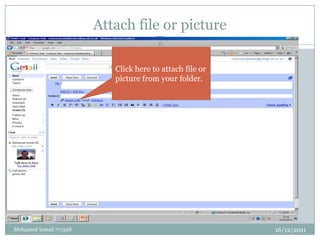
Attach file or picture
                                        6


                           Click here to attach file or
                           picture from your folder.


Mohamed Ismail 771598                                     16/12/2011
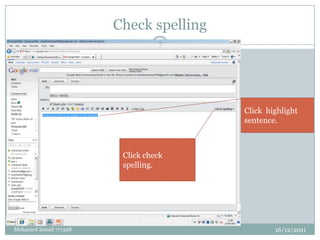
Check spelling
                                  7


                                         Click highlight
                                         sentence.


                         Click check
                         spelling.


Mohamed Ismail 771598                            16/12/2011
8


                        This yellow highlight is
                        spelling mistake it shows
                        when you click check
                        spelling. Then change correct
                        spell than click done.


Mohamed Ismail 771598                                   16/12/2011
Thesaurus
                              9


                        Thesaurus which is
                        you can use word
                        same meaning.


Mohamed Ismail 771598                        16/12/2011
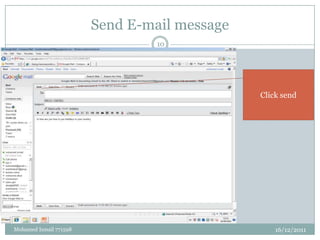
Send E-mail message
                                 10


                                              Click send


Mohamed Ismail 771598                             16/12/2011
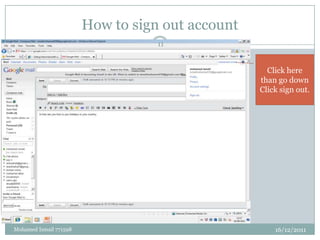
How to sign out account
                                   11


                                                    Click here
                                                  than go down
                                                  Click sign out.


Mohamed Ismail 771598                                 16/12/2011

How to use e mail for beginners

  • 1.
    How to useE-mail for beginners 1 Step 1 :Go to home page Google. Step 2 : Type Google mail. Step 3: create account. Step 4:how to compose message. Step 5:how to check spelling . Step 6:how to do thesaurus. Step 7:how to send e-mail. Step 8:How to attachment file Step 9:how to sign out account. Mohamed Ismail 771598 16/12/2011
  • 2.
    Home page 2 Click Gmail Mohamed Ismail 771598 16/12/2011
  • 3.
    Gmail create account 3 Type your E-mail Type your address Pass word Click here create Click sign an account if in you don’t have G-mail account Mohamed Ismail 771598 16/12/2011
  • 4.
    How to goto compose mail and checking mail. 4 Click compose mail Click Inbox Mohamed Ismail 771598 16/12/2011
  • 5.
    How to composee-mail 5 Click compose mail it will show you like this screen. Type email id who you want sent e-mail. Type what are you tell about. Type here your message. Mohamed Ismail 771598 16/12/2011
  • 6.
    Attach file orpicture 6 Click here to attach file or picture from your folder. Mohamed Ismail 771598 16/12/2011
  • 7.
    Check spelling 7 Click highlight sentence. Click check spelling. Mohamed Ismail 771598 16/12/2011
  • 8.
    8 This yellow highlight is spelling mistake it shows when you click check spelling. Then change correct spell than click done. Mohamed Ismail 771598 16/12/2011
  • 9.
    Thesaurus 9 Thesaurus which is you can use word same meaning. Mohamed Ismail 771598 16/12/2011
  • 10.
    Send E-mail message 10 Click send Mohamed Ismail 771598 16/12/2011
  • 11.
    How to signout account 11 Click here than go down Click sign out. Mohamed Ismail 771598 16/12/2011