Mehdi Khalili
                                            Readify
             Live Backchannel: #dddbrisbane #web01


Advanced Web Debugging
      with Fiddler
Advanced Web Debugging with


      Fiddler
Mehdi Khalili
Readify
Blog: www.Mehdi -Khalili.com
Twitter: @ MehdiKhalili
Please leave your questions to the end
  Tight schedule
  Your answer may be in the next slide
  We will have a Q&A at the end
  If we run out of time:
   − Do not hesitate to shoot me an email with your questions

   − You can also read an extensive two part tutorial on my blog:
       http://www.mehdi-khalili.com/fiddler-in-action/part-1
       http://www.mehdi-khalili.com/fiddler-in-action/part-2


Fiddler Web Debugger
Agenda
  What is Fiddler and how does it work?
  Alternative tools
  Fiddler features
  FiddlerCore and FiddlerCap
  Quick tour of remaining features
  Q&A
  Lots of positive feedback and tweets from you ;-)


Fiddler Web Debugger
What is Fiddler?

   A Web Debugging Proxy
   It is free and has millions of users
   A necessary tool in a developer’s toolbox!!


Fiddler Web Debugger
Fiddler features in a nutshell
  With Fiddler you can perform:
     •   HTTP(S) traffic monitoring and Analysis
     •   HTTP request and response modification


Fiddler Web Debugger
What is HTTP again?
  A networking protocol
  In the application layer
  Sits on top of TCP protocol (usually)


Fiddler Web Debugger
HTTP Session
  An HTTP communication is called a session
  An example of that is web browsing:
   1. You type an address in your browser
   2. Your browser does a DNS lookup for the URL
   3. Then creates a TCP connection to the server
   4. And creates and sends an HTTP request
   5. The server receives the request
   6. Processes it (and optionally maps it to a resource)
   7. And creates and returns an HTTP response


Fiddler Web Debugger
HTTP Request
  An HTTP request is composed of:
   − A request line

   − Header lines

   − A blank line

   − An optional body


   GET http://www.google.com.au/ HTTP/1.1
   Host: www.google.com.au
   Connection: keep-alive
   Accept: text/html,application/xhtml+xml,application/xml;
   Accept-Encoding: gzip,deflate,sdch
   Accept-Language: en-US,en;q=0.8

Fiddler Web Debugger
HTTP Response
  An HTTP response is composed of:
   − A status code

   − Header lines

   − An optional body


   HTTP/1.1 200 OK
   Date: Tue, 22 Nov 2011 20:38:20 GMT
   Expires: -1
   Cache-Control: private, max-age=0
   Content-Type: text/html; charset=UTF-8
   Server: gws
   Content-Length: 57556
Fiddler Web Debugger
Back to Fiddler: Where to get it from?
  http://www.fiddler2.com
     ● Application

     ● Documentation

     ● Fiddler extensions


Fiddler Web Debugger
How does it work?

                                                 Firewall

    Firefox


  CryptoAPI       WinHTTP


   Internet                            CorpNET
                  WinINET    Fiddler                        example.com
   Explorer                             Proxy


    Office


Fiddler Web Debugger
Demo


FIDDLER AND WININET
If you can use a proxy you can use Fiddler
      PC
      Mac


                       Fiddler     Web Server
      Linux
      Mobile


Fiddler Web Debugger
What is next?
  What is Fiddler and how does it work?
  Alternative tools
  Fiddler features
  FiddlerCore and FiddlerCap
  Quick tour of remaining features
  Q&A
  Lots of positive feedback and tweets from you ;-)


Fiddler Web Debugger
Alternatives and similar tools

  Packet Analysers:
   − WireShark

   − NetMon

  Proxies:
   − Charles

   − Burp Suite

  Browser Dev Tools:
   − HttpWatch for IE and FireFox

   − FireBug for FireFox

   − Chrome developer tools and FireBug Lite for Chrome

   − IE Dev Tools


Fiddler Web Debugger
Sniffer vs Proxy vs Browser Dev Tools

Feature                Sniffer   Proxy   Browser Tools
HTTP only                 No      Yes            Yes
Nice visualisation       No       Yes            Yes
From all processes       Yes      Yes    Only Browser session
Local traffic            No       Yes            Yes
Cached traffic           No       No             Yes


Fiddler Web Debugger
What is next?
  What is Fiddler and how does it work?
  Alternative tools
  Fiddler features
  FiddlerCore and FiddlerCap
  Quick tour of remaining features
  Q&A
  Lots of positive feedback and tweets from you ;-)


Fiddler Web Debugger
HTTP(S) Traffic


Result - The Result code
Protocol - HTTP/HTTPS/FTP
Host - The hostname
URL - The path and file requested from the server
Body - The number of bytes in the response body
Caching - Response's Expires or Cache-Control headers
Process - The local Windows Process
Content-Type - The Content-Type header

Fiddler Web Debugger
Demo


HTTP TRAFFIC
Traffic Comparison

Compare sessions
using a diff tool


Fiddler Web Debugger
Demo


TRAFFIC COMPARISON
Traffic Comparison
  It allows you to compare two sessions
  If you want to compare two traffic profiles then use
   Traffic Differ extension


Fiddler Web Debugger
Statistics
 Get a "total page
 weight and wait"—the
 number of requests
 and the bytes
 transferred.


Fiddler Web Debugger
Demo


STATISTICS TAB
Quick Exec


Fiddler Web Debugger
Demo


A FEW HANDY QUICKEXEC COMMANDS
Inspectors
 Inspectors allow you to visualize requests and
 responses in meaningful ways.


Fiddler Web Debugger
Demo


INSPECTORS
HTTPS Traffic Decryption
 Fiddler can decrypt HTTPS traffic using the
 Man-In-The-Middle attack


Fiddler Web Debugger
HTTPS Traffic Decryption
 Fiddler can decrypt HTTPS traffic using the
 Man-In-The-Middle attack


                             1
         Client            MITM               Server
                             2


                   Man In The Middle Attack
Fiddler Web Debugger
HTTPS Traffic Decryption
 Fiddler can decrypt HTTPS traffic using the
 Man-In-The-Middle attack


                       1             2
         Client            MITM               Server
                       4             3


                   Man In The Middle Attack
Fiddler Web Debugger
Demo


SETTING UP HTTPS DECRYPTION
Changing the traffic on the fly
 You can set breakpoints and change the request
 and/or response on the fly.


Fiddler Web Debugger
Demo


     HOW TO SET BREAKPOINTS
              AND
CHANGE REQUESTS AND/OR RESPONSES
Changing the traffic on the fly
  Test your JavaScript code with less than perfect
   response
  Test your website for security holes
  Troubleshoot your third party web client
  Troubleshoot your third party web service


Fiddler Web Debugger
Auto Responder
 Create a fake web server using Auto Responder


Fiddler Web Debugger
Demo


HOW TO SETUP AND USE AUTO RESPONDER
Auto Responder
  Replace a JavaScript or css or image file
  Replace an entire traffic
  Force a redirection
  Work without a connection!


Fiddler Web Debugger
Request Builder
 Create a fake web client using Request Builder


 Avoid coding html pages or test clients. Use Request
 Builder instead to send a hand rolled request to your
 server/service
Fiddler Web Debugger
Demo


HOW TO SETUP AND USE REQUEST BUILDER
Filters
 Filter and flag traffic and perform some lightweight
 modifications


Fiddler Web Debugger
Demo


QUICK TOUR OF FILTERS
Filters
  Clean up your Web Sessions page
  Filter out some status codes
  Filter out traffic from some urls
  Flag some of the traffic
  Very useful on a high traffic server/machine


Fiddler Web Debugger
What is next?
  What is Fiddler and how does it work?
  Alternative tools
  Fiddler features
  FiddlerCore and FiddlerCap
  Quick tour of remaining features
  Q&A
  Lots of positive feedback and tweets from you ;-)


Fiddler Web Debugger
Fiddler Core
                  Fiddler application with extensions     Your application hosting FiddlerCore

                               Fiddler 2                             YourApp.exe
                                Inspector2

                                Inspector2
 ExecAction.exe


                             IFiddlerExtension

                             IFiddlerExtension

                           Fiddler ScriptEngine
                             Your FiddlerScript

                               FiddlerCore                               FiddlerCore


                        Xceed*.dll     Makecert.exe              Xceed*.dll    Makecert.exe

Fiddler Web Debugger
FiddlerCap


   Built on top of FiddlerCore
   It is bin deployable
   A handy tool for production support

Fiddler Web Debugger
Demo


FIDDLER CAP
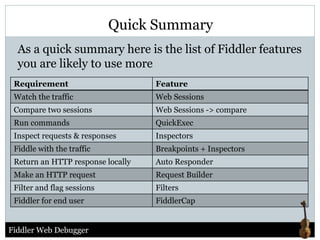
Quick Summary
  As a quick summary here is the list of Fiddler features
  you are likely to use more
 Requirement                       Feature
 Watch the traffic                 Web Sessions
 Compare two sessions              Web Sessions -> compare
 Run commands                      QuickExec
 Inspect requests & responses      Inspectors
 Fiddle with the traffic           Breakpoints + Inspectors
 Return an HTTP response locally   Auto Responder
 Make an HTTP request              Request Builder
 Filter and flag sessions          Filters
 Fiddler for end user              FiddlerCap


Fiddler Web Debugger
What is next?
  What is Fiddler and how does it work?
  Alternative tools
  Fiddler features
  FiddlerCore and FiddlerCap
  Quick tour of remaining features
  Q&A
  Lots of positive feedback and tweets from you ;-)


Fiddler Web Debugger
Demo


QUICK TOUR OF WHAT IS NOT COVERED
Extensions
  SyntaxView
  WcfBinaryInspector
  Traffic Differ
  Gallery
  neXpert Performance Report Generator
  StresStimulus aids in load-testing


 Find out more on Fiddler website


Fiddler Web Debugger
That is all from me
  What is Fiddler and how does it work?
  Alternative tools
  Fiddler features
  FiddlerCore and FiddlerCap
  Quick tour of remaining features
  Quick overview of useful extensions
  Q&A
  Lots of positive feedback and tweets from you ;-)


Fiddler Web Debugger
Thanks for attending


                            Q&A
  Tutorials:
   − http://www.mehdi-khalili.com/fiddler-in-action/part-1
   − http://www.mehdi-khalili.com/fiddler-in-action/part-2


  Contact Details:
   − www.mehdi-khalili.com
   − Twitter: @MehdiKhalili


Fiddler Web Debugger

Advanced Web Debugging with Fiddler

  • 1.
    Mehdi Khalili Readify Live Backchannel: #dddbrisbane #web01 Advanced Web Debugging with Fiddler
  • 2.
    Advanced Web Debuggingwith Fiddler Mehdi Khalili Readify Blog: www.Mehdi -Khalili.com Twitter: @ MehdiKhalili
  • 3.
    Please leave yourquestions to the end  Tight schedule  Your answer may be in the next slide  We will have a Q&A at the end  If we run out of time: − Do not hesitate to shoot me an email with your questions − You can also read an extensive two part tutorial on my blog:  http://www.mehdi-khalili.com/fiddler-in-action/part-1  http://www.mehdi-khalili.com/fiddler-in-action/part-2 Fiddler Web Debugger
  • 4.
    Agenda  Whatis Fiddler and how does it work?  Alternative tools  Fiddler features  FiddlerCore and FiddlerCap  Quick tour of remaining features  Q&A  Lots of positive feedback and tweets from you ;-) Fiddler Web Debugger
  • 5.
    What is Fiddler?  A Web Debugging Proxy  It is free and has millions of users  A necessary tool in a developer’s toolbox!! Fiddler Web Debugger
  • 6.
    Fiddler features ina nutshell  With Fiddler you can perform: • HTTP(S) traffic monitoring and Analysis • HTTP request and response modification Fiddler Web Debugger
  • 7.
    What is HTTPagain?  A networking protocol  In the application layer  Sits on top of TCP protocol (usually) Fiddler Web Debugger
  • 8.
    HTTP Session An HTTP communication is called a session  An example of that is web browsing: 1. You type an address in your browser 2. Your browser does a DNS lookup for the URL 3. Then creates a TCP connection to the server 4. And creates and sends an HTTP request 5. The server receives the request 6. Processes it (and optionally maps it to a resource) 7. And creates and returns an HTTP response Fiddler Web Debugger
  • 9.
    HTTP Request An HTTP request is composed of: − A request line − Header lines − A blank line − An optional body GET http://www.google.com.au/ HTTP/1.1 Host: www.google.com.au Connection: keep-alive Accept: text/html,application/xhtml+xml,application/xml; Accept-Encoding: gzip,deflate,sdch Accept-Language: en-US,en;q=0.8 Fiddler Web Debugger
  • 10.
    HTTP Response An HTTP response is composed of: − A status code − Header lines − An optional body HTTP/1.1 200 OK Date: Tue, 22 Nov 2011 20:38:20 GMT Expires: -1 Cache-Control: private, max-age=0 Content-Type: text/html; charset=UTF-8 Server: gws Content-Length: 57556 Fiddler Web Debugger
  • 11.
    Back to Fiddler:Where to get it from? http://www.fiddler2.com ● Application ● Documentation ● Fiddler extensions Fiddler Web Debugger
  • 12.
    How does itwork? Firewall Firefox CryptoAPI WinHTTP Internet CorpNET WinINET Fiddler example.com Explorer Proxy Office Fiddler Web Debugger
  • 13.
  • 14.
    If you canuse a proxy you can use Fiddler PC Mac Fiddler Web Server Linux Mobile Fiddler Web Debugger
  • 15.
    What is next?  What is Fiddler and how does it work?  Alternative tools  Fiddler features  FiddlerCore and FiddlerCap  Quick tour of remaining features  Q&A  Lots of positive feedback and tweets from you ;-) Fiddler Web Debugger
  • 16.
    Alternatives and similartools  Packet Analysers: − WireShark − NetMon  Proxies: − Charles − Burp Suite  Browser Dev Tools: − HttpWatch for IE and FireFox − FireBug for FireFox − Chrome developer tools and FireBug Lite for Chrome − IE Dev Tools Fiddler Web Debugger
  • 17.
    Sniffer vs Proxyvs Browser Dev Tools Feature Sniffer Proxy Browser Tools HTTP only No Yes Yes Nice visualisation No Yes Yes From all processes Yes Yes Only Browser session Local traffic No Yes Yes Cached traffic No No Yes Fiddler Web Debugger
  • 18.
    What is next?  What is Fiddler and how does it work?  Alternative tools  Fiddler features  FiddlerCore and FiddlerCap  Quick tour of remaining features  Q&A  Lots of positive feedback and tweets from you ;-) Fiddler Web Debugger
  • 19.
    HTTP(S) Traffic Result -The Result code Protocol - HTTP/HTTPS/FTP Host - The hostname URL - The path and file requested from the server Body - The number of bytes in the response body Caching - Response's Expires or Cache-Control headers Process - The local Windows Process Content-Type - The Content-Type header Fiddler Web Debugger
  • 20.
  • 21.
    Traffic Comparison Compare sessions usinga diff tool Fiddler Web Debugger
  • 22.
  • 23.
    Traffic Comparison It allows you to compare two sessions  If you want to compare two traffic profiles then use Traffic Differ extension Fiddler Web Debugger
  • 24.
    Statistics Get a"total page weight and wait"—the number of requests and the bytes transferred. Fiddler Web Debugger
  • 25.
  • 26.
  • 27.
    Demo A FEW HANDYQUICKEXEC COMMANDS
  • 28.
    Inspectors Inspectors allowyou to visualize requests and responses in meaningful ways. Fiddler Web Debugger
  • 29.
  • 30.
    HTTPS Traffic Decryption Fiddler can decrypt HTTPS traffic using the Man-In-The-Middle attack Fiddler Web Debugger
  • 31.
    HTTPS Traffic Decryption Fiddler can decrypt HTTPS traffic using the Man-In-The-Middle attack 1 Client MITM Server 2 Man In The Middle Attack Fiddler Web Debugger
  • 32.
    HTTPS Traffic Decryption Fiddler can decrypt HTTPS traffic using the Man-In-The-Middle attack 1 2 Client MITM Server 4 3 Man In The Middle Attack Fiddler Web Debugger
  • 33.
  • 34.
    Changing the trafficon the fly You can set breakpoints and change the request and/or response on the fly. Fiddler Web Debugger
  • 35.
    Demo HOW TO SET BREAKPOINTS AND CHANGE REQUESTS AND/OR RESPONSES
  • 36.
    Changing the trafficon the fly  Test your JavaScript code with less than perfect response  Test your website for security holes  Troubleshoot your third party web client  Troubleshoot your third party web service Fiddler Web Debugger
  • 37.
    Auto Responder Createa fake web server using Auto Responder Fiddler Web Debugger
  • 38.
    Demo HOW TO SETUPAND USE AUTO RESPONDER
  • 39.
    Auto Responder Replace a JavaScript or css or image file  Replace an entire traffic  Force a redirection  Work without a connection! Fiddler Web Debugger
  • 40.
    Request Builder Createa fake web client using Request Builder Avoid coding html pages or test clients. Use Request Builder instead to send a hand rolled request to your server/service Fiddler Web Debugger
  • 41.
    Demo HOW TO SETUPAND USE REQUEST BUILDER
  • 42.
    Filters Filter andflag traffic and perform some lightweight modifications Fiddler Web Debugger
  • 43.
  • 44.
    Filters  Cleanup your Web Sessions page  Filter out some status codes  Filter out traffic from some urls  Flag some of the traffic  Very useful on a high traffic server/machine Fiddler Web Debugger
  • 45.
    What is next?  What is Fiddler and how does it work?  Alternative tools  Fiddler features  FiddlerCore and FiddlerCap  Quick tour of remaining features  Q&A  Lots of positive feedback and tweets from you ;-) Fiddler Web Debugger
  • 46.
    Fiddler Core Fiddler application with extensions Your application hosting FiddlerCore Fiddler 2 YourApp.exe Inspector2 Inspector2 ExecAction.exe IFiddlerExtension IFiddlerExtension Fiddler ScriptEngine Your FiddlerScript FiddlerCore FiddlerCore Xceed*.dll Makecert.exe Xceed*.dll Makecert.exe Fiddler Web Debugger
  • 47.
    FiddlerCap Built on top of FiddlerCore  It is bin deployable  A handy tool for production support Fiddler Web Debugger
  • 48.
  • 49.
    Quick Summary As a quick summary here is the list of Fiddler features you are likely to use more Requirement Feature Watch the traffic Web Sessions Compare two sessions Web Sessions -> compare Run commands QuickExec Inspect requests & responses Inspectors Fiddle with the traffic Breakpoints + Inspectors Return an HTTP response locally Auto Responder Make an HTTP request Request Builder Filter and flag sessions Filters Fiddler for end user FiddlerCap Fiddler Web Debugger
  • 50.
    What is next?  What is Fiddler and how does it work?  Alternative tools  Fiddler features  FiddlerCore and FiddlerCap  Quick tour of remaining features  Q&A  Lots of positive feedback and tweets from you ;-) Fiddler Web Debugger
  • 51.
    Demo QUICK TOUR OFWHAT IS NOT COVERED
  • 52.
    Extensions  SyntaxView  WcfBinaryInspector  Traffic Differ  Gallery  neXpert Performance Report Generator  StresStimulus aids in load-testing Find out more on Fiddler website Fiddler Web Debugger
  • 53.
    That is allfrom me  What is Fiddler and how does it work?  Alternative tools  Fiddler features  FiddlerCore and FiddlerCap  Quick tour of remaining features  Quick overview of useful extensions  Q&A  Lots of positive feedback and tweets from you ;-) Fiddler Web Debugger
  • 54.
    Thanks for attending Q&A  Tutorials: − http://www.mehdi-khalili.com/fiddler-in-action/part-1 − http://www.mehdi-khalili.com/fiddler-in-action/part-2  Contact Details: − www.mehdi-khalili.com − Twitter: @MehdiKhalili Fiddler Web Debugger