THOMASNET.COM –
A FREE PLATFORM FOR PRODUCT SOURCING
AND SUPPLIER DISCOVERY

A Ready Reference Instructional Guide
THOMASNET LEADS TO BUSINESS


ThomasNet connects industrial buyers and suppliers through online solutions that make it
easier to find and do business. Since its start in 1898, the technologies driving their
solutions may have changed, but they remain an essential cog in the wheels of American
manufacturing.

 Buyers and engineers worldwide rely on ThomasNet.com, a free platform for product

sourcing and supplier discovery.
 Key decision-makers turn to ThomasNet News, the industry’s leading source of new

product news, information and analysis.
HOW TO ACCESS
 ThomasNet can be accessed from any computer having access to the

Internet.
 Simply open your preferred search engine and type

http://www.thomasnet.com/ into your browser or click on the provided link.
HISTORY OF THOMASNET
 The printed multivolume annual Thomas Register of American Manufacturers

was published since 1906 and were known as the “big green books”.
 The printed volumes were deemed so vital to industry that the U.S.

Government exempted it from strict paper rationing laws during World War II.
WHAT CAN THOMASNET DO FOR YOU?
 Discover OEMs (Original Equipment

Manufacturers), distributors and custom
services
 Source locally or throughout the US and

Canada
 Find Diverse and Quality certified

Suppliers
 Send RFQ (Request For Quotes) and RFI

(Request For Information)

 Source parts, raw materials and

equipment from 30,000 suppliers
 Specify by product attribute
 Review product details, spec sheets and

schematics
 Search by product category or part

number
 Find 2D and 3D models
WHAT CAN THOMASNET DO FOR YOU?
It is the standard authority for finding information such as:
 contact numbers
 addresses
 subsidiaries

 sales offices, and
 affiliations for 607,000 companies
ARRANGEMENT OF INFORMATION
 There are 67,000 product and service categories listed alphabetically under

city and state.
 Contact information, as well as product details, is accompanied by millions of

detailed CAD (Computer Aided Design) drawings of component pieces and
company catalogs.
 The information is updated on the daily basis.
HOW TO SEARCH
There are two easy ways to use ThomasNet:
 Searching using keywords
 Browsing the product category

Both searches can be limited by geographic location
KEYWORD SEARCH EXAMPLE
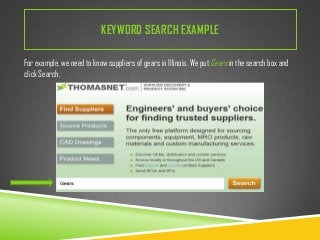
For example, we need to know suppliers of gears in Illinois. We put Gears in the search box and
click Search.
KEYWORD SEARCH EXAMPLE
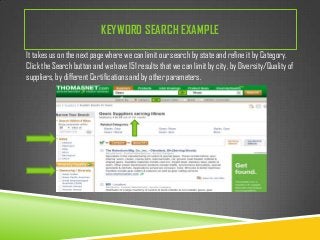
It takes us on the next page where we can limit our search by state and refine it by Category.
Click the Search button and we have 151 results that we can limit by city, by Diversity/Quality of
suppliers, by different Certifications and by other parameters.
KEYWORD SEARCH EXAMPLE
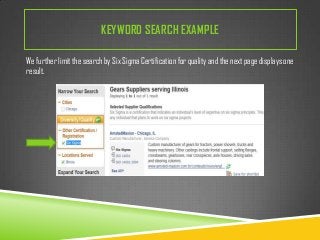
We further limit the search by Six Sigma Certification for quality and the next page displays one
result.
KEYWORD SEARCH EXAMPLE
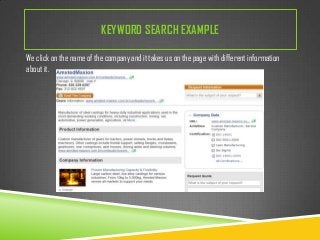
We click on the name of the company and it takes us on the page with different information
about it.
Keyword search example
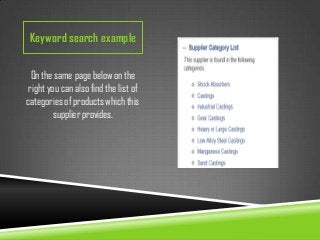
On the same page below on the
right you can also find the list of
categories of products which this
supplier provides.
BROWSING EXAMPLE
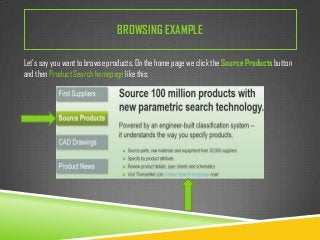
Let’s say you want to browse products. On the home page we click the Source Products button
and then Product Search homepage like this:
BROWSING EXAMPLE
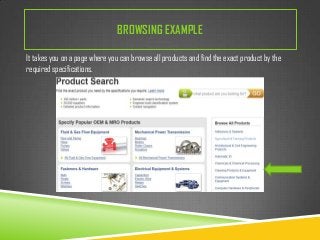
It takes you on a page where you can browse all products and find the exact product by the
required specifications.
BROWSING EXAMPLE
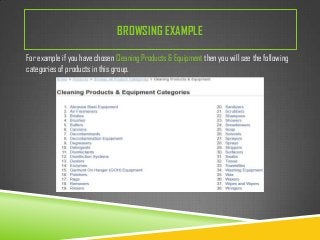
For example if you have chosen Cleaning Products & Equipment then you will see the following
categories of products in this group.
BROWSING EXAMPLE

You can continue your search clicking on the necessary category from the list
and you will receive the list of suppliers with the information about them similar
to the example with AmstedMaxion.
BROWSING EXAMPLE
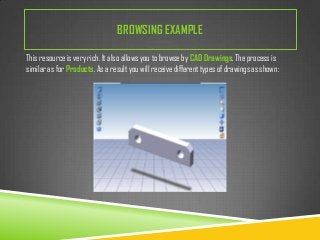
This resource is very rich. It also allows you to browse by CAD Drawings. The process is
similar as for Products. As a result you will receive different types of drawings as shown:
CITATION

 ThomasNet.com: supplier discovery & product sourcing. (2013). Accessed

November 9th, 2013. www.thomasnet.com/
ASK A LIBRARIAN
If you have any questions about this resource or something left unclear please
contact our ASK A LIBRARIAN service and it will be our pleasure to help you.

Elena Stuart
2013-11-10

ThomasNet.com

  • 1.
    THOMASNET.COM – A FREEPLATFORM FOR PRODUCT SOURCING AND SUPPLIER DISCOVERY A Ready Reference Instructional Guide
  • 2.
    THOMASNET LEADS TOBUSINESS  ThomasNet connects industrial buyers and suppliers through online solutions that make it easier to find and do business. Since its start in 1898, the technologies driving their solutions may have changed, but they remain an essential cog in the wheels of American manufacturing.  Buyers and engineers worldwide rely on ThomasNet.com, a free platform for product sourcing and supplier discovery.  Key decision-makers turn to ThomasNet News, the industry’s leading source of new product news, information and analysis.
  • 3.
    HOW TO ACCESS ThomasNet can be accessed from any computer having access to the Internet.  Simply open your preferred search engine and type http://www.thomasnet.com/ into your browser or click on the provided link.
  • 4.
    HISTORY OF THOMASNET The printed multivolume annual Thomas Register of American Manufacturers was published since 1906 and were known as the “big green books”.  The printed volumes were deemed so vital to industry that the U.S. Government exempted it from strict paper rationing laws during World War II.
  • 5.
    WHAT CAN THOMASNETDO FOR YOU?  Discover OEMs (Original Equipment Manufacturers), distributors and custom services  Source locally or throughout the US and Canada  Find Diverse and Quality certified Suppliers  Send RFQ (Request For Quotes) and RFI (Request For Information)  Source parts, raw materials and equipment from 30,000 suppliers  Specify by product attribute  Review product details, spec sheets and schematics  Search by product category or part number  Find 2D and 3D models
  • 6.
    WHAT CAN THOMASNETDO FOR YOU? It is the standard authority for finding information such as:  contact numbers  addresses  subsidiaries  sales offices, and  affiliations for 607,000 companies
  • 7.
    ARRANGEMENT OF INFORMATION There are 67,000 product and service categories listed alphabetically under city and state.  Contact information, as well as product details, is accompanied by millions of detailed CAD (Computer Aided Design) drawings of component pieces and company catalogs.  The information is updated on the daily basis.
  • 8.
    HOW TO SEARCH Thereare two easy ways to use ThomasNet:  Searching using keywords  Browsing the product category Both searches can be limited by geographic location
  • 9.
    KEYWORD SEARCH EXAMPLE Forexample, we need to know suppliers of gears in Illinois. We put Gears in the search box and click Search.
  • 10.
    KEYWORD SEARCH EXAMPLE Ittakes us on the next page where we can limit our search by state and refine it by Category. Click the Search button and we have 151 results that we can limit by city, by Diversity/Quality of suppliers, by different Certifications and by other parameters.
  • 11.
    KEYWORD SEARCH EXAMPLE Wefurther limit the search by Six Sigma Certification for quality and the next page displays one result.
  • 12.
    KEYWORD SEARCH EXAMPLE Weclick on the name of the company and it takes us on the page with different information about it.
  • 13.
    Keyword search example Onthe same page below on the right you can also find the list of categories of products which this supplier provides.
  • 14.
    BROWSING EXAMPLE Let’s sayyou want to browse products. On the home page we click the Source Products button and then Product Search homepage like this:
  • 15.
    BROWSING EXAMPLE It takesyou on a page where you can browse all products and find the exact product by the required specifications.
  • 16.
    BROWSING EXAMPLE For exampleif you have chosen Cleaning Products & Equipment then you will see the following categories of products in this group.
  • 17.
    BROWSING EXAMPLE You cancontinue your search clicking on the necessary category from the list and you will receive the list of suppliers with the information about them similar to the example with AmstedMaxion.
  • 18.
    BROWSING EXAMPLE This resourceis very rich. It also allows you to browse by CAD Drawings. The process is similar as for Products. As a result you will receive different types of drawings as shown:
  • 19.
    CITATION  ThomasNet.com: supplierdiscovery & product sourcing. (2013). Accessed November 9th, 2013. www.thomasnet.com/
  • 20.
    ASK A LIBRARIAN Ifyou have any questions about this resource or something left unclear please contact our ASK A LIBRARIAN service and it will be our pleasure to help you. Elena Stuart 2013-11-10