An interactive e-learning platform
for Data Analysis based on R
Martijn Theuwissen
Dieter De Mesmaeker
Jonathan Cornelissen
Who we are!
Jonathan@datamind.org
Dieter@datamind.org
Martijn@datamind.org
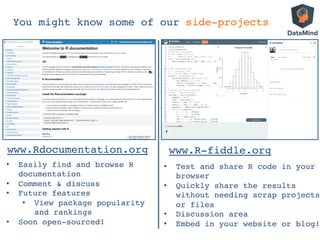
You might know some of our side-projects!
www.Rdocumentation.org!
•  Easily find and browse R
documentation!
•  Comment & discuss!
•  Future features!
•  View package popularity
and rankings!
•  Soon open-sourced!!
www.R-fiddle.org!
•  Test and share R code in your
browser!
•  Quickly share the results
without needing scrap projects
or files!
•  Discussion area!
•  Embed in your website or blog!!
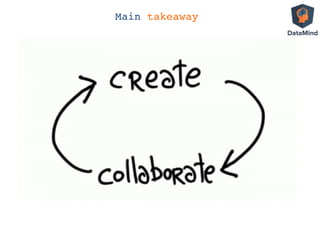
Main takeaway!
1.  Motivation:
Why e-learning with and for R?
2.  Learner experience
3.  Technical overview
4.  Course creators experience on DataMind
1.  Web interface
2.  R interface
5.  Submission Correctness Tests (examples)
6.  Questions and answers?
Why e-learning with and for R?
Need for scalable tools to learn
R and Data Analysis…
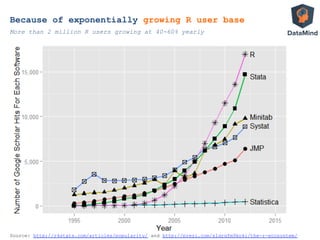
Because of exponentially growing R user base
More than 2 million R users growing at 40-60% yearly
Source: http://r4stats.com/articles/popularity/ and http://prezi.com/s1qrgfm9ko4i/the-r-ecosystem/
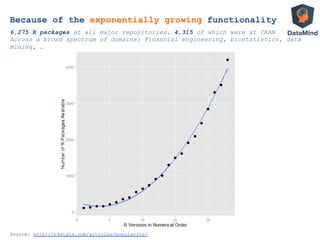
Source: http://r4stats.com/articles/popularity/
6,275 R packages at all major repositories, 4,315 of which were at CRAN
Across a broad spectrum of domains: Financial engineering, biostatistics, data
mining, …
Because of the exponentially growing functionality
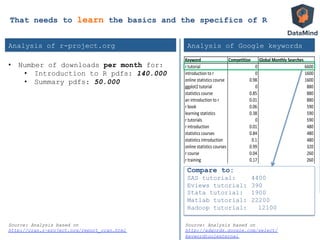
Keyword Competition Global2Monthly2Searches
r"tutorial 0 6600
introduction"to"r 0 1600
online"statistics"course 0.98 1600
ggplot2"tutorial 0 880
statistics"course 0.85 880
an"introduction"to"r 0.01 880
r"book 0.06 590
learning"statistics 0.38 590
r"tutorials 0 590
r"introduction 0.01 480
statistics"courses 0.84 480
statistics"introduction 0.1 480
online"statistics"courses 0.99 320
r"course 0.04 260
r"training 0.17 260
free"online"statistics"course 0.56 260
statistics"training 0.62 210
online"statistics"class 0.98 170
statistics"class"online 0.98 140
data"analysis"tutorial 0.5 110
Analysis of r-project.org Analysis of Google keywords
Compare to:
SAS tutorial: 4400
Eviews tutorial: 390
Stata tutorial: 1900
Matlab tutorial: 22200
Hadoop tutorial: 12100
Source: Analysis based on
http://cran.r-project.org/report_cran.html
Source: Analysis based on
http://adwords.google.com/select/
keywordtoolexternal
That needs to learn the basics and the specifics of R
•  Number of downloads per month for:
•  Introduction to R pdfs: 140.000
•  Summary pdfs: 50.000
Why e-learning with and for R?
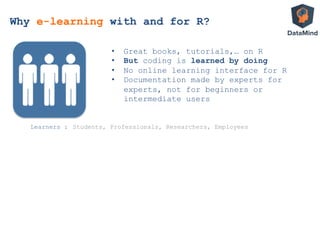
•  Great books, tutorials,… on R
•  But coding is learned by doing
•  No online learning interface for R
•  Documentation made by experts for
experts, not for beginners or
intermediate users
Learners : Students, Professionals, Researchers, Employees
Why e-learning with and for R?
•  Great books, tutorials,… on R
•  But coding is learned by doing
•  No online learning interface for R
•  Documentation made by experts for
experts, not for beginners or
intermediate users
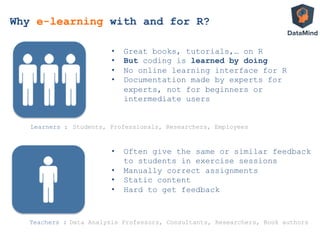
Teachers :
Learners :
•  Often give the same or similar feedback
to students in exercise sessions
•  Manually correct assignments
•  Static content
•  Hard to get feedback
Students, Professionals, Researchers, Employees
Why e-learning with and for R?
Data Analysis Professors, Consultants, Researchers, Book authors
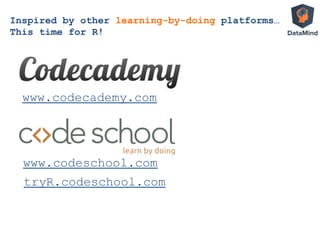
Inspired by other learning-by-doing platforms…
This time for R!
www.codecademy.com
www.codeschool.com
tryR.codeschool.com
Benefits for students of learning R online
1. Everything in one place:
assignments, sample code, R-console, …
2. Lowering the barrier:
start right-away with R, no installation, version
problems, .. since R runs in the background on
our servers
3. Automated correction and feedback
through Submission Correctness Tests (SCT)
4. Gamification
more fun while learning
LIVE DEMO
Surf to
http://www.datamind.org
Technical overview
DataMind IT architecture
R
Open-source
statistical
language
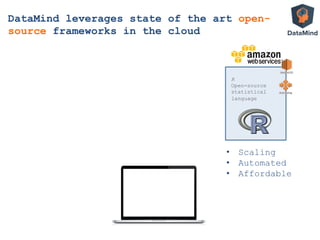
DataMind leverages state of the art open-
source frameworks in the cloud
•  Scaling
•  Automated
•  Affordable
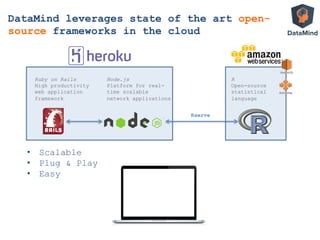
•  Scalable
•  Plug & Play
•  Easy
Rserve
Ruby on Rails
High productivity
web application
framework
Node.js
Platform for real-
time scalable
network applications
R
Open-source
statistical
language
DataMind leverages state of the art open-
source frameworks in the cloud
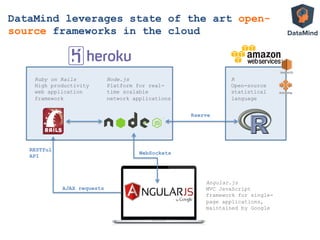
WebSockets
AJAX requests
Rserve
Ruby on Rails
High productivity
web application
framework
Node.js
Platform for real-
time scalable
network applications
RESTful
API
R
Open-source
statistical
language
Angular.js
MVC JavaScript
framework for single-
page applications,
maintained by Google
DataMind leverages state of the art open-
source frameworks in the cloud
Rserve: Communication with R
•  Package of Simon Urbanek
•  Manages sessions and workspaces
•  Binary communication
•  Emulate console with capture.output()
•  Detect incomplete statements with parse()
•  Catch and print errors
RAppArmor: Security
•  Evaluation of external code
è Huge security risk
•  Solution:
•  Limited access to OS
•  RAppArmor
•  Package of Jeroen Ooms
•  R-interface to OS Security
•  Limit CPU, Memory, Spawned processes
Course creators experience on DataMind
How to create your own course?
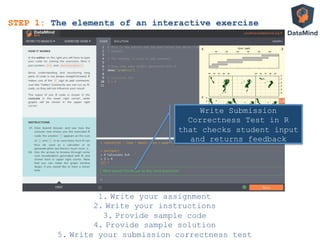
STEP 1: The elements of an interactive exercise
STEP 2: Using the web or R interface to create an exercise
STEP 3: Explaining interactivity	
  
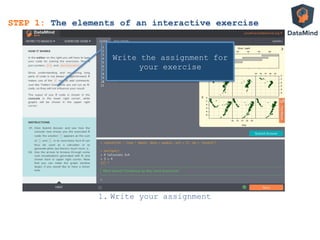
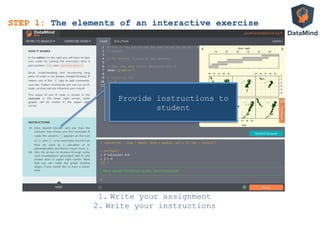
STEP 1: The elements of an interactive exercise
1.  Write your assignment
Write the assignment for
your exercise
STEP 1: The elements of an interactive exercise
1.  Write your assignment
2.  Write your instructions
Provide instructions to
student
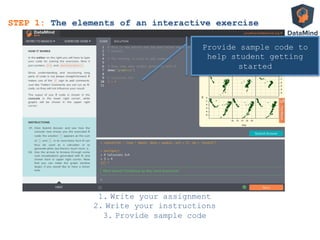
STEP 1: The elements of an interactive exercise
1.  Write your assignment
2.  Write your instructions
3.  Provide sample code
Provide sample code to
help student getting
started
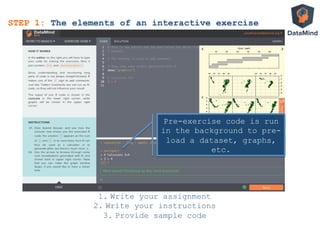
STEP 1: The elements of an interactive exercise
1.  Write your assignment
2.  Write your instructions
3.  Provide sample code
Pre-exercise code is run
in the background to pre-
load a dataset, graphs,
etc.
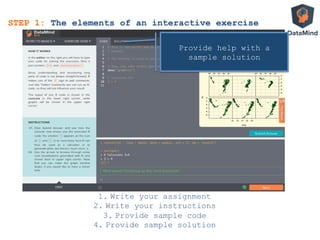
STEP 1: The elements of an interactive exercise
1.  Write your assignment
2.  Write your instructions
3.  Provide sample code
4.  Provide sample solution
Provide help with a
sample solution
STEP 1: The elements of an interactive exercise
1.  Write your assignment
2.  Write your instructions
3.  Provide sample code
4.  Provide sample solution
5.  Write your submission correctness test
Write Submission
Correctness Test in R
that checks student input
and returns feedback
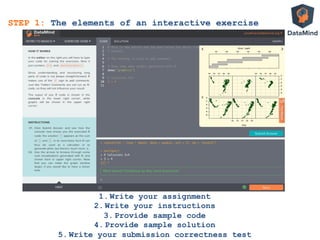
STEP 1: The elements of an interactive exercise
1.  Write your assignment
2.  Write your instructions
3.  Provide sample code
4.  Provide sample solution
5.  Write your submission correctness test
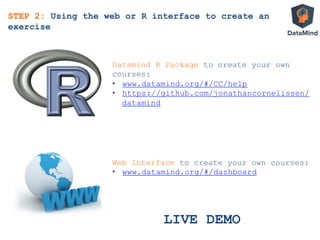
STEP 2: Using the web or R interface to create an
exercise
Datamind R Package to create your own
courses:
•  www.datamind.org/#/CC/help
•  https://github.com/jonathancornelissen/
datamind
Web Interface to create your own courses:
•  www.datamind.org/#/dashboard
LIVE DEMO
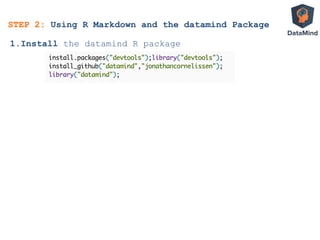
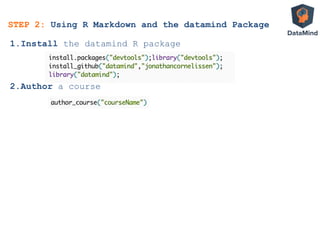
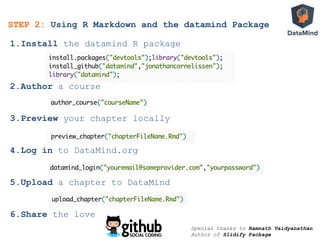
STEP 2: Using R Markdown and the datamind Package
1. Install the datamind R package
STEP 2: Using R Markdown and the datamind Package
1. Install the datamind R package
2. Author a course
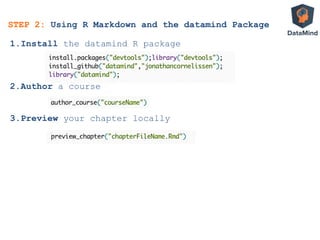
STEP 2: Using R Markdown and the datamind Package
1. Install the datamind R package
2. Author a course
3. Preview your chapter locally
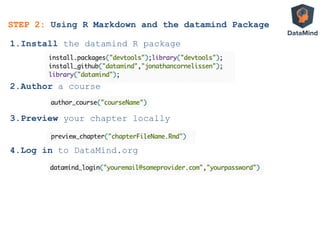
STEP 2: Using R Markdown and the datamind Package
1. Install the datamind R package
2. Author a course
3. Preview your chapter locally
4. Log in to DataMind.org
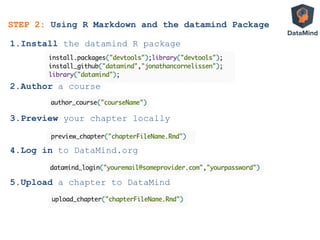
STEP 2: Using R Markdown and the datamind Package
1. Install the datamind R package
2. Author a course
3. Preview your chapter locally
4. Log in to DataMind.org
5. Upload a chapter to DataMind
STEP 2: Using R Markdown and the datamind Package
1. Install the datamind R package
2. Author a course
3. Preview your chapter locally
4. Log in to DataMind.org
5. Upload a chapter to DataMind
6. Share the love
Special thanks to Ramnath Vaidyanathan
Author of Slidify Package
Submission Correctness Tests
STEP 3: Explaining Interactivity
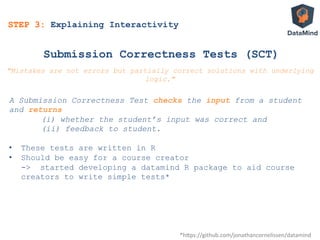
Submission Correctness Tests (SCT)
A Submission Correctness Test checks the input from a student
and returns
(i) whether the student’s input was correct and
(ii) feedback to student.
•  These tests are written in R
•  Should be easy for a course creator
-> started developing a datamind R package to aid course
creators to write simple tests*
*h$ps://github.com/jonathancornelissen/datamind	
  
"Mistakes are not errors but partially correct solutions with underlying
logic."
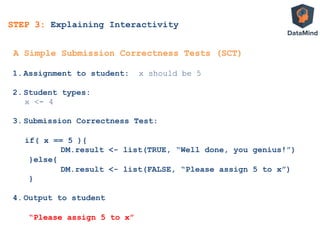
STEP 3: Explaining Interactivity
1.  Assignment to student: x should be 5
2.  Student types:
x <- 4
3.  Submission Correctness Test:
if( x == 5 ){
DM.result <- list(TRUE, “Well done, you genius!”)
}else{
DM.result <- list(FALSE, “Please assign 5 to x”)
}
4.  Output to student
“Please assign 5 to x”
A Simple Submission Correctness Tests (SCT)
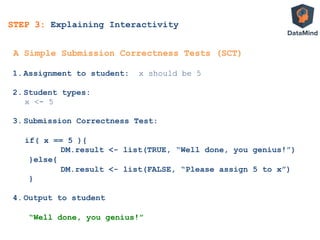
STEP 3: Explaining Interactivity
1.  Assignment to student: x should be 5
2.  Student types:
x <- 5
3.  Submission Correctness Test:
if( x == 5 ){
DM.result <- list(TRUE, “Well done, you genius!”)
}else{
DM.result <- list(FALSE, “Please assign 5 to x”)
}
4.  Output to student
“Well done, you genius!”	
  
A Simple Submission Correctness Tests (SCT)
STEP 3: Explaining Interactivity
•  Everything in the student’s workspace
•  DM.user.code
all code written by student
•  DM.console.output
everything printed to user console
INPUT
Automated exercise correction with SCT
Assignment to the student:
Print a matrix with 3 rows
containing the numbers 1 up to 9
If Student does this correctly
then:
DM.console.ouput contains
[,1] [,2] [,3]
[1,] 1 2 3
[2,] 4 5 6
[3,] 7 8 9
STEP 3: Explaining Interactivity
•  Everything in the student’s workspace
•  DM.user.code
all code written by student
•  DM.console.output
everything printed to user console
INPUT
Automated exercise correction with SCT
Assignment to the student:
Print a matrix with 3 rows
containing the numbers 1 up to 9
If Student does this correctly
then:
DM.console.ouput contains
[,1] [,2] [,3]
[1,] 1 2 3
[2,] 4 5 6
[3,] 7 8 9
STEP 3: Explaining Interactivity
Submission Correctness Test written by course
creator (potentially using datamind package)
DM.result <- output_contains("matrix(1:9,
byrow=TRUE, nrow=3)”)
•  Everything in the student’s workspace
•  DM.user.code
all code written by student
•  DM.console.output
everything printed to user console
INPUT
Automated exercise correction with SCT
Assignment to the student:
Print a matrix with 3 rows
containing the numbers 1 up to 9
If Student does this correctly
then:
DM.console.ouput contains
[,1] [,2] [,3]
[1,] 1 2 3
[2,] 4 5 6
[3,] 7 8 9
STEP 3: Explaining Interactivity
Submission Correctness Test written by course
creator (potentially using DM package)
DM.result <- output_contains("matrix(1:9,
byrow=TRUE, nrow=3)”)
•  Assigned to variable DM.result
•  List with two elements
1.  TRUE / FALSE
2.  Message to provide to student with
feedback
DM.result is shown to student
OUTPUT
STEP 3: Explaining Interactivity
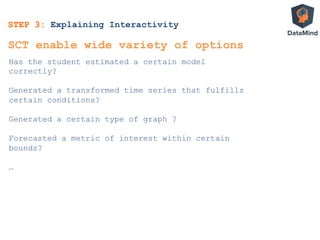
Has the student estimated a certain model
correctly?
Generated a transformed time series that fulfills
certain conditions?
Generated a certain type of graph ?
Forecasted a metric of interest within certain
bounds?
…
SCT enable wide variety of options
Main takeaway!
Become a course creator:info@DataMind.org
Q&AQuestions and Answers

DataMind interactive learning: Dublin R User Group: September 2013

  • 1.
    An interactive e-learningplatform for Data Analysis based on R
  • 2.
    Martijn Theuwissen Dieter DeMesmaeker Jonathan Cornelissen Who we are! Jonathan@datamind.org Dieter@datamind.org Martijn@datamind.org
  • 3.
    You might knowsome of our side-projects! www.Rdocumentation.org! •  Easily find and browse R documentation! •  Comment & discuss! •  Future features! •  View package popularity and rankings! •  Soon open-sourced!! www.R-fiddle.org! •  Test and share R code in your browser! •  Quickly share the results without needing scrap projects or files! •  Discussion area! •  Embed in your website or blog!!
  • 4.
  • 5.
    1.  Motivation: Why e-learningwith and for R? 2.  Learner experience 3.  Technical overview 4.  Course creators experience on DataMind 1.  Web interface 2.  R interface 5.  Submission Correctness Tests (examples) 6.  Questions and answers?
  • 6.
    Why e-learning withand for R? Need for scalable tools to learn R and Data Analysis…
  • 7.
    Because of exponentiallygrowing R user base More than 2 million R users growing at 40-60% yearly Source: http://r4stats.com/articles/popularity/ and http://prezi.com/s1qrgfm9ko4i/the-r-ecosystem/
  • 8.
    Source: http://r4stats.com/articles/popularity/ 6,275 Rpackages at all major repositories, 4,315 of which were at CRAN Across a broad spectrum of domains: Financial engineering, biostatistics, data mining, … Because of the exponentially growing functionality
  • 9.
    Keyword Competition Global2Monthly2Searches r"tutorial0 6600 introduction"to"r 0 1600 online"statistics"course 0.98 1600 ggplot2"tutorial 0 880 statistics"course 0.85 880 an"introduction"to"r 0.01 880 r"book 0.06 590 learning"statistics 0.38 590 r"tutorials 0 590 r"introduction 0.01 480 statistics"courses 0.84 480 statistics"introduction 0.1 480 online"statistics"courses 0.99 320 r"course 0.04 260 r"training 0.17 260 free"online"statistics"course 0.56 260 statistics"training 0.62 210 online"statistics"class 0.98 170 statistics"class"online 0.98 140 data"analysis"tutorial 0.5 110 Analysis of r-project.org Analysis of Google keywords Compare to: SAS tutorial: 4400 Eviews tutorial: 390 Stata tutorial: 1900 Matlab tutorial: 22200 Hadoop tutorial: 12100 Source: Analysis based on http://cran.r-project.org/report_cran.html Source: Analysis based on http://adwords.google.com/select/ keywordtoolexternal That needs to learn the basics and the specifics of R •  Number of downloads per month for: •  Introduction to R pdfs: 140.000 •  Summary pdfs: 50.000
  • 10.
  • 11.
    •  Great books,tutorials,… on R •  But coding is learned by doing •  No online learning interface for R •  Documentation made by experts for experts, not for beginners or intermediate users Learners : Students, Professionals, Researchers, Employees Why e-learning with and for R?
  • 12.
    •  Great books,tutorials,… on R •  But coding is learned by doing •  No online learning interface for R •  Documentation made by experts for experts, not for beginners or intermediate users Teachers : Learners : •  Often give the same or similar feedback to students in exercise sessions •  Manually correct assignments •  Static content •  Hard to get feedback Students, Professionals, Researchers, Employees Why e-learning with and for R? Data Analysis Professors, Consultants, Researchers, Book authors
  • 13.
    Inspired by otherlearning-by-doing platforms… This time for R! www.codecademy.com www.codeschool.com tryR.codeschool.com
  • 14.
    Benefits for studentsof learning R online 1. Everything in one place: assignments, sample code, R-console, … 2. Lowering the barrier: start right-away with R, no installation, version problems, .. since R runs in the background on our servers 3. Automated correction and feedback through Submission Correctness Tests (SCT) 4. Gamification more fun while learning
  • 15.
  • 16.
  • 17.
    R Open-source statistical language DataMind leverages stateof the art open- source frameworks in the cloud •  Scaling •  Automated •  Affordable
  • 18.
    •  Scalable •  Plug& Play •  Easy Rserve Ruby on Rails High productivity web application framework Node.js Platform for real- time scalable network applications R Open-source statistical language DataMind leverages state of the art open- source frameworks in the cloud
  • 19.
    WebSockets AJAX requests Rserve Ruby onRails High productivity web application framework Node.js Platform for real- time scalable network applications RESTful API R Open-source statistical language Angular.js MVC JavaScript framework for single- page applications, maintained by Google DataMind leverages state of the art open- source frameworks in the cloud
  • 20.
    Rserve: Communication withR •  Package of Simon Urbanek •  Manages sessions and workspaces •  Binary communication •  Emulate console with capture.output() •  Detect incomplete statements with parse() •  Catch and print errors
  • 21.
    RAppArmor: Security •  Evaluationof external code è Huge security risk •  Solution: •  Limited access to OS •  RAppArmor •  Package of Jeroen Ooms •  R-interface to OS Security •  Limit CPU, Memory, Spawned processes
  • 22.
    Course creators experienceon DataMind How to create your own course? STEP 1: The elements of an interactive exercise STEP 2: Using the web or R interface to create an exercise STEP 3: Explaining interactivity  
  • 23.
    STEP 1: Theelements of an interactive exercise 1.  Write your assignment Write the assignment for your exercise
  • 24.
    STEP 1: Theelements of an interactive exercise 1.  Write your assignment 2.  Write your instructions Provide instructions to student
  • 25.
    STEP 1: Theelements of an interactive exercise 1.  Write your assignment 2.  Write your instructions 3.  Provide sample code Provide sample code to help student getting started
  • 26.
    STEP 1: Theelements of an interactive exercise 1.  Write your assignment 2.  Write your instructions 3.  Provide sample code Pre-exercise code is run in the background to pre- load a dataset, graphs, etc.
  • 27.
    STEP 1: Theelements of an interactive exercise 1.  Write your assignment 2.  Write your instructions 3.  Provide sample code 4.  Provide sample solution Provide help with a sample solution
  • 28.
    STEP 1: Theelements of an interactive exercise 1.  Write your assignment 2.  Write your instructions 3.  Provide sample code 4.  Provide sample solution 5.  Write your submission correctness test Write Submission Correctness Test in R that checks student input and returns feedback
  • 29.
    STEP 1: Theelements of an interactive exercise 1.  Write your assignment 2.  Write your instructions 3.  Provide sample code 4.  Provide sample solution 5.  Write your submission correctness test
  • 30.
    STEP 2: Usingthe web or R interface to create an exercise Datamind R Package to create your own courses: •  www.datamind.org/#/CC/help •  https://github.com/jonathancornelissen/ datamind Web Interface to create your own courses: •  www.datamind.org/#/dashboard LIVE DEMO
  • 31.
    STEP 2: UsingR Markdown and the datamind Package 1. Install the datamind R package
  • 32.
    STEP 2: UsingR Markdown and the datamind Package 1. Install the datamind R package 2. Author a course
  • 33.
    STEP 2: UsingR Markdown and the datamind Package 1. Install the datamind R package 2. Author a course 3. Preview your chapter locally
  • 34.
    STEP 2: UsingR Markdown and the datamind Package 1. Install the datamind R package 2. Author a course 3. Preview your chapter locally 4. Log in to DataMind.org
  • 35.
    STEP 2: UsingR Markdown and the datamind Package 1. Install the datamind R package 2. Author a course 3. Preview your chapter locally 4. Log in to DataMind.org 5. Upload a chapter to DataMind
  • 36.
    STEP 2: UsingR Markdown and the datamind Package 1. Install the datamind R package 2. Author a course 3. Preview your chapter locally 4. Log in to DataMind.org 5. Upload a chapter to DataMind 6. Share the love Special thanks to Ramnath Vaidyanathan Author of Slidify Package
  • 37.
    Submission Correctness Tests STEP3: Explaining Interactivity
  • 38.
    Submission Correctness Tests(SCT) A Submission Correctness Test checks the input from a student and returns (i) whether the student’s input was correct and (ii) feedback to student. •  These tests are written in R •  Should be easy for a course creator -> started developing a datamind R package to aid course creators to write simple tests* *h$ps://github.com/jonathancornelissen/datamind   "Mistakes are not errors but partially correct solutions with underlying logic." STEP 3: Explaining Interactivity
  • 39.
    1.  Assignment tostudent: x should be 5 2.  Student types: x <- 4 3.  Submission Correctness Test: if( x == 5 ){ DM.result <- list(TRUE, “Well done, you genius!”) }else{ DM.result <- list(FALSE, “Please assign 5 to x”) } 4.  Output to student “Please assign 5 to x” A Simple Submission Correctness Tests (SCT) STEP 3: Explaining Interactivity
  • 40.
    1.  Assignment tostudent: x should be 5 2.  Student types: x <- 5 3.  Submission Correctness Test: if( x == 5 ){ DM.result <- list(TRUE, “Well done, you genius!”) }else{ DM.result <- list(FALSE, “Please assign 5 to x”) } 4.  Output to student “Well done, you genius!”   A Simple Submission Correctness Tests (SCT) STEP 3: Explaining Interactivity
  • 41.
    •  Everything inthe student’s workspace •  DM.user.code all code written by student •  DM.console.output everything printed to user console INPUT Automated exercise correction with SCT Assignment to the student: Print a matrix with 3 rows containing the numbers 1 up to 9 If Student does this correctly then: DM.console.ouput contains [,1] [,2] [,3] [1,] 1 2 3 [2,] 4 5 6 [3,] 7 8 9 STEP 3: Explaining Interactivity
  • 42.
    •  Everything inthe student’s workspace •  DM.user.code all code written by student •  DM.console.output everything printed to user console INPUT Automated exercise correction with SCT Assignment to the student: Print a matrix with 3 rows containing the numbers 1 up to 9 If Student does this correctly then: DM.console.ouput contains [,1] [,2] [,3] [1,] 1 2 3 [2,] 4 5 6 [3,] 7 8 9 STEP 3: Explaining Interactivity Submission Correctness Test written by course creator (potentially using datamind package) DM.result <- output_contains("matrix(1:9, byrow=TRUE, nrow=3)”)
  • 43.
    •  Everything inthe student’s workspace •  DM.user.code all code written by student •  DM.console.output everything printed to user console INPUT Automated exercise correction with SCT Assignment to the student: Print a matrix with 3 rows containing the numbers 1 up to 9 If Student does this correctly then: DM.console.ouput contains [,1] [,2] [,3] [1,] 1 2 3 [2,] 4 5 6 [3,] 7 8 9 STEP 3: Explaining Interactivity Submission Correctness Test written by course creator (potentially using DM package) DM.result <- output_contains("matrix(1:9, byrow=TRUE, nrow=3)”) •  Assigned to variable DM.result •  List with two elements 1.  TRUE / FALSE 2.  Message to provide to student with feedback DM.result is shown to student OUTPUT
  • 44.
    STEP 3: ExplainingInteractivity Has the student estimated a certain model correctly? Generated a transformed time series that fulfills certain conditions? Generated a certain type of graph ? Forecasted a metric of interest within certain bounds? … SCT enable wide variety of options
  • 45.
    Main takeaway! Become acourse creator:info@DataMind.org
  • 46.