
DirtyTooth:	it’s	only	Rock’n’Roll,		
but	I	like	it!	
	
Chema	Alonso	(chema@11paths.com)	
Pablo	González	(pablo@11paths.com)	
Ioseba	Palop	(ioseba.palop@11paths.com)	
Jorge	Rivera	(jorge.rivera@11paths.com)	
Álvaro	Nuñez-Romero	(alvaro.nunezromero@11paths.com)	
	
Executive	Summary	
	 	
Bluetooth	communications	are	on	the	increase.	Millions	of	users	use	
the	technology	to	connect	to	peripherals	that	simplify	and	provide	
greater	comfort	and	experience.	There	is	a	trick	or	hack	for	iOS	10.2.1	
and	earlier	that	takes	advantage	of	the	management	of	the	profiles	
causing	a	great	impact	on	the	privacy	of	millions	of	users	who	use	
Bluetooth	 technology	 daily.	 From	 the	 iOS	 device	 information	 leak	
caused	by	the	incorrect	management	of	profiles,	a	lot	of	information	
about	the	user	and	their	background	may	be	obtained.
1.	Bluetooth	devices	
Bluetooth	devices	have	undergone	a	proliferation.	Its	use	with	peripherals	has	meant	
that	the	expansion	and	use	of	technology	have	rocketed	in	recent	years.	Keyboards,	
mice,	speakers,	hands-free	kits	and	a	whole	range	of	devices	use	Bluetooth	technology	
to	provide	wireless	communication	to	users	and	improve	the	usability	of	peripherals	and	
entertainment	elements.		
All	modern	operating	systems	support	and	integrate	the	technology.	Mobile	operating	
systems	such	as	Android,	iOS	and	Windows	Phone	provide	various	ways	of	interacting	
with	the	different	elements	mentioned	above.		
1.1-	Versions	of	Bluetooth	
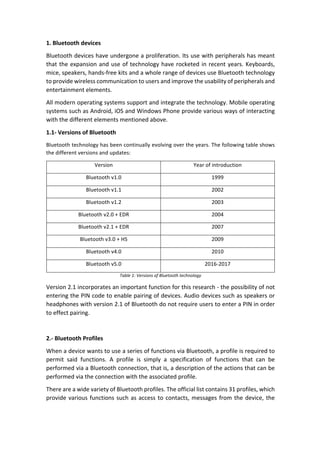
Bluetooth	technology	has	been	continually	evolving	over	the	years.	The	following	table	shows	
the	different	versions	and	updates:	
Version	 Year	of	introduction	
Bluetooth	v1.0	 1999	
Bluetooth	v1.1	 2002	
Bluetooth	v1.2	 2003	
Bluetooth	v2.0	+	EDR	 2004	
Bluetooth	v2.1	+	EDR	 2007	
Bluetooth	v3.0	+	HS	 2009	
Bluetooth	v4.0	 2010	
Bluetooth	v5.0	 2016-2017	
Table	1:	Versions	of	Bluetooth	technology	
Version	2.1	incorporates	an	important	function	for	this	research	-	the	possibility	of	not	
entering	the	PIN	code	to	enable	pairing	of	devices.	Audio	devices	such	as	speakers	or	
headphones	with	version	2.1	of	Bluetooth	do	not	require	users	to	enter	a	PIN	in	order	
to	effect	pairing.		
	
2.-	Bluetooth	Profiles	
When	a	device	wants	to	use	a	series	of	functions	via	Bluetooth,	a	profile	is	required	to	
permit	 said	 functions.	 A	 profile	 is	 simply	 a	 specification	 of	 functions	 that	 can	 be	
performed	via	a	Bluetooth	connection,	that	is,	a	description	of	the	actions	that	can	be	
performed	via	the	connection	with	the	associated	profile.		
There	are	a	wide	variety	of	Bluetooth	profiles.	The	official	list	contains	31	profiles,	which	
provide	various	functions	such	as	access	to	contacts,	messages	from	the	device,	the
ability	to	use	hands-free,	send	audio	to	a	device	and	so	on.	The	range	of	functions	is	
growing	constantly.		
	
2.1-	Bluetooth	Profiles	on	iOS	
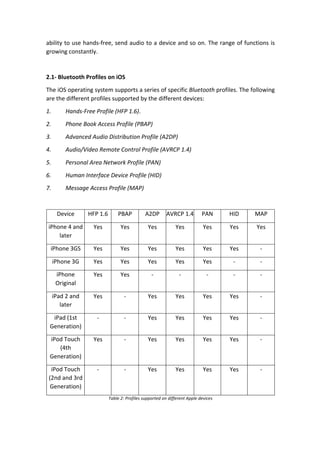
The	iOS	operating	system	supports	a	series	of	specific	Bluetooth	profiles.	The	following	
are	the	different	profiles	supported	by	the	different	devices:	
1. Hands-Free	Profile	(HFP	1.6).	
2. Phone	Book	Access	Profile	(PBAP)	
3. Advanced	Audio	Distribution	Profile	(A2DP)	
4. Audio/Video	Remote	Control	Profile	(AVRCP	1.4)	
5. Personal	Area	Network	Profile	(PAN)	
6. Human	Interface	Device	Profile	(HID)	
7. Message	Access	Profile	(MAP)	
	
Device	 HFP	1.6	 PBAP	 A2DP	 AVRCP	1.4	 PAN	 HID	 MAP	
iPhone	4	and	
later	
Yes	 Yes		 Yes		 Yes		 Yes		 Yes	 Yes	
iPhone	3GS	 Yes	 Yes	 Yes	 Yes	 Yes	 Yes	 -	
iPhone	3G	 Yes	 Yes	 Yes	 Yes	 Yes	 -	 -	
iPhone	
Original	
Yes	 Yes	 -	 -	 -	 -	 -	
iPad	2	and	
later	
Yes	 -	 Yes	 Yes	 Yes	 Yes	 -	
iPad	(1st	
Generation)	
-	 -	 Yes	 Yes	 Yes	 Yes	 -	
iPod	Touch	
(4th	
Generation)	
Yes	 -	 Yes	 Yes	 Yes	 Yes	 -	
iPod	Touch	
(2nd	and	3rd	
Generation)	
-	 -	 Yes	 Yes	 Yes	 Yes	 -	
Table	2:	Profiles	supported	on	different	Apple	devices
3.-	Hack:	DirtyTooth	
Bluetooth	profiles	access	different	mobile	resources,	so	it	is	essential	that	proper	permissions	
management	is	available	from	the	operating	system.	Bluetooth	allows	a	device	to	run	different	
profiles,	switching	between	them.	
The	operating	system	notifies	you	when	there	is	a	profile	change	on	a	device	that	is	paired	with	
the	mobile	device.	In	this	research,	a	test	was	carried	out	on	the	iOS	and	Android	operating	
systems	and	each	gave	very	different	results.		
When	a	device	is	linked	to	a	mobile	and	the	former	changes	its	profile,	two	circumstances	may	
occur.	 The	 first	 is	 that	 the	 operating	 system	 detects	 the	 change	 of	 profile	 and	 therefore	 of	
functions	and	data	to	which	the	linked	device	can	access	and	asks	the	user	to	accept	the	profile	
change.	This	takes	the	form	of	a	secure	notification,	so	that	the	user	realizes	that	the	connected	
Bluetooth	device	wants	to	access	another	profile	and,	therefore,	the	private	information	on	the	
terminal.	The	second	circumstance	is	that	the	operating	system	does	not	detect	the	profile	
change	and	allows	it	to	be	accomplished	without	notifying	the	user.		
This	second	circumstance	has	been	detected	in	iOS	operating	systems	and	has	been	defined	as	
DirtyTooth.	This	trick	or	hack	allows	an	attacker	to	impersonate	the	A2DP	profile	of	a	speaker	so	
that	a	user's	iOS	device	connects	assuming	it	to	be	a	speaker.	A	few	moments	after	pairing,	
without	having	to	enter	a	PIN,	the	device	changes	its	profile	to	another.	The	iOS	operating	
system	does	not	notify	this	change	and	allows	the	attacker	to	access	and	download	private	
information	from	the	device.	
	
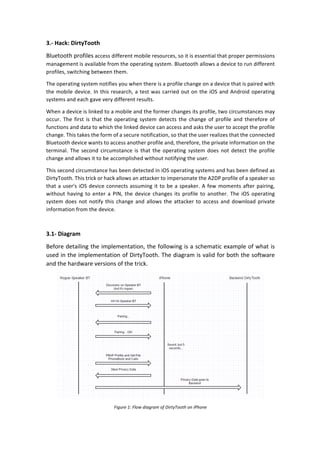
3.1-	Diagram	
Before	detailing	the	implementation,	the	following	is	a	schematic	example	of	what	is	
used	in	the	implementation	of	DirtyTooth.	The	diagram	is	valid	for	both	the	software	
and	the	hardware	versions	of	the	trick.		
	
Figure	1:	Flow	diagram	of	DirtyTooth	on	iPhone
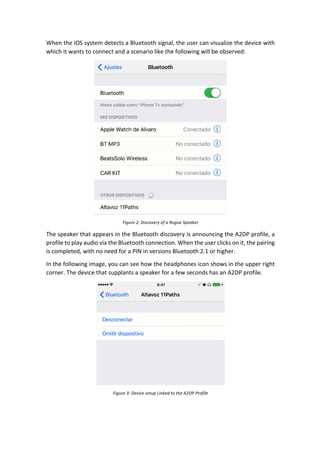
When	the	iOS	system	detects	a	Bluetooth	signal,	the	user	can	visualize	the	device	with	
which	it	wants	to	connect	and	a	scenario	like	the	following	will	be	observed:	
	
Figure	2:	Discovery	of	a	Rogue	Speaker	
The	speaker	that	appears	in	the	Bluetooth	discovery	is	announcing	the	A2DP	profile,	a	
profile	to	play	audio	via	the	Bluetooth	connection.	When	the	user	clicks	on	it,	the	pairing	
is	completed,	with	no	need	for	a	PIN	in	versions	Bluetooth	2.1	or	higher.		
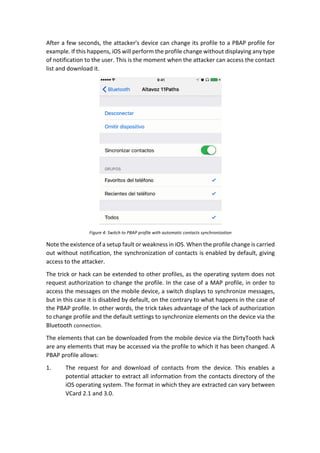
In	the	following	image,	you	can	see	how	the	headphones	icon	shows	in	the	upper	right	
corner.	The	device	that	supplants	a	speaker	for	a	few	seconds	has	an	A2DP	profile.		
	
Figure	3:	Device	setup	Linked	to	the	A2DP	Profile
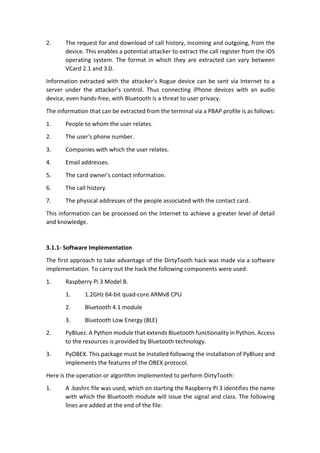
After	a	few	seconds,	the	attacker's	device	can	change	its	profile	to	a	PBAP	profile	for	
example.	If	this	happens,	iOS	will	perform	the	profile	change	without	displaying	any	type	
of	notification	to	the	user.	This	is	the	moment	when	the	attacker	can	access	the	contact	
list	and	download	it.	
	
Figure	4:	Switch	to	PBAP	profile	with	automatic	contacts	synchronization	
Note	the	existence	of	a	setup	fault	or	weakness	in	iOS.	When	the	profile	change	is	carried	
out	without	notification,	the	synchronization	of	contacts	is	enabled	by	default,	giving	
access	to	the	attacker.	
The	trick	or	hack	can	be	extended	to	other	profiles,	as	the	operating	system	does	not	
request	authorization	to	change	the	profile.	In	the	case	of	a	MAP	profile,	in	order	to	
access	the	messages	on	the	mobile	device,	a	switch	displays	to	synchronize	messages,	
but	in	this	case	it	is	disabled	by	default,	on	the	contrary	to	what	happens	in	the	case	of	
the	PBAP	profile.	In	other	words,	the	trick	takes	advantage	of	the	lack	of	authorization	
to	change	profile	and	the	default	settings	to	synchronize	elements	on	the	device	via	the	
Bluetooth	connection.	
The	elements	that	can	be	downloaded	from	the	mobile	device	via	the	DirtyTooth	hack	
are	any	elements	that	may	be	accessed	via	the	profile	to	which	it	has	been	changed.	A	
PBAP	profile	allows:	
1. The	 request	 for	 and	 download	 of	 contacts	 from	 the	 device.	 This	 enables	 a	
potential	attacker	to	extract	all	information	from	the	contacts	directory	of	the	
iOS	operating	system.	The	format	in	which	they	are	extracted	can	vary	between	
VCard	2.1	and	3.0.
2. The	request	for	and	download	of	call	history,	incoming	and	outgoing,	from	the	
device.	This	enables	a	potential	attacker	to	extract	the	call	register	from	the	iOS	
operating	 system.	 The	 format	 in	 which	 they	 are	 extracted	 can	 vary	 between	
VCard	2.1	and	3.0.	
Information	extracted	with	the	attacker's	Rogue	device	can	be	sent	via	Internet	to	a	
server	 under	 the	 attacker’s	 control.	 Thus	 connecting	 iPhone	 devices	 with	 an	 audio	
device,	even	hands-free,	with	Bluetooth	is	a	threat	to	user	privacy.	
The	information	that	can	be	extracted	from	the	terminal	via	a	PBAP	profile	is	as	follows:	
1. People	to	whom	the	user	relates.	
2. The	user's	phone	number.	
3. Companies	with	which	the	user	relates.		
4. Email	addresses.	
5. The	card	owner's	contact	information.	
6. The	call	history.	
7. The	physical	addresses	of	the	people	associated	with	the	contact	card.	
This	information	can	be	processed	on	the	Internet	to	achieve	a	greater	level	of	detail	
and	knowledge.	
	
3.1.1-	Software	Implementation	
The	first	approach	to	take	advantage	of	the	DirtyTooth	hack	was	made	via	a	software	
implementation.	To	carry	out	the	hack	the	following	components	were	used:	
1. Raspberry	Pi	3	Model	B.	
1. 1.2GHz	64-bit	quad-core	ARMv8	CPU	
2. Bluetooth	4.1	module	
3. Bluetooth	Low	Energy	(BLE)	
2. PyBluez.	A	Python	module	that	extends	Bluetooth	functionality	in	Python.	Access	
to	the	resources	is	provided	by	Bluetooth	technology.		
3. PyOBEX.	This	package	must	be	installed	following	the	installation	of	PyBluez	and	
implements	the	features	of	the	OBEX	protocol.	
Here	is	the	operation	or	algorithm	implemented	to	perform	DirtyTooth:	
1. A	.bashrc	file	was	used,	which	on	starting	the	Raspberry	Pi	3	identifies	the	name	
with	which	the	Bluetooth	module	will	issue	the	signal	and	class.	The	following	
lines	are	added	at	the	end	of	the	file:
1. pulseaudio	-D	
2. #	sudo	-u	pi	pulseaudio	-D	
3. sudo	hciconfig	hci0	name	"NAME	HERE"	
4. sudo	hciconfig	hci0	class	0x240418	
5. sudo	hciconfig	hci0	sspmode	1	
6. sudo	hciconfig	hci0	piscan	
7. sudo	/usr/bin/hacktooth/dirtytooth.py	&	
	
As	you	can	see,	the	hciconfig	command	is	the	one	that	defines	the	class	of	the	
profile	that	is	offered	via	Bluetooth.		
2. Option	pulseaudio	-D	allows	the	execution	of	pulseaudio	daemon.	The	sspmode	
allows	the	module	setup	to	specify	the	need	to	enter	a	PIN	in	the	pairing	process	
between	speaker	and	the	iPhone.	By	setting	it	to	1,	it	will	not	ask	for	a	PIN,	as	
long	as	the	Bluetooth	device	version	is	equivalent	to	the	2.1	implementation	or	
higher.		
3. The	dirtytooth.py	file	is	in	charge	of	automating	the	actions	once	the	pairing	is	
done.	In	the	first	instance	the	device	is	paired	thanks	to	the	commands	entered	
in	the	.bashrc	file.		
4. Once	a	device	is	paired,	the	dirtytooth.py	file	is	launched.	This	file	will	make	the	
request	by	changing	the	class	UUID.	This	is	the	moment	that	the	hack	enters	iOS,	
as	the	operating	system	neither	prohibits	it	nor	notifies	the	user.		
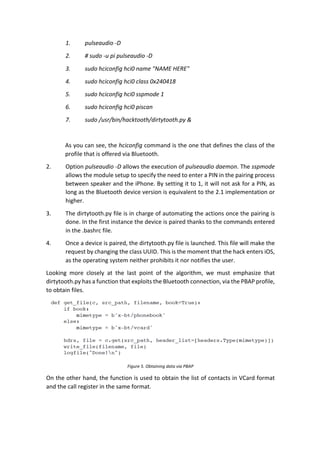
Looking	 more	 closely	 at	 the	 last	 point	 of	 the	 algorithm,	 we	 must	 emphasize	 that	
dirtytooth.py	has	a	function	that	exploits	the	Bluetooth	connection,	via	the	PBAP	profile,	
to	obtain	files.		
	
Figure	5.	Obtaining	data	via	PBAP	
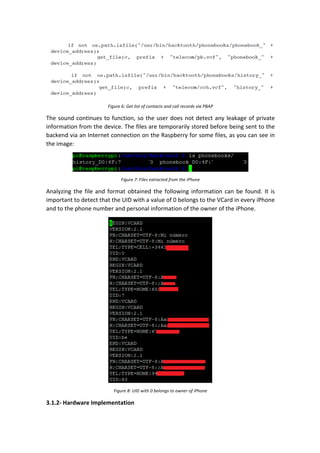
On	the	other	hand,	the	function	is	used	to	obtain	the	list	of	contacts	in	VCard	format	
and	the	call	register	in	the	same	format.
Figure	6:	Get	list	of	contacts	and	call	records	via	PBAP	
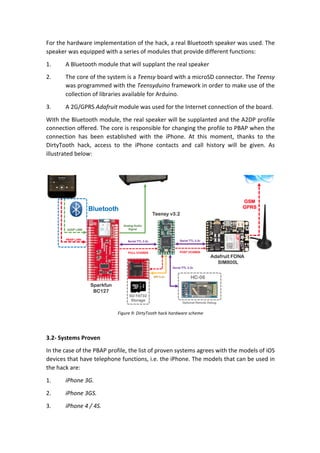
The	sound	continues	to	function,	so	the	user	does	not	detect	any	leakage	of	private	
information	from	the	device.	The	files	are	temporarily	stored	before	being	sent	to	the	
backend	via	an	Internet	connection	on	the	Raspberry	for	some	files,	as	you	can	see	in	
the	image:	
	
Figure	7:	Files	extracted	from	the	iPhone	
Analyzing	the	file	and	format	obtained	the	following	information	can	be	found.	It	is	
important	to	detect	that	the	UID	with	a	value	of	0	belongs	to	the	VCard	in	every	iPhone	
and	to	the	phone	number	and	personal	information	of	the	owner	of	the	iPhone.		
	
Figure	8:	UID	with	0	belongs	to	owner	of	iPhone	
3.1.2-	Hardware	Implementation
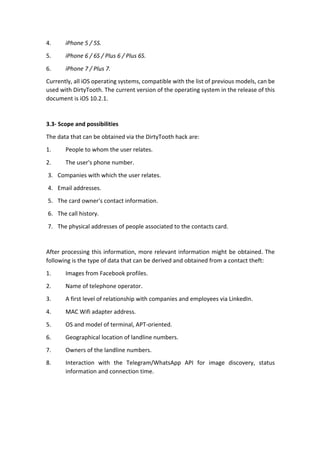
For	the	hardware	implementation	of	the	hack,	a	real	Bluetooth	speaker	was	used.	The	
speaker	was	equipped	with	a	series	of	modules	that	provide	different	functions:		
1. A	Bluetooth	module	that	will	supplant	the	real	speaker	
2. The	core	of	the	system	is	a	Teensy	board	with	a	microSD	connector.	The	Teensy	
was	programmed	with	the	Teensyduino	framework	in	order	to	make	use	of	the	
collection	of	libraries	available	for	Arduino.	
3. A	2G/GPRS	Adafruit	module	was	used	for	the	Internet	connection	of	the	board.		
With	the	Bluetooth	module,	the	real	speaker	will	be	supplanted	and	the	A2DP	profile	
connection	offered.	The	core	is	responsible	for	changing	the	profile	to	PBAP	when	the	
connection	 has	 been	 established	 with	 the	 iPhone.	 At	 this	 moment,	 thanks	 to	 the	
DirtyTooth	 hack,	 access	 to	 the	 iPhone	 contacts	 and	 call	 history	 will	 be	 given.	 As	
illustrated	below:		
	
	
Figure	9:	DirtyTooth	hack	hardware	scheme	
	
3.2-	Systems	Proven	
In	the	case	of	the	PBAP	profile,	the	list	of	proven	systems	agrees	with	the	models	of	iOS	
devices	that	have	telephone	functions,	i.e.	the	iPhone.	The	models	that	can	be	used	in	
the	hack	are:	
1. iPhone	3G.	
2. iPhone	3GS.	
3. iPhone	4	/	4S.
4. iPhone	5	/	5S.	
5. iPhone	6	/	6S	/	Plus	6	/	Plus	6S.	
6. iPhone	7	/	Plus	7.	
Currently,	all	iOS	operating	systems,	compatible	with	the	list	of	previous	models,	can	be	
used	with	DirtyTooth.	The	current	version	of	the	operating	system	in	the	release	of	this	
document	is	iOS	10.2.1.	
	
3.3-	Scope	and	possibilities	
The	data	that	can	be	obtained	via	the	DirtyTooth	hack	are:		
1.	 People	to	whom	the	user	relates.	
2.	 The	user's	phone	number.	
3. Companies	with	which	the	user	relates.		
4. Email	addresses.	
5. The	card	owner's	contact	information.	
6. The	call	history.	
7. The	physical	addresses	of	people	associated	to	the	contacts	card.	
	
After	processing	this	information,	more	relevant	information	might	be	obtained.	The	
following	is	the	type	of	data	that	can	be	derived	and	obtained	from	a	contact	theft:	
1. Images	from	Facebook	profiles.	
2. Name	of	telephone	operator.		
3. A	first	level	of	relationship	with	companies	and	employees	via	LinkedIn.	
4. MAC	Wifi	adapter	address.	
5. OS	and	model	of	terminal,	APT-oriented.	
6. Geographical	location	of	landline	numbers.	
7. Owners	of	the	landline	numbers.		
8. Interaction	 with	 the	 Telegram/WhatsApp	 API	 for	 image	 discovery,	 status	
information	and	connection	time.
4.-	Conclusions	
The	Bluetooth	connection	of	iPhones	with	peripherals	such	as	speakers,	headphones	or	
sound	 equipment	 imply	 risk	 for	 the	 user's	 privacy	 as	 these	 elements	 could	 extract	
private	information	from	the	iPhone,	without	the	user	being	aware	of	it.	
The	DirtyTooth	hack	enables	an	attacker	to	extract	private	information	from	the	iOS	
device	and	to	know	the	user's	relationships	and	environment,	as	well	as	data	such	as:	
1. People	to	whom	the	user	relates.	
2. The	user’s	telephone	number.	
3. Companies	with	which	the	user	relates.		
4. Email	addresses.	
5. The	card	owner's	contact	information.	
6. The	call	history.	
7. The	physical	addresses	of	people	associated	to	the	contacts	card.	
	
The	hack	or	trick	puts	users'	privacy	at	risk.	The	iOS	operating	system	does	not	notify	the	
profile	change	and	allows	the	execution	of	the	functions	and	actions	associated	with	the	
new	profile,	so	that	the	users'	data	are	at	risk	of	being	stolen	by	a	potential	attacker.	
Uploading	the	information	to	a	server	controlled	by	the	attacker	allows	the	information	
to	be	processed	to	attain	a	greater	level	of	detail.	Information	can	be	exploited	and	
much	information	can	be	obtained	from	the	person's	relationships.	
In	other	words,	DirtyTooth	is	a	trick	or	hack	that	can	take	advantage	of	this	accesibility	
configuration.	It's	a	simply	accesibility	configuration	potentially	dangerous.		
	
5.-	References	
• iOS	Profiles	–	Bluetooth.	https://support.apple.com/es-la/HT204387		
• Specification	 Bluetooth.	 Requirements	 PIN.		
http://nvlpubs.nist.gov/nistpubs/Legacy/SP/nistspecialpublication800-
121r1.pdf		
• iOS	10.2.1	Security.	https://support.apple.com/es-es/HT207482	
• Specification	 of	 Profiles.	 Bluetooth.	
https://www.bluetooth.com/specifications/profiles-overview	
• 	Bluez	 Libray	 Specification.	 https://people.csail.mit.edu/albert/bluez-
intro/c212.html	
• Components:	BlueCreation	BC127.	https://www.sparkfun.com/products/11927		
• Teensy.	https://www.pjrc.com/teensy/
• 2G/GPRS	 Adafruit.	 https://learn.adafruit.com/adafruit-fona-mini-gsm-gprs-cellular-phone-
module/overview		
• Remote	Debbugging	Bluetooth.	http://www.prometec.net/bt-hc06/		
• PyBluez.	https://github.com/karulis/pybluez

DirtyTooth: It´s only Rock'n Roll but I like it