Odoo 14: Features of Sales and CRM Apps
Browseinfo
Sensing your needs
Website:
https://www.browseinfo.in/
Email: contact@browseinfo.in
CRM Features
1. Messaging through the list view to the sales person
● In odoo 13 we were just able to see the list view and sales person
associated with it in the list view of opportunity but on clicking on it were
able to open the opportunity but if we have to directly communicate with
that salesperson we were not able to do that
● Whereas in odoo 14 has done our work easy and smooth if we want to
ping the salesperson we can directly click on the salesperson photo and
can chat and clear doubts with him.
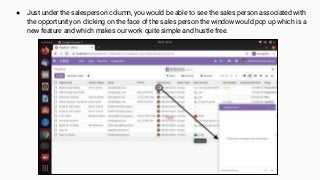
● Just under the salesperson column, you would be able to see the sales person associated with
the opportunity on clicking on the face of the sales person the window would pop up which is a
new feature and which makes our work quite simple and hustle free.
2. New rental Option in the quotation template:
● In odoo 13, we were not able to rent any of our product whereas in most
of the business its a mandate that they give products on a rental
● so odoo 14 has come up with a new concept if we have installed a Rental
app then in the quotation template only there would be a smart button of
rental.
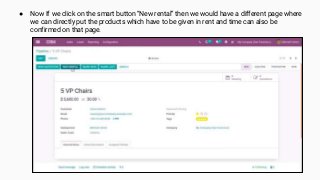
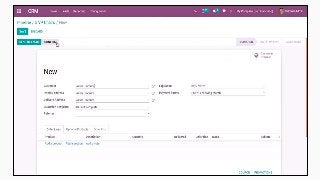
● Now If we click on the smart button “New rental” then we would have a different page where
we can directly put the products which have to be given in rent and time can also be
confirmed on that page.
Sales Features
1. Forecasted report generation of stock:
● In odoo 14 there we have one new feature available called forecasted
report, in that we are able to see the report of on hand stock,
occupied stock, and forecasted stock. each and every small detail
has been covered in that.
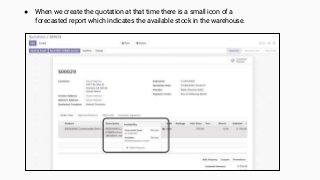
● When we create the quotation at that time there is a small icon of a
forecasted report which indicates the available stock in the warehouse.
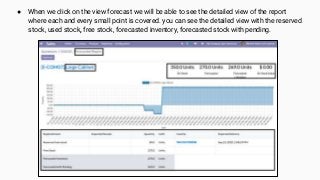
● When we click on the view forecast we will be able to see the detailed view of the report
where each and every small point is covered. you can see the detailed view with the reserved
stock, used stock, free stock, forecasted inventory, forecasted stock with pending.
2. Easy access of purchase module in dropshipping
● In Odoo 13 we don’t have a smart button for the purchase tab when
the dropshipping has activated for a particular product. Manually we
have to go and check in the purchase module for the desired
purchase tab.
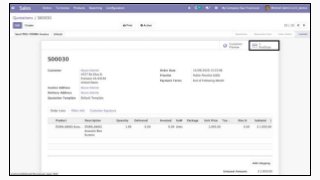
● In Odoo 14 the work has been easy when we have a smart tab of
purchase we can directly go to the purchase quotation of that item
from the sales quotation.
● If you want to migrate your previous odoo version to latest odoo
version,or if you want any other app to developed which is not
available in odoo we have lots different solution is available for the
different industry and want in your module then we would be ready
to help you in developing particular requirement from your side and
if you have any query in odoo 14 or any previous odoo version you
can just reach us through Browseinfo
Odoo
Integration
Odoo Apps
Customization
Odoo
Development
Odoo
Implementation
OUR ODOO SERVICES
Website: https://www.browseinfo.in/
Email: contact@browseinfo.in
Contact: 079-29700001
Sensing your needs
Browseinfo
Website: https://www.browseinfo.in/
Email: contact@browseinfo.in
Contact: 079-29700001
FOLLOW US
Sales and CRM Apps Features | Odoo 14

Sales and CRM Apps Features | Odoo 14

  • 1.
    Odoo 14: Featuresof Sales and CRM Apps Browseinfo Sensing your needs Website: https://www.browseinfo.in/ Email: contact@browseinfo.in
  • 2.
  • 3.
    1. Messaging throughthe list view to the sales person ● In odoo 13 we were just able to see the list view and sales person associated with it in the list view of opportunity but on clicking on it were able to open the opportunity but if we have to directly communicate with that salesperson we were not able to do that ● Whereas in odoo 14 has done our work easy and smooth if we want to ping the salesperson we can directly click on the salesperson photo and can chat and clear doubts with him.
  • 4.
    ● Just underthe salesperson column, you would be able to see the sales person associated with the opportunity on clicking on the face of the sales person the window would pop up which is a new feature and which makes our work quite simple and hustle free.
  • 5.
    2. New rentalOption in the quotation template: ● In odoo 13, we were not able to rent any of our product whereas in most of the business its a mandate that they give products on a rental ● so odoo 14 has come up with a new concept if we have installed a Rental app then in the quotation template only there would be a smart button of rental.
  • 6.
    ● Now Ifwe click on the smart button “New rental” then we would have a different page where we can directly put the products which have to be given in rent and time can also be confirmed on that page.
  • 8.
  • 9.
    1. Forecasted reportgeneration of stock: ● In odoo 14 there we have one new feature available called forecasted report, in that we are able to see the report of on hand stock, occupied stock, and forecasted stock. each and every small detail has been covered in that.
  • 10.
    ● When wecreate the quotation at that time there is a small icon of a forecasted report which indicates the available stock in the warehouse.
  • 11.
    ● When weclick on the view forecast we will be able to see the detailed view of the report where each and every small point is covered. you can see the detailed view with the reserved stock, used stock, free stock, forecasted inventory, forecasted stock with pending.
  • 12.
    2. Easy accessof purchase module in dropshipping ● In Odoo 13 we don’t have a smart button for the purchase tab when the dropshipping has activated for a particular product. Manually we have to go and check in the purchase module for the desired purchase tab. ● In Odoo 14 the work has been easy when we have a smart tab of purchase we can directly go to the purchase quotation of that item from the sales quotation.
  • 14.
    ● If youwant to migrate your previous odoo version to latest odoo version,or if you want any other app to developed which is not available in odoo we have lots different solution is available for the different industry and want in your module then we would be ready to help you in developing particular requirement from your side and if you have any query in odoo 14 or any previous odoo version you can just reach us through Browseinfo
  • 15.
    Odoo Integration Odoo Apps Customization Odoo Development Odoo Implementation OUR ODOOSERVICES Website: https://www.browseinfo.in/ Email: contact@browseinfo.in Contact: 079-29700001
  • 16.
    Sensing your needs Browseinfo Website:https://www.browseinfo.in/ Email: contact@browseinfo.in Contact: 079-29700001 FOLLOW US