Multi Branch Operations
Management Odoo Apps
Email : contact@browseinfo.in Contact : 079-29700001
About App :
● This Multiple Branch Management Odoo Apps helps
users to make different branches for single company
with multi branch concept.
● You can also manage multiple branches with multi
company environment. For each company you can add
several branches also multi company rules is already
applied on branch object, so if user don't have access of
company then that user can't have access of branch of
that specific company.
About App :
● Also Don't worry about the access rights too, We have
added branch user/manager roles inside this Odoo
module for Multi Branch Management, Branch user can
only access records of its specific branch and Branch
manager can see records of all Branches.
Multi Branch Odoo Apps works for both community and
enterprise edition with all generic application like
contact, product, sales, purchase, warehouse,billing,
accounting etc.
App Features:
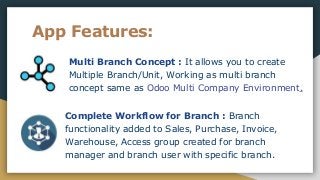
Multi Branch Concept : It allows you to create
Multiple Branch/Unit, Working as multi branch
concept same as Odoo Multi Company Environment.
Complete Workflow for Branch : Branch
functionality added to Sales, Purchase, Invoice,
Warehouse, Access group created for branch
manager and branch user with specific branch.
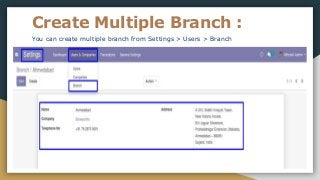
Create Multiple Branch :
You can create multiple branch from Settings > Users > Branch
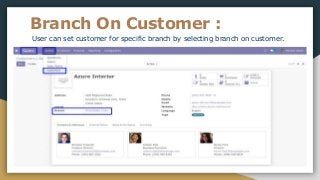
Branch On Customer :
User can set customer for specific branch by selecting branch on customer.
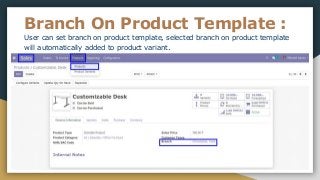
Branch On Product Template :
User can set branch on product template, selected branch on product template
will automatically added to product variant.
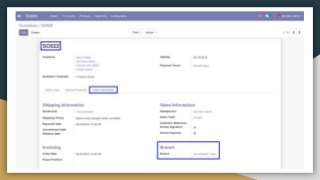
Branch On Sales Flow :
● While creating sales order user who is currently login,
branch of the user is set as branch to the sales order
and warehouse shipment address is also set according
to selected branch.
looking for All in one Odoo app: All in one import
Odoo app
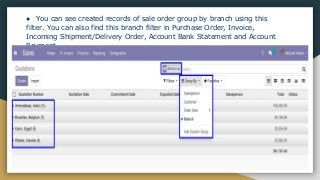
● You can see created records of sale order group by branch using this
filter. You can also find this branch filter in Purchase Order, Invoice,
Incoming Shipment/Delivery Order, Account Bank Statement and Account
Payment.
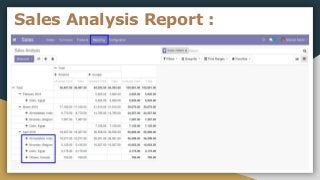
Branch Sales Analysis Report :
● You can see sales analysis report based on branch
Find practical video here : Multi Branch Operations
Management
Sales Analysis Report :
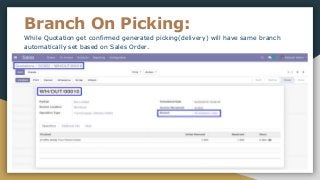
Branch On Picking:
While Quotation get confirmed generated picking(delivery) will have same branch
automatically set based on Sales Order.
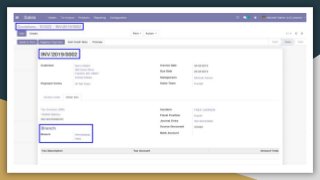
Branch On Invoices :
● While quotation get confirmed generated
picking(delivery) will have same branch automatically
set based on Sales Order.
● While invoice created from the sales order selected
branch of the sales order will automatically set on
invoice.
● When creating manual invoice then log in user's
branch will be assigned to the invoice.
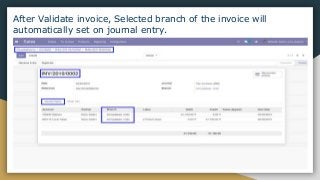
After Validate invoice, Selected branch of the invoice will
automatically set on journal entry.
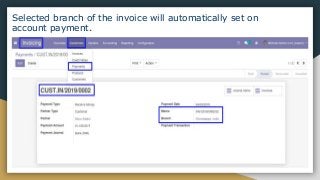
Selected branch of the invoice will automatically set on
account payment.
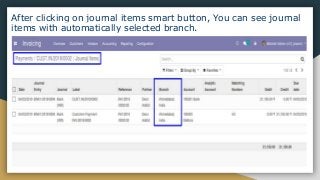
After clicking on journal items smart button, You can see journal
items with automatically selected branch.
Branch On Purchase :
● While creating purchase order user who is currently
login, branch of the user is set as branch to the
purchase order
● While creating purchase order warehouse picking
address is set according to branch which is selected.
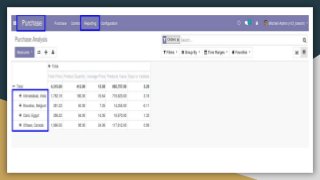
● You can see purchase analysis report based on branch
Branch On Warehouse :
● You can also define branch in the warehouse and all
the technical fields are set according to the branch.
● In warehouse locations you can also set branch.
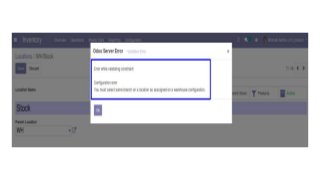
● It display warning if you select different branch on
location than warehouse.
Conclusion : -
● This application works for both community as well as
enterprise.By using this app you can do Multi Branch
Operation Setup
● This app has v8, v9, v10, v11, v12, v13 Versions.
● Easy customization
● Simple and Flexible Odoo app
● Find this app here : Multiple Branch Management
Odoo Apps
What We Offer…..
● ODOO DEVELOPMENT
● ODOO MIGRATION
● ODOO INTEGRATION
● ODOO IMPLEMENTATION
● ODOO APP CUSTOMIZATION
Contact on “contact@browseinfo.in” To get this services

Thank you...
Browseinfo
Sensing your needs
Email : contact@browseinfo.in
Contact : 079-29700001
Website : https://browseinfo.in/

Multiple Branch(Unit) Operation Setup Odoo Apps

  • 1.
    Multi Branch Operations ManagementOdoo Apps Email : contact@browseinfo.in Contact : 079-29700001
  • 2.
    About App : ●This Multiple Branch Management Odoo Apps helps users to make different branches for single company with multi branch concept. ● You can also manage multiple branches with multi company environment. For each company you can add several branches also multi company rules is already applied on branch object, so if user don't have access of company then that user can't have access of branch of that specific company.
  • 3.
    About App : ●Also Don't worry about the access rights too, We have added branch user/manager roles inside this Odoo module for Multi Branch Management, Branch user can only access records of its specific branch and Branch manager can see records of all Branches. Multi Branch Odoo Apps works for both community and enterprise edition with all generic application like contact, product, sales, purchase, warehouse,billing, accounting etc.
  • 4.
    App Features: Multi BranchConcept : It allows you to create Multiple Branch/Unit, Working as multi branch concept same as Odoo Multi Company Environment. Complete Workflow for Branch : Branch functionality added to Sales, Purchase, Invoice, Warehouse, Access group created for branch manager and branch user with specific branch.
  • 5.
    Create Multiple Branch: You can create multiple branch from Settings > Users > Branch
  • 6.
    Branch On Customer: User can set customer for specific branch by selecting branch on customer.
  • 7.
    Branch On ProductTemplate : User can set branch on product template, selected branch on product template will automatically added to product variant.
  • 8.
    Branch On SalesFlow : ● While creating sales order user who is currently login, branch of the user is set as branch to the sales order and warehouse shipment address is also set according to selected branch. looking for All in one Odoo app: All in one import Odoo app
  • 10.
    ● You cansee created records of sale order group by branch using this filter. You can also find this branch filter in Purchase Order, Invoice, Incoming Shipment/Delivery Order, Account Bank Statement and Account Payment.
  • 11.
    Branch Sales AnalysisReport : ● You can see sales analysis report based on branch Find practical video here : Multi Branch Operations Management
  • 12.
  • 13.
    Branch On Picking: WhileQuotation get confirmed generated picking(delivery) will have same branch automatically set based on Sales Order.
  • 14.
    Branch On Invoices: ● While quotation get confirmed generated picking(delivery) will have same branch automatically set based on Sales Order. ● While invoice created from the sales order selected branch of the sales order will automatically set on invoice. ● When creating manual invoice then log in user's branch will be assigned to the invoice.
  • 16.
    After Validate invoice,Selected branch of the invoice will automatically set on journal entry.
  • 17.
    Selected branch ofthe invoice will automatically set on account payment.
  • 18.
    After clicking onjournal items smart button, You can see journal items with automatically selected branch.
  • 19.
    Branch On Purchase: ● While creating purchase order user who is currently login, branch of the user is set as branch to the purchase order ● While creating purchase order warehouse picking address is set according to branch which is selected. ● You can see purchase analysis report based on branch
  • 21.
    Branch On Warehouse: ● You can also define branch in the warehouse and all the technical fields are set according to the branch. ● In warehouse locations you can also set branch. ● It display warning if you select different branch on location than warehouse.
  • 23.
    Conclusion : - ●This application works for both community as well as enterprise.By using this app you can do Multi Branch Operation Setup ● This app has v8, v9, v10, v11, v12, v13 Versions. ● Easy customization ● Simple and Flexible Odoo app ● Find this app here : Multiple Branch Management Odoo Apps
  • 24.
    What We Offer….. ●ODOO DEVELOPMENT ● ODOO MIGRATION ● ODOO INTEGRATION ● ODOO IMPLEMENTATION ● ODOO APP CUSTOMIZATION Contact on “contact@browseinfo.in” To get this services
  • 25.
    Thank you... Browseinfo Sensing yourneeds Email : contact@browseinfo.in Contact : 079-29700001 Website : https://browseinfo.in/