What is anUnsanctioned or Imposter App?
• An unsanctioned app was not developed by or for the brand it
purports to be
• It may appear as if it were a sanctioned (“official”) app
• If the brand has not developed an app of its own, it may purport to
provide functionality for the brand
• It may also appear to have been developed by a legitimate developer or
marketing agency under contract to the brand
• These apps appear benign, but could be malicious
• A benign app may help you make a menu list or manage your loyalty points;
a malicious app will acquire your personal and device information for its
developers’ benefit
3.
How Imposter AppsDupe You
• They use copies of the brand’s legitimate collateral (logos,
typefaces, etc)
• They appear legitimate in the appropriate app store
• The developer’s name is similar to the brand’s name, the parent company’s
name, or appears to be a legitimate third party whom brands may contract
to develop their apps
• They are often the first or second app in a search
• This is especially true when the brand has not developed its own/sanctioned
app
• They appear to have a user following
4.
Why Imposter Appsare Dangerous
• When a legitimate app exists, they can lure customers away from that
app
• Most users don’t want to “duplicate” the apps on their phone
• Like phishing emails, they can capture personal information for malicious
ends
• This can have legal repercussions not just for the user, but also for the legitimate
brand, if they are not vigilant about defending their brand
• They may have limited functionality and infrequent updates, causing user
frustration and resulting in bad user reviews
• Poor ratings of an imposter app can hurt the legitimate brand’s reputation
• Missing or unempathetic developer replies make the brand appear as if it doesn’t
care about its customers
5.
Clues an AppMight Be Unsanctioned (or an Imposter)
• There is no link to the app on the brand’s site (usually from an App Store,
Google Play, Amazon, or Windows Store logo)
• There is an Android app, but no iOS app
• It’s easier for many brands to create an iPhone/iPad app first, and an Android app later
• The Android and iOS apps have different names, icons, or developer names
• The developer’s name is not the same as the known brand or its known parent
company
• The developer may have developed a large number of apps for high profile
brands, but a further search shows it to be a very small firm not likely to
acquire high-profile clients
• The developer mentions specifically that the app is unsanctioned, but
developed because he is a fan of the brand and wants to help other fans
6.
Most Legitimate (Sanctioned)Apps
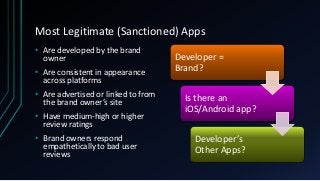
• Are developed by the brand
owner
• Are consistent in appearance
across platforms
• Are advertised or linked to from
the brand owner’s site
• Have medium-high or higher
review ratings
• Brand owners respond
empathetically to bad user
reviews
Developer =
Brand?
Is there an
iOS/Android app?
Developer’s
Other Apps?
App Check: Transitionto a New Phone
• Verizon and Google copied all the apps from my old phone to my
new phone, but did not copy over authentication
• I had to open many apps manually to log into almost everything that wasn’t
a Google app, an Amazon app, or a Microsoft app
• Several apps either wouldn’t open or wouldn’t let me log in
• Most of these had a “could not connect to server” type error.
• One app had an “Account Suspended” error message across its splash
screen.
• The error message included the Internet Presence Provider, the developer name, the
account’s username, and the app’s name
9.
App Check: AfterOvernight Sit
• The apps that wouldn’t open or wouldn’t let me in were still
misbehaving in the exact same manner
• Those which I expected not to need, I uninstalled
• Some of those apps were abandoned by their brands, but not actively
uninstalled
• One app I expected to need I uninstalled, but could not find it to
reinstall
• The last app I uninstalled and found again in Google Play
• The developer name was not the same as the brand, but I figured the brand
was small enough to have a third-party do its development
10.
The Error Persists
•I went back to Google Play, and clicked on the developer’s name
• The developer had apps for a half-dozen or so high-profile brands
• I went to the developer’s web site.
• The developer appeared to be a small, regional house but had the high-
profile brand apps on its site. I had an app for one of the listed brands on my
phone.
• The second brand’s app worked fine, so I concluded the issue was with the individual
brand.
• I checked Apple’s App Store to see if there was a similar problem
with the iOS app.
• There was no iOS app.
11.
Escalating the Issue
•I went to the brand’s web site and found a “contact us” link. I sent
the brand the entire text of the error message along with my
troubleshooting methods.
• I was near a brick-and-mortar for the brand, and spoke with the
Manager on Duty (MOD)
• The MOD said the brand didn’t have an app, and this must have been a
third-party/unofficial (unsanctioned) app
• I checked the developer’s apps against my installed apps, and found that the
branded app that worked was not the same app as the rogue developer’s
app for that brand
• I downloaded the third-party developer’s app, went to launch it, and
discovered an identical error (account suspended)
12.
Resolving the Issue(Consumer End)
• I negatively rated and reviewed the apps on Google’s Play Store
• I noted in my reviews that these apps were not sanctioned by the
brand
• I went to the bottom of the review page and clicked on “Report
Inappropriate App”
• I selected the option “Copycat or impersonation”
• I had already contacted the first app’s brand owner before realizing
this was an unsanctioned app.
What Information DidThat Third Party Get?
• I presume at minimum browser, location, and basic phone
information (Android version, browser version, possibly phone
model)
• Since the brand does not have a loyalty program or an e-commerce
presence, I don’t expect more personally-identifiable information
than an email address and my shopping preferences at that brand,
BUT
• I’ve no idea what sort of malicious code might have run behind the
“good” code, nor what was done with the information received
15.
Who is responsiblefor policing branded apps?
• Google Play does not seem to be too keen on scanning for or removing
unsanctioned apps
• Apps I reported two days ago have not been removed
• Apple’s App Store does not have an obvious method for reporting
unsanctioned or rogue apps
• Neither Lookout (my go-to), nor AVG (on my tablet), nor McAfee (prepackaged
as Verizon’s “Privacy and Security”) caught this imposter app
• Lookout and McAfee both pinged my Flashlight app because it kept the flash on and could
run ads. This, and my pedometer app, were the ONLY ad-ful apps they pinged.
• Brands may be too busy trying to monitor social media and general intrusion
detection to monitor the app stores for fake, imposter, and/or unsanctioned
apps
Caveat Emptor –Let the End User Beware
Before installing any app on your device
• Check the developer/app owner
• Is it correct for the brand?
• If you go to the brand’s web site, will you find links for the app?
• If you go to the developer’s web site, will you find it appropriate for the brand’s
recognizability and profile?
• Check for cross-platform development
• In general, apps are first developed for iOS (iPhone, iPad), then only later for Android
• Check the reviews
• Poor reviews or no reviews at all may indicate a rogue app or an unsupported app
• Report any app misbehavior to the brand owner
• They may not be aware of the imposter app
18.
Resources
• I foundthe following pages in a search after I had presented this
case history:
• The 3 Different Kinds of Fake Apps in the Google Play Store
• How to identify fake Android apps in Play Store
• Lifehacker: How to Spot Fake Apps in Apple’s App Store and Google
Play
• How-to-Geek: How to Spot (and Avoid) Fake Android Apps in the
Play Store
• Make Tech Easier: How to Identify Fake Apps on the Play Store