#WVQOCVKQP 
 
5GNGPKWO 
Best practices 
Java 
Yanir Taflev 
yanir.taflev@applitools.com
Yanir Taflev 
Customer success engineer 
BSc - Computers Science 
Previous Titles: Automation 
engineer, SW Architect, Lead 
developer, RD 
Startups: Loca-To, somon.me 
il.linkedin.com/in/yanirta/ 
Technologies: Selenium, Appium, UFT/QTP, 
CodedUI, Java, C#, RoR, ASP.NET, OOD/OOSE, 
Web, Android, Client-Server, Python and more…
#IGPFC 
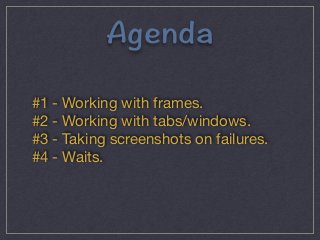
#1 - Working with frames. 
#2 - Working with tabs/windows. 
#3 - Taking screenshots on failures. 
#4 - Waits.
9QTMKPI9KVJ(TCOGU 
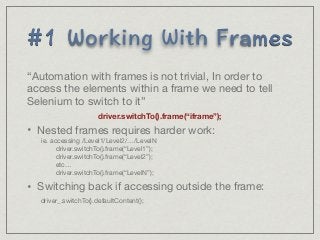
“Automation with frames is not trivial, In order to 
access the elements within a frame we need to tell 
Selenium to switch to it” 
driver.switchTo().frame(“iframe”); 
• Nested frames requires harder work: 
ie. accessing /Level1/Level2/…/LevelN 
driver.switchTo().frame(“Level1”); 
driver.switchTo().frame(“Level2”); 
etc… 
driver.switchTo().frame(“LevelN”); 
• Switching back if accessing outside the frame: 
driver_.switchTo().defaultContent();
9QTMKPI9KVJ 
9KPFQYUVCDU 
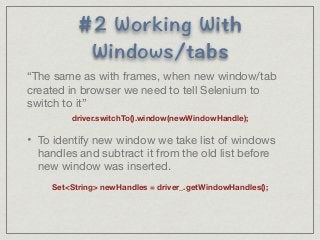
“The same as with frames, when new window/tab 
created in browser we need to tell Selenium to 
switch to it” 
driver.switchTo().window(newWindowHandle); 
• To identify new window we take list of windows 
handles and subtract it from the old list before 
new window was inserted. 
SetString newHandles = driver_.getWindowHandles();
6CMKPI5ETGGPUJQVU1P 
(CKNWTGU 
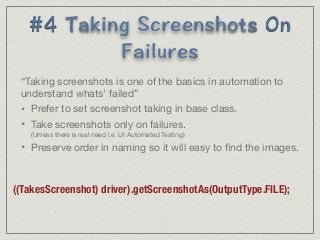
“Taking screenshots is one of the basics in automation to 
understand whats’ failed” 
• Prefer to set screenshot taking in base class. 
• Take screenshots only on failures. 
(Unless there is real need i.e. UI Automated Testing) 
• Preserve order in naming so it will easy to find the images. 
((TakesScreenshot) driver).getScreenshotAs(OutputType.FILE);
9CKVU 
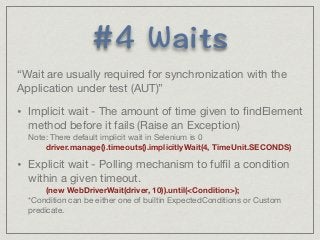
“Wait are usually required for synchronization with the 
Application under test (AUT)” 
• Implicit wait - The amount of time given to findElement 
method before it fails (Raise an Exception) 
Note: There default implicit wait in Selenium is 0 
driver.manage().timeouts().implicitlyWait(4, TimeUnit.SECONDS) 
• Explicit wait - Polling mechanism to fulfil a condition 
within a given timeout. 
(new WebDriverWait(driver, 10)).until(Condition); 
*Condition can be either one of builtin ExpectedConditions or Custom 
predicate.
6JCPMU 
Yanir Taflev 
yanir.taflev@applitools.com

Selenium Tips & Tricks - By Yanir Taflev

  • 1.
    #WVQOCVKQP 5GNGPKWO Best practices Java Yanir Taflev yanir.taflev@applitools.com
  • 2.
    Yanir Taflev Customersuccess engineer BSc - Computers Science Previous Titles: Automation engineer, SW Architect, Lead developer, RD Startups: Loca-To, somon.me il.linkedin.com/in/yanirta/ Technologies: Selenium, Appium, UFT/QTP, CodedUI, Java, C#, RoR, ASP.NET, OOD/OOSE, Web, Android, Client-Server, Python and more…
  • 3.
    #IGPFC #1 -Working with frames. #2 - Working with tabs/windows. #3 - Taking screenshots on failures. #4 - Waits.
  • 4.
    9QTMKPI9KVJ(TCOGU “Automation withframes is not trivial, In order to access the elements within a frame we need to tell Selenium to switch to it” driver.switchTo().frame(“iframe”); • Nested frames requires harder work: ie. accessing /Level1/Level2/…/LevelN driver.switchTo().frame(“Level1”); driver.switchTo().frame(“Level2”); etc… driver.switchTo().frame(“LevelN”); • Switching back if accessing outside the frame: driver_.switchTo().defaultContent();
  • 5.
    9QTMKPI9KVJ 9KPFQYUVCDU “Thesame as with frames, when new window/tab created in browser we need to tell Selenium to switch to it” driver.switchTo().window(newWindowHandle); • To identify new window we take list of windows handles and subtract it from the old list before new window was inserted. SetString newHandles = driver_.getWindowHandles();
  • 6.
    6CMKPI5ETGGPUJQVU1P (CKNWTGU “Takingscreenshots is one of the basics in automation to understand whats’ failed” • Prefer to set screenshot taking in base class. • Take screenshots only on failures. (Unless there is real need i.e. UI Automated Testing) • Preserve order in naming so it will easy to find the images. ((TakesScreenshot) driver).getScreenshotAs(OutputType.FILE);
  • 7.
    9CKVU “Wait areusually required for synchronization with the Application under test (AUT)” • Implicit wait - The amount of time given to findElement method before it fails (Raise an Exception) Note: There default implicit wait in Selenium is 0 driver.manage().timeouts().implicitlyWait(4, TimeUnit.SECONDS) • Explicit wait - Polling mechanism to fulfil a condition within a given timeout. (new WebDriverWait(driver, 10)).until(Condition); *Condition can be either one of builtin ExpectedConditions or Custom predicate.
  • 8.
    6JCPMU Yanir Taflev yanir.taflev@applitools.com