Localization Testing
using
UI Automation
Agenda
• Introduction
• Advantages
• Challenges
• Best Practices
• Tools and technologies used
• Test cases
• Framework Flow chart
• Demo
Introduction
• Localization testing is an essential aspect of software testing that
ensures the smooth functioning and adaptability of applications across
various languages and cultures.
• Localization testing is a non-functional form of testing. That’s why it is
used to test the user interface, strings ,date & time, calendars,
currency format, and other elements that are region or locale-specific.
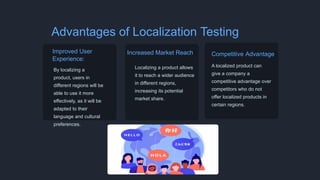
Advantages of Localization Testing
Improved User
Experience:
By localizing a
product, users in
different regions will be
able to use it more
effectively, as it will be
adapted to their
language and cultural
preferences.
Increased Market Reach:
Localizing a product allows
it to reach a wider audience
in different regions,
increasing its potential
market share.
Competitive Advantage:
A localized product can
give a company a
competitive advantage over
competitors who do not
offer localized products in
certain regions.
Challenges in Localization Testing
Language-specific Challenges
Linguistic variations can be major
hurdles during localization testing.
Technical Challenges
Handling date and time formats,
currency conversions, complex UI
elements, and other technical
aspects presents challenges in
localization testing.
Best Practices for Localization Testing
Test Environment
Setup
Create a robust testing
environment with localized
operating systems,
keyboards, time zones, and
language packs.
Test Case Creation
and Execution
Develop comprehensive test
cases covering all aspects of
localization, including UI,
content, language-specific
functionality
Bug Reporting and
Tracking
Review testing results to
efficiently manage and
resolve localization
bug/issues throughout the
testing process.
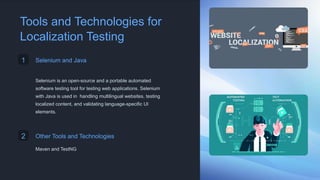
Tools and Technologies for
Localization Testing
1 Selenium and Java
Selenium is an open-source and a portable automated
software testing tool for testing web applications. Selenium
with Java is used in handling multilingual websites, testing
localized content, and validating language-specific UI
elements.
2 Other Tools and Technologies
Maven and TestNG
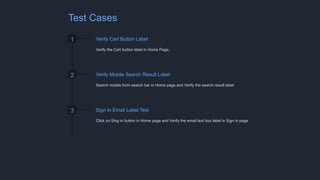
Test Cases
1 Verify Cart Button Label
Verify the Cart button label in Home Page.
2 Verify Mobile Search Result Label
Search mobile from search bar in Home page and Verify the search result label
3 Sign In Email Label Test
Click on Sing in button in Home page and Verify the email text box label in Sign in page
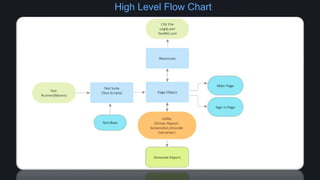
High Level Flow Chart
In summary, localization testing using UI automation
empowers businesses to deliver software products that
excel in global markets. With impeccable
functionality, linguistic accuracy, and cultural
sensitivity, the success of international applications is
assured.
Localisation Testing using UI automation

Localisation Testing using UI automation

  • 1.
  • 2.
    Agenda • Introduction • Advantages •Challenges • Best Practices • Tools and technologies used • Test cases • Framework Flow chart • Demo
  • 3.
    Introduction • Localization testingis an essential aspect of software testing that ensures the smooth functioning and adaptability of applications across various languages and cultures. • Localization testing is a non-functional form of testing. That’s why it is used to test the user interface, strings ,date & time, calendars, currency format, and other elements that are region or locale-specific.
  • 4.
    Advantages of LocalizationTesting Improved User Experience: By localizing a product, users in different regions will be able to use it more effectively, as it will be adapted to their language and cultural preferences. Increased Market Reach: Localizing a product allows it to reach a wider audience in different regions, increasing its potential market share. Competitive Advantage: A localized product can give a company a competitive advantage over competitors who do not offer localized products in certain regions.
  • 5.
    Challenges in LocalizationTesting Language-specific Challenges Linguistic variations can be major hurdles during localization testing. Technical Challenges Handling date and time formats, currency conversions, complex UI elements, and other technical aspects presents challenges in localization testing.
  • 6.
    Best Practices forLocalization Testing Test Environment Setup Create a robust testing environment with localized operating systems, keyboards, time zones, and language packs. Test Case Creation and Execution Develop comprehensive test cases covering all aspects of localization, including UI, content, language-specific functionality Bug Reporting and Tracking Review testing results to efficiently manage and resolve localization bug/issues throughout the testing process.
  • 7.
    Tools and Technologiesfor Localization Testing 1 Selenium and Java Selenium is an open-source and a portable automated software testing tool for testing web applications. Selenium with Java is used in handling multilingual websites, testing localized content, and validating language-specific UI elements. 2 Other Tools and Technologies Maven and TestNG
  • 8.
    Test Cases 1 VerifyCart Button Label Verify the Cart button label in Home Page. 2 Verify Mobile Search Result Label Search mobile from search bar in Home page and Verify the search result label 3 Sign In Email Label Test Click on Sing in button in Home page and Verify the email text box label in Sign in page
  • 9.
  • 12.
    In summary, localizationtesting using UI automation empowers businesses to deliver software products that excel in global markets. With impeccable functionality, linguistic accuracy, and cultural sensitivity, the success of international applications is assured.