SAP SD - How to
use SAP SD
partner functions
in the most
effective way?
Partner Functions
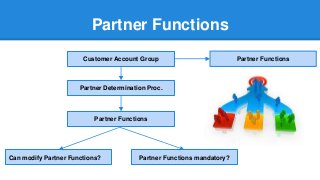
Customer Account Group
Partner Determination Proc.
Partner Functions
Can modify Partner Functions? Partner Functions mandatory?
Partner Functions
Partner Functions
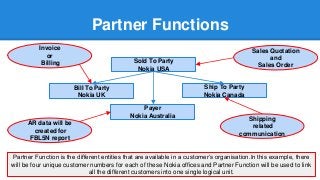
Partner Function is the different entities that are available in a customer’s organisation.In this example, there
will be four unique customer numbers for each of these Nokia offices and Partner Function will be used to link
all the different customers into one single logical unit.
Sold To Party
Nokia USA
Payer
Nokia Australia
Ship To Party
Nokia Canada
Bill To Party
Nokia UK
Shipping
related
communication
Invoice
or
Billing
Sales Quotation
and
Sales Order
AR data will be
created for
FBL5N report
Partner Functions
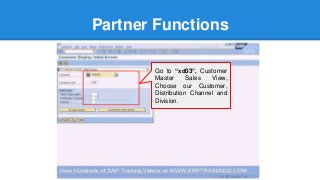
Go to “xd03”, Customer
Master Sales View,
Choose our Customer,
Distribution Channel and
Division.
Partner Functions
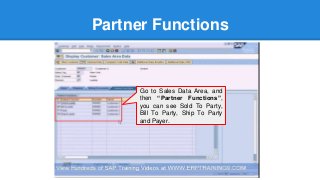
Go to Sales Data Area, and
then “Partner Functions”,
you can see Sold To Party,
Bill To Party, Ship To Party
and Payer.
Partner Functions
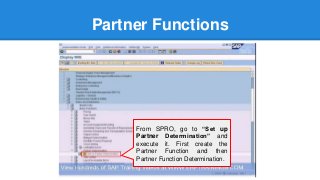
From SPRO, go to “Set up
Partner Determination” and
execute it. First create the
Partner Function and then
Partner Function Determination.

Partner Functions
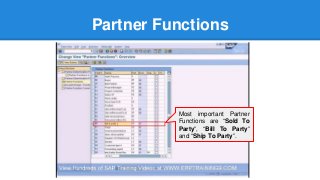
Most important Partner
Functions are “Sold To
Party”, “Bill To Party”
and “Ship To Party”.
Partner Functions
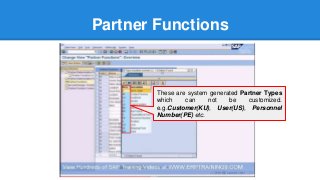
These are system generated Partner Types
which can not be customized.
e.g.Customer(KU), User(US), Personnel
Number(PE) etc.
Partner Functions
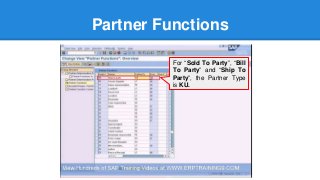
For “Sold To Party”, “Bill
To Party” and “Ship To
Party”, the Partner Type
is KU.
Partner Functions
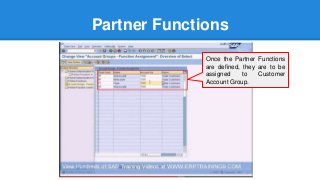
Once the Partner Functions
are defined, they are to be
assigned to Customer
Account Group.
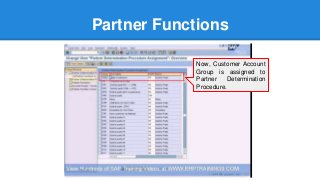
Partner Functions
Now, Customer Account
Group is assigned to
Partner Determination
Procedure.
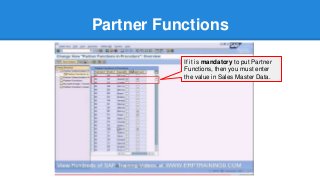
Partner Functions
If it is mandatory to put Partner
Functions, then you must enter
the value in Sales Master Data.
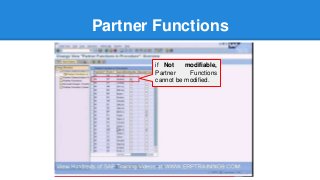
Partner Functions
if Not modifiable,
Partner Functions
cannot be modified.
Visit us @ ERPTRAINING9.COM

SAP SD - How to use SAP SD partner functions in the most effective way?

  • 1.
    SAP SD -How to use SAP SD partner functions in the most effective way?
  • 2.
    Partner Functions Customer AccountGroup Partner Determination Proc. Partner Functions Can modify Partner Functions? Partner Functions mandatory? Partner Functions
  • 3.
    Partner Functions Partner Functionis the different entities that are available in a customer’s organisation.In this example, there will be four unique customer numbers for each of these Nokia offices and Partner Function will be used to link all the different customers into one single logical unit. Sold To Party Nokia USA Payer Nokia Australia Ship To Party Nokia Canada Bill To Party Nokia UK Shipping related communication Invoice or Billing Sales Quotation and Sales Order AR data will be created for FBL5N report
  • 4.
    Partner Functions Go to“xd03”, Customer Master Sales View, Choose our Customer, Distribution Channel and Division.
  • 5.
    Partner Functions Go toSales Data Area, and then “Partner Functions”, you can see Sold To Party, Bill To Party, Ship To Party and Payer.
  • 6.
    Partner Functions From SPRO,go to “Set up Partner Determination” and execute it. First create the Partner Function and then Partner Function Determination.
  • 7.
    Partner Functions Most importantPartner Functions are “Sold To Party”, “Bill To Party” and “Ship To Party”.
  • 8.
    Partner Functions These aresystem generated Partner Types which can not be customized. e.g.Customer(KU), User(US), Personnel Number(PE) etc.
  • 9.
    Partner Functions For “SoldTo Party”, “Bill To Party” and “Ship To Party”, the Partner Type is KU.
  • 10.
    Partner Functions Once thePartner Functions are defined, they are to be assigned to Customer Account Group.
  • 11.
    Partner Functions Now, CustomerAccount Group is assigned to Partner Determination Procedure.
  • 12.
    Partner Functions If itis mandatory to put Partner Functions, then you must enter the value in Sales Master Data.
  • 13.
    Partner Functions if Notmodifiable, Partner Functions cannot be modified.
  • 14.
    Visit us @ERPTRAINING9.COM