
Open & ‘Free’ Geo
Software & Data
June 20th 2013
Geoforum 2013
Overview
• Why bother with Open?
• OpenSource, Free, Freemium Software
– Desktop
– Cloud based
– Webmaps
• OpenSource Data, Open Data, Freemium Data
– Quality
– Accessibility
Why Bother?
• Quality
– Much improved
• No Restrictions
– Off campus, commercial use, web publishing
• Demand
– Industry has noticed
• Cost
– Free*
OpenSource, Free, Freemium?
• OpenSource
– Free to download, use and develop
– Code or raw data is available to update or augment
• Free
– Free to download and use
– Code or source material is not available
• Freemium
– Free to download
– Extra functionality or content is not free
Desktop GIS
Desktop GIS
• OpenSource
– Quantum GIS (QGIS)
• http://www.qgis.org/
– gvSIG
• http://www.gvsig.org/
• Free*
– AutoCAD Map 3D (*for academic use)
• http://students.autodesk.com/
• Freemium
– ArcGIS Explorer Desktop
• http://www.esri.com/software/arcgis/explorer
Quantum GIS: www.qgis.org
• Its Free
• Works on a Mac!
• Huge user community
– Online forums are very active
– Many people developing plugins and addons
• Version 2 will see parity in functionality and
ease of use with ArcGIS
• Becoming more widely used in industry
– Students with skills in QGIS will be in demand
Quantum GIS: www.qgis.org (2)
• Integrates well with Spatial Databases
– Postgres, MYSQL, ODBC, Esri, etc.
• Ordnance Survey are now producing
styling for their data
– Style Layer Descriptor (SLD) Files work in
most OpenSource GIS software
– www.ordnancesurvey.co.uk/oswebsite/su
pport/products/styled-layer-
descriptors/index.html
Honourable mentions
• gvSIG: http://www.gvsig.org/web/
– Excellent foreign Language support
– There is a mobile version
• uDig: http://udig.refractions.net/
– Very easy to use but limited in its functionality
– It has not been updated for a while
• GRASS: http://grass.osgeo.org/
– Very powerful
– Very difficult to use
– Powerful tools available as a plugin for QGIS
Cloud Based GIS
Cloud Based GIS
• Accessed via the web
• For data visualisation and sharing
• ArcGIS Online: http://www.arcgis.com
– Freemium
• Google Earth: http://earthengine.google.org/
– More a Desktop GIS but storage is cloud based
– Freemium
Cloud Based GIS
Warning!
Ordnance Survey do not allow their licensed
data to be put into Esri or Google’s cloud
storage.
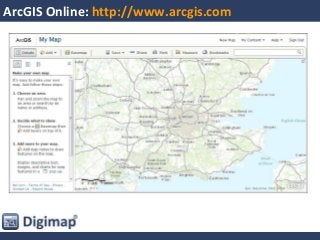
ArcGIS Online: http://www.arcgis.com
• Create maps online
– Add lots of data from ESRI Microsoft OS
– Upload your own data
– Share your maps
• Free Service
– All maps created are open for anyone to view
• Paid Service
– Included in the top level CHEST deal
– Keep maps private or share to small groups
ArcGIS Online: http://www.arcgis.com
Google Earth: http://earth.google.co.uk/
• Create maps online
– Add lots of data from Google
– Upload your own data
– Share your maps
• Free Service
– Google gets access to all the data you upload
• Paid Service: Google Earth Enterprise
– Host the data on your own server, OK for OS data
– Some analysis tools are available
Web Maps
Web Mapping
• Display your maps online rather than perform
analysis
• Some will allow editing and data creation
– MapBox (Freemium service built on Leaflet)
– Leaflet
– OpenLayers
– MapServer
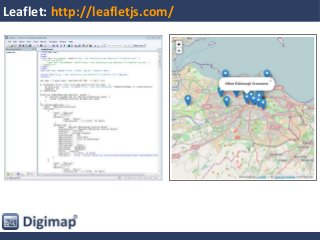
Leaflet: http://leafletjs.com/
• Easy to use
• Very light weight
• Not very flexible
– Only uses Web Mercator projection
– Only uses GeoJSON or Native layers
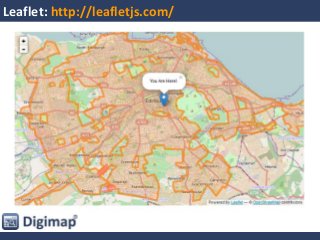
Leaflet: http://leafletjs.com/
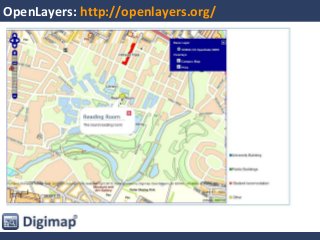
OpenLayers: http://openlayers.org/
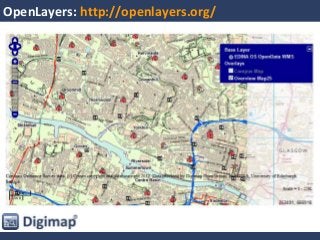
• Very Powerful
– Accepts a wide range of formats and data sources
• OpenSource with a large user community
– Lots of online help, someone will have encountered
and solved most situations
• Not so easy to use
– Must specify many options rather than rely on
defaults
OpenLayers: http://openlayers.org/
Data
• Quality
• Accessibility
OpenSource, OpenData, Freemium Dataservices
• OpenSource Data
– Free to download, upload your edits
• OpenData
– Data created by organisations and individuals
– No restrictions on use*
• *You will need to credit the creator though!
• Freemium Data Services
– Free to use up to a point
– Charges for high usage
Data
• OpenSource Data
– OpenStreetMap
• Open Data
– OS OpenData
– BGS OpenGeoscience
– ShareGeo Open
• Freemium Data Services
– Google
– Bing
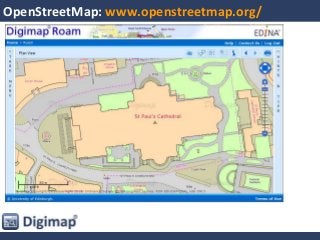
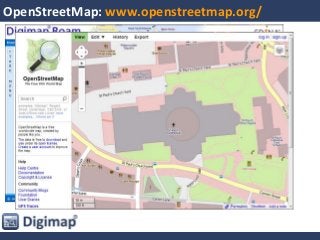
OpenSource Data
•Poor Quality?
•Patchy Coverage?
•Inconsistent?
•Inaccurate?
…Yes, but…
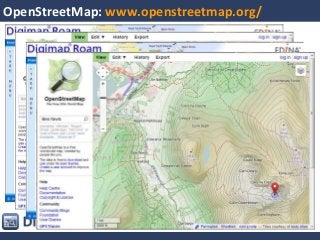
OpenStreetMap: www.openstreetmap.org/
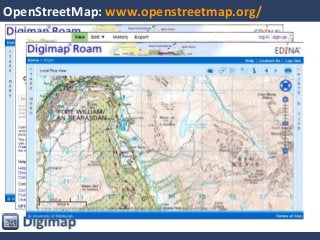
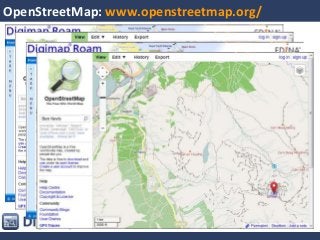
•Poor Quality?
•Patchy Coverage?
•Inconsistent?
•Inaccurate?
OpenStreetMap: www.openstreetmap.org/
Open Data
OS OpenData: http://www.ordnancesurvey.co.uk/oswebsite/products/os-opendata.html
• OS OpenData
– OS VectorMap District, 1:50 000 Scale Gazetteer, 1:250 000
Scale Colour Raster, Boundary-Line, Code-Point Open, Land-
Form PANORAMA, Meridian 2, Miniscale, OS Locator, OS
Terrain 50, Strategi, OS Street View
• 8 of the 14 views in Digimap Roam use open
data
• Data Download makes OS OpenData easy.
• OpenStream pipes it direct into your web app
or GIS
OpenGeosience: www.bgs.ac.uk/opengeoscience/
• Smallest Scale data available for download:
– 1:625,000 Scale
• Larger Scale data in online viewers and as a
WMS
– Geology of Britain, Boreholes, Hydrogeology,
Earthquakes etc.
• Geology Roam adds in the OS backdrop maps
• Geology Download
– Provides the large scale data you need ready for
analysis
ShareGeo Open: www.sharegeo.ac.uk
• A collection of 214 Open Datasets
– International (most for the UK)
• Contains:
– Datasets found by Geoservices Support
– Datasets created by the Geospatial community
– Very diverse topics:
• Census data
• Bird count maps
• Aluminium production
• Please contribute your data!
Open Data Services
Geospatial data: it isn’t just all about maps
• Most data has an element that is
geospatial or can be georeferenced
– Postcode, Place name, Location Stamp, IP Address
• Unlock Places
– can put a point or a polygon to virtually any data that
has a spatial element
– Global coverage (better in the UK)
• Unlock Text
– can dig out references from plain text
More Information:
• OSGeo: www.osgeo.org
– FOSS4G Conference
• http://2013.foss4g.org/
– Grass, Quantum GIS and PostGIS
• GoGeo: http://www.gogeo.ac.uk
– Lists most major free software resources:
• http://bit.ly/11J4tVg
OpenSource and Free Geo Software and Data, Geoforum 2013

OpenSource and Free Geo Software and Data, Geoforum 2013

  • 1.
    Open & ‘Free’Geo Software & Data June 20th 2013 Geoforum 2013
  • 2.
    Overview • Why botherwith Open? • OpenSource, Free, Freemium Software – Desktop – Cloud based – Webmaps • OpenSource Data, Open Data, Freemium Data – Quality – Accessibility
  • 3.
    Why Bother? • Quality –Much improved • No Restrictions – Off campus, commercial use, web publishing • Demand – Industry has noticed • Cost – Free*
  • 4.
    OpenSource, Free, Freemium? •OpenSource – Free to download, use and develop – Code or raw data is available to update or augment • Free – Free to download and use – Code or source material is not available • Freemium – Free to download – Extra functionality or content is not free
  • 5.
  • 6.
    Desktop GIS • OpenSource –Quantum GIS (QGIS) • http://www.qgis.org/ – gvSIG • http://www.gvsig.org/ • Free* – AutoCAD Map 3D (*for academic use) • http://students.autodesk.com/ • Freemium – ArcGIS Explorer Desktop • http://www.esri.com/software/arcgis/explorer
  • 7.
    Quantum GIS: www.qgis.org •Its Free • Works on a Mac! • Huge user community – Online forums are very active – Many people developing plugins and addons • Version 2 will see parity in functionality and ease of use with ArcGIS • Becoming more widely used in industry – Students with skills in QGIS will be in demand
  • 8.
    Quantum GIS: www.qgis.org(2) • Integrates well with Spatial Databases – Postgres, MYSQL, ODBC, Esri, etc. • Ordnance Survey are now producing styling for their data – Style Layer Descriptor (SLD) Files work in most OpenSource GIS software – www.ordnancesurvey.co.uk/oswebsite/su pport/products/styled-layer- descriptors/index.html
  • 9.
    Honourable mentions • gvSIG:http://www.gvsig.org/web/ – Excellent foreign Language support – There is a mobile version • uDig: http://udig.refractions.net/ – Very easy to use but limited in its functionality – It has not been updated for a while • GRASS: http://grass.osgeo.org/ – Very powerful – Very difficult to use – Powerful tools available as a plugin for QGIS
  • 10.
  • 11.
    Cloud Based GIS •Accessed via the web • For data visualisation and sharing • ArcGIS Online: http://www.arcgis.com – Freemium • Google Earth: http://earthengine.google.org/ – More a Desktop GIS but storage is cloud based – Freemium
  • 12.
    Cloud Based GIS Warning! OrdnanceSurvey do not allow their licensed data to be put into Esri or Google’s cloud storage.
  • 13.
    ArcGIS Online: http://www.arcgis.com •Create maps online – Add lots of data from ESRI Microsoft OS – Upload your own data – Share your maps • Free Service – All maps created are open for anyone to view • Paid Service – Included in the top level CHEST deal – Keep maps private or share to small groups
  • 14.
  • 15.
    Google Earth: http://earth.google.co.uk/ •Create maps online – Add lots of data from Google – Upload your own data – Share your maps • Free Service – Google gets access to all the data you upload • Paid Service: Google Earth Enterprise – Host the data on your own server, OK for OS data – Some analysis tools are available
  • 16.
  • 17.
    Web Mapping • Displayyour maps online rather than perform analysis • Some will allow editing and data creation – MapBox (Freemium service built on Leaflet) – Leaflet – OpenLayers – MapServer
  • 18.
    Leaflet: http://leafletjs.com/ • Easyto use • Very light weight • Not very flexible – Only uses Web Mercator projection – Only uses GeoJSON or Native layers
  • 19.
  • 20.
  • 21.
    OpenLayers: http://openlayers.org/ • VeryPowerful – Accepts a wide range of formats and data sources • OpenSource with a large user community – Lots of online help, someone will have encountered and solved most situations • Not so easy to use – Must specify many options rather than rely on defaults
  • 22.
  • 23.
  • 24.
  • 25.
    OpenSource, OpenData, FreemiumDataservices • OpenSource Data – Free to download, upload your edits • OpenData – Data created by organisations and individuals – No restrictions on use* • *You will need to credit the creator though! • Freemium Data Services – Free to use up to a point – Charges for high usage
  • 26.
    Data • OpenSource Data –OpenStreetMap • Open Data – OS OpenData – BGS OpenGeoscience – ShareGeo Open • Freemium Data Services – Google – Bing
  • 27.
  • 28.
  • 29.
  • 30.
  • 31.
  • 32.
  • 33.
  • 34.
  • 35.
    OS OpenData: http://www.ordnancesurvey.co.uk/oswebsite/products/os-opendata.html •OS OpenData – OS VectorMap District, 1:50 000 Scale Gazetteer, 1:250 000 Scale Colour Raster, Boundary-Line, Code-Point Open, Land- Form PANORAMA, Meridian 2, Miniscale, OS Locator, OS Terrain 50, Strategi, OS Street View • 8 of the 14 views in Digimap Roam use open data • Data Download makes OS OpenData easy. • OpenStream pipes it direct into your web app or GIS
  • 36.
    OpenGeosience: www.bgs.ac.uk/opengeoscience/ • SmallestScale data available for download: – 1:625,000 Scale • Larger Scale data in online viewers and as a WMS – Geology of Britain, Boreholes, Hydrogeology, Earthquakes etc. • Geology Roam adds in the OS backdrop maps • Geology Download – Provides the large scale data you need ready for analysis
  • 37.
    ShareGeo Open: www.sharegeo.ac.uk •A collection of 214 Open Datasets – International (most for the UK) • Contains: – Datasets found by Geoservices Support – Datasets created by the Geospatial community – Very diverse topics: • Census data • Bird count maps • Aluminium production • Please contribute your data!
  • 38.
  • 39.
    Geospatial data: itisn’t just all about maps • Most data has an element that is geospatial or can be georeferenced – Postcode, Place name, Location Stamp, IP Address • Unlock Places – can put a point or a polygon to virtually any data that has a spatial element – Global coverage (better in the UK) • Unlock Text – can dig out references from plain text
  • 40.
    More Information: • OSGeo:www.osgeo.org – FOSS4G Conference • http://2013.foss4g.org/ – Grass, Quantum GIS and PostGIS • GoGeo: http://www.gogeo.ac.uk – Lists most major free software resources: • http://bit.ly/11J4tVg