SASS ESSENTIALS
Sass: Syntactically Awesome Style Sheets
@romiguelangel
: About me
Miguel Ángel Ríos | @romiguelangel
Frontend Developer at
and
: What is SASS ?
SASS is a pseudo-language that adds
superpowers to your css, allowing use variables,
functions, control statements, inheritance,
interpolation, etc ..
: How can SASS help you ?
Scalability
Maintenance
Increase development speed
Apply DRY (Don’t Repeat Yourself)
More control over the code
Apply Clean Code principles
...
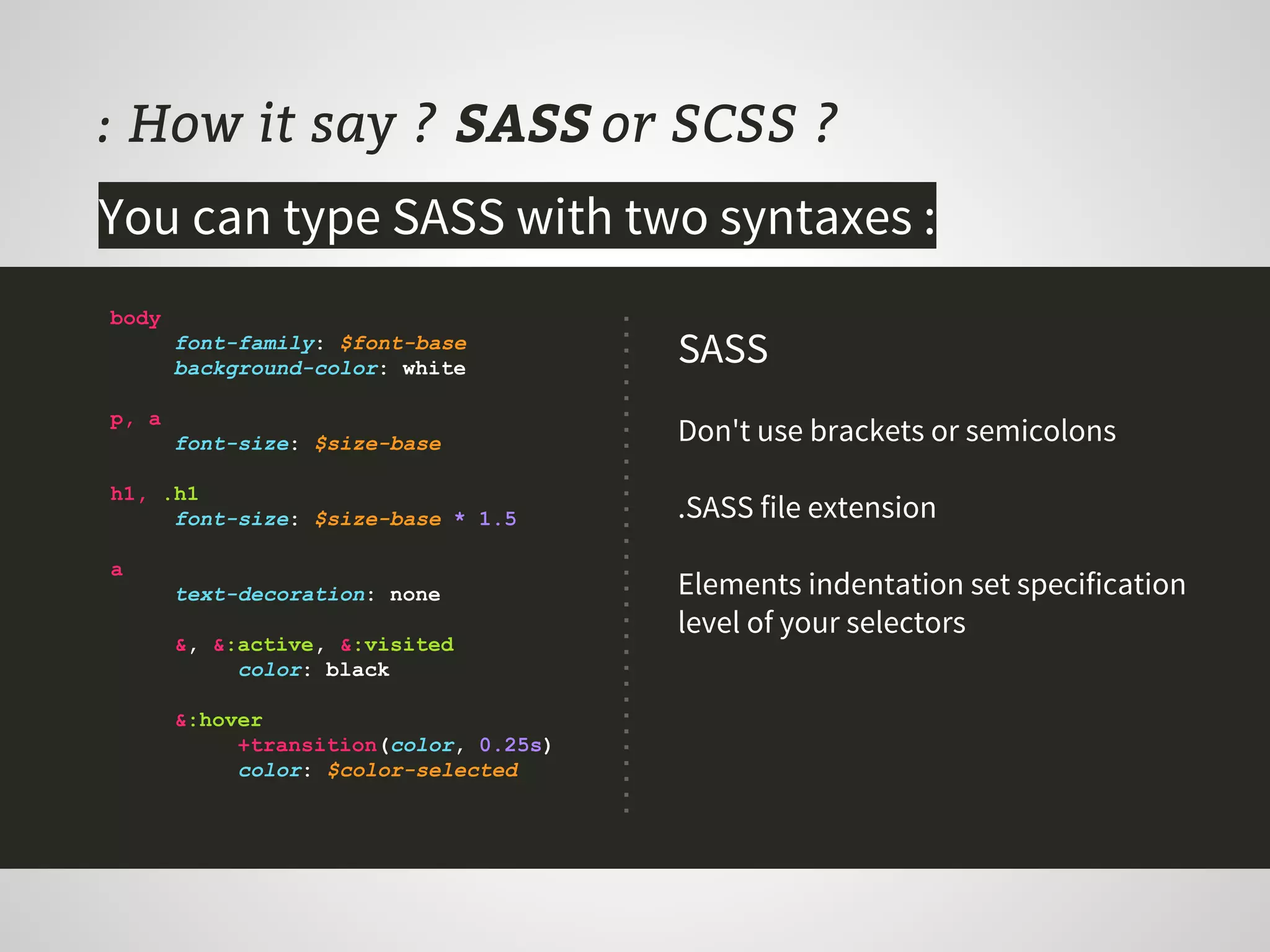
: How it say ? SASS or SCSS ?
You can type SASS with two syntaxes :
body
font-family: $font-base
background-color: white
p, a
font-size: $size-base
h1, .h1
font-size: $size-base * 1.5
a
text-decoration: none
&, &:active, &:visited
color: black
&:hover
+transition(color, 0.25s)
color: $color-selected
SASS
Don't use brackets or semicolons
.SASS file extension
Elements indentation set specification
level of your selectors
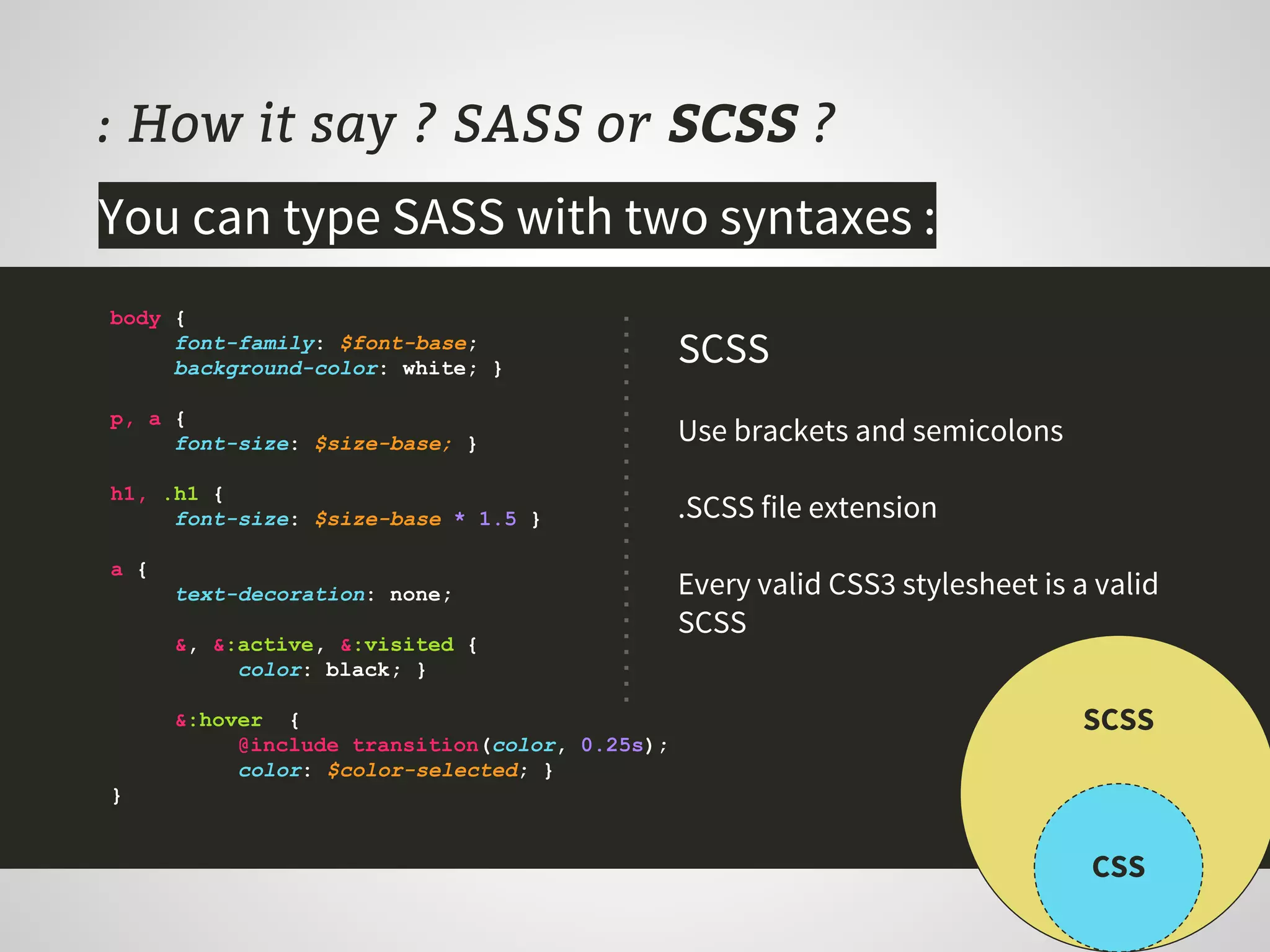
: How it say ? SASS or SCSS ?
body {
font-family: $font-base;
background-color: white; }
p, a {
font-size: $size-base; }
h1, .h1 {
font-size: $size-base * 1.5 }
a {
text-decoration: none;
&, &:active, &:visited {
color: black; }
&:hover {
@include transition(color, 0.25s);
color: $color-selected; }
}
SCSS
Use brackets and semicolons
.SCSS file extension
Every valid CSS3 stylesheet is a valid
SCSS
CSS
SCSS
You can type SASS with two syntaxes :
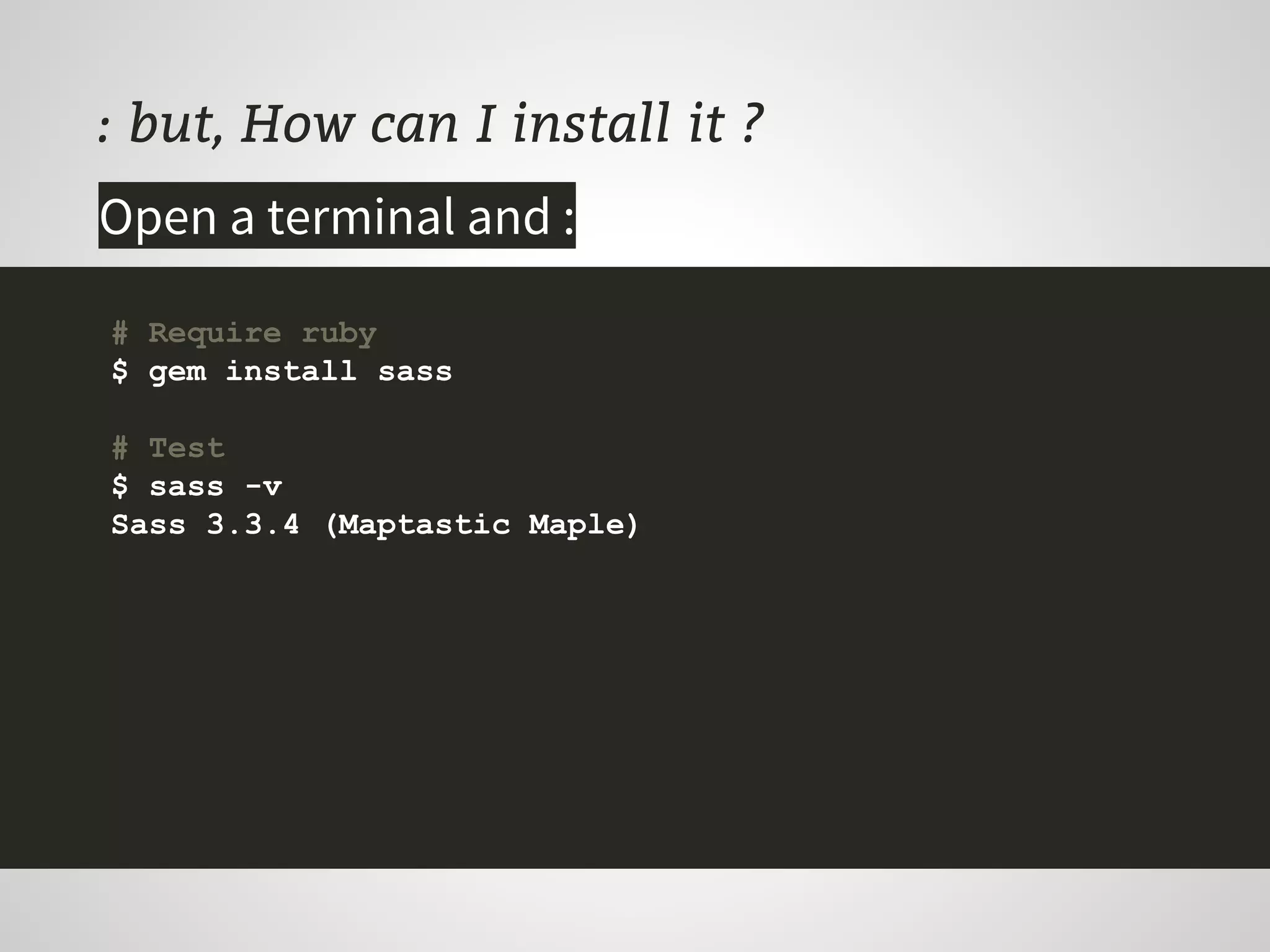
: but, How can I install it ?
Open a terminal and :
# Require ruby
$ gem install sass
# Test
$ sass -v
Sass 3.3.4 (Maptastic Maple)
: All right, how can I convert my css ?
$ sass-convert [input] [output]
# CSS to SASS
$ sass-convert main.css main.sass
# CSS to SCSS
$ mv main.css main.scss
# SCSS to SASS
$ sass-convert main.scss main.sass
Open a terminal and :
: Processing CSS
$ sass [--option] [input]:[output]
# Create or update main.css once
$ sass --update main.sass:main.css
# Active watcher and update main.css by each change
$ sass --watch main.sass:main.css
# Compile all folder files into css folder
$ sass --watch .:../css
# Output compressed in one line
$ sass --watch .:../css --style compressed
Leave open a terminal and :
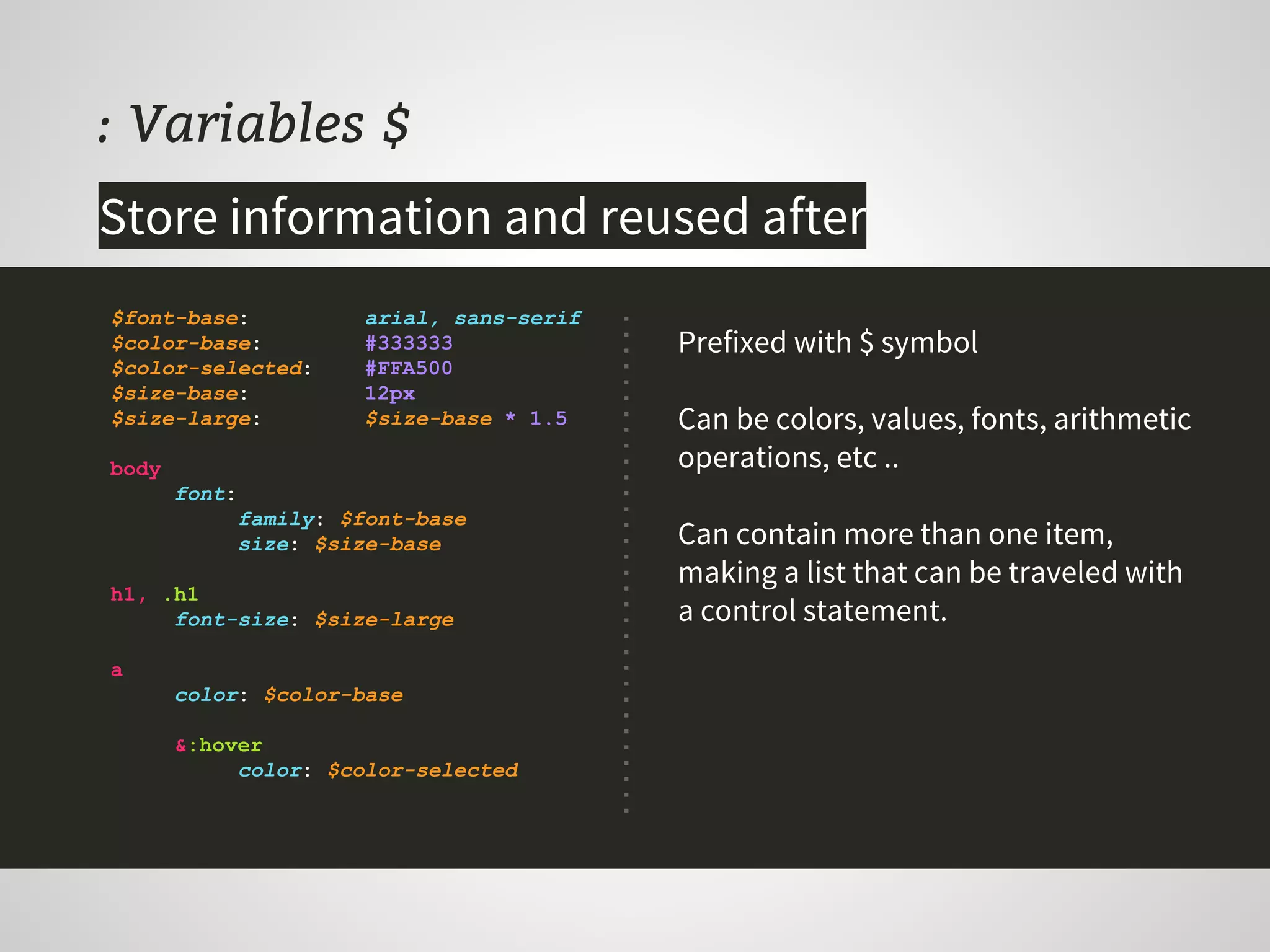
: Variables $
Prefixed with $ symbol
Can be colors, values, fonts, arithmetic
operations, etc ..
Can contain more than one item,
making a list that can be traveled with
a control statement.
$font-base: arial, sans-serif
$color-base: #333333
$color-selected: #FFA500
$size-base: 12px
$size-large: $size-base * 1.5
body
font:
family: $font-base
size: $size-base
h1, .h1
font-size: $size-large
a
color: $color-base
&:hover
color: $color-selected
Store information and reused after
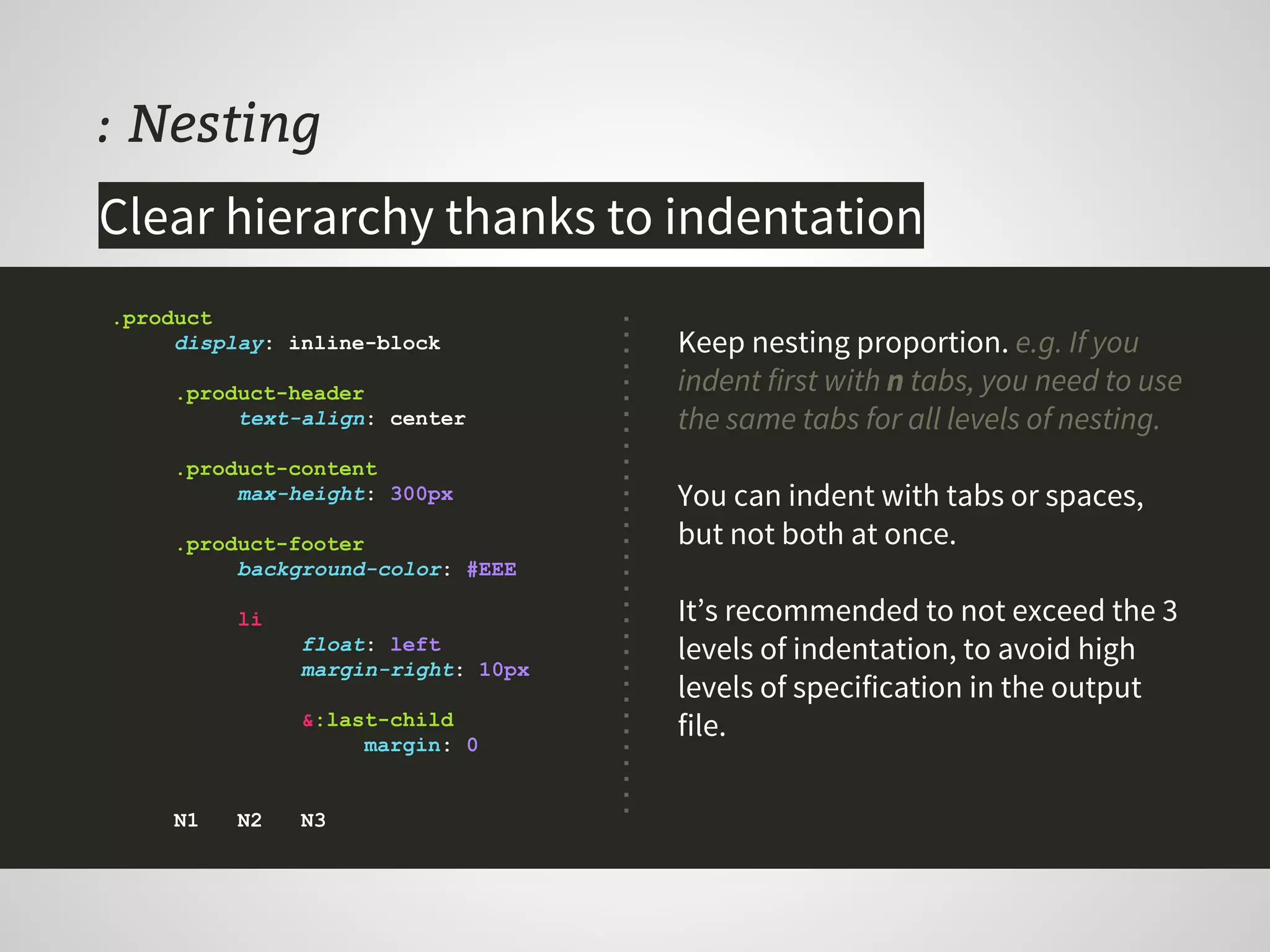
: Nesting
Keep nesting proportion. e.g. If you
indent first with n tabs, you need to use
the same tabs for all levels of nesting.
You can indent with tabs or spaces,
but not both at once.
It’s recommended to not exceed the 3
levels of indentation, to avoid high
levels of specification in the output
file.
.product
display: inline-block
.product-header
text-align: center
.product-content
max-height: 300px
.product-footer
background-color: #EEE
li
float: left
margin-right: 10px
&:last-child
margin: 0
N1 N2 N3
Clear hierarchy thanks to indentation
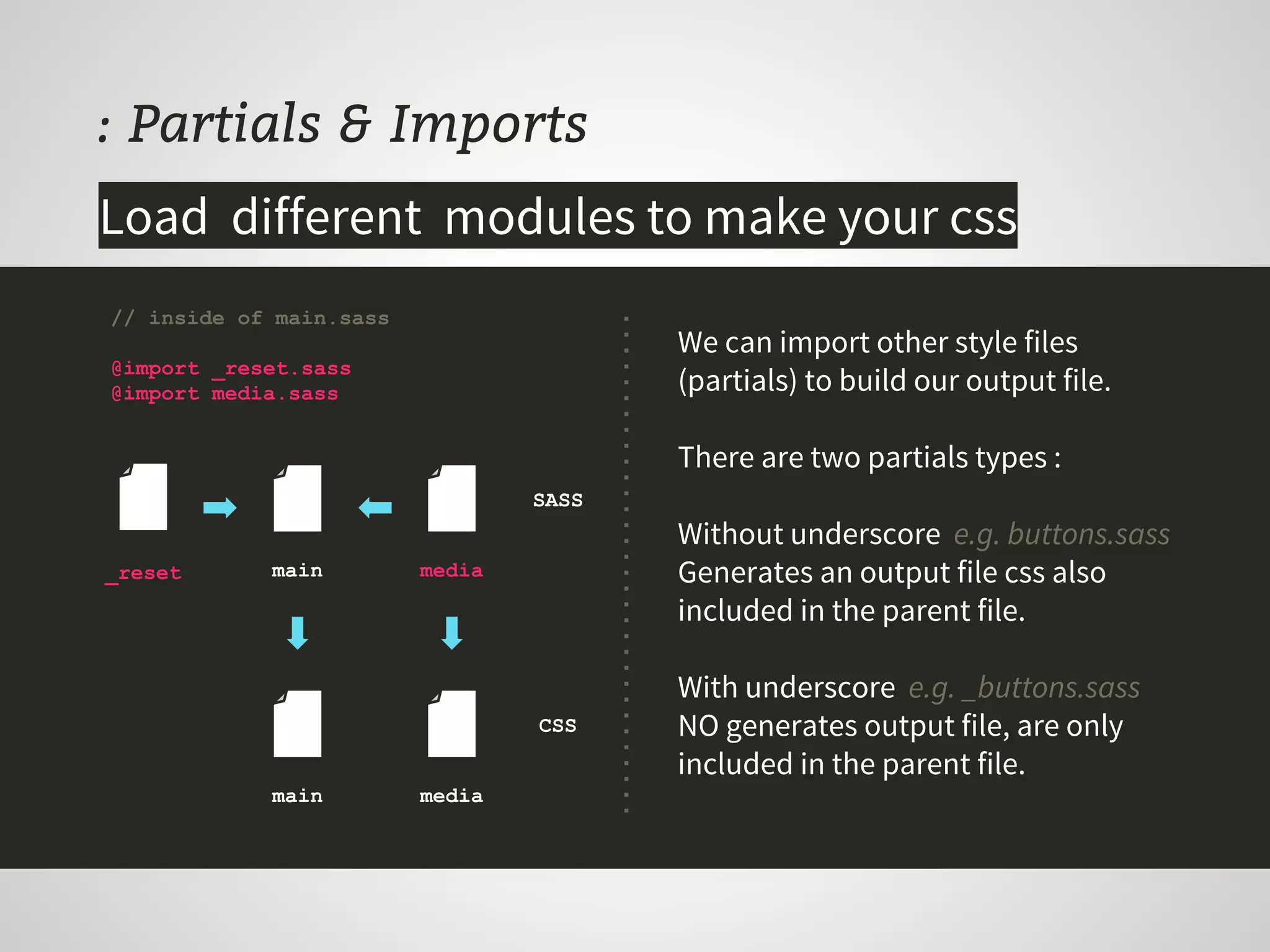
: Partials & Imports
We can import other style files
(partials) to build our output file.
There are two partials types :
Without underscore e.g. buttons.sass
Generates an output file css also
included in the parent file.
With underscore e.g. _buttons.sass
NO generates output file, are only
included in the parent file.
// inside of main.sass
@import _reset.sass
@import media.sass
Load different modules to make your css
_reset main media
main media
CSS
SASS
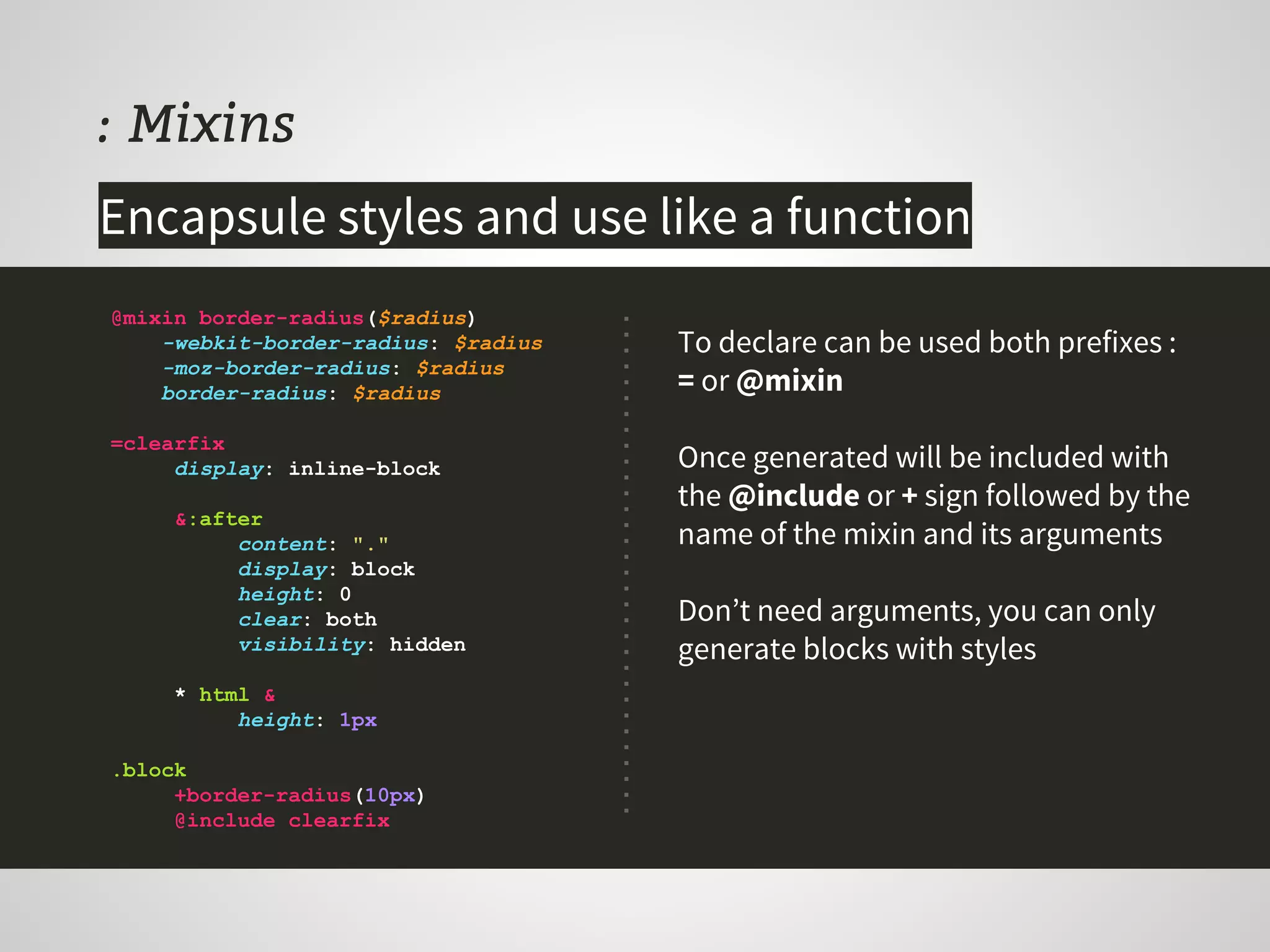
: Mixins
To declare can be used both prefixes :
= or @mixin
Once generated will be included with
the @include or + sign followed by the
name of the mixin and its arguments
Don’t need arguments, you can only
generate blocks with styles
@mixin border-radius($radius)
-webkit-border-radius: $radius
-moz-border-radius: $radius
border-radius: $radius
=clearfix
display: inline-block
&:after
content: "."
display: block
height: 0
clear: both
visibility: hidden
* html &
height: 1px
.block
+border-radius(10px)
@include clearfix
Encapsule styles and use like a function
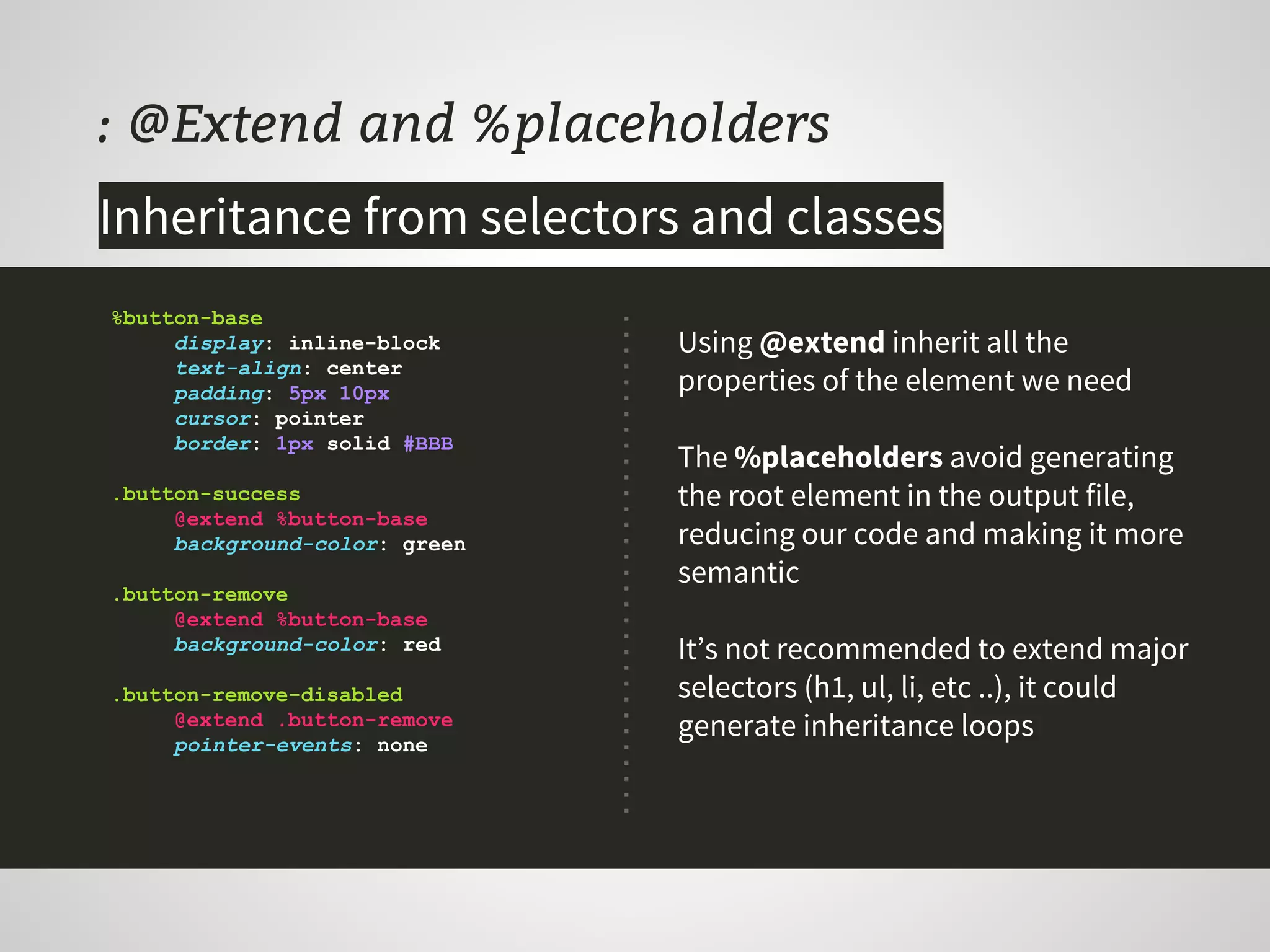
: @Extend and %placeholders
Using @extend inherit all the
properties of the element we need
The %placeholders avoid generating
the root element in the output file,
reducing our code and making it more
semantic
It’s not recommended to extend major
selectors (h1, ul, li, etc ..), it could
generate inheritance loops
%button-base
display: inline-block
text-align: center
padding: 5px 10px
cursor: pointer
border: 1px solid #BBB
.button-success
@extend %button-base
background-color: green
.button-remove
@extend %button-base
background-color: red
.button-remove-disabled
@extend .button-remove
pointer-events: none
Inheritance from selectors and classes
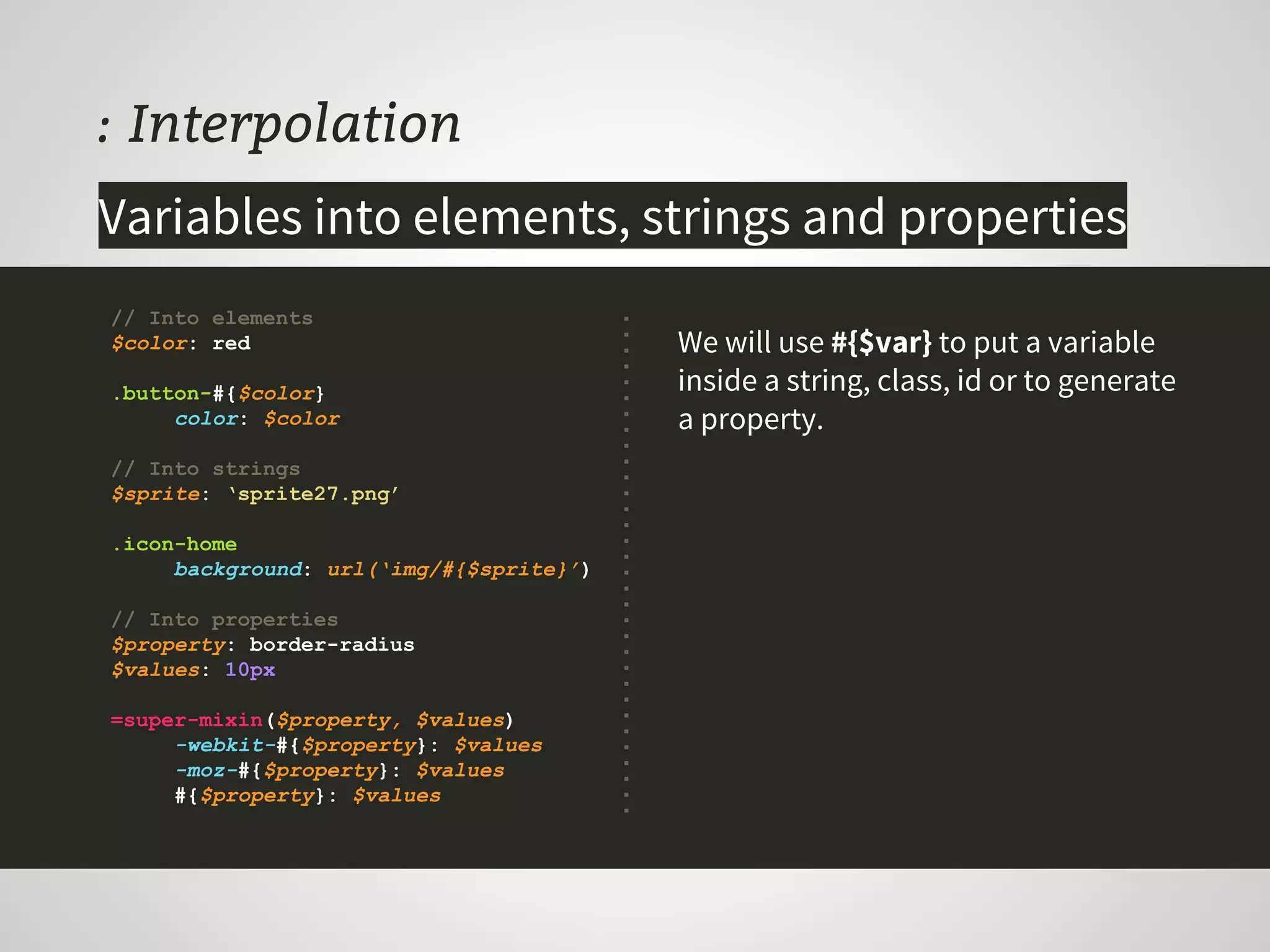
: Interpolation
We will use #{$var} to put a variable
inside a string, class, id or to generate
a property.
// Into elements
$color: red
.button-#{$color}
color: $color
// Into strings
$sprite: ‘sprite27.png’
.icon-home
background: url(‘img/#{$sprite}’)
// Into properties
$property: border-radius
$values: 10px
=super-mixin($property, $values)
-webkit-#{$property}: $values
-moz-#{$property}: $values
#{$property}: $values
Variables into elements, strings and properties
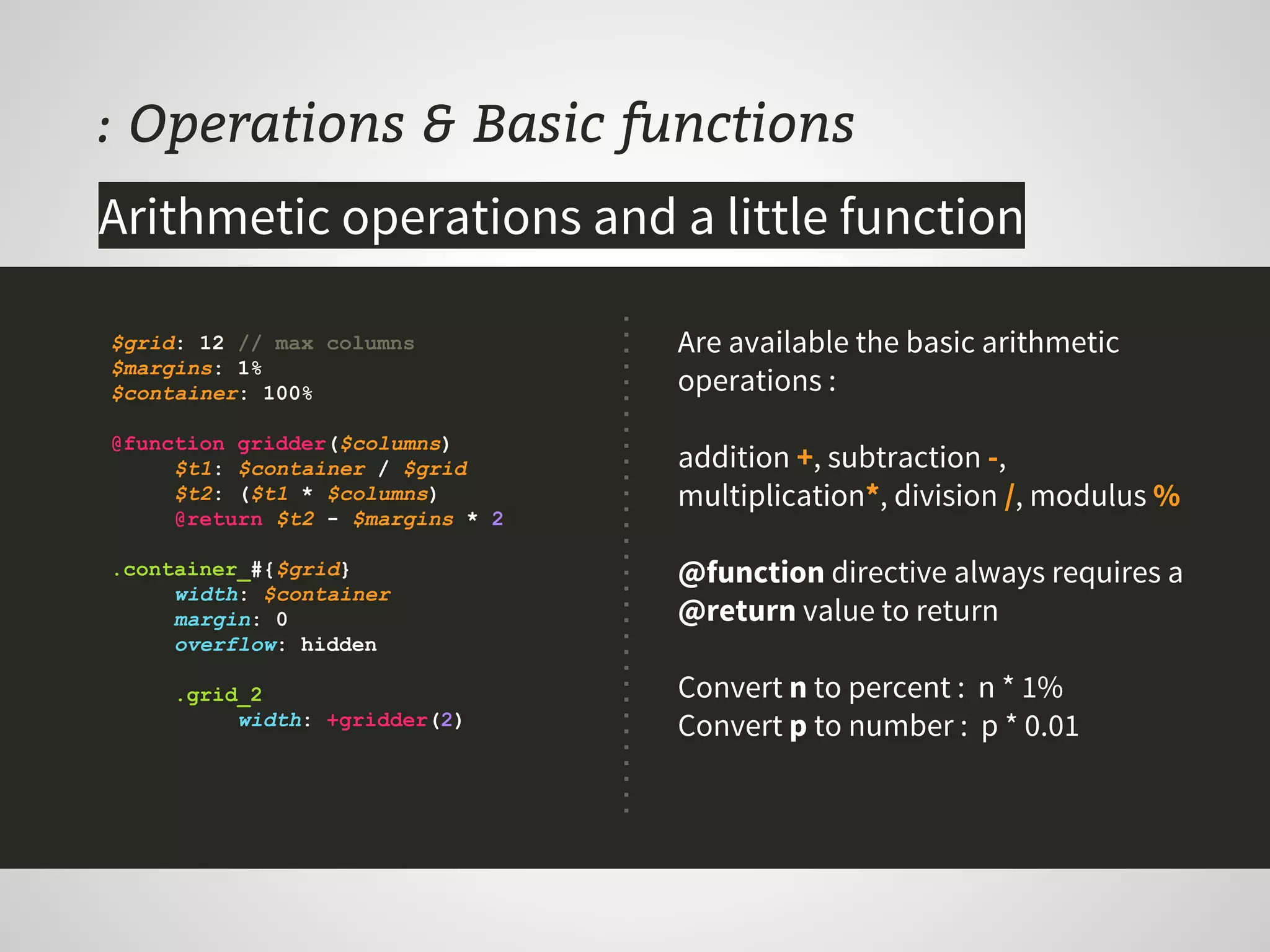
: Operations & Basic functions
$grid: 12 // max columns
$margins: 1%
$container: 100%
@function gridder($columns)
$t1: $container / $grid
$t2: ($t1 * $columns)
@return $t2 - $margins * 2
.container_#{$grid}
width: $container
margin: 0
overflow: hidden
.grid_2
width: +gridder(2)
Are available the basic arithmetic
operations :
addition +, subtraction -,
multiplication*, division /, modulus %
@function directive always requires a
@return value to return
Convert n to percent : n * 1%
Convert p to number : p * 0.01
Arithmetic operations and a little function
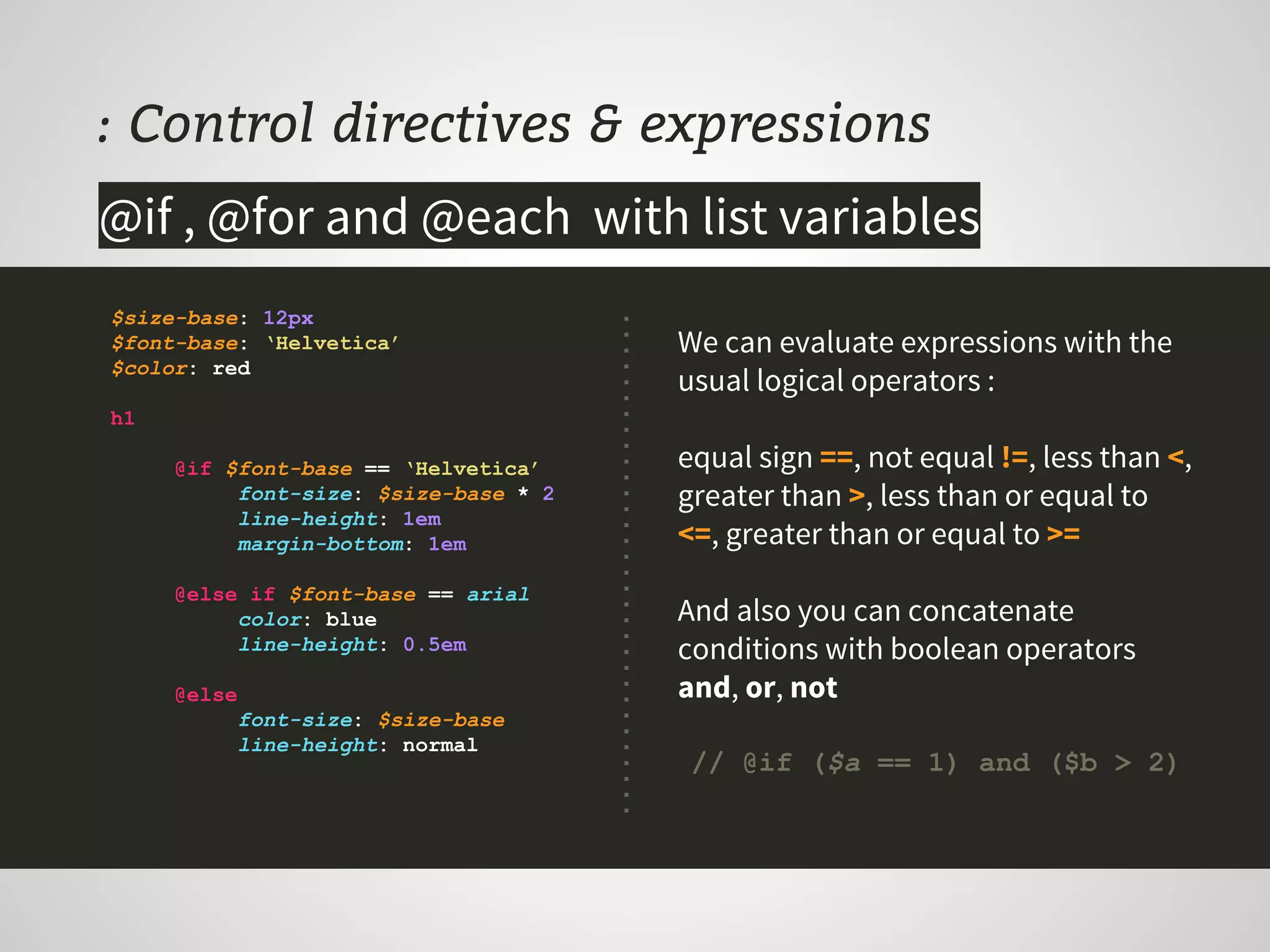
: Control directives & expressions
$size-base: 12px
$font-base: ‘Helvetica’
$color: red
h1
@if $font-base == ‘Helvetica’
font-size: $size-base * 2
line-height: 1em
margin-bottom: 1em
@else if $font-base == arial
color: blue
line-height: 0.5em
@else
font-size: $size-base
line-height: normal
@if , @for and @each with list variables
We can evaluate expressions with the
usual logical operators :
equal sign ==, not equal !=, less than <,
greater than >, less than or equal to
<=, greater than or equal to >=
And also you can concatenate
conditions with boolean operators
and, or, not
// @if ($a == 1) and ($b > 2)
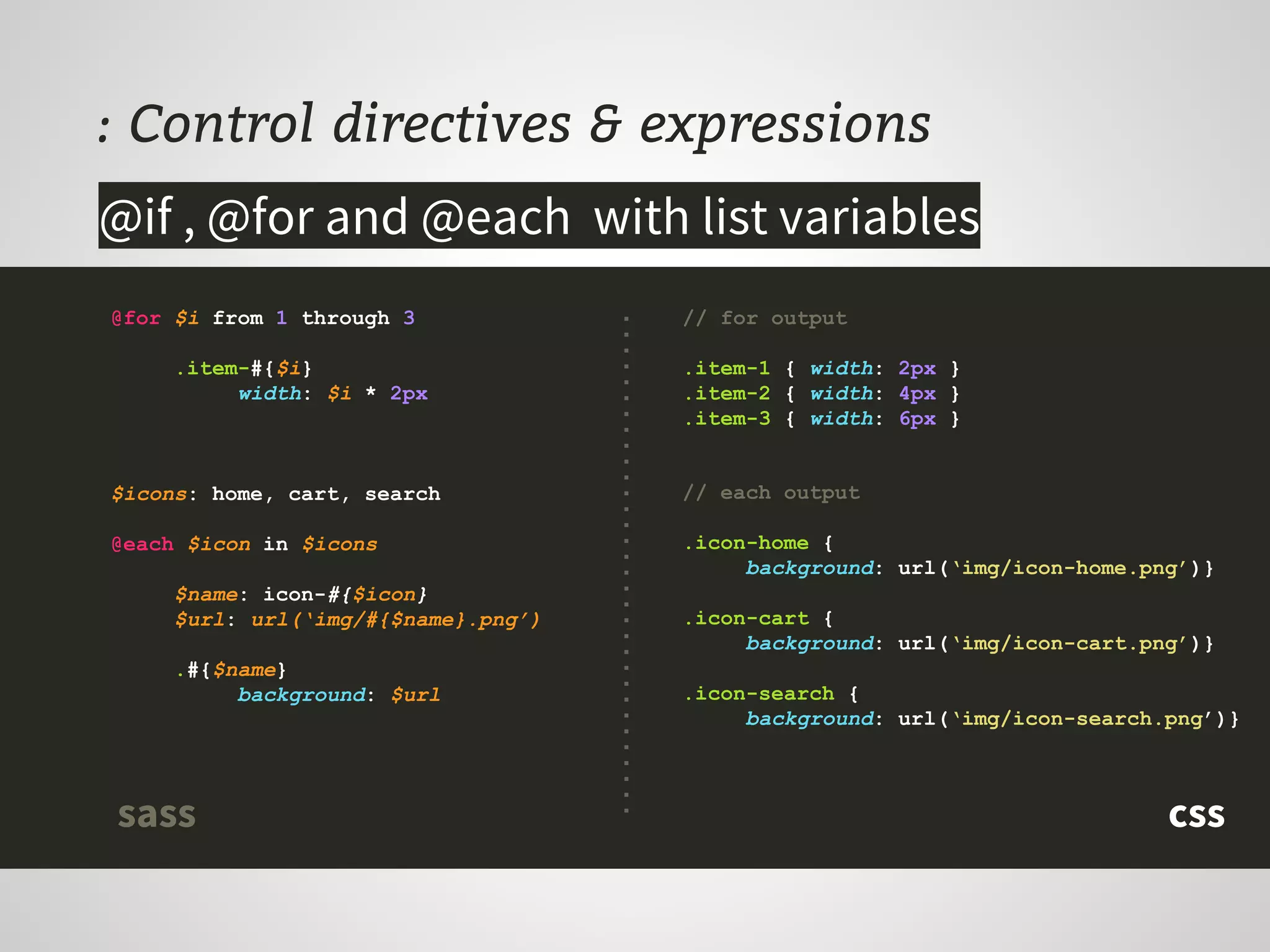
: Control directives & expressions
@for $i from 1 through 3
.item-#{$i}
width: $i * 2px
$icons: home, cart, search
@each $icon in $icons
$name: icon-#{$icon}
$url: url(‘img/#{$name}.png’)
.#{$name}
background: $url
@if , @for and @each with list variables
// for output
.item-1 { width: 2px }
.item-2 { width: 4px }
.item-3 { width: 6px }
// each output
.icon-home {
background: url(‘img/icon-home.png’)}
.icon-cart {
background: url(‘img/icon-cart.png’)}
.icon-search {
background: url(‘img/icon-search.png’)}
csssass
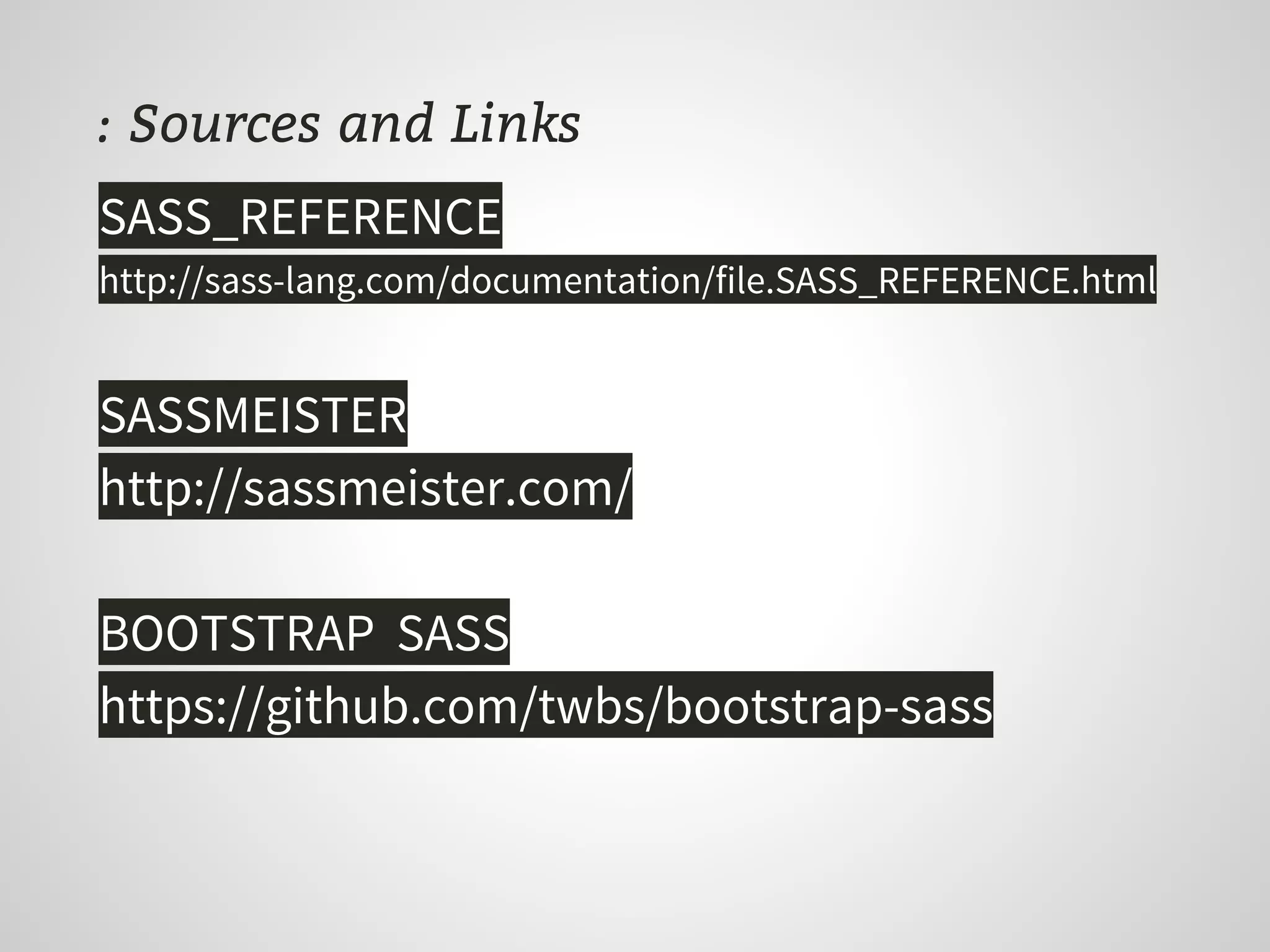
: Sources and Links
SASS_REFERENCE
http://sass-lang.com/documentation/file.SASS_REFERENCE.html
SASSMEISTER
http://sassmeister.com/
BOOTSTRAP SASS
https://github.com/twbs/bootstrap-sass
Thanks !
@romiguelangel
Miguel Ángel Ríos | Frontend Developer

Sass Essentials

  • 1.
    SASS ESSENTIALS Sass: SyntacticallyAwesome Style Sheets @romiguelangel
  • 2.
    : About me MiguelÁngel Ríos | @romiguelangel Frontend Developer at and
  • 3.
    : What isSASS ? SASS is a pseudo-language that adds superpowers to your css, allowing use variables, functions, control statements, inheritance, interpolation, etc ..
  • 4.
    : How canSASS help you ? Scalability Maintenance Increase development speed Apply DRY (Don’t Repeat Yourself) More control over the code Apply Clean Code principles ...
  • 5.
    : How itsay ? SASS or SCSS ? You can type SASS with two syntaxes : body font-family: $font-base background-color: white p, a font-size: $size-base h1, .h1 font-size: $size-base * 1.5 a text-decoration: none &, &:active, &:visited color: black &:hover +transition(color, 0.25s) color: $color-selected SASS Don't use brackets or semicolons .SASS file extension Elements indentation set specification level of your selectors
  • 6.
    : How itsay ? SASS or SCSS ? body { font-family: $font-base; background-color: white; } p, a { font-size: $size-base; } h1, .h1 { font-size: $size-base * 1.5 } a { text-decoration: none; &, &:active, &:visited { color: black; } &:hover { @include transition(color, 0.25s); color: $color-selected; } } SCSS Use brackets and semicolons .SCSS file extension Every valid CSS3 stylesheet is a valid SCSS CSS SCSS You can type SASS with two syntaxes :
  • 7.
    : but, Howcan I install it ? Open a terminal and : # Require ruby $ gem install sass # Test $ sass -v Sass 3.3.4 (Maptastic Maple)
  • 8.
    : All right,how can I convert my css ? $ sass-convert [input] [output] # CSS to SASS $ sass-convert main.css main.sass # CSS to SCSS $ mv main.css main.scss # SCSS to SASS $ sass-convert main.scss main.sass Open a terminal and :
  • 9.
    : Processing CSS $sass [--option] [input]:[output] # Create or update main.css once $ sass --update main.sass:main.css # Active watcher and update main.css by each change $ sass --watch main.sass:main.css # Compile all folder files into css folder $ sass --watch .:../css # Output compressed in one line $ sass --watch .:../css --style compressed Leave open a terminal and :
  • 10.
    : Variables $ Prefixedwith $ symbol Can be colors, values, fonts, arithmetic operations, etc .. Can contain more than one item, making a list that can be traveled with a control statement. $font-base: arial, sans-serif $color-base: #333333 $color-selected: #FFA500 $size-base: 12px $size-large: $size-base * 1.5 body font: family: $font-base size: $size-base h1, .h1 font-size: $size-large a color: $color-base &:hover color: $color-selected Store information and reused after
  • 11.
    : Nesting Keep nestingproportion. e.g. If you indent first with n tabs, you need to use the same tabs for all levels of nesting. You can indent with tabs or spaces, but not both at once. It’s recommended to not exceed the 3 levels of indentation, to avoid high levels of specification in the output file. .product display: inline-block .product-header text-align: center .product-content max-height: 300px .product-footer background-color: #EEE li float: left margin-right: 10px &:last-child margin: 0 N1 N2 N3 Clear hierarchy thanks to indentation
  • 12.
    : Partials &Imports We can import other style files (partials) to build our output file. There are two partials types : Without underscore e.g. buttons.sass Generates an output file css also included in the parent file. With underscore e.g. _buttons.sass NO generates output file, are only included in the parent file. // inside of main.sass @import _reset.sass @import media.sass Load different modules to make your css _reset main media main media CSS SASS
  • 13.
    : Mixins To declarecan be used both prefixes : = or @mixin Once generated will be included with the @include or + sign followed by the name of the mixin and its arguments Don’t need arguments, you can only generate blocks with styles @mixin border-radius($radius) -webkit-border-radius: $radius -moz-border-radius: $radius border-radius: $radius =clearfix display: inline-block &:after content: "." display: block height: 0 clear: both visibility: hidden * html & height: 1px .block +border-radius(10px) @include clearfix Encapsule styles and use like a function
  • 14.
    : @Extend and%placeholders Using @extend inherit all the properties of the element we need The %placeholders avoid generating the root element in the output file, reducing our code and making it more semantic It’s not recommended to extend major selectors (h1, ul, li, etc ..), it could generate inheritance loops %button-base display: inline-block text-align: center padding: 5px 10px cursor: pointer border: 1px solid #BBB .button-success @extend %button-base background-color: green .button-remove @extend %button-base background-color: red .button-remove-disabled @extend .button-remove pointer-events: none Inheritance from selectors and classes
  • 15.
    : Interpolation We willuse #{$var} to put a variable inside a string, class, id or to generate a property. // Into elements $color: red .button-#{$color} color: $color // Into strings $sprite: ‘sprite27.png’ .icon-home background: url(‘img/#{$sprite}’) // Into properties $property: border-radius $values: 10px =super-mixin($property, $values) -webkit-#{$property}: $values -moz-#{$property}: $values #{$property}: $values Variables into elements, strings and properties
  • 16.
    : Operations &Basic functions $grid: 12 // max columns $margins: 1% $container: 100% @function gridder($columns) $t1: $container / $grid $t2: ($t1 * $columns) @return $t2 - $margins * 2 .container_#{$grid} width: $container margin: 0 overflow: hidden .grid_2 width: +gridder(2) Are available the basic arithmetic operations : addition +, subtraction -, multiplication*, division /, modulus % @function directive always requires a @return value to return Convert n to percent : n * 1% Convert p to number : p * 0.01 Arithmetic operations and a little function
  • 17.
    : Control directives& expressions $size-base: 12px $font-base: ‘Helvetica’ $color: red h1 @if $font-base == ‘Helvetica’ font-size: $size-base * 2 line-height: 1em margin-bottom: 1em @else if $font-base == arial color: blue line-height: 0.5em @else font-size: $size-base line-height: normal @if , @for and @each with list variables We can evaluate expressions with the usual logical operators : equal sign ==, not equal !=, less than <, greater than >, less than or equal to <=, greater than or equal to >= And also you can concatenate conditions with boolean operators and, or, not // @if ($a == 1) and ($b > 2)
  • 18.
    : Control directives& expressions @for $i from 1 through 3 .item-#{$i} width: $i * 2px $icons: home, cart, search @each $icon in $icons $name: icon-#{$icon} $url: url(‘img/#{$name}.png’) .#{$name} background: $url @if , @for and @each with list variables // for output .item-1 { width: 2px } .item-2 { width: 4px } .item-3 { width: 6px } // each output .icon-home { background: url(‘img/icon-home.png’)} .icon-cart { background: url(‘img/icon-cart.png’)} .icon-search { background: url(‘img/icon-search.png’)} csssass
  • 19.
    : Sources andLinks SASS_REFERENCE http://sass-lang.com/documentation/file.SASS_REFERENCE.html SASSMEISTER http://sassmeister.com/ BOOTSTRAP SASS https://github.com/twbs/bootstrap-sass
  • 20.
    Thanks ! @romiguelangel Miguel ÁngelRíos | Frontend Developer