Beginners Guide to TikTok for Search - Rachel Pearson - We are Tilt __ Bright...
How To Submit A Free Construction Job Post On Grus
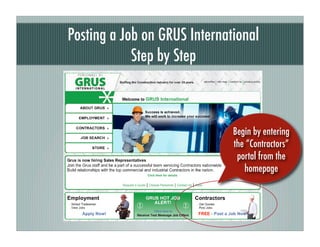
1. Posting a Job on GRUS International
Step by Step
Begin by entering
the “Contractors”
portal from the
homepage
2. Did you know... Posting a Job on
GRUS is 100% Free!
Click the
“Get Started Now”
Button
3. Creating an Account
If you don’t
yet have an account,
create one by entering
your email address and
then clicking
Select the “Login”
“new customer”
option
4. Creating a Password
Enter Your
Email Address
to Confirm
Create and
Confirm your
Password
5. Creating a Company Profile
The “My Profile”
page is where you’ll enter
contact details & list the
primary trade of your
business
6. Confirming Your Company Profile
You’ll know that your profile
is complete when you see the
“profile is current” button.
Now That Your Profile is Complete,
It’s Time to Create a Free Job Listing!
Click the “Add
New Posting”Button
7. Writing Your Job Listing
Enter Job Details....
Select either an hourly pay rate
and any additional compensation
you’d like to offer
8. Writing Your Job Listing
Enter a date to
close the ad. Otherwise,
the ad will expire 30 days Enter the date that the
after the job start date job will begin
Click to submit your
job posting. Once reviewed,
it will be published in the
GRUS job search
database.
9. Your Job Listing
Quick Read ‘Job Plenty of space for
Stats’ Makes job details to reduce
Browsing Simple unqualified applicants
Applicants can apply,
send a resume, or tell a
friend right from the job
listing page