Ini adalah senarai hotkey untuk GIMP dalam linux

Hotkeys
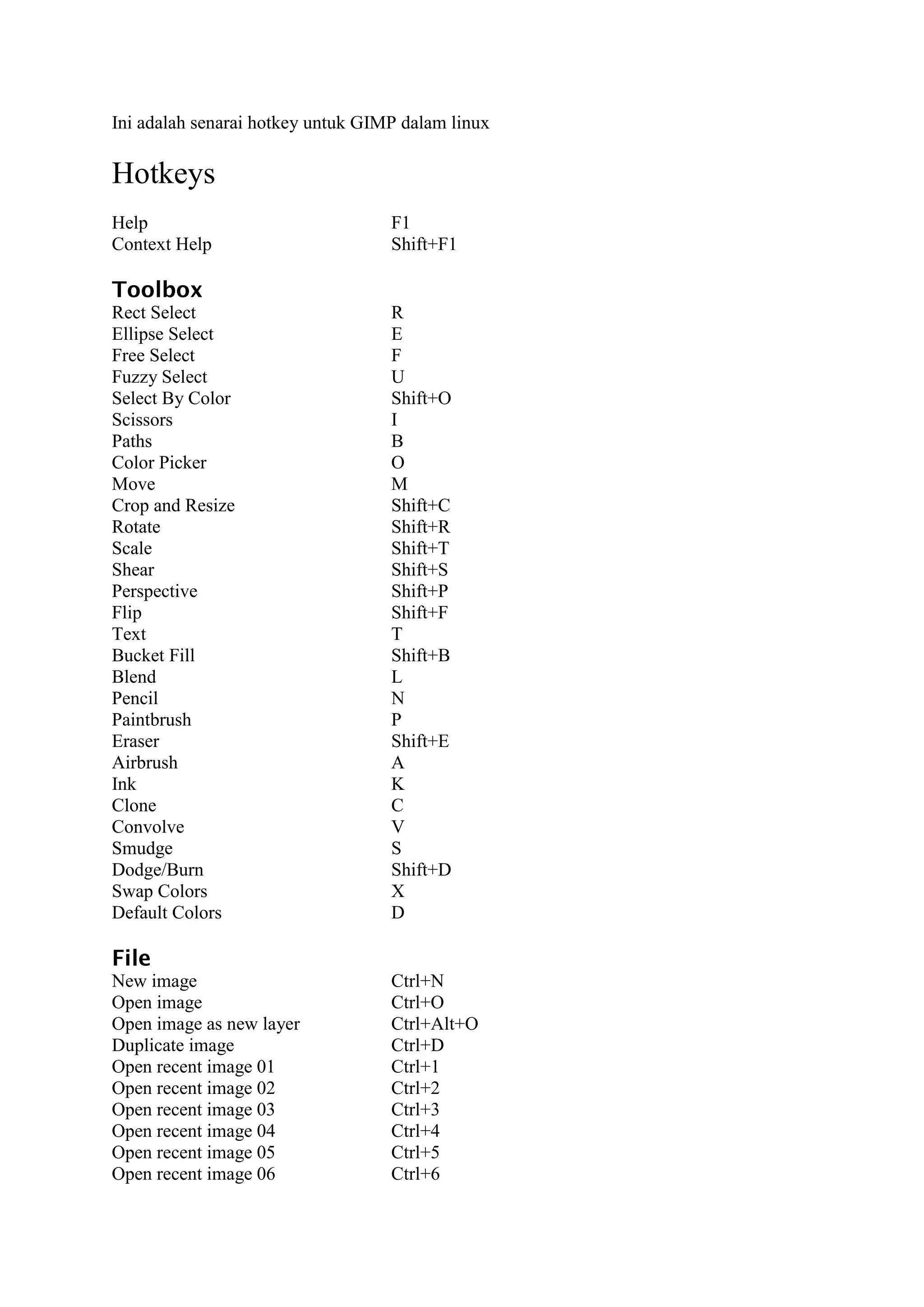
Help                               F1
Context Help                       Shift+F1

Toolbox
Rect Select                        R
Ellipse Select                     E
Free Select                        F
Fuzzy Select                       U
Select By Color                    Shift+O
Scissors                           I
Paths                              B
Color Picker                       O
Move                               M
Crop and Resize                    Shift+C
Rotate                             Shift+R
Scale                              Shift+T
Shear                              Shift+S
Perspective                        Shift+P
Flip                               Shift+F
Text                               T
Bucket Fill                        Shift+B
Blend                              L
Pencil                             N
Paintbrush                         P
Eraser                             Shift+E
Airbrush                           A
Ink                                K
Clone                              C
Convolve                           V
Smudge                             S
Dodge/Burn                         Shift+D
Swap Colors                        X
Default Colors                     D

File
New image                          Ctrl+N
Open image                         Ctrl+O
Open image as new layer            Ctrl+Alt+O
Duplicate image                    Ctrl+D
Open recent image 01               Ctrl+1
Open recent image 02               Ctrl+2
Open recent image 03               Ctrl+3
Open recent image 04               Ctrl+4
Open recent image 05               Ctrl+5
Open recent image 06               Ctrl+6
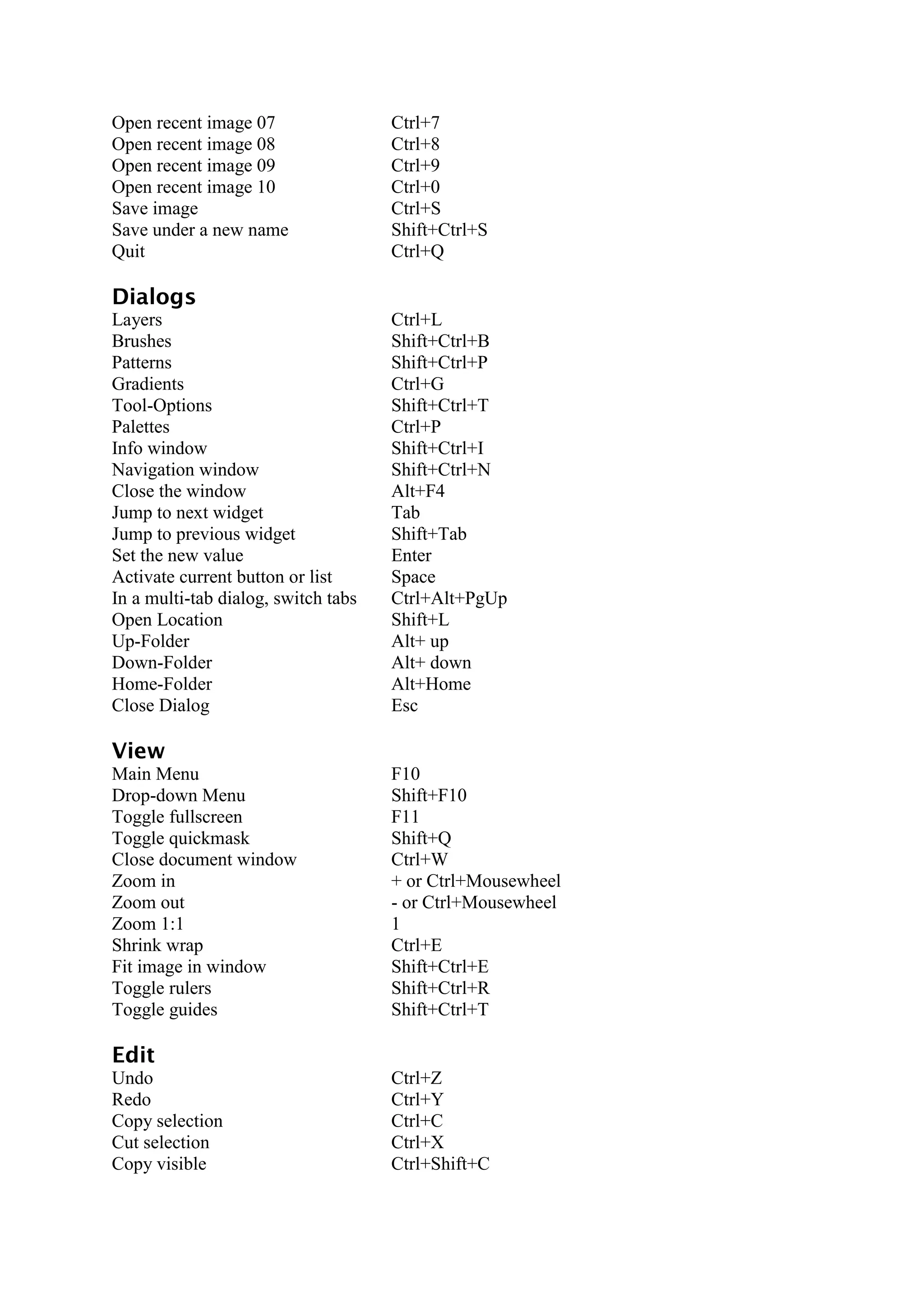
Open recent image 07                 Ctrl+7
Open recent image 08                 Ctrl+8
Open recent image 09                 Ctrl+9
Open recent image 10                 Ctrl+0
Save image                           Ctrl+S
Save under a new name                Shift+Ctrl+S
Quit                                 Ctrl+Q

Dialogs
Layers                               Ctrl+L
Brushes                              Shift+Ctrl+B
Patterns                             Shift+Ctrl+P
Gradients                            Ctrl+G
Tool-Options                         Shift+Ctrl+T
Palettes                             Ctrl+P
Info window                          Shift+Ctrl+I
Navigation window                    Shift+Ctrl+N
Close the window                     Alt+F4
Jump to next widget                  Tab
Jump to previous widget              Shift+Tab
Set the new value                    Enter
Activate current button or list      Space
In a multi-tab dialog, switch tabs   Ctrl+Alt+PgUp
Open Location                        Shift+L
Up-Folder                            Alt+ up
Down-Folder                          Alt+ down
Home-Folder                          Alt+Home
Close Dialog                         Esc

View
Main Menu                            F10
Drop-down Menu                       Shift+F10
Toggle fullscreen                    F11
Toggle quickmask                     Shift+Q
Close document window                Ctrl+W
Zoom in                              + or Ctrl+Mousewheel
Zoom out                             - or Ctrl+Mousewheel
Zoom 1:1                             1
Shrink wrap                          Ctrl+E
Fit image in window                  Shift+Ctrl+E
Toggle rulers                        Shift+Ctrl+R
Toggle guides                        Shift+Ctrl+T

Edit
Undo                                 Ctrl+Z
Redo                                 Ctrl+Y
Copy selection                       Ctrl+C
Cut selection                        Ctrl+X
Copy visible                         Ctrl+Shift+C
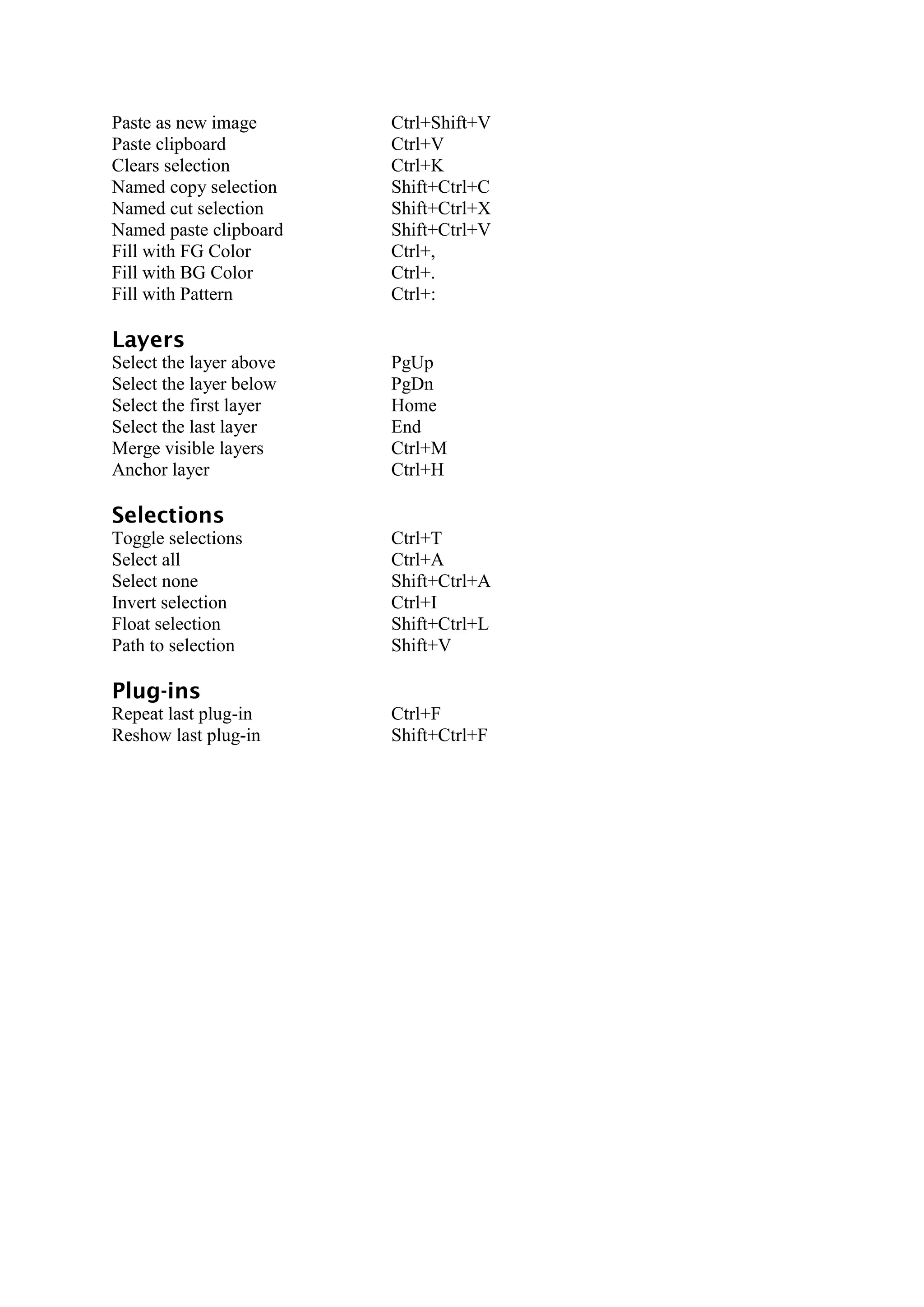
Paste as new image       Ctrl+Shift+V
Paste clipboard          Ctrl+V
Clears selection         Ctrl+K
Named copy selection     Shift+Ctrl+C
Named cut selection      Shift+Ctrl+X
Named paste clipboard    Shift+Ctrl+V
Fill with FG Color       Ctrl+,
Fill with BG Color       Ctrl+.
Fill with Pattern        Ctrl+:

Layers
Select the layer above   PgUp
Select the layer below   PgDn
Select the first layer   Home
Select the last layer    End
Merge visible layers     Ctrl+M
Anchor layer             Ctrl+H

Selections
Toggle selections        Ctrl+T
Select all               Ctrl+A
Select none              Shift+Ctrl+A
Invert selection         Ctrl+I
Float selection          Shift+Ctrl+L
Path to selection        Shift+V

Plug-ins
Repeat last plug-in      Ctrl+F
Reshow last plug-in      Shift+Ctrl+F

Shortcut gimp for gimper

  • 1.
    Ini adalah senaraihotkey untuk GIMP dalam linux Hotkeys Help F1 Context Help Shift+F1 Toolbox Rect Select R Ellipse Select E Free Select F Fuzzy Select U Select By Color Shift+O Scissors I Paths B Color Picker O Move M Crop and Resize Shift+C Rotate Shift+R Scale Shift+T Shear Shift+S Perspective Shift+P Flip Shift+F Text T Bucket Fill Shift+B Blend L Pencil N Paintbrush P Eraser Shift+E Airbrush A Ink K Clone C Convolve V Smudge S Dodge/Burn Shift+D Swap Colors X Default Colors D File New image Ctrl+N Open image Ctrl+O Open image as new layer Ctrl+Alt+O Duplicate image Ctrl+D Open recent image 01 Ctrl+1 Open recent image 02 Ctrl+2 Open recent image 03 Ctrl+3 Open recent image 04 Ctrl+4 Open recent image 05 Ctrl+5 Open recent image 06 Ctrl+6
  • 2.
    Open recent image07 Ctrl+7 Open recent image 08 Ctrl+8 Open recent image 09 Ctrl+9 Open recent image 10 Ctrl+0 Save image Ctrl+S Save under a new name Shift+Ctrl+S Quit Ctrl+Q Dialogs Layers Ctrl+L Brushes Shift+Ctrl+B Patterns Shift+Ctrl+P Gradients Ctrl+G Tool-Options Shift+Ctrl+T Palettes Ctrl+P Info window Shift+Ctrl+I Navigation window Shift+Ctrl+N Close the window Alt+F4 Jump to next widget Tab Jump to previous widget Shift+Tab Set the new value Enter Activate current button or list Space In a multi-tab dialog, switch tabs Ctrl+Alt+PgUp Open Location Shift+L Up-Folder Alt+ up Down-Folder Alt+ down Home-Folder Alt+Home Close Dialog Esc View Main Menu F10 Drop-down Menu Shift+F10 Toggle fullscreen F11 Toggle quickmask Shift+Q Close document window Ctrl+W Zoom in + or Ctrl+Mousewheel Zoom out - or Ctrl+Mousewheel Zoom 1:1 1 Shrink wrap Ctrl+E Fit image in window Shift+Ctrl+E Toggle rulers Shift+Ctrl+R Toggle guides Shift+Ctrl+T Edit Undo Ctrl+Z Redo Ctrl+Y Copy selection Ctrl+C Cut selection Ctrl+X Copy visible Ctrl+Shift+C
  • 3.
    Paste as newimage Ctrl+Shift+V Paste clipboard Ctrl+V Clears selection Ctrl+K Named copy selection Shift+Ctrl+C Named cut selection Shift+Ctrl+X Named paste clipboard Shift+Ctrl+V Fill with FG Color Ctrl+, Fill with BG Color Ctrl+. Fill with Pattern Ctrl+: Layers Select the layer above PgUp Select the layer below PgDn Select the first layer Home Select the last layer End Merge visible layers Ctrl+M Anchor layer Ctrl+H Selections Toggle selections Ctrl+T Select all Ctrl+A Select none Shift+Ctrl+A Invert selection Ctrl+I Float selection Shift+Ctrl+L Path to selection Shift+V Plug-ins Repeat last plug-in Ctrl+F Reshow last plug-in Shift+Ctrl+F