












UX 101
Usability Testing
Cori Jones
WELCOME
UX 101

ABOUT ME
UX 101

AGENDA
Overview of usability testing
Planning
Recruiting
Writing activities
Facilitation
Analyzing results
Sharing findings
OVERVIEW
UX 101

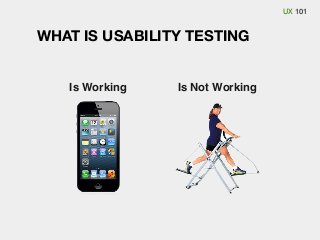
WHAT IS USABILITY TESTING

Is Working

Is Not Working
UX 101

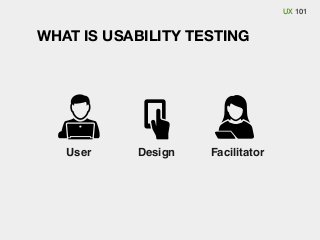
WHAT IS USABILITY TESTING

User

Design

Facilitator
UX 101
UX 101

BASICS OF USABILITY TESTING (IDI)
Decide what to test
Define who the audience is
Recruit 4-6 participants
Write 3-5 realistic activities for the participants to complete
Find a location and set a date
Invite observers
Conduct the test sessions
Gather, compare notes and discuss
UX 101

BENEFITS TO DESIGNERS
Better understanding of the users perspective (Mental Model)
Uncover unknown or unexpected issues
Fix problems early in the process when they are easy to fix
Test assumptions
Highlight unnecessary features
Provide objectivity help and solve opinion battles
Set baselines and measure improvement
Get stakeholder buy-in
UX 101

BUSINESS BENEFITS
Fix problems early in the process when they are cheaper to fix
Improve customer satisfaction and retention
Increase conversion rates
Reduce maintenance, training and support costs
Reduce project risk
Set baselines and measure improvement

Video: The ROI of User Experience with Dr. Susan Weinschenk
PLANNING
UX 101

MAKE A TESTING PLAN
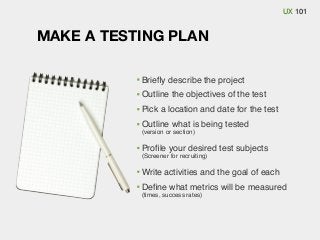
Briefly describe the project
Outline the objectives of the test
Pick a location and date for the test
Outline what is being tested
(version or section)

Profile your desired test subjects
(Screener for recruiting)

Write activities and the goal of each
Define what metrics will be measured
(times, success rates)
UX 101

ADDRESS LOGISTICS
Decide if (or when) the facilitator will be allowed to help users
Time limits on activities, follow up questions
List of needed materials (NDA’s, questionnaires, pens & paper,
water, incentives, etc.)
State of system at start of each session (Cookies and history
erased, start page (or place) for each user)
What to do between tests
RECRUITING
UX 101

RECRUITING PARTICIPANTS
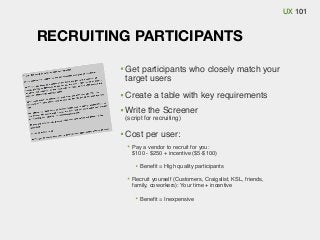
Get participants who closely match your
target users
Create a table with key requirements
Write the Screener
(script for recruiting)

Cost per user:
Pay a vendor to recruit for you:
$100 - $250 + incentive ($5-$100)
Benefit = High quality participants
Recruit yourself (Customers, Craigslist, KSL, friends,
family, coworkers): Your time + incentive
Benefit = Inexpensive
WRITING
ACTIVITIES
UX 101

CHOOSING ACTIVITIES
What are the top user tasks?
What are your priorities?
What new features have never been tested?
Competitive features?
What areas do you think may be difficult?
What should users be able to do?
UX 101

TYPE OF ACTIVITIES
First impression questions
Good for learning about the image of the site (home pages)

Exploratory task
Open-ended/ research oriented
Use the website and see if you would invest in this company
Find a cellular phone plan for yourself

Directed Tasks
Specific/ answer oriented
Find the contact information for the PR department
How fast can a cheetah run?
UX 101

ACTIVITY-WRITING GUIDELINES
Consider the goal of the activity
Make it realistic
Avoid humorous tasks
Give minimal context, not overly scenario-based
Keep it neutral and unbiased
Use language people understand
Lease out clues or hints
Avoid using wording used in the design
Avoid having micro-steps

Involve team in writing and/or reviewing activities
UX 101

SESSION LOGISTICS
Prioritize activities
Is the priority to get through many activities, or hit a select few deeply?

Consider the total session length
Allow 15-25 minutes for introductions and debrief
Allow 10-20 minutes per activity (depends on the difficulty of the activity)

Make the first task easy
Put essential activities early on
Prepare additional activities in case of extra time
UX 101

EXERCISE: ACTIVITY CRITIQUE
1. Sign up for “email exclusives” on target.com
Goal: See if they can join the email list

Go to spotify.com, sign up, create a new playlist, then add Ben
Kweller’s album: Go Fly a Kite to that playlist
Goal: See if people can create a playlist

Your mother’s birthday is next week. Send her a bouquet of flowers.
Goal: See how people browse the product offerings on your floral site

Add new events to the calendar feature on your phone
Goal: Study adding events

You are organizing a team of runners for an upcoming relay race.
The team wants matching shirts for the event. The shirts need to be
green, have a white logo on the front, and yellow racing stripes on
the back. Go to www.customink.com and order 20 of these shirts.
Goal: See if users can customize a design
UX 101

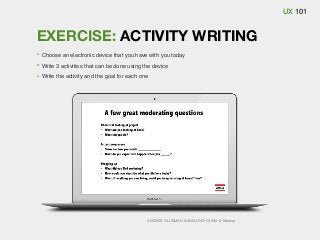
EXERCISE: ACTIVITY WRITING
Choose an electronic device that you have with you today
Write 3 activities that can be done using the device
Write the activity and the goal for each one

ANDRES GLUSMAN & ANNA DEYOUNG @ Meetup
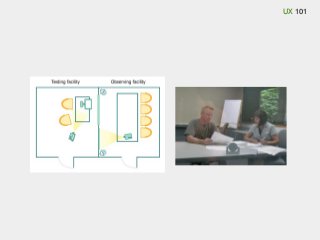
FACILITATION
UX 101
UX 101
UX 101

WHILE FACILITATING
Give participants one activity at a time
Monitor
Activities
Session time
User comfort
System
Observers

Observe
Take notes
Consider whether to interrupt or ask questions
UX 101

EXAMPLE TEST SESSION
The facilitator welcomes the participant and explains what the test is
about. They then ask any pre-test or demographic questions.
The facilitator explains thinking aloud and asks if the participant has any
additional questions. The facilitator explains where to start.
The participant reads the first activity aloud and begins completing the
activity, vocalizing their thoughts as they go.
The observers take notes of the participant’s behaviors, comments, errors
and completion (success or failure) on each activity.
The session continues until all task scenarios are completed or time
allotted has elapsed.
The facilitator either asks the end-of session subjective questions or sends
them to an online survey, thanks the participant, gives the participant the
agreed-on incentive, and escorts them from the testing environment.
The facilitator them resets the materials and equipment, speaks briefly with
the observers and waits for the next participant to arrive.
UX 101

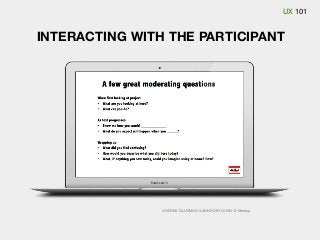
INTERACTING WITH THE PARTICIPANT
Give subtle acknowledgements
Uh-huh, OK, nodding
Refrain from being interruptive or chatty

Stay neutral
Don’t ask leading questions
Avoid prompting

Avoid explaining of defending interface (don’t test your own stuff)
Avoid answering questions or helping out too early

Get clarification
Echoing technique
Trailing-off technique
UX 101

INTERACTING WITH THE PARTICIPANT

ANDRES GLUSMAN & ANNA DEYOUNG @ Meetup
UX 101

EXERCISE: FACILITATION
Break into groups
Choose roles
One facilitator
One participant
The rest will be observers

Use the activities you wrote
Prepare to do a full usability session
When groups are ready, participants move to another group
Run the session
Everyone should do their part (role)
Observers: note findings as well as the facilitation techniques
ANALYZING
UX 101

ANALYZE THE RESULTS
Lean approach
Focus on frequency and team involvement over precision and depth
Same day meeting with all who participated
Discuss and agree on “obvious” usability issues
Side effect: User empathy throughout entire team and process

Traditional approach
Focus on being thorough and precise
Reference the tests goals
Gather all notes and do affinity diagramming
UX 101
UX 101

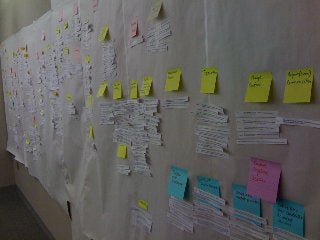
GUIDE TO AFFINITY DIAGRAMMING
Low-tech method, flexible, easy to learn
Everyone in the room participates
One facilitator
Identify all issues during test sessions
Group issues into categories
Vote on most severe issues
Goal: To have all issues sorted in categories and assigned a
priority rating
UX 101

AFFINITY DIAGRAMMING STEPS
Write issues from tests on post-it notes and place on the wall
one issue per note (good or bad)
Use a different color post-it for each user

Find two issues that go together, give category name and post
elsewhere in room
Continue grouping and naming categories until all post-it notes are placed
No talking when doing initial groupings
Give time limit

Walk around room gallery style and review/refine categories
Discuss categories once you are refining them

Vote on severity on top issues
Give each attendee 2-3 votes to determine high priority issues
SHARING
UX 101

SHARE THE FINDINGS
Lean approach
Frequency and team involvement are key
Make and share video of sessions
Gather and share session notes
Keep a good thing going
leverage enthusiasm to help make usability testing a regular activity

Traditional approach (make a report)
Helpful if the team can’t or won’t participate
Positions you as the usability expert and defender of the user needs
The report must make findings understandable and actionable
Be a historical document
Include screenshots
Be objective (don’t get caught up in “selling” your recommendations)
UX 101

WHAT SHOULD BE IN YOUR REPORT
Look for both positive and negative findings
Describe what happened
Explain WHY, not just what

Distinguish between fact and interpretations
Include simple quantitative data
Success (pass/fail) rates
Activity time
Possibly means
5 users is not a statistical sampling

User quotes or embedded videos
WRAP UP
UX 101

MAKE IT HAPPEN
Anyone can run a usability test with the right preparation
and attitude
There is lots of advice available online
Learn from mistakes and evolve your methods
Any amount of testing is better than not testing at all
Ask people who have done it before to help you out
Team up & test each other
THANKS!
Questions? corijones@gmail.com
UX 101

OTHER COMMON METHODS
Eye-tracking
Card sorting
Paper prototyping
Remote testing
Co-Discovery (groups of 2 or more)
Field studies or site visits
Customer round tables
Competitive studies
Surveys or questionnaires
Expert reviews, heuristic evaluations, guideline inspection
Focus groups

Ux 101, usability testing

  • 1.
  • 2.
  • 3.
  • 4.
    UX 101 AGENDA Overview ofusability testing Planning Recruiting Writing activities Facilitation Analyzing results Sharing findings
  • 5.
  • 6.
    UX 101 WHAT ISUSABILITY TESTING Is Working Is Not Working
  • 7.
    UX 101 WHAT ISUSABILITY TESTING User Design Facilitator
  • 8.
  • 9.
    UX 101 BASICS OFUSABILITY TESTING (IDI) Decide what to test Define who the audience is Recruit 4-6 participants Write 3-5 realistic activities for the participants to complete Find a location and set a date Invite observers Conduct the test sessions Gather, compare notes and discuss
  • 10.
    UX 101 BENEFITS TODESIGNERS Better understanding of the users perspective (Mental Model) Uncover unknown or unexpected issues Fix problems early in the process when they are easy to fix Test assumptions Highlight unnecessary features Provide objectivity help and solve opinion battles Set baselines and measure improvement Get stakeholder buy-in
  • 11.
    UX 101 BUSINESS BENEFITS Fixproblems early in the process when they are cheaper to fix Improve customer satisfaction and retention Increase conversion rates Reduce maintenance, training and support costs Reduce project risk Set baselines and measure improvement Video: The ROI of User Experience with Dr. Susan Weinschenk
  • 12.
  • 13.
    UX 101 MAKE ATESTING PLAN Briefly describe the project Outline the objectives of the test Pick a location and date for the test Outline what is being tested (version or section) Profile your desired test subjects (Screener for recruiting) Write activities and the goal of each Define what metrics will be measured (times, success rates)
  • 14.
    UX 101 ADDRESS LOGISTICS Decideif (or when) the facilitator will be allowed to help users Time limits on activities, follow up questions List of needed materials (NDA’s, questionnaires, pens & paper, water, incentives, etc.) State of system at start of each session (Cookies and history erased, start page (or place) for each user) What to do between tests
  • 15.
  • 16.
    UX 101 RECRUITING PARTICIPANTS Getparticipants who closely match your target users Create a table with key requirements Write the Screener (script for recruiting) Cost per user: Pay a vendor to recruit for you: $100 - $250 + incentive ($5-$100) Benefit = High quality participants Recruit yourself (Customers, Craigslist, KSL, friends, family, coworkers): Your time + incentive Benefit = Inexpensive
  • 17.
  • 18.
    UX 101 CHOOSING ACTIVITIES Whatare the top user tasks? What are your priorities? What new features have never been tested? Competitive features? What areas do you think may be difficult? What should users be able to do?
  • 19.
    UX 101 TYPE OFACTIVITIES First impression questions Good for learning about the image of the site (home pages) Exploratory task Open-ended/ research oriented Use the website and see if you would invest in this company Find a cellular phone plan for yourself Directed Tasks Specific/ answer oriented Find the contact information for the PR department How fast can a cheetah run?
  • 20.
    UX 101 ACTIVITY-WRITING GUIDELINES Considerthe goal of the activity Make it realistic Avoid humorous tasks Give minimal context, not overly scenario-based Keep it neutral and unbiased Use language people understand Lease out clues or hints Avoid using wording used in the design Avoid having micro-steps Involve team in writing and/or reviewing activities
  • 21.
    UX 101 SESSION LOGISTICS Prioritizeactivities Is the priority to get through many activities, or hit a select few deeply? Consider the total session length Allow 15-25 minutes for introductions and debrief Allow 10-20 minutes per activity (depends on the difficulty of the activity) Make the first task easy Put essential activities early on Prepare additional activities in case of extra time
  • 22.
    UX 101 EXERCISE: ACTIVITYCRITIQUE 1. Sign up for “email exclusives” on target.com Goal: See if they can join the email list Go to spotify.com, sign up, create a new playlist, then add Ben Kweller’s album: Go Fly a Kite to that playlist Goal: See if people can create a playlist Your mother’s birthday is next week. Send her a bouquet of flowers. Goal: See how people browse the product offerings on your floral site Add new events to the calendar feature on your phone Goal: Study adding events You are organizing a team of runners for an upcoming relay race. The team wants matching shirts for the event. The shirts need to be green, have a white logo on the front, and yellow racing stripes on the back. Go to www.customink.com and order 20 of these shirts. Goal: See if users can customize a design
  • 23.
    UX 101 EXERCISE: ACTIVITYWRITING Choose an electronic device that you have with you today Write 3 activities that can be done using the device Write the activity and the goal for each one ANDRES GLUSMAN & ANNA DEYOUNG @ Meetup
  • 24.
  • 25.
  • 26.
  • 27.
    UX 101 WHILE FACILITATING Giveparticipants one activity at a time Monitor Activities Session time User comfort System Observers Observe Take notes Consider whether to interrupt or ask questions
  • 28.
    UX 101 EXAMPLE TESTSESSION The facilitator welcomes the participant and explains what the test is about. They then ask any pre-test or demographic questions. The facilitator explains thinking aloud and asks if the participant has any additional questions. The facilitator explains where to start. The participant reads the first activity aloud and begins completing the activity, vocalizing their thoughts as they go. The observers take notes of the participant’s behaviors, comments, errors and completion (success or failure) on each activity. The session continues until all task scenarios are completed or time allotted has elapsed. The facilitator either asks the end-of session subjective questions or sends them to an online survey, thanks the participant, gives the participant the agreed-on incentive, and escorts them from the testing environment. The facilitator them resets the materials and equipment, speaks briefly with the observers and waits for the next participant to arrive.
  • 29.
    UX 101 INTERACTING WITHTHE PARTICIPANT Give subtle acknowledgements Uh-huh, OK, nodding Refrain from being interruptive or chatty Stay neutral Don’t ask leading questions Avoid prompting Avoid explaining of defending interface (don’t test your own stuff) Avoid answering questions or helping out too early Get clarification Echoing technique Trailing-off technique
  • 30.
    UX 101 INTERACTING WITHTHE PARTICIPANT ANDRES GLUSMAN & ANNA DEYOUNG @ Meetup
  • 31.
    UX 101 EXERCISE: FACILITATION Breakinto groups Choose roles One facilitator One participant The rest will be observers Use the activities you wrote Prepare to do a full usability session When groups are ready, participants move to another group Run the session Everyone should do their part (role) Observers: note findings as well as the facilitation techniques
  • 32.
  • 33.
    UX 101 ANALYZE THERESULTS Lean approach Focus on frequency and team involvement over precision and depth Same day meeting with all who participated Discuss and agree on “obvious” usability issues Side effect: User empathy throughout entire team and process Traditional approach Focus on being thorough and precise Reference the tests goals Gather all notes and do affinity diagramming
  • 34.
  • 35.
    UX 101 GUIDE TOAFFINITY DIAGRAMMING Low-tech method, flexible, easy to learn Everyone in the room participates One facilitator Identify all issues during test sessions Group issues into categories Vote on most severe issues Goal: To have all issues sorted in categories and assigned a priority rating
  • 36.
    UX 101 AFFINITY DIAGRAMMINGSTEPS Write issues from tests on post-it notes and place on the wall one issue per note (good or bad) Use a different color post-it for each user Find two issues that go together, give category name and post elsewhere in room Continue grouping and naming categories until all post-it notes are placed No talking when doing initial groupings Give time limit Walk around room gallery style and review/refine categories Discuss categories once you are refining them Vote on severity on top issues Give each attendee 2-3 votes to determine high priority issues
  • 37.
  • 38.
    UX 101 SHARE THEFINDINGS Lean approach Frequency and team involvement are key Make and share video of sessions Gather and share session notes Keep a good thing going leverage enthusiasm to help make usability testing a regular activity Traditional approach (make a report) Helpful if the team can’t or won’t participate Positions you as the usability expert and defender of the user needs The report must make findings understandable and actionable Be a historical document Include screenshots Be objective (don’t get caught up in “selling” your recommendations)
  • 39.
    UX 101 WHAT SHOULDBE IN YOUR REPORT Look for both positive and negative findings Describe what happened Explain WHY, not just what Distinguish between fact and interpretations Include simple quantitative data Success (pass/fail) rates Activity time Possibly means 5 users is not a statistical sampling User quotes or embedded videos
  • 40.
  • 41.
    UX 101 MAKE ITHAPPEN Anyone can run a usability test with the right preparation and attitude There is lots of advice available online Learn from mistakes and evolve your methods Any amount of testing is better than not testing at all Ask people who have done it before to help you out Team up & test each other
  • 42.
  • 43.
    UX 101 OTHER COMMONMETHODS Eye-tracking Card sorting Paper prototyping Remote testing Co-Discovery (groups of 2 or more) Field studies or site visits Customer round tables Competitive studies Surveys or questionnaires Expert reviews, heuristic evaluations, guideline inspection Focus groups