Actions on GOOGLE with Drupal
Nishant Kumar
https://drupal.org/u/nishantkumar155
@nishantkumar
● How to use Action-on-Google for a new project and an
existing one?
● How to integrate Google voice assistance with Drupal 8.
Agenda
How to use Action-on-Google for a new project and an
existing one?
By leveraging this application, we can use electronic gadgets to
trigger voice command that can control Drupal command.
● Clear cache
● Count no of node
● Send email
● Run external as well as internal cron
● And many more to control your Drupal application to respond
or insite defined action
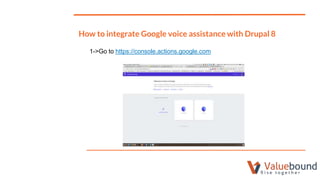
How to integrate Google voice assistance with Drupal 8
1->Go to https://console.actions.google.com
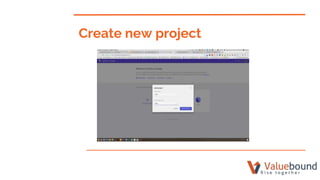
Create new project
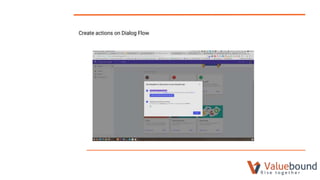
Create actions on Dialog Flow
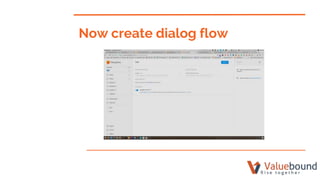
Now create dialog flow
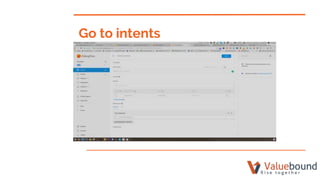
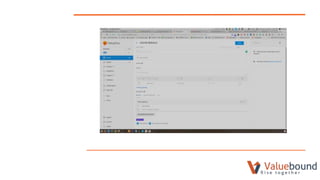
Go to intents
Fill below field
User says
Response → Default → “voice control text which can be
speak”
And checked the field of Fulfillment and save
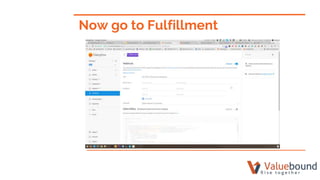
Now go to Fulfillment
Module development Drupal 8
Create a custom module and a routing file:
okgoogle.test:
path: '/ok-google-test'
defaults:
_controller: 'DrupalokgoogleControllertest::handleRequest'
_title: 'Ok Google'
requirements:
_access: 'TRUE'
Create controller:
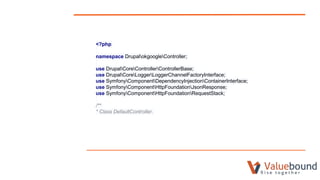
<?php
namespace DrupalokgoogleController;
use DrupalCoreControllerControllerBase;
use DrupalCoreLoggerLoggerChannelFactoryInterface;
use SymfonyComponentDependencyInjectionContainerInterface;
use SymfonyComponentHttpFoundationJsonResponse;
use SymfonyComponentHttpFoundationRequestStack;
/**
* Class DefaultController.
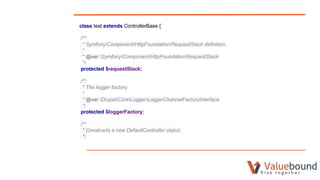
class test extends ControllerBase {
/**
* SymfonyComponentHttpFoundationRequestStack definition.
*
* @var SymfonyComponentHttpFoundationRequestStack
*/
protected $requestStack;
/**
* The logger factory.
*
* @var DrupalCoreLoggerLoggerChannelFactoryInterface
*/
protected $loggerFactory;
/**
* Constructs a new DefaultController object.
*/
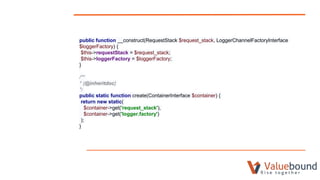
public function __construct(RequestStack $request_stack, LoggerChannelFactoryInterface
$loggerFactory) {
$this->requestStack = $request_stack;
$this->loggerFactory = $loggerFactory;
}
/**
* {@inheritdoc}
*/
public static function create(ContainerInterface $container) {
return new static(
$container->get('request_stack'),
$container->get('logger.factory')
);
}
/**
* Handlerequest.
*
* @return mixed
* Return Hello string.
*/
public function handleRequest() {
$this->loggerFactory->get('droogle')->info('droogle triggered');
$this->processRequest();
$data = [
'speech' => 'Cache Rebuild Completed for the Site by bisu',
'displayText' => 'Cache Rebuild Completed nishant',
'data' => '',
'contextOut' => [],
'source' => 'uniworld',
];
return JsonResponse::create($data, 200);
}
protected function sent_mail(){
}
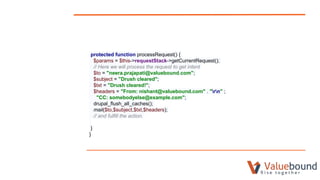
protected function processRequest() {
$params = $this->requestStack->getCurrentRequest();
// Here we will process the request to get intent
$to = "neera.prajapati@valuebound.com";
$subject = "Drush cleared";
$txt = "Drush cleared!";
$headers = "From: nishant@valuebound.com" . "rn" ;
"CC: somebodyelse@example.com";
drupal_flush_all_caches();
mail($to,$subject,$txt,$headers);
// and fulfill the action.
}
}
CONCLUSION
THANKS!
QUESTIONS?

Action on google with Drupal

  • 1.
    Actions on GOOGLEwith Drupal Nishant Kumar https://drupal.org/u/nishantkumar155 @nishantkumar
  • 2.
    ● How touse Action-on-Google for a new project and an existing one? ● How to integrate Google voice assistance with Drupal 8. Agenda
  • 3.
    How to useAction-on-Google for a new project and an existing one? By leveraging this application, we can use electronic gadgets to trigger voice command that can control Drupal command. ● Clear cache ● Count no of node ● Send email ● Run external as well as internal cron ● And many more to control your Drupal application to respond or insite defined action
  • 4.
    How to integrateGoogle voice assistance with Drupal 8 1->Go to https://console.actions.google.com
  • 5.
  • 6.
    Create actions onDialog Flow
  • 7.
  • 8.
  • 9.
    Fill below field Usersays Response → Default → “voice control text which can be speak” And checked the field of Fulfillment and save
  • 11.
    Now go toFulfillment
  • 12.
    Module development Drupal8 Create a custom module and a routing file: okgoogle.test: path: '/ok-google-test' defaults: _controller: 'DrupalokgoogleControllertest::handleRequest' _title: 'Ok Google' requirements: _access: 'TRUE'
  • 13.
  • 14.
    <?php namespace DrupalokgoogleController; use DrupalCoreControllerControllerBase; useDrupalCoreLoggerLoggerChannelFactoryInterface; use SymfonyComponentDependencyInjectionContainerInterface; use SymfonyComponentHttpFoundationJsonResponse; use SymfonyComponentHttpFoundationRequestStack; /** * Class DefaultController.
  • 15.
    class test extendsControllerBase { /** * SymfonyComponentHttpFoundationRequestStack definition. * * @var SymfonyComponentHttpFoundationRequestStack */ protected $requestStack; /** * The logger factory. * * @var DrupalCoreLoggerLoggerChannelFactoryInterface */ protected $loggerFactory; /** * Constructs a new DefaultController object. */
  • 16.
    public function __construct(RequestStack$request_stack, LoggerChannelFactoryInterface $loggerFactory) { $this->requestStack = $request_stack; $this->loggerFactory = $loggerFactory; } /** * {@inheritdoc} */ public static function create(ContainerInterface $container) { return new static( $container->get('request_stack'), $container->get('logger.factory') ); }
  • 17.
    /** * Handlerequest. * * @returnmixed * Return Hello string. */ public function handleRequest() { $this->loggerFactory->get('droogle')->info('droogle triggered'); $this->processRequest(); $data = [ 'speech' => 'Cache Rebuild Completed for the Site by bisu', 'displayText' => 'Cache Rebuild Completed nishant', 'data' => '', 'contextOut' => [], 'source' => 'uniworld', ]; return JsonResponse::create($data, 200); } protected function sent_mail(){ }
  • 18.
    protected function processRequest(){ $params = $this->requestStack->getCurrentRequest(); // Here we will process the request to get intent $to = "neera.prajapati@valuebound.com"; $subject = "Drush cleared"; $txt = "Drush cleared!"; $headers = "From: nishant@valuebound.com" . "rn" ; "CC: somebodyelse@example.com"; drupal_flush_all_caches(); mail($to,$subject,$txt,$headers); // and fulfill the action. } }
  • 19.
  • 20.