Zohaib Siddiquepresents Data Flow Diagram
What is it?A model that indicates the flow of data through a system.Represented using Data Flow Diagrams(DFD)
Data Flow Diagrams are:Used to perform structured analysis to determine logical requirementsA graphical tool, useful for communicating with users, managers, and other IS personnelUseful for analyzing existing as well as proposed systemsA relatively simple technique to learn and use
Purposes of DFDsUnexploded DFDs are useful to identify information requirementsExploded DFDs can be used forpresentationeducationgathering feedback information from users
It is the first step towards implementationIt helps guide the development of user interfacesGuides the user through choices and avoids meaningless stepsGood way to verify requirements with your client.Advantages of DFD
Uses of DFDsUsed to analyze the system to ensure that the design is complete Used to partition the system into programsUsed for system documentation
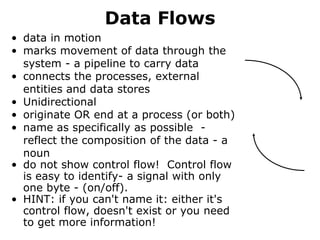
Data Flowsdata in motionmarks movement of data through the system - a pipeline to carry dataconnects the processes, external entities and data storesUnidirectionaloriginate OR end at a process (or both)name as specifically as possible  - reflect the composition of the data - a noundo not show control flow!  Control flow is easy to identify- a signal with only one byte - (on/off). HINT: if you can't name it: either it's control flow, doesn't exist or you need to get more information!
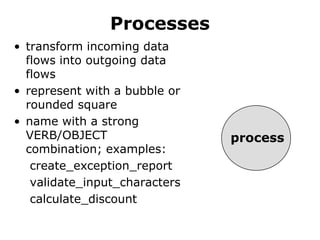
Processestransform incoming data flows into outgoing data flowsrepresent with a bubble or rounded square name with a strong VERB/OBJECT combination; examples:create_exception_report validate_input_characters calculate_discountprocess
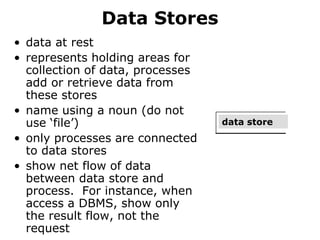
Data Storesdata at restrepresents holding areas for collection of data, processes add or retrieve data from these storesname using a noun (do not use ‘file’)only processes are connected to data storesshow net flow of data between data store and process.  For instance, when access a DBMS, show only the result flow, not the requestdata store
Different Types of DFDsContext diagram						Level-0 diagram (system diagram)					Level-n diagram						Primitive diagram
Context Diagramdefines the scope of the system by identifying the system boundarycontains: one process (which represents the entire system)all sources/sinks (external entities)data flows linking the process to the sources and sinks (external entities)
Level-0 Diagramdescribes the overall processing of the systemshow one process for each major processing step or functional requirementdata flows from the context appear on system diagram also (level balancing)can show a single data store to represent all data in aggregate at this levelcan draw duplicate sources, sinks and data stores to increase legibility
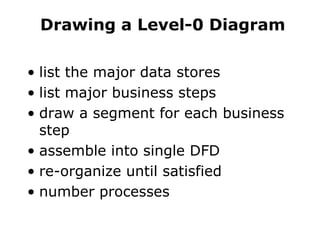
Drawing a Level-0 Diagramlist the major data storeslist major business stepsdraw a segment for each business stepassemble into single DFDre-organize until satisfiednumber processes
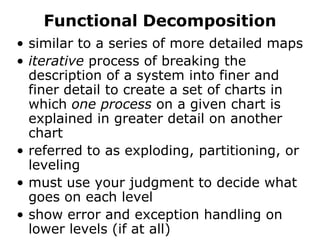
Functional Decompositionsimilar to a series of more detailed mapsiterative process of breaking the description of a system into finer and finer detail to create a set of charts in which one process on a given chart is explained in greater detail on another chartreferred to as exploding, partitioning, or levelingmust use your judgment to decide what goes on each levelshow error and exception handling on lower levels (if at all)
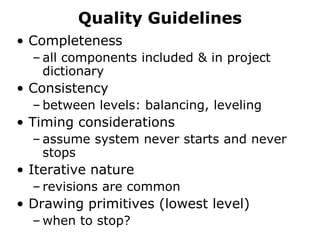
Quality GuidelinesCompletenessall components included & in project dictionaryConsistencybetween levels: balancing, levelingTiming considerationsassume system never starts and never stopsIterative naturerevisions are commonDrawing primitives (lowest level)when to stop?
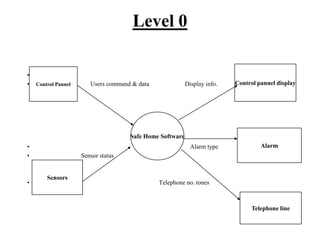
                                 Users command & data                       Display info.                                                                                                 Alarm type                           Sensor status                                                                               Telephone no. tones        Level 0Control pannel displayControl PannelSafe Home SoftwareAlarmSensorsTelephone line
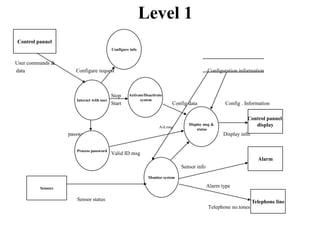
Level 1User commands &dataConfigure requestConfiguration informationStop StartConfig dataConfig . Information                                                                                                                                                            A/d msg                                                                                                                                                        passwordDisplay info.Valid ID msgSensor infoAlarm typeSensor statusTelephone no.tonesControl pannelConfigure infoActivate/Deactivate systemInteract with userDisplay msg & statusControl pannel displayProcess passwordAlarmMonitor systemSensorsTelephone line
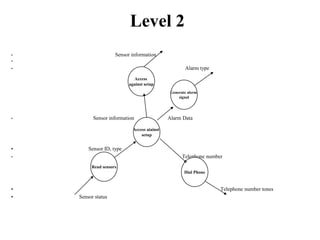
Level 2Sensor informationAlarm typeSensor information Alarm Data                                                 Sensor ID, typeTelephone number                                                                                                                                                    Telephone number tones                                          Sensor statusAccess against setupGenerate alsrm signalAccess aiainst setupRead sensorsDial Phone
                      And that’s the end.
INVITATIONYours existance will highly be appreciated on 16th August 2009 at 10:00PM in my wedding ceremony at Sheraton Hotel, Karachi.Invitation Cards will be handed to you soon.

Zohaib Dfd

  • 1.
  • 2.
    What is it?Amodel that indicates the flow of data through a system.Represented using Data Flow Diagrams(DFD)
  • 3.
    Data Flow Diagramsare:Used to perform structured analysis to determine logical requirementsA graphical tool, useful for communicating with users, managers, and other IS personnelUseful for analyzing existing as well as proposed systemsA relatively simple technique to learn and use
  • 4.
    Purposes of DFDsUnexplodedDFDs are useful to identify information requirementsExploded DFDs can be used forpresentationeducationgathering feedback information from users
  • 5.
    It is thefirst step towards implementationIt helps guide the development of user interfacesGuides the user through choices and avoids meaningless stepsGood way to verify requirements with your client.Advantages of DFD
  • 6.
    Uses of DFDsUsedto analyze the system to ensure that the design is complete Used to partition the system into programsUsed for system documentation
  • 7.
    Data Flowsdata inmotionmarks movement of data through the system - a pipeline to carry dataconnects the processes, external entities and data storesUnidirectionaloriginate OR end at a process (or both)name as specifically as possible - reflect the composition of the data - a noundo not show control flow! Control flow is easy to identify- a signal with only one byte - (on/off). HINT: if you can't name it: either it's control flow, doesn't exist or you need to get more information!
  • 8.
    Processestransform incoming dataflows into outgoing data flowsrepresent with a bubble or rounded square name with a strong VERB/OBJECT combination; examples:create_exception_report validate_input_characters calculate_discountprocess
  • 9.
    Data Storesdata atrestrepresents holding areas for collection of data, processes add or retrieve data from these storesname using a noun (do not use ‘file’)only processes are connected to data storesshow net flow of data between data store and process. For instance, when access a DBMS, show only the result flow, not the requestdata store
  • 10.
    Different Types ofDFDsContext diagram Level-0 diagram (system diagram) Level-n diagram Primitive diagram
  • 11.
    Context Diagramdefines thescope of the system by identifying the system boundarycontains: one process (which represents the entire system)all sources/sinks (external entities)data flows linking the process to the sources and sinks (external entities)
  • 12.
    Level-0 Diagramdescribes theoverall processing of the systemshow one process for each major processing step or functional requirementdata flows from the context appear on system diagram also (level balancing)can show a single data store to represent all data in aggregate at this levelcan draw duplicate sources, sinks and data stores to increase legibility
  • 13.
    Drawing a Level-0Diagramlist the major data storeslist major business stepsdraw a segment for each business stepassemble into single DFDre-organize until satisfiednumber processes
  • 14.
    Functional Decompositionsimilar toa series of more detailed mapsiterative process of breaking the description of a system into finer and finer detail to create a set of charts in which one process on a given chart is explained in greater detail on another chartreferred to as exploding, partitioning, or levelingmust use your judgment to decide what goes on each levelshow error and exception handling on lower levels (if at all)
  • 15.
    Quality GuidelinesCompletenessall componentsincluded & in project dictionaryConsistencybetween levels: balancing, levelingTiming considerationsassume system never starts and never stopsIterative naturerevisions are commonDrawing primitives (lowest level)when to stop?
  • 16.
    Users command & data Display info. Alarm type Sensor status Telephone no. tones Level 0Control pannel displayControl PannelSafe Home SoftwareAlarmSensorsTelephone line
  • 17.
    Level 1User commands&dataConfigure requestConfiguration informationStop StartConfig dataConfig . Information A/d msg passwordDisplay info.Valid ID msgSensor infoAlarm typeSensor statusTelephone no.tonesControl pannelConfigure infoActivate/Deactivate systemInteract with userDisplay msg & statusControl pannel displayProcess passwordAlarmMonitor systemSensorsTelephone line
  • 18.
    Level 2Sensor informationAlarmtypeSensor information Alarm Data Sensor ID, typeTelephone number Telephone number tones Sensor statusAccess against setupGenerate alsrm signalAccess aiainst setupRead sensorsDial Phone
  • 19.
    And that’s the end.
  • 20.
    INVITATIONYours existance willhighly be appreciated on 16th August 2009 at 10:00PM in my wedding ceremony at Sheraton Hotel, Karachi.Invitation Cards will be handed to you soon.