CoRePublisher
Basic Troubleshooting Guidelines
CoRePublisher Basic Troubleshooting Guidelines
Using these slides
• you will be able to do a first health check and
to resolve basic issues that might prevent the
CoRePublisher service from publishing your
IBM Cognos reports;
• and you will also be able to better narrow
down the problem, and hence to accelerate
the support process (your xplore+ ticket
requests).
CoRePublisher Basic Troubleshooting Guidelines
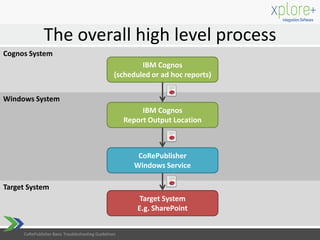
The overall high level process
Target System
Windows System
Cognos System
IBM Cognos
(scheduled or ad hoc reports)
IBM Cognos
Report Output Location
CoRePublisher
Windows Service
Target System
E.g. SharePoint
CoRePublisher Basic Troubleshooting Guidelines
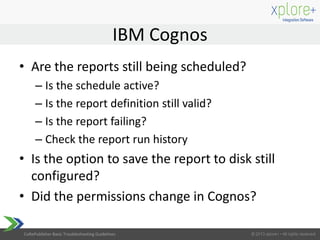
• Are the reports still being scheduled?
– Is the schedule active?
– Is the report definition still valid?
– Is the report failing?
– Check the report run history
• Is the option to save the report to disk still
configured?
• Did the permissions change in Cognos?
IBM Cognos
CoRePublisher Basic Troubleshooting Guidelines
IBM Cognos output folder
• Are the reports available in the Cognos report
output folder?
• Is the folder or share still accessible? Did the
permissions change?
CoRePublisher Basic Troubleshooting Guidelines
CRP service
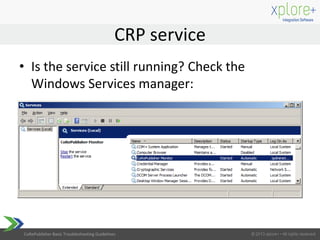
• Is the service still running? Check the
Windows Services manager:
CoRePublisher Basic Troubleshooting Guidelines
• Check the CRP Monitor logs tail (logging directory
is configured in CRP_Config.xml), do you find any
errors in the log?
• Is the CRP Service still able to monitor the Cognos
output folder location?
2013-09-23T23:09:27 ERROR Unable to monitor
E:Cognos Output Director, directory does not
exist or cannot be accessed.
• Access permissions might have changed or
shares could be temporarily unavailable
CRP Monitor logging
CoRePublisher Basic Troubleshooting Guidelines
• In case of reports not being published, you
should only consult the CRP Monitor log files, the
CRP Configurator log is not relevant at this time
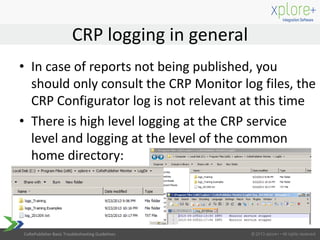
• There is high level logging at the CRP service
level and logging at the level of the common
home directory:
CRP logging in general
CoRePublisher Basic Troubleshooting Guidelines
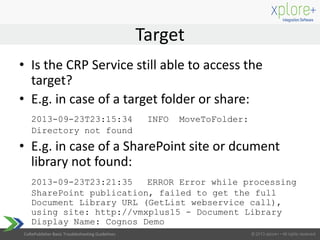
• Is the CRP Service still able to access the
target?
• E.g. in case of a target folder or share:
2013-09-23T23:15:34 INFO MoveToFolder:
Directory not found
• E.g. in case of a SharePoint site or dcument
library not found:
2013-09-23T23:21:35 ERROR Error while processing
SharePoint publication, failed to get the full
Document Library URL (GetList webservice call),
using site: http://vmxplus15 - Document Library
Display Name: Cognos Demo
Target
CoRePublisher Basic Troubleshooting Guidelines
• In case of other target types, error messages
will be different and should provide you with
an indication of what the problem is
• Or, in some cases the logon credentials are
wrong, expired or access is denied because of
permission changes
• Test whether you can access the target or still
can manually upload reports yourself
Other targets issues
CoRePublisher Basic Troubleshooting Guidelines
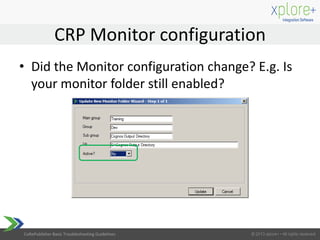
• Did the Monitor configuration change? E.g. Is
your monitor folder still enabled?
CRP Monitor configuration
CoRePublisher Basic Troubleshooting Guidelines
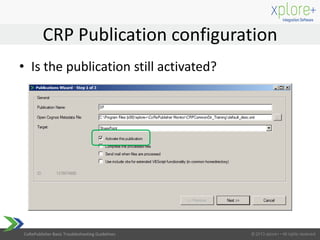
• Is the publication still activated?
CRP Publication configuration
CoRePublisher Basic Troubleshooting Guidelines
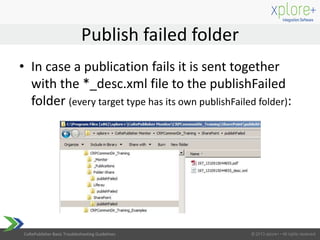
• In case a publication fails it is sent together
with the *_desc.xml file to the publishFailed
folder (every target type has its own publishFailed folder):
Publish failed folder
CoRePublisher Basic Troubleshooting Guidelines
• For detailed information on setup,
configuration, logging and the different target
publications, refer to the CRP Installation and
End User manuals
• If the root cause cannot be detected, and the
publication keeps on failing, a service ticket
can be opened at the xplore+ Support Center:
http://xploreplus.com/support/
Next steps
CoRePublisher Basic Troubleshooting Guidelines
Contact
Contact us anytime at :
+32 479 52 76 80
info@xploreplus.com
www.xploreplus.com

xplore+ CoRePublisher Basic Troubleshooting Guidelines

  • 1.
  • 2.
    CoRePublisher Basic TroubleshootingGuidelines Using these slides • you will be able to do a first health check and to resolve basic issues that might prevent the CoRePublisher service from publishing your IBM Cognos reports; • and you will also be able to better narrow down the problem, and hence to accelerate the support process (your xplore+ ticket requests).
  • 3.
    CoRePublisher Basic TroubleshootingGuidelines The overall high level process Target System Windows System Cognos System IBM Cognos (scheduled or ad hoc reports) IBM Cognos Report Output Location CoRePublisher Windows Service Target System E.g. SharePoint CoRePublisher Basic Troubleshooting Guidelines
  • 4.
    CoRePublisher Basic TroubleshootingGuidelines • Are the reports still being scheduled? – Is the schedule active? – Is the report definition still valid? – Is the report failing? – Check the report run history • Is the option to save the report to disk still configured? • Did the permissions change in Cognos? IBM Cognos
  • 5.
    CoRePublisher Basic TroubleshootingGuidelines IBM Cognos output folder • Are the reports available in the Cognos report output folder? • Is the folder or share still accessible? Did the permissions change?
  • 6.
    CoRePublisher Basic TroubleshootingGuidelines CRP service • Is the service still running? Check the Windows Services manager:
  • 7.
    CoRePublisher Basic TroubleshootingGuidelines • Check the CRP Monitor logs tail (logging directory is configured in CRP_Config.xml), do you find any errors in the log? • Is the CRP Service still able to monitor the Cognos output folder location? 2013-09-23T23:09:27 ERROR Unable to monitor E:Cognos Output Director, directory does not exist or cannot be accessed. • Access permissions might have changed or shares could be temporarily unavailable CRP Monitor logging
  • 8.
    CoRePublisher Basic TroubleshootingGuidelines • In case of reports not being published, you should only consult the CRP Monitor log files, the CRP Configurator log is not relevant at this time • There is high level logging at the CRP service level and logging at the level of the common home directory: CRP logging in general
  • 9.
    CoRePublisher Basic TroubleshootingGuidelines • Is the CRP Service still able to access the target? • E.g. in case of a target folder or share: 2013-09-23T23:15:34 INFO MoveToFolder: Directory not found • E.g. in case of a SharePoint site or dcument library not found: 2013-09-23T23:21:35 ERROR Error while processing SharePoint publication, failed to get the full Document Library URL (GetList webservice call), using site: http://vmxplus15 - Document Library Display Name: Cognos Demo Target
  • 10.
    CoRePublisher Basic TroubleshootingGuidelines • In case of other target types, error messages will be different and should provide you with an indication of what the problem is • Or, in some cases the logon credentials are wrong, expired or access is denied because of permission changes • Test whether you can access the target or still can manually upload reports yourself Other targets issues
  • 11.
    CoRePublisher Basic TroubleshootingGuidelines • Did the Monitor configuration change? E.g. Is your monitor folder still enabled? CRP Monitor configuration
  • 12.
    CoRePublisher Basic TroubleshootingGuidelines • Is the publication still activated? CRP Publication configuration
  • 13.
    CoRePublisher Basic TroubleshootingGuidelines • In case a publication fails it is sent together with the *_desc.xml file to the publishFailed folder (every target type has its own publishFailed folder): Publish failed folder
  • 14.
    CoRePublisher Basic TroubleshootingGuidelines • For detailed information on setup, configuration, logging and the different target publications, refer to the CRP Installation and End User manuals • If the root cause cannot be detected, and the publication keeps on failing, a service ticket can be opened at the xplore+ Support Center: http://xploreplus.com/support/ Next steps
  • 15.
    CoRePublisher Basic TroubleshootingGuidelines Contact Contact us anytime at : +32 479 52 76 80 info@xploreplus.com www.xploreplus.com