XML HTTP Request
• The XMLHttpRequest object is used to
exchange data with a server behind the
scenes. =>
it is possible to update parts of a web
page, without reloading the whole page.
• All modern browsers like
IE7+, Firefox, Chrome, Safari, and Opera
have a built-in XMLHttpRequest object.
Create an XMLHttpRequest Object
• Syntax for creating an XMLHttpRequest
object:
variable=new XMLHttpRequest();
• Old versions of Internet Explorer (IE5 and IE6)
uses an ActiveX Object:
variable=new ActiveXObject("Microsoft.XMLHTTP");
• Example
• var xmlhttp;
if (window.XMLHttpRequest)
{// code for IE7+, Firefox, Chrome, Opera, Safari
xmlhttp=new XMLHttpRequest();
}
else
{// code for IE6, IE5
xmlhttp=new ActiveXObject("Microsoft.XMLHTTP");
}
Ajax - onreadystatechange Property
• Special property of XMLHttpRequest
• stores the function that will process the
response from the server.
• Example: Javascript Code:
// Create a function that will receive data sent from the server
ajaxRequest.onreadystatechange = function()
{ // We still need to write some code here }
Ajax - readyState Property
• another property of XMLHttpRequest
• The status of the server response is stored in
this.
• The response can be
 processing,
 downloading
 Completed.
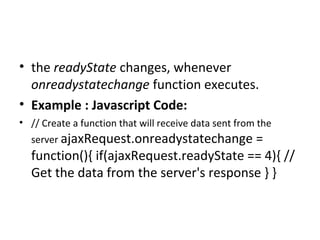
• the readyState changes, whenever
onreadystatechange function executes.
• Example : Javascript Code:
• // Create a function that will receive data sent from the
server ajaxRequest.onreadystatechange =
function(){ if(ajaxRequest.readyState == 4){ //
Get the data from the server's response } }
Ajax - responseText Property
• To get the response from a server, use the
responseText or responseXML property of the
XMLHttpRequest object.
responseText => get the response data as a string
responseXML => get the response data as XML data
• If the response from the server is not XML,
use the responseText property.
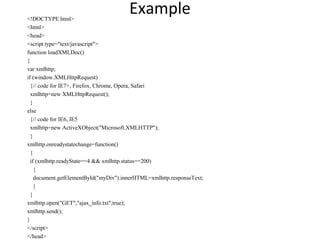
Example<!DOCTYPE html>
<html>
<head>
<script type="text/javascript">
function loadXMLDoc()
{
var xmlhttp;
if (window.XMLHttpRequest)
{// code for IE7+, Firefox, Chrome, Opera, Safari
xmlhttp=new XMLHttpRequest();
}
else
{// code for IE6, IE5
xmlhttp=new ActiveXObject("Microsoft.XMLHTTP");
}
xmlhttp.onreadystatechange=function()
{
if (xmlhttp.readyState==4 && xmlhttp.status==200)
{
document.getElementById("myDiv").innerHTML=xmlhttp.responseText;
}
}
xmlhttp.open("GET","ajax_info.txt",true);
xmlhttp.send();
}
</script>
</head>
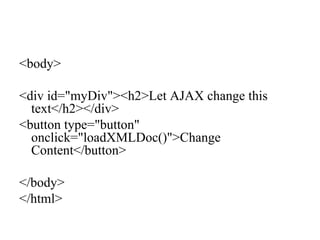
<body>
<div id="myDiv"><h2>Let AJAX change this
text</h2></div>
<button type="button"
onclick="loadXMLDoc()">Change
Content</button>
</body>
</html>
responseXML Property
• If the response from the server is XML, and we
have to parse it as an XML object, use the
responseXML Property:
<!DOCTYPE html>
<html>
<head>
<script type="text/javascript">
function loadXMLDoc()
{
var xmlhttp;
var txt,x,i;
if (window.XMLHttpRequest)
{// code for IE7+, Firefox, Chrome, Opera, Safari
xmlhttp=new XMLHttpRequest();
}
else
{// code for IE6, IE5
xmlhttp=new ActiveXObject("Microsoft.XMLHTTP");
}
xmlhttp.onreadystatechange=function()
{
if (xmlhttp.readyState==4 && xmlhttp.status==200)
{
xmlDoc=xmlhttp.responseXML;
txt="";
x=xmlDoc.getElementsByTagName("ARTIST");
for (i=0;i<x.length;i++)
{
txt=txt + x[i].childNodes[0].nodeValue + "<br />";
}
document.getElementById("myDiv").innerHTML=txt;
}
}
xmlhttp.open("GET","cd_catalog.xml",true);
xmlhttp.send();
}
</script>
</head>
<body>
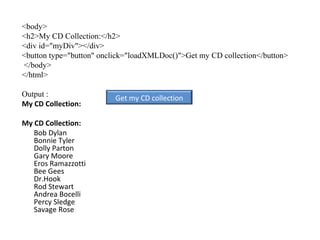
<h2>My CD Collection:</h2>
<div id="myDiv"></div>
<button type="button" onclick="loadXMLDoc()">Get my CD collection</button>
</body>
</html>
Output :
My CD Collection:
My CD Collection:
Bob Dylan
Bonnie Tyler
Dolly Parton
Gary Moore
Eros Ramazzotti
Bee Gees
Dr.Hook
Rod Stewart
Andrea Bocelli
Percy Sledge
Savage Rose
Get my CD collection
AJAX - Send a Request To a Server
• The XMLHttpRequest object is used to exchange data
with a server.
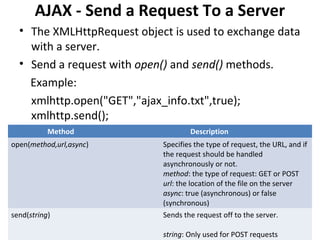
• Send a request with open() and send() methods.
Example:
xmlhttp.open("GET","ajax_info.txt",true);
xmlhttp.send();
Method Description
open(method,url,async) Specifies the type of request, the URL, and if
the request should be handled
asynchronously or not.
method: the type of request: GET or POST
url: the location of the file on the server
async: true (asynchronous) or false
(synchronous)
send(string) Sends the request off to the server.
string: Only used for POST requests
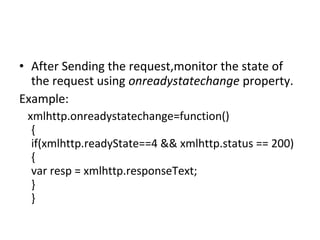
• After Sending the request,monitor the state of
the request using onreadystatechange property.
Example:
xmlhttp.onreadystatechange=function()
{
if(xmlhttp.readyState==4 && xmlhttp.status == 200)
{
var resp = xmlhttp.responseText;
}
}
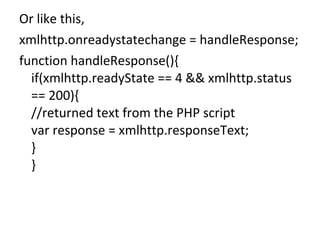
Or like this,
xmlhttp.onreadystatechange = handleResponse;
function handleResponse(){
if(xmlhttp.readyState == 4 && xmlhttp.status
== 200){
//returned text from the PHP script
var response = xmlhttp.responseText;
}
}
• The readyState property holds the status of the
server’s response
• the possible values for the readyState property:
State Description
0 The request is not initialized
1 The request has been set up
2 The request has been sent
3 The request is in process
4 The request is complete
• And status is the status of the HTTP Request, like
500 Internal Server Error, 400 Bad Request, 401
Unauthorized, 403 Forbidden, 404 Not Found etc.
200 means no error.
AJAX - Server Response
• To get the response from a server, use the
responseText or responseXML property of the
XMLHttpRequest object.
• When a request to a server is sent.
• The onreadystatechange event is triggered
every time the readyState changes.
• The readyState property holds the status of
the XMLHttpRequest.
AJAX Advanced
AJAX ASP/PHP Example
• Example: How a web page can communicate
with a web server while a user type characters
in an input field:
function showHint(str)
{
var xmlhttp;
if (str.length==0)
{
document.getElementById("txtHint").innerHTML="";
return;
}
if (window.XMLHttpRequest)
{// code for IE7+, Firefox, Chrome, Opera, Safari
xmlhttp=new XMLHttpRequest();
}
else
{// code for IE6, IE5
xmlhttp=new ActiveXObject("Microsoft.XMLHTTP");
}
xmlhttp.onreadystatechange=function()
{
if (xmlhttp.readyState==4 && xmlhttp.status==200)
{
document.getElementById("txtHint").innerHTML=xmlhttp.responseText;
}
}
xmlhttp.open("GET","gethint.php?q="+str,true);
xmlhttp.send();
}
<?php
// Fill up array with names
$a[]="Anna";
$a[]="Brittany";
$a[]="Cinderella";
$a[]="Diana";
$a[]="Eva";
$a[]="Fiona";
$a[]="Gunda";
$a[]="Hege";
$a[]="Inga";
$a[]="Johanna";
$a[]="Kitty";
$a[]="Linda";
$a[]="Nina";
$a[]="Ophelia";
$a[]="Petunia";
$a[]="Amanda";
$a[]="Raquel";
$a[]="Cindy";
$a[]="Doris";
$a[]="Eve";
$a[]="Evita";
$a[]="Sunniva";
$a[]="Tove";
$a[]="Unni";
$a[]="Violet";
$a[]="Liza";
$a[]="Elizabeth";
$a[]="Ellen";
$a[]="Wenche";
$a[]="Vicky";
//get the q parameter from URL
$q=$_GET["q"];
//lookup all hints from array if length of q>0
if (strlen($q) > 0)
{
$hint="";
for($i=0; $i<count($a); $i++)
{
if
(strtolower($q)==strtolower(substr($a[$i],0,strlen($q
))))
{
if ($hint=="")
{
$hint=$a[$i];
}
else
{
$hint=$hint." , ".$a[$i];
}
}
}
}
// Set output to "no suggestion" if no hint were found
// or to the correct values
if ($hint == "")
{
$response="no suggestion";
}
else
{
$response=$hint;
}
//output the response
echo $response;
?>
AJAX Database Example
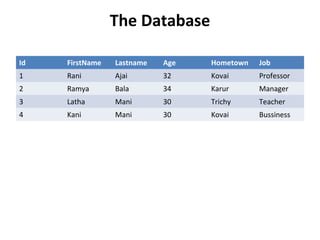
• The AJAX example Which demonstrate how a
web page can fetch information from a
MySQL database using AJAX technology.
• This example consists of four elements:
a MySQL database
a simple HTML form
a JavaScript
a PHP page
The Database
Id FirstName Lastname Age Hometown Job
1 Rani Ajai 32 Kovai Professor
2 Ramya Bala 34 Karur Manager
3 Latha Mani 30 Trichy Teacher
4 Kani Mani 30 Kovai Bussiness
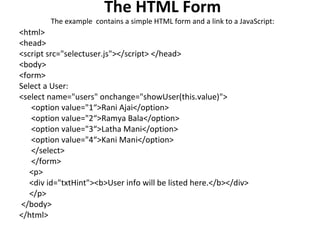
The HTML Form
The example contains a simple HTML form and a link to a JavaScript:
<html>
<head>
<script src="selectuser.js"></script> </head>
<body>
<form>
Select a User:
<select name="users" onchange="showUser(this.value)">
<option value="1“>Rani Ajai</option>
<option value="2“>Ramya Bala</option>
<option value="3“>Latha Mani</option>
<option value="4“>Kani Mani</option>
</select>
</form>
<p>
<div id="txtHint"><b>User info will be listed here.</b></div>
</p>
</body>
</html>
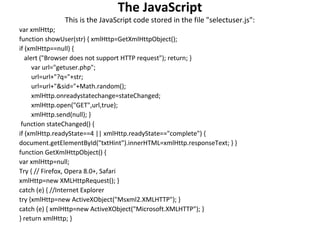
The JavaScript
This is the JavaScript code stored in the file "selectuser.js":
var xmlHttp;
function showUser(str) { xmlHttp=GetXmlHttpObject();
if (xmlHttp==null) {
alert ("Browser does not support HTTP request"); return; }
var url="getuser.php";
url=url+"?q="+str;
url=url+"&sid="+Math.random();
xmlHttp.onreadystatechange=stateChanged;
xmlHttp.open("GET",url,true);
xmlHttp.send(null); }
function stateChanged() {
if (xmlHttp.readyState==4 || xmlHttp.readyState=="complete") {
document.getElementById("txtHint").innerHTML=xmlHttp.responseText; } }
function GetXmlHttpObject() {
var xmlHttp=null;
Try { // Firefox, Opera 8.0+, Safari
xmlHttp=new XMLHttpRequest(); }
catch (e) { //Internet Explorer
try {xmlHttp=new ActiveXObject("Msxml2.XMLHTTP"); }
catch (e) { xmlHttp=new ActiveXObject("Microsoft.XMLHTTP"); }
} return xmlHttp; }
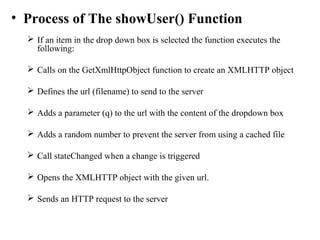
• Process of The showUser() Function
 If an item in the drop down box is selected the function executes the
following:
 Calls on the GetXmlHttpObject function to create an XMLHTTP object
 Defines the url (filename) to send to the server
 Adds a parameter (q) to the url with the content of the dropdown box
 Adds a random number to prevent the server from using a cached file
 Call stateChanged when a change is triggered
 Opens the XMLHTTP object with the given url.
 Sends an HTTP request to the server
• The PHP Page
• The server page called by the JavaScript, is a
simple PHP file called "getuser.php".
• The page is written in PHP and uses a MySQL
databse.
• The code runs a SQL query against a database
and returns the result as an HTML table:
<?php
$q=$_GET["q"];
$con = mysql_connect('localhost', ‘my_db', ‘xxx');
if (!$con)
{ die('Could not connect: ' . mysql_error()); }
mysql_select_db("ajax_demo", $con);
$sql="SELECT * FROM user WHERE id = '".$q."'";
$result = mysql_query($sql);
echo "<table border='1'>
<tr>
<th>Firstname</th>
<th>Lastname</th>
<th>Age</th>
<th>Hometown</th>
<th>Job</th> </tr>";
while($row = mysql_fetch_array($result)) {
echo "<tr>";
echo "<td>" . $row['FirstName'] . "</td>";
echo "<td>" . $row['LastName'] . "</td>";
echo "<td>" . $row['Age'] . "</td>";
echo "<td>" . $row['Hometown'] . "</td>";
echo "<td>" . $row['Job'] . "</td>";
echo "</tr>"; }
echo "</table>";
mysql_close($con);
?>
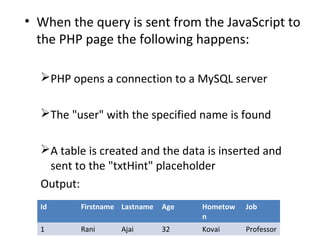
• When the query is sent from the JavaScript to
the PHP page the following happens:
PHP opens a connection to a MySQL server
The "user" with the specified name is found
A table is created and the data is inserted and
sent to the "txtHint" placeholder
Output:
Id Firstname Lastname Age Hometow
n
Job
1 Rani Ajai 32 Kovai Professor
Xml http request

Xml http request

  • 1.
    XML HTTP Request •The XMLHttpRequest object is used to exchange data with a server behind the scenes. => it is possible to update parts of a web page, without reloading the whole page. • All modern browsers like IE7+, Firefox, Chrome, Safari, and Opera have a built-in XMLHttpRequest object.
  • 2.
    Create an XMLHttpRequestObject • Syntax for creating an XMLHttpRequest object: variable=new XMLHttpRequest(); • Old versions of Internet Explorer (IE5 and IE6) uses an ActiveX Object: variable=new ActiveXObject("Microsoft.XMLHTTP");
  • 3.
    • Example • varxmlhttp; if (window.XMLHttpRequest) {// code for IE7+, Firefox, Chrome, Opera, Safari xmlhttp=new XMLHttpRequest(); } else {// code for IE6, IE5 xmlhttp=new ActiveXObject("Microsoft.XMLHTTP"); }
  • 4.
    Ajax - onreadystatechangeProperty • Special property of XMLHttpRequest • stores the function that will process the response from the server. • Example: Javascript Code: // Create a function that will receive data sent from the server ajaxRequest.onreadystatechange = function() { // We still need to write some code here }
  • 5.
    Ajax - readyStateProperty • another property of XMLHttpRequest • The status of the server response is stored in this. • The response can be  processing,  downloading  Completed.
  • 6.
    • the readyStatechanges, whenever onreadystatechange function executes. • Example : Javascript Code: • // Create a function that will receive data sent from the server ajaxRequest.onreadystatechange = function(){ if(ajaxRequest.readyState == 4){ // Get the data from the server's response } }
  • 7.
    Ajax - responseTextProperty • To get the response from a server, use the responseText or responseXML property of the XMLHttpRequest object. responseText => get the response data as a string responseXML => get the response data as XML data • If the response from the server is not XML, use the responseText property.
  • 8.
    Example<!DOCTYPE html> <html> <head> <script type="text/javascript"> functionloadXMLDoc() { var xmlhttp; if (window.XMLHttpRequest) {// code for IE7+, Firefox, Chrome, Opera, Safari xmlhttp=new XMLHttpRequest(); } else {// code for IE6, IE5 xmlhttp=new ActiveXObject("Microsoft.XMLHTTP"); } xmlhttp.onreadystatechange=function() { if (xmlhttp.readyState==4 && xmlhttp.status==200) { document.getElementById("myDiv").innerHTML=xmlhttp.responseText; } } xmlhttp.open("GET","ajax_info.txt",true); xmlhttp.send(); } </script> </head>
  • 9.
    <body> <div id="myDiv"><h2>Let AJAXchange this text</h2></div> <button type="button" onclick="loadXMLDoc()">Change Content</button> </body> </html>
  • 10.
    responseXML Property • Ifthe response from the server is XML, and we have to parse it as an XML object, use the responseXML Property:
  • 11.
    <!DOCTYPE html> <html> <head> <script type="text/javascript"> functionloadXMLDoc() { var xmlhttp; var txt,x,i; if (window.XMLHttpRequest) {// code for IE7+, Firefox, Chrome, Opera, Safari xmlhttp=new XMLHttpRequest(); } else {// code for IE6, IE5 xmlhttp=new ActiveXObject("Microsoft.XMLHTTP"); } xmlhttp.onreadystatechange=function() { if (xmlhttp.readyState==4 && xmlhttp.status==200) { xmlDoc=xmlhttp.responseXML; txt=""; x=xmlDoc.getElementsByTagName("ARTIST"); for (i=0;i<x.length;i++) { txt=txt + x[i].childNodes[0].nodeValue + "<br />"; } document.getElementById("myDiv").innerHTML=txt; } } xmlhttp.open("GET","cd_catalog.xml",true); xmlhttp.send(); } </script> </head>
  • 12.
    <body> <h2>My CD Collection:</h2> <divid="myDiv"></div> <button type="button" onclick="loadXMLDoc()">Get my CD collection</button> </body> </html> Output : My CD Collection: My CD Collection: Bob Dylan Bonnie Tyler Dolly Parton Gary Moore Eros Ramazzotti Bee Gees Dr.Hook Rod Stewart Andrea Bocelli Percy Sledge Savage Rose Get my CD collection
  • 13.
    AJAX - Senda Request To a Server • The XMLHttpRequest object is used to exchange data with a server. • Send a request with open() and send() methods. Example: xmlhttp.open("GET","ajax_info.txt",true); xmlhttp.send(); Method Description open(method,url,async) Specifies the type of request, the URL, and if the request should be handled asynchronously or not. method: the type of request: GET or POST url: the location of the file on the server async: true (asynchronous) or false (synchronous) send(string) Sends the request off to the server. string: Only used for POST requests
  • 14.
    • After Sendingthe request,monitor the state of the request using onreadystatechange property. Example: xmlhttp.onreadystatechange=function() { if(xmlhttp.readyState==4 && xmlhttp.status == 200) { var resp = xmlhttp.responseText; } }
  • 15.
    Or like this, xmlhttp.onreadystatechange= handleResponse; function handleResponse(){ if(xmlhttp.readyState == 4 && xmlhttp.status == 200){ //returned text from the PHP script var response = xmlhttp.responseText; } }
  • 16.
    • The readyStateproperty holds the status of the server’s response • the possible values for the readyState property: State Description 0 The request is not initialized 1 The request has been set up 2 The request has been sent 3 The request is in process 4 The request is complete • And status is the status of the HTTP Request, like 500 Internal Server Error, 400 Bad Request, 401 Unauthorized, 403 Forbidden, 404 Not Found etc. 200 means no error.
  • 17.
    AJAX - ServerResponse • To get the response from a server, use the responseText or responseXML property of the XMLHttpRequest object. • When a request to a server is sent. • The onreadystatechange event is triggered every time the readyState changes. • The readyState property holds the status of the XMLHttpRequest.
  • 18.
    AJAX Advanced AJAX ASP/PHPExample • Example: How a web page can communicate with a web server while a user type characters in an input field:
  • 19.
    function showHint(str) { var xmlhttp; if(str.length==0) { document.getElementById("txtHint").innerHTML=""; return; } if (window.XMLHttpRequest) {// code for IE7+, Firefox, Chrome, Opera, Safari xmlhttp=new XMLHttpRequest(); } else {// code for IE6, IE5 xmlhttp=new ActiveXObject("Microsoft.XMLHTTP"); } xmlhttp.onreadystatechange=function() { if (xmlhttp.readyState==4 && xmlhttp.status==200) { document.getElementById("txtHint").innerHTML=xmlhttp.responseText; } } xmlhttp.open("GET","gethint.php?q="+str,true); xmlhttp.send(); }
  • 20.
    <?php // Fill uparray with names $a[]="Anna"; $a[]="Brittany"; $a[]="Cinderella"; $a[]="Diana"; $a[]="Eva"; $a[]="Fiona"; $a[]="Gunda"; $a[]="Hege"; $a[]="Inga"; $a[]="Johanna"; $a[]="Kitty"; $a[]="Linda"; $a[]="Nina"; $a[]="Ophelia"; $a[]="Petunia"; $a[]="Amanda"; $a[]="Raquel"; $a[]="Cindy"; $a[]="Doris"; $a[]="Eve"; $a[]="Evita"; $a[]="Sunniva"; $a[]="Tove"; $a[]="Unni"; $a[]="Violet"; $a[]="Liza"; $a[]="Elizabeth"; $a[]="Ellen"; $a[]="Wenche"; $a[]="Vicky"; //get the q parameter from URL $q=$_GET["q"]; //lookup all hints from array if length of q>0 if (strlen($q) > 0) { $hint=""; for($i=0; $i<count($a); $i++) { if (strtolower($q)==strtolower(substr($a[$i],0,strlen($q )))) { if ($hint=="") { $hint=$a[$i]; } else { $hint=$hint." , ".$a[$i]; } } } } // Set output to "no suggestion" if no hint were found // or to the correct values if ($hint == "") { $response="no suggestion"; } else { $response=$hint; } //output the response echo $response; ?>
  • 21.
    AJAX Database Example •The AJAX example Which demonstrate how a web page can fetch information from a MySQL database using AJAX technology. • This example consists of four elements: a MySQL database a simple HTML form a JavaScript a PHP page
  • 22.
    The Database Id FirstNameLastname Age Hometown Job 1 Rani Ajai 32 Kovai Professor 2 Ramya Bala 34 Karur Manager 3 Latha Mani 30 Trichy Teacher 4 Kani Mani 30 Kovai Bussiness
  • 23.
    The HTML Form Theexample contains a simple HTML form and a link to a JavaScript: <html> <head> <script src="selectuser.js"></script> </head> <body> <form> Select a User: <select name="users" onchange="showUser(this.value)"> <option value="1“>Rani Ajai</option> <option value="2“>Ramya Bala</option> <option value="3“>Latha Mani</option> <option value="4“>Kani Mani</option> </select> </form> <p> <div id="txtHint"><b>User info will be listed here.</b></div> </p> </body> </html>
  • 24.
    The JavaScript This isthe JavaScript code stored in the file "selectuser.js": var xmlHttp; function showUser(str) { xmlHttp=GetXmlHttpObject(); if (xmlHttp==null) { alert ("Browser does not support HTTP request"); return; } var url="getuser.php"; url=url+"?q="+str; url=url+"&sid="+Math.random(); xmlHttp.onreadystatechange=stateChanged; xmlHttp.open("GET",url,true); xmlHttp.send(null); } function stateChanged() { if (xmlHttp.readyState==4 || xmlHttp.readyState=="complete") { document.getElementById("txtHint").innerHTML=xmlHttp.responseText; } } function GetXmlHttpObject() { var xmlHttp=null; Try { // Firefox, Opera 8.0+, Safari xmlHttp=new XMLHttpRequest(); } catch (e) { //Internet Explorer try {xmlHttp=new ActiveXObject("Msxml2.XMLHTTP"); } catch (e) { xmlHttp=new ActiveXObject("Microsoft.XMLHTTP"); } } return xmlHttp; }
  • 25.
    • Process ofThe showUser() Function  If an item in the drop down box is selected the function executes the following:  Calls on the GetXmlHttpObject function to create an XMLHTTP object  Defines the url (filename) to send to the server  Adds a parameter (q) to the url with the content of the dropdown box  Adds a random number to prevent the server from using a cached file  Call stateChanged when a change is triggered  Opens the XMLHTTP object with the given url.  Sends an HTTP request to the server
  • 26.
    • The PHPPage • The server page called by the JavaScript, is a simple PHP file called "getuser.php". • The page is written in PHP and uses a MySQL databse. • The code runs a SQL query against a database and returns the result as an HTML table:
  • 27.
    <?php $q=$_GET["q"]; $con = mysql_connect('localhost',‘my_db', ‘xxx'); if (!$con) { die('Could not connect: ' . mysql_error()); } mysql_select_db("ajax_demo", $con); $sql="SELECT * FROM user WHERE id = '".$q."'"; $result = mysql_query($sql); echo "<table border='1'> <tr> <th>Firstname</th> <th>Lastname</th> <th>Age</th> <th>Hometown</th> <th>Job</th> </tr>"; while($row = mysql_fetch_array($result)) { echo "<tr>"; echo "<td>" . $row['FirstName'] . "</td>"; echo "<td>" . $row['LastName'] . "</td>"; echo "<td>" . $row['Age'] . "</td>"; echo "<td>" . $row['Hometown'] . "</td>"; echo "<td>" . $row['Job'] . "</td>"; echo "</tr>"; } echo "</table>"; mysql_close($con); ?>
  • 28.
    • When thequery is sent from the JavaScript to the PHP page the following happens: PHP opens a connection to a MySQL server The "user" with the specified name is found A table is created and the data is inserted and sent to the "txtHint" placeholder Output: Id Firstname Lastname Age Hometow n Job 1 Rani Ajai 32 Kovai Professor