Introduction to XML 
• XML is a extensible markup language like 
HTML. 
• The only difference between XML and HTML is 
that XML is used for documents containing 
structured information. 
• Structured information contains both content and 
some indication of what role that content 
performs. 
• XML is basically designed to describe data, it 
contains no pre-defined tag, and you must 
define your own tag in it. 
• It uses DTD and XML schema to describe the 
data.
Syntax 
• Extensible Markup Language (XML) is a set of rules 
for encoding documents in machine-readable form. 
• All XML Elements Must Have a Closing Tag: 
– In HTML, some elements do not have to have a closing tag: 
– <p>This is a paragraph 
<p>This is another paragraph. In XML, it is illegal to omit the 
closing tag. All elements must have a closing tag: 
– <p>This is a paragraph</p> 
<p>This is another paragraph</p> 
• XML Tags are Case Sensitive: 
– XML tags are case sensitive. The tag <Letter> is different from 
the tag <letter>. 
– Opening and closing tags must be written with the same case: 
– <Message>This is incorrect</message> 
<message>This is correct</message>
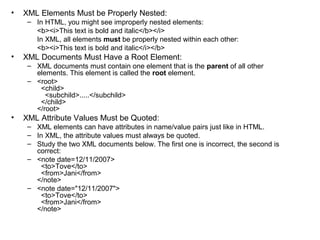
• XML Elements Must be Properly Nested: 
– In HTML, you might see improperly nested elements: 
<b><i>This text is bold and italic</b></i> 
In XML, all elements must be properly nested within each other: 
<b><i>This text is bold and italic</i></b> 
• XML Documents Must Have a Root Element: 
– XML documents must contain one element that is the parent of all other 
elements. This element is called the root element. 
– <root> 
<child> 
<subchild>.....</subchild> 
</child> 
</root> 
• XML Attribute Values Must be Quoted: 
– XML elements can have attributes in name/value pairs just like in HTML. 
– In XML, the attribute values must always be quoted. 
– Study the two XML documents below. The first one is incorrect, the second is 
correct: 
– <note date=12/11/2007> 
<to>Tove</to> 
<from>Jani</from> 
</note> 
– <note date="12/11/2007"> 
<to>Tove</to> 
<from>Jani</from> 
</note>
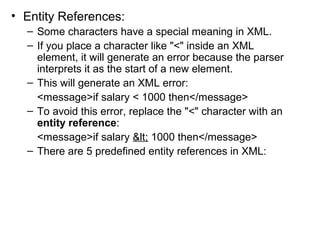
• Entity References: 
– Some characters have a special meaning in XML. 
– If you place a character like "<" inside an XML 
element, it will generate an error because the parser 
interprets it as the start of a new element. 
– This will generate an XML error: 
<message>if salary < 1000 then</message> 
– To avoid this error, replace the "<" character with an 
entity reference: 
<message>if salary &lt; 1000 then</message> 
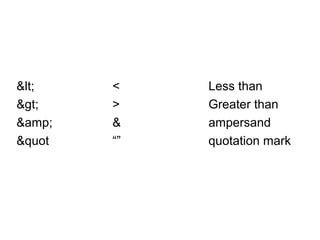
– There are 5 predefined entity references in XML:
&lt; < Less than 
&gt; > Greater than 
&amp; & ampersand 
&quot “” quotation mark
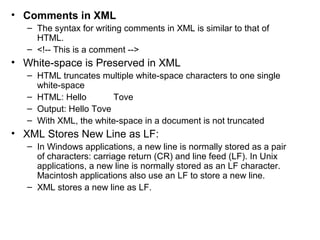
• Comments in XML 
– The syntax for writing comments in XML is similar to that of 
HTML. 
– <!-- This is a comment --> 
• White-space is Preserved in XML 
– HTML truncates multiple white-space characters to one single 
white-space 
– HTML: Hello Tove 
– Output: Hello Tove 
– With XML, the white-space in a document is not truncated 
• XML Stores New Line as LF: 
– In Windows applications, a new line is normally stored as a pair 
of characters: carriage return (CR) and line feed (LF). In Unix 
applications, a new line is normally stored as an LF character. 
Macintosh applications also use an LF to store a new line. 
– XML stores a new line as LF.
DTDs and XML Schema 
• The purpose of a DTD is to define the 
legal building blocks of an XML document. 
• It defines the document structure with a 
list of legal elements. 
• A DTD can be declared inline in your XML 
document, or as an external reference. 
• Internal DTD 
– This is an XML document with a Document 
Type Definition
<?xml version="1.0"?> 
<!DOCTYPE note [ 
<!ELEMENT note (to,from,heading,body)> 
<!ELEMENT to (#PCDATA)> 
<!ELEMENT from (#PCDATA)> 
<!ELEMENT heading (#PCDATA)> 
<!ELEMENT body (#PCDATA)> 
]> 
<note> 
<to>Tove</to> <from>Jani</from> 
<heading>Reminder</heading> 
<body>Meeting Tomorrow at 5 p.m</body> 
</note> 
In XML DTD, #PCDATA is the keyword to specify 
mixed content, meaning an element may contain 
character data.
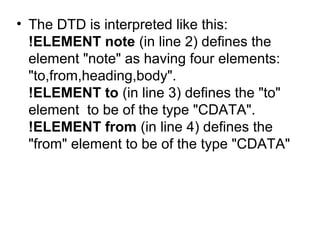
• The DTD is interpreted like this: 
!ELEMENT note (in line 2) defines the 
element "note" as having four elements: 
"to,from,heading,body". 
!ELEMENT to (in line 3) defines the "to" 
element to be of the type "CDATA". 
!ELEMENT from (in line 4) defines the 
"from" element to be of the type "CDATA"
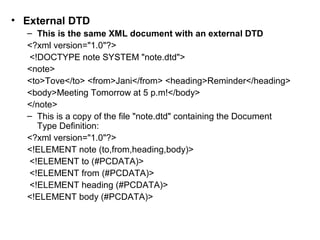
• External DTD 
– This is the same XML document with an external DTD 
<?xml version="1.0"?> 
<!DOCTYPE note SYSTEM "note.dtd"> 
<note> 
<to>Tove</to> <from>Jani</from> <heading>Reminder</heading> 
<body>Meeting Tomorrow at 5 p.m!</body> 
</note> 
– This is a copy of the file "note.dtd" containing the Document 
Type Definition: 
<?xml version="1.0"?> 
<!ELEMENT note (to,from,heading,body)> 
<!ELEMENT to (#PCDATA)> 
<!ELEMENT from (#PCDATA)> 
<!ELEMENT heading (#PCDATA)> 
<!ELEMENT body (#PCDATA)>
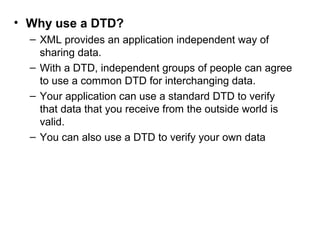
• Why use a DTD? 
– XML provides an application independent way of 
sharing data. 
– With a DTD, independent groups of people can agree 
to use a common DTD for interchanging data. 
– Your application can use a standard DTD to verify 
that data that you receive from the outside world is 
valid. 
– You can also use a DTD to verify your own data
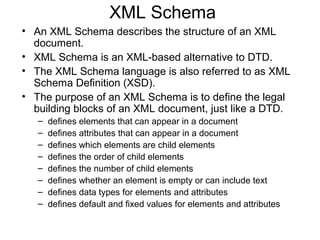
XML Schema 
• An XML Schema describes the structure of an XML 
document. 
• XML Schema is an XML-based alternative to DTD. 
• The XML Schema language is also referred to as XML 
Schema Definition (XSD). 
• The purpose of an XML Schema is to define the legal 
building blocks of an XML document, just like a DTD. 
– defines elements that can appear in a document 
– defines attributes that can appear in a document 
– defines which elements are child elements 
– defines the order of child elements 
– defines the number of child elements 
– defines whether an element is empty or can include text 
– defines data types for elements and attributes 
– defines default and fixed values for elements and attributes
XML Schemas are the Successors of DTDs 
• We think that very soon XML Schemas will 
be used in most Web applications as a 
replacement for DTDs. Here are some 
reasons: 
– XML Schemas are extensible to future 
additions 
– XML Schemas are richer and more powerful 
than DTDs 
– XML Schemas are written in XML 
– XML Schemas support data types 
– XML Schemas support namespaces
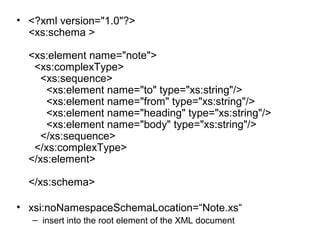
• <?xml version="1.0"?> 
<xs:schema > 
<xs:element name="note"> 
<xs:complexType> 
<xs:sequence> 
<xs:element name="to" type="xs:string"/> 
<xs:element name="from" type="xs:string"/> 
<xs:element name="heading" type="xs:string"/> 
<xs:element name="body" type="xs:string"/> 
</xs:sequence> 
</xs:complexType> 
</xs:element> 
</xs:schema> 
• xsi:noNamespaceSchemaLocation=“Note.xs“ 
– insert into the root element of the XML document
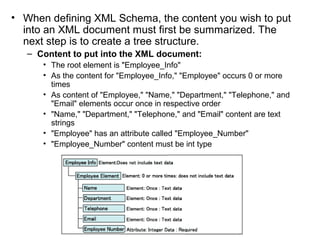
• When defining XML Schema, the content you wish to put 
into an XML document must first be summarized. The 
next step is to create a tree structure. 
– Content to put into the XML document: 
• The root element is "Employee_Info" 
• As the content for "Employee_Info," "Employee" occurs 0 or more 
times 
• As content of "Employee," "Name," "Department," "Telephone," and 
"Email" elements occur once in respective order 
• "Name," "Department," "Telephone," and "Email" content are text 
strings 
• "Employee" has an attribute called "Employee_Number" 
• "Employee_Number" content must be int type
XPath 
• XPath is used to navigate through 
elements and attributes in an XML 
document. 
• XPath, the XML Path Language, is a 
query language for selecting nodes 
from an XML document 
• XPath includes over 100 built-in functions. 
There are functions for string values, 
numeric values, date and time 
comparison, Boolean values, and more.
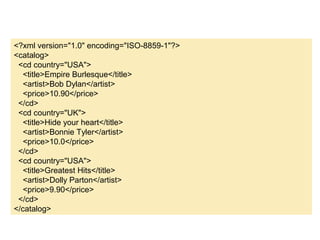
<?xml version="1.0" encoding="ISO-8859-1"?> 
<catalog> 
<cd country="USA"> 
<title>Empire Burlesque</title> 
<artist>Bob Dylan</artist> 
<price>10.90</price> 
</cd> 
<cd country="UK"> 
<title>Hide your heart</title> 
<artist>Bonnie Tyler</artist> 
<price>10.0</price> 
</cd> 
<cd country="USA"> 
<title>Greatest Hits</title> 
<artist>Dolly Parton</artist> 
<price>9.90</price> 
</cd> 
</catalog>
using System.Xml; 
using System.Xml.XPath; 
.... 
string fileName = "data.xml"; 
XPathDocument doc = new XPathDocument(fileName); 
XPathNavigator nav = doc.CreateNavigator(); 
// Compile a standard XPath expression 
XPathExpression expr; 
expr = nav.Compile("/catalog/cd[price>=10.0]/price"); 
XPathNodeIterator iterator = nav.Select(expr); 
// Iterate on the node set 
listBox1.Items.Clear(); 
try 
{ 
while (iterator.MoveNext()) 
{ 
XPathNavigator nav2 = iterator.Current.Clone(); 
listBox1.Items.Add("price: " + nav2.Value); 
} 
} 
catch(Exception ex) 
{ 
Console.WriteLine(ex.Message); 
}
/catalog/cd[1] selects the first cd child of 
catalog 
/catalog/cd[last()] selects the last cd child of 
catalog 
/catalog/cd[price] selects all the cd elements that 
have price 
/ 
catalog/cd[price= 
10.90] 
selects cd elements with the 
price of 10.90 
/ 
catalog/cd[price= 
10.90]/price 
selects all price elements with 
the price of 10.90
• What is XSLT 
– Extensible Stylesheet Language 
Transformation 
– Name is misleading 
– Stylesheet 
• implies it makes things look like something 
• not necessarily or usually true 
Name should have been 
• “The XML Transformation Language”
• What XSLT Does is “Transform” 
– Transform means change 
Reads XML documents and writes 
– HTML for browsers 
– interchange file (RTF, RDF, EDI, etc.) 
– a flat ASCII file (plain text, comma separated 
etc.)
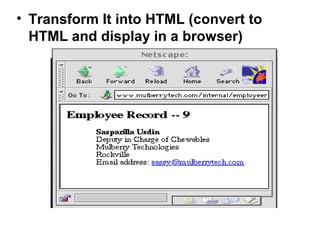
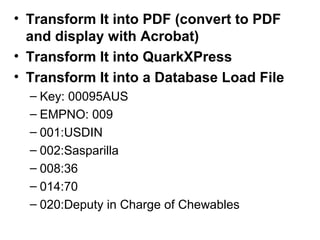
• Transform It into HTML (convert to 
HTML and display in a browser)
• Transform It into PDF (convert to PDF 
and display with Acrobat) 
• Transform It into QuarkXPress 
• Transform It into a Database Load File 
– Key: 00095AUS 
– EMPNO: 009 
– 001:USDIN 
– 002:Sasparilla 
– 008:36 
– 014:70 
– 020:Deputy in Charge of Chewables
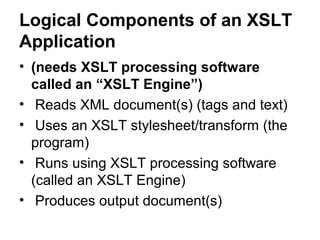
Logical Components of an XSLT 
Application 
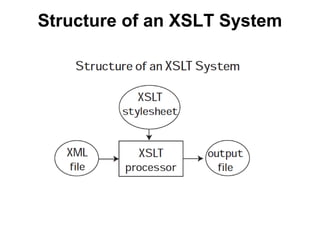
• (needs XSLT processing software 
called an “XSLT Engine”) 
• Reads XML document(s) (tags and text) 
• Uses an XSLT stylesheet/transform (the 
program) 
• Runs using XSLT processing software 
(called an XSLT Engine) 
• Produces output document(s)
Structure of an XSLT System
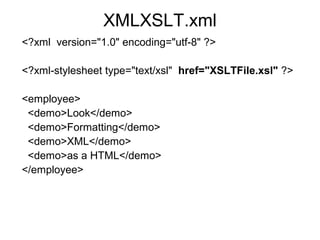
XMLXSLT.xml 
<?xml version="1.0" encoding="utf-8" ?> 
<?xml-stylesheet type="text/xsl" href="XSLTFile.xsl" ?> 
<employee> 
<demo>Look</demo> 
<demo>Formatting</demo> 
<demo>XML</demo> 
<demo>as a HTML</demo> 
</employee>
XSLTFile.xsl 
<?xml version="1.0" encoding="utf-8"?> 
<xsl:stylesheet version="1.0" 
xmlns:xsl="http://www.w3.org/1999/XSL/Transform"> 
<xsl:template match ="/"> 
<html> 
<head> 
<titel>XSLT Test</titel> 
</head> 
<body> 
<xsl:for-each select ="employee/demo"> 
<h1> 
<xsl:value-of select ="."/> 
</h1> 
</xsl:for-each> 
</body> 
</html> 
</xsl:template> 
</xsl:stylesheet>
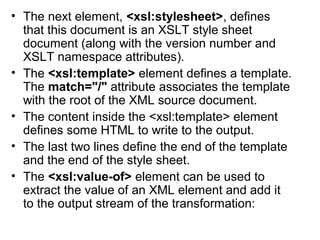
• The next element, <xsl:stylesheet>, defines 
that this document is an XSLT style sheet 
document (along with the version number and 
XSLT namespace attributes). 
• The <xsl:template> element defines a template. 
The match="/" attribute associates the template 
with the root of the XML source document. 
• The content inside the <xsl:template> element 
defines some HTML to write to the output. 
• The last two lines define the end of the template 
and the end of the style sheet. 
• The <xsl:value-of> element can be used to 
extract the value of an XML element and add it 
to the output stream of the transformation:
• We can also filter the output from the XML 
file by adding a criterion to the select 
attribute in the <xsl:for-each> element. 
<xsl:for-each 
select="catalog/cd[artist='Bob Dylan']">
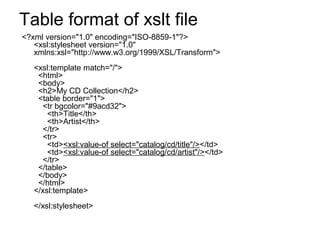
Table format of xslt file 
<?xml version="1.0" encoding="ISO-8859-1"?> 
<xsl:stylesheet version="1.0" 
xmlns:xsl="http://www.w3.org/1999/XSL/Transform"> 
<xsl:template match="/"> 
<html> 
<body> 
<h2>My CD Collection</h2> 
<table border="1"> 
<tr bgcolor="#9acd32"> 
<th>Title</th> 
<th>Artist</th> 
</tr> 
<tr> 
<td><xsl:value-of select="catalog/cd/title"/></td> 
<td><xsl:value-of select="catalog/cd/artist"/></td> 
</tr> 
</table> 
</body> 
</html> 
</xsl:template> 
</xsl:stylesheet>
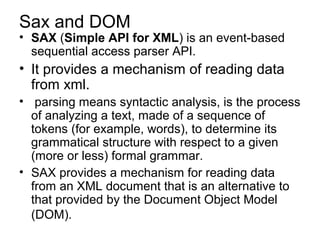
Sax and DOM 
• SAX (Simple API for XML) is an event-based 
sequential access parser API. 
• It provides a mechanism of reading data 
from xml. 
• parsing means syntactic analysis, is the process 
of analyzing a text, made of a sequence of 
tokens (for example, words), to determine its 
grammatical structure with respect to a given 
(more or less) formal grammar. 
• SAX provides a mechanism for reading data 
from an XML document that is an alternative to 
that provided by the Document Object Model 
(DOM).
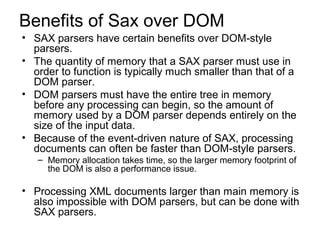
Benefits of Sax over DOM 
• SAX parsers have certain benefits over DOM-style 
parsers. 
• The quantity of memory that a SAX parser must use in 
order to function is typically much smaller than that of a 
DOM parser. 
• DOM parsers must have the entire tree in memory 
before any processing can begin, so the amount of 
memory used by a DOM parser depends entirely on the 
size of the input data. 
• Because of the event-driven nature of SAX, processing 
documents can often be faster than DOM-style parsers. 
– Memory allocation takes time, so the larger memory footprint of 
the DOM is also a performance issue. 
• Processing XML documents larger than main memory is 
also impossible with DOM parsers, but can be done with 
SAX parsers.
DOM 
• The XML DOM defines a standard way for 
accessing and manipulating XML 
documents. 
• It also provides an application 
programming interface for working with 
XML data. 
• The DOM is designed to be used with any 
programming language. such as C/C++, 
Visual Basic, VBScript, and JScript.

Xml and DTD's

  • 1.
    Introduction to XML • XML is a extensible markup language like HTML. • The only difference between XML and HTML is that XML is used for documents containing structured information. • Structured information contains both content and some indication of what role that content performs. • XML is basically designed to describe data, it contains no pre-defined tag, and you must define your own tag in it. • It uses DTD and XML schema to describe the data.
  • 2.
    Syntax • ExtensibleMarkup Language (XML) is a set of rules for encoding documents in machine-readable form. • All XML Elements Must Have a Closing Tag: – In HTML, some elements do not have to have a closing tag: – <p>This is a paragraph <p>This is another paragraph. In XML, it is illegal to omit the closing tag. All elements must have a closing tag: – <p>This is a paragraph</p> <p>This is another paragraph</p> • XML Tags are Case Sensitive: – XML tags are case sensitive. The tag <Letter> is different from the tag <letter>. – Opening and closing tags must be written with the same case: – <Message>This is incorrect</message> <message>This is correct</message>
  • 3.
    • XML ElementsMust be Properly Nested: – In HTML, you might see improperly nested elements: <b><i>This text is bold and italic</b></i> In XML, all elements must be properly nested within each other: <b><i>This text is bold and italic</i></b> • XML Documents Must Have a Root Element: – XML documents must contain one element that is the parent of all other elements. This element is called the root element. – <root> <child> <subchild>.....</subchild> </child> </root> • XML Attribute Values Must be Quoted: – XML elements can have attributes in name/value pairs just like in HTML. – In XML, the attribute values must always be quoted. – Study the two XML documents below. The first one is incorrect, the second is correct: – <note date=12/11/2007> <to>Tove</to> <from>Jani</from> </note> – <note date="12/11/2007"> <to>Tove</to> <from>Jani</from> </note>
  • 4.
    • Entity References: – Some characters have a special meaning in XML. – If you place a character like "<" inside an XML element, it will generate an error because the parser interprets it as the start of a new element. – This will generate an XML error: <message>if salary < 1000 then</message> – To avoid this error, replace the "<" character with an entity reference: <message>if salary &lt; 1000 then</message> – There are 5 predefined entity references in XML:
  • 5.
    &lt; < Lessthan &gt; > Greater than &amp; & ampersand &quot “” quotation mark
  • 6.
    • Comments inXML – The syntax for writing comments in XML is similar to that of HTML. – <!-- This is a comment --> • White-space is Preserved in XML – HTML truncates multiple white-space characters to one single white-space – HTML: Hello Tove – Output: Hello Tove – With XML, the white-space in a document is not truncated • XML Stores New Line as LF: – In Windows applications, a new line is normally stored as a pair of characters: carriage return (CR) and line feed (LF). In Unix applications, a new line is normally stored as an LF character. Macintosh applications also use an LF to store a new line. – XML stores a new line as LF.
  • 7.
    DTDs and XMLSchema • The purpose of a DTD is to define the legal building blocks of an XML document. • It defines the document structure with a list of legal elements. • A DTD can be declared inline in your XML document, or as an external reference. • Internal DTD – This is an XML document with a Document Type Definition
  • 8.
    <?xml version="1.0"?> <!DOCTYPEnote [ <!ELEMENT note (to,from,heading,body)> <!ELEMENT to (#PCDATA)> <!ELEMENT from (#PCDATA)> <!ELEMENT heading (#PCDATA)> <!ELEMENT body (#PCDATA)> ]> <note> <to>Tove</to> <from>Jani</from> <heading>Reminder</heading> <body>Meeting Tomorrow at 5 p.m</body> </note> In XML DTD, #PCDATA is the keyword to specify mixed content, meaning an element may contain character data.
  • 9.
    • The DTDis interpreted like this: !ELEMENT note (in line 2) defines the element "note" as having four elements: "to,from,heading,body". !ELEMENT to (in line 3) defines the "to" element to be of the type "CDATA". !ELEMENT from (in line 4) defines the "from" element to be of the type "CDATA"
  • 10.
    • External DTD – This is the same XML document with an external DTD <?xml version="1.0"?> <!DOCTYPE note SYSTEM "note.dtd"> <note> <to>Tove</to> <from>Jani</from> <heading>Reminder</heading> <body>Meeting Tomorrow at 5 p.m!</body> </note> – This is a copy of the file "note.dtd" containing the Document Type Definition: <?xml version="1.0"?> <!ELEMENT note (to,from,heading,body)> <!ELEMENT to (#PCDATA)> <!ELEMENT from (#PCDATA)> <!ELEMENT heading (#PCDATA)> <!ELEMENT body (#PCDATA)>
  • 11.
    • Why usea DTD? – XML provides an application independent way of sharing data. – With a DTD, independent groups of people can agree to use a common DTD for interchanging data. – Your application can use a standard DTD to verify that data that you receive from the outside world is valid. – You can also use a DTD to verify your own data
  • 12.
    XML Schema •An XML Schema describes the structure of an XML document. • XML Schema is an XML-based alternative to DTD. • The XML Schema language is also referred to as XML Schema Definition (XSD). • The purpose of an XML Schema is to define the legal building blocks of an XML document, just like a DTD. – defines elements that can appear in a document – defines attributes that can appear in a document – defines which elements are child elements – defines the order of child elements – defines the number of child elements – defines whether an element is empty or can include text – defines data types for elements and attributes – defines default and fixed values for elements and attributes
  • 13.
    XML Schemas arethe Successors of DTDs • We think that very soon XML Schemas will be used in most Web applications as a replacement for DTDs. Here are some reasons: – XML Schemas are extensible to future additions – XML Schemas are richer and more powerful than DTDs – XML Schemas are written in XML – XML Schemas support data types – XML Schemas support namespaces
  • 14.
    • <?xml version="1.0"?> <xs:schema > <xs:element name="note"> <xs:complexType> <xs:sequence> <xs:element name="to" type="xs:string"/> <xs:element name="from" type="xs:string"/> <xs:element name="heading" type="xs:string"/> <xs:element name="body" type="xs:string"/> </xs:sequence> </xs:complexType> </xs:element> </xs:schema> • xsi:noNamespaceSchemaLocation=“Note.xs“ – insert into the root element of the XML document
  • 15.
    • When definingXML Schema, the content you wish to put into an XML document must first be summarized. The next step is to create a tree structure. – Content to put into the XML document: • The root element is "Employee_Info" • As the content for "Employee_Info," "Employee" occurs 0 or more times • As content of "Employee," "Name," "Department," "Telephone," and "Email" elements occur once in respective order • "Name," "Department," "Telephone," and "Email" content are text strings • "Employee" has an attribute called "Employee_Number" • "Employee_Number" content must be int type
  • 16.
    XPath • XPathis used to navigate through elements and attributes in an XML document. • XPath, the XML Path Language, is a query language for selecting nodes from an XML document • XPath includes over 100 built-in functions. There are functions for string values, numeric values, date and time comparison, Boolean values, and more.
  • 17.
    <?xml version="1.0" encoding="ISO-8859-1"?> <catalog> <cd country="USA"> <title>Empire Burlesque</title> <artist>Bob Dylan</artist> <price>10.90</price> </cd> <cd country="UK"> <title>Hide your heart</title> <artist>Bonnie Tyler</artist> <price>10.0</price> </cd> <cd country="USA"> <title>Greatest Hits</title> <artist>Dolly Parton</artist> <price>9.90</price> </cd> </catalog>
  • 18.
    using System.Xml; usingSystem.Xml.XPath; .... string fileName = "data.xml"; XPathDocument doc = new XPathDocument(fileName); XPathNavigator nav = doc.CreateNavigator(); // Compile a standard XPath expression XPathExpression expr; expr = nav.Compile("/catalog/cd[price>=10.0]/price"); XPathNodeIterator iterator = nav.Select(expr); // Iterate on the node set listBox1.Items.Clear(); try { while (iterator.MoveNext()) { XPathNavigator nav2 = iterator.Current.Clone(); listBox1.Items.Add("price: " + nav2.Value); } } catch(Exception ex) { Console.WriteLine(ex.Message); }
  • 19.
    /catalog/cd[1] selects thefirst cd child of catalog /catalog/cd[last()] selects the last cd child of catalog /catalog/cd[price] selects all the cd elements that have price / catalog/cd[price= 10.90] selects cd elements with the price of 10.90 / catalog/cd[price= 10.90]/price selects all price elements with the price of 10.90
  • 20.
    • What isXSLT – Extensible Stylesheet Language Transformation – Name is misleading – Stylesheet • implies it makes things look like something • not necessarily or usually true Name should have been • “The XML Transformation Language”
  • 21.
    • What XSLTDoes is “Transform” – Transform means change Reads XML documents and writes – HTML for browsers – interchange file (RTF, RDF, EDI, etc.) – a flat ASCII file (plain text, comma separated etc.)
  • 22.
    • Transform Itinto HTML (convert to HTML and display in a browser)
  • 23.
    • Transform Itinto PDF (convert to PDF and display with Acrobat) • Transform It into QuarkXPress • Transform It into a Database Load File – Key: 00095AUS – EMPNO: 009 – 001:USDIN – 002:Sasparilla – 008:36 – 014:70 – 020:Deputy in Charge of Chewables
  • 24.
    Logical Components ofan XSLT Application • (needs XSLT processing software called an “XSLT Engine”) • Reads XML document(s) (tags and text) • Uses an XSLT stylesheet/transform (the program) • Runs using XSLT processing software (called an XSLT Engine) • Produces output document(s)
  • 25.
    Structure of anXSLT System
  • 26.
    XMLXSLT.xml <?xml version="1.0"encoding="utf-8" ?> <?xml-stylesheet type="text/xsl" href="XSLTFile.xsl" ?> <employee> <demo>Look</demo> <demo>Formatting</demo> <demo>XML</demo> <demo>as a HTML</demo> </employee>
  • 27.
    XSLTFile.xsl <?xml version="1.0"encoding="utf-8"?> <xsl:stylesheet version="1.0" xmlns:xsl="http://www.w3.org/1999/XSL/Transform"> <xsl:template match ="/"> <html> <head> <titel>XSLT Test</titel> </head> <body> <xsl:for-each select ="employee/demo"> <h1> <xsl:value-of select ="."/> </h1> </xsl:for-each> </body> </html> </xsl:template> </xsl:stylesheet>
  • 28.
    • The nextelement, <xsl:stylesheet>, defines that this document is an XSLT style sheet document (along with the version number and XSLT namespace attributes). • The <xsl:template> element defines a template. The match="/" attribute associates the template with the root of the XML source document. • The content inside the <xsl:template> element defines some HTML to write to the output. • The last two lines define the end of the template and the end of the style sheet. • The <xsl:value-of> element can be used to extract the value of an XML element and add it to the output stream of the transformation:
  • 29.
    • We canalso filter the output from the XML file by adding a criterion to the select attribute in the <xsl:for-each> element. <xsl:for-each select="catalog/cd[artist='Bob Dylan']">
  • 30.
    Table format ofxslt file <?xml version="1.0" encoding="ISO-8859-1"?> <xsl:stylesheet version="1.0" xmlns:xsl="http://www.w3.org/1999/XSL/Transform"> <xsl:template match="/"> <html> <body> <h2>My CD Collection</h2> <table border="1"> <tr bgcolor="#9acd32"> <th>Title</th> <th>Artist</th> </tr> <tr> <td><xsl:value-of select="catalog/cd/title"/></td> <td><xsl:value-of select="catalog/cd/artist"/></td> </tr> </table> </body> </html> </xsl:template> </xsl:stylesheet>
  • 31.
    Sax and DOM • SAX (Simple API for XML) is an event-based sequential access parser API. • It provides a mechanism of reading data from xml. • parsing means syntactic analysis, is the process of analyzing a text, made of a sequence of tokens (for example, words), to determine its grammatical structure with respect to a given (more or less) formal grammar. • SAX provides a mechanism for reading data from an XML document that is an alternative to that provided by the Document Object Model (DOM).
  • 32.
    Benefits of Saxover DOM • SAX parsers have certain benefits over DOM-style parsers. • The quantity of memory that a SAX parser must use in order to function is typically much smaller than that of a DOM parser. • DOM parsers must have the entire tree in memory before any processing can begin, so the amount of memory used by a DOM parser depends entirely on the size of the input data. • Because of the event-driven nature of SAX, processing documents can often be faster than DOM-style parsers. – Memory allocation takes time, so the larger memory footprint of the DOM is also a performance issue. • Processing XML documents larger than main memory is also impossible with DOM parsers, but can be done with SAX parsers.
  • 33.
    DOM • TheXML DOM defines a standard way for accessing and manipulating XML documents. • It also provides an application programming interface for working with XML data. • The DOM is designed to be used with any programming language. such as C/C++, Visual Basic, VBScript, and JScript.