
X Window System Ron Bandes Cloud Nine Networks, LLC ©2007 Cloud Nine Networks, LLC
X Window System Known as: X Window System X Windows X X11 ©2007 Cloud Nine Networks, LLC
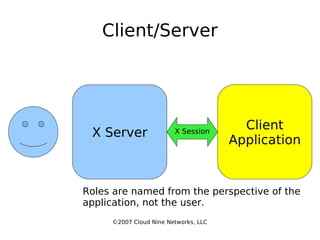
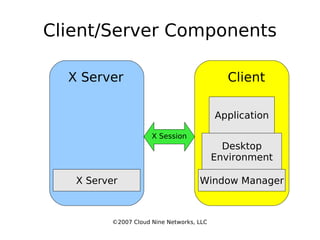
Client/Server ©2007 Cloud Nine Networks, LLC X Server Client Application X Session Roles are named from the perspective of the application, not the user.
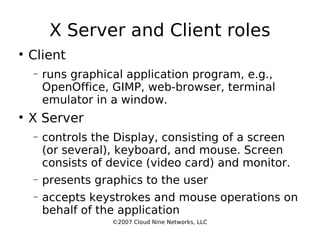
X Server and Client roles Client runs graphical application program, e.g., OpenOffice, GIMP, web-browser, terminal emulator in a window. X Server controls the Display, consisting of a screen (or several), keyboard, and mouse. Screen consists of device (video card) and monitor. presents graphics to the user accepts keystrokes and mouse operations on behalf of the application ©2007 Cloud Nine Networks, LLC
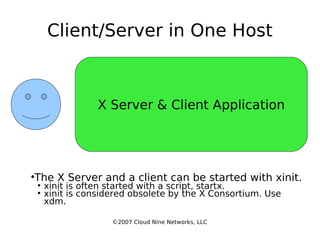
Client/Server in One Host ©2007 Cloud Nine Networks, LLC X Server & Client Application The X Server and a client can be started with xinit. xinit is often started with a script, startx. xinit is considered obsolete by the X Consortium. Use xdm.
Client/Server Components ©2007 Cloud Nine Networks, LLC X Session X Server Client X Server Window Manager Desktop Environment Application
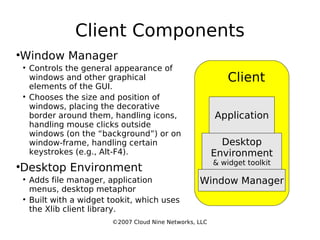
Client Components ©2007 Cloud Nine Networks, LLC Client Window Manager Desktop Environment & widget toolkit Application Window Manager Controls the general appearance of windows and other graphical elements of the GUI. Chooses the size and position of windows, placing the decorative border around them, handling icons, handling mouse clicks outside windows (on the “background”) or on window-frame, handling certain keystrokes (e.g., Alt-F4). Desktop Environment Adds file manager, application menus, desktop metaphor Built with a widget tookit, which uses the Xlib client library.
Client Files Global – in /etc/X11/xinit xinitrc  – evaluated by xinit; starts clients Local – in user's home directory .xinitrc – script passed to xinit via startx to start clients.  Sets global resources: screen-saver, keyboard. .Xclients  – starts user-specific clients. .Xresources  – widget definitions. Specifies font sizes, colors, general look and feel.  All X applications look here for resource settings. ©2007 Cloud Nine Networks, LLC
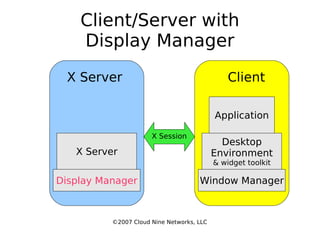
Client/Server with Display Manager ©2007 Cloud Nine Networks, LLC X Session X Server Client Display Manager Window Manager Desktop Environment & widget toolkit Application X Server
Display Manager Also known as a l ogin manager . Shows the graphical login prompt in the X Window System. A graphical substitute for  getty  or  login . Accepts userid and password Starts  window manager  on remote host. First released in X11R3. XDMCP and xauth introduced in X11R4. ©2007 Cloud Nine Networks, LLC
Display Manager Files Global files   in  /usr/lib/X11/xdm  or  /etc/xdm xdm-config - specifies location of other config files; sets commands for xdm setup, startup, reset, and initial script. Xservers  – list of servers managed by xdm. Xsession  – startup script for each X session. Xresources  – defines resources loaded by xrdb for servers managed by xdm. xdm-pid  – contains pid of xdm. xdm-errors  – log. Xaccess  – configure access  for XDMCP; define macros to group related hosts. Xsetup_0  – display setup for local console. ©2007 Cloud Nine Networks, LLC
Display Manager Files Local files in user's home directory .xsession  – user-specific startup script. .Xresources  – user-specific resources. .xsession-errors  – user-specific log. .Xauthority  – authorization info for user's svr. ©2007 Cloud Nine Networks, LLC
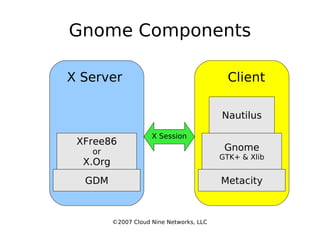
Gnome Components ©2007 Cloud Nine Networks, LLC X Session X Server Client GDM Metacity Gnome GTK+ & Xlib Nautilus XFree86 or X.Org
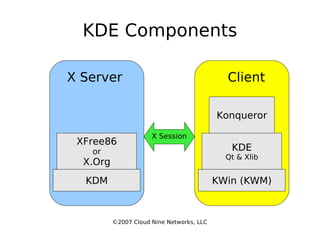
KDE Components ©2007 Cloud Nine Networks, LLC X Session X Server Client KDM KWin (KWM)‏ KDE Qt & Xlib Konqueror XFree86 or X.Org
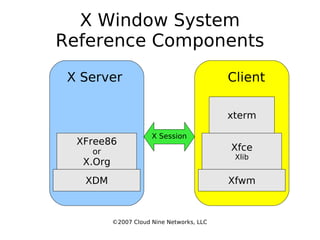
X Window System Reference Components ©2007 Cloud Nine Networks, LLC X Session X Server Client XDM Xfwm Xfce Xlib xterm XFree86 or X.Org
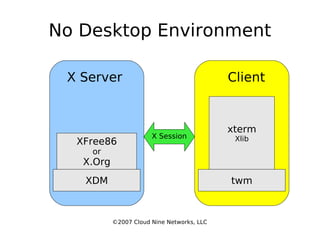
No Desktop Environment ©2007 Cloud Nine Networks, LLC X Session X Server Client XDM twm xterm Xlib XFree86 or X.Org
©2007 Cloud Nine Networks, LLC Intermission
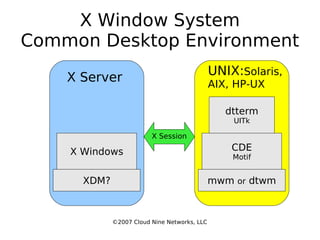
X Window System Common Desktop Environment ©2007 Cloud Nine Networks, LLC X Session X Server UNIX: Solaris, AIX, HP-UX XDM? mwm  or  dtwm CDE Motif dtterm UITk X Windows
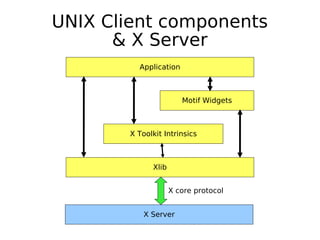
UNIX Client components & X Server ©2007 Cloud Nine Networks, LLC Application Motif Widgets X Toolkit Intrinsics Xlib X Server X core protocol
Location of Display Manager When the X Server is on the same system as the Display Manager, the DM starts the X Server after login. With an X Terminal (X Server alone), the DM is on another system. They are started independently. In both cases, the X Server connects to the DM. Authorization to access the X server is controlled by: xhost – insecure xauth – more secure ©2007 Cloud Nine Networks, LLC
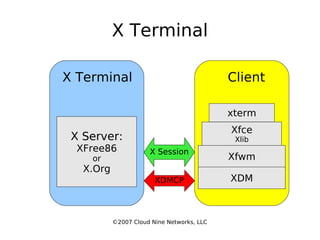
X Terminal ©2007 Cloud Nine Networks, LLC X Session X Terminal Client XDM xterm X Server: XFree86 or X.Org XDMCP Xfwm Xfce Xlib
X Terminal An X Terminal is a thin, or lightweight, system that only has a display. The Display Manager is moved to the system hosting the Clients. The X Terminal requests a login screen from the DM via XDM Control Protocol (XDMCP). The DM may provide a Chooser menu, offering to connect the X Terminal to any of several hosts. ©2007 Cloud Nine Networks, LLC
Communication between Clients Core protocol doesn't specify protocol between clients. Inter-Client Conventions Manual (ICCM)‏ specifies protocol for exchange of data via selections Interaction of applications with Window Mgr. Inter-Client Exchange (ICE) protocol framework for building protocols for interaction between clients. ©2007 Cloud Nine Networks, LLC
Session Managers Session Managers (SM) store the status of the desktop when shutting down. Session-aware applications communicate with the SM via X Session Mgmt Protocol (XSMP). XSMP is based on ICE protocol framework. Some Session Managers: xsm (default)‏ ksmserver (for KDE)‏ ©2007 Cloud Nine Networks, LLC
©2007 Cloud Nine Networks, LLC The End

X Window System

  • 1.
    X Window SystemRon Bandes Cloud Nine Networks, LLC ©2007 Cloud Nine Networks, LLC
  • 2.
    X Window SystemKnown as: X Window System X Windows X X11 ©2007 Cloud Nine Networks, LLC
  • 3.
    Client/Server ©2007 CloudNine Networks, LLC X Server Client Application X Session Roles are named from the perspective of the application, not the user.
  • 4.
    X Server andClient roles Client runs graphical application program, e.g., OpenOffice, GIMP, web-browser, terminal emulator in a window. X Server controls the Display, consisting of a screen (or several), keyboard, and mouse. Screen consists of device (video card) and monitor. presents graphics to the user accepts keystrokes and mouse operations on behalf of the application ©2007 Cloud Nine Networks, LLC
  • 5.
    Client/Server in OneHost ©2007 Cloud Nine Networks, LLC X Server & Client Application The X Server and a client can be started with xinit. xinit is often started with a script, startx. xinit is considered obsolete by the X Consortium. Use xdm.
  • 6.
    Client/Server Components ©2007Cloud Nine Networks, LLC X Session X Server Client X Server Window Manager Desktop Environment Application
  • 7.
    Client Components ©2007Cloud Nine Networks, LLC Client Window Manager Desktop Environment & widget toolkit Application Window Manager Controls the general appearance of windows and other graphical elements of the GUI. Chooses the size and position of windows, placing the decorative border around them, handling icons, handling mouse clicks outside windows (on the “background”) or on window-frame, handling certain keystrokes (e.g., Alt-F4). Desktop Environment Adds file manager, application menus, desktop metaphor Built with a widget tookit, which uses the Xlib client library.
  • 8.
    Client Files Global– in /etc/X11/xinit xinitrc – evaluated by xinit; starts clients Local – in user's home directory .xinitrc – script passed to xinit via startx to start clients. Sets global resources: screen-saver, keyboard. .Xclients – starts user-specific clients. .Xresources – widget definitions. Specifies font sizes, colors, general look and feel. All X applications look here for resource settings. ©2007 Cloud Nine Networks, LLC
  • 9.
    Client/Server with DisplayManager ©2007 Cloud Nine Networks, LLC X Session X Server Client Display Manager Window Manager Desktop Environment & widget toolkit Application X Server
  • 10.
    Display Manager Alsoknown as a l ogin manager . Shows the graphical login prompt in the X Window System. A graphical substitute for getty or login . Accepts userid and password Starts window manager on remote host. First released in X11R3. XDMCP and xauth introduced in X11R4. ©2007 Cloud Nine Networks, LLC
  • 11.
    Display Manager FilesGlobal files in /usr/lib/X11/xdm or /etc/xdm xdm-config - specifies location of other config files; sets commands for xdm setup, startup, reset, and initial script. Xservers – list of servers managed by xdm. Xsession – startup script for each X session. Xresources – defines resources loaded by xrdb for servers managed by xdm. xdm-pid – contains pid of xdm. xdm-errors – log. Xaccess – configure access for XDMCP; define macros to group related hosts. Xsetup_0 – display setup for local console. ©2007 Cloud Nine Networks, LLC
  • 12.
    Display Manager FilesLocal files in user's home directory .xsession – user-specific startup script. .Xresources – user-specific resources. .xsession-errors – user-specific log. .Xauthority – authorization info for user's svr. ©2007 Cloud Nine Networks, LLC
  • 13.
    Gnome Components ©2007Cloud Nine Networks, LLC X Session X Server Client GDM Metacity Gnome GTK+ & Xlib Nautilus XFree86 or X.Org
  • 14.
    KDE Components ©2007Cloud Nine Networks, LLC X Session X Server Client KDM KWin (KWM)‏ KDE Qt & Xlib Konqueror XFree86 or X.Org
  • 15.
    X Window SystemReference Components ©2007 Cloud Nine Networks, LLC X Session X Server Client XDM Xfwm Xfce Xlib xterm XFree86 or X.Org
  • 16.
    No Desktop Environment©2007 Cloud Nine Networks, LLC X Session X Server Client XDM twm xterm Xlib XFree86 or X.Org
  • 17.
    ©2007 Cloud NineNetworks, LLC Intermission
  • 18.
    X Window SystemCommon Desktop Environment ©2007 Cloud Nine Networks, LLC X Session X Server UNIX: Solaris, AIX, HP-UX XDM? mwm or dtwm CDE Motif dtterm UITk X Windows
  • 19.
    UNIX Client components& X Server ©2007 Cloud Nine Networks, LLC Application Motif Widgets X Toolkit Intrinsics Xlib X Server X core protocol
  • 20.
    Location of DisplayManager When the X Server is on the same system as the Display Manager, the DM starts the X Server after login. With an X Terminal (X Server alone), the DM is on another system. They are started independently. In both cases, the X Server connects to the DM. Authorization to access the X server is controlled by: xhost – insecure xauth – more secure ©2007 Cloud Nine Networks, LLC
  • 21.
    X Terminal ©2007Cloud Nine Networks, LLC X Session X Terminal Client XDM xterm X Server: XFree86 or X.Org XDMCP Xfwm Xfce Xlib
  • 22.
    X Terminal AnX Terminal is a thin, or lightweight, system that only has a display. The Display Manager is moved to the system hosting the Clients. The X Terminal requests a login screen from the DM via XDM Control Protocol (XDMCP). The DM may provide a Chooser menu, offering to connect the X Terminal to any of several hosts. ©2007 Cloud Nine Networks, LLC
  • 23.
    Communication between ClientsCore protocol doesn't specify protocol between clients. Inter-Client Conventions Manual (ICCM)‏ specifies protocol for exchange of data via selections Interaction of applications with Window Mgr. Inter-Client Exchange (ICE) protocol framework for building protocols for interaction between clients. ©2007 Cloud Nine Networks, LLC
  • 24.
    Session Managers SessionManagers (SM) store the status of the desktop when shutting down. Session-aware applications communicate with the SM via X Session Mgmt Protocol (XSMP). XSMP is based on ICE protocol framework. Some Session Managers: xsm (default)‏ ksmserver (for KDE)‏ ©2007 Cloud Nine Networks, LLC
  • 25.
    ©2007 Cloud NineNetworks, LLC The End