TITANIUM DEVELOPMENT WITH
Accelerated

     COFFEESCRIPT, COMPASS, AND SASS


                         WYNNNETHERLAND
$ whoami
NETHERLAND
Mobile?
Web?
Both?
Nice to meet ya.
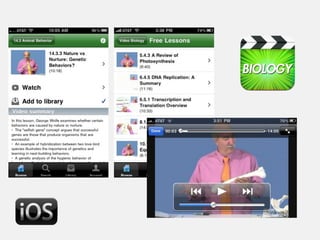
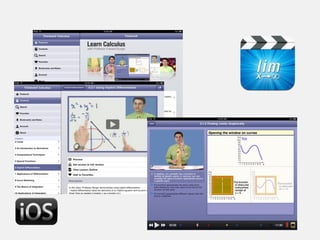
PIXELS I'VE PUSHED
With some very talented folks.
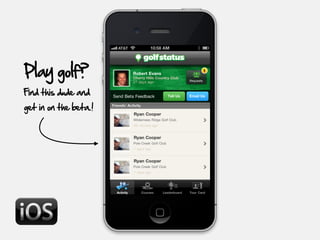
Play golf?
Find this dude and
get in on the beta.!
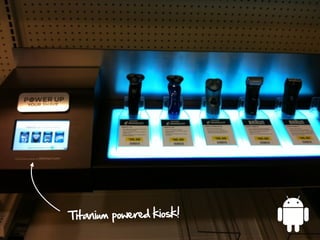
Titanium powered kiosk!
A polyglot's


TITANIUM STACK
COFFEESCRIPT
It's still just JavaScript.
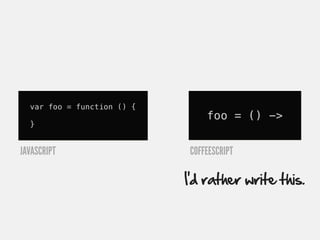
var foo = function () {
                                foo = () ->
  }


JAVASCRIPT                  COFFEESCRIPT

                            I’d rather write this.
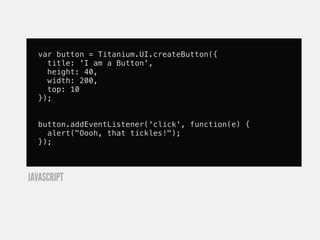
var button = Titanium.UI.createButton({
    title: 'I am a Button',
    height: 40,
    width: 200,
    top: 10
  });


  button.addEventListener('click', function(e) {
    alert("Oooh, that tickles!");
  });


JAVASCRIPT
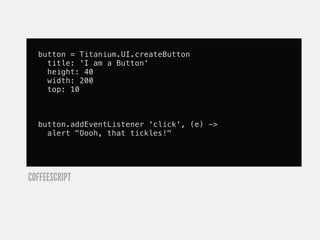
button = Titanium.UI.createButton
    title: 'I am a Button'
    height: 40
    width: 200
    top: 10


  button.addEventListener 'click', (e) ->
    alert "Oooh, that tickles!"


COFFEESCRIPT
For me,

It's about more than aesthetics


                                  ; {}
Some of my favorite features...
for own key, value of query
    uri += "#{ key }=#{ escape(value) }&"


COFFEESCRIPT


  var key, value;
  var __hasProp = Object.prototype.hasOwnProperty;
  for (key in query) {
    if (!__hasProp.call(query, key)) continue;
    value = query[key];
    uri += "" + key + "=" + (escape(value)) + "&";
  }


JAVASCRIPT
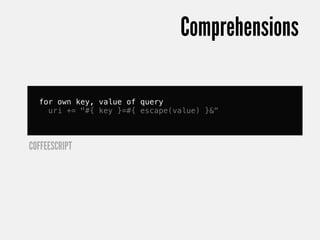
Comprehensions

  for own key, value of query
    uri += "#{ key }=#{ escape(value) }&"


COFFEESCRIPT
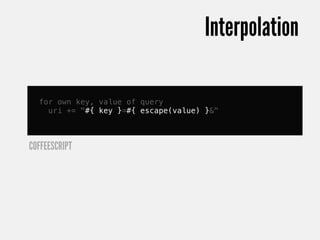
Interpolation

  for own key, value of query
    uri += "#{ key }=#{ escape(value) }&"


COFFEESCRIPT
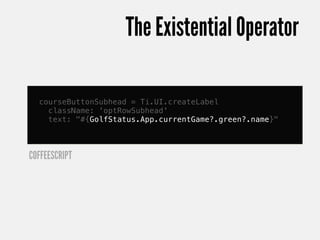
The Existential Operator

  courseButtonSubhead = Ti.UI.createLabel
    className: 'optRowSubhead'
    text: "#{GolfStatus.App.currentGame?.green?.name}"


COFFEESCRIPT
Simple inheritance pattern
  class GolfStatus.Models.Game

     constructor: (@owner,
                   @course,
                   @playingFor='brag',
                   @scoringFormat='low_net') ->
       @players = {}
       @addPlayer @owner if @owner
       @green = @course.greens[0] if @course
       @currentHole = 1
       @maxHolePlayed = 1

  # elsewhere
  game = new GolfStatus.Models.Game(...)


COFFEESCRIPT
@
  class GolfStatus.Models.Game

     constructor: (@owner,
                   @course,
                   @playingFor='brag',
                   @scoringFormat='low_net') ->
       @players = {}
       @addPlayer @owner if @owner
       @green = @course.greens[0] if @course
       @currentHole = 1
       @maxHolePlayed = 1


COFFEESCRIPT
Default values
  class GolfStatus.Models.Game

     constructor: (@owner,
                   @course,
                   @playingFor='brag',
                   @scoringFormat='low_net') ->
       @players = {}
       @addPlayer @owner if @owner
       @green = @course.greens[0] if @course
       @currentHole = 1
       @maxHolePlayed = 1


COFFEESCRIPT
More human conditionals
  class GolfStatus.Models.Game

     constructor: (@owner,
                   @course,
                   @playingFor='brag',
                   @scoringFormat='low_net') ->
       @players = {}
       @addPlayer @owner if @owner
       @green = @course.greens[0] if @course
       @currentHole = 1
       @maxHolePlayed = 1


COFFEESCRIPT
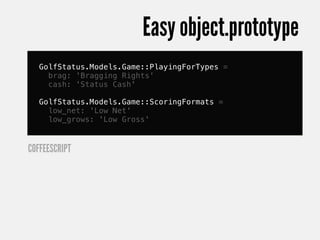
Easy object.prototype
   GolfStatus.Models.Game::PlayingForTypes =
     brag: 'Bragging Rights'
     cash: 'Status Cash'

   GolfStatus.Models.Game::ScoringFormats =
     low_net: 'Low Net'
     low_grows: 'Low Gross'


COFFEESCRIPT
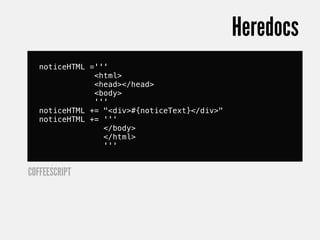
Heredocs
   noticeHTML ='''
               <html>
               <head></head>
               <body>
               '''
   noticeHTML += "<div>#{noticeText}</div>"
   noticeHTML += '''
                 </body>
                 </html>
                 '''


COFFEESCRIPT
Because string building sucks.
And so much more.
http://wynn.fm/2Y
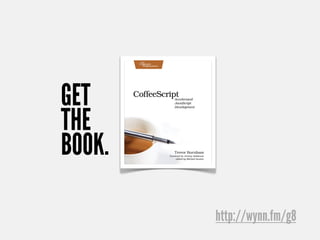
GET
THE
BOOK.

        http://wynn.fm/g8
STYLESHEETS
Are you using JSS?
JSS works like CSS.
Why do we have CSS?
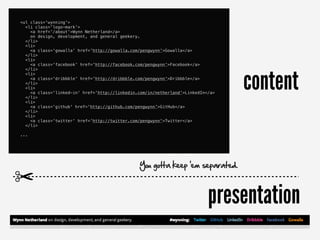
<ul class='wynning'>
  <li class='logo-mark'>
    <a href='/about'>Wynn Netherland</a>
    on design, development, and general geekery.
  </li>
  <li>
    <a class='gowalla' href='http://gowalla.com/pengwynn'>Gowalla</a>
  </li>
  <li>
    <a class='facebook' href='http://facebook.com/pengwynn'>Facebook</a>


                                                                                 content
  </li>
  <li>
    <a class='dribbble' href='http://dribbble.com/pengwynn'>Dribbble</a>
  </li>
  <li>
    <a class='linked-in' href='http://linkedin.com/in/netherland'>LinkedIn</a>
  </li>
  <li>
    <a class='github' href='http://github.com/pengwynn'>GitHub</a>
  </li>
  <li>
    <a class='twitter' href='http://twitter.com/pengwynn'>Twitter</a>
  </li>

...


                                               You gotta keep 'em separated.

✂
                                                                           presentation
A   example
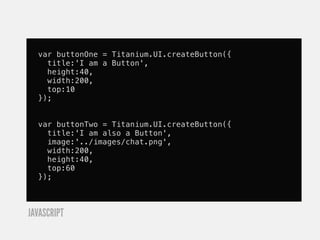
var buttonOne = Titanium.UI.createButton({
    title:'I am a Button',
    height:40,
    width:200,
    top:10
  });


  var buttonTwo = Titanium.UI.createButton({
    title:'I am also a Button',
    image:'../images/chat.png',
    width:200,
    height:40,
    top:60
  });


JAVASCRIPT
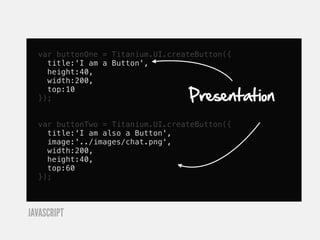
var buttonOne = Titanium.UI.createButton({
    title:'I am a Button',
    height:40,
    width:200,

                                  Presentation
    top:10
  });


  var buttonTwo = Titanium.UI.createButton({
    title:'I am also a Button',
    image:'../images/chat.png',
    width:200,
    height:40,
    top:60
  });


JAVASCRIPT
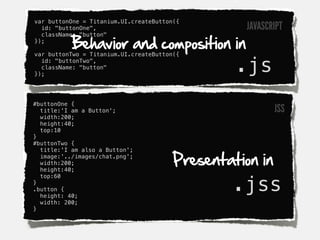
var buttonOne = Titanium.UI.createButton({
  id: "buttonOne",                                 JAVASCRIPT
           Behavior and composition in
  className: "button"
});

var buttonTwo = Titanium.UI.createButton({
  id: "buttonTwo",
  className: "button"
});
                                                 .js
#buttonOne {
  title:'I am a Button';                                  JSS
  width:200;
  height:40;
  top:10
}
#buttonTwo {


                                        Presentation in
  title:'I am also a Button';
  image:'../images/chat.png';
  width:200;
  height:40;


                                                .jss
  top:60
}
.button {
  height: 40;
  width: 200;
}
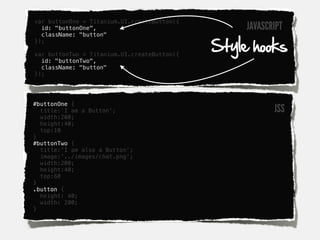
var buttonOne = Titanium.UI.createButton({
  id: "buttonOne",                                JAVASCRIPT
  className: "button"

                                             Style hooks
});

var buttonTwo = Titanium.UI.createButton({
  id: "buttonTwo",
  className: "button"
});


#buttonOne {
  title:'I am a Button';                                 JSS
  width:200;
  height:40;
  top:10
}
#buttonTwo {
  title:'I am also a Button';
  image:'../images/chat.png';
  width:200;
  height:40;
  top:60
}
.button {
  height: 40;
  width: 200;
}
JSS

There's a better way to write CSS.
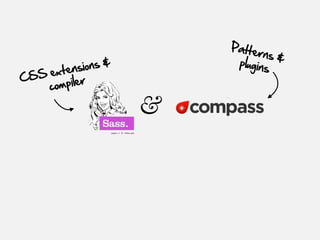
Patte
                                  rns &
             io n s &        plugins
  SS e xtens
C
     co mpiler

                        &
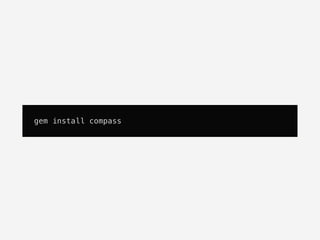
gem install compass
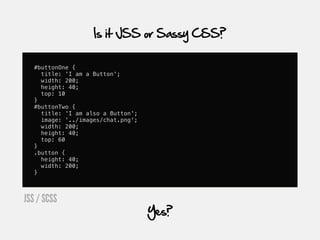
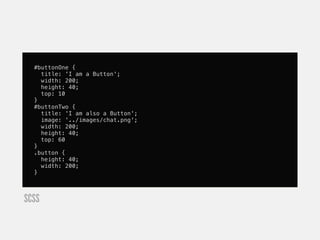
Is it JSS or Sassy CSS?

   #buttonOne {
     title: 'I am a Button';
     width: 200;
     height: 40;
     top: 10
   }
   #buttonTwo {
     title: 'I am also a Button';
     image: '../images/chat.png';
     width: 200;
     height: 40;
     top: 60
   }
   .button {
     height: 40;
     width: 200;
   }


JSS / SCSS
                                    Yes?
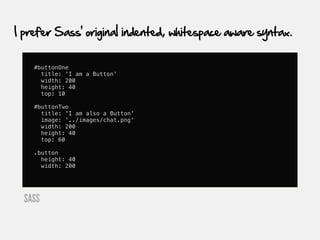
I prefer Sass' original indented, whitespace aware syntax.


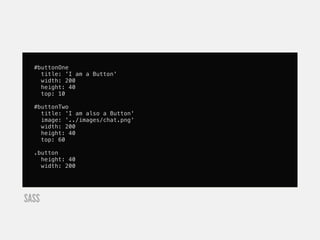
    #buttonOne
      title: 'I am a Button'
      width: 200
      height: 40
      top: 10

    #buttonTwo
      title: 'I am also a Button'
      image: '../images/chat.png'
      width: 200
      height: 40
      top: 60

    .button
      height: 40
      width: 200


  SASS
Which do you prefer?
#buttonOne {
    title: 'I am a Button';
    width: 200;
    height: 40;
    top: 10
  }
  #buttonTwo {
    title: 'I am also a Button';
    image: '../images/chat.png';
    width: 200;
    height: 40;
    top: 60
  }
  .button {
    height: 40;
    width: 200;
  }


SCSS
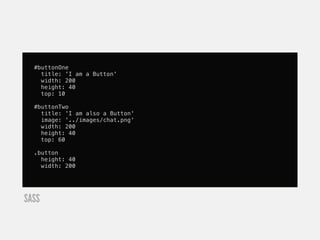
#buttonOne
    title: 'I am a Button'
    width: 200
    height: 40
    top: 10

  #buttonTwo
    title: 'I am also a Button'
    image: '../images/chat.png'
    width: 200
    height: 40
    top: 60

  .button
    height: 40
    width: 200


SASS
Pick one. Or not. Mix and match.
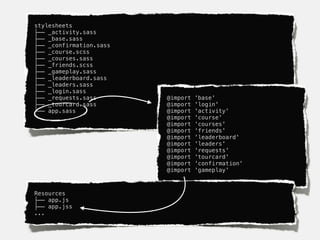
Organize with partials.
stylesheets
├── _activity.sass
├── _base.sass
├── _confirmation.sass
├── _course.scss
├── _courses.sass
├── _friends.scss
├── _gameplay.sass
├── _leaderboard.sass
├── _leaders.sass
├── _login.sass
├── _requests.sass       @import   'base'
├── _tourcard.sass       @import   'login'
└── app.sass             @import   'activity'
                         @import   'course'
                         @import   'courses'
                         @import   'friends'
                         @import   'leaderboard'
                         @import   'leaders'
                         @import   'requests'
                         @import   'tourcard'
                         @import   'confirmation'
                         @import   'gameplay'


Resources
├── app.js
├── app.jss
...
stylesheets

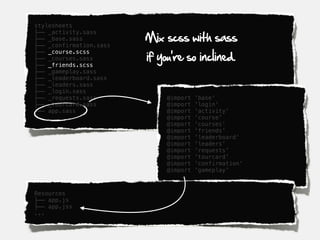
                         Mix scss with sass
├── _activity.sass
├── _base.sass
├── _confirmation.sass

                         if you're so inclined.
├── _course.scss
├── _courses.sass
├── _friends.scss
├── _gameplay.sass
├── _leaderboard.sass
├── _leaders.sass
├── _login.sass
├── _requests.sass            @import   'base'
├── _tourcard.sass            @import   'login'
└── app.sass                  @import   'activity'
                              @import   'course'
                              @import   'courses'
                              @import   'friends'
                              @import   'leaderboard'
                              @import   'leaders'
                              @import   'requests'
                              @import   'tourcard'
                              @import   'confirmation'
                              @import   'gameplay'


Resources
├── app.js
├── app.jss
...
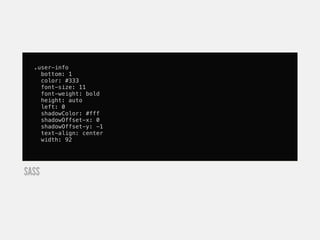
Don't Repeat Yourself
.user-info
    bottom: 1
    color: #333
    font-size: 11
    font-weight: bold
    height: auto
    left: 0
    shadowColor: #fff
    shadowOffset-x: 0
    shadowOffset-y: -1
    text-align: center
    width: 92


SASS
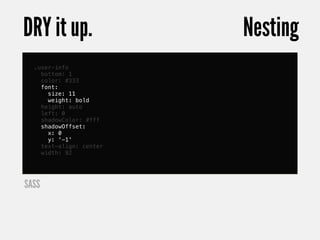
DRY it up.               Nesting
  .user-info
    bottom: 1
    color: #333
    font:
      size: 11
      weight: bold
    height: auto
    left: 0
    shadowColor: #fff
    shadowOffset:
      x: 0
      y: '-1'
    text-align: center
    width: 92


SASS
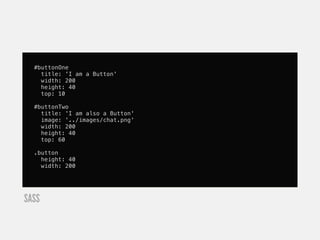
#buttonOne
    title: 'I am a Button'
    width: 200
    height: 40
    top: 10

  #buttonTwo
    title: 'I am also a Button'
    image: '../images/chat.png'
    width: 200
    height: 40
    top: 60

  .button
    height: 40
    width: 200


SASS
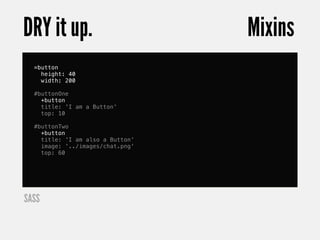
DRY it up.                        Mixins
  =button
    height: 40
    width: 200

  #buttonOne
    +button
    title: 'I am a Button'
    top: 10

  #buttonTwo
    +button
    title: 'I am also a Button'
    image: '../images/chat.png'
    top: 60


SASS
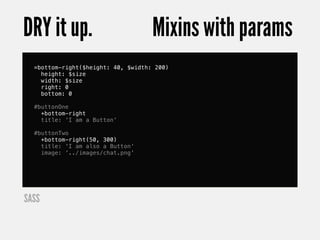
DRY it up.                          Mixins with params
  =bottom-right($height: 40, $width: 200)
    height: $size
    width: $size
    right: 0
    bottom: 0

  #buttonOne
    +bottom-right
    title: 'I am a Button'

  #buttonTwo
    +bottom-right(50, 300)
    title: 'I am also a Button'
    image: '../images/chat.png'


SASS
#buttonOne
    title: 'I am a Button'
    width: 200
    height: 40
    top: 10

  #buttonTwo
    title: 'I am also a Button'
    image: '../images/chat.png'
    width: 200
    height: 40
    top: 60

  .button
    height: 40
    width: 200


SASS
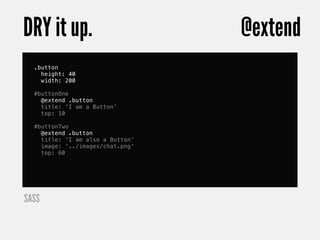
DRY it up.                        @extend
  .button
    height: 40
    width: 200

  #buttonOne
    @extend .button
    title: 'I am a Button'
    top: 10

  #buttonTwo
    @extend .button
    title: 'I am also a Button'
    image: '../images/chat.png'
    top: 60


SASS
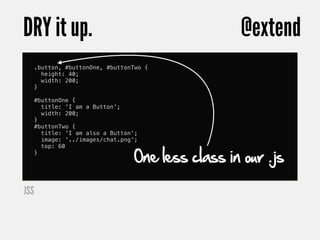
DRY it up.                                          @extend
      .button, #buttonOne, #buttonTwo {
        height: 40;
        width: 200;
      }

      #buttonOne {
        title: 'I am a Button';
        width: 200;
      }
      #buttonTwo {
        title: 'I am also a Button';
        image: '../images/chat.png';


                                   One less class in our .js
        top: 60
      }


JSS
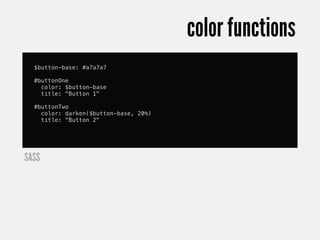
Craft themes with color functions.
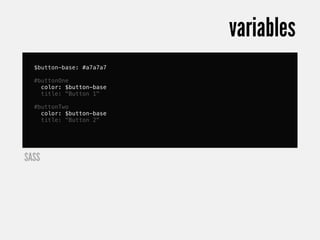
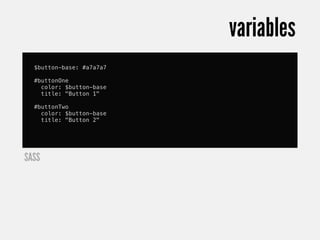
variables
  $button-base: #a7a7a7

  #buttonOne
    color: $button-base
    title: "Button 1"

  #buttonTwo
    color: $button-base
    title: "Button 2"


SASS
variables
  $button-base: #a7a7a7

  #buttonOne
    color: $button-base
    title: "Button 1"

  #buttonTwo
    color: $button-base
    title: "Button 2"


SASS
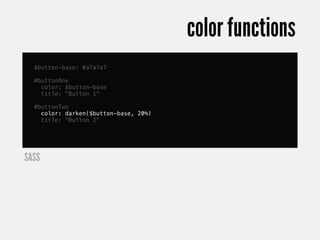
color functions
  $button-base: #a7a7a7

  #buttonOne
    color: $button-base
    title: "Button 1"

  #buttonTwo
    color: darken($button-base, 20%)
    title: "Button 2"


SASS
color functions
  $button-base: #a7a7a7

  #buttonOne
    color: $button-base
    title: "Button 1"

  #buttonTwo
    color: darken($button-base, 20%)
    title: "Button 2"


SASS
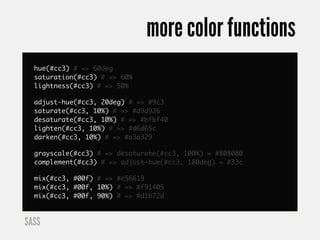
more color functions
  hue(#cc3) # => 60deg
  saturation(#cc3) # => 60%
  lightness(#cc3) # => 50%

  adjust-hue(#cc3, 20deg) # => #9c3
  saturate(#cc3, 10%) # => #d9d926
  desaturate(#cc3, 10%) # => #bfbf40
  lighten(#cc3, 10%) # => #d6d65c
  darken(#cc3, 10%) # => #a3a329

  grayscale(#cc3) # => desaturate(#cc3, 100%) = #808080
  complement(#cc3) # => adjust-hue(#cc3, 180deg) = #33c

  mix(#cc3, #00f) # => #e56619
  mix(#cc3, #00f, 10%) # => #f91405
  mix(#cc3, #00f, 90%) # => #d1b72d


SASS
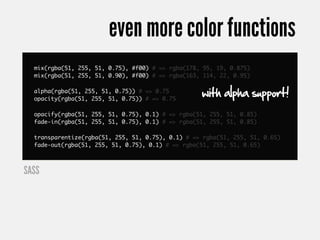
even more color functions
  mix(rgba(51, 255, 51, 0.75), #f00) # => rgba(178, 95, 19, 0.875)
  mix(rgba(51, 255, 51, 0.90), #f00) # => rgba(163, 114, 22, 0.95)

  alpha(rgba(51, 255, 51, 0.75)) # => 0.75
  opacity(rgba(51, 255, 51, 0.75)) # => 0.75
                                                   with alpha support!
  opacify(rgba(51, 255, 51, 0.75), 0.1) # => rgba(51, 255, 51, 0.85)
  fade-in(rgba(51, 255, 51, 0.75), 0.1) # => rgba(51, 255, 51, 0.85)

  transparentize(rgba(51, 255, 51, 0.75), 0.1) # => rgba(51, 255, 51, 0.65)
  fade-out(rgba(51, 255, 51, 0.75), 0.1) # => rgba(51, 255, 51, 0.65)


SASS
Building a hybrid native+web app?
Share your stylesheet variables!
No more vendor namespaces.
Selector inheritance.
URL helpers.
So much more.
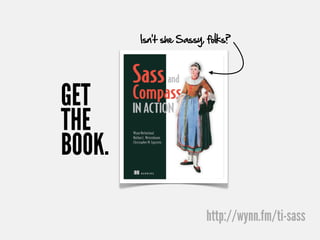
I could write a book.
Oh wait. We did!
Isn’t she Sassy, folks?


GET
THE
BOOK.

                        http://wynn.fm/ti-sass
Save 40% and get early access!


           sass40

Sadly, sass100 is not a valid code.


                             http://wynn.fm/ti-sass
Patterns
Web languages. Native apps.
Stateful.
Event driven.
MVC?
Views...
... are really ViewControllers.
So we create View factories...
... and Model factories ...
...and factories that make miniature
                 models of factories.
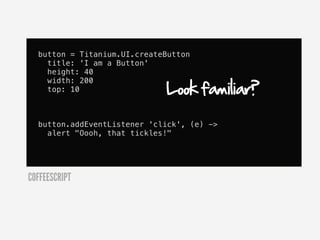
The Titanium WayTM
button = Titanium.UI.createButton
    title: 'I am a Button'
    height: 40

                             Look familiar?
    width: 200
    top: 10


  button.addEventListener 'click', (e) ->
    alert "Oooh, that tickles!"


COFFEESCRIPT
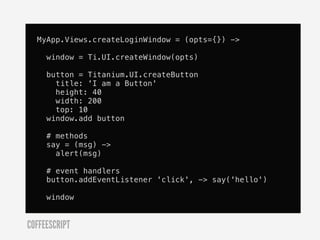
So how do you manufacture your own views?
Compose from other views.
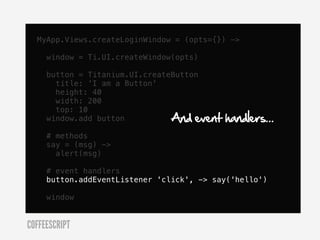
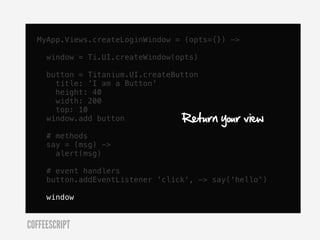
MyApp.Views.createLoginWindow = (opts={}) ->

     window = Ti.UI.createWindow(opts)

     button = Titanium.UI.createButton
       title: 'I am a Button'
       height: 40
       width: 200
       top: 10
     window.add button

     # methods
     say = (msg) ->
       alert(msg)

     # event handlers
     button.addEventListener 'click', -> say('hello')

     window


COFFEESCRIPT
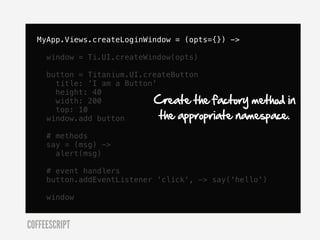
MyApp.Views.createLoginWindow = (opts={}) ->

     window = Ti.UI.createWindow(opts)

     button = Titanium.UI.createButton
       title: 'I am a Button'
       height: 40
       width: 200           Create the factory method in
                              the appropriate namespace.
       top: 10
     window.add button

     # methods
     say = (msg) ->
       alert(msg)

     # event handlers
     button.addEventListener 'click', -> say('hello')

     window


COFFEESCRIPT
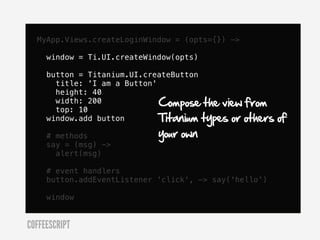
MyApp.Views.createLoginWindow = (opts={}) ->

     window = Ti.UI.createWindow(opts)

     button = Titanium.UI.createButton
       title: 'I am a Button'
       height: 40
       width: 200             Compose the view from
       top: 10
     window.add button        Titanium types or others   of
     # methods               your own
     say = (msg) ->
       alert(msg)

     # event handlers
     button.addEventListener 'click', -> say('hello')

     window


COFFEESCRIPT
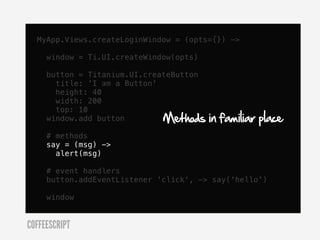
MyApp.Views.createLoginWindow = (opts={}) ->

     window = Ti.UI.createWindow(opts)

     button = Titanium.UI.createButton
       title: 'I am a Button'
       height: 40
       width: 200
       top: 10
     window.add button        Methods    in familiar place
     # methods
     say = (msg) ->
       alert(msg)

     # event handlers
     button.addEventListener 'click', -> say('hello')

     window


COFFEESCRIPT
MyApp.Views.createLoginWindow = (opts={}) ->

     window = Ti.UI.createWindow(opts)

     button = Titanium.UI.createButton
       title: 'I am a Button'
       height: 40
       width: 200
       top: 10
     window.add button          And event   handlers...
     # methods
     say = (msg) ->
       alert(msg)

     # event handlers
     button.addEventListener 'click', -> say('hello')

     window


COFFEESCRIPT
MyApp.Views.createLoginWindow = (opts={}) ->

     window = Ti.UI.createWindow(opts)

     button = Titanium.UI.createButton
       title: 'I am a Button'
       height: 40
       width: 200
       top: 10
     window.add button            Return   your view
     # methods
     say = (msg) ->
       alert(msg)

     # event handlers
     button.addEventListener 'click', -> say('hello')

     window


COFFEESCRIPT
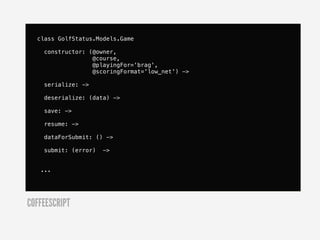
Models
CoffeeScript classes
class GolfStatus.Models.Game

    constructor: (@owner,
                  @course,
                  @playingFor='brag',
                  @scoringFormat='low_net') ->

    serialize: ->

    deserialize: (data) ->

    save: ->

    resume: ->

    dataForSubmit: () ->

    submit: (error)   ->


   ...


COFFEESCRIPT
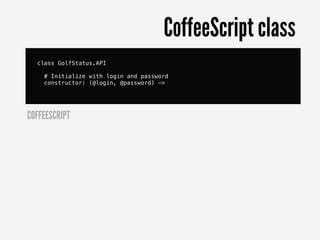
API Wrappers
CoffeeScript class
  class GolfStatus.API

    # Initialize with login and password
    constructor: (@login, @password) ->


COFFEESCRIPT
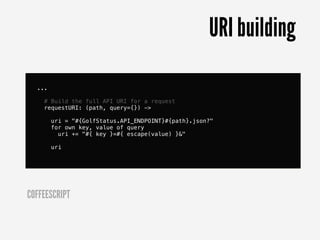
URI building

  ...

    # Build the full API URI for a request
    requestURI: (path, query={}) ->

        uri = "#{GolfStatus.API_ENDPOINT}#{path}.json?"
        for own key, value of query
          uri += "#{ key }=#{ escape(value) }&"

        uri


COFFEESCRIPT
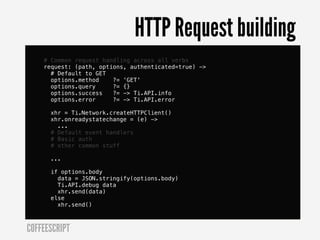
HTTP Request building
    # Common request handling across all verbs
    request: (path, options, authenticated=true) ->
      # Default to GET
      options.method    ?= 'GET'
      options.query     ?= {}
      options.success   ?= -> Ti.API.info
      options.error     ?= -> Ti.API.error

      xhr = Ti.Network.createHTTPClient()
      xhr.onreadystatechange = (e) ->
        ...
      # Default event handlers
      # Basic auth
      # other common stuff

      ...

      if options.body
        data = JSON.stringify(options.body)
        Ti.API.debug data
        xhr.send(data)
      else
        xhr.send()


COFFEESCRIPT
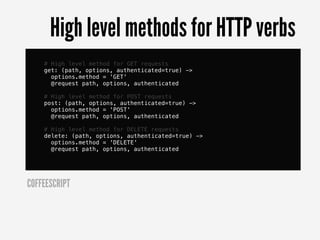
High level methods for HTTP verbs
    # High level method for GET requests
    get: (path, options, authenticated=true) ->
      options.method = 'GET'
      @request path, options, authenticated

    # High level method for POST requests
    post: (path, options, authenticated=true) ->
      options.method = 'POST'
      @request path, options, authenticated

    # High level method for DELETE requests
    delete: (path, options, authenticated=true) ->
      options.method = 'DELETE'
      @request path, options, authenticated


COFFEESCRIPT
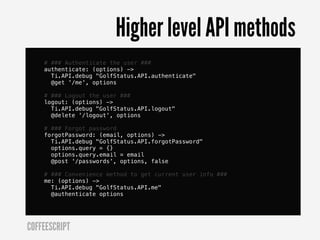
Higher level API methods
    # ### Authenticate the user ###
    authenticate: (options) ->
      Ti.API.debug "GolfStatus.API.authenticate"
      @get '/me', options

    # ### Logout the user ###
    logout: (options) ->
      Ti.API.debug "GolfStatus.API.logout"
      @delete '/logout', options

    # ### Forgot password
    forgotPassword: (email, options) ->
      Ti.API.debug "GolfStatus.API.forgotPassword"
      options.query = {}
      options.query.email = email
      @post '/passwords', options, false

    # ### Convenience method to get current user info ###
    me: (options) ->
      Ti.API.debug "GolfStatus.API.me"
      @authenticate options


COFFEESCRIPT
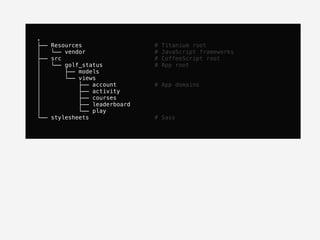
Folder structure
.
├──   Resources                 #   Titanium root
│     └── vendor                #   JavaScript frameworks
├──   src                       #   CoffeeScript root
│     └── golf_status           #   App root
│         ├── models
│         └── views
│             ├── account       # App domains
│             ├── activity
│             ├── courses
│             ├── leaderboard
│             └── play
└──   stylesheets               # Sass
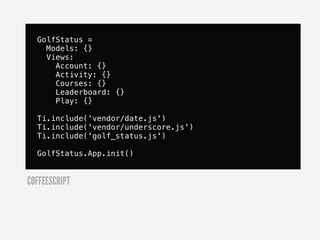
Stitching it all together
app.js
GolfStatus =
    Models: {}
    Views:
      Account: {}
      Activity: {}
      Courses: {}
      Leaderboard: {}
      Play: {}

  Ti.include('vendor/date.js')
  Ti.include('vendor/underscore.js')
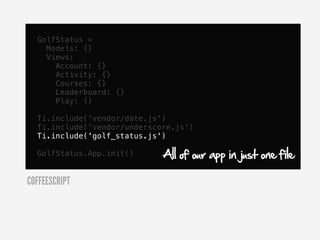
  Ti.include('golf_status.js')

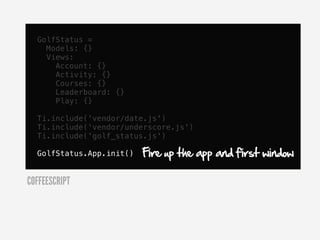
  GolfStatus.App.init()


COFFEESCRIPT
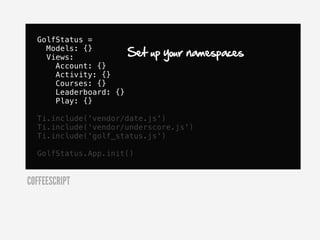
GolfStatus =
    Models: {}
    Views:              Set up your namespaces
      Account: {}
      Activity: {}
      Courses: {}
      Leaderboard: {}
      Play: {}

  Ti.include('vendor/date.js')
  Ti.include('vendor/underscore.js')
  Ti.include('golf_status.js')

  GolfStatus.App.init()


COFFEESCRIPT
GolfStatus =
    Models: {}
    Views:
      Account: {}
      Activity: {}
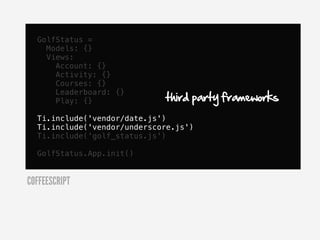
      Courses: {}

                             third party frameworks
      Leaderboard: {}
      Play: {}

  Ti.include('vendor/date.js')
  Ti.include('vendor/underscore.js')
  Ti.include('golf_status.js')

  GolfStatus.App.init()


COFFEESCRIPT
GolfStatus =
    Models: {}
    Views:
      Account: {}
      Activity: {}
      Courses: {}
      Leaderboard: {}
      Play: {}

  Ti.include('vendor/date.js')
  Ti.include('vendor/underscore.js')
  Ti.include('golf_status.js')

  GolfStatus.App.init()      All of our app in just one file

COFFEESCRIPT
GolfStatus =
    Models: {}
    Views:
      Account: {}
      Activity: {}
      Courses: {}
      Leaderboard: {}
      Play: {}

  Ti.include('vendor/date.js')
  Ti.include('vendor/underscore.js')
  Ti.include('golf_status.js')

  GolfStatus.App.init()   Fire up the app and first window

COFFEESCRIPT
Lean app.js makes for flexibility
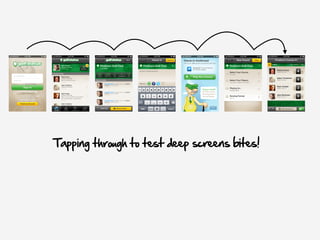
Tapping through to test deep screens bites!
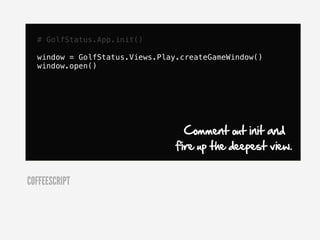
# GolfStatus.App.init()

  window = GolfStatus.Views.Play.createGameWindow()
  window.open()


                                  Comment out init and
                                fire up the deepest view.


COFFEESCRIPT
make
run-iphone:
&   @DEVICE_TYPE=iphone make run

test-iphone:
&   @DEVICE_TYPE=iphone make test

run-ipad:
&   @DEVICE_TYPE=ipad make run

test-ipad:
&   @DEVICE_TYPE=ipad make test

run:
&    @if [ "${DEVICE_TYPE}" == "" ]; then
&    &   echo "Please run "make run-[iphone|ipad]" instead.";
&    &   exit 1;
&    fi
&    @mkdir -p ${PROJECT_ROOT}/${PROJECT_NAME}/Resources/test/
&    @echo "" > ${PROJECT_ROOT}/${PROJECT_NAME}/Resources/test/enabled.js
&    @make launch-titanium


            guilhermechapiewski (Guilherme Chapiewski)

                                                   http://wynn.fm/g9
I'm a Rubyist, so I speak


        rake
Compile
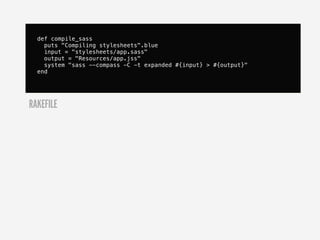
def compile_sass
    puts "Compiling stylesheets".blue
    input = "stylesheets/app.sass"
    output = "Resources/app.jss"
    system "sass --compass -C -t expanded #{input} > #{output}"
  end


RAKEFILE
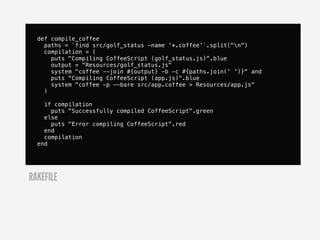
def compile_coffee
    paths = `find src/golf_status -name '*.coffee'`.split("n")
    compilation = (
      puts "Compiling CoffeeScript (golf_status.js)".blue
      output = "Resources/golf_status.js"
      system "coffee --join #{output} -b -c #{paths.join(' ')}" and
      puts "Compiling CoffeeScript (app.js)".blue
      system "coffee -p --bare src/app.coffee > Resources/app.js"
    )

    if compilation
      puts "Successfully compiled CoffeeScript".green
    else
      puts "Error compiling CoffeeScript".red
    end
    compilation
  end


RAKEFILE
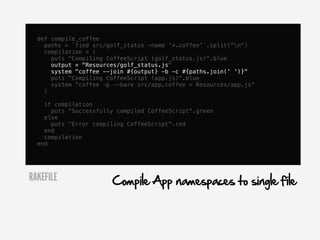
def compile_coffee
    paths = `find src/golf_status -name '*.coffee'`.split("n")
    compilation = (
      puts "Compiling CoffeeScript (golf_status.js)".blue
      output = "Resources/golf_status.js"
      system "coffee --join #{output} -b -c #{paths.join(' ')}"
      puts "Compiling CoffeeScript (app.js)".blue
      system "coffee -p --bare src/app.coffee > Resources/app.js"
    )

    if compilation
      puts "Successfully compiled CoffeeScript".green
    else
      puts "Error compiling CoffeeScript".red
    end
    compilation
  end


RAKEFILE               Compile App namespaces to single file
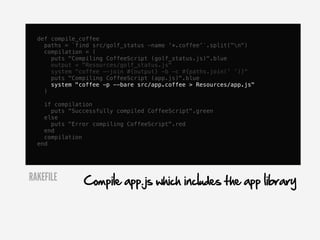
def compile_coffee
    paths = `find src/golf_status -name '*.coffee'`.split("n")
    compilation = (
      puts "Compiling CoffeeScript (golf_status.js)".blue
      output = "Resources/golf_status.js"
      system "coffee --join #{output} -b -c #{paths.join(' ')}"
      puts "Compiling CoffeeScript (app.js)".blue
      system "coffee -p --bare src/app.coffee > Resources/app.js"
    )

    if compilation
      puts "Successfully compiled CoffeeScript".green
    else
      puts "Error compiling CoffeeScript".red
    end
    compilation
  end


RAKEFILE       Compile app.js which includes the app library
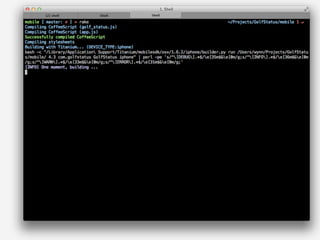
Build
def build(options={})
    return unless compile
    options[:device] ||= 'iphone'
    puts "Building with Titanium...
  (DEVICE_TYPE:#{options[:device]})".blue
    sh %Q{bash -c "#{TI_BUILD} run #{PROJECT_ROOT}/ #{IPHONE_SDK_VERSION}
  #{APP_ID} #{APP_NAME} #{APP_DEVICE}" 
  | perl -pe 's/^[DEBUG].*$/e[35m$&e[0m/g;s/^[INFO].*$/e[36m
  $&e[0m/g;s/^[WARN].*$/e[33m$&e[0m/g;s/^[ERROR].*$/e[31m
  $&e[0m/g;'}

  end


RAKEFILE
def build(options={})
    return unless compile
    options[:device] ||= 'iphone'
    puts "Building with Titanium...
  (DEVICE_TYPE:#{options[:device]})".blue
    sh %Q{bash -c "#{TI_BUILD} run #{PROJECT_ROOT}/ #{IPHONE_SDK_VERSION}
  #{APP_ID} #{APP_NAME} #{APP_DEVICE}" 
  | perl -pe 's/^[DEBUG].*$/e[35m$&e[0m/g;s/^[INFO].*$/e[36m
  $&e[0m/g;s/^[WARN].*$/e[33m$&e[0m/g;s/^[ERROR].*$/e[31m
  $&e[0m/g;'}

  end


RAKEFILE             Build with Titanium Python command line
def build(options={})
    return unless compile
    options[:device] ||= 'iphone'
    puts "Building with Titanium...
  (DEVICE_TYPE:#{options[:device]})".blue
    sh %Q{bash -c "#{TI_BUILD} run #{PROJECT_ROOT}/ #{IPHONE_SDK_VERSION}
  #{APP_ID} #{APP_NAME} #{APP_DEVICE}" 
  | perl -pe 's/^[DEBUG].*$/e[35m$&e[0m/g;s/^[INFO].*$/e[36m
  $&e[0m/g;s/^[WARN].*$/e[33m$&e[0m/g;s/^[ERROR].*$/e[31m
  $&e[0m/g;'}

  end


        Pipe to PERL for some colored terminal goodness

RAKEFILE
Choose what works for you.
JavaScript Frameworks
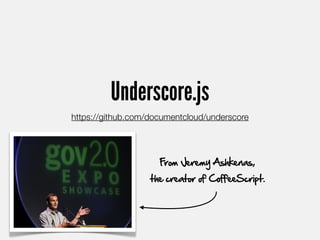
Underscore.js
https://github.com/documentcloud/underscore


                     From Jeremy Ashkenas,
                   the creator of CoffeeScript.
Don't Repeat Yourself Not Repeating Yourself
Ti GEM
Automating these patterns. A work in progress.
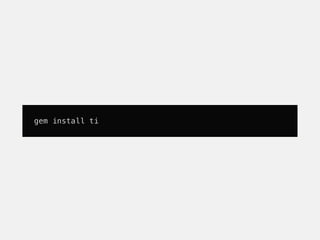
gem install ti
Generate.
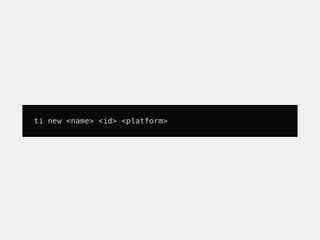
ti new <name> <id> <platform>
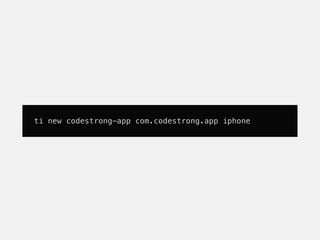
ti new codestrong-app com.codestrong.app iphone
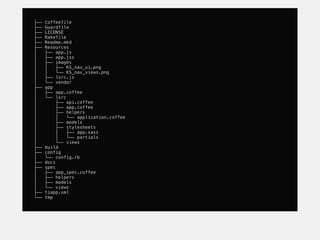
├──   Coffeefile
├──   Guardfile
├──   LICENSE
├──   Rakefile
├──   Readme.mkd
├──   Resources
│     ├── app.js
│     ├── app.jss
│     ├── images
│     │   ├── KS_nav_ui.png
│     │   └── KS_nav_views.png
│     ├── lsrc.js
│     └── vendor
├──   app
│     ├── app.coffee
│     └── lsrc
│          ├── api.coffee
│          ├── app.coffee
│          ├── helpers
│          │   └── application.coffee
│          ├── models
│          ├── stylesheets
│          │   ├── app.sass
│          │   └── partials
│          └── views
├──   build
├──   config
│     └── config.rb
├──   docs
├──   spec
│     ├── app_spec.coffee
│     ├── helpers
│     ├── models
│     └── views
├──   tiapp.xml
└──   tmp
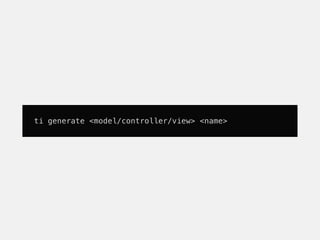
ti generate <model/controller/view> <name>
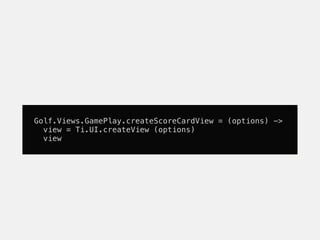
Golf.Views.GamePlay.createScoreCardView = (options) ->
  view = Ti.UI.createView (options)
  view
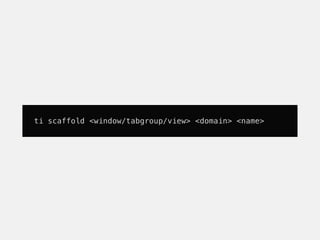
ti scaffold <window/tabgroup/view> <domain> <name>
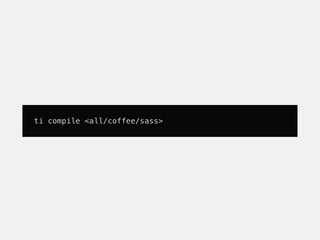
Compile.
ti compile <all/coffee/sass>
Build.
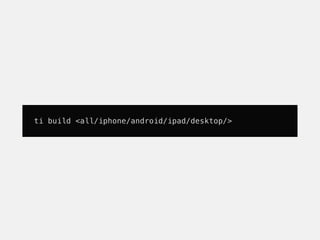
ti build <all/iphone/android/ipad/desktop/>
Ti GEM

@revans               @baldrailers

            @rupakg
Get involved!
We've got BIG ideas.
Testing.
Jasmine
Jasmine
https://github.com/akahigeg/jasmine-titanium
XIB
xib2js
https://github.com/daoki2/xib2js
js2coffee
http://ricostacruz.com/js2coffee/
QUESTIONS?


http://spkr8.com/t/8342

Wynn Netherland: Accelerating Titanium Development with CoffeeScript, Compass, and Sass

  • 1.
    TITANIUM DEVELOPMENT WITH Accelerated COFFEESCRIPT, COMPASS, AND SASS WYNNNETHERLAND
  • 2.
  • 3.
  • 5.
  • 6.
  • 7.
    PIXELS I'VE PUSHED Withsome very talented folks.
  • 10.
    Play golf? Find thisdude and get in on the beta.!
  • 14.
  • 17.
  • 18.
  • 19.
    It's still justJavaScript.
  • 20.
    var foo =function () { foo = () -> } JAVASCRIPT COFFEESCRIPT I’d rather write this.
  • 21.
    var button =Titanium.UI.createButton({ title: 'I am a Button', height: 40, width: 200, top: 10 }); button.addEventListener('click', function(e) { alert("Oooh, that tickles!"); }); JAVASCRIPT
  • 22.
    button = Titanium.UI.createButton title: 'I am a Button' height: 40 width: 200 top: 10 button.addEventListener 'click', (e) -> alert "Oooh, that tickles!" COFFEESCRIPT
  • 23.
    For me, It's aboutmore than aesthetics ; {}
  • 24.
    Some of myfavorite features...
  • 25.
    for own key,value of query uri += "#{ key }=#{ escape(value) }&" COFFEESCRIPT var key, value; var __hasProp = Object.prototype.hasOwnProperty; for (key in query) { if (!__hasProp.call(query, key)) continue; value = query[key]; uri += "" + key + "=" + (escape(value)) + "&"; } JAVASCRIPT
  • 26.
    Comprehensions forown key, value of query uri += "#{ key }=#{ escape(value) }&" COFFEESCRIPT
  • 27.
    Interpolation forown key, value of query uri += "#{ key }=#{ escape(value) }&" COFFEESCRIPT
  • 28.
    The Existential Operator courseButtonSubhead = Ti.UI.createLabel className: 'optRowSubhead' text: "#{GolfStatus.App.currentGame?.green?.name}" COFFEESCRIPT
  • 29.
    Simple inheritance pattern class GolfStatus.Models.Game constructor: (@owner, @course, @playingFor='brag', @scoringFormat='low_net') -> @players = {} @addPlayer @owner if @owner @green = @course.greens[0] if @course @currentHole = 1 @maxHolePlayed = 1 # elsewhere game = new GolfStatus.Models.Game(...) COFFEESCRIPT
  • 30.
    @ classGolfStatus.Models.Game constructor: (@owner, @course, @playingFor='brag', @scoringFormat='low_net') -> @players = {} @addPlayer @owner if @owner @green = @course.greens[0] if @course @currentHole = 1 @maxHolePlayed = 1 COFFEESCRIPT
  • 31.
    Default values class GolfStatus.Models.Game constructor: (@owner, @course, @playingFor='brag', @scoringFormat='low_net') -> @players = {} @addPlayer @owner if @owner @green = @course.greens[0] if @course @currentHole = 1 @maxHolePlayed = 1 COFFEESCRIPT
  • 32.
    More human conditionals class GolfStatus.Models.Game constructor: (@owner, @course, @playingFor='brag', @scoringFormat='low_net') -> @players = {} @addPlayer @owner if @owner @green = @course.greens[0] if @course @currentHole = 1 @maxHolePlayed = 1 COFFEESCRIPT
  • 33.
    Easy object.prototype GolfStatus.Models.Game::PlayingForTypes = brag: 'Bragging Rights' cash: 'Status Cash' GolfStatus.Models.Game::ScoringFormats = low_net: 'Low Net' low_grows: 'Low Gross' COFFEESCRIPT
  • 34.
    Heredocs noticeHTML =''' <html> <head></head> <body> ''' noticeHTML += "<div>#{noticeText}</div>" noticeHTML += ''' </body> </html> ''' COFFEESCRIPT
  • 35.
  • 36.
  • 37.
  • 38.
    GET THE BOOK. http://wynn.fm/g8
  • 39.
  • 40.
  • 41.
  • 42.
    Why do wehave CSS?
  • 43.
    <ul class='wynning'> <li class='logo-mark'> <a href='/about'>Wynn Netherland</a> on design, development, and general geekery. </li> <li> <a class='gowalla' href='http://gowalla.com/pengwynn'>Gowalla</a> </li> <li> <a class='facebook' href='http://facebook.com/pengwynn'>Facebook</a> content </li> <li> <a class='dribbble' href='http://dribbble.com/pengwynn'>Dribbble</a> </li> <li> <a class='linked-in' href='http://linkedin.com/in/netherland'>LinkedIn</a> </li> <li> <a class='github' href='http://github.com/pengwynn'>GitHub</a> </li> <li> <a class='twitter' href='http://twitter.com/pengwynn'>Twitter</a> </li> ... You gotta keep 'em separated. ✂ presentation
  • 44.
    A example
  • 45.
    var buttonOne =Titanium.UI.createButton({ title:'I am a Button', height:40, width:200, top:10 }); var buttonTwo = Titanium.UI.createButton({ title:'I am also a Button', image:'../images/chat.png', width:200, height:40, top:60 }); JAVASCRIPT
  • 46.
    var buttonOne =Titanium.UI.createButton({ title:'I am a Button', height:40, width:200, Presentation top:10 }); var buttonTwo = Titanium.UI.createButton({ title:'I am also a Button', image:'../images/chat.png', width:200, height:40, top:60 }); JAVASCRIPT
  • 47.
    var buttonOne =Titanium.UI.createButton({ id: "buttonOne", JAVASCRIPT Behavior and composition in className: "button" }); var buttonTwo = Titanium.UI.createButton({ id: "buttonTwo", className: "button" }); .js #buttonOne { title:'I am a Button'; JSS width:200; height:40; top:10 } #buttonTwo { Presentation in title:'I am also a Button'; image:'../images/chat.png'; width:200; height:40; .jss top:60 } .button { height: 40; width: 200; }
  • 48.
    var buttonOne =Titanium.UI.createButton({ id: "buttonOne", JAVASCRIPT className: "button" Style hooks }); var buttonTwo = Titanium.UI.createButton({ id: "buttonTwo", className: "button" }); #buttonOne { title:'I am a Button'; JSS width:200; height:40; top:10 } #buttonTwo { title:'I am also a Button'; image:'../images/chat.png'; width:200; height:40; top:60 } .button { height: 40; width: 200; }
  • 49.
    JSS There's a betterway to write CSS.
  • 50.
    Patte rns & io n s & plugins SS e xtens C co mpiler &
  • 51.
  • 52.
    Is it JSSor Sassy CSS? #buttonOne { title: 'I am a Button'; width: 200; height: 40; top: 10 } #buttonTwo { title: 'I am also a Button'; image: '../images/chat.png'; width: 200; height: 40; top: 60 } .button { height: 40; width: 200; } JSS / SCSS Yes?
  • 53.
    I prefer Sass'original indented, whitespace aware syntax. #buttonOne title: 'I am a Button' width: 200 height: 40 top: 10 #buttonTwo title: 'I am also a Button' image: '../images/chat.png' width: 200 height: 40 top: 60 .button height: 40 width: 200 SASS
  • 54.
    Which do youprefer?
  • 55.
    #buttonOne { title: 'I am a Button'; width: 200; height: 40; top: 10 } #buttonTwo { title: 'I am also a Button'; image: '../images/chat.png'; width: 200; height: 40; top: 60 } .button { height: 40; width: 200; } SCSS
  • 56.
    #buttonOne title: 'I am a Button' width: 200 height: 40 top: 10 #buttonTwo title: 'I am also a Button' image: '../images/chat.png' width: 200 height: 40 top: 60 .button height: 40 width: 200 SASS
  • 57.
    Pick one. Ornot. Mix and match.
  • 58.
  • 59.
    stylesheets ├── _activity.sass ├── _base.sass ├──_confirmation.sass ├── _course.scss ├── _courses.sass ├── _friends.scss ├── _gameplay.sass ├── _leaderboard.sass ├── _leaders.sass ├── _login.sass ├── _requests.sass @import 'base' ├── _tourcard.sass @import 'login' └── app.sass @import 'activity' @import 'course' @import 'courses' @import 'friends' @import 'leaderboard' @import 'leaders' @import 'requests' @import 'tourcard' @import 'confirmation' @import 'gameplay' Resources ├── app.js ├── app.jss ...
  • 60.
    stylesheets Mix scss with sass ├── _activity.sass ├── _base.sass ├── _confirmation.sass if you're so inclined. ├── _course.scss ├── _courses.sass ├── _friends.scss ├── _gameplay.sass ├── _leaderboard.sass ├── _leaders.sass ├── _login.sass ├── _requests.sass @import 'base' ├── _tourcard.sass @import 'login' └── app.sass @import 'activity' @import 'course' @import 'courses' @import 'friends' @import 'leaderboard' @import 'leaders' @import 'requests' @import 'tourcard' @import 'confirmation' @import 'gameplay' Resources ├── app.js ├── app.jss ...
  • 61.
  • 62.
    .user-info bottom: 1 color: #333 font-size: 11 font-weight: bold height: auto left: 0 shadowColor: #fff shadowOffset-x: 0 shadowOffset-y: -1 text-align: center width: 92 SASS
  • 63.
    DRY it up. Nesting .user-info bottom: 1 color: #333 font: size: 11 weight: bold height: auto left: 0 shadowColor: #fff shadowOffset: x: 0 y: '-1' text-align: center width: 92 SASS
  • 64.
    #buttonOne title: 'I am a Button' width: 200 height: 40 top: 10 #buttonTwo title: 'I am also a Button' image: '../images/chat.png' width: 200 height: 40 top: 60 .button height: 40 width: 200 SASS
  • 65.
    DRY it up. Mixins =button height: 40 width: 200 #buttonOne +button title: 'I am a Button' top: 10 #buttonTwo +button title: 'I am also a Button' image: '../images/chat.png' top: 60 SASS
  • 66.
    DRY it up. Mixins with params =bottom-right($height: 40, $width: 200) height: $size width: $size right: 0 bottom: 0 #buttonOne +bottom-right title: 'I am a Button' #buttonTwo +bottom-right(50, 300) title: 'I am also a Button' image: '../images/chat.png' SASS
  • 67.
    #buttonOne title: 'I am a Button' width: 200 height: 40 top: 10 #buttonTwo title: 'I am also a Button' image: '../images/chat.png' width: 200 height: 40 top: 60 .button height: 40 width: 200 SASS
  • 68.
    DRY it up. @extend .button height: 40 width: 200 #buttonOne @extend .button title: 'I am a Button' top: 10 #buttonTwo @extend .button title: 'I am also a Button' image: '../images/chat.png' top: 60 SASS
  • 69.
    DRY it up. @extend .button, #buttonOne, #buttonTwo { height: 40; width: 200; } #buttonOne { title: 'I am a Button'; width: 200; } #buttonTwo { title: 'I am also a Button'; image: '../images/chat.png'; One less class in our .js top: 60 } JSS
  • 70.
    Craft themes withcolor functions.
  • 71.
    variables $button-base:#a7a7a7 #buttonOne color: $button-base title: "Button 1" #buttonTwo color: $button-base title: "Button 2" SASS
  • 72.
    variables $button-base:#a7a7a7 #buttonOne color: $button-base title: "Button 1" #buttonTwo color: $button-base title: "Button 2" SASS
  • 73.
    color functions $button-base: #a7a7a7 #buttonOne color: $button-base title: "Button 1" #buttonTwo color: darken($button-base, 20%) title: "Button 2" SASS
  • 74.
    color functions $button-base: #a7a7a7 #buttonOne color: $button-base title: "Button 1" #buttonTwo color: darken($button-base, 20%) title: "Button 2" SASS
  • 75.
    more color functions hue(#cc3) # => 60deg saturation(#cc3) # => 60% lightness(#cc3) # => 50% adjust-hue(#cc3, 20deg) # => #9c3 saturate(#cc3, 10%) # => #d9d926 desaturate(#cc3, 10%) # => #bfbf40 lighten(#cc3, 10%) # => #d6d65c darken(#cc3, 10%) # => #a3a329 grayscale(#cc3) # => desaturate(#cc3, 100%) = #808080 complement(#cc3) # => adjust-hue(#cc3, 180deg) = #33c mix(#cc3, #00f) # => #e56619 mix(#cc3, #00f, 10%) # => #f91405 mix(#cc3, #00f, 90%) # => #d1b72d SASS
  • 76.
    even more colorfunctions mix(rgba(51, 255, 51, 0.75), #f00) # => rgba(178, 95, 19, 0.875) mix(rgba(51, 255, 51, 0.90), #f00) # => rgba(163, 114, 22, 0.95) alpha(rgba(51, 255, 51, 0.75)) # => 0.75 opacity(rgba(51, 255, 51, 0.75)) # => 0.75 with alpha support! opacify(rgba(51, 255, 51, 0.75), 0.1) # => rgba(51, 255, 51, 0.85) fade-in(rgba(51, 255, 51, 0.75), 0.1) # => rgba(51, 255, 51, 0.85) transparentize(rgba(51, 255, 51, 0.75), 0.1) # => rgba(51, 255, 51, 0.65) fade-out(rgba(51, 255, 51, 0.75), 0.1) # => rgba(51, 255, 51, 0.65) SASS
  • 77.
    Building a hybridnative+web app?
  • 78.
  • 79.
    No more vendornamespaces. Selector inheritance. URL helpers. So much more.
  • 80.
  • 81.
  • 82.
    Isn’t she Sassy,folks? GET THE BOOK. http://wynn.fm/ti-sass
  • 83.
    Save 40% andget early access! sass40 Sadly, sass100 is not a valid code. http://wynn.fm/ti-sass
  • 85.
  • 86.
  • 87.
  • 88.
  • 89.
  • 90.
  • 91.
    ... are reallyViewControllers.
  • 92.
    So we createView factories...
  • 93.
    ... and Modelfactories ...
  • 94.
    ...and factories thatmake miniature models of factories.
  • 95.
  • 96.
    button = Titanium.UI.createButton title: 'I am a Button' height: 40 Look familiar? width: 200 top: 10 button.addEventListener 'click', (e) -> alert "Oooh, that tickles!" COFFEESCRIPT
  • 97.
    So how doyou manufacture your own views?
  • 98.
  • 99.
    MyApp.Views.createLoginWindow = (opts={})-> window = Ti.UI.createWindow(opts) button = Titanium.UI.createButton title: 'I am a Button' height: 40 width: 200 top: 10 window.add button # methods say = (msg) -> alert(msg) # event handlers button.addEventListener 'click', -> say('hello') window COFFEESCRIPT
  • 100.
    MyApp.Views.createLoginWindow = (opts={})-> window = Ti.UI.createWindow(opts) button = Titanium.UI.createButton title: 'I am a Button' height: 40 width: 200 Create the factory method in the appropriate namespace. top: 10 window.add button # methods say = (msg) -> alert(msg) # event handlers button.addEventListener 'click', -> say('hello') window COFFEESCRIPT
  • 101.
    MyApp.Views.createLoginWindow = (opts={})-> window = Ti.UI.createWindow(opts) button = Titanium.UI.createButton title: 'I am a Button' height: 40 width: 200 Compose the view from top: 10 window.add button Titanium types or others of # methods your own say = (msg) -> alert(msg) # event handlers button.addEventListener 'click', -> say('hello') window COFFEESCRIPT
  • 102.
    MyApp.Views.createLoginWindow = (opts={})-> window = Ti.UI.createWindow(opts) button = Titanium.UI.createButton title: 'I am a Button' height: 40 width: 200 top: 10 window.add button Methods in familiar place # methods say = (msg) -> alert(msg) # event handlers button.addEventListener 'click', -> say('hello') window COFFEESCRIPT
  • 103.
    MyApp.Views.createLoginWindow = (opts={})-> window = Ti.UI.createWindow(opts) button = Titanium.UI.createButton title: 'I am a Button' height: 40 width: 200 top: 10 window.add button And event handlers... # methods say = (msg) -> alert(msg) # event handlers button.addEventListener 'click', -> say('hello') window COFFEESCRIPT
  • 104.
    MyApp.Views.createLoginWindow = (opts={})-> window = Ti.UI.createWindow(opts) button = Titanium.UI.createButton title: 'I am a Button' height: 40 width: 200 top: 10 window.add button Return your view # methods say = (msg) -> alert(msg) # event handlers button.addEventListener 'click', -> say('hello') window COFFEESCRIPT
  • 105.
  • 106.
  • 107.
    class GolfStatus.Models.Game constructor: (@owner, @course, @playingFor='brag', @scoringFormat='low_net') -> serialize: -> deserialize: (data) -> save: -> resume: -> dataForSubmit: () -> submit: (error) -> ... COFFEESCRIPT
  • 108.
  • 109.
    CoffeeScript class class GolfStatus.API # Initialize with login and password constructor: (@login, @password) -> COFFEESCRIPT
  • 110.
    URI building ... # Build the full API URI for a request requestURI: (path, query={}) -> uri = "#{GolfStatus.API_ENDPOINT}#{path}.json?" for own key, value of query uri += "#{ key }=#{ escape(value) }&" uri COFFEESCRIPT
  • 111.
    HTTP Request building # Common request handling across all verbs request: (path, options, authenticated=true) -> # Default to GET options.method ?= 'GET' options.query ?= {} options.success ?= -> Ti.API.info options.error ?= -> Ti.API.error xhr = Ti.Network.createHTTPClient() xhr.onreadystatechange = (e) -> ... # Default event handlers # Basic auth # other common stuff ... if options.body data = JSON.stringify(options.body) Ti.API.debug data xhr.send(data) else xhr.send() COFFEESCRIPT
  • 112.
    High level methodsfor HTTP verbs # High level method for GET requests get: (path, options, authenticated=true) -> options.method = 'GET' @request path, options, authenticated # High level method for POST requests post: (path, options, authenticated=true) -> options.method = 'POST' @request path, options, authenticated # High level method for DELETE requests delete: (path, options, authenticated=true) -> options.method = 'DELETE' @request path, options, authenticated COFFEESCRIPT
  • 113.
    Higher level APImethods # ### Authenticate the user ### authenticate: (options) -> Ti.API.debug "GolfStatus.API.authenticate" @get '/me', options # ### Logout the user ### logout: (options) -> Ti.API.debug "GolfStatus.API.logout" @delete '/logout', options # ### Forgot password forgotPassword: (email, options) -> Ti.API.debug "GolfStatus.API.forgotPassword" options.query = {} options.query.email = email @post '/passwords', options, false # ### Convenience method to get current user info ### me: (options) -> Ti.API.debug "GolfStatus.API.me" @authenticate options COFFEESCRIPT
  • 114.
  • 115.
    . ├── Resources # Titanium root │   └── vendor # JavaScript frameworks ├── src # CoffeeScript root │   └── golf_status # App root │   ├── models │   └── views │   ├── account # App domains │   ├── activity │   ├── courses │   ├── leaderboard │   └── play └── stylesheets # Sass
  • 116.
  • 117.
  • 118.
    GolfStatus = Models: {} Views: Account: {} Activity: {} Courses: {} Leaderboard: {} Play: {} Ti.include('vendor/date.js') Ti.include('vendor/underscore.js') Ti.include('golf_status.js') GolfStatus.App.init() COFFEESCRIPT
  • 119.
    GolfStatus = Models: {} Views: Set up your namespaces Account: {} Activity: {} Courses: {} Leaderboard: {} Play: {} Ti.include('vendor/date.js') Ti.include('vendor/underscore.js') Ti.include('golf_status.js') GolfStatus.App.init() COFFEESCRIPT
  • 120.
    GolfStatus = Models: {} Views: Account: {} Activity: {} Courses: {} third party frameworks Leaderboard: {} Play: {} Ti.include('vendor/date.js') Ti.include('vendor/underscore.js') Ti.include('golf_status.js') GolfStatus.App.init() COFFEESCRIPT
  • 121.
    GolfStatus = Models: {} Views: Account: {} Activity: {} Courses: {} Leaderboard: {} Play: {} Ti.include('vendor/date.js') Ti.include('vendor/underscore.js') Ti.include('golf_status.js') GolfStatus.App.init() All of our app in just one file COFFEESCRIPT
  • 122.
    GolfStatus = Models: {} Views: Account: {} Activity: {} Courses: {} Leaderboard: {} Play: {} Ti.include('vendor/date.js') Ti.include('vendor/underscore.js') Ti.include('golf_status.js') GolfStatus.App.init() Fire up the app and first window COFFEESCRIPT
  • 123.
    Lean app.js makesfor flexibility
  • 124.
    Tapping through totest deep screens bites!
  • 125.
    # GolfStatus.App.init() window = GolfStatus.Views.Play.createGameWindow() window.open() Comment out init and fire up the deepest view. COFFEESCRIPT
  • 126.
  • 127.
    run-iphone: & @DEVICE_TYPE=iphone make run test-iphone: & @DEVICE_TYPE=iphone make test run-ipad: & @DEVICE_TYPE=ipad make run test-ipad: & @DEVICE_TYPE=ipad make test run: & @if [ "${DEVICE_TYPE}" == "" ]; then & & echo "Please run "make run-[iphone|ipad]" instead."; & & exit 1; & fi & @mkdir -p ${PROJECT_ROOT}/${PROJECT_NAME}/Resources/test/ & @echo "" > ${PROJECT_ROOT}/${PROJECT_NAME}/Resources/test/enabled.js & @make launch-titanium guilhermechapiewski (Guilherme Chapiewski) http://wynn.fm/g9
  • 128.
    I'm a Rubyist,so I speak rake
  • 129.
  • 130.
    def compile_sass puts "Compiling stylesheets".blue input = "stylesheets/app.sass" output = "Resources/app.jss" system "sass --compass -C -t expanded #{input} > #{output}" end RAKEFILE
  • 131.
    def compile_coffee paths = `find src/golf_status -name '*.coffee'`.split("n") compilation = ( puts "Compiling CoffeeScript (golf_status.js)".blue output = "Resources/golf_status.js" system "coffee --join #{output} -b -c #{paths.join(' ')}" and puts "Compiling CoffeeScript (app.js)".blue system "coffee -p --bare src/app.coffee > Resources/app.js" ) if compilation puts "Successfully compiled CoffeeScript".green else puts "Error compiling CoffeeScript".red end compilation end RAKEFILE
  • 132.
    def compile_coffee paths = `find src/golf_status -name '*.coffee'`.split("n") compilation = ( puts "Compiling CoffeeScript (golf_status.js)".blue output = "Resources/golf_status.js" system "coffee --join #{output} -b -c #{paths.join(' ')}" puts "Compiling CoffeeScript (app.js)".blue system "coffee -p --bare src/app.coffee > Resources/app.js" ) if compilation puts "Successfully compiled CoffeeScript".green else puts "Error compiling CoffeeScript".red end compilation end RAKEFILE Compile App namespaces to single file
  • 133.
    def compile_coffee paths = `find src/golf_status -name '*.coffee'`.split("n") compilation = ( puts "Compiling CoffeeScript (golf_status.js)".blue output = "Resources/golf_status.js" system "coffee --join #{output} -b -c #{paths.join(' ')}" puts "Compiling CoffeeScript (app.js)".blue system "coffee -p --bare src/app.coffee > Resources/app.js" ) if compilation puts "Successfully compiled CoffeeScript".green else puts "Error compiling CoffeeScript".red end compilation end RAKEFILE Compile app.js which includes the app library
  • 134.
  • 135.
    def build(options={}) return unless compile options[:device] ||= 'iphone' puts "Building with Titanium... (DEVICE_TYPE:#{options[:device]})".blue sh %Q{bash -c "#{TI_BUILD} run #{PROJECT_ROOT}/ #{IPHONE_SDK_VERSION} #{APP_ID} #{APP_NAME} #{APP_DEVICE}" | perl -pe 's/^[DEBUG].*$/e[35m$&e[0m/g;s/^[INFO].*$/e[36m $&e[0m/g;s/^[WARN].*$/e[33m$&e[0m/g;s/^[ERROR].*$/e[31m $&e[0m/g;'} end RAKEFILE
  • 136.
    def build(options={}) return unless compile options[:device] ||= 'iphone' puts "Building with Titanium... (DEVICE_TYPE:#{options[:device]})".blue sh %Q{bash -c "#{TI_BUILD} run #{PROJECT_ROOT}/ #{IPHONE_SDK_VERSION} #{APP_ID} #{APP_NAME} #{APP_DEVICE}" | perl -pe 's/^[DEBUG].*$/e[35m$&e[0m/g;s/^[INFO].*$/e[36m $&e[0m/g;s/^[WARN].*$/e[33m$&e[0m/g;s/^[ERROR].*$/e[31m $&e[0m/g;'} end RAKEFILE Build with Titanium Python command line
  • 137.
    def build(options={}) return unless compile options[:device] ||= 'iphone' puts "Building with Titanium... (DEVICE_TYPE:#{options[:device]})".blue sh %Q{bash -c "#{TI_BUILD} run #{PROJECT_ROOT}/ #{IPHONE_SDK_VERSION} #{APP_ID} #{APP_NAME} #{APP_DEVICE}" | perl -pe 's/^[DEBUG].*$/e[35m$&e[0m/g;s/^[INFO].*$/e[36m $&e[0m/g;s/^[WARN].*$/e[33m$&e[0m/g;s/^[ERROR].*$/e[31m $&e[0m/g;'} end Pipe to PERL for some colored terminal goodness RAKEFILE
  • 139.
  • 140.
  • 141.
    Underscore.js https://github.com/documentcloud/underscore From Jeremy Ashkenas, the creator of CoffeeScript.
  • 142.
    Don't Repeat YourselfNot Repeating Yourself
  • 143.
    Ti GEM Automating thesepatterns. A work in progress.
  • 144.
  • 145.
  • 146.
    ti new <name><id> <platform>
  • 147.
    ti new codestrong-appcom.codestrong.app iphone
  • 148.
    ├── Coffeefile ├── Guardfile ├── LICENSE ├── Rakefile ├── Readme.mkd ├── Resources │   ├── app.js │   ├── app.jss │   ├── images │   │   ├── KS_nav_ui.png │   │   └── KS_nav_views.png │   ├── lsrc.js │   └── vendor ├── app │   ├── app.coffee │   └── lsrc │   ├── api.coffee │   ├── app.coffee │   ├── helpers │   │   └── application.coffee │   ├── models │   ├── stylesheets │   │   ├── app.sass │   │   └── partials │   └── views ├── build ├── config │   └── config.rb ├── docs ├── spec │   ├── app_spec.coffee │   ├── helpers │   ├── models │   └── views ├── tiapp.xml └── tmp
  • 149.
  • 150.
    Golf.Views.GamePlay.createScoreCardView = (options)-> view = Ti.UI.createView (options) view
  • 151.
  • 152.
  • 153.
  • 154.
  • 155.
  • 156.
    Ti GEM @revans @baldrailers @rupakg
  • 157.
  • 158.
  • 159.
  • 160.
  • 161.
  • 162.
  • 163.
  • 164.
  • 165.