Welcome to the
Agentic AI Workshop
By the end of this workshop, you’ll have
a cool project on your resume ;)
We are a group of educators at
Thought Exe Shiv Parvati
Classes
Where have you
seen agents in
your everyday
life?
What is an
Agent ?
The future of Autonomous
Intelligence….
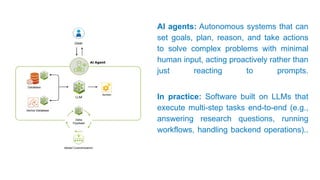
AI agents: Autonomous systems that can
set goals, plan, reason, and take actions
to solve complex problems with minimal
human input, acting proactively rather than
just reacting to prompts.
In practice: Software built on LLMs that
execute multi-step tasks end-to-end (e.g.,
answering research questions, running
workflows, handling backend operations)..
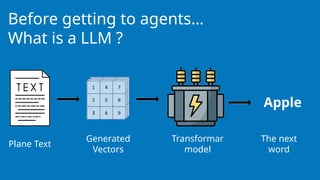
Before getting to agents…
What is a LLM ?
Plane Text
Generated
Vectors
Transformar
model
The next
word
Apple
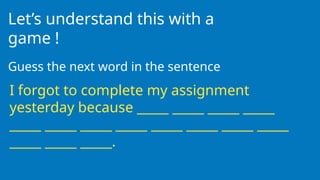
Let’s understand this with a
game !
Guess the next word in the sentence
I forgot to complete my assignment
yesterday because _____ _____ _____ _____
_____ _____ _____ _____ _____ _____ _____ _____
_____ _____ _____.
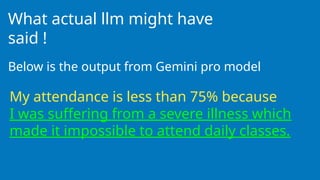
What actual llm might have
said !
Below is the output from Gemini pro model
My attendance is less than 75% because
I was suffering from a severe illness which
made it impossible to attend daily classes.
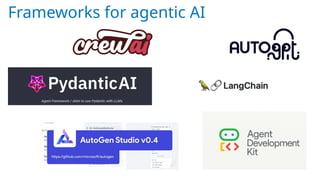
Frameworks for agentic AI
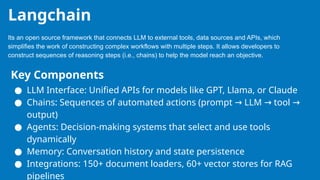
Its an open source framework that connects LLM to external tools, data sources and APIs, which
simplifies the work of constructing complex workflows with multiple steps. It allows developers to
construct sequences of reasoning steps (i.e., chains) to help the model reach an objective.
Langchain
Key Components
● LLM Interface: Unified APIs for models like GPT, Llama, or Claude
● Chains: Sequences of automated actions (prompt LLM tool
→ → →
output)
● Agents: Decision-making systems that select and use tools
dynamically
● Memory: Conversation history and state persistence
● Integrations: 150+ document loaders, 60+ vector stores for RAG
pipelines
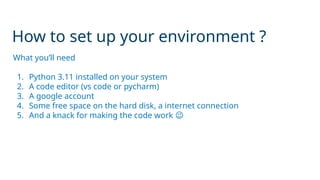
How to set up your environment ?
What you’ll need
1. Python 3.11 installed on your system
2. A code editor (vs code or pycharm)
3. A google account
4. Some free space on the hard disk, a internet connection
5. And a knack for making the code work 😉
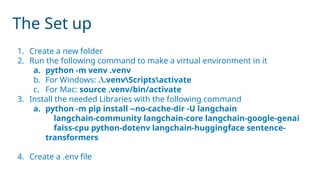
The Set up
1. Create a new folder
2. Run the following command to make a virtual environment in it
a. python -m venv .venv
b. For Windows: ..venvScriptsactivate
c. For Mac: source .venv/bin/activate
3. Install the needed Libraries with the following command
a. python -m pip install --no-cache-dir -U langchain
langchain-community langchain-core langchain-google-genai
faiss-cpu python-dotenv langchain-huggingface sentence-
transformers
4. Create a .env file
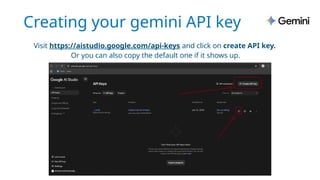
Creating your gemini API key
Visit https://aistudio.google.com/api-keys and click on create API key.
Or you can also copy the default one if it shows up.
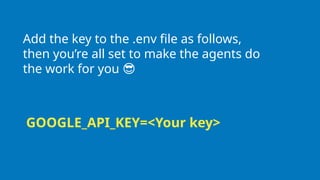
Add the key to the .env file as follows,
then you’re all set to make the agents do
the work for you 😎
GOOGLE_API_KEY=<Your key>
Now Create a new file
called
simple_agent.py in
you folder
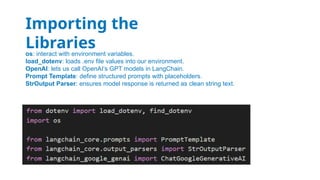
os: interact with environment variables.
load_dotenv: loads .env file values into our environment.
OpenAI: lets us call OpenAI’s GPT models in LangChain.
Prompt Template: define structured prompts with placeholders.
StrOutput Parser: ensures model response is returned as clean string text.
Importing the
Libraries
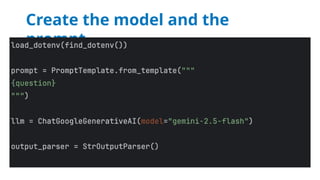
Create the model and the
prompt
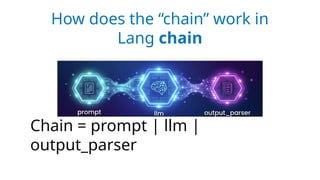
How does the “chain” work in
Lang chain
Chain = prompt | llm |
output_parser
But There’s still one problem !!
Can you guess what ?
The model only answers
basic questions !!
You can ask the model with the capital of france is,
but if you deploy it as a chatbot to your custom
travel service app, it can’t answer what the price
for tomorrow’s train ticket to Rajasthan is…
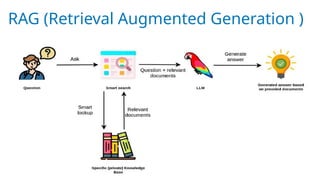
RAG (Retrieval Augmented Generation )
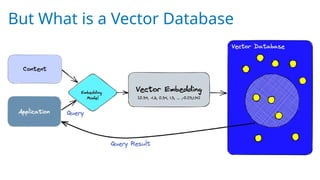
But What is a Vector Database
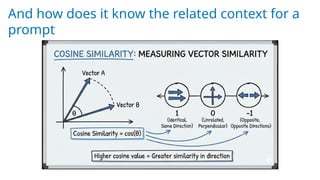
And how does it know the related context for a
prompt
Let's make a simple vector
RAG system of our own using
the FAISS vector store and
the hugging face
embeddings
GAMING
TIME
Prompt Wars !!
You are going to see a
image…
Try to prompt the gemini
Nano Banana to
generate the closest
image possible to the
image that you’re seeing.
Generate an image of A goofy orange cat wearing
oversized black sunglasses and a tiny gold crown,
sitting on a plastic chair like a boss, holding a
smartphone in one paw and a cup of chai in the
other, dramatic serious face, Indian street tea stall
background, funny meme vibe, ultra detailed,
cinematic lighting, sharp focus, 4k, realistic style,
centered composition, no text, no watermark
Generate an image of a person sketching a portrait on the
canvas placed on the easel, painting a grassy landscape as
given in this description: "There is a sunset with a river
flowing between the mountains and gradually flowing in the
farmland beside the man; there is a tree beside it that bears
apples." The person should be shown drawing exactly the
painting described in the double quotes. Make the image
lighter and it should be a sunset scene. The background
should project the exact same painting drawn on the canvas.
So now the LLM know about our data, But how can we make it do some real
stuff…
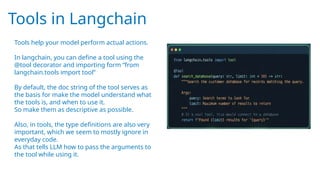
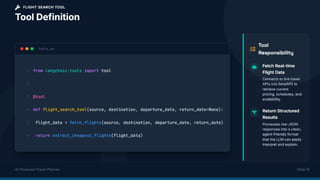
Tools in Langchain
Tools help your model perform actual actions.
In langchain, you can define a tool using the
@tool decorator and importing form “from
langchain.tools import tool”
By default, the doc string of the tool serves as
the basis for make the model understand what
the tools is, and when to use it.
So make them as descriptive as possible.
Also, in tools, the type definitions are also very
important, which we seem to mostly ignore in
everyday code.
As that tells LLM how to pass the arguments to
the tool while using it.
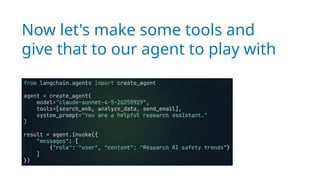
Now let's make some tools and
give that to our agent to play with
This is all good, but what if I want
to customize the flow of the data
through my agent pipeline. What if
I want to execute some code at
very specific parts of the pipeline ??
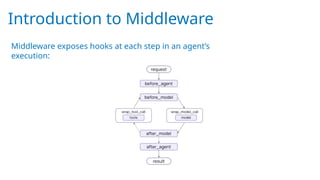
Introduction to Middleware
Middleware exposes hooks at each step in an agent’s
execution:
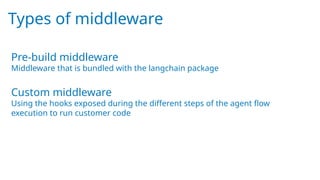
Types of middleware
Pre-build middleware
Middleware that is bundled with the langchain package
Custom middleware
Using the hooks exposed during the different steps of the agent flow
execution to run customer code
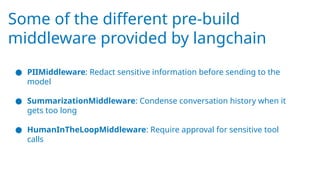
Some of the different pre-build
middleware provided by langchain
● PIIMiddleware: Redact sensitive information before sending to the
model
● SummarizationMiddleware: Condense conversation history when it
gets too long
● HumanInTheLoopMiddleware: Require approval for sensitive tool
calls
Examples of inbuilt middleware
PIIMiddleware("email", strategy="redact", apply_to_input=True),
PIIMiddleware(
"phone_number",
detector=(
r"(?:+?d{1,3}[s.-]?)?"
r"(?:(?d{2,4})?[s.-]?)?"
r"d{3,4}[s.-]?d{4}"
),
strategy="block"
),
SummarizationMiddleware(
model="claude-sonnet-4-5-20250929",
trigger={"tokens": 500}
),
HumanInTheLoopMiddleware(
interrupt_on={
"send_email": {
"allowed_decisions": ["approve", "edit", "reject"]
}
}
)
Example of Custom middleware
from langchain.agents.middleware import dynamic_prompt
@dynamic_prompt
def prompt_with_context(request):
query = request.state["messages"][-1].content
retrieved_docs = retriever.invoke(query)
context = "nn".join([doc.page_content for doc in retrieved_docs])
system_prompt = (
"Use the given context to answer the question. "
"If you don't know the answer, say you don't know. "
f"Context: {context}"
)
return system_prompt
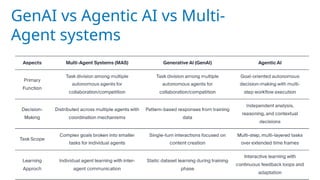
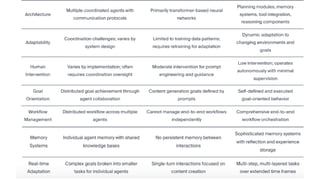
GenAI vs Agentic AI vs Multi-
Agent systems
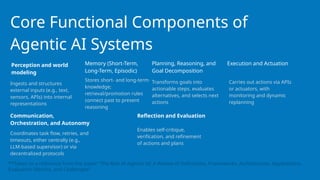
Core Functional Components of
Agentic AI Systems
Ingests and structures
external inputs (e.g., text,
sensors, APIs) into internal
representations
Carries out actions via APIs
or actuators, with
monitoring and dynamic
replanning
Stores short- and long-term
knowledge;
retrieval/promotion rules
connect past to present
reasoning
Transforms goals into
actionable steps, evaluates
alternatives, and selects next
actions
Perception and world
modeling
Memory (Short-Term,
Long-Term, Episodic)
Planning, Reasoning, and
Goal Decomposition
Execution and Actuation
Coordinates task flow, retries, and
timeouts, either centrally (e.g.,
LLM-based supervisor) or via
decentralized protocols
Communication,
Orchestration, and Autonomy
**Taken as a reference from the paper “The Rise of Agentic AI: A Review of Definitions, Frameworks, Architectures, Applications,
Evaluation Metrics, and Challenges”
Enables self-critique,
verification, and refinement
of actions and plans
Reflection and Evaluation
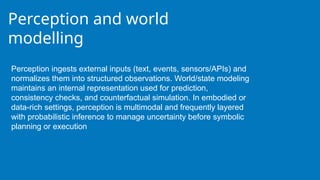
Perception and world
modelling
Perception ingests external inputs (text, events, sensors/APIs) and
normalizes them into structured observations. World/state modeling
maintains an internal representation used for prediction,
consistency checks, and counterfactual simulation. In embodied or
data-rich settings, perception is multimodal and frequently layered
with probabilistic inference to manage uncertainty before symbolic
planning or execution
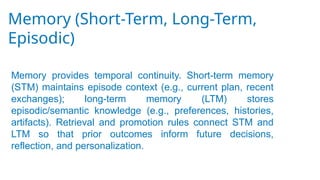
Memory (Short-Term, Long-Term,
Episodic)
Memory provides temporal continuity. Short-term memory
(STM) maintains episode context (e.g., current plan, recent
exchanges); long-term memory (LTM) stores
episodic/semantic knowledge (e.g., preferences, histories,
artifacts). Retrieval and promotion rules connect STM and
LTM so that prior outcomes inform future decisions,
reflection, and personalization.
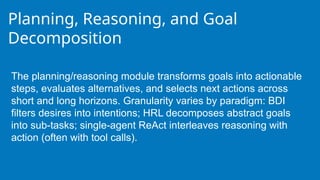
Planning, Reasoning, and Goal
Decomposition
The planning/reasoning module transforms goals into actionable
steps, evaluates alternatives, and selects next actions across
short and long horizons. Granularity varies by paradigm: BDI
filters desires into intentions; HRL decomposes abstract goals
into sub-tasks; single-agent ReAct interleaves reasoning with
action (often with tool calls).
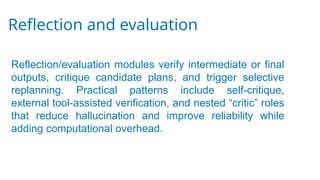
Reflection and evaluation
Reflection/evaluation modules verify intermediate or final
outputs, critique candidate plans, and trigger selective
replanning. Practical patterns include self-critique,
external tool-assisted verification, and nested “critic” roles
that reduce hallucination and improve reliability while
adding computational overhead.
Execution and Actuation
Execution bridges cognition to impact. It invokes tools/APIs,
actuators, or workflow steps; validates outcomes against
expectations; and triggers retries or replanning on deviation.
Production-oriented variants emphasize schema checks,
budget/latency limits, and robust error handling to support
closed-loop operation in dynamic environments.
Communication, Orchestration, and
Autonomy
Interaction modules support human–agent and agent–agent
dialogue (clarification, negotiation, oversight) and surface
trace information (e.g., actions, tools, sources) for
transparency. Autonomy emerges when perception, planning,
execution, memory, and reflection are orchestrated over time;
in many systems, an LLM-based supervisor coordinates sub-
agents, invokes memory or tools, and maintains coherence
across steps.
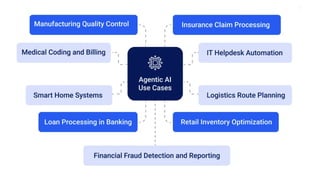
Types of Goals and Tasks Are
Currently Being Solved Using
Agentic AI Across Domains?
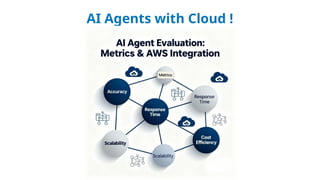
AI Agents with Cloud !
MCP
A standardized plug-and-play system introduced by Anthropic
in late 2024 for all AI models. It standardised how applications
provide context to LLMs.
It gets connected with different data sources, tools, APIs
Origins:
1) LLMs only
2) LLMs+Context- We solved the context problem so no more
spoon feeding data manually! “AI is only as good as the
context you give it.”
3) MCP-Fixing integration mess
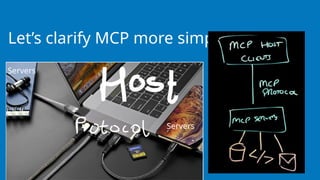
Let’s clarify MCP more simply!
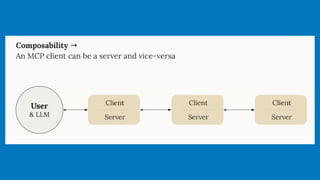
Servers
Servers
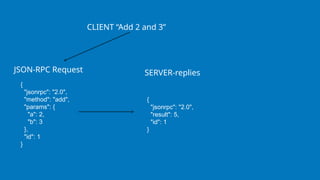
MCP uses JSON-RPC 2.0 as its underlying RPC protocol. Client
and servers send requests to each other and respond
accordingly.
MCP is not a JSON session by itself, but rather a stateful
session protocol that uses JSON-RPC 2.0 messages for
communication. This means:
All messages follow the JSON-RPC 2.0 specification (requests,
responses, and notifications).
The protocol establishes a persistent, bidirectional connection
with a defined lifecycle: Initialization, Operation, and
Shutdown.
It supports stateful sessions, allowing clients and servers to
{
"jsonrpc": "2.0",
"method": "add",
"params": {
"a": 2,
"b": 3
},
"id": 1
}
CLIENT “Add 2 and 3”
{
"jsonrpc": "2.0",
"result": 5,
"id": 1
}
SERVER-replies
JSON-RPC Request
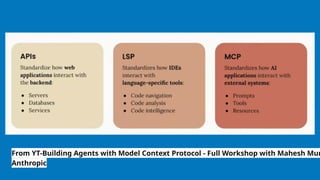
From YT-Building Agents with Model Context Protocol - Full Workshop with Mahesh Mur
Anthropic
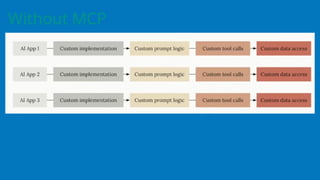
Without MCP
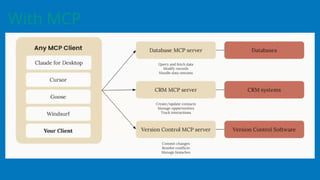
With MCP
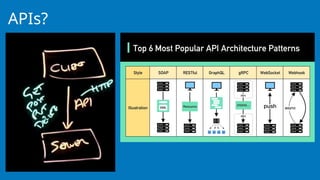
APIs?
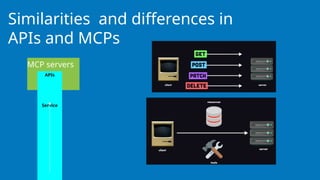
MCP servers
Similarities and differences in
APIs and MCPs
APIs
Service
MCP
LLMs + Tools= Problem solved- Yes but partially…!
It's like the N X M problem. N AI apps try to talk with M various
tools, databases APIs. Every connection is custom.
For eg connect with slack, postgres they both have different APIs
different authentication, different framework so like this there are
many. If you connect local file system, you take another approach.
This creates a fragmented mess and its chaotic for developers.
Here where MCP comes into picture like USB-C universal protocol
for any AI to get any context it needs using a defined set of rules.
M-Model-(Gpt-4,
Groq,gemini,claude,gpt-5,text image or
video models-any ai model)
C-Context-(Code from your
repo,database,files, function calls,info
from slack anything making ai smarter
for specific task)
P-Protocol-Standardised rulebook, how
model asks and recvs info,context just
like http for websites
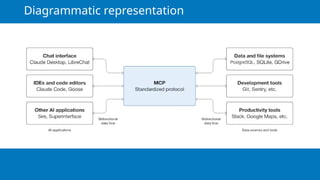
Diagrammatic representation
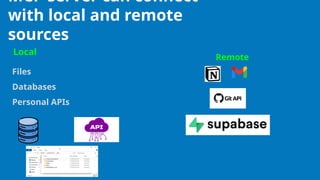
MCP server can connect
with local and remote
sources
Files
Databases
Personal APIs
Local
Remote
What are the available MCP
clients?
AI Agents & Chat Interfaces (MCP Clients)
Claude: Native support for MCP servers, particularly for extending Claude
Desktop capabilities.
Cursor: Popular IDE with deep integration for MCP servers, allowing LLMs to
interact with local development environments.
Windsurf: IDE supporting MCP for enhanced AI coding assistant capabilities.
ChatGPT Desktop App: Now supports MCP across its products, including
Agents SDK.
AnythingLLM: Supports MCP for connecting LLMs to external data sources.
Replit: Supports MCP for real-time project context in code development.
Frameworks
AI Development Frameworks
LangChain: Provides tool-calling support for MCP, allowing Python-based
agents to interact with MCP servers.
Agno: A Python framework built for creating agentic workflows with
seamless MCP integration.
Praison AI: Python framework supporting MCP for agentic workflows.
Chainlit: Platform for building Python AI apps with built-in MCP support for
server-sent events (SSE) and stdio.
Composio: Offers a library that connects 100+ MCP servers to AI agents.
MCP-integrated systems and
platforms
GitHub: Serves as a central repository for various MCP server implementations.
Microsoft Copilot Studio: Integrates MCP to streamline how AI apps and agents
access tools.
Google Cloud: Offers a collection of official MCP servers, including those for Kaggle
datasets, models, and notebooks.
Cloudflare: MCP servers can be deployed and used for configuring resources
(Workers/KV/R2/D1).
Databricks: Integrates MCP via the Mosaic framework, connecting Delta Lake to
LLMs.
Supabase: Offers MCP servers for connecting database, authentication, and edge
functions to AI.
MCP-Architecture
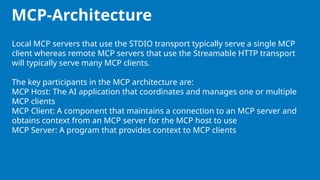
Local MCP servers that use the STDIO transport typically serve a single MCP
client whereas remote MCP servers that use the Streamable HTTP transport
will typically serve many MCP clients.
The key participants in the MCP architecture are:
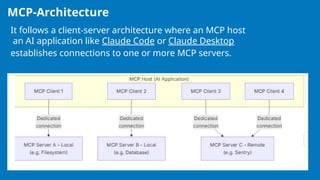
MCP Host: The AI application that coordinates and manages one or multiple
MCP clients
MCP Client: A component that maintains a connection to an MCP server and
obtains context from an MCP server for the MCP host to use
MCP Server: A program that provides context to MCP clients
MCP-Architecture
It follows a client-server architecture where an MCP host
an AI application like Claude Code or Claude Desktop
establishes connections to one or more MCP servers.
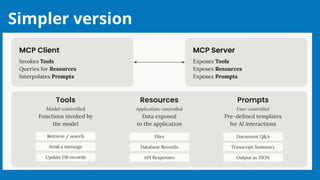
Simpler version
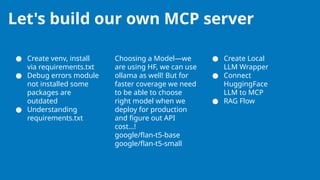
Let's build our own MCP server
● Create venv, install
via requirements.txt
● Debug errors module
not installed some
packages are
outdated
● Understanding
requirements.txt
Choosing a Model—we
are using HF, we can use
ollama as well! But for
faster coverage we need
to be able to choose
right model when we
deploy for production
and figure out API
cost…!
google/flan-t5-base
google/flan-t5-small
● Create Local
LLM Wrapper
● Connect
HuggingFace
LLM to MCP
● RAG Flow
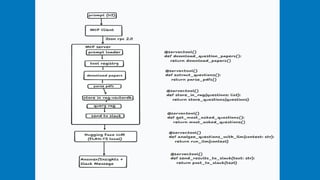
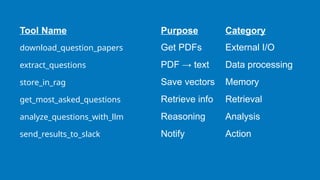
Tool Name Purpose Category
download_question_papers Get PDFs External I/O
extract_questions PDF → text Data processing
store_in_rag Save vectors Memory
get_most_asked_questions Retrieve info Retrieval
analyze_questions_with_llm Reasoning Analysis
send_results_to_slack Notify Action
Benchmarking in LLMs
● LLM benchmarks are standardized tests: same questions +
scoring rubric applied across models to measure
performance on a task.
● Why they matter
○ Compare models on a common yardstick (avoids cherry-
picked demos).
○ Track progress over time by rerunning the same tests.
○ Spot gaps: strengths in some areas, failures in others.
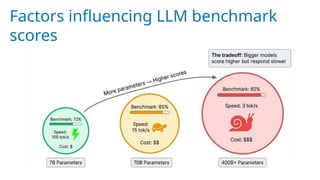
Factors influencing LLM benchmark
scores
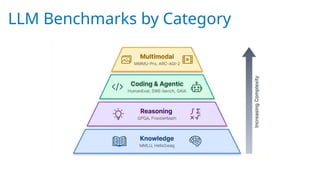
LLM Benchmarks by Category
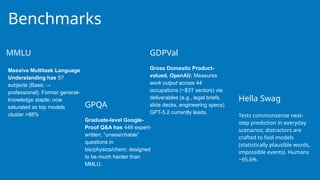
Benchmarks
Massive Multitask Language
Understanding has 57
subjects (Basic →
professional). Former general-
knowledge staple; now
saturated as top models
cluster >88% Tests commonsense next-
step prediction in everyday
scenarios; distractors are
crafted to fool models
(statistically plausible words,
impossible events). Humans
~95.6%.
Graduate-level Google-
Proof Q&A has 448 expert-
written, “unsearchable”
questions in
bio/physics/chem; designed
to be much harder than
MMLU.
Gross Domestic Product-
valued, OpenAI): Measures
work output across 44
occupations (~$3T sectors) via
deliverables (e.g., legal briefs,
slide decks, engineering specs).
GPT-5.2 currently leads.
MMLU
GPQA
Hella Swag
GDPVal
Newer benchmarks
features never-before-
published problems from
research mathematicians,
where even the best
models score below 20%.
compiles 2,500 expert-level
questions designed to resist
guessing.
pulls problems from 2025 math
competitions to guarantee zero
training data overlap.
Frontier Math Humanity's Last Exam MathArena
It contains 164 Python problems
where models write functions from
docstrings and are graded on
whether the code passes unit tests.
Most current frontier models score
above 85%, so researchers created
more difficult variants like
HumanEval+ with more rigorous test
cases.
SWE-bench (Software Engineering
Benchmark) moves beyond isolated
functions. It drops models into real
GitHub repositories and asks them
to fix actual bugs. The model must
navigate the codebase, understand
the issue, and produce a working
patch.
GAIA (General AI Assistants) inverts the usual difficulty
relationship. Its 466 tasks are trivially easy for humans (92%
accuracy) but brutal for AI. When GPT-4 first attempted
GAIA with plugins, it scored just 15%. Each task requires
chaining multiple steps: searching the web, reading
documents, doing calculations, and synthesizing answers.
A typical question might ask for the birth city of the director
of a specific 1970s film, requiring the model to identify the
film, find the director, and then look up biographical details.
The benchmark tests whether models can coordinate tools
and execute multi-step plans without losing track.
HumanEval SWE-bench
GAIA
Coding and agentic benchmarks
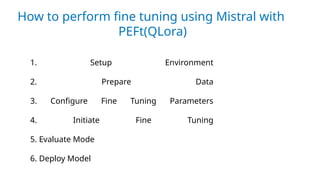
How to perform fine tuning using Mistral with
PEFt(QLora)
1. Setup Environment
2. Prepare Data
3. Configure Fine Tuning Parameters
4. Initiate Fine Tuning
5. Evaluate Mode
6. Deploy Model
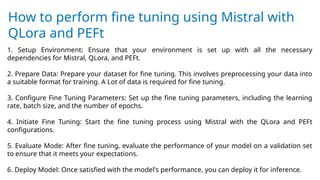
How to perform fine tuning using Mistral with
QLora and PEFt
1. Setup Environment: Ensure that your environment is set up with all the necessary
dependencies for Mistral, QLora, and PEFt.
2. Prepare Data: Prepare your dataset for fine tuning. This involves preprocessing your data into
a suitable format for training. A Lot of data is required for fine tuning.
3. Configure Fine Tuning Parameters: Set up the fine tuning parameters, including the learning
rate, batch size, and the number of epochs.
4. Initiate Fine Tuning: Start the fine tuning process using Mistral with the QLora and PEFt
configurations.
5. Evaluate Mode: After fine tuning, evaluate the performance of your model on a validation set
to ensure that it meets your expectations.
6. Deploy Model: Once satisfied with the model's performance, you can deploy it for inference.
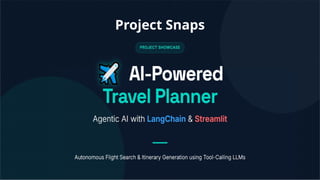
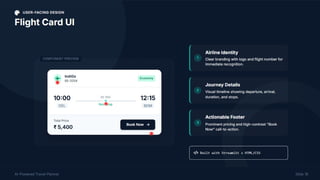
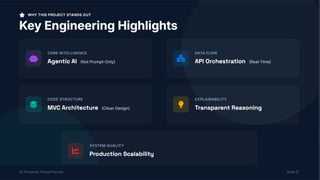
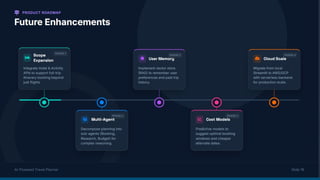
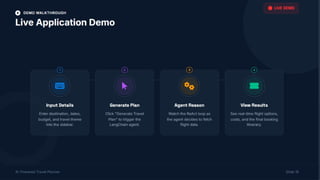
Project Snaps
Thank you for still
being here !
Maybe you’re bored but at least
you’re bored with a solid project ;)

WOWVerse Workshop: Agentic AI & LLM Workshop

  • 1.
    Welcome to the AgenticAI Workshop By the end of this workshop, you’ll have a cool project on your resume ;)
  • 2.
    We are agroup of educators at Thought Exe Shiv Parvati Classes
  • 3.
    Where have you seenagents in your everyday life?
  • 4.
    What is an Agent? The future of Autonomous Intelligence….
  • 5.
    AI agents: Autonomoussystems that can set goals, plan, reason, and take actions to solve complex problems with minimal human input, acting proactively rather than just reacting to prompts. In practice: Software built on LLMs that execute multi-step tasks end-to-end (e.g., answering research questions, running workflows, handling backend operations)..
  • 6.
    Before getting toagents… What is a LLM ? Plane Text Generated Vectors Transformar model The next word Apple
  • 7.
    Let’s understand thiswith a game ! Guess the next word in the sentence I forgot to complete my assignment yesterday because _____ _____ _____ _____ _____ _____ _____ _____ _____ _____ _____ _____ _____ _____ _____.
  • 8.
    What actual llmmight have said ! Below is the output from Gemini pro model My attendance is less than 75% because I was suffering from a severe illness which made it impossible to attend daily classes.
  • 9.
  • 10.
    Its an opensource framework that connects LLM to external tools, data sources and APIs, which simplifies the work of constructing complex workflows with multiple steps. It allows developers to construct sequences of reasoning steps (i.e., chains) to help the model reach an objective. Langchain Key Components ● LLM Interface: Unified APIs for models like GPT, Llama, or Claude ● Chains: Sequences of automated actions (prompt LLM tool → → → output) ● Agents: Decision-making systems that select and use tools dynamically ● Memory: Conversation history and state persistence ● Integrations: 150+ document loaders, 60+ vector stores for RAG pipelines
  • 11.
    How to setup your environment ? What you’ll need 1. Python 3.11 installed on your system 2. A code editor (vs code or pycharm) 3. A google account 4. Some free space on the hard disk, a internet connection 5. And a knack for making the code work 😉
  • 12.
    The Set up 1.Create a new folder 2. Run the following command to make a virtual environment in it a. python -m venv .venv b. For Windows: ..venvScriptsactivate c. For Mac: source .venv/bin/activate 3. Install the needed Libraries with the following command a. python -m pip install --no-cache-dir -U langchain langchain-community langchain-core langchain-google-genai faiss-cpu python-dotenv langchain-huggingface sentence- transformers 4. Create a .env file
  • 13.
    Creating your geminiAPI key Visit https://aistudio.google.com/api-keys and click on create API key. Or you can also copy the default one if it shows up.
  • 14.
    Add the keyto the .env file as follows, then you’re all set to make the agents do the work for you 😎 GOOGLE_API_KEY=<Your key>
  • 15.
    Now Create anew file called simple_agent.py in you folder
  • 16.
    os: interact withenvironment variables. load_dotenv: loads .env file values into our environment. OpenAI: lets us call OpenAI’s GPT models in LangChain. Prompt Template: define structured prompts with placeholders. StrOutput Parser: ensures model response is returned as clean string text. Importing the Libraries
  • 17.
    Create the modeland the prompt
  • 18.
    How does the“chain” work in Lang chain Chain = prompt | llm | output_parser
  • 19.
    But There’s stillone problem !! Can you guess what ?
  • 20.
    The model onlyanswers basic questions !! You can ask the model with the capital of france is, but if you deploy it as a chatbot to your custom travel service app, it can’t answer what the price for tomorrow’s train ticket to Rajasthan is…
  • 21.
  • 22.
    But What isa Vector Database
  • 23.
    And how doesit know the related context for a prompt
  • 24.
    Let's make asimple vector RAG system of our own using the FAISS vector store and the hugging face embeddings
  • 25.
  • 26.
    Prompt Wars !! Youare going to see a image… Try to prompt the gemini Nano Banana to generate the closest image possible to the image that you’re seeing.
  • 28.
    Generate an imageof A goofy orange cat wearing oversized black sunglasses and a tiny gold crown, sitting on a plastic chair like a boss, holding a smartphone in one paw and a cup of chai in the other, dramatic serious face, Indian street tea stall background, funny meme vibe, ultra detailed, cinematic lighting, sharp focus, 4k, realistic style, centered composition, no text, no watermark
  • 30.
    Generate an imageof a person sketching a portrait on the canvas placed on the easel, painting a grassy landscape as given in this description: "There is a sunset with a river flowing between the mountains and gradually flowing in the farmland beside the man; there is a tree beside it that bears apples." The person should be shown drawing exactly the painting described in the double quotes. Make the image lighter and it should be a sunset scene. The background should project the exact same painting drawn on the canvas.
  • 32.
    So now theLLM know about our data, But how can we make it do some real stuff…
  • 33.
    Tools in Langchain Toolshelp your model perform actual actions. In langchain, you can define a tool using the @tool decorator and importing form “from langchain.tools import tool” By default, the doc string of the tool serves as the basis for make the model understand what the tools is, and when to use it. So make them as descriptive as possible. Also, in tools, the type definitions are also very important, which we seem to mostly ignore in everyday code. As that tells LLM how to pass the arguments to the tool while using it.
  • 34.
    Now let's makesome tools and give that to our agent to play with
  • 35.
    This is allgood, but what if I want to customize the flow of the data through my agent pipeline. What if I want to execute some code at very specific parts of the pipeline ??
  • 36.
    Introduction to Middleware Middlewareexposes hooks at each step in an agent’s execution:
  • 37.
    Types of middleware Pre-buildmiddleware Middleware that is bundled with the langchain package Custom middleware Using the hooks exposed during the different steps of the agent flow execution to run customer code
  • 38.
    Some of thedifferent pre-build middleware provided by langchain ● PIIMiddleware: Redact sensitive information before sending to the model ● SummarizationMiddleware: Condense conversation history when it gets too long ● HumanInTheLoopMiddleware: Require approval for sensitive tool calls
  • 39.
    Examples of inbuiltmiddleware PIIMiddleware("email", strategy="redact", apply_to_input=True), PIIMiddleware( "phone_number", detector=( r"(?:+?d{1,3}[s.-]?)?" r"(?:(?d{2,4})?[s.-]?)?" r"d{3,4}[s.-]?d{4}" ), strategy="block" ), SummarizationMiddleware( model="claude-sonnet-4-5-20250929", trigger={"tokens": 500} ), HumanInTheLoopMiddleware( interrupt_on={ "send_email": { "allowed_decisions": ["approve", "edit", "reject"] } } )
  • 40.
    Example of Custommiddleware from langchain.agents.middleware import dynamic_prompt @dynamic_prompt def prompt_with_context(request): query = request.state["messages"][-1].content retrieved_docs = retriever.invoke(query) context = "nn".join([doc.page_content for doc in retrieved_docs]) system_prompt = ( "Use the given context to answer the question. " "If you don't know the answer, say you don't know. " f"Context: {context}" ) return system_prompt
  • 41.
    GenAI vs AgenticAI vs Multi- Agent systems
  • 43.
    Core Functional Componentsof Agentic AI Systems Ingests and structures external inputs (e.g., text, sensors, APIs) into internal representations Carries out actions via APIs or actuators, with monitoring and dynamic replanning Stores short- and long-term knowledge; retrieval/promotion rules connect past to present reasoning Transforms goals into actionable steps, evaluates alternatives, and selects next actions Perception and world modeling Memory (Short-Term, Long-Term, Episodic) Planning, Reasoning, and Goal Decomposition Execution and Actuation Coordinates task flow, retries, and timeouts, either centrally (e.g., LLM-based supervisor) or via decentralized protocols Communication, Orchestration, and Autonomy **Taken as a reference from the paper “The Rise of Agentic AI: A Review of Definitions, Frameworks, Architectures, Applications, Evaluation Metrics, and Challenges” Enables self-critique, verification, and refinement of actions and plans Reflection and Evaluation
  • 44.
    Perception and world modelling Perceptioningests external inputs (text, events, sensors/APIs) and normalizes them into structured observations. World/state modeling maintains an internal representation used for prediction, consistency checks, and counterfactual simulation. In embodied or data-rich settings, perception is multimodal and frequently layered with probabilistic inference to manage uncertainty before symbolic planning or execution
  • 45.
    Memory (Short-Term, Long-Term, Episodic) Memoryprovides temporal continuity. Short-term memory (STM) maintains episode context (e.g., current plan, recent exchanges); long-term memory (LTM) stores episodic/semantic knowledge (e.g., preferences, histories, artifacts). Retrieval and promotion rules connect STM and LTM so that prior outcomes inform future decisions, reflection, and personalization.
  • 46.
    Planning, Reasoning, andGoal Decomposition The planning/reasoning module transforms goals into actionable steps, evaluates alternatives, and selects next actions across short and long horizons. Granularity varies by paradigm: BDI filters desires into intentions; HRL decomposes abstract goals into sub-tasks; single-agent ReAct interleaves reasoning with action (often with tool calls).
  • 47.
    Reflection and evaluation Reflection/evaluationmodules verify intermediate or final outputs, critique candidate plans, and trigger selective replanning. Practical patterns include self-critique, external tool-assisted verification, and nested “critic” roles that reduce hallucination and improve reliability while adding computational overhead.
  • 48.
    Execution and Actuation Executionbridges cognition to impact. It invokes tools/APIs, actuators, or workflow steps; validates outcomes against expectations; and triggers retries or replanning on deviation. Production-oriented variants emphasize schema checks, budget/latency limits, and robust error handling to support closed-loop operation in dynamic environments.
  • 49.
    Communication, Orchestration, and Autonomy Interactionmodules support human–agent and agent–agent dialogue (clarification, negotiation, oversight) and surface trace information (e.g., actions, tools, sources) for transparency. Autonomy emerges when perception, planning, execution, memory, and reflection are orchestrated over time; in many systems, an LLM-based supervisor coordinates sub- agents, invokes memory or tools, and maintains coherence across steps.
  • 50.
    Types of Goalsand Tasks Are Currently Being Solved Using Agentic AI Across Domains?
  • 52.
  • 53.
    MCP A standardized plug-and-playsystem introduced by Anthropic in late 2024 for all AI models. It standardised how applications provide context to LLMs. It gets connected with different data sources, tools, APIs Origins: 1) LLMs only 2) LLMs+Context- We solved the context problem so no more spoon feeding data manually! “AI is only as good as the context you give it.” 3) MCP-Fixing integration mess
  • 54.
    Let’s clarify MCPmore simply! Servers Servers
  • 55.
    MCP uses JSON-RPC2.0 as its underlying RPC protocol. Client and servers send requests to each other and respond accordingly. MCP is not a JSON session by itself, but rather a stateful session protocol that uses JSON-RPC 2.0 messages for communication. This means: All messages follow the JSON-RPC 2.0 specification (requests, responses, and notifications). The protocol establishes a persistent, bidirectional connection with a defined lifecycle: Initialization, Operation, and Shutdown. It supports stateful sessions, allowing clients and servers to
  • 56.
    { "jsonrpc": "2.0", "method": "add", "params":{ "a": 2, "b": 3 }, "id": 1 } CLIENT “Add 2 and 3” { "jsonrpc": "2.0", "result": 5, "id": 1 } SERVER-replies JSON-RPC Request
  • 57.
    From YT-Building Agentswith Model Context Protocol - Full Workshop with Mahesh Mur Anthropic
  • 58.
  • 59.
  • 60.
  • 61.
    MCP servers Similarities anddifferences in APIs and MCPs APIs Service
  • 62.
    MCP LLMs + Tools=Problem solved- Yes but partially…! It's like the N X M problem. N AI apps try to talk with M various tools, databases APIs. Every connection is custom. For eg connect with slack, postgres they both have different APIs different authentication, different framework so like this there are many. If you connect local file system, you take another approach. This creates a fragmented mess and its chaotic for developers. Here where MCP comes into picture like USB-C universal protocol for any AI to get any context it needs using a defined set of rules.
  • 63.
    M-Model-(Gpt-4, Groq,gemini,claude,gpt-5,text image or videomodels-any ai model) C-Context-(Code from your repo,database,files, function calls,info from slack anything making ai smarter for specific task) P-Protocol-Standardised rulebook, how model asks and recvs info,context just like http for websites
  • 64.
  • 65.
    MCP server canconnect with local and remote sources Files Databases Personal APIs Local Remote
  • 66.
    What are theavailable MCP clients? AI Agents & Chat Interfaces (MCP Clients) Claude: Native support for MCP servers, particularly for extending Claude Desktop capabilities. Cursor: Popular IDE with deep integration for MCP servers, allowing LLMs to interact with local development environments. Windsurf: IDE supporting MCP for enhanced AI coding assistant capabilities. ChatGPT Desktop App: Now supports MCP across its products, including Agents SDK. AnythingLLM: Supports MCP for connecting LLMs to external data sources. Replit: Supports MCP for real-time project context in code development.
  • 67.
    Frameworks AI Development Frameworks LangChain:Provides tool-calling support for MCP, allowing Python-based agents to interact with MCP servers. Agno: A Python framework built for creating agentic workflows with seamless MCP integration. Praison AI: Python framework supporting MCP for agentic workflows. Chainlit: Platform for building Python AI apps with built-in MCP support for server-sent events (SSE) and stdio. Composio: Offers a library that connects 100+ MCP servers to AI agents.
  • 68.
    MCP-integrated systems and platforms GitHub:Serves as a central repository for various MCP server implementations. Microsoft Copilot Studio: Integrates MCP to streamline how AI apps and agents access tools. Google Cloud: Offers a collection of official MCP servers, including those for Kaggle datasets, models, and notebooks. Cloudflare: MCP servers can be deployed and used for configuring resources (Workers/KV/R2/D1). Databricks: Integrates MCP via the Mosaic framework, connecting Delta Lake to LLMs. Supabase: Offers MCP servers for connecting database, authentication, and edge functions to AI.
  • 69.
    MCP-Architecture Local MCP serversthat use the STDIO transport typically serve a single MCP client whereas remote MCP servers that use the Streamable HTTP transport will typically serve many MCP clients. The key participants in the MCP architecture are: MCP Host: The AI application that coordinates and manages one or multiple MCP clients MCP Client: A component that maintains a connection to an MCP server and obtains context from an MCP server for the MCP host to use MCP Server: A program that provides context to MCP clients
  • 70.
    MCP-Architecture It follows aclient-server architecture where an MCP host an AI application like Claude Code or Claude Desktop establishes connections to one or more MCP servers.
  • 71.
  • 73.
    Let's build ourown MCP server ● Create venv, install via requirements.txt ● Debug errors module not installed some packages are outdated ● Understanding requirements.txt Choosing a Model—we are using HF, we can use ollama as well! But for faster coverage we need to be able to choose right model when we deploy for production and figure out API cost…! google/flan-t5-base google/flan-t5-small ● Create Local LLM Wrapper ● Connect HuggingFace LLM to MCP ● RAG Flow
  • 75.
    Tool Name PurposeCategory download_question_papers Get PDFs External I/O extract_questions PDF → text Data processing store_in_rag Save vectors Memory get_most_asked_questions Retrieve info Retrieval analyze_questions_with_llm Reasoning Analysis send_results_to_slack Notify Action
  • 76.
    Benchmarking in LLMs ●LLM benchmarks are standardized tests: same questions + scoring rubric applied across models to measure performance on a task. ● Why they matter ○ Compare models on a common yardstick (avoids cherry- picked demos). ○ Track progress over time by rerunning the same tests. ○ Spot gaps: strengths in some areas, failures in others.
  • 77.
    Factors influencing LLMbenchmark scores
  • 78.
  • 79.
    Benchmarks Massive Multitask Language Understandinghas 57 subjects (Basic → professional). Former general- knowledge staple; now saturated as top models cluster >88% Tests commonsense next- step prediction in everyday scenarios; distractors are crafted to fool models (statistically plausible words, impossible events). Humans ~95.6%. Graduate-level Google- Proof Q&A has 448 expert- written, “unsearchable” questions in bio/physics/chem; designed to be much harder than MMLU. Gross Domestic Product- valued, OpenAI): Measures work output across 44 occupations (~$3T sectors) via deliverables (e.g., legal briefs, slide decks, engineering specs). GPT-5.2 currently leads. MMLU GPQA Hella Swag GDPVal
  • 80.
    Newer benchmarks features never-before- publishedproblems from research mathematicians, where even the best models score below 20%. compiles 2,500 expert-level questions designed to resist guessing. pulls problems from 2025 math competitions to guarantee zero training data overlap. Frontier Math Humanity's Last Exam MathArena It contains 164 Python problems where models write functions from docstrings and are graded on whether the code passes unit tests. Most current frontier models score above 85%, so researchers created more difficult variants like HumanEval+ with more rigorous test cases. SWE-bench (Software Engineering Benchmark) moves beyond isolated functions. It drops models into real GitHub repositories and asks them to fix actual bugs. The model must navigate the codebase, understand the issue, and produce a working patch. GAIA (General AI Assistants) inverts the usual difficulty relationship. Its 466 tasks are trivially easy for humans (92% accuracy) but brutal for AI. When GPT-4 first attempted GAIA with plugins, it scored just 15%. Each task requires chaining multiple steps: searching the web, reading documents, doing calculations, and synthesizing answers. A typical question might ask for the birth city of the director of a specific 1970s film, requiring the model to identify the film, find the director, and then look up biographical details. The benchmark tests whether models can coordinate tools and execute multi-step plans without losing track. HumanEval SWE-bench GAIA Coding and agentic benchmarks
  • 81.
    How to performfine tuning using Mistral with PEFt(QLora) 1. Setup Environment 2. Prepare Data 3. Configure Fine Tuning Parameters 4. Initiate Fine Tuning 5. Evaluate Mode 6. Deploy Model
  • 82.
    How to performfine tuning using Mistral with QLora and PEFt 1. Setup Environment: Ensure that your environment is set up with all the necessary dependencies for Mistral, QLora, and PEFt. 2. Prepare Data: Prepare your dataset for fine tuning. This involves preprocessing your data into a suitable format for training. A Lot of data is required for fine tuning. 3. Configure Fine Tuning Parameters: Set up the fine tuning parameters, including the learning rate, batch size, and the number of epochs. 4. Initiate Fine Tuning: Start the fine tuning process using Mistral with the QLora and PEFt configurations. 5. Evaluate Mode: After fine tuning, evaluate the performance of your model on a validation set to ensure that it meets your expectations. 6. Deploy Model: Once satisfied with the model's performance, you can deploy it for inference.
  • 83.
  • 101.
    Thank you forstill being here ! Maybe you’re bored but at least you’re bored with a solid project ;)