






Modernizing WordPress
Search with Elasticsearch
Who Am I?
• My name is Taylor Lovett
• Director of Web Engineering at 10up
• Open source community member
• WordPress core contributor
• ElasticPress team member
@tlovett12
10up is hiring!
@tlovett12
taylor.lovett@10up.com
Doesn’t WordPress have
search built-in?
WordPress Search is Rudimentary
• Only searches post title, content, and excerpt.
• Relies on MySQL and thus is slow.
• Relevancy calculations are poor and overly
simplistic.
• Not able to handle any advanced filtering.
I Want to….
• Search as follows
• Search post content, title, excerpt, and
public taxonomy terms against the users
search terms
• Only return posts that have a specific meta
key/value association
What is Elasticsearch?
www.elastic.co
Elasticsearch
• Open-source search server written in Java
based on a technology called Lucene (open-
source search software by Apache).
• A standalone database server that provides a
RESTful interface to accept and store data in a
way that is optimized for search.
• Extremely scalable, performant, and reliable
Elasticsearch
• Relevant results
• Autosuggest
• Fuzzy matching
• Geographic searches
• Filterable searches
• Data weighting
• Much more
Get an Elasticsearch Server
• Very flexible and customizable. There is not
really a “one size fits all” setup. Generally, you
have two options:
• Option 1: Pay someone else to manage/host
your Elasticsearch cluster (SaaS)
• Option 2: Host your own cluster
Elasticsearch SaaS
• found.no
• AWS
• qbox.io
• heroku.com
• etc…
Elasticsearch Self-Hosted Cluster
• Make sure you have Java installed.
• Download Elasticsearch:

https://www.elastic.co/downloads/elasticsearch
• Assuming you are installing on a Linux
distribution, you can easily install using DEB or
RPM packages.
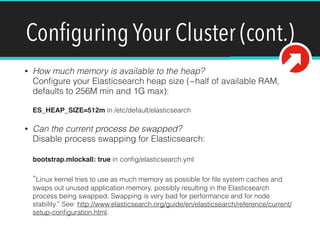
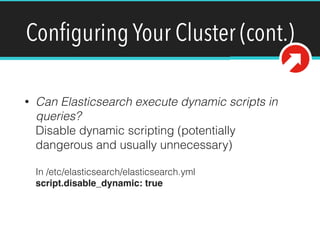
Configuring Your Cluster
For the purposes of this talk, we won’t
go into Elasticsearch installation or
configuration.
What is ElasticPress?
https://github.com/10up/elasticpress
ElasticPress
A free 10up WordPress plugin that powers
WordPress search with Elasticsearch.
ElasticPress
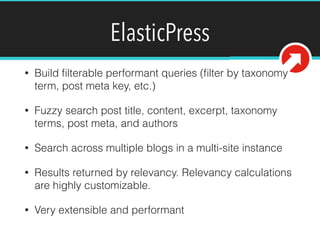
• Build filterable performant queries (filter by taxonomy
term, post meta key, etc.)
• Fuzzy search post title, content, excerpt, taxonomy
terms, post meta, and authors
• Search across multiple blogs in a multi-site instance
• Results returned by relevancy. Relevancy calculations
are highly customizable.
• Very extensible and performant
ElasticPress Requirements
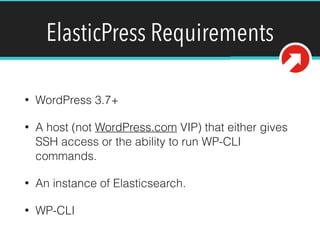
• WordPress 3.7+
• A host (not WordPress.com VIP) that either gives
SSH access or the ability to run WP-CLI
commands.
• An instance of Elasticsearch.
• WP-CLI
Installation
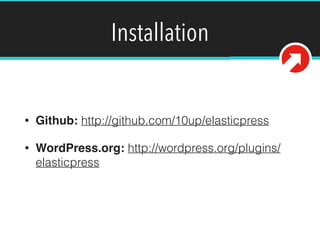
• Github: http://github.com/10up/elasticpress
• WordPress.org: http://wordpress.org/plugins/
elasticpress
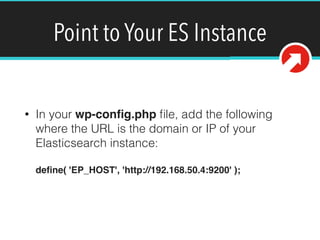
Point to Your ES Instance
• In your wp-config.php file, add the following
where the URL is the domain or IP of your
Elasticsearch instance:


define( 'EP_HOST', 'http://192.168.50.4:9200' );
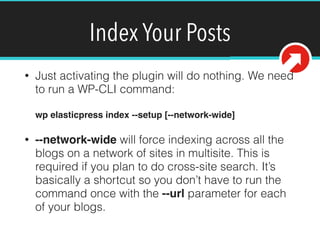
Index Your Posts
• Just activating the plugin will do nothing. We need
to run a WP-CLI command:


wp elasticpress index --setup [--network-wide]
• --network-wide will force indexing across all the
blogs on a network of sites in multisite. This is
required if you plan to do cross-site search. It’s
basically a shortcut so you don’t have to run the
command once with the --url parameter for each
of your blogs.
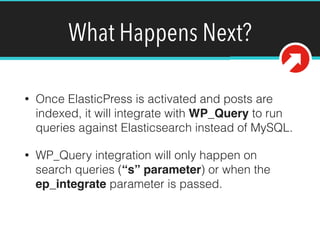
What Happens Next?
• Once ElasticPress is activated and posts are
indexed, it will integrate with WP_Query to run
queries against Elasticsearch instead of MySQL.
• WP_Query integration will only happen on
search queries (“s” parameter) or when the
ep_integrate parameter is passed.
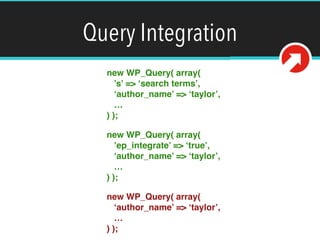
Query Integration
new WP_Query( array(

’s’ => ‘search terms’,

‘author_name’ => ‘taylor’,

…

) );
new WP_Query( array(

’ep_integrate’ => ‘true’,

‘author_name’ => ‘taylor’,

…

) );
new WP_Query( array(

‘author_name’ => ‘taylor’,

…

) );
Note on Search
• We can use ElasticPress to power queries
OTHER than search! This is powerful.
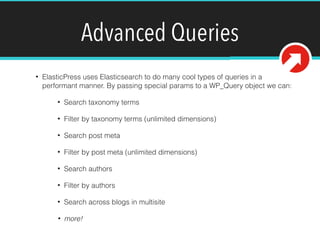
Advanced Queries
• ElasticPress uses Elasticsearch to do many cool types of queries in a
performant manner. By passing special params to a WP_Query object we can:
• Search taxonomy terms
• Filter by taxonomy terms (unlimited dimensions)
• Search post meta
• Filter by post meta (unlimited dimensions)
• Search authors
• Filter by authors
• Search across blogs in multisite
• more!
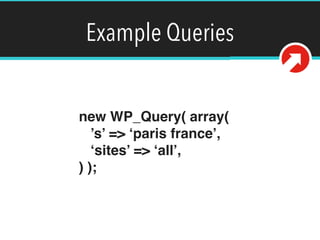
Example Queries
new WP_Query( array(

’s’ => ‘miami florida’,

‘sites’ => ‘all’,

) );
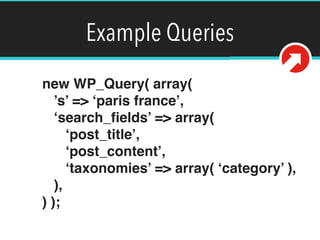
Example Queries
new WP_Query( array(

’s’ => ‘miami florida’,

‘search_fields’ => array(

‘post_title’,

‘post_content’,

‘taxonomies’ => array( ‘category’ ),

),

) );
Example Queries
new WP_Query( array(

’s’ => ‘miami florida’,

‘search_fields’ => array(

‘post_title’,

‘post_content’,

‘taxonomies’ => array( ‘category’ ),

),

'date_query' => array(

array(

'column' => 'post_date',

'after' => 'January 1st 2012',

),

),

) );
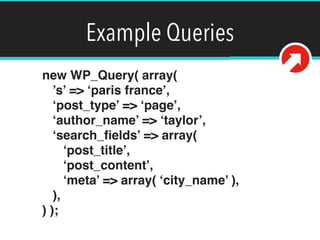
Example Queries
new WP_Query( array(

’s’ => ‘miami florida’,

‘post_type’ => ‘page’,

‘author_name’ => ‘taylor’,

‘search_fields’ => array(

‘post_title’,

‘post_content’,

‘meta’ => array( ‘city_name’ ),

),

) );
Example Queries
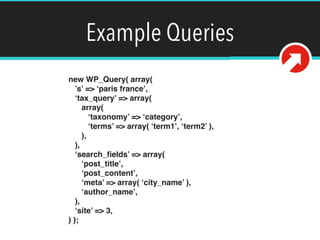
new WP_Query( array(

’s’ => ‘miami florida’,

‘tax_query’ => array(

array(

‘taxonomy’ => ‘category’,

‘terms’ => array( ‘category1’, ‘category2’ ),

),

),

‘search_fields’ => array(

‘post_title’,

‘post_content’,

‘meta’ => array( ‘city_name’ ),

‘author_name’,

),

‘site’ => 3,

) );
Example Queries
new WP_Query( array(

‘ep_integrate’ => true,

‘tax_query’ => array(

array(

‘taxonomy’ => ‘category’,

‘terms’ => array( ‘category1’ ),

),

array(

‘taxonomy’ => ‘post_tag’,

‘terms’ => array( ‘tag1’, ‘tag2’ ),

),

array(

‘taxonomy’ => ‘custom_taxonomy’,

‘terms’ => array( ‘term1’, ‘term2’ ),

),

)

) );
This would require 3 inner joins 

in MySQL plus extra queries to 

determine term IDs!
Example Queries
new WP_Query( array(

‘ep_integrate’ => true,

‘meta_query’ => array(

array(

‘key’ => ‘city’,

‘value’ => ‘Miami’,

),

array(

‘key’ => ‘price’,

‘value’ => ‘100’,

'compare' => '>',

),

array(

‘key’ => ‘_thumbnail_id’,

‘value’ => 1,

),

)

) );
This would require 3 inner joins

in MySQL!
WP_Query Integration
• The goal for ElasticPress is to make WP_Query
work behind the scenes through Elasticsearch
and provide extra functionality.
• This means we have to support every query
parameter which isn’t the case yet. Github
contains a full list of parameters WP_Query
supports with ElasticPress and usage for each
parameter.
Elasticsearch in Your Language
• Elasticsearch is designed to be
internationalized.
• Out of the box, it will work fine with most
languages.
Analysis and Analyzers
• When a document is indexed in Elasticsearch,
text is analyzed, broken into terms (tokenized),
and normalized with token filters.
• In normalization, strings might be lowercased
and plurals stripped.
Custom Analyzers
• ElasticPress by default uses a pretty standard set of
analyzers intended for the English language.
• We can easily customize our analyzers for use with
other languages by filtering ep_config_mapping
(see EP source code).
• You can read about language specific analyzers here:


http://www.elasticsearch.org/guide/en/elasticsearch/
reference/current/analysis-lang-analyzer.html
Documentation
Full documentation with installation instructions:


https://github.com/10up/ElasticPress
Future Possibilities
• Integration with WooCommerce
• WordPress admin search integration
• Related posts module
• Geolocation module
Feedback and Continuing Development
• If you are using ElasticPress on a project, please
let us know and give us feedback!
• Pull requests are welcome!
Questions?
We need to send a PUT request to this endpoint with
our post data. Of course we must authenticate before
doing this.
@tlovett12
taylor.lovett@10up.com
taylorlovett.com
Wordpress search-elasticsearch

Wordpress search-elasticsearch

  • 1.
  • 2.
    Who Am I? •My name is Taylor Lovett • Director of Web Engineering at 10up • Open source community member • WordPress core contributor • ElasticPress team member @tlovett12
  • 3.
  • 4.
  • 5.
    WordPress Search isRudimentary • Only searches post title, content, and excerpt. • Relies on MySQL and thus is slow. • Relevancy calculations are poor and overly simplistic. • Not able to handle any advanced filtering.
  • 6.
    I Want to…. •Search as follows • Search post content, title, excerpt, and public taxonomy terms against the users search terms • Only return posts that have a specific meta key/value association
  • 7.
  • 8.
    Elasticsearch • Open-source searchserver written in Java based on a technology called Lucene (open- source search software by Apache). • A standalone database server that provides a RESTful interface to accept and store data in a way that is optimized for search. • Extremely scalable, performant, and reliable
  • 9.
    Elasticsearch • Relevant results •Autosuggest • Fuzzy matching • Geographic searches • Filterable searches • Data weighting • Much more
  • 10.
    Get an ElasticsearchServer • Very flexible and customizable. There is not really a “one size fits all” setup. Generally, you have two options: • Option 1: Pay someone else to manage/host your Elasticsearch cluster (SaaS) • Option 2: Host your own cluster
  • 11.
    Elasticsearch SaaS • found.no •AWS • qbox.io • heroku.com • etc…
  • 12.
    Elasticsearch Self-Hosted Cluster •Make sure you have Java installed. • Download Elasticsearch:
 https://www.elastic.co/downloads/elasticsearch • Assuming you are installing on a Linux distribution, you can easily install using DEB or RPM packages.
  • 13.
    Configuring Your Cluster Forthe purposes of this talk, we won’t go into Elasticsearch installation or configuration.
  • 14.
  • 15.
    ElasticPress A free 10upWordPress plugin that powers WordPress search with Elasticsearch.
  • 16.
    ElasticPress • Build filterableperformant queries (filter by taxonomy term, post meta key, etc.) • Fuzzy search post title, content, excerpt, taxonomy terms, post meta, and authors • Search across multiple blogs in a multi-site instance • Results returned by relevancy. Relevancy calculations are highly customizable. • Very extensible and performant
  • 17.
    ElasticPress Requirements • WordPress3.7+ • A host (not WordPress.com VIP) that either gives SSH access or the ability to run WP-CLI commands. • An instance of Elasticsearch. • WP-CLI
  • 18.
    Installation • Github: http://github.com/10up/elasticpress •WordPress.org: http://wordpress.org/plugins/ elasticpress
  • 19.
    Point to YourES Instance • In your wp-config.php file, add the following where the URL is the domain or IP of your Elasticsearch instance:
 
 define( 'EP_HOST', 'http://192.168.50.4:9200' );
  • 20.
    Index Your Posts •Just activating the plugin will do nothing. We need to run a WP-CLI command:
 
 wp elasticpress index --setup [--network-wide] • --network-wide will force indexing across all the blogs on a network of sites in multisite. This is required if you plan to do cross-site search. It’s basically a shortcut so you don’t have to run the command once with the --url parameter for each of your blogs.
  • 21.
    What Happens Next? •Once ElasticPress is activated and posts are indexed, it will integrate with WP_Query to run queries against Elasticsearch instead of MySQL. • WP_Query integration will only happen on search queries (“s” parameter) or when the ep_integrate parameter is passed.
  • 22.
    Query Integration new WP_Query(array(
 ’s’ => ‘search terms’,
 ‘author_name’ => ‘taylor’,
 …
 ) ); new WP_Query( array(
 ’ep_integrate’ => ‘true’,
 ‘author_name’ => ‘taylor’,
 …
 ) ); new WP_Query( array(
 ‘author_name’ => ‘taylor’,
 …
 ) );
  • 23.
    Note on Search •We can use ElasticPress to power queries OTHER than search! This is powerful.
  • 24.
    Advanced Queries • ElasticPressuses Elasticsearch to do many cool types of queries in a performant manner. By passing special params to a WP_Query object we can: • Search taxonomy terms • Filter by taxonomy terms (unlimited dimensions) • Search post meta • Filter by post meta (unlimited dimensions) • Search authors • Filter by authors • Search across blogs in multisite • more!
  • 25.
    Example Queries new WP_Query(array(
 ’s’ => ‘miami florida’,
 ‘sites’ => ‘all’,
 ) );
  • 26.
    Example Queries new WP_Query(array(
 ’s’ => ‘miami florida’,
 ‘search_fields’ => array(
 ‘post_title’,
 ‘post_content’,
 ‘taxonomies’ => array( ‘category’ ),
 ),
 ) );
  • 27.
    Example Queries new WP_Query(array(
 ’s’ => ‘miami florida’,
 ‘search_fields’ => array(
 ‘post_title’,
 ‘post_content’,
 ‘taxonomies’ => array( ‘category’ ),
 ),
 'date_query' => array(
 array(
 'column' => 'post_date',
 'after' => 'January 1st 2012',
 ),
 ),
 ) );
  • 28.
    Example Queries new WP_Query(array(
 ’s’ => ‘miami florida’,
 ‘post_type’ => ‘page’,
 ‘author_name’ => ‘taylor’,
 ‘search_fields’ => array(
 ‘post_title’,
 ‘post_content’,
 ‘meta’ => array( ‘city_name’ ),
 ),
 ) );
  • 29.
    Example Queries new WP_Query(array(
 ’s’ => ‘miami florida’,
 ‘tax_query’ => array(
 array(
 ‘taxonomy’ => ‘category’,
 ‘terms’ => array( ‘category1’, ‘category2’ ),
 ),
 ),
 ‘search_fields’ => array(
 ‘post_title’,
 ‘post_content’,
 ‘meta’ => array( ‘city_name’ ),
 ‘author_name’,
 ),
 ‘site’ => 3,
 ) );
  • 30.
    Example Queries new WP_Query(array(
 ‘ep_integrate’ => true,
 ‘tax_query’ => array(
 array(
 ‘taxonomy’ => ‘category’,
 ‘terms’ => array( ‘category1’ ),
 ),
 array(
 ‘taxonomy’ => ‘post_tag’,
 ‘terms’ => array( ‘tag1’, ‘tag2’ ),
 ),
 array(
 ‘taxonomy’ => ‘custom_taxonomy’,
 ‘terms’ => array( ‘term1’, ‘term2’ ),
 ),
 )
 ) ); This would require 3 inner joins 
 in MySQL plus extra queries to 
 determine term IDs!
  • 31.
    Example Queries new WP_Query(array(
 ‘ep_integrate’ => true,
 ‘meta_query’ => array(
 array(
 ‘key’ => ‘city’,
 ‘value’ => ‘Miami’,
 ),
 array(
 ‘key’ => ‘price’,
 ‘value’ => ‘100’,
 'compare' => '>',
 ),
 array(
 ‘key’ => ‘_thumbnail_id’,
 ‘value’ => 1,
 ),
 )
 ) ); This would require 3 inner joins
 in MySQL!
  • 32.
    WP_Query Integration • Thegoal for ElasticPress is to make WP_Query work behind the scenes through Elasticsearch and provide extra functionality. • This means we have to support every query parameter which isn’t the case yet. Github contains a full list of parameters WP_Query supports with ElasticPress and usage for each parameter.
  • 33.
    Elasticsearch in YourLanguage • Elasticsearch is designed to be internationalized. • Out of the box, it will work fine with most languages.
  • 34.
    Analysis and Analyzers •When a document is indexed in Elasticsearch, text is analyzed, broken into terms (tokenized), and normalized with token filters. • In normalization, strings might be lowercased and plurals stripped.
  • 35.
    Custom Analyzers • ElasticPressby default uses a pretty standard set of analyzers intended for the English language. • We can easily customize our analyzers for use with other languages by filtering ep_config_mapping (see EP source code). • You can read about language specific analyzers here:
 
 http://www.elasticsearch.org/guide/en/elasticsearch/ reference/current/analysis-lang-analyzer.html
  • 36.
    Documentation Full documentation withinstallation instructions:
 
 https://github.com/10up/ElasticPress
  • 37.
    Future Possibilities • Integrationwith WooCommerce • WordPress admin search integration • Related posts module • Geolocation module
  • 38.
    Feedback and ContinuingDevelopment • If you are using ElasticPress on a project, please let us know and give us feedback! • Pull requests are welcome!
  • 39.
    Questions? We need tosend a PUT request to this endpoint with our post data. Of course we must authenticate before doing this. @tlovett12 taylor.lovett@10up.com taylorlovett.com