WockerDocker-based rapid development
environment of WordPress.
@WordBench Osaka No. 41
- Facebook: kite.koga
- Twitter: @ixkaito
- GitHub: @ixkaito
Kite
What Do I Do?
- Designer
- Programmer
- WordBench Osaka moderator
- WordCamp Kansai 2015 organizer
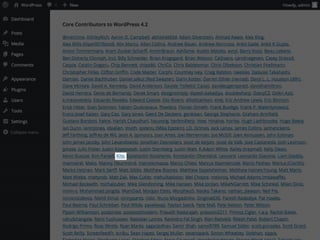
- WordPress core contributor
What is Wocker?
Docker-based rapid development environment of
WordPress.
Docker ベースの高速 WordPress 開発環境
How Fast?
IT TAKES JUST 3 SECONDS TO CREATE A NEW
WORDPRESS ENVIRONMENT!
WordPress の新しい環境を作るのにたった3秒!
What is Docker?
How is this different
from Virtual Machines?
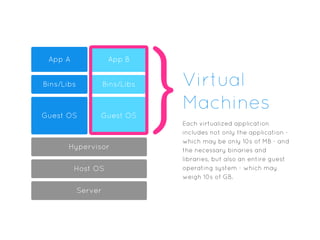
Virtual
Machines
Hypervisor
App A App B
Bins/Libs Bins/Libs
Guest OS Guest OS
Host OS
Server
}Each virtualized application
includes not only the application -
which may be only 10s of MB - and
the necessary binaries and
libraries, but also an entire guest
operating system - which may
weigh 10s of GB.
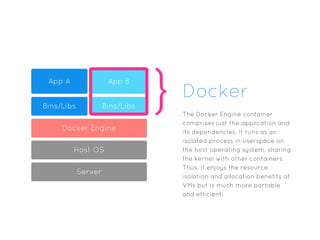
Docker
Docker Engine
App A App B
Bins/Libs Bins/Libs
Host OS
Server
} The Docker Engine container
comprises just the application and
its dependencies. It runs as an
isolated process in userspace on
the host operating system, sharing
the kernel with other containers.
Thus, it enjoys the resource
isolation and allocation benefits of
VMs but is much more portable
and efficient.
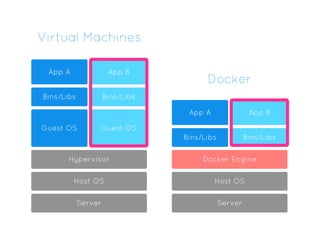
Virtual Machines
Hypervisor
App A App B
Bins/Libs Bins/Libs
Guest OS Guest OS
Host OS
Server
Docker Engine
App A App B
Bins/Libs Bins/Libs
Host OS
Server
Docker
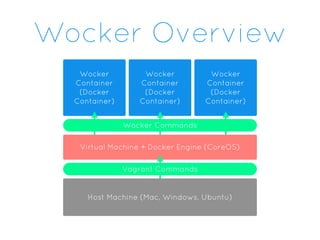
Wocker
Container
(Docker
Container)
Wocker
Container
(Docker
Container)
Wocker
Container
(Docker
Container)
Wocker Overview
Wocker Commands
Virtual Machine + Docker Engine (CoreOS)
Vagrant Commands
Host Machine (Mac, Windows, Ubuntu)
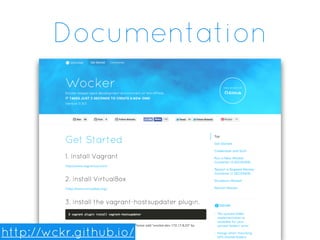
Documentation
http://wckr.github.io/
Get Started with
Wocker
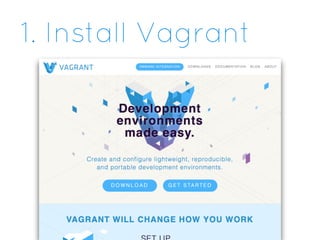
1. Install Vagrant
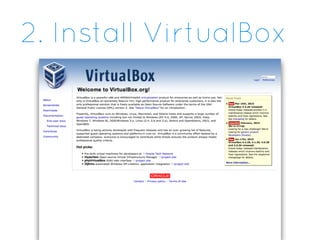
2. Install VirtualBox
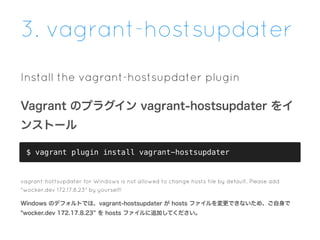
3. vagrant-hostsupdater
Install the vagrant-hostsupdater plugin
Vagrant のプラグイン vagrant-hostsupdater をイ
ンストール
$ vagrant plugin install vagrant-hostsupdater
vagrant-hottsupdater for Windows is not allowed to change hosts file by default. Please add
"wocker.dev 172.17.8.23" by yourself!
Windows のデフォルトでは、vagrant-hostsupdater が hosts ファイルを変更できないため、ご自身で
"wocker.dev 172.17.8.23 を hosts ファイルに追加してください。
4. Clone the Repo
Clone the Wocker Repository
Wocker リポジトリをクローン
$ git clone https://github.com/wckr/wocker.git && cd wocker
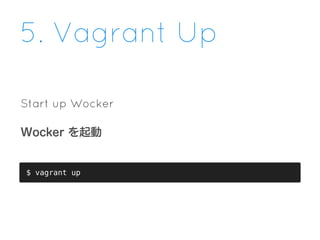
5. Vagrant Up
Start up Wocker
Wocker を起動
$ vagrant up
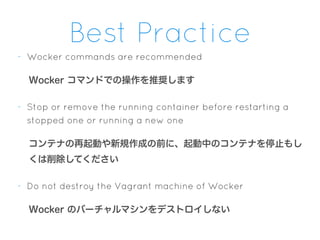
Best Practice
- Wocker commands are recommended
Wocker コマンドでの操作を推奨します
- Stop or remove the running container before restarting a
stopped one or running a new one
コンテナの再起動や新規作成の前に、起動中のコンテナを停止もし
くは削除してください
- Do not destroy the Vagrant machine of Wocker
Wocker のバーチャルマシンをデストロイしない

Wocker @WordBench Osaka No.41

  • 1.
    WockerDocker-based rapid development environmentof WordPress. @WordBench Osaka No. 41
  • 2.
    - Facebook: kite.koga -Twitter: @ixkaito - GitHub: @ixkaito Kite
  • 3.
    What Do IDo? - Designer - Programmer - WordBench Osaka moderator - WordCamp Kansai 2015 organizer - WordPress core contributor
  • 5.
    What is Wocker? Docker-basedrapid development environment of WordPress. Docker ベースの高速 WordPress 開発環境
  • 6.
    How Fast? IT TAKESJUST 3 SECONDS TO CREATE A NEW WORDPRESS ENVIRONMENT! WordPress の新しい環境を作るのにたった3秒!
  • 7.
  • 8.
    How is thisdifferent from Virtual Machines?
  • 9.
    Virtual Machines Hypervisor App A AppB Bins/Libs Bins/Libs Guest OS Guest OS Host OS Server }Each virtualized application includes not only the application - which may be only 10s of MB - and the necessary binaries and libraries, but also an entire guest operating system - which may weigh 10s of GB.
  • 10.
    Docker Docker Engine App AApp B Bins/Libs Bins/Libs Host OS Server } The Docker Engine container comprises just the application and its dependencies. It runs as an isolated process in userspace on the host operating system, sharing the kernel with other containers. Thus, it enjoys the resource isolation and allocation benefits of VMs but is much more portable and efficient.
  • 11.
    Virtual Machines Hypervisor App AApp B Bins/Libs Bins/Libs Guest OS Guest OS Host OS Server Docker Engine App A App B Bins/Libs Bins/Libs Host OS Server Docker
  • 12.
  • 13.
  • 14.
  • 15.
  • 16.
  • 17.
    3. vagrant-hostsupdater Install thevagrant-hostsupdater plugin Vagrant のプラグイン vagrant-hostsupdater をイ ンストール $ vagrant plugin install vagrant-hostsupdater vagrant-hottsupdater for Windows is not allowed to change hosts file by default. Please add "wocker.dev 172.17.8.23" by yourself! Windows のデフォルトでは、vagrant-hostsupdater が hosts ファイルを変更できないため、ご自身で "wocker.dev 172.17.8.23 を hosts ファイルに追加してください。
  • 18.
    4. Clone theRepo Clone the Wocker Repository Wocker リポジトリをクローン $ git clone https://github.com/wckr/wocker.git && cd wocker
  • 19.
    5. Vagrant Up Startup Wocker Wocker を起動 $ vagrant up
  • 20.
    Best Practice - Wockercommands are recommended Wocker コマンドでの操作を推奨します - Stop or remove the running container before restarting a stopped one or running a new one コンテナの再起動や新規作成の前に、起動中のコンテナを停止もし くは削除してください - Do not destroy the Vagrant machine of Wocker Wocker のバーチャルマシンをデストロイしない