An intro to operating system
• An operating system is the set of programs that
controls a computer.
• It provides a pleasant and effective interface between
user and the hardware.
• Without an operating system a computer would be
useless.
What is windows?
Why is Microsoft Windows called Windows?
• Before the release of Microsoft Windows, Microsoft users were used to the
single-task command line operating system MS-DOS.
• Because Microsoft names most of its products with one word, it needed a
word that best described its new GUI operating system.
• Microsoft chose "Windows" because of the multiple windows that allow
different tasks and programs to be run at the same time.
• Because you cannot trademark a common name like "Windows" it is
officially known as "Microsoft Windows".
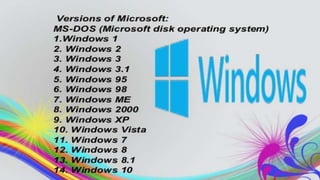
• The first version of Microsoft Windows was version 1.0, released in 1985.
• Founded in April 4, 1975 by Bill Gates and Paul Allen, today Microsoft is
one of the largest and most successful companies in the world.
How does a GUI work?
• A GUI uses windows, icons, and menus to carry out
commands, such as opening, deleting, and moving files.
Although many GUI operating systems are navigated through
the use of a mouse, the keyboard can also be utilized by
using keyboard shortcuts or arrow keys.
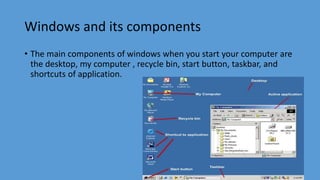
Windows and its components
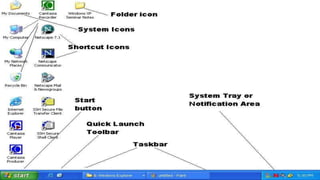
• The main components of windows when you start your computer are
the desktop, my computer , recycle bin, start button, taskbar, and
shortcuts of application.
Control panel
• Control panel is the centralised configuration area in
windows. It is used to make changes to nearly every
aspect of the operating system.
• Think of control panel if you want to change windows
of how it looks and it works.
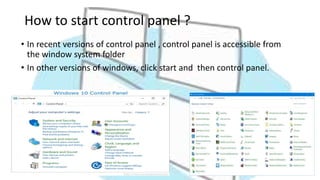
How to start control panel ?
• In recent versions of control panel , control panel is accessible from
the window system folder
• In other versions of windows, click start and then control panel.
Program manager
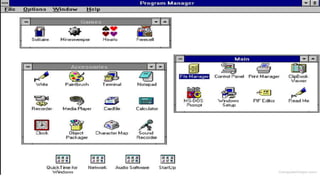
• Program Manager is the main window of Microsoft Windows 3.x that
allows users to execute each program on their computer.
• Users running Windows 95, 98, NT, 2000, or XP can open it by
clicking Start, Run, and typing "program" and clicking ok. The file is
known as progman.exe and is located in the root directory of
Windows; deleting this file can cause problems with your computer.
File manager or file explorer
• A file manager or file browser is a computer program that provides a user
interface to manage files and folders.
• File management in windows can be done through Windows explorer or
My Computer. Windows Explorer displays the hierarchical list of files,
folders, and storage drives (both fixed and removable) on your computer.
• Where is File Manager Windows 10 and window 8?
Use the File Explorer shortcut on the taskbar. By default, Windows
10 includes a File Explorer shortcut on the taskbar. Its icon looks like a
folder. Click or tap on it and File Explorer is opened.
Accessories
• Windows operating system ships with some handy applications
known as Windows accessories. Calculator, Notepad, Paint, Explorer,
WordPad are some of the most frequently used accessories.
Paint
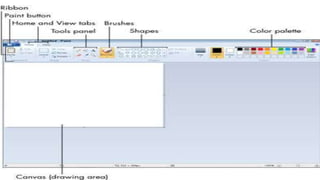
• Paint (formerly Paintbrush for Windows) is a simple graphics painting
program that has been included with all versions of Microsoft
Windows. It is often referred to as MS Paint or Microsoft Paint. The
program opens and saves files as Windows bitmap .It now supports
PNG,BMP, JPEG, GIF.
Notepad
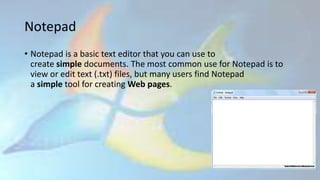
• Notepad is a basic text editor that you can use to
create simple documents. The most common use for Notepad is to
view or edit text (.txt) files, but many users find Notepad
a simple tool for creating Web pages.
Windows

Windows

  • 2.
    An intro tooperating system • An operating system is the set of programs that controls a computer. • It provides a pleasant and effective interface between user and the hardware. • Without an operating system a computer would be useless.
  • 4.
  • 5.
    Why is MicrosoftWindows called Windows? • Before the release of Microsoft Windows, Microsoft users were used to the single-task command line operating system MS-DOS. • Because Microsoft names most of its products with one word, it needed a word that best described its new GUI operating system. • Microsoft chose "Windows" because of the multiple windows that allow different tasks and programs to be run at the same time. • Because you cannot trademark a common name like "Windows" it is officially known as "Microsoft Windows". • The first version of Microsoft Windows was version 1.0, released in 1985. • Founded in April 4, 1975 by Bill Gates and Paul Allen, today Microsoft is one of the largest and most successful companies in the world.
  • 6.
    How does aGUI work? • A GUI uses windows, icons, and menus to carry out commands, such as opening, deleting, and moving files. Although many GUI operating systems are navigated through the use of a mouse, the keyboard can also be utilized by using keyboard shortcuts or arrow keys.
  • 8.
    Windows and itscomponents • The main components of windows when you start your computer are the desktop, my computer , recycle bin, start button, taskbar, and shortcuts of application.
  • 10.
    Control panel • Controlpanel is the centralised configuration area in windows. It is used to make changes to nearly every aspect of the operating system. • Think of control panel if you want to change windows of how it looks and it works.
  • 11.
    How to startcontrol panel ? • In recent versions of control panel , control panel is accessible from the window system folder • In other versions of windows, click start and then control panel.
  • 12.
    Program manager • ProgramManager is the main window of Microsoft Windows 3.x that allows users to execute each program on their computer. • Users running Windows 95, 98, NT, 2000, or XP can open it by clicking Start, Run, and typing "program" and clicking ok. The file is known as progman.exe and is located in the root directory of Windows; deleting this file can cause problems with your computer.
  • 14.
    File manager orfile explorer • A file manager or file browser is a computer program that provides a user interface to manage files and folders. • File management in windows can be done through Windows explorer or My Computer. Windows Explorer displays the hierarchical list of files, folders, and storage drives (both fixed and removable) on your computer. • Where is File Manager Windows 10 and window 8? Use the File Explorer shortcut on the taskbar. By default, Windows 10 includes a File Explorer shortcut on the taskbar. Its icon looks like a folder. Click or tap on it and File Explorer is opened.
  • 15.
    Accessories • Windows operatingsystem ships with some handy applications known as Windows accessories. Calculator, Notepad, Paint, Explorer, WordPad are some of the most frequently used accessories.
  • 16.
    Paint • Paint (formerlyPaintbrush for Windows) is a simple graphics painting program that has been included with all versions of Microsoft Windows. It is often referred to as MS Paint or Microsoft Paint. The program opens and saves files as Windows bitmap .It now supports PNG,BMP, JPEG, GIF.
  • 18.
    Notepad • Notepad isa basic text editor that you can use to create simple documents. The most common use for Notepad is to view or edit text (.txt) files, but many users find Notepad a simple tool for creating Web pages.