Wi-Fi TECHNOLOGY
BY
TEJASRI
A New Paradigm of Wireless Technology
This Paper Tells About
• Introduction
• Wi-Fi Technologies
• Wi-Fi Network Elements
• How a Wi-Fi Network Works
• Wi-Fi Network Topologies
• Wi-Fi Applications
• Wi-Fi Configurations
• Wi-Fi Security
• Advantages/ Disadvantages of Wi-Fi
Introduction
• Wireless Technology is an alternative to Wired
Technology, which is commonly used, for
connecting devices in wireless mode.
• Wi-Fi (Wireless Fidelity) is a generic term that
refers to the IEEE 802.11 communications
standard for Wireless Local Area Networks
(WLANs).
• Wi-Fi Network connect computers to each other,
to the internet and to the wired network.
The Wi-Fi Technology
Wi-Fi Networks use Radio Technologies to
transmit & receive data at high speed:
• IEEE 802.11b
• IEEE 802.11a
• IEEE 802.11g
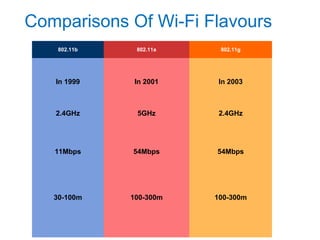
Comparisons Of Wi-Fi Flavours
802.11b 802.11a 802.11g
In 1999
2.4GHz
In 2001
5GHz
In 2003
2.4GHz
11Mbps 54Mbps 54Mbps
30-100m 100-300m 100-300m
Elements of a WI-FI Network
• Access Point (AP) - The AP is a wireless LAN
transceiver or “base station” that can connect one or many
wireless devices simultaneously to the Internet.
• Wi-Fi cards - They accept the wireless signal and relay
information.They can be internal and external.(e.g PCMCIA
Card for Laptop and PCI Card for Desktop PC)
• Safeguards - Firewalls and anti-virus software protect
networks from uninvited users and keep information secure.
How a Wi-Fi Network Works
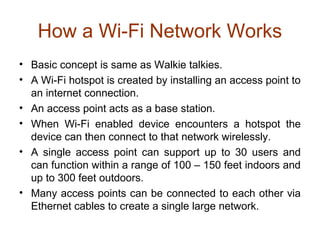
• Basic concept is same as Walkie talkies.
• A Wi-Fi hotspot is created by installing an access point to
an internet connection.
• An access point acts as a base station.
• When Wi-Fi enabled device encounters a hotspot the
device can then connect to that network wirelessly.
• A single access point can support up to 30 users and
can function within a range of 100 – 150 feet indoors and
up to 300 feet outdoors.
• Many access points can be connected to each other via
Ethernet cables to create a single large network.
How a Wi-Fi Network Works
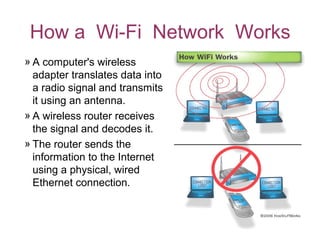
» A computer's wireless
adapter translates data into
a radio signal and transmits
it using an antenna.
» A wireless router receives
the signal and decodes it.
» The router sends the
information to the Internet
using a physical, wired
Ethernet connection.
Wi-Fi Network Topologies
• AP-based topology (Infrastructure Mode)
• Peer-to-peer topology
• Point-to-multipoint bridge topology
AP-based topology
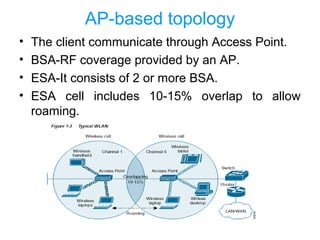
• The client communicate through Access Point.
• BSA-RF coverage provided by an AP.
• ESA-It consists of 2 or more BSA.
• ESA cell includes 10-15% overlap to allow
roaming.
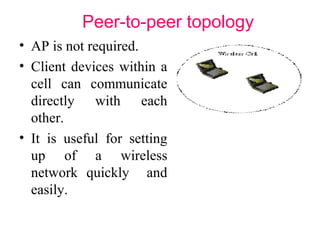
Peer-to-peer topology
• AP is not required.
• Client devices within a
cell can communicate
directly with each
other.
• It is useful for setting
up of a wireless
network quickly and
easily.
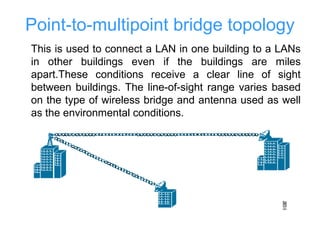
Point-to-multipoint bridge topology
This is used to connect a LAN in one building to a LANs
in other buildings even if the buildings are miles
apart.These conditions receive a clear line of sight
between buildings. The line-of-sight range varies based
on the type of wireless bridge and antenna used as well
as the environmental conditions.
Wi-Fi Applications
• Home
• Small Businesses or SOHO
• Large Corporations & Campuses
• Health Care
• Wireless ISP (WISP)
• Travellers
Wi-Fi Security
The requirements for Wi-Fi network security
can be broken down into two primary
components:
• Authentication
 User Authentication
 Server Authentication
• Privacy
Wi-Fi Security Techniques
• Service Set Identifier (SSID)
• Wired Equivalent Privacy (WEP)
• 802.1X Access Control
• Wireless Protected Access (WPA)
• IEEE 802.11i
Service Set Identifier (SSID)
• SSID is used to identify an 802.11 network
• It can be pre-configured or advertised in the
name of provider
• It is transmitted in clear text
• Provide very little security
Wired Equivalent Privacy (WEP)
• Uses RC4 encryption with pre-shared keys and 24 bit
initialization vectors (IV)
• Key schedule is generated by concatenating the
shared secret key with a random generated 24-bit IV
• 32 bit ICV (Integrity check value)
• No. of bits in keyschedule is equal to sum of length of
the plaintext and ICV
• Security Issue with WEP
• Short IV
• Static key
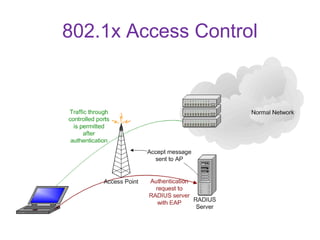
802.1x Access Control
Wireless Protected Access (WPA)
• WPA is a specification of standard based, interoperable
security enhancements that strongly increase the level of data
protection and access control for existing and future wireless
LAN system.
• User Authentication
• 802.1x
• TKIP (Temporal Key Integrity Protocol) encryption
• RC4, dynamic encryption keys (session based)
• 48 bit IV
• Fixes all issues found from WEP
• Uses Message Integrity Code (MIC)
– Ensures data integrity
• Old hardware should be upgradeable to WPA
802.11i
• Provides standard for WLAN security
• Authentication
• 802.1x
• Data encryption
• AES protocol is used
• Secure fast handoff-This allow roaming between
APs without requiring client to fully reauthenticate to
every AP.
• Will require new hardware
Advantages
• Mobility
• Ease of Installation
• Flexibility
• Cost
• Reliability
• Security
• Roaming
• Speed
Limitations
• Interference
• Degradation in performance
• High power consumption
• Limited range
Conclusion
• In the past, internet is luxury but now a days it
is need.
• So that for our requirements it’s necessity to
develop further technologies with low cost &
high speed of data transmission.
“Things that thinks …
don’t make sense unless they link.”
QUERIES ?
?
?
? ?
? ?
?
?
?? ?
?
Wifi vignan final

Wifi vignan final

  • 1.
  • 2.
    A New Paradigmof Wireless Technology
  • 3.
    This Paper TellsAbout • Introduction • Wi-Fi Technologies • Wi-Fi Network Elements • How a Wi-Fi Network Works • Wi-Fi Network Topologies • Wi-Fi Applications • Wi-Fi Configurations • Wi-Fi Security • Advantages/ Disadvantages of Wi-Fi
  • 4.
    Introduction • Wireless Technologyis an alternative to Wired Technology, which is commonly used, for connecting devices in wireless mode. • Wi-Fi (Wireless Fidelity) is a generic term that refers to the IEEE 802.11 communications standard for Wireless Local Area Networks (WLANs). • Wi-Fi Network connect computers to each other, to the internet and to the wired network.
  • 5.
    The Wi-Fi Technology Wi-FiNetworks use Radio Technologies to transmit & receive data at high speed: • IEEE 802.11b • IEEE 802.11a • IEEE 802.11g
  • 6.
    Comparisons Of Wi-FiFlavours 802.11b 802.11a 802.11g In 1999 2.4GHz In 2001 5GHz In 2003 2.4GHz 11Mbps 54Mbps 54Mbps 30-100m 100-300m 100-300m
  • 7.
    Elements of aWI-FI Network • Access Point (AP) - The AP is a wireless LAN transceiver or “base station” that can connect one or many wireless devices simultaneously to the Internet. • Wi-Fi cards - They accept the wireless signal and relay information.They can be internal and external.(e.g PCMCIA Card for Laptop and PCI Card for Desktop PC) • Safeguards - Firewalls and anti-virus software protect networks from uninvited users and keep information secure.
  • 8.
    How a Wi-FiNetwork Works • Basic concept is same as Walkie talkies. • A Wi-Fi hotspot is created by installing an access point to an internet connection. • An access point acts as a base station. • When Wi-Fi enabled device encounters a hotspot the device can then connect to that network wirelessly. • A single access point can support up to 30 users and can function within a range of 100 – 150 feet indoors and up to 300 feet outdoors. • Many access points can be connected to each other via Ethernet cables to create a single large network.
  • 9.
    How a Wi-FiNetwork Works » A computer's wireless adapter translates data into a radio signal and transmits it using an antenna. » A wireless router receives the signal and decodes it. » The router sends the information to the Internet using a physical, wired Ethernet connection.
  • 10.
    Wi-Fi Network Topologies •AP-based topology (Infrastructure Mode) • Peer-to-peer topology • Point-to-multipoint bridge topology
  • 11.
    AP-based topology • Theclient communicate through Access Point. • BSA-RF coverage provided by an AP. • ESA-It consists of 2 or more BSA. • ESA cell includes 10-15% overlap to allow roaming.
  • 12.
    Peer-to-peer topology • APis not required. • Client devices within a cell can communicate directly with each other. • It is useful for setting up of a wireless network quickly and easily.
  • 13.
    Point-to-multipoint bridge topology Thisis used to connect a LAN in one building to a LANs in other buildings even if the buildings are miles apart.These conditions receive a clear line of sight between buildings. The line-of-sight range varies based on the type of wireless bridge and antenna used as well as the environmental conditions.
  • 14.
    Wi-Fi Applications • Home •Small Businesses or SOHO • Large Corporations & Campuses • Health Care • Wireless ISP (WISP) • Travellers
  • 15.
    Wi-Fi Security The requirementsfor Wi-Fi network security can be broken down into two primary components: • Authentication  User Authentication  Server Authentication • Privacy
  • 16.
    Wi-Fi Security Techniques •Service Set Identifier (SSID) • Wired Equivalent Privacy (WEP) • 802.1X Access Control • Wireless Protected Access (WPA) • IEEE 802.11i
  • 17.
    Service Set Identifier(SSID) • SSID is used to identify an 802.11 network • It can be pre-configured or advertised in the name of provider • It is transmitted in clear text • Provide very little security
  • 18.
    Wired Equivalent Privacy(WEP) • Uses RC4 encryption with pre-shared keys and 24 bit initialization vectors (IV) • Key schedule is generated by concatenating the shared secret key with a random generated 24-bit IV • 32 bit ICV (Integrity check value) • No. of bits in keyschedule is equal to sum of length of the plaintext and ICV • Security Issue with WEP • Short IV • Static key
  • 19.
  • 20.
    Wireless Protected Access(WPA) • WPA is a specification of standard based, interoperable security enhancements that strongly increase the level of data protection and access control for existing and future wireless LAN system. • User Authentication • 802.1x • TKIP (Temporal Key Integrity Protocol) encryption • RC4, dynamic encryption keys (session based) • 48 bit IV • Fixes all issues found from WEP • Uses Message Integrity Code (MIC) – Ensures data integrity • Old hardware should be upgradeable to WPA
  • 21.
    802.11i • Provides standardfor WLAN security • Authentication • 802.1x • Data encryption • AES protocol is used • Secure fast handoff-This allow roaming between APs without requiring client to fully reauthenticate to every AP. • Will require new hardware
  • 22.
    Advantages • Mobility • Easeof Installation • Flexibility • Cost • Reliability • Security • Roaming • Speed
  • 23.
    Limitations • Interference • Degradationin performance • High power consumption • Limited range
  • 24.
    Conclusion • In thepast, internet is luxury but now a days it is need. • So that for our requirements it’s necessity to develop further technologies with low cost & high speed of data transmission.
  • 25.
    “Things that thinks… don’t make sense unless they link.”
  • 26.
    QUERIES ? ? ? ? ? ?? ? ? ?? ? ?