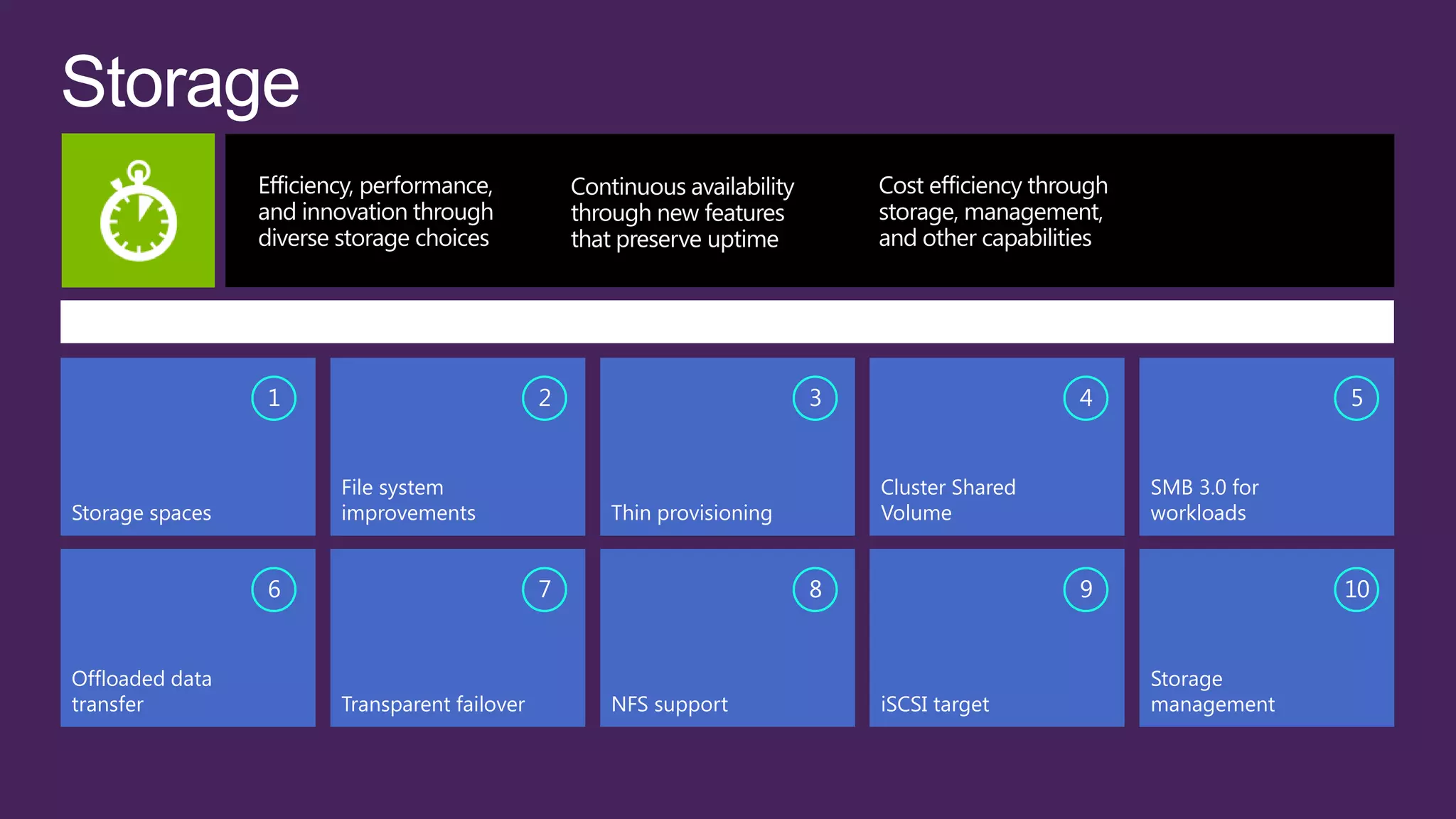
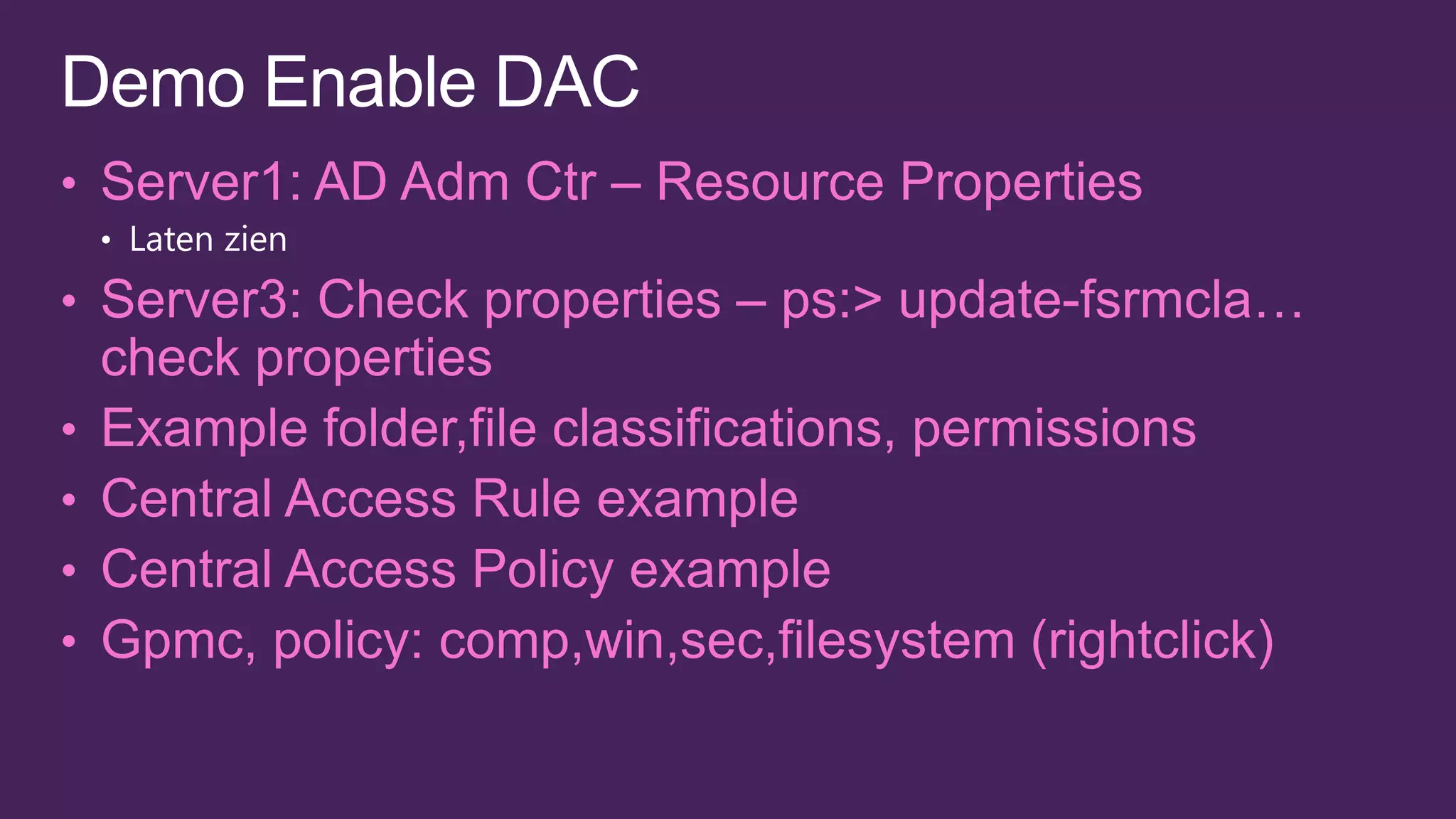
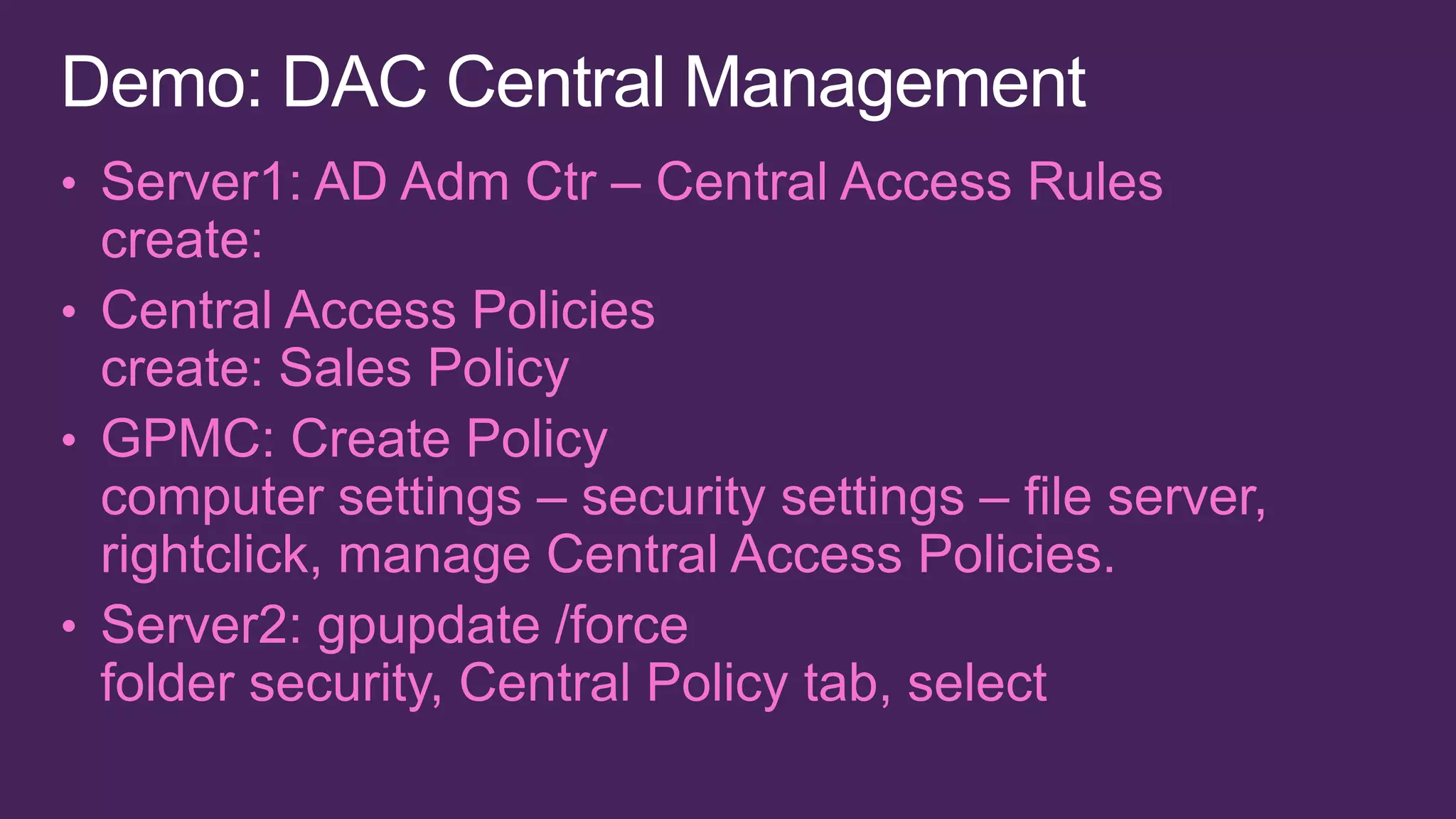
TOP FEATURES OF STORAGE TO MEET CUSTOMER CHALLENGES

                 1                          2                       3                    4                 5


                     File system                                        Cluster Shared       SMB 3.0 for
Storage spaces       improvements               Thin provisioning       Volume               workloads


                 6                          7                       8                    9                 10


Offloaded data                                                                               Storage
transfer             Transparent failover       NFS support             iSCSI target         management
1                       2                   3                    4                 5


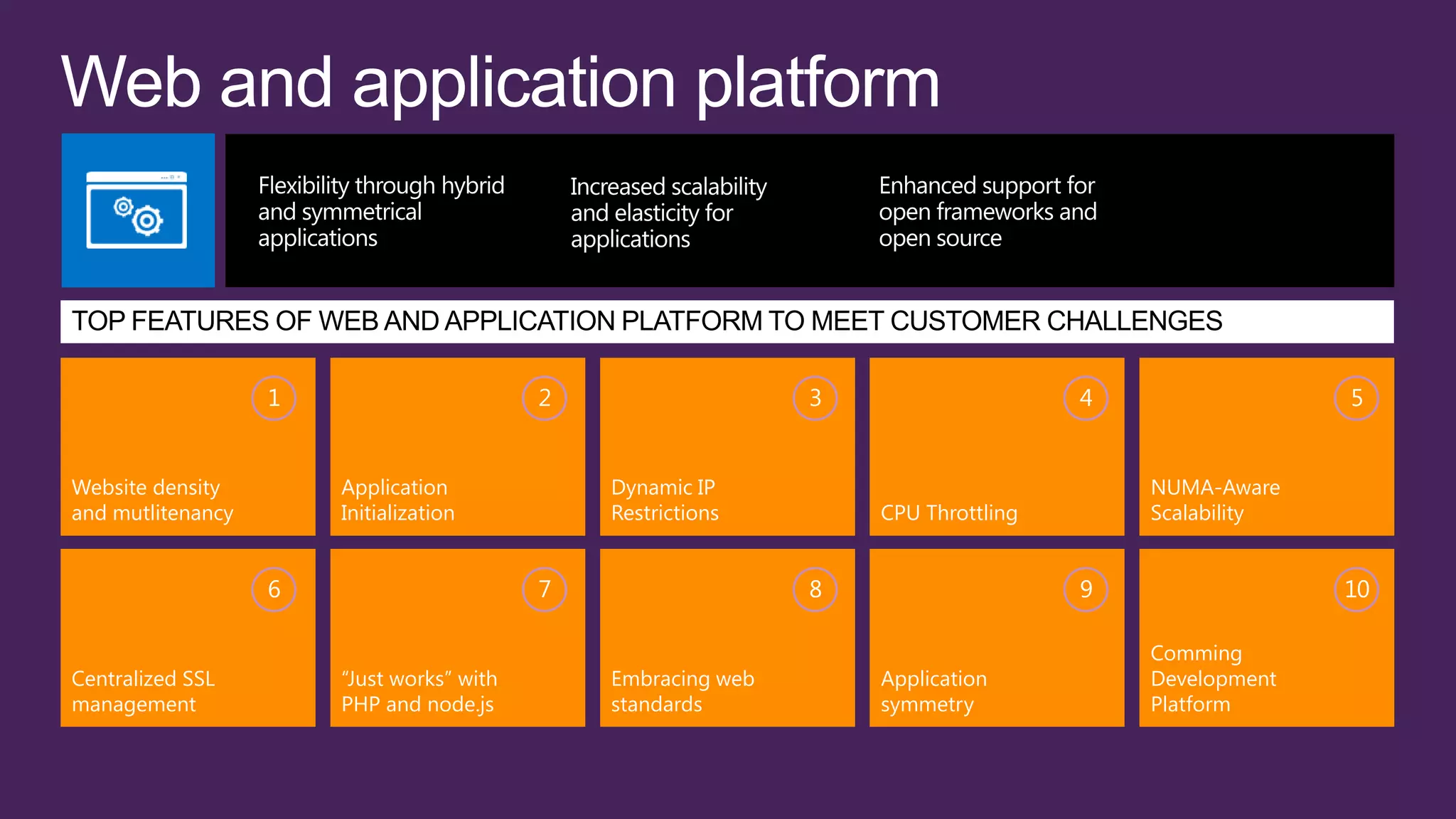
Website density        Application             Dynamic IP                               NUMA-Aware
and mutlitenancy       Initialization          Restrictions        CPU Throttling       Scalability


                   6                       7                   8                    9                 10

                                                                                        Comming
Centralized SSL        “Just works” with       Embracing web       Application          Development
management             PHP and node.js         standards           symmetry             Platform
1                    2                        3                     4                       5

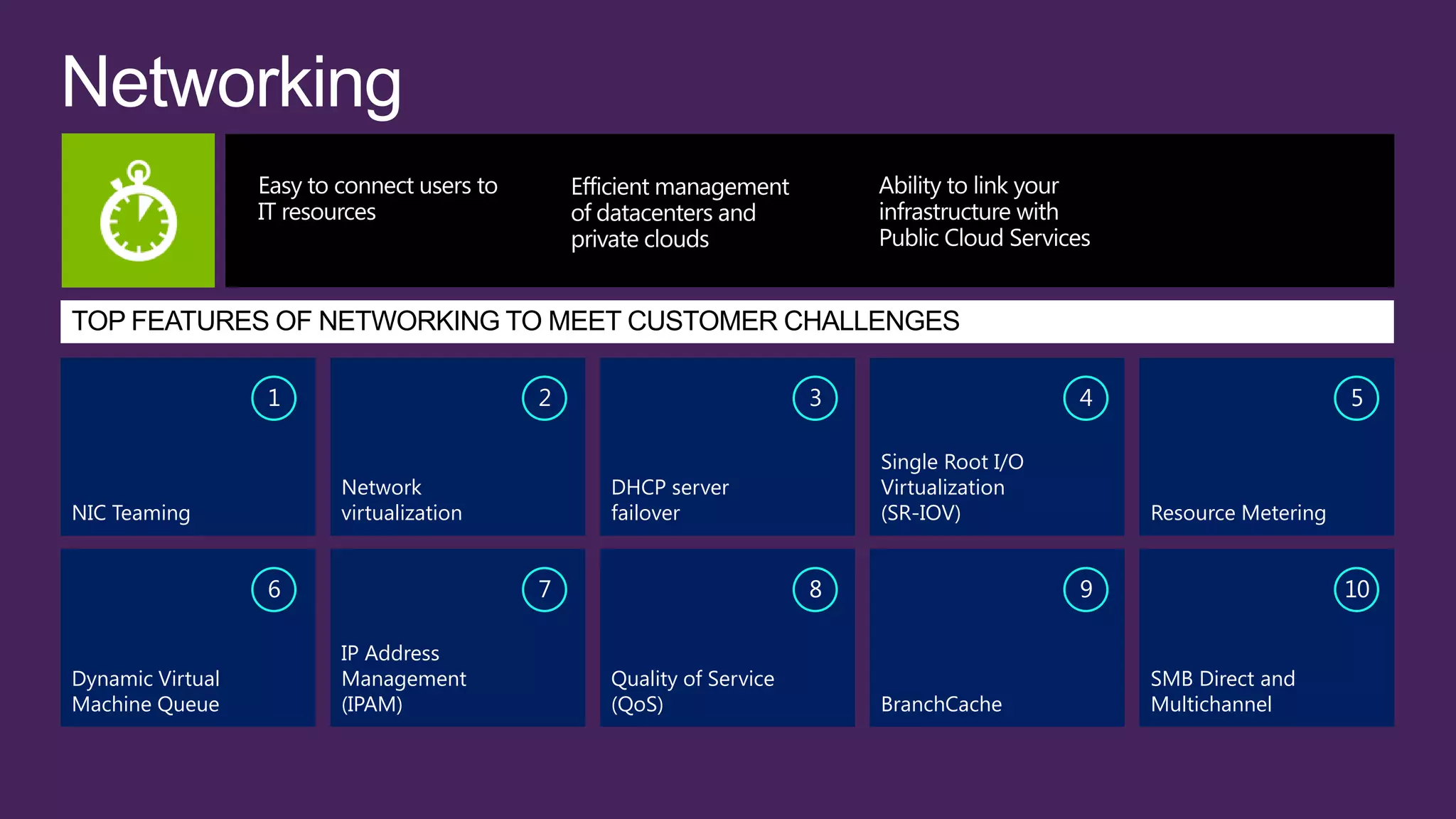
                                                                    Single Root I/O
                      Network              DHCP server              Virtualization
NIC Teaming           virtualization       failover                 (SR-IOV)              Resource Metering


                  6                    7                        8                     9                       10

                      IP Address
Dynamic Virtual       Management           Quality of Service                             SMB Direct and
Machine Queue         (IPAM)               (QoS)                    BranchCache           Multichannel
1                      2                        3                    4                        5


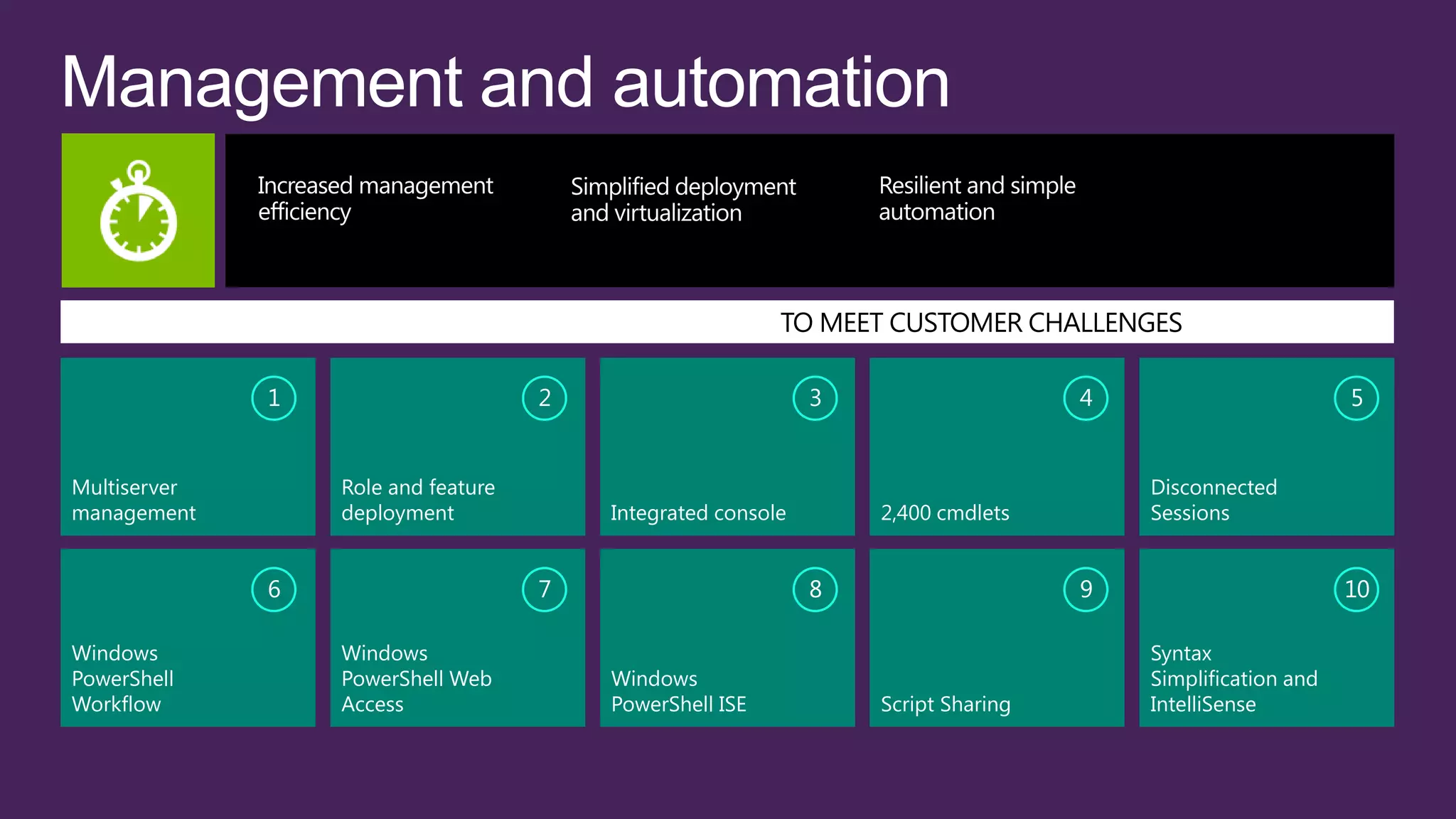
Multiserver       Role and feature                                                     Disconnected
management        deployment             Integrated console       2,400 cmdlets        Sessions


              6                      7                        8                    9                        10

Windows           Windows                                                              Syntax
PowerShell        PowerShell Web         Windows                                       Simplification and
Workflow          Access                 PowerShell ISE           Script Sharing       IntelliSense
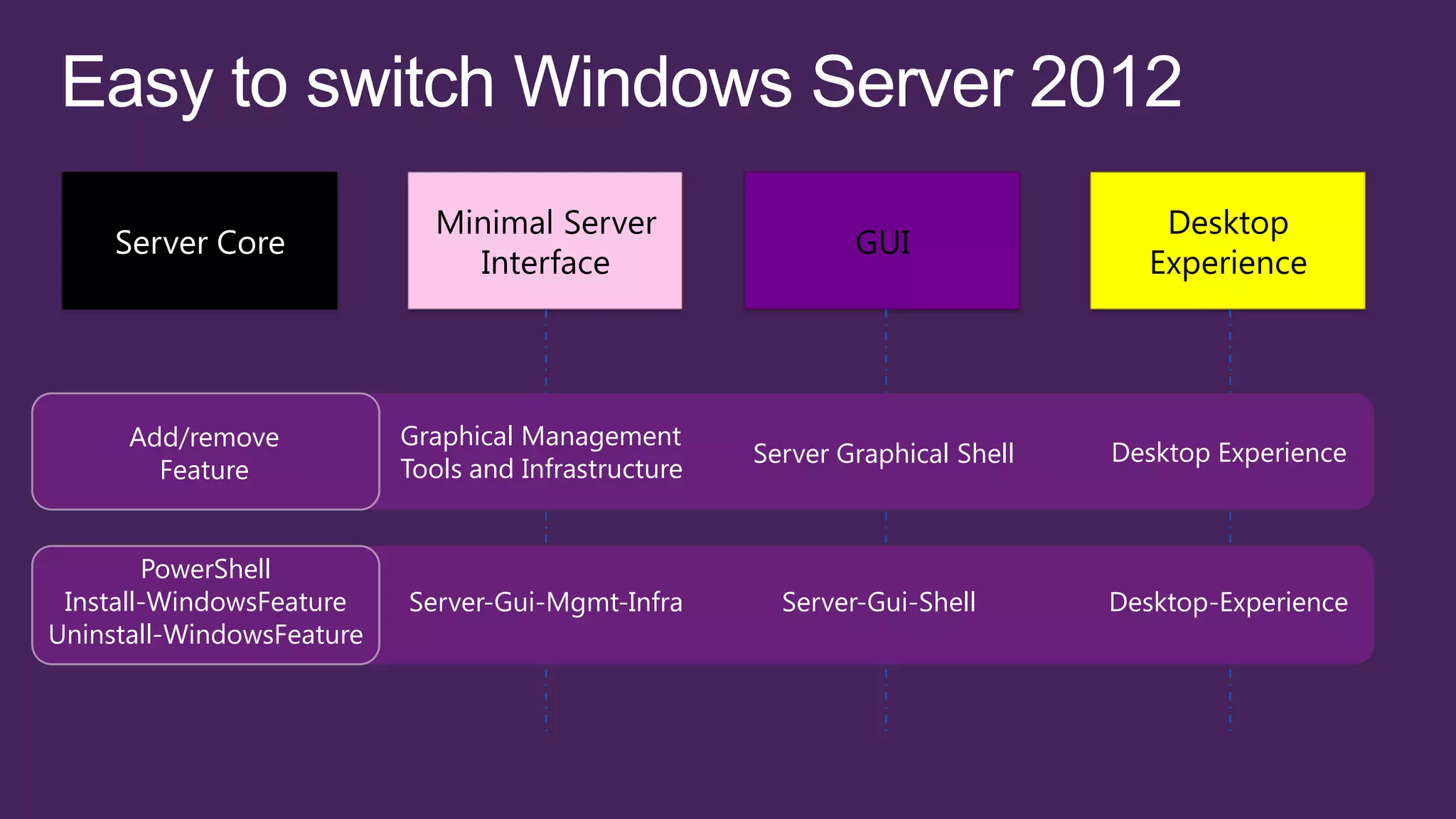
Add/remove           Graphical Management
                                                      Server Graphical Shell   Desktop Experience
        Feature            Tools and Infrastructure


        PowerShell
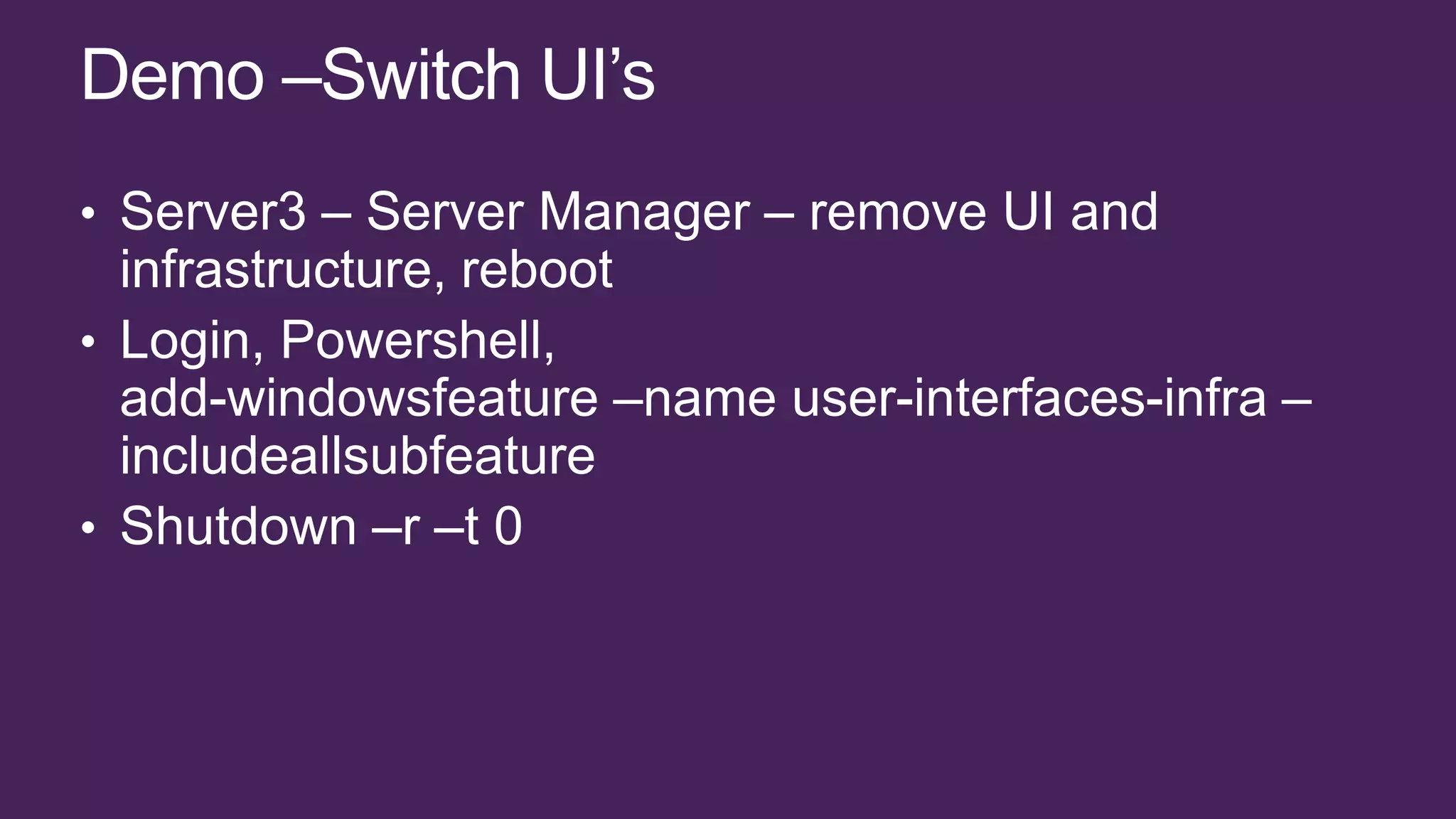
 Install-WindowsFeature    Server-Gui-Mgmt-Infra        Server-Gui-Shell       Desktop-Experience
Uninstall-WindowsFeature
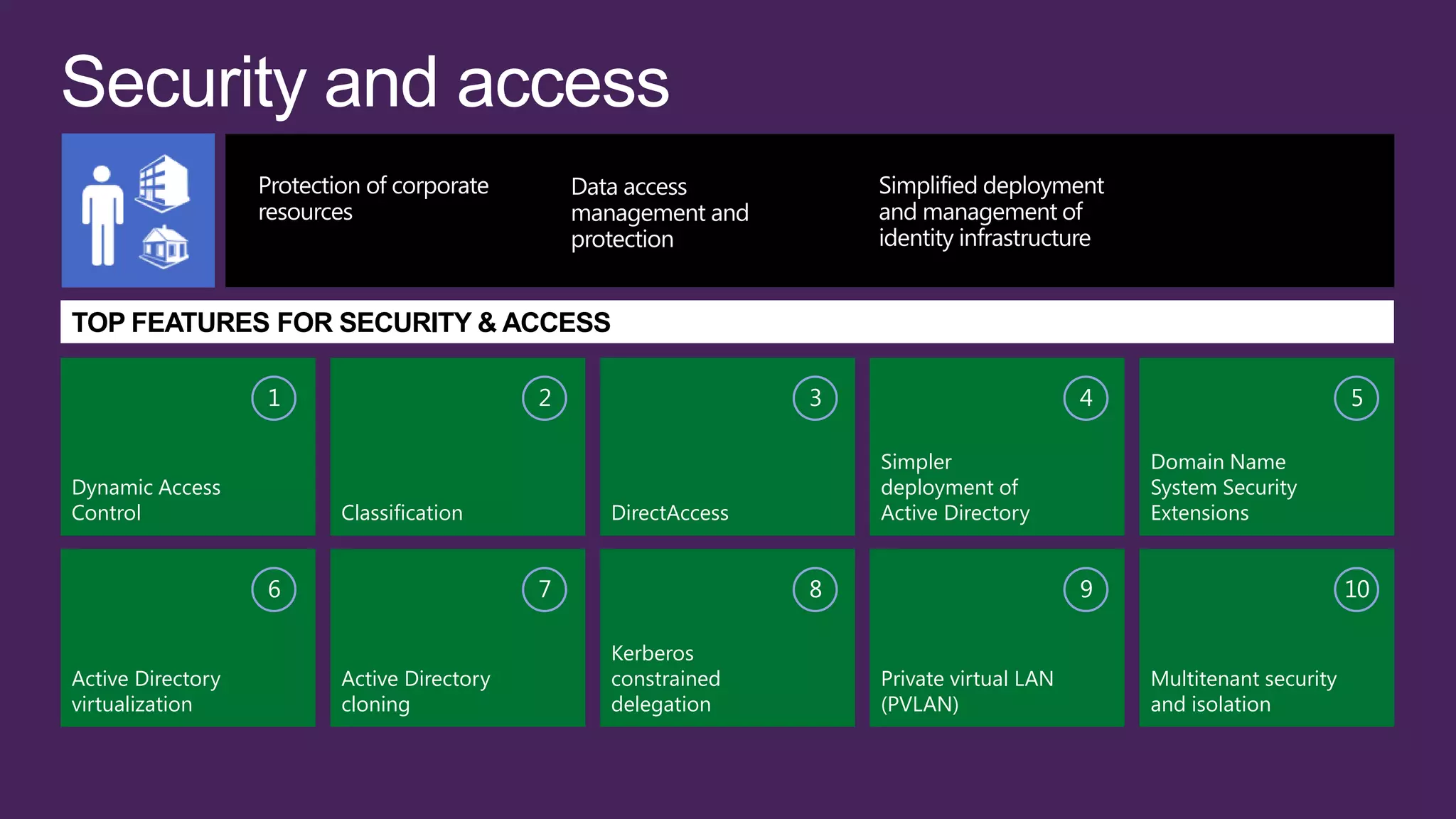
TOP FEATURES FOR SECURITY & ACCESS

                   1                      2                  3                         4                          5

                                                                 Simpler                   Domain Name
Dynamic Access                                                   deployment of             System Security
Control                Classification         DirectAccess       Active Directory          Extensions


                   6                      7                  8                         9                          10

                                              Kerberos
Active Directory       Active Directory       constrained        Private virtual LAN       Multitenant security
virtualization         cloning                delegation         (PVLAN)                   and isolation
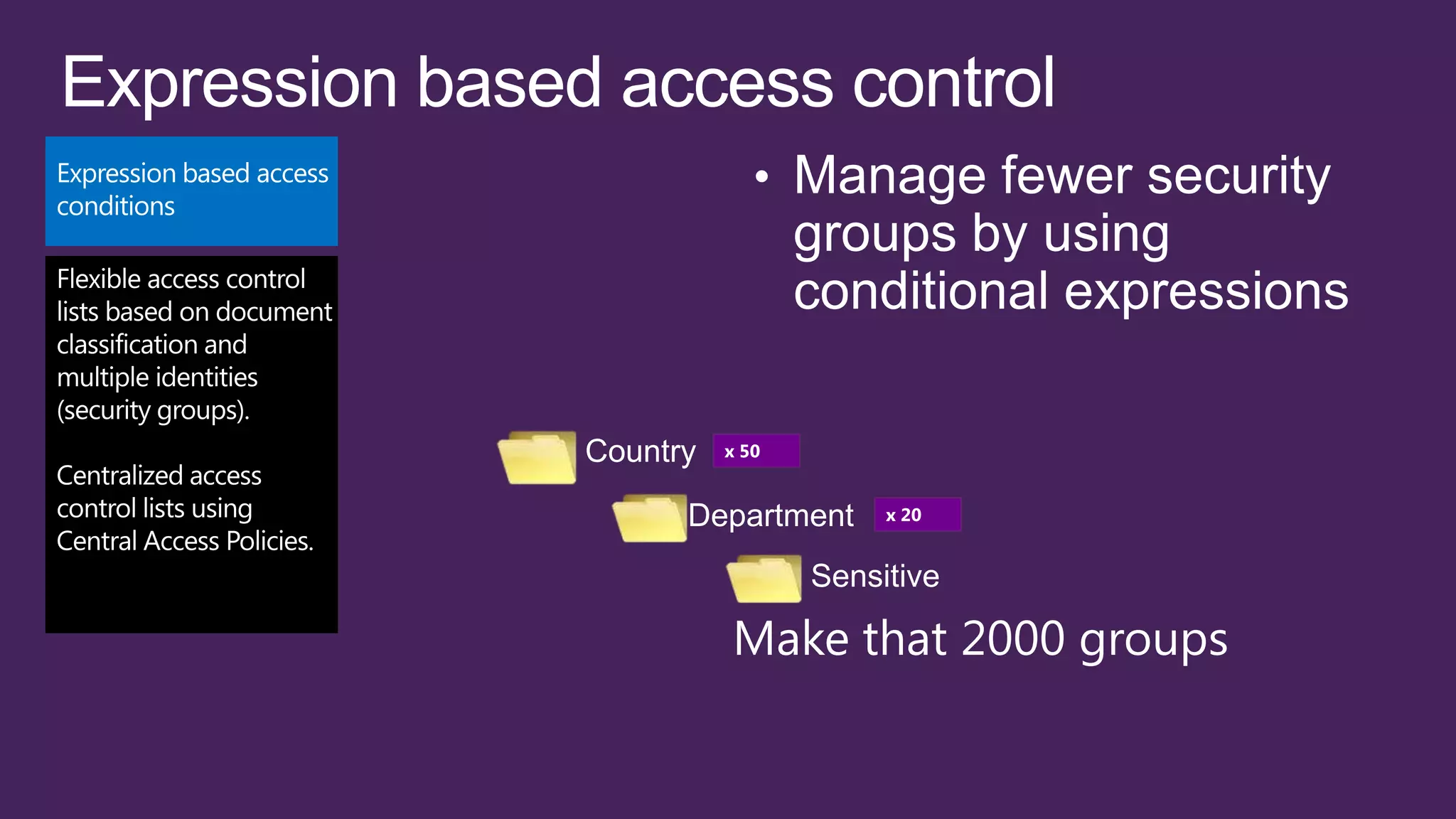
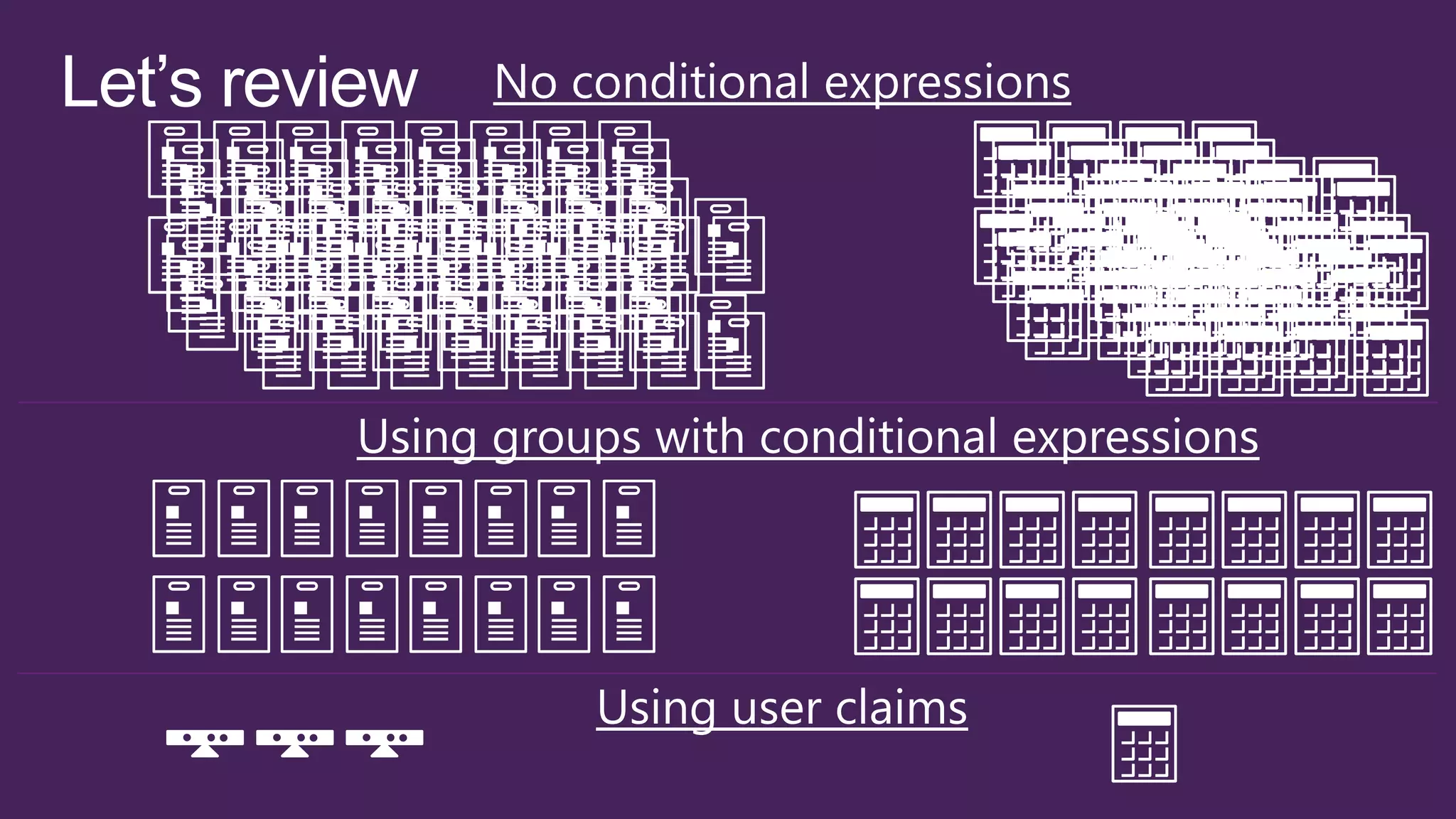
Country   x 50


      Department      x 20


                 Sensitive

          Make that 2000 groups
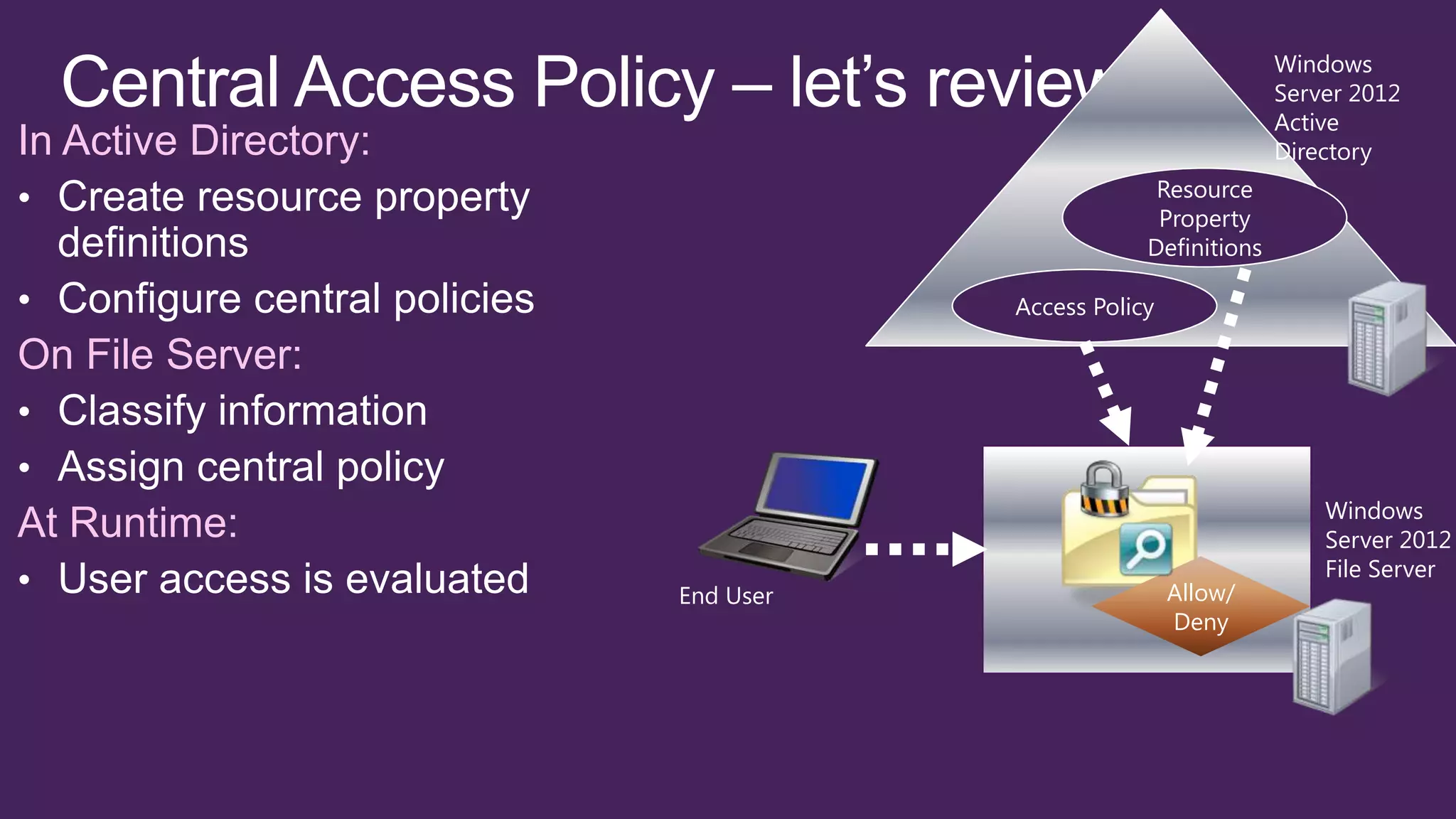
Windows
                                                            Server 2012
                                                            Active
In Active Directory:                                        Directory
                                               Resource
                                               Property
                                              Definitions

                                  Access Policy

On File Server:


                                                                Windows
At Runtime:                                                     Server 2012
                                                                File Server
                       End User                   Allow/
                                                  Deny
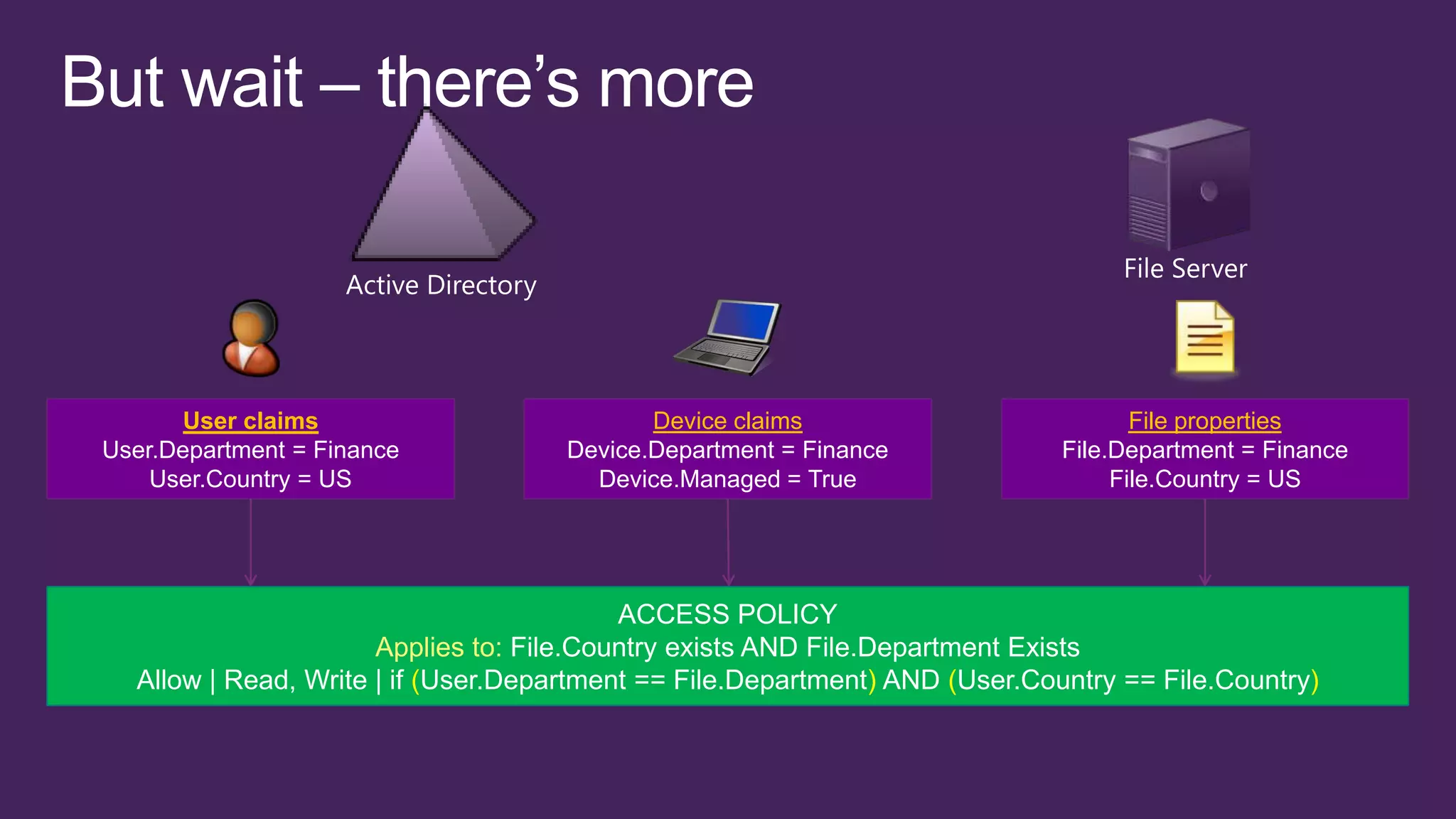
User claims                         Device claims                            File properties
User.Department = Finance           Device.Department = Finance              File.Department = Finance
    User.Country = US                 Device.Managed = True                       File.Country = US


                                          ACCESS POLICY
                      Applies to: File.Country exists AND File.Department Exists
  Allow | Read, Write | if (User.Department == File.Department) AND (User.Country == File.Country)
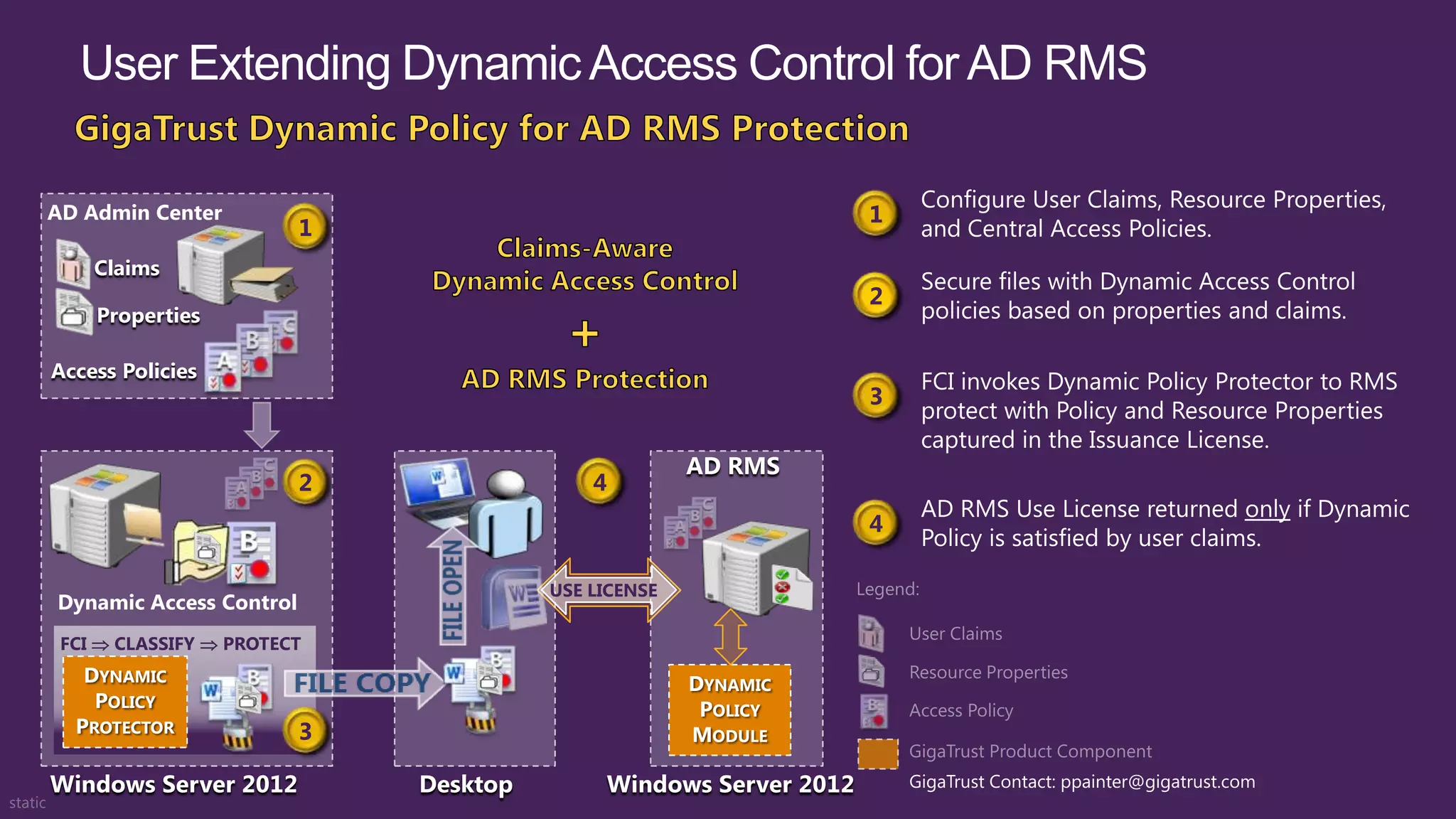
AD Admin Center                                                   1
                         1
    Claims
                                                                  2
    Properties

Access Policies
                                                                  3

                                                     AD RMS
                         2                 4
                                                                  4

                                       USE LICENSE
Dynamic Access Control
 FCI  CLASSIFY  PROTECT
   DYNAMIC                                           DYNAMIC
    POLICY                                            POLICY
  PROTECTOR              3                           MODULE

Windows Server 2012          Desktop        Windows Server 2012       GigaTrust Contact: ppainter@gigatrust.com
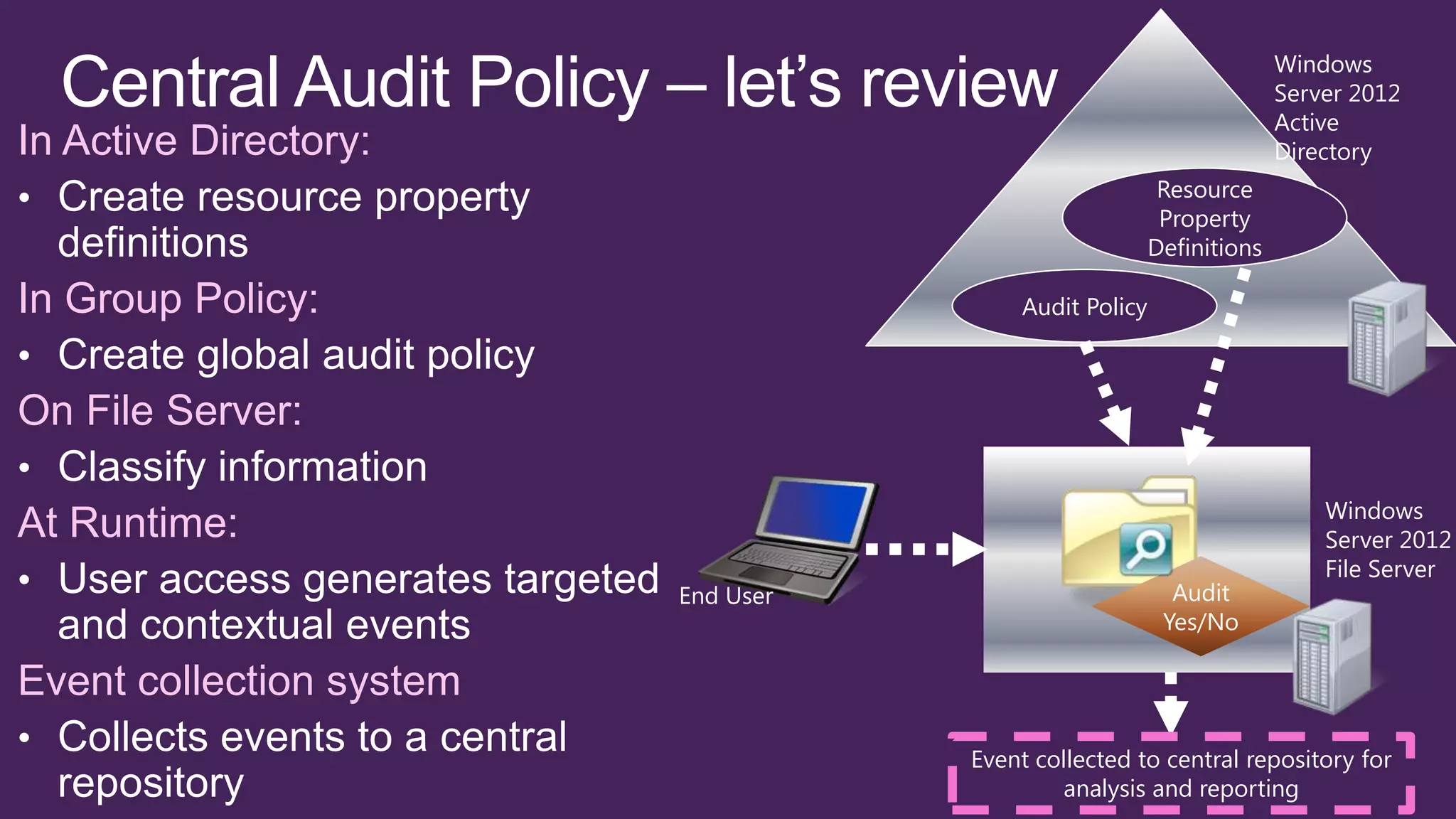
Windows
                                                                      Server 2012
                                                                      Active
In Active Directory:                                                  Directory
                                                         Resource
                                                         Property
                                                        Definitions

In Group Policy:                         Audit Policy


On File Server:

                                                                          Windows
At Runtime:                                                               Server 2012
                                                                          File Server
                          End User                        Audit
                                                         Yes/No

Event collection system
                                     Event collected to central repository for
                                             analysis and reporting
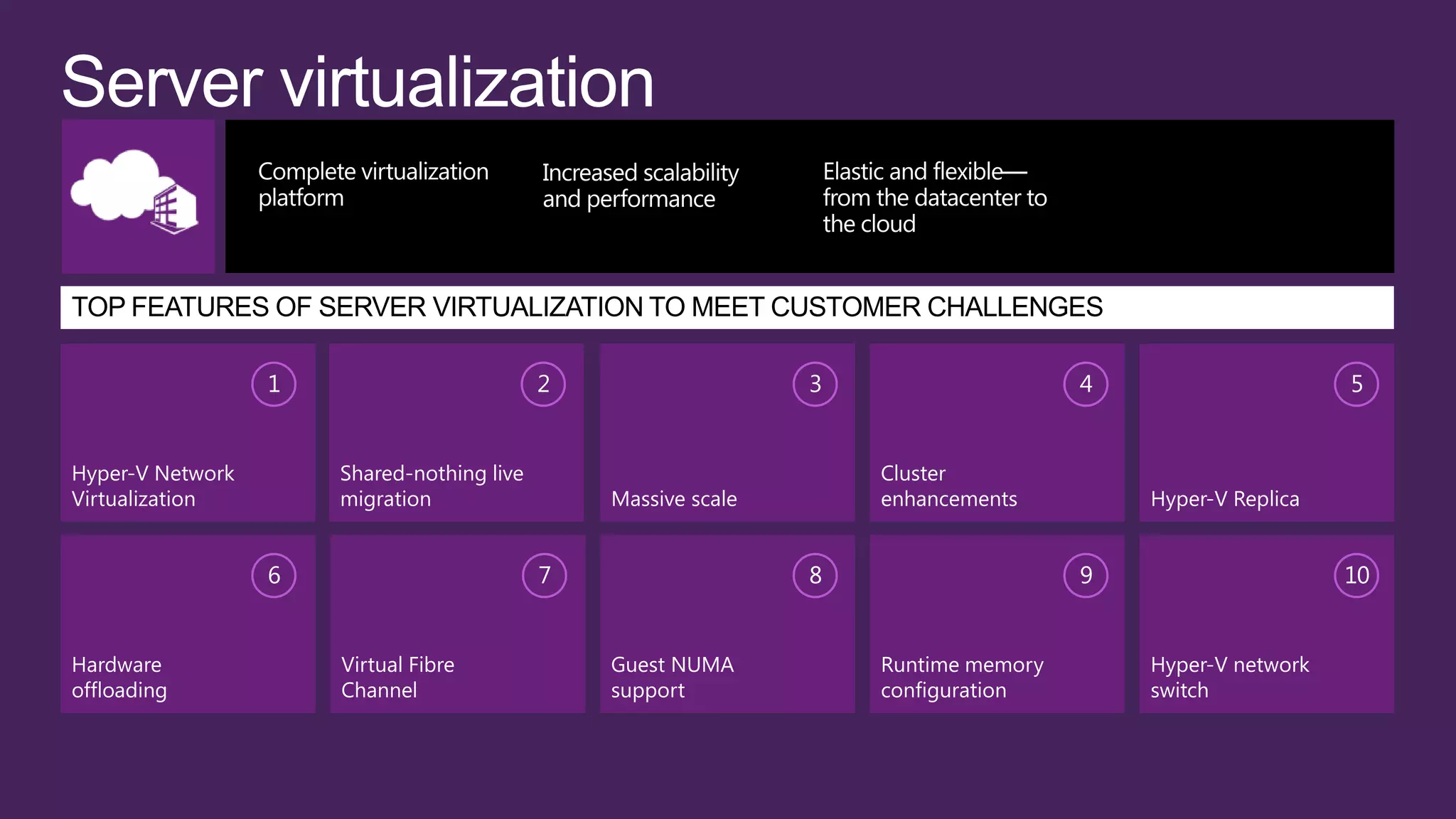
1                         2                   3                    4                     5


Hyper-V Network       Shared-nothing live                           Cluster
Virtualization        migration                 Massive scale       enhancements         Hyper-V Replica


                  6                         7                   8                    9                     10


Hardware              Virtual Fibre             Guest NUMA          Runtime memory       Hyper-V network
offloading            Channel                   support             configuration        switch
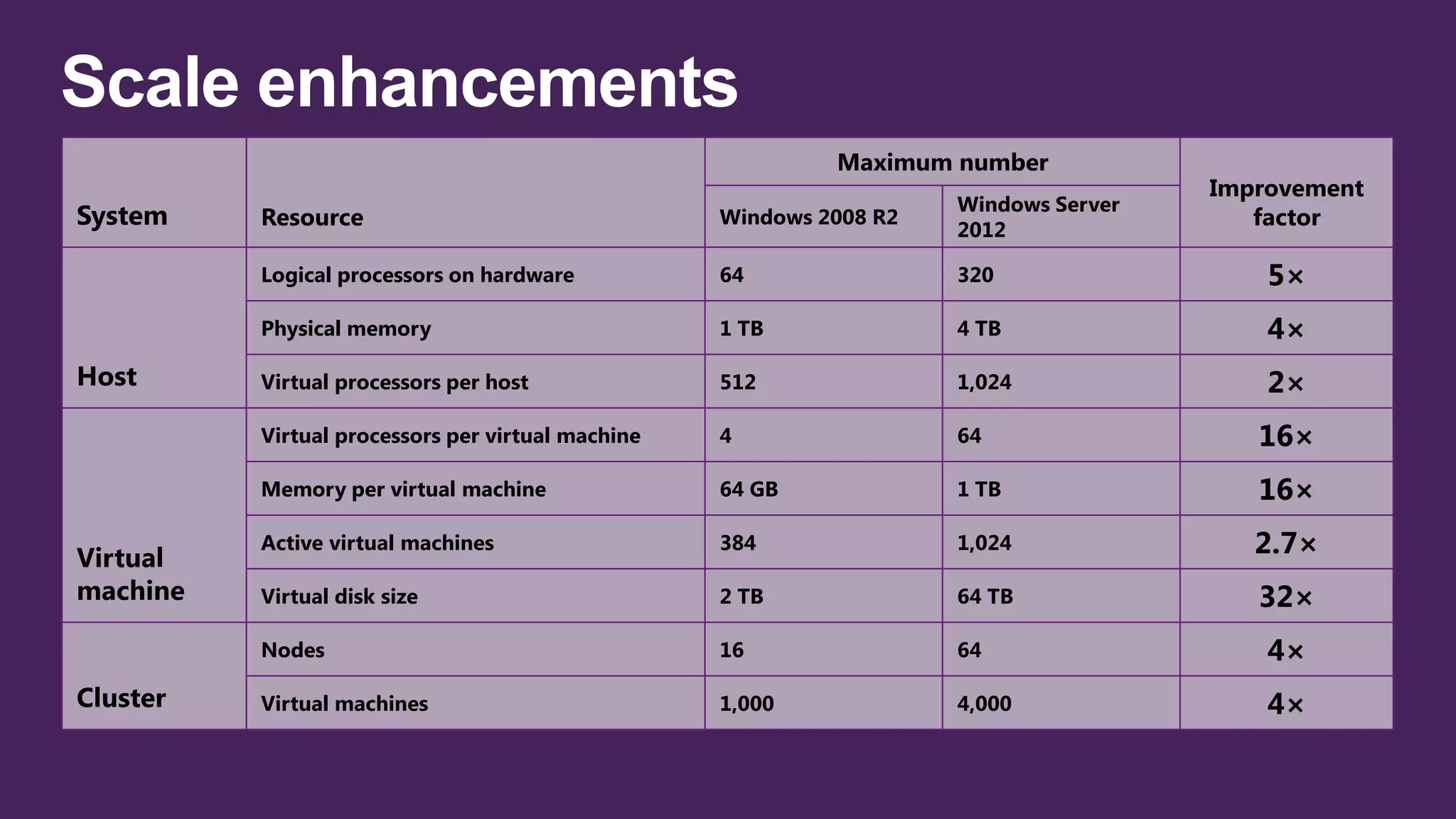
Maximum number
                                                                                      Improvement
                                                                     Windows Server
System    Resource                                 Windows 2008 R2
                                                                     2012
                                                                                         factor

          Logical processors on hardware           64                320                  5×
          Physical memory                          1 TB              4 TB                 4×
Host      Virtual processors per host              512               1,024                2×
          Virtual processors per virtual machine   4                 64                  16×
          Memory per virtual machine               64 GB             1 TB                16×

Virtual
          Active virtual machines                  384               1,024               2.7×
machine   Virtual disk size                        2 TB              64 TB               32×
          Nodes                                    16                64                   4×
Cluster   Virtual machines                         1,000             4,000                4×
Windows Server 2008      Windows Server 2008 R2      Windows Server 2012
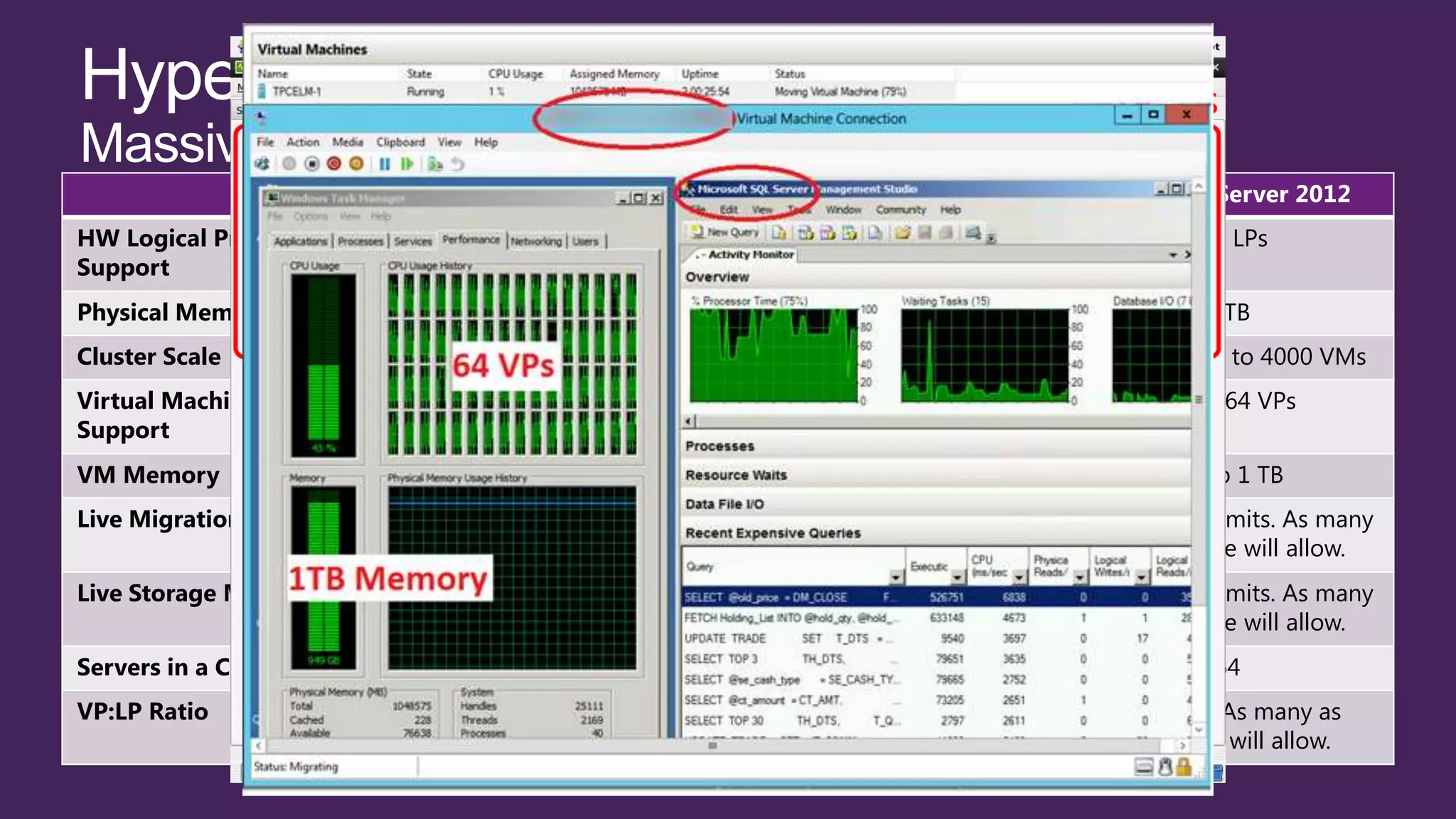
HW Logical Processor                16 LPs                     64 LPs                     320 LPs
Support
Physical Memory Support              1 TB                       1 TB                       4 TB
Cluster Scale               16 Nodes up to 1000 VMs   16 Nodes up to 1000 VMs   64 Nodes up to 4000 VMs
Virtual Machine Processor         Up to 4 VPs               Up to 4 VPs                Up to 64 VPs
Support
VM Memory                         Up to 64 GB               Up to 64 GB                 Up to 1 TB
Live Migration                 Yes, one at a time        Yes, one at a time     Yes, with no limits. As many
                                                                                  as hardware will allow.
Live Storage Migration        No. Quick Storage         No. Quick Storage       Yes, with no limits. As many
                             Migration via SCVMM       Migration via SCVMM        as hardware will allow.
Servers in a Cluster                  16                         16                         64
VP:LP Ratio                           8:1                  8:1 for Server          No limits. As many as
                                                        12:1 for Client (VDI)       hardware will allow.
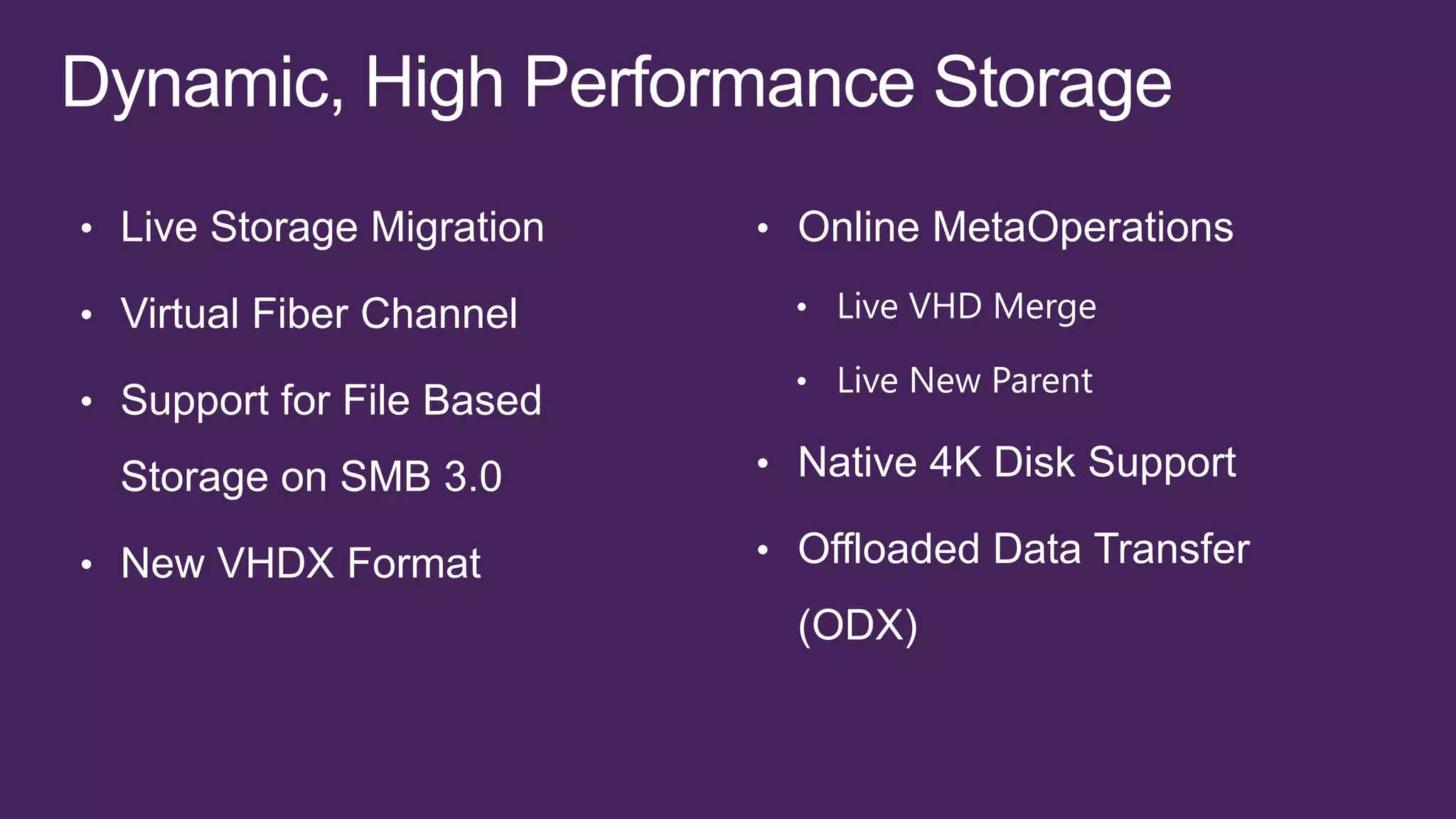
• Live Storage Migration   • Online MetaOperations

• Virtual Fiber Channel      • Live VHD Merge

                             • Live New Parent
• Support for File Based

  Storage on SMB 3.0       • Native 4K Disk Support

• New VHDX Format          • Offloaded Data Transfer
                             (ODX)
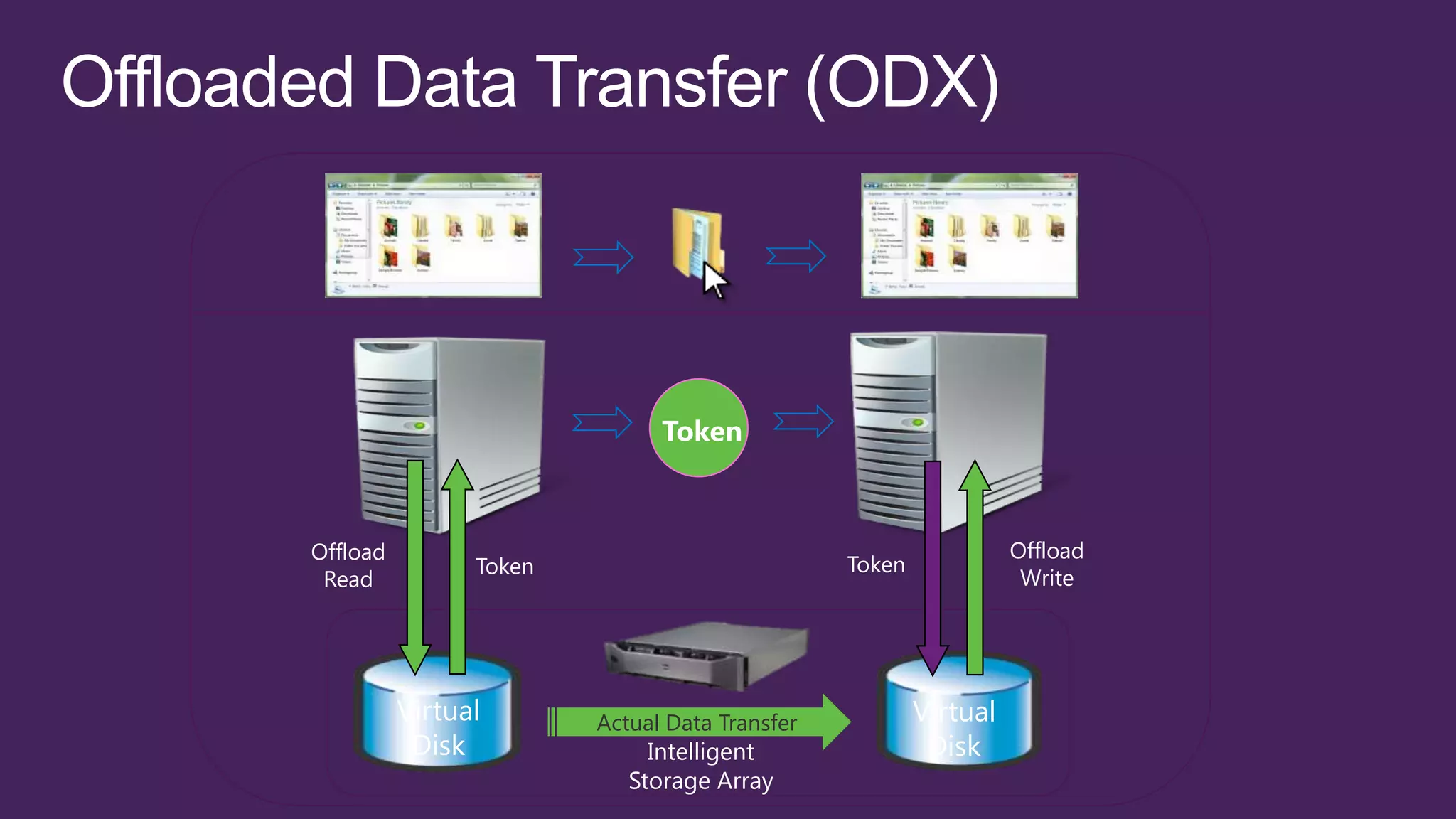
Token


Offload                                                          Offload
                Token                          Token
 Read                                                             Write


          Virtual       Actual Data Transfer           Virtual
           Disk              Intelligent                Disk
                           Storage Array
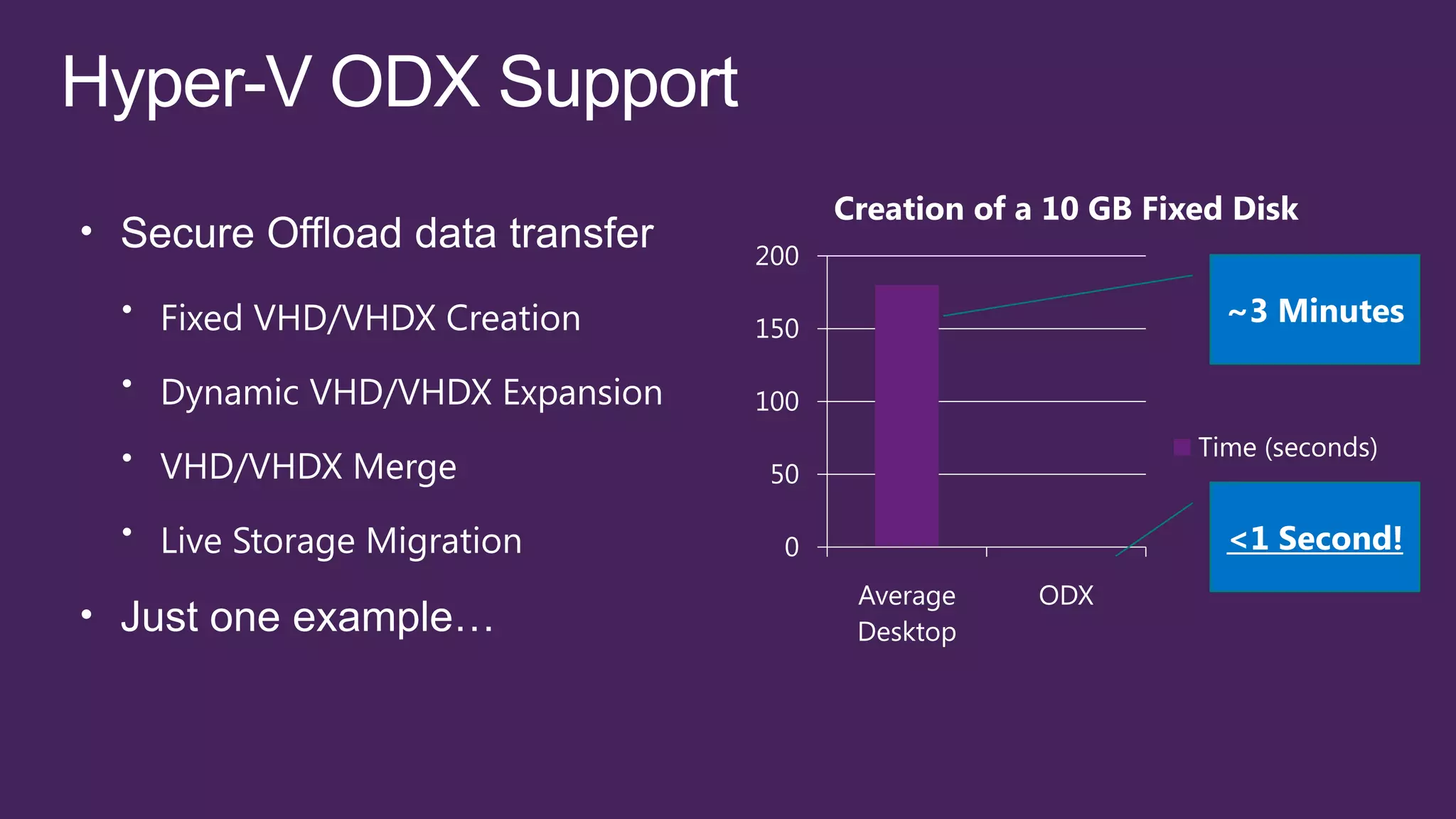
Creation of a 10 GB Fixed Disk
200

150
                               ~3 Minutes

100
                             Time (seconds)
 50

  0                            <1 Second!
       Average     ODX
       Desktop
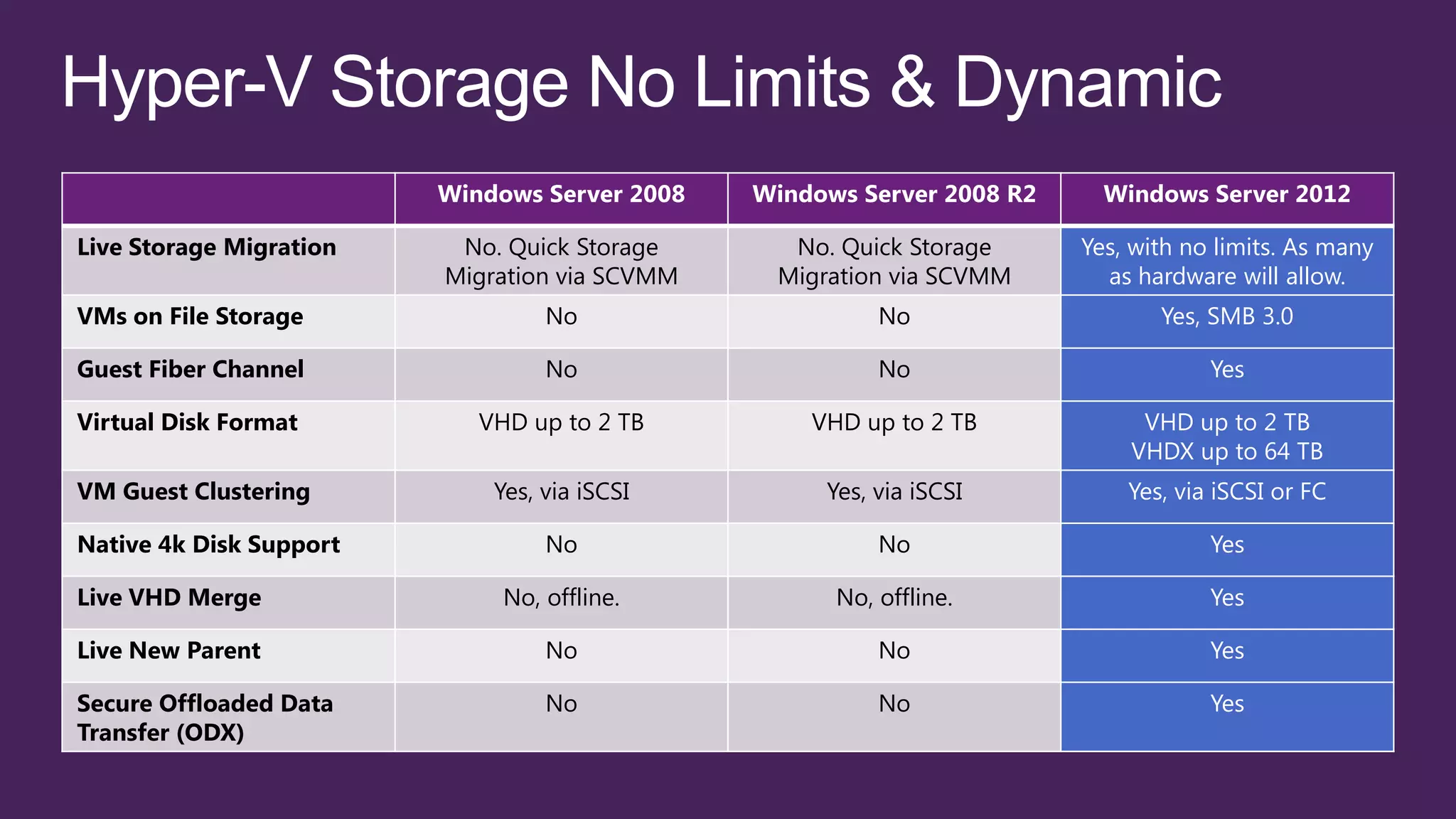
Windows Server 2008   Windows Server 2008 R2     Windows Server 2012

Live Storage Migration    No. Quick Storage      No. Quick Storage      Yes, with no limits. As many
                         Migration via SCVMM    Migration via SCVMM       as hardware will allow.
VMs on File Storage               No                     No                    Yes, SMB 3.0

Guest Fiber Channel               No                     No                         Yes

Virtual Disk Format         VHD up to 2 TB         VHD up to 2 TB            VHD up to 2 TB
                                                                            VHDX up to 64 TB
VM Guest Clustering          Yes, via iSCSI         Yes, via iSCSI          Yes, via iSCSI or FC

Native 4k Disk Support            No                     No                         Yes

Live VHD Merge                No, offline.           No, offline.                   Yes

Live New Parent                   No                     No                         Yes

Secure Offloaded Data             No                     No                         Yes
Transfer (ODX)
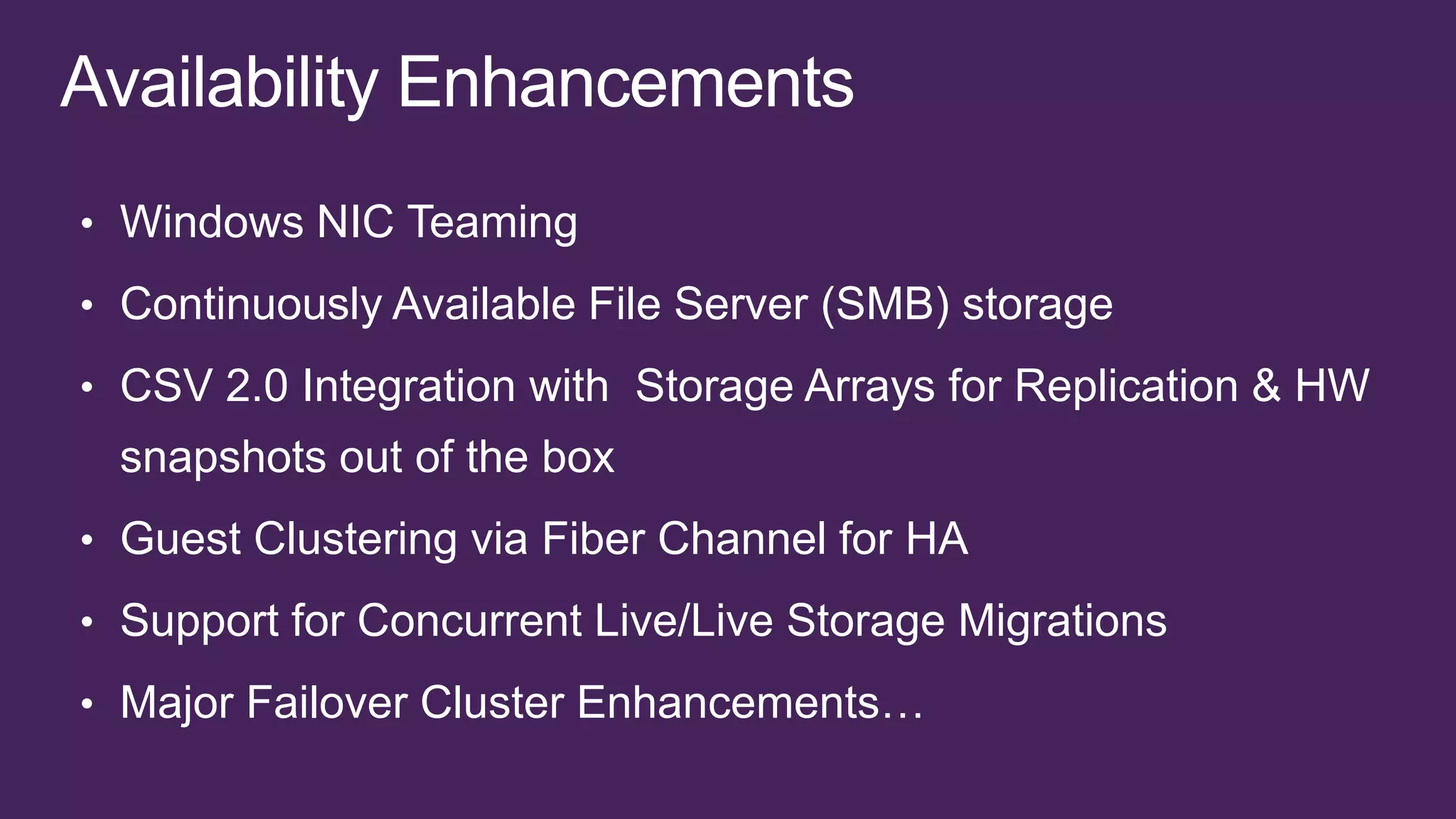
• Windows NIC Teaming

• Continuously Available File Server (SMB) storage
• CSV 2.0 Integration with Storage Arrays for Replication & HW
 snapshots out of the box
• Guest Clustering via Fiber Channel for HA

• Support for Concurrent Live/Live Storage Migrations

• Major Failover Cluster Enhancements…
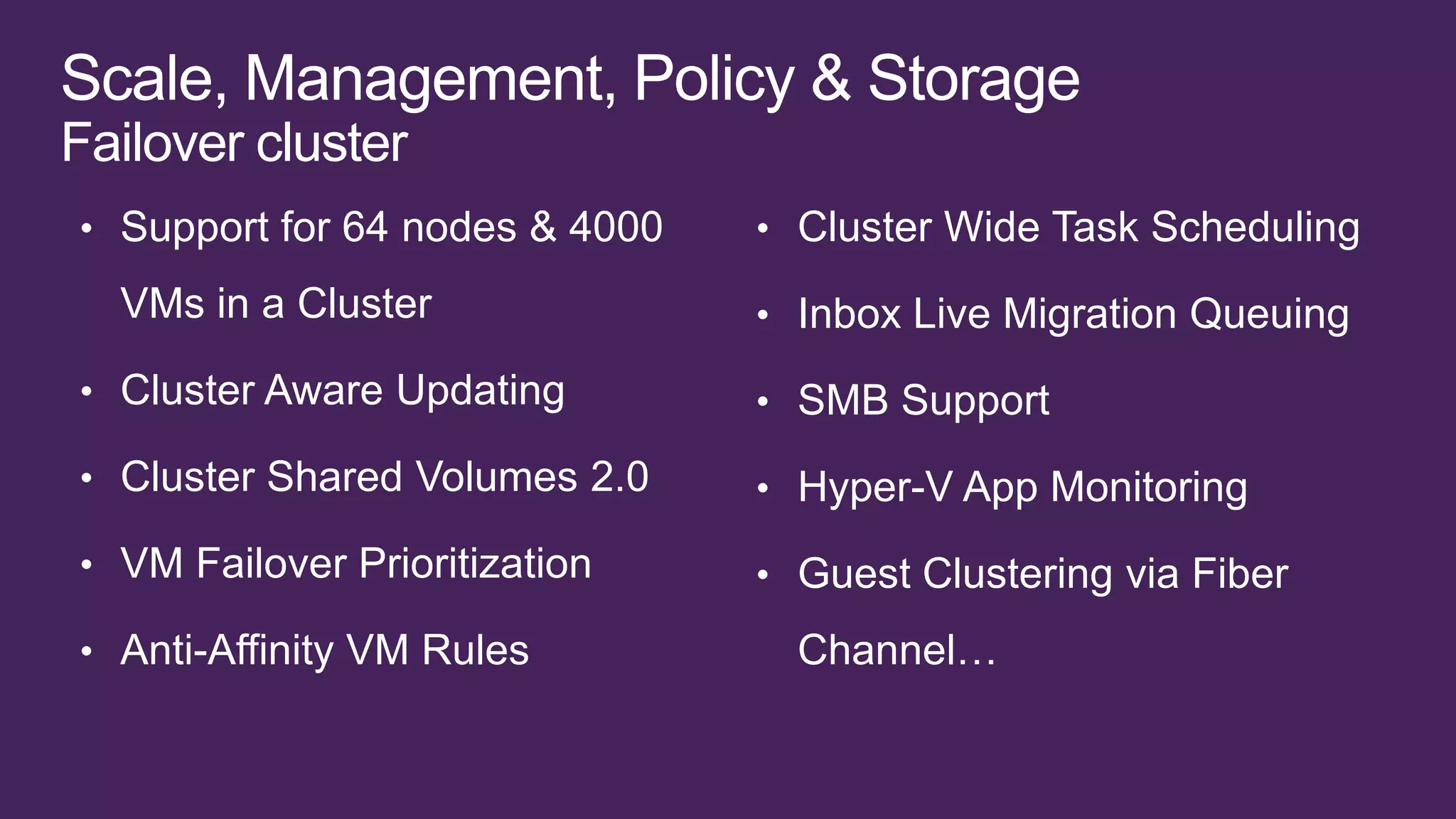
Failover cluster
• Support for 64 nodes & 4000   • Cluster Wide Task Scheduling

  VMs in a Cluster              • Inbox Live Migration Queuing
• Cluster Aware Updating        • SMB Support

• Cluster Shared Volumes 2.0    • Hyper-V App Monitoring
• VM Failover Prioritization    • Guest Clustering via Fiber

• Anti-Affinity VM Rules          Channel…
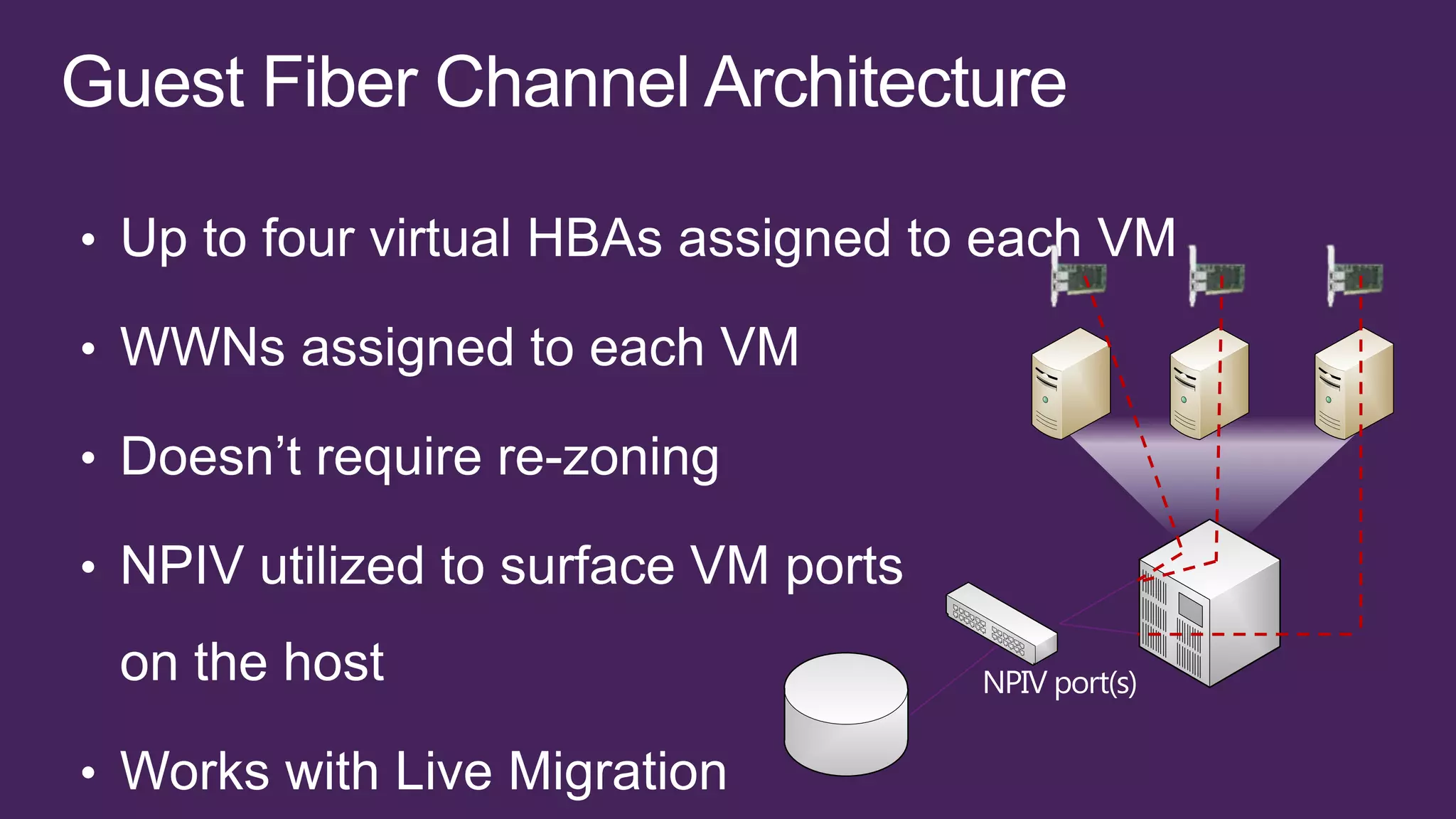
NPIV port(s)
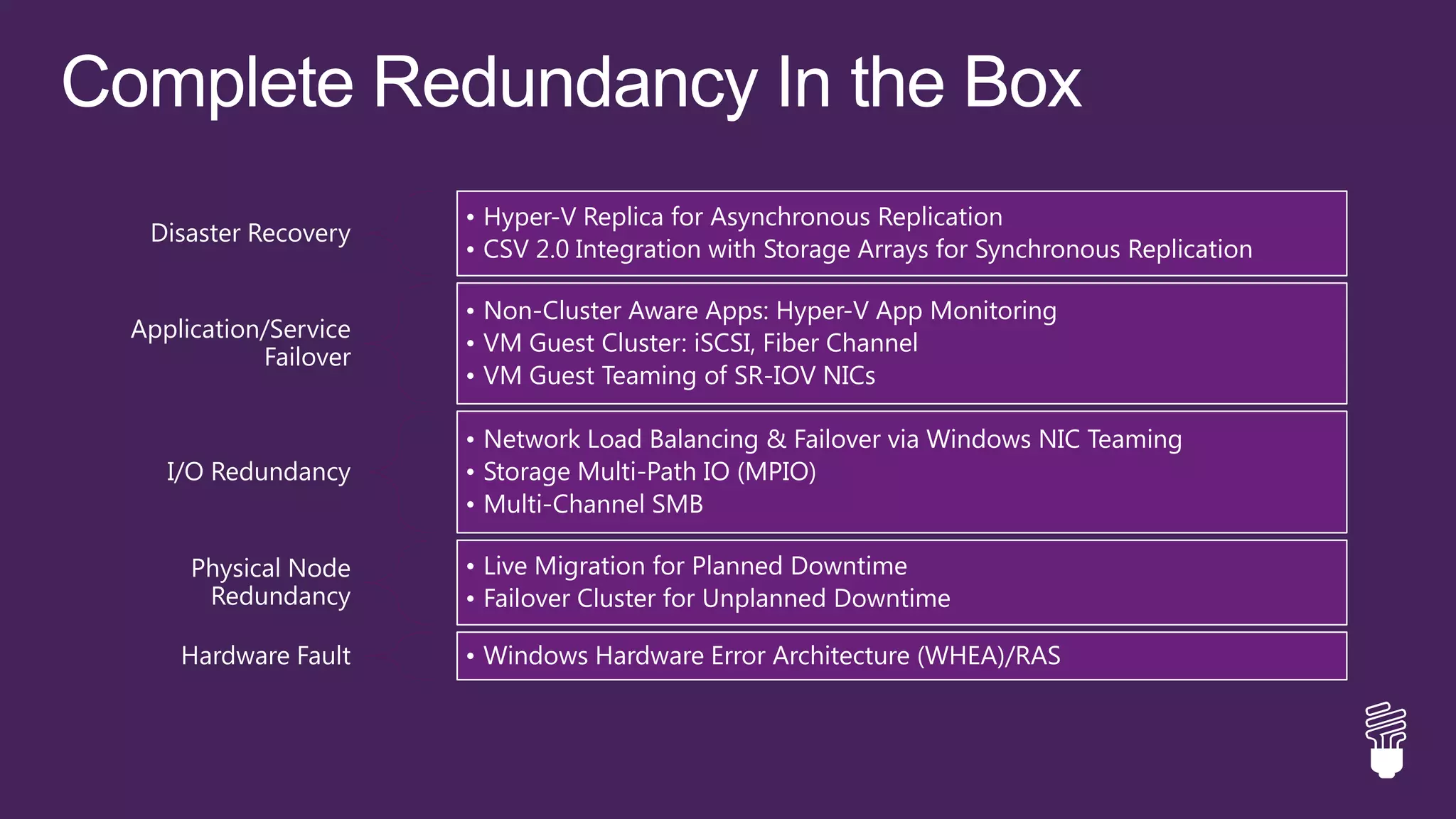
• Hyper-V Replica for Asynchronous Replication
 Disaster Recovery
                      • CSV 2.0 Integration with Storage Arrays for Synchronous Replication

                      • Non-Cluster Aware Apps: Hyper-V App Monitoring
Application/Service
                      • VM Guest Cluster: iSCSI, Fiber Channel
           Failover
                      • VM Guest Teaming of SR-IOV NICs

                      • Network Load Balancing & Failover via Windows NIC Teaming
   I/O Redundancy     • Storage Multi-Path IO (MPIO)
                      • Multi-Channel SMB

     Physical Node    • Live Migration for Planned Downtime
      Redundancy      • Failover Cluster for Unplanned Downtime

    Hardware Fault    • Windows Hardware Error Architecture (WHEA)/RAS
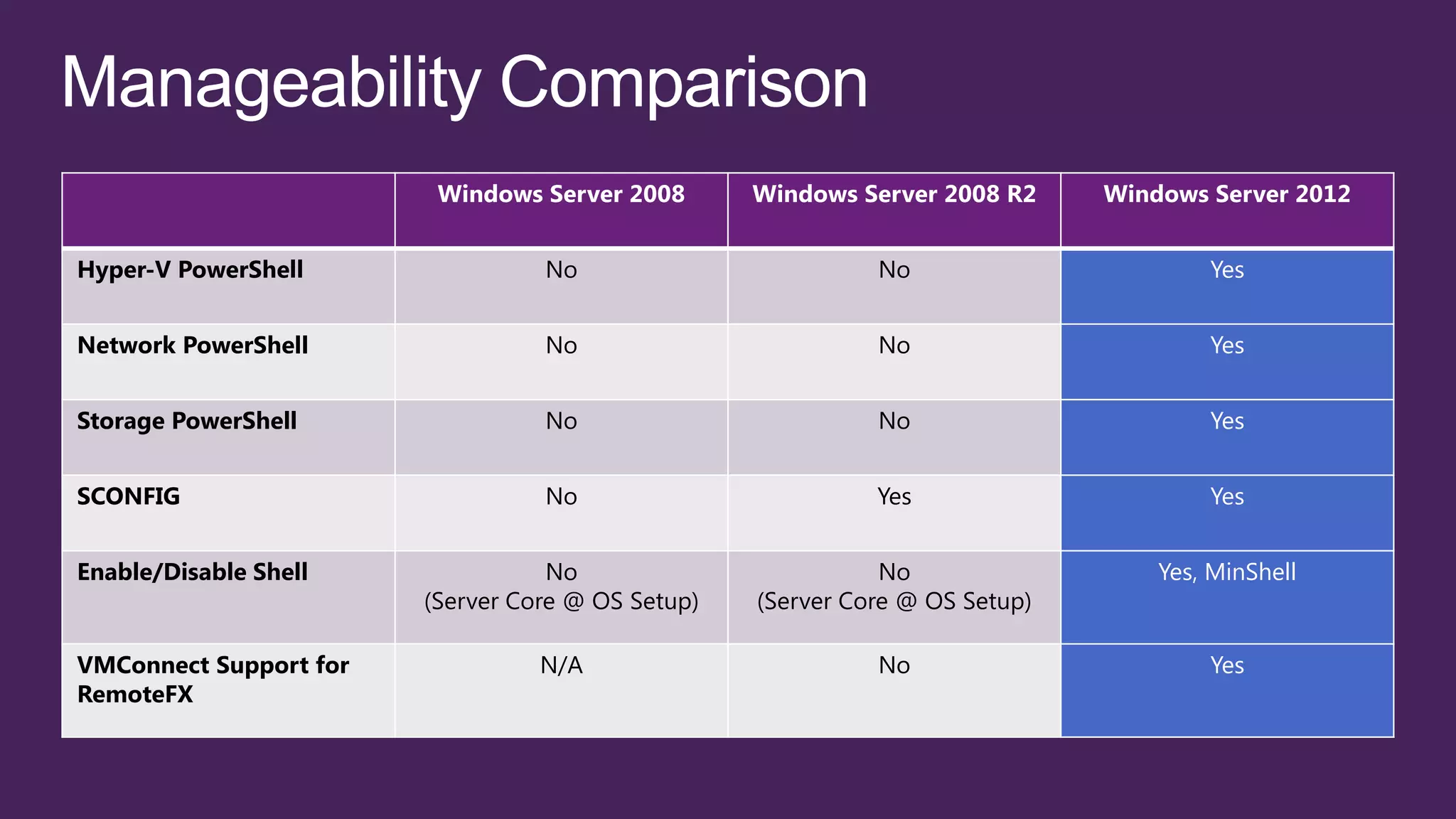
Windows Server 2008       Windows Server 2008 R2     Windows Server 2012


Hyper-V PowerShell                No                         No                       Yes


Network PowerShell                No                         No                       Yes


Storage PowerShell                No                         No                       Yes


SCONFIG                           No                         Yes                      Yes


Enable/Disable Shell               No                         No                  Yes, MinShell
                        (Server Core @ OS Setup)   (Server Core @ OS Setup)

VMConnect Support for             N/A                        No                       Yes
RemoteFX
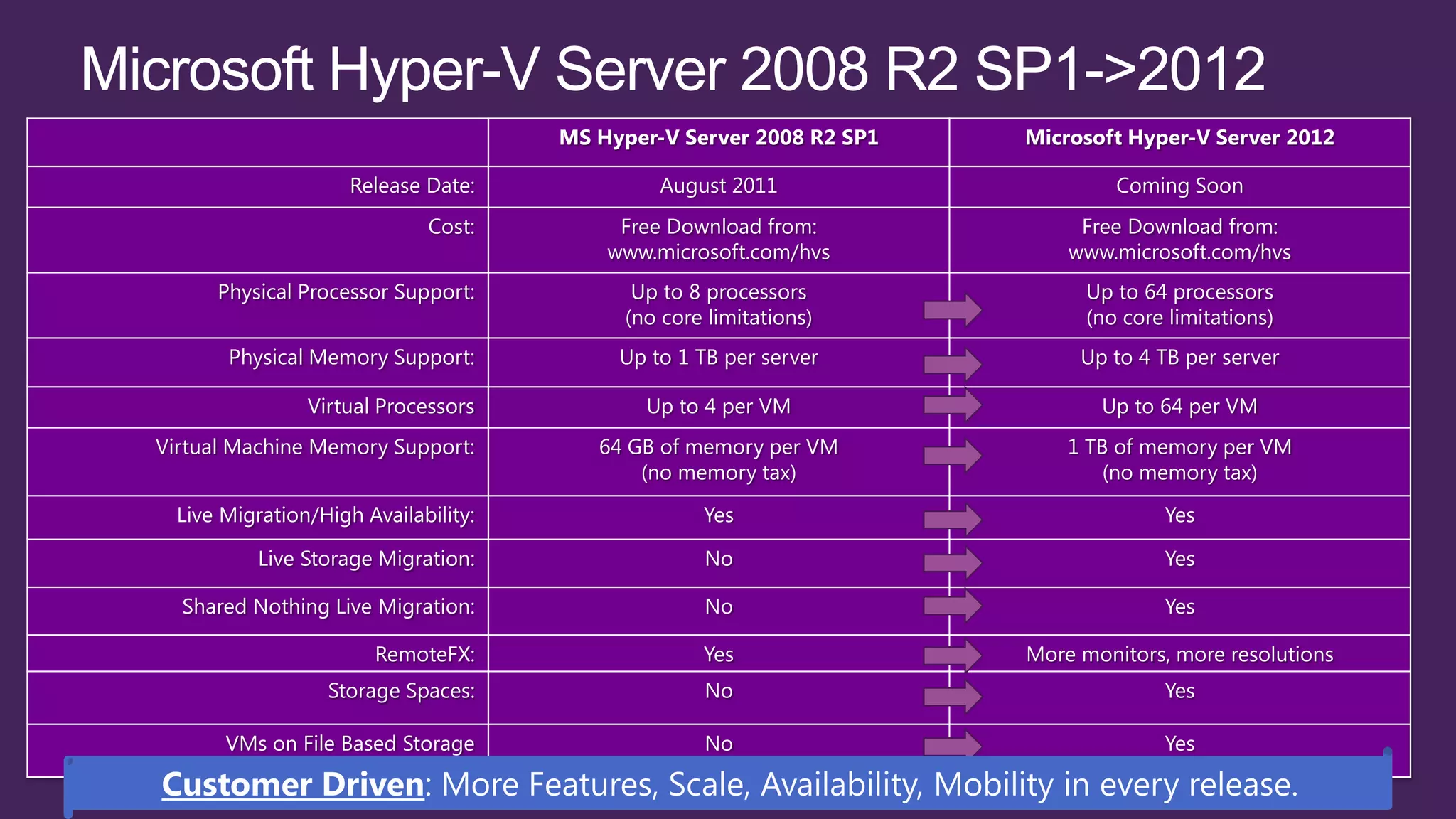
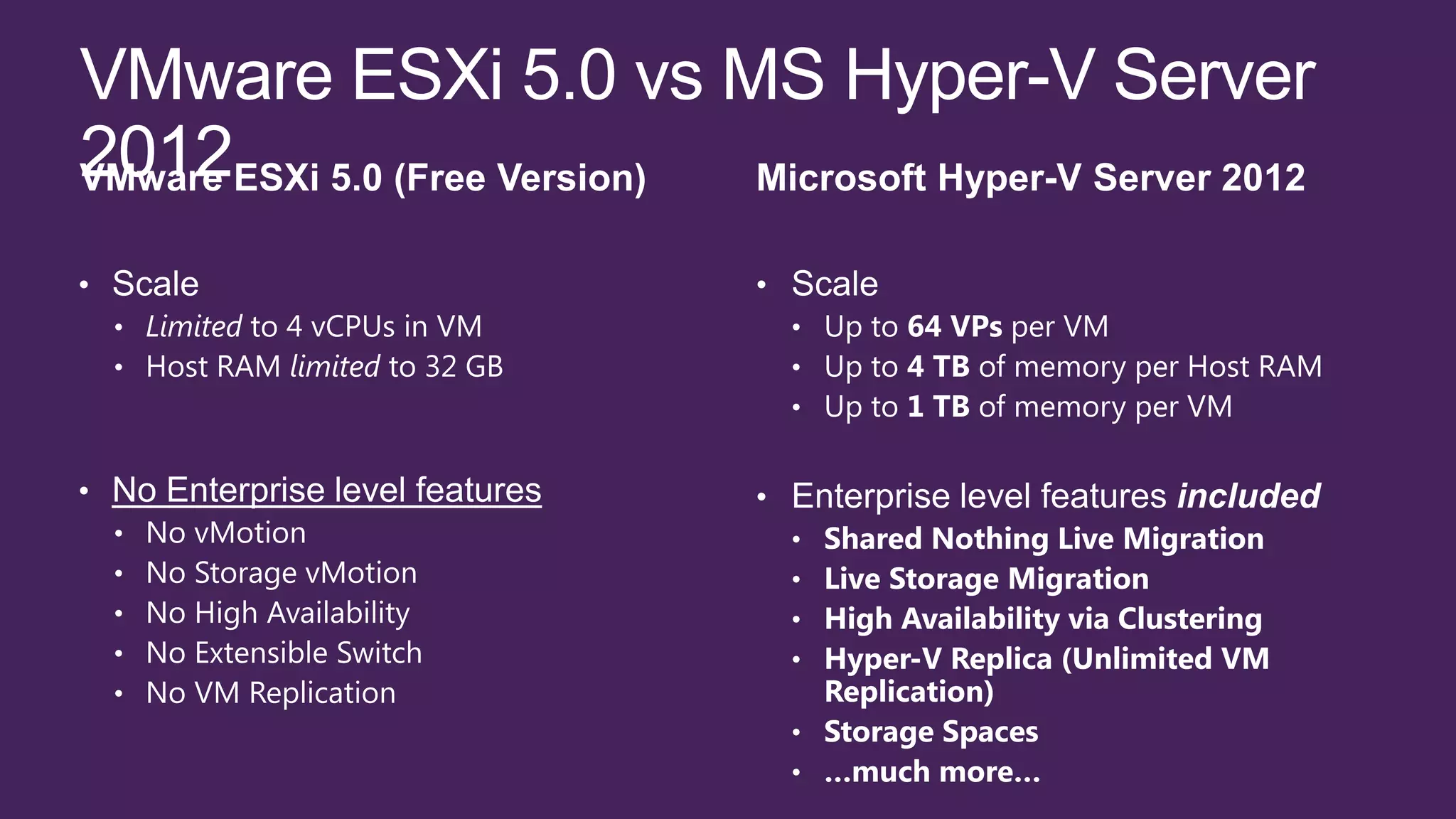
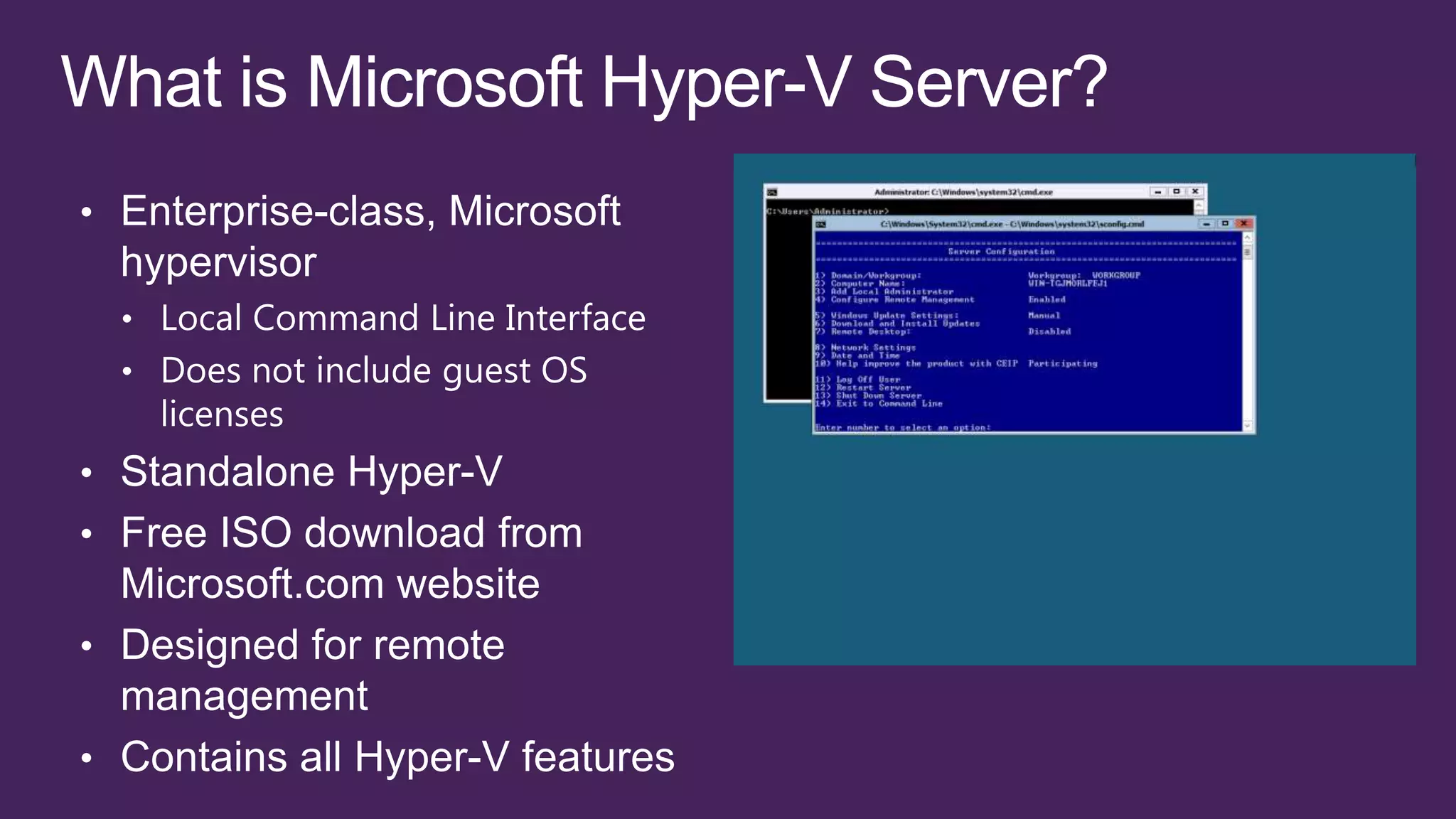
MS Hyper-V Server 2008 R2 SP1   Microsoft Hyper-V Server 2012

                     Release Date:             August 2011                     Coming Soon
                             Cost:         Free Download from:             Free Download from:
                                          www.microsoft.com/hvs           www.microsoft.com/hvs
      Physical Processor Support:            Up to 8 processors             Up to 64 processors
                                            (no core limitations)           (no core limitations)
       Physical Memory Support:            Up to 1 TB per server           Up to 4 TB per server

                Virtual Processors            Up to 4 per VM                 Up to 64 per VM
Virtual Machine Memory Support:          64 GB of memory per VM           1 TB of memory per VM
                                             (no memory tax)                  (no memory tax)
  Live Migration/High Availability:                 Yes                             Yes

           Live Storage Migration:                  No                              Yes

  Shared Nothing Live Migration:                    No                              Yes

                       RemoteFX:                    Yes               More monitors, more resolutions
                  Storage Spaces:                   No                              Yes

       VMs on File Based Storage                    No                              Yes
What’s new in windows server 2012

What’s new in windows server 2012

  • 4.
    TOP FEATURES OFSTORAGE TO MEET CUSTOMER CHALLENGES 1 2 3 4 5 File system Cluster Shared SMB 3.0 for Storage spaces improvements Thin provisioning Volume workloads 6 7 8 9 10 Offloaded data Storage transfer Transparent failover NFS support iSCSI target management
  • 5.
    1 2 3 4 5 Website density Application Dynamic IP NUMA-Aware and mutlitenancy Initialization Restrictions CPU Throttling Scalability 6 7 8 9 10 Comming Centralized SSL “Just works” with Embracing web Application Development management PHP and node.js standards symmetry Platform
  • 6.
    1 2 3 4 5 Single Root I/O Network DHCP server Virtualization NIC Teaming virtualization failover (SR-IOV) Resource Metering 6 7 8 9 10 IP Address Dynamic Virtual Management Quality of Service SMB Direct and Machine Queue (IPAM) (QoS) BranchCache Multichannel
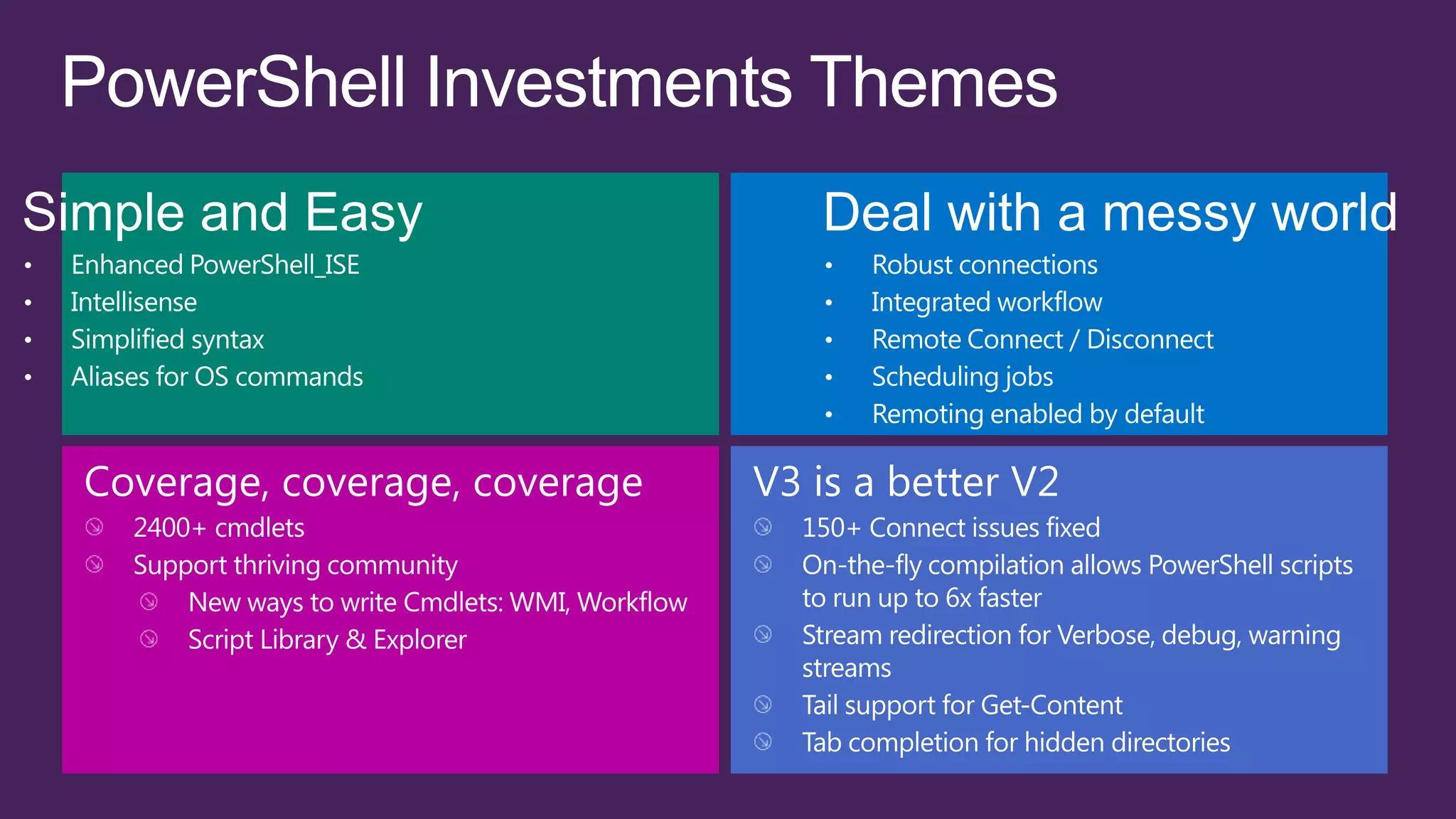
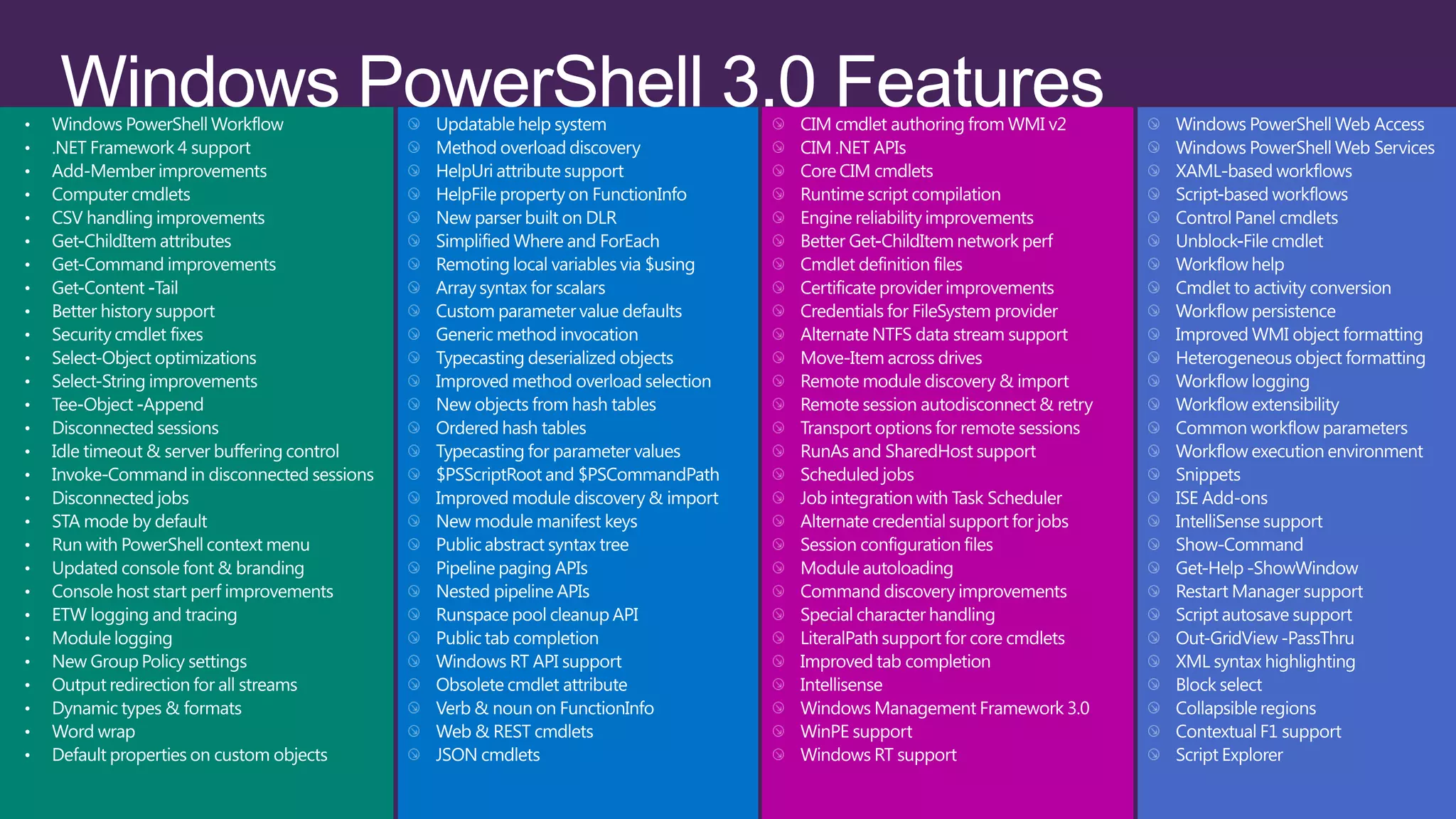
  • 7.
    1 2 3 4 5 Multiserver Role and feature Disconnected management deployment Integrated console 2,400 cmdlets Sessions 6 7 8 9 10 Windows Windows Syntax PowerShell PowerShell Web Windows Simplification and Workflow Access PowerShell ISE Script Sharing IntelliSense
  • 8.
    Add/remove Graphical Management Server Graphical Shell Desktop Experience Feature Tools and Infrastructure PowerShell Install-WindowsFeature Server-Gui-Mgmt-Infra Server-Gui-Shell Desktop-Experience Uninstall-WindowsFeature
  • 16.
    TOP FEATURES FORSECURITY & ACCESS 1 2 3 4 5 Simpler Domain Name Dynamic Access deployment of System Security Control Classification DirectAccess Active Directory Extensions 6 7 8 9 10 Kerberos Active Directory Active Directory constrained Private virtual LAN Multitenant security virtualization cloning delegation (PVLAN) and isolation
  • 17.
    Country x 50 Department x 20 Sensitive Make that 2000 groups
  • 20.
    Windows Server 2012 Active In Active Directory: Directory Resource Property Definitions Access Policy On File Server: Windows At Runtime: Server 2012 File Server End User Allow/ Deny
  • 21.
    User claims Device claims File properties User.Department = Finance Device.Department = Finance File.Department = Finance User.Country = US Device.Managed = True File.Country = US ACCESS POLICY Applies to: File.Country exists AND File.Department Exists Allow | Read, Write | if (User.Department == File.Department) AND (User.Country == File.Country)
  • 23.
    AD Admin Center 1 1 Claims 2 Properties Access Policies 3 AD RMS 2 4 4 USE LICENSE Dynamic Access Control FCI  CLASSIFY  PROTECT DYNAMIC DYNAMIC POLICY POLICY PROTECTOR 3 MODULE Windows Server 2012 Desktop Windows Server 2012 GigaTrust Contact: ppainter@gigatrust.com
  • 24.
    Windows Server 2012 Active In Active Directory: Directory Resource Property Definitions In Group Policy: Audit Policy On File Server: Windows At Runtime: Server 2012 File Server End User Audit Yes/No Event collection system Event collected to central repository for analysis and reporting
  • 27.
    1 2 3 4 5 Hyper-V Network Shared-nothing live Cluster Virtualization migration Massive scale enhancements Hyper-V Replica 6 7 8 9 10 Hardware Virtual Fibre Guest NUMA Runtime memory Hyper-V network offloading Channel support configuration switch
  • 28.
    Maximum number Improvement Windows Server System Resource Windows 2008 R2 2012 factor Logical processors on hardware 64 320 5× Physical memory 1 TB 4 TB 4× Host Virtual processors per host 512 1,024 2× Virtual processors per virtual machine 4 64 16× Memory per virtual machine 64 GB 1 TB 16× Virtual Active virtual machines 384 1,024 2.7× machine Virtual disk size 2 TB 64 TB 32× Nodes 16 64 4× Cluster Virtual machines 1,000 4,000 4×
  • 29.
    Windows Server 2008 Windows Server 2008 R2 Windows Server 2012 HW Logical Processor 16 LPs 64 LPs 320 LPs Support Physical Memory Support 1 TB 1 TB 4 TB Cluster Scale 16 Nodes up to 1000 VMs 16 Nodes up to 1000 VMs 64 Nodes up to 4000 VMs Virtual Machine Processor Up to 4 VPs Up to 4 VPs Up to 64 VPs Support VM Memory Up to 64 GB Up to 64 GB Up to 1 TB Live Migration Yes, one at a time Yes, one at a time Yes, with no limits. As many as hardware will allow. Live Storage Migration No. Quick Storage No. Quick Storage Yes, with no limits. As many Migration via SCVMM Migration via SCVMM as hardware will allow. Servers in a Cluster 16 16 64 VP:LP Ratio 8:1 8:1 for Server No limits. As many as 12:1 for Client (VDI) hardware will allow.
  • 30.
    • Live StorageMigration • Online MetaOperations • Virtual Fiber Channel • Live VHD Merge • Live New Parent • Support for File Based Storage on SMB 3.0 • Native 4K Disk Support • New VHDX Format • Offloaded Data Transfer (ODX)
  • 31.
    Token Offload Offload Token Token Read Write Virtual Actual Data Transfer Virtual Disk Intelligent Disk Storage Array
  • 32.
    Creation of a10 GB Fixed Disk 200 150 ~3 Minutes 100 Time (seconds) 50 0 <1 Second! Average ODX Desktop
  • 33.
    Windows Server 2008 Windows Server 2008 R2 Windows Server 2012 Live Storage Migration No. Quick Storage No. Quick Storage Yes, with no limits. As many Migration via SCVMM Migration via SCVMM as hardware will allow. VMs on File Storage No No Yes, SMB 3.0 Guest Fiber Channel No No Yes Virtual Disk Format VHD up to 2 TB VHD up to 2 TB VHD up to 2 TB VHDX up to 64 TB VM Guest Clustering Yes, via iSCSI Yes, via iSCSI Yes, via iSCSI or FC Native 4k Disk Support No No Yes Live VHD Merge No, offline. No, offline. Yes Live New Parent No No Yes Secure Offloaded Data No No Yes Transfer (ODX)
  • 34.
    • Windows NICTeaming • Continuously Available File Server (SMB) storage • CSV 2.0 Integration with Storage Arrays for Replication & HW snapshots out of the box • Guest Clustering via Fiber Channel for HA • Support for Concurrent Live/Live Storage Migrations • Major Failover Cluster Enhancements…
  • 35.
    Failover cluster • Supportfor 64 nodes & 4000 • Cluster Wide Task Scheduling VMs in a Cluster • Inbox Live Migration Queuing • Cluster Aware Updating • SMB Support • Cluster Shared Volumes 2.0 • Hyper-V App Monitoring • VM Failover Prioritization • Guest Clustering via Fiber • Anti-Affinity VM Rules Channel…
  • 36.
  • 37.
    • Hyper-V Replicafor Asynchronous Replication Disaster Recovery • CSV 2.0 Integration with Storage Arrays for Synchronous Replication • Non-Cluster Aware Apps: Hyper-V App Monitoring Application/Service • VM Guest Cluster: iSCSI, Fiber Channel Failover • VM Guest Teaming of SR-IOV NICs • Network Load Balancing & Failover via Windows NIC Teaming I/O Redundancy • Storage Multi-Path IO (MPIO) • Multi-Channel SMB Physical Node • Live Migration for Planned Downtime Redundancy • Failover Cluster for Unplanned Downtime Hardware Fault • Windows Hardware Error Architecture (WHEA)/RAS
  • 38.
    Windows Server 2008 Windows Server 2008 R2 Windows Server 2012 Hyper-V PowerShell No No Yes Network PowerShell No No Yes Storage PowerShell No No Yes SCONFIG No Yes Yes Enable/Disable Shell No No Yes, MinShell (Server Core @ OS Setup) (Server Core @ OS Setup) VMConnect Support for N/A No Yes RemoteFX
  • 41.
    MS Hyper-V Server2008 R2 SP1 Microsoft Hyper-V Server 2012 Release Date: August 2011 Coming Soon Cost: Free Download from: Free Download from: www.microsoft.com/hvs www.microsoft.com/hvs Physical Processor Support: Up to 8 processors Up to 64 processors (no core limitations) (no core limitations) Physical Memory Support: Up to 1 TB per server Up to 4 TB per server Virtual Processors Up to 4 per VM Up to 64 per VM Virtual Machine Memory Support: 64 GB of memory per VM 1 TB of memory per VM (no memory tax) (no memory tax) Live Migration/High Availability: Yes Yes Live Storage Migration: No Yes Shared Nothing Live Migration: No Yes RemoteFX: Yes More monitors, more resolutions Storage Spaces: No Yes VMs on File Based Storage No Yes