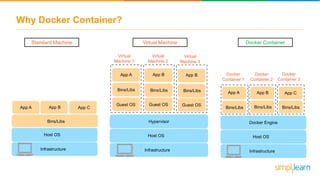
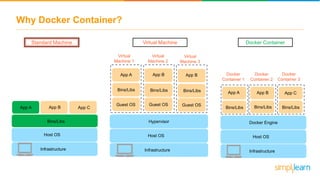


Why Docker Container?
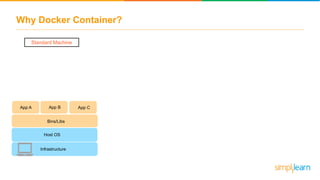
Standard Machine
Bins/Libs
App A App CApp B
Host OS
Infrastructure
Why Docker Container?
App A
Bins/Libs
App B
Bins/Libs
Guest OS Guest OS
Virtual
Machine 1
Virtual
Machine 2
Virtual
Machine 3
Bins/LibsBins/Libs
Guest OS
App B
Bins/Libs
Guest OS
Bins/Libs
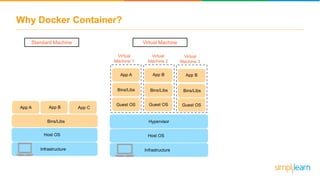
Standard Machine Virtual Machine
Hypervisor
Host OS
Infrastructure
Bins/Libs
App A App CApp B
Host OS
Infrastructure
Why Docker Container?
Docker
Container 1
App A
Bins/Libs
App B
Bins/Libs
Guest OS Guest OS
Virtual
Machine 1
Virtual
Machine 2
Virtual
Machine 3
Bins/LibsBins/Libs
Guest OS
App B
Bins/Libs
Guest OS
Bins/Libs App A
Bins/Libs
App C
Bins/Libs
App B
Bins/Libs
Docker
Container 2
Docker
Container 3
Standard Machine Virtual Machine Docker Container
Docker Engine
Host OS
Infrastructure
Hypervisor
Host OS
Infrastructure
Bins/Libs
App A App CApp B
Host OS
Infrastructure
Why Docker Container?
Docker
Container 1
App A
Bins/Libs
App B
Bins/Libs
Guest OS Guest OS
Virtual
Machine 1
Virtual
Machine 2
Virtual
Machine 3
Bins/LibsBins/Libs
Guest OS
App B
Bins/Libs
Guest OS
Bins/Libs App A
Bins/Libs
App C
Bins/Libs
App B
Bins/Libs
Docker
Container 2
Docker
Container 3
Virtual Machine Docker Container
Docker Engine
Host OS
Infrastructure
Hypervisor
Host OS
Infrastructure
Bins/Libs
App A App CApp B
Host OS
Infrastructure
Standard Machine
Why Docker Container?
Docker
Container 1
App A
Bins/Libs
App B
Bins/Libs
Guest OS Guest OS
Virtual
Machine 1
Virtual
Machine 2
Virtual
Machine 3
Bins/LibsBins/Libs
Guest OS
App B
Bins/Libs
Guest OS
Bins/Libs App A
Bins/Libs
App C
Bins/Libs
App B
Bins/Libs
Docker
Container 2
Docker
Container 3
Standard Machine Virtual Machine Docker Container
Docker Engine
Host OS
Infrastructure
Hypervisor
Host OS
Infrastructure
Bins/Libs
App A App CApp B
Host OS
Infrastructure
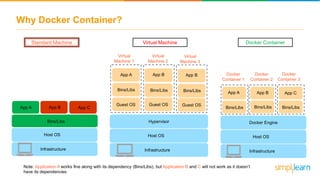
Note: Application A works fine along with its dependency (Bins/Libs), but Application B and C will not work as it doesn’t
have its dependencies
Why Docker Container?
Docker
Container 1
App A
Bins/Libs
App B
Bins/Libs
Guest OS Guest OS
Virtual
Machine 1
Virtual
Machine 2
Virtual
Machine 3
Bins/LibsBins/Libs
Guest OS
App B
Bins/Libs
Guest OS
Bins/Libs App A
Bins/Libs
App C
Bins/Libs
App B
Bins/Libs
Docker
Container 2
Docker
Container 3
Standard Machine Virtual Machine Docker Container
Docker Engine
Host OS
Infrastructure
Hypervisor
Host OS
Infrastructure
Bins/Libs
App A App CApp B
Host OS
Infrastructure
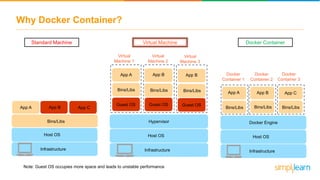
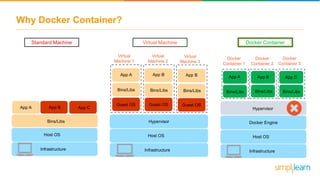
Note: Guest OS occupies more space and leads to unstable performance
Why Docker Container?
App A
Bins/Libs
App B
Bins/Libs
Guest OS Guest OS
Virtual
Machine 1
Virtual
Machine 2
Virtual
Machine 3
Bins/LibsBins/Libs
Guest OS
App B
Bins/Libs
Guest OS
Bins/Libs
Docker
Container 1
App A
Bins/Libs
App C
Bins/Libs
App B
Bins/Libs
Docker
Container 2
Docker
Container 3
Standard Machine Virtual Machine Docker Container
Docker Engine
Host OS
Infrastructure
Hypervisor
Host OS
Infrastructure
Bins/Libs
App A App CApp B
Host OS
Infrastructure
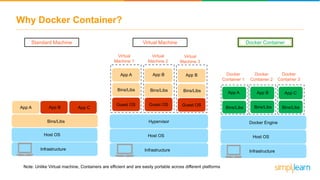
Note: Unlike Virtual machine, Containers are efficient and are easily portable across different platforms
Why Docker Container?
App A
Bins/Libs
App B
Bins/Libs
Guest OS Guest OS
Virtual
Machine 1
Virtual
Machine 2
Virtual
Machine 3
Bins/LibsBins/Libs
Guest OS
App B
Bins/Libs
Guest OS
Bins/Libs
Standard Machine Virtual Machine Docker Container
Docker Engine
Host OS
Infrastructure
Hypervisor
Host OS
Infrastructure
Bins/Libs
App A App CApp B
Host OS
Infrastructure
Hypervisor
Docker
Container 1
App A
Bins/Libs
App C
Bins/Libs
App B
Bins/Libs
Docker
Container 2
Docker
Container 3
Why Docker Container?
Docker
Container 1
Docker Engine
Host OS
Infrastructure
App A
Bins/Libs
App C
Bins/Libs
App B
Bins/Libs
Docker
Container 2
Docker
Container 3
Docker
Container 1
Docker Engine
Host OS
Infrastructure
Docker
Container 2
Docker
Container 3
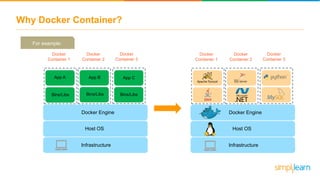
For example:
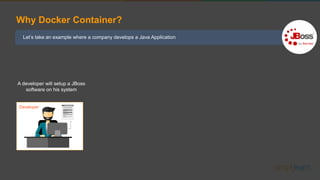
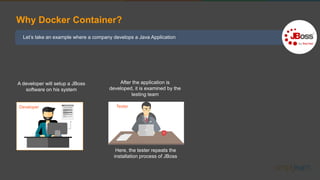
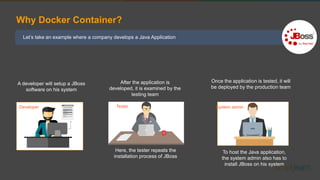
Let’s take an example where a company develops a Java Application
Why Docker Container?
A developer will setup a JBoss
software on his system
Developer
Let’s take an example where a company develops a Java Application
Why Docker Container?
A developer will setup a JBoss
software on his system
After the application is
developed, it is examined by the
testing team
Here, the tester repeats the
installation process of JBoss
Developer Tester
Let’s take an example where a company develops a Java Application
Why Docker Container?
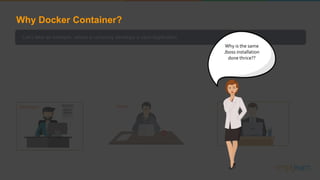
A developer will setup a JBoss
software on his system
After the application is
developed, it is examined by the
testing team
Here, the tester repeats the
installation process of JBoss
To host the Java application,
the system admin also has to
install JBoss on his system
Developer Tester System admin
Once the application is tested, it will
be deployed by the production team
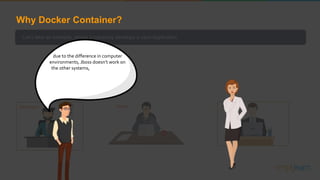
Let’s take an example, where a company develops a Java Application
In order to do so a software programmer
will setup an JBoss server on his system
After the application is developed
it has to be tested by the testing
team
For which the tester will have to
repeat the set up process of JBoss
in order to test the application
As soon the testing is finished, it will be
deployed to the production team
Once again the production team
requires an environment with JBoss
installed on their system, so that it
can host the Java application
Developer Tester Production
Why is the same
Jboss installation
done thrice??
Why Docker Container?
Let’s take an example, where a company develops a Java Application
In order to do so a software programmer
will setup an JBoss server on his system
After the application is developed
it has to be tested by the testing
team
For which the tester will have to
repeat the set up process of JBoss
in order to test the application
As soon the testing is finished, it will be
deployed to the production team
Once again the production team
requires an environment with JBoss
installed on their system, so that it
can host the Java application
Developer Tester Production
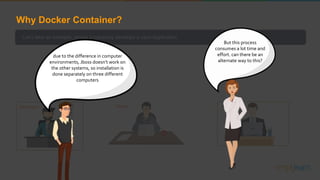
due to the difference in computer
environments, Jboss doesn’t work on
the other systems, so installation is
done separately on three different
Why Docker Container?
Let’s take an example, where a company develops a Java Application
In order to do so a software programmer
will setup an JBoss server on his system
After the application is developed
it has to be tested by the testing
team
For which the tester will have to
repeat the set up process of JBoss
in order to test the application
As soon the testing is finished, it will be
deployed to the production team
Once again the production team
requires an environment with JBoss
installed on their system, so that it
can host the Java application
Developer Tester Production
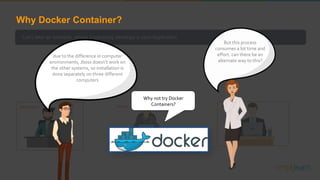
But this process
consumes a lot time and
effort. can there be an
alternate way to this?
due to the difference in computer
environments, Jboss doesn’t work on
the other systems, so installation is
done separately on three different
computers
Why Docker Container?
Let’s take an example, where a company develops a Java Application
In order to do so a software programmer
will setup an JBoss server on his system
After the application is developed
it has to be tested by the testing
team
For which the tester will have to
repeat the set up process of JBoss
in order to test the application
As soon the testing is finished, it will be
deployed to the production team
Once again the production team
requires an environment with JBoss
installed on their system, so that it
can host the Java application
Developer Tester Production
But this process
consumes a lot time and
effort. can there be an
alternate way to this?
due to the difference in computer
environments, Jboss doesn’t work on
the other systems, so installation is
done separately on three different
computers
Why not try Docker
Containers?
Why Docker Container?
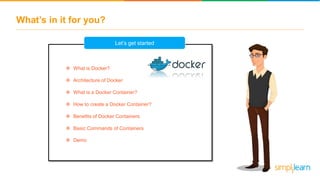
What’s in it for you?
 What is Docker?
 Architecture of Docker
 What is a Docker Container?
 How to create a Docker Container?
 Benefits of Docker Containers
 Basic Commands of Containers
 Demo
Let’s get started
What is Docker?
What is Docker?
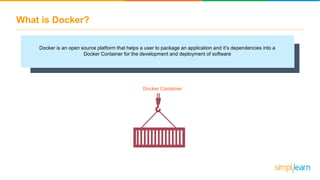
Docker is an open source platform that helps a user to package an application and it’s dependencies into a
Docker Container for the development and deployment of software
Docker Container
What is Docker?
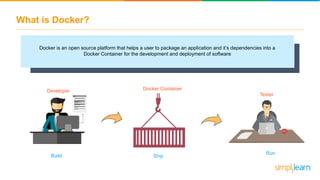
Docker is an open source platform that helps a user to package an application and it’s dependencies into a
Docker Container for the development and deployment of software
Build
Developer
Ship
Docker Container
Run
Tester
What is Docker?
Docker is an open source platform that helps a user to package an application and it’s dependencies into a
Docker Container for the development and deployment of software
Build
Developer
Ship
Docker Container
Run
Tester
Before starting with Docker
containers, let’s understand
the architecture of Docker
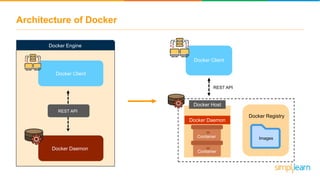
Architecture of Docker
Docker Client
Docker Host
Docker Daemon
Docker Registry
ImagesContainer
Container
REST API
Docker Client
Docker Daemon
REST API
Docker Engine
Architecture of Docker
Docker Client
Docker Host
Docker Daemon
Docker Registry
ImagesContainer
Container
REST API
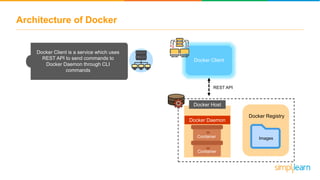
Docker Client is a service which uses
REST API to send commands to
Docker Daemon through CLI
commands
Architecture of Docker
Docker Client
Docker Host
Docker Daemon
Docker Registry
ImagesContainer
Container
REST API
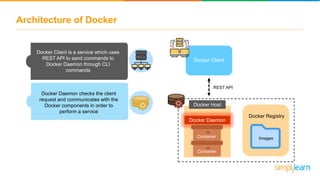
Docker Client is a service which uses
REST API to send commands to
Docker Daemon through CLI
commands
Docker Daemon checks the client
request and communicates with the
Docker components in order to
perform a service
Architecture of Docker
Docker Client
Docker Host
Docker Daemon
Docker Registry
ImagesContainer
Container
REST API
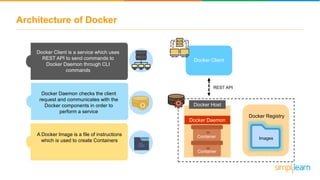
Docker Client is a service which uses
REST API to send commands to
Docker Daemon through CLI
commands
Docker Daemon checks the client
request and communicates with the
Docker components in order to
perform a service
A Docker Image is a file of instructions
which is used to create Containers
Architecture of Docker
Docker Client
Docker Host
Docker Daemon
Docker Registry
ImagesContainer
Container
REST API
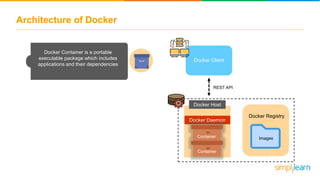
Docker Container is a portable
executable package which includes
applications and their dependencies
Architecture of Docker
Docker Client
Docker Host
Docker Daemon
Docker Registry
ImagesContainer
Container
REST API
Docker Container is a portable
executable package which includes
applications and their dependencies
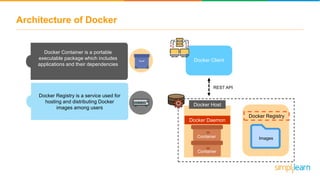
Docker Registry is a service used for
hosting and distributing Docker
images among users
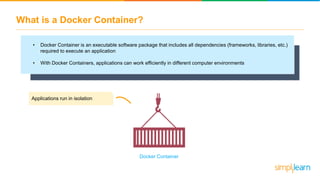
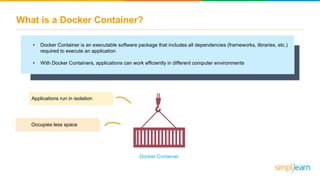
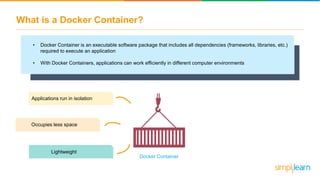
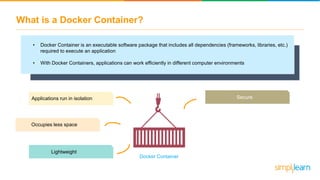
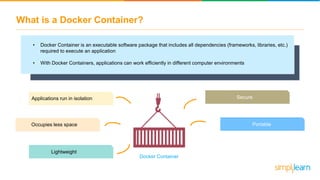
What is a Docker Container?
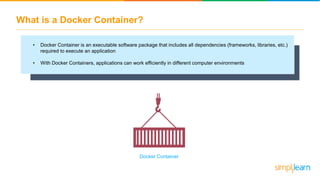
• Docker Container is an executable software package that includes all dependencies (frameworks, libraries, etc.)
required to execute an application
• With Docker Containers, applications can work efficiently in different computer environments
Docker Container
What is a Docker Container?
• Docker Container is an executable software package that includes all dependencies (frameworks, libraries, etc.)
required to execute an application
• With Docker Containers, applications can work efficiently in different computer environments
Applications run in isolation
Docker Container
What is a Docker Container?
• Docker Container is an executable software package that includes all dependencies (frameworks, libraries, etc.)
required to execute an application
• With Docker Containers, applications can work efficiently in different computer environments
Applications run in isolation
Occupies less space
Docker Container
What is a Docker Container?
• Docker Container is an executable software package that includes all dependencies (frameworks, libraries, etc.)
required to execute an application
• With Docker Containers, applications can work efficiently in different computer environments
Applications run in isolation
Lightweight
Occupies less space
Docker Container
What is a Docker Container?
• Docker Container is an executable software package that includes all dependencies (frameworks, libraries, etc.)
required to execute an application
• With Docker Containers, applications can work efficiently in different computer environments
Applications run in isolation
Lightweight
Secure
Occupies less space
Docker Container
What is a Docker Container?
• Docker Container is an executable software package that includes all dependencies (frameworks, libraries, etc.)
required to execute an application
• With Docker Containers, applications can work efficiently in different computer environments
Applications run in isolation
Lightweight
Secure
PortableOccupies less space
Docker Container
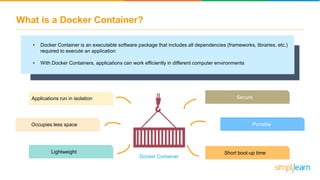
What is a Docker Container?
• Docker Container is an executable software package that includes all dependencies (frameworks, libraries, etc.)
required to execute an application
• With Docker Containers, applications can work efficiently in different computer environments
Applications run in isolation
Lightweight
Secure
Portable
Short boot-up time
Occupies less space
Docker Container
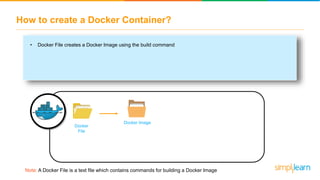
How to create a Docker Container?
Docker
File
Docker Image
Note: A Docker File is a text file which contains commands for building a Docker Image
• Docker File creates a Docker Image using the build command
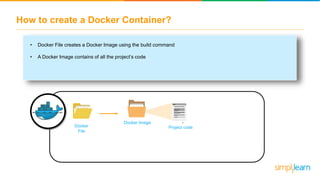
How to create a Docker Container?
Docker
File
Docker Image
Project code
• Docker File creates a Docker Image using the build command
• A Docker Image contains of all the project’s code
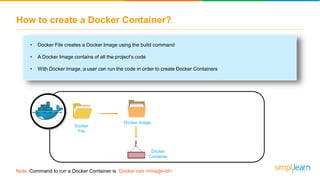
How to create a Docker Container?
Docker
File
Docker
Container
Docker Image
• Docker File creates a Docker Image using the build command
• A Docker Image contains of all the project’s code
• With Docker Image, a user can run the code in order to create Docker Containers
Note: Command to run a Docker Container is Docker run <image-id>
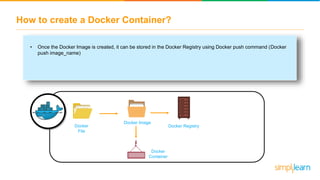
How to create a Docker Container?
Docker
File
Docker
Container
Docker Image
Docker Registry
• Once the Docker Image is created, it can be stored in the Docker Registry using Docker push command (Docker
push image_name)
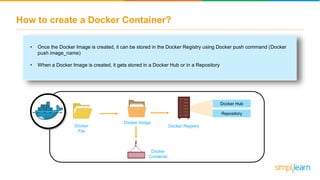
How to create a Docker Container?
Docker
File
Docker
Container
Docker Image
Docker Registry
Docker Hub
Repository
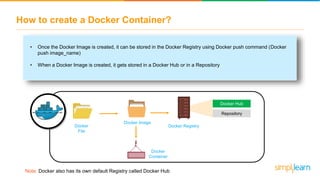
• Once the Docker Image is created, it can be stored in the Docker Registry using Docker push command (Docker
push image_name)
• When a Docker Image is created, it gets stored in a Docker Hub or in a Repository
How to create a Docker Container?
Docker
File
Docker
Container
Docker Image
Note: Docker also has its own default Registry called Docker Hub
Docker Registry
Docker Hub
Repository
• Once the Docker Image is created, it can be stored in the Docker Registry using Docker push command (Docker
push image_name)
• When a Docker Image is created, it gets stored in a Docker Hub or in a Repository
How to create a Docker Container?
Docker
File
Docker
Container
Docker Image
Docker Hub
Repository
Docker Registry
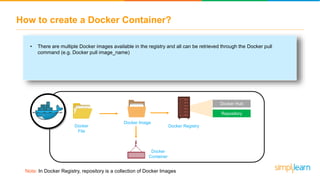
• There are multiple Docker images available in the registry and all can be retrieved through the Docker pull
command (e.g. Docker pull image_name)
Note: In Docker Registry, repository is a collection of Docker Images
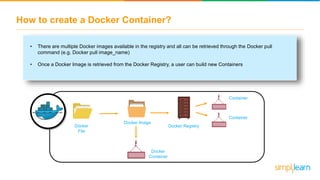
• There are multiple Docker images available in the registry and all can be retrieved through the Docker pull
command (e.g. Docker pull image_name)
• Once a Docker Image is retrieved from the Docker Registry, a user can build new Containers
How to create a Docker Container?
Docker
File
Docker
Container
Docker Image
Container
Container
Docker Registry
• There are multiple Docker images available in the registry and all can be retrieved through the Docker pull
command (e.g. Docker pull image_name)
• Once a Docker Image is retrieved from the Docker Registry, a user can get the Docker Image and build new
Containers
How to create a Docker Container?
Docker
File
Docker
Container
Docker Image
Container
Container
Docker Registry
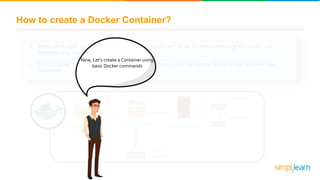
Now, Let’s create a Container using
basic Docker commands
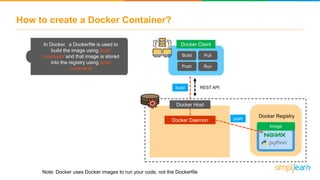
How to create a Docker Container?
Docker Daemon
Docker Registry
REST API
Image
Docker Host
Note: Docker uses Docker images to run your code, not the Dockerfile
build
push
In Docker, a Dockerfile is used to
build the image using build
command and that image is stored
into the registry using push
command
Docker Client
Build
Push
Pull
Run
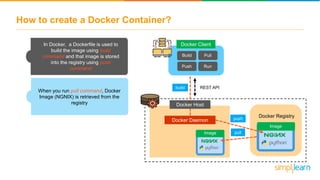
How to create a Docker Container?
When you run pull command, Docker
Image (NGNIX) is retrieved from the
registry
Docker Daemon
Docker Registry
REST API
pull
Image
Image
Docker Host
Docker Client
Build
Push
Pull
Run
push
In Docker, a Dockerfile is used to
build the image using build
command and that image is stored
into the registry using push
command
build
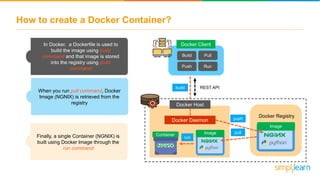
How to create a Docker Container?
Finally, a single Container (NGNIX) is
built using Docker Image through the
run command
Docker Daemon
Docker Registry
REST API
pull
Image
ImageContainer
run
Docker Client
Docker Host
Build
Push
Pull
Run
push
In Docker, a Dockerfile is used to
build the image using build
command and that image is stored
into the registry using push
command
When you run pull command, Docker
Image (NGNIX) is retrieved from the
registry
build
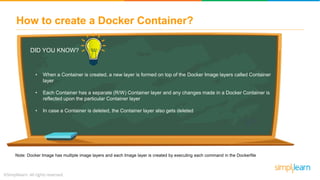
How to create a Docker Container?
DID YOU KNOW?
• When a Container is created, a new layer is formed on top of the Docker Image layers called Container
layer
• Each Container has a separate (R/W) Container layer and any changes made in a Docker Container is
reflected upon the particular Container layer
• In case a Container is deleted, the Container layer also gets deleted
Note: Docker Image has multiple image layers and each Image layer is created by executing each command in the Dockerfile
Benefits of Containers
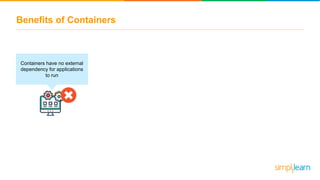
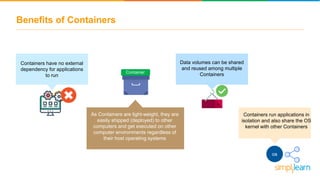
Containers have no external
dependency for applications
to run
Benefits of Containers
Container
Containers have no external
dependency for applications
to run
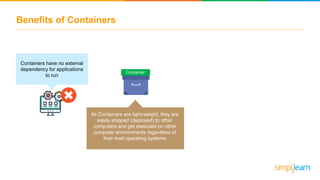
As Containers are light-weight, they are
easily shipped (deployed) to other
computers and get executed on other
computer environments regardless of
their host operating systems
Benefits of Containers
Containers have no external
dependency for applications
to run
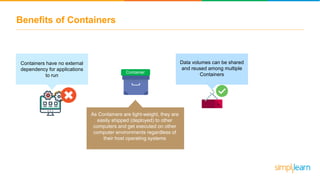
Data volumes can be shared
and reused among multiple
ContainersContainer
As Containers are light-weight, they are
easily shipped (deployed) to other
computers and get executed on other
computer environments regardless of
their host operating systems
Benefits of Containers
Data volumes can be shared
and reused among multiple
Containers
As Containers are light-weight, they are
easily shipped (deployed) to other
computers and get executed on other
computer environments regardless of
their host operating systems
Container
Containers run applications in
isolation and also share the OS
kernel with other Containers
os
Containers have no external
dependency for applications
to run
Is it possible to run multiple
Containers together without the
need to start each one
individually?Well, it’s possible with Docker
compose !
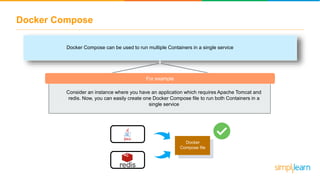
Docker Compose
Docker Compose can be used to run multiple Containers in a single service
For example
Consider an instance where you have an application which requires Apache Tomcat and
redis. Now, you can easily create one Docker Compose file to run both Containers in a
single service
Docker
Compose file
Basic Docker Container commands
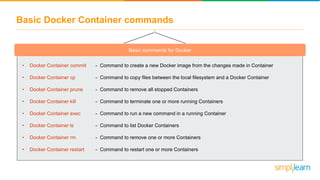
Basic commands for Docker
• Docker Container commit
• Docker Container cp
• Docker Container prune
• Docker Container kill
• Docker Container exec
• Docker Container ls
• Docker Container rm
• Docker Container restart
- Command to create a new Docker image from the changes made in Container
- Command to copy files between the local filesystem and a Docker Container
- Command to remove all stopped Containers
- Command to terminate one or more running Containers
- Command to run a new command in a running Container
- Command to list Docker Containers
- Command to remove one or more Containers
- Command to restart one or more Containers
Other fields that use Blockchain
Blockchain has been used in other industries as well. Some examples of this are:
To ease the verification
of documents
To stop music piracy and to
compensate artists for
purchased songs
Data integrity can be
guaranteed. There cannot
be a single point of failure
Verification of identity of
employee, history, etc.
Payment and benefit
process validation
Travel Music Cybersecurity Human Resources

What Is A Docker Container? | Docker Container Tutorial For Beginners| Docker Container |Simplilearn

  • 2.
    Why Docker Container? StandardMachine Bins/Libs App A App CApp B Host OS Infrastructure
  • 3.
    Why Docker Container? AppA Bins/Libs App B Bins/Libs Guest OS Guest OS Virtual Machine 1 Virtual Machine 2 Virtual Machine 3 Bins/LibsBins/Libs Guest OS App B Bins/Libs Guest OS Bins/Libs Standard Machine Virtual Machine Hypervisor Host OS Infrastructure Bins/Libs App A App CApp B Host OS Infrastructure
  • 4.
    Why Docker Container? Docker Container1 App A Bins/Libs App B Bins/Libs Guest OS Guest OS Virtual Machine 1 Virtual Machine 2 Virtual Machine 3 Bins/LibsBins/Libs Guest OS App B Bins/Libs Guest OS Bins/Libs App A Bins/Libs App C Bins/Libs App B Bins/Libs Docker Container 2 Docker Container 3 Standard Machine Virtual Machine Docker Container Docker Engine Host OS Infrastructure Hypervisor Host OS Infrastructure Bins/Libs App A App CApp B Host OS Infrastructure
  • 5.
    Why Docker Container? Docker Container1 App A Bins/Libs App B Bins/Libs Guest OS Guest OS Virtual Machine 1 Virtual Machine 2 Virtual Machine 3 Bins/LibsBins/Libs Guest OS App B Bins/Libs Guest OS Bins/Libs App A Bins/Libs App C Bins/Libs App B Bins/Libs Docker Container 2 Docker Container 3 Virtual Machine Docker Container Docker Engine Host OS Infrastructure Hypervisor Host OS Infrastructure Bins/Libs App A App CApp B Host OS Infrastructure Standard Machine
  • 6.
    Why Docker Container? Docker Container1 App A Bins/Libs App B Bins/Libs Guest OS Guest OS Virtual Machine 1 Virtual Machine 2 Virtual Machine 3 Bins/LibsBins/Libs Guest OS App B Bins/Libs Guest OS Bins/Libs App A Bins/Libs App C Bins/Libs App B Bins/Libs Docker Container 2 Docker Container 3 Standard Machine Virtual Machine Docker Container Docker Engine Host OS Infrastructure Hypervisor Host OS Infrastructure Bins/Libs App A App CApp B Host OS Infrastructure Note: Application A works fine along with its dependency (Bins/Libs), but Application B and C will not work as it doesn’t have its dependencies
  • 7.
    Why Docker Container? Docker Container1 App A Bins/Libs App B Bins/Libs Guest OS Guest OS Virtual Machine 1 Virtual Machine 2 Virtual Machine 3 Bins/LibsBins/Libs Guest OS App B Bins/Libs Guest OS Bins/Libs App A Bins/Libs App C Bins/Libs App B Bins/Libs Docker Container 2 Docker Container 3 Standard Machine Virtual Machine Docker Container Docker Engine Host OS Infrastructure Hypervisor Host OS Infrastructure Bins/Libs App A App CApp B Host OS Infrastructure Note: Guest OS occupies more space and leads to unstable performance
  • 8.
    Why Docker Container? AppA Bins/Libs App B Bins/Libs Guest OS Guest OS Virtual Machine 1 Virtual Machine 2 Virtual Machine 3 Bins/LibsBins/Libs Guest OS App B Bins/Libs Guest OS Bins/Libs Docker Container 1 App A Bins/Libs App C Bins/Libs App B Bins/Libs Docker Container 2 Docker Container 3 Standard Machine Virtual Machine Docker Container Docker Engine Host OS Infrastructure Hypervisor Host OS Infrastructure Bins/Libs App A App CApp B Host OS Infrastructure Note: Unlike Virtual machine, Containers are efficient and are easily portable across different platforms
  • 9.
    Why Docker Container? AppA Bins/Libs App B Bins/Libs Guest OS Guest OS Virtual Machine 1 Virtual Machine 2 Virtual Machine 3 Bins/LibsBins/Libs Guest OS App B Bins/Libs Guest OS Bins/Libs Standard Machine Virtual Machine Docker Container Docker Engine Host OS Infrastructure Hypervisor Host OS Infrastructure Bins/Libs App A App CApp B Host OS Infrastructure Hypervisor Docker Container 1 App A Bins/Libs App C Bins/Libs App B Bins/Libs Docker Container 2 Docker Container 3
  • 10.
    Why Docker Container? Docker Container1 Docker Engine Host OS Infrastructure App A Bins/Libs App C Bins/Libs App B Bins/Libs Docker Container 2 Docker Container 3 Docker Container 1 Docker Engine Host OS Infrastructure Docker Container 2 Docker Container 3 For example:
  • 11.
    Let’s take anexample where a company develops a Java Application Why Docker Container? A developer will setup a JBoss software on his system Developer
  • 12.
    Let’s take anexample where a company develops a Java Application Why Docker Container? A developer will setup a JBoss software on his system After the application is developed, it is examined by the testing team Here, the tester repeats the installation process of JBoss Developer Tester
  • 13.
    Let’s take anexample where a company develops a Java Application Why Docker Container? A developer will setup a JBoss software on his system After the application is developed, it is examined by the testing team Here, the tester repeats the installation process of JBoss To host the Java application, the system admin also has to install JBoss on his system Developer Tester System admin Once the application is tested, it will be deployed by the production team
  • 14.
    Let’s take anexample, where a company develops a Java Application In order to do so a software programmer will setup an JBoss server on his system After the application is developed it has to be tested by the testing team For which the tester will have to repeat the set up process of JBoss in order to test the application As soon the testing is finished, it will be deployed to the production team Once again the production team requires an environment with JBoss installed on their system, so that it can host the Java application Developer Tester Production Why is the same Jboss installation done thrice?? Why Docker Container?
  • 15.
    Let’s take anexample, where a company develops a Java Application In order to do so a software programmer will setup an JBoss server on his system After the application is developed it has to be tested by the testing team For which the tester will have to repeat the set up process of JBoss in order to test the application As soon the testing is finished, it will be deployed to the production team Once again the production team requires an environment with JBoss installed on their system, so that it can host the Java application Developer Tester Production due to the difference in computer environments, Jboss doesn’t work on the other systems, so installation is done separately on three different Why Docker Container?
  • 16.
    Let’s take anexample, where a company develops a Java Application In order to do so a software programmer will setup an JBoss server on his system After the application is developed it has to be tested by the testing team For which the tester will have to repeat the set up process of JBoss in order to test the application As soon the testing is finished, it will be deployed to the production team Once again the production team requires an environment with JBoss installed on their system, so that it can host the Java application Developer Tester Production But this process consumes a lot time and effort. can there be an alternate way to this? due to the difference in computer environments, Jboss doesn’t work on the other systems, so installation is done separately on three different computers Why Docker Container?
  • 17.
    Let’s take anexample, where a company develops a Java Application In order to do so a software programmer will setup an JBoss server on his system After the application is developed it has to be tested by the testing team For which the tester will have to repeat the set up process of JBoss in order to test the application As soon the testing is finished, it will be deployed to the production team Once again the production team requires an environment with JBoss installed on their system, so that it can host the Java application Developer Tester Production But this process consumes a lot time and effort. can there be an alternate way to this? due to the difference in computer environments, Jboss doesn’t work on the other systems, so installation is done separately on three different computers Why not try Docker Containers? Why Docker Container?
  • 18.
    What’s in itfor you?  What is Docker?  Architecture of Docker  What is a Docker Container?  How to create a Docker Container?  Benefits of Docker Containers  Basic Commands of Containers  Demo Let’s get started
  • 19.
  • 20.
    What is Docker? Dockeris an open source platform that helps a user to package an application and it’s dependencies into a Docker Container for the development and deployment of software Docker Container
  • 21.
    What is Docker? Dockeris an open source platform that helps a user to package an application and it’s dependencies into a Docker Container for the development and deployment of software Build Developer Ship Docker Container Run Tester
  • 22.
    What is Docker? Dockeris an open source platform that helps a user to package an application and it’s dependencies into a Docker Container for the development and deployment of software Build Developer Ship Docker Container Run Tester Before starting with Docker containers, let’s understand the architecture of Docker
  • 23.
  • 24.
    Architecture of Docker DockerClient Docker Host Docker Daemon Docker Registry ImagesContainer Container REST API Docker Client Docker Daemon REST API Docker Engine
  • 25.
    Architecture of Docker DockerClient Docker Host Docker Daemon Docker Registry ImagesContainer Container REST API Docker Client is a service which uses REST API to send commands to Docker Daemon through CLI commands
  • 26.
    Architecture of Docker DockerClient Docker Host Docker Daemon Docker Registry ImagesContainer Container REST API Docker Client is a service which uses REST API to send commands to Docker Daemon through CLI commands Docker Daemon checks the client request and communicates with the Docker components in order to perform a service
  • 27.
    Architecture of Docker DockerClient Docker Host Docker Daemon Docker Registry ImagesContainer Container REST API Docker Client is a service which uses REST API to send commands to Docker Daemon through CLI commands Docker Daemon checks the client request and communicates with the Docker components in order to perform a service A Docker Image is a file of instructions which is used to create Containers
  • 28.
    Architecture of Docker DockerClient Docker Host Docker Daemon Docker Registry ImagesContainer Container REST API Docker Container is a portable executable package which includes applications and their dependencies
  • 29.
    Architecture of Docker DockerClient Docker Host Docker Daemon Docker Registry ImagesContainer Container REST API Docker Container is a portable executable package which includes applications and their dependencies Docker Registry is a service used for hosting and distributing Docker images among users
  • 30.
    What is aDocker Container?
  • 31.
    What is aDocker Container? • Docker Container is an executable software package that includes all dependencies (frameworks, libraries, etc.) required to execute an application • With Docker Containers, applications can work efficiently in different computer environments Docker Container
  • 32.
    What is aDocker Container? • Docker Container is an executable software package that includes all dependencies (frameworks, libraries, etc.) required to execute an application • With Docker Containers, applications can work efficiently in different computer environments Applications run in isolation Docker Container
  • 33.
    What is aDocker Container? • Docker Container is an executable software package that includes all dependencies (frameworks, libraries, etc.) required to execute an application • With Docker Containers, applications can work efficiently in different computer environments Applications run in isolation Occupies less space Docker Container
  • 34.
    What is aDocker Container? • Docker Container is an executable software package that includes all dependencies (frameworks, libraries, etc.) required to execute an application • With Docker Containers, applications can work efficiently in different computer environments Applications run in isolation Lightweight Occupies less space Docker Container
  • 35.
    What is aDocker Container? • Docker Container is an executable software package that includes all dependencies (frameworks, libraries, etc.) required to execute an application • With Docker Containers, applications can work efficiently in different computer environments Applications run in isolation Lightweight Secure Occupies less space Docker Container
  • 36.
    What is aDocker Container? • Docker Container is an executable software package that includes all dependencies (frameworks, libraries, etc.) required to execute an application • With Docker Containers, applications can work efficiently in different computer environments Applications run in isolation Lightweight Secure PortableOccupies less space Docker Container
  • 37.
    What is aDocker Container? • Docker Container is an executable software package that includes all dependencies (frameworks, libraries, etc.) required to execute an application • With Docker Containers, applications can work efficiently in different computer environments Applications run in isolation Lightweight Secure Portable Short boot-up time Occupies less space Docker Container
  • 38.
    How to createa Docker Container?
  • 39.
    How to createa Docker Container? Docker File Docker Image Note: A Docker File is a text file which contains commands for building a Docker Image • Docker File creates a Docker Image using the build command
  • 40.
    How to createa Docker Container? Docker File Docker Image Project code • Docker File creates a Docker Image using the build command • A Docker Image contains of all the project’s code
  • 41.
    How to createa Docker Container? Docker File Docker Container Docker Image • Docker File creates a Docker Image using the build command • A Docker Image contains of all the project’s code • With Docker Image, a user can run the code in order to create Docker Containers Note: Command to run a Docker Container is Docker run <image-id>
  • 42.
    How to createa Docker Container? Docker File Docker Container Docker Image Docker Registry • Once the Docker Image is created, it can be stored in the Docker Registry using Docker push command (Docker push image_name)
  • 43.
    How to createa Docker Container? Docker File Docker Container Docker Image Docker Registry Docker Hub Repository • Once the Docker Image is created, it can be stored in the Docker Registry using Docker push command (Docker push image_name) • When a Docker Image is created, it gets stored in a Docker Hub or in a Repository
  • 44.
    How to createa Docker Container? Docker File Docker Container Docker Image Note: Docker also has its own default Registry called Docker Hub Docker Registry Docker Hub Repository • Once the Docker Image is created, it can be stored in the Docker Registry using Docker push command (Docker push image_name) • When a Docker Image is created, it gets stored in a Docker Hub or in a Repository
  • 45.
    How to createa Docker Container? Docker File Docker Container Docker Image Docker Hub Repository Docker Registry • There are multiple Docker images available in the registry and all can be retrieved through the Docker pull command (e.g. Docker pull image_name) Note: In Docker Registry, repository is a collection of Docker Images
  • 46.
    • There aremultiple Docker images available in the registry and all can be retrieved through the Docker pull command (e.g. Docker pull image_name) • Once a Docker Image is retrieved from the Docker Registry, a user can build new Containers How to create a Docker Container? Docker File Docker Container Docker Image Container Container Docker Registry
  • 47.
    • There aremultiple Docker images available in the registry and all can be retrieved through the Docker pull command (e.g. Docker pull image_name) • Once a Docker Image is retrieved from the Docker Registry, a user can get the Docker Image and build new Containers How to create a Docker Container? Docker File Docker Container Docker Image Container Container Docker Registry Now, Let’s create a Container using basic Docker commands
  • 48.
    How to createa Docker Container? Docker Daemon Docker Registry REST API Image Docker Host Note: Docker uses Docker images to run your code, not the Dockerfile build push In Docker, a Dockerfile is used to build the image using build command and that image is stored into the registry using push command Docker Client Build Push Pull Run
  • 49.
    How to createa Docker Container? When you run pull command, Docker Image (NGNIX) is retrieved from the registry Docker Daemon Docker Registry REST API pull Image Image Docker Host Docker Client Build Push Pull Run push In Docker, a Dockerfile is used to build the image using build command and that image is stored into the registry using push command build
  • 50.
    How to createa Docker Container? Finally, a single Container (NGNIX) is built using Docker Image through the run command Docker Daemon Docker Registry REST API pull Image ImageContainer run Docker Client Docker Host Build Push Pull Run push In Docker, a Dockerfile is used to build the image using build command and that image is stored into the registry using push command When you run pull command, Docker Image (NGNIX) is retrieved from the registry build
  • 51.
    How to createa Docker Container? DID YOU KNOW? • When a Container is created, a new layer is formed on top of the Docker Image layers called Container layer • Each Container has a separate (R/W) Container layer and any changes made in a Docker Container is reflected upon the particular Container layer • In case a Container is deleted, the Container layer also gets deleted Note: Docker Image has multiple image layers and each Image layer is created by executing each command in the Dockerfile
  • 52.
  • 53.
    Benefits of Containers Containershave no external dependency for applications to run
  • 54.
    Benefits of Containers Container Containershave no external dependency for applications to run As Containers are light-weight, they are easily shipped (deployed) to other computers and get executed on other computer environments regardless of their host operating systems
  • 55.
    Benefits of Containers Containershave no external dependency for applications to run Data volumes can be shared and reused among multiple ContainersContainer As Containers are light-weight, they are easily shipped (deployed) to other computers and get executed on other computer environments regardless of their host operating systems
  • 56.
    Benefits of Containers Datavolumes can be shared and reused among multiple Containers As Containers are light-weight, they are easily shipped (deployed) to other computers and get executed on other computer environments regardless of their host operating systems Container Containers run applications in isolation and also share the OS kernel with other Containers os Containers have no external dependency for applications to run
  • 57.
    Is it possibleto run multiple Containers together without the need to start each one individually?Well, it’s possible with Docker compose !
  • 58.
    Docker Compose Docker Composecan be used to run multiple Containers in a single service For example Consider an instance where you have an application which requires Apache Tomcat and redis. Now, you can easily create one Docker Compose file to run both Containers in a single service Docker Compose file
  • 59.
  • 60.
    Basic Docker Containercommands Basic commands for Docker • Docker Container commit • Docker Container cp • Docker Container prune • Docker Container kill • Docker Container exec • Docker Container ls • Docker Container rm • Docker Container restart - Command to create a new Docker image from the changes made in Container - Command to copy files between the local filesystem and a Docker Container - Command to remove all stopped Containers - Command to terminate one or more running Containers - Command to run a new command in a running Container - Command to list Docker Containers - Command to remove one or more Containers - Command to restart one or more Containers
  • 61.
    Other fields thatuse Blockchain Blockchain has been used in other industries as well. Some examples of this are: To ease the verification of documents To stop music piracy and to compensate artists for purchased songs Data integrity can be guaranteed. There cannot be a single point of failure Verification of identity of employee, history, etc. Payment and benefit process validation Travel Music Cybersecurity Human Resources

Editor's Notes

  • #3 https://www.youtube.com/watch?v=_dfLOzuIg2o
  • #4 https://www.youtube.com/watch?v=_dfLOzuIg2o
  • #5 https://www.youtube.com/watch?v=_dfLOzuIg2o
  • #6 application ‘A’ works fine along with its dependency (bin/lib),
  • #7 application ‘A’ works fine along with its dependency (bin/lib), But Application B and C will not work as it doesn’t have its dependencies
  • #10 Docker Containers are lightweight (occupies less space) because docker engines do not require an extra layer of a hypervisor and runs directly on the host operating system
  • #11 https://www.youtube.com/watch?v=_dfLOzuIg2o
  • #12 https://www.youtube.com/watch?v=_dfLOzuIg2o
  • #13 https://www.youtube.com/watch?v=_dfLOzuIg2o
  • #14 https://www.youtube.com/watch?v=_dfLOzuIg2o
  • #15 https://www.youtube.com/watch?v=_dfLOzuIg2o
  • #16 https://www.youtube.com/watch?v=_dfLOzuIg2o
  • #17 https://www.youtube.com/watch?v=_dfLOzuIg2o
  • #18 https://www.youtube.com/watch?v=_dfLOzuIg2o
  • #19 https://www.youtube.com/watch?v=_dfLOzuIg2o
  • #21 https://www.youtube.com/watch?v=_dfLOzuIg2o
  • #22 https://www.youtube.com/watch?v=_dfLOzuIg2o
  • #23 https://www.youtube.com/watch?v=_dfLOzuIg2o
  • #25 https://www.youtube.com/watch?v=_dfLOzuIg2o
  • #26 https://www.youtube.com/watch?v=_dfLOzuIg2o
  • #27 https://www.youtube.com/watch?v=_dfLOzuIg2o
  • #28 https://www.youtube.com/watch?v=_dfLOzuIg2o
  • #29 https://www.youtube.com/watch?v=_dfLOzuIg2o
  • #30 https://www.youtube.com/watch?v=_dfLOzuIg2o
  • #32 https://www.youtube.com/watch?v=_dfLOzuIg2o
  • #33 https://www.youtube.com/watch?v=_dfLOzuIg2o
  • #34 https://www.youtube.com/watch?v=_dfLOzuIg2o
  • #35 https://www.youtube.com/watch?v=_dfLOzuIg2o
  • #36 https://www.youtube.com/watch?v=_dfLOzuIg2o
  • #37 https://www.youtube.com/watch?v=_dfLOzuIg2o
  • #38 https://www.youtube.com/watch?v=_dfLOzuIg2o
  • #40 https://www.youtube.com/watch?v=_dfLOzuIg2o
  • #41 https://www.youtube.com/watch?v=_dfLOzuIg2o
  • #42 https://www.youtube.com/watch?v=_dfLOzuIg2o
  • #43 https://www.youtube.com/watch?v=_dfLOzuIg2o
  • #44 https://www.youtube.com/watch?v=_dfLOzuIg2o
  • #45 https://www.youtube.com/watch?v=_dfLOzuIg2o
  • #46 https://www.youtube.com/watch?v=_dfLOzuIg2o
  • #47 https://www.youtube.com/watch?v=_dfLOzuIg2o
  • #48 https://www.youtube.com/watch?v=_dfLOzuIg2o
  • #49 https://www.youtube.com/watch?v=_dfLOzuIg2o
  • #50 https://www.youtube.com/watch?v=_dfLOzuIg2o
  • #51 https://www.youtube.com/watch?v=_dfLOzuIg2o
  • #52 Style - 01
  • #54 https://www.youtube.com/watch?v=JENUye8SX1A
  • #55 https://www.youtube.com/watch?v=JENUye8SX1A
  • #56 https://www.youtube.com/watch?v=JENUye8SX1A
  • #57 https://www.youtube.com/watch?v=JENUye8SX1A
  • #58 https://www.youtube.com/watch?v=JENUye8SX1A
  • #59 https://www.youtube.com/watch?v=JENUye8SX1A
  • #61 https://www.youtube.com/watch?v=JENUye8SX1A