Silberschatz, Galvin and Gagne ©2013
Operating System Concepts – 9th Edit9on
Chapter 1: Introduction
1.2 Silberschatz, Galvin and Gagne ©2013
Operating System Concepts – 9th Edition
Chapter 1: Introduction
 What Operating Systems Do
 Computer-System Organization
 Computer-System Architecture
 Operating-System Structure
 Operating-System Operations
 Process Management
 Memory Management
 Storage Management
1.3 Silberschatz, Galvin and Gagne ©2013
Operating System Concepts – 9th Edition
Objectives
 To describe the basic organization of computer systems
 To provide a grand tour of the major components of
operating systems
1.4 Silberschatz, Galvin and Gagne ©2013
Operating System Concepts – 9th Edition
What is an Operating System?
 A program that acts as an intermediary between a user of a
computer and the computer hardware
 Operating system goals:
 Execute user programs and make solving user problems
easier
 Make the computer system convenient to use
 Use the computer hardware in an efficient manner
1.5 Silberschatz, Galvin and Gagne ©2013
Operating System Concepts – 9th Edition
Computer System Structure
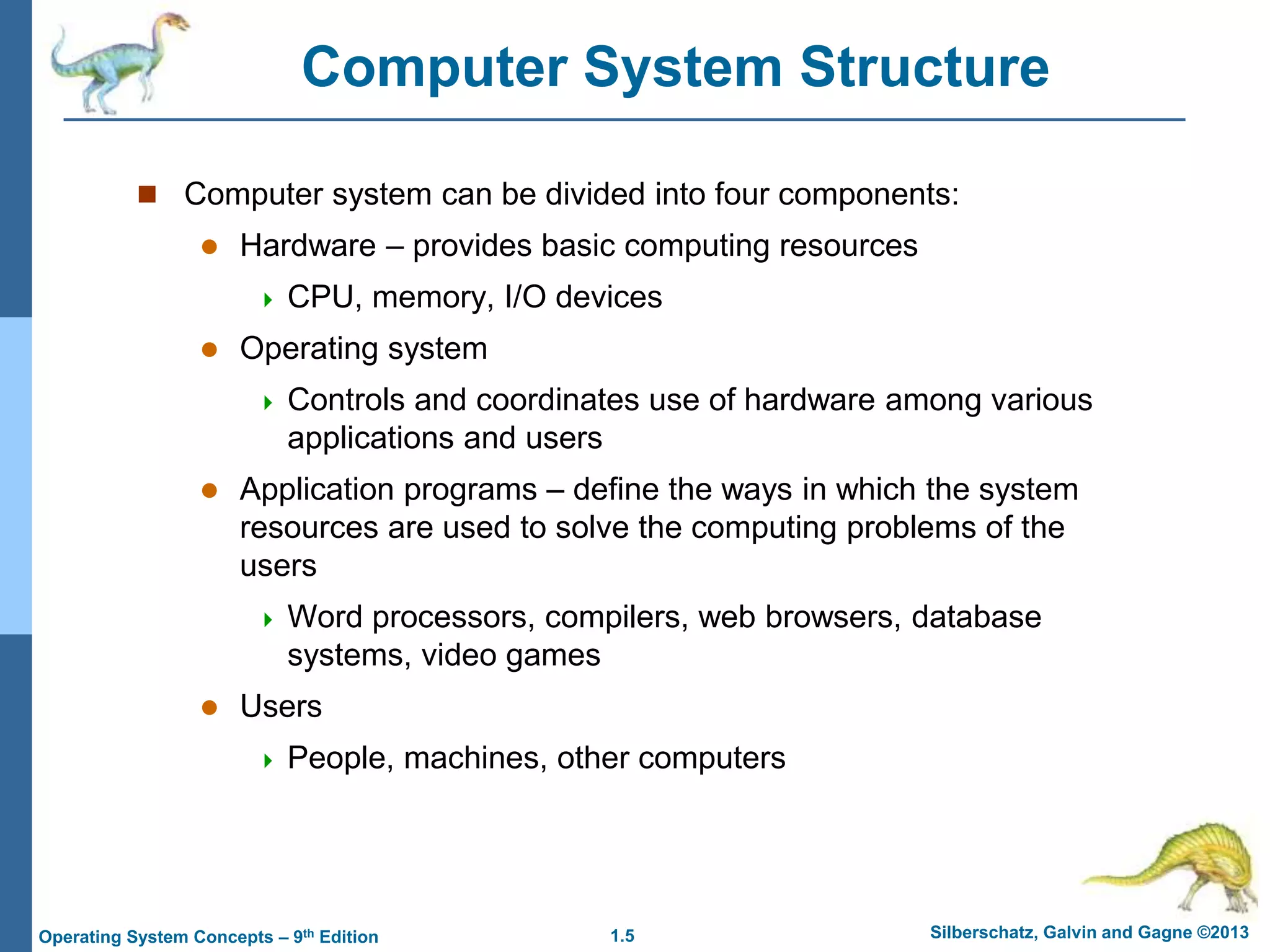
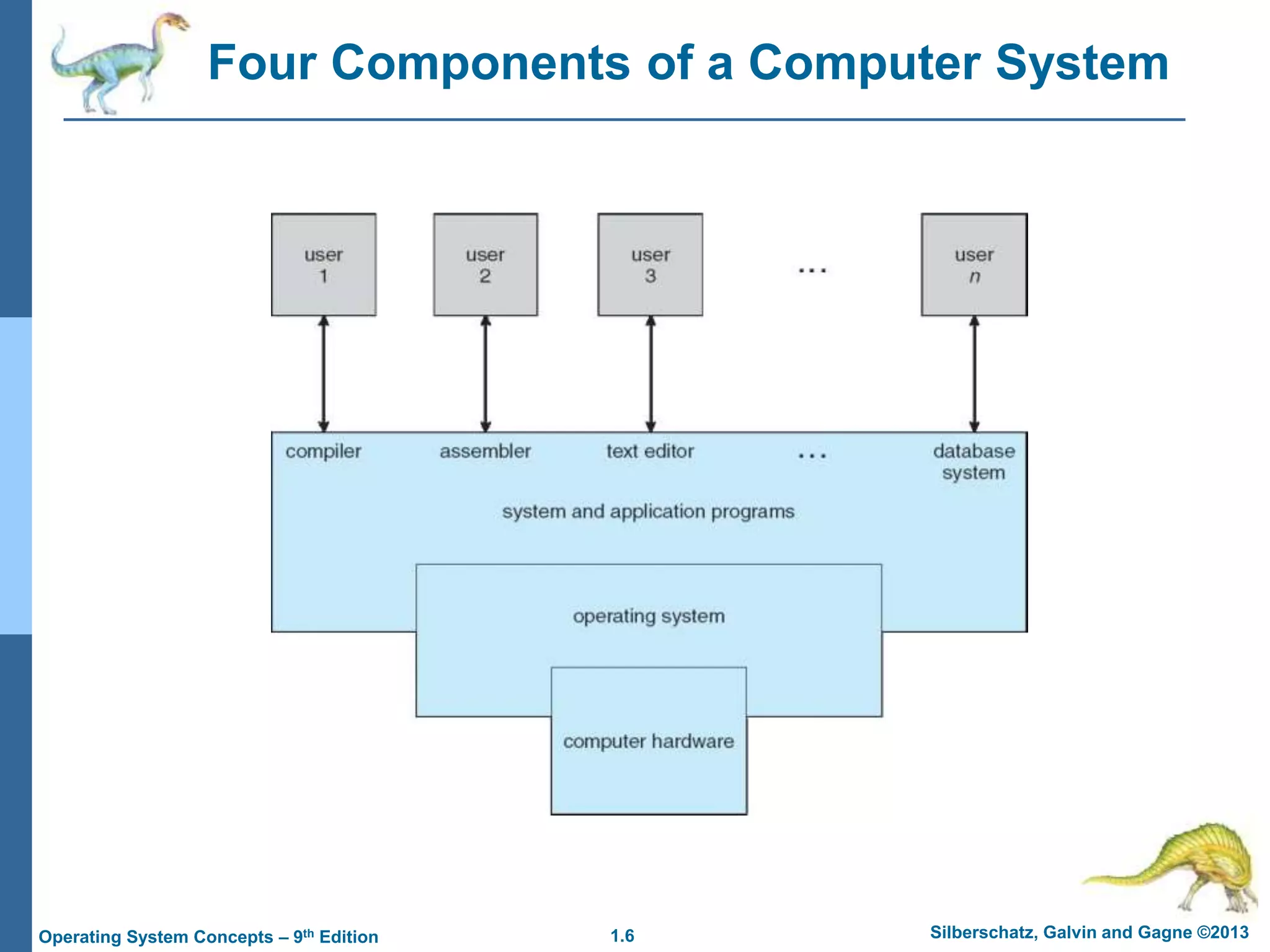
 Computer system can be divided into four components:
 Hardware – provides basic computing resources
 CPU, memory, I/O devices
 Operating system
 Controls and coordinates use of hardware among various
applications and users
 Application programs – define the ways in which the system
resources are used to solve the computing problems of the
users
 Word processors, compilers, web browsers, database
systems, video games
 Users
 People, machines, other computers
1.6 Silberschatz, Galvin and Gagne ©2013
Operating System Concepts – 9th Edition
Four Components of a Computer System
1.7 Silberschatz, Galvin and Gagne ©2013
Operating System Concepts – 9th Edition
What Operating Systems Do
 Depends on the point of view
 Users want convenience, ease of use and good performance
 Don’t care about resource utilization
 But shared computer such as mainframe or minicomputer must
keep all users happy
 Users of dedicate systems such as workstations have dedicated
resources but frequently use shared resources from servers
 Handheld computers are resource poor, optimized for usability
and battery life
 Some computers have little or no user interface, such as
embedded computers in devices and automobiles
1.8 Silberschatz, Galvin and Gagne ©2013
Operating System Concepts – 9th Edition
Operating System Definition
 OS is a resource allocator
 Manages all resources
 Decides between conflicting requests for efficient and
fair resource use
 OS is a control program
 Controls execution of programs to prevent errors and
improper use of the computer
1.9 Silberschatz, Galvin and Gagne ©2013
Operating System Concepts – 9th Edition
Operating System Definition (Cont.)
 No universally accepted definition
 “Everything a vendor ships when you order an operating
system” is a good approximation
 But varies wildly
 “The one program running at all times on the computer” is
the kernel.
 Everything else is either
 a system program (ships with the operating system) , or
 an application program.
1.10 Silberschatz, Galvin and Gagne ©2013
Operating System Concepts – 9th Edition
Computer Startup
 bootstrap program is loaded at power-up or reboot
 Typically stored in ROM or EPROM, generally known
as firmware
 Initializes all aspects of system
 Loads operating system kernel and starts execution
1.11 Silberschatz, Galvin and Gagne ©2013
Operating System Concepts – 9th Edition
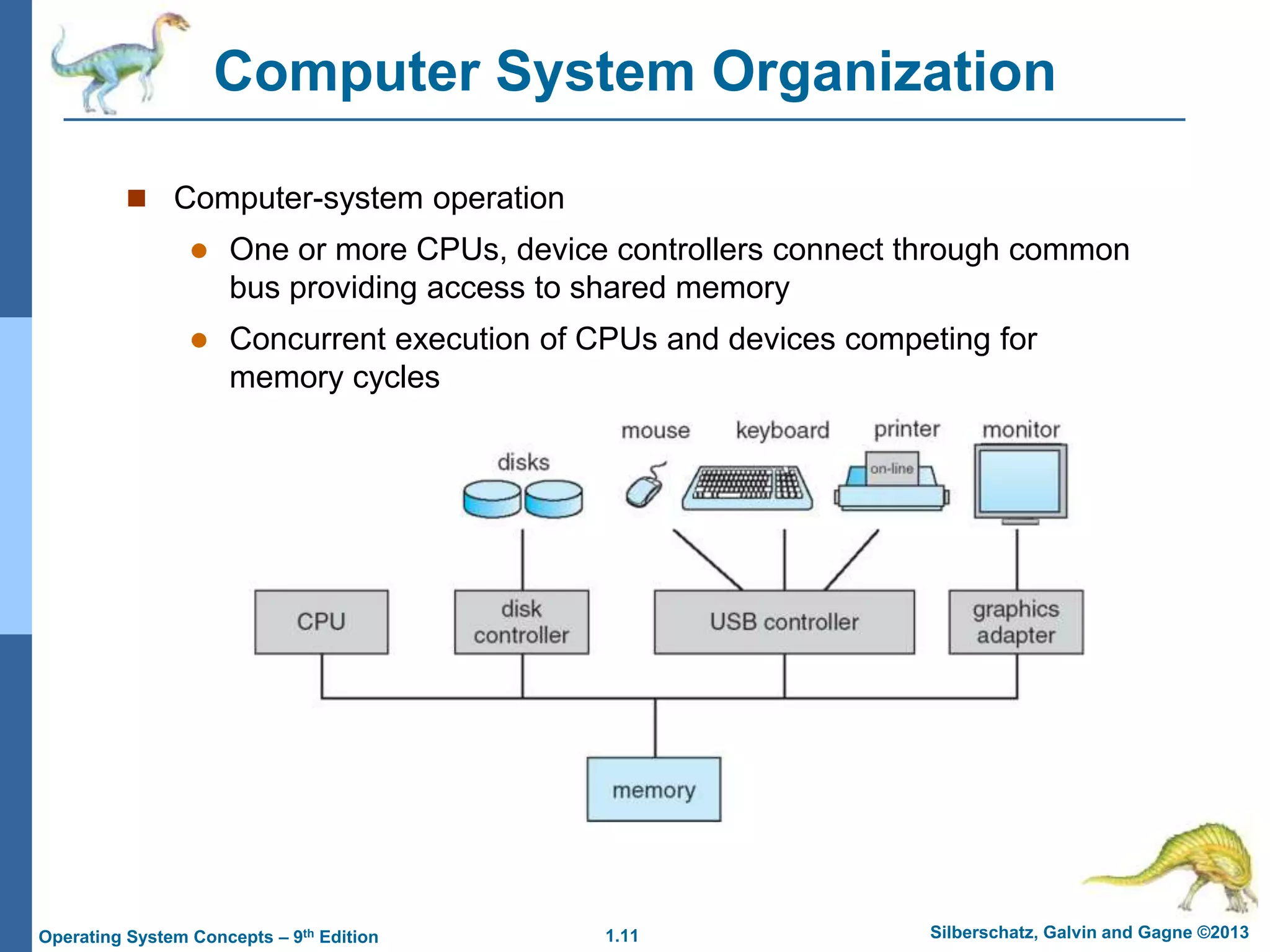
Computer System Organization
 Computer-system operation
 One or more CPUs, device controllers connect through common
bus providing access to shared memory
 Concurrent execution of CPUs and devices competing for
memory cycles
1.12 Silberschatz, Galvin and Gagne ©2013
Operating System Concepts – 9th Edition
Computer-System Operation
 I/O devices and the CPU can execute concurrently
 Each device controller is in charge of a particular device type
 Each device controller has a local buffer
 CPU moves data from/to main memory to/from local buffers
 I/O is from the device to local buffer of controller
 Device controller informs CPU that it has finished its
operation by causing an interrupt
1.13 Silberschatz, Galvin and Gagne ©2013
Operating System Concepts – 9th Edition
Common Functions of Interrupts
 Interrupt transfers control to the interrupt service routine
generally, through the interrupt vector, which contains the
addresses of all the service routines
 Interrupt architecture must save the address of the
interrupted instruction
 A trap or exception is a software-generated interrupt
caused either by an error or a user request
 An operating system is interrupt driven
1.14 Silberschatz, Galvin and Gagne ©2013
Operating System Concepts – 9th Edition
Interrupt Handling
 The operating system preserves the state of the CPU by
storing registers and the program counter
 Determines which type of interrupt has occurred:
 polling
 vectored interrupt system
 Separate segments of code determine what action should
be taken for each type of interrupt
1.15 Silberschatz, Galvin and Gagne ©2013
Operating System Concepts – 9th Edition
I/O Structure
 After I/O starts, control returns to user program only upon I/O
completion
 Wait instruction idles the CPU until the next interrupt
 Wait loop (contention for memory access)
 At most one I/O request is outstanding at a time, no
simultaneous I/O processing
 After I/O starts, control returns to user program without waiting
for I/O completion
 System call – request to the OS to allow user to wait for
I/O completion
 Device-status table contains entry for each I/O device
indicating its type, address, and state
 OS indexes into I/O device table to determine device
status and to modify table entry to include interrupt
1.16 Silberschatz, Galvin and Gagne ©2013
Operating System Concepts – 9th Edition
Storage Definitions and Notation Review
The basic unit of computer storage is the bit. A bit can contain one of two
values, 0 and 1. All other storage in a computer is based on collections of bits.
Given enough bits, it is amazing how many things a computer can represent:
numbers, letters, images, movies, sounds, documents, and programs, to name
a few. A byte is 8 bits, and on most computers it is the smallest convenient
chunk of storage. For example, most computers don’t have an instruction to
move a bit but do have one to move a byte. A less common term is word,
which is a given computer architecture’s native unit of data. A word is made up
of one or more bytes. For example, a computer that has 64-bit registers and 64-
bit memory addressing typically has 64-bit (8-byte) words. A computer executes
many operations in its native word size rather than a byte at a time.
Computer storage, along with most computer throughput, is generally measured
and manipulated in bytes and collections of bytes.
A kilobyte, or KB, is 1,024 bytes
a megabyte, or MB, is 1,0242 bytes
a gigabyte, or GB, is 1,0243 bytes
a terabyte, or TB, is 1,0244 bytes
a petabyte, or PB, is 1,0245 bytes
Computer manufacturers often round off these numbers and say that a
megabyte is 1 million bytes and a gigabyte is 1 billion bytes. Networking
measurements are an exception to this general rule; they are given in bits
(because networks move data a bit at a time).
1.17 Silberschatz, Galvin and Gagne ©2013
Operating System Concepts – 9th Edition
Storage Structure
 Main memory – only large storage media that the CPU can access
directly
 Random access
 Typically volatile
 Secondary storage – extension of main memory that provides large
nonvolatile storage capacity
 Hard disks – rigid metal or glass platters covered with magnetic
recording material
 Disk surface is logically divided into tracks, which are subdivided into
sectors
 The disk controller determines the logical interaction between the device
and the computer
 Solid-state disks – faster than hard disks, nonvolatile
 Various technologies
 Becoming more popular
1.18 Silberschatz, Galvin and Gagne ©2013
Operating System Concepts – 9th Edition
Storage Hierarchy
 Storage systems organized in hierarchy
 Speed
 Cost
 Volatility
 Caching – copying information into faster storage system;
main memory can be viewed as a cache for secondary
storage
 Device Driver for each device controller to manage I/O
 Provides uniform interface between controller and
kernel
1.19 Silberschatz, Galvin and Gagne ©2013
Operating System Concepts – 9th Edition
Storage-Device Hierarchy
1.20 Silberschatz, Galvin and Gagne ©2013
Operating System Concepts – 9th Edition
Caching
 Important principle, performed at many levels in a computer
(in hardware, operating system, software)
 Information in use copied from slower to faster storage
temporarily
 Faster storage (cache) checked first to determine if
information is there
 If it is, information used directly from the cache (fast)
 If not, data copied to cache and used there
 Cache smaller than storage being cached
 Cache management important design problem
 Cache size and replacement policy
1.21 Silberschatz, Galvin and Gagne ©2013
Operating System Concepts – 9th Edition
Direct Memory Access Structure
 Used for high-speed I/O devices able to transmit
information at close to memory speeds
 Device controller transfers blocks of data from buffer
storage directly to main memory without CPU
intervention
 Only one interrupt is generated per block, rather than
the one interrupt per byte
1.22 Silberschatz, Galvin and Gagne ©2013
Operating System Concepts – 9th Edition
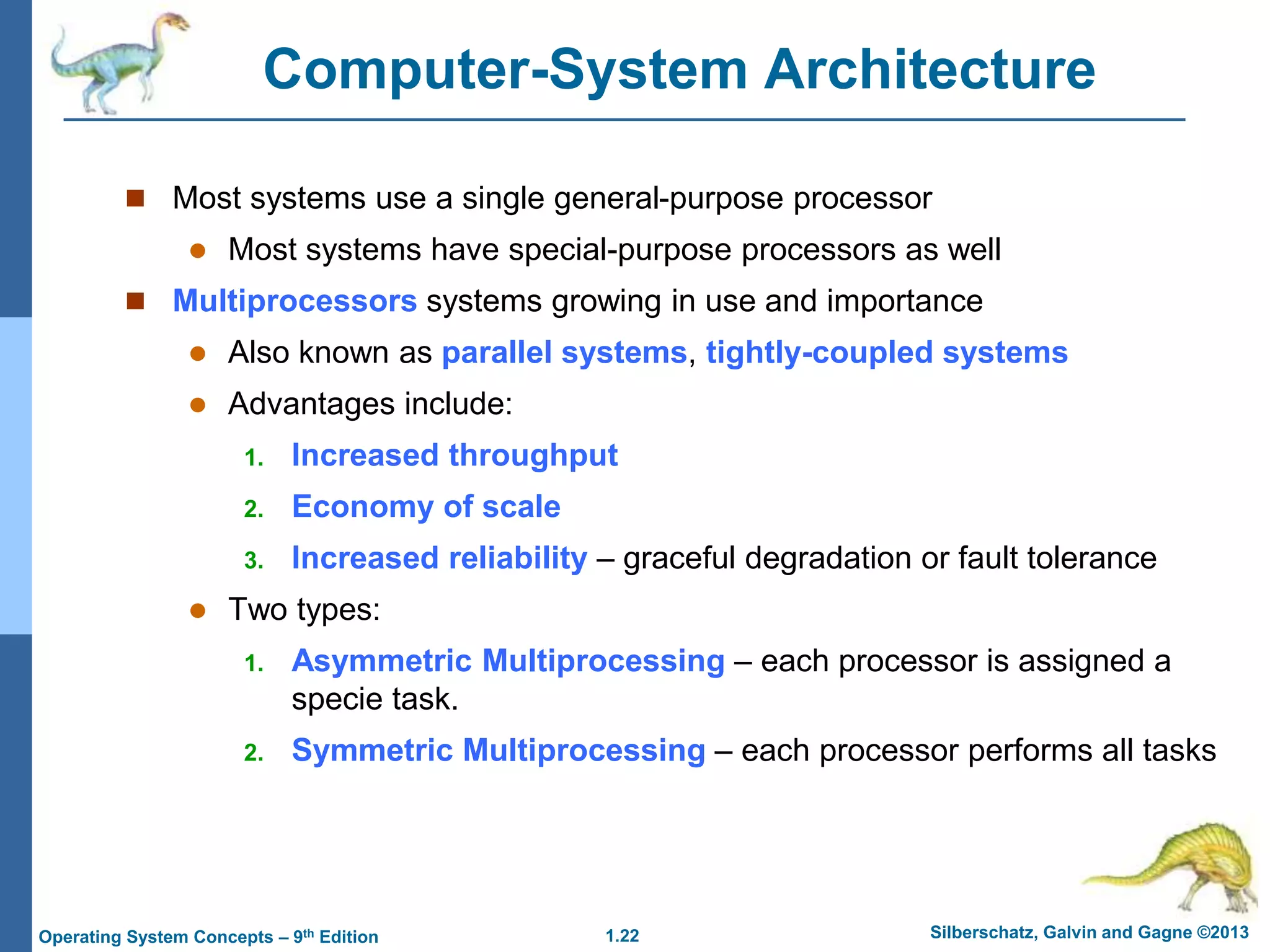
Computer-System Architecture
 Most systems use a single general-purpose processor
 Most systems have special-purpose processors as well
 Multiprocessors systems growing in use and importance
 Also known as parallel systems, tightly-coupled systems
 Advantages include:
1. Increased throughput
2. Economy of scale
3. Increased reliability – graceful degradation or fault tolerance
 Two types:
1. Asymmetric Multiprocessing – each processor is assigned a
specie task.
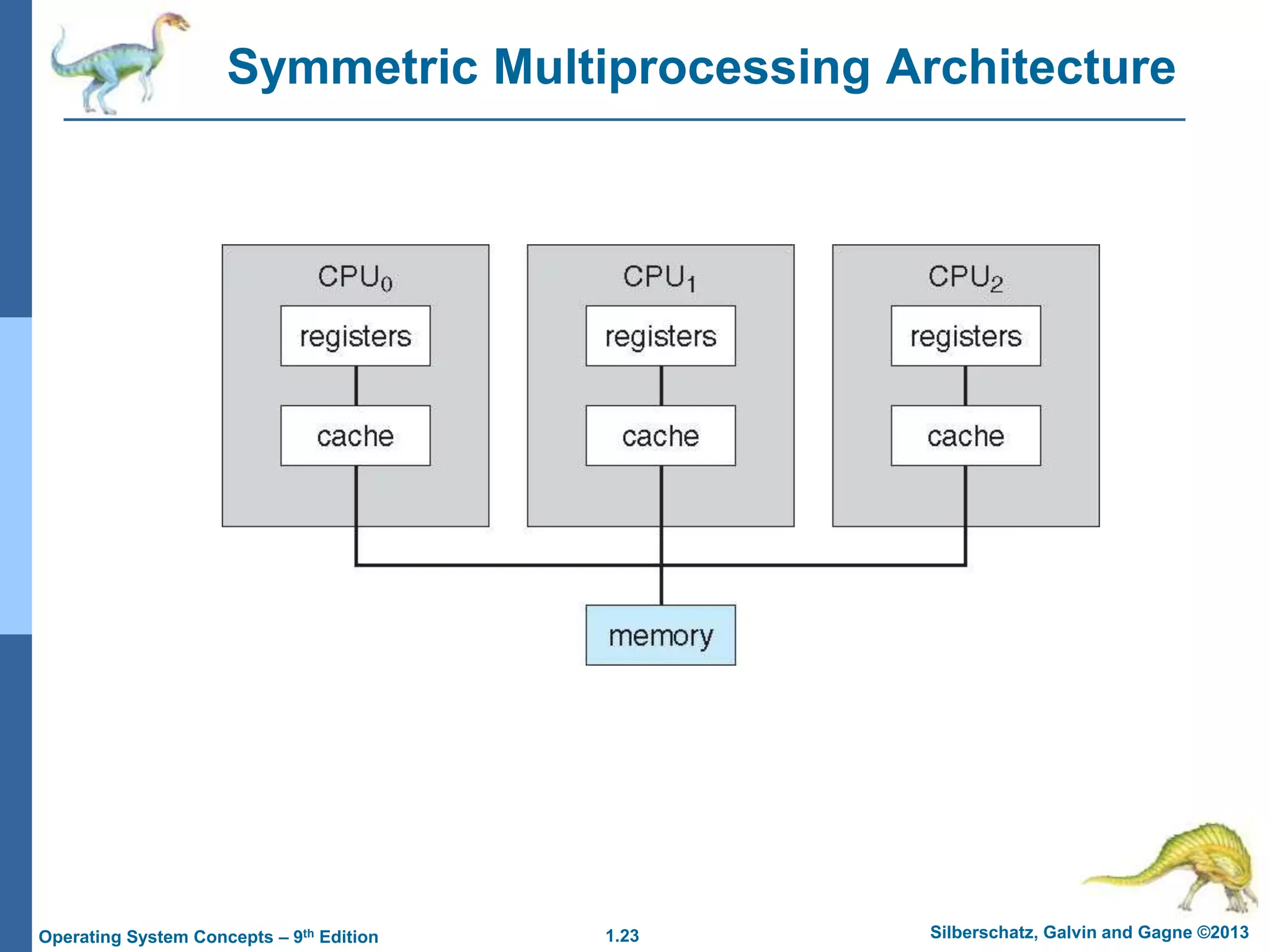
2. Symmetric Multiprocessing – each processor performs all tasks
1.23 Silberschatz, Galvin and Gagne ©2013
Operating System Concepts – 9th Edition
Symmetric Multiprocessing Architecture
1.24 Silberschatz, Galvin and Gagne ©2013
Operating System Concepts – 9th Edition
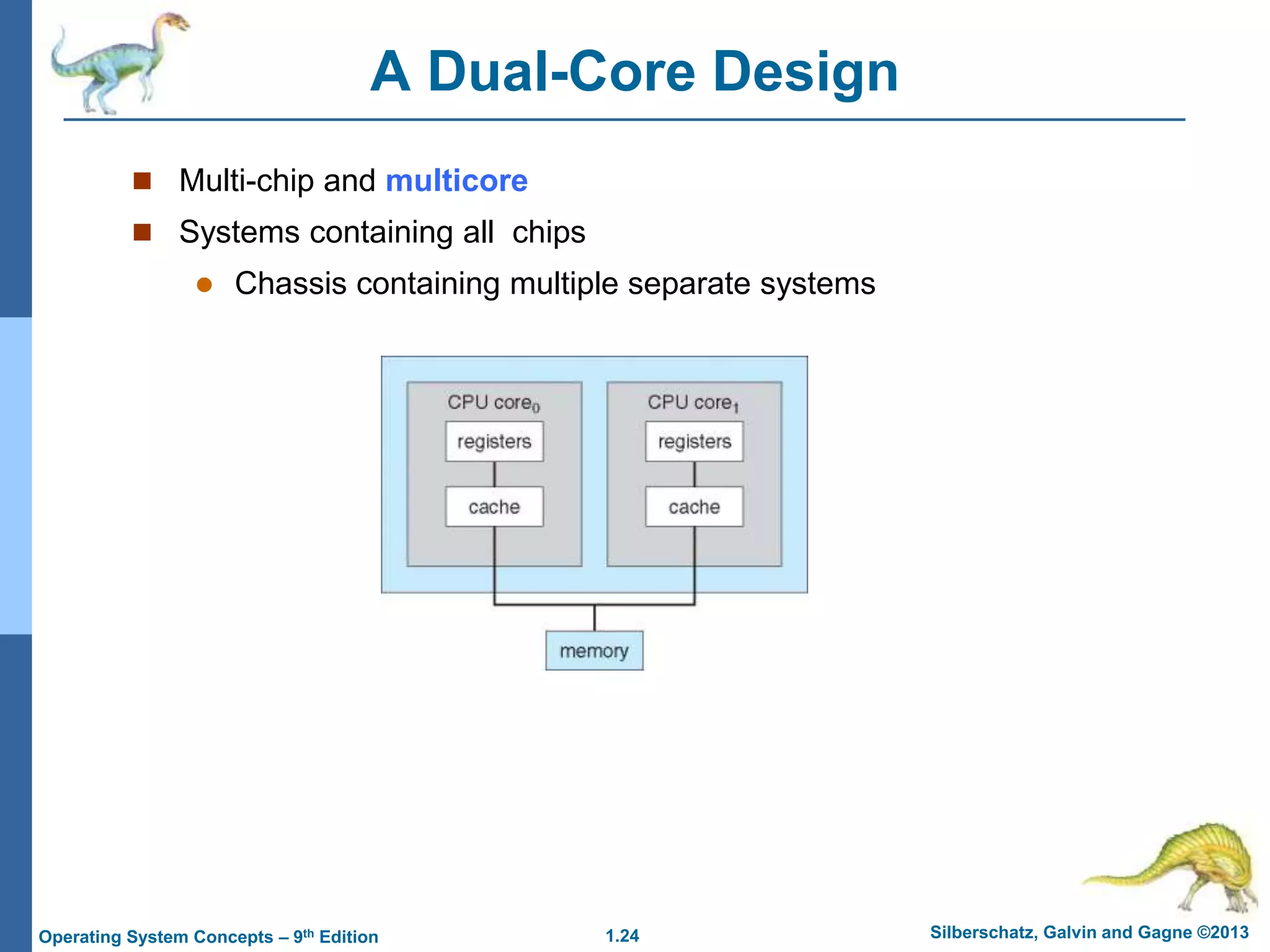
A Dual-Core Design
 Multi-chip and multicore
 Systems containing all chips
 Chassis containing multiple separate systems
1.25 Silberschatz, Galvin and Gagne ©2013
Operating System Concepts – 9th Edition
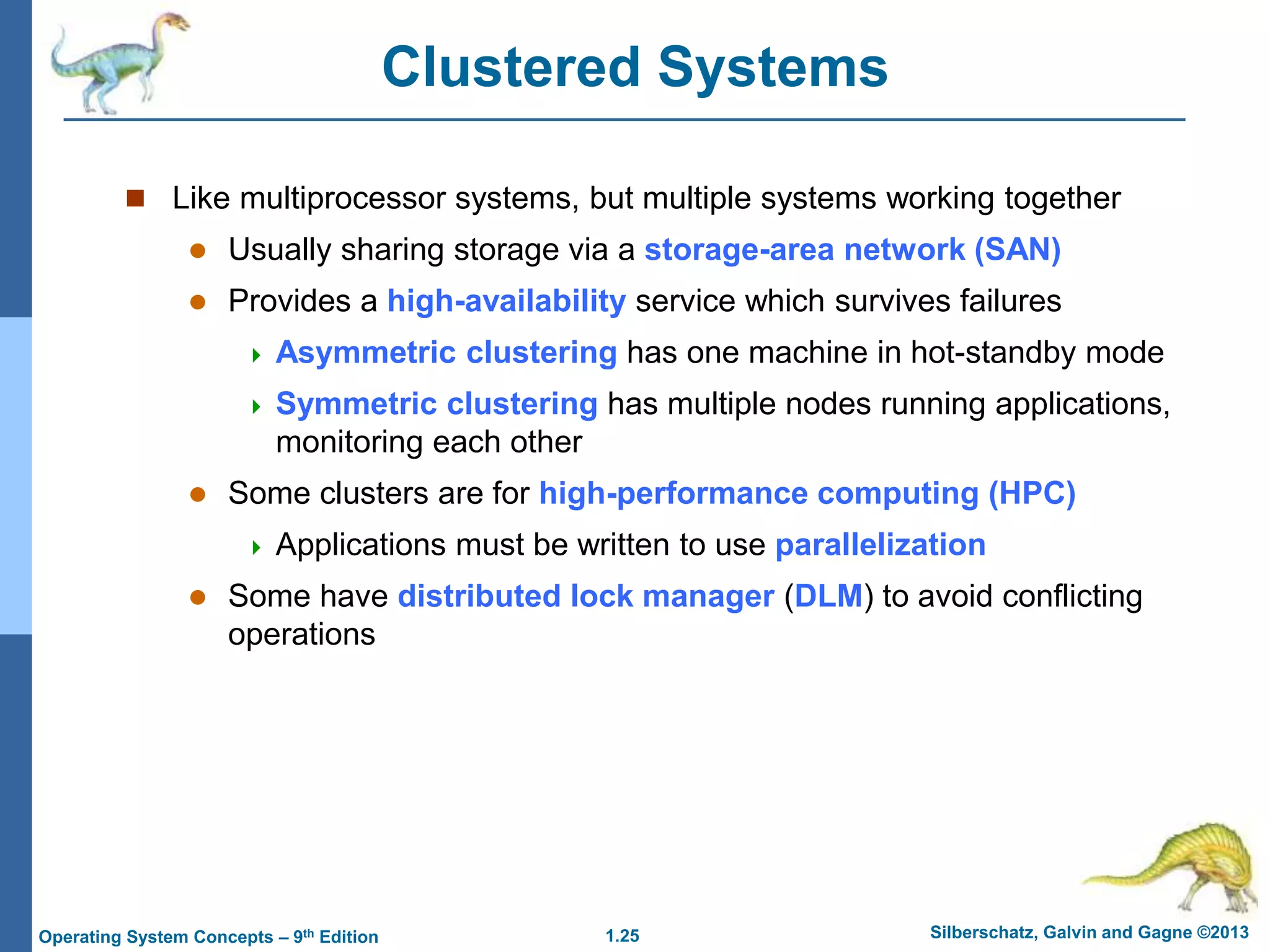
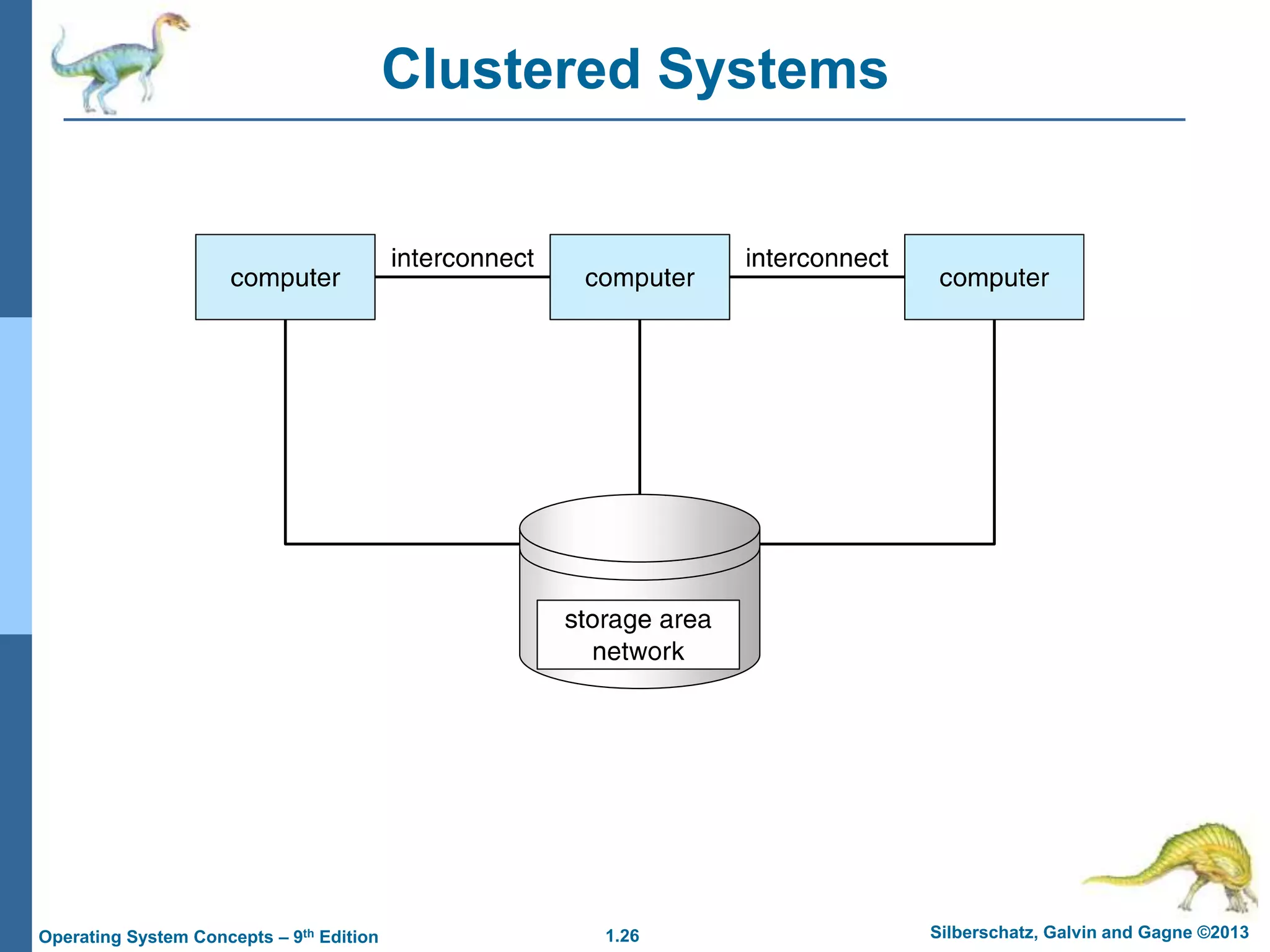
Clustered Systems
 Like multiprocessor systems, but multiple systems working together
 Usually sharing storage via a storage-area network (SAN)
 Provides a high-availability service which survives failures
 Asymmetric clustering has one machine in hot-standby mode
 Symmetric clustering has multiple nodes running applications,
monitoring each other
 Some clusters are for high-performance computing (HPC)
 Applications must be written to use parallelization
 Some have distributed lock manager (DLM) to avoid conflicting
operations
1.26 Silberschatz, Galvin and Gagne ©2013
Operating System Concepts – 9th Edition
Clustered Systems
1.27 Silberschatz, Galvin and Gagne ©2013
Operating System Concepts – 9th Edition
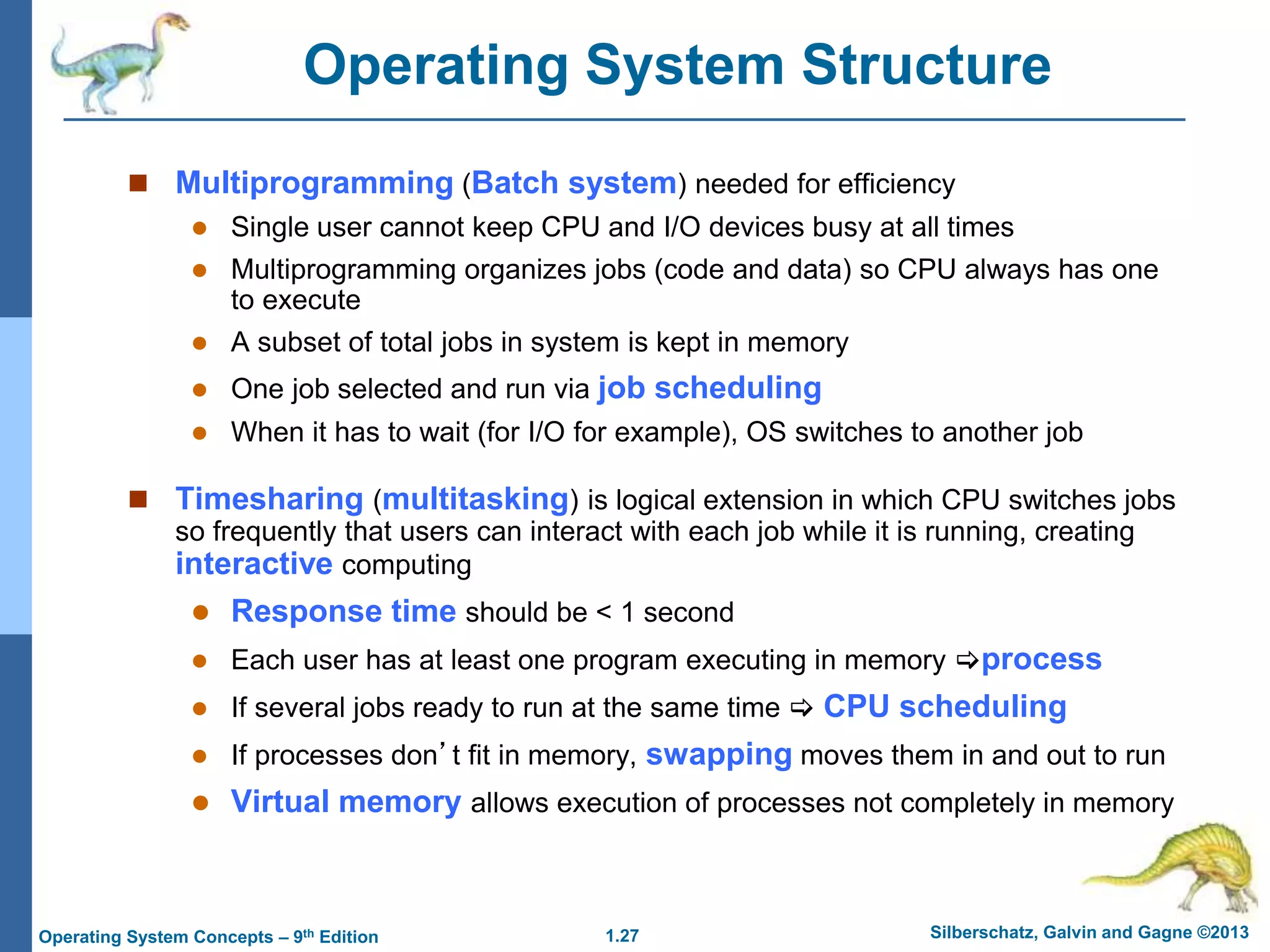
Operating System Structure
 Multiprogramming (Batch system) needed for efficiency
 Single user cannot keep CPU and I/O devices busy at all times
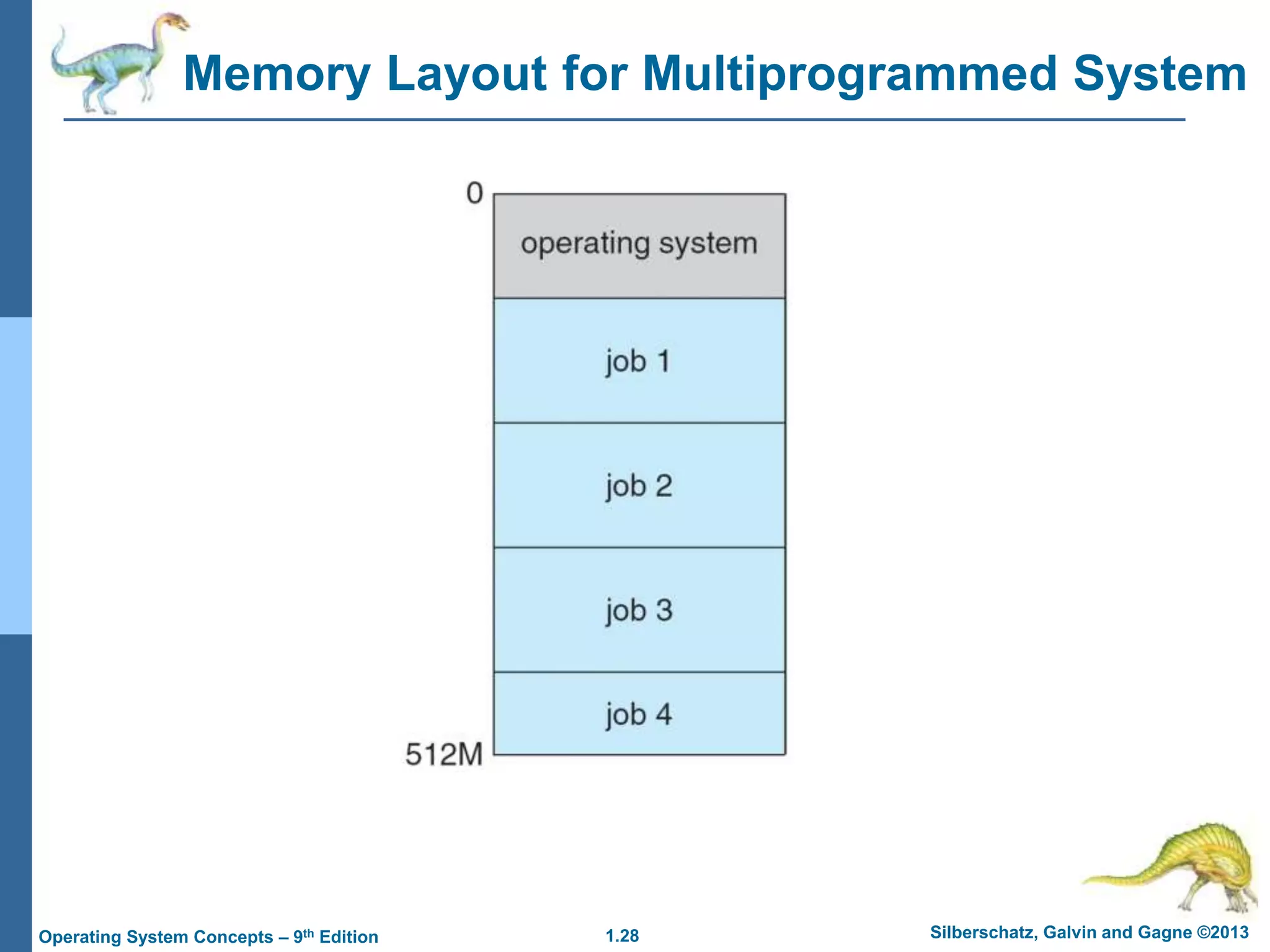
 Multiprogramming organizes jobs (code and data) so CPU always has one
to execute
 A subset of total jobs in system is kept in memory
 One job selected and run via job scheduling
 When it has to wait (for I/O for example), OS switches to another job
 Timesharing (multitasking) is logical extension in which CPU switches jobs
so frequently that users can interact with each job while it is running, creating
interactive computing
 Response time should be < 1 second
 Each user has at least one program executing in memory process
 If several jobs ready to run at the same time  CPU scheduling
 If processes don’t fit in memory, swapping moves them in and out to run
 Virtual memory allows execution of processes not completely in memory
1.28 Silberschatz, Galvin and Gagne ©2013
Operating System Concepts – 9th Edition
Memory Layout for Multiprogrammed System
1.29 Silberschatz, Galvin and Gagne ©2013
Operating System Concepts – 9th Edition
Operating-System Operations
 Interrupt driven (hardware and software)
 Hardware interrupt by one of the devices
 Software interrupt (exception or trap):
 Software error (e.g., division by zero)
 Request for operating system service
 Other process problems include infinite loop, processes
modifying each other or the operating system
1.30 Silberschatz, Galvin and Gagne ©2013
Operating System Concepts – 9th Edition
Operating-System Operations (cont.)
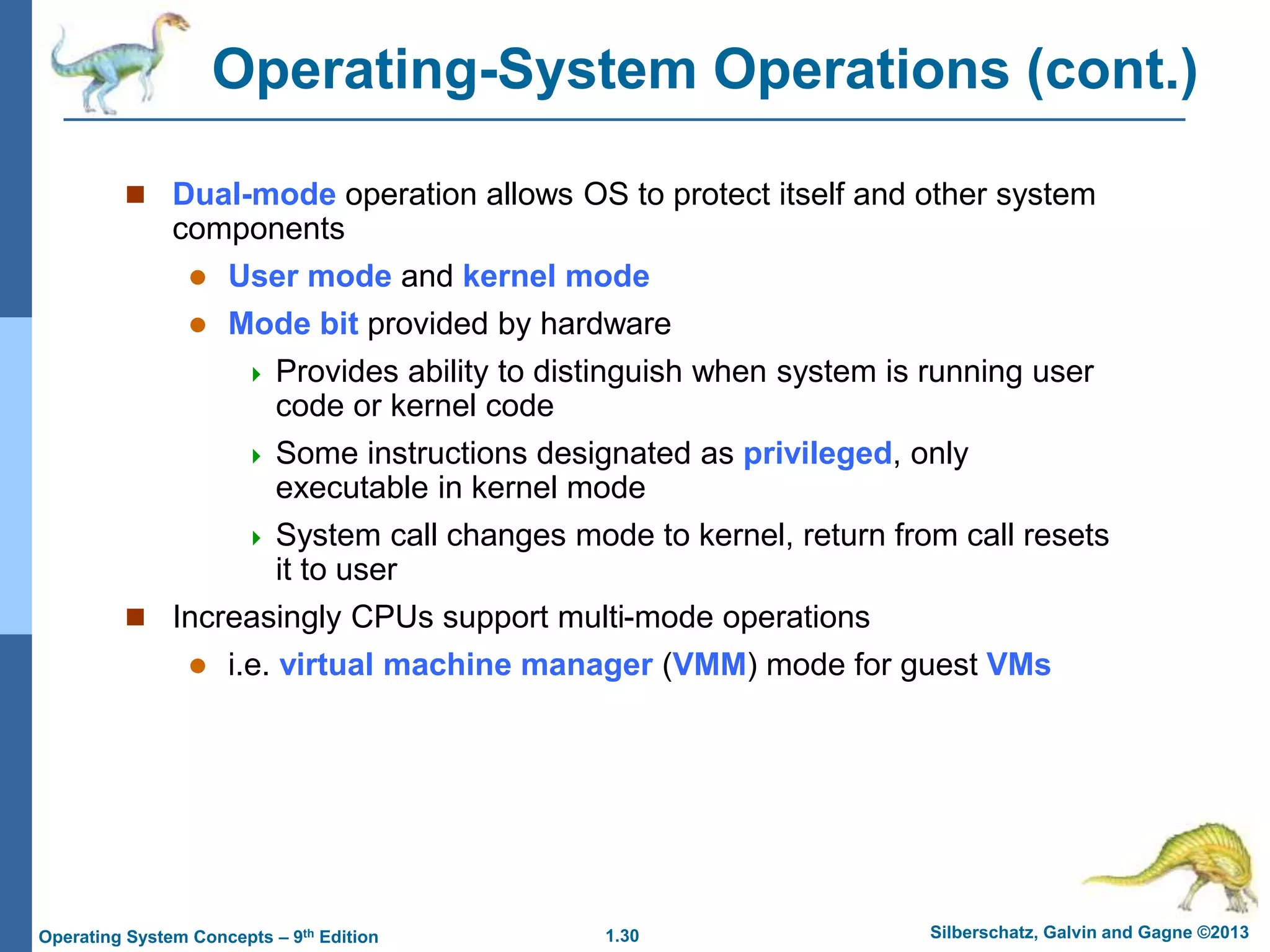
 Dual-mode operation allows OS to protect itself and other system
components
 User mode and kernel mode
 Mode bit provided by hardware
 Provides ability to distinguish when system is running user
code or kernel code
 Some instructions designated as privileged, only
executable in kernel mode
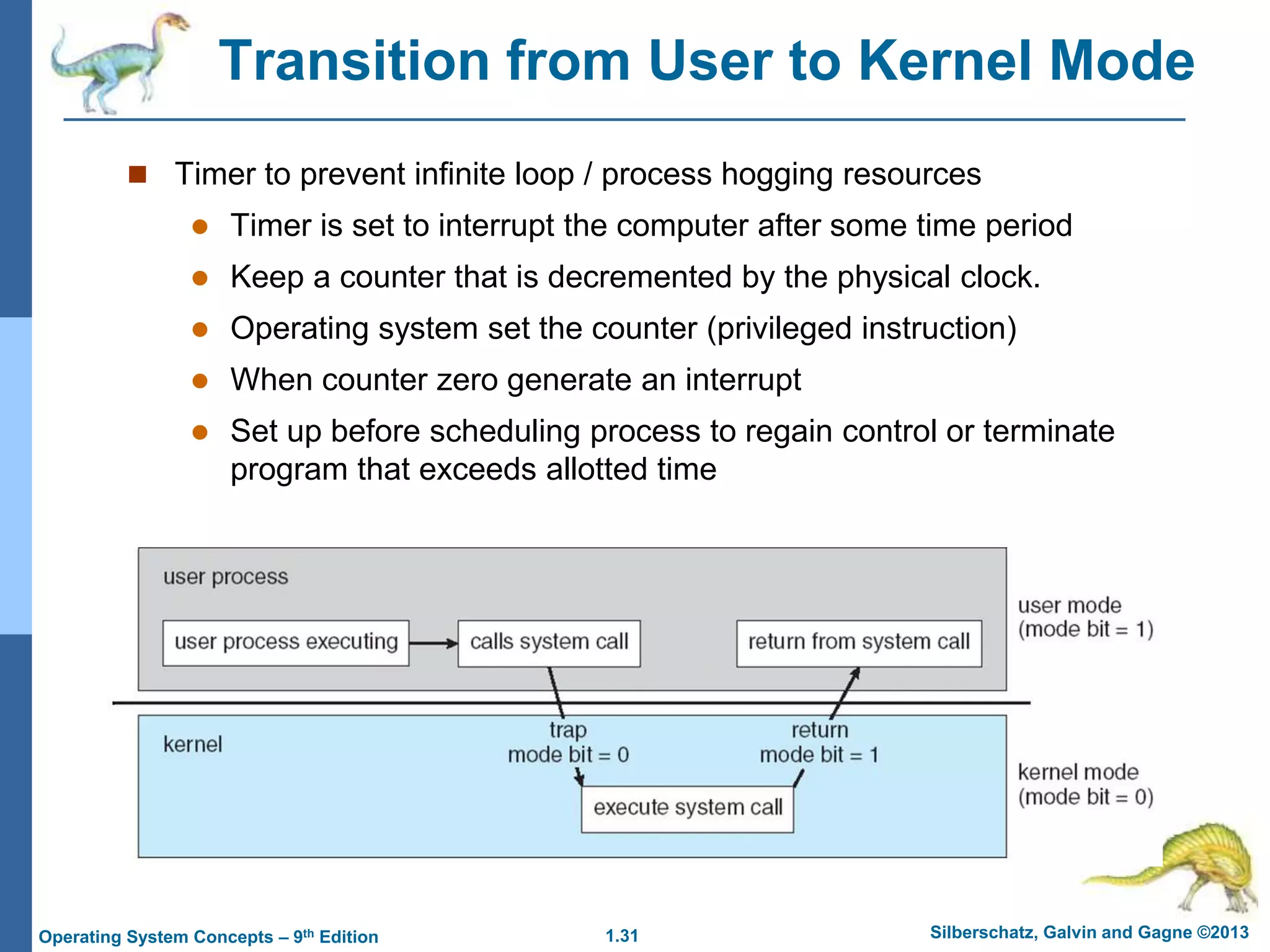
 System call changes mode to kernel, return from call resets
it to user
 Increasingly CPUs support multi-mode operations
 i.e. virtual machine manager (VMM) mode for guest VMs
1.31 Silberschatz, Galvin and Gagne ©2013
Operating System Concepts – 9th Edition
Transition from User to Kernel Mode
 Timer to prevent infinite loop / process hogging resources
 Timer is set to interrupt the computer after some time period
 Keep a counter that is decremented by the physical clock.
 Operating system set the counter (privileged instruction)
 When counter zero generate an interrupt
 Set up before scheduling process to regain control or terminate
program that exceeds allotted time
1.32 Silberschatz, Galvin and Gagne ©2013
Operating System Concepts – 9th Edition
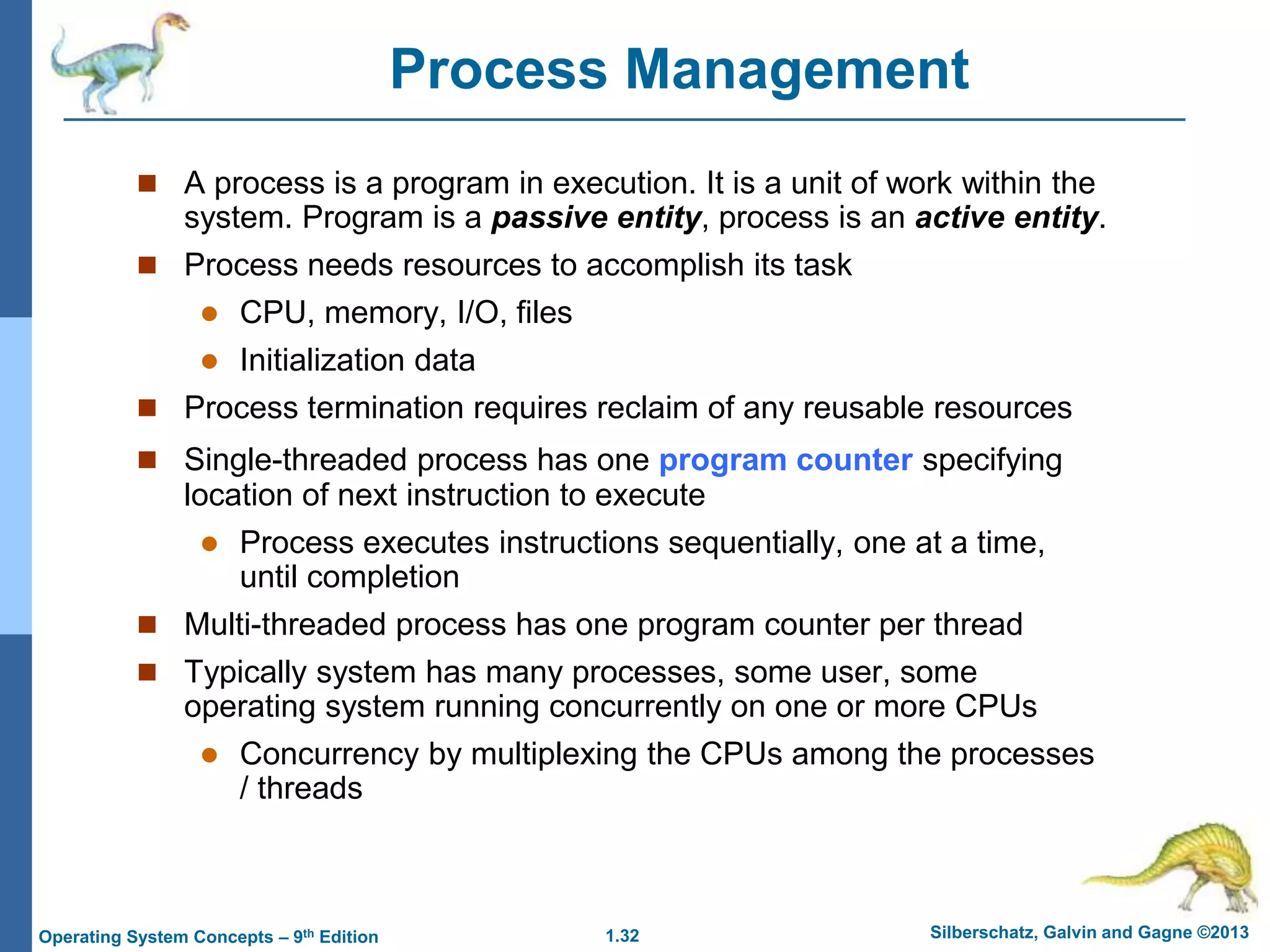
Process Management
 A process is a program in execution. It is a unit of work within the
system. Program is a passive entity, process is an active entity.
 Process needs resources to accomplish its task
 CPU, memory, I/O, files
 Initialization data
 Process termination requires reclaim of any reusable resources
 Single-threaded process has one program counter specifying
location of next instruction to execute
 Process executes instructions sequentially, one at a time,
until completion
 Multi-threaded process has one program counter per thread
 Typically system has many processes, some user, some
operating system running concurrently on one or more CPUs
 Concurrency by multiplexing the CPUs among the processes
/ threads
1.33 Silberschatz, Galvin and Gagne ©2013
Operating System Concepts – 9th Edition
Process Management Activities
 Creating and deleting both user and system processes
 Suspending and resuming processes
 Providing mechanisms for process synchronization
 Providing mechanisms for process communication
 Providing mechanisms for deadlock handling
The operating system is responsible for the following activities in
connection with process management:
1.34 Silberschatz, Galvin and Gagne ©2013
Operating System Concepts – 9th Edition
Memory Management
 To execute a program all (or part) of the instructions must be in
memory
 All (or part) of the data that is needed by the program must be in
memory.
 Memory management determines what is in memory and when
 Optimizing CPU utilization and computer response to users
 Memory management activities
 Keeping track of which parts of memory are currently being
used and by whom
 Deciding which processes (or parts thereof) and data to
move into and out of memory
 Allocating and deallocating memory space as needed
1.35 Silberschatz, Galvin and Gagne ©2013
Operating System Concepts – 9th Edition
Storage Management
 OS provides uniform, logical view of information storage
 Abstracts physical properties to logical storage unit - file
 Each medium is controlled by device (i.e., disk drive, tape drive)
 Varying properties include access speed, capacity, data-
transfer rate, access method (sequential or random)
 File-System management
 Files usually organized into directories
 Access control on most systems to determine who can access
what
 OS activities include
 Creating and deleting files and directories
 Primitives to manipulate files and directories
 Mapping files onto secondary storage
 Backup files onto stable (non-volatile) storage media
Silberschatz, Galvin and Gagne ©2013
Operating System Concepts – 9th Edit9on
End of Chapter 1

Week-01-26092022-095635am (4).ppt

  • 1.
    Silberschatz, Galvin andGagne ©2013 Operating System Concepts – 9th Edit9on Chapter 1: Introduction
  • 2.
    1.2 Silberschatz, Galvinand Gagne ©2013 Operating System Concepts – 9th Edition Chapter 1: Introduction  What Operating Systems Do  Computer-System Organization  Computer-System Architecture  Operating-System Structure  Operating-System Operations  Process Management  Memory Management  Storage Management
  • 3.
    1.3 Silberschatz, Galvinand Gagne ©2013 Operating System Concepts – 9th Edition Objectives  To describe the basic organization of computer systems  To provide a grand tour of the major components of operating systems
  • 4.
    1.4 Silberschatz, Galvinand Gagne ©2013 Operating System Concepts – 9th Edition What is an Operating System?  A program that acts as an intermediary between a user of a computer and the computer hardware  Operating system goals:  Execute user programs and make solving user problems easier  Make the computer system convenient to use  Use the computer hardware in an efficient manner
  • 5.
    1.5 Silberschatz, Galvinand Gagne ©2013 Operating System Concepts – 9th Edition Computer System Structure  Computer system can be divided into four components:  Hardware – provides basic computing resources  CPU, memory, I/O devices  Operating system  Controls and coordinates use of hardware among various applications and users  Application programs – define the ways in which the system resources are used to solve the computing problems of the users  Word processors, compilers, web browsers, database systems, video games  Users  People, machines, other computers
  • 6.
    1.6 Silberschatz, Galvinand Gagne ©2013 Operating System Concepts – 9th Edition Four Components of a Computer System
  • 7.
    1.7 Silberschatz, Galvinand Gagne ©2013 Operating System Concepts – 9th Edition What Operating Systems Do  Depends on the point of view  Users want convenience, ease of use and good performance  Don’t care about resource utilization  But shared computer such as mainframe or minicomputer must keep all users happy  Users of dedicate systems such as workstations have dedicated resources but frequently use shared resources from servers  Handheld computers are resource poor, optimized for usability and battery life  Some computers have little or no user interface, such as embedded computers in devices and automobiles
  • 8.
    1.8 Silberschatz, Galvinand Gagne ©2013 Operating System Concepts – 9th Edition Operating System Definition  OS is a resource allocator  Manages all resources  Decides between conflicting requests for efficient and fair resource use  OS is a control program  Controls execution of programs to prevent errors and improper use of the computer
  • 9.
    1.9 Silberschatz, Galvinand Gagne ©2013 Operating System Concepts – 9th Edition Operating System Definition (Cont.)  No universally accepted definition  “Everything a vendor ships when you order an operating system” is a good approximation  But varies wildly  “The one program running at all times on the computer” is the kernel.  Everything else is either  a system program (ships with the operating system) , or  an application program.
  • 10.
    1.10 Silberschatz, Galvinand Gagne ©2013 Operating System Concepts – 9th Edition Computer Startup  bootstrap program is loaded at power-up or reboot  Typically stored in ROM or EPROM, generally known as firmware  Initializes all aspects of system  Loads operating system kernel and starts execution
  • 11.
    1.11 Silberschatz, Galvinand Gagne ©2013 Operating System Concepts – 9th Edition Computer System Organization  Computer-system operation  One or more CPUs, device controllers connect through common bus providing access to shared memory  Concurrent execution of CPUs and devices competing for memory cycles
  • 12.
    1.12 Silberschatz, Galvinand Gagne ©2013 Operating System Concepts – 9th Edition Computer-System Operation  I/O devices and the CPU can execute concurrently  Each device controller is in charge of a particular device type  Each device controller has a local buffer  CPU moves data from/to main memory to/from local buffers  I/O is from the device to local buffer of controller  Device controller informs CPU that it has finished its operation by causing an interrupt
  • 13.
    1.13 Silberschatz, Galvinand Gagne ©2013 Operating System Concepts – 9th Edition Common Functions of Interrupts  Interrupt transfers control to the interrupt service routine generally, through the interrupt vector, which contains the addresses of all the service routines  Interrupt architecture must save the address of the interrupted instruction  A trap or exception is a software-generated interrupt caused either by an error or a user request  An operating system is interrupt driven
  • 14.
    1.14 Silberschatz, Galvinand Gagne ©2013 Operating System Concepts – 9th Edition Interrupt Handling  The operating system preserves the state of the CPU by storing registers and the program counter  Determines which type of interrupt has occurred:  polling  vectored interrupt system  Separate segments of code determine what action should be taken for each type of interrupt
  • 15.
    1.15 Silberschatz, Galvinand Gagne ©2013 Operating System Concepts – 9th Edition I/O Structure  After I/O starts, control returns to user program only upon I/O completion  Wait instruction idles the CPU until the next interrupt  Wait loop (contention for memory access)  At most one I/O request is outstanding at a time, no simultaneous I/O processing  After I/O starts, control returns to user program without waiting for I/O completion  System call – request to the OS to allow user to wait for I/O completion  Device-status table contains entry for each I/O device indicating its type, address, and state  OS indexes into I/O device table to determine device status and to modify table entry to include interrupt
  • 16.
    1.16 Silberschatz, Galvinand Gagne ©2013 Operating System Concepts – 9th Edition Storage Definitions and Notation Review The basic unit of computer storage is the bit. A bit can contain one of two values, 0 and 1. All other storage in a computer is based on collections of bits. Given enough bits, it is amazing how many things a computer can represent: numbers, letters, images, movies, sounds, documents, and programs, to name a few. A byte is 8 bits, and on most computers it is the smallest convenient chunk of storage. For example, most computers don’t have an instruction to move a bit but do have one to move a byte. A less common term is word, which is a given computer architecture’s native unit of data. A word is made up of one or more bytes. For example, a computer that has 64-bit registers and 64- bit memory addressing typically has 64-bit (8-byte) words. A computer executes many operations in its native word size rather than a byte at a time. Computer storage, along with most computer throughput, is generally measured and manipulated in bytes and collections of bytes. A kilobyte, or KB, is 1,024 bytes a megabyte, or MB, is 1,0242 bytes a gigabyte, or GB, is 1,0243 bytes a terabyte, or TB, is 1,0244 bytes a petabyte, or PB, is 1,0245 bytes Computer manufacturers often round off these numbers and say that a megabyte is 1 million bytes and a gigabyte is 1 billion bytes. Networking measurements are an exception to this general rule; they are given in bits (because networks move data a bit at a time).
  • 17.
    1.17 Silberschatz, Galvinand Gagne ©2013 Operating System Concepts – 9th Edition Storage Structure  Main memory – only large storage media that the CPU can access directly  Random access  Typically volatile  Secondary storage – extension of main memory that provides large nonvolatile storage capacity  Hard disks – rigid metal or glass platters covered with magnetic recording material  Disk surface is logically divided into tracks, which are subdivided into sectors  The disk controller determines the logical interaction between the device and the computer  Solid-state disks – faster than hard disks, nonvolatile  Various technologies  Becoming more popular
  • 18.
    1.18 Silberschatz, Galvinand Gagne ©2013 Operating System Concepts – 9th Edition Storage Hierarchy  Storage systems organized in hierarchy  Speed  Cost  Volatility  Caching – copying information into faster storage system; main memory can be viewed as a cache for secondary storage  Device Driver for each device controller to manage I/O  Provides uniform interface between controller and kernel
  • 19.
    1.19 Silberschatz, Galvinand Gagne ©2013 Operating System Concepts – 9th Edition Storage-Device Hierarchy
  • 20.
    1.20 Silberschatz, Galvinand Gagne ©2013 Operating System Concepts – 9th Edition Caching  Important principle, performed at many levels in a computer (in hardware, operating system, software)  Information in use copied from slower to faster storage temporarily  Faster storage (cache) checked first to determine if information is there  If it is, information used directly from the cache (fast)  If not, data copied to cache and used there  Cache smaller than storage being cached  Cache management important design problem  Cache size and replacement policy
  • 21.
    1.21 Silberschatz, Galvinand Gagne ©2013 Operating System Concepts – 9th Edition Direct Memory Access Structure  Used for high-speed I/O devices able to transmit information at close to memory speeds  Device controller transfers blocks of data from buffer storage directly to main memory without CPU intervention  Only one interrupt is generated per block, rather than the one interrupt per byte
  • 22.
    1.22 Silberschatz, Galvinand Gagne ©2013 Operating System Concepts – 9th Edition Computer-System Architecture  Most systems use a single general-purpose processor  Most systems have special-purpose processors as well  Multiprocessors systems growing in use and importance  Also known as parallel systems, tightly-coupled systems  Advantages include: 1. Increased throughput 2. Economy of scale 3. Increased reliability – graceful degradation or fault tolerance  Two types: 1. Asymmetric Multiprocessing – each processor is assigned a specie task. 2. Symmetric Multiprocessing – each processor performs all tasks
  • 23.
    1.23 Silberschatz, Galvinand Gagne ©2013 Operating System Concepts – 9th Edition Symmetric Multiprocessing Architecture
  • 24.
    1.24 Silberschatz, Galvinand Gagne ©2013 Operating System Concepts – 9th Edition A Dual-Core Design  Multi-chip and multicore  Systems containing all chips  Chassis containing multiple separate systems
  • 25.
    1.25 Silberschatz, Galvinand Gagne ©2013 Operating System Concepts – 9th Edition Clustered Systems  Like multiprocessor systems, but multiple systems working together  Usually sharing storage via a storage-area network (SAN)  Provides a high-availability service which survives failures  Asymmetric clustering has one machine in hot-standby mode  Symmetric clustering has multiple nodes running applications, monitoring each other  Some clusters are for high-performance computing (HPC)  Applications must be written to use parallelization  Some have distributed lock manager (DLM) to avoid conflicting operations
  • 26.
    1.26 Silberschatz, Galvinand Gagne ©2013 Operating System Concepts – 9th Edition Clustered Systems
  • 27.
    1.27 Silberschatz, Galvinand Gagne ©2013 Operating System Concepts – 9th Edition Operating System Structure  Multiprogramming (Batch system) needed for efficiency  Single user cannot keep CPU and I/O devices busy at all times  Multiprogramming organizes jobs (code and data) so CPU always has one to execute  A subset of total jobs in system is kept in memory  One job selected and run via job scheduling  When it has to wait (for I/O for example), OS switches to another job  Timesharing (multitasking) is logical extension in which CPU switches jobs so frequently that users can interact with each job while it is running, creating interactive computing  Response time should be < 1 second  Each user has at least one program executing in memory process  If several jobs ready to run at the same time  CPU scheduling  If processes don’t fit in memory, swapping moves them in and out to run  Virtual memory allows execution of processes not completely in memory
  • 28.
    1.28 Silberschatz, Galvinand Gagne ©2013 Operating System Concepts – 9th Edition Memory Layout for Multiprogrammed System
  • 29.
    1.29 Silberschatz, Galvinand Gagne ©2013 Operating System Concepts – 9th Edition Operating-System Operations  Interrupt driven (hardware and software)  Hardware interrupt by one of the devices  Software interrupt (exception or trap):  Software error (e.g., division by zero)  Request for operating system service  Other process problems include infinite loop, processes modifying each other or the operating system
  • 30.
    1.30 Silberschatz, Galvinand Gagne ©2013 Operating System Concepts – 9th Edition Operating-System Operations (cont.)  Dual-mode operation allows OS to protect itself and other system components  User mode and kernel mode  Mode bit provided by hardware  Provides ability to distinguish when system is running user code or kernel code  Some instructions designated as privileged, only executable in kernel mode  System call changes mode to kernel, return from call resets it to user  Increasingly CPUs support multi-mode operations  i.e. virtual machine manager (VMM) mode for guest VMs
  • 31.
    1.31 Silberschatz, Galvinand Gagne ©2013 Operating System Concepts – 9th Edition Transition from User to Kernel Mode  Timer to prevent infinite loop / process hogging resources  Timer is set to interrupt the computer after some time period  Keep a counter that is decremented by the physical clock.  Operating system set the counter (privileged instruction)  When counter zero generate an interrupt  Set up before scheduling process to regain control or terminate program that exceeds allotted time
  • 32.
    1.32 Silberschatz, Galvinand Gagne ©2013 Operating System Concepts – 9th Edition Process Management  A process is a program in execution. It is a unit of work within the system. Program is a passive entity, process is an active entity.  Process needs resources to accomplish its task  CPU, memory, I/O, files  Initialization data  Process termination requires reclaim of any reusable resources  Single-threaded process has one program counter specifying location of next instruction to execute  Process executes instructions sequentially, one at a time, until completion  Multi-threaded process has one program counter per thread  Typically system has many processes, some user, some operating system running concurrently on one or more CPUs  Concurrency by multiplexing the CPUs among the processes / threads
  • 33.
    1.33 Silberschatz, Galvinand Gagne ©2013 Operating System Concepts – 9th Edition Process Management Activities  Creating and deleting both user and system processes  Suspending and resuming processes  Providing mechanisms for process synchronization  Providing mechanisms for process communication  Providing mechanisms for deadlock handling The operating system is responsible for the following activities in connection with process management:
  • 34.
    1.34 Silberschatz, Galvinand Gagne ©2013 Operating System Concepts – 9th Edition Memory Management  To execute a program all (or part) of the instructions must be in memory  All (or part) of the data that is needed by the program must be in memory.  Memory management determines what is in memory and when  Optimizing CPU utilization and computer response to users  Memory management activities  Keeping track of which parts of memory are currently being used and by whom  Deciding which processes (or parts thereof) and data to move into and out of memory  Allocating and deallocating memory space as needed
  • 35.
    1.35 Silberschatz, Galvinand Gagne ©2013 Operating System Concepts – 9th Edition Storage Management  OS provides uniform, logical view of information storage  Abstracts physical properties to logical storage unit - file  Each medium is controlled by device (i.e., disk drive, tape drive)  Varying properties include access speed, capacity, data- transfer rate, access method (sequential or random)  File-System management  Files usually organized into directories  Access control on most systems to determine who can access what  OS activities include  Creating and deleting files and directories  Primitives to manipulate files and directories  Mapping files onto secondary storage  Backup files onto stable (non-volatile) storage media
  • 36.
    Silberschatz, Galvin andGagne ©2013 Operating System Concepts – 9th Edit9on End of Chapter 1